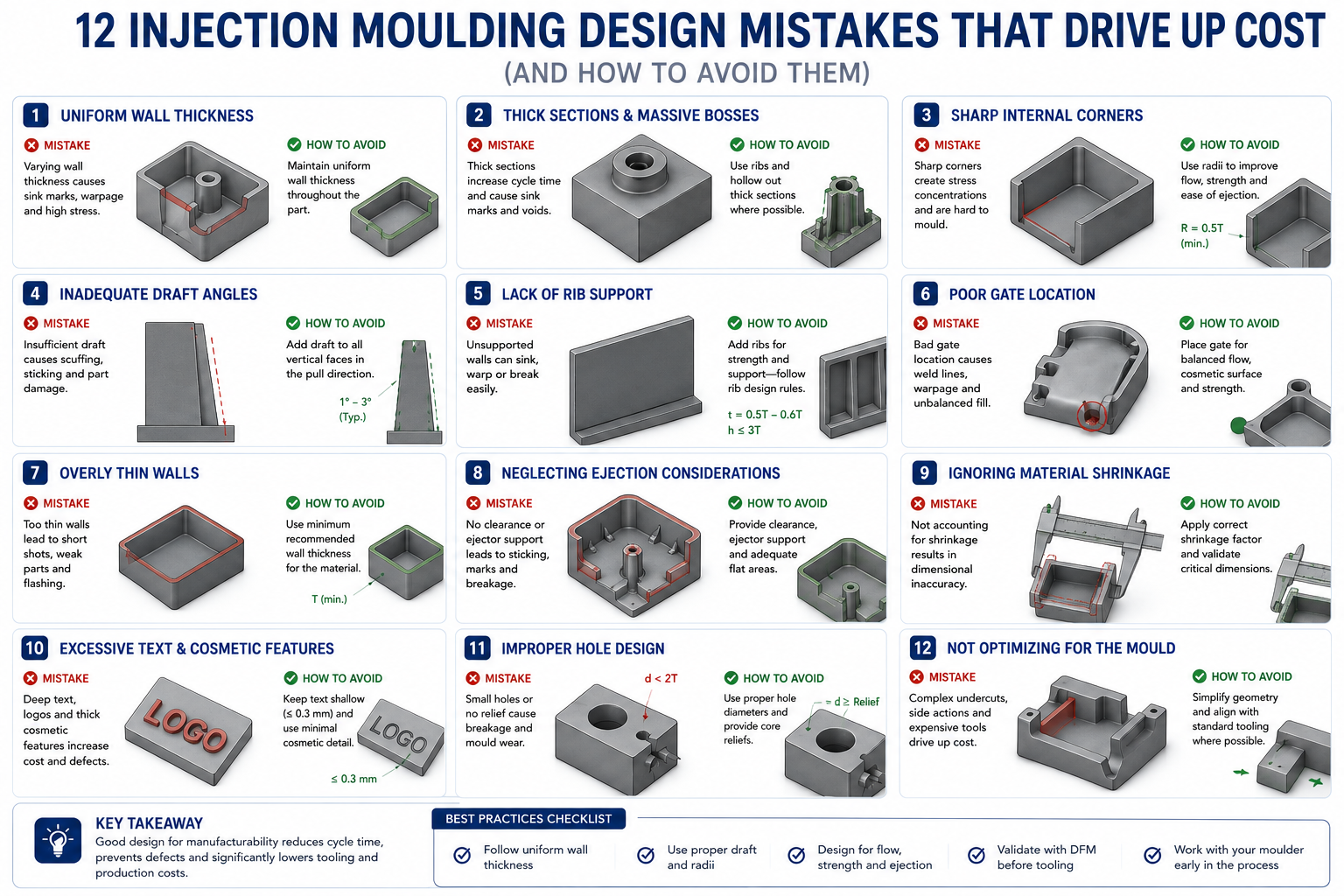
An industrial product had been in production for three years when the sales team brought a problem to engineering: a competitor had launched a similar product thirty percent cheaper, and orders were shifting. Finance looked at the bill of materials and said there wasn’t much room to move on material costs. Operations looked at labour and said the processes were already efficient. The conclusion was that product cost was essentially fixed.
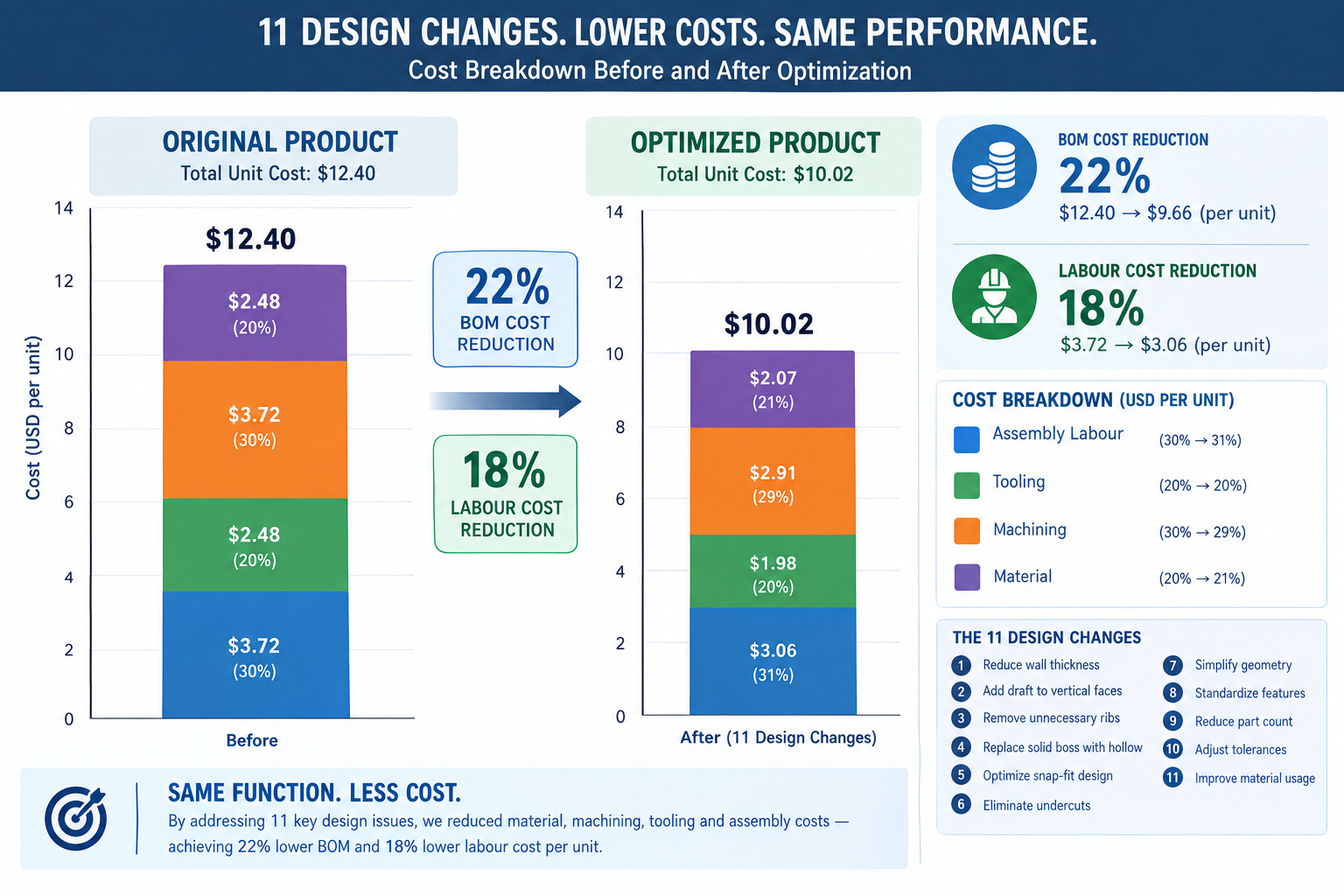
Engineering took a different approach. Instead of asking what the product cost and how to reduce it, they asked what the product was designed to be and whether any of those design decisions cost more than they needed to. Within six weeks, they found eleven specific changes: two parts consolidated into one, a machined block replaced by an extrusion, three tight tolerances relaxed to commercial grade after a stack-up analysis showed they weren’t functionally required, a five-setup CNC part redesigned to three, and four custom fasteners replaced with standard hardware.
| Quick answer: No change compromised function or quality. The bill of materials dropped twenty-two percent and assembly labour dropped eighteen percent, together producing the cost reduction finance had said wasn’t available. The highest-leverage design changes for cutting product cost are part count reduction, CNC setup elimination, tolerance relaxation to commercial grade, and switching to standard stock forms or fasteners, each targeting a specific, identifiable cost driver rather than guessing at across-the-board trims. |
This article is built around that same approach: specific, actionable design changes that address real cost drivers, with quantified savings ranges, the CAD effort required, and the functional risk to watch for. None of them require accepting a lower-quality product. All of them require understanding what’s actually driving the cost.
The Cost Reduction Mindset: Attacking the Right Cost Driver
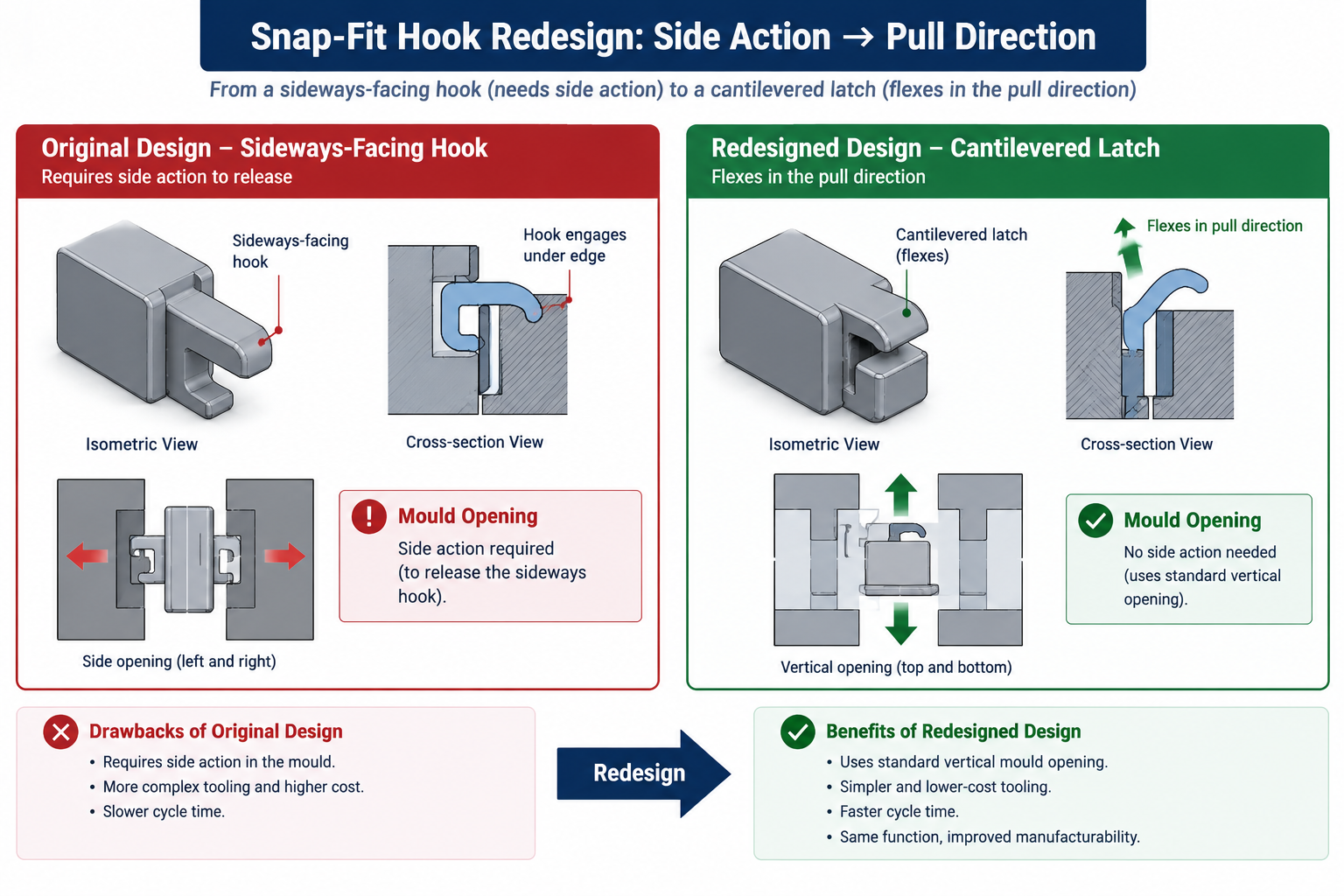
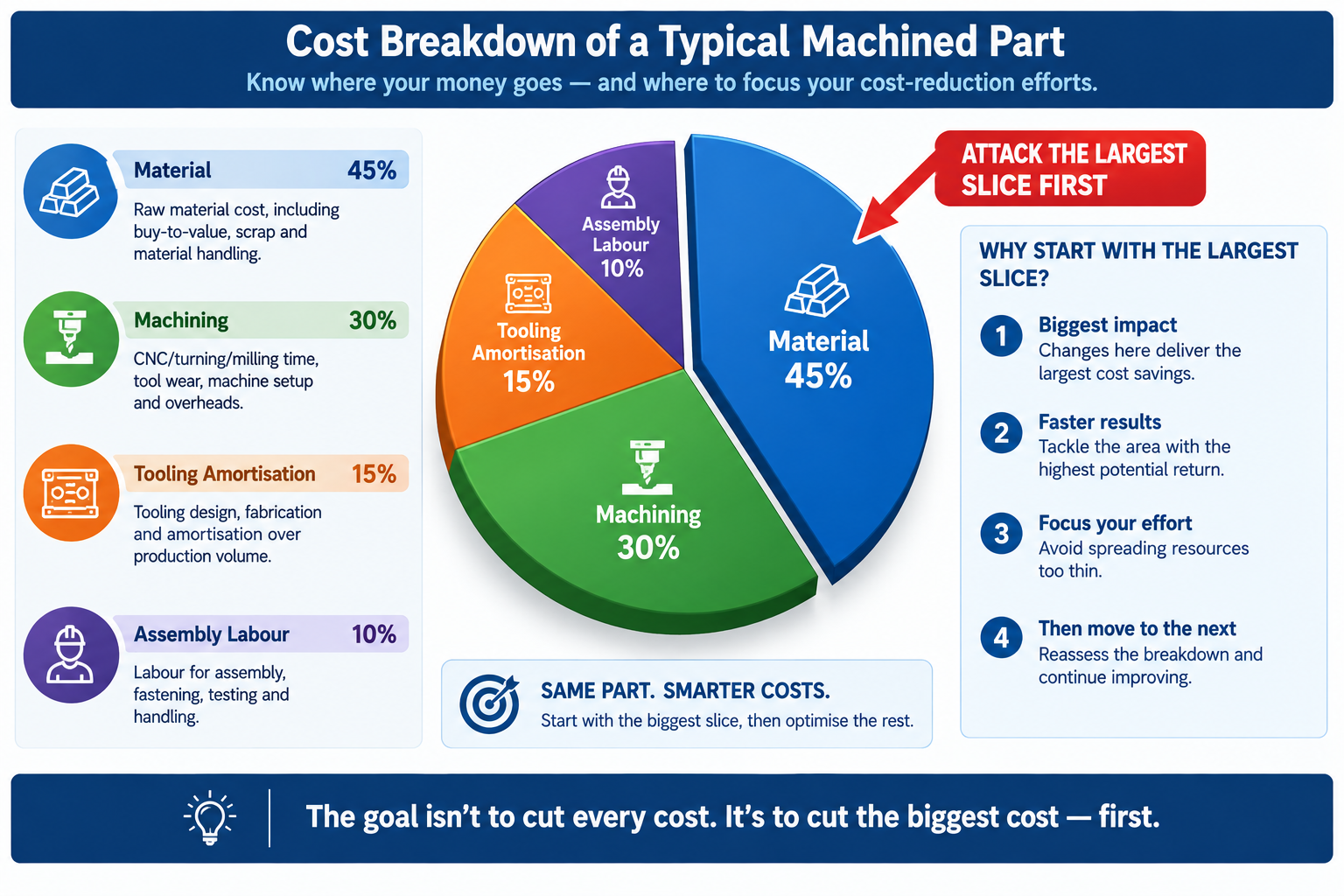
Cost reduction only works if it targets the right cost driver. A team that spends two weeks trimming five percent of material from an injection moulded part, when tooling amortisation represents forty percent of unit cost and material represents fifteen percent, has invested significant effort for a result that moves the needle by less than one percent of total cost. The same two weeks spent eliminating a side action from the mould would cut tooling cost by twenty to thirty percent, a far larger saving that compounds across the entire run.
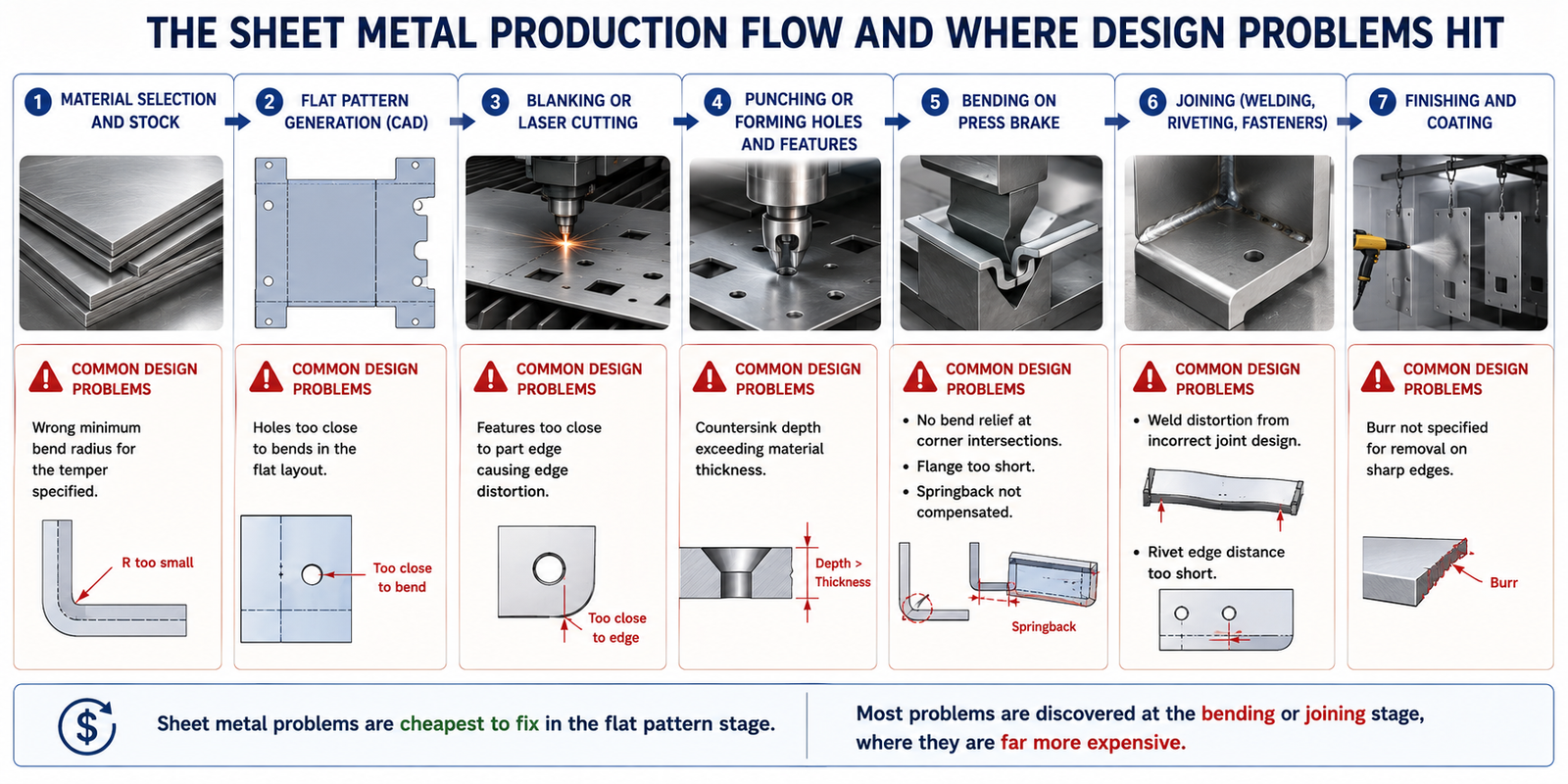
The first step in any cost reduction review is understanding the cost breakdown of the part or assembly. A machined metal assembly is dominated by machining time and setup cost, so reducing setups and simplifying features pays off there. A high-volume injection moulded product is often dominated by tooling amortisation at lower volumes and assembly labour at higher volumes, so eliminating side actions and cutting part count are the highest-leverage moves. A sheet metal enclosure is driven by material and forming time at low volumes and assembly at moderate volumes, so switching from welded to snap-fit assembly pays off there.
None of these strategies require a redesign from scratch. They’re targeted, specific changes, each addressing a specific cost driver, each leaving function and quality intact.
Twelve Design Changes and Their Cost Impact
Savings ranges are representative of typical engineering components, not minimums or maximums; actual savings depend on the specific design, supplier pricing, and volume. CAD effort: “very low” means a drawing revision with no geometry change, “low” means a minor geometry or spec change, “medium” means a feature relocation or cross-section redesign.
| Design Change | Process | Typical Cost Saving | CAD Effort | Functional Risk if Applied Incorrectly |
|---|---|---|---|---|
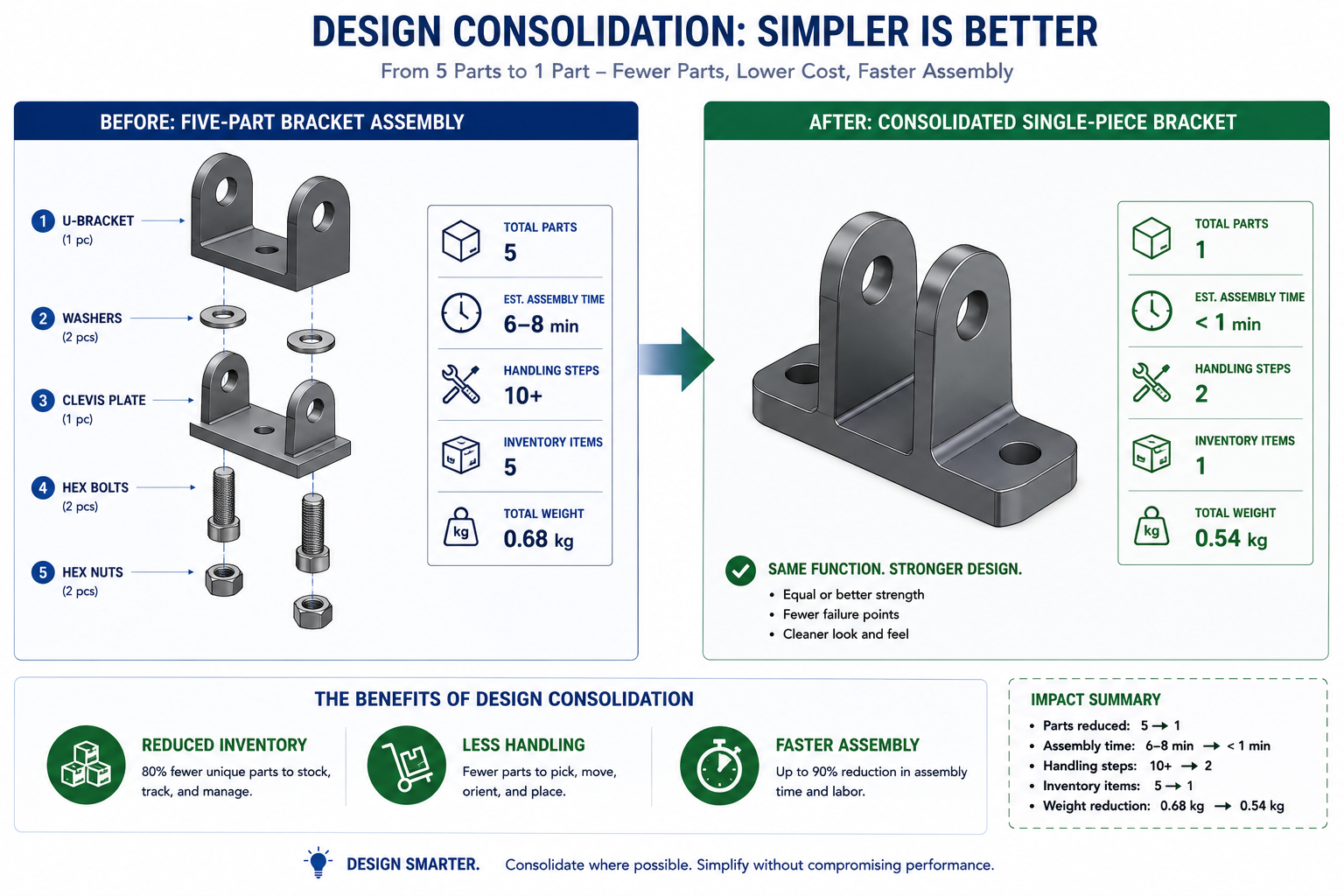
| Reduce part count via consolidation | All assembly processes | 15-40% of assembly cost per part eliminated | Medium | Must not compromise serviceable, differently-materialed, or moving parts |
| Switch machined part to standard stock profile | CNC machining | 20-50% material/machining reduction | Low | Standard dimensions may affect fit; confirm with stack-up analysis |
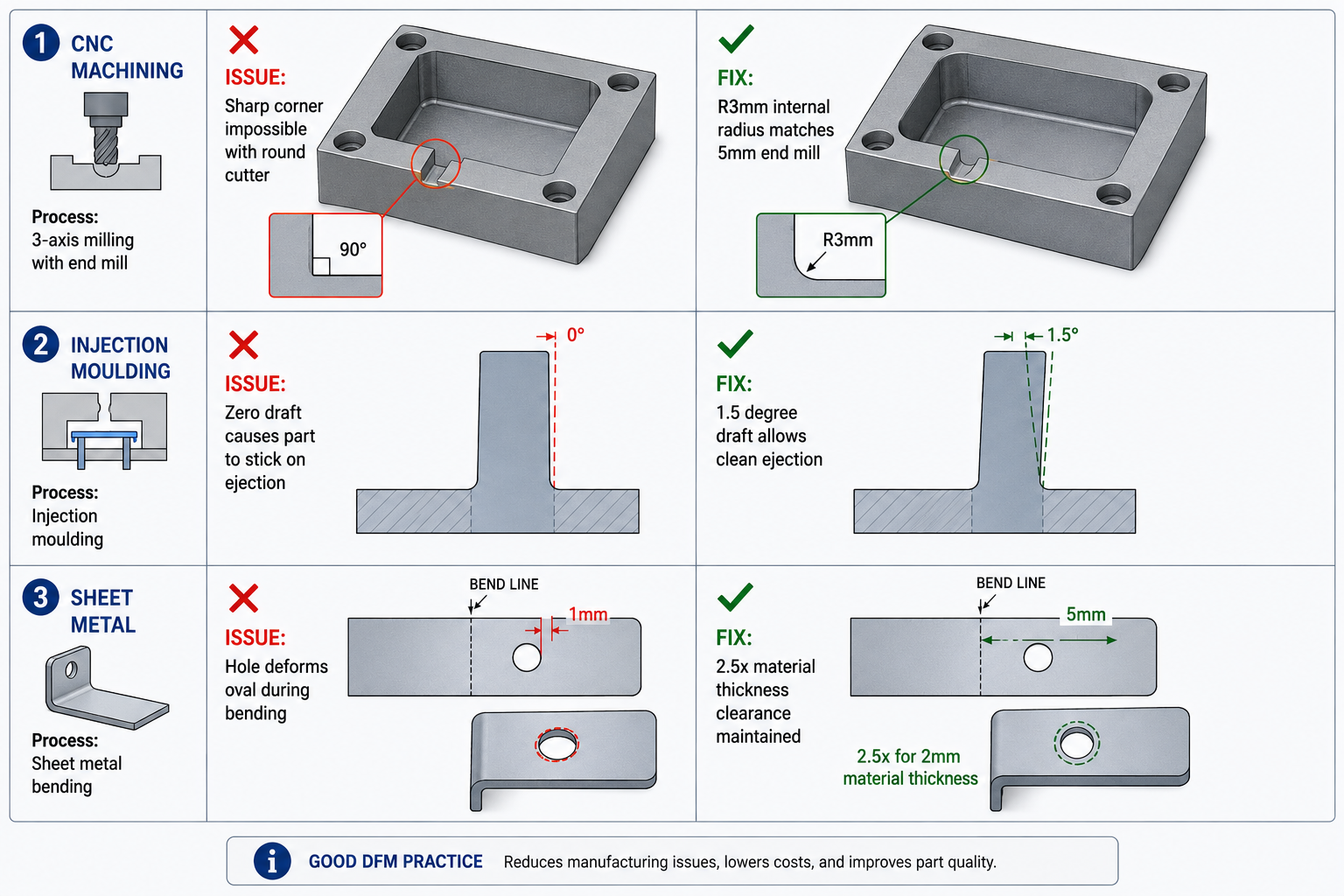
| Eliminate or relocate undercuts | Injection moulding, die casting | 20-50% tooling cost reduction | Medium | Snap-fits may need redesign; validate relocated feature function |
| Loosen tolerances to commercial grade | CNC machining, all processes | 30-60% on tightened dimensions | Very low | Verify tolerance isn’t required for fit, function, or stack-up |
| Reduce number of CNC setups | CNC machining | 20-40% per setup eliminated | Medium | Relocated features must stay accessible and hold positional accuracy |
| Replace custom fasteners with standard hardware | Assembly, all processes | 50-90% fastener cost reduction | Very low | Standard sizes must meet load; check thread engagement and clamping |
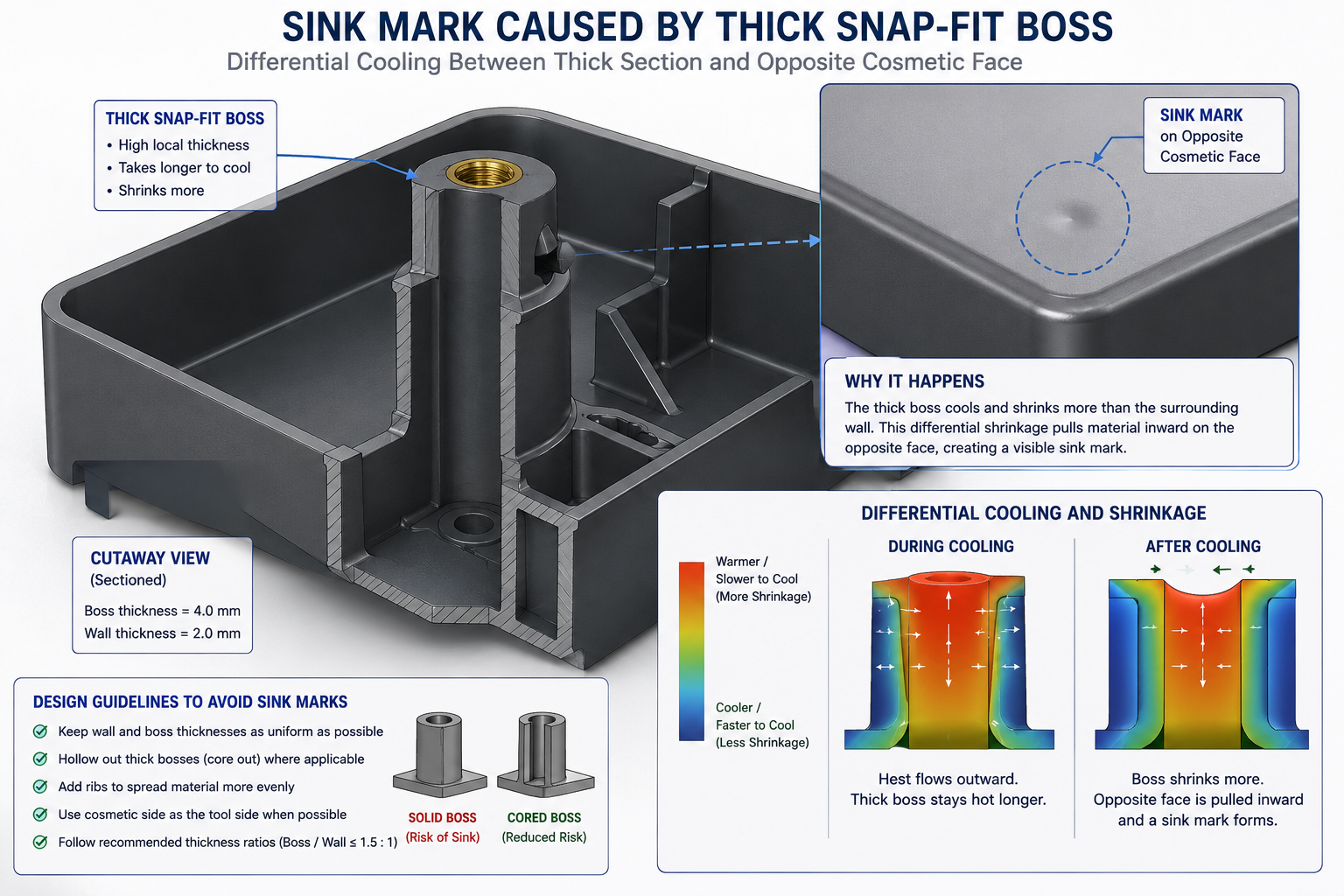
| Redesign rib/boss geometry to eliminate sink marks | Injection moulding | 10-30% finishing cost saving | Low | Preserve rib’s structural function after thinning; may need gusset |
| Switch 5-axis to 3-axis via geometry redesign | CNC machining | 30-60% machine rate reduction | Medium | Compound-angle functional surfaces may need to stay; confirm with team |
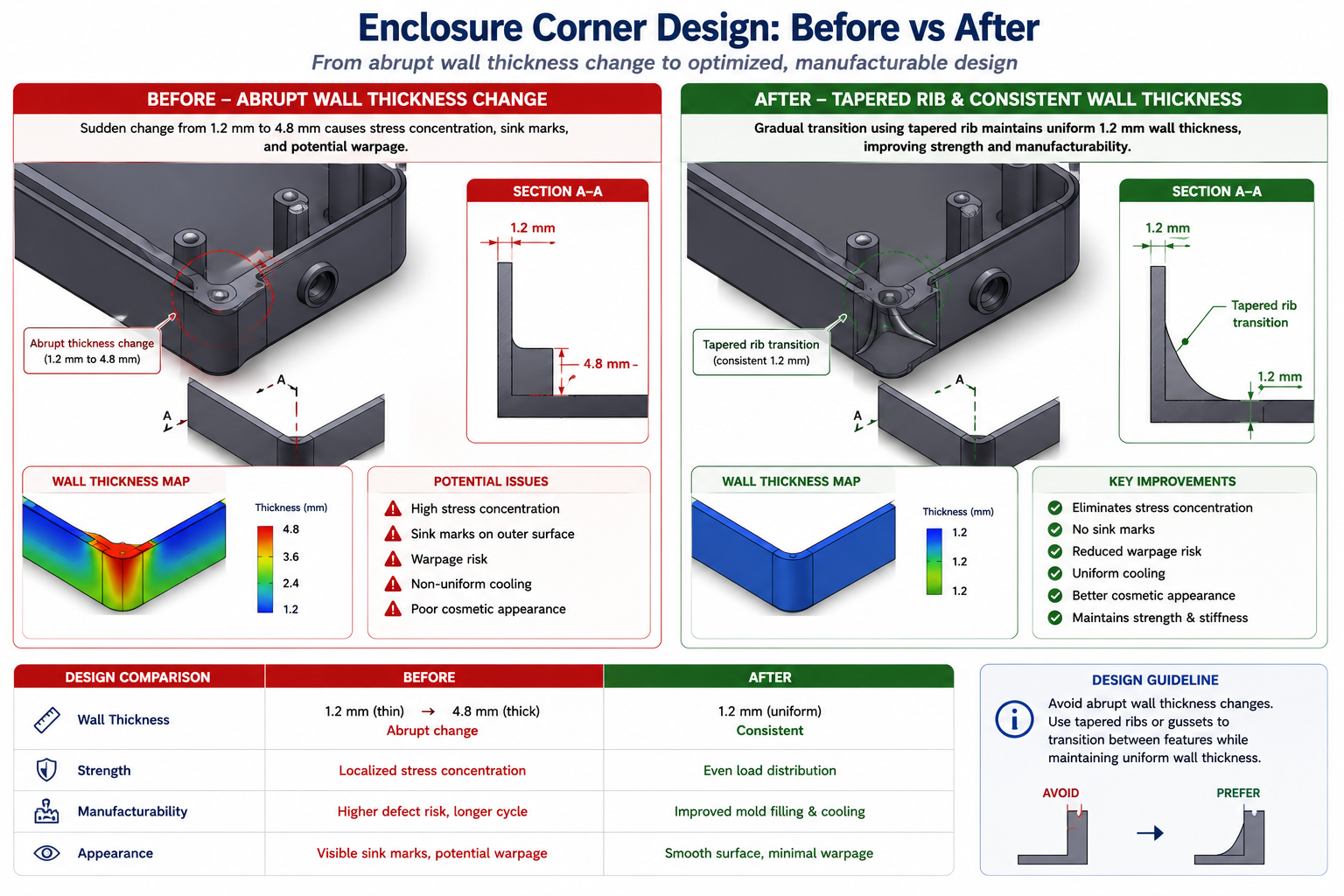
| Increase moulded wall thickness uniformity | Injection moulding | 10-25% cycle time; scrap improvement | Medium | Thicker sections need more cooling if not corrected |
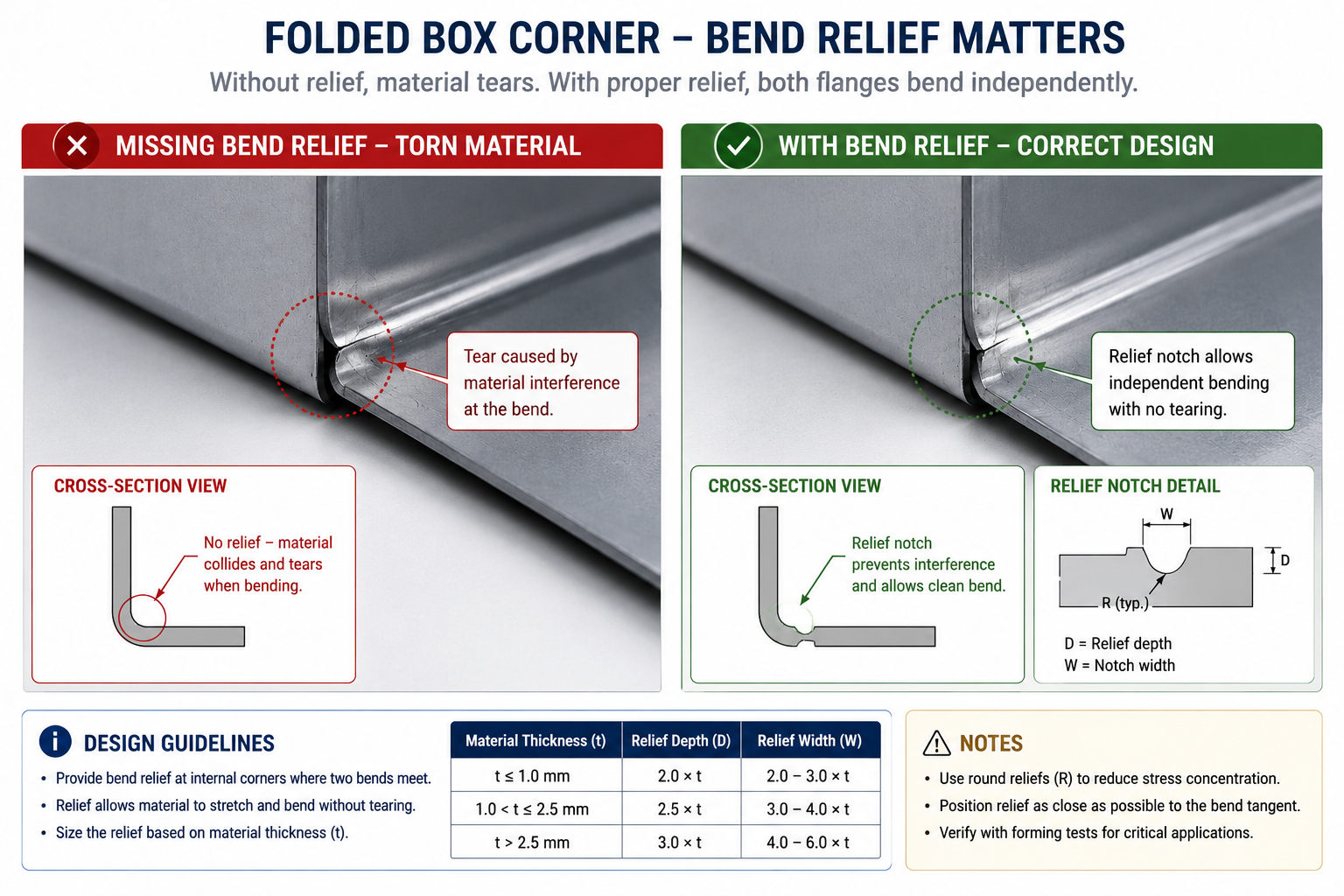
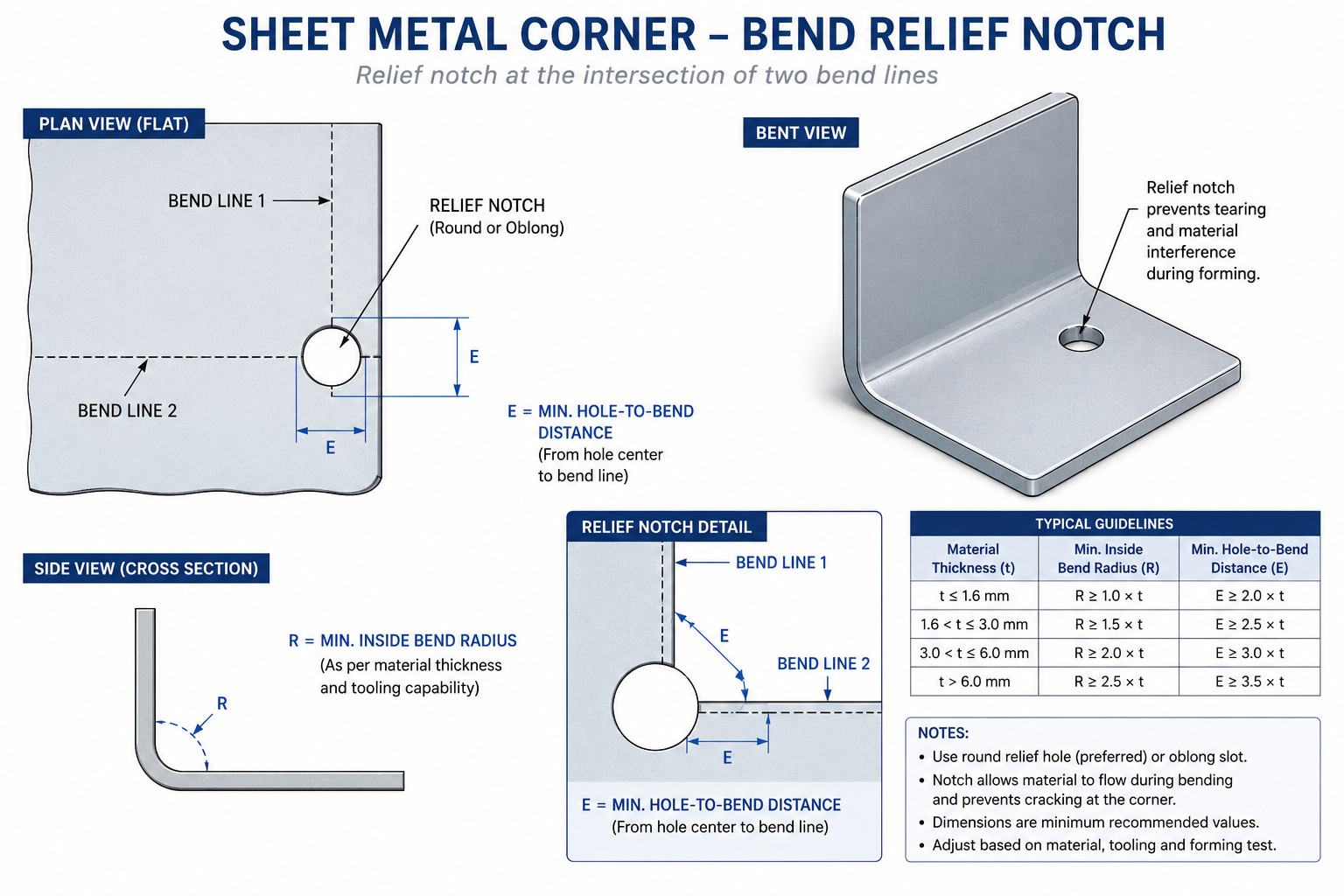
| Use self-clinching fasteners instead of weld nuts | Sheet metal assembly | 30-60% labour reduction; no weld distortion | Low | Verify gauge meets PEM series minimum thickness |
| Change welded assembly to formed features | Sheet metal forming | 20-40% assembly/welding labour reduction | Medium | Formed features differ structurally from welded joints; verify under load |
| Reduce material removal volume | CNC machining | 10-30% cycle time; material cost saving | Medium | Run FEA if stiffness is margin-critical |
Start with the largest cost driver, not the easiest change. The temptation is to go for easy wins first, loosen a few tolerances, switch a fastener size, call it a win. These are fast, low-risk, and real, but rarely address the dominant driver. Spend thirty minutes mapping the cost breakdown first: what fraction is material, machining, tooling amortisation, and assembly labour. Direct the first and most effort toward whatever fraction is largest. A three percent material saving sounds good; a thirty percent tooling saving from eliminating one side action saves more in absolute terms and requires less ongoing effort, since the saving is structural, not incremental.
Part Count Reduction: The Highest-Leverage Single Change
Part count reduction consistently delivers the largest total savings per design-change hour invested, for a reason easy to underestimate until you calculate it: every part in an assembly carries cost entirely separate from its own material and processing, supplier management, purchase orders, receiving inspection, inventory, kitting, assembly labour, and quality tracking. Eliminating one part eliminates all of that overhead for every unit ever produced.
The Boothroyd-Dewhurst criterion for evaluating whether a part can be eliminated is three questions: does it need to move relative to other parts during operation, does it need to be a different material for functional reasons, and does it need to be removable for service? If the honest answer to all three is no, there’s a strong case for consolidating it with an adjacent part. This analysis frequently reveals that parts separate since the original design became separate because of how the design was built in CAD, not a genuine functional requirement.
How to Identify Consolidation Opportunities
Walk the bill of materials and ask the three questions for every pair of adjacent parts, not just ones that obviously look redundant. Some of the highest-value consolidations involve parts that aren’t visually similar at all. A separate threaded insert press-fit into a plastic housing fails all three criteria: it doesn’t move, it’s a metal insert in a plastic part (a material difference), and it could reasonably be replaced by a moulded thread or self-tapping screw feature, depending on pull-out strength and insertion cycle requirements.
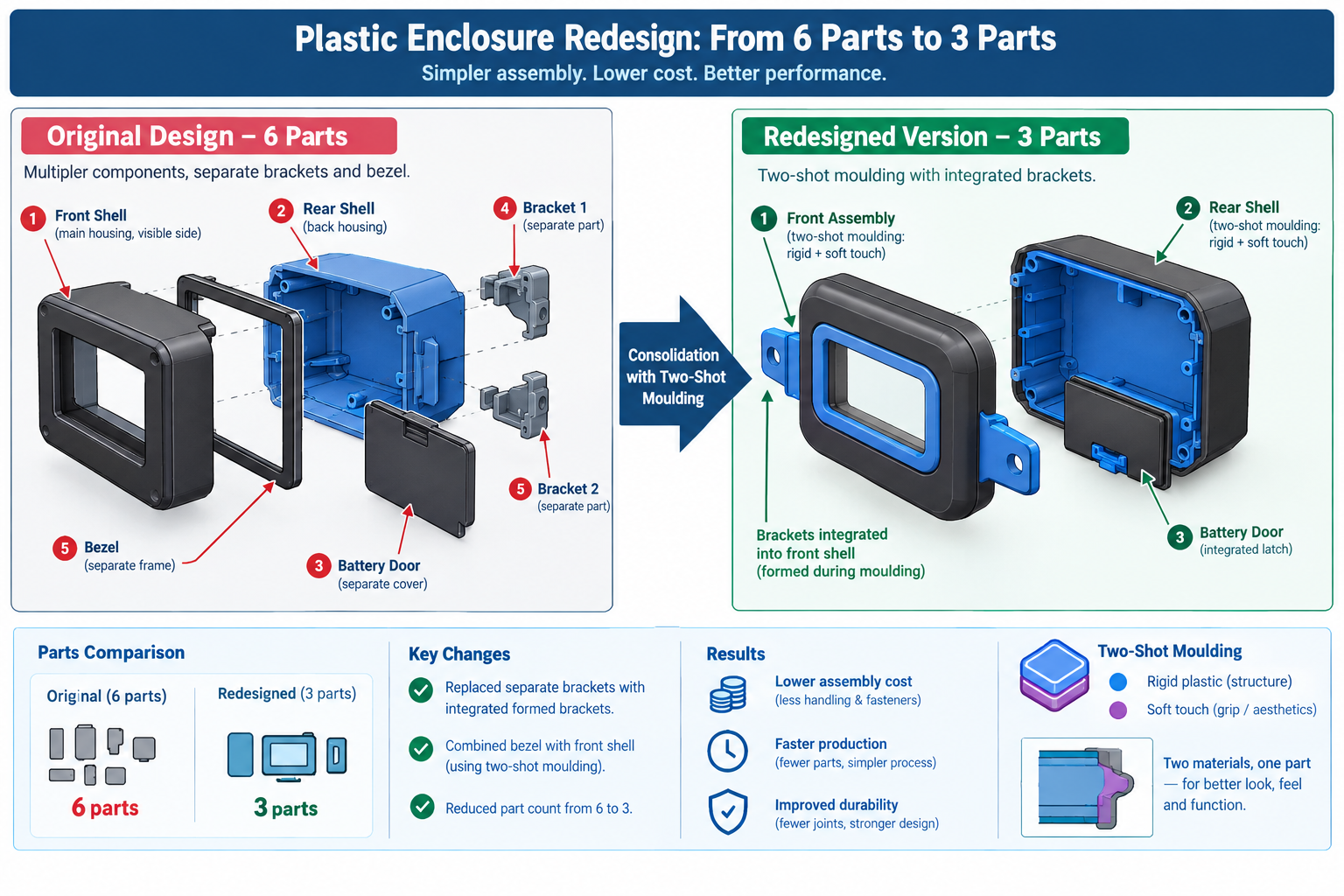
A concrete example: a plastic consumer electronics housing had a separate moulded lens bezel, a different colour, bonded on during assembly. It didn’t move relative to the housing and didn’t need removal for service. The only reason it was separate was that the original designer hadn’t considered in-mould painting or two-shot moulding as alternatives. Switching to two-shot moulding of the main housing combined both colours in one operation, eliminating the bezel as a separate part, the bonding adhesive, and the bonding assembly station. The saving was roughly $0.80 per unit at 50,000 units per year, $40,000 annually that had been a design decision made without asking whether the bezel needed to be separate.
CNC Setup Reduction: Designing Out the Repositioning Cost
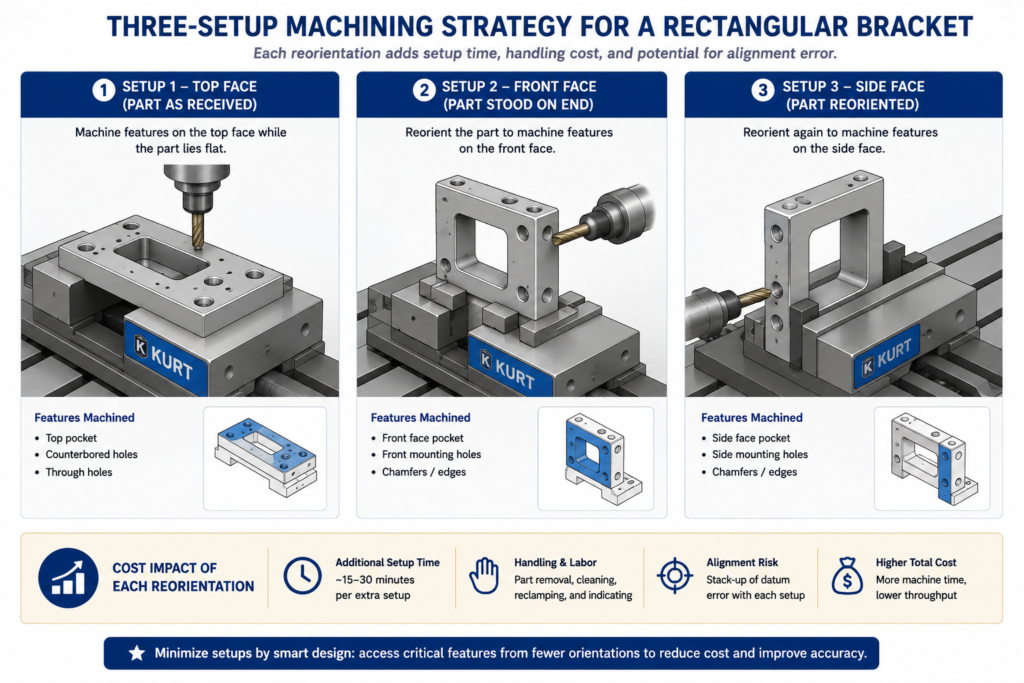
In CNC machining, setup time is non-productive: the machine is available but not cutting. Every repositioning means removing the part, refixturing it, and reprobing to establish a new datum, anywhere from fifteen minutes for a simple flip to two hours for complex refixturing with tight positional requirements. At $80 to $200 per hour of machine time, even a thirty-minute setup is a meaningful cost per part, and for parts with three or more setups, that cost is often a larger fraction of the total than most engineers realise.
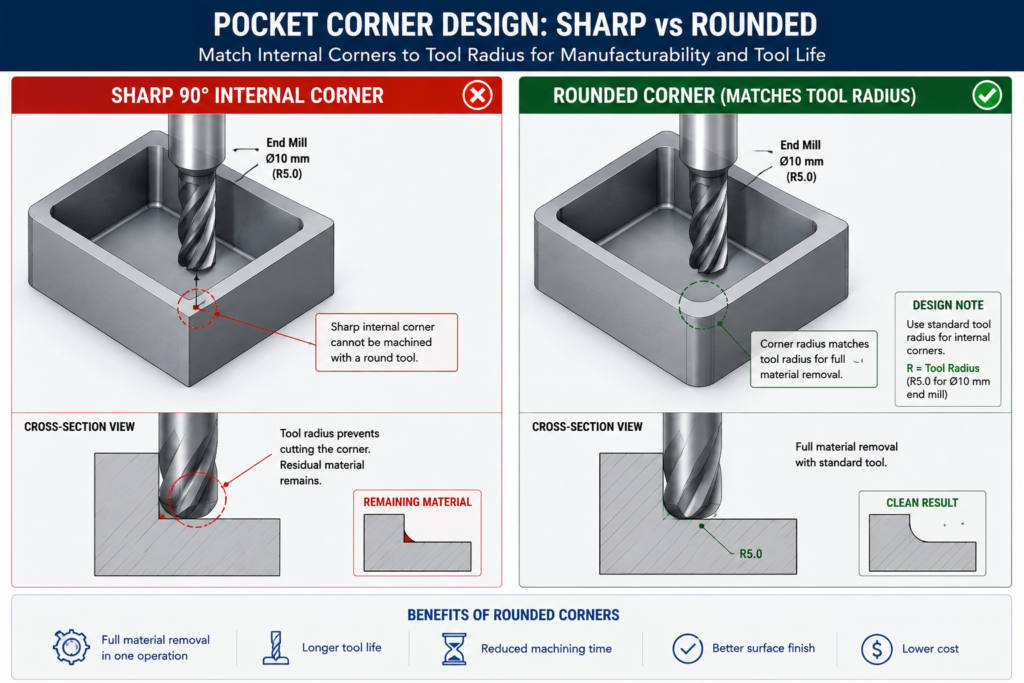
Setup count is almost always a design decision, not a physical constraint of the part’s function. Most multi-setup parts can be redesigned to fewer setups without changing any functional surface, usually by moving a feature to an adjacent face reachable in an existing setup, or accepting a minor positional shift in a non-critical feature.
| Design Situation | Original Setups | Redesigned To | How | Cost Impact |
|---|---|---|---|---|
| Bracket with features on all six faces | 6 | 2 | Moved features from two minor faces to adjacent faces; one relocated 4mm | 38% cost reduction; shorter lead time |
| Cylindrical part with off-axis tapped holes | 2 (lathe + mill) | 1 (lathe with live tooling) | Redesigned holes to align with lathe’s live tooling angular positions | 40% cost reduction; eliminated transfer |
| Housing with internal pocket and external features | 3 | 2 | Deepened pocket 3mm to let the same tool reach features from third setup | 25% cost reduction; better positional accuracy |
| Shaft with keyway and cross-drilled holes | 3 | 2 | Both features reached with the same rotary fixture positioning | 30% cost reduction; better relative accuracy |
| Plate with tapped holes on top and bottom | 2 | 1 | Switched to press-fit Helicoils installed from one side | 45% cost reduction; simplified inspection |
The Five-Minute Setup Audit
Before sending any machined part out for quoting, spend five minutes walking the feature list, asking which machine orientation each feature needs and whether it’s already accounted for in the setup count. This map often reveals one or two features driving a dedicated extra setup that everything else on that face doesn’t need. Moving those features, often just a few millimetres, to a position accessible in an existing setup eliminates the extra setup without changing any functional dimension.
Each setup eliminated saves roughly twenty to forty percent of the machining cost for the features that would have been in it, plus the refixturing time savings. For a four-setup part where the fourth setup contains only two movable features, eliminating it saves the refixturing time (say thirty minutes at $120/hour = $60) plus reprobing time. Over a 200-part run, that’s $12,000 saved for an afternoon of design work.
Tolerance Relaxation: Finding the Tolerances That Don’t Need to Be Tight
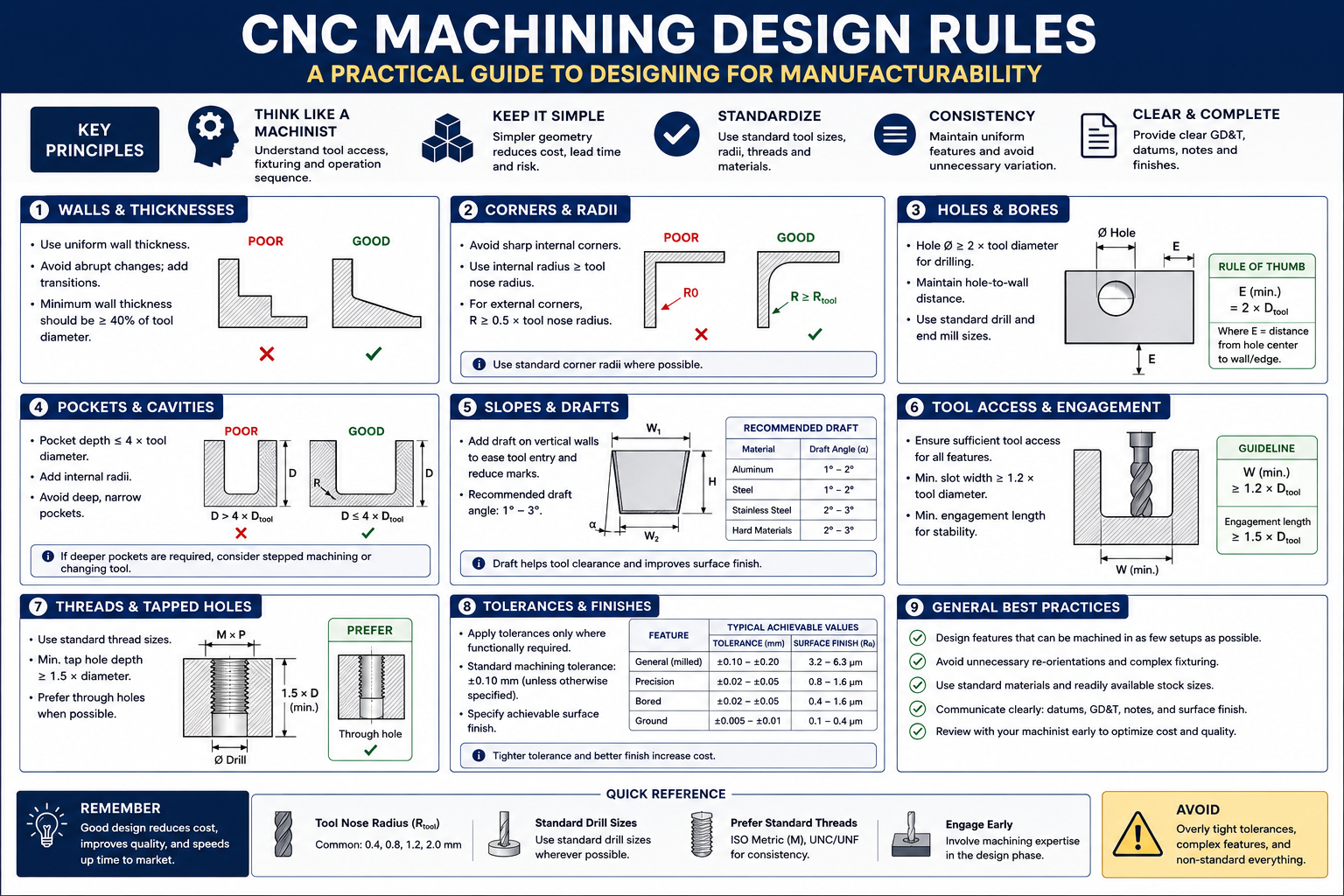
Tight tolerances cost money non-linearly: loosening from a precision class to a commercial class doesn’t cost a little less, it can cost dramatically less, since precision classes often require additional operations like reaming, grinding, or environmental control that commercial classes don’t. Understanding which tolerances are genuinely load-bearing and which inherited their value from a previous design or a default title block setting is one of the most reliable ways to find cost reduction without changing a single physical dimension.
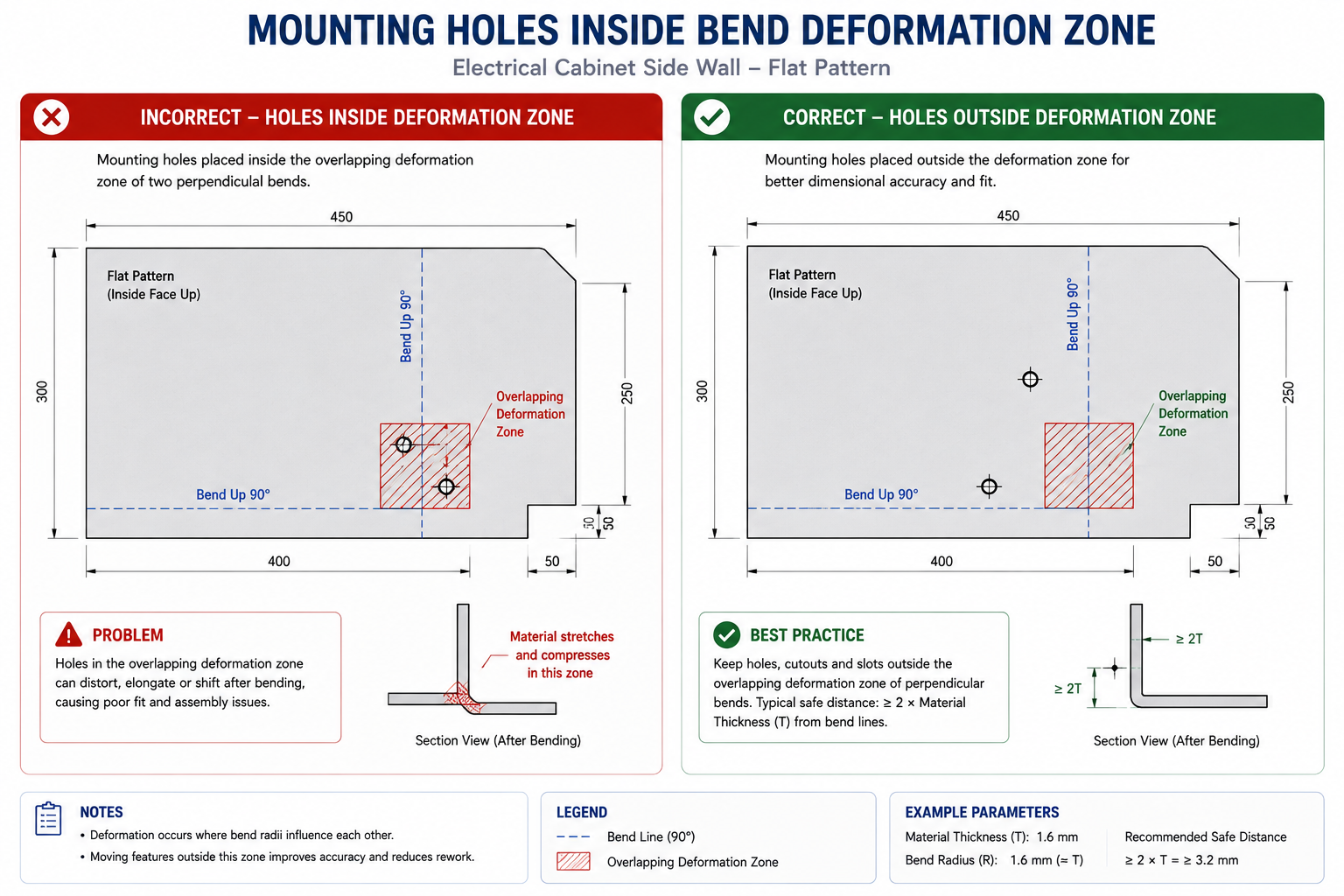
The audit is straightforward: for every dimension tighter than commercial grade (roughly tighter than +/-0.1 to 0.25mm for a machined part), ask what happens if it were at the loose end of commercial tolerance instead. Does it prevent assembly, cause interference, compromise sealing, or affect load-bearing performance? Or does nothing actually happen? If nothing consequential changes, the tolerance is tighter than it needs to be.
The Tolerance Audit in Practice
A machined aluminium bracket carried a title block default of +/-0.05mm, a precision-class tolerance, applied to every dimension not otherwise called out. The bracket mounted a PCB on four bosses and bolted to the chassis on two datum pads, with real functional requirements of 0.15mm positional accuracy on the PCB bosses and 0.05mm flatness on the datum pads. Everything else, envelope dimensions, chamfers, overall thickness, non-datum fastener holes, was carrying the precision-class default for no functional reason.
The audit confirmed the PCB boss positions and datum pad flatness needed to stay precise, while everything else could move to commercial tolerance (+/-0.15mm) with no consequence. Revising the title block default and adding specific callouts for the two critical features relaxed roughly sixty percent of the part’s dimensions, cutting machining cost by roughly twenty-five percent since several slow, careful operations were no longer needed once only two features required that level of care.
Material and Stock Form Switches: Changing What Comes In the Door
Material cost is often treated as fixed, since engineers are comfortable changing feature geometry but less comfortable changing material specifications. In reality, material changes are sometimes the simplest way to reduce cost, since many material specifications represent defaults or conservative choices rather than genuine minimums. A part specified in 304 stainless when 303 would serve equally well pays a twenty to thirty percent machining premium for a benefit it doesn’t use.
| Original Material/Form | Alternative | Cost Saving | When the Switch Is Valid |
|---|---|---|---|
| Machined aluminium 6061 block | 6061 extrusion profiled to cross-section | 30-60% material/machining reduction | Constant cross-section along length; extrusion economical at 500+ kg/year |
| 1018 mild steel | 1215 free-machining steel | 20-40% machining reduction | No welding or heat treatment required; similar tensile strength |
| 304 stainless machined part | 303 stainless | 30-50% machining reduction | Environment doesn’t need 304’s higher corrosion resistance |
| Steel machined bracket | Sheet metal formed bracket | 40-70% reduction at moderate volume | No precision machined datum surfaces required |
| Custom-sized bar stock | Nearest standard bar size | 15-35% material cost reduction | Almost always valid; standard stock is cheaper and stocked |
| Aluminium die cast at low volume | CNC machined aluminium | Lower tooling investment and risk | Volume below die cast breakeven (typically 5,000-10,000 units) |
| Injection moulded PC | Injection moulded ABS where strength permits | 15-25% material cost reduction | Part doesn’t need PC’s impact resistance or 90°C+ temperature limit |
The Standard Stock Form Review
For any machined part, ask whether a standard stock form in the specified material approximates the finished cross-section. Bar, tube, angle, channel, I-section, and flat plate are available in a wide range of alloys. An extrusion matching the part’s cross-section needs far less material removal than machining from a block, which means less machining time, less chip disposal, and lower material cost.
A structural bracket designed as a 50mm x 50mm x 200mm aluminium 6061 block with a T-shaped slot milled through it was redesigned around a standard T-slot aluminium extrusion in the same alloy. The extrusion cost thirty percent of the raw block per unit length, and machining dropped from two setups (rough and finish slot milling) to a single saw cut and two drilled holes. Total cost reduction was roughly fifty-five percent, for a change requiring two hours in CAD to verify the standard profile met the functional requirements.
Fastener and Hardware Standardisation: The Invisible Cost Driver
Custom fasteners, non-standard thread forms, and proprietary hardware are among the quietest cost drivers in a BOM because each item seems inexpensive individually. A custom-headed screw in a non-standard length might cost $0.18 per unit versus $0.04 for the nearest standard equivalent. That sixty percent premium sounds trivial until multiplied by the fastener count in the assembly, the number of assemblies produced, and the stocking cost of a dedicated part number requiring separate ordering, receiving, and inspection.
The audit: list every fastener and hardware item in the BOM and check it against the standard catalogue. Question anything not a standard length or head type, is the non-standard feature genuinely required, or did it end up there because the original designer picked it without checking standard availability? For most non-standard fasteners, it’s the latter, and substituting the nearest standard alternative usually needs at most a minor check of clearance hole, countersink depth, or thread engagement length.
Worked Examples
The industrial pump housing: A pump housing machined from an aluminium 6061-T6 billet had five setups (top, front, back, left, right faces). Material cost was $28 per part, machining $142, for a total annual cost of roughly $30,600 at 180 parts per year.
The billet was replaced with a near-net extruded profile matching the outer envelope more closely, eliminating roughly forty percent of raw material and dropping material cost from $28 to $17. The drain plug hole and sensor port, reviewed against functional requirements, were relocated onto faces accessible in existing setups, since the sensor measured cavity pressure rather than flow direction, eliminating two setups and dropping machining from $142 to $94. An O-ring groove tolerance audit against the O-ring manufacturer’s gland design guide confirmed +/-0.08mm on width and +/-0.05mm on depth met spec, versus the conservative +/-0.03mm originally specified, eliminating a precision grinding pass.
Total per-part cost dropped from $170 to $103, a thirty-nine percent reduction, saving roughly $12,000 annually from four days of engineering work with no change to hydraulic performance or assembly.
The consumer device enclosure: A handheld device’s six-part enclosure (front shell, rear shell, battery door, two internal brackets, separate display bezel) took roughly four minutes per unit to assemble. The two internal brackets, whose function was positional rather than structural, were redesigned as integrated formed features folded up from the rear shell, eliminating two parts and cutting assembly time by roughly a minute.
The separate bezel was eliminated by switching to two-shot injection moulding, combining both colours in one operation and removing the bonding adhesive and assembly station; at 40,000 units per year, the higher two-shot tooling cost paid back within eight months. A drop simulation confirmed ABS alone met the one-metre drop specification once bezel delamination (now eliminated) was no longer the failure mode, allowing a switch from ABS/PC blend to plain ABS for a roughly fifteen percent material saving.
Part count dropped from six to three, assembly time from four minutes to two and a half, and total enclosure unit cost dropped roughly thirty percent, worth about $48,000 annually, from three weeks of engineering work.
Frequently Asked Questions
Where should I start a cost reduction review on an existing product? Map the cost breakdown first: what fraction is material, machining or forming labour, tooling amortisation, assembly labour, and finishing. This is almost always more revealing than looking at the BOM in dollar terms alone. Direct the first review effort toward the largest category. If assembly labour dominates, part count reduction is the highest-leverage move. If tooling amortisation dominates, eliminating side actions gives the largest return. If machining time dominates, setup reduction gives the most.
Can cost reduction design changes compromise quality or reliability? Not if applied correctly and verified against functional requirements first. Every change in this article carries a functional risk if applied without checking, relaxing a tolerance that’s actually load-bearing reduces quality, and eliminating a part that genuinely needs a different material causes a field failure. The changes themselves aren’t risky; applying them without verification is. That discipline is what separates a cost reduction that works from one that creates a warranty problem six months after launch.
How much cost reduction is realistically achievable through design changes alone? On products that haven’t been through a formal cost reduction review, twenty to forty percent reduction in total unit cost is achievable for most mechanical assemblies through part count reduction, setup elimination, tolerance relaxation, and material switching combined. Products that went through rigorous DFM during initial development have less room, perhaps ten to twenty percent. Products designed primarily for function without cost consideration often have forty to sixty percent available, consistent with the findings documented in Anderson’s Design for Manufacturability, before any supplier negotiation is considered.
Does part count reduction always reduce cost? It reduces cost when savings in assembly labour, inventory, and supplier management exceed the incremental cost of the more complex consolidated part, almost always true when two parts become one moulded or formed part. It’s not always true when consolidation requires a significantly more expensive process, like requiring a five-axis machined part where the original components were simple sheet metal. The test is whether total production cost, including all parts and assembly steps, is lower after consolidation than before.
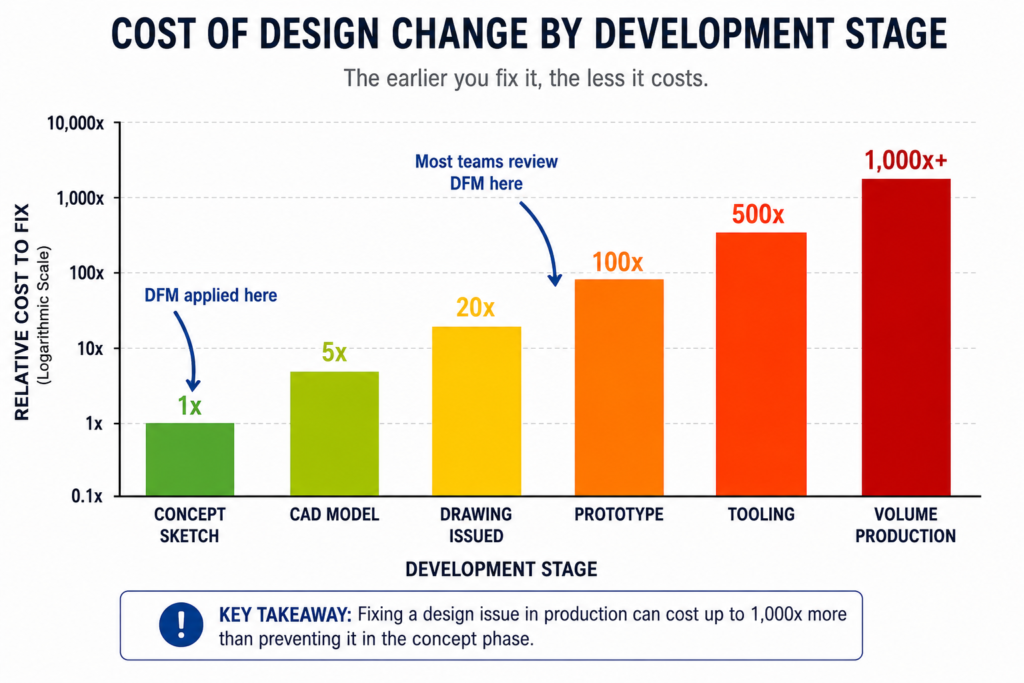
Is it too late to make cost reduction changes after production has started? Never too late, but the cost of implementing the change, drawing revision, supplier notification, validation, any regulatory resubmission, grows with time, and the opportunity to recover the saving shrinks as the production run progresses. Changes made in year one have years of saving left to recover; changes made in year five may have only months left before a next-generation product replaces it. This is the strongest argument for doing cost reduction reviews early, before release, rather than as a reaction to competitive pressure.
What is the easiest cost reduction change with the lowest functional risk? Fastener standardisation, since it requires only that the standard replacement meets the same load requirements, a simple check against published load data. The per-unit saving is usually small, but the change needs essentially no engineering analysis beyond a load and clearance check, takes an hour of drawing revision, and doesn’t affect any functional surface. Combined with a tolerance audit, these two changes together often represent the quickest five to fifteen percent cost reduction available on any machined product.
Key Takeaways
The product team from the opening story found twenty-two percent cost reduction in six weeks, not by squeezing suppliers or substituting lower-quality materials, but by asking a different question: not what the product needs to do, but whether every design decision is as cost-efficient as it could be while still doing what it needs to do.
The twelve design changes, the setup reduction examples, and the material switch scenarios in this article are all answers to that second question, cases where a design decision serving a function could be made differently while still serving it, at meaningfully lower cost. None require accepting reduced quality or performance. All require understanding enough about manufacturing to know where the cost is coming from.
The habit worth building isn’t a periodic review triggered by competitive pressure. It’s a design practice with cost awareness from the start: checking the cost breakdown as a routine part of design review, asking the three part-count consolidation questions for every pair of adjacent parts, auditing tolerances against their functional justification, and confirming material and stock form choices are driven by function rather than historical default.