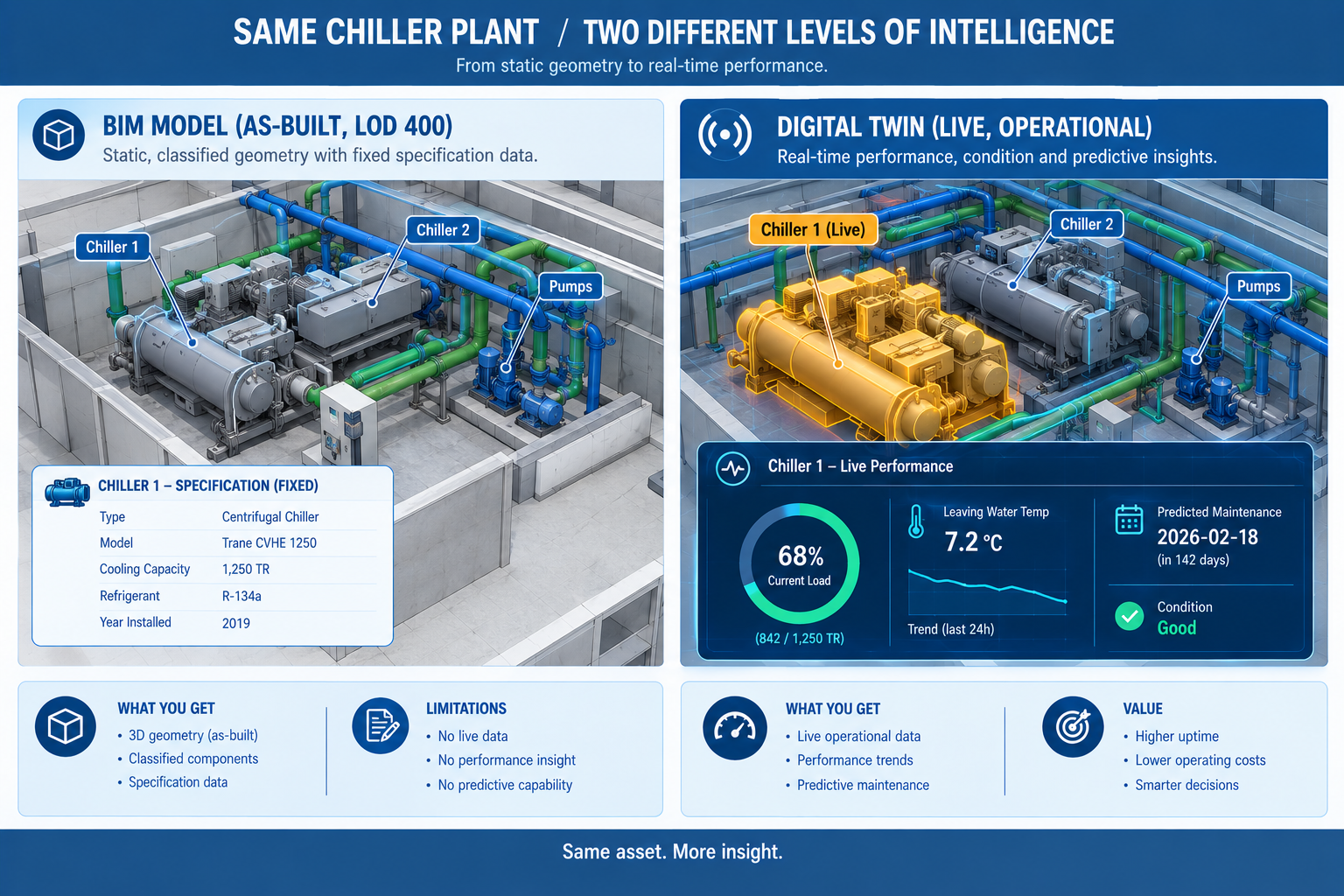
A university’s facilities team, managing a newly completed engineering building, pulled up the project’s handover BIM model to investigate a complaint about uneven temperatures on the third floor. The model showed exactly what it was designed to show: the HVAC system’s design specification, the ductwork layout, and the as-built equipment schedule, accurate as of the day the building was handed over fourteen months earlier.
What it couldn’t show was why the third floor was currently running warm, because the model had no connection to anything happening in the building right now. No current sensor readings, no live equipment status, no record of how performance had drifted since handover. The facilities team’s next step was the same one teams have used for decades: send a technician to manually check dampers, sensors, and control settings floor by floor, a process that took four days to isolate a single miscalibrated VAV box damper that had been slowly drifting out of setpoint since month three.
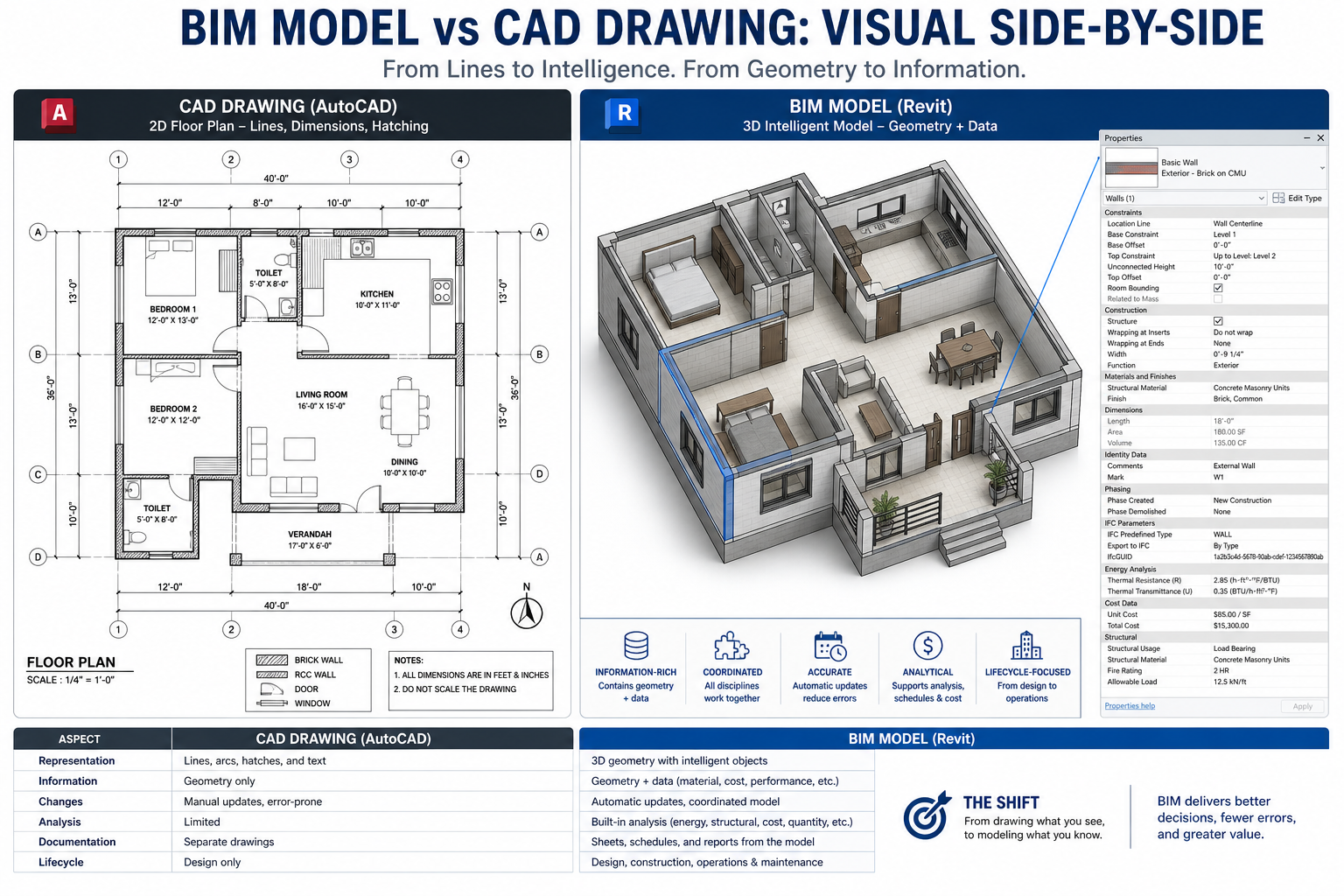
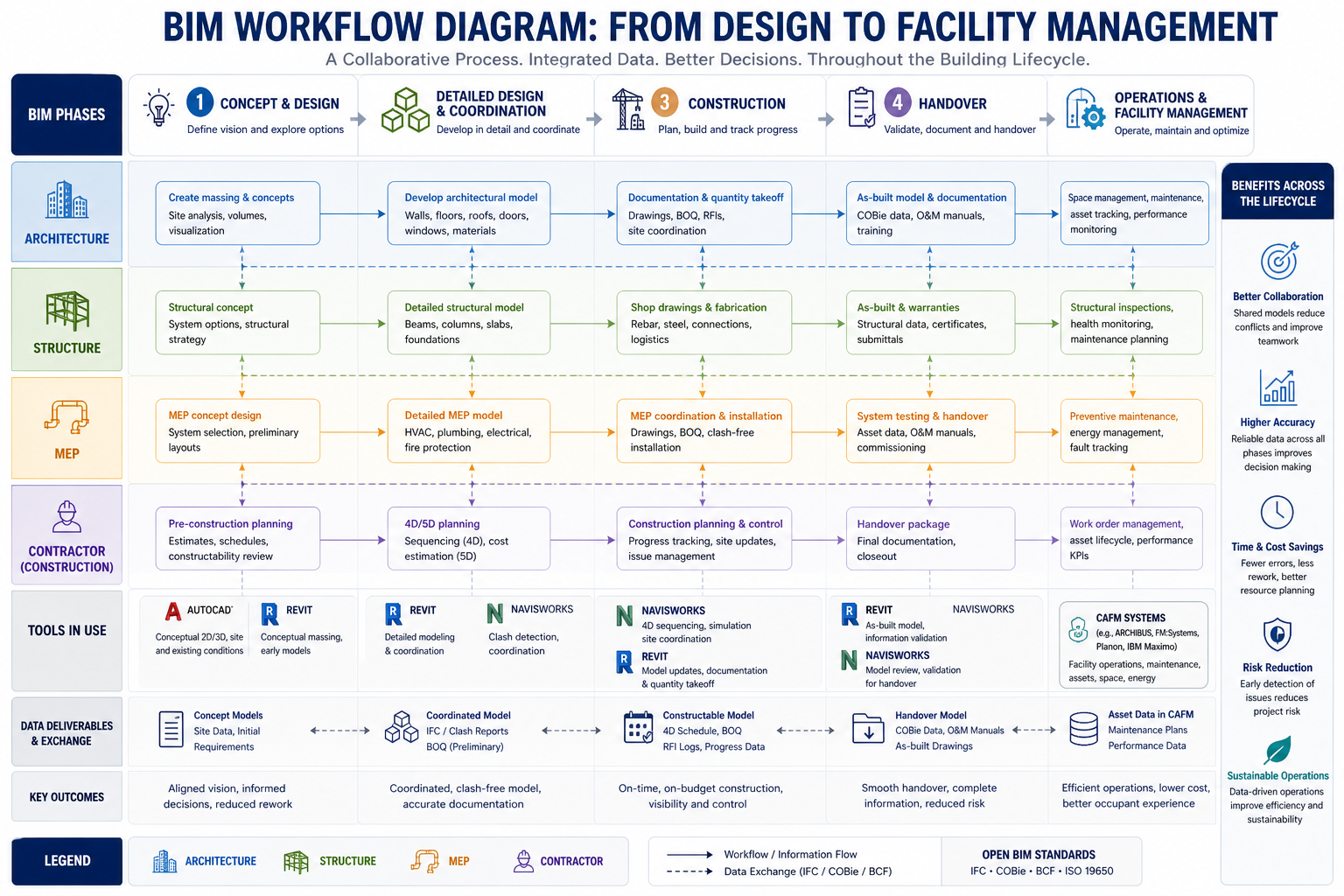
Quick answer: BIM and digital twins are not competing technologies, and a digital twin is not simply a more advanced or renamed version of BIM. BIM is a static, point-in-time model answering what a building was designed and built to be. A digital twin is a live, continuously updated representation connected to real-time sensor data, answering what a building is actually doing right now, and increasingly, what it’s likely to do next. The most effective digital twins are built directly on top of an accurate BIM model, making the two sequential stages of the same digital representation rather than alternative choices.
This article covers the core differences between BIM and digital twins, the five-stage evolution from a static model to a fully autonomous twin, guidance on when each is the right tool, and worked examples showing the distinction in practice.
Defining the Two Terms Precisely
Building Information Modeling (BIM) is the process of creating and managing a structured, element-based digital representation of a building’s physical and functional characteristics, used primarily to support design, coordination, and construction decision-making. A BIM model is authoritative about design intent and as-built condition: what a building was designed to be, and at LOD 500, what was actually built.
A digital twin, in building and infrastructure contexts, is a live, continuously updated digital representation of a physical asset, connected to that asset through real-time or near-real-time data. This lets the digital representation reflect the asset’s actual current state and, in more advanced implementations, support prediction and even automated control of the physical asset. A digital twin is authoritative about current operational reality.
The two definitions aren’t competing; they describe different relationships between a digital model and physical reality. A BIM model is a snapshot, accurate as of a specific point in time, updated deliberately at defined milestones. A digital twin is a live connection, continuously reflecting whatever the building’s sensors report at this moment.
Six Core Differences Between BIM and Digital Twins
These six dimensions, moving from the most fundamental to the more technical, give a practical picture of how the two actually differ in day-to-day use.
Aspect
BIM
Digital Twin
Example
Primary purpose
Design, document, and coordinate construction, concept through as-built handover
Monitor, analyse, and predict ongoing operational behaviour after occupancy
BIM coordinates ductwork before installation; a twin tracks that same ductwork’s airflow five years into occupancy
Data currency
Represents a point-in-time condition, updated at formal revisions or renovations
Continuously updated with live data, reflecting real-time conditions
BIM shows a chiller’s design spec; a twin shows that chiller’s actual real-time energy draw and fault status
Data direction
One-directional: data flows into the model, little or none flows back out
Bidirectional: sensor data flows in, and in advanced twins, commands flow back out to control systems
A twin can trigger an automatic HVAC adjustment; a BIM model has no mechanism to affect the physical building
Typical lifecycle stage
Concept design through construction and handover, ending at LOD 500
Building operation, often spanning decades after construction
A hospital’s BIM model is finalized at handover; its twin then operates continuously for the building’s 40+ year life
Underlying technology
3D modelling and coordination platforms (Revit, Navisworks)
IoT sensors, real-time data integration, analytics, and increasingly AI/ML, built on a 3D base
A BIM platform manages static model elements; a twin platform manages a continuous stream of sensor readings
Value delivered
Reduces design conflicts, rework, and delays during design and construction
Reduces operational cost, energy waste, downtime, and maintenance inefficiency
The Data Direction Difference Is the Most Consequential
Of these six differences, data direction, one-directional for BIM, bidirectional for a mature digital twin, carries the largest practical consequence. It’s what separates a true digital twin from being simply “BIM with a live dashboard attached.” A monitored twin that only displays live data without acting on it is a valuable but limited tool, essentially a sophisticated visualisation layer. The genuinely transformative applications, automated demand response, self-optimising HVAC control, predictive maintenance that schedules its own work orders, all depend on bidirectional capability that lets the digital representation influence the physical building, not just observe it.
From Static BIM to Autonomous Digital Twin: A Five-Stage Evolution
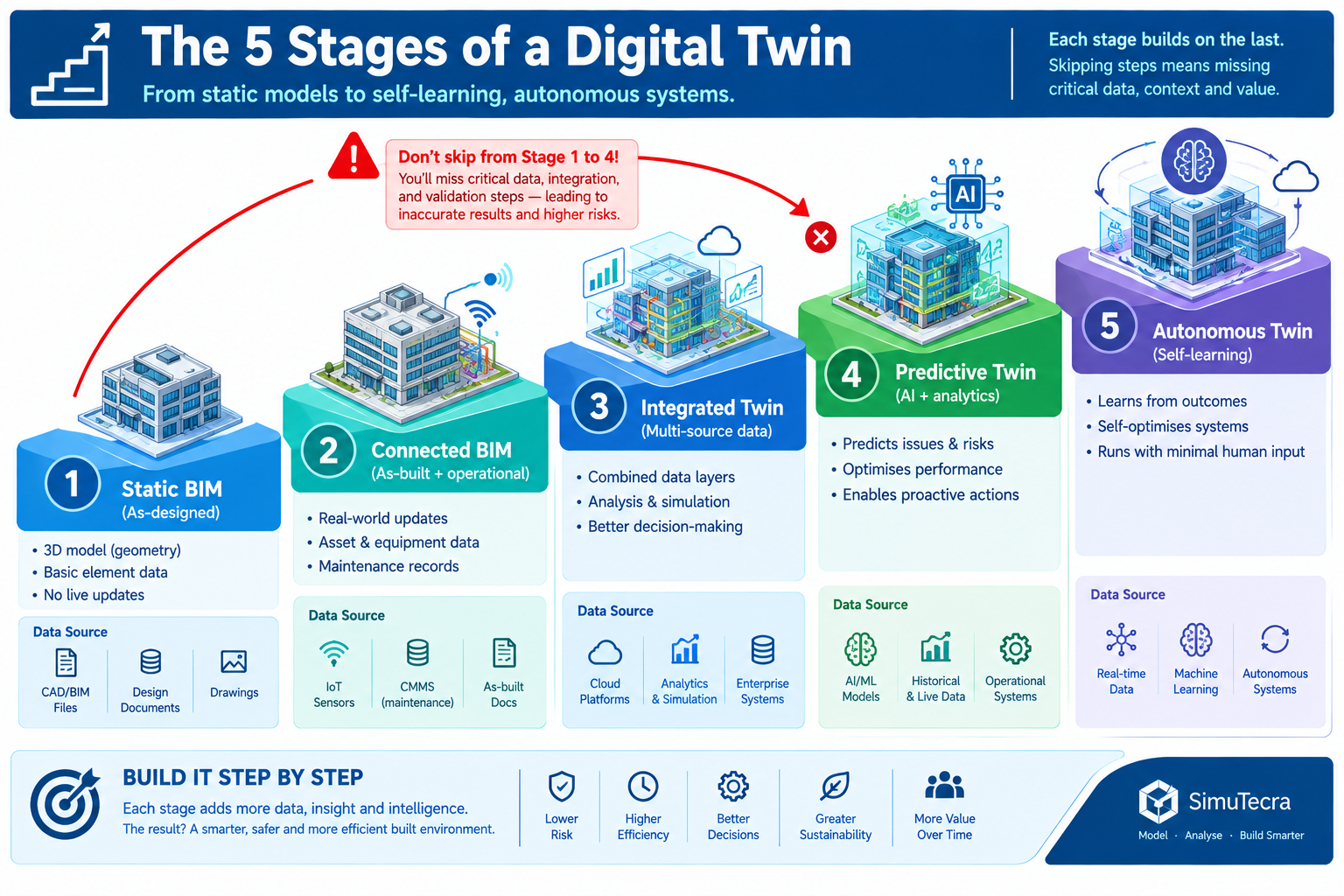
Most buildings’ digital representations progress through stages, each adding a distinct capability on top of the previous one, rather than making a binary choice between “BIM” and “digital twin.”
Stage
Description
Capability Unlocked
1. Static BIM model
A fixed, element-based model with no live data connection
Design coordination, clash detection, documented as-built record
2. Connected (asset-linked) BIM
The as-built model linked to static asset and maintenance data
Facilities teams locate equipment info directly through the model
3. Monitored digital twin
The connected model linked to live sensor and BAS/BMS data
Live dashboards and alerts when a parameter moves outside threshold
4. Predictive digital twin
Historical data used to build models forecasting future behaviour
Predictive maintenance scheduling and early failure warning
5. Autonomous / prescriptive twin
A live control interface lets the twin issue commands, not just receive data
Automated, continuously optimised building system operation
Why Skipping Stages Rarely Works
Owners occasionally try to procure a predictive or autonomous twin (stages 4 or 5) without first establishing a solid connected BIM foundation (stages 1 and 2), usually because prediction and automation are the most visible part of the pitch. This consistently underperforms, since predictive analytics need historical data accumulated over time, and that data is far more useful tied to accurate, well-classified building elements from a solid BIM foundation than existing as disconnected sensor readings with no spatial or asset context.
The university engineering building shows this dependency directly. The four-day diagnostic process was only shortened by connecting live data to the existing, accurate BIM model of the ductwork and VAV boxes. Without that model as a foundation, live sensor data alone would tell a facilities team a damper was misbehaving without easily showing them where it was or what it connected to.
When BIM Alone Is Enough, and When a Digital Twin Earns Its Cost
Not every building or use case justifies investing beyond a well-executed, connected BIM model.
Use Case
Is BIM Alone Sufficient?
Recommendation
Design coordination and clash detection during construction
Yes, this is exactly what BIM is designed for
Use standard BIM coordination; a twin has no role before the building is operational
Facilities handover and initial asset documentation
Largely yes, with a connected BIM model
Treat a well-structured handover as digital twin readiness, not a full twin
Ongoing energy management and equipment performance monitoring
No, a static model can’t show current consumption or status
Justified for buildings with meaningful energy spend or equipment criticality
Predictive maintenance for critical equipment (chillers, generators, medical equipment)
No, prediction requires historical trend data and analytics
Strongly justified where unplanned downtime carries high cost, like hospitals and data centres
Portfolio-wide space utilisation and occupancy planning
Partially; BIM provides spatial data but not usage patterns over time
Justified for large portfolio owners actively managing space allocation costs
Automated, self-optimising building system control
No, static models have no mechanism to observe or control live systems
Justified only for owners with the operational scale and technical maturity to manage it
Matching Investment to Building Criticality and Scale
The clearest pattern across these use cases: digital twin investment is justified in proportion to how expensive the consequences of not knowing current operational status actually are, and how much scale exists to spread the sensor and platform investment across. A single small office building with modest energy spend has a much weaker case for a predictive twin than a hospital with critical medical equipment and continuous occupancy, or a large campus where the same monitoring platform serves dozens of buildings at once. Size the investment to the specific operational risk and scale of the portfolio, not as a general technology upgrade disconnected from a problem it’s meant to solve.
Worked Examples
A hospital’s critical equipment digital twin: A 400-bed hospital had a complete, accurate BIM model of its central plant and medical gas systems, maintained through several years of minor renovations. Despite the accurate model, the facilities team experienced two unplanned chiller failures in eighteen months, each requiring emergency rental chiller deployment at significant cost, because the existing preventive maintenance programme was based on fixed time intervals rather than actual condition.
The hospital connected its three central plant chillers to a monitored digital twin platform built on the existing BIM model, adding vibration, temperature, and electrical load sensors and feeding that data into an analytics platform trained on historical performance and failure data, reaching stage 4 (predictive) in the evolution above.
Within the first year, the predictive twin flagged a developing bearing wear pattern on one chiller fourteen days before the vibration signature reached the threshold that would previously have gone undetected until failure. This let the facilities team schedule a planned repair during a low-demand period instead of experiencing an emergency failure. The facilities director credited the twin with avoiding at least one of the emergency rental deployments that had cost more than the twin implementation itself.
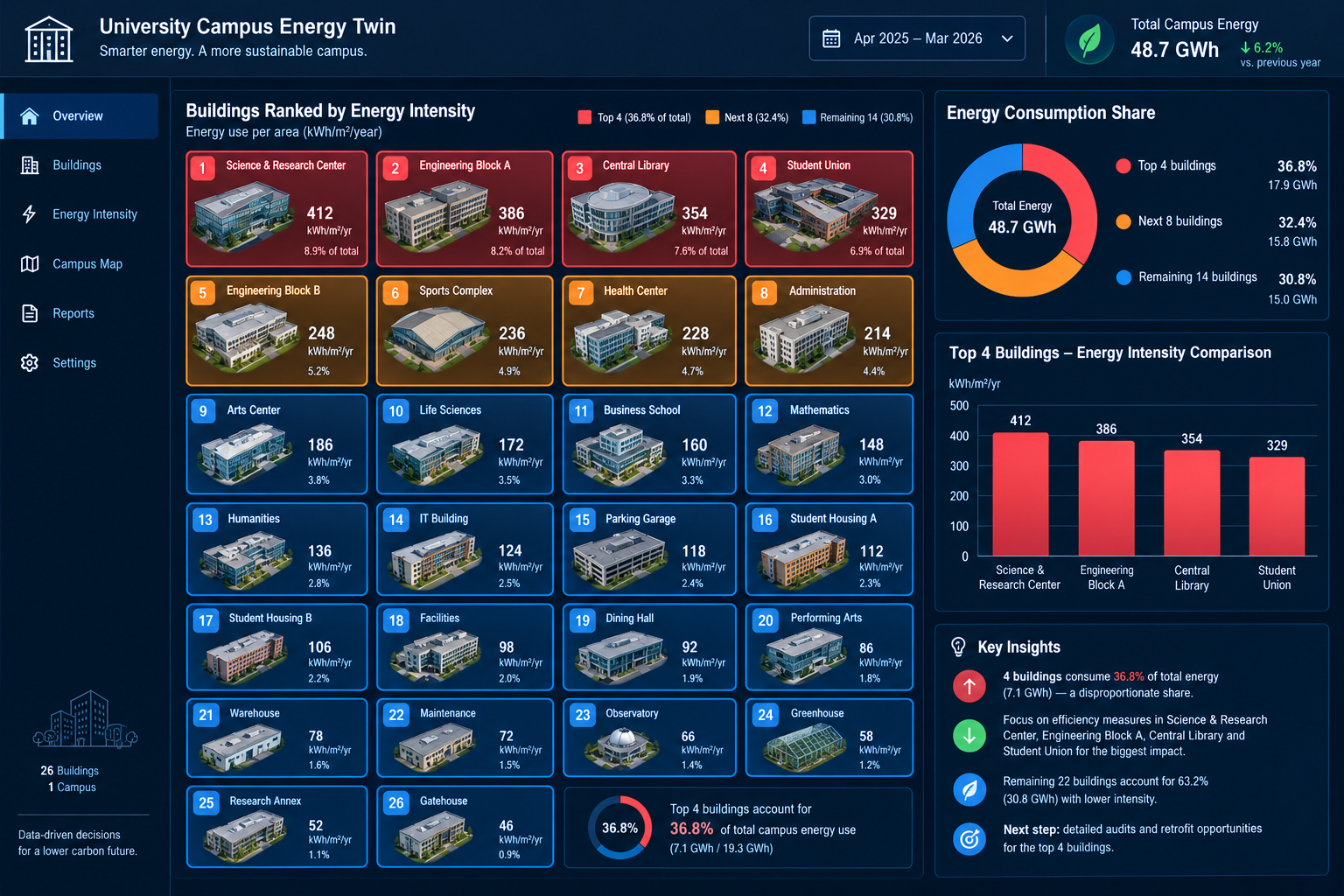
A university campus energy management twin: A university with 26 buildings across its main campus had individually accurate BIM models for each building, produced by different design teams over a 15-year construction programme, but no unified way to compare energy performance across buildings.
The university implemented a campus-wide monitored digital twin (stage 3) that connected each building’s existing utility metering and BAS data into a single platform, using the existing BIM models as the spatial and asset foundation, without initially pursuing predictive or autonomous stages.
The unified live view revealed that four buildings, representing less than 20% of total campus floor area, accounted for nearly 40% of total campus energy consumption, a pattern invisible when each building’s utility data had been reviewed separately with no easy way to compare buildings directly. This directed the university’s capital energy-efficiency investment toward the four highest-consuming buildings first, rather than spreading a limited budget evenly across all 26 regardless of actual need, a targeting decision the static BIM models alone wouldn’t have supported.
Frequently Asked Questions
Can a digital twin exist without a BIM model? Technically yes, a digital twin can be built directly from sensor data or a simplified 3D representation without a full BIM authoring process. For buildings specifically, a twin built on an accurate, element-classified BIM foundation is substantially more useful, since BIM provides the spatial and asset context, which specific duct, which specific chiller, that makes live sensor data meaningful rather than just a stream of unattached numbers.
Does every building need a digital twin? No. The value of a digital twin scales with a building’s operational complexity, criticality, and scale. A well-maintained, connected BIM model is genuinely sufficient for many buildings’ ongoing facilities needs. Small, simple buildings with modest energy spend and no critical equipment often don’t generate enough operational risk to justify the sensor and platform cost.
How much does it cost to move from a static BIM model to a monitored digital twin? Cost varies with building size, how many systems are monitored, existing building automation system capability, and analytics platform sophistication. As a general pattern, a monitored twin (stage 3) is driven primarily by sensor and integration hardware, while a predictive twin (stage 4) adds meaningful software and data science cost on top. Scope a specific pilot, often starting with the highest-value critical equipment, rather than attempting a full-building deployment first.
Is “digital twin” just a marketing term for what used to be called a BMS? There’s real overlap, and some products marketed as digital twins are, in substance, a building management system or CMMS with a 3D visualisation layer added. The meaningful distinction is whether the platform is genuinely connected to an accurate, element-level 3D model derived from BIM, and whether it supports the predictive or bidirectional-control capabilities described above, rather than only displaying current sensor readings on a floor plan.
Who should own a digital twin implementation within a facilities organisation? This typically sits with the facilities management or operations team, since a digital twin is fundamentally an operational tool, but it should be planned in coordination with whoever managed the original BIM delivery to ensure the foundation is accurate and well-classified. Larger or more technically ambitious programmes, particularly those pursuing predictive or autonomous capability, often add a dedicated data or analytics role, since building and maintaining predictive models requires data science skills traditional BIM or facilities roles don’t typically include.
Key Takeaways
The university engineering building had an accurate BIM model and still spent four days manually diagnosing a problem a monitored digital twin would have flagged within days. The hospital and campus examples show what changes when a live, data-connected layer is added on top of an accurate model foundation: not a replacement for BIM, but a genuinely new capability a static model, however accurate, was never designed to provide. In every case, the BIM model remained useful and necessary, both as the design and construction record and as the foundation the digital twin was built on.
This is the relationship worth remembering past the terminology: BIM answers what a building was designed and built to be, and a digital twin answers what that building is actually doing right now and, at its most capable, what it’s likely to do next, consistent with the maturity framework defined by the Digital Twin Consortium. Neither replaces the other, and the strongest operational outcomes came from treating the digital twin as the next stage built on a solid BIM foundation, not as a competing technology chosen instead of one.
Owners and facilities teams evaluating this decision are best served by being precise about which of the five evolution stages their building currently occupies, and which specific operational problem the next stage of investment would actually solve, rather than pursuing “a digital twin” as an undifferentiated technology goal disconnected from the operational reality their facilities team is actually managing day to day.
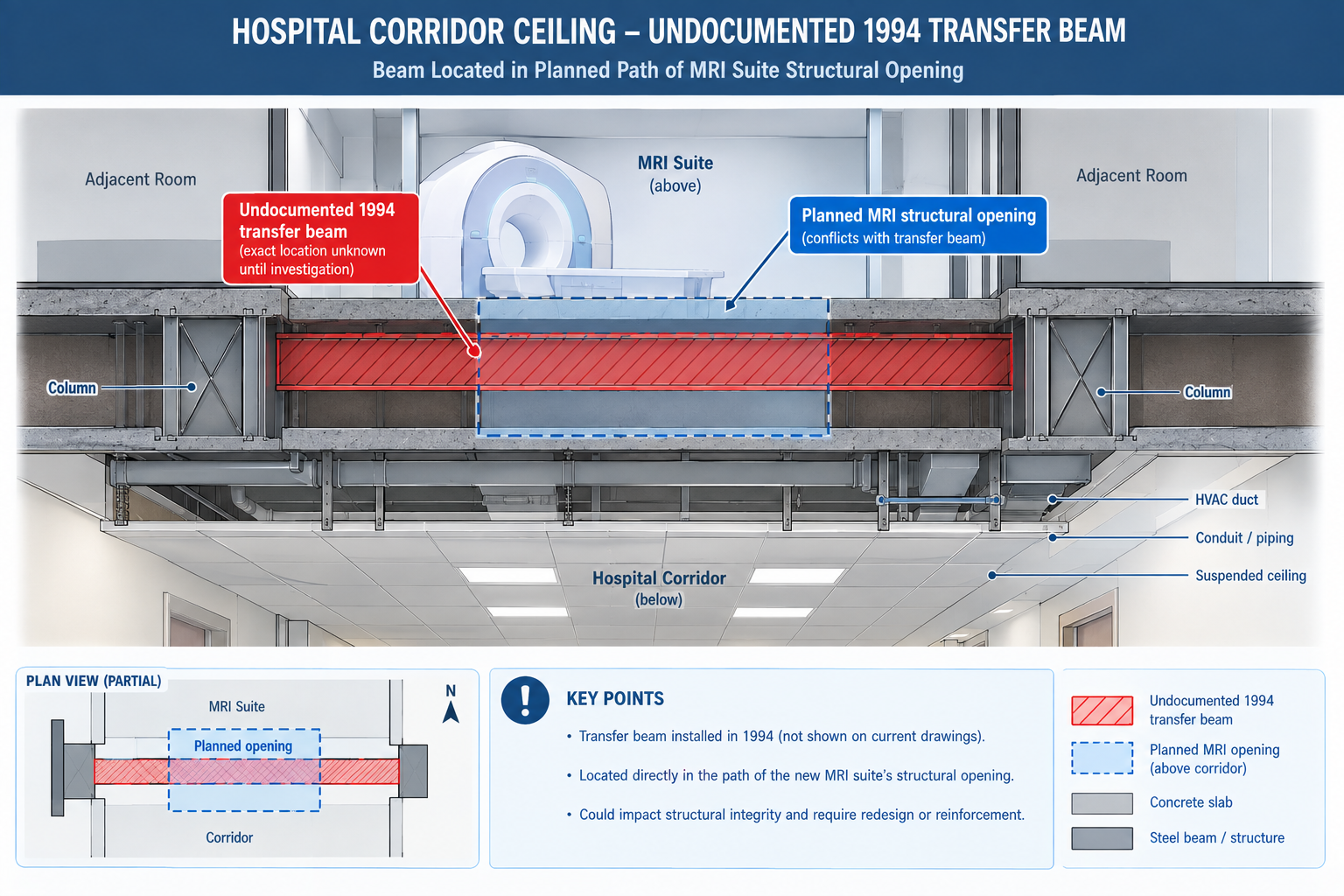
A regional health system planning a major renovation of a 1970s-era hospital wing commissioned the design based on the building’s original architectural drawings, supplemented by a handful of field measurements taken during a walkthrough.
Three weeks into demolition, the contractor discovered a section of corridor ceiling concealed a structural transfer beam that appeared nowhere in the drawings. It had been installed during an unrecorded 1994 renovation to support a rooftop mechanical unit added at that time. The beam sat directly in the path of a new MRI suite’s structural opening, already planned and approved.
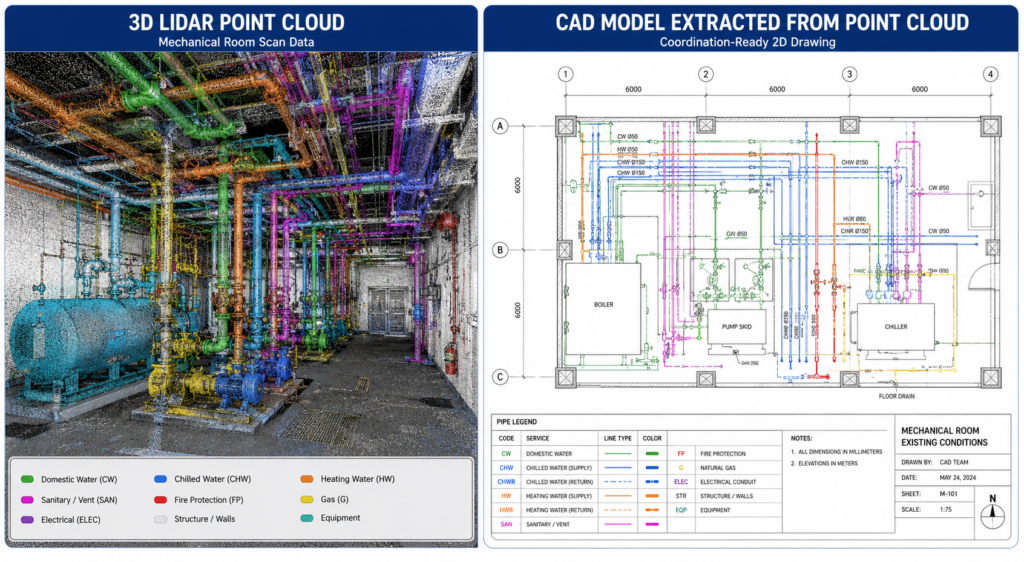
Quick answer: The discovery halted demolition for eleven days while a structural engineer assessed the beam, the design was revised around it, and the revision was resubmitted for approval. On an active hospital renovation that had to stay partially operational throughout construction, that delay carried significantly higher cost and disruption than it would have on a vacant building. The beam had been there the entire time. What was missing was a reliable way to capture it before the design was finalised. That’s the gap scan-to-BIM closes: converting a building’s true, current physical condition into an accurate 3D model the design team can trust, instead of relying on original drawings that quietly stopped matching reality years earlier.
This article covers the reality capture technologies used to gather existing-conditions data, the six-stage scan-to-BIM process, the benefits specific to renovation and facilities projects, what drives project cost, and worked examples in practice.
What Scan-to-BIM Actually Is
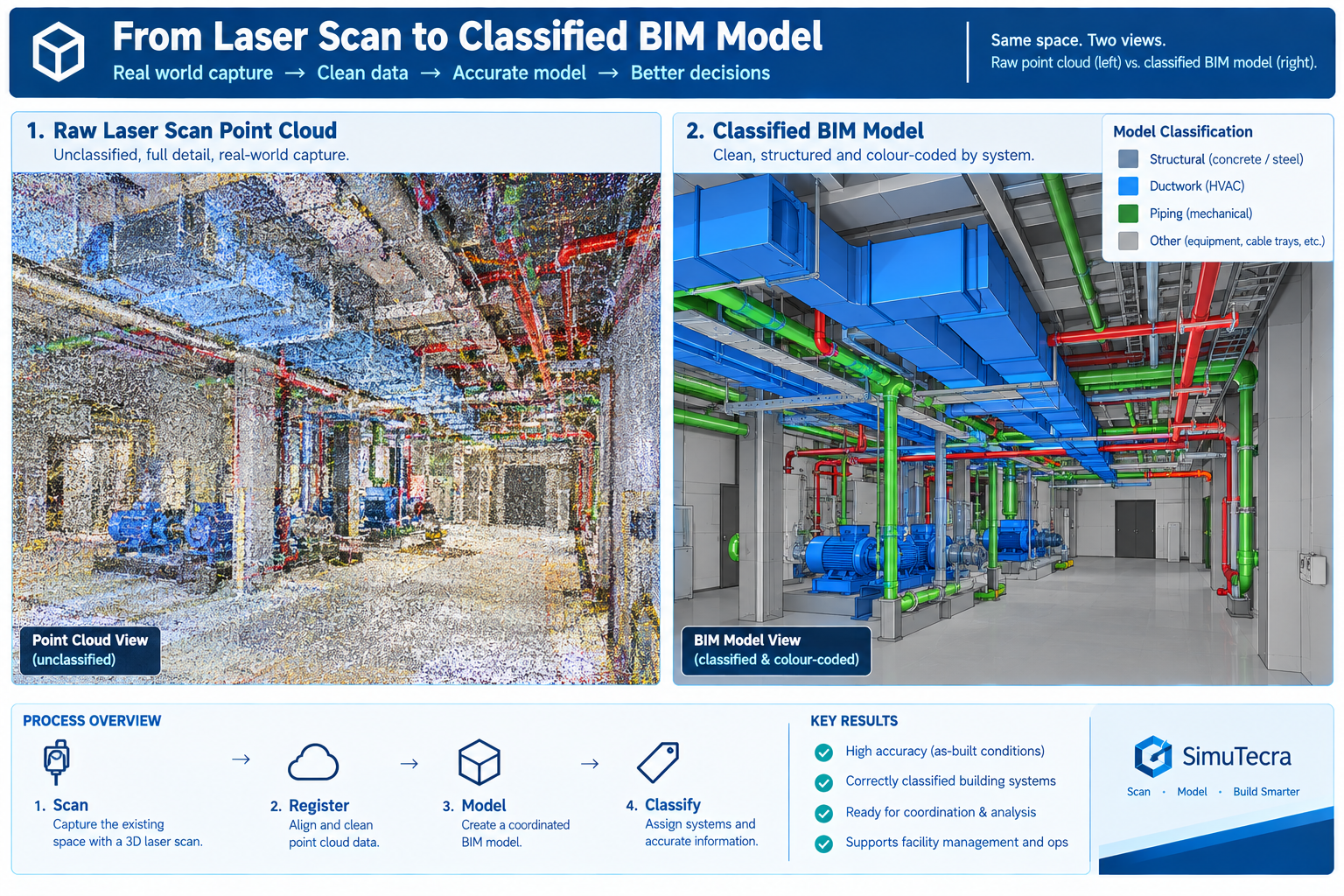
Scan-to-BIM captures a building’s existing physical condition using 3D reality capture technology, most commonly laser scanning, and converts that data into a structured Building Information Model a design or facilities team can use the same way they’d use a model authored from scratch. The output isn’t the raw scan itself, a point cloud of millions of individually measured 3D points, but a modelled interpretation of it: walls, structure, and MEP systems traced and classified into an organised, element-based model.
The point cloud and the finished model serve different purposes, and a complete deliverable should include both. The point cloud is the unfiltered record of physical reality, every visible surface at true measured accuracy, with no interpretation applied. The finished model is an interpreted simplification built to a defined level of development, so it can be federated and clash-tested using standard BIM workflows. Keeping the point cloud alongside the finished model lets anyone downstream independently verify what the model claims about a specific area, exactly the kind of check that would have caught the concealed hospital beam before, not after, demolition began.
The Reality Capture Technologies Behind Scan-to-BIM
Choosing the wrong technology for a given scope is one of the most common sources of both cost overrun and accuracy shortfall.
Technology
Typical Accuracy
Capture Speed
Best Suited For
Terrestrial laser scanner (tripod)
2-5mm at building-interior range
Slower per setup (2-8 min); many setups for full coverage
The Scan-to-BIM Process: Six Stages From Scope to Handoff
Scan-to-BIM is a structured production process, not a single scanning visit. The finished model’s quality depends as much on the planning and verification stages around the scan as on the technology itself.
Stage
What Happens
Common Pitfall
1. Scope definition and scan planning
Define required accuracy, target LOD, which systems to capture, and the technology mix
Scoping without confirming what the model will actually be used for, causing over-capture or missing detail
2. Field data capture
Crews capture the site, placing control points to tie scans into a consistent coordinate system
Insufficient overlap or control points, leaving gaps or accuracy drift expensive to fix later
3. Registration and point cloud processing
Individual scans are aligned into a single, unified, cleaned point cloud
Accepting a registered point cloud without verifying it against control points, letting errors propagate
4. Model authoring to target LOD
Modellers build the BIM model from the point cloud to the agreed level of detail
Modelling every visible feature indiscriminately instead of to the agreed LOD, producing an oversized, expensive model
5. Quality assurance and accuracy verification
The model is checked against the point cloud and survey control for accuracy and completeness
Skipping independent QA and relying solely on the modelling team’s self-review
6. Deliverable handoff and integration
The model, point cloud, and documentation are delivered and integrated into the project workflow
Delivering the model without the point cloud or QA documentation, leaving the client unable to verify it later
Why Scope Definition Is the Highest-Leverage Stage
Scope definition carries disproportionate weight because it sets the target accuracy and LOD every later stage is measured against. A scope specifying survey-grade accuracy and LOD 350 detail where LOD 200 general planning would suffice spends far more than the project needs. A scope that under-specifies LOD for a project that actually needs coordination-ready detail delivers a model that looks complete but can’t support the workflow the design team needs, forcing a costly re-scope later.
The hospital renovation illustrates getting scope wrong in the other direction. Relying on original drawings and a walkthrough, rather than commissioning any capture at all, is itself a scope decision, one assuming the drawing record was reliable enough to design from directly. For buildings with any unrecorded modification history, that assumption is very often wrong.
The Benefits of Scan-to-BIM, and Where Each One Applies Best
Scan-to-BIM’s benefits concentrate on projects where existing conditions matter and can’t be fully trusted from drawings alone.
Benefit
Mechanism
Best Suited Project Type
Accurate existing conditions for renovation design
Captures true, current geometry instead of relying on outdated or missing drawings
Renovation, retrofit, and adaptive reuse, especially buildings older than 20-30 years
Reduced field verification trips
A complete point cloud eliminates repeated site visits to manually verify conditions
Design teams not co-located with the site, or restricted-access sites
Faster and more reliable design coordination
The as-built model can be clash-tested against new design elements like any discipline model
Renovation projects coordinated using a full BIM workflow
Reduced construction rework from unknown conditions
Conflicts with undocumented existing structure are caught in the model, not by a demolition crew
Any renovation, especially in occupied or operational buildings
Reliable facilities management and space planning data
Gives facilities teams a verified baseline for maintenance and future capital planning
Large portfolios without reliable current documentation
Connecting Scan-to-BIM to the Rest of the Coordination Workflow
A scan-to-BIM model delivers the most value when it’s not treated as a standalone deliverable but federated into the same coordination workflow used for new design: brought into the common data environment as the authoritative existing-conditions reference, clash-tested against new elements, and maintained through construction like an as-built model. Renovation projects that integrate the scan into a full coordination programme capture the benefit twice, once from the accuracy of the capture itself, and again from standard BIM coordination benefits, fewer RFIs, less rework, more reliable scheduling, now extended to a project that would otherwise have had no reliable existing-conditions model at all.
What Drives Scan-to-BIM Project Cost
Cost varies widely by project. A meaningful quote depends on the specific combination of these factors rather than a single per-square-foot number.
Cost Factor
Description
Why It Varies
Building size and site complexity
Total floor area and physical complexity, often the single largest cost driver
Open, simple spaces need fewer scan setups per unit area than congested, MEP-dense spaces
Required accuracy and LOD
Higher accuracy and target LOD need slower scanning and significantly more modelling time
Modelling time scales non-linearly with LOD; each added level needs proportionally more verification
Site access and operating conditions
Occupied, hazardous, or restricted sites slow field capture and may need off-hours scanning
Restricted access reduces effective scanning hours per day and adds safety/escort requirements
Element categories and system detail required
Architectural-only versus full MEP-inclusive scope with ductwork and piping modelled
MEP systems are geometrically dense and often partially concealed, needing more careful interpretation
Deliverable format and software compatibility
The required authoring platform, classification standard, and integration needs
Providers experienced with a client’s specific platform work faster than those adapting for the first time
Weighing Scan-to-BIM Cost Against the Cost of Not Doing It
The more consequential comparison for most project decisions is against the cost of proceeding without a scan, relying on outdated drawings and field measurement, as the hospital renovation did. The eleven-day delay from the concealed beam, on an occupied hospital renovation, almost certainly cost more than a full scan of the affected wing would have. That comparison typically holds for any renovation of meaningful scope: weigh the cost of scan-to-BIM against the cost of the specific field discoveries and redesigns it’s likely to prevent, not as a standalone expense. Buildings with a long, undocumented modification history are where this comparison most reliably favours commissioning the scan.
Worked Examples
A historic theatre renovation: A 1920s-era theatre undergoing a seismic retrofit and accessibility renovation had no reliable original drawings, having been renovated at least four times with no consistent as-built record surviving. The retrofit design depended on knowing exactly how the existing structure was configured, not an assumed condition.
The project commissioned a terrestrial laser scan of the entire building, prioritising survey-grade accuracy for the seismic engineering use case, combined with drone photogrammetry of the exterior facade and roof. The point cloud was modelled to LOD 300 for structural elements and LOD 200 for architectural finishes not relevant to the seismic scope, a deliberately mixed-LOD approach matched to how each part would actually be used.
The scan revealed that a section of the original timber roof structure had been partially reinforced with steel during an undocumented 1960s repair, a condition the structural engineer needed to correctly model the existing structure’s seismic behaviour. Designing the retrofit without this information risked a design that misjudged the structure’s actual capacity. The scan-to-BIM model became the structural engineer’s primary reference for the entire retrofit, replacing the unreliable drawing record entirely.
A manufacturing facility equipment relocation: A manufacturing company relocating a production line within an existing 1980s facility needed to verify that new equipment, with specific clearance requirements, would fit within an existing bay alongside structural columns, overhead crane rails, and utility routing, none of it documented in drawings that predated at least three prior equipment changes in the same bay.
A handheld SLAM scan captured the full production bay in under two hours, prioritising speed over survey-grade accuracy since the use case was equipment fit and clearance checking, not structural design. The point cloud was modelled to LOD 200-300, sufficient to run a clearance check without the cost of a survey-grade capture the project didn’t need.
The clearance check identified that the new equipment’s largest component wouldn’t clear an existing overhead crane rail bracket by the margin the manufacturer’s installation requirements specified, a conflict invisible in the facility’s outdated drawings, which didn’t reflect the bracket’s actual as-installed position after a prior modification. Catching the conflict before equipment delivery let the facility relocate the bracket during a scheduled maintenance window rather than during the tightly scheduled production line changeover, avoiding unplanned downtime.
Frequently Asked Questions
How accurate does a scan-to-BIM model need to be?
It depends on the use case. Structural or seismic engineering, precision MEP coordination, and historic preservation typically need survey-grade accuracy (a few millimetres) from terrestrial laser scanning. General space planning and equipment clearance checks often only need 10-30mm accuracy, achievable faster with handheld SLAM scanning. Define the required accuracy before selecting the technology, rather than defaulting to the highest accuracy available.
Can scan-to-BIM be used for an entire building, or only specific areas?
Both are common. A full-building scan fits a renovation spanning the whole building or an owner wanting a complete facilities record. A targeted scan of specific floors or systems fits a limited project scope, like the manufacturing example here. Scoping the capture area precisely to what’s needed is one of the most effective ways to manage cost without sacrificing accuracy.
How long does a typical scan-to-BIM project take from field capture to finished model?
Field capture is often the fastest stage, from a single day for a small space to several weeks for a large or access-restricted building. Registration, modelling, and QA typically take substantially longer, often several times the field capture duration, since modelling to a coordination-ready LOD is a detailed manual process. Confirm the modelling and QA timeline with the provider based on the specific scope and target LOD.
Is scan-to-BIM only useful for renovation projects, or does it have a role in new construction too?
It has a role in new construction as well: capturing as-built structural or MEP work before it’s concealed by later construction, verifying fabricated components match design models within tolerance, and documenting final as-built conditions for facilities handover. The core value, replacing an assumed condition with a verified, measured one, applies any time there’s meaningful uncertainty about what’s actually built or what exists.
What should a client look for when selecting a scan-to-BIM provider?
Look for experience with the specific scanning technology the project needs, since not every provider is equally strong across terrestrial, SLAM, and photogrammetry capture. Check for a documented accuracy verification process, ideally a QA report comparing the model against survey control. Confirm they’ll deliver the underlying point cloud alongside the finished model, not just the model itself, so the accuracy can be independently verified.
Key Takeaways
The concealed hospital beam, the undocumented theatre reinforcement, and the relocated crane rail bracket share a common thread: each was a physical condition that existed on site, invisible in the available drawings, found either expensively during construction or affordably during design depending on whether the project had commissioned an accurate capture beforehand. None of these discoveries needed unusual diligence to catch once a scan-to-BIM model existed; each was a straightforward measurement once the building’s true condition was actually captured rather than assumed from a drawing record that had quietly stopped being accurate.
This is the core case for scan-to-BIM on any project involving an existing building. Original drawings and even careful field measurement can’t reliably substitute for a systematic, verified capture of current conditions, particularly for buildings with any undocumented modification history, which describes the large majority of buildings more than a decade or two old, a gap the reality capture guidance in the GSA BIM Guide for 3D Imaging was specifically developed to address for institutional projects.
The six stages covered here, scope, capture, registration, modelling, QA, and handoff, exist to convert that physical reality into a model reliable enough to design and coordinate against, with the same confidence a design team would have working from a model of a building that doesn’t yet exist.
Weighed against the cost of the field discoveries, redesigns, and schedule delays it prevents, scan-to-BIM is rarely the most expensive line item on a renovation budget. It’s one of the more reliable ways to make sure the rest of that budget is spent designing and building against what’s actually there, rather than against what an old drawing set assumed still was.
A university science and engineering campus project, four connected buildings, a central utility plant, and a below-grade parking structure, involved 28 separate design and engineering firms and, at peak construction, more than 60 trade contractors and fabricators.
Eighteen months into design, the bim coordination lead discovered that three different mechanical subcontractors bidding on the central utility plant’s tie-in were working from three different versions of the campus utility corridor model. None matched the version the structural engineer had used to finalise the corridor’s concrete encasement dimensions two months earlier.
Quick answer: No single organisation had done anything wrong within their own scope. Each had simply pulled the most recent model version available to them, from a shared network drive with no formal version control, no publish gate, and no way to know whether a newer version existed elsewhere. Reconciling the three versions took five weeks. On large, multi-firm building projects, the coordination workflow, not just clash detection software, is what determines whether dozens of independently working organisations stay synchronised on a single source of truth. The fix is a common data environment (CDE) with a defined publish gate, explicit coordination roles, and a level-of-development plan that matches checks to design maturity.
This article sets out the workflow large building projects need to coordinate reliably at scale: the challenges that appear once a project crosses from a handful of firms into dozens, the coordination team roles that keep a large programme functioning, the level of development (LOD) progression that determines when checks become meaningful, the CDE workflow that prevents version-control failures, and worked examples in practice.
What Changes When a Project Gets Large in Bim Coordination
The coordination principles from this series’ companion article on clash detection, federate the models, define clash rules, run tests, review, resolve, verify, apply at any project scale. What changes on a large project is the operational load: more organisations producing more models on independent schedules, spanning more construction phases, over a longer duration, with more owner stakeholders to reconcile.
A workflow that works informally on a project with four firms and an eighteen-month schedule breaks down, often invisibly at first, on a project with twenty-eight firms and a six-year schedule, unless it’s deliberately restructured.
Challenge
Why It Appears at Scale
Workflow Response
Owner
Model volume and file size
Dozens of discipline models across buildings/phases become too large to federate as one file without performance loss
Split into coordination zones (building, floor band, system), federate each on its own cycle, aggregate summary results
BIM manager, via the BIM execution plan
Number of participating organisations
15-40+ firms producing models on independent schedules
A CDE with defined publish points and version control
Information manager / CDE administrator
Multiple concurrent project phases
Early phases under construction while later phases are still in design
Separate coordination tracks and clash matrices per phase, scoped by proximity to construction start
Project BIM coordinator
Long project duration
5-10 year projects see software, staff, and firms change
A living BIM execution plan reissued at milestones, plus structured onboarding for new participants
BIM manager
Owner and stakeholder complexity
Facilities, operations, security, and sustainability requirements must all be reconciled against one model
A structured stakeholder requirement register with a defined review and sign-off workflow
Owner’s project representative
Interface coordination between buildings or zones
Shared utility corridors and campus systems have no single owning design team
An explicit interface management plan with a named responsible party per interface
Project BIM coordinator
The Coordination Team: Roles and Reporting Structure
On a small project, one BIM coordinator can plausibly hold every coordination responsibility informally. On a large project, that responsibility has to be explicitly divided, since no single person can simultaneously manage model federation, CDE governance, discipline-level clash resolution, 4D construction coordination, and owner stakeholder review.
Role
Core Responsibilities
Key Deliverable
Reports Coordination Status To
Information manager / CDE administrator
Owns the CDE; defines and enforces the WIP-Shared-Published-Archived workflow; manages access across all organisations
CDE governance procedure; version control standard
Project executive and BIM manager
Project BIM manager
Owns the BIM execution plan; sets modelling standards and LOD requirements; oversees coordination across all zones/phases
BIM execution plan (BEP); coordination governance structure
Project executive and steering committee
Discipline BIM coordinator
Manages one discipline’s model production, federation submission, and clash resolution
Discipline model at required LOD; clash resolution log
Project BIM manager
General contractor’s BIM/VDC manager
Coordinates the construction-phase model; integrates trade and fabrication models; links to schedule for 4D
Construction coordination model; 4D simulation
Project BIM manager and GC’s project executive
Trade contractor / fabricator modeller
Produces fabrication-level models coordinated against the federated model before fabrication
Fabrication-ready model; as-built updates
GC’s BIM/VDC manager
Owner’s facilities/operations representative
Defines asset and maintenance data requirements; reviews the model from an O&M perspective
EIR input for facilities data; milestone review comments
Project executive and BIM manager
Why the Information Manager Role Is Frequently Underinvested
The information manager role is the one most commonly underinvested on large projects, often seen as administrative rather than coordination-critical. The campus utility corridor failure in the introduction is a direct consequence: no one owned the responsibility for a formal publish gate, so the project defaulted to ungoverned file-sharing that couldn’t tell twenty-eight organisations which version was current. On projects at this scale, the CDE administrator role is the foundation the rest of the coordination programme depends on.
Level of Development: When Different Coordination Checks Become Meaningful
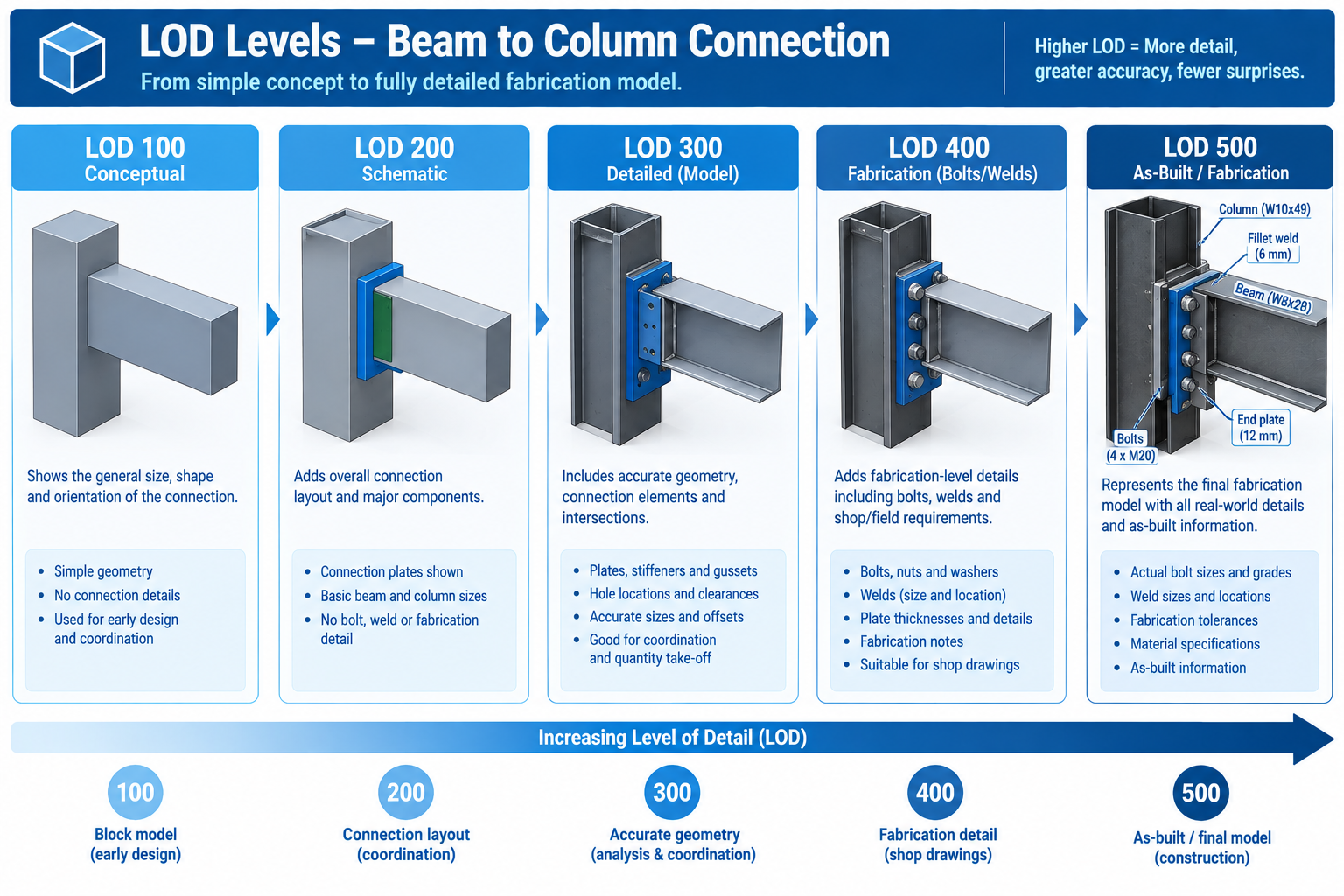
A large project’s workflow has to account for different buildings, zones, or systems sitting at different levels of design maturity on the same calendar date, since phased design and construction is the norm at this scale. Level of Development (LOD) describes how much geometric and data detail a model element carries at a given stage, and it directly determines what coordination check that geometry can meaningfully support.
Not suitable for clash detection; visualisation and space planning only
LOD 200
Generalised systems with approximate quantities and orientation
Schematic design
First stage for checking basic, large-scale spatial conflicts
LOD 300
Specific systems accurately sized, shaped, located, oriented
Design development
Formal, recurring clash detection across all disciplines should be fully underway
LOD 350
LOD 300 plus specific interfaces and connections (hangers, supports)
Late DD / early construction docs
Interface-level clashes (support/connection conflicts) become visible
LOD 400
Fabrication-level detail with manufacturer and fabrication info
Construction docs / shop drawings
Must be re-coordinated against the current design model before fabrication starts
LOD 500
As-built, field-verified installed condition
Construction completion / handover
Source of truth for the facilities model; discrepancies from LOD 400 should be captured
Mixed-LOD Coordination: The Reality on Large Phased Projects
A single coordination cycle may need to test an early-design Phase 3 building at LOD 200 against an under-construction Phase 1 building at LOD 400, particularly at shared interfaces like a connecting bridge or a common below-grade structure. This mixed-LOD condition is normal on large projects and needs explicit planning: for each interface between phases at different LOD, define which elements are fixed (adjacent phase already under construction) and which are still flexible.
The Common Data Environment Workflow
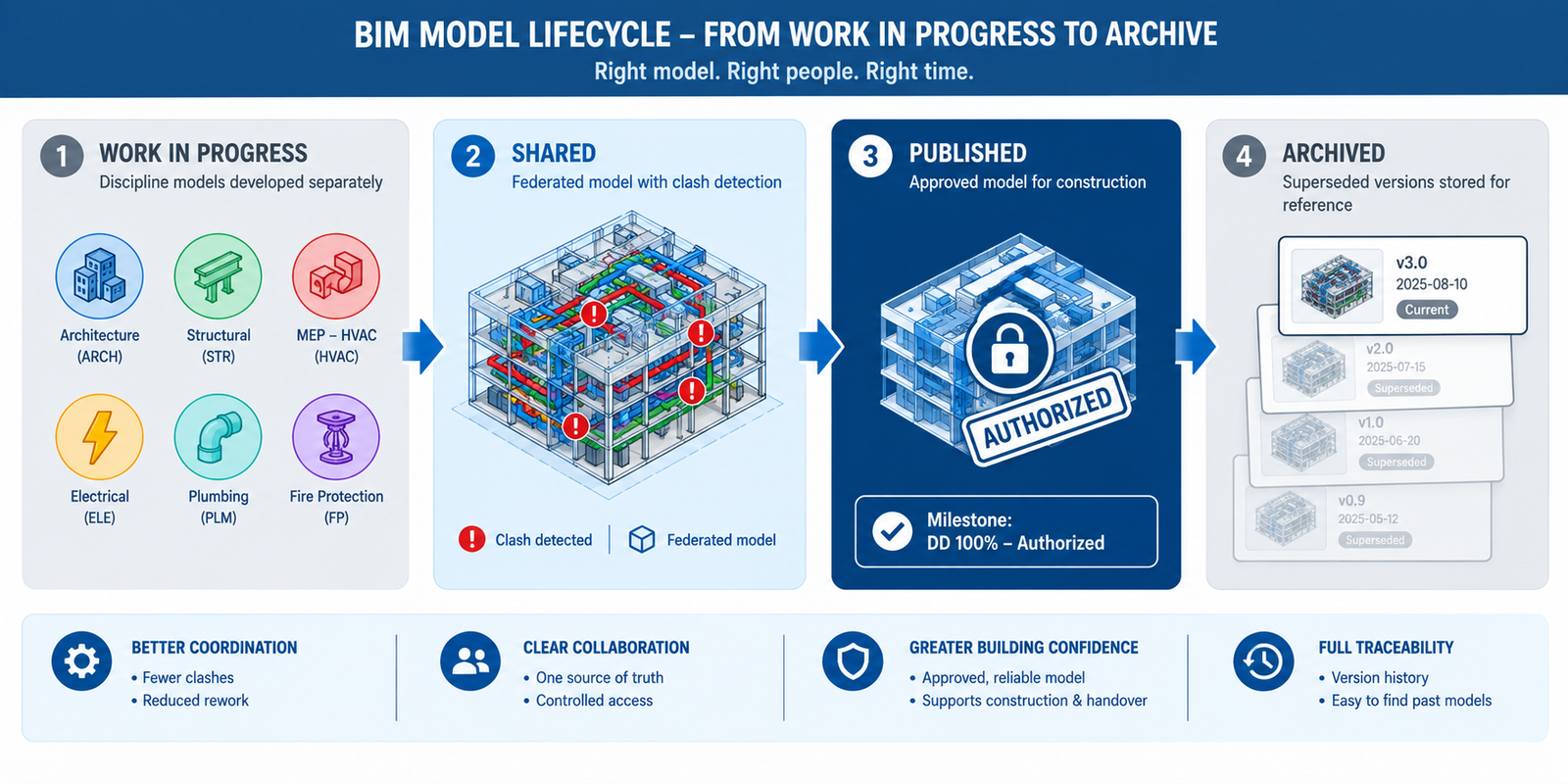
The common data environment (CDE), formalised internationally through the ISO 19650 series, is the information management structure that makes reliable coordination possible once a project has more participants than can informally track each other’s model versions through email and shared drives. The CDE defines four states every model version passes through.
CDE State
Purpose
What Moves It Forward
Common Pitfall
Work in Progress (WIP)
Where each discipline develops and iterates privately before sharing
Internal quality check and discipline lead approval
Sharing WIP-quality models directly, bypassing the quality check
Shared
Where models are federated and coordinated against each other; clash detection happens here
Outstanding critical clashes resolved; model authorised for formal issue
Treating Shared as final and proceeding to construction from an unauthorised version
Published
The formal, authorised milestone version used for issue, approval, and contractual purposes
A new milestone is reached and a superseding version is published
Continuing to reference a Published version after a newer one supersedes it
Archived
A permanent, immutable record of every previously Published version
Not applicable; retained for reference
Failing to retain a complete history, losing the ability to trace a decision later
The Publish Gate: The Step That Would Have Prevented the Campus Corridor Failure
The single workflow element most directly responsible for preventing a failure like the campus utility corridor breakdown is the formal gate between Shared and Published states. This is the point where the coordination team confirms a model version has been reviewed, critical clashes are resolved, and the version is authorised as the official reference for every downstream party. Without an enforced publish gate, every organisation independently judges which version is current, exactly the condition that produced three subcontractors working from three unreconciled corridor models.
Implementing the gate well requires more than software; it requires an agreed governance procedure specifying who has authority to publish, what review must be completed first, and how participants are notified when a new version supersedes the last. This is typically documented in the BIM execution plan and owned by the information manager.
Worked Examples
A multi-terminal airport expansion: An international airport expansion added a new terminal, a connecting people-mover system, and renovations to two operational terminals, coordinated across 34 firms over seven years. Early coordination attempts, using the same informal single-coordinator approach that had worked on smaller projects, fell behind within the first year, with clash reports taking over three weeks since the coordinator was manually federating models from five different native platforms with no shared CDE.
The project introduced a formal ISO 19650-aligned CDE with a dedicated information manager, split coordination into four parallel tracks (new terminal, people-mover, Terminal A, Terminal B), each with discipline BIM coordinators reporting to a project BIM manager, and defined an explicit interface register for connections between the new terminal and the existing operational terminals.
Clash report turnaround dropped from three weeks to five days once models were federated from a governed CDE, and the interface register caught a fire life-safety systems conflict between the new terminal’s smoke control system and Terminal A’s existing system nine months before it would otherwise have surfaced during commissioning, a stage where the conflict on an operational, occupied terminal would have carried substantially higher risk.
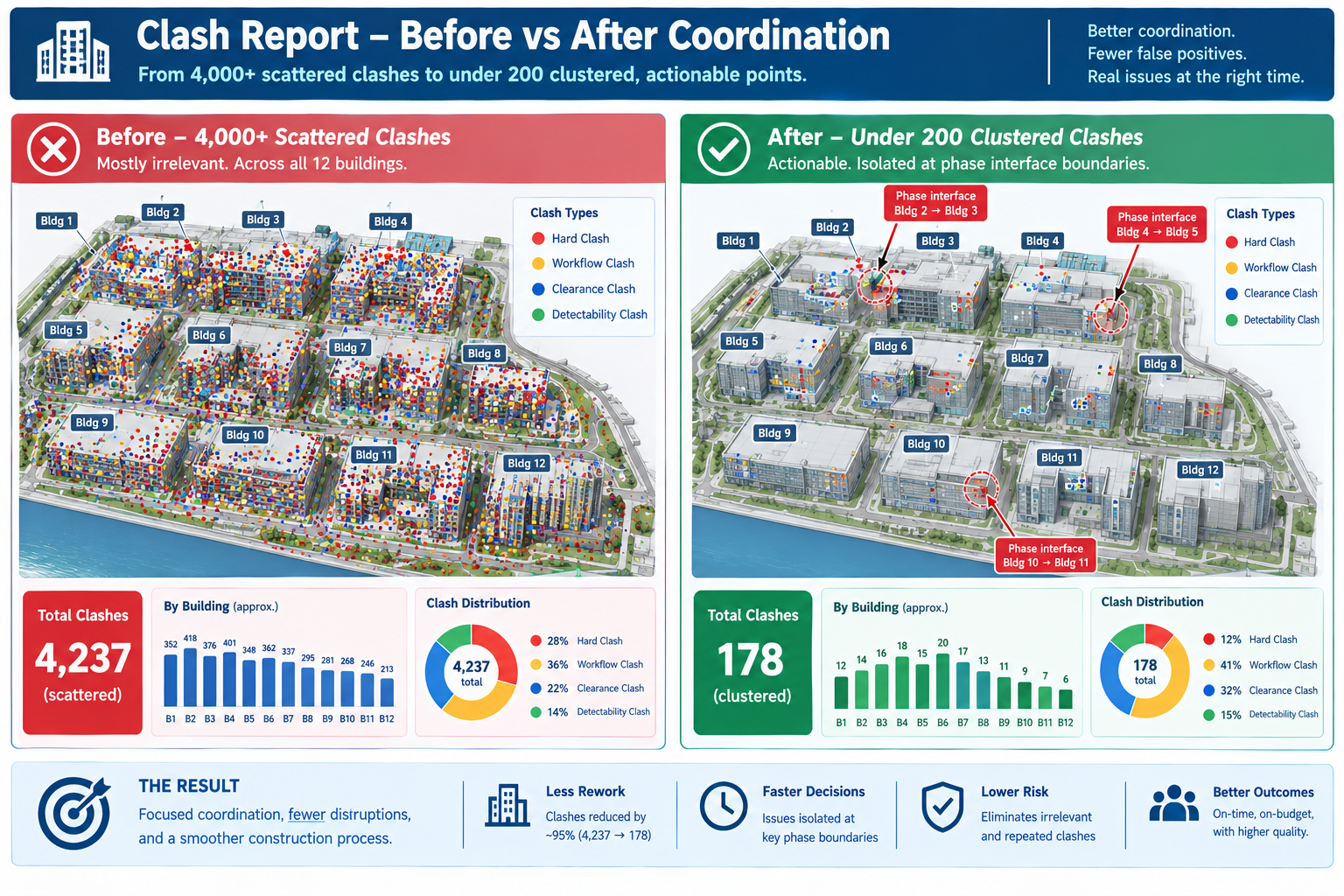
A mixed-use residential and retail campus: A twelve-building campus was designed and built in four overlapping phases over five years, sharing a common below-grade parking structure and central utility infrastructure. By year three, Phase 1 was at LOD 500 (as-built), Phase 2 under construction at LOD 400, Phase 3 in construction documentation at LOD 350, and Phase 4 still in schematic design at LOD 200, all sharing the same infrastructure.
Early attempts ran a single, uniform clash test across all twelve buildings together, producing an unmanageable mixed-LOD report where genuine Phase 3/Phase 4 interface conflicts were buried among thousands of low-value results from comparing precise LOD 400 geometry against approximate LOD 200 massing.
The team restructured the clash matrix to test each phase against itself at full detail, plus a separate, explicitly scoped interface-only test at each phase boundary, limited to the specific shared elements crossing between phases. This cut the weekly clash report from over 4,000 largely irrelevant results to under 200 genuinely actionable ones, and the interface-only tests caught a below-grade utility riser conflict between Phase 3 and Phase 4 while Phase 4 was still in schematic design, cheap enough to resolve with a routing change on paper.
Frequently Asked Questions
At what project size does a formal CDE and role structure become necessary?
There’s no fixed threshold, but the practical signal is when informal coordination starts producing version-confusion failures. Most projects with more than 8-10 firms, concurrent design and construction phases, or a schedule over two years benefit from a formal CDE and defined roles, even in a lighter-weight form.
Does ISO 19650 have to be formally adopted to get the benefit of a CDE workflow?
No. ISO 19650 gives a well-tested structure and vocabulary, but a project can implement the same underlying workflow, a governed staging process with a publish gate and version control, without formally certifying compliance. Adopt it informally if it solves the coordination problem; engage a qualified advisor only if a contract requires certified compliance.
How should a large project handle disciplines working at different LOD levels?
This is normal, not a problem to eliminate. Don’t force every discipline to the same LOD artificially. Instead, define for each interface between different-LOD zones which elements need general spatial checking versus precise geometric checking that requires both sides at LOD 300 or higher.
Who should own the BIM execution plan on a large, multi-stakeholder project?
Typically the owner’s project team or a designated lead consultant acting on the owner’s behalf, since the plan needs authority across every participating firm, which no single design firm or contractor can enforce over the others. Very large projects often engage an independent BIM management consultant for this role.
Why do large project coordination workflows break down even after being properly set up?
Usually because the workflow is documented at kickoff but not actively maintained as the participant list, phases, and staff change over a multi-year duration. A correct publish gate and role structure can degrade silently as new firms join without onboarding or as shortcuts creep back in under schedule pressure. Audit and reinforce the workflow at defined milestones, not just once at setup.
Key Takeaways
The campus utility corridor failure, and the airport and mixed-use campus examples, share a common lesson: on a large project, the coordination methods themselves are only as reliable as the workflow governing who’s working from which model version, at what stage, reporting to whom, and authorised by what gate. None of these failures happened because a discipline modelled something incorrectly within their own scope. Each happened because the structure connecting dozens of independently working organisations had a gap.
This is why large project coordination can’t simply be the same informal process used on a small project, scaled up by adding more people. It needs the explicit role structure, LOD-aware test planning, and governed CDE workflow set out here, built in from the earliest stages of the BIM execution plan and actively maintained through a duration that can span most of a decade.
The projects that get this right don’t have fewer moving parts than the ones that struggle; a twelve-building, five-year, multi-phase campus carries the same underlying complexity regardless of coordination quality. What differs is whether that complexity is managed through a defined, governed workflow that catches version confusion and interface conflicts before they reach the field, or discovered the way the campus utility corridor conflict was: three subcontractors quietly working from three different answers to the same question, until someone finally asked which one was right.
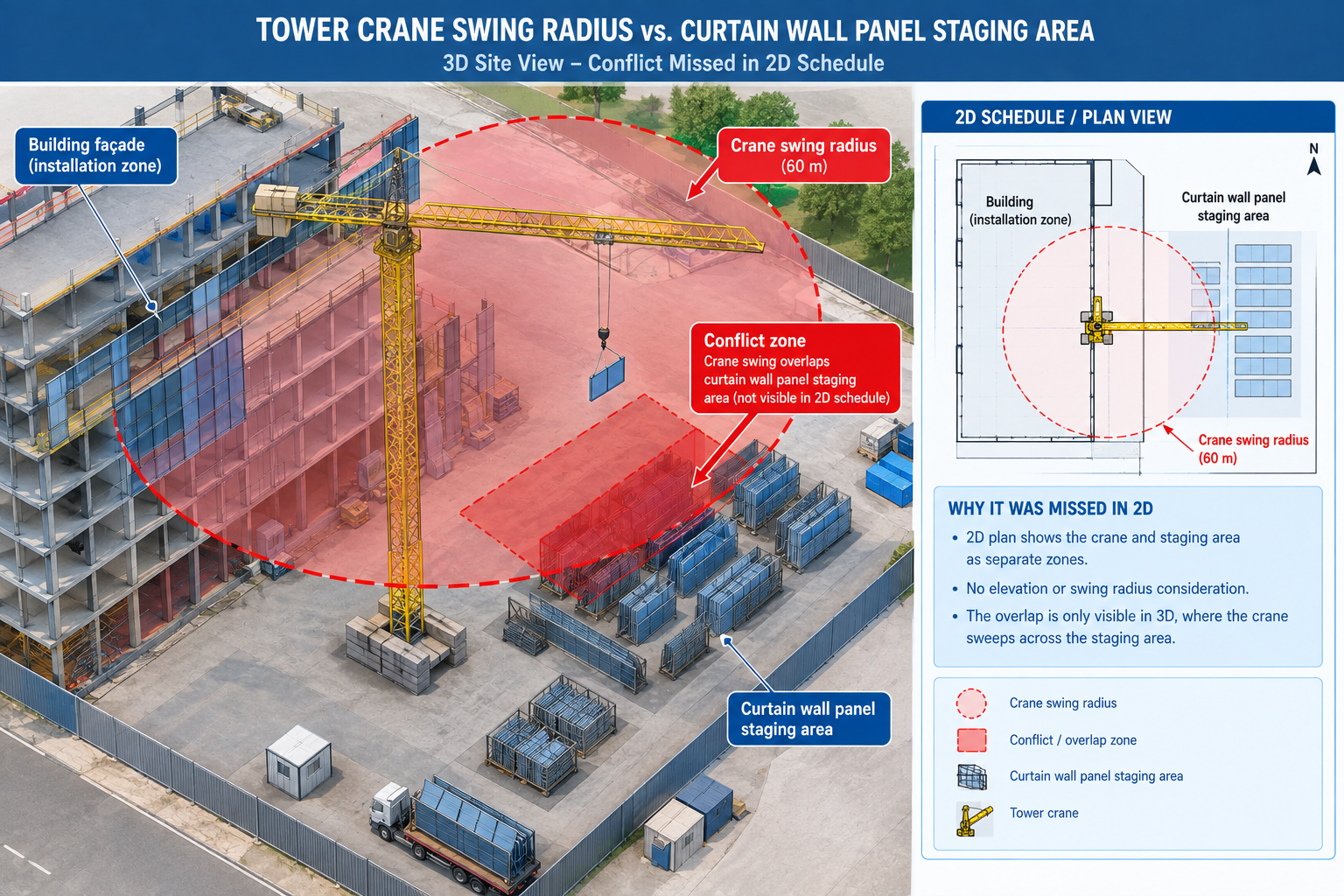
A 22-storey mixed-use tower was seven months into structural erection when the general contractor’s superintendent discovered that the tower crane’s planned swing radius for lifting curtain wall panels to the sixth floor would sweep directly through the staging area where those same panels were scheduled to be stored before installation. Two activities, each individually scheduled correctly, had never been checked against each other in three dimensions.
The schedule, built and maintained in a standalone scheduling tool with no link to the building model, showed both activities happening the same week because that week’s sequence looked correct on paper: steel substantially complete, curtain wall crew mobilised, crane available. Nobody had checked whether the crane could physically reach the panels without its swing path crossing the space where the panels themselves were sitting.
Quick answer: The conflict cost eleven days: four to identify a temporary alternate staging location, three to renegotiate the crane’s lift sequence with the steel erector, and four of lost curtain wall progress implementing the new sequence. Every individual activity in the original schedule had been logically planned. What was missing wasn’t planning discipline; it was a way to test the plan against the physical, three-dimensional reality of the site before committing crews and equipment to it. This is what BIM does for delay prevention: it’s not one tool that fixes delays generally, but a set of distinct methods, each targeted at a specific delay mechanism, from clash detection for physical conflicts to 4D simulation for sequencing conflicts.
This article covers the six most common causes of construction delay, the specific BIM dimensions and methods that address each one, the six-stage process for implementing BIM in a way that actually prevents delays, and two worked examples showing the argument in practice.
The Six Most Common Causes of Construction Delay, and What BIM Does About Each
Construction delays rarely have a single cause; they accumulate from recurring, well-understood problems that appear on nearly every project. What varies is how early each is caught and how disruptive the fix is once found.
Delay Cause
Description
Typical Schedule Impact
BIM Method / Tool
Design conflicts discovered on site
2D drawings didn’t reveal a physical overlap between systems before construction
1-4 weeks per major conflict
3D clash detection (Navisworks, Solibri) run on a recurring cycle through design
Inaccurate or incomplete quantity take-offs
Manual take-offs from 2D drawings are wrong, causing late reorders or oversupply
1-3 weeks per major shortfall
5D BIM quantity take-off and cost estimating tools, model-linked and auto-updating
Unclear or outdated construction sequence
The site team works from a static schedule that doesn’t reflect design evolution
1-6 weeks cumulative from repeated resequencing
4D BIM scheduling simulation, schedule linked directly to model elements
Late or unresolved RFIs
Design ambiguities aren’t caught until a subcontractor in the field can’t proceed
3-15 days per RFI cycle, multiplied by stalled critical-path work
Federated model as a common reference; cloud-based CDE for RFI tracking
Model-based fabrication with digital model handoff, bypassing 2D shop drawings
Poor stakeholder communication and approval delays
Owners, architects, and contractors interpret drawings differently
1-4 weeks per major disagreement
Cloud-based model viewers and common data environments for real-time shared visualisation
Why RFIs Are the Clearest Early-Warning Signal
Among these six causes, the volume and cycle time of requests for information (RFIs) deserves particular attention, since it’s the delay mechanism most directly visible in ongoing project data, long before the delay itself shows up in the schedule. An RFI is, by definition, a moment where the field can’t proceed without clarification, and every day it stays open is a day the affected activity, and often activities scheduled after it, can’t move forward with certainty. Projects that track RFI volume and cycle time as a leading indicator, rather than only reviewing schedule variance after the fact, can catch a coordination breakdown while it’s still a paperwork problem rather than a field delay.
A shared, coordinated 3D model reduces RFI volume by resolving underlying ambiguity before construction reaches that point, and reduces RFI cycle time for the RFIs that still occur by giving the responding party an exact model location and geometry to reference rather than a written description requiring back-and-forth clarification. Both effects compound: fewer RFIs, each resolved faster, is a meaningfully different schedule risk profile than a project relying on 2D drawings alone.
The BIM Dimensions That Do the Delay-Prevention Work
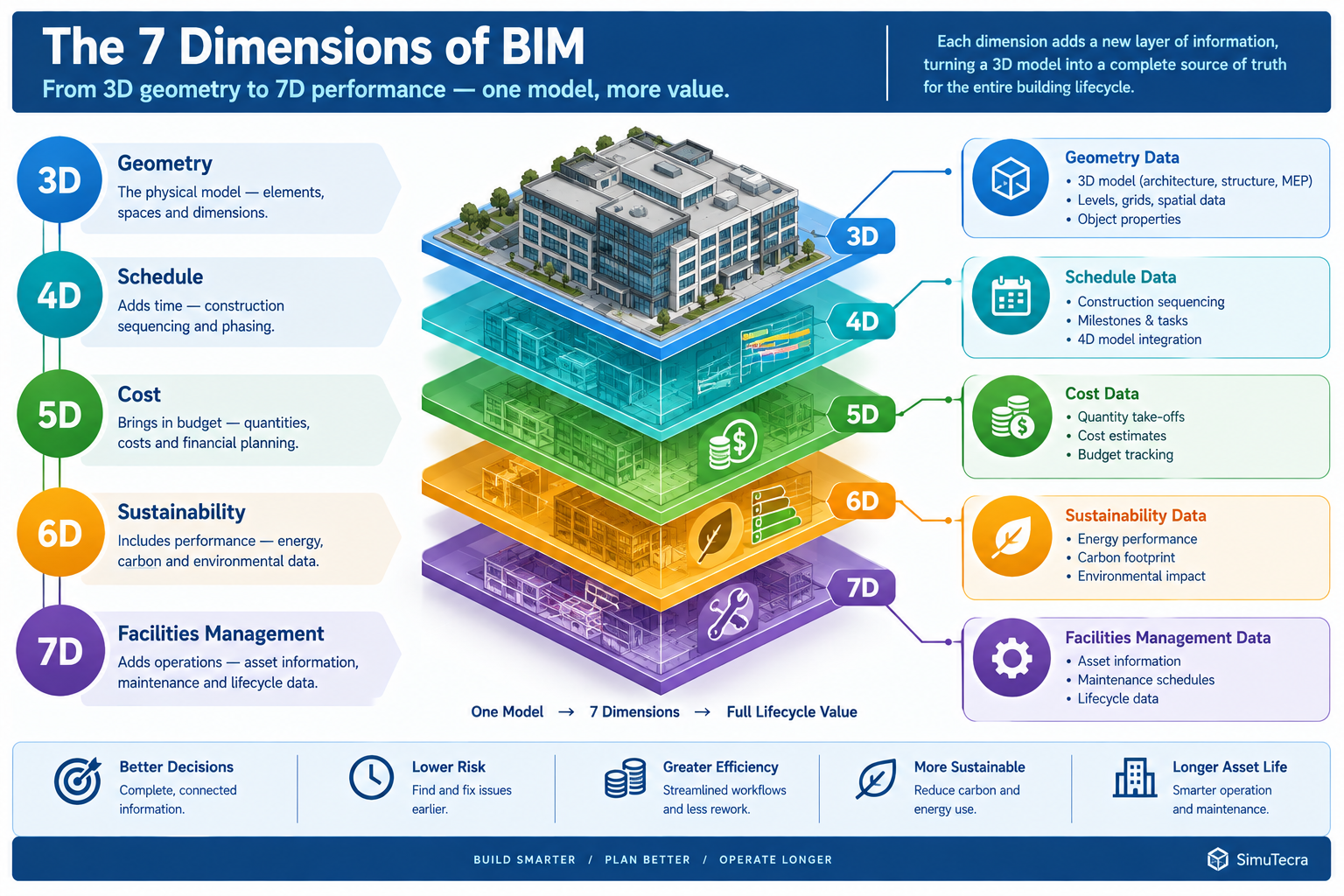
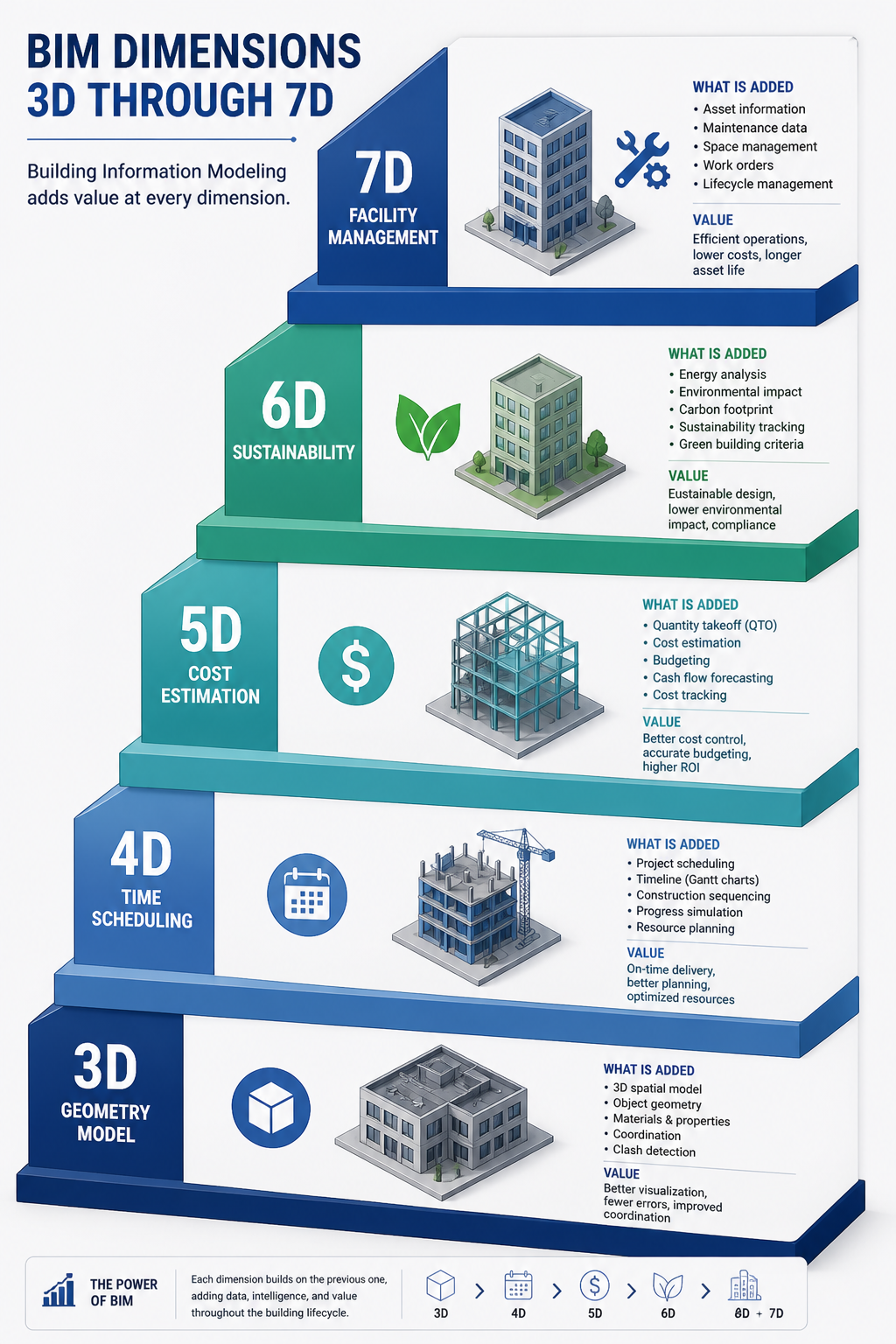
The “dimension” numbering (4D, 5D, and so on) is more convenient shorthand than a strict technical hierarchy, but each does correspond to a distinct type of data linked to the model and a distinct delay-prevention mechanism.
BIM Dimension
What It Adds
Delay-Prevention Mechanism
Representative Tools
3D, Geometry
Three-dimensional representation of every building element from every discipline
Makes physical conflicts visible before construction, replacing flat 2D overlay review
Revit, ArchiCAD, Tekla Structures
4D, Schedule
Schedule activities linked directly to model elements
Reveals sequencing conflicts, an element scheduled before its access route or preceding trade is complete, before it reaches the field
Navisworks TimeLiner, Synchro
5D, Cost
Cost data linked to model elements, auto-updating as design changes
Prevents late-discovered budget overruns from triggering mid-construction redesign scope cuts
Autodesk Assemble, CostX, Vico Office
6D, Sustainability
Energy and sustainability data linked to elements
Prevents late-stage code or certification compliance failures requiring redesign after construction starts
Autodesk Insight, IES Virtual Environment
7D, Facilities management
Asset and maintenance data linked to elements for post-construction use
Reduces commissioning delays from incomplete or inconsistent handover documentation
FM:Systems, Archibus, Autodesk Tandem
4D Scheduling: The Dimension Most Directly Tied to Delay Prevention
Of these dimensions, 4D scheduling aims most directly at delay prevention, since it’s the only one that tests the time dimension of the project against the model rather than cost, sustainability, or facilities data. The tower crane conflict is a canonical 4D problem: two activities correctly scheduled in isolation created a physical conflict only visible when their spatial footprint was checked against each other during the same time window. A 4D simulation run before the schedule is finalised, and re-run as the schedule and design evolve through construction, catches exactly this category of conflict before crews, equipment, and materials commit to a sequence that can’t physically work.
The practical value of 4D simulation depends heavily on keeping it current. A 4D model built once at project kickoff provides a useful early check but a false sense of security later if not updated as both the schedule and design continue to change. Projects that treat 4D simulation as a living tool, updated on the same recurring cycle as clash detection, catch sequencing conflicts throughout construction rather than only at the outset.
Implementing BIM for Delay Prevention: A Six-Stage Process
Owning BIM software, or even having each discipline produce a 3D model, doesn’t by itself prevent delays. The delay-prevention benefit comes from a disciplined process built around the model.
Stage
Activity
Common Pitfall
1. BIM execution planning
Define BIM goals, level of development requirements, model ownership, and specific delay-prevention uses before design begins
Treating the BEP as a compliance formality that’s signed but not actually followed
2. Model authoring and federation
Each discipline authors to the agreed detail level and federates into a shared environment on a recurring cycle
Inconsistent levels of detail across disciplines, hiding conflicts because one discipline hasn’t modelled that scope yet
3. 4D schedule linking
Schedule activities are linked to model elements and simulated to check access, logistics, and sequencing before the schedule is finalised
Building the simulation once at kickoff and never updating it as schedule and design evolve
4. Ongoing coordination and clash resolution
Clash detection continues on a recurring cycle through design and into early construction
Coordination slowing or stopping once construction starts, even though field conditions keep generating new conflicts
5. Fabrication and construction model handoff
Model geometry hands off directly to fabricators rather than being redrawn into 2D shop drawings
Fabricators working from an outdated model version due to unclear version control
6. Facilities handover and closeout
The as-built model, updated with field-verified changes, is delivered to the owner with asset and maintenance data
Deferring model updates until the end, producing a rushed, incomplete as-built model
The BIM Execution Plan: Where Delay Prevention Is Won or Lost
The first stage is disproportionately important because it defines whether the remaining five are actually structured to prevent delays or are simply producing a coordinated model as a documentation exercise. A BIM execution plan (BEP) that specifies model federation and clash detection but not 4D schedule linking will catch physical conflicts but miss sequencing conflicts of exactly the kind that delayed the tower crane example.
A BEP that doesn’t specify how the as-built model will be maintained through construction will produce a coordinated design model but a facilities handover gap at project close. Each specific delay-prevention use, clash detection, 4D sequencing, quantity take-off, fabrication handoff, facilities data, should be explicitly scoped in the BEP, since a model built without a defined use for a specific benefit rarely delivers that benefit by accident.
Measured Benefits: Where BIM’s Delay Reduction Shows Up in Project Data
Rather than treating “BIM reduces delays” as a single unmeasurable claim, each benefit ties to a specific project metric a scheduler or owner would already be tracking.
Benefit
Mechanism
Where It Shows Up
Caveats
Fewer schedule-impacting RFIs
Geometric ambiguities resolved in the coordinated model before construction
RFI logs and critical-path variance reports
Largest for MEP-heavy, congested-space projects; smaller relative benefit for simpler projects
Reduced rework and change orders
Conflicts caught in the model fixed as design changes rather than field improvisations
Change order logs and field rework tracking
Savings depend on how disciplined the resolution and verification process actually is
Faster procurement and fabrication cycles
Accurate, model-derived quantities shorten time from design finalisation to delivery
Procurement lead-time tracking and fabrication schedule adherence
Depends on trade contractors’ own fabrication capability and willingness to work from model data
More reliable schedule commitments
4D simulation identifies conflicts before the schedule is issued
Schedule variance reports and revision frequency during construction
Simulation quality depends on how current the underlying model and schedule data are
Shorter commissioning and closeout
Accurate, continuously updated as-built model reduces documentation gaps
Commissioning schedule adherence, substantial-to-final completion gap
Requires the owner’s facilities team to have systems in place to actually use the handover data
Why the Benefit Is Concentrated in Complex, Multi-Trade Projects
The delay-reduction benefit isn’t uniform across project types; it scales with the density of interdependent systems and trades, since that density determines how many opportunities exist for the kind of conflict BIM catches. A single-storey warehouse with a simple structural system and minimal MEP scope has relatively few opportunities for a tower-crane-style sequencing conflict or ceiling-void congestion, so the absolute delay-prevention benefit of a full BIM programme is smaller, even though the underlying methods still apply.
A hospital, laboratory, or high-rise mixed-use tower, with dense, interdependent MEP systems, tight sequencing, and multiple concurrent trades in the same physical space, is where the benefit concentrates most heavily, since those are exactly the conditions under which 2D-only coordination is least reliable.
Worked Examples
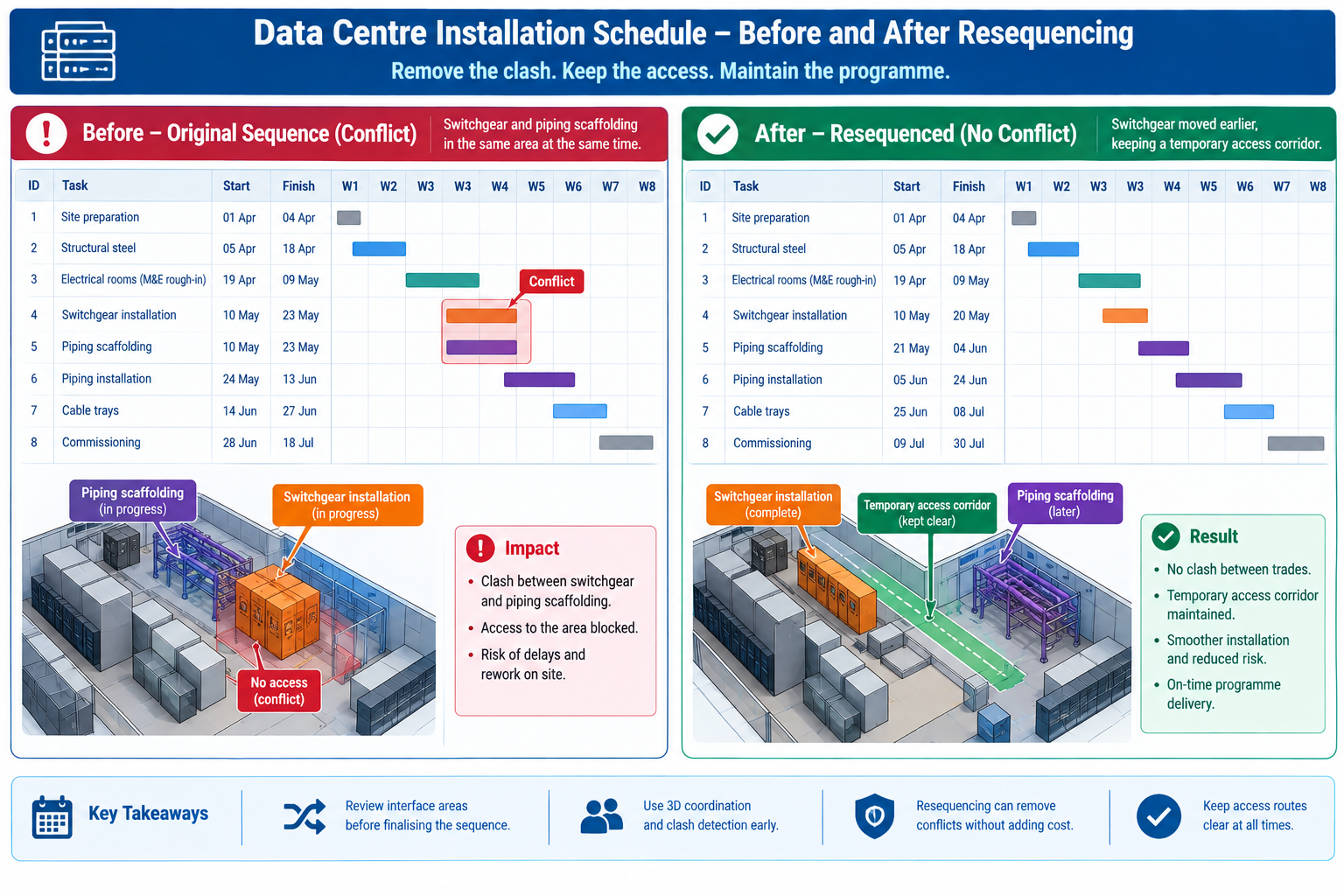
A data centre fit-out schedule: A hyperscale data centre fit-out had an aggressive 34-week schedule driven by a fixed equipment delivery date, with cooling infrastructure, electrical switchgear, and server rack installation sequenced to overlap heavily in the same rooms. The original schedule, built in a standalone tool by an experienced scheduler, showed a logically sound sequence with appropriate lead and lag times.
When linked to the coordinated model and simulated in 4D, the simulation revealed that the electrical switchgear installation crew, scheduled for weeks 18 through 21, would need access to a room that the cooling infrastructure crew’s overhead chilled-water piping, scheduled for week 17, would already have enclosed with scaffolding and temporary bracing blocking the switchgear’s only practical delivery path.
The simulation gave the team six weeks of advance warning, time to resequence the chilled-water piping installation to leave a temporary access corridor open until the switchgear was delivered and positioned, then complete the remaining piping afterward, a one-day schedule logic change made in the office. This avoided what the team estimated would otherwise have been a two-to-three week delay bringing in additional rigging equipment to manoeuvre the switchgear around completed piping and scaffolding, a delay that would have directly threatened the fixed equipment delivery date the entire schedule was built around.
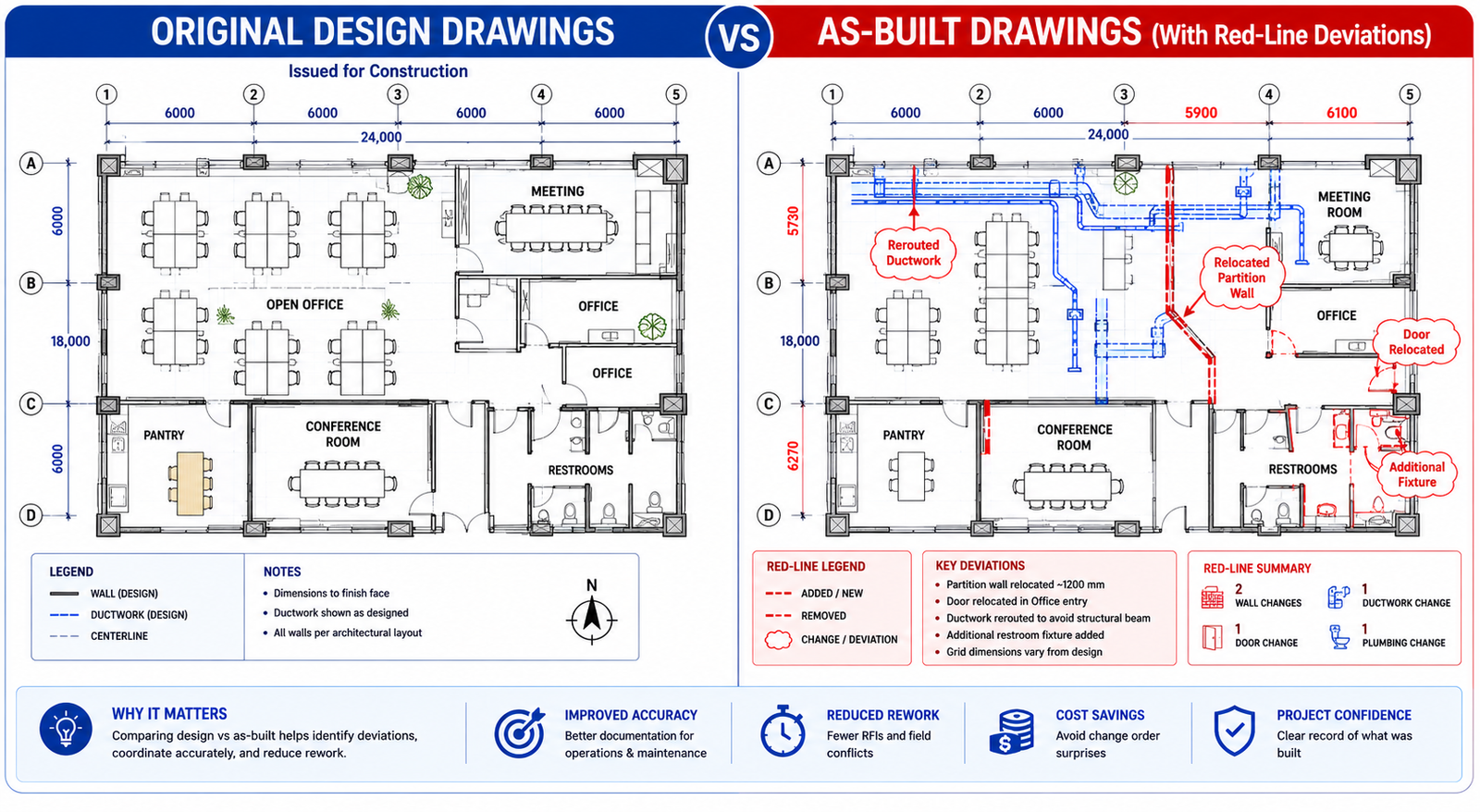
A renovation project with unknown existing conditions: A hospital renovation involved gutting and rebuilding three floors of an operating 1980s-era building while adjacent floors stayed occupied and in clinical use. The original design was based on the building’s archived 2D drawings, known to be incomplete and, in places, inconsistent with the building’s actual as-built condition after four decades of undocumented modifications.
The project team commissioned a 3D laser scan of existing conditions before finalising the renovation design, converting the point-cloud data into an as-built 3D model capturing the building’s true existing structure, ductwork, and piping routes, rather than relying on archived drawings. The new design was then coordinated directly against this verified as-built model.
Scan-based coordination identified 47 locations where the building’s actual condition differed materially from the archived drawings, including a structural beam relocated during a 1990s renovation, reflected in no drawing set, that would have directly conflicted with a new mechanical shaft location in the original design.
Because these discrepancies were identified against a verified model before construction began, the design was adjusted in the office rather than discovered by a demolition crew mid-renovation, in an occupied hospital where an unplanned structural or MEP discovery carries especially high schedule and safety risk. The team credited the upfront scanning investment with avoiding an estimated several weeks of cumulative delay that unknown existing-condition conflicts would otherwise have caused across the renovation’s three floors.
Frequently Asked Questions
Does BIM eliminate construction delays entirely?
No single method eliminates delays entirely, since some causes, weather, material supply chain disruption, labour availability, sit outside what a coordinated model and schedule simulation can address. BIM’s delay-prevention benefit concentrates specifically in the categories covered here: design conflicts, sequencing conflicts, quantity and procurement errors, RFI cycle time, fabrication errors, and stakeholder miscommunication. Projects with a mature BIM programme still experience delays from external causes; the argument for BIM is that it removes a specific, large, and largely preventable category of delay, not that it removes delay risk altogether.
How early in a project should 4D scheduling begin?
As soon as the design model and construction schedule both have enough detail to link meaningfully, typically once design has progressed into construction documentation and the contractor’s detailed schedule is being developed, though a preliminary 4D simulation using design-development-level detail can still catch major sequencing and logistics conflicts earlier. Both examples in this article depended on the simulation being run and reviewed well before the affected activities were due to start; a simulation reviewed only in the same week as the activity it covers provides little of the warning time that makes the method valuable.
Is BIM-driven delay prevention only relevant to large, complex projects?
The underlying methods apply at any scale, but the benefit’s magnitude scales with project complexity. A small, simple project with few interdependent systems will still benefit from basic 3D coordination and clash checking, but is less likely to justify the full cost of a 5D cost-linked or 7D facilities-management programme. Scope the BIM execution plan to the specific delay risks the project actually carries, rather than applying every available BIM dimension uniformly regardless of size.
Who is responsible for maintaining the 4D and coordination models through construction?
This should be explicitly assigned during BIM execution planning, typically to a BIM coordinator role that may sit within the general contractor’s project team, a dedicated BIM management subcontractor, or occasionally the design team depending on delivery method. The key requirement, regardless of who holds the role, is that the same party or a clearly defined handoff maintains both the coordination model and its link to the live construction schedule throughout the project, since a simulation or clash register that falls out of sync with the current design and schedule loses much of its delay-prevention value.
What is the most common reason a BIM programme fails to actually reduce delays?
Treating model creation as the deliverable rather than the coordination and scheduling process built around the model. The model finds conflicts, but a defined process for reviewing, prioritising, resolving, and verifying those conflicts, and for keeping the schedule link current, is what actually converts that information into prevented delays. A beautifully modelled building with no defined clash resolution protocol, no 4D update cadence, and no clear model ownership through construction will still experience most of the delay causes in this article’s opening table, because the model alone resolves nothing; the process around it does.
Key Takeaways
The tower crane conflict cost eleven days on a schedule where every individual activity had been planned correctly. The data centre and hospital renovation examples show what changes when the schedule and design are tested against each other, and against verified existing conditions, before crews and equipment commit to a sequence. In every case, the underlying problem was the same: a plan internally consistent on paper but never checked against the physical, three-dimensional, time-based reality of the actual site.
BIM reduces construction delays specifically because it makes that check possible before commitment rather than after, whether the conflict is geometric (caught by clash detection), sequential (caught by 4D simulation), or based on existing conditions the original drawings never accurately captured (caught by as-built scanning and model verification). None of these methods work by accident; each requires the deliberate process described in the six implementation stages, from execution planning through facilities handover, following the coordination framework in the National BIM Standard-United States, to actually convert model and schedule data into prevented delays rather than an expensive but unused coordination exercise.
Projects that build this process in from the start, and maintain it through the full construction period rather than treating coordination as a design-phase-only activity, consistently show fewer schedule-impacting RFIs, less rework, more reliable schedule commitments, and shorter closeout periods than projects relying on 2D coordination and standalone scheduling tools. The eleven days lost to the tower crane conflict, and the weeks avoided in the data centre and hospital examples, are the same underlying quantity viewed from opposite sides: the cost of not testing the plan against reality, and the value of testing it in time to still change course.
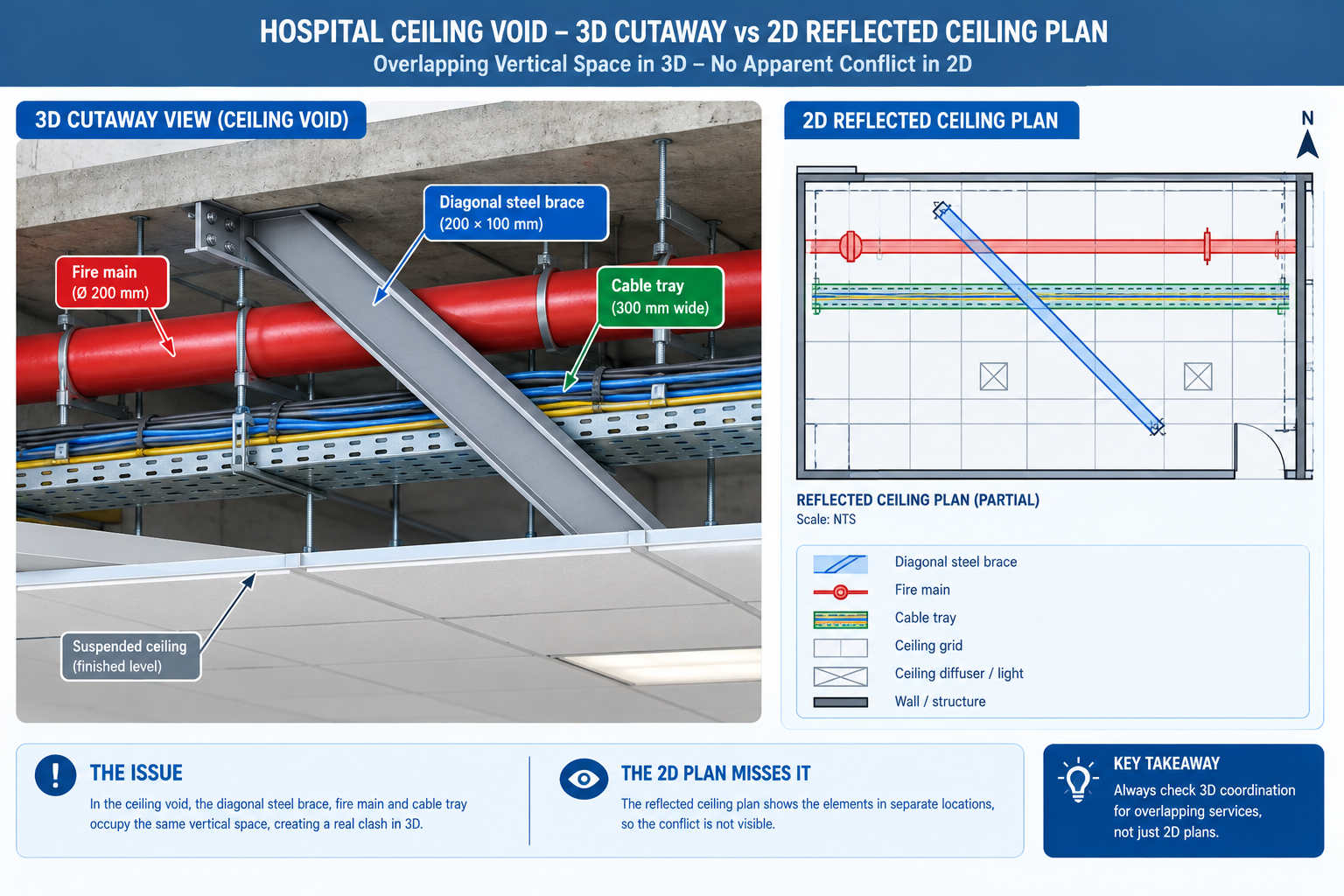
A 340-bed hospital project was six weeks from starting MEP rough-in on its fourth floor when the mechanical contractor’s foreman raised a question during a routine site walk: how was the fire suppression main, already fabricated and staged for installation, supposed to fit through the same 900mm ceiling void as the medical gas piping, the imaging suite’s cable tray, and the structural steel bracing installed two weeks earlier?
The 2D coordination drawings, produced by overlaying each trade’s reflected ceiling plan as flat, semi-transparent PDF layers, had shown no conflict. In three dimensions, the fire main, the cable tray, and a diagonal steel brace occupied the same 400mm of vertical space over an 18-metre run of corridor.
Quick answer: The conflict had existed since the structural bracing was added five months earlier, passing through three separate 2D drawing reviews because no single 2D overlay showed all three systems at once. This is the problem BIM clash detection exists to solve: three-dimensional conflicts that plan-view drawings, however carefully overlaid, cannot reliably reveal, because a 2D drawing collapses vertical position into a single flat view. Catching a conflict like this during design costs a few hours of model editing; catching it six weeks before fabricated pipe arrives on site costs nine days of schedule float and an emergency design change.
This article covers the five types of clashes a coordination process needs to catch, the measurable benefits of catching them before construction, the six-stage process that turns separate discipline models into a coordinated design, and a comparison of the tools used to run that process on real projects.
What BIM Clash Detection Actually Does
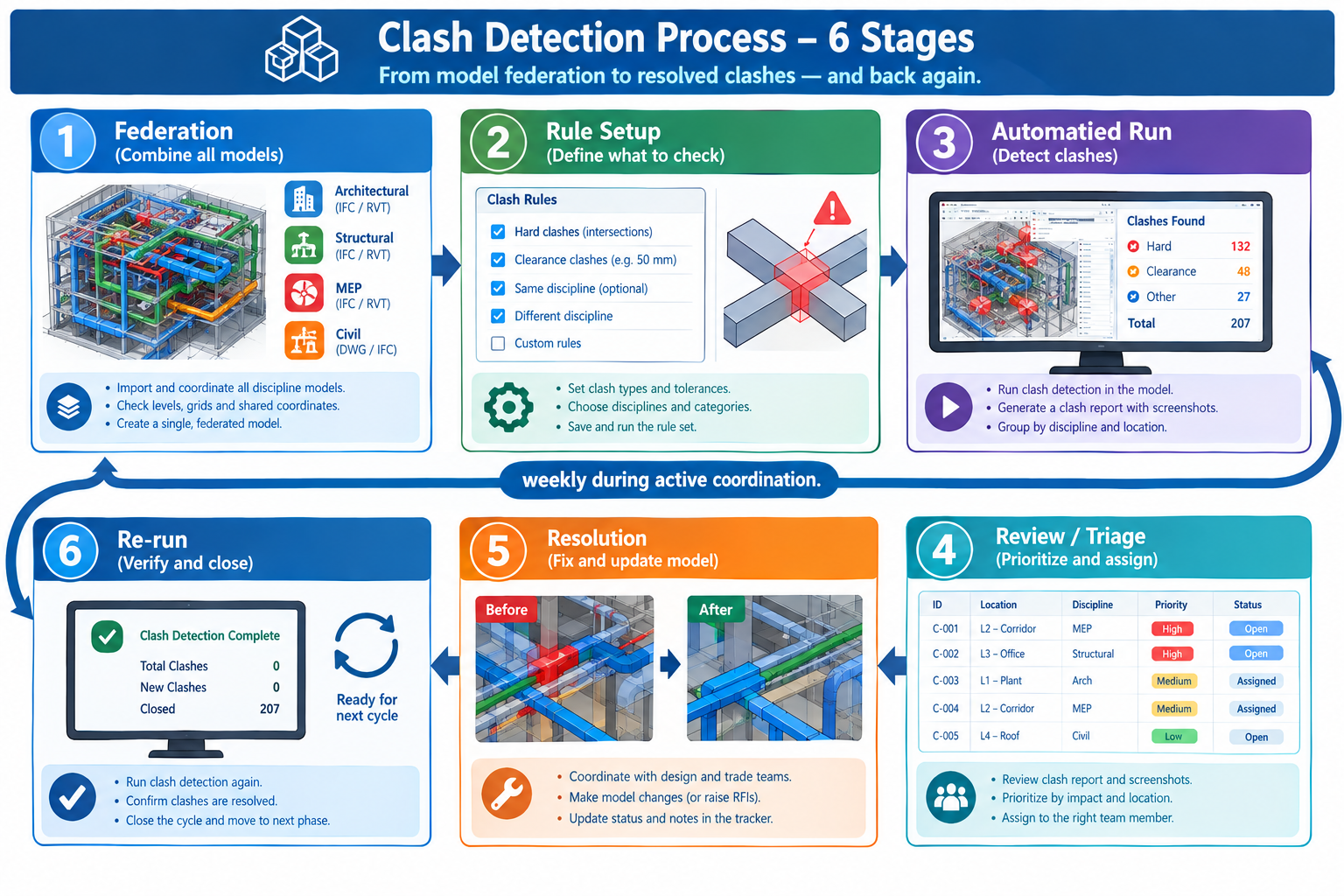
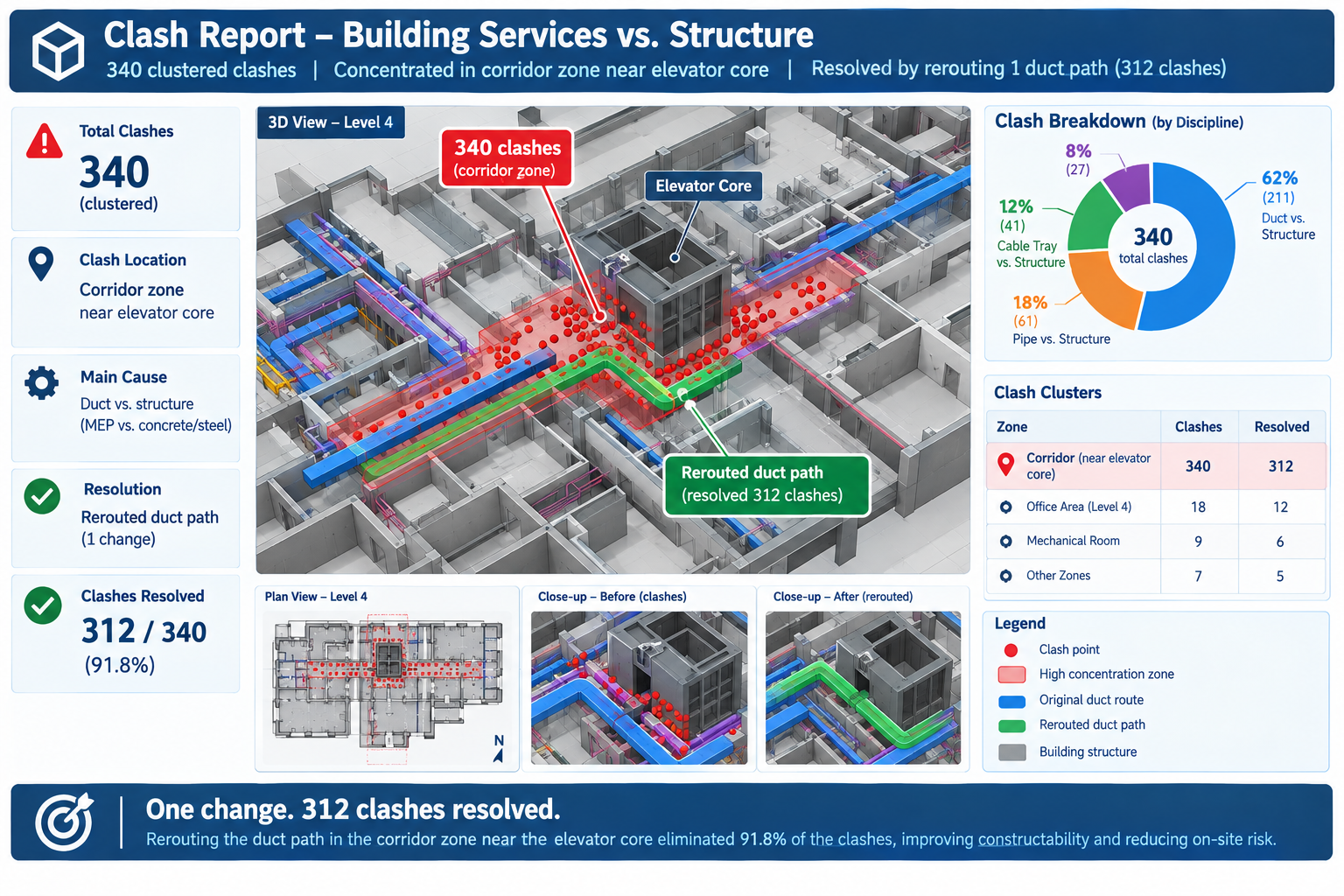
Clash detection is the automated process of testing the three-dimensional geometry of a federated Building Information Model, a shared model space bringing together individual discipline models from architecture, structure, mechanical, electrical, plumbing, and fire protection, to identify locations where elements from different systems conflict with each other or with a project rule. The output isn’t a design decision; it’s a list of specific, located conflicts, each tied to the exact elements involved and their model coordinates, that the coordination team then reviews, assigns, and resolves.
The distinction between clash detection and clash resolution matters because it defines what the software does versus what the process around it does. The software’s job is exhaustive and mechanical: test every element in one discipline’s model against every element in another’s, according to defined rules, and report every geometric overlap or rule violation, with no judgment about which conflicts matter most.
The coordination team’s job is everything after that: filtering out modelling artifacts that aren’t real conflicts, prioritising the ones that actually threaten schedule or budget, deciding which discipline moves, and confirming the fix worked. Treating the clash report as a finished deliverable rather than the start of a review process is one of the most common reasons coordination programmes underperform.
The Five Categories of Clashes a Coordination Process Should Test For
Relying only on hard-clash geometry testing misses the clearance, sequencing, and rule-based conflicts that cause just as much field disruption as a duct running through a beam.
Clash Type
Definition
Typical Example
Severity
Hard clash
Two physical elements occupy the same physical space
A structural beam passing through a ductwork run
Critical; cannot be built as drawn
Soft (clearance) clash
Elements don’t overlap but violate a required clearance or maintenance zone
A valve installed with less than code-required operating clearance
High; may install but creates an operational or compliance problem
Workflow (4D/sequencing) clash
No physical conflict, but construction sequence creates a scheduling or access conflict
A precast panel scheduled before the crane path is clear of scaffolding
Medium to high; causes schedule delay and resequencing
Non-collision clash (rule-based)
No overlap or clearance violation, but a business or design rule is violated
A duct routed through a designated clean room
Medium to high; life-safety and compliance rules often critical
Duplicate/redundant element clash
The same physical element modelled more than once by two disciplines
A structural engineer and architect both modelling the same slab edge
Low to medium; distorts quantities and coordination confidence
The Benefits of Clash Detection, Measured Where They Actually Show Up
The case for clash detection is easiest to make concretely: specific, measurable categories of cost and schedule risk shrink when conflicts are caught in the model instead of in the field.
Benefit
What It Solves
Where It Shows Up
Who Benefits Most
Reduced field rework
Physical conflicts discovered only when a crew tries to install the second system into occupied space
RFIs, change orders, demolition/re-installation cycles during rough-in
General contractors and MEP subcontractors carrying installation risk
Schedule certainty
Unplanned stoppages while a field conflict is redesigned and re-procured
Critical path activities in MEP and fire protection rough-in
Schedulers and owners with occupancy or lease-driven completion dates
Lower change order volume
Design conflicts caught only during construction, forcing an expensive change order
Owner change order logs
Owners and design teams carrying financial and reputational exposure
Earlier, cheaper design fixes
The same conflict is far cheaper to resolve as a model edit than a field fix
Design development and construction documentation phases
Design teams and owners managing a fixed design fee
Improved multi-trade coordination
2D overlay drawings don’t reliably reveal 3D conflicts in congested spaces
Coordination meetings across all disciplines
MEP coordinators and BIM managers running weekly meetings
Better as-built accuracy
Field-only fixes leave the model and as-built condition permanently out of sync
Facilities management handover
Facilities managers and owners operating the building long-term
Rework costs on uncoordinated projects are commonly cited at 5 to 10 percent of construction cost, and clash detection removes the large majority of the geometry-driven share of that figure. Model-based coordination is widely reported to substantially reduce coordination-related change orders compared with drawing-only coordination, consistent with the broader finding that the cost of correcting a coordination error rises by an order of magnitude at each stage it survives undetected.
What the Model-Based Process Would Have Caught
Had the hospital project run a federated clash test between the structural, mechanical, electrical, and fire protection models when the diagonal bracing was added, a hard clash between the brace and the fire main would have appeared automatically in that week’s clash report, five months before fabrication. The fix at that stage, adjusting the brace angle or rerouting a short section of the fire main, would have been a model edit costing a few hours of two disciplines’ time. The fix actually required, re-routing a fabricated fire main around an already-installed steel brace inside a congested ceiling void, consumed nine days of schedule float and required an emergency design change that delayed the floor’s inspection sign-off.
The Clash Detection Process: Six Stages From Federation to Closure
On any project of meaningful complexity, clash detection is a recurring cycle running throughout design development and continuing, at reduced frequency, through construction documentation and early construction.
Stage
What Happens
Common Pitfall
1. Model preparation and federation
Each discipline links its native model into a shared coordinate system inside a common platform
Mismatched origin points or level datums produce false clashes that waste review time
2. Clash test and rule set definition
The team defines which discipline pairs are tested, what clearance buffers apply, and which categories are excluded
Testing every discipline against every other with no buffers produces thousands of low-value soft clashes that bury critical hard clashes
3. Automated clash run
Software runs the defined tests and generates a report listing every detected conflict with location and severity
Running clashes only once at the end of design instead of on a recurring cycle lets conflicts accumulate undetected
4. Review, triage, and assignment
The team reviews the report together, confirms real conflicts versus false positives, and assigns ownership and priority
Reviewing clashes discipline-by-discipline in isolation lets each party defer resolution without a shared decision
5. Resolution and model update
The responsible discipline reroutes, resizes, or repositions the conflicting element and republishes the model
Resolving a clash locally without checking whether the fix creates a new conflict with a third, uninvolved discipline
6. Re-run and closure verification
The clash test is re-run to confirm the assigned clash is actually resolved and no new clash was introduced
Marking a clash closed based on a discipline’s report alone, without re-running the automated test
Why the Cadence of the Cycle Matters as Much as the Steps
A coordination process that runs these six stages once, at the end of design development, catches far fewer conflicts than the same process run weekly or biweekly throughout design, since every discipline is still actively changing their model, and a conflict introduced in week 10 won’t appear in a clash report generated in week 4. Mature coordination programmes typically run the full cycle weekly during the most active coordination phase, tapering to biweekly or on-demand once the clash count drops to a low, stable baseline.
The cadence also affects the coordination meeting itself. A team walking in with a clash report generated the same week discusses current, relevant conflicts. A team working from a month-old report is likely discussing conflicts one discipline has already partially resolved and others that no longer exist, wasting meeting time reconciling the report against the current model state before real coordination discussion can begin.
Clash Detection Tools: What Each One Is Actually Good At
No single tool covers every part of the process equally well. Most mature coordination programmes combine a geometric clash engine, a rule-based compliance checker, and increasingly a cloud-based issue tracker.
Tool
Primary Use Case
Typical Users
Notes
Autodesk Navisworks
Multi-discipline federation and automated clash detection
General contractors, MEP coordinators, BIM managers
Most widely used platform in construction; strong scheduling integration, steeper learning curve for rule-based setup
Solibri Model Checker
Rule-based model checking with strong code and standard compliance emphasis
Architects, code reviewers, owner QA teams
Particularly strong for non-collision and rule-based clashes; often used alongside Navisworks
BIM Collaborate (Autodesk Construction Cloud)
Cloud-based, continuous clash detection integrated with issue tracking
Distributed project teams needing real-time coordination
Removes manual federation, but requires all disciplines to publish to a shared cloud environment
BIMcollab
Cross-platform issue and clash management
Multi-vendor teams using different authoring tools
Uses BCF for cross-vendor issue exchange; typically manages clashes detected by another tool rather than detecting them itself
Trimble Tekla BIMsight/Connect
Federation and clash review for structural and precast-heavy projects
Structural engineers, precast/steel fabricators
Strong structural and fabrication-detail handling; less common as the primary MEP platform
Revit built-in interference check
Early, single-discipline or lightly federated checking during design development
Design teams performing preliminary self-checks
Useful first-pass check; not a substitute for a dedicated coordination platform
Choosing Between Desktop and Cloud-Based Coordination
The most consequential tool decision on most projects isn’t which specific software brand to use, but whether coordination runs on a desktop-federated model, where a BIM coordinator manually links each discipline’s exported file on a recurring cycle, or a cloud-based model, where each discipline publishes directly to a shared environment and clash detection runs automatically on every publish. Desktop federation gives more direct control over exactly which model versions are tested and is often preferred by small, co-located coordination teams. Cloud-based coordination reduces manual federation workload and gives near-real-time visibility, which tends to matter more with a large subcontractor pool or a geographically distributed design team.
Neither approach eliminates the need for review, triage, and resolution; a faster clash run only accelerates stage 3 of the six-stage cycle. Projects adopting cloud-based automatic clash detection without strengthening the review stage often end up with faster but not more effective coordination, more reports generated, same bottleneck at the human review stage.
Worked Examples
A commercial office tower ceiling void: A 32-storey office tower’s typical floor had a tightly constrained 600mm ceiling void carrying structural steel, HVAC ductwork, sprinkler mains, electrical bus duct, and data cable tray. Early coordination used 2D reflected ceiling plans reviewed independently by each trade, with the design team assuming the void depth was adequate based on a previous similar project.
The first federated clash test, run at roughly 60% model completion for mechanical and electrical, returned 340 hard clashes concentrated in the corridor zones outside the elevator core, where the largest primary ductwork, the fire sprinkler main, and the electrical bus duct all needed to cross the same limited ceiling void width at the same points. The clustering made clear that the 600mm void depth, adequate for a typical open office bay, wasn’t adequate where all major distribution systems converged near the core.
Rather than resolving 340 individual clashes one at a time, the coordination team used the clustering to identify the root design issue and raise it as a single decision: increase the void depth in that specific zone by 150mm, or reroute the primary ductwork through the adjacent open office bays instead. The team chose the reroute, implemented as a single change to the mechanical model. This resolved 312 of the 340 clashes in one model update, with the remaining 28 resolved individually in the next cycle. Because the pattern was caught at 60% model completion, the mechanical redesign was absorbed within the existing design schedule with no impact to the construction start date.
A precast parking structure column interface: A precast concrete parking structure had its column and beam connections modelled by the precast fabricator to a high level of detail, while the cast-in-place foundation and embedded electrical conduit were modelled separately by the structural and electrical engineers, on a coordination timeline running roughly two weeks behind the fabricator’s shop drawing schedule.
A clash test between the precast column base connection detail and the electrical conduit model found 14 hard clashes where embedded conduit for card-access control at ground-floor columns passed directly through the location reserved for precast column base plates and anchor bolts, a conflict invisible in either discipline’s drawings alone since the precast connection detail existed only in the fabricator’s shop model, not in the structural design model the electrical engineer had coordinated against.
Since the precast shop drawings were already in production and changing the anchor bolt pattern would have affected a connection type used at every ground-floor column, the team resolved the conflict by rerouting the conduit instead, adding a documented offset detail at each affected column. Resolving it as a single standard detail, rather than 14 separate site improvisations, meant the electrical contractor could issue one instruction covering every affected column, and the precast erection schedule proceeded without delay.
Frequently Asked Questions
At what stage of a project should clash detection start?
As soon as at least two disciplines have models with enough real geometry to test meaningfully, typically midway through schematic design or early design development, even with models still incomplete. Starting early catches large, structural-level conflicts (like the office tower ceiling void) while they’re still cheap to fix with a major routing decision, rather than waiting until construction documentation when the conflict can only be fixed by unpicking hundreds of already-detailed elements. Early clash detection produces more false positives from incomplete modelling, a reasonable cost for catching major conflicts while inexpensive to resolve.
Who is responsible for resolving a clash once it’s detected?
The clash report identifies the elements and disciplines involved, but resolution responsibility is typically assigned during review and triage based on project-specific coordination protocols, not automatically by the software. Common conventions: whichever discipline’s element is easier or cheaper to move (a duct is usually easier to reroute than a structural beam), whichever discipline routed later in the design sequence, or whichever the project’s coordination protocol designates as having priority in a given zone. These conventions should be agreed and documented before coordination begins, since disputes over whose model should change are a common source of resolution delay.
Does clash detection replace the need for a BIM coordinator or coordination meetings?
No. Clash detection software automates the geometric testing stage, but review, triage, assignment, and verification all require human judgment the software doesn’t perform. A BIM coordinator’s role shifts with mature tools from manually cross-checking drawings to managing the clash register, facilitating coordination discussion, and ensuring resolutions are actually verified by re-running the clash test, arguably a more valuable use of that role’s time, not one clash detection eliminates.
How many clashes is normal to find on a typical project?
Raw clash count varies enormously by project complexity, model maturity, and rule configuration, so it isn’t a meaningful benchmark alone. A more useful measure is the trend over time: a healthy programme shows open clash count rising as new disciplines’ models are added early in design, then declining steadily as resolution works through the backlog, converging toward a low, stable number by the time construction documents are issued. A flat or rising clash count through construction documentation signals the resolution stage isn’t keeping pace with detection.
Can clash detection be run without a full BIM model for every discipline?
Clash detection requires three-dimensional geometry to test, so a discipline still working in 2D drawings can’t be included in automated clash tests, limiting the programme’s coverage to disciplines that have modelled their scope in 3D. Many projects run a partial clash detection programme early, testing disciplines with adequate model maturity while others catch up, expanding the test matrix as more disciplines reach the required detail level. A project relying on 2D drawings for any major building system carries the same risk that produced the hospital corridor conflict, regardless of how well the 3D-modelled disciplines are coordinated.
Key Takeaways
The hospital corridor conflict existed in the design for five months before it was found, not because anyone reviewing the drawings was careless, but because the drawing format itself, separate 2D plan views, couldn’t show a three-way conflict between a diagonal brace, a duct, and a fire main occupying the same vertical space. This is the structural limitation clash detection exists to remove: three-dimensional conflicts require a three-dimensional test to be reliably found before they reach the field.
The office tower and precast parking structure examples show what that test looks like in practice: not a single pass/fail check, but a recurring cycle that surfaces conflicts early enough to fix as design decisions rather than field improvisations, and groups related conflicts so a team resolves a systemic issue once rather than fighting the same underlying conflict dozens of times. The software finds the conflicts; the process built around it, federation, rule definition, review, assignment, resolution, and verification, following the coordination protocols outlined in the National BIM Standard-United States, is what actually prevents them from reaching the job site.
Projects that treat clash detection as a checkbox run once before construction documents are issued get a fraction of its value. Projects that run it as a disciplined, recurring cycle throughout design, with a clear resolution protocol and a verified closure step, turn what’s otherwise an invisible risk, discovered only when a foreman looks up at the wrong moment, into a managed, tracked, and resolved part of the design process.
A property management company recently acquired a commercial office building. The previous owner handed over a set of architectural drawings from the original 1998 construction. Within six months, the new FM team needed to reconfigure an HVAC zone to accommodate a tenant fit-out. The drawings showed ductwork in one configuration. What was actually in the ceiling was something else entirely: two decades of undocumented modifications, rerouted runs, and added dampers that had never been captured in any drawing.
The tenant fit-out that should have taken four weeks took eleven. Three change orders were issued because contractors kept encountering conditions that contradicted the available documentation. The additional cost: just under $40,000. The root cause: no accurate as-built drawings.
This scenario is not unusual. It plays out in commercial buildings, industrial facilities, infrastructure projects, and residential developments around the world, every time a building changes hands, undergoes renovation, requires maintenance, or faces a regulatory inspection. The absence of accurate as-built drawings is one of the most consistently expensive and most consistently preventable problems in the built environment.
This guide explains what as-built drawings are, how they differ from related document types, who is responsible for producing them, what the legal and contractual requirements look like, how modern technology is changing the way they are created, and what happens when they are missing, incomplete, or inaccurate. Whether you are a building owner, facility manager, contractor, architect, or project manager, this is the foundational knowledge that protects you across the full lifecycle of a built asset.
1. What Are As-Built Drawings? A Clear Definition
As-built drawings, also called as-builts, record drawings, or as-constructed drawings, are a revised set of engineering and architectural drawings submitted at project completion that reflect how a structure was actually built, not how it was originally designed.
Every construction project begins with design drawings that represent the architect’s and engineer’s intent. These drawings are issued for permit, tendered against, and used to guide construction. But construction is not a perfect translation of design intent into physical reality. Materials get substituted, site conditions require routing changes, coordination issues move equipment, dimensions are adjusted in the field, and change orders modify the original scope. The gap between what was designed and what was built is not a failure of the construction process. It is a natural and expected consequence of building in the real world.
As-built drawings close that gap. They are the official, verified record of what was actually constructed: the exact dimensions, locations, elevations, routing, materials, and specifications of every element of the completed work. They become the authoritative technical reference for the building or structure for every purpose that comes after construction, whether that is routine maintenance, emergency repair, tenant fit-out, major renovation, asset sale, or regulatory inspection.
KEY POINT: The core definition. As-built drawings are the final, verified record of a construction project as it was actually built. They incorporate all field changes, substitutions, and deviations from the original design drawings, creating an accurate technical baseline for the building’s entire operational life.
The Construction Management Association of America (CMAA) defines as-builts as: a revised set of drawings submitted by a contractor upon completion of a project that reflects all changes made in the specifications and working drawings during the construction process, and shows the exact dimensions, geometry and location of all elements of the work completed under the contract.
That definition is precise and important. As-builts show the exact dimensions and location of all elements. Not approximate. Not mostly accurate. Exact, within the tolerances of the measurement methods used. This precision standard is what distinguishes a proper as-built drawing set from a lightly annotated copy of the original design drawings.
2. As-Built vs. Record Drawings vs. Shop Drawings: The Differences That Matter
These three document types are frequently confused, sometimes used interchangeably, and occasionally conflated in contracts in ways that create expensive disputes. Understanding the precise distinction between them is essential for anyone involved in construction documentation.
Document Type
Who Produces It
When Produced
What It Shows
Legal Status
Design / Construction Drawings
Architect or engineer of record
Before construction begins
Design intent: what is planned to be built
Basis for permit approval; contract document
Shop Drawings
Contractor or subcontractor
Before installation of a specific element
How the contractor plans to build or install something; fabrication details
Submitted for architect/engineer review and approval
As-Built Drawings
Contractor (GC and subs), verified by architect/engineer
During and after construction
What was actually built: all field changes, deviations, and substitutions from design
Part of project closeout package; often contractually required
Record Drawings
Architect or engineer of record
After construction, based on as-built markups submitted by contractor
Architect’s or engineer’s final updated set incorporating confirmed field changes
More formally verified than contractor as-builts; sometimes required for permit closeout
Measured / Survey Drawings
Specialist surveyor or scan-to-CAD firm
After construction or at any point during building’s life
Conditions as they exist, verified by physical measurement or laser scan
Independently verified; highest accuracy standard
The distinction between as-built drawings and record drawings deserves particular attention because the two terms are often used interchangeably but carry different implications of accuracy and responsibility.
As-built drawings: Produced by the contractor, based on field markups maintained during construction. They represent the contractor’s record of what was built. They are subject to the quality and diligence of whoever maintained the site markups. Accuracy varies significantly across projects and contractors.
Record drawings: Produced by the architect or engineer of record, incorporating the contractor’s as-built markups after verification. They carry the design professional’s stamp and represent a higher standard of accuracy and professional accountability than contractor as-builts alone.
Measured or survey drawings: Produced by independent measurement, either traditional survey methods or modern laser scanning. They are verified against the physical structure, not just against markup documentation. They represent the highest accuracy standard and are increasingly used where absolute dimensional accuracy is required, such as for heritage buildings, complex renovations, or high-precision facility management.
INSIGHT: Specify the document type in your contract. Construction contracts that specify ‘as-built drawings’ without defining the standard of accuracy or whether record drawings (architect-verified) are required frequently produce disputes at closeout. Be explicit: specify who produces the drawings, at what standard, and who verifies them.
3. Why As-Built Drawings Matter After Construction Is Complete
The case for as-built drawings is sometimes framed as a documentation compliance requirement, something to produce at project closeout because the contract or the AHJ (authority having jurisdiction) requires it. This framing undersells the actual value by a significant margin. As-built drawings are not a paperwork obligation. They are the foundational technical document for everything that happens to a building after the construction team leaves.
Facility Operations and Maintenance
Facility management teams make decisions daily about building systems based on what the documentation tells them is there. Where are the main water shutoffs? Which electrical circuit feeds which zone? Where does the HVAC trunk line run before it splits into branch ducts? How deep is the gas main below the parking lot surface?
When as-built drawings are accurate, maintenance technicians can answer these questions from a drawing, plan their work, order the right parts, and complete the job without surprises. When as-builts are missing or inaccurate, the answers are discovered empirically, often by opening walls, cutting into ceilings, or digging up slabs. That discovery process is expensive, disruptive, and sometimes dangerous.
As the Matterport as-built documentation research notes, accurate records allow facility management teams to rapidly diagnose and resolve maintenance issues. When a maintenance issue arises related to supply grilles that were relocated during construction but never updated in the drawings, the FM team searching for them in the wrong location loses hours. Across a large portfolio, undocumented changes accumulate into a significant hidden operational cost.
Renovation and Tenant Fit-Out
Every renovation project begins with a question: what is behind this wall, above this ceiling, and under this floor? For structural renovations, the answer determines whether a wall can be removed. For MEP modifications, it determines how new systems connect to existing infrastructure. For tenant fit-outs, it determines construction cost, timeline, and the potential for change orders.
When renovation designers work from accurate as-builts, they can develop designs that account for actual conditions. When they work from outdated or inaccurate documentation, they discover reality during construction, in the form of change orders, schedule delays, and contractor disputes. Published research consistently cites rework as accounting for 12 to 15 percent of construction costs on a typical project. A meaningful portion of that rework is attributable to designs developed without accurate as-built information.
DATA: Rework cost impact. On a typical construction project, rework accounts for 12 to 15 percent of total construction cost. With accurate as-built documentation enabling better preconstruction planning, laser scanning data shows rework rates can be reduced to 1 to 3 percent (GP Radar laser scanning research).
Asset Sales and Due Diligence
Commercial property transactions involve extensive due diligence on the physical condition and documentation of the building. Buyers, their lenders, and their technical advisors will request as-built drawings as part of the documentation package. Missing or incomplete as-builts are a red flag that increases buyer perceived risk, which translates directly into price pressure or deal conditions.
More practically, a property transaction that closes without complete as-built documentation transfers the risk of undocumented conditions to the new owner. If concealed systems require emergency repair, the new owner has no baseline documentation against which to understand what was original construction and what was a previous modification. The cost of reconstructing accurate documentation after the fact is substantially higher than producing it at construction closeout.
Legal and Dispute Resolution
Construction disputes frequently involve questions about what was actually built versus what was contracted, designed, or specified. As-built drawings are the primary evidentiary record for resolving those questions. A contractor who can demonstrate that a deviation from the design was documented, approved, and incorporated into the as-built set is in a fundamentally different legal position than one relying on verbal accounts of field decisions made three years earlier.
From the Law Insider contract clause analysis of as-built requirements: the standard contract clause requires contractors to provide accurate, updated drawings reflecting the completed project, specifically to ensure that the owner receives a clear record of the finished work, facilitating future maintenance, renovations, or audits. When as-builts are missing or disputed, the cost of reconstruction or litigation can exceed the cost of having produced them properly at project completion by an order of magnitude.
Regulatory Compliance and Inspections
In many jurisdictions, as-built drawings are required for occupancy certification, permit closeout, or ongoing regulatory compliance. Facilities subject to fire safety regulations, building codes, environmental permits, or health and safety standards may face inspection requirements where as-built documentation must be produced on demand. An organization that cannot produce accurate as-builts when required by the authority having jurisdiction faces permit violations, occupancy restrictions, or mandatory remediation costs.
In the UK, the Building Safety Act 2022 introduced what practitioners call the Golden Thread: a requirement for buildings above a certain height to maintain a continuously updated digital record of the building, its systems, and all changes made throughout its lifecycle. As-built documentation is the foundation of that Golden Thread. Failure to maintain it is not an administrative shortcoming; it is a legal liability.
4. What As-Built Drawings Must Include: The Complete Content Checklist
A complete as-built drawing set for a construction project is not simply the original drawing set with a few annotations. It is a comprehensive documentation package that covers every system and element of the completed construction. The specific content requirements vary by project type and jurisdiction, but the following checklist represents the standard for a complete commercial or institutional building as-built package.
Architectural As-Builts
Floor plans with all verified dimensions, room boundaries, and partition locations as constructed
Ceiling plans showing finished ceiling heights, ceiling types, and locations of access panels
Elevations (exterior and interior) reflecting final materials, window and door locations, and surface finishes as installed
Building sections at all critical conditions, updated to reflect as-constructed structural and architectural relationships
Detail drawings updated to reflect any substituted materials, modified connection details, or site-adjusted dimensions
Door and window schedules updated to reflect any substitutions or field changes
Finish schedules updated to reflect material substitutions approved during construction
Structural As-Builts
Foundation plans with verified pile or footing locations, dimensions, and depths
Structural floor and roof framing plans with member sizes, spans, and connection types as constructed
Updated sections at all critical structural conditions
Any field-modified connection details or member substitutions
INSIGHT: The MEP as-builts are the most critical and most frequently incomplete. MEP systems are the primary reason as-builts matter for facility management. Routing of concealed ductwork, piping, and conduit is impossible to reconstruct without as-built documentation. Yet MEP as-builts are also the drawings most frequently produced from memory or estimate rather than actual field measurement. Require field-verified MEP routing in your contract.
5. Who Is Responsible for As-Built Drawings?
Responsibility for as-built drawings is one of the most frequently disputed questions in construction closeout, and the answer is less straightforward than most owners expect. Multiple parties have roles, and the consequences of unclear contract language about those roles play out as delayed project closeout, incomplete documentation packages, and disputes over final payment.
The General Contractor’s Role
In most contracts, the general contractor is the party primarily responsible for maintaining as-built markups throughout construction and producing the as-built drawing package at closeout. The GC maintains a set of construction drawings on-site that are updated continuously as field changes occur: each substituted material is noted, each rerouted pipe is marked, each dimension that was adjusted in the field is corrected.
The quality of this process varies enormously across projects and contractors. A disciplined GC with a strong site superintendent who maintains real-time redline markups will produce as-builts that are genuinely accurate. A GC who defers all markup documentation until the last week before closeout, relying on memory and subcontractor records, will produce as-builts that are incomplete, approximate, and unreliable.
Subcontractor Contributions
Individual trades maintain their own as-built markups for their scope of work. The mechanical contractor tracks all ductwork routing changes. The electrical contractor maintains updated single-line diagrams and conduit routing plans. The plumbing contractor documents all pipe routing deviations and invert elevation changes. These subcontractor markups feed into the GC’s master as-built package.
The coordination of subcontractor as-built documentation is a GC management responsibility. When subcontractors submit their closeout packages late, incompletely, or in incompatible formats, the GC’s as-built package suffers. Contracts should require subcontractors to maintain as-built markups throughout their work and submit them in a defined format and timeline.
The Architect’s and Engineer’s Role
The architect and engineers of record have a role in reviewing and verifying the contractor’s as-built markups, and in some contracts, in producing formally updated record drawings that incorporate the verified field changes. This is an important distinction: contractor as-builts and architect-produced record drawings carry different levels of professional accountability and are not interchangeable in regulated environments.
As the LiDAR As-Built Drawings analysis of responsibility notes: on existing buildings, responsibility typically falls on the building owner or whoever is commissioning documentation for a renovation, permit, or facility management purpose. When as-builts are needed retroactively with verified accuracy, owners and project managers increasingly hire a third-party as-built documentation provider, removing the ambiguity entirely.
The Owner’s Role and Responsibility
Owners bear responsibility for two things that directly affect as-built quality. First, contract language: owners who do not require as-built drawings in their contracts, or who specify them vaguely, should not be surprised when they receive incomplete or inaccurate documentation at closeout. Second, project management: owners who allow final payment to be released before as-built documentation has been reviewed and accepted have lost their primary leverage for ensuring quality documentation.
WATCH OUT: Do not release final payment or retainage until as-builts are accepted. Final payment and retainage release are the primary contractual levers for ensuring complete as-built documentation. Once a contractor has received full payment and demobilized, the incentive to produce or correct as-built documentation is dramatically reduced. Review and accept the as-built package before releasing final payment.
6. Legal and Contractual Requirements: What Owners and Contractors Must Know
The legal and regulatory landscape for as-built drawings is genuinely complex because it varies by jurisdiction, project type, contract form, and applicable regulatory framework. The practical answer to ‘are as-built drawings legally required?’ is: sometimes yes by regulation, almost always yes by contract, and invariably yes by the practical needs of operating and maintaining the built asset.
Regulatory Requirements
In many jurisdictions, submitting as-built documentation is a condition of final occupancy certification or building permit closeout. The authority having jurisdiction (AHJ), typically a municipal building department, fire marshal, or combination thereof, may require as-built drawings demonstrating that what was built matches what was permitted, or that approved deviations from the permitted design have been documented.
For public works projects (roads, utilities, government buildings), as-built documentation requirements are almost universally mandatory and are often specified in the project contract with public agencies. Municipal water and sewer utilities typically require as-built utility plans for all new infrastructure before accepting the system into their maintenance responsibilities.
In the UK, the Building Safety Act 2022 established the Golden Thread requirement for higher-risk buildings: a continuously updated digital record of the building, its structural and fire safety systems, and all changes made throughout the building’s life. As-built documentation is the origin point of that Golden Thread. Similar requirements are emerging in other jurisdictions under various names.
Contractual Requirements
Even where regulation does not mandate as-built drawings, standard construction contracts almost universally require them. The AIA A201 General Conditions of the Contract for Construction, one of the most widely used contract forms in US commercial construction, requires the contractor to prepare as-built drawings and submit them to the architect as a condition of project closeout.
The contract requirements to look for and define clearly include:
Format: Are as-builts required as marked-up paper copies, AutoCAD DWG files, Revit models, PDFs, or some combination? Specifying ‘as-built drawings’ without defining the deliverable format produces disputes about what constitutes compliance.
Who produces them: Contractor as-builts, architect-produced record drawings, or independently verified survey drawings? Each has different accuracy implications.
Who verifies them: Does the architect or engineer of record review and sign off on the as-built package before it is accepted? This verification step is critical for accountability and accuracy.
Timing: When must as-builts be submitted relative to substantial completion, final completion, and final payment? Requiring submission at substantial completion rather than final completion provides a review window before the contractor fully demobilizes.
Standards compliance: Must as-builts comply with a specific drawing standard (NCS, AIA layer guidelines, client-specific standards)?
IN PRACTICE: Contractual protection. The Law Insider analysis of as-built contract clauses confirms that the standard clause requires the contractor to provide as-builts immediately following completion and approval of the facilities, with final payment conditioned on receipt of an acceptable documentation package. Owners who do not have this language in their contracts should add it.
7. How As-Built Drawings Are Created: From Red-Lines to Laser Scanning
The method used to produce as-built drawings has a direct impact on their accuracy, the time and cost of production, and their usefulness for downstream applications. In 2026, the industry is in active transition from manual red-line methods to digital documentation workflows, and the difference in output quality is significant.
Method 1: Manual Red-Line Markups
The traditional as-built documentation method is the red-line markup: the site superintendent or project engineer maintains a set of printed construction drawings on-site and marks up changes in red pen as they occur. At project completion, these marked-up drawings are scanned and submitted, or the markups are transferred to CAD files by a drafter.
This method is inexpensive and requires no special technology. Its limitations are significant. It relies entirely on the discipline of the site team in recording changes as they occur. Changes that are not recorded immediately are often forgotten or reconstructed from memory at closeout. The accuracy of hand-measured field dimensions is limited by the care taken with the tape measure, and concealed systems (pipes buried in slabs, conduit above finished ceilings) cannot be verified after construction without destructive access.
Method 2: CAD Drafting from Field Notes
An improved version of the manual approach involves a dedicated drafter, either internal or from an engineering design service, creating updated CAD drawings from the site superintendent’s field notes, sketches, and redline markups. This produces cleaner, more legible as-built drawings than raw redline scans, but inherits all the accuracy limitations of the underlying field records.
For most standard commercial construction projects, this remains the most common as-built production method. It produces documents that are adequate for facility management purposes when the field records are complete and the drafter is experienced. It is not adequate for high-precision applications or for buildings with complex MEP systems where routing accuracy is critical.
Method 3: 3D Laser Scanning (LiDAR)
Laser scanning has transformed as-built documentation in the past decade, and in 2026 it is rapidly becoming the standard of care for commercial and institutional projects where accuracy matters. A LiDAR scanner fires millions of laser pulses per second, measures the return time of each pulse with sub-millimeter precision, and builds a complete three-dimensional point cloud of the scanned space, capturing every visible surface in the scan environment.
That point cloud can then be used to produce as-built drawings in AutoCAD or Revit with tolerances of plus or minus 3 to 5 millimeters, significantly more accurate than manual measurement methods, and capable of capturing geometry that would be impossible to measure manually (complex ceiling structures, curved surfaces, multi-level spatial relationships).
DATA: Laser scanning time savings. What used to take weeks of manual field measuring takes days with 3D laser scanning. Large sites that previously required weeks of survey time can be scanned in hours, with higher accuracy and without access to concealed systems after construction is complete (LiDAR Precise Plans, 2026 guide).
Laser scanning limitations: LiDAR scanners capture visible surfaces only. They cannot see inside walls, above solid ceilings, or below concrete slabs. For existing buildings where MEP systems are already concealed, laser scanning documents what is visible. For new construction where scanning occurs before finishes are installed, it can capture far more. The timing of scanning relative to construction progress is therefore important in maximizing scan coverage.
Method 4: Scan-to-BIM
The highest-value as-built documentation method for complex buildings is Scan-to-BIM: using laser scan point cloud data as the geometric basis for building an accurate Revit or other BIM model of the as-built conditions. The resulting BIM model is not just a set of drawings. It is a data-rich, three-dimensional representation of the building that can be used for facility management, energy modeling, renovation design, and digital twin development.
Scan-to-BIM workflows are more time and cost-intensive than traditional as-built drafting, but they produce a documentation asset that delivers value over the full lifecycle of the building. The iScano 2026 as-built documentation best practices guide captures the direction the industry is moving: 2026 best practices demand a continuous digital representation of the asset, not just a static PDF.
8. The True Cost of Missing or Inaccurate As-Built Drawings
The cost of not having accurate as-built drawings rarely appears as a line item in any budget. It accumulates across years of building operation in the form of extended maintenance times, change orders on renovation projects, permit submission failures, and dispute costs. Understanding the full cost picture makes the investment in quality as-built documentation easy to justify.
Scenario
Typical Cost of Inaccurate As-Builts
How It Arises
MEP renovation or fit-out
$10,000 – $150,000+ in change orders per project
Designers specify work based on documented routing; contractors encounter actual conditions; change orders resolve the gap
Emergency MEP repair
Additional 4-12 hours of investigation per incident
Maintenance teams cannot locate shutoffs, routing paths, or connection points without accurate documentation
Permit submission failure
2-6 week delay plus resubmission cost
AHJ rejects permit because submitted drawings do not match actual conditions as visible during inspection
Property transaction due diligence
$15,000 – $50,000 in retroactive documentation
Buyer requires accurate as-builts; seller must commission retroactive documentation or accept price reduction
Regulatory compliance failure
Variable; potentially significant for regulated facilities
Inability to demonstrate that built conditions match permitted or approved design
Structural renovation conflicts
$20,000 – $200,000+ depending on scale
Structural modifications designed without accurate knowledge of existing conditions require costly field adjustment
Legal dispute
$50,000 – $500,000+ in legal and reconstruction costs
Inability to establish what was actually built becomes central to construction defect or workmanship dispute
The construction industry data on rework is instructive here. Research from GP Radar’s laser scanning analysis finds that on a typical construction project, rework accounts for 12 to 15 percent of construction costs, and that the ability to catch conflicts before they happen through accurate as-built and scan data can reduce rework rates to 1 to 3 percent. The mechanism is the same whether the conflict is in new construction or renovation: working from accurate documentation prevents the expensive discovery of reality during construction.
9. As-Built Drawings in the Digital Age: BIM, Scan-to-CAD, and the Golden Thread
The as-built drawing is evolving from a static PDF deliverable produced at project closeout into a living digital record that is continuously maintained throughout a building’s life. This shift is driven by technology, by regulation (particularly the UK Building Safety Act’s Golden Thread requirements), and by the increasing sophistication of facility management and asset management practices.
BIM as the As-Built Platform
Building Information Modeling is transforming what as-built documentation can be. A BIM model is not just geometry. It is geometry with embedded data: material specifications, equipment manufacturer and model numbers, maintenance intervals, warranty information, spatial relationships between systems, and links to external documents. When this model reflects as-built conditions, it becomes a facility management asset of significant value.
Owners who invest in Scan-to-BIM as-built documentation at project handover receive more than a set of drawings. They receive a queryable, three-dimensional record of their building that their FM teams can use for maintenance planning, space management, energy modeling, and renovation design throughout the building’s operational life.
The Digital Twin Connection
As-built BIM models are the foundation for digital twins: continuously updated virtual representations of physical assets connected to real-time sensor data. For commercial buildings, a digital twin built on an accurate as-built BIM model enables predictive maintenance, energy optimization, occupancy management, and safety monitoring. The Matterport as-built documentation analysis notes that digital twins ensure as-builts are always updated when changes are made to buildings, creating a continuous documentation loop that eliminates the historical problem of documentation drifting out of accuracy with the physical asset over time.
The Golden Thread: Regulatory Driver for Digital As-Builts
The UK Building Safety Act 2022 introduced the Golden Thread concept as a legal requirement for higher-risk buildings: a single, accessible, continuously updated digital record of the building and all changes made to it throughout its lifecycle. As-built documentation is the starting point and the foundation for Golden Thread compliance.
The implications extend beyond UK regulation. The Golden Thread concept reflects a broader industry direction: buildings increasingly need continuously maintained digital records, not just static documentation packages produced at construction completion. Organizations that invest in high-quality digital as-built documentation today are building the infrastructure for whatever regulatory and operational requirements emerge over the next decade.
AI and the Future of As-Built Documentation
Emerging AI capabilities are beginning to accelerate as-built documentation workflows. AI-powered tools can extract dimensions and annotations from point cloud data, auto-generate drawing sheets from BIM models, identify discrepancies between design drawings and scan data, and flag potential documentation gaps. While these capabilities are still maturing in 2026, the trajectory is clear: as-built documentation that once required weeks of manual drafting will increasingly be produced in hours through AI-assisted scan-to-drawing workflows.
10. Best Practices for As-Built Documentation
Whether you are an owner, a general contractor, a project manager, or a facility professional, the following practices consistently distinguish organizations that manage as-built documentation well from those that struggle with incomplete or inaccurate records.
For Owners and Project Managers
Specify as-built requirements in the contract before executionDefine the deliverable format (CAD, BIM, PDF), who produces it, who verifies it, the accuracy standard required, and the submission timeline relative to substantial and final completion. Vague contract language produces vague documentation.
Require progressive documentation, not end-of-project dumpsRequire the GC to maintain current redline markups throughout construction and submit interim as-built updates at defined milestones. End-of-project reconstruction of field changes from memory is the primary cause of as-built inaccuracy.
Link final payment to as-built acceptanceDo not release retainage or final payment until the as-built documentation package has been reviewed, found complete, and formally accepted. This is the primary contractual lever available to owners and it is consistently under-used.
Consider laser scanning for MEP-intensive facilitiesFor buildings with complex mechanical, electrical, or plumbing systems where routing accuracy is critical for future operations, a LiDAR laser scan at practical completion, before ceilings and finishes conceal systems, is a cost-effective investment in building lifecycle value.
For General Contractors
Assign as-built markup responsibility on day oneDesignate a specific person (superintendent, project engineer, or MEP coordinator) responsible for maintaining as-built redlines from the first day of construction. Do not treat this as a closeout activity.
Require subcontractor as-built submissions as a condition of final subcontract paymentMirror the owner’s leverage with your own subcontractors. Make sub-tier as-built documentation a condition of final payment release at the subcontract level.
Use digital markup tools where possibleConstruction project management platforms (Procore, Autodesk Construction Cloud, PlanGrid) allow digital redlines to be maintained on mobile devices at the point of work. Digital markups are easier to transfer into final as-built drawings than handwritten notes on paper plans.
Do not produce as-builts from memory at closeoutThis is the single most common cause of as-built inaccuracy. If field changes were not documented as they occurred, the most honest and defensible path is to commission a survey or scan of the actual conditions rather than reconstruct undocumented changes from recollection.
For Facility Managers and Building Owners
Audit your existing as-built documentationMost buildings more than ten years old have as-built documentation that is significantly out of date due to accumulated undocumented modifications. Audit your documentation against actual conditions, identify the gaps, and commission updated documentation before the next renovation or system modification project.
Establish a documentation update protocol for facility modificationsEvery time a system is modified, a partition is relocated, or new MEP infrastructure is added, update the as-built documentation as part of the work scope. The discipline of continuous documentation maintenance prevents the accumulation of undocumented changes that makes documentation unreliable over time.
11. FAQ: As-Built Drawings Answered
What is the difference between as-built drawings and record drawings?
As-built drawings are produced by the contractor and reflect the contractor’s record of field changes made during construction. Record drawings are produced by the architect or engineer of record, incorporating the contractor’s as-built markups after professional review and verification. Record drawings carry the design professional’s stamp and represent a higher standard of accuracy and professional accountability. In practice, the terms are often used interchangeably in contracts, which can create disputes. Specify clearly which document type you require, including the standard of accuracy and who bears professional responsibility for verification.
Are as-built drawings legally required?
The answer depends on jurisdiction, project type, and contract. In many jurisdictions, as-built documentation is required for building permit closeout or occupancy certification. For public works, utility installations, and government buildings, it is almost always contractually and regulatory mandatory. In the UK, the Building Safety Act 2022 requires continuously maintained digital building records (the Golden Thread) for higher-risk buildings. For private commercial projects, as-built documentation is typically required by the construction contract rather than by statute, but the contractual requirement is nearly universal in standard contract forms. The most direct answer is: for any project above a modest scale, you should assume as-built documentation will be required, and plan accordingly.
Who pays for as-built drawings?
The cost of producing contractor as-built markups during construction is typically included in the general contractor’s contract scope. The cost of a drafter converting those markups to final CAD drawings is also typically the GC’s responsibility unless the contract specifies otherwise. Architect-produced record drawings are typically a separately defined service in the architect’s contract, compensated as part of construction administration services. Laser-scanned as-built documentation, when required at a higher accuracy standard than standard contractor as-builts, may be either a GC deliverable (if specified in the contract) or a direct owner-commissioned service from a specialist provider. Retroactive as-built documentation for existing buildings is always an owner cost, typically commissioned from a specialist survey or scan-to-CAD firm.
How accurate do as-built drawings need to be?
The accuracy standard depends on the intended use. For general facility management and renovation design, drawings accurate to plus or minus one inch (25 mm) are typically sufficient. For structural and mechanical system design where clearances and connections are critical, plus or minus one-quarter inch (6 mm) accuracy is the appropriate standard. For high-precision applications such as industrial facilities, clean rooms, or heritage building restoration, the accuracy standard may be plus or minus 3 to 5 millimeters, achievable only through laser scanning. Specifying the accuracy standard in the contract, rather than accepting whatever the contractor delivers, is the way to ensure the documentation is actually usable for its intended purpose.
What happens if as-built drawings are missing for an existing building?
If as-built drawings are missing or substantially out of date for an existing building, the options are: commission a new measured survey using traditional methods (tape measure and total station), commission a laser scan of the building to produce a high-accuracy point cloud that can be drafted to CAD, or reconstruct documentation from available sources (original design drawings, old permit records, maintenance notes, and field inspection) accepting that the resulting drawings will have higher uncertainty than measured documentation. For buildings undergoing significant renovation, a laser scan is almost always the most cost-effective approach because the accuracy it provides reduces the change order risk that inaccurate documentation generates during construction.
How long should as-built drawings be retained?
Retention requirements vary by jurisdiction and project type, but the practical standard for building as-built documentation is: retain for the full operational life of the building plus applicable statutory limitation periods. For commercial buildings, this typically means indefinitely, since buildings have multi-decade operational lives and the documentation becomes more valuable, not less, as the building ages and its original construction team disperses. For regulated facilities (industrial plants with environmental permits, healthcare facilities, defense buildings), consult applicable regulations, which may specify minimum retention periods. The practice of discarding as-built drawings when they seem ‘out of date’ is one of the primary causes of expensive documentation reconstruction projects.
Conclusion: As-Built Drawings Are a Building Asset, Not a Paperwork Obligation
Every building is, in some sense, a documentation project as well as a construction project. The physical structure has a finite life determined by materials, maintenance, and use. The documentation record, if well maintained, can outlast multiple building lifetimes as the accumulated knowledge of what was built, how it was modified, and what decisions were made at each stage of the building’s evolution.
As-built drawings are not a closeout checkbox or a bureaucratic formality. They are the foundational technical document for everything that happens to a built asset after the construction team leaves: every maintenance decision, every renovation design, every regulatory inspection, every property transaction, and every emergency repair. The quality of that documentation determines how quickly, accurately, and cost-effectively all of those activities can be conducted.
The scenario at the opening of this guide, a $40,000 overrun on a tenant fit-out caused by undocumented MEP modifications, is not an unusual story. It is a routine outcome of undocumented construction changes in a building that changed hands without complete as-built documentation. It is also entirely preventable.
Produce complete as-builts. Maintain them through every modification. Make documentation update a standard part of every facility change order scope. And when documentation is missing or out of date for an existing building, invest in accurate reconstruction before the next renovation project reveals the cost of not having it.
Need accurate as-built drawings for your project or facility?
Explore our related guides on version control for engineering drawings, what CAD drafting costs in 2026, how to write a complete RFQ for CAD and drafting services, and the differences between in-house and outsourced CAD drafting to build a complete technical documentation framework for your organization.
Introduction: The Question Every Engineer and Architect Faces
At some point in your career in construction, architecture, or civil engineering, someone has asked you about BIM. Maybe your firm just mandated it. Maybe a client put it in the project specification. Maybe you have been using AutoCAD for a decade and you are trying to understand what all the noise is about.
The short version: Building Information Modeling is not just a software upgrade. It is a fundamentally different way of thinking about what a design file is supposed to do. A CAD drawing shows what a building looks like. A BIM model knows what a building is made of, how much it costs, when each piece gets installed, and how it should be maintained for the next 50 years.
That distinction has enormous practical consequences for how projects are designed, coordinated, built, and operated. This guide walks through exactly how BIM works, where it overlaps with CAD software, where the two serve different purposes, and what this means for engineers and architects working on real projects today.
Quick definition: BIM (Building Information Modeling) is a digital process that creates an intelligent, data-rich model of a building or infrastructure project. Unlike CAD which stores geometry, BIM stores information about materials, costs, schedules, and specifications linked directly to every element in the model.
What Is BIM? A Clear, No-Jargon Explanation
BIM stands for Building Information Modeling. Each word matters.
Building: It covers not just buildings but infrastructure, bridges, tunnels, roads, utilities, and any constructed asset.
Information: Every element in the model carries data. A wall knows its material, fire rating, acoustic performance, cost, and the date it is scheduled for installation.
Modeling: The representation is three-dimensional and parametric, meaning changes to the model propagate intelligently across all views and documentation.
The result is a living, coordinated digital asset that serves the entire project team, from design and engineering through construction and facility management. That is what BIM is in practice.
BIM Is a Process, Not Just Software
This is the part most people miss when they first encounter BIM. Buying a Revit license does not mean you are doing BIM. BIM methodology is about how information flows between disciplines, who owns which part of the model, how changes are communicated, and how the model is used after the building is constructed.
A project team that uses Revit but still coordinates via emailed PDFs and resolves clashes on site is using BIM software without a BIM workflow. The software is only the tool. The process is the point.
What Information Does a BIM Model Actually Contain?
This is what separates BIM from geometry-only CAD approaches:
Performance data: thermal resistance, fire rating, acoustic value, structural capacity
Cost data: unit rates, estimated totals, procurement status
Schedule data: installation sequence linked to the construction programme
Supplier information: manufacturer, product code, lead time, warranty
Maintenance data: service intervals, replacement parts, expected lifespan
Regulatory information: compliance with building codes and environmental standards
When all of this sits inside the model rather than in disconnected spreadsheets and specification documents, the information stays coordinated and current as the design evolves. That is the fundamental value proposition of BIM in construction.
BIM Dimensions Explained: From 3D to 7D
You will often see BIM described in terms of dimensions: 3D BIM, 4D BIM, 5D BIM, and so on. Each dimension adds a layer of information to the model. Here is what each one means in practice.
3D BIM is now standard on any serious construction project. 4D and 5D BIM are increasingly required on large public sector and infrastructure projects, particularly in the UK, Australia, and Scandinavia where government mandates have pushed adoption. 6D and 7D are growing fastest in the data center, healthcare, and commercial real estate sectors where whole-life cost and facility operations justify the upfront investment in richer data.
BIM vs CAD: What Is the Actual Difference?
This is the most commonly searched question in this space and it deserves a direct, honest answer. The difference between BIM and CAD is not about 2D versus 3D. It is about what the file contains.
Aspect
Traditional CAD
BIM
Core output
2D drawings or 3D geometry
Intelligent data-rich model
Information stored
Lines, arcs, dimensions
Materials, costs, schedules, specs
Collaboration
File-sharing, version confusion
Shared model environment
Design changes
Manual redraw across sheets
Model updates propagate everywhere
Clash detection
Manual review, often missed
Automated, real-time detection
Lifecycle coverage
Design and drafting phase only
Design through demolition
Stakeholder access
Engineers and architects only
All disciplines, owners, FM teams
Data intelligence
None embedded in geometry
Each element carries rich metadata
Primary tools
AutoCAD, MicroStation
Revit, ArchiCAD, OpenBIM tools
The Wall Analogy
Here is the clearest way to understand the distinction. Draw a wall in AutoCAD. You have drawn two parallel lines with some hatching between them. The file knows nothing else. It does not know it is a wall. It does not know what it is made of, whether it meets fire rating requirements, or how much it costs.
Model a wall in Revit. The model element knows it is a wall. It knows its type, its layers, the material of each layer, the thermal properties of each material, the cost per square meter, the fire rating, and the structural load it can carry. Change the wall type and every drawing that includes that wall updates automatically. The wall is not a drawing element. It is an intelligent object.
That is not a small difference. That is a different category of tool serving a different purpose. Understanding this is the foundation of understanding how BIM and CAD work together rather than treating them as competitors.
Key point: BIM does not make CAD obsolete. It changes where CAD fits in the workflow. CAD handles precision detailing and fabrication documentation. BIM handles model coordination, information management, and lifecycle data.
How BIM Works: The Workflow Step by Step
Understanding how BIM works in practice requires looking at how a typical project progresses through the BIM process. This is not the theory. This is the actual workflow on a coordinated BIM project.
Step 1: Setting Up the BIM Execution Plan
Before any modeling begins, the project team establishes a BIM Execution Plan (BEP). This defines the BIM standards for the project: which software will be used, what level of detail is required at each stage, who owns which model, how files will be shared, and what the Common Data Environment (CDE) platform will be.
Getting this right at the start is critical. Projects that skip the BEP and jump straight into modeling almost always create coordination problems later when different disciplines are using incompatible file formats, naming conventions, and coordinate systems.
Step 2: Developing Discipline Models
Each discipline builds its own model. The architect models walls, floors, roofs, doors, and windows in Revit Architecture. The structural engineer models the frame, columns, beams, and foundations in Revit Structure or a structural analysis tool. The MEP engineer models ductwork, pipework, cable trays, and equipment in Revit MEP.
Each model is developed to the required Level of Development (LOD) for that project stage. LOD 100 is a conceptual massing model. LOD 400 is fabrication-ready with construction-level detail. The LOD framework gives the entire team a shared language for how much information each element should contain at each stage.
Step 3: Model Coordination and Clash Detection
The discipline models are federated (combined) in a coordination platform such as Navisworks or BIM Collaborate Pro. The coordination team runs clash detection in BIM to identify where elements from different models intersect or conflict.
A duct from the mechanical model passing through a structural beam. A drainage pipe conflicting with a foundation element. A lighting fixture too close to a sprinkler head. These are the clashes that cost money to fix on site and pennies to resolve on screen. Clash detection is one of the highest-value outputs of a properly coordinated BIM process.
Step 4: Drawing Production from the BIM Model
Here is where CAD and BIM most directly intersect. Floor plans, sections, elevations, and details are generated directly from the BIM model as drawing views. Because the views are driven by the model, they update automatically when the model changes. No more updating the plan and forgetting to update the section.
Complex fabrication details, specialist trade drawings, and certain annotation-heavy documents are still often completed in AutoCAD or exported to CAD format for specialist contractors. The BIM model produces the coordinated geometry. CAD tools add the fabrication-level detail.
Step 5: Quantity Takeoffs and Cost Planning
One of the most immediately valuable BIM benefits for construction is automated quantity extraction. Because every element in the model has material and dimensional properties, the software can generate a complete schedule of quantities directly from the model. Concrete volume, reinforcement weight, number of windows by type, area of external cladding by material: all of it extracted in minutes rather than days.
Cost planners and quantity surveyors connect these schedules to cost databases to produce early-stage estimates that are directly tied to design decisions. Change the structural system and the cost updates. That feedback loop accelerates decision-making significantly.
Step 6: Construction and Site Integration
During construction, the BIM model is used for site coordination, progress tracking, and as-built recording. 4D BIM links model elements to the construction programme so the site team can visualize construction sequencing and identify logistical clashes before they happen on site.
Mobile BIM viewers allow site engineers and foremen to access the model on tablets directly on site, comparing as-built conditions to the design model and recording issues for resolution.
Step 7: Handover and Facility Management
At project completion, the BIM model is handed over to the building owner or facilities management team as an as-built record. The BIM for facilities management use case is arguably the most valuable and the most underutilized. The model contains equipment schedules, maintenance intervals, warranty information, and spare parts data that FM teams need for the entire operational life of the building.
When BIM handover is done properly, the FM team receives a digital twin of the building they can use to plan maintenance, simulate changes, and manage assets through the building’s entire life.
How BIM and CAD Work Together on Real Projects
The framing of BIM vs CAD as a competition misrepresents how most projects actually operate. In practice, the two coexist and complement each other throughout the project lifecycle.
Where BIM Leads
Multidiscipline coordination and clash detection
Automated quantity takeoffs and schedule generation
Design change management and drawing coordination
Energy analysis and building performance simulation
Construction sequencing and programme integration
Asset data management and FM handover packages
Where CAD Still Leads
Complex fabrication drawings for specialist subcontractors
Site engineering and setting-out drawings
Detailed civil and infrastructure drawings where BIM tools are less mature
2D annotation-heavy documentation like drainage networks and road layouts
Disciplines and regions where BIM adoption has not yet reached standard
Export to DWG format for contractors and consultants outside the BIM environment
The IFC Bridge Between BIM and CAD
IFC (Industry Foundation Classes) is the open standard that allows different BIM software platforms and CAD tools to share data without being locked to one vendor. An architect working in ArchiCAD can share an IFC model with a structural engineer using Tekla Structures and an MEP consultant using Revit, without any of them needing to own the same software.
IFC is the file format equivalent of DWG in the CAD world: the common language that makes cross-platform collaboration possible. Understanding OpenBIM and IFC is increasingly important for anyone working in a multidiscipline project environment.
BIM Software: Key Platforms and What They Do
The BIM software market is dominated by a few major platforms, each with particular strengths for different disciplines and project types.
Software
Type
Best for
BIM standard
CAD output
Autodesk Revit
Full BIM
Architecture / MEP
Industry-wide
DWG, IFC, NWC
AutoCAD
CAD / 2D
Drafting, documentation
Limited
DWG universal
ArchiCAD
Full BIM
Architecture
OpenBIM / IFC
DWG, IFC, BCF
Navisworks
BIM review
Clash detection
Coordination
NWD, NWF
Civil 3D
BIM + Civil
Infrastructure
Growing
DWG, LandXML
Bentley AECOsim
Full BIM
Large infrastructure
ISO standards
DGN, IFC
OpenBIM / IFC
Standard
Cross-platform share
ISO 16739
IFC (open)
Autodesk Revit: The Market Standard
Autodesk Revit is the most widely adopted BIM software for architects and MEP engineers globally. It handles architectural modeling, structural framing, and building services in a single environment with strong interoperability within the Autodesk ecosystem. Its dominance in the UK, US, Australia, and most of Europe makes Revit proficiency effectively mandatory for BIM practitioners in those markets.
Navisworks: Coordination and Clash Detection
Navisworks is not a modeling tool. It is a coordination and review platform that aggregates models from different software packages into a single federated model for clash detection, 4D construction simulation, and project review. Most major BIM projects use Navisworks at the coordination stage regardless of which modeling tools the disciplines use.
ArchiCAD: The OpenBIM Alternative
Graphisoft ArchiCAD has a strong following particularly in Europe and Australasia. Its commitment to OpenBIM and IFC export is more mature than Revit’s historically, making it a strong choice for projects involving international teams or public clients requiring vendor-neutral data exchange. The BCF (BIM Collaboration Format) standard for issue tracking also originated in the ArchiCAD ecosystem.
BIM Maturity Levels: Where Your Project or Organisation Sits
BIM adoption does not happen all at once. The BIM maturity levels framework describes the stages of adoption from paper-based working to fully integrated digital delivery.
BIM Level 0
No digital collaboration. Paper-based or 2D CAD only with no data sharing. Still found in smaller firms and specialist trades in some markets but increasingly rare on commercial projects.
BIM Level 1
CAD use in 2D or 3D but with no shared model environment. Files are shared by email or FTP. Each discipline works in isolation. The drawing set is the primary coordination mechanism. Most construction firms operated at Level 1 through most of the 2000s and 2010s.
BIM Level 2
The current UK government mandate and the target standard for major infrastructure and public sector construction globally. Disciplines produce their own BIM models and share them in a Common Data Environment (CDE). Models are federated for coordination. The client receives a data-rich handover package at project completion. BIM Level 2 is where most large commercial and public sector construction projects currently operate.
BIM Level 3 (OpenBIM / iBIM)
A single, integrated, cloud-based model shared across all disciplines in real time. Full lifecycle data integration from design through demolition. True digital twin capability where the model reflects the actual state of the built asset continuously. Level 3 is the direction the industry is moving but is not yet standard practice on most projects in 2026.
AI in BIM Workflows: What Is Actually Changing in 2026
Artificial intelligence is starting to have a measurable impact on how BIM workflows operate, and it is worth understanding where the real value is showing up rather than the hype.
Automated Clash Detection and Resolution
Traditional clash detection flags every geometric conflict and asks the coordination team to resolve them one by one. AI-assisted clash detection is beginning to prioritize clashes by severity and suggest standard resolutions for common conflict types, reducing the time coordination teams spend on routine issues.
Generative Design in BIM
Autodesk’s generative design tools within the 3DEXPERIENCE platform and integrated with Revit can explore thousands of design configurations against performance constraints such as structural efficiency, daylighting, energy consumption, and cost. The engineer or architect sets the constraints. The AI generates the options. The human selects and refines the most promising direction. This is a genuine workflow change, not a demonstration feature.
AI for BIM Documentation
This is where tools like Claude have a direct and practical application. BIM models produce enormous amounts of structured data: quantity schedules, room data sheets, equipment schedules, material specifications, inspection records. Turning that data into readable technical documents, reports, and handover packages has historically been a significant manual effort.
Using AI for BIM documentation and AI workflow engineering principles, engineers and BIM managers can now prompt an AI tool with structured BIM data exports and receive formatted technical reports, FM handover documentation, specification clauses, and RFI responses in minutes rather than days. The BIM model supplies the data. AI handles the communication layer.
Natural Language Queries on BIM Data
Emerging tools are connecting natural language interfaces directly to BIM databases, allowing project team members to ask questions like ‘show me all the doors in the building that are not fire rated to the required standard’ or ‘what is the total volume of concrete in the ground floor slab’ without needing to build custom schedules or run database queries.
For engineers and architects who want to understand how AI tools fit into technical workflows more broadly, the is the authoritative reference for BIM standards including IFC, BCF, and the full OpenBIM specification suite.
BIM Mandates and Industry Adoption: Where the World Stands in 2026
Government and institutional mandates have been the most powerful driver of BIM adoption globally. Understanding where mandates exist helps engineers and firms prioritize their investment in BIM capability.
United Kingdom: BIM Level 2 has been mandatory on all UK government-funded construction projects since 2016. The UK is now moving toward ISO 19650 compliance as the new standard framework, which builds on Level 2 and provides an internationally aligned methodology.
Europe: The EU’s public procurement directive encourages BIM on public projects, and countries including Finland, Norway, the Netherlands, Denmark, and Germany have active BIM mandates or strong government-backed adoption programs.
United States: The GSA (General Services Administration) has required BIM on major federal projects since 2007. State-level and sector-specific mandates vary but adoption is high in commercial construction, healthcare, and education.
Australia: BIM is required on major federal infrastructure projects and is increasingly standard in state government construction programs. Australian standards largely follow the UK and ISO 19650 framework.
Middle East: The UAE, Saudi Arabia, and Qatar have driven significant BIM adoption through major infrastructure programs. Dubai’s BIM mandate for buildings above a certain scale has made Revit proficiency a standard requirement for firms working in the region.
Common BIM Mistakes and How to Avoid Them
Treating BIM as a software purchase rather than a process change. Buying Revit licenses without changing coordination workflows produces expensive, poorly managed models. The process redesign is harder than the software training.
Skipping the BIM Execution Plan. Without an agreed BEP, each discipline makes different assumptions about coordinate systems, naming conventions, model ownership, and file sharing. The coordination model becomes unusable.
Over-modeling at early stages. Adding LOD 400 detail at a concept stage wastes time and creates a model that is too rigid to accommodate the design changes that inevitably come in early project phases.
Ignoring the handover requirement. Many project teams build excellent BIM models during design and construction and then hand over a PDF set at completion. The client receives none of the operational value that BIM makes possible.
Not training the full team. BIM coordination only works if all disciplines on a project are producing compatible models. A project where the architect uses Revit but the structural engineer sends DWG files is a coordination project, not a BIM project.
Who Benefits Most from BIM and Who Still Needs CAD
BIM Is the Right Tool If You Are:
An architect or designer on commercial, healthcare, education, or public sector buildings
An MEP engineer coordinating services across multiple disciplines on a large project
A structural engineer working on projects where digital coordination with architect and MEP is required
A main contractor managing subcontractor coordination and construction programming
A facilities manager responsible for a complex building asset over its operational life
A client or owner investing in infrastructure who wants digital asset data at handover
CAD Remains the Right Tool If You Are:
A specialist subcontractor producing fabrication shop drawings in a trade-specific tool
A civil engineer working on roads, drainage, and utilities where BIM tool maturity is still developing
A small design practice on residential or small-scale commercial work where BIM overhead is not justified
An engineer in a sector or region where BIM is not yet the coordination standard
Producing detailed annotation-heavy drawings for regulatory submission where CAD workflow is faster
Conclusion: BIM and CAD Are Better Together Than Either Is Alone
The question ‘what is BIM‘ has a technical answer and a practical answer. Technically: it is a data-rich parametric modeling process where every element carries structured information about what it is, not just what it looks like. Practically: it is the infrastructure that allows complex building projects to be designed, coordinated, built, and operated without the information loss and rework that has characterized the construction industry for decades.
BIM does not replace CAD. It changes where CAD belongs in the process. CAD tools handle precision detailing, specialist fabrication documentation, and disciplines where BIM tool maturity has not yet reached the same level. BIM handles coordination, information management, lifecycle data, and the intelligent model that the whole project team works from.
The engineers and architects who understand how to operate effectively in both environments, who know when to use Revit for BIM coordination and when to use AutoCAD for detailed documentation, and who are beginning to incorporate AI tools to handle the documentation and data communication layer, are the ones who will do the most valuable work on the most complex projects in the years ahead.
Learn the process first. The software follows from understanding the workflow.
Frequently Asked Questions
What is BIM in simple terms?
BIM stands for Building Information Modeling. It is a process of creating and managing a digital representation of a building or infrastructure project that contains not just geometry but also data such as materials, costs, schedules, and specifications. Unlike a CAD drawing that shows what something looks like, a BIM model contains information about what it is and how it behaves throughout its entire lifecycle.
What is the difference between BIM and CAD?
CAD produces geometry: lines, arcs, and surfaces that represent a design visually. BIM produces intelligent models where every element carries embedded data. A wall in AutoCAD is a set of lines. The same wall in Revit knows its material, thermal resistance, cost, fire rating, and structural load. BIM enables automatic quantity takeoffs, clash detection, and lifecycle management that CAD cannot support.
Does BIM replace CAD?
BIM does not fully replace CAD. CAD tools like AutoCAD remain essential for 2D documentation, detailed fabrication drawings, and disciplines where BIM tools are not yet standard. In practice, most large construction projects use both: BIM platforms for coordination and model management, and CAD tools for detailed drawing production and specialist trade work.
What software is used for BIM?
The most widely used BIM software includes Autodesk Revit (dominant in architecture and MEP), Navisworks (clash detection and coordination), ArchiCAD, Bentley AECOsim, and Civil 3D for infrastructure. The IFC open standard allows different BIM tools to share data across platforms without being locked to one vendor.
What are the levels of BIM?
BIM maturity is described in levels: Level 0 is paper-based drawing with no collaboration. Level 1 is basic CAD in 2D or 3D without data sharing. Level 2 is collaborative BIM with data-rich models shared between disciplines, currently the UK government mandate standard. Level 3 is fully integrated, cloud-based BIM with a single shared model across the entire project lifecycle, often called OpenBIM or iBIM.
Can AI be used in BIM workflows?
Yes. AI tools are being used in BIM workflows for automated clash detection, generative design exploration, energy performance prediction, and natural language documentation. Tools like Claude can assist with BIM documentation, specification writing, quantity takeoff interpretation, and structuring the data outputs from BIM models into readable technical reports, making the information layer of BIM significantly faster to produce and communicate.