Tag: cad cost

  • Manufacturing Process Constraints: A Product Designer’s Guide to Choosing the Right Process

    Manufacturing Process Constraints: A Product Designer’s Guide to Choosing the Right Process

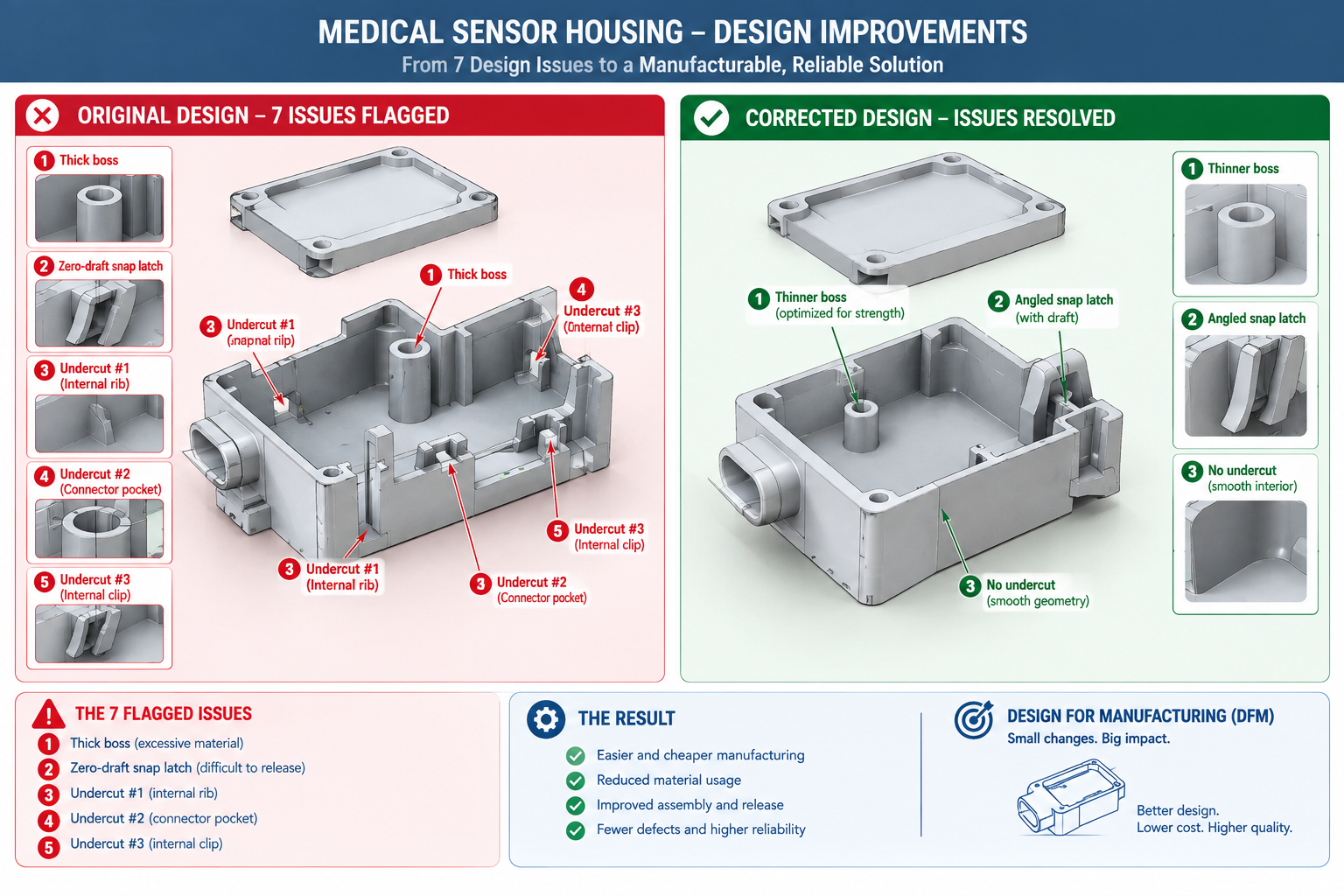
    A product design team spent eight months developing a small medical sensor housing. The design was elegant: organic curves, minimal visible fasteners, integrated cable management, a two-part snap-fit enclosure that felt premium in the hand. Wall thicknesses ranged from 0.9mm at the curved flanges to 4.2mm where the window mounting boss met the shell wall. The snap latches had zero draft, since draft would have complicated the snap face geometry. Three internal undercuts wrapped around the USB port opening.

    The tooling quote came back with seven flagged design issues, four required side actions, and a price more than double the budget. The programme paused for six weeks of redesign, essentially rebuilding what eight months of work had produced, now constrained by rules that had been available at the start but weren’t part of the initial design process.

    Quick answer: Manufacturing constraints exist because every process is bound by physics, molten plastic has to fill a cavity and eject cleanly, a rotating cutting tool can only reach what its geometry allows, sheet metal can only bend as tight as its ductility permits. The single highest-impact decision a product designer makes isn’t a geometric rule at all: it’s choosing the right process for the target production volume before any detailed geometry exists, since that choice determines which constraints apply and what tooling investment gets recovered.
    Medical device housing design comparison showing seven flagged manufacturing issues versus corrected redesign

    This is the scenario manufacturing constraints exist to prevent. The rules aren’t bureaucratic obstacles to creative design. They’re descriptions of what physical processes can and cannot do, most useful when known before a design is finalised rather than discovered when a quote comes back with problems.

    Why Manufacturing Constraints Are Process-Specific

    Every manufacturing process imposes constraints that come directly from its physics. Injection moulding pushes molten plastic into a cavity under pressure, and the plastic has to fill completely and eject cleanly, generating the wall thickness, draft, and undercut rules. CNC machining removes material with a rotating cylindrical tool, and the tool geometry generates the internal corner radius constraint, the pocket depth limit, and the multi-setup cost penalty. Sheet metal forming bends flat material around a tooling radius, and the material’s ductility and springback generate the minimum bend radius and feature-to-bend-line proximity rules.

    None of these constraints are arbitrary; each is a physical consequence of how the process works. A designer who understands the physics behind two or three constraints tends to figure out related ones without looking them up, since the same underlying mechanism generates multiple related rules. Understanding that injection moulded walls need draft because the part shrinks onto the core as it cools and has to slide off the steel without tearing is more durable knowledge than memorising “1 degree per side,” since the physical understanding generates the correct angle for any texture depth without a table lookup.

    Understanding the mechanism also clarifies when a constraint applies at all. Draft on a flat horizontal face parallel to the mould opening direction is irrelevant, since that face never slides across the mould steel during ejection. Draft on a vertical face is essential, since that face slides along the steel for the entire ejection stroke. Knowing why makes it immediately clear which surfaces need draft and which don’t.

    Ten Processes, Their Constraints, and Their Sweet Spots

    This comparison helps with the earliest and most consequential decision in product development: which process fits this part, at this volume, with these material and performance requirements.

    ProcessMin Feature SizeTypical ToleranceVolume Sweet SpotKey Constraint
    Injection moulding0.4mm features; 0.8mm min wall+/-0.1 to 0.25mm10,000 to millionsUniform wall thickness (within 15%); draft on all vertical faces; no undercuts without side actions
    CNC milling0.5mm end mill; 1mm practical+/-0.025 to 0.1mm1 to 1,000Internal corners always carry a radius; pocket depth max 4x width; each setup adds 20-40% cost
    CNC turning0.1mm feature detail+/-0.01 to 0.05mm1 to 10,000Features must be rotationally symmetric; off-axis holes need a separate milling setup
    Sheet metal (press brake)1mm hole (punched); 0.5mm laser+/-0.5-1.0mm bent; +/-0.1mm flat10 to 100,000Holes distort within 2.5x thickness of a bend; springback must be designed in
    Die casting (aluminium)0.8mm wall; 0.4mm HPDC+/-0.1 to 0.3mm5,000 to millionsDraft required (1-3°); undercuts need slides; porosity risk in thick sections
    Sand casting5mm wall; 3mm with chill+/-0.5 to 2.0mm1 to 500Large draft required (2-5° per side); generous internal corner radii; core prints needed
    ForgingComplex 3D; limited thin sections+/-0.5 to 2.0mm500 to millionsFlash line runs along the parting plane; cannot form internal cavities without machining
    3D printing (FDM/SLS/SLA)0.1-0.4mm+/-0.1 to 0.3mm1 to 500Anisotropic strength (weakest across layers); supports needed for overhangs > 45°
    Laser cutting (flat)0.1mm kerf+/-0.05 to 0.1mm1 to any volume2D only; slight edge taper at high thickness; dross removal on thick cuts
    Waterjet cutting (flat)0.5mm after kerf+/-0.1 to 0.25mm1 to moderate2D only; no heat-affected zone; slower than laser or plasma for thick material

    Volume and Process Selection: The Tooling Cost Trade-off

    The most consequential decision a product designer makes, before any geometry is finalised, is which process to use at which production volume. This decision determines tooling investment, achievable unit cost, available tolerances and finishes, and the constraints the design must satisfy. Getting this right early is far more valuable than optimising within a process chosen without weighing whether it fits the volume.

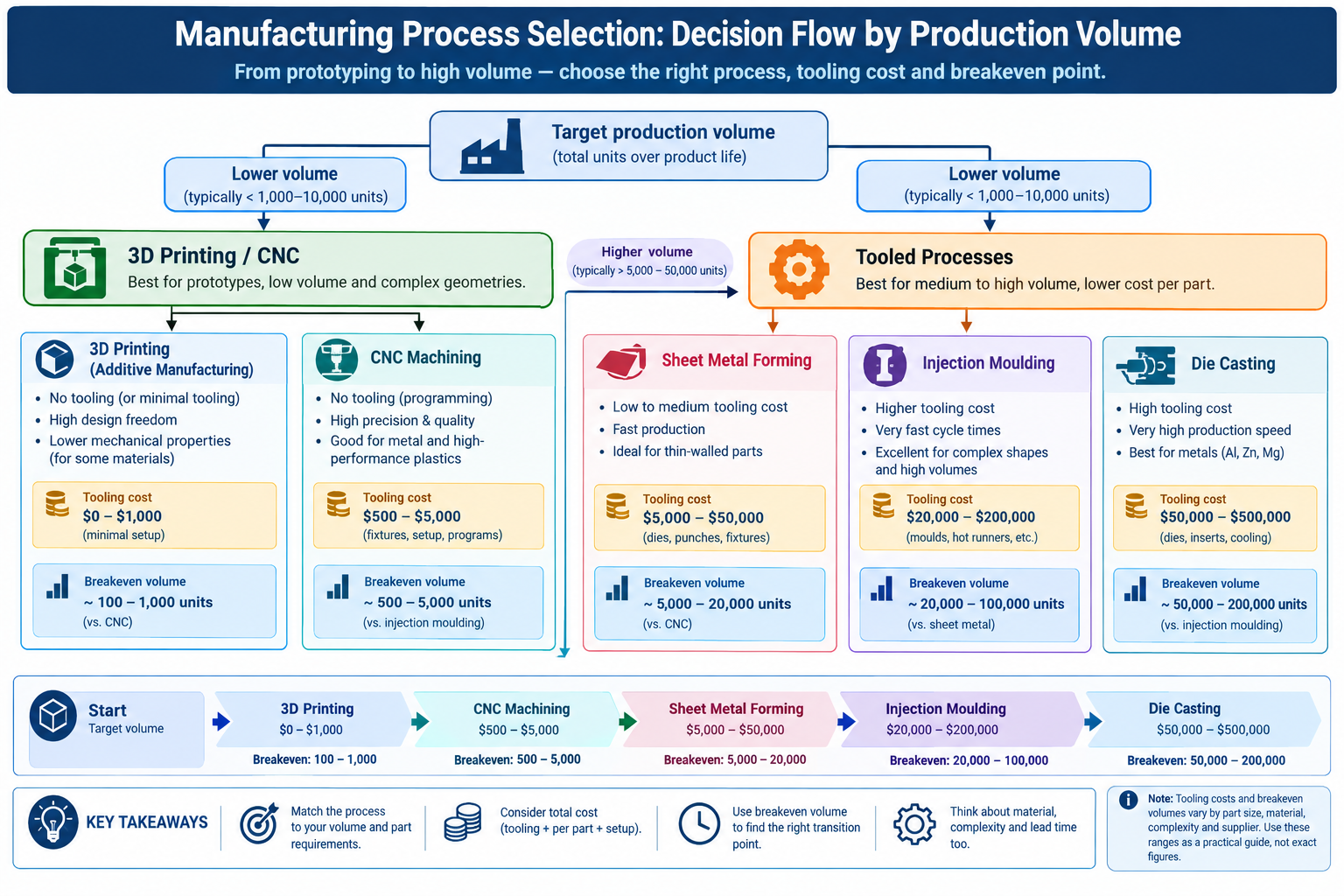
    The fundamental trade-off is between tooling investment and unit cost. Tooled processes (injection moulding, die casting, progressive stamping) carry high fixed costs but low per-part variable cost once tooling is paid off. Toolless processes (CNC machining, 3D printing, laser cutting) carry no fixed cost but higher variable cost per part, since each part needs fresh machine time. The crossover point, where total tooled-process cost drops below total toolless-process cost at the same volume, is the volume breakeven.

    Production VolumeTypically Correct ProcessTooling Cost RangeUnit Cost RangeLead Time to First Parts
    1-5 units (proof of concept)3D printing; CNC for structural prototypesNone or minimal$20-$500 per part1-5 days print; 5-15 days CNC
    5-100 units (pilot/pre-series)CNC machining; 3D printing; sheet metal$0 CNC; $500-5,000 soft-tool mould$50-$2,000 per part5-15 days CNC; 4-8 weeks soft tool
    100-1,000 unitsCNC if complex; sheet metal; die casting if geometry suits$5,000-$80,000 for tooled processes$10-$200 machined; $3-$30 cast6-14 weeks tooled
    1,000-10,000 unitsInjection moulding; aluminium die casting; sheet metal$15,000-$200,000$1-$20 injection moulded; $3-$50 die cast8-16 weeks tooling
    10,000-100,000 unitsInjection moulding; die casting; progressive die sheet metal$50,000-$500,000$0.10-$5 per part12-24 weeks tooling
    100,000+ units (mass production)Injection moulding; die casting; progressive stamping; hot stamping$200,000-$2,000,000$0.02-$2 per part24-52 weeks major tooling

    The Breakeven Calculation: Simple But Often Skipped

    The calculation is straightforward: total cost of a tooled process is tooling cost plus unit cost times volume. Total cost of a toolless process is unit cost times volume. Breakeven volume equals tooling cost divided by the unit cost difference between the two processes.

    For a plastic part costing $8 per unit by CNC machining and $0.50 per unit by injection moulding, with a $40,000 tooling investment: breakeven volume = $40,000 / ($8 – $0.50) = $40,000 / $7.50 = 5,333 units. Below that, CNC is cheaper overall. Above it, injection moulding is cheaper overall.

    This calculation is rarely wrong in direction, and it’s almost never done at the point where the process decision actually gets made. Teams commit to injection moulding because “it will be a consumer product” without checking whether the target volume crosses the breakeven, or they commit to CNC because “it’s a prototype” without realising the actual pilot volume already sits above the point where moulding would be cheaper over the programme lifetime. The calculation takes fifteen minutes and changes the decision more often than most designers expect.

    Material-Process Compatibility: The Constraints Before the Constraints

    Before any geometric design constraint applies, there’s a more fundamental question: is this material compatible with this process at all? Not all materials can be processed by all processes, and combinations that look plausible in theory can be impractical or extremely expensive in reality.

    MaterialInjection MouldingCNC MachiningSheet Metal FormingDie CastingKey Constraint
    Aluminium alloysNot applicableExcellentGood (5052, 3003); difficult (6061-T6)Excellent, primary process6061-T6 needs annealing for tight bends; die cast alloys (A380) differ from wrought
    Mild steelNot applicableGoodExcellent, standard materialNot typicalWeld distortion in thin gauge; scale/rust needs coating
    Stainless steelNot applicableDifficult (work-hardening)Moderate; higher springbackNot common303 free-machining grade avoids work-hardening issues
    Engineering thermoplasticsExcellent, primary processGood (Delrin/POM best)Not applicableNot applicableSome plastics absorb moisture, affecting post-mould dimensions
    Copper and brassNot applicableExcellent (brass); good (copper)Good at annealed temperPossible, not commonGalvanic corrosion risk with steel fasteners
    Titanium alloysNot applicableDifficult, expensiveVery limitedNot practicalCost driven by tool life and cutting time
    High-performance polymers (PEEK, PTFE)Possible with high-temp toolingGood (PEEK); care needed (PTFE)Not applicableNot applicablePEEK injection moulding needs 150-200°C tool temperatures
    Elastomers (silicone, TPU)LSR moulding; TPU injection mouldedLimited, soft materials deflectNot applicableNot applicableLSR requires dedicated tooling separate from thermoplastic tooling

    The Cost of Getting Material-Process Compatibility Wrong

    Some mismatches are obvious, specifying stainless steel for injection moulding is clearly wrong since one’s a metal and the other’s a plastics process. The more dangerous mismatches are plausible in principle but problematic in practice: specifying 6061-T6 aluminium for die casting (the wrong alloy family, which uses A380 or A360), specifying glass-filled nylon for a part that needs adhesive bonding (glass fill significantly reduces bond strength), or specifying PEEK for injection moulding without accounting for the $200,000 to $500,000 cost of a high-temperature tool.

    The habit that prevents these problems is checking material-process compatibility as one of the first steps of design, not as a review after the design is complete. A five-minute conversation with a supplier who specialises in the target process, asking whether the specified material is standard for their process, catches these issues at zero cost, following the process capability principles documented in Kalpakjian and Schmid’s Manufacturing Engineering and Technology. The same discovery after a drawing release and a tooling quote takes weeks to resolve.

    Twelve Universal Manufacturing Constraints

    Beyond the process-specific rules in the companion articles of this series, these twelve constraints apply across multiple processes and are worth carrying as working knowledge.

    ConstraintRule of ThumbApplies ToWhat Breaks If Ignored
    Wall thickness uniformityKeep variation within 10-15% of nominalInjection moulding, die casting, thermoformingSink marks, warping, voids, scrap on first shots
    Draft angle on vertical faces1-2° minimum; add 1° per 0.025mm texture depthInjection moulding, die casting, forgingPart sticks in mould; drag marks; tool damage
    Internal corner radiusMinimum 1x wall thickness; match standard tool sizesCNC milling, injection moulding, die castingStress concentration; custom tooling required
    Undercut/side actionAvoid unless volume justifies tooling costInjection moulding, die casting, forgingSlides/lifters add 20-50% tooling cost
    Feature-to-bend-line proximityHoles at least 2.5x thickness + bend radius from bend lineSheet metal formingFeatures distort; holes become ovals
    Minimum flange length3x thickness + inside bend radiusSheet metal press brake bendingInaccurate, inconsistent bend angle
    Pocket depth-to-width ratioMaximum 4:1 with standard toolingCNC millingTool deflection, chatter, possible breakage
    Tolerance vs. process capabilityCommercial tolerance needs no special process; each tighter step adds 1.5-6x costAll machined/formed processesOver-tolerancing adds cost with no functional benefit
    Part count in assembliesAsk “can this be one part?” before adding a secondAll assembly designsUnnecessary assembly time, inventory, failure points
    Springback in bendingDesign the bend angle to compensate; document itSheet metal, roll forming, tube bendingPart springs to wrong angle; assembly interference
    Material-process compatibilityCheck compatibility earlyAll processesWrong material for the process; late-stage redesign
    Tooling investment vs. volume breakevenCalculate cost per part at target volume including amortisationInjection moulding, die casting, progressive stampingTooling spend never recovered at actual production volume

    Part Count: The Constraint That Compounds Across the Entire Product

    Of these twelve, part count reduction has the largest potential impact and is the most frequently overlooked, precisely because it’s not a feature-level constraint. It applies to the whole assembly, requiring a step back from individual part optimisation to ask whether the assembly could be simplified.

    Each separate part carries its own cost chain: material, machining or forming, quality inspection, supplier management, inventory, picking during assembly, and any fasteners used to join it. Consolidating two parts into one eliminates most of that chain for the second part, on every unit produced. The savings aren’t dramatic for a small two-part assembly with limited volume. They become significant for a twenty-part assembly at a hundred thousand units per year, where the difference between twenty parts and fourteen means six fewer cost chains multiplied across a hundred thousand units.

    The systematic question, drawn from the Boothroyd-Dewhurst design for assembly criterion, is: does this part move relative to adjacent parts, does it need a different material, and does it need to be disassembled for service? If the answer to all three is no, there’s a good case for consolidating it into a single feature on an adjacent piece.
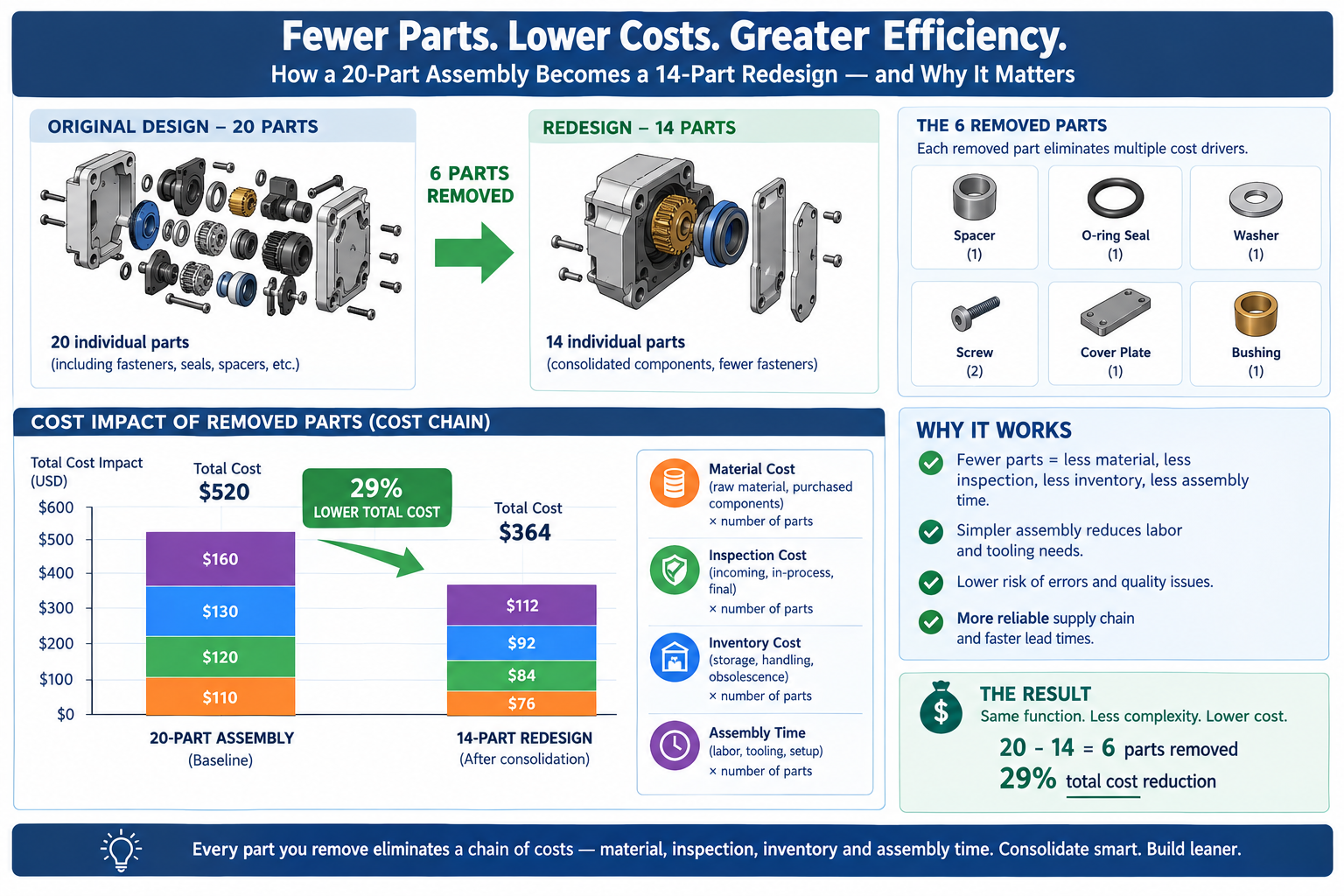
    Comparison diagram showing cost chain reduction from consolidating a twenty-part assembly into fourteen parts

    When Manufacturing Constraints Are Discovered Determines Their Cost

    Every constraint not considered during design gets discovered eventually: by the product designer in a review, the mould maker in a quote, the operator at the press brake, or the inspector at the quality station. The cost of resolving it grows by roughly an order of magnitude at each successive stage. A wall thickness problem caught in design review costs an hour of CAD time. The same problem caught after tooling is cut costs tool rework, schedule delay, and possibly scrapped first-article parts, together perhaps a hundred times the design review fix.

    This asymmetry is the entire business case for knowing manufacturing constraints at the design stage rather than learning them from supplier feedback. The knowledge itself is free. The cost is in when it’s applied, and it’s minimised the earlier it’s applied.

    The Design Review as a Manufacturing Constraint Check

    The most practical institutional way to apply constraints early is a structured design review focused specifically on manufacturability, distinct from the structural and functional reviews that happen as a matter of course. A manufacturing-focused review asks a different question, not “will this carry the load” but “can this be made, at this volume, with the process specified, by a supplier with reasonable capability for these features.” These are engineering questions that need manufacturing knowledge to answer, whether from a manufacturing engineer, a supplier representative, or a designer who has studied the process-specific guidelines this series covers.

    The twelve-item table above is one framework for structuring that review: a checklist workable in thirty to sixty minutes for a typical design, checking each part against the constraints for its intended process. None of the checks need specialised equipment. They need knowing what to look for while the design is still on screen.

    Worked Examples

    The medical sensor housing: The housing from the opening example, eight months in design before the tooling quote revealed seven problems, could have caught all of them with a constraint checklist during design. The wall thickness variation from 0.9mm to 4.2mm was far outside the 10-15% rule; the 4.2mm boss should have been redesigned to 60% of the adjacent wall with a gusset rib. Zero draft on the snap faces meant the part couldn’t eject without surface damage; a minimum one degree on the non-functional face would have worked without compromising the snap function.

    The three USB port undercuts could have been redesigned as through-features formed by two mould halves at the parting surface, or repositioned to allow core pull in the mould opening direction.

    The tools to catch these issues, wall thickness analysis, draft analysis, and a pull-direction undercut check, were standard features in the CAD package used from day one. Eight months of design could have been eight months of constraint-aware design instead. The six weeks of post-quote redesign was time lost entirely.

    The enclosure that should have been sheet metal, not machined: An industrial instrument enclosure was designed as a machined aluminium block with milled pockets for internal electronics, needing four setups and several precision tolerances on PCB mounting bosses. At an estimated $320 per unit for a target run of 800 units, total machined cost was $256,000.

    A volume breakeven check against sheet metal told a different story. A press brake-formed, laser-cut version with PEM-nut fastener inserts for PCB mounting had an estimated unit cost of $45, with no tooling investment for the standard sizes involved. At 800 units, total sheet metal cost was $36,000. The IP54 weatherproof rating, 0.2mm PCB mounting positional accuracy, and hard-anodised finish requirements were all achievable in sheet metal with appropriate gasket design and CMM-checked PEM nut locations. The switch saved roughly $220,000 on this run while meeting every functional requirement.

    The machined option hadn’t been obviously wrong at the concept stage; it was chosen because the team was comfortable with machined enclosures and never evaluated the sheet metal alternative. The thirty-minute breakeven check made the comparison explicit and changed the decision. The constraint that unlocked the saving wasn’t a geometric rule. It was process selection based on volume.

    Frequently Asked Questions

    How early in the design process should manufacturing constraints be considered? From the first sketch. The most consequential decisions, which process and which material, are made or implied before any geometry exists, at the concept stage where product category and approximate volume are first established. A consumer product at high volume implies injection moulding, which implies thermoplastics, which implies wall thickness uniformity, draft, and every other injection moulding rule, all before a single wall is modelled in CAD. Confirm the process-versus-volume decision before detailed design begins, not after a tooling quote reveals it was wrong.

    What is the most important manufacturing constraint for a designer working across multiple processes? Wall thickness uniformity in moulded and cast parts is probably the most impactful geometric rule, since violations are both common and highly visible: sink marks on a cosmetic surface are exactly the defect customers notice. But the constraint with the largest programme-level impact is the volume breakeven calculation, since choosing the wrong process for a given volume doesn’t just create a bad part, it creates bad product economics, which is much harder to fix than a sink mark.

    Can 3D printing replace injection moulding for production parts? For some applications and volumes, yes. Industrial processes like SLS, MJF, and DMLS produce functional parts in engineering-grade materials at tolerances competitive with injection moulding for low to moderate volumes. The practical limits are unit cost (higher than moulding above roughly 500 to 1,000 units for most sizes), a narrower material range, and surface finish showing layer lines unless post-processed. For volumes below a few hundred units, complex geometries that would need expensive tooling, or evolving designs, 3D printing is often the better choice. Above a few thousand units in a stable design, injection moulding is almost always lower total cost.

    What does “design for manufacture” actually mean in practice? It means applying knowledge of how each process works to the design decisions made at the CAD stage, so the resulting part is producible by the chosen process, at the intended cost, without surprises at tooling or fabrication. It’s not a separate analysis step added at the end. It’s a way of thinking about geometry integrated into how the design is built, asking “can a tool reach this corner,” “will this wall cause a sink mark,” “do these holes move when this face bends” throughout modelling rather than after it.

    How do I know which manufacturing process to specify for a new product? Start with production volume and unit cost target, since these determine which processes are economically viable. At a few hundred units, CNC machining and sheet metal are typically the only practical metal choices, with 3D printing or soft-tool moulding for plastics. At tens of thousands, injection moulding and die casting become cost-competitive. At hundreds of thousands, progressive stamping and other high-volume processes fit. Within the economically viable options, check material-process compatibility, then check whether functional requirements are achievable. If multiple processes clear all three bars, choose based on team experience or the strongest local supplier base.

    Why does adding a side action to an injection mould add so much cost? A side action is a moving mechanism inside the mould that travels perpendicular to the opening direction to form an undercut, requiring precision-machined steel, guide rails, locking mechanisms, and return springs. Each slide needs its own design, machining, fitting, and debugging. A simple slide might add 15 to 25 percent to tooling cost; a complex compound-motion slide might add 40 to 60 percent. Three or four slides, as in the medical housing example, can more than double tooling cost relative to an undercut-free design, which is why the rule is to eliminate undercuts where possible and budget explicitly when they’re genuinely necessary.
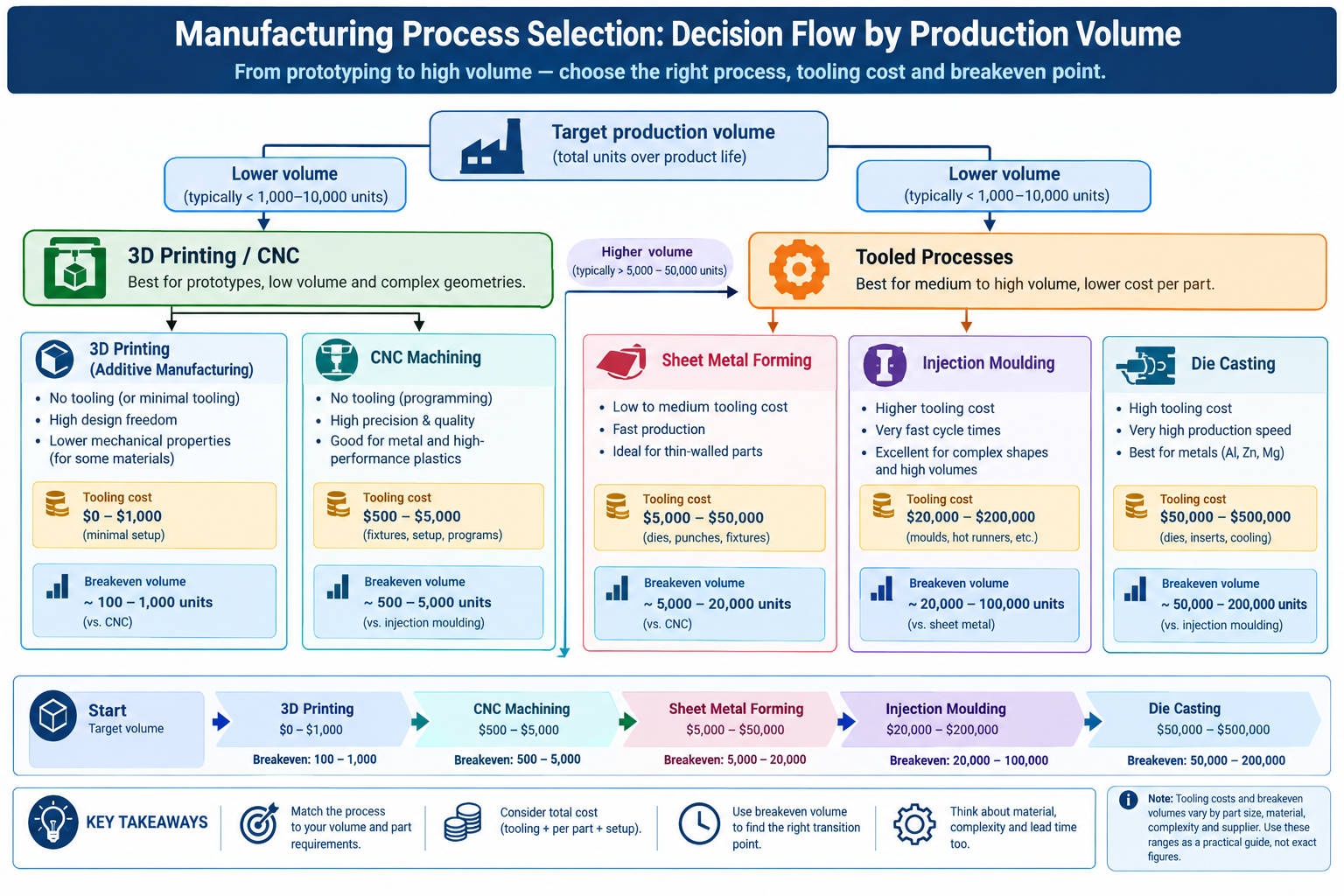
    Manufacturing process selection flowchart based on production volume and tooling cost breakeven points

    Key Takeaways

    The sensor housing that took six weeks to redesign, and the instrument enclosure that could have been sheet metal all along, share the same underlying issue: the constraints that would have changed the design decisions were available but weren’t part of the conversation at the right time. None of this is specialised knowledge requiring years of manufacturing experience. It’s available in published guidelines, supplier conversations, and process-specific references.

    The shift that makes manufacturing constraints useful rather than frustrating is treating them as information about what a process does well, not restrictions on what a designer can create. Injection moulding produces thin, uniform walls with complex geometry and integrated features at tolerances machining can’t match at scale, as long as the design respects what the process needs. CNC machining produces any machinable geometry to tight tolerances without tooling investment, as long as the design respects what a cutting tool can reach. Sheet metal produces lightweight, strong enclosures cheaply at almost any volume, as long as the design respects how the material bends.

    Every process constraint is a description of what that process does well, stated as a boundary condition. Designers who understand that, who know enough about several processes to design for them deliberately rather than discovering the limits from suppliers, get from first quote to first production more smoothly, more cheaply, and with fewer detours.
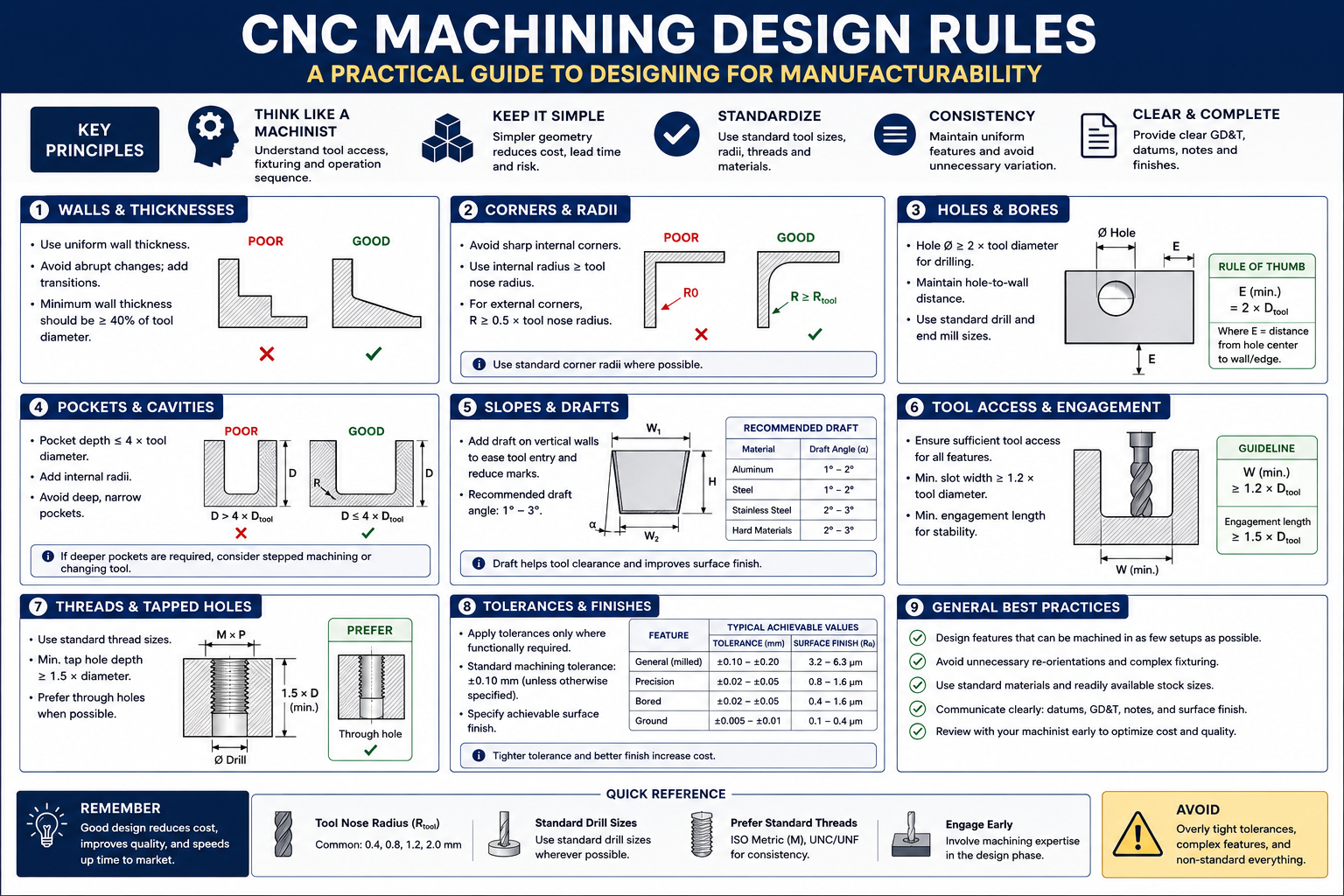
  • CNC Machining Design Rules: A Practical Guide to Designing for Manufacturability

    CNC Machining Design Rules: A Practical Guide to Designing for Manufacturability

    An engineer spent two hours on a Friday afternoon drawing a bracket that looked clean, was correctly dimensioned, and had all the right tolerances. The pocket in the center had sharp 90-degree internal corners because it needed to clear a mating component. One wall was 0.8mm thick because the overall envelope was tight.

    The drawing went out for quoting Monday morning. By Tuesday afternoon the shop called back: they could make the bracket, but the sharp corners needed EDM after milling, and the thin wall needed a slow, dedicated setup to cut without chatter. The price reflected both. What looked like a straightforward bracket had become a two-operation part with a lead time measured in weeks, and procurement pushed back on the number.

    Quick answer: CNC machining can produce very complex shapes, tight tolerances, and excellent surface finishes, but it can’t do anything a spinning cylindrical tool physically cannot reach. Internal corner radii must match a real end mill radius, wall thickness needs enough rigidity to resist cutting force, and every extra machine setup adds 20 to 40 percent to cost. Designing around these physical constraints from the start, not after a shop quote comes back, is what separates a cheap, fast part from an expensive, slow one with identical function.
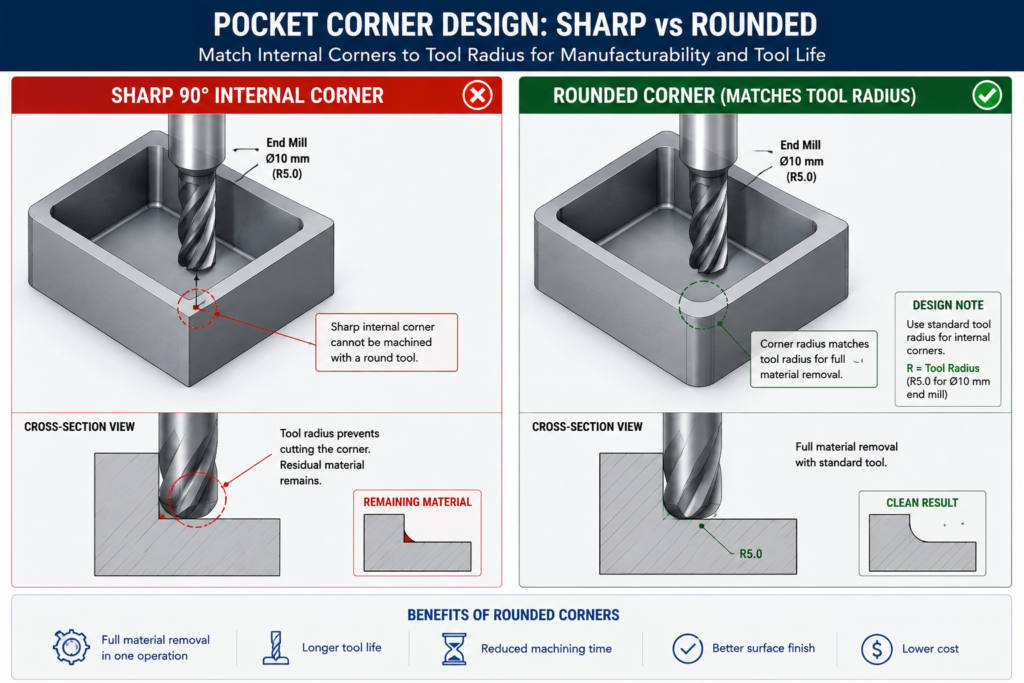
    CAD comparison of a sharp internal pocket corner requiring EDM versus a redesigned corner matching a standard end mill radius

    None of what the shop said was wrong. The corners really did need EDM, and the wall really did need special process planning. The problem wasn’t in the drawing. It was in the design choices that produced it, made by an engineer who understood the bracket’s structural requirements well but hadn’t built the habit of thinking about what a cutting tool can and cannot reach.

    Why CNC Has Design Constraints At All

    Every CNC constraint traces back to the same source: the cutting tool is a solid body that must physically reach the feature being cut, and its geometry determines what shapes it can produce. An end mill is a cylinder with cutting edges. When it plunges into a pocket and sweeps the perimeter, it leaves a radius at every internal corner equal to its own radius. That’s not a limitation of machine accuracy or operator skill. It’s a geometric consequence of the tool being round. The only ways around it are a smaller tool (slower, more fragile), EDM (spark erosion instead of a spinning tool), or a design that doesn’t call for a sharp corner there.

    Understanding this changes how you approach feature design. The question stops being “what shape do I want here” and becomes “what shape can a tool produce here, and is that compatible with what I actually need.” For most brackets, housings, and structural components, the answer is a straightforward yes once the design adapts. Cases where the functional requirement genuinely conflicts with what a cutting tool can reach are actually rare, and almost always better solved by reconsidering the feature geometry than by accepting the cost of a workaround.

    The Three Axes and What They Limit

    Most CNC machining centres operate in three axes: X, Y, and Z. The tool reaches any point on the top surface and any vertical surface relative to the current setup. What it can’t reach without repositioning the workpiece are features on other faces, undercuts hidden behind an overhang, and surfaces sloped outside the range of vertical tool motion.

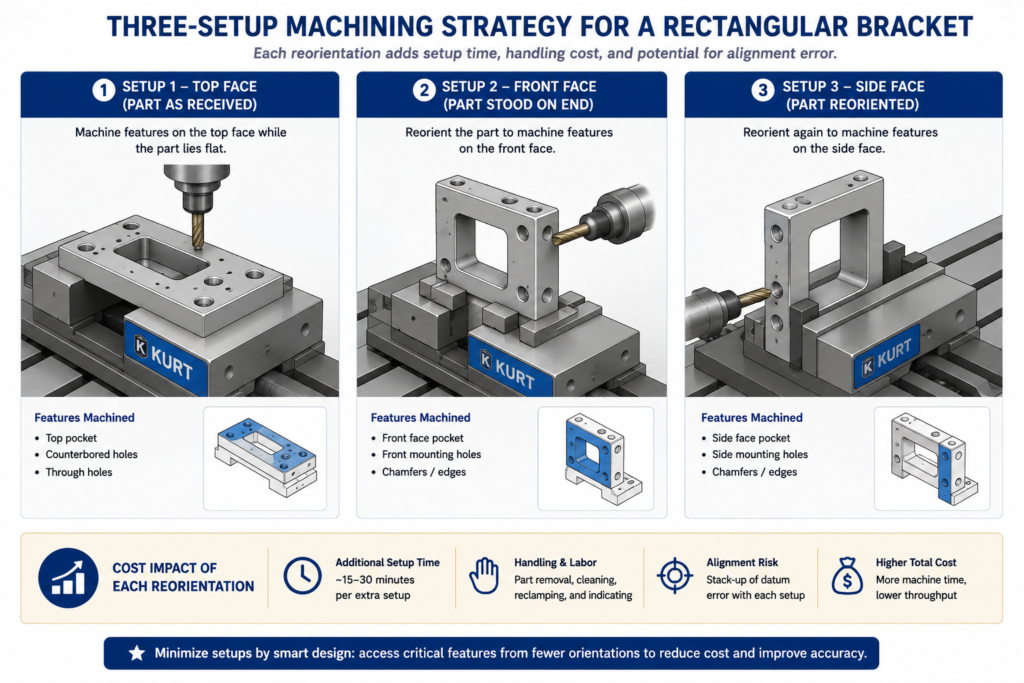
    This is why setup count is such an important cost driver. Every time the workpiece is removed, flipped, and re-fixtured, the machine stops producing chips. Repositioning takes time, and re-fixturing introduces a small but real alignment uncertainty that accumulates across the part’s critical dimensions. Reducing a part from four setups to two doesn’t just roughly halve machining time; it also improves positional accuracy between features previously cut in separate setups.

    Five-axis machining extends this by tilting or rotating the workpiece relative to the linear axes, reaching compound-angle surfaces and some undercuts in a single setup. It’s genuinely powerful for complex aerospace and medical components, but it costs more per hour, needs more sophisticated programming, and isn’t available at every shop. Commit to a five-axis requirement only after three-axis approaches have genuinely been exhausted, since the pool of shops that can bid narrows and the price rises noticeably once five-axis is a requirement.

    CNC Feature Design Rules: The Reference Table

    These eight rules are the ones that show up most often in shop feedback, worth checking on every drawing before it goes out for quoting.

    FeatureRule / GuidelineWhy It ExistsWhat Happens If Violated
    Internal corner radius (pocket)Match standard end mill radii: 0.5, 1.0, 1.5, 2.0, 3.0, 4.0, 6.0, 8.0, 10.0mmEnd mills are cylindrical, leaving a radius equal to their ownCustom micro-tooling or EDM secondary operation needed
    Pocket depth-to-width ratioMax 4:1 for standard tooling; up to 6:1 with long-reach toolingDeep narrow pockets need long, thin tools that deflect and chatterDimensional error, poor finish, shortened tool life, possible breakage
    Hole depth-to-diameterThrough holes: no practical limit. Blind: 3:1 max standard; 5:1 with extended-reach drillsDeep narrow holes need extensions that deflect; chip evacuation is difficultDrill wander, wall thickness violation, chip welding, breakage
    Thread engagement depth1.0-1.5x diameter steel-into-steel; 1.5-2.0x steel-into-aluminumShallower threads strip under preload; deeper adds time with no gainThread strip-out under torque, especially in softer materials
    Wall thickness (milled pocket)0.5mm minimum rigid materials, short feature height; 1.0mm practical general minimumThin walls deflect under cutting force, causing chatter and inaccuracyWall bows inward at mid-height, poor finish, out-of-tolerance
    Boss/protrusion heightMax 4-5x base diameter for a standard end millTall thin protrusions vibrate and deflect away from the toolPoor finish, dimensional error, possible feature fracture
    Counterbore vs. screw sizeDiameter = head diameter + 0.5-1.0mm clearance; depth = head height + 0.2mmMust clear the fastener head for correct seatingHead protrudes above surface, or contacts bore walls
    Chamfers vs. filletsChamfers at 45° for standard tooling; fillets need a radius end millChamfers use angled tools; fillets need a ball-nose or radius cutterA 1mm fillet on every edge triggers a slow finishing pass on all of them

    Internal Corners: The Rule That Catches the Most Engineers

    The internal corner radius rule is probably the most frequently violated rule in CNC machining, not because it’s complicated but because it’s easy to forget while focused on functional geometry. On a CAD screen, a pocket with sharp 90-degree internal corners looks perfectly clean and buildable. The machinist’s eye sees a feature that requires either a fragile micro-tool that cuts slowly and breaks often, or a standard end mill followed by a secondary EDM operation.

    The fix is almost always free in CAD and costs nothing in the part’s function. If the corner radius needs to clear a mating component with a sharp corner, add a corner relief in the mating part instead of requiring a sharp corner in the pocket. If the radius is simply unconstrained, size it to the nearest standard end mill and the issue disappears. A 6mm internal radius lets any end mill up to 12mm diameter finish the corners, giving the shop far more flexibility than a 1mm radius would.

    Below about 1mm internal radius, you’re in micro-machining territory. Tools at this scale are fragile, cut slowly, and need spindles running 20,000 to 50,000 RPM to maintain reasonable surface speeds. Cost per feature rises sharply, breakage risk is meaningful, and the range of shops that can produce it reliably narrows. This isn’t to say micro-machining is never appropriate, medical devices, optical mounts, and precision instruments genuinely need it sometimes, but it should be a deliberate choice against a known requirement, not an accidental consequence of a sharp corner in a standard bracket.

    Tolerances and Surface Finish: Only as Tight as the Function Needs

    One of the most reliable ways to add cost without adding value is specifying tolerances tighter than the application requires. This happens for a few common reasons: CAD title block defaults that carry a tolerance tighter than most features need, dimensions copied from a previous design, and a conservative instinct that tighter is always safer. None of those reasons are wrong in intent, but they all lead to a shop running additional operations or more extensive inspection to hit a number that serves no purpose in the finished assembly.

    The discipline worth applying: for every toleranced dimension, ask what actually breaks if the tolerance were twice as loose. If the answer is genuinely nothing, the tolerance is tighter than needed. For most non-mating, non-locating dimensions on a structural part, a general tolerance of +/- 0.125mm to +/- 0.25mm is perfectly adequate, matching the standard tolerance classes documented in Machinery’s Handbook, and achievable without any special process consideration.

    Feature TypeStandard ToleranceAchievable TighterAdded Operation for Tighter
    General machined dimension+/- 0.125 to 0.250mm+/- 0.05mm with careful setupNone standard; extra fixturing for +/-0.05
    Drilled hole diameter+0.10/-0.00 (drilled nominal)+/- 0.025mm (reamed)Reaming adds one tool change, one pass
    Bored hole diameter+/- 0.025 to 0.050mm+/- 0.005-0.010mmFine or jig boring; climate control
    Tapped threadISO 6H (medium fit)ISO 5H or 4H (close fit)Machine tapping vs. hand; gauge verification
    Flatness (milled)0.05-0.10mm over 100mm0.01-0.02mm over 100mmGrinding or precision milling with temp stabilisation
    Surface finish (as-milled)Ra 1.6-3.2 μmRa 0.8 μm with fine finish passFine pass at lower feed, higher speed
    Surface finish (ground)Ra 0.2-0.8 μmRa 0.025-0.1 μm (precision ground)Cylindrical or surface grinding, secondary op
    Hole pattern position+/- 0.1-0.15mm diameter zone+/- 0.025-0.05mm with jig boringCMM verification, tight fixturing, thermal stabilisation

    Surface Finish Is a Secondary Operation, Not a Milling Setting

    Surface finish finer than Ra 0.8 micron typically can’t be achieved by milling alone regardless of cutting parameters. Ra 0.4 micron or better needs a secondary process, grinding, lapping, or honing, each a separate production step with its own setup and cycle time. Specifying Ra 0.4 on a surface that serves no sealing, sliding, or tribological function adds an entire secondary operation for no functional benefit.

    The practical approach: specify surface finish only where it matters functionally, and use the loosest specification that still meets the requirement. A sealing face needs smoothness for the seal to seat without leaking. A sliding contact needs a finish appropriate for its bearing pressure. Everything else can stay as-machined, typically Ra 1.6 to 3.2 micron, which costs nothing extra since it’s what standard milling produces without additional operations.

    Material Machinability: How Material Choice Affects Cost

    Material choice is one of the most consequential machining cost decisions, typically locked in early, before any features are designed. A designer who understands machinability characteristics upfront can sometimes cut machining cost by thirty to fifty percent with a material choice that still satisfies engineering requirements.

    MaterialMachinability RatingKey ConsiderationTool Life Impact
    Aluminium (6061, 7075)Excellent: 200-300% of free-cutting steelLong, stringy chips need chip-breaker geometryVery long tool life; carbide and HSS both work well
    Mild steel (1018, 1020)Good: 70-80%Free-machining grades (1215, 12L14) are significantly easierModerate; carbide preferred for production runs
    Stainless steel (304, 316)Difficult: 40-50%; work-hardening is the challengeMust cut continuously; carbide tooling mandatoryShort tool life; 303 free-machining much easier if allowed
    Stainless steel (316L, duplex)Very difficult: 30-40%Rigid setup essential; flood coolant mandatoryVery short tool life; high tooling cost per part
    Titanium (Grade 5, Ti-6Al-4V)Difficult: 25-40%; low thermal conductivityLow cutting speed mandatory; sharp tools, aggressive coolantShort tool life; one of the highest tooling costs in common use
    Hardened steel (>45 HRC)Very difficult: better suited to EDM or grindingHard milling with CBN/ceramic possible on rigid machinesVery short tool life even with CBN
    Copper and brassVery good: 150-200%Soft copper can smear at low speeds; leaded brass easiestGood tool life, similar to aluminium
    Engineering plastics (Delrin, PTFE, nylon)Good but workpiece-dependentPTFE is soft and deflects; nylon absorbs moistureExcellent tool life; plastic doesn’t wear tooling significantly

    The Free-Machining Grade Trade-off

    For most structural steels, free-machining grades exist that are substantially easier and cheaper to machine than standard equivalents, with only modest property compromises. 1018 is the workhorse structural grade with good strength and weldability. 1215, a resulfurized free-machining grade, machines at roughly twice the speed with better surface finish and longer tool life. If the application doesn’t need welding, heat treatment, or 1018’s slightly higher strength, switching to 1215 often halves machining cost for no functional penalty.

    The same trade-off exists in stainless: 303 machines three to four times faster than 304, with better finish and much longer tool life, at the cost of weldability and slightly lower corrosion resistance in some environments. A lot of engineers default to 304 simply because it’s the most widely specified grade, without checking whether the application actually needs what 304 provides over 303, and that default carries a real cost penalty on every unit produced.

    Setups and Fixturing: Designing for How the Part Sits in the Machine

    Every time a machinist repositions a part, the clock runs but no chips get made. Fixturing, alignment, and probing each take time, and setup count is one of the clearest predictors of cost. A part needing three setups doesn’t simply cost 50 percent more than one needing two. The operator also has to re-establish the datum reference each time, small alignment errors accumulate between features cut in different setups, and a custom fixture may be needed if the geometry doesn’t lend itself to standard workholding.

    Three-panel diagram showing a rectangular part in three CNC machine setups for top, front, and side face features

    Design for Standard Workholding

    Standard workholding means a machine vise, a collet chuck, or toe clamps on a fixture plate. Parts with flat, parallel reference surfaces and enough clearance for vise jaws to grip without interfering with the cut features are the cheapest to set up and the least likely to trigger a call about needing a custom fixture. Round or organically shaped parts, or ones with features that conflict with standard vise jaw positions, need a custom fixture or an angled setup that introduces risk.

    The practical habits: keep at least two opposite faces flat and parallel as datum surfaces for vise workholding, make sure features needed in each setup are accessible from the top without vise jaws blocking the tool path, and avoid features requiring the part to be fixtured at an angle, since angle plates and tilted fixtures add cost and setup time.

    The 2+2+2 Setup Rule for Rectangular Parts

    Think of a rectangular part’s six faces as three pairs: top and bottom, front and back, left and right. A well-designed three-axis part should have all its features accessible from at most three of those faces. Top-face features get cut in setup one, front or back face in setup two with the part stood on end, and a side face in setup three. That’s the practical limit of efficient three-axis machining without a rotary fourth axis or a five-axis machine, and designing within it keeps the part accessible to the widest pool of suppliers.

    CNC Cost Drivers: What Makes a Part Expensive

    Not all cost drivers are equally within a designer’s control, and not all carry equal weight.

    Cost DriverRelative ImpactDesign Changes That Reduce ItRed Flags in a Drawing
    Number of setupsHigh: 20-40% per additional orientationDesign features on as few faces as possibleFeatures requiring more than one flip; holes on 5-6 faces
    Tight tolerancesHigh, non-linear: 1.5-6x cost per tighter classSpecify no tighter than function demandsTight tolerances on cosmetic features; blanket +/-0.025mm title block
    Deep narrow pocketsMedium-HighWiden pockets for a stiffer tool; step the depth downDepth-to-width above 4:1; narrow full-depth slots
    Small internal corner radiiMediumMatch standard end mill sizesInternal corners under 1.0mm without micro-machining need
    Custom tooling or operationsVery High: weeks of lead time, high costDesign to standard tool sizes and thread formsNon-standard thread forms; radii matching no available tool
    Surface finish requirementsMediumSpecify finish only where functionally neededRa 0.4-0.8 on surfaces with no sealing/bearing/mating function
    Material removal volumeMediumRemove only what the design needs50mm billet machined down to a 3mm plate
    Part size vs. machine capacityLow-MediumSplit oversized parts where the design allowsParts approaching a 600-800mm three-axis envelope

    The Setup Count Problem Is Easy to Underestimate

    Setup count is the cost driver most frequently underestimated by engineers without shop floor experience. A design requiring five setups doesn’t just add four extra repositionings’ worth of time. It also shrinks the pool of shops that can run the part economically, since tying up a machining centre for five operations is only profitable at certain volumes and price points. An engineer who reconsiders a four-setup layout and finds a way to do it in two hasn’t just cut unit cost; they’ve opened the part to a wider range of competitive bids, which often drives cost down further.

    Worked Examples

    The pump housing with EDM corners: A pump housing had a rectangular internal cavity for a sliding valve with square cross-section corners, so the designer specified a matching square cavity with zero-radius corners on all four internal walls. The sharp corners required EDM after milling, adding roughly 60 percent to machining cost and extending lead time from five to twelve days.

    The redesign kept the valve body’s functional cross-section but added 2mm corner reliefs to the valve, matching the radius a 4mm end mill would leave in the housing cavity. The cavity became fully machinable with a standard end mill in one operation, and the valve still slid correctly since the reliefs didn’t interfere with any sealing or guidance surface. The EDM step was eliminated entirely, machining cost dropped roughly 45 percent, and lead time returned to five days, all from an hour of CAD work with zero impact on function.

    The instrument bracket with unnecessary surface finish: An optical instrument bracket carried a Ra 0.4 micron finish requirement on all machined surfaces, inherited from the finish standard of the optical instrument it mounted. The bracket itself was purely structural, none of its surfaces were optical, sealing, or sliding contacts. That blanket finish requirement meant grinding every face as a secondary operation, accounting for sixty percent of total machining cost.

    The revision set structural faces to Ra 1.6 micron as-milled, keeping Ra 0.4 micron only on the two precision datum surfaces where the instrument actually seated. Grinding dropped from six faces to two. Machining cost fell roughly 40 percent and lead time shortened from eight days to four, with zero change to the instrument’s optical performance since the surfaces that actually mattered kept their required finish.

    Frequently Asked Questions

    What is the minimum internal corner radius I should design for? The practical floor is set by the smallest standard end mill your shop carries, typically 1mm diameter for a 0.5mm corner radius, but that size is fragile and slow. A more practical minimum for typical work is 1.5mm to 2.0mm, matching common, robust 3mm and 4mm tools. Designing to 3mm or 6mm gives even more tool selection flexibility, usually translating to faster cycle times and lower cost. Choose the largest radius the design will tolerate functionally, matched to a standard end mill size.

    How many setups should I aim for? One setup is ideal wherever function allows it. Two is the practical target for most rectangular parts. Three is the practical limit for standard three-axis equipment without a rotary axis. Once a part needs four or more, cost rises substantially and the pool of shops that can run it economically narrows. If a design is heading toward four or more setups, ask whether features can be relocated or consolidated, or whether five-axis machining would bring the setup count down to one or two and improve the economics for your volume.

    Does material choice really affect machining cost that much? Yes, significantly. The difference between 303 stainless (free-machining) and 316 for the same part can be a factor of two to three in cycle time alone, with tool wear compounding it further. The difference between 6061 aluminium and Ti-6Al-4V for a structurally equivalent part can run five to ten times in total machining cost. For meaningful production volumes, machinability deserves the same attention as structural material selection, since there are often two or three material options within a given structural requirement with very different machinability profiles.

    When should I use a chamfer instead of a fillet on an external edge? Use a chamfer whenever the purpose is deburring, lead-in for assembly, or a cosmetic break, and a fillet isn’t structurally required. A 45-degree chamfer is cut in a single fast pass. An external fillet needs a ball-nose or radius end mill making a slower finishing pass around every edge that carries the callout. On a part with many external edges, specifying fillets everywhere can add a full finishing operation. Reserve fillets for features where the radius is functionally required, like a fatigue-critical wall-to-floor transition, or a load-distributing contact surface.

    Why do tighter tolerances cost so much more? Because tighter tolerances usually trigger a step change in process rather than a smooth increase in care. A hole at a standard drilling tolerance needs one operation. The same hole at +/-0.025mm needs reaming: an additional tool, an additional pass, additional inspection. Flatness at 0.05mm over 100mm might be achievable with careful milling; 0.005mm needs grinding in a temperature-controlled environment. Each tighter step tends to require an additional operation or a different process entirely, which is why tolerance cost looks like a series of jumps rather than a smooth curve.

    What’s the maximum depth-to-width ratio for a CNC pocket? The standard guideline is 4:1 for pockets machined with a standard-length end mill. At that ratio, the tool already experiences meaningful deflection under cutting load, affecting finish and accuracy, particularly at the bottom corners. Above 4:1 you need long-reach tooling, which deflects more, cuts more slowly, and costs more. Above 6:1, options are accepting long-reach tooling’s cost, widening the pocket at deeper sections, splitting the part into two conventionally machined pieces, or switching to EDM for the deep sections, which avoids deflection but runs considerably slower than milling.

    Key Takeaways

    The bracket from the opening example eventually got made, at a higher cost and longer lead time than expected. That’s not the worst outcome, and it’s far from unusual. Most engineers learn these rules from experience, from parts that cost too much, took too long, or generated a call from the shop about a feature the drawing hadn’t accounted for.

    The goal is to move that learning earlier, before a drawing goes out, before tooling is committed, while the features are still adjustable in CAD at no cost. These rules aren’t creative constraints on what a part can look like. They’re physical facts about what a spinning cylindrical tool can and cannot do through three or five axes. A designer who has internalised them thinks differently about feature geometry, not less ambitiously, but with a natural awareness of which choices translate directly into cost and lead time.

    Run through the reference tables whenever a CNC drawing is close to final. Check internal corner radii against the feature rules. Audit every tight tolerance. Count the setups the current feature layout requires and whether any change would reduce it. Those checks cost minutes in CAD. The problems they catch cost days or weeks and real money once the drawing is at a shop.