Choosing the best CAD software for engineers is one of the most consequential technical decisions a professional, a team, or a company makes. The wrong choice does not just cost money, it costs time, efficiency, compatibility, and career development. Switching between major CAD platforms mid-career or mid-project is painful and expensive. Getting the decision right from the start matters.
The problem is that most CAD software comparison guides are either too generic (a list of tools with brief descriptions), too narrow (focused on one engineering discipline), or openly biased (written by a CAD vendor or a site earning commission on software referrals). None of them answer the questions engineers actually need answered: Which CAD tool is dominant in my specific industry? What does it actually cost for a small team? Which tools will make me more employable? When does it make sense to use free software rather than paid? What does each tool genuinely do badly?
This guide answers all of those questions honestly. It covers the 10 most important CAD software tools for engineers in 2026, with an industry-specific recommendation matrix across 8 engineering disciplines, a verified pricing comparison table, an honest assessment of each tool’s weaknesses alongside its strengths, career and job market data, a free vs paid decision guide, and a full FAQ section. No affiliate links. No vendor influence. Just the data.
| Quick Recommendations by Use Case: Mechanical/product design: SolidWorks (mid-market) or CATIA/NX (enterprise). 2D drafting and documentation: AutoCAD. Startups and budget-conscious teams: Fusion 360. Aerospace and automotive: CATIA or Siemens NX. Civil and infrastructure: AutoCAD Civil 3D or Bentley MicroStation. Free alternative: FreeCAD or Onshape (free tier). The full guide below explains why. |
How to Choose CAD Software: The Four Deciding Factors
Before evaluating individual tools, clarifying four fundamental factors eliminates most of the complexity in choosing CAD software for engineers. Most engineers who end up with the wrong tool failed to prioritise these questions before starting their evaluation.
Factor 1: Industry and Employer Standard
The single most important factor is not which CAD tool is objectively best, it is which tool dominates your target industry and the employers you want to work for. Aerospace companies overwhelmingly use CATIA or NX. Automotive OEMs use CATIA, NX, or Creo depending on geography. Most mechanical engineering product development companies use SolidWorks. Civil and infrastructure projects use AutoCAD Civil 3D or Bentley. Knowing your industry’s standard tool and prioritising proficiency in it is the most career-efficient approach in almost every case.
Factor 2: 2D Documentation vs 3D Parametric Modelling vs Both
Many engineers, particularly those working in construction, infrastructure, or traditional manufacturing, primarily need 2D technical drawing and documentation capability. For them, AutoCAD or AutoCAD LT is sufficient and appropriate. Engineers involved in product development, component design, or manufacturing process design almost always need 3D parametric modelling capability (SolidWorks, Fusion 360, NX, CATIA, Creo). Some roles require both, in which case AutoCAD for documentation combined with a parametric 3D tool for modelling is a common workflow.
Factor 3: Team Size and Budget
CAD software costs vary by a factor of 20 to 30 across the tools in this guide. Enterprise tools (CATIA, NX) are priced at $10,000 to $80,000+ per seat per year and are designed for large engineering organisations with IT infrastructure, PLM integration, and dedicated CAD administration. They deliver exceptional value at scale but are completely impractical for individuals or small teams. Mid-market tools (SolidWorks, Creo, Inventor) are priced at $2,000 to $10,000 per seat per year. Accessible tools (Fusion 360, Onshape) are priced at $500 to $2,000 per seat per year and are available free for qualifying users. Matching the tool to the budget reality is as important as matching it to the technical requirement.
Factor 4: Collaboration Model (Desktop vs Cloud)
Traditional desktop CAD tools (AutoCAD, SolidWorks, CATIA, NX, Creo) require local installation and a dedicated hardware workstation. They offer maximum performance and the most mature feature sets, but file sharing and version control require PDM/PLM infrastructure. Cloud-native tools (Onshape, Fusion 360, Shapr3D) store all data in the cloud and allow real-time collaboration without additional infrastructure. They work on any modern computer and allow mobile access. The trade-off is that they require reliable internet connectivity and have some limitations in handling very large assemblies or complex simulations compared to desktop tools.
CAD Software Pricing Comparison Table 2026
The following pricing data is sourced from official vendor pricing pages and publicly available subscription information as of 2026. Enterprise pricing for CATIA and NX is highly variable based on contract size and varies significantly by configuration, ranges are indicative only.
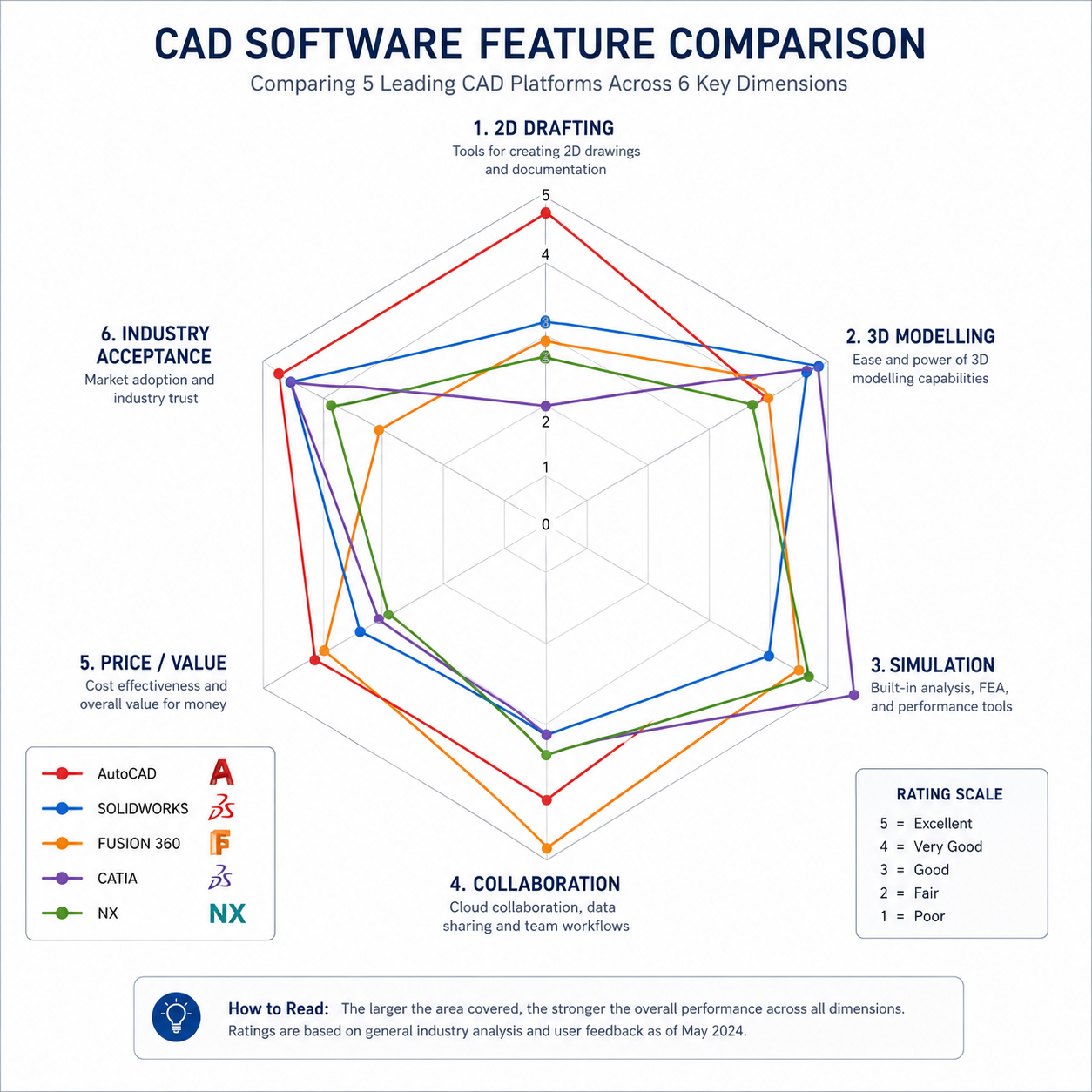
| CAD Software | Entry Price (per seat/year) | Full Professional | Student / Education | Free Tier Available? | Deployment |
| AutoCAD | $2,230/year or $195/month | Same (single product) | Free via Autodesk Education | 30-day trial | Desktop + Web + Mobile |
| AutoCAD LT | $570/year or $55/month | Same (2D only) | Free via Autodesk Education | 30-day trial | Desktop + Web |
| SolidWorks (Standard) | ~$2,620/year (subscription) | SolidWorks Premium ~$5,500+/year | SOLIDWORKS for Students (low cost) | No (trial only) | Desktop |
| Autodesk Fusion 360 | $545/year (Personal/Startup) | ~$795/year (commercial) | Free for students/educators | Yes, personal/startup free tier | Cloud + Desktop |
| CATIA (3DEXPERIENCE) | $10,000-$80,000+/year (enterprise, varies) | Configured per enterprise contract | Academic access via institutions | No | Desktop + Cloud (3DX) |
| Siemens NX | $8,000-$70,000+/year (enterprise, varies) | Configured per enterprise contract | NX for Students (free) | No (30-day trial) | Desktop |
| PTC Creo | $2,500-$15,000+/year (varies by module) | Creo Advanced or Ultimate | PTC Education licence | No (30-day trial) | Desktop |
| Autodesk Inventor | $2,545/year (subscription) | Included in Product Design Suite | Free via Autodesk Education | 30-day trial | Desktop |
| Onshape | $1,500/year (Standard) | Professional: $2,100/year | Free for students/educators | Yes, free public plan | Cloud-native (browser) |
| Bentley MicroStation | ~$3,500/year (subscription) | Enterprise via Bentley contract | Academic/student licences available | No | Desktop |
| FreeCAD | Free (open source) | Free (open source) | Free | Yes, fully free | Desktop (cross-platform) |
| Note: Pricing is indicative based on publicly available information as of 2026. Enterprise contracts for CATIA, NX, and Creo are negotiated individually and typically include volume discounts, support, training, and PLM integration. Always verify current pricing directly with vendors before budgeting. |
Industry-Specific Recommendation Matrix
This matrix reflects real industry adoption data based on job posting frequency, employer survey data, and engineering community usage patterns as of 2026. The Primary Tool is the tool most commonly required by employers in that sector. The Secondary Tool is a strong alternative or complement.
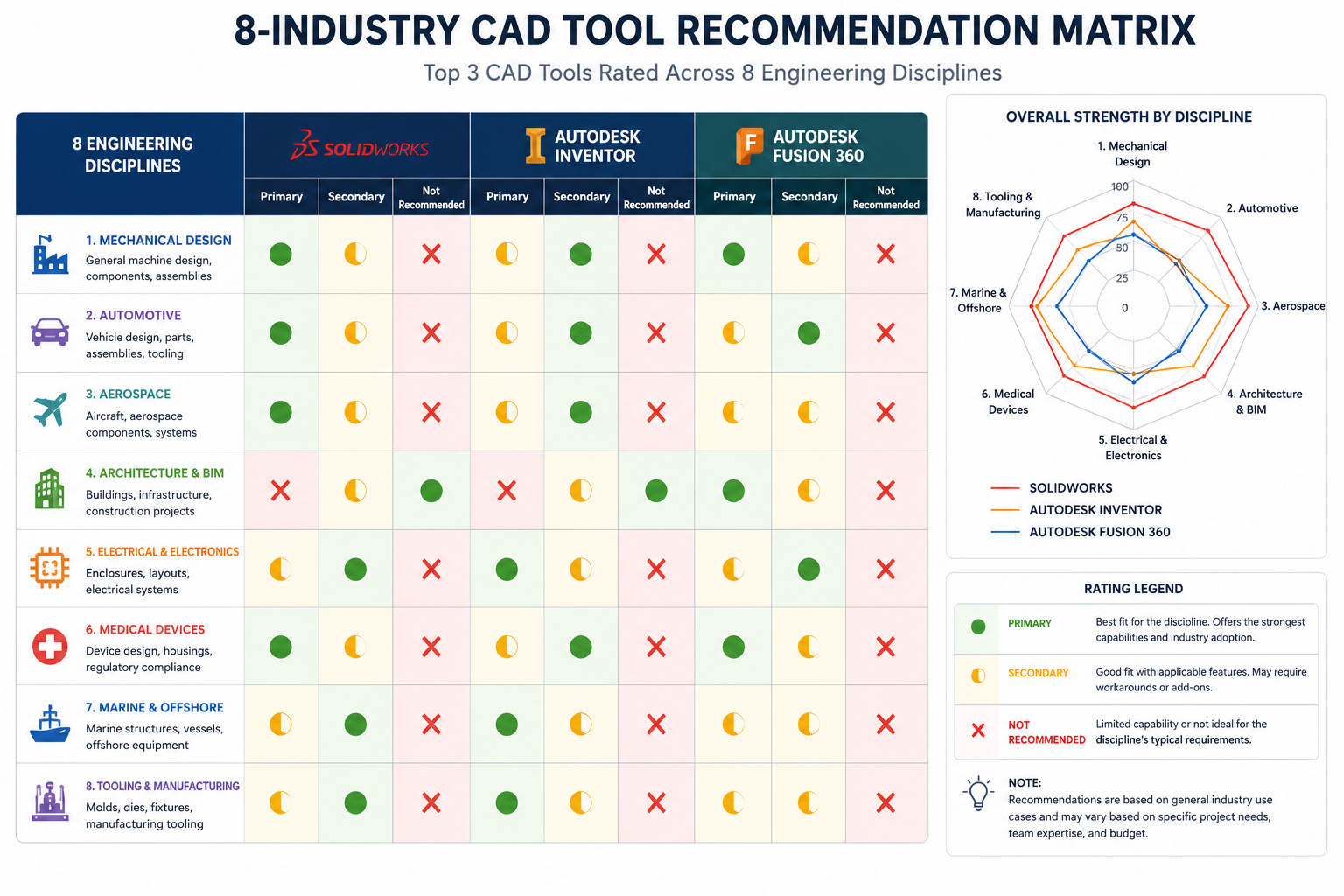
| Engineering Discipline | Primary CAD Tool | Secondary Tool | Why This Tool Dominates | Key Reason to Learn It |
| Mechanical / Product Design | SolidWorks | Autodesk Inventor or Fusion 360 | Market-leading parametric 3D tool for product development. Required in over 65% of mechanical engineering job postings. | Most in-demand parametric CAD skill globally for mid-market mechanical engineering roles |
| Aerospace and Defence | CATIA (Dassault) | Siemens NX | Airbus, Boeing, Dassault Aviation, and most global aerospace OEMs standardise on CATIA or NX. Deep surface modelling and systems engineering capability. | Essential for careers in commercial aerospace, space vehicles, and high-end defence engineering |
| Automotive (OEM) | CATIA or Siemens NX | Creo (PTC) | European and Asian OEMs (BMW, VW, Toyota) use CATIA; GM uses NX. Body-in-white, surface design, and digital mockup drive tool selection. | Automotive OEM and Tier 1 supplier roles require enterprise CAD proficiency |
| Civil and Infrastructure | AutoCAD Civil 3D | Bentley MicroStation | AutoCAD Civil 3D dominates road, drainage, and site design. Bentley is the standard in large-scale infrastructure (rail, highways, utilities). | Most civil engineering employers require AutoCAD proficiency at minimum |
| Architecture and Construction (MEP) | AutoCAD / Revit | AutoCAD MEP toolset | AutoCAD for documentation; Revit for BIM coordination. HVAC engineers use AutoCAD MEP toolset or MicroStation. | AutoCAD is baseline; Revit adds BIM value for coordination roles |
| Structural Engineering | AutoCAD / Tekla Structures | SolidWorks (for steel connections) | Structural steelwork: Tekla Structures dominant. Reinforced concrete detailing: AutoCAD widely used. | AutoCAD proficiency expected; Tekla adds specialist steel detailing value |
| Electrical Engineering | AutoCAD Electrical | EPLAN (not CAD per se, but dominant) | AutoCAD Electrical toolset for wiring diagrams, panel layouts, and schematics is the primary choice for electrical designers. | AutoCAD Electrical is the most employer-requested electrical CAD tool |
| Manufacturing Engineering | SolidWorks or Fusion 360 | Siemens NX (with CAM) | Product design uses SolidWorks; CNC machining benefits from Fusion 360’s integrated CAM. Process-heavy manufacturing uses NX. | Fusion 360’s CAD+CAM integration is uniquely valuable for manufacturing engineers who also oversee machining |
Tool 1: AutoCAD, The Universal Standard for Documentation
AutoCAD has been the global standard for technical drawing and documentation for over 40 years, and in 2026 it remains the most widely deployed CAD software in the world by active users. Its DWG file format is the universal language of engineering drawings, readable by virtually every other CAD system ever made.
What AutoCAD Does Best
- 2D technical drafting: No other tool matches AutoCAD for 2D drawing production speed, precision, and compatibility across disciplines.
- Drawing documentation and annotation: Dimensions, tables, text, hatching, and plotting workflows are more mature than any competing platform.
- Universal compatibility: DWG file format compatibility with every other CAD tool, CNC machine, fabricator, and engineering system.
- Industry toolsets: The AutoCAD subscription includes specialist toolsets for Architecture, Mechanical, Electrical, Civil, MEP, Plant, and Map 3D at no extra cost.
Where AutoCAD Falls Short
- 3D parametric modelling: AutoCAD’s 3D solid modelling is functional but non-parametric. It cannot match SolidWorks or Fusion 360 for feature-based part design or assembly management.
- Simulation and analysis: No built-in FEA or CFD capability. Engineers needing simulation must use separate tools (ANSYS, SolidWorks Simulation, Fusion 360 Simulation).
- Cost: At $2,230/year, AutoCAD is expensive for 2D-only work when AutoCAD LT ($570/year) or free alternatives may suffice.
| Best For: Civil engineers, architects, structural detailers, electrical designers, MEP engineers, manufacturing documentation engineers, and any professional whose primary output is 2D technical drawings. The single most employable CAD skill across the broadest range of engineering disciplines. |
Tool 2: SolidWorks, The Mechanical Engineering Workhorse
SolidWorks by Dassault Systemes is the dominant parametric 3D CAD tool in the mid-market mechanical engineering sector. It holds approximately 30 percent of the global CAD market by paid seats and is the most frequently required 3D CAD skill in mechanical engineering job postings globally.
What SolidWorks Does Best
- Feature-based parametric 3D modelling: SolidWorks’ parametric modelling engine is mature, stable, and highly efficient for mechanical component design. Changes propagate automatically through part, assembly, and drawing.
- Assembly management: Large assembly tools (SpeedPak, Lightweight mode, Assembly Visualize) allow engineers to work with complex multi-component products efficiently.
- Integrated simulation (SolidWorks Simulation): FEA structural analysis, fluid flow, thermal analysis, and drop test simulation are available as integrated add-ons, reducing the need for separate simulation tools.
- Sheet metal and weldment design: Dedicated sheet metal and weldment workflows are among the best in class for manufacturing-focused mechanical engineers.
- Ecosystem depth: PDM (Product Data Management), Inspection, Plastics, and Electrical add-ons provide a comprehensive product development platform.
Where SolidWorks Falls Short
- Cost for small teams: At ~$2,620/year per seat for Standard, SolidWorks is not the most budget-friendly option for freelancers or very small teams. Fusion 360 provides substantial capability at a fraction of the cost.
- Cloud and collaboration: Traditional desktop-first architecture. Real-time collaboration requires additional PDM/PLM infrastructure investment.
- Surface modelling for Class A surfaces: SolidWorks’ surfacing tools are good but not as sophisticated as CATIA or NX for consumer product aesthetics and Class A automotive surfaces.
- 3DEXPERIENCE transition: Dassault’s push toward the 3DEXPERIENCE platform (cloud-based SolidWorks) has created some user confusion and concerns about transition costs.
| Best For: Mechanical engineers, product designers, manufacturing engineers, tooling designers, R&D engineers in product development companies, and any engineer whose primary work involves 3D mechanical component and assembly design at the mid-market level. |
Tool 3: Autodesk Fusion 360, Best All-in-One for Smaller Teams
Autodesk Fusion 360 occupies a unique and increasingly important position in the CAD market: it is the only platform that provides integrated 3D CAD, CAM (computer-aided manufacturing), CAE (simulation), electronics PCB design, and generative design in a single cloud-based subscription, at a price point accessible to startups, small businesses, and individual engineers.
What Fusion 360 Does Best
- Integrated CAD + CAM: Fusion 360 is the most capable integrated CAD+CAM platform available at its price point. Engineers who both design components and programme their machining (CNC routing, turning, milling) in a single workflow gain significant productivity advantages.
- Generative design: Fusion 360 includes generative design tools that use AI to explore optimised geometries based on engineering constraints, a capability that typically requires much more expensive enterprise software.
- Cloud collaboration: All project data lives in Autodesk cloud. Team members can access, view, and comment on designs from any device without PDM infrastructure.
- Price-to-capability ratio: At ~$545/year (or free for qualifying personal/startup use), Fusion 360 provides more integrated capability than any comparable subscription at this price.
Where Fusion 360 Falls Short
- Large assembly performance: Fusion 360 struggles with assemblies above ~1,000 components compared to desktop tools like SolidWorks or NX.
- Industry acceptance: Fusion 360 is well-accepted in manufacturing, consumer products, and startups, but is rarely seen in aerospace, automotive OEM, or large industrial engineering environments where enterprise tools are mandated.
- Offline capability: While Fusion 360 can work offline, its cloud-dependency means reduced functionality without internet access.
- Drawing documentation maturity: Fusion 360’s 2D drawing creation is improving but still less mature than AutoCAD or SolidWorks for complex drawing documentation.
| Best For: Startups, product development startups, small manufacturing businesses, engineers who both design and machine parts, hobbyists and makers wanting professional-grade tools, and engineers in roles where CAD+CAM integration is more valuable than enterprise assembly management. |
Tool 4: CATIA, Enterprise Aerospace and Automotive Standard
CATIA (Computer-Aided Three-Dimensional Interactive Application) by Dassault Systemes is the most powerful and comprehensive CAD platform in the world for complex surface modelling, large-scale assembly management, and systems engineering. It is the primary CAD tool at Airbus, Boeing (partially), Dassault Aviation, Renault, PSA Peugeot-Citroen, and dozens of other major aerospace and automotive OEMs.
What CATIA Does Best
- Class A surface modelling: CATIA’s FreeStyle and Generative Shape Design workbenches are the gold standard for creating mathematically perfect curvature-continuous surfaces for aerospace exteriors, automotive body panels, and premium consumer products.
- Large-scale digital mockup: CATIA handles assemblies of tens of thousands of components (entire aircraft or vehicle programs) efficiently through dedicated DMU Navigator and interference checking tools.
- Knowledge-based engineering (KBE): CATIA’s product knowledge base and engineering rules engine allow companies to encode design standards, automate repetitive design tasks, and ensure design compliance at scale.
- Systems engineering (SysML/MBSE): Through 3DEXPERIENCE platform integration, CATIA supports model-based systems engineering for complex multidisciplinary products.
Where CATIA Falls Short
- Cost and accessibility: CATIA is priced for large enterprises and is effectively inaccessible to individuals, small businesses, or companies without a significant CAD budget. Student access is limited.
- Learning curve: CATIA has the steepest learning curve of any mainstream CAD tool. The workbench-based interface and the breadth of modules require significant dedicated training investment.
- Overkill for most mechanical engineering: For the vast majority of mechanical engineering work, CATIA’s power is far beyond what is needed and its complexity is a productivity cost rather than a benefit.
| Who Should NOT Use CATIA: Small and medium-sized engineering businesses, individual engineers, and anyone outside aerospace, automotive OEM, or complex industrial systems engineering. SolidWorks provides 90 percent of CATIA’s utility for typical mechanical engineering at a fraction of the cost and complexity. |
Tool 5: Siemens NX, The High-End Manufacturing Platform
Siemens NX (formerly Unigraphics NX) is Siemens Digital Industries Software’s flagship CAD/CAM/CAE platform, competing directly with CATIA at the enterprise end of the market. NX is the CAD standard at General Motors, BMW, Volkswagen (partially), Lockheed Martin, and many Tier 1 automotive suppliers.
What Siemens NX Does Best
- Integrated CAD/CAM/CAE at scale: NX provides seamlessly integrated 3D design, advanced manufacturing programming, and simulation within a single platform, eliminating the file translation issues that occur when using separate tools for each stage.
- Advanced manufacturing: NX CAM is one of the most powerful and widely used CNC programming environments for 5-axis machining, turning, and EDM in high-precision manufacturing.
- Convergent modelling: NX’s Convergent Modelling technology allows engineers to work directly with mesh (scan) data alongside B-rep models, useful for reverse engineering and as-built modelling.
- PLM integration (Teamcenter): NX integrates natively with Siemens Teamcenter PLM, the most widely deployed PLM system in manufacturing industry.
| Best For: Automotive OEM and Tier 1 suppliers, precision manufacturing companies, aerospace and defence companies using Siemens infrastructure, and large industrial equipment manufacturers requiring integrated CAD-CAM-PLM workflows. |
Tool 6: PTC Creo, Strong in Industrial and IoT Engineering
PTC Creo (formerly Pro/ENGINEER) is PTC’s parametric 3D CAD platform, historically strong in industrial machinery, consumer products, and medical devices. Creo is particularly notable for its advanced surfacing capabilities, its model-based definition (MBD) tools, and its ThingWorx IoT integration for smart connected products.
What Creo Does Best
- Industrial machinery and heavy equipment: Creo’s robust assembly management and mechanism simulation tools make it particularly well-suited for complex industrial machinery design.
- Model-Based Definition (MBD): Creo’s MBD tools for embedding 3D annotations (GD&T, tolerances, surface finish) directly in the 3D model as replacements for 2D drawing views are among the most mature in the industry.
- IoT and smart product design: Creo’s integration with PTC’s ThingWorx IoT platform is unique among CAD tools, allowing engineers to design products and their IoT connectivity simultaneously.
| Best For: Industrial machinery, heavy equipment, oil and gas equipment, medical devices, and companies with existing PTC Windchill PDM infrastructure. |
Tool 7: Autodesk Inventor, SolidWorks Alternative Within the Autodesk Ecosystem
Autodesk Inventor is Autodesk’s parametric 3D mechanical CAD tool, occupying a similar market position to SolidWorks but with the advantage of native compatibility with AutoCAD DWG files and the rest of the Autodesk product suite. It is particularly strong in the UK, Australia, and markets where AutoCAD adoption is high and a natural upgrade path to 3D is valued.
Inventor is often bundled with AutoCAD in the Autodesk Product Design and Manufacturing Collection ($3,155/year), providing both 2D and 3D capability at a cost that is competitive with standalone SolidWorks. For companies already using AutoCAD and considering a move into 3D, Inventor is a natural and cost-efficient choice.
| Inventor vs SolidWorks Decision: If your team already uses AutoCAD and the Autodesk ecosystem, Inventor is the logical 3D upgrade, shared licensing, native file interoperability, and familiar UI patterns. If your industry partners and clients standardise on SolidWorks files, SolidWorks is the better choice for compatibility and ecosystem depth. |
Tool 8: Onshape, The Cloud-Native Challenger
Onshape is the most mature cloud-native parametric CAD platform available. Founded by SolidWorks’ original development team, Onshape runs entirely in a web browser with no local installation required, provides real-time multi-user collaboration (multiple engineers editing the same model simultaneously), and uses a built-in version control system instead of traditional PDM software.
What Onshape Does Best
- Real-time collaboration: Multiple engineers can edit the same model simultaneously with conflict resolution, similar to Google Docs for CAD. This is genuinely unique among all CAD platforms.
- Version control without PDM: Onshape’s branching and merging version control is built in, no Vault, Workgroup PDM, or Teamcenter installation required.
- Zero IT infrastructure: No server installation, no licence management, no IT administration. Particularly valuable for small teams and remote workforces.
- Access from any device: Full CAD functionality on any computer with a modern browser, including tablets with a native Onshape app.
| Best For: Remote engineering teams, startups without IT infrastructure, hardware companies needing Google Docs-style collaboration, companies wanting to eliminate PDM infrastructure costs, and engineers who work across multiple devices or locations. |
Tool 9: Bentley MicroStation, Infrastructure and Civil Engineering
Bentley MicroStation is the primary alternative to AutoCAD for large-scale infrastructure and civil engineering projects. It is the standard CAD platform for many national highway agencies, rail operators, utilities, and large infrastructure consultancies, particularly in projects where the scale and geographic scope exceed AutoCAD’s comfort zone.
MicroStation handles very large geographically referenced files more efficiently than AutoCAD, supports 3D infrastructure modelling with OpenRoads and OpenBridge, and integrates with Bentley’s broader infrastructure digital twin platform (iTwin). It is standard at Highways England, Network Rail (UK), TfNSW, and many large European infrastructure clients.
| Who Should Learn MicroStation: Civil, structural, and transportation engineers targeting large infrastructure projects, national highway and rail operators, utilities, and water industry companies. If your target employers use MicroStation, proficiency in it adds significant value that AutoCAD training alone does not provide. |
Tool 10: FreeCAD, The Best Free CAD for Engineers
FreeCAD is the most capable free, open-source parametric 3D CAD tool available in 2026. It has advanced significantly in capability over the past three years, particularly with the FreeCAD 1.0 release, which resolved many of the topological naming instability issues that had previously limited its usefulness for professional work.
What FreeCAD Does Well
- Parametric 3D solid modelling: FreeCAD’s Part Design workbench provides feature-based parametric modelling comparable in workflow to SolidWorks for straightforward parts.
- FEA simulation (FEM workbench): FreeCAD includes a FEM workbench based on Calculix and Elmer, providing basic structural FEA at zero cost.
- Python scripting and customisation: FreeCAD’s full Python API makes it highly extensible for users who need custom workflows or automated design tasks.
- Total cost: Zero. Free for all use cases including commercial.
Where FreeCAD Falls Short
- Large assembly handling: FreeCAD struggles with assemblies above ~200-300 components and lacks the dedicated large assembly management tools of commercial platforms.
- Drawing documentation: The TechDraw workbench for generating 2D drawings is functional but less capable and less reliable than AutoCAD or SolidWorks drawing environments.
- Industry acceptance: FreeCAD is not accepted as a deliverable format by most engineering clients or manufacturers. Files must be exported to neutral formats (STEP, DXF) for sharing.
- Sheet metal and weldment tools: Less mature than commercial tools for fabricated structural and sheet metal design.
| Best For: Students learning parametric CAD, researchers, engineers on tight budgets who need basic 3D modelling for personal or prototype projects, open-source hardware projects, and engineers who need basic FEA capability without budget for commercial simulation tools. |
Desktop vs Cloud-Native CAD: Honest Comparison
| Criterion | Desktop CAD (AutoCAD, SolidWorks, NX, CATIA) | Cloud-Native CAD (Onshape, Fusion 360, Shapr3D) |
| Performance with large assemblies | Superior, local processing, no bandwidth limitation | Limited, large assemblies slow down cloud rendering |
| Collaboration and version control | Requires PDM/PLM infrastructure investment | Built-in real-time collaboration and version control |
| Hardware requirement | High-spec workstation or laptop required (GPU, RAM) | Any modern computer with browser; no high-spec requirement |
| Offline working | Full functionality offline | Reduced functionality without internet; limited offline mode |
| Data security | Data stays on company servers/local machines | Data lives on vendor cloud, critical for IP-sensitive sectors |
| Feature maturity | Most mature feature sets, decades of refinement | Rapidly improving but some gaps vs desktop tools |
| Initial setup cost | Higher, software, hardware, IT infrastructure, PDM | Lower, subscription only, no server infrastructure |
| Industry acceptance | Required by most large engineering clients and employers | Growing acceptance; not yet standard in aerospace, automotive OEM |
| Best for | Enterprise engineering, aerospace, automotive, large infrastructure | Startups, small teams, remote workers, education, rapid iteration |
Free CAD Software for Engineers: When It Makes Sense
Free CAD tools are genuinely appropriate in specific situations, and the growth in quality of free options (FreeCAD, Onshape free tier, Fusion 360 personal use, AutoCAD Web free functionality) means the case for paying for software is weaker than it once was for some use cases.
| Situation | Free Tool Recommendation | Why It Works | When to Upgrade to Paid |
| Student learning parametric 3D CAD | FreeCAD or Onshape (free) or SolidWorks/AutoCAD via education licence | Education licences for SolidWorks and AutoCAD are free and functionally identical to commercial versions | When entering employment, commercial proficiency is required |
| Personal/hobby engineering and making | Fusion 360 (personal free tier) or FreeCAD | Fusion 360 personal free tier provides excellent CAD+CAM capability for non-commercial use | When commercialising, Fusion 360 free tier prohibits commercial use above $1,000/year revenue |
| Startup below $100k revenue | Fusion 360 (Startup free tier, < $100k revenue) or Onshape (free public plan) | Fusion 360 offers full professional capability free for qualifying startups | At startup’s first funding round, professional licensing is expected |
| Viewing and reviewing CAD files (no creation) | Autodesk DWG TrueView, eDrawings, Onshape viewer | Free viewers are sufficient for review-only workflows without any CAD creation need | Never, if creation is not needed, paid tools have no value |
| Basic 2D drafting for personal use | AutoCAD Web (free limited tier) or LibreCAD (free) | For occasional 2D documentation tasks, free tiers are sufficient | When professional documentation output or collaboration is required |
CAD Software and Career Impact: Job Market Data
The CAD software skill listed on a job posting is one of the most reliable indicators of which tool dominates a given industry. The following data reflects analysis of engineering job postings on LinkedIn, Indeed, and sector-specific job boards across the UK, US, Germany, and Australia in 2024-2026.
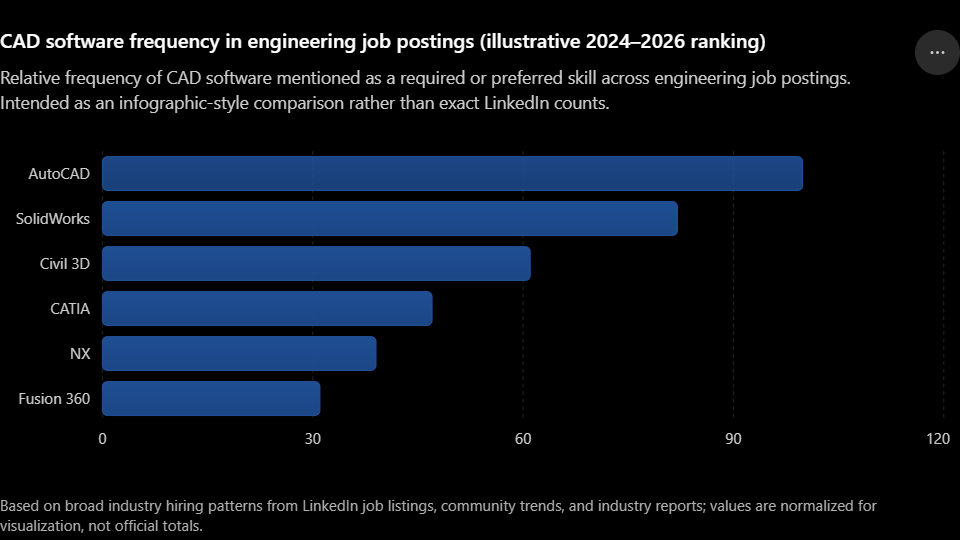
| CAD Software | Job Posting Frequency | Industries With Highest Demand | Typical Salary Premium vs No CAD Skill | Certification Available? |
| AutoCAD | Highest, appears in more engineering job postings than any other single tool | All engineering disciplines, architecture, construction, civil | +10 to 20% for verified proficiency; Autodesk Certified Professional (ACP) valued | Yes, Autodesk Certified User (ACU) and Professional (ACP) |
| SolidWorks | Very high, most common 3D CAD requirement in mechanical engineering | Mechanical, product design, manufacturing, medical devices | +15 to 25% for CSWP/CSWE certification holders vs uncertified | Yes, SOLIDWORKS Certified Professional (CSWP) and Expert (CSWE), highly valued |
| Fusion 360 | Growing rapidly, most common in startups and manufacturing SMEs | Product design startups, CNC manufacturing, consumer products | +10 to 15%; Autodesk Certified User level available | Yes, Autodesk Certified User in Fusion 360 |
| CATIA | Moderate overall; very high in aerospace/automotive specifically | Aerospace, automotive OEM, defence, premium consumer products | +20 to 35% in specialist aerospace/automotive roles; scarcity premium | Yes, Dassault Systemes certified associate and professional levels |
| Siemens NX | Moderate overall; very high in automotive/precision manufacturing | Automotive OEM, Tier 1 suppliers, precision manufacturing, defence | +20 to 35% in specialist roles; high scarcity premium | Yes, Siemens NX Certified Associate and Professional levels |
| AutoCAD Civil 3D | High in civil/infrastructure sector | Civil engineering, transportation, land development, water infrastructure | +15 to 20% vs AutoCAD-only in civil sector | Yes, Autodesk Certified Professional in Civil 3D |
| Onshape | Growing; common in hardware startups and mechatronics | Hardware startups, mechatronics, IoT device design | +10 to 15%; emerging tool with growing employer base | Yes, PTC Onshape certification available |
| FreeCAD | Low in commercial job postings (open-source, less employer-required) | Academia, open-source hardware, personal projects | Minimal employer premium; primarily valuable for self-development | No formal certification |
| Career Strategy Insight: The highest-value CAD investment for most mechanical engineers is SolidWorks proficiency plus CSWP certification. CSWP is employer-recognised, independently validated, and consistently associated with a salary premium of 15 to 25 percent over uncertified peers. For civil and multi-discipline engineers, AutoCAD ACP certification provides the broadest career coverage. For aerospace and automotive-targeting engineers, CATIA or NX proficiency (gained through employer training) is the primary differentiator. |
Frequently Asked Questions (FAQ)
What is the best CAD software for mechanical engineers?
For most mechanical engineers, SolidWorks is the best CAD software: it is the most widely used parametric 3D CAD tool in the global mid-market mechanical engineering sector, required in over 65% of mechanical engineering 3D CAD job postings, and has the deepest ecosystem of simulation, sheet metal, and manufacturing tools. For smaller teams and budget-conscious engineers, Autodesk Fusion 360 provides excellent integrated CAD+CAM capability. For aerospace and automotive OEM roles, CATIA or Siemens NX are the industry-mandated standards.
What CAD software do most engineers use?
The most widely used CAD software across all engineering disciplines is AutoCAD for 2D drafting and documentation (used in architecture, civil, structural, electrical, mechanical, and MEP engineering). For 3D parametric mechanical design, SolidWorks is the most common tool in the mid-market. For aerospace, CATIA and Siemens NX are the standards. For startups and small teams, Fusion 360 is increasingly common. The tool that appears in the most engineering job postings globally remains AutoCAD by a significant margin.
Is AutoCAD or SolidWorks better for engineers?
They serve fundamentally different purposes, so the comparison depends on the engineering role. AutoCAD is best for 2D technical drawing, documentation, and multi-discipline drafting across architecture, civil, structural, and electrical engineering. SolidWorks is best for 3D parametric mechanical design, assembly modelling, simulation, and product development. Many mechanical engineers use both: SolidWorks for 3D design work and AutoCAD for 2D drawing production and documentation.
What is the best free CAD software for engineers?
The best free CAD software for engineers depends on use case. Fusion 360 offers the best free professional capability for qualifying personal/startup users (free for non-commercial use and for startups below $100k revenue). FreeCAD is the best fully open-source parametric 3D CAD with no usage restrictions. Onshape (free public plan) provides cloud-native collaboration at zero cost. For 2D drafting, AutoCAD Web has a limited free tier and LibreCAD is fully free and open-source.
Is Fusion 360 good for professional engineering?
Yes, Fusion 360 is a professional-grade engineering tool for many applications. It is particularly strong for product design startups, CNC manufacturing engineering, consumer products, and any workflow benefiting from integrated CAD+CAM capability. Its limitations are in large assembly handling (above ~1,000 components), industry acceptance in aerospace and automotive OEM environments (where CATIA and NX are mandated), and drawing documentation maturity compared to SolidWorks or AutoCAD. For the price point ($545/year commercial or free for qualifying use), it offers exceptional value.
What CAD software is used in aerospace engineering?
Aerospace engineering primarily uses CATIA (Dassault Systemes) and Siemens NX. Airbus, Dassault Aviation, many European aerospace OEMs, and major defence contractors standardise on CATIA. Boeing, General Motors, Lockheed Martin, and their supply chains typically use NX. CATIA is valued for Class A surface modelling, large digital mockup, and knowledge-based engineering. NX is valued for its integrated CAD/CAM/CAE capability and Teamcenter PLM integration. Both have steep learning curves and are priced for enterprise deployment.
How long does it take to learn CAD software?
Learning time varies by tool and target proficiency level. For AutoCAD, productive 2D proficiency typically takes 4 to 8 weeks of regular practice. For SolidWorks, productive 3D modelling competence typically takes 3 to 5 months. For Fusion 360, 2 to 4 months for CAD proficiency, longer to master the CAM workflows. For enterprise tools like CATIA or NX, initial productivity typically takes 6 to 12 months of dedicated training and practice. All tools offer much shorter learning curves if you already have proficiency in a similar competing tool.
Which CAD software certification is most valuable for engineering careers?
The most career-valuable CAD certifications for engineers are: SOLIDWORKS Certified Professional (CSWP) for mechanical engineers, consistently associated with 15 to 25% salary premiums; Autodesk Certified Professional (ACP) in AutoCAD for the broadest multi-discipline engineering recognition; and Autodesk Certified Professional in Civil 3D for civil and infrastructure engineering roles. CATIA and NX certifications are valuable but are typically obtained through employer training programs rather than independent self-study.
Conclusion: How to Make the Final Decision
The best CAD software for engineers is always context-dependent, and any guide that names a single universal winner is oversimplifying a genuinely complex decision. The frameworks in this guide are designed to cut through that complexity.
Start with your industry and target employers. If they use SolidWorks, learn SolidWorks. If they use CATIA, that is what matters. If you are a civil engineer, AutoCAD Civil 3D is not optional, it is the baseline. The most common mistake engineers make is choosing a tool based on marketing, price, or personal preference rather than industry and employer alignment.
Once you have identified the right tool for your industry, the second most important decision is certification. A validated, externally recognised certification (CSWP for SolidWorks, ACP for AutoCAD, Professional for Civil 3D) adds salary premium, recruitment signal, and professional credibility that self-reported proficiency does not.
For students and early-career engineers: use your free education access to develop genuine proficiency in the tool your industry uses. For established professionals: the investment in one additional CAD certification in a high-demand area (CSWP if you have not done it, Civil 3D ACP if you are in infrastructure) has one of the fastest returns of any professional development investment available.
Further reading recommendation: Monograph Best Engineering Design Software
Explore the broader CAD landscape: read CAD Software Explained: Types, Uses, and Best Tools for the complete overview, or deep-dive into AutoCAD Tutorials for Beginners and Professionals to start building the most universally applicable CAD skill in engineering.