Tag: cnc machining

  • 12 Design Changes That Cut Product Cost Without Sacrificing Quality

    12 Design Changes That Cut Product Cost Without Sacrificing Quality

    An industrial product had been in production for three years when the sales team brought a problem to engineering: a competitor had launched a similar product thirty percent cheaper, and orders were shifting. Finance looked at the bill of materials and said there wasn’t much room to move on material costs. Operations looked at labour and said the processes were already efficient. The conclusion was that product cost was essentially fixed.

    Engineering took a different approach. Instead of asking what the product cost and how to reduce it, they asked what the product was designed to be and whether any of those design decisions cost more than they needed to. Within six weeks, they found eleven specific changes: two parts consolidated into one, a machined block replaced by an extrusion, three tight tolerances relaxed to commercial grade after a stack-up analysis showed they weren’t functionally required, a five-setup CNC part redesigned to three, and four custom fasteners replaced with standard hardware.

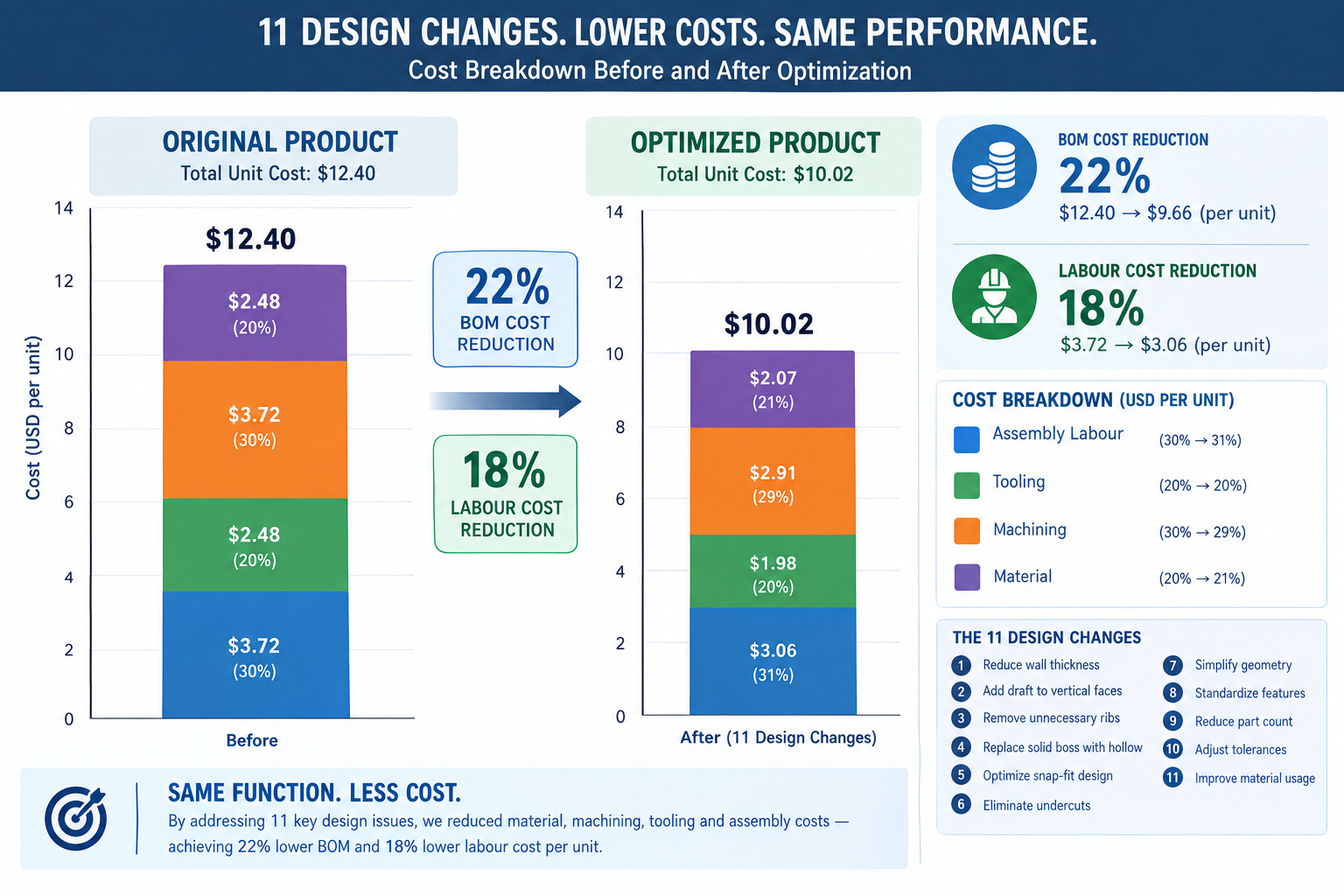
    Quick answer: No change compromised function or quality. The bill of materials dropped twenty-two percent and assembly labour dropped eighteen percent, together producing the cost reduction finance had said wasn’t available. The highest-leverage design changes for cutting product cost are part count reduction, CNC setup elimination, tolerance relaxation to commercial grade, and switching to standard stock forms or fasteners, each targeting a specific, identifiable cost driver rather than guessing at across-the-board trims.
    Bar chart comparing product cost breakdown before and after eleven design changes showing 22 percent BOM reduction

    This article is built around that same approach: specific, actionable design changes that address real cost drivers, with quantified savings ranges, the CAD effort required, and the functional risk to watch for. None of them require accepting a lower-quality product. All of them require understanding what’s actually driving the cost.

    The Cost Reduction Mindset: Attacking the Right Cost Driver

    Cost reduction only works if it targets the right cost driver. A team that spends two weeks trimming five percent of material from an injection moulded part, when tooling amortisation represents forty percent of unit cost and material represents fifteen percent, has invested significant effort for a result that moves the needle by less than one percent of total cost. The same two weeks spent eliminating a side action from the mould would cut tooling cost by twenty to thirty percent, a far larger saving that compounds across the entire run.

    The first step in any cost reduction review is understanding the cost breakdown of the part or assembly. A machined metal assembly is dominated by machining time and setup cost, so reducing setups and simplifying features pays off there. A high-volume injection moulded product is often dominated by tooling amortisation at lower volumes and assembly labour at higher volumes, so eliminating side actions and cutting part count are the highest-leverage moves. A sheet metal enclosure is driven by material and forming time at low volumes and assembly at moderate volumes, so switching from welded to snap-fit assembly pays off there.

    None of these strategies require a redesign from scratch. They’re targeted, specific changes, each addressing a specific cost driver, each leaving function and quality intact.

    Twelve Design Changes and Their Cost Impact

    Savings ranges are representative of typical engineering components, not minimums or maximums; actual savings depend on the specific design, supplier pricing, and volume. CAD effort: “very low” means a drawing revision with no geometry change, “low” means a minor geometry or spec change, “medium” means a feature relocation or cross-section redesign.

    Design ChangeProcessTypical Cost SavingCAD EffortFunctional Risk if Applied Incorrectly
    Reduce part count via consolidationAll assembly processes15-40% of assembly cost per part eliminatedMediumMust not compromise serviceable, differently-materialed, or moving parts
    Switch machined part to standard stock profileCNC machining20-50% material/machining reductionLowStandard dimensions may affect fit; confirm with stack-up analysis
    Eliminate or relocate undercutsInjection moulding, die casting20-50% tooling cost reductionMediumSnap-fits may need redesign; validate relocated feature function
    Loosen tolerances to commercial gradeCNC machining, all processes30-60% on tightened dimensionsVery lowVerify tolerance isn’t required for fit, function, or stack-up
    Reduce number of CNC setupsCNC machining20-40% per setup eliminatedMediumRelocated features must stay accessible and hold positional accuracy
    Replace custom fasteners with standard hardwareAssembly, all processes50-90% fastener cost reductionVery lowStandard sizes must meet load; check thread engagement and clamping
    Redesign rib/boss geometry to eliminate sink marksInjection moulding10-30% finishing cost savingLowPreserve rib’s structural function after thinning; may need gusset
    Switch 5-axis to 3-axis via geometry redesignCNC machining30-60% machine rate reductionMediumCompound-angle functional surfaces may need to stay; confirm with team
    Increase moulded wall thickness uniformityInjection moulding10-25% cycle time; scrap improvementMediumThicker sections need more cooling if not corrected
    Use self-clinching fasteners instead of weld nutsSheet metal assembly30-60% labour reduction; no weld distortionLowVerify gauge meets PEM series minimum thickness
    Change welded assembly to formed featuresSheet metal forming20-40% assembly/welding labour reductionMediumFormed features differ structurally from welded joints; verify under load
    Reduce material removal volumeCNC machining10-30% cycle time; material cost savingMediumRun FEA if stiffness is margin-critical

    Start with the largest cost driver, not the easiest change. The temptation is to go for easy wins first, loosen a few tolerances, switch a fastener size, call it a win. These are fast, low-risk, and real, but rarely address the dominant driver. Spend thirty minutes mapping the cost breakdown first: what fraction is material, machining, tooling amortisation, and assembly labour. Direct the first and most effort toward whatever fraction is largest. A three percent material saving sounds good; a thirty percent tooling saving from eliminating one side action saves more in absolute terms and requires less ongoing effort, since the saving is structural, not incremental.

    Part Count Reduction: The Highest-Leverage Single Change

    Part count reduction consistently delivers the largest total savings per design-change hour invested, for a reason easy to underestimate until you calculate it: every part in an assembly carries cost entirely separate from its own material and processing, supplier management, purchase orders, receiving inspection, inventory, kitting, assembly labour, and quality tracking. Eliminating one part eliminates all of that overhead for every unit ever produced.

    The Boothroyd-Dewhurst criterion for evaluating whether a part can be eliminated is three questions: does it need to move relative to other parts during operation, does it need to be a different material for functional reasons, and does it need to be removable for service? If the honest answer to all three is no, there’s a strong case for consolidating it with an adjacent part. This analysis frequently reveals that parts separate since the original design became separate because of how the design was built in CAD, not a genuine functional requirement.

    How to Identify Consolidation Opportunities

    Walk the bill of materials and ask the three questions for every pair of adjacent parts, not just ones that obviously look redundant. Some of the highest-value consolidations involve parts that aren’t visually similar at all. A separate threaded insert press-fit into a plastic housing fails all three criteria: it doesn’t move, it’s a metal insert in a plastic part (a material difference), and it could reasonably be replaced by a moulded thread or self-tapping screw feature, depending on pull-out strength and insertion cycle requirements.

    A concrete example: a plastic consumer electronics housing had a separate moulded lens bezel, a different colour, bonded on during assembly. It didn’t move relative to the housing and didn’t need removal for service. The only reason it was separate was that the original designer hadn’t considered in-mould painting or two-shot moulding as alternatives. Switching to two-shot moulding of the main housing combined both colours in one operation, eliminating the bezel as a separate part, the bonding adhesive, and the bonding assembly station. The saving was roughly $0.80 per unit at 50,000 units per year, $40,000 annually that had been a design decision made without asking whether the bezel needed to be separate.
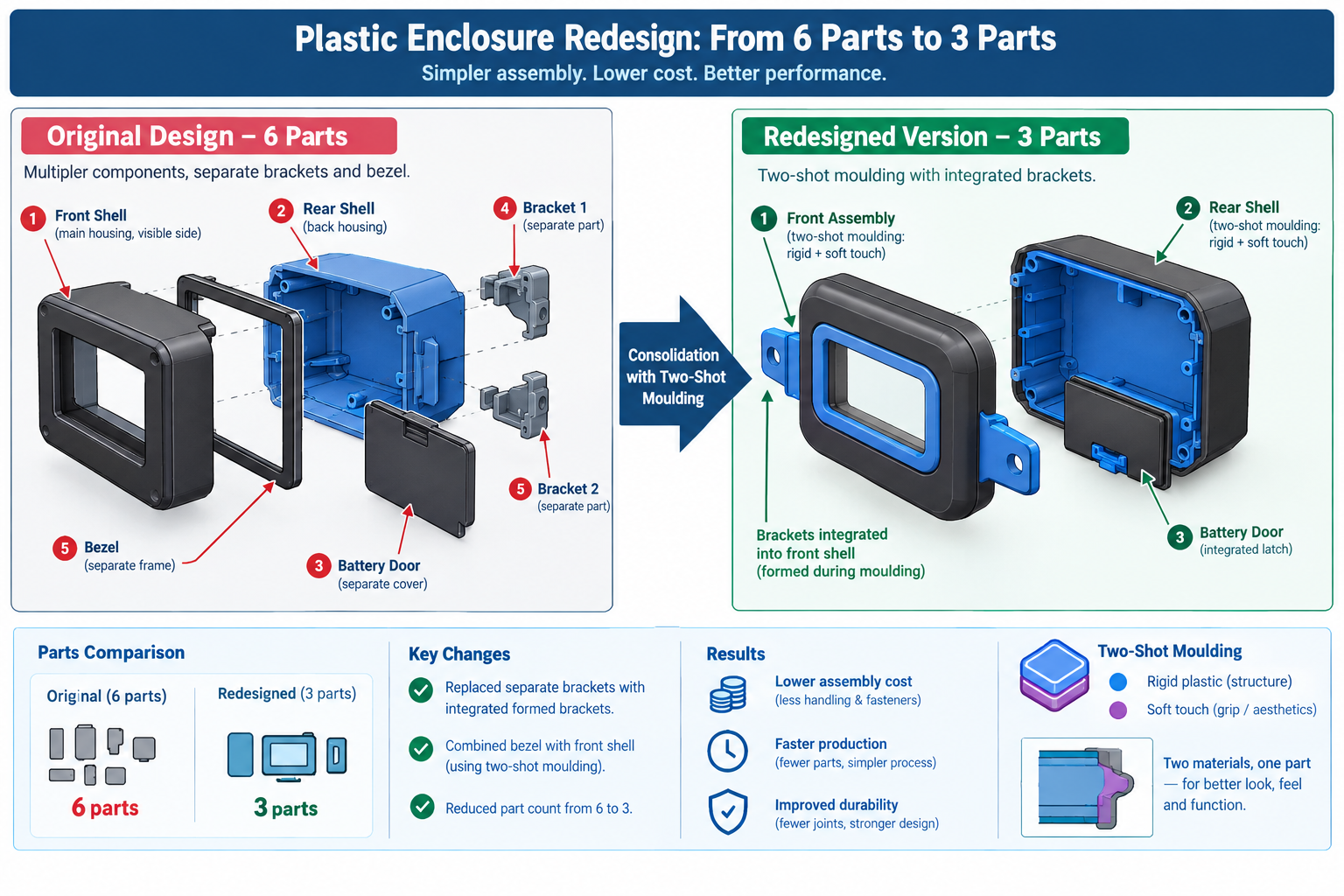
    Exploded diagram comparing a six-part enclosure assembly to a consolidated three-part redesign using two-shot moulding

    CNC Setup Reduction: Designing Out the Repositioning Cost

    In CNC machining, setup time is non-productive: the machine is available but not cutting. Every repositioning means removing the part, refixturing it, and reprobing to establish a new datum, anywhere from fifteen minutes for a simple flip to two hours for complex refixturing with tight positional requirements. At $80 to $200 per hour of machine time, even a thirty-minute setup is a meaningful cost per part, and for parts with three or more setups, that cost is often a larger fraction of the total than most engineers realise.

    Setup count is almost always a design decision, not a physical constraint of the part’s function. Most multi-setup parts can be redesigned to fewer setups without changing any functional surface, usually by moving a feature to an adjacent face reachable in an existing setup, or accepting a minor positional shift in a non-critical feature.

    Design SituationOriginal SetupsRedesigned ToHowCost Impact
    Bracket with features on all six faces62Moved features from two minor faces to adjacent faces; one relocated 4mm38% cost reduction; shorter lead time
    Cylindrical part with off-axis tapped holes2 (lathe + mill)1 (lathe with live tooling)Redesigned holes to align with lathe’s live tooling angular positions40% cost reduction; eliminated transfer
    Housing with internal pocket and external features32Deepened pocket 3mm to let the same tool reach features from third setup25% cost reduction; better positional accuracy
    Shaft with keyway and cross-drilled holes32Both features reached with the same rotary fixture positioning30% cost reduction; better relative accuracy
    Plate with tapped holes on top and bottom21Switched to press-fit Helicoils installed from one side45% cost reduction; simplified inspection

    The Five-Minute Setup Audit

    Before sending any machined part out for quoting, spend five minutes walking the feature list, asking which machine orientation each feature needs and whether it’s already accounted for in the setup count. This map often reveals one or two features driving a dedicated extra setup that everything else on that face doesn’t need. Moving those features, often just a few millimetres, to a position accessible in an existing setup eliminates the extra setup without changing any functional dimension.

    Each setup eliminated saves roughly twenty to forty percent of the machining cost for the features that would have been in it, plus the refixturing time savings. For a four-setup part where the fourth setup contains only two movable features, eliminating it saves the refixturing time (say thirty minutes at $120/hour = $60) plus reprobing time. Over a 200-part run, that’s $12,000 saved for an afternoon of design work.

    Tolerance Relaxation: Finding the Tolerances That Don’t Need to Be Tight

    Tight tolerances cost money non-linearly: loosening from a precision class to a commercial class doesn’t cost a little less, it can cost dramatically less, since precision classes often require additional operations like reaming, grinding, or environmental control that commercial classes don’t. Understanding which tolerances are genuinely load-bearing and which inherited their value from a previous design or a default title block setting is one of the most reliable ways to find cost reduction without changing a single physical dimension.

    The audit is straightforward: for every dimension tighter than commercial grade (roughly tighter than +/-0.1 to 0.25mm for a machined part), ask what happens if it were at the loose end of commercial tolerance instead. Does it prevent assembly, cause interference, compromise sealing, or affect load-bearing performance? Or does nothing actually happen? If nothing consequential changes, the tolerance is tighter than it needs to be.

    The Tolerance Audit in Practice

    A machined aluminium bracket carried a title block default of +/-0.05mm, a precision-class tolerance, applied to every dimension not otherwise called out. The bracket mounted a PCB on four bosses and bolted to the chassis on two datum pads, with real functional requirements of 0.15mm positional accuracy on the PCB bosses and 0.05mm flatness on the datum pads. Everything else, envelope dimensions, chamfers, overall thickness, non-datum fastener holes, was carrying the precision-class default for no functional reason.

    The audit confirmed the PCB boss positions and datum pad flatness needed to stay precise, while everything else could move to commercial tolerance (+/-0.15mm) with no consequence. Revising the title block default and adding specific callouts for the two critical features relaxed roughly sixty percent of the part’s dimensions, cutting machining cost by roughly twenty-five percent since several slow, careful operations were no longer needed once only two features required that level of care.

    Material and Stock Form Switches: Changing What Comes In the Door

    Material cost is often treated as fixed, since engineers are comfortable changing feature geometry but less comfortable changing material specifications. In reality, material changes are sometimes the simplest way to reduce cost, since many material specifications represent defaults or conservative choices rather than genuine minimums. A part specified in 304 stainless when 303 would serve equally well pays a twenty to thirty percent machining premium for a benefit it doesn’t use.

    Original Material/FormAlternativeCost SavingWhen the Switch Is Valid
    Machined aluminium 6061 block6061 extrusion profiled to cross-section30-60% material/machining reductionConstant cross-section along length; extrusion economical at 500+ kg/year
    1018 mild steel1215 free-machining steel20-40% machining reductionNo welding or heat treatment required; similar tensile strength
    304 stainless machined part303 stainless30-50% machining reductionEnvironment doesn’t need 304’s higher corrosion resistance
    Steel machined bracketSheet metal formed bracket40-70% reduction at moderate volumeNo precision machined datum surfaces required
    Custom-sized bar stockNearest standard bar size15-35% material cost reductionAlmost always valid; standard stock is cheaper and stocked
    Aluminium die cast at low volumeCNC machined aluminiumLower tooling investment and riskVolume below die cast breakeven (typically 5,000-10,000 units)
    Injection moulded PCInjection moulded ABS where strength permits15-25% material cost reductionPart doesn’t need PC’s impact resistance or 90°C+ temperature limit

    The Standard Stock Form Review

    For any machined part, ask whether a standard stock form in the specified material approximates the finished cross-section. Bar, tube, angle, channel, I-section, and flat plate are available in a wide range of alloys. An extrusion matching the part’s cross-section needs far less material removal than machining from a block, which means less machining time, less chip disposal, and lower material cost.

    A structural bracket designed as a 50mm x 50mm x 200mm aluminium 6061 block with a T-shaped slot milled through it was redesigned around a standard T-slot aluminium extrusion in the same alloy. The extrusion cost thirty percent of the raw block per unit length, and machining dropped from two setups (rough and finish slot milling) to a single saw cut and two drilled holes. Total cost reduction was roughly fifty-five percent, for a change requiring two hours in CAD to verify the standard profile met the functional requirements.

    Fastener and Hardware Standardisation: The Invisible Cost Driver

    Custom fasteners, non-standard thread forms, and proprietary hardware are among the quietest cost drivers in a BOM because each item seems inexpensive individually. A custom-headed screw in a non-standard length might cost $0.18 per unit versus $0.04 for the nearest standard equivalent. That sixty percent premium sounds trivial until multiplied by the fastener count in the assembly, the number of assemblies produced, and the stocking cost of a dedicated part number requiring separate ordering, receiving, and inspection.

    The audit: list every fastener and hardware item in the BOM and check it against the standard catalogue. Question anything not a standard length or head type, is the non-standard feature genuinely required, or did it end up there because the original designer picked it without checking standard availability? For most non-standard fasteners, it’s the latter, and substituting the nearest standard alternative usually needs at most a minor check of clearance hole, countersink depth, or thread engagement length.

    Worked Examples

    The industrial pump housing: A pump housing machined from an aluminium 6061-T6 billet had five setups (top, front, back, left, right faces). Material cost was $28 per part, machining $142, for a total annual cost of roughly $30,600 at 180 parts per year.

    The billet was replaced with a near-net extruded profile matching the outer envelope more closely, eliminating roughly forty percent of raw material and dropping material cost from $28 to $17. The drain plug hole and sensor port, reviewed against functional requirements, were relocated onto faces accessible in existing setups, since the sensor measured cavity pressure rather than flow direction, eliminating two setups and dropping machining from $142 to $94. An O-ring groove tolerance audit against the O-ring manufacturer’s gland design guide confirmed +/-0.08mm on width and +/-0.05mm on depth met spec, versus the conservative +/-0.03mm originally specified, eliminating a precision grinding pass.

    Total per-part cost dropped from $170 to $103, a thirty-nine percent reduction, saving roughly $12,000 annually from four days of engineering work with no change to hydraulic performance or assembly.

    The consumer device enclosure: A handheld device’s six-part enclosure (front shell, rear shell, battery door, two internal brackets, separate display bezel) took roughly four minutes per unit to assemble. The two internal brackets, whose function was positional rather than structural, were redesigned as integrated formed features folded up from the rear shell, eliminating two parts and cutting assembly time by roughly a minute.

    The separate bezel was eliminated by switching to two-shot injection moulding, combining both colours in one operation and removing the bonding adhesive and assembly station; at 40,000 units per year, the higher two-shot tooling cost paid back within eight months. A drop simulation confirmed ABS alone met the one-metre drop specification once bezel delamination (now eliminated) was no longer the failure mode, allowing a switch from ABS/PC blend to plain ABS for a roughly fifteen percent material saving.

    Part count dropped from six to three, assembly time from four minutes to two and a half, and total enclosure unit cost dropped roughly thirty percent, worth about $48,000 annually, from three weeks of engineering work.

    Frequently Asked Questions

    Where should I start a cost reduction review on an existing product? Map the cost breakdown first: what fraction is material, machining or forming labour, tooling amortisation, assembly labour, and finishing. This is almost always more revealing than looking at the BOM in dollar terms alone. Direct the first review effort toward the largest category. If assembly labour dominates, part count reduction is the highest-leverage move. If tooling amortisation dominates, eliminating side actions gives the largest return. If machining time dominates, setup reduction gives the most.

    Can cost reduction design changes compromise quality or reliability? Not if applied correctly and verified against functional requirements first. Every change in this article carries a functional risk if applied without checking, relaxing a tolerance that’s actually load-bearing reduces quality, and eliminating a part that genuinely needs a different material causes a field failure. The changes themselves aren’t risky; applying them without verification is. That discipline is what separates a cost reduction that works from one that creates a warranty problem six months after launch.

    How much cost reduction is realistically achievable through design changes alone? On products that haven’t been through a formal cost reduction review, twenty to forty percent reduction in total unit cost is achievable for most mechanical assemblies through part count reduction, setup elimination, tolerance relaxation, and material switching combined. Products that went through rigorous DFM during initial development have less room, perhaps ten to twenty percent. Products designed primarily for function without cost consideration often have forty to sixty percent available, consistent with the findings documented in Anderson’s Design for Manufacturability, before any supplier negotiation is considered.

    Does part count reduction always reduce cost? It reduces cost when savings in assembly labour, inventory, and supplier management exceed the incremental cost of the more complex consolidated part, almost always true when two parts become one moulded or formed part. It’s not always true when consolidation requires a significantly more expensive process, like requiring a five-axis machined part where the original components were simple sheet metal. The test is whether total production cost, including all parts and assembly steps, is lower after consolidation than before.

    Is it too late to make cost reduction changes after production has started? Never too late, but the cost of implementing the change, drawing revision, supplier notification, validation, any regulatory resubmission, grows with time, and the opportunity to recover the saving shrinks as the production run progresses. Changes made in year one have years of saving left to recover; changes made in year five may have only months left before a next-generation product replaces it. This is the strongest argument for doing cost reduction reviews early, before release, rather than as a reaction to competitive pressure.

    What is the easiest cost reduction change with the lowest functional risk? Fastener standardisation, since it requires only that the standard replacement meets the same load requirements, a simple check against published load data. The per-unit saving is usually small, but the change needs essentially no engineering analysis beyond a load and clearance check, takes an hour of drawing revision, and doesn’t affect any functional surface. Combined with a tolerance audit, these two changes together often represent the quickest five to fifteen percent cost reduction available on any machined product.
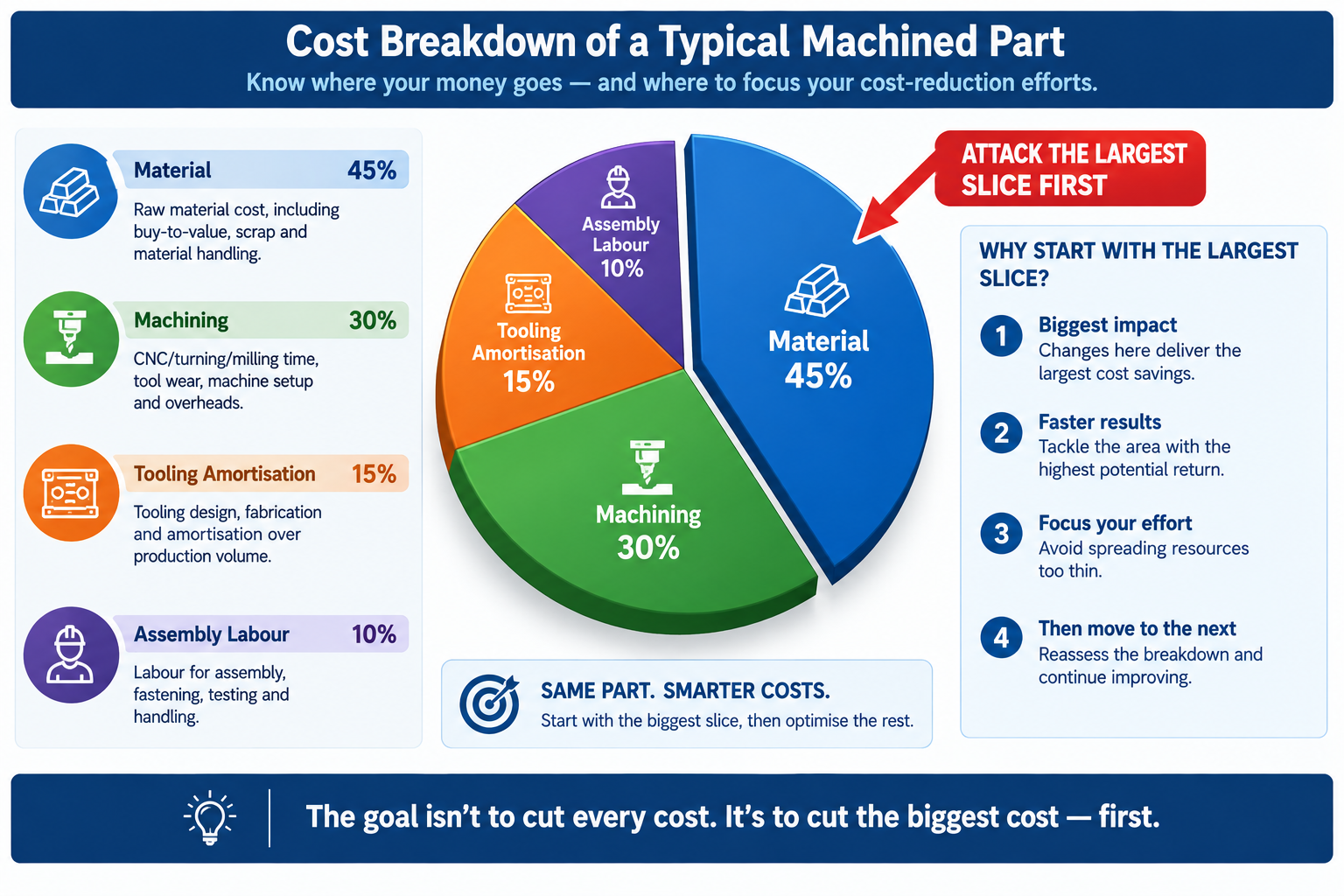
    Pie chart of product cost breakdown by material, machining, tooling, and assembly labour showing where to target cost reduction first

    Key Takeaways

    The product team from the opening story found twenty-two percent cost reduction in six weeks, not by squeezing suppliers or substituting lower-quality materials, but by asking a different question: not what the product needs to do, but whether every design decision is as cost-efficient as it could be while still doing what it needs to do.

    The twelve design changes, the setup reduction examples, and the material switch scenarios in this article are all answers to that second question, cases where a design decision serving a function could be made differently while still serving it, at meaningfully lower cost. None require accepting reduced quality or performance. All require understanding enough about manufacturing to know where the cost is coming from.

    The habit worth building isn’t a periodic review triggered by competitive pressure. It’s a design practice with cost awareness from the start: checking the cost breakdown as a routine part of design review, asking the three part-count consolidation questions for every pair of adjacent parts, auditing tolerances against their functional justification, and confirming material and stock form choices are driven by function rather than historical default.
  • CNC Machining Design Rules: A Practical Guide to Designing for Manufacturability

    CNC Machining Design Rules: A Practical Guide to Designing for Manufacturability

    An engineer spent two hours on a Friday afternoon drawing a bracket that looked clean, was correctly dimensioned, and had all the right tolerances. The pocket in the center had sharp 90-degree internal corners because it needed to clear a mating component. One wall was 0.8mm thick because the overall envelope was tight.

    The drawing went out for quoting Monday morning. By Tuesday afternoon the shop called back: they could make the bracket, but the sharp corners needed EDM after milling, and the thin wall needed a slow, dedicated setup to cut without chatter. The price reflected both. What looked like a straightforward bracket had become a two-operation part with a lead time measured in weeks, and procurement pushed back on the number.

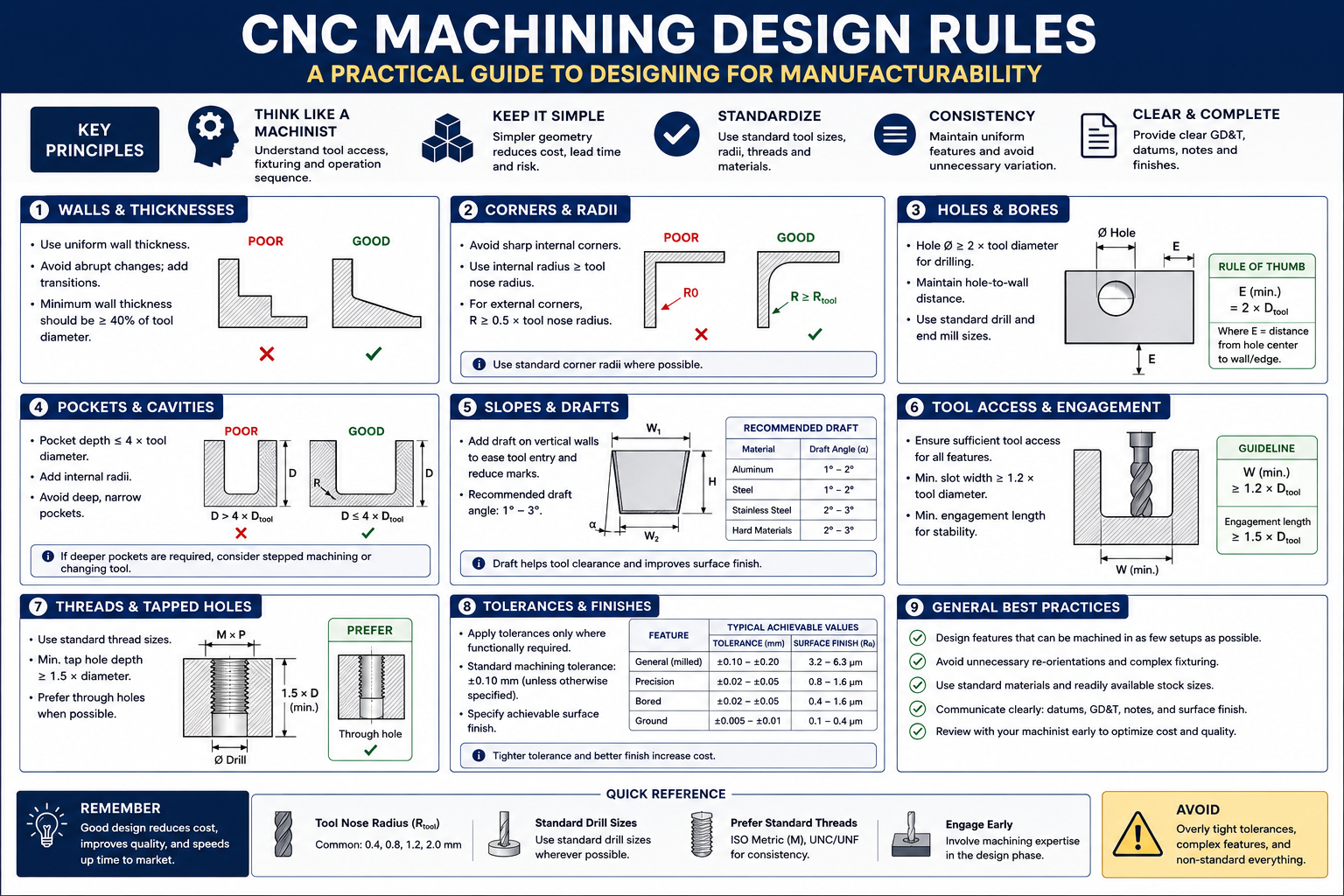
    Quick answer: CNC machining can produce very complex shapes, tight tolerances, and excellent surface finishes, but it can’t do anything a spinning cylindrical tool physically cannot reach. Internal corner radii must match a real end mill radius, wall thickness needs enough rigidity to resist cutting force, and every extra machine setup adds 20 to 40 percent to cost. Designing around these physical constraints from the start, not after a shop quote comes back, is what separates a cheap, fast part from an expensive, slow one with identical function.
    CAD comparison of a sharp internal pocket corner requiring EDM versus a redesigned corner matching a standard end mill radius

    None of what the shop said was wrong. The corners really did need EDM, and the wall really did need special process planning. The problem wasn’t in the drawing. It was in the design choices that produced it, made by an engineer who understood the bracket’s structural requirements well but hadn’t built the habit of thinking about what a cutting tool can and cannot reach.

    Why CNC Has Design Constraints At All

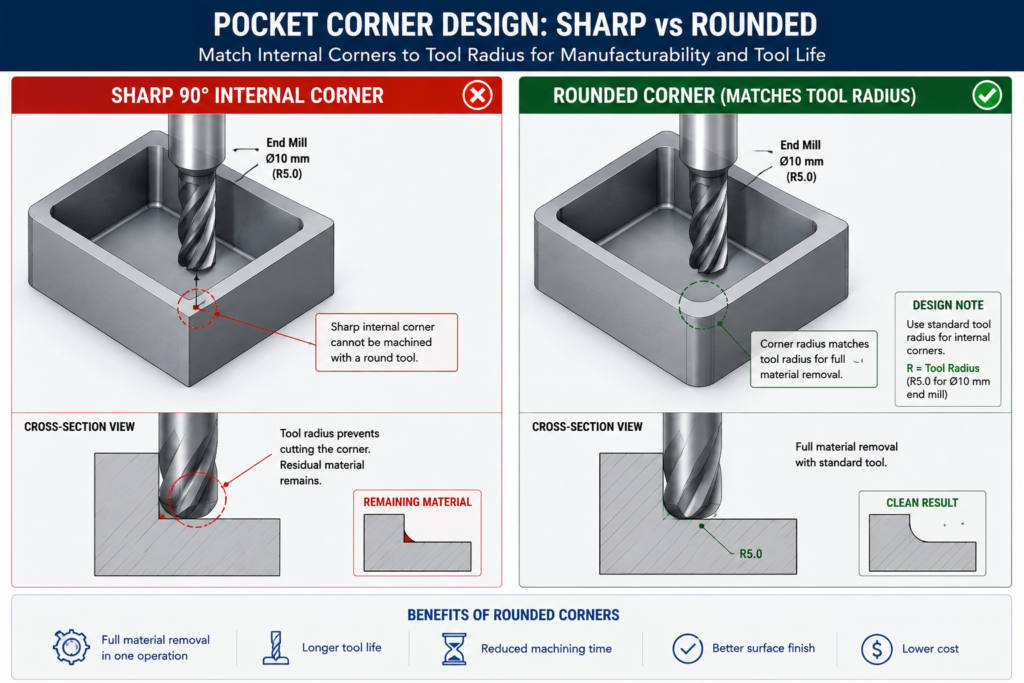
    Every CNC constraint traces back to the same source: the cutting tool is a solid body that must physically reach the feature being cut, and its geometry determines what shapes it can produce. An end mill is a cylinder with cutting edges. When it plunges into a pocket and sweeps the perimeter, it leaves a radius at every internal corner equal to its own radius. That’s not a limitation of machine accuracy or operator skill. It’s a geometric consequence of the tool being round. The only ways around it are a smaller tool (slower, more fragile), EDM (spark erosion instead of a spinning tool), or a design that doesn’t call for a sharp corner there.

    Understanding this changes how you approach feature design. The question stops being “what shape do I want here” and becomes “what shape can a tool produce here, and is that compatible with what I actually need.” For most brackets, housings, and structural components, the answer is a straightforward yes once the design adapts. Cases where the functional requirement genuinely conflicts with what a cutting tool can reach are actually rare, and almost always better solved by reconsidering the feature geometry than by accepting the cost of a workaround.

    The Three Axes and What They Limit

    Most CNC machining centres operate in three axes: X, Y, and Z. The tool reaches any point on the top surface and any vertical surface relative to the current setup. What it can’t reach without repositioning the workpiece are features on other faces, undercuts hidden behind an overhang, and surfaces sloped outside the range of vertical tool motion.

    This is why setup count is such an important cost driver. Every time the workpiece is removed, flipped, and re-fixtured, the machine stops producing chips. Repositioning takes time, and re-fixturing introduces a small but real alignment uncertainty that accumulates across the part’s critical dimensions. Reducing a part from four setups to two doesn’t just roughly halve machining time; it also improves positional accuracy between features previously cut in separate setups.

    Five-axis machining extends this by tilting or rotating the workpiece relative to the linear axes, reaching compound-angle surfaces and some undercuts in a single setup. It’s genuinely powerful for complex aerospace and medical components, but it costs more per hour, needs more sophisticated programming, and isn’t available at every shop. Commit to a five-axis requirement only after three-axis approaches have genuinely been exhausted, since the pool of shops that can bid narrows and the price rises noticeably once five-axis is a requirement.

    CNC Feature Design Rules: The Reference Table

    These eight rules are the ones that show up most often in shop feedback, worth checking on every drawing before it goes out for quoting.

    FeatureRule / GuidelineWhy It ExistsWhat Happens If Violated
    Internal corner radius (pocket)Match standard end mill radii: 0.5, 1.0, 1.5, 2.0, 3.0, 4.0, 6.0, 8.0, 10.0mmEnd mills are cylindrical, leaving a radius equal to their ownCustom micro-tooling or EDM secondary operation needed
    Pocket depth-to-width ratioMax 4:1 for standard tooling; up to 6:1 with long-reach toolingDeep narrow pockets need long, thin tools that deflect and chatterDimensional error, poor finish, shortened tool life, possible breakage
    Hole depth-to-diameterThrough holes: no practical limit. Blind: 3:1 max standard; 5:1 with extended-reach drillsDeep narrow holes need extensions that deflect; chip evacuation is difficultDrill wander, wall thickness violation, chip welding, breakage
    Thread engagement depth1.0-1.5x diameter steel-into-steel; 1.5-2.0x steel-into-aluminumShallower threads strip under preload; deeper adds time with no gainThread strip-out under torque, especially in softer materials
    Wall thickness (milled pocket)0.5mm minimum rigid materials, short feature height; 1.0mm practical general minimumThin walls deflect under cutting force, causing chatter and inaccuracyWall bows inward at mid-height, poor finish, out-of-tolerance
    Boss/protrusion heightMax 4-5x base diameter for a standard end millTall thin protrusions vibrate and deflect away from the toolPoor finish, dimensional error, possible feature fracture
    Counterbore vs. screw sizeDiameter = head diameter + 0.5-1.0mm clearance; depth = head height + 0.2mmMust clear the fastener head for correct seatingHead protrudes above surface, or contacts bore walls
    Chamfers vs. filletsChamfers at 45° for standard tooling; fillets need a radius end millChamfers use angled tools; fillets need a ball-nose or radius cutterA 1mm fillet on every edge triggers a slow finishing pass on all of them

    Internal Corners: The Rule That Catches the Most Engineers

    The internal corner radius rule is probably the most frequently violated rule in CNC machining, not because it’s complicated but because it’s easy to forget while focused on functional geometry. On a CAD screen, a pocket with sharp 90-degree internal corners looks perfectly clean and buildable. The machinist’s eye sees a feature that requires either a fragile micro-tool that cuts slowly and breaks often, or a standard end mill followed by a secondary EDM operation.

    The fix is almost always free in CAD and costs nothing in the part’s function. If the corner radius needs to clear a mating component with a sharp corner, add a corner relief in the mating part instead of requiring a sharp corner in the pocket. If the radius is simply unconstrained, size it to the nearest standard end mill and the issue disappears. A 6mm internal radius lets any end mill up to 12mm diameter finish the corners, giving the shop far more flexibility than a 1mm radius would.

    Below about 1mm internal radius, you’re in micro-machining territory. Tools at this scale are fragile, cut slowly, and need spindles running 20,000 to 50,000 RPM to maintain reasonable surface speeds. Cost per feature rises sharply, breakage risk is meaningful, and the range of shops that can produce it reliably narrows. This isn’t to say micro-machining is never appropriate, medical devices, optical mounts, and precision instruments genuinely need it sometimes, but it should be a deliberate choice against a known requirement, not an accidental consequence of a sharp corner in a standard bracket.

    Tolerances and Surface Finish: Only as Tight as the Function Needs

    One of the most reliable ways to add cost without adding value is specifying tolerances tighter than the application requires. This happens for a few common reasons: CAD title block defaults that carry a tolerance tighter than most features need, dimensions copied from a previous design, and a conservative instinct that tighter is always safer. None of those reasons are wrong in intent, but they all lead to a shop running additional operations or more extensive inspection to hit a number that serves no purpose in the finished assembly.

    The discipline worth applying: for every toleranced dimension, ask what actually breaks if the tolerance were twice as loose. If the answer is genuinely nothing, the tolerance is tighter than needed. For most non-mating, non-locating dimensions on a structural part, a general tolerance of +/- 0.125mm to +/- 0.25mm is perfectly adequate, matching the standard tolerance classes documented in Machinery’s Handbook, and achievable without any special process consideration.

    Feature TypeStandard ToleranceAchievable TighterAdded Operation for Tighter
    General machined dimension+/- 0.125 to 0.250mm+/- 0.05mm with careful setupNone standard; extra fixturing for +/-0.05
    Drilled hole diameter+0.10/-0.00 (drilled nominal)+/- 0.025mm (reamed)Reaming adds one tool change, one pass
    Bored hole diameter+/- 0.025 to 0.050mm+/- 0.005-0.010mmFine or jig boring; climate control
    Tapped threadISO 6H (medium fit)ISO 5H or 4H (close fit)Machine tapping vs. hand; gauge verification
    Flatness (milled)0.05-0.10mm over 100mm0.01-0.02mm over 100mmGrinding or precision milling with temp stabilisation
    Surface finish (as-milled)Ra 1.6-3.2 μmRa 0.8 μm with fine finish passFine pass at lower feed, higher speed
    Surface finish (ground)Ra 0.2-0.8 μmRa 0.025-0.1 μm (precision ground)Cylindrical or surface grinding, secondary op
    Hole pattern position+/- 0.1-0.15mm diameter zone+/- 0.025-0.05mm with jig boringCMM verification, tight fixturing, thermal stabilisation

    Surface Finish Is a Secondary Operation, Not a Milling Setting

    Surface finish finer than Ra 0.8 micron typically can’t be achieved by milling alone regardless of cutting parameters. Ra 0.4 micron or better needs a secondary process, grinding, lapping, or honing, each a separate production step with its own setup and cycle time. Specifying Ra 0.4 on a surface that serves no sealing, sliding, or tribological function adds an entire secondary operation for no functional benefit.

    The practical approach: specify surface finish only where it matters functionally, and use the loosest specification that still meets the requirement. A sealing face needs smoothness for the seal to seat without leaking. A sliding contact needs a finish appropriate for its bearing pressure. Everything else can stay as-machined, typically Ra 1.6 to 3.2 micron, which costs nothing extra since it’s what standard milling produces without additional operations.

    Material Machinability: How Material Choice Affects Cost

    Material choice is one of the most consequential machining cost decisions, typically locked in early, before any features are designed. A designer who understands machinability characteristics upfront can sometimes cut machining cost by thirty to fifty percent with a material choice that still satisfies engineering requirements.

    MaterialMachinability RatingKey ConsiderationTool Life Impact
    Aluminium (6061, 7075)Excellent: 200-300% of free-cutting steelLong, stringy chips need chip-breaker geometryVery long tool life; carbide and HSS both work well
    Mild steel (1018, 1020)Good: 70-80%Free-machining grades (1215, 12L14) are significantly easierModerate; carbide preferred for production runs
    Stainless steel (304, 316)Difficult: 40-50%; work-hardening is the challengeMust cut continuously; carbide tooling mandatoryShort tool life; 303 free-machining much easier if allowed
    Stainless steel (316L, duplex)Very difficult: 30-40%Rigid setup essential; flood coolant mandatoryVery short tool life; high tooling cost per part
    Titanium (Grade 5, Ti-6Al-4V)Difficult: 25-40%; low thermal conductivityLow cutting speed mandatory; sharp tools, aggressive coolantShort tool life; one of the highest tooling costs in common use
    Hardened steel (>45 HRC)Very difficult: better suited to EDM or grindingHard milling with CBN/ceramic possible on rigid machinesVery short tool life even with CBN
    Copper and brassVery good: 150-200%Soft copper can smear at low speeds; leaded brass easiestGood tool life, similar to aluminium
    Engineering plastics (Delrin, PTFE, nylon)Good but workpiece-dependentPTFE is soft and deflects; nylon absorbs moistureExcellent tool life; plastic doesn’t wear tooling significantly

    The Free-Machining Grade Trade-off

    For most structural steels, free-machining grades exist that are substantially easier and cheaper to machine than standard equivalents, with only modest property compromises. 1018 is the workhorse structural grade with good strength and weldability. 1215, a resulfurized free-machining grade, machines at roughly twice the speed with better surface finish and longer tool life. If the application doesn’t need welding, heat treatment, or 1018’s slightly higher strength, switching to 1215 often halves machining cost for no functional penalty.

    The same trade-off exists in stainless: 303 machines three to four times faster than 304, with better finish and much longer tool life, at the cost of weldability and slightly lower corrosion resistance in some environments. A lot of engineers default to 304 simply because it’s the most widely specified grade, without checking whether the application actually needs what 304 provides over 303, and that default carries a real cost penalty on every unit produced.

    Setups and Fixturing: Designing for How the Part Sits in the Machine

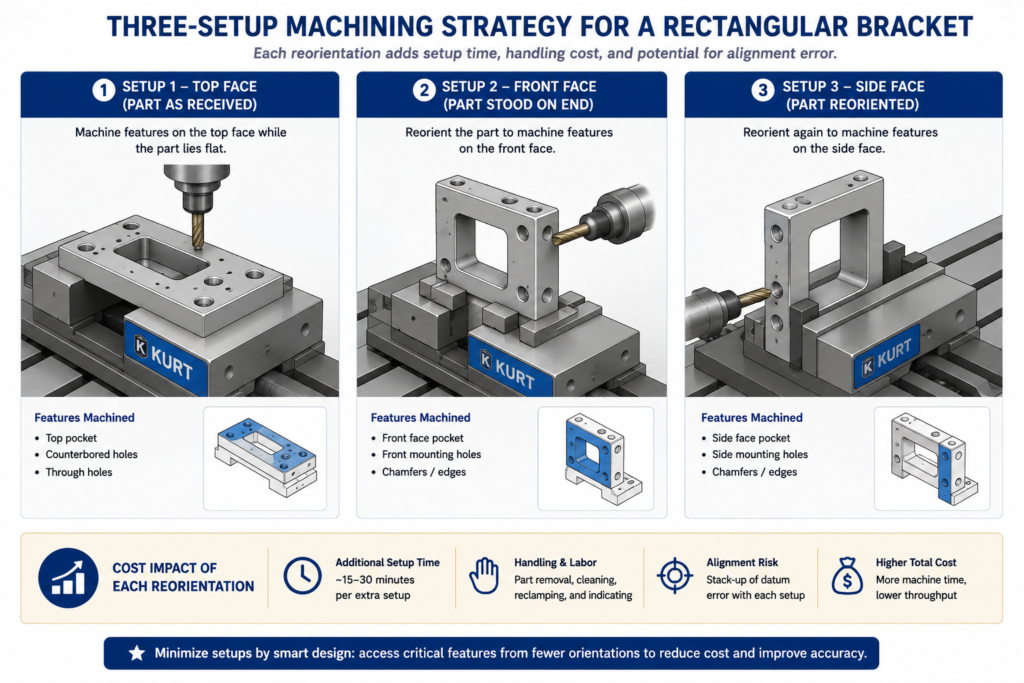
    Every time a machinist repositions a part, the clock runs but no chips get made. Fixturing, alignment, and probing each take time, and setup count is one of the clearest predictors of cost. A part needing three setups doesn’t simply cost 50 percent more than one needing two. The operator also has to re-establish the datum reference each time, small alignment errors accumulate between features cut in different setups, and a custom fixture may be needed if the geometry doesn’t lend itself to standard workholding.

    Three-panel diagram showing a rectangular part in three CNC machine setups for top, front, and side face features

    Design for Standard Workholding

    Standard workholding means a machine vise, a collet chuck, or toe clamps on a fixture plate. Parts with flat, parallel reference surfaces and enough clearance for vise jaws to grip without interfering with the cut features are the cheapest to set up and the least likely to trigger a call about needing a custom fixture. Round or organically shaped parts, or ones with features that conflict with standard vise jaw positions, need a custom fixture or an angled setup that introduces risk.

    The practical habits: keep at least two opposite faces flat and parallel as datum surfaces for vise workholding, make sure features needed in each setup are accessible from the top without vise jaws blocking the tool path, and avoid features requiring the part to be fixtured at an angle, since angle plates and tilted fixtures add cost and setup time.

    The 2+2+2 Setup Rule for Rectangular Parts

    Think of a rectangular part’s six faces as three pairs: top and bottom, front and back, left and right. A well-designed three-axis part should have all its features accessible from at most three of those faces. Top-face features get cut in setup one, front or back face in setup two with the part stood on end, and a side face in setup three. That’s the practical limit of efficient three-axis machining without a rotary fourth axis or a five-axis machine, and designing within it keeps the part accessible to the widest pool of suppliers.

    CNC Cost Drivers: What Makes a Part Expensive

    Not all cost drivers are equally within a designer’s control, and not all carry equal weight.

    Cost DriverRelative ImpactDesign Changes That Reduce ItRed Flags in a Drawing
    Number of setupsHigh: 20-40% per additional orientationDesign features on as few faces as possibleFeatures requiring more than one flip; holes on 5-6 faces
    Tight tolerancesHigh, non-linear: 1.5-6x cost per tighter classSpecify no tighter than function demandsTight tolerances on cosmetic features; blanket +/-0.025mm title block
    Deep narrow pocketsMedium-HighWiden pockets for a stiffer tool; step the depth downDepth-to-width above 4:1; narrow full-depth slots
    Small internal corner radiiMediumMatch standard end mill sizesInternal corners under 1.0mm without micro-machining need
    Custom tooling or operationsVery High: weeks of lead time, high costDesign to standard tool sizes and thread formsNon-standard thread forms; radii matching no available tool
    Surface finish requirementsMediumSpecify finish only where functionally neededRa 0.4-0.8 on surfaces with no sealing/bearing/mating function
    Material removal volumeMediumRemove only what the design needs50mm billet machined down to a 3mm plate
    Part size vs. machine capacityLow-MediumSplit oversized parts where the design allowsParts approaching a 600-800mm three-axis envelope

    The Setup Count Problem Is Easy to Underestimate

    Setup count is the cost driver most frequently underestimated by engineers without shop floor experience. A design requiring five setups doesn’t just add four extra repositionings’ worth of time. It also shrinks the pool of shops that can run the part economically, since tying up a machining centre for five operations is only profitable at certain volumes and price points. An engineer who reconsiders a four-setup layout and finds a way to do it in two hasn’t just cut unit cost; they’ve opened the part to a wider range of competitive bids, which often drives cost down further.

    Worked Examples

    The pump housing with EDM corners: A pump housing had a rectangular internal cavity for a sliding valve with square cross-section corners, so the designer specified a matching square cavity with zero-radius corners on all four internal walls. The sharp corners required EDM after milling, adding roughly 60 percent to machining cost and extending lead time from five to twelve days.

    The redesign kept the valve body’s functional cross-section but added 2mm corner reliefs to the valve, matching the radius a 4mm end mill would leave in the housing cavity. The cavity became fully machinable with a standard end mill in one operation, and the valve still slid correctly since the reliefs didn’t interfere with any sealing or guidance surface. The EDM step was eliminated entirely, machining cost dropped roughly 45 percent, and lead time returned to five days, all from an hour of CAD work with zero impact on function.

    The instrument bracket with unnecessary surface finish: An optical instrument bracket carried a Ra 0.4 micron finish requirement on all machined surfaces, inherited from the finish standard of the optical instrument it mounted. The bracket itself was purely structural, none of its surfaces were optical, sealing, or sliding contacts. That blanket finish requirement meant grinding every face as a secondary operation, accounting for sixty percent of total machining cost.

    The revision set structural faces to Ra 1.6 micron as-milled, keeping Ra 0.4 micron only on the two precision datum surfaces where the instrument actually seated. Grinding dropped from six faces to two. Machining cost fell roughly 40 percent and lead time shortened from eight days to four, with zero change to the instrument’s optical performance since the surfaces that actually mattered kept their required finish.

    Frequently Asked Questions

    What is the minimum internal corner radius I should design for? The practical floor is set by the smallest standard end mill your shop carries, typically 1mm diameter for a 0.5mm corner radius, but that size is fragile and slow. A more practical minimum for typical work is 1.5mm to 2.0mm, matching common, robust 3mm and 4mm tools. Designing to 3mm or 6mm gives even more tool selection flexibility, usually translating to faster cycle times and lower cost. Choose the largest radius the design will tolerate functionally, matched to a standard end mill size.

    How many setups should I aim for? One setup is ideal wherever function allows it. Two is the practical target for most rectangular parts. Three is the practical limit for standard three-axis equipment without a rotary axis. Once a part needs four or more, cost rises substantially and the pool of shops that can run it economically narrows. If a design is heading toward four or more setups, ask whether features can be relocated or consolidated, or whether five-axis machining would bring the setup count down to one or two and improve the economics for your volume.

    Does material choice really affect machining cost that much? Yes, significantly. The difference between 303 stainless (free-machining) and 316 for the same part can be a factor of two to three in cycle time alone, with tool wear compounding it further. The difference between 6061 aluminium and Ti-6Al-4V for a structurally equivalent part can run five to ten times in total machining cost. For meaningful production volumes, machinability deserves the same attention as structural material selection, since there are often two or three material options within a given structural requirement with very different machinability profiles.

    When should I use a chamfer instead of a fillet on an external edge? Use a chamfer whenever the purpose is deburring, lead-in for assembly, or a cosmetic break, and a fillet isn’t structurally required. A 45-degree chamfer is cut in a single fast pass. An external fillet needs a ball-nose or radius end mill making a slower finishing pass around every edge that carries the callout. On a part with many external edges, specifying fillets everywhere can add a full finishing operation. Reserve fillets for features where the radius is functionally required, like a fatigue-critical wall-to-floor transition, or a load-distributing contact surface.

    Why do tighter tolerances cost so much more? Because tighter tolerances usually trigger a step change in process rather than a smooth increase in care. A hole at a standard drilling tolerance needs one operation. The same hole at +/-0.025mm needs reaming: an additional tool, an additional pass, additional inspection. Flatness at 0.05mm over 100mm might be achievable with careful milling; 0.005mm needs grinding in a temperature-controlled environment. Each tighter step tends to require an additional operation or a different process entirely, which is why tolerance cost looks like a series of jumps rather than a smooth curve.

    What’s the maximum depth-to-width ratio for a CNC pocket? The standard guideline is 4:1 for pockets machined with a standard-length end mill. At that ratio, the tool already experiences meaningful deflection under cutting load, affecting finish and accuracy, particularly at the bottom corners. Above 4:1 you need long-reach tooling, which deflects more, cuts more slowly, and costs more. Above 6:1, options are accepting long-reach tooling’s cost, widening the pocket at deeper sections, splitting the part into two conventionally machined pieces, or switching to EDM for the deep sections, which avoids deflection but runs considerably slower than milling.

    Key Takeaways

    The bracket from the opening example eventually got made, at a higher cost and longer lead time than expected. That’s not the worst outcome, and it’s far from unusual. Most engineers learn these rules from experience, from parts that cost too much, took too long, or generated a call from the shop about a feature the drawing hadn’t accounted for.

    The goal is to move that learning earlier, before a drawing goes out, before tooling is committed, while the features are still adjustable in CAD at no cost. These rules aren’t creative constraints on what a part can look like. They’re physical facts about what a spinning cylindrical tool can and cannot do through three or five axes. A designer who has internalised them thinks differently about feature geometry, not less ambitiously, but with a natural awareness of which choices translate directly into cost and lead time.

    Run through the reference tables whenever a CNC drawing is close to final. Check internal corner radii against the feature rules. Audit every tight tolerance. Count the setups the current feature layout requires and whether any change would reduce it. Those checks cost minutes in CAD. The problems they catch cost days or weeks and real money once the drawing is at a shop.