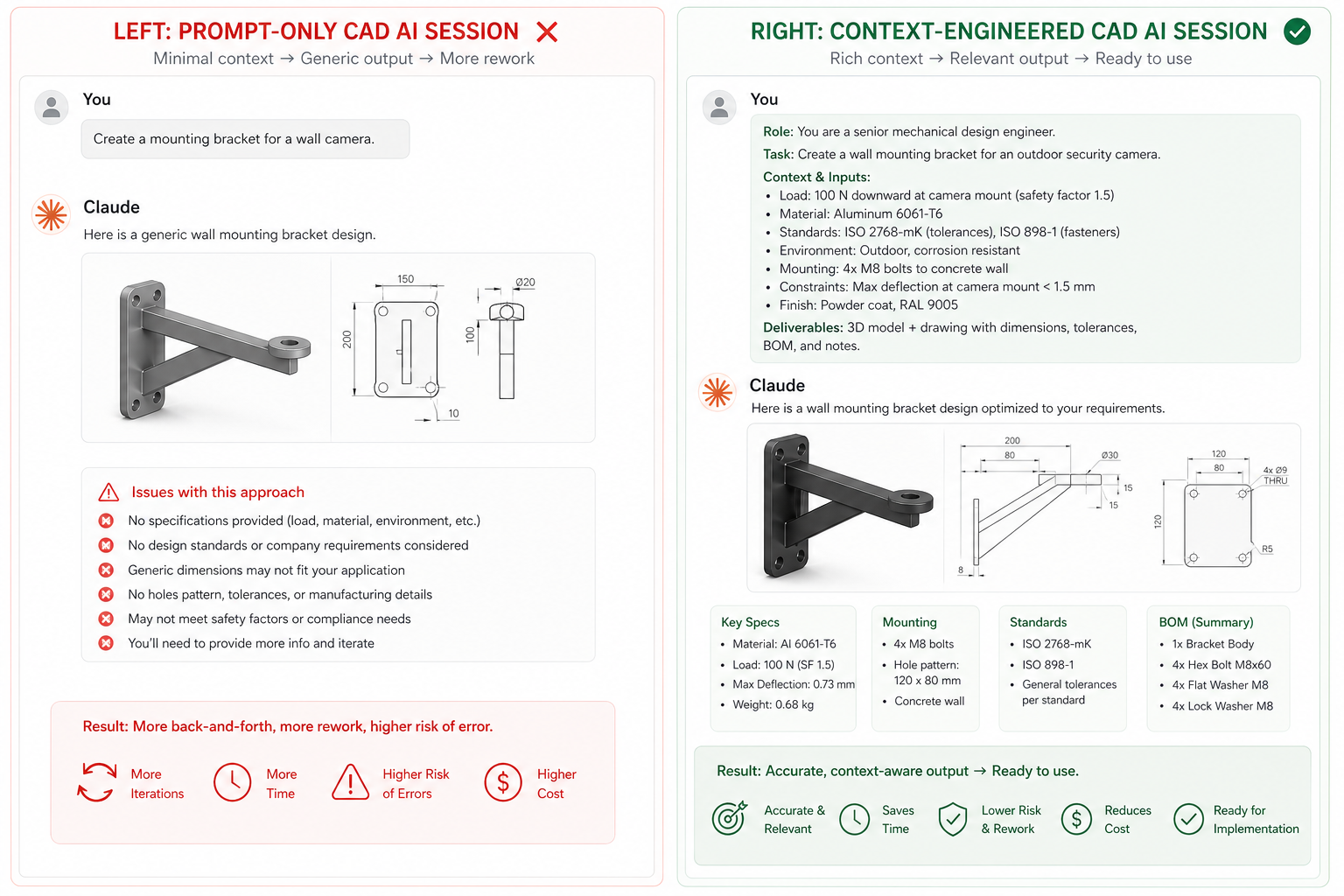
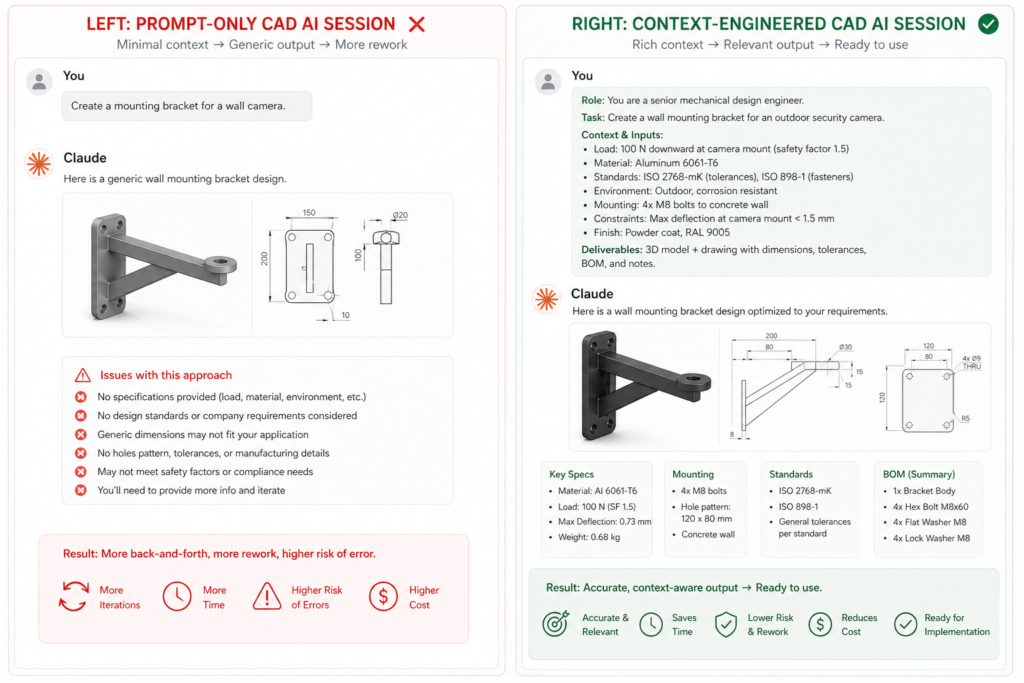
You Have Been Optimising the Wrong Thing
If your AI-assisted CAD workflow produces inconsistent results, you have probably been trying to fix it the same way. You rewrite the prompt. You try a different phrasing. You add more detail or remove it. Sometimes it helps. Often it does not.
Here is why: the prompt is not the problem. The problem is everything around the prompt. What the AI knows, what it remembers, what context it is operating in, and what information gets loaded before it generates an answer.
This is the insight behind context engineering for CAD and why it is replacing basic prompt engineering as the core skill for engineers working with AI. In June 2025, Shopify CEO Tobi Lutke and former OpenAI researcher Andrej Karpathy publicly endorsed the term. By July 2025, Gartner declared that context engineering was in and prompt engineering was out. Anthropic published its own definition and framework shortly after.
This article explains what context engineering 2025 actually means, why it matters specifically for CAD and engineering workflows, and how to start building it into the way you work with AI today.
| The 2025 Context Engineering Moment Gartner (July 2025): Gartner context engineering 2025: Declared that context engineering is in and prompt engineering is out, advising AI leaders to prioritise context-aware architectures with dynamic data pipelines over prompt optimisation. Anthropic (2025): Anthropic context engineering: Published a formal definition of context engineering as the set of strategies for curating and maintaining the optimal set of tokens during LLM inference, covering system prompts, retrieved documents, memory, tools, and conversation history. Tobi Lutke + Andrej Karpathy (June 2025): context engineering Tobi Lutke and context engineering Andrej Karpathy: Both publicly endorsed context engineering as the correct framing for production AI, triggering rapid adoption across the AI community within weeks. |
What Is Context Engineering and Why Do Engineers Need to Know It
The cleanest way to understand context engineering vs prompt engineering is with a single contrast: prompt engineering focuses on what you say to the AI. Context engineering focuses on what the AI knows when you say it.
A prompt is a single instruction. Context is the full environment the AI operates in: the system message that defines its role, the conversation history it carries, the relevant documents or data it can access, the tools it can call, and the constraints it operates under.
Think of it this way. You can write the most perfectly crafted prompt in the world. But if the AI is receiving that prompt without knowing your design standards, your material library, your company tolerances, or which project you are working on, it will give you a generic answer. Context engineering for CAD is the practice of making sure the AI always has the right information loaded before it responds.
Why Context Engineering Emerged in 2025
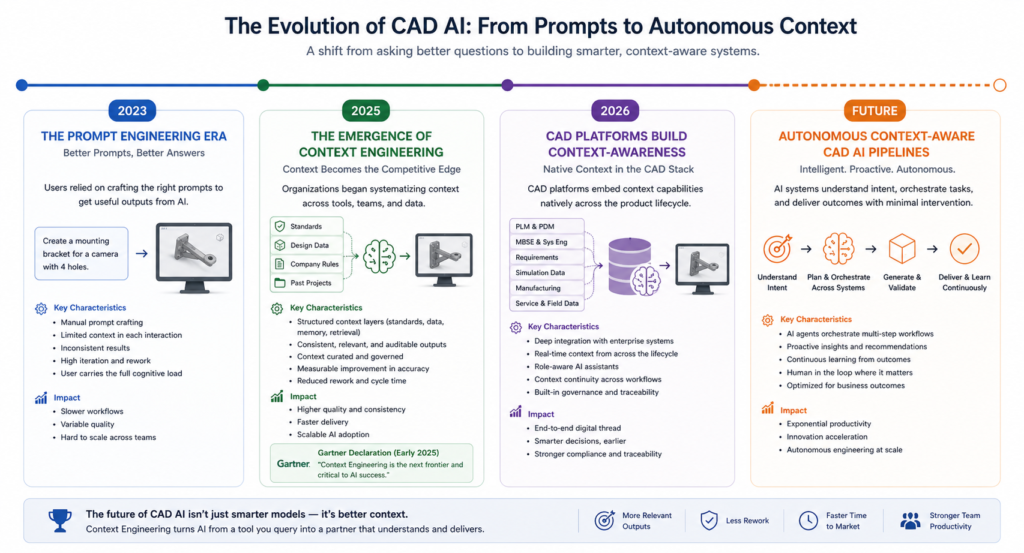
The transition from prompt engineering limitations CAD to context engineering reflects how AI has changed. In 2023, most AI interactions were single-turn: ask a question, get an answer. Those interactions could be improved significantly by writing better prompts.
By 2025, engineering teams started building multi-step AI workflows: design brief to CAD to FEA to documentation, with the AI involved at every stage. Single prompts were not sufficient. The AI needed persistent knowledge about the project, the constraints, the standards, and the decisions made in previous steps. That need for persistent, structured knowledge is exactly what context engineering 2025 is designed to address.
What Is Context Engineering for Mechanical Engineers
| Definition: What Is Context Engineering for Mechanical Engineers what is context engineering for mechanical engineers: Context engineering is the practice of deliberately designing and managing all the information that an AI model has access to before and during an engineering task. This includes the role and rules you give the AI at the start of a session (the system prompt), the design standards and material specifications you load into the context window, the conversation history that carries design decisions forward, and any external data you retrieve from your parts library or PLM system. Rather than hoping a good prompt will compensate for missing information, context engineering ensures the AI always starts from a well-informed position. |
The Problem With Prompt-Only Approaches in CAD Workflows
To understand why context engineering for CAD matters, you need to understand the three ways that prompt-only AI interactions fail in engineering environments.
Problem 1: The AI Does Not Know Your Design Environment
When you open a new Claude session and type a prompt about designing a bracket, the AI has no knowledge of your company standards, your preferred material grades, your tolerance conventions, the existing parts already in your library, or the design intent of the system this bracket will join. It answers from general engineering knowledge.
This is not a prompting problem. You could write the most detailed prompt ever constructed and still not cover everything the AI would need to know to give you an expert-level, company-specific answer. CAD knowledge graph AI and structured context loading is the correct solution, not better prompting.
Problem 2: Context Rot Across Multi-Step Workflows
Context rot engineering is the gradual degradation of AI response quality as a conversation grows longer. Research from Stanford found that LLM accuracy drops by 24.2 percent when relevant information is buried in long contexts, even when the model has theoretically received all the necessary information.
In a long CAD session, the design brief you wrote in turn one gradually loses influence as the context window fills with subsequent exchanges. By turn fifteen, the AI is less reliably grounded in the original constraints. CAD AI context window management means actively curating what stays visible and what gets summarised or removed.
Problem 3: No Memory Between Sessions
Every time you start a new Claude session, the AI has forgotten everything from the previous session. The design decisions, the material choices, the reasoning behind the configuration: all gone. Engineering projects span days or weeks. A prompt-only approach means re-explaining the project context every single time, which is exactly the kind of repetitive work AI is supposed to eliminate.
Proper AI context for CAD design includes a persistent context document that carries project information forward across sessions, eliminating the re-explanation problem entirely.
How to Use Context Engineering in CAD: Building Your Context System
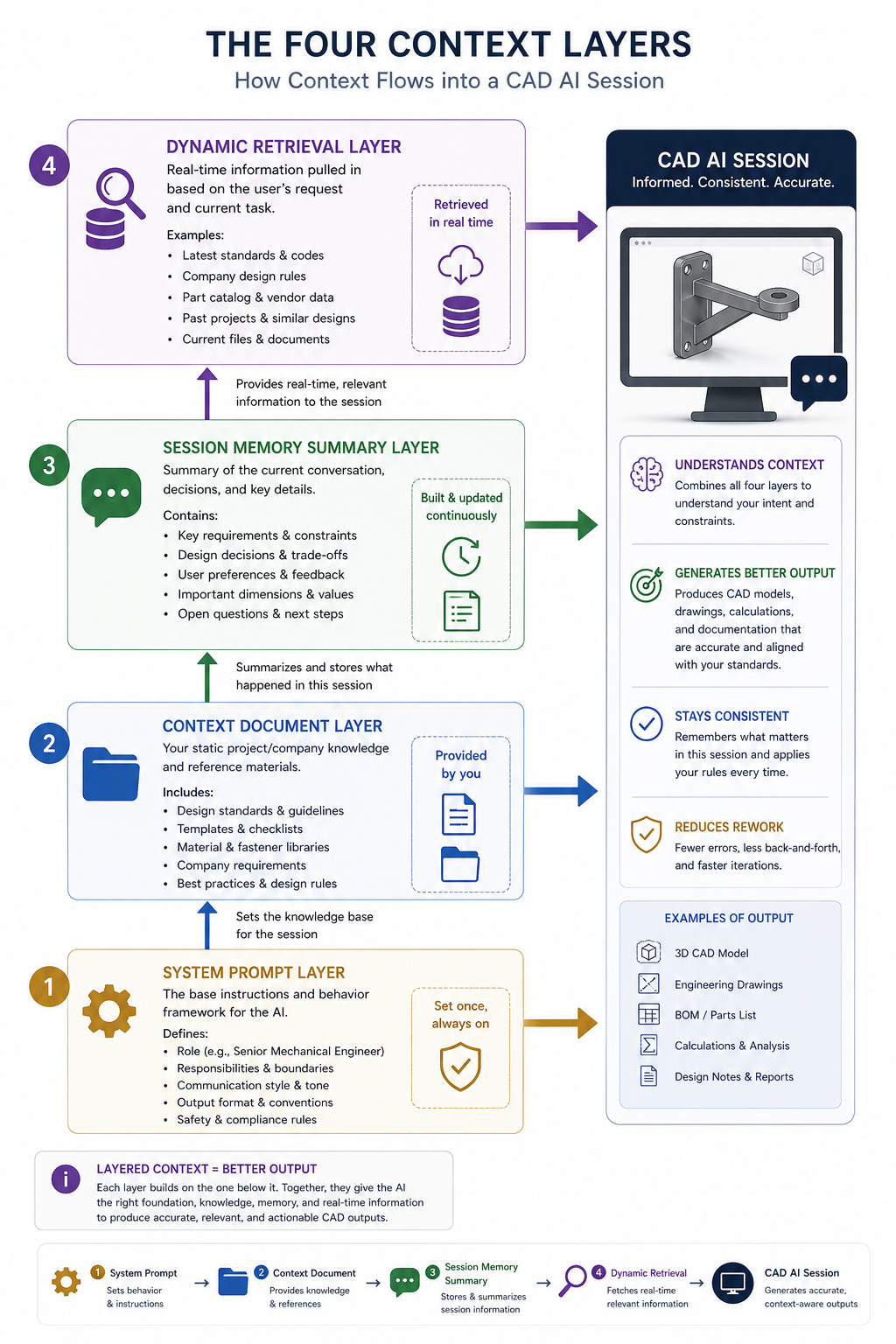
Here is the practical framework for how to use context engineering in CAD today. You do not need to build complex software systems. You need to be deliberate about what information the AI has before every engineering session.
Layer 1: The System Prompt (Role and Rules)
Every CAD AI session should start with a well-defined role and a set of operating rules. This is the foundation of AI system prompt CAD design. The system prompt tells the AI who it is, what standards it applies, what format it uses, and how it handles uncertainty.
Layer 2: The Context Document (Persistent Knowledge)
A context document is a short reference file (200 to 500 words) that captures everything the AI needs to know about a specific project, product, or design environment. You paste it into every session before starting work. This is the single most practical step in context engineering CAD workflow 2025, and it takes about 20 minutes to create the first time.
What Goes Into a CAD Context Document
- Project identity: Product name, project number, revision status, applicable standards
- Material library: Approved materials with grades, yield strengths, and any substitution rules
- Dimensional conventions: Unit system, preferred tolerance grades, critical fits and clearances
- Design constraints: Weight limits, envelope limits, mounting interface requirements, safety classifications
- Decisions already made: Key design choices from previous sessions, reasons for any non-standard approaches
- Things to avoid: Specific materials, geometries, or approaches ruled out earlier in the project
Layer 3: Session Memory Summary (Preventing Context Rot)
At the end of each working session, ask the AI to generate a summary of the key decisions, dimensions, and constraints established during the session. Paste this summary into the context document before the next session. This prevents context rot engineering and ensures knowledge carries forward without the AI needing to re-derive everything from scratch.
| Prompt: End-of-Session Context Summary “Summarise the key engineering decisions, dimensions, constraints, and design choices we established in this session. Format as a structured context update I can add to my project context document. Flag any open items or unresolved decisions.” ✔ What you get: A clean, structured summary of session decisions that maintains the continuity of your context-aware CAD workflow across multiple sessions. context-aware CAD workflow x AI context management for engineering design |
Layer 4: Dynamic Context Retrieval (Advanced)
The most advanced form of context engineering for CAD uses retrieval-augmented generation (RAG) to pull specific relevant information from a larger knowledge base into the context window on demand. Instead of manually loading everything, the system retrieves only what is relevant to the current task.
For engineering teams, this means building a searchable library of design standards, test reports, approved material data sheets, and simulation results. When you ask a question about a specific material or design scenario, the system automatically retrieves the relevant sections and includes them in the context. This is RAG for engineering applied at the team level, and it is the direction that enterprise CAD AI tools like Siemens Teamcenter Copilot and PTC Windchill AI are already moving toward.
Context Engineering vs Prompt Engineering: What Changes for CAD
Here is a direct comparison of what context engineering vs prompt engineering means in day-to-day CAD and engineering AI work:
| What Prompt Engineering Does | What Context Engineering Does | Why It Matters for CAD |
| Optimises the words in a single instruction to get a better response in this session | Designs the entire information environment the AI operates in, across sessions and tools | AI prompt CAD systems: prompts alone cannot carry company standards or project memory |
| Requires re-explaining context every session from scratch | context-aware CAD workflow: persistent context documents carry project knowledge forward automatically | Saves 20-30 min per session not re-explaining project context |
| Quality degrades when context window fills up (context rot) | context rot engineering mitigation: regular session summaries keep context clean and relevant | Longer sessions remain reliable without accuracy degradation |
| Works well for isolated one-off tasks | context engineering CAD workflow 2025: designed for multi-step workflows where AI must retain design intent across stages | Essential for design-to-simulation-to-documentation pipelines |
| No memory of design decisions made in previous sessions | AI context management for engineering design: structured session summaries create continuity across the project lifecycle | AI builds on previous work rather than starting over every time |
Putting Context Engineering Into Practice: A CAD Session Workflow
Here is exactly how to run a context engineering for CAD session using Claude or any similar AI tool. This workflow takes about five minutes to set up and produces consistently better outputs than cold-start prompting.
- Open a new session. Do not start with your question. Start by pasting your system prompt (Layer 1) to establish the AI role and operating rules.
- Load your context document. Paste your project context document immediately after the system prompt. This gives the AI everything it needs to know about the design environment before you ask a single question. This is AI context for CAD working as designed.
- Work normally. Ask your design questions, iterate on geometry, check calculations, generate documentation. The AI now responds with your specific standards, materials, and constraints in mind rather than general engineering knowledge.
- Maintain the window. If the session grows long (over 20 exchanges), ask the AI to summarise the decisions made so far and paste that summary as a new message at the top of the thread. This prevents context rot engineering and keeps the AI grounded.
- Close with a summary. At the end of each session, use the end-of-session prompt to generate a structured decisions summary. Add it to your context document. Your context-aware CAD workflow now carries forward seamlessly to the next session.
Where Context Engineering for CAD Is Going
What engineers are doing manually today with context documents and session summaries, CAD software will do automatically within the next two to three years. Context engineering CAD workflow 2025 is the leading edge of a shift that major platforms are already building toward.
CAD Software Is Becoming Context-Aware
AutoCAD 2026 introduced AI-powered Smart Blocks and an Autodesk Assistant that understands the project context within the design environment. SolidWorks AURA learns from user habits and project history to provide contextual suggestions. PTC Creo AI embeds context from PLM data directly into design assistance. These are all early implementations of context engineering for CAD at the platform level.
The CAD Knowledge Graph Is Coming
The next step is CAD knowledge graph AI: a structured representation of your entire design knowledge including parts, standards, materials, simulation results, and project history, all queryable by an AI in real time. Siemens Teamcenter Copilot already lets engineers query BOM structures and design documents using plain English. PTC Windchill AI identifies duplicate parts across the enterprise BOM. These are knowledge graph retrieval systems applied to engineering data.
When these systems mature, context engineering for CAD will not require manual context documents. The platform will assemble the relevant context automatically from your PLM, PDM, and simulation data every time you start an AI-assisted design session.
Multi-Agent CAD Pipelines
The furthest edge of LLM context design for engineering is multi-agent CAD pipelines: networks of specialised AI agents where each agent has a carefully engineered context for its specific role. One agent holds the design intent context. Another holds the simulation constraints context. A third holds the manufacturing process context. They collaborate within a shared project knowledge environment.
This is already emerging in research environments and early enterprise deployments. Teams that understand context engineering 2025 today are the ones best positioned to work effectively with these systems as they reach production.
Pro Tips for Context Engineering in Engineering Teams
Practical Guidance for Engineering Teams Starting With Context Engineering
- Start with one project context document. Pick your most active project and write a 300-word context document covering role, standards, materials, constraints, and current design status. Use it for every AI session this week. The quality difference will convince your team.
- Keep context documents in version control. Your context documents are engineering artefacts. Store them alongside your drawings, specifications, and models. Update them when design decisions change. AI context management for engineering design is a discipline, not a one-time setup.
- Make the system prompt a team standard. Write one shared system prompt for your engineering team that defines the AI role, applicable standards, and documentation conventions. Everyone who uses AI for CAD work starts from the same AI system prompt CAD baseline.
- Use session summaries as meeting notes. End-of-session summaries are not just context management tools. They are a record of what the AI helped you decide in that session. Store them as project documentation.
- Build your context library incrementally. Your first context document covers one project. Over six months, you build a library covering your common material grades, tolerance standards, manufacturing processes, and customer requirements. Each new project benefits from everything that came before. This compound effect is how context engineering for CAD becomes a team capability rather than an individual practice.
Conclusion: The Engineers Who Master This Now Will Lead
Context engineering for CAD is the natural evolution of how engineers work with AI. Prompt engineering was the first step: learning how to ask AI the right questions. Context engineering is the second step: learning how to build the right environment so AI can answer those questions well every time.
Gartner declared in July 2025 that context engineering was in and prompt engineering was out. Anthropic formalised the practice. Andrej Karpathy and Tobi Lutke endorsed it publicly. CAD platforms like AutoCAD, SolidWorks, and PTC Creo are building it into their products. The shift is real and it is already underway.
What engineers can do right now is begin the transition deliberately. Write the system prompt. Build the context document. Start a context-aware CAD workflow on one project. Within three sessions, the difference in output quality will be clear.
The engineers who understand context engineering 2025 today will be the most effective users of the context-aware CAD platforms arriving over the next two years. That is the practical case for learning this now rather than later.
| Ready to Build a Smarter CAD Workflow With Context Engineering At Simutecra Engineering Services, e help engineering teams move beyond single-prompt interactions and build structured AI context systems for CAD, simulation, and documentation workflows. We design the context architecture so your AI always knows what it needs to know. Smarter context means better outputs, less rework, and more time on actual engineering. Reach out today at Simutecra |
Frequently Asked Questions
What is context engineering?
Context engineering 2025 is the practice of designing and managing everything the AI model has access to during a task: the system prompt, relevant documents, conversation history, tools, and memory. It goes beyond writing better prompts by ensuring the AI always operates in a well-informed environment.
How is context engineering different from prompt engineering?
Context engineering vs prompt engineering: prompt engineering optimises a single instruction. Context engineering designs the entire information system around the AI. Prompt engineering is what you say. Context engineering is what the AI knows when you say it.
Why does context engineering matter for CAD?
CAD workflows are multi-step and project-specific. Context engineering for CAD ensures the AI knows your design standards, materials, constraints, and past decisions across every session. Without it, the AI answers from generic engineering knowledge instead of your specific engineering environment.
What is a context document for CAD?
A context document is a 200 to 500 word reference file covering your project identity, approved materials, dimensional conventions, design constraints, and current decisions. You paste it at the start of every AI session to give the AI the context it needs before you ask your first question.
What is context rot in engineering AI?
Context rot engineering is the gradual loss of accuracy as a long AI session grows. Earlier instructions and constraints get diluted by the volume of later exchanges. Managing the CAD AI context window with regular summaries prevents this.
Is context engineering the same as RAG?
No, but RAG is one component of it. RAG for engineering retrieves relevant documents into the context window at query time. Context engineering is the broader discipline that includes RAG, system prompt design, memory management, and tool use.
How do I start using context engineering for CAD today?
Start with two steps. Write a system prompt defining the AI role and your engineering standards. Create a context document for your current project covering materials, constraints, and design status. Paste both at the start of every AI context for CAD session. That is a working context-aware CAD workflow you can use immediately.
External Reference
For Anthropic’s official research and guidance on context engineering principles and agent context management:
Effective Context Engineering for AI Agents, Anthropic Engineering Blog (anthropic.com) (Official Anthropic source, primary research reference for context engineering)