Tag: Design for manufacturability

  • CNC Machining Design Rules: A Practical Guide to Designing for Manufacturability

    CNC Machining Design Rules: A Practical Guide to Designing for Manufacturability

    An engineer spent two hours on a Friday afternoon drawing a bracket that looked clean, was correctly dimensioned, and had all the right tolerances. The pocket in the center had sharp 90-degree internal corners because it needed to clear a mating component. One wall was 0.8mm thick because the overall envelope was tight.

    The drawing went out for quoting Monday morning. By Tuesday afternoon the shop called back: they could make the bracket, but the sharp corners needed EDM after milling, and the thin wall needed a slow, dedicated setup to cut without chatter. The price reflected both. What looked like a straightforward bracket had become a two-operation part with a lead time measured in weeks, and procurement pushed back on the number.

    Quick answer: CNC machining can produce very complex shapes, tight tolerances, and excellent surface finishes, but it can’t do anything a spinning cylindrical tool physically cannot reach. Internal corner radii must match a real end mill radius, wall thickness needs enough rigidity to resist cutting force, and every extra machine setup adds 20 to 40 percent to cost. Designing around these physical constraints from the start, not after a shop quote comes back, is what separates a cheap, fast part from an expensive, slow one with identical function.
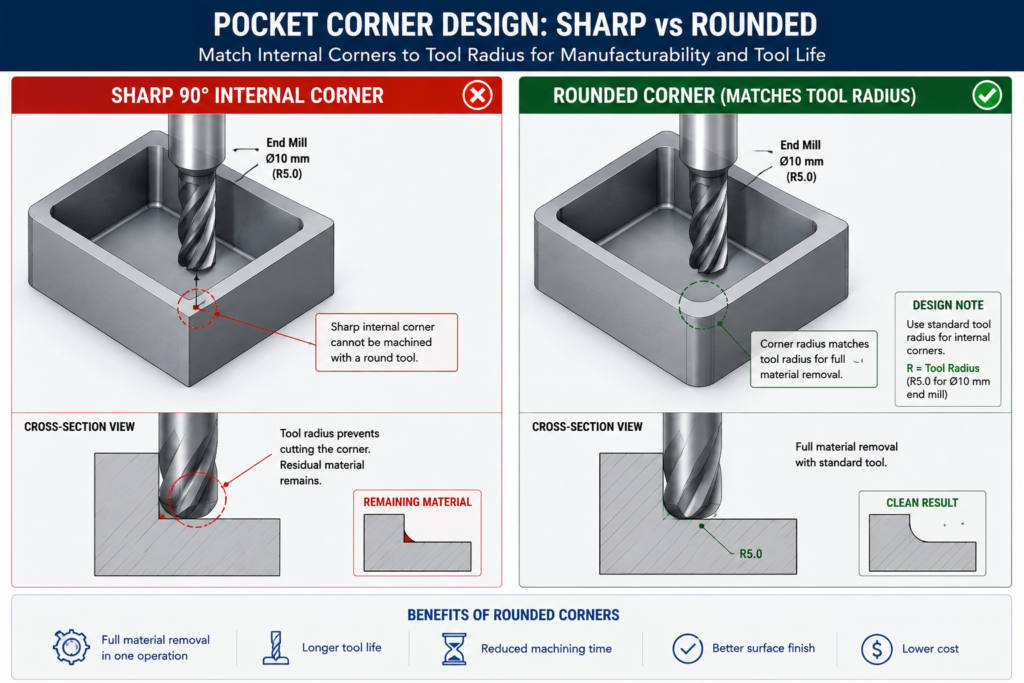
    CAD comparison of a sharp internal pocket corner requiring EDM versus a redesigned corner matching a standard end mill radius

    None of what the shop said was wrong. The corners really did need EDM, and the wall really did need special process planning. The problem wasn’t in the drawing. It was in the design choices that produced it, made by an engineer who understood the bracket’s structural requirements well but hadn’t built the habit of thinking about what a cutting tool can and cannot reach.

    Why CNC Has Design Constraints At All

    Every CNC constraint traces back to the same source: the cutting tool is a solid body that must physically reach the feature being cut, and its geometry determines what shapes it can produce. An end mill is a cylinder with cutting edges. When it plunges into a pocket and sweeps the perimeter, it leaves a radius at every internal corner equal to its own radius. That’s not a limitation of machine accuracy or operator skill. It’s a geometric consequence of the tool being round. The only ways around it are a smaller tool (slower, more fragile), EDM (spark erosion instead of a spinning tool), or a design that doesn’t call for a sharp corner there.

    Understanding this changes how you approach feature design. The question stops being “what shape do I want here” and becomes “what shape can a tool produce here, and is that compatible with what I actually need.” For most brackets, housings, and structural components, the answer is a straightforward yes once the design adapts. Cases where the functional requirement genuinely conflicts with what a cutting tool can reach are actually rare, and almost always better solved by reconsidering the feature geometry than by accepting the cost of a workaround.

    The Three Axes and What They Limit

    Most CNC machining centres operate in three axes: X, Y, and Z. The tool reaches any point on the top surface and any vertical surface relative to the current setup. What it can’t reach without repositioning the workpiece are features on other faces, undercuts hidden behind an overhang, and surfaces sloped outside the range of vertical tool motion.

    This is why setup count is such an important cost driver. Every time the workpiece is removed, flipped, and re-fixtured, the machine stops producing chips. Repositioning takes time, and re-fixturing introduces a small but real alignment uncertainty that accumulates across the part’s critical dimensions. Reducing a part from four setups to two doesn’t just roughly halve machining time; it also improves positional accuracy between features previously cut in separate setups.

    Five-axis machining extends this by tilting or rotating the workpiece relative to the linear axes, reaching compound-angle surfaces and some undercuts in a single setup. It’s genuinely powerful for complex aerospace and medical components, but it costs more per hour, needs more sophisticated programming, and isn’t available at every shop. Commit to a five-axis requirement only after three-axis approaches have genuinely been exhausted, since the pool of shops that can bid narrows and the price rises noticeably once five-axis is a requirement.

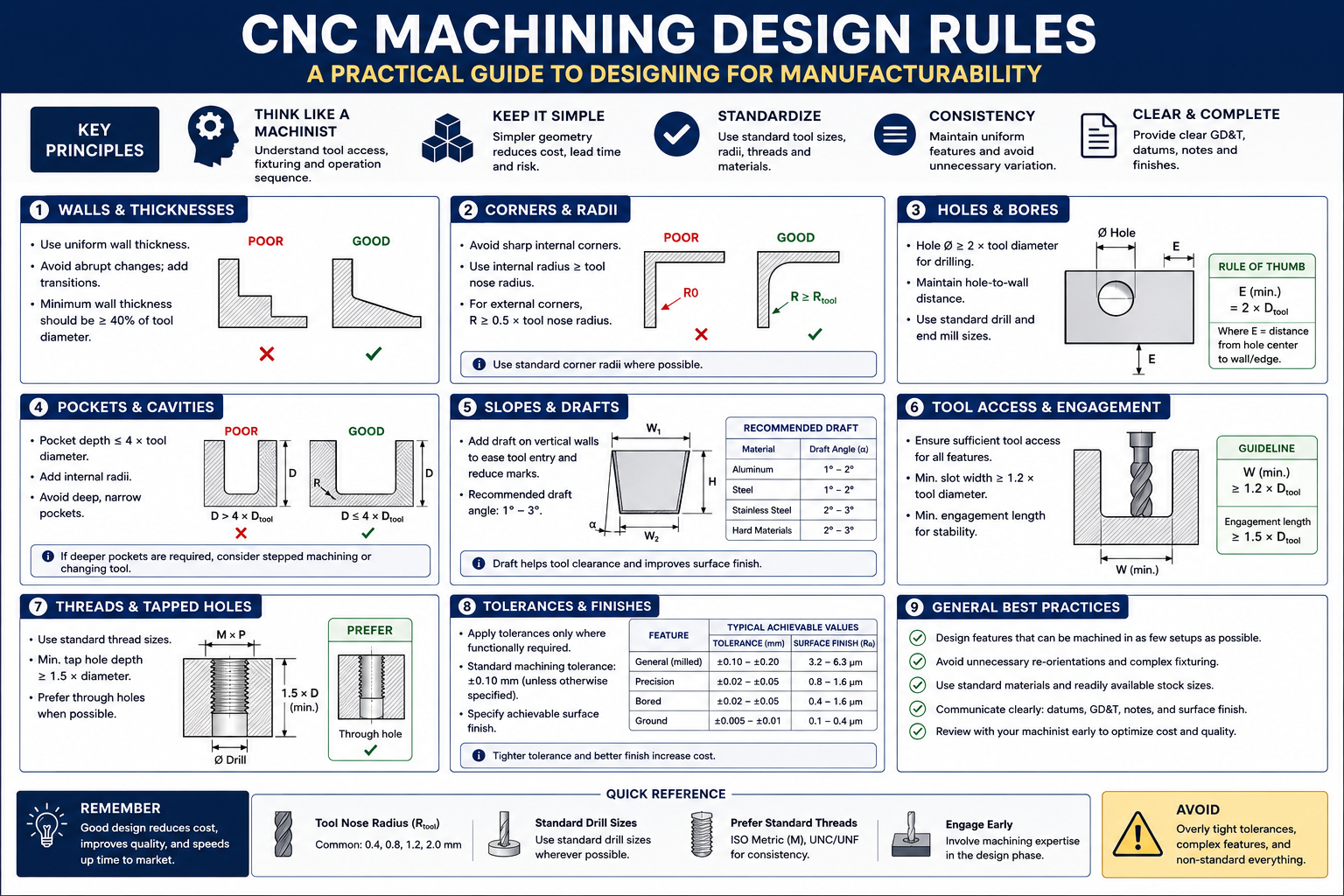
    CNC Feature Design Rules: The Reference Table

    These eight rules are the ones that show up most often in shop feedback, worth checking on every drawing before it goes out for quoting.

    FeatureRule / GuidelineWhy It ExistsWhat Happens If Violated
    Internal corner radius (pocket)Match standard end mill radii: 0.5, 1.0, 1.5, 2.0, 3.0, 4.0, 6.0, 8.0, 10.0mmEnd mills are cylindrical, leaving a radius equal to their ownCustom micro-tooling or EDM secondary operation needed
    Pocket depth-to-width ratioMax 4:1 for standard tooling; up to 6:1 with long-reach toolingDeep narrow pockets need long, thin tools that deflect and chatterDimensional error, poor finish, shortened tool life, possible breakage
    Hole depth-to-diameterThrough holes: no practical limit. Blind: 3:1 max standard; 5:1 with extended-reach drillsDeep narrow holes need extensions that deflect; chip evacuation is difficultDrill wander, wall thickness violation, chip welding, breakage
    Thread engagement depth1.0-1.5x diameter steel-into-steel; 1.5-2.0x steel-into-aluminumShallower threads strip under preload; deeper adds time with no gainThread strip-out under torque, especially in softer materials
    Wall thickness (milled pocket)0.5mm minimum rigid materials, short feature height; 1.0mm practical general minimumThin walls deflect under cutting force, causing chatter and inaccuracyWall bows inward at mid-height, poor finish, out-of-tolerance
    Boss/protrusion heightMax 4-5x base diameter for a standard end millTall thin protrusions vibrate and deflect away from the toolPoor finish, dimensional error, possible feature fracture
    Counterbore vs. screw sizeDiameter = head diameter + 0.5-1.0mm clearance; depth = head height + 0.2mmMust clear the fastener head for correct seatingHead protrudes above surface, or contacts bore walls
    Chamfers vs. filletsChamfers at 45° for standard tooling; fillets need a radius end millChamfers use angled tools; fillets need a ball-nose or radius cutterA 1mm fillet on every edge triggers a slow finishing pass on all of them

    Internal Corners: The Rule That Catches the Most Engineers

    The internal corner radius rule is probably the most frequently violated rule in CNC machining, not because it’s complicated but because it’s easy to forget while focused on functional geometry. On a CAD screen, a pocket with sharp 90-degree internal corners looks perfectly clean and buildable. The machinist’s eye sees a feature that requires either a fragile micro-tool that cuts slowly and breaks often, or a standard end mill followed by a secondary EDM operation.

    The fix is almost always free in CAD and costs nothing in the part’s function. If the corner radius needs to clear a mating component with a sharp corner, add a corner relief in the mating part instead of requiring a sharp corner in the pocket. If the radius is simply unconstrained, size it to the nearest standard end mill and the issue disappears. A 6mm internal radius lets any end mill up to 12mm diameter finish the corners, giving the shop far more flexibility than a 1mm radius would.

    Below about 1mm internal radius, you’re in micro-machining territory. Tools at this scale are fragile, cut slowly, and need spindles running 20,000 to 50,000 RPM to maintain reasonable surface speeds. Cost per feature rises sharply, breakage risk is meaningful, and the range of shops that can produce it reliably narrows. This isn’t to say micro-machining is never appropriate, medical devices, optical mounts, and precision instruments genuinely need it sometimes, but it should be a deliberate choice against a known requirement, not an accidental consequence of a sharp corner in a standard bracket.

    Tolerances and Surface Finish: Only as Tight as the Function Needs

    One of the most reliable ways to add cost without adding value is specifying tolerances tighter than the application requires. This happens for a few common reasons: CAD title block defaults that carry a tolerance tighter than most features need, dimensions copied from a previous design, and a conservative instinct that tighter is always safer. None of those reasons are wrong in intent, but they all lead to a shop running additional operations or more extensive inspection to hit a number that serves no purpose in the finished assembly.

    The discipline worth applying: for every toleranced dimension, ask what actually breaks if the tolerance were twice as loose. If the answer is genuinely nothing, the tolerance is tighter than needed. For most non-mating, non-locating dimensions on a structural part, a general tolerance of +/- 0.125mm to +/- 0.25mm is perfectly adequate, matching the standard tolerance classes documented in Machinery’s Handbook, and achievable without any special process consideration.

    Feature TypeStandard ToleranceAchievable TighterAdded Operation for Tighter
    General machined dimension+/- 0.125 to 0.250mm+/- 0.05mm with careful setupNone standard; extra fixturing for +/-0.05
    Drilled hole diameter+0.10/-0.00 (drilled nominal)+/- 0.025mm (reamed)Reaming adds one tool change, one pass
    Bored hole diameter+/- 0.025 to 0.050mm+/- 0.005-0.010mmFine or jig boring; climate control
    Tapped threadISO 6H (medium fit)ISO 5H or 4H (close fit)Machine tapping vs. hand; gauge verification
    Flatness (milled)0.05-0.10mm over 100mm0.01-0.02mm over 100mmGrinding or precision milling with temp stabilisation
    Surface finish (as-milled)Ra 1.6-3.2 μmRa 0.8 μm with fine finish passFine pass at lower feed, higher speed
    Surface finish (ground)Ra 0.2-0.8 μmRa 0.025-0.1 μm (precision ground)Cylindrical or surface grinding, secondary op
    Hole pattern position+/- 0.1-0.15mm diameter zone+/- 0.025-0.05mm with jig boringCMM verification, tight fixturing, thermal stabilisation

    Surface Finish Is a Secondary Operation, Not a Milling Setting

    Surface finish finer than Ra 0.8 micron typically can’t be achieved by milling alone regardless of cutting parameters. Ra 0.4 micron or better needs a secondary process, grinding, lapping, or honing, each a separate production step with its own setup and cycle time. Specifying Ra 0.4 on a surface that serves no sealing, sliding, or tribological function adds an entire secondary operation for no functional benefit.

    The practical approach: specify surface finish only where it matters functionally, and use the loosest specification that still meets the requirement. A sealing face needs smoothness for the seal to seat without leaking. A sliding contact needs a finish appropriate for its bearing pressure. Everything else can stay as-machined, typically Ra 1.6 to 3.2 micron, which costs nothing extra since it’s what standard milling produces without additional operations.

    Material Machinability: How Material Choice Affects Cost

    Material choice is one of the most consequential machining cost decisions, typically locked in early, before any features are designed. A designer who understands machinability characteristics upfront can sometimes cut machining cost by thirty to fifty percent with a material choice that still satisfies engineering requirements.

    MaterialMachinability RatingKey ConsiderationTool Life Impact
    Aluminium (6061, 7075)Excellent: 200-300% of free-cutting steelLong, stringy chips need chip-breaker geometryVery long tool life; carbide and HSS both work well
    Mild steel (1018, 1020)Good: 70-80%Free-machining grades (1215, 12L14) are significantly easierModerate; carbide preferred for production runs
    Stainless steel (304, 316)Difficult: 40-50%; work-hardening is the challengeMust cut continuously; carbide tooling mandatoryShort tool life; 303 free-machining much easier if allowed
    Stainless steel (316L, duplex)Very difficult: 30-40%Rigid setup essential; flood coolant mandatoryVery short tool life; high tooling cost per part
    Titanium (Grade 5, Ti-6Al-4V)Difficult: 25-40%; low thermal conductivityLow cutting speed mandatory; sharp tools, aggressive coolantShort tool life; one of the highest tooling costs in common use
    Hardened steel (>45 HRC)Very difficult: better suited to EDM or grindingHard milling with CBN/ceramic possible on rigid machinesVery short tool life even with CBN
    Copper and brassVery good: 150-200%Soft copper can smear at low speeds; leaded brass easiestGood tool life, similar to aluminium
    Engineering plastics (Delrin, PTFE, nylon)Good but workpiece-dependentPTFE is soft and deflects; nylon absorbs moistureExcellent tool life; plastic doesn’t wear tooling significantly

    The Free-Machining Grade Trade-off

    For most structural steels, free-machining grades exist that are substantially easier and cheaper to machine than standard equivalents, with only modest property compromises. 1018 is the workhorse structural grade with good strength and weldability. 1215, a resulfurized free-machining grade, machines at roughly twice the speed with better surface finish and longer tool life. If the application doesn’t need welding, heat treatment, or 1018’s slightly higher strength, switching to 1215 often halves machining cost for no functional penalty.

    The same trade-off exists in stainless: 303 machines three to four times faster than 304, with better finish and much longer tool life, at the cost of weldability and slightly lower corrosion resistance in some environments. A lot of engineers default to 304 simply because it’s the most widely specified grade, without checking whether the application actually needs what 304 provides over 303, and that default carries a real cost penalty on every unit produced.

    Setups and Fixturing: Designing for How the Part Sits in the Machine

    Every time a machinist repositions a part, the clock runs but no chips get made. Fixturing, alignment, and probing each take time, and setup count is one of the clearest predictors of cost. A part needing three setups doesn’t simply cost 50 percent more than one needing two. The operator also has to re-establish the datum reference each time, small alignment errors accumulate between features cut in different setups, and a custom fixture may be needed if the geometry doesn’t lend itself to standard workholding.
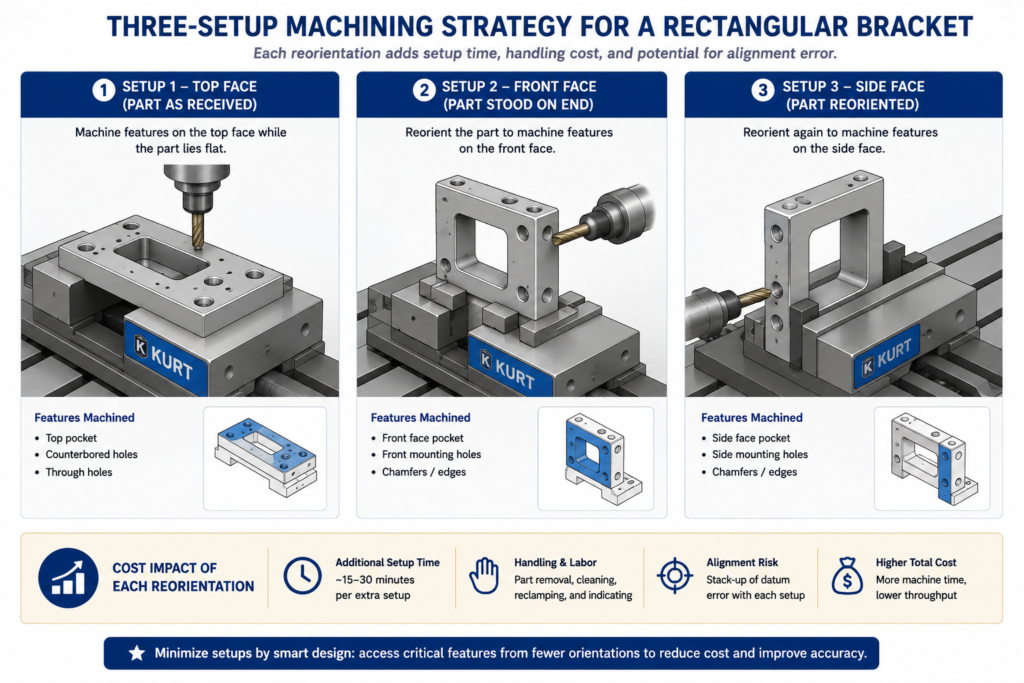
    Three-panel diagram showing a rectangular part in three CNC machine setups for top, front, and side face features

    Design for Standard Workholding

    Standard workholding means a machine vise, a collet chuck, or toe clamps on a fixture plate. Parts with flat, parallel reference surfaces and enough clearance for vise jaws to grip without interfering with the cut features are the cheapest to set up and the least likely to trigger a call about needing a custom fixture. Round or organically shaped parts, or ones with features that conflict with standard vise jaw positions, need a custom fixture or an angled setup that introduces risk.

    The practical habits: keep at least two opposite faces flat and parallel as datum surfaces for vise workholding, make sure features needed in each setup are accessible from the top without vise jaws blocking the tool path, and avoid features requiring the part to be fixtured at an angle, since angle plates and tilted fixtures add cost and setup time.

    The 2+2+2 Setup Rule for Rectangular Parts

    Think of a rectangular part’s six faces as three pairs: top and bottom, front and back, left and right. A well-designed three-axis part should have all its features accessible from at most three of those faces. Top-face features get cut in setup one, front or back face in setup two with the part stood on end, and a side face in setup three. That’s the practical limit of efficient three-axis machining without a rotary fourth axis or a five-axis machine, and designing within it keeps the part accessible to the widest pool of suppliers.

    CNC Cost Drivers: What Makes a Part Expensive

    Not all cost drivers are equally within a designer’s control, and not all carry equal weight.

    Cost DriverRelative ImpactDesign Changes That Reduce ItRed Flags in a Drawing
    Number of setupsHigh: 20-40% per additional orientationDesign features on as few faces as possibleFeatures requiring more than one flip; holes on 5-6 faces
    Tight tolerancesHigh, non-linear: 1.5-6x cost per tighter classSpecify no tighter than function demandsTight tolerances on cosmetic features; blanket +/-0.025mm title block
    Deep narrow pocketsMedium-HighWiden pockets for a stiffer tool; step the depth downDepth-to-width above 4:1; narrow full-depth slots
    Small internal corner radiiMediumMatch standard end mill sizesInternal corners under 1.0mm without micro-machining need
    Custom tooling or operationsVery High: weeks of lead time, high costDesign to standard tool sizes and thread formsNon-standard thread forms; radii matching no available tool
    Surface finish requirementsMediumSpecify finish only where functionally neededRa 0.4-0.8 on surfaces with no sealing/bearing/mating function
    Material removal volumeMediumRemove only what the design needs50mm billet machined down to a 3mm plate
    Part size vs. machine capacityLow-MediumSplit oversized parts where the design allowsParts approaching a 600-800mm three-axis envelope

    The Setup Count Problem Is Easy to Underestimate

    Setup count is the cost driver most frequently underestimated by engineers without shop floor experience. A design requiring five setups doesn’t just add four extra repositionings’ worth of time. It also shrinks the pool of shops that can run the part economically, since tying up a machining centre for five operations is only profitable at certain volumes and price points. An engineer who reconsiders a four-setup layout and finds a way to do it in two hasn’t just cut unit cost; they’ve opened the part to a wider range of competitive bids, which often drives cost down further.

    Worked Examples

    The pump housing with EDM corners: A pump housing had a rectangular internal cavity for a sliding valve with square cross-section corners, so the designer specified a matching square cavity with zero-radius corners on all four internal walls. The sharp corners required EDM after milling, adding roughly 60 percent to machining cost and extending lead time from five to twelve days.

    The redesign kept the valve body’s functional cross-section but added 2mm corner reliefs to the valve, matching the radius a 4mm end mill would leave in the housing cavity. The cavity became fully machinable with a standard end mill in one operation, and the valve still slid correctly since the reliefs didn’t interfere with any sealing or guidance surface. The EDM step was eliminated entirely, machining cost dropped roughly 45 percent, and lead time returned to five days, all from an hour of CAD work with zero impact on function.

    The instrument bracket with unnecessary surface finish: An optical instrument bracket carried a Ra 0.4 micron finish requirement on all machined surfaces, inherited from the finish standard of the optical instrument it mounted. The bracket itself was purely structural, none of its surfaces were optical, sealing, or sliding contacts. That blanket finish requirement meant grinding every face as a secondary operation, accounting for sixty percent of total machining cost.

    The revision set structural faces to Ra 1.6 micron as-milled, keeping Ra 0.4 micron only on the two precision datum surfaces where the instrument actually seated. Grinding dropped from six faces to two. Machining cost fell roughly 40 percent and lead time shortened from eight days to four, with zero change to the instrument’s optical performance since the surfaces that actually mattered kept their required finish.

    Frequently Asked Questions

    What is the minimum internal corner radius I should design for? The practical floor is set by the smallest standard end mill your shop carries, typically 1mm diameter for a 0.5mm corner radius, but that size is fragile and slow. A more practical minimum for typical work is 1.5mm to 2.0mm, matching common, robust 3mm and 4mm tools. Designing to 3mm or 6mm gives even more tool selection flexibility, usually translating to faster cycle times and lower cost. Choose the largest radius the design will tolerate functionally, matched to a standard end mill size.

    How many setups should I aim for? One setup is ideal wherever function allows it. Two is the practical target for most rectangular parts. Three is the practical limit for standard three-axis equipment without a rotary axis. Once a part needs four or more, cost rises substantially and the pool of shops that can run it economically narrows. If a design is heading toward four or more setups, ask whether features can be relocated or consolidated, or whether five-axis machining would bring the setup count down to one or two and improve the economics for your volume.

    Does material choice really affect machining cost that much? Yes, significantly. The difference between 303 stainless (free-machining) and 316 for the same part can be a factor of two to three in cycle time alone, with tool wear compounding it further. The difference between 6061 aluminium and Ti-6Al-4V for a structurally equivalent part can run five to ten times in total machining cost. For meaningful production volumes, machinability deserves the same attention as structural material selection, since there are often two or three material options within a given structural requirement with very different machinability profiles.

    When should I use a chamfer instead of a fillet on an external edge? Use a chamfer whenever the purpose is deburring, lead-in for assembly, or a cosmetic break, and a fillet isn’t structurally required. A 45-degree chamfer is cut in a single fast pass. An external fillet needs a ball-nose or radius end mill making a slower finishing pass around every edge that carries the callout. On a part with many external edges, specifying fillets everywhere can add a full finishing operation. Reserve fillets for features where the radius is functionally required, like a fatigue-critical wall-to-floor transition, or a load-distributing contact surface.

    Why do tighter tolerances cost so much more? Because tighter tolerances usually trigger a step change in process rather than a smooth increase in care. A hole at a standard drilling tolerance needs one operation. The same hole at +/-0.025mm needs reaming: an additional tool, an additional pass, additional inspection. Flatness at 0.05mm over 100mm might be achievable with careful milling; 0.005mm needs grinding in a temperature-controlled environment. Each tighter step tends to require an additional operation or a different process entirely, which is why tolerance cost looks like a series of jumps rather than a smooth curve.

    What’s the maximum depth-to-width ratio for a CNC pocket? The standard guideline is 4:1 for pockets machined with a standard-length end mill. At that ratio, the tool already experiences meaningful deflection under cutting load, affecting finish and accuracy, particularly at the bottom corners. Above 4:1 you need long-reach tooling, which deflects more, cuts more slowly, and costs more. Above 6:1, options are accepting long-reach tooling’s cost, widening the pocket at deeper sections, splitting the part into two conventionally machined pieces, or switching to EDM for the deep sections, which avoids deflection but runs considerably slower than milling.

    Key Takeaways

    The bracket from the opening example eventually got made, at a higher cost and longer lead time than expected. That’s not the worst outcome, and it’s far from unusual. Most engineers learn these rules from experience, from parts that cost too much, took too long, or generated a call from the shop about a feature the drawing hadn’t accounted for.

    The goal is to move that learning earlier, before a drawing goes out, before tooling is committed, while the features are still adjustable in CAD at no cost. These rules aren’t creative constraints on what a part can look like. They’re physical facts about what a spinning cylindrical tool can and cannot do through three or five axes. A designer who has internalised them thinks differently about feature geometry, not less ambitiously, but with a natural awareness of which choices translate directly into cost and lead time.

    Run through the reference tables whenever a CNC drawing is close to final. Check internal corner radii against the feature rules. Audit every tight tolerance. Count the setups the current feature layout requires and whether any change would reduce it. Those checks cost minutes in CAD. The problems they catch cost days or weeks and real money once the drawing is at a shop.
  • Design for Manufacturability (DFM) Checklist for Engineers (20-Point Guide)

    Design for Manufacturability (DFM) Checklist for Engineers (20-Point Guide)

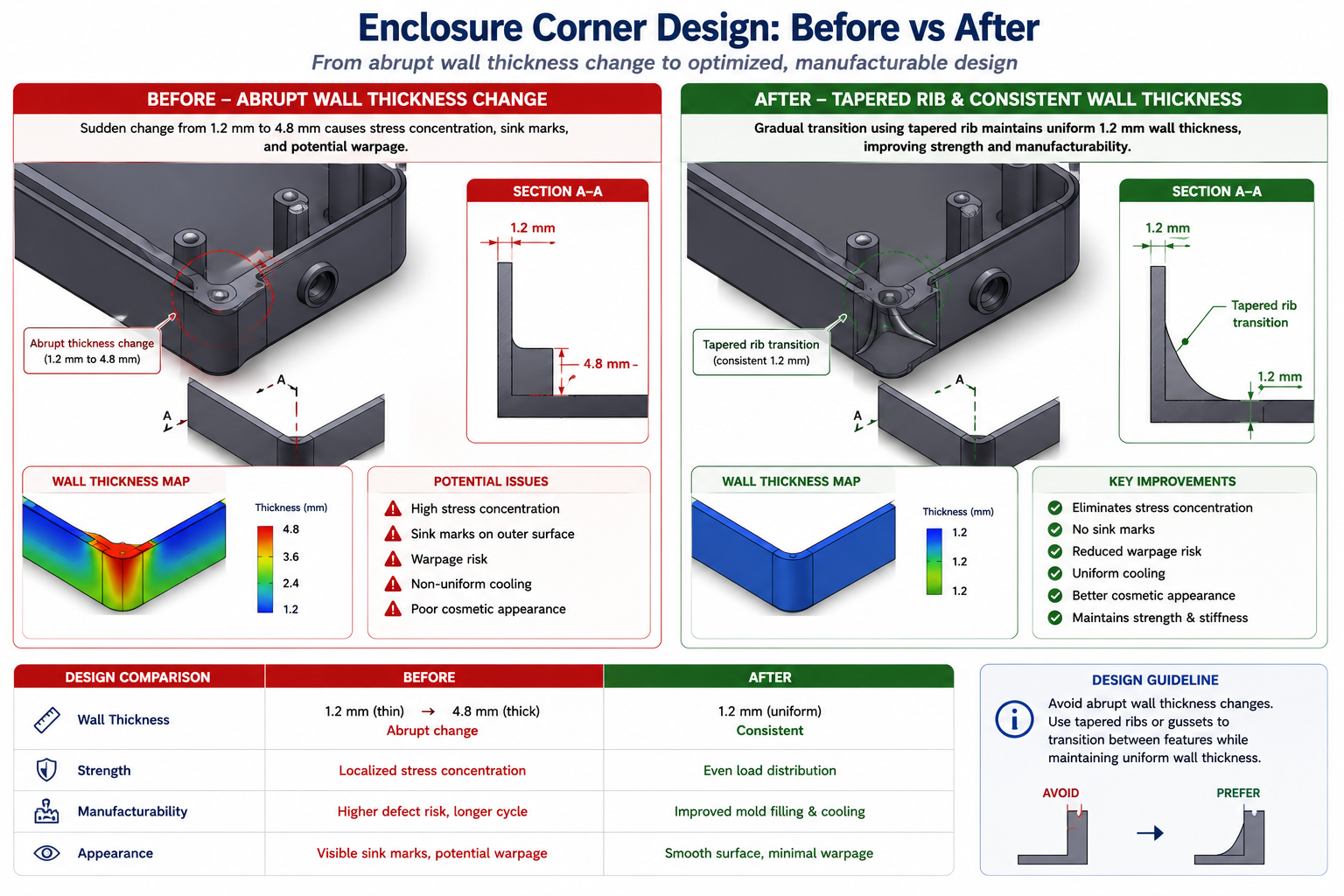
    An injection-moulded enclosure looked fine on screen. Wall thickness ranged from 1.2mm to 4.8mm across the part because the designer hollowed out a solid model without tracking where the resulting walls changed thickness. Nobody caught it in CAD review, since the review checked fit and function, not wall uniformity.

    The tooling got cut. First shots showed sink marks over every thick section and a warp across the lid that threw the snap-fit tabs out of alignment by half a millimetre. Fixing it meant reworking tool steel and revalidating fit. The change cost eleven thousand dollars and pushed launch back six weeks.

    Quick answer: Design for manufacturability (DFM) is the set of process-specific constraints that turn a geometrically correct CAD model into a part that can actually be produced, at target cost, without surprises after tooling is committed. The highest-leverage checks are wall thickness uniformity, draft angles, internal fillet radii, and tolerances specified no tighter than function requires. None of these are engineering skill gaps; they’re a missing systematic check against how the part will actually be made.
    Design for manufacturability CAD comparison of uneven wall thickness causing sink marks versus redesigned uniform wall with rib

    This guide covers the four processes most engineers actually work with: injection moulding, CNC machining, sheet metal forming, and assembly. It includes a 20-item checklist with priority ratings, four reference tables with the numbers you need at the CAD stage, and worked examples showing how a DFM review changes a part before it reaches a tool shop.

    The 20-Point DFM Checklist

    This master checklist spans all four process families and is built to scan quickly during a design review. Critical items cause part failure, tooling damage, or major rework if missed. High items cause significant cost or schedule impact. Medium items are good practice that controls cost without being make-or-break.

    #Checklist ItemProcessCost Impact if IgnoredPriority
    1Minimum wall thickness meets process capabilityMoulding, die castingSink marks, incomplete fill; scrap up 10-30%Critical
    2Uniform wall thickness throughout the partMoulding, casting, sheet metalWarping, sink marks, internal stressCritical
    3Draft angle applied to all vertical facesMoulding, casting, forgingPart sticks in mould; drag marks; tooling damageCritical
    4Generous fillets at internal cornersAll processesStress concentration, sink marks, crack initiationCritical
    5Hole diameter-to-depth ratio within process limitsMachining, moulding, castingDrill wander, tool breakage, incomplete fillHigh
    6Avoid undercuts unless side-action tooling is budgetedMoulding, die castingRequires slides/lifters; tooling cost +20-50%Critical
    7Standard fastener sizes and thread specs usedAssembly, machiningCustom fasteners cost 3-10x standardHigh
    8Tolerances specified only as tight as neededMachining, all processesCost increases exponentially per tightened toleranceCritical
    9GD&T datums match assembly and inspection methodMachining, inspectionUnmeasurable tolerances; assembly issuesHigh
    10Symmetric or self-locating partsAssemblyIncorrect assembly; warranty and rework costHigh
    11Minimize part count through consolidationAssembly, all processesEach part adds time, inventory, failure pointsHigh
    12Avoid dissimilar materials without joining planAssembly, welding, bondingGalvanic corrosion; CTE mismatch failureCritical
    13Bend radius meets minimum per material/thicknessSheet metalCracking at bend; unpredictable springbackCritical
    14Features kept clear of bend lines (2-3x thickness)Sheet metalDistortion near bend; feature tolerance lostHigh
    15Machined features accessible without special toolingCNC machiningCustom fixtures or multiple setups neededHigh
    16Parting line positioned to minimize flashDie casting, sand castingExcess flash removal labor; cosmetic defectsMedium
    17Weld joint design matches process capabilityWelding/fabricationPoor penetration, distortion, reworkCritical
    18Surface finish specified only where necessaryMachining, finishingUnnecessary polishing operations add costMedium
    19Design supports automated inspectionQuality/inspectionManual inspection required; slower, less repeatableMedium
    20Reviewed against supplier’s process capability dataAll processesDesign exceeds shop capability; late redesignCritical
    How to use this checklist: Run it at the CAD stage, before any drawing goes out for quoting or tooling. It works best as a joint review between the design engineer and someone with shop-floor or supplier experience, since the reference table numbers are starting points, not universal constants. Every supplier has their own capability data, and asking for it directly is the only way to know your actual limits.

    Injection Moulding: Where Wall Thickness Decides Everything

    Injection moulding is unforgiving about wall thickness in a way that surprises engineers coming from machining or sheet metal backgrounds. Molten plastic fills a cavity and has to cool before ejection. Thick sections cool slower than thin ones, and that mismatch is the root cause of most defects people associate with cheap-looking plastic parts: sink marks, warping, internal voids.

    The fix is almost always the same: keep wall thickness as close to uniform as possible, within the range the resin and geometry can support. Where a thicker section is unavoidable, like a screw boss, taper into it gradually instead of stepping straight from thin to thick.

    Design ParameterRecommended ValueWhat Happens If Violated
    Nominal wall thickness1.0-3.5mm most thermoplastics; 0.5-1.0mm minimum for engineering resinsThicker: sink marks, voids. Thinner: incomplete fill, high pressure
    Wall thickness uniformityVariation under 10-15% of nominalDifferential cooling causes warping and internal stress
    Draft angle1-2° minimum for smooth surfaces; 3-5° for texturedDrag marks, part sticking, ejector pin stress
    Internal corner radius0.5x wall thickness minimum; ideal 0.75-1.0xStress concentration (Kt up to 3+), fracture initiation
    Rib thickness50-60% of adjacent wall thickness at baseRibs over 60-75% cause visible sink marks opposite
    Boss wall thickness60% of nominal wall; taper thinner at tipThick bosses sink and crack; thin bosses strip threads
    Hole diameter-to-depthThrough holes up to 4-6x diameter; blind holes 2-3xDeep core pins deflect, causing wall variation or breakage
    Minimum feature size0.4-0.5mm standard; 0.15-0.25mm with precision toolingFeatures below capability fail to fill or break during ejection

    Draft Angle: The Rule Everyone Forgets Until the First Shot

    Draft angle is the small taper on vertical walls that lets the part release from the mould without the steel scraping the surface on the way out. A part with zero draft looks completely normal on screen, sometimes cleaner than one with draft applied. The problem only shows up at the tool shop, or on the first production shot, when the part either won’t release or comes out scarred with drag marks.

    Apply draft as one of the first steps once a surface is finalised, not as an afterthought. Most CAD packages include a draft analysis tool that colour-codes the model relative to pull direction. Run it before calling the design done. Textured surfaces need roughly an extra degree of draft for every 0.025mm of texture depth, since texture adds friction during ejection.

    Ribs and Bosses: The Sink Mark Trade-off

    Ribs add stiffness without adding bulk, which is why they show up everywhere in plastic part design. A rib is effectively a local thickness increase where it meets the wall. If that local thickness gets too close to the wall’s own thickness, a sink mark appears on the opposite face as material pulls in during cooling. Keeping the rib base at roughly half to sixty percent of the adjacent wall is the standard fix, worth knowing by heart.

    Screw bosses add a second consideration: the boss needs to survive repeated screw insertion without cracking, which pushes toward a thicker wall, while a thicker wall pushes toward sink marks. The usual resolution keeps the boss wall around sixty percent of nominal thickness and adds a gusset rib connecting it to the nearest structural wall.

    CNC Machining: Designing Around Tooling and Fixturing

    Machining feels more forgiving than moulding since material is removed rather than formed, with no mould to fill or shrink unevenly. But it has its own constraints, rooted in cutting tool geometry and the practical limits of holding a part securely while cutting. Both are easy to overlook in CAD, since a 3D model doesn’t care how a tool would physically reach a pocket or how the part sits in a vice.

    The most common machining DFM mistake is calling out a sharp internal corner in a pocket. Every end mill is a cylinder, so it leaves a radius in every internal corner it cuts. A sharp 90-degree internal corner forces the machinist into a tiny, fragile custom tool or a separate EDM finishing step, either of which adds cost that a slightly larger radius avoids for free.

    Design ParameterRecommended PracticeCost Impact
    Internal corner radiusMatch standard end mill sizes: 1.5mm, 3mm, 6mm, 10mmCustom small-radius tooling adds 30-100% machining time
    Hole tolerance and finishStandard reamed/drilled (+/-0.05 to 0.1mm) unless function requires tighterEach tightened level adds 15-40% cost
    Thread depth and typeStandard series (UNC, UNF, metric coarse); blind hole depth 1.5-2x diameterCustom thread forms require special long-lead tooling
    Pocket depth-to-widthKeep below 4:1 for standard end millsLong-reach tooling cuts feed rate 30-60%
    Datum and fixturing accessFlat, accessible reference surfaces for workholdingCustom fixtures cost $2,000-$20,000 and add weeks
    Number of setups requiredMinimize machine orientations neededEach additional setup adds 20-40% cost
    Tool access for deep featuresVerify standard-length tool reaches without collisionEDM workaround costs 5-20x standard milling
    Thin wall machiningMinimum 0.5mm wall for rigid materials with supportThin walls need slower feeds, multiple passes: 2-4x cycle time

    Setups: Every Reorientation Costs Time and Accuracy

    A CNC machine only reaches features from the orientation it currently holds the part in. Features cut from four different sides mean the part gets removed, flipped, and realigned four times, and each of those setups adds machine time, operator labor, and a small amount of alignment error between features cut in different orientations.

    This doesn’t mean avoiding multi-sided parts; plenty of functional designs genuinely need features on more than one face. It means that between two functionally equivalent designs, the one needing fewer setups will be meaningfully cheaper and faster. A quick mental walk-through of how the part sits in a vice and how a tool reaches each feature catches a surprising number of these issues before they hit a quote.

    Sheet Metal: Bend Lines Are Where Things Go Wrong

    Sheet metal parts start as flat stock that gets cut and bent into shape, and almost every design problem traces back to a bend line. Material doesn’t like being bent sharply. Bend it too tight relative to thickness and it cracks on the outside of the bend, especially in stainless steel or hardened aluminum tempers with less ductility than mild steel.

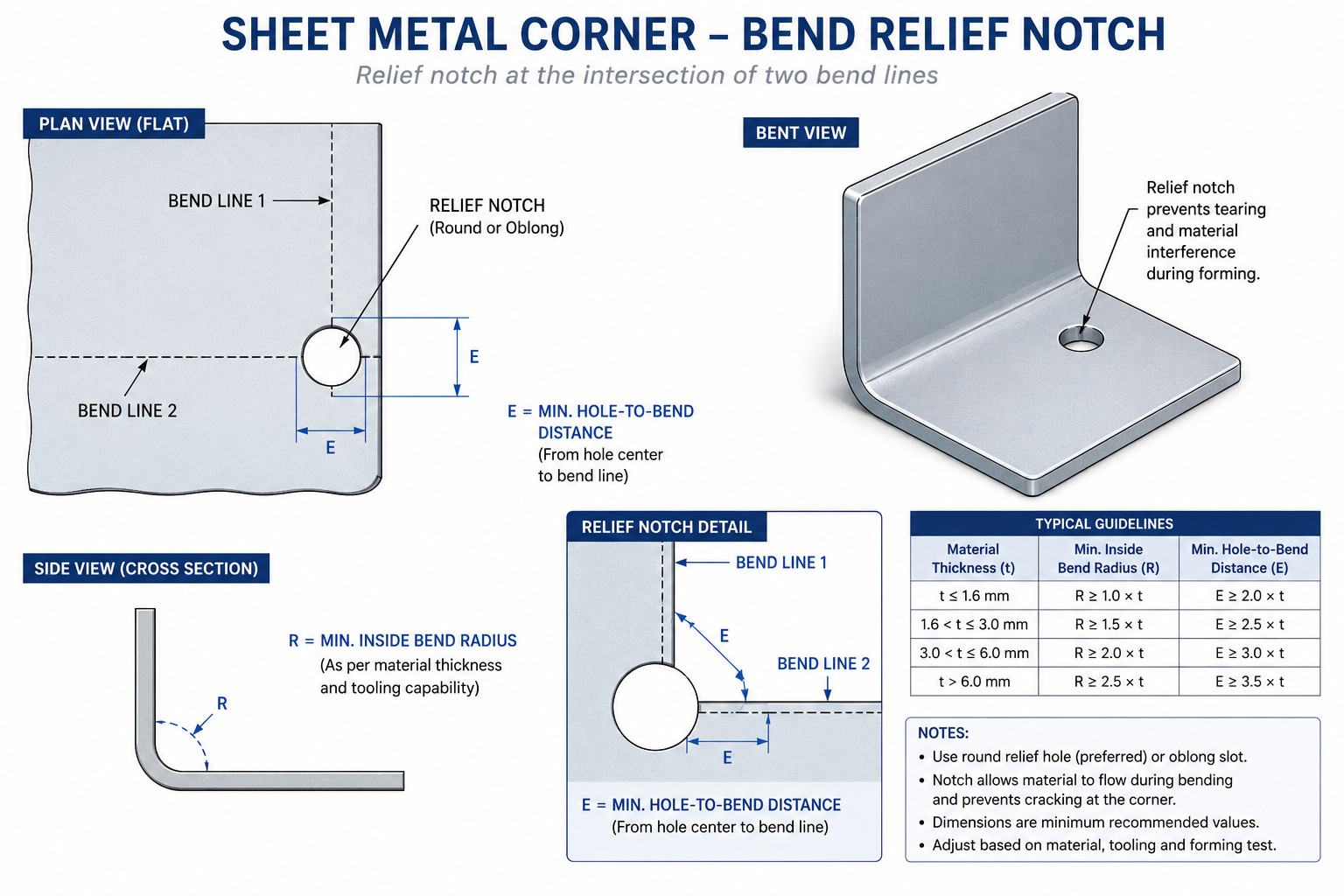
    Minimum bend radius scales roughly with material thickness. A radius equal to material thickness is a safe baseline for mild steel and most aluminum alloys, with stainless and harder tempers needing more. Where two bend lines meet at a corner, a relief notch is needed at the intersection before bending, or the corner tears as both folds try to occupy the same material at once.

    Design ParameterRecommended PracticeCommon Mistake
    Minimum bend radius~1x material thickness for mild steel/aluminum; 2-3x for harder tempersSpecifying a zero-radius bend, which cracks
    Bend relief at cornersRelief notch at least equal to material thicknessOmitting relief causes tearing at bend intersections
    Hole-to-bend distance2.5-3x thickness plus bend radiusPlacing holes too close causes distortion during forming
    Hole-to-edge distance1.5-2x material thicknessHoles too close to edge cause bulging or tearing
    Minimum flange length3x thickness plus bend radiusFlanges too short for tooling to grip inconsistent bend angle
    Tab and slot fitSlot width = tab thickness + 0.1-0.2mm clearanceZero-clearance designs ignoring cutting tolerance
    Countersink compatibilityMatch standard tooling angle (82° or 90°)Countersink deeper than material allows, breaking through

    Features Near a Bend Line Move More Than You Expect

    Holes, slots, and cutouts placed too close to a bend line get pulled out of position as material deforms during forming. Keep functional features at least two and a half to three times the material thickness from the nearest bend line, with extra margin if hole tolerance is tight. This is one of the more common reasons a sheet metal part comes back from its first form with mounting holes that no longer line up, and it’s entirely avoidable by checking feature-to-bend distance before the flat pattern is finalised.

    Sheet metal bend relief notch diagram showing minimum bend radius and hole clearance distances

    Tolerances: The Hidden Cost Multiplier

    Tolerance specification hides a lot of unnecessary cost, because tightening a tolerance doesn’t add cost linearly, it adds it disproportionately, and that relationship isn’t obvious from looking at a drawing. A dimension at commercial tolerance might cost a few cents to hold. The same dimension at precision tolerance might cost several times that, not because the machine runs slower, but because tighter tolerances usually require additional operations, more careful fixturing, environmental control, and inspection.

    The habit worth building: for every toleranced dimension, ask what actually breaks if the tolerance were twice as loose. If the honest answer is nothing, the tolerance is tighter than needed and adding cost with no functional benefit.

    Tolerance ClassTypical Range (linear, mm)Relative CostAchievable By
    General/commercial+/- 0.25 to 0.51.0x (baseline)Standard milling, turning, sheet metal forming
    Precision+/- 0.05 to 0.151.5-2.5xStandard CNC with normal process control; reamed holes
    High precision+/- 0.01 to 0.053-6xTemperature-controlled CNC; CMM verification
    Ultra-precision+/- 0.002 to 0.018-20xGrinding, honing, jig boring; climate-controlled metrology
    Flatness (general)0.05-0.1mm over 100mm1.5-2x vs no calloutStandard machining and finishing
    Position (general)+/- 0.1-0.25mm diameter zone1.5-3x vs basic dimensionCNC with standard fixturing
    Surface finish, as-machinedRa 1.6-3.2 μm1.0x (baseline)Standard milling and turning
    Surface finish, ground/polishedRa 0.1-0.8 μm3-10xGrinding, lapping, polishing

    GD&T Datums Should Match How the Part Is Actually Used

    Geometric dimensioning and tolerancing gives a precise language for describing how a feature can vary, following the ASME Y14.5 standard for dimensioning and tolerancing, but it only helps if the datum structure reflects how the part is actually held during machining, measured during inspection, and mated during assembly. A datum scheme that looks correct on paper but doesn’t match any of those real-world references creates a part that can pass inspection and still not assemble correctly.

    A practical check: picture the part sitting in the inspection fixture or on the CMM table, and ask whether the called-out datums are actually the surfaces that would locate it there. If the answer is unclear, revisit the datum structure before the drawing goes out. Correcting it after parts are in production is a far bigger conversation than catching it during design review.

    Design for Assembly: Reducing Parts and Preventing Mistakes

    Design for assembly (DFA), usually paired with DFM under the combined acronym DFMA, asks a different question: not whether each part can be made, but whether the whole product can be put together efficiently and correctly. The two biggest levers are reducing part count and making incorrect assembly physically difficult.

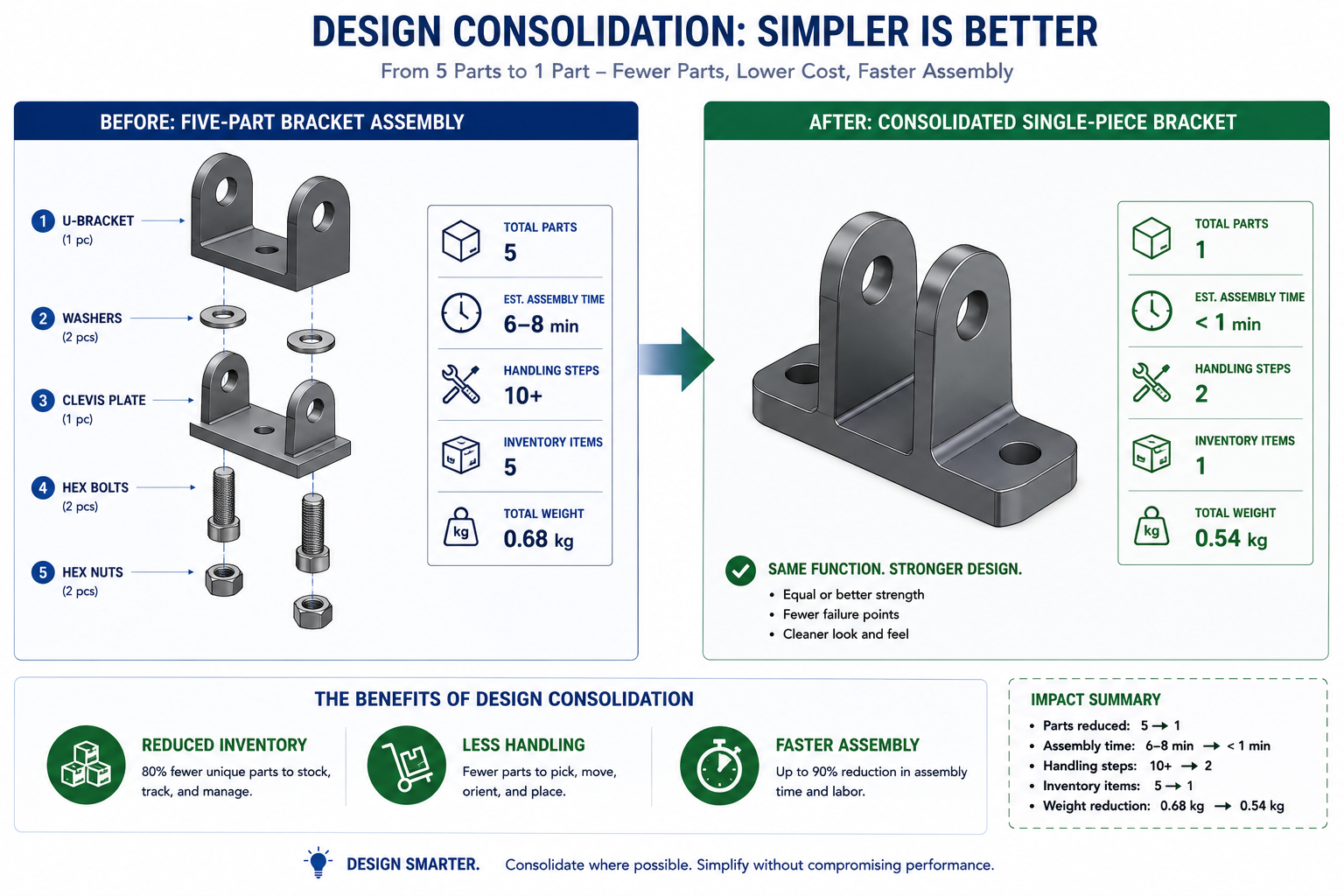
    Every part in an assembly carries cost beyond its own material and machining: it needs to be ordered, stocked, picked, oriented, and joined, with paperwork and quality records to manage. A design that combines three separate brackets into one moulded or formed piece eliminates two entire chains of that overhead, not just the material cost of two fewer parts. This feature consolidation is one of the highest-leverage things a DFM review can catch, since savings compound across every unit ever built.

    Poka-Yoke: Making the Wrong Assembly Physically Impossible

    The Japanese term poka-yoke translates roughly to mistake-proofing: designing parts so incorrect assembly is either impossible or immediately obvious. A connector symmetric enough to plug in backwards eventually will get plugged in backwards on a production line, no matter how good the work instructions are. A keyed, asymmetric connector shape removes that failure mode entirely, at zero ongoing cost once the tooling exists.

    The same thinking applies to brackets, covers, and any orientation-sensitive part. If a part looks identical in two orientations but only works correctly in one, build in an asymmetric feature, an offset hole or a notch, that makes the correct orientation the only one that fits. This is far cheaper to design in at the CAD stage than to manage through inspection or training later.

    Mixed Materials and the Joining Problem

    Combining dissimilar materials is sometimes unavoidable, but it needs to be a deliberate decision, not something that falls out of picking the cheapest material for each part independently. Two metals with very different positions on the galvanic series will corrode at the joint when moisture is present, even if neither corrodes on its own. Materials with very different coefficients of thermal expansion build up stress at a rigid joint as temperature cycles, eventually leading to fatigue cracking or loosened fasteners.

    This doesn’t mean avoiding mixed materials. It means that whenever a design crosses a material boundary, that joint deserves a specific look: is there galvanic corrosion risk requiring an isolating coating or gasket, and is there a CTE mismatch requiring the joint to accommodate movement rather than resist it rigidly. Catching this at the design stage is far cheaper than diagnosing a field failure years after shipping.

    Worked Examples

    The enclosure with uneven walls: A consumer electronics housing, moulded as a single shell hollowed from a solid block model, ended up with wall thickness ranging from 1.2mm to 4.8mm because the hollowing offset the outer surface by a constant amount except where ribs and bosses interrupted it. The DFM review flagged the variation as well outside the 10-15 percent guideline, and flagged the abrupt step between the 4.8mm and 1.8mm sections with no taper.

    The redesign replaced the thick corner with a 1.8mm wall plus a separate internal rib, tapered into the surrounding wall over roughly 6mm. The screw boss in that corner was rebuilt at 60 percent of nominal wall thickness with a gusset rib. The result eliminated sink mark risk entirely and cut part mass by roughly 12 percent, with no loss of stiffness, all caught in CAD before the tool was cut.

    The bracket with an inaccessible pocket: A machined aluminum bracket had a straightforward rectangular pocket on its underside, positioned beneath an overhanging flange added for a separate mounting requirement. The DFM review found that no standard-length end mill could reach the pocket without colliding with the flange, leaving only a costly custom long-reach tool or a redesign.

    Relocating the flange 8mm further from the pocket gave a standard tool clearance to approach directly, with no change to the flange’s mounting function since the new position still aligned with the mating bracket’s hole pattern. This avoided a roughly 70 percent per-part cost premium the shop had estimated for the custom tooling, and took an afternoon of CAD work instead of a multi-week delay.

    Frequently Asked Questions

    What is the difference between DFM and DFA? DFM focuses on whether an individual part can be produced efficiently by a given process, covering wall thickness, draft angle, and tolerances. DFA focuses on whether the parts can be assembled efficiently once they exist, covering part count reduction and mistake-proofing. The two are usually discussed together as DFMA because they overlap heavily in practice: a part that’s hard to make is often hard to assemble too.

    When in the design process should a DFM review happen? As early as possible, and more than once. The first pass belongs at the concept or early CAD stage, before significant effort goes into specific geometry, when changes are cheapest. A second pass belongs just before release for tooling or first-article quoting, the last point where a change avoids tooling cost entirely. Waiting until after a prototype reveals a problem pushes the fix to the most expensive stage possible.

    How do I know what wall thickness or tolerance my supplier can actually achieve? Ask them directly for their process capability data rather than relying on generic published guidelines. The numbers in a checklist like this are reasonable starting points, but actual capability varies by shop, machine, tooling condition, and the specific material and geometry involved. The earlier you get this data, the fewer surprises at first-article inspection.

    Why does tightening a tolerance cost so much more than the value suggests? Because tighter tolerances usually trigger a step change in process, not a smooth increase in effort. A hole within a few microns of nominal often can’t be held by drilling alone and needs reaming or boring. A flatness requirement tight enough for a sealing surface often needs a separate grinding operation. Each step change adds a separate operation, setup, and often inspection equipment, which is why tolerance cost looks like a series of jumps rather than a straight line.

    Can a DFM checklist replace talking to a manufacturing engineer or supplier? No. A checklist catches the common, well-documented mistakes that show up across most projects in a given process, which prevents the most frequent and expensive surprises. It can’t replace the specific knowledge a manufacturing engineer or experienced supplier has about your particular part, material, and equipment. The most effective use is as preparation: work through it yourself first, then bring a tighter design to the conversation so it can focus on the genuinely difficult decisions.

    What’s the single highest-impact DFM change most engineers could make? Reducing part count through feature consolidation, especially in assemblies that grew across multiple design iterations without anyone stepping back to ask whether several parts could become one. Every part carries cost beyond material and machining, ordering, stocking, handling, and quality tracking all scale with part count. Combining three brackets into one moulded piece often pays for the redesign effort many times over, since savings compound on every unit built.

    Exploded view comparing five-part bracket assembly to consolidated single-piece DFA redesign

    Key Takeaways

    Every item in this checklist describes a constraint that exists whether or not the design respects it. A wall too thick relative to its neighbours will sink. A tool without draft will not pull the part. A bend too tight for the material will crack. None of these are arbitrary rules; they’re physical realities that surface sooner or later. The only real choice an engineer has is whether they show up on a CAD screen during review, or on a production floor after tooling is already cut.

    None of the numbers here are exotic: a 1 to 2 degree draft angle, a rib at 50 to 60 percent of wall thickness, a bend radius around one times material thickness, a tolerance no tighter than the function actually demands. What makes DFM valuable isn’t the difficulty of any single rule. It’s the discipline of checking every part against the rules that govern the process it will actually go through, before that process turns an overlooked detail into an expensive lesson.

    Build the checklist into your design review process, keep the reference numbers close during CAD work, and treat your supplier’s actual process capability data as the final word over any general guideline, including this one.

  • How Engineering Design Services Reduce Development Time & Cost

    How Engineering Design Services Reduce Development Time & Cost

    A mid-size manufacturer of industrial packaging equipment was eighteen months into a new product development cycle. The project had consumed significant internal engineering time, produced three physical prototypes, each requiring expensive rework, and was already six months behind the original launch date. When they finally brought in an external engineering design firm for a DFM (design for manufacturability) review, the outside team identified eleven design features that were unnecessarily expensive to produce and two assembly sequences that could be consolidated. The resulting redesign cut per-unit manufacturing cost by 23 percent and the remaining development timeline by four months.

    This is not an exceptional outcome. It is a typical one when engineering design services are applied at the right stage of product development. What is exceptional about that company’s situation is how long they waited before bringing outside expertise in.

    Engineering design services encompass a broad range of specialized capabilities: mechanical and industrial design, CAD modeling and detailing, design for manufacturability analysis, FEA and CFD simulation, value engineering, prototyping support, and full product development outsourcing. When applied strategically, they compress development timelines, reduce manufacturing costs, and prevent the expensive late-stage rework that consumes R&D budgets and delays market entry.

    This guide explains exactly how each mechanism works, backs every claim with published research and market data, and gives you a practical framework for identifying where engineering design services can create the most impact for your specific development challenge.

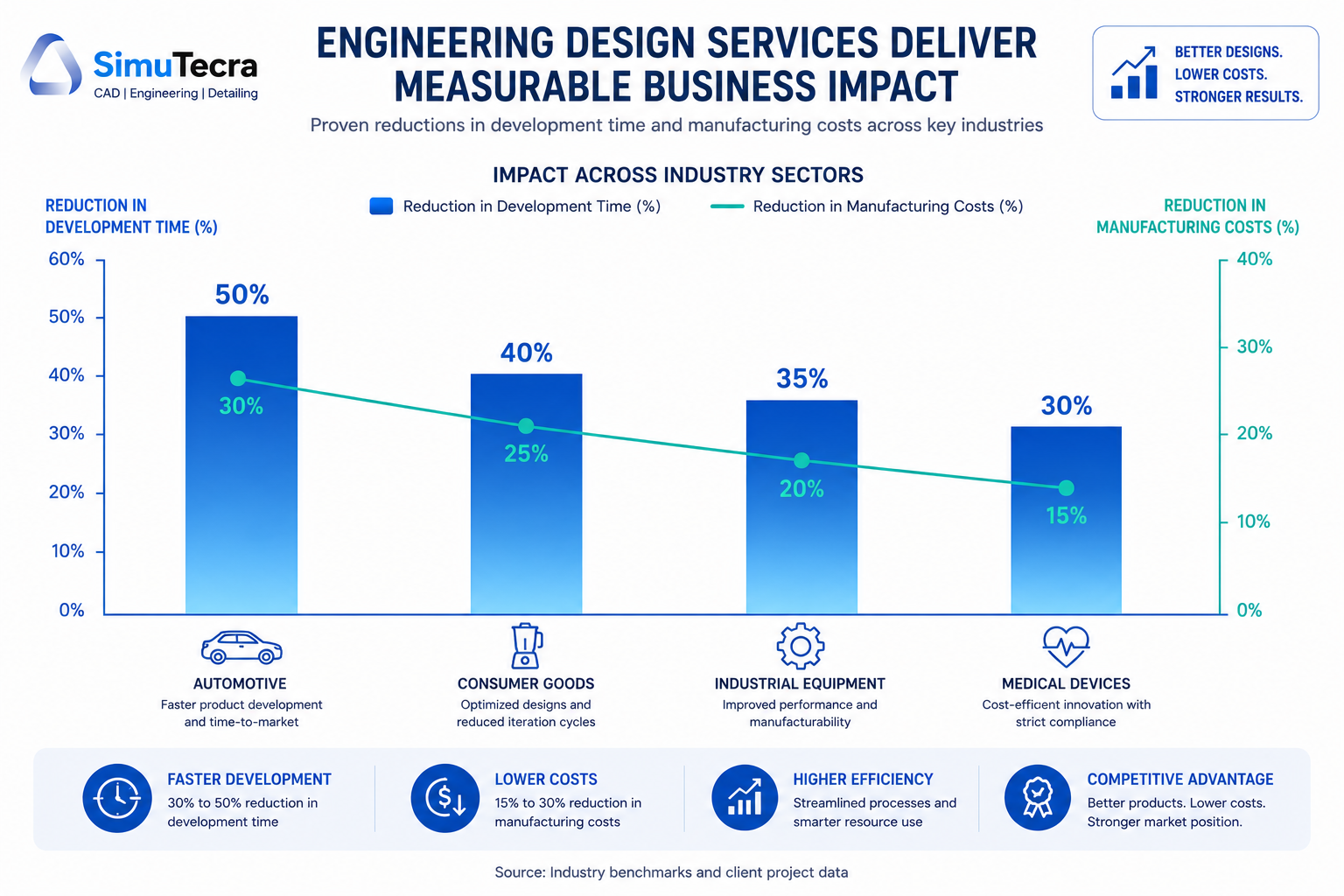
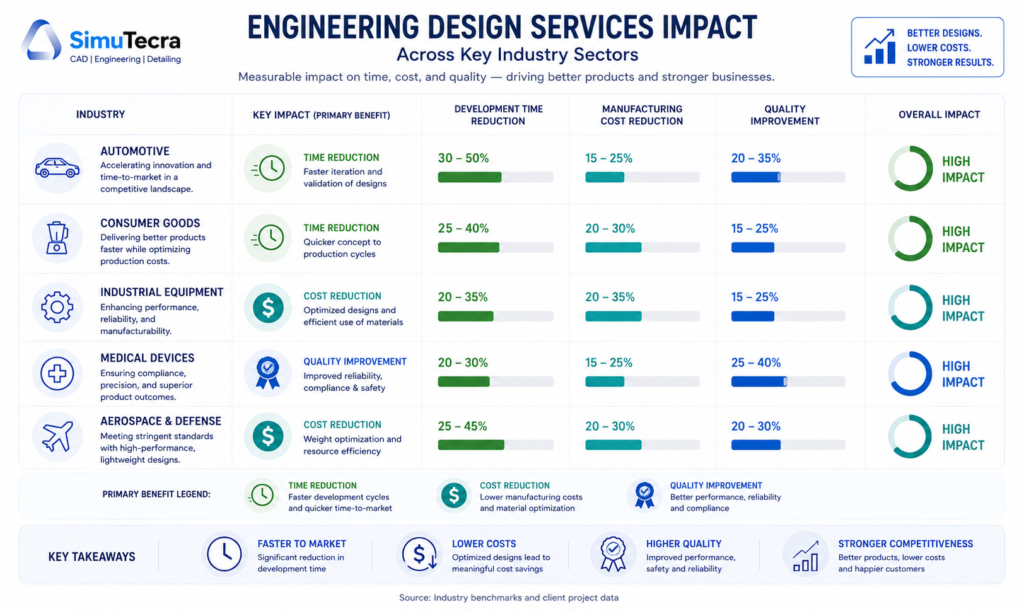
    Chart showing how engineering design services reduce product development time by 30-50% and manufacturing costs by 15-30% across automotive, consumer goods, and industrial sectors

    1. The Scale of the Problem: What Product Development Really Costs

    Before examining how engineering design services reduce development costs, it is worth establishing what those costs actually look like and where the largest waste occurs.

    Product development costs for a new physical product range from $20,000 for a simple consumer product with established manufacturing processes to well over $1 million for complex hardware in regulated industries. The wide range reflects differences in development complexity, required certifications, tooling costs, and the number of prototype iterations needed. For most industrial, mechanical, or electromechanical products, the realistic range is $150,000 to $500,000 from concept to production-ready design.

    DATA POINT:  PwC digital product development research. Digital product development is expected to increase efficiency by 19%, reduce time-to-market by 17%, and reduce production costs by 13% compared to conventional processes (PwC, cited in multiple 2025 research analyses).

    Where Development Waste Actually Occurs

    Most product development cost overruns and timeline delays share common root causes. Understanding where the waste occurs is essential to understanding how engineering design services address it.

    Waste CategoryDescriptionTypical Cost ImpactPrimary Cause
    Late-stage design changesChanges to design after tooling has been committed or prototypes have been built$10,000 – $500,000+ per significant changeManufacturability issues not identified in design phase
    Excess prototype iterationsBuilding more physical prototypes than necessary because simulation was insufficient$5,000 – $50,000 per iteration plus timeUnder-investment in simulation and analysis upfront
    Overly tight tolerancesSpecifying precision tighter than functional requirements demand15-40% cost increase on affected featuresDesign engineers specifying to what they can model, not what manufacturing requires
    Over-engineered componentsParts designed to perform beyond requirements, adding material and complexity cost10-30% avoidable material costLack of value engineering discipline; conservative design culture
    Rework from drawing errorsManufacturing errors caused by ambiguous or incorrect engineering drawings$2,000 – $50,000+ per incidentInadequate drafting standards, no QC review of drawings
    Sequential development delaysEach phase waiting for the previous to complete (design finishes before manufacturing input begins)4-12 additional weeks per projectLack of concurrent engineering approach
    KEY FINDING:  The 70% rule. Research consistently shows that approximately 70% of a product’s total manufacturing cost is determined by design decisions made in the early engineering phase. Changes made after tooling commitment are exponentially more expensive than those made on screen.

    2. The Data: How Engineering Design Services Impact Time and Cost

    The claims made about engineering design services, faster timelines and lower costs, are backed by a consistent body of research across industry reports, academic studies, and documented project outcomes. Here is what the evidence actually shows.

    MetricFindingSource / Context
    Project completion time reduction30-50% reduction in project completion times for companies outsourcing engineering servicesIDC research, cited across multiple 2025 engineering outsourcing analyses
    Manufacturing cost reduction via DFM15-30% manufacturing cost reduction typical when DFM is applied early in designMultiple DFM implementation studies; Modus Advanced, Source Engineering, SixSigma.us analyses
    CAD software prototype cost reductionUp to 25% reduction in physical prototype costs in some industries through advanced CAD-driven digital validationIntelevo Research Engineering Design Software Market Report, 2025
    DFM assembly time reduction30% reduction in assembly time demonstrated in smartphone manufacturing case study through DFM implementation from initial design phaseSixSigma.us DFM implementation analysis
    DFM ROI timeline15-25% ROI improvement within 12-24 months for companies implementing DFM disciplineSource Engineering DFM analysis, 2025
    Digital development efficiency19% efficiency increase, 17% time-to-market reduction, 13% production cost reduction from digital product developmentPwC digital product development research
    Engineering design software simulation savingsOrganizations report cuts of up to 30% in physical prototyping costs and time savings of several weeks per project from simulation-driven workflowsIntelevo Research, Engineering Design Software Market, 2025
    Cost savings vs. internal hiringClients save 30-50% compared to hiring equivalent engineering capability internallyEngon Technologies outsourced mechanical engineering analysis

    These figures deserve honest contextualization. The 30 to 50 percent project completion time reduction is an aggregate finding that reflects well-managed outsourcing arrangements on appropriate project types. It does not mean every project becomes half as long by bringing in external engineers. The savings are most pronounced in specific scenarios: projects where specialist skills are the bottleneck, organizations with under-resourced internal engineering teams, and products where DFM has not previously been applied. The following sections explain the specific mechanisms through which these savings are generated.

    3. Mechanism 1: Design for Manufacturability (DFM) — Solving Cost Problems at the Source

    Design for manufacturability is the single highest-impact mechanism through which engineering design services reduce product development cost. It is also the most consistently underused discipline in product development, particularly at small and mid-size manufacturers whose internal teams are primarily trained in design and modeling, not in manufacturing process optimization.

    What DFM Actually Does

    DFM is the engineering practice of designing a product to reduce the cost and complexity of its manufacture, without compromising its functional performance. It operates on a fundamental principle that is easy to state and surprisingly difficult to implement internally: the design phase is the cheapest and most powerful place to make cost decisions.

    Research from multiple DFM implementation studies confirms that approximately 70% of a product’s total manufacturing cost is locked in by design decisions made before a single physical part is produced. Material selection, part geometry, tolerance specifications, assembly sequence, and component count: each of these decisions, made on screen by a design engineer, determines what a machinist, fabricator, or assembler will spend years executing.

    When those decisions are made by engineers who understand manufacturing processes deeply, costs are naturally controlled. When they are made by designers optimizing primarily for function and aesthetics, manufacturing inefficiencies are designed in and discovered later, at much greater expense.

    Specific DFM Cost Levers

    • Tolerance rationalization: Overly tight tolerances are a pervasive and silent cost driver. A tolerance specification that requires specialized fixturing, slower machining, or 100% inspection adds cost with no functional benefit if the tolerance is tighter than the application demands. DFM review consistently finds opportunities to relax non-critical tolerances, often reducing machining costs by 20 to 40% on affected features.
    • Part count reduction: Every component in an assembly adds cost: material cost, machining or molding cost, inventory cost, assembly labor, inspection, and potential failure points. DFM analysis looks for opportunities to combine functions into fewer parts. A two-part assembly that becomes a one-part assembly eliminates an entire component’s cost stack.
    • Standardized hardware: Custom fasteners, specialty hardware, and non-standard materials add procurement cost and supply chain risk. DFM substitutes standard hardware wherever functional requirements permit, reducing both per-unit cost and purchasing complexity.
    • Manufacturing process alignment: A design that looks manufacturable in CAD may be difficult or impossible to produce efficiently with the actual manufacturing processes available to your supply chain. DFM bridges this gap, ensuring that geometry, features, and tolerances align with what your specific manufacturing partners can do efficiently.
    • Assembly sequence optimization: Assembly operations are labor-intensive and error-prone. DFM reviews assembly sequences to reduce the number of steps, eliminate orientations that require skilled judgment, and design for assembly automation where volume justifies it.
     REAL WORLD:  DFM cost reduction in practice. A smartphone manufacturer integrating DFM principles from the initial design phase achieved a 30% reduction in assembly time for their latest model (SixSigma.us case study). Effective DFM implementation typically reduces manufacturing costs by 15-30% without compromising functionality, with some comprehensive programs reporting even higher savings.

    Why Internal Teams Miss DFM Opportunities

    The reason DFM is underused is structural, not a matter of skill or intention. Internal design engineers are evaluated primarily on whether the product works. Their performance metrics rarely include manufacturing cost or assembly time. External engineering design service firms, whose value proposition includes manufacturability optimization, approach the same design from a different incentive structure. They are looking for cost and complexity that can be removed, not just function that needs to be preserved.

    This is not a criticism of internal engineering teams. It is an observation about organizational incentive structures. The most effective approach is to ensure that DFM discipline, whether delivered internally or through an engineering design service partner, is applied before tooling commitments are made.

    4. Mechanism 2: Expert CAD and Simulation — Fewer Prototypes, Faster Validation

    Physical prototyping is expensive. A machined prototype of a moderately complex mechanical component can cost $1,000 to $10,000 and take one to four weeks to produce. An injection-molded prototype, if the mold is purpose-built, can cost $5,000 to $50,000. Complex assembly prototypes for industrial products can run $50,000 to $200,000 each. Most product development programs require multiple iteration cycles.

    Engineering design services that include advanced CAD modeling, FEA (finite element analysis), and CFD (computational fluid dynamics) simulation reduce the number of physical prototypes required by validating designs digitally before physical production. The savings are substantial and well-documented.

    How Simulation Replaces Physical Prototyping

    FEA simulation allows engineers to apply virtual loads, stresses, temperatures, and forces to a 3D CAD model and observe how it responds, identifying failure points and optimization opportunities without building a physical part. CFD simulation models fluid flow, heat transfer, and pressure distribution for fluidic and thermal applications. Both capabilities are standard offerings of experienced engineering design service firms.

    Engineering design software market research published in late 2025 documents that organizations using simulation-driven workflows report cuts of up to 30% in physical prototyping costs and time savings of several weeks per project. The mechanism is straightforward: a simulation run that takes hours replaces a prototype iteration that takes weeks.

    DATA POINT:  Simulation-driven development. Organizations report up to 30% reduction in physical prototyping costs and several weeks of time savings per project when simulation-driven workflows replace or supplement physical prototyping (Intelevo Research Engineering Design Software Market Report, 2025).

    The Role of Expert CAD in Reducing Rework

    Beyond simulation, the quality of CAD modeling and drawing production directly affects downstream cost. Ambiguous drawings, incorrect tolerances, missing specifications, or drawing errors discovered during first article inspection create costly correction cycles. Engineering design service firms with experienced drafters and established QA processes produce fewer drawing errors, which translates directly to fewer manufacturing corrections and lower first article failure rates.

    This is a cost savings that is invisible until you calculate what manufacturing corrections actually cost: rescheduled production runs, material waste, expedited re-delivery, and the project management time spent resolving a problem that originated on a drawing. For complex mechanical assemblies, a single undetected drawing error can cost $10,000 to $50,000 in manufacturing consequences.

    Digital Twins and Their Growing Role

    At the enterprise end of engineering design services, the integration of digital twin capabilities is extending the simulation advantage further. A digital twin is not just a simulation model; it is a continuously updated virtual replica of the physical product that can be used throughout the product’s lifecycle for ongoing validation, maintenance prediction, and design iteration. Established engineering design service firms offering digital twin capabilities are enabling clients to compress not just initial development cycles but ongoing product evolution cycles as well.

    5. Mechanism 3: Concurrent Engineering Compressing the Development Timeline

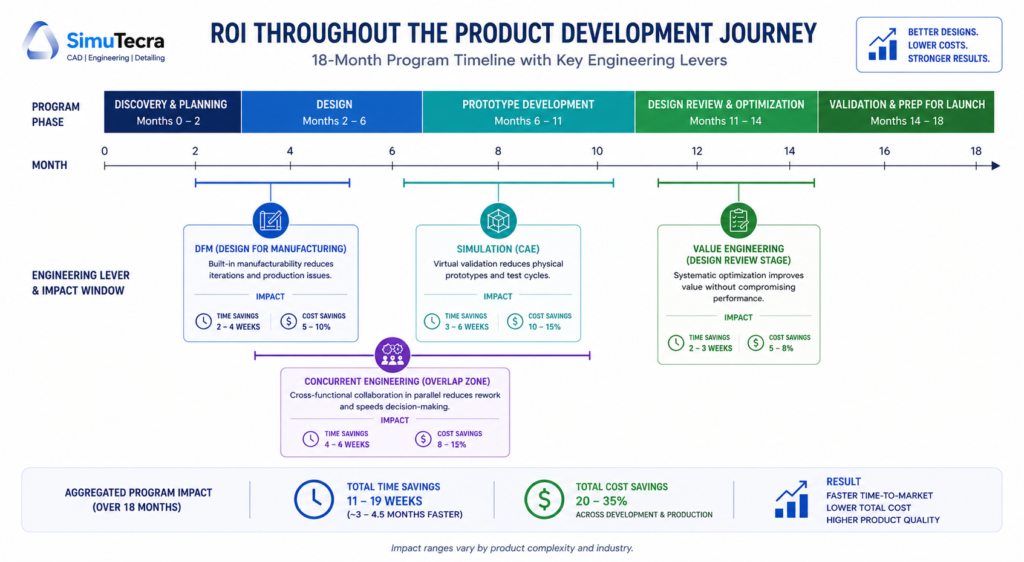
    Traditional product development follows a sequential model: concept is approved, then detailed design begins, then manufacturing planning begins, then procurement begins, then tooling is ordered. Each phase waits for the previous to complete. In a complex product development program, this sequential handoff structure can add 12 to 20 weeks of elapsed time to a development cycle that has no functional reason to be that long.

    Concurrent engineering, also called simultaneous engineering, overlaps development phases so that manufacturing planning, procurement qualification, and tooling design begin while detailed engineering is still in progress. Engineering design service firms that work alongside client engineering teams facilitate concurrent engineering in ways that internal teams often cannot, simply because a client’s internal engineers are already fully occupied with the design work itself.

    How It Works in Practice

    An external engineering design services partner can take ownership of detailed drawing production, BOM development, and supplier qualification while the client’s internal team focuses on design decisions and customer requirement management. This parallel workflow structure removes the sequential wait times that inflate development timelines.

    Research published by IDC and cited across multiple 2025 engineering services analyses finds that companies outsourcing engineering services experience 30 to 50 percent reductions in project completion times. The concurrent engineering effect is a primary driver of the upper end of this range.

    DATA POINT:  Concurrent engineering timeline impact. Companies outsourcing engineering services to enable concurrent workflows experience 30-50% reduction in project completion times compared to sequential internal development models (IDC research, 2025).

    The Follow-the-Sun Advantage

    For organizations engaging offshore engineering design service partners, the time zone difference that initially sounds like a communication challenge can become a timeline accelerator. A design change reviewed internally at 5 PM can be modeled and returned as updated drawings by 8 AM the next morning, because the engineering team in a complementary time zone was working while the client team slept. For projects on tight timelines, this follow-the-sun workflow can reduce elapsed calendar time by 15 to 25 percent on drawing-intensive phases.

    6. Mechanism 4: Value Engineering — Cost Reduction Without Compromising Performance

    Value engineering is a structured methodology for analyzing the function of a product, component, or process and finding ways to deliver the same function at lower cost. It is different from cost-cutting in a critical way: cost-cutting reduces cost by reducing what you do. Value engineering reduces cost while preserving or improving what the product does.

    Engineering design service firms experienced in value engineering bring an external perspective that is extremely difficult to replicate internally. When your engineers have been working on a product for two years, they have cognitive ownership of design decisions that made sense when they were made. Questioning whether a part needs to be aluminum or whether a five-component assembly could be one injection-molded part requires fresh eyes and process discipline that external partners provide naturally.

    Value Engineering in Action: Key Techniques

    • Material substitution: Replacing an over-specified material with one that meets functional requirements at lower cost. Aluminum for steel where weight is not a concern, commodity-grade plastics for engineering polymers where chemical resistance requirements do not justify the premium.
    • Process substitution: Changing the manufacturing process to one that is more cost-effective for the required quantity. Switching from CNC machining to casting for high-volume components, or from welded fabrication to bent-and-formed sheet metal for certain enclosure geometries.
    • Assembly consolidation: Redesigning multi-component assemblies into single molded or formed parts. Fewer parts mean less assembly labor, fewer inventory line items, fewer potential failure points, and lower total cost.
    • Standard component substitution: Replacing custom or specialty components with standard catalog items. Standard bearings, fasteners, seals, and hardware are less expensive, more reliably available, and supported by established maintenance practices.
    • Tolerance optimization: Identifying and relaxing tolerances that are tighter than functional requirements. This is a DFM concept applied through a value engineering lens: every tolerance that can be relaxed reduces manufacturing cost without reducing product performance.
     INSIGHT:  When to apply value engineering. The highest-value window for value engineering is during design development, before tooling commitments. Applied after tooling, value engineering still has potential, but it must work within the constraints of existing tooling geometry. Applied at the design stage, it has full freedom.

    7. Mechanism 5: Access to Specialization — Solving Problems Faster with the Right Expertise

    One of the least quantified but most practically significant ways engineering design services reduce development time is by eliminating the learning curve that occurs when an internal team encounters a design challenge outside their primary expertise.

    A mechanical engineering team with deep expertise in rotating equipment may spend three weeks researching best practices for designing a compliant mechanism that is new to their portfolio. An engineering design service firm that has designed fifty compliant mechanisms can solve the same problem in three days. The difference is not capability; it is accumulated domain knowledge that is not worth building internally for a one-time challenge.

    Where Specialization Creates the Biggest Timeline Advantage

    Specialization AreaWhen It Creates Timeline AdvantageTypical Internal vs. External Timeline Difference
    Structural simulation (FEA)When internal team has limited simulation expertise and is iterating physically3-5 weeks physical vs. 3-5 days simulation
    GD&T and tolerance stack analysisWhen drawings are being returned by manufacturers due to ambiguous tolerancesDays of correction cycles vs. hours with an expert
    Medical device design controlsWhen product must meet FDA 21 CFR Part 820 or ISO 13485 requirementsMonths of compliance learning vs. weeks with a specialist
    BIM coordination and clash detectionWhen construction project has multi-discipline coordination requirementsWeeks of manual coordination vs. days with BIM specialists
    DFM for a new manufacturing processWhen product design requires a process the internal team has not used beforeMultiple prototype iterations vs. expert guidance upfront
    Sheet metal or injection mold design rulesWhen designers are modeling geometry that is expensive or impossible to produceMultiple quote rejections vs. producible geometry first time
    ASME Y14.5 GD&T complianceWhen drawings must meet standard for a defense, aerospace, or regulated clientRedline review cycles vs. correct first submission

    The market data reflects the economic value of this specialization access: the global product engineering services market was valued at approximately $1.38 billion in 2025 and is projected to grow at a compound annual growth rate of 9.7% through 2034, driven substantially by organizations accessing specialized engineering capabilities they do not maintain internally. According to Fortune Business Insights, the growing focus on faster product deliveries and time-to-market systems is a primary driver of this sustained market expansion.

    8. Mechanism 6: Elastic Capacity — Scaling Without Hiring Cycles

    Hiring a mechanical engineer in a competitive market takes three to six months from job posting to productive contributor. An experienced senior mechanical engineer with the specific specialization you need may take longer. During that period, your product development program either waits, proceeds with understaffed engineering resources and accepts the quality consequences, or pays premium contract rates for interim coverage.

    Engineering design services provide elastic capacity: the ability to scale engineering bandwidth up or down in response to project demand without the fixed cost commitment of employment or the delays of a recruiting cycle. This elasticity directly reduces development time by ensuring that engineering bandwidth is never the bottleneck.

    Where Elastic Capacity Has the Highest Impact

    • Program surges: When a large contract win or accelerated launch date requires engineering bandwidth that exceeds internal team capacity, engineering design services provide immediate scale-up without a hiring cycle.
    • Specialist gaps: When a specific phase of development requires expertise (BIM coordination, FEA simulation, medical device design controls) that the internal team does not maintain, engineering services fill the gap without requiring permanent headcount.
    • Geographic expansion: When projects require knowledge of local building codes, regional standards, or specific regulatory environments, engineering service partners with local expertise eliminate the learning curve.
    • Peak-and-valley workloads: Many product development organizations have inherently cyclical workloads: intense during design and development phases, lower during production. Engineering design services allow organizations to staff their engineering function for average load and supplement at peak, rather than staffing for peak and carrying idle capacity at valley.
     DATA POINT:  Elastic capacity economics. Large enterprises dominated the product engineering services market in 2025 with 61% market share, driven by their need for flexible, scalable engineering resources that can be deployed without fixed overhead commitments (SNS Insider Market Report, 2026).

    9. Industry-Specific Impact: Where Engineering Design Services Deliver the Most Value

    The impact of engineering design services is not uniform across industries. The following analysis identifies where the benefits of time reduction, cost savings, and specialized expertise are most pronounced.

    Industry comparison infographic showing engineering design services impact across automotive, medical device, consumer goods, industrial equipment, and AEC sectors by primary benefit category
    IndustryPrimary Benefit AreaKey MechanismTypical Outcome
    Automotive and EVTime-to-market compressionConcurrent engineering, simulation-driven design, offshore parallel workflows30-50% development timeline reduction; significant DFM savings at production scale
    Medical devicesRegulatory compliance speedDesign control documentation, FDA/ISO 13485 expertise, risk management integrationMonths saved in FDA submission preparation; reduced design history record rework
    Consumer goods / CPGManufacturing cost reductionDFM, value engineering, tooling optimization for high-volume production15-30% manufacturing cost reduction; part count reduction reduces per-unit cost
    Industrial equipmentSpecialization accessFEA/CFD simulation, mechanical system design, custom component DFMPrototype reduction; fewer field failures from simulation-validated designs
    AEC (Architecture, Engineering, Construction)Drawing production speedBIM coordination, MEP drafting, structural detailing outsourcingProject schedule acceleration; fewer RFI and clash-driven delays
    Aerospace and defenseTechnical documentation qualityGD&T compliance, AS9100 drawing standards, configuration managementReduced first article rejections; lower audit finding rate
    SME manufacturersAccess to capabilities not maintained internallyFull product development outsourcing; DFM review; CAD modeling supportAccess to senior engineering capability without full-time employment cost

    10. Where Engineering Design Services Do NOT Reduce Costs or Time

    Intellectual honesty requires naming the situations where engineering design services do not produce the outcomes described in vendor marketing. Understanding these limits prevents misaligned expectations and poor procurement decisions.

    When the Brief Is Inadequate

    An engineering design service firm, however experienced, cannot produce accurate, manufacturable, cost-optimized drawings from a vague or incomplete brief. The output quality of engineering design services is directly bounded by the quality of input they receive. Organizations that engage external engineering partners without investing in clear scope definition, organized input materials, and responsive communication during execution will not see the timeline and cost benefits described in this guide. The fault will be on the client side, not the provider side, but the result is the same: wasted time and rework.

    When IP Risk Is Undermanaged

    For organizations with highly proprietary designs, outsourcing engineering work without proper contractual protections (work-for-hire clauses, NDAs, data handling agreements) creates IP risk that can offset the economic benefits. This does not mean outsourcing is inappropriate; it means the legal and contractual infrastructure must be established before any design files are shared. Organizations that skip this step, often because the procurement felt informal or the timeline was tight, create vulnerabilities that can be costly to resolve.

    When the Work Is Too Context-Dependent

    Some engineering design work is so deeply embedded in institutional knowledge, customer relationships, and ongoing system context that external partners cannot contribute effectively without a disproportionate knowledge transfer investment. If explaining the project context to an external partner would take longer than doing the work internally, the economics of outsourcing break down. This is particularly true for complex systems with years of accumulated design decisions, regulatory certifications, and customer-specific requirements.

    When Cost Savings Come at the Expense of Quality

    Selecting an engineering design service partner primarily on price, particularly for offshore providers at the lowest end of the market rate range, can produce drawings and models that require extensive internal correction before they are usable. The cost of that correction often exceeds the price savings from the low-cost provider. The quality of engineering design services varies significantly across providers, and the selection process must include portfolio review, standards compliance verification, and ideally a pilot project before committing to a major engagement.

     WATCH OUT:  The low-cost trap. A per-sheet rate that looks 60% cheaper than market rate may result in drawings that require three rounds of redlining before they are useful. Calculate the total cost of engagement, including your internal review time, not just the provider’s quoted rate.

    11. How to Evaluate Whether Engineering Design Services Are Right for Your Project

    Not every product development challenge benefits from external engineering design services. The following decision framework helps identify the scenarios where the time and cost benefits are most likely to be realized.

    The High-Value Indicators

    Engineering design services are most likely to reduce your development time and cost when one or more of the following conditions apply:

    • Specialist skill gap: Your project requires expertise your internal team does not have. Bringing in specialists is faster and cheaper than building the skill internally for a single application.
    • Capacity constraint: Your internal engineering team is already fully occupied. Adding external resources is more efficient than delaying the project or burning out internal staff on overtime.
    • DFM opportunity: Your product is in design development and has not yet undergone a formal manufacturability review. The 70% rule applies: this is your best window to lock in cost-efficient design decisions.
    • High prototype count: Your recent development programs have required more physical prototypes than planned. Simulation and expert design review can reduce that number on the next program.
    • Cyclical workload: Your engineering demand peaks during design phases and drops during production. External services allow you to match capacity to demand rather than staffing for peak.
    • Regulated environment with compliance gaps: Your product must meet FDA, AS9100, ITAR, or similar regulatory requirements that your team is not fully experienced with. External partners with compliance expertise reduce risk and timeline.

    The Low-Value Indicators

    Engineering design services are less likely to reduce time and cost when:

    • Institutional knowledge is the primary bottleneck: If the limiting factor is deep product-specific knowledge that cannot be efficiently transferred, external engineers will spend more time learning context than producing output.
    • The brief cannot be clearly defined: If the project scope is genuinely ambiguous and exploratory, an external partner working from an unclear brief will require extensive revision cycles that negate the timeline benefit.
    • IP sensitivity is high and legal infrastructure is not in place: If you cannot establish appropriate contractual protections before sharing design files, the risk may outweigh the benefit.
    • Volume is too low to justify onboarding: A single two-hour drafting task does not justify the time investment of briefing, standards transfer, and QC review for a new external partner. Minimum economics apply.

    12. FAQ: Engineering Design Services and Product Development Efficiency

    How much can engineering design services actually reduce development time?

    The documented range is 17 to 50 percent, depending on project type and the specific services applied. PwC research on digital product development documents a 17 percent time-to-market reduction from digital development practices. IDC research on engineering outsourcing documents 30 to 50 percent project completion time reduction. The upper end of that range reflects concurrent engineering arrangements where external resources run in parallel with internal development, compressing the elapsed timeline. The lower end reflects more targeted applications like simulation-based prototype reduction or specialist skills engagement. Neither figure applies universally. The specific impact on your program depends on where your current development process has the most friction.

    What is the most cost-effective first step when evaluating engineering design services?

    For most manufacturers, a DFM review of a product that is currently in design development or has recently entered production is the highest-confidence first engagement. It is contained in scope, has a clear deliverable (a list of design changes with estimated cost impact), and the ROI is directly measurable by comparing manufacturing costs before and after implementation. A DFM review for a moderately complex product typically costs $3,000 to $15,000 and can identify cost savings of $30,000 to $150,000 or more on a product with meaningful production volume. That is a risk-justified first engagement that establishes the value of the relationship.

    How do engineering design services compare to hiring internally for reducing development costs?

    The cost comparison favors external services when specialization access, capacity flexibility, or time-to-market speed is the primary objective. Published analyses from engineering outsourcing practitioners show cost savings of 30 to 50 percent compared to equivalent internal hiring when fully loaded employee costs (salary, benefits, software, training, onboarding) are included. The case for internal hiring is strongest when the design work is ongoing, deeply context-dependent, requires real-time collaboration throughout the day, or involves highly sensitive IP that needs to remain within your own infrastructure. Many organizations reach the optimal outcome with a hybrid model: core engineering capability internally, supplemented by external services for specialist tasks and volume overflow.

    Does outsourcing engineering design work create quality risks?

    It can, if the engagement is managed poorly. The quality risks associated with external engineering design services are well-understood and manageable: inadequate brief causing misaligned output, insufficient QC review before drawings enter production, and standards compliance gaps if the provider is not familiar with your applicable standards. Organizations that establish clear drawing standards documentation, include a defined QC review step in the workflow, and vet providers on their specific discipline experience routinely achieve quality equivalent to or better than their internal baseline. The risk is real but not inherent. It is a function of process discipline, not of the outsourcing model itself.

    At what stage of product development should engineering design services be engaged?

    The greatest leverage is at design development, before tooling commitments. This is where DFM review, value engineering, and simulation-driven prototype reduction deliver the most impact. The 70 percent cost-determination rule makes this timing critical. After tooling is committed, value engineering and DFM still have potential, but they work within constraints that limit the available savings. At concept stage, engineering services are most valuable for feasibility analysis and technology selection. At production stage, the primary engineering service value shifts to as-built documentation, manufacturing support drawings, and process improvement analysis.

    How do I measure ROI from engineering design services?

    The most accessible ROI metrics are manufacturing cost per unit before and after DFM engagement, number of prototype iterations per development program, elapsed development time from design freeze to production release, first article acceptance rate, and engineering revision cycles per drawing release. For an organization new to measuring engineering design service ROI, we recommend selecting one clear baseline metric from your most recent comparable development program and tracking it against the program where engineering design services are applied. A single metric tracked rigorously tells you more than multiple metrics tracked loosely.

    Conclusion:

    The framing of engineering design services as a cost center, something to minimize or avoid, is the most expensive mistake organizations make in managing their product development operations. The data is consistent: applied strategically, engineering design services reduce product development costs by 15 to 30 percent, compress timelines by 17 to 50 percent, and produce ROI improvements of 15 to 25 percent within 12 to 24 months.

    Those outcomes are not generated by simply hiring a cheaper external engineer to do work your internal team would otherwise do. They are generated by applying specific mechanisms, DFM, simulation-driven validation, concurrent engineering, value engineering, and specialization access, at the right stage of development, with sufficient organizational discipline to act on what those services recommend.

    8-month product development timeline showing where engineering design services — DFM, simulation, concurrent engineering, and value engineering — deliver time and cost savings at each phase'

    The 70 percent rule is the most important number in this entire discussion. Seventy percent of your product’s manufacturing cost is determined by design decisions made before a single physical part is produced. Every week you spend in design development without DFM discipline, simulation validation, and expert review is a week of cost decisions being locked in by default rather than by intent.

    Engineering design services give you the ability to make those decisions intentionally, with the specialized knowledge and fresh perspective that internal teams, however capable, often cannot provide for themselves. The organizations that treat this as a strategic investment rather than an operational cost are the ones whose products consistently reach market faster, cost less to produce, and require fewer post-launch corrections.

    Ready to reduce your product development time and cost?

    Explore our related guides on in-house versus outsourced CAD drafting, how to write a comprehensive RFQ for engineering design services, and what CAD drafting costs in 2026 to build a complete procurement and operational framework for your engineering projects.