Tag: design for manufacturing

  • 12 Injection Molding Design Mistakes That Drive Up Cost (And How to Avoid Them)

    12 Injection Molding Design Mistakes That Drive Up Cost (And How to Avoid Them)

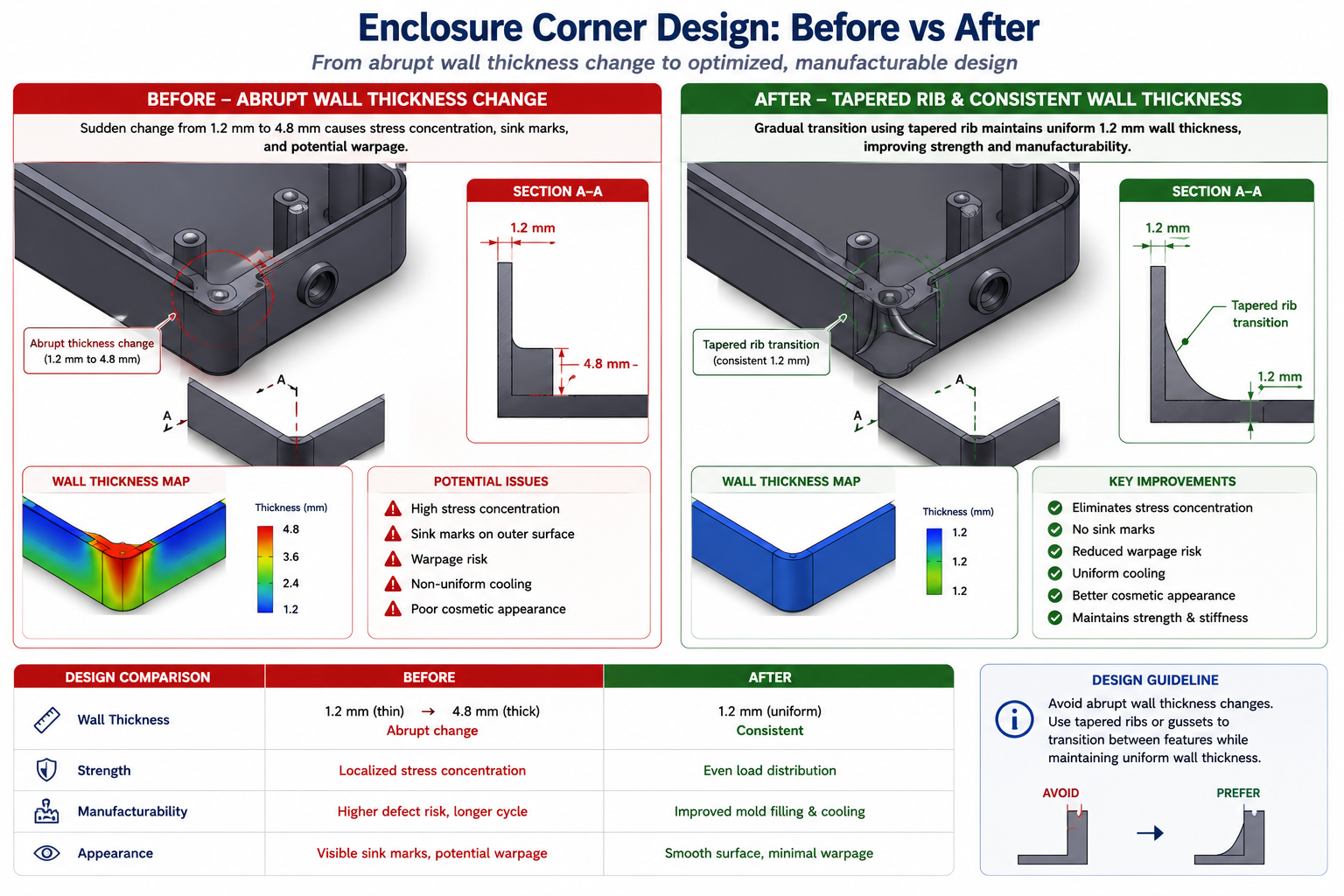
    A housing had been designed by an engineer who understood enclosures well. It had good snap-fit latches, correct wall clearances for the PCB inside, adequate rib structure for the drop test, and a textured grip area the product team liked. What it also had, discovered only after tooling was cut, was a 4.8mm wall directly behind a snap-fit boss, unflagged internal undercuts around a USB port, and zero draft on the grip texture.

    The molder called with an itemised problem list. The undercuts needed side actions that weren’t in the original tool quote. The thick boss caused a visible sink mark the product team rejected immediately. The textured surface with no draft was tearing on ejection.

    Quick answer: The costliest injection molding design mistakes are non-uniform wall thickness, insufficient draft angle, sharp internal corners, unplanned undercuts, and boss or rib walls too close to the nominal wall thickness. All of them are avoidable at the CAD stage with knowledge that costs nothing to apply, and all of them become expensive, sometimes very expensive, once tooling has already been cut.
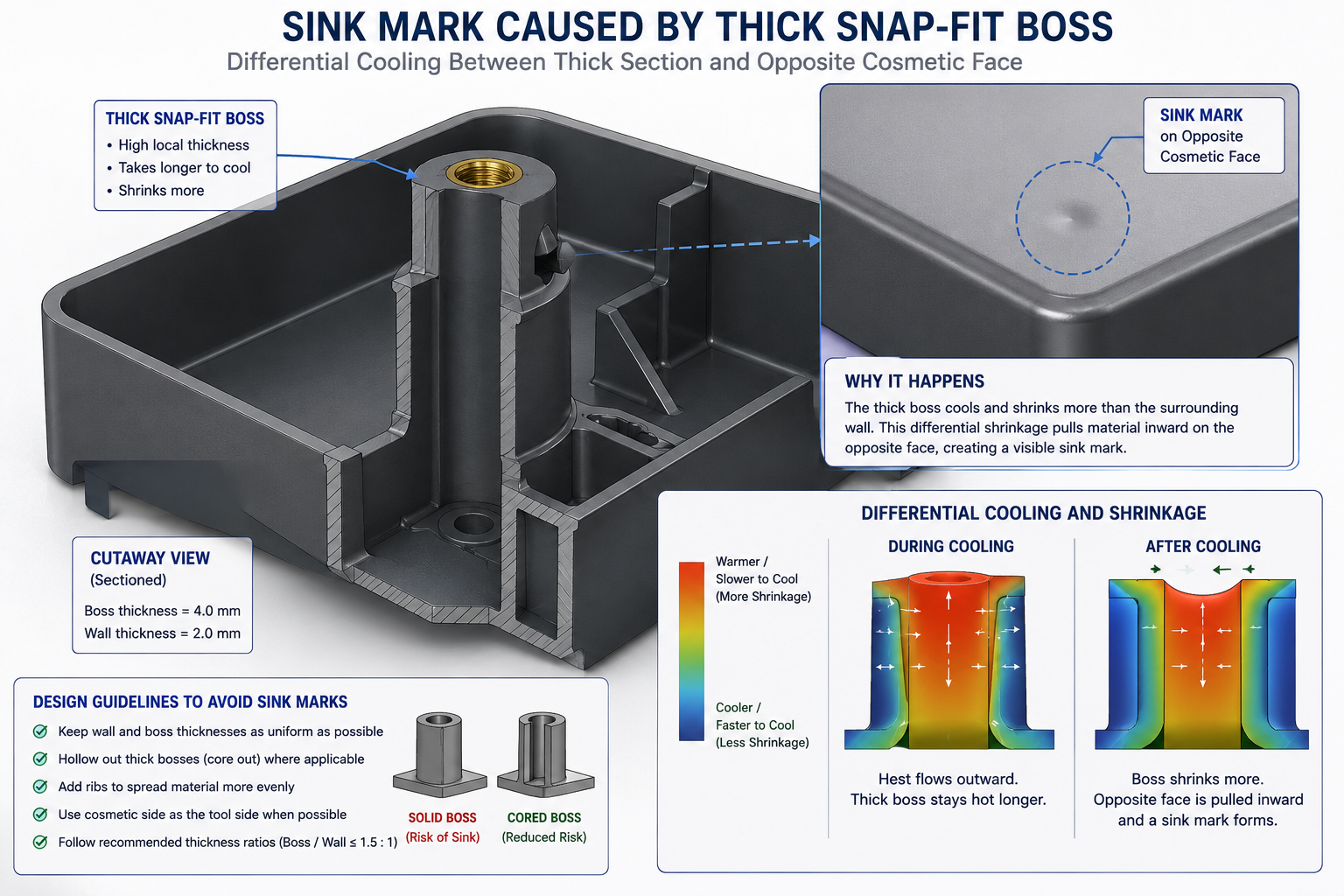
    Cutaway diagram of an injection moulded boss showing sink mark caused by uneven wall thickness cooling

    Three separate design issues, three separate remedies, each avoidable in CAD. The tool rework, delayed launch, and first-shot rejection cost the programme significantly more than the original tooling budget, and all of it traced back to design decisions made without a working understanding of how plastic flows, how moulds open, and what happens to a part between injection and ejection.

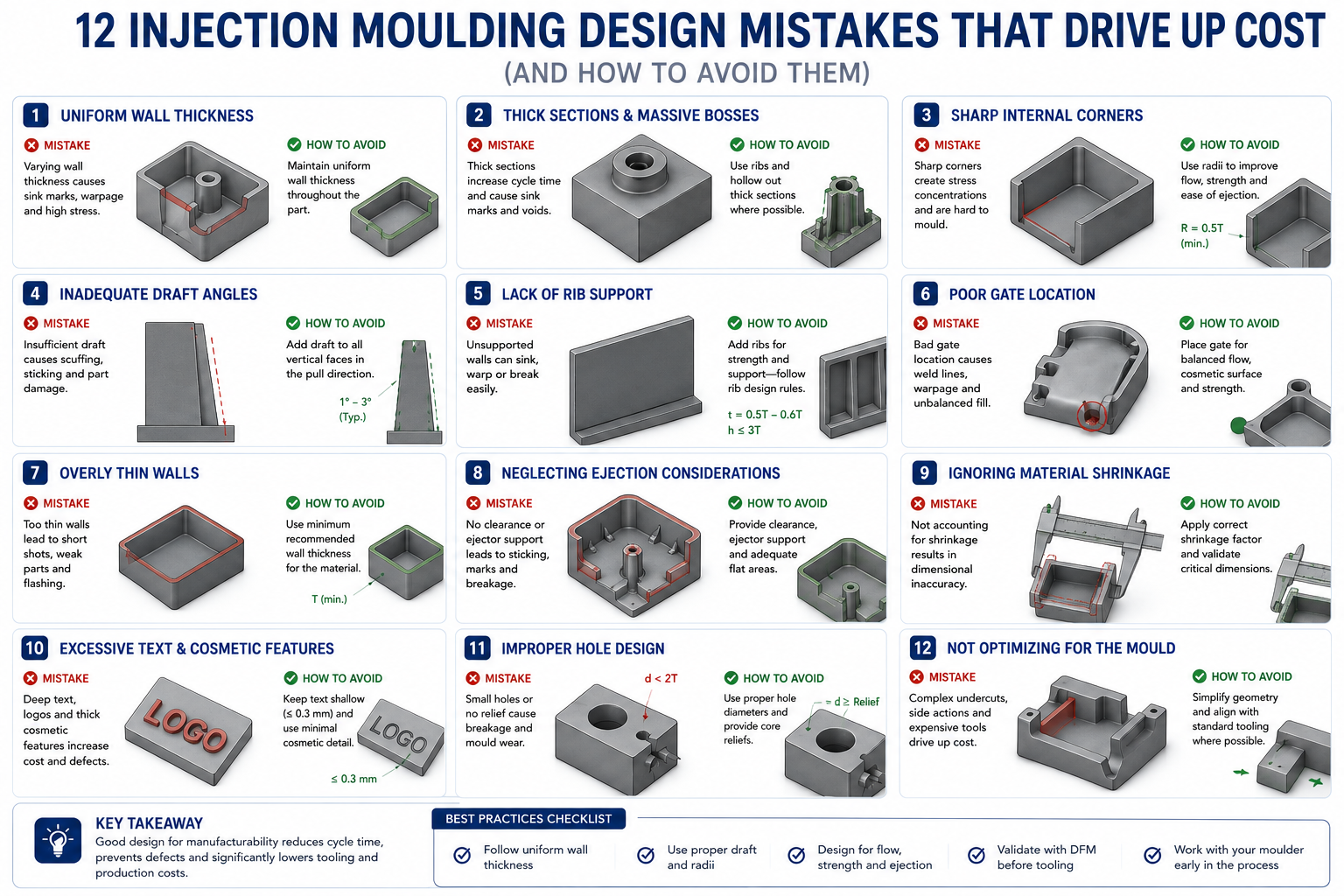
    The 12 Most Costly Injection Molding Design Mistakes

    Each mistake below is a CAD decision with direct consequences at the tool shop, on the injection press, or in the quality inspection booth. All are avoidable at the design stage.

    #MistakeRoot CauseTypical Cost ImpactFix
    1Non-uniform wall thicknessHollowing a solid CAD model without checking resulting variationSink marks, warping, longer cycle time; scrap 10-30% on first shotsKeep variation within 10-15% of nominal throughout
    2Insufficient draft angleDraft added as an afterthought, not designed inPart sticks; drag marks; ejector pin stress and tool damage1-2° minimum per side; 3-5° for textured surfaces
    3Sharp internal cornersStructural intent transferred without adaptationStress concentration, field failures, mould wear, fill problems0.5x wall thickness radius minimum; 0.75-1.0x preferred
    4Undercuts without planningFeature designed without checking mould release directionSlides/lifters add 20-50% tooling cost and lead timeEliminate by redesign; budget for side actions early if unavoidable
    5Boss wall too close to nominalBoss over-built for strength without the 60% ruleVisible sink marks opposite the boss on cosmetic faceBoss wall at 60% of adjacent wall; add gusset rib
    6Rib thickness causing sink marksRibs built at 75-100% of wall for structural confidenceSink marks wherever a rib meets the wallRib base at 50-60% of adjacent wall; use multiple thin ribs
    7Gate location not consideredGate left entirely to the mould makerWeld lines in critical locations; fill imbalance, distortionAgree gate location during design, not after
    8Weld lines in critical locationsFlow splits around a hole without considerationWeld lines 10-50% weaker; field failures at these locationsReposition gate or feature to move the weld line
    9Textured surfaces without extra draftTexture specified without accounting for added draft needPart tears on ejection; high surface reject rate~1° extra draft per 0.025mm of texture depth
    10Geometry requiring 3+ side actionsComplex features designed without evaluating tool complexityTooling cost 40-80% higher; longer lead timeRedesign to eliminate or consolidate side actions
    11Resin selected without process checkResin chosen for mechanical properties, shrink rate ignoredWrong shrinkage allowance; parts out of dimensionConfirm shrink rate for the resin and geometry before tooling
    12Tolerances tighter than process capabilityTolerance copied from a machined part designConsistent inspection failures; sorting/rework costTypical range +/-0.1 to 0.25mm; tighter may not be achievable
    The single most important habit: run a draft analysis before releasing any drawing. Most CAD packages colour-code every face relative to a specified pull direction, green for adequate draft, red for insufficient or negative draft. It takes two minutes and catches problems that cost thousands of dollars per face and weeks of delay once tooling is cut.

    Mistakes 1 and 2: Non-Uniform and Wrong Wall Thickness

    Wall thickness is the single design parameter that most directly controls whether a moulded part looks acceptable, holds its shape, and produces at the assumed cycle time. Get it right and the mould fills evenly, cools uniformly, and ejects cleanly. Get it wrong and the problems cascade: thick sections cool slower than thin ones, so thin sections solidify first while the thick sections pull inward as they cool, creating visible sink marks and internal voids. Severe variation warps the entire part out of flat.

    The target isn’t a specific thickness but a specific relationship between walls, following the process fundamentals documented in the Rosato Injection Molding Handbook: keep variation within roughly ten to fifteen percent of nominal throughout the part. A part with a 2.0mm nominal wall shouldn’t have regions thicker than 2.3mm or thinner than 1.7mm without a gradual transition. Where a thick section is unavoidable, taper into it over a distance of at least three times the thickness difference.

    Resin FamilyMin Wall (mm)Typical Nominal (mm)Max Practical Wall (mm)Key Notes
    ABS1.21.5-3.04.5Versatile, forgiving flow; avoid exceeding 3mm without gas assist
    Polycarbonate (PC)1.01.5-4.56.0Higher flow resistance; thick walls fill reliably but cycle time is long
    PC/ABS blend1.21.5-3.55.0Popular for electronics enclosures; easier than pure PC
    Nylon (PA6, PA66)0.81.5-3.04.0Absorbs moisture; design to nominal dry dimension
    Polypropylene (PP)0.81.5-3.03.5High shrinkage (1.5-2.0%); excellent for living hinges
    Acetal/Delrin (POM)0.81.5-3.03.0Excellent dimensional stability; good for precision gears
    PEEK0.51.0-2.53.5Very high processing temperature; expensive resin and process
    HDPE1.02.0-4.06.0High shrinkage; waxy surface complicates bonding and painting
    PETG0.81.5-3.04.0Good clarity; lower impact resistance than PC
    Liquid Silicone Rubber0.30.6-2.56.0Two-component thermoset; excellent for seals, soft-touch grips

    How the Solidification Sequence Governs Sink Marks

    The mould is cold. The injected plastic is hot. Thin sections next to the cool steel lose heat quickly and solidify into a rigid skin. Thick sections take longer. As a thick section keeps cooling and shrinking after its skin has solidified, the still-soft interior gets pulled inward, and since the far skin is already rigid, the only surface that can move is the opposite face of the thin section adjacent to the thick one. That face dimples inward, producing the sink mark that appears on the cosmetic surface directly opposite the rib or boss.

    This is why rib and boss thickness rules are expressed as ratios to the adjacent wall, not absolute values. A 1.5mm rib base next to a 3mm wall, at fifty percent, follows the rule. The same 1.5mm base next to a 1.0mm wall, at one hundred fifty percent, violates it by creating exactly the local thickness excess the rule exists to avoid. Track the ratio, not the dimension alone.

    Mistake 2: No Draft Angle on Vertical Walls

    When a mould opens, the part has to slide off the core without the walls dragging against the steel. Without draft, the part grips the core tightly as it cools and shrinks onto it, forcing the ejector pins to push it off. The result is drag marks, distortion from uneven ejector loading, and in the worst case a part that sticks entirely, destroying surface finish and risking broken ejector pins.

    Draft doesn’t need to be large. On a smooth surface, one degree per side is typically adequate for clean ejection. The fix is applying the right taper before the drawing goes to the mould maker, since draft affects tool steel geometry, parting line position, and ejection layout. Asking for draft after the cavity and core are already machined means re-machining steel already cut to size, expensive and sometimes impossible without scrapping the insert.

    Textured Surfaces Need More Draft Than You’d Expect

    A smooth surface with one degree of draft ejects cleanly. The same surface with a leather-grain texture and the same one degree won’t. Texture creates physical interlocking with the tool steel, so the part has to tear away rather than slide cleanly, damaging the texture. The standard rule of thumb is one degree of additional draft for every 0.025mm of texture depth, so a leather grain at 0.075mm needs three additional degrees, four degrees total minimum. A heavy texture at 0.150mm needs six additional degrees beyond base draft.

    Mistakes 4 and 10: Undercuts and Side Actions

    An undercut is any feature preventing the part from being pulled straight out of the mould in the opening direction. Sideways-facing snap-fit hooks, holes on vertical walls, internal threads, wrap-around lips: all trap the part if the mould tries to open in a straight line. The solutions, slides, lifters, collapsible cores, are proven mechanisms used on millions of parts every year, but each adds cost, tool complexity, lead time, and ongoing maintenance considerations.

    Undercut TypeTooling SolutionCost PremiumLead Time ImpactWhen to Accept vs. Redesign
    External undercut (lip, sideways hook)Side action (slide)+20-35% tooling cost+2-4 weeksAccept if function is genuinely required; redesign to a hinged snap if possible
    Internal undercut (thread, groove)Internal lifter or collapsible core+25-50% tooling cost+3-6 weeksConsider a threaded insert or two-piece design before committing
    Shallow undercut, flexible materialForced ejection (stripped over)No premiumNo impactAccept if material flexes without tearing; typically under 0.5mm depth
    Through-hole perpendicular to drawSimple core pinNo premiumNo impactAlways prefer over a blind hole where function allows
    Hole on a side face (parallel to parting line)Side core or split cavity+10-20% tooling cost+1-2 weeksAccept when genuinely functional; verify parting line flash is acceptable

    How to Spot an Undercut Before the Drawing Goes Out

    Set the pull direction in CAD and run draft analysis, which flags any negative-draft faces as potential undercuts. Sideways-facing faces relative to the pull direction are the most common source. A hole drilled through a vertical wall is a simple example: the core pin forming it runs perpendicular to the pull direction, trapping the surrounding steel unless a slide is provided.

    Before budgeting for a side action, ask whether the feature causing it can be moved or redesigned. A sideways-facing snap hook can sometimes become a cantilevered latch that flexes in the pull direction, eliminating the undercut entirely. A hole on a vertical side wall can sometimes move to the parting surface, becoming a through-feature both halves of the tool form, needing no slide. These redesigns take minutes in CAD and save thousands in tooling cost.
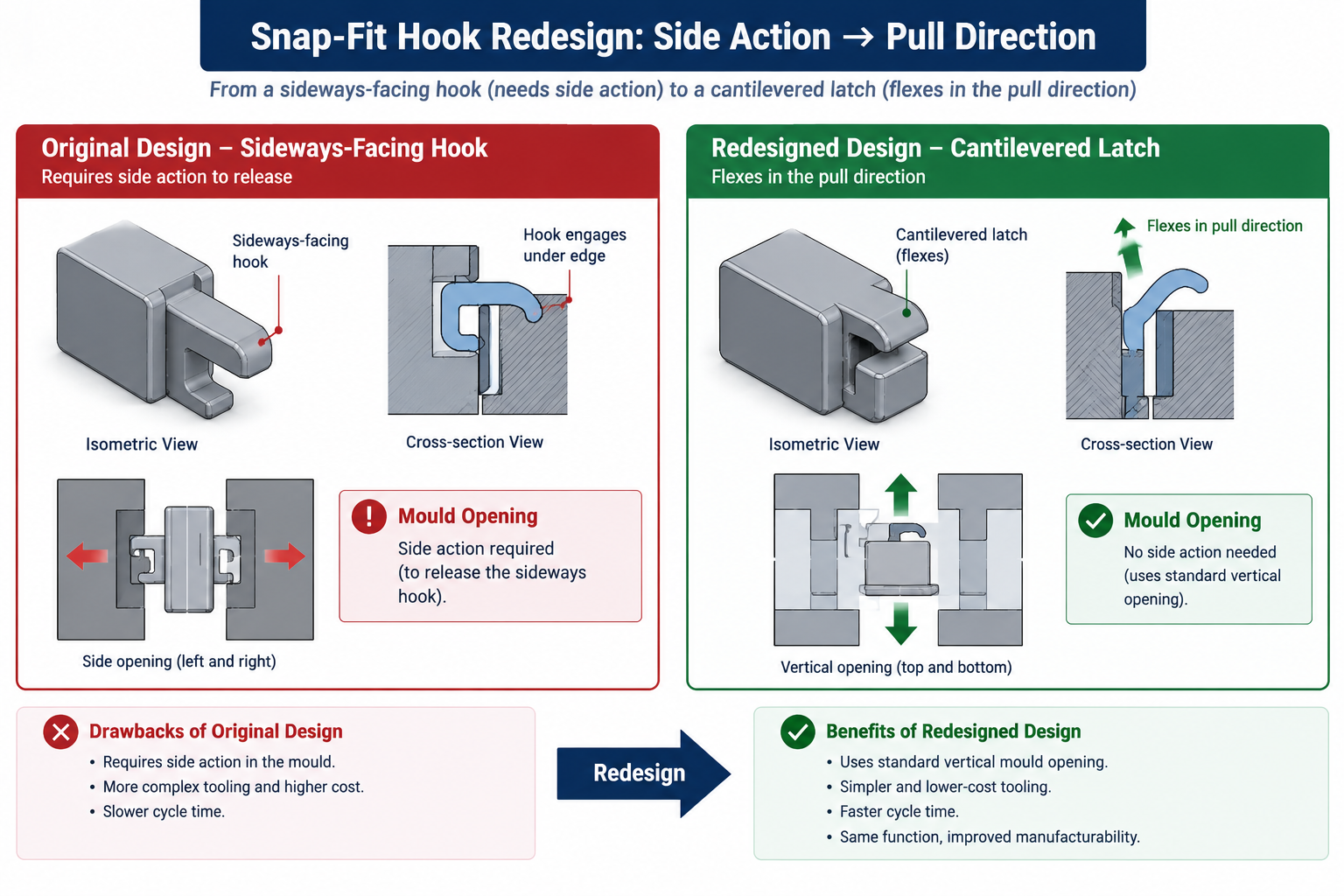
    Comparison of a sideways snap-fit hook requiring tooling side action versus a cantilevered redesign needing no slide

    Mistakes 7 and 8: Gate Location and Weld Lines

    Gate location, where plastic enters the cavity, is one of the most consequential decisions in mould design, and one many designers leave entirely to the mould maker without guidance. That’s a missed opportunity. The design engineer knows which surfaces are cosmetic and cannot show a gate mark, and which features are structural and shouldn’t have weld lines running through them. The mould maker knows injection molding but doesn’t know which is which unless told. Gate location should be a conversation during design, not a surprise after the tool is built.

    Gate TypeAppearanceWeld Line RiskBest ForAvoid When
    Edge gate (tab)Visible stub on parting line; needs degatingLow for simple parts; higher with multiple featuresSimple flat parts, prototype toolingCosmetic surfaces on the parting line edge
    Submarine (tunnel) gateAuto-degated, small dimple below parting surfaceModerateHigh-volume production, labour savingsBrittle resins that crack at the shear point
    Pin point gate (3-plate)Small round mark, auto-degatedLow; positionable away from critical areasMulti-cavity tools, specific face gatingLarge parts with high flow resistance
    Hot tip gateSmall vestige only; no cold runner wasteLow, precisely controlledHigh-volume, multi-cavity balanced fillingLow-volume runs; heat-sensitive resins
    Fan gateWide, shallow, visible at parting edgeVery low; distributes flow evenlyFlat sheet-like parts, optical componentsCosmetic surfaces along the gated edge
    Valve gate (hot runner)No or minimal vestigeLow, controllable via timingCosmetic surfaces; sequential fill controlHigh complexity/cost; not for low-volume tools

    Weld Lines: Where They Come From and Why They Matter

    A weld line forms wherever two flow fronts of molten plastic meet and fuse during filling. Every hole in a moulded part creates one downstream of it, since flow splits around the hole and rejoins on the far side. A part with four holes has at least four potential weld lines. Their location relative to structural loads and cosmetic surfaces is set by gate placement and flow path geometry, and moving the gate can move the weld lines without changing the part’s functional geometry.

    Weld lines are mechanically weaker than the surrounding material because the two flow fronts have cooled slightly by the time they meet, and molecular chains and glass fibres (in filled resins) orient parallel to the weld line rather than across it. In unfilled amorphous plastics like ABS, strength reduction might be ten to twenty percent. In glass-filled semi-crystalline plastics like PA66 GF30, it can reach fifty percent, since the fibres that carry load in the base material leave the weld line essentially unreinforced. A weld line running through the root of a snap-fit latch or a screw hole edge is designed to fail there under repeated loading.

    Mistakes 5 and 6: Bosses and Ribs That Cause Sink Marks

    Bosses and ribs account for more sink mark problems than any other feature type, since both need local material thickness to function, and local thickness excess is exactly what causes sink marks. The rules are simple and widely published, but frequently violated by an instinct to make the boss wall thicker for strength or the rib taller and thicker for stiffness, both of which push directly toward the sink mark the rule exists to prevent.

    The Boss Wall Rule

    A screw boss needs enough wall thickness to resist hoop stress from screw insertion without cracking, and enough depth for adequate thread engagement. That functional wall thickness is approximately sixty percent of the adjacent nominal wall, providing adequate strength for normal self-tapping screw torque without visible sink marks.

    When a designer increases the boss wall beyond sixty to seventy-five percent, the local thickness increase becomes large enough that differential cooling pulls the opposite face inward, producing a visible circular sink mark on the cosmetic surface. The fix once the mould already exists is either texturing the cosmetic surface to hide it or reworking the boss geometry in the tool, both costing money the sixty percent rule would have avoided. Adding a gusset rib from the boss to the nearest structural wall satisfies both the structural requirement and the sink mark rule simultaneously.

    The Rib Thickness Rule

    Ribs add stiffness without the wall thickness that would increase cooling time, weight, and sink mark risk. But a rib is itself a local thickness increase where it meets the wall, and if the rib base is too thick relative to the wall, it creates exactly the local thick section it was supposed to avoid. The rule: rib base should be fifty to sixty percent of the adjacent nominal wall. A 2mm nominal wall should have ribs no more than 1.0 to 1.2mm thick at the base.

    When a designer specifies a rib at seventy-five or a hundred percent of wall thickness for extra structural confidence, the rib creates a local thickness the molding process faithfully converts into a sink mark opposite the rib junction. The fix isn’t a thicker rib, it’s more ribs, each following the fifty to sixty percent rule, distributed over the area needing stiffness. Multiple thin ribs outperform a single thick rib in structural efficiency, sink mark avoidance, and material usage.

    Worked Examples

    The consumer electronics housing: A mould maker’s pre-tooling review flagged three issues: a 5mm wall behind a snap-fit boss where the designer had added material for strength, a USB port opening on a side wall creating an internal undercut requiring a lifter, and a textured grip area specified with only one degree of draft against a 0.08mm texture depth.

    The boss wall was reduced to 1.8mm, sixty percent of the 3mm nominal wall adjacent to it, with a gusset rib added to the nearest internal rib for the structural connection the extra material had been trying to provide. The USB port was relocated so its axis ran parallel to the mould pull direction, converting the undercut into a simple through-feature formed by a core pin, a 4mm position shift the product team accepted after an ergonomics check. The textured faces were redesigned with four degrees of draft, one base plus three for the texture depth.

    The tooling was cut to the revised design without any of the three original issues. First shots showed no sink marks, no ejection damage, clean texture release, and matched the original quote. The two days of CAD work prevented what the mould maker estimated would have been a three-to-four-week rework programme costing thirty-five percent of the original tool budget.

    The automotive interior component with weld line failures: A trim panel with two mounting holes was gated at the centre of the top edge, sending flow symmetrically toward mounting holes on either side. The flow fronts that split around each hole rejoined directly in line with the screw thread pull-out direction, the axis of highest stress in service. The panel was failing at forty percent of target pull-out force, with clean, planar failure surfaces, the classic morphology of a weld line fracture.

    The resin was PA66 GF30, where weld line strength can drop to forty to fifty percent of base material strength. Moving the gate to one end of the panel sent a single flow front across it, still splitting around each hole but rejoining at angles roughly perpendicular to the panel face rather than aligned with the pull-out direction, and the shorter flow path to the far hole reduced the temperature drop before rejoining, improving fusion. Pull-out results improved to ninety-two percent of target, meeting spec, from a runner-only tool modification completed in two days with no cavity or core rework needed.

    Frequently Asked Questions

    What is the most common injection molding design mistake? Non-uniform wall thickness, and the one with the most visible consequences, since the sink marks it causes show up on cosmetic surfaces where every customer and quality inspector can see them. It’s also the mistake most common among engineers experienced with machined parts, where a thick section just takes longer to cut rather than cooling differently and producing surface defects.

    How much draft angle do injection moulded parts actually need? One degree per side is the practical minimum for smooth surfaces, with two degrees giving comfortable margin. For textured surfaces, add roughly one additional degree per 0.025mm of texture depth beyond the base one degree. A light orange-peel texture at 0.025mm needs about two degrees total; a leather grain at 0.075mm needs about four; a heavy tactile texture at 0.15mm may need six or more.

    Can I get away without draft angle if I use a good ejection system? Not reliably. Stripper plates, air blast, and heavy ejector pin layouts can push a part off a zero-draft surface, but that force transmits through the part, distorting it or leaving ejector pin marks. For production tooling where appearance and consistency matter, no ejection system reliably substitutes for adequate draft.

    What is a weld line and does it always need to be avoided? A weld line is the seam where two flow fronts of molten plastic meet and fuse during filling. They form wherever flow splits and rejoins, downstream of every hole, protrusion, and obstacle, and can’t be eliminated from parts with multiple flow-splitting features. What matters is location and load: a weld line on a hidden, non-structural surface is typically fine, while one through a snap-fit latch root or a mounting boss in glass-filled nylon is a real structural risk.

    How tight a tolerance can injection molding actually hold? Typical production parts hold +/- 0.1 to 0.25mm on linear dimensions. Down to +/- 0.05mm is achievable on small parts with controlled process conditions, high-quality tooling, and predictable-shrinkage resins, but needs careful monitoring. Tighter than +/- 0.05mm generally requires secondary operations like machining on specific surfaces. Semi-crystalline resins (nylon, PP) shrink more and less predictably than amorphous resins (ABS, PC).

    When should I use a hot runner instead of a cold runner? Hot runners eliminate the cold runner that would otherwise be ejected and scrapped or recycled each cycle, saving material cost and allowing faster cycle times. The manifold itself adds two thousand to twenty thousand dollars to tooling cost depending on complexity, recovered through material and cycle time savings over the production run. This makes economic sense above roughly fifty thousand parts per year for moderate-cost resins, lower for expensive engineering resins like PEEK, and doesn’t make sense for prototype or low-volume tools.
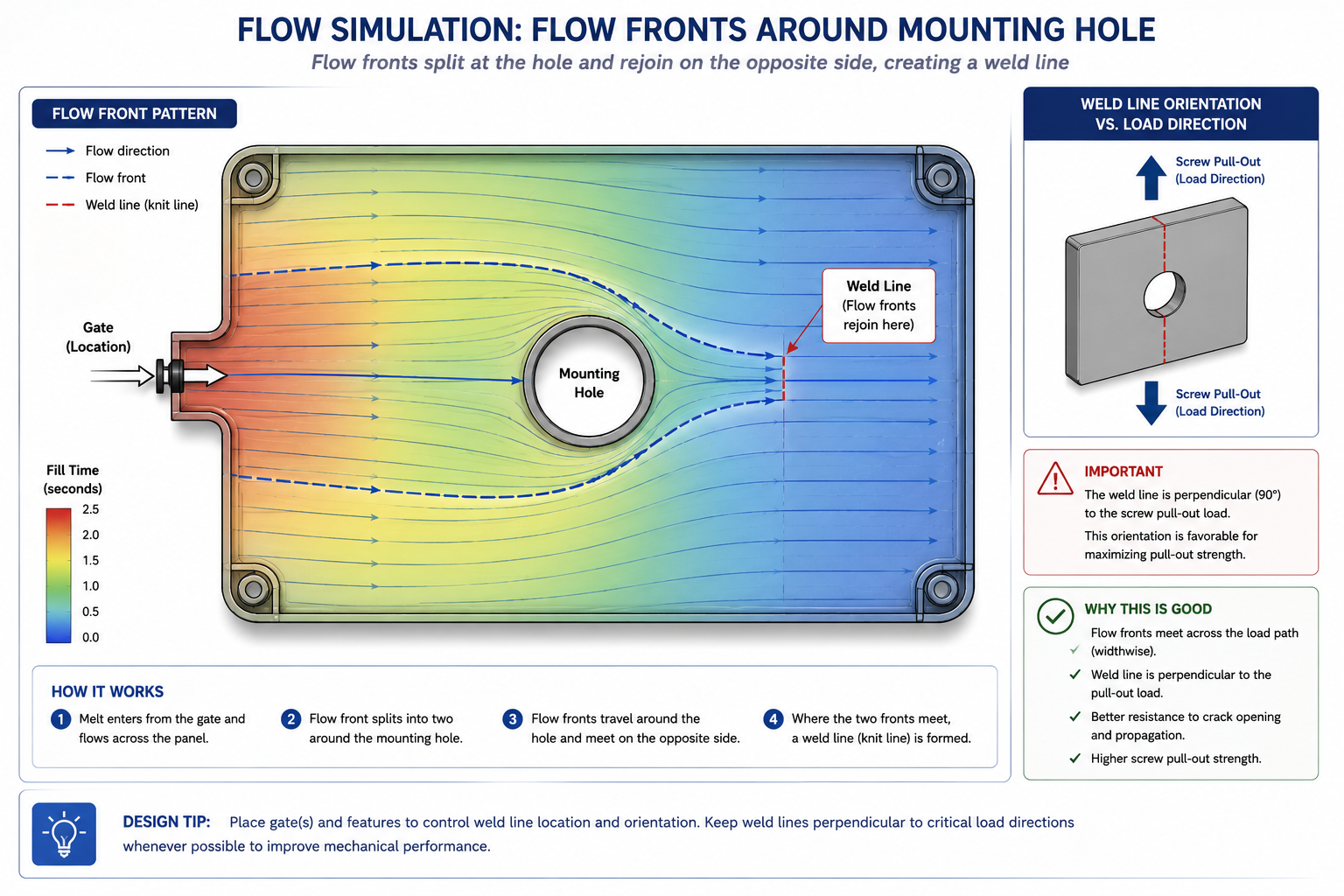
    Flow simulation diagram showing weld line formation around a mounting hole relative to structural load direction

    Key Takeaways

    The twelve mistakes in this article aren’t exotic edge cases. They’re the items that generate the most tool rework, the most first-shot rejection, and the most programme delays across consumer electronics, automotive, medical, and industrial moulded products. Nearly all of them are avoidable at the CAD stage by an engineer who knows what to look for, and free to fix while the part is still on screen.

    The housing story at the start of this article wasn’t a failure of engineering skill. It was a failure of knowledge applied at the right time. Every one of the three problems the mould maker called about has a straightforward CAD fix that takes minutes. The same fix in tooling takes days to weeks and costs real money. Run the draft analysis on every moulded part before the drawing is released. Check every boss and rib against the sixty and fifty percent wall ratio rules.

    Walk the pull direction and flag every trapped face. Agree gate location with the mould maker before the tool is designed, not after. These habits are inexpensive in CAD and genuinely expensive to substitute for afterward.
  • Design for Manufacturability (DFM) Checklist for Engineers (20-Point Guide)

    Design for Manufacturability (DFM) Checklist for Engineers (20-Point Guide)

    An injection-moulded enclosure looked fine on screen. Wall thickness ranged from 1.2mm to 4.8mm across the part because the designer hollowed out a solid model without tracking where the resulting walls changed thickness. Nobody caught it in CAD review, since the review checked fit and function, not wall uniformity.

    The tooling got cut. First shots showed sink marks over every thick section and a warp across the lid that threw the snap-fit tabs out of alignment by half a millimetre. Fixing it meant reworking tool steel and revalidating fit. The change cost eleven thousand dollars and pushed launch back six weeks.

    Quick answer: Design for manufacturability (DFM) is the set of process-specific constraints that turn a geometrically correct CAD model into a part that can actually be produced, at target cost, without surprises after tooling is committed. The highest-leverage checks are wall thickness uniformity, draft angles, internal fillet radii, and tolerances specified no tighter than function requires. None of these are engineering skill gaps; they’re a missing systematic check against how the part will actually be made.
    Design for manufacturability CAD comparison of uneven wall thickness causing sink marks versus redesigned uniform wall with rib

    This guide covers the four processes most engineers actually work with: injection moulding, CNC machining, sheet metal forming, and assembly. It includes a 20-item checklist with priority ratings, four reference tables with the numbers you need at the CAD stage, and worked examples showing how a DFM review changes a part before it reaches a tool shop.

    The 20-Point DFM Checklist

    This master checklist spans all four process families and is built to scan quickly during a design review. Critical items cause part failure, tooling damage, or major rework if missed. High items cause significant cost or schedule impact. Medium items are good practice that controls cost without being make-or-break.

    #Checklist ItemProcessCost Impact if IgnoredPriority
    1Minimum wall thickness meets process capabilityMoulding, die castingSink marks, incomplete fill; scrap up 10-30%Critical
    2Uniform wall thickness throughout the partMoulding, casting, sheet metalWarping, sink marks, internal stressCritical
    3Draft angle applied to all vertical facesMoulding, casting, forgingPart sticks in mould; drag marks; tooling damageCritical
    4Generous fillets at internal cornersAll processesStress concentration, sink marks, crack initiationCritical
    5Hole diameter-to-depth ratio within process limitsMachining, moulding, castingDrill wander, tool breakage, incomplete fillHigh
    6Avoid undercuts unless side-action tooling is budgetedMoulding, die castingRequires slides/lifters; tooling cost +20-50%Critical
    7Standard fastener sizes and thread specs usedAssembly, machiningCustom fasteners cost 3-10x standardHigh
    8Tolerances specified only as tight as neededMachining, all processesCost increases exponentially per tightened toleranceCritical
    9GD&T datums match assembly and inspection methodMachining, inspectionUnmeasurable tolerances; assembly issuesHigh
    10Symmetric or self-locating partsAssemblyIncorrect assembly; warranty and rework costHigh
    11Minimize part count through consolidationAssembly, all processesEach part adds time, inventory, failure pointsHigh
    12Avoid dissimilar materials without joining planAssembly, welding, bondingGalvanic corrosion; CTE mismatch failureCritical
    13Bend radius meets minimum per material/thicknessSheet metalCracking at bend; unpredictable springbackCritical
    14Features kept clear of bend lines (2-3x thickness)Sheet metalDistortion near bend; feature tolerance lostHigh
    15Machined features accessible without special toolingCNC machiningCustom fixtures or multiple setups neededHigh
    16Parting line positioned to minimize flashDie casting, sand castingExcess flash removal labor; cosmetic defectsMedium
    17Weld joint design matches process capabilityWelding/fabricationPoor penetration, distortion, reworkCritical
    18Surface finish specified only where necessaryMachining, finishingUnnecessary polishing operations add costMedium
    19Design supports automated inspectionQuality/inspectionManual inspection required; slower, less repeatableMedium
    20Reviewed against supplier’s process capability dataAll processesDesign exceeds shop capability; late redesignCritical
    How to use this checklist: Run it at the CAD stage, before any drawing goes out for quoting or tooling. It works best as a joint review between the design engineer and someone with shop-floor or supplier experience, since the reference table numbers are starting points, not universal constants. Every supplier has their own capability data, and asking for it directly is the only way to know your actual limits.

    Injection Moulding: Where Wall Thickness Decides Everything

    Injection moulding is unforgiving about wall thickness in a way that surprises engineers coming from machining or sheet metal backgrounds. Molten plastic fills a cavity and has to cool before ejection. Thick sections cool slower than thin ones, and that mismatch is the root cause of most defects people associate with cheap-looking plastic parts: sink marks, warping, internal voids.

    The fix is almost always the same: keep wall thickness as close to uniform as possible, within the range the resin and geometry can support. Where a thicker section is unavoidable, like a screw boss, taper into it gradually instead of stepping straight from thin to thick.

    Design ParameterRecommended ValueWhat Happens If Violated
    Nominal wall thickness1.0-3.5mm most thermoplastics; 0.5-1.0mm minimum for engineering resinsThicker: sink marks, voids. Thinner: incomplete fill, high pressure
    Wall thickness uniformityVariation under 10-15% of nominalDifferential cooling causes warping and internal stress
    Draft angle1-2° minimum for smooth surfaces; 3-5° for texturedDrag marks, part sticking, ejector pin stress
    Internal corner radius0.5x wall thickness minimum; ideal 0.75-1.0xStress concentration (Kt up to 3+), fracture initiation
    Rib thickness50-60% of adjacent wall thickness at baseRibs over 60-75% cause visible sink marks opposite
    Boss wall thickness60% of nominal wall; taper thinner at tipThick bosses sink and crack; thin bosses strip threads
    Hole diameter-to-depthThrough holes up to 4-6x diameter; blind holes 2-3xDeep core pins deflect, causing wall variation or breakage
    Minimum feature size0.4-0.5mm standard; 0.15-0.25mm with precision toolingFeatures below capability fail to fill or break during ejection

    Draft Angle: The Rule Everyone Forgets Until the First Shot

    Draft angle is the small taper on vertical walls that lets the part release from the mould without the steel scraping the surface on the way out. A part with zero draft looks completely normal on screen, sometimes cleaner than one with draft applied. The problem only shows up at the tool shop, or on the first production shot, when the part either won’t release or comes out scarred with drag marks.

    Apply draft as one of the first steps once a surface is finalised, not as an afterthought. Most CAD packages include a draft analysis tool that colour-codes the model relative to pull direction. Run it before calling the design done. Textured surfaces need roughly an extra degree of draft for every 0.025mm of texture depth, since texture adds friction during ejection.

    Ribs and Bosses: The Sink Mark Trade-off

    Ribs add stiffness without adding bulk, which is why they show up everywhere in plastic part design. A rib is effectively a local thickness increase where it meets the wall. If that local thickness gets too close to the wall’s own thickness, a sink mark appears on the opposite face as material pulls in during cooling. Keeping the rib base at roughly half to sixty percent of the adjacent wall is the standard fix, worth knowing by heart.

    Screw bosses add a second consideration: the boss needs to survive repeated screw insertion without cracking, which pushes toward a thicker wall, while a thicker wall pushes toward sink marks. The usual resolution keeps the boss wall around sixty percent of nominal thickness and adds a gusset rib connecting it to the nearest structural wall.

    CNC Machining: Designing Around Tooling and Fixturing

    Machining feels more forgiving than moulding since material is removed rather than formed, with no mould to fill or shrink unevenly. But it has its own constraints, rooted in cutting tool geometry and the practical limits of holding a part securely while cutting. Both are easy to overlook in CAD, since a 3D model doesn’t care how a tool would physically reach a pocket or how the part sits in a vice.

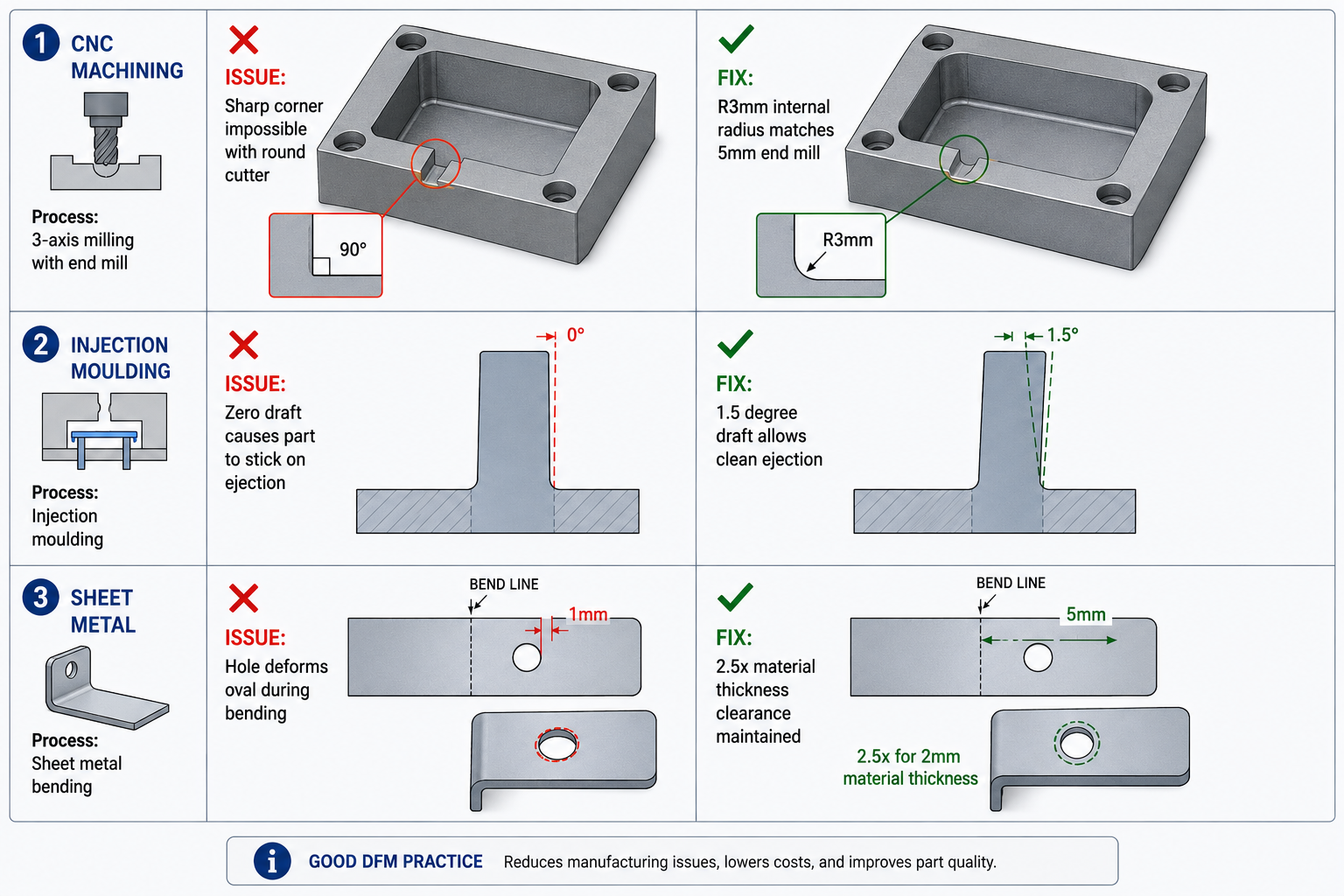
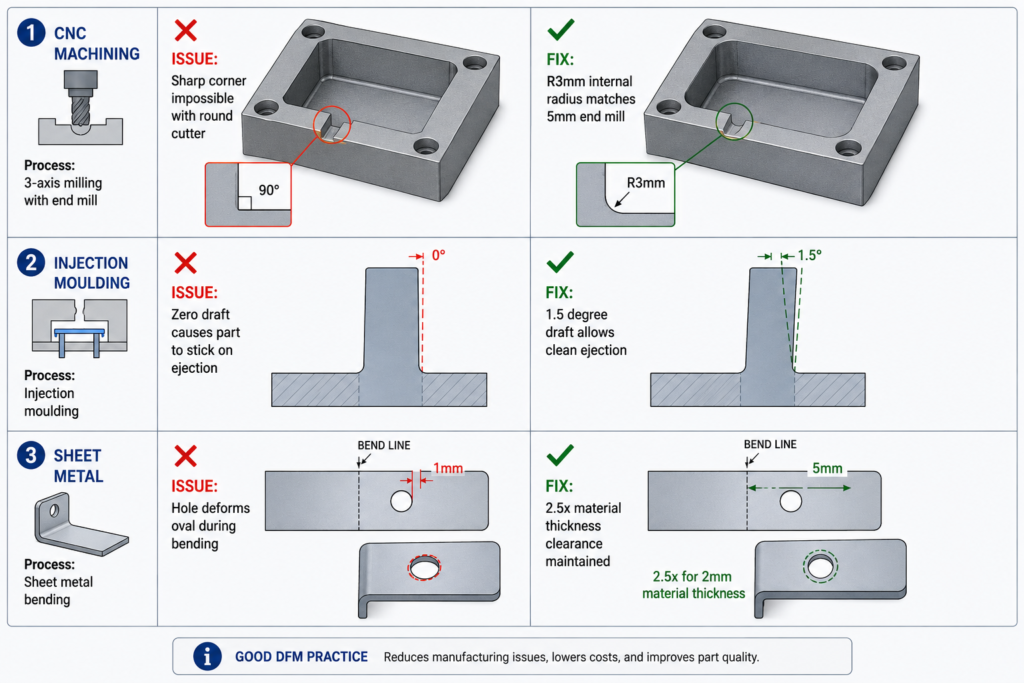
    The most common machining DFM mistake is calling out a sharp internal corner in a pocket. Every end mill is a cylinder, so it leaves a radius in every internal corner it cuts. A sharp 90-degree internal corner forces the machinist into a tiny, fragile custom tool or a separate EDM finishing step, either of which adds cost that a slightly larger radius avoids for free.

    Design ParameterRecommended PracticeCost Impact
    Internal corner radiusMatch standard end mill sizes: 1.5mm, 3mm, 6mm, 10mmCustom small-radius tooling adds 30-100% machining time
    Hole tolerance and finishStandard reamed/drilled (+/-0.05 to 0.1mm) unless function requires tighterEach tightened level adds 15-40% cost
    Thread depth and typeStandard series (UNC, UNF, metric coarse); blind hole depth 1.5-2x diameterCustom thread forms require special long-lead tooling
    Pocket depth-to-widthKeep below 4:1 for standard end millsLong-reach tooling cuts feed rate 30-60%
    Datum and fixturing accessFlat, accessible reference surfaces for workholdingCustom fixtures cost $2,000-$20,000 and add weeks
    Number of setups requiredMinimize machine orientations neededEach additional setup adds 20-40% cost
    Tool access for deep featuresVerify standard-length tool reaches without collisionEDM workaround costs 5-20x standard milling
    Thin wall machiningMinimum 0.5mm wall for rigid materials with supportThin walls need slower feeds, multiple passes: 2-4x cycle time

    Setups: Every Reorientation Costs Time and Accuracy

    A CNC machine only reaches features from the orientation it currently holds the part in. Features cut from four different sides mean the part gets removed, flipped, and realigned four times, and each of those setups adds machine time, operator labor, and a small amount of alignment error between features cut in different orientations.

    This doesn’t mean avoiding multi-sided parts; plenty of functional designs genuinely need features on more than one face. It means that between two functionally equivalent designs, the one needing fewer setups will be meaningfully cheaper and faster. A quick mental walk-through of how the part sits in a vice and how a tool reaches each feature catches a surprising number of these issues before they hit a quote.

    Sheet Metal: Bend Lines Are Where Things Go Wrong

    Sheet metal parts start as flat stock that gets cut and bent into shape, and almost every design problem traces back to a bend line. Material doesn’t like being bent sharply. Bend it too tight relative to thickness and it cracks on the outside of the bend, especially in stainless steel or hardened aluminum tempers with less ductility than mild steel.

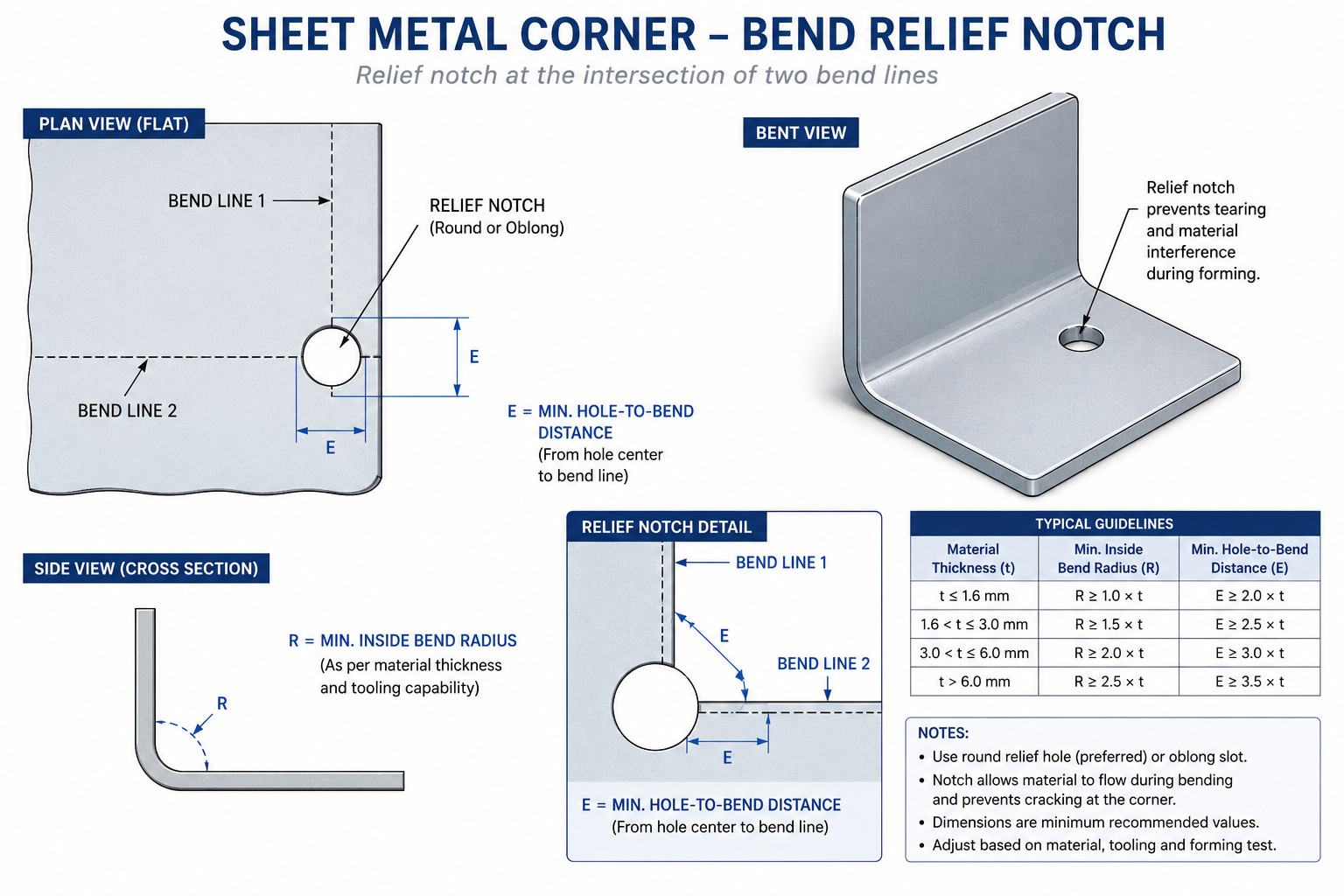
    Minimum bend radius scales roughly with material thickness. A radius equal to material thickness is a safe baseline for mild steel and most aluminum alloys, with stainless and harder tempers needing more. Where two bend lines meet at a corner, a relief notch is needed at the intersection before bending, or the corner tears as both folds try to occupy the same material at once.

    Design ParameterRecommended PracticeCommon Mistake
    Minimum bend radius~1x material thickness for mild steel/aluminum; 2-3x for harder tempersSpecifying a zero-radius bend, which cracks
    Bend relief at cornersRelief notch at least equal to material thicknessOmitting relief causes tearing at bend intersections
    Hole-to-bend distance2.5-3x thickness plus bend radiusPlacing holes too close causes distortion during forming
    Hole-to-edge distance1.5-2x material thicknessHoles too close to edge cause bulging or tearing
    Minimum flange length3x thickness plus bend radiusFlanges too short for tooling to grip inconsistent bend angle
    Tab and slot fitSlot width = tab thickness + 0.1-0.2mm clearanceZero-clearance designs ignoring cutting tolerance
    Countersink compatibilityMatch standard tooling angle (82° or 90°)Countersink deeper than material allows, breaking through

    Features Near a Bend Line Move More Than You Expect

    Holes, slots, and cutouts placed too close to a bend line get pulled out of position as material deforms during forming. Keep functional features at least two and a half to three times the material thickness from the nearest bend line, with extra margin if hole tolerance is tight. This is one of the more common reasons a sheet metal part comes back from its first form with mounting holes that no longer line up, and it’s entirely avoidable by checking feature-to-bend distance before the flat pattern is finalised.

    Sheet metal bend relief notch diagram showing minimum bend radius and hole clearance distances

    Tolerances: The Hidden Cost Multiplier

    Tolerance specification hides a lot of unnecessary cost, because tightening a tolerance doesn’t add cost linearly, it adds it disproportionately, and that relationship isn’t obvious from looking at a drawing. A dimension at commercial tolerance might cost a few cents to hold. The same dimension at precision tolerance might cost several times that, not because the machine runs slower, but because tighter tolerances usually require additional operations, more careful fixturing, environmental control, and inspection.

    The habit worth building: for every toleranced dimension, ask what actually breaks if the tolerance were twice as loose. If the honest answer is nothing, the tolerance is tighter than needed and adding cost with no functional benefit.

    Tolerance ClassTypical Range (linear, mm)Relative CostAchievable By
    General/commercial+/- 0.25 to 0.51.0x (baseline)Standard milling, turning, sheet metal forming
    Precision+/- 0.05 to 0.151.5-2.5xStandard CNC with normal process control; reamed holes
    High precision+/- 0.01 to 0.053-6xTemperature-controlled CNC; CMM verification
    Ultra-precision+/- 0.002 to 0.018-20xGrinding, honing, jig boring; climate-controlled metrology
    Flatness (general)0.05-0.1mm over 100mm1.5-2x vs no calloutStandard machining and finishing
    Position (general)+/- 0.1-0.25mm diameter zone1.5-3x vs basic dimensionCNC with standard fixturing
    Surface finish, as-machinedRa 1.6-3.2 μm1.0x (baseline)Standard milling and turning
    Surface finish, ground/polishedRa 0.1-0.8 μm3-10xGrinding, lapping, polishing

    GD&T Datums Should Match How the Part Is Actually Used

    Geometric dimensioning and tolerancing gives a precise language for describing how a feature can vary, following the ASME Y14.5 standard for dimensioning and tolerancing, but it only helps if the datum structure reflects how the part is actually held during machining, measured during inspection, and mated during assembly. A datum scheme that looks correct on paper but doesn’t match any of those real-world references creates a part that can pass inspection and still not assemble correctly.

    A practical check: picture the part sitting in the inspection fixture or on the CMM table, and ask whether the called-out datums are actually the surfaces that would locate it there. If the answer is unclear, revisit the datum structure before the drawing goes out. Correcting it after parts are in production is a far bigger conversation than catching it during design review.

    Design for Assembly: Reducing Parts and Preventing Mistakes

    Design for assembly (DFA), usually paired with DFM under the combined acronym DFMA, asks a different question: not whether each part can be made, but whether the whole product can be put together efficiently and correctly. The two biggest levers are reducing part count and making incorrect assembly physically difficult.

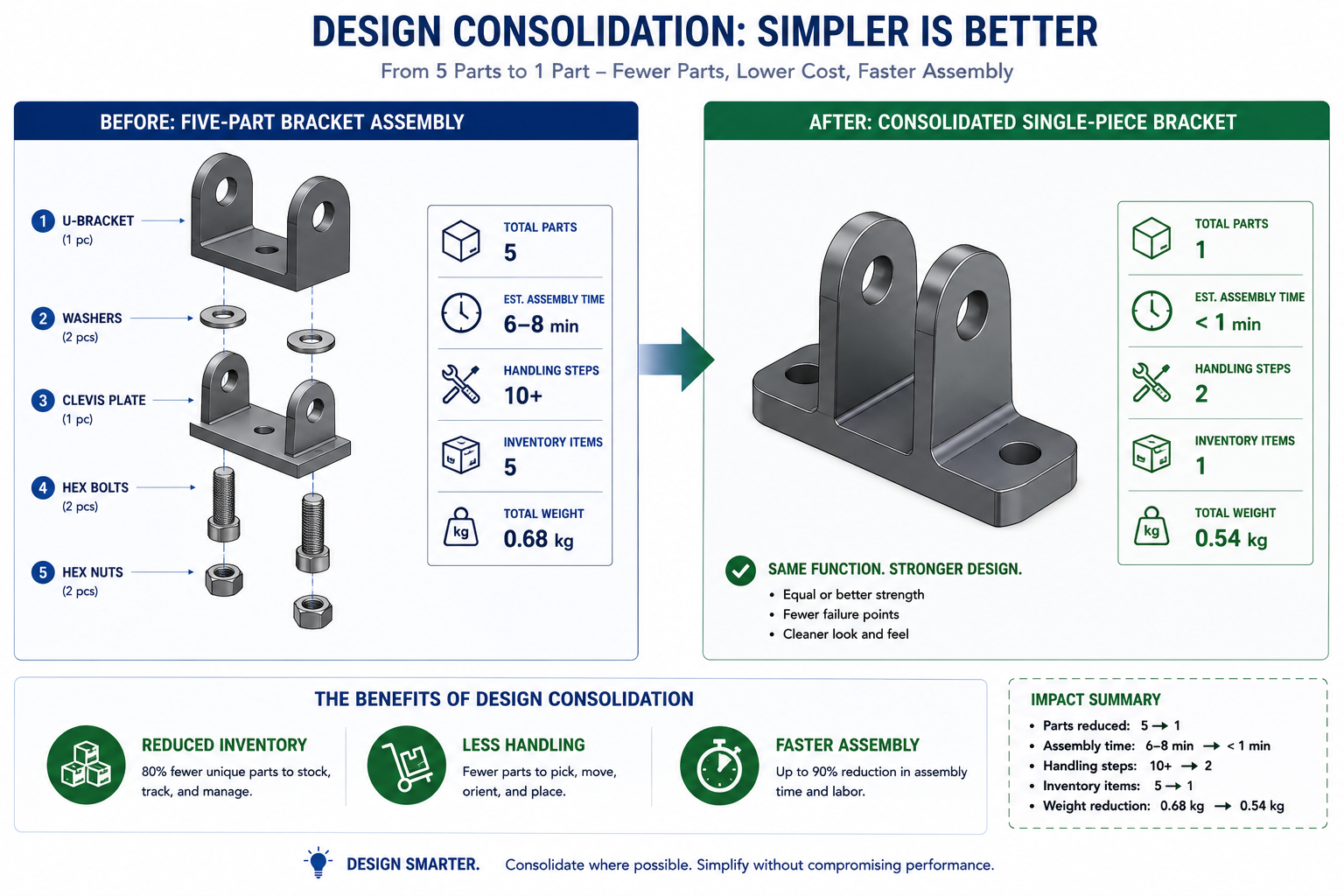
    Every part in an assembly carries cost beyond its own material and machining: it needs to be ordered, stocked, picked, oriented, and joined, with paperwork and quality records to manage. A design that combines three separate brackets into one moulded or formed piece eliminates two entire chains of that overhead, not just the material cost of two fewer parts. This feature consolidation is one of the highest-leverage things a DFM review can catch, since savings compound across every unit ever built.

    Poka-Yoke: Making the Wrong Assembly Physically Impossible

    The Japanese term poka-yoke translates roughly to mistake-proofing: designing parts so incorrect assembly is either impossible or immediately obvious. A connector symmetric enough to plug in backwards eventually will get plugged in backwards on a production line, no matter how good the work instructions are. A keyed, asymmetric connector shape removes that failure mode entirely, at zero ongoing cost once the tooling exists.

    The same thinking applies to brackets, covers, and any orientation-sensitive part. If a part looks identical in two orientations but only works correctly in one, build in an asymmetric feature, an offset hole or a notch, that makes the correct orientation the only one that fits. This is far cheaper to design in at the CAD stage than to manage through inspection or training later.

    Mixed Materials and the Joining Problem

    Combining dissimilar materials is sometimes unavoidable, but it needs to be a deliberate decision, not something that falls out of picking the cheapest material for each part independently. Two metals with very different positions on the galvanic series will corrode at the joint when moisture is present, even if neither corrodes on its own. Materials with very different coefficients of thermal expansion build up stress at a rigid joint as temperature cycles, eventually leading to fatigue cracking or loosened fasteners.

    This doesn’t mean avoiding mixed materials. It means that whenever a design crosses a material boundary, that joint deserves a specific look: is there galvanic corrosion risk requiring an isolating coating or gasket, and is there a CTE mismatch requiring the joint to accommodate movement rather than resist it rigidly. Catching this at the design stage is far cheaper than diagnosing a field failure years after shipping.

    Worked Examples

    The enclosure with uneven walls: A consumer electronics housing, moulded as a single shell hollowed from a solid block model, ended up with wall thickness ranging from 1.2mm to 4.8mm because the hollowing offset the outer surface by a constant amount except where ribs and bosses interrupted it. The DFM review flagged the variation as well outside the 10-15 percent guideline, and flagged the abrupt step between the 4.8mm and 1.8mm sections with no taper.

    The redesign replaced the thick corner with a 1.8mm wall plus a separate internal rib, tapered into the surrounding wall over roughly 6mm. The screw boss in that corner was rebuilt at 60 percent of nominal wall thickness with a gusset rib. The result eliminated sink mark risk entirely and cut part mass by roughly 12 percent, with no loss of stiffness, all caught in CAD before the tool was cut.

    The bracket with an inaccessible pocket: A machined aluminum bracket had a straightforward rectangular pocket on its underside, positioned beneath an overhanging flange added for a separate mounting requirement. The DFM review found that no standard-length end mill could reach the pocket without colliding with the flange, leaving only a costly custom long-reach tool or a redesign.

    Relocating the flange 8mm further from the pocket gave a standard tool clearance to approach directly, with no change to the flange’s mounting function since the new position still aligned with the mating bracket’s hole pattern. This avoided a roughly 70 percent per-part cost premium the shop had estimated for the custom tooling, and took an afternoon of CAD work instead of a multi-week delay.

    Frequently Asked Questions

    What is the difference between DFM and DFA? DFM focuses on whether an individual part can be produced efficiently by a given process, covering wall thickness, draft angle, and tolerances. DFA focuses on whether the parts can be assembled efficiently once they exist, covering part count reduction and mistake-proofing. The two are usually discussed together as DFMA because they overlap heavily in practice: a part that’s hard to make is often hard to assemble too.

    When in the design process should a DFM review happen? As early as possible, and more than once. The first pass belongs at the concept or early CAD stage, before significant effort goes into specific geometry, when changes are cheapest. A second pass belongs just before release for tooling or first-article quoting, the last point where a change avoids tooling cost entirely. Waiting until after a prototype reveals a problem pushes the fix to the most expensive stage possible.

    How do I know what wall thickness or tolerance my supplier can actually achieve? Ask them directly for their process capability data rather than relying on generic published guidelines. The numbers in a checklist like this are reasonable starting points, but actual capability varies by shop, machine, tooling condition, and the specific material and geometry involved. The earlier you get this data, the fewer surprises at first-article inspection.

    Why does tightening a tolerance cost so much more than the value suggests? Because tighter tolerances usually trigger a step change in process, not a smooth increase in effort. A hole within a few microns of nominal often can’t be held by drilling alone and needs reaming or boring. A flatness requirement tight enough for a sealing surface often needs a separate grinding operation. Each step change adds a separate operation, setup, and often inspection equipment, which is why tolerance cost looks like a series of jumps rather than a straight line.

    Can a DFM checklist replace talking to a manufacturing engineer or supplier? No. A checklist catches the common, well-documented mistakes that show up across most projects in a given process, which prevents the most frequent and expensive surprises. It can’t replace the specific knowledge a manufacturing engineer or experienced supplier has about your particular part, material, and equipment. The most effective use is as preparation: work through it yourself first, then bring a tighter design to the conversation so it can focus on the genuinely difficult decisions.

    What’s the single highest-impact DFM change most engineers could make? Reducing part count through feature consolidation, especially in assemblies that grew across multiple design iterations without anyone stepping back to ask whether several parts could become one. Every part carries cost beyond material and machining, ordering, stocking, handling, and quality tracking all scale with part count. Combining three brackets into one moulded piece often pays for the redesign effort many times over, since savings compound on every unit built.

    Exploded view comparing five-part bracket assembly to consolidated single-piece DFA redesign

    Key Takeaways

    Every item in this checklist describes a constraint that exists whether or not the design respects it. A wall too thick relative to its neighbours will sink. A tool without draft will not pull the part. A bend too tight for the material will crack. None of these are arbitrary rules; they’re physical realities that surface sooner or later. The only real choice an engineer has is whether they show up on a CAD screen during review, or on a production floor after tooling is already cut.

    None of the numbers here are exotic: a 1 to 2 degree draft angle, a rib at 50 to 60 percent of wall thickness, a bend radius around one times material thickness, a tolerance no tighter than the function actually demands. What makes DFM valuable isn’t the difficulty of any single rule. It’s the discipline of checking every part against the rules that govern the process it will actually go through, before that process turns an overlooked detail into an expensive lesson.

    Build the checklist into your design review process, keep the reference numbers close during CAD work, and treat your supplier’s actual process capability data as the final word over any general guideline, including this one.

  • What Is Design for Manufacturability (DFM) and How Does It Affect Your CAD Drawings?

    What Is Design for Manufacturability (DFM) and How Does It Affect Your CAD Drawings?

    10x  cost multiplier at each development stage for fixing the same manufacturing issue. A sketch-stage fix costs hours. A post-tooling fix costs months and six figures.
    1981  year the first DFM software was released on an Apple II Plus, offering real-time feedback to engineers. DFM as a discipline predates the modern CAD era.
    30-50%  typical quote price reduction achievable by applying DFM to sheet metal and machined parts before issue to suppliers (published fabrication industry data, 2026)
    Weeks to days  DFM review cycle time compression reported by CoLab AutoReview users by sharing designs with manufacturing and quality engineers simultaneously, without requiring CAD access

    Introduction:

    There is a particular type of engineering problem that happens quietly, costs a lot, and is almost entirely avoidable. An engineer spends three weeks building a detailed CAD model. The drawing is clean, well-dimensioned, and geometrically precise. It goes to the fabricator. A week later, the quote comes back with a price that is 40 percent higher than expected and a list of queries about features the machinist cannot make with standard tooling.

    Or worse: the drawing passes quoting, the parts are made, and the first batch comes back with features that are technically within drawing tolerance but functionally wrong because the drawing was not specific enough about what the manufacturing process needed to deliver.

    Both of these problems have the same root cause: the design was completed without Design for Manufacturability applied. The engineer knew what the part needed to do. They did not build the knowledge of how it would be made into the decisions that shaped the geometry, the tolerances, and the drawing notes.

    This guide explains what DFM is, how it changes the specific content of CAD drawings, what the most important rules are for each common manufacturing process, how tolerances should actually be allocated rather than how they usually are, what AI DFM tools are doing differently in 2026, and the ten mistakes that most consistently make parts expensive, slow, or wrong.

    Quick definition:  Design for Manufacturability (DFM) is the practice of designing parts and assemblies so they can be manufactured efficiently, at minimum cost, and without the defects that result from ignoring process constraints during design. Applied to CAD drawings, DFM changes how features are geometrically defined, how tolerances are allocated, and what notes and specifications the drawing must contain to produce a manufacturable part.
    What Is Design for Manufacturability (DFM) and How Does It Affect Your CAD Drawings
    DFM is not about making the drawing more complex. It is about making the geometry actually manufacturable.

    What Is Design for Manufacturability? The Clear Explanation

    The idea behind Design for Manufacturability is straightforward. Every manufacturing process has constraints. CNC milling cutters are round, so they cannot cut perfectly sharp internal corners. Injection moulds open and close in a single direction, so walls must have draft to release cleanly. Sheet metal presses bend material in a way that deforms nearby holes if they are too close to the bend line.

    DFM is the practice of knowing these constraints and designing around them from the start, rather than discovering them when the quote comes back with a problem list or when the first batch fails inspection. It is not a single review step at the end of the design process. It is a continuous mindset applied to every feature as the model is built.

    The core disciplines within the broader DFM umbrella include:

    • DFM (Design for Manufacturability): individual part geometry designed to be made efficiently by the target process
    • DFA (Design for Assembly): assemblies designed to be assembled with minimum parts, minimum operations, and mistake-proof orientations
    • DFMA (Design for Manufacture and Assembly): both combined, which is how most mature organisations approach the methodology
    • DFQ (Design for Quality): geometry and tolerances designed so that inspection and quality control are practical and reliable
    • DFS (Design for Sustainability): material selection and geometry designed for minimum material waste, energy use, and end-of-life disassembly

    This guide focuses on DFM in its most direct engineering application: how the manufacturing process a part will go through should determine the geometry, tolerances, and documentation of the CAD drawing that produces it.

    Why DFM Has Been Around Since 1981 and Still Gets Ignored

    The first DFM software was released in 1981 on an Apple II Plus. Boothroyd Dewhurst, Inc. was founded in 1983 to commercialise DFM and DFA methodology. The principles have been taught in mechanical engineering degrees for four decades. And yet, the most common feedback from manufacturing engineers reviewing designs from product engineers is still that basic DFM rules have not been applied.

    The reason is structural, not individual. In most product development workflows, the design engineer and the manufacturing engineer are separated by process, timeline, and sometimes by geography. The design engineer’s incentive is to get the design right functionally. The manufacturing engineer’s knowledge enters the process only at review gates that happen after significant design investment has been made. By the time a DFM problem is formally identified, it is expensive to fix.

    AI DFM tools in 2026 are beginning to solve this by giving the design engineer manufacturing feedback at the moment they are making the decisions that create the problem, not after those decisions are locked into a finished drawing.

    The Cost of Getting DFM Wrong: Why Early Matters So Much

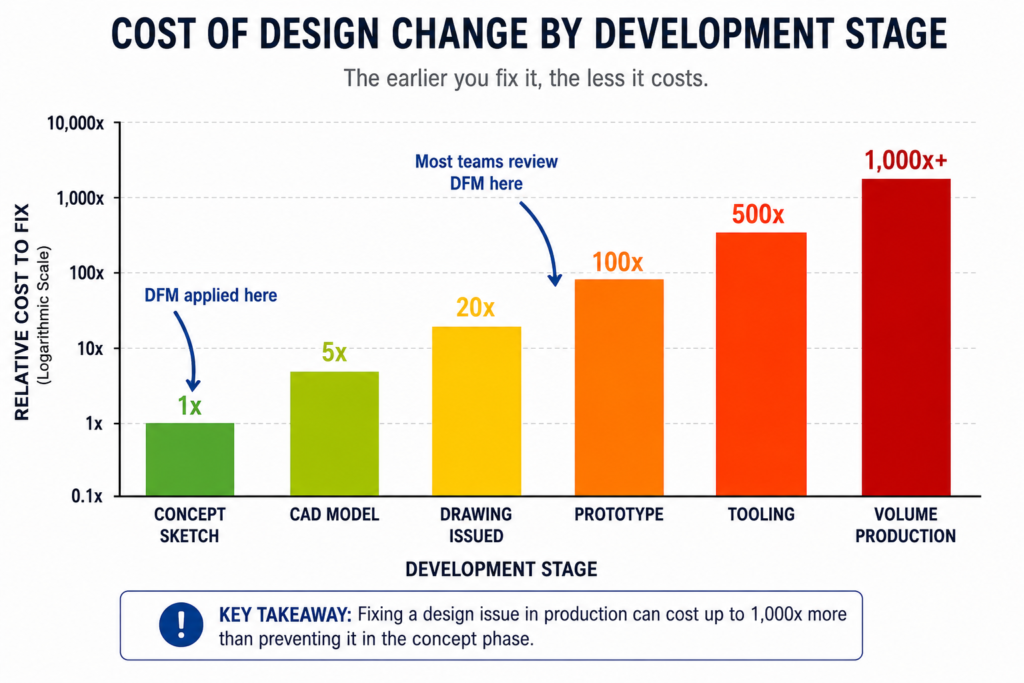
    The relationship between when a manufacturing problem is discovered and what it costs to fix it is not linear. It is exponential. Published data from the manufacturing industry consistently shows a ten times cost multiplier at each stage of the development process.

    StageWho catches the issueTypical correction costTime impact
    Concept / sketchDesign engineerNear zero: edit the sketchHours
    CAD model completeDFM review or tool$1,000 – $5,000Days to 1 week
    Drawing issuedManufacturer or DFM check$5,000 – $20,0001-3 weeks
    Prototype builtTesting team$20,000 – $100,000Weeks to months
    Tooling cut or orderedProduction engineer$50,000 – $500,000+Months
    Volume productionQuality / customer return$500,000 – millionsProgramme delay

    These are not theoretical figures. They reflect the actual economics of product development: engineering time to redesign, management overhead to approve the change, supplier communication to revise the order, scrapped tooling or scrapped parts, extended lead times, and in volume production, the cost of customer returns and warranty claims.

    The table makes the business case for DFM review at the concept stage self-evident. The cost of an engineering hour at concept is the same as at prototype. But an engineering hour at concept prevents a problem that would cost a hundred times more to fix at the same stage one step later in the process.

    The most common DFM timing mistake:  Treating DFM as a drawing release gate rather than a design activity. When DFM review only happens after the CAD model is complete and the drawing is drafted, every finding requires changes to finished work. The model must be reopened and edited. The drawing must be revised and re-checked. If DFM is instead applied feature by feature as the model is being built, the cost of each correction is essentially zero because the geometry does not yet exist in final form.
    Cost of Design Change by Development Stage Bar Chart
    DFM is not about adding cost to the design process. It is about avoiding the far larger costs that come when manufacturing problems are discovered late

    How DFM Directly Affects Your CAD Drawings: Element by Element

    The clearest way to understand how DFM in CAD works in practice is to look at specific drawing elements and compare how they appear with and without DFM applied. The differences are not cosmetic. They are the difference between a drawing that a manufacturer can confidently execute and one that generates a query list before production starts.

    Drawing ElementWithout DFM thinkingWith DFM applied
    Internal corner radiusSharp 90-degree corners on pocketed featuresMinimum radius callout matching available tool size
    Draft anglesVertical walls on moulded or cast parts1-3 degree draft on every wall with draw direction arrow
    TolerancesUniform tight tolerance on all featuresSelective: tight on functional interfaces, ISO 2768 elsewhere
    Wall thicknessVariable wall, thicker for stiffness, thinner for weightUniform wall, stiffness achieved through ribs and form
    Hole placementHoles positioned by assembly need aloneHoles checked against DFM rules for process before finalising
    Surface finishSingle Ra value across all surfacesSurface finish specified by zone: mating, sealing, general
    Material calloutNominal material grade, no processing specFull material spec with temper, condition, and standard reference
    Weld symbolsGeneric weld calloutProcess-specific: groove type, joint prep, inspection class
    GD&TAll dimensions in plus/minusGD&T applied at functional interfaces, datum structure defined
    NotesGeneric manufacturing notesProcess-specific notes: tool access, assembly sequence, inspection

    The Tolerance Conversation: What Most Engineers Get Wrong

    Tolerance over-specification is one of the most consistently expensive DFM failures, and one of the most consistently overlooked. When a drawing applies the same tight tolerance to every dimension regardless of whether that dimension affects function, the fabricator must either meet every tolerance at premium cost or query the drawing. Most of the time, tight tolerances are applied by default because the engineer did not consciously decide what each feature’s tolerance should be.

    The correct approach is selective tolerancing: apply tight tolerances only to features that genuinely require them for assembly or function, and let everything else default to a general tolerance standard like ISO 2768 medium (m). This approach communicates clearly to the fabricator what is critical and what is not, allowing them to prioritise process control where it matters and use their judgment elsewhere.

    Feature typeStandard tolerancePrecision toleranceWhen to specify precision
    Non-functional dimensionsISO 2768-mNot neededNever. Leave to process default.
    Mating clearance fitsISO 2768-mH7/g6 or similarWhen assembly requires controlled clearance
    Press fits / interferenceISO 2768-fH7/p6 or tighterWhen retention force is load-bearing
    Bearing seatsIT6-IT7 typicalIT5 for precisionAll rotating or oscillating bearing interfaces
    Sealing surfacesRa 1.6 surface finishRa 0.8 or 0.4All elastomeric or metal-to-metal seals
    Bolt clearance holesH12 or H13Not neededOnly for precise pin/dowel location
    General machined facesISO 2768-mAvoidGeneral form only, not functional mating
    Welded joint gapsPlus/minus 1.0mmPlus/minus 0.5mmOnly for precision structural weld joints
    The tolerance audit habit:  Before releasing any drawing, go through every toleranced dimension and ask one question: does the function of this part or assembly change measurably if this dimension is at the opposite end of its tolerance? If the answer is no, the tolerance is over-specified. Remove it or replace it with a general note reference. This single habit reduces manufacturing cost on most parts by 10 to 30 percent without changing function.

    DFM Rules by Manufacturing Process: What the Drawing Must Communicate

    The most important DFM knowledge for a design engineer is process-specific. The rules for CNC machining DFM are different from the rules for injection moulding, which are different from sheet metal, which are different from casting. The manufacturing process determines what the drawing must say, and a drawing that does not communicate the right things for its intended process is not a complete engineering document.

    Manufacturing ProcessKey DFM Rules for CADCommon CAD drawing violations
    CNC MachiningMin internal corner radius = tool radius + 10%. Max depth-to-width = 4:1 for slots. Uniform wall thickness. Limit setups to one or two sides.Sharp internal corners, pockets deeper than tool reach, features requiring 5-axis where 3-axis is spec
    Injection MouldingDraft angle 1-2 degrees on all walls. Min wall 1.2mm, uniform thickness. Rib height max 3x wall thickness. Gate location away from mating faces.No draft on tall walls, variable wall thickness causing sink marks, undercuts needing side actions
    Sheet MetalMin hole diameter = material thickness. Hole-to-bend distance = 2.5x thickness. Flange height = 4x thickness. Bend relief at intersecting bends.Holes too close to bends, flanges too short for press brake, no bend relief at corners
    Die CastingDraft 1-3 degrees. Wall uniformity critical. Parting line position chosen to minimise surface marks. Draft on cores and inserts.Non-uniform walls causing porosity, draft violations, undercuts on parting plane
    3D Printing (FDM)Orient to minimise supports. Min feature 2x nozzle diameter. Avoid horizontal overhangs beyond 45 degrees. Bridge length under 50mm without support.Features requiring excessive support, thin horizontal bridges, tolerance expectations beyond FDM capability
    Casting (sand/invest.)Min wall 3-5mm depending on alloy. Generous draft 2-5 degrees. Avoid sharp transitions, use fillets everywhere. Core placement feasibility.Thin sections that cannot fill, missing draft, sharp corners causing stress concentration in casting
    Welded fabricationAccess for welding torch and visual inspection. Joint gap specification. Weld sequence to minimise distortion. Avoid welds in high-stress zones.No access for torch, joints requiring simultaneous multi-position welding, tolerance on welded geometry too tight
    Turning / lathe workConsistent diameters to minimise tool changes. Undercuts need relief groove. Chamfers on all transitions. Length-to-diameter max 4:1 without steady.Long slender parts with no steady provision, multiple non-standard diameters, undercuts without relief

    CNC Machining DFM: The Internal Corner Is Where It Always Breaks

    The single most common CNC machining DFM violation is the sharp internal corner in a pocketed feature. A milling cutter is round. It cannot cut a 90-degree internal corner. It leaves a radius equal to its own radius. If the design requires a sharp corner, either a different operation is needed (EDM wire cutting, broaching, or grinding), or the part cannot be made as drawn.

    The solution is not complicated: specify a minimum internal corner radius in every pocketed feature, equal to the cutter radius plus ten percent clearance. For a 10mm end mill, specify R6mm internal corners. For a 6mm end mill, R4mm. If the mating part that fits into the pocket has a sharp corner, chamfer or relieve that part’s corner rather than requiring the pocket to be square.

    The second most common issue is feature depth relative to available tooling. Standard end mills have a flute length to diameter ratio of around 3:1 to 4:1. A pocket 60mm deep requiring a 10mm end mill cannot be machined with standard tooling because the flute length is only 30 to 40mm. The feature requires special extended-reach tooling, which adds cost, delivery time, and vibration risk to the operation. If the pocket depth is driven by function, acknowledge in the notes that extended tooling is required and confirm with the machinist before releasing.

    Injection Moulding DFM: Draft and Wall Thickness Are Not Optional

    Draft angle is the first and most critical injection moulding DFM rule. When a part is injected into a mould, it must be ejected cleanly as the mould opens. Without draft on the walls, the part grips the mould and either damages the surface, requires excessive ejection force that marks the part, or sticks entirely. The minimum draft angle depends on the surface finish: polished surfaces require at least 0.5 degrees, textured surfaces require 3 to 5 degrees in addition to the texture depth.

    Wall thickness uniformity is the second critical rule. Injection-moulded parts cool from the outside in. Thick walls cool slowly, thin walls cool quickly. Where thick and thin sections meet, the differential cooling creates internal stress, sink marks on the surface opposite the thick section, and warping as the part cools unevenly. The DFM-compliant approach is to design uniform wall thickness throughout and use ribs and gussets to add stiffness, not increased wall thickness.

    Rib design follows specific proportions from the wall: rib height maximum 3 times the wall thickness, rib thickness 50 to 60 percent of the wall thickness, and a draft of 0.5 to 1 degree on each rib face. These proportions prevent the rib from causing sink marks on the visible face while providing the stiffness that the design requires.

    Sheet Metal DFM: The Rules That Are Invisible Until You Break Them

    Sheet metal DFM rules are covered in depth in our guide on sheet metal design for manufacturing. The most consequential rules that affect CAD drawings specifically are the hole-to-bend distance (minimum 2.5 times material thickness from the hole edge to the nearest bend tangent line), the flange height minimum (4 times material thickness for press brake grip), and the requirement for bend relief cuts at all intersecting bends.

    These rules are invisible on the finished drawing to anyone who does not know them. A hole positioned 3mm from a bend in 2mm steel looks like a standard hole. The drawing does not announce that it will deform oval during bending. The experienced fabricator will query it. The inexperienced one will cut it and discover the problem at forming.

    AI DFM Tools in 2026: From Rule Checkers to Active Design Optimisers

    The AI DFM tool landscape in 2026 has split into two distinct categories: tools that check designs against rules and flag problems, and tools that actively optimise designs against manufacturing constraints without requiring the engineer to make every correction manually. Understanding the difference helps set realistic expectations about what each tool can deliver.

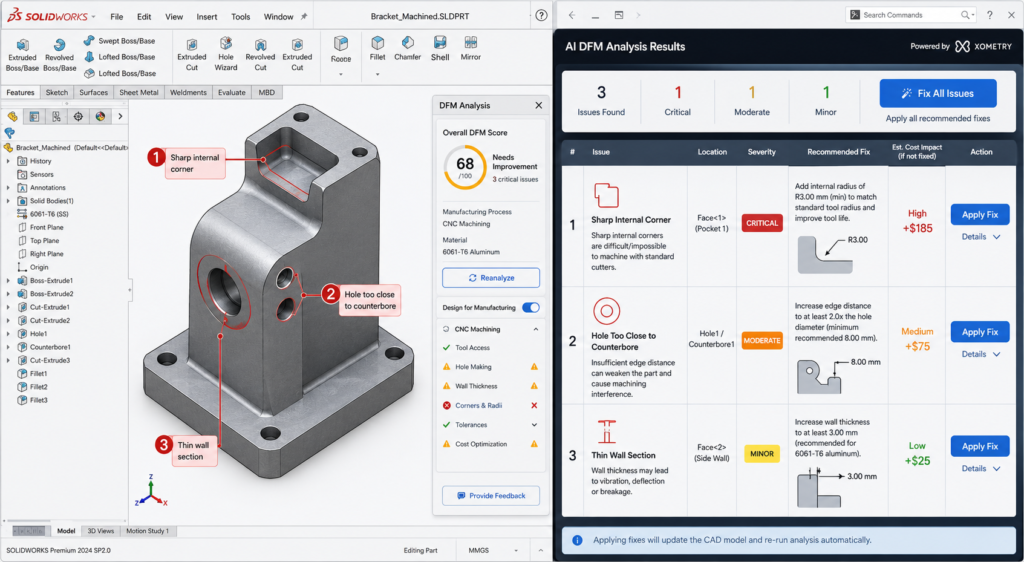
    AI DFM Analysis Interface Real-Time Feedback on CAD Model
    I DFM tools in 2026 flag issues as you model, not after the drawing is released. The fix takes seconds. The same fix after tooling takes months.
    ToolTypeWhat it checksCAD integration
    Xometry DFMCloud / uploadCNC, 3D printing, injection mouldingSTEP upload, instant feedback online
    CoLab AutoReviewCollaboration AIBest practices, company-specific standardsComment on 3D models in browser, no CAD needed
    InfinitFormIn-CAD AIActively optimises geometry, not just flagsDirect Fusion 360 and SolidWorks integration
    Autodesk DFM (Fusion)In-CAD integratedMachining, additive, sheet metalNative in Fusion 360 Manufacture workspace
    DFMXpressIn-CAD integratedMachining and injection moulding rulesNative in SolidWorks, runs on active model
    Dashnode AI DFMCloud / uploadCNC, turning, sheet metal, additiveSTEP/IGES upload, detailed feature-level report
    Protolabs DFMCloud / uploadInjection moulding, machining, 3D printingPart upload on quoting platform
    Fictiv DFM feedbackCloud / uploadAll common processes with manufacturabilityIntegrated in quoting and ordering workflow

    Static Rule Checkers vs AI-Driven Optimisers

    Traditional DFM tools, including the built-in DFMXpress in SolidWorks and early versions of cloud upload tools, apply static geometric rule sets. The rules are hard-coded: minimum corner radius, minimum draft, minimum hole diameter. When a feature violates a rule, the tool flags it. The engineer decides what to do.

    The limitation identified in a March 2026 CoLab analysis is that static rule checkers often generate high volumes of false positive alerts on designs that are technically acceptable for the specific tooling and process setup being used, even if they violate a generic rule. Engineers begin ignoring the alerts because too many are irrelevant. The signal-to-noise ratio degrades the value of the tool.

    AI-trained tools like InfinitForm and the newer generation of analysis engines trained on real manufacturing outcomes are beginning to address this. Rather than applying static geometric rules, they are trained on historical manufacturing data: which designs were quoted at a premium, which resulted in scrap, which required tool changes or process deviations. The feedback is contextual rather than generic, which reduces false positives and increases engineer trust in the outputs.

    InfinitForm: The Active Optimiser Approach

    InfinitForm represents a conceptually different approach from flagging tools. Rather than producing a list of problems for the engineer to solve, it applies automated geometry corrections directly to the CAD model: rounding corners, adding draft, adjusting wall thickness, all within the CAD environment without requiring the engineer to identify and manually fix each issue.

    For engineering teams processing high volumes of similar part geometries, this approach delivers significant throughput gains. For complex or novel designs where the engineering judgment behind each feature is important, the active optimiser approach needs careful supervision: automated corrections can change the design intent if the optimiser does not understand why a specific geometry exists. The engineer remains responsible for reviewing what the tool has changed.

    Cloud Upload Tools: Xometry, Protolabs, and Fictiv

    The cloud quoting platforms operated by Xometry, Protolabs, and Fictiv have built DFM analysis directly into their quoting workflow. When an engineer uploads a STEP file for a quote, the platform analyses the geometry against the selected process rules and returns both a price and a DFM report in the same response.

    This is probably the most consequentially positioned DFM feedback in any workflow: the engineer receives manufacturing feedback at the exact moment they are deciding whether to proceed with the design. A DFM issue flagged at the quoting stage costs an email and a model revision. The same issue discovered during production at that same supplier costs a production hold and an emergency re-design.

    Design for Assembly: The DFM Dimension That Affects the Whole Product

    If DFM focuses on how individual parts are made, Design for Assembly (DFA) focuses on how those parts come together. The principles are related but distinct, and both have direct effects on what appears on CAD drawings and assembly documentation.

    The Boothroyd-Dewhurst Principles That Still Apply in 2026

    Geoffrey Boothroyd and Peter Dewhurst codified the foundational DFA principles in the 1970s and 1980s. Four decades later, they remain the most consistently useful framework for assembly design decisions in CAD:

    1. Minimise the part count. Every part is a cost: material, manufacturing, inspection, inventory, and assembly time. Ask whether each part can be combined with an adjacent part without losing function. The part count is the single highest-lever driver of assembly cost.
    2. Design parts with unambiguous assembly orientation. If a part can be inserted in the wrong orientation, it will be, eventually, and the consequence will be a field failure or an assembly line stoppage. Use asymmetric geometry or assembly features to make the wrong orientation physically impossible.
    3. Design for top-down assembly. Where possible, design assemblies so each part is added from above and drops into place under gravity. This enables robotic assembly and reduces the number of repositioning steps required during manual assembly.
    4. Minimise fastener count and types. Each different fastener type requires a different tool, a different bin, and a different training requirement. Standardise on a minimum number of fastener types and sizes across a product family.

    How DFA Appears in CAD Drawings

    • Poka-yoke features (asymmetric tabs, locating pins, orientation notches) that make wrong assembly physically impossible
    • Assembly sequence notes specifying the order of sub-assembly and final assembly operations
    • Fastener callouts using the minimum number of standardised types across the assembly
    • Clearance specifications for assembly tool access (screwdriver, spanner, rivet gun)
    • Datum references that are accessible and measurable during assembly, not just during inspection

    Integrating DFM Into Your CAD Modeling Workflow

    DFM is most effective when it is not a separate activity from CAD modeling but a habit embedded in how the model is built. The following approach integrates DFM thinking at each stage of the modeling process without adding a separate review gate that is often compressed or skipped under schedule pressure.

    Before Opening the CAD Software

    The most important DFM decision is often the first one: selecting the manufacturing process. The process determines every subsequent DFM rule that applies. A design engineer who does not know whether a part will be machined, moulded, or fabricated cannot make any sensible geometry decisions because the constraints are completely different for each.

    If the process is not yet fixed, the concept design should use geometry that is agnostic enough to work for at least two candidate processes. Do not design sharp internal corners as a default if the part might be injection moulded, because adding draft later is more disruptive than designing with draft from the start. Use the concept stage to test which process is most appropriate before committing to the geometry that locks the choice.

    During Feature Creation

    Apply the most critical DFM rule for the chosen process to each feature as it is created. For machined parts: never create an internal pocket without specifying the corner radius in the feature. For moulded parts: apply draft before finalising any extruded wall. For sheet metal: check hole-to-bend clearance before placing any hole near a fold line.

    This is not additional work. It is the same modeling time applied with process awareness rather than pure geometry focus. The feature takes the same time to create. The only difference is whether the geometry that is created will need to be reopened and corrected when the DFM check is run after drawing completion.

    At Drawing Creation

    The drawing is where DFM is either confirmed or undermined by tolerances and notes. Three things matter most at the drawing stage.

    First, tolerance allocation: apply the tolerance table approach from earlier in this guide. Tight only where function requires it. General reference everywhere else. Add a general tolerance block in the title block referencing ISO 2768-m so the fabricator knows the default.

    Second, drawing notes: add process-specific notes that the drawing geometry alone cannot communicate. Tool access direction for inspection. Acceptable substitution materials if the primary specification is unavailable. Required testing before acceptance. Any feature that is critical to assembly or safety, marked as such.

    Third, run the AI DFM check before releasing. With tools like DFMXpress in SolidWorks or the Fusion 360 DFM workspace, this takes minutes and catches the geometric violations that might have slipped through modeling. Treat any critical finding as a mandatory fix, not an optional consideration.

    10 DFM Mistakes That Make Parts Expensive, Slow, or Wrong

    These are the DFM failures that come up most consistently across machined, moulded, and fabricated part reviews. Each one has a specific, measurable cost consequence and a straightforward prevention strategy.

    MistakeCost consequencePrevention
    Sharp internal corners in CNC pockets100% rejection or EDM rework: $500-$5,000/partSpecify minimum internal radius = tool radius + 10% in all pocketed features. Put it in the drawing notes.
    No draft on injection-moulded wallsMould tools reworked or part sticks on ejectionApply 1-2 degree draft to all walls in draw direction. Check mould flow simulation before tooling.
    Over-toleranced non-critical featuresQuote 30-50% higher than necessaryApply ISO 2768-m as default. Tighten only mating and functional interfaces. Mark critical dimensions clearly.
    Variable wall thickness in mouldingSink marks, warping, weld lines in productionDesign uniform wall thickness. Add ribs for stiffness. Transition thickness changes with tapered sections.
    Undercuts without side actions budgetedTooling cost overrun by 20-40%Identify all undercuts during DFM review and confirm whether side actions are in tooling budget and lead time.
    Material specified without temperWrong material properties, wrong machinabilityAlways specify full material standard: alloy, grade, temper, condition. Not ‘aluminium’ but ‘6061-T6 per AMS 2770’.
    Feature depth exceeding tool reachSpecial tooling ordered, programme delayedCheck all pocket depths against standard end mill reach ratios (max 4:1 depth:diameter for standard tooling).
    No tool access for inspectionIn-process inspection impossible, defects missedDesign inspection access for all critical features. Confirm measurement method with quality team before drawing release.
    Assembly sequence not consideredParts cannot be assembled in the designed orderBuild assembly sequence into notes. Check that every fastener has access and every sub-assembly can reach its position.
    Ignoring DFM until drawing is completeRework of finalised model is expensive and slowIntegrate DFM checks at the concept and mid-model stage, not as a gate after the drawing is finished.
    The DFM checklist for every drawing release:  Before releasing any CAD drawing: (1) Internal corner radii specified for all machined pockets. (2) Draft angles on all moulded or cast walls. (3) Wall thickness uniform or tapered for injection moulding. (4) Hole positions checked against bend distances for sheet metal. (5) Tolerance callouts reviewed, non-critical features set to ISO 2768-m. (6) Full material specification including temper and standard. (7) AI DFM check run and all critical findings resolved. (8) Assembly sequence and tool access confirmed where relevant. Two minutes of checking here prevents two weeks of rework later.

    DFM and Sustainability: The 2026 Dimension

    Sustainability-focused DFM is the fastest-growing component of the discipline in 2026. Regulatory pressure, customer expectations, and genuine cost savings from material efficiency are driving its adoption in sectors from consumer electronics to industrial equipment.

    Sustainability-focused design for manufacturability applies the same logic as cost-focused DFM: the design decision made at the CAD stage determines the material waste, energy consumption, and end-of-life recyclability of every part produced. Those outcomes cannot be improved significantly once the geometry is fixed and tooling is committed.

    • Material efficiency: topology-optimised geometry removes material from low-stress regions, reducing both part weight and the energy required to produce the raw material
    • Process selection for carbon footprint: machining from solid generates significant swarf waste; near-net-shape forming processes such as forging and casting use materially less input stock for the same output part
    • Fastener-free joining: snap-fit, press-fit, and adhesive-bonded joints reduce the number of dissimilar materials in an assembly, improving recyclability at end of life
    • Recycled material specification: calling out recycled aluminium alloys or post-consumer recycled polymer grades in the material specification is now a viable and often cost-neutral choice on many standard part types
    • Design for disassembly: ensuring that assembled parts can be separated at end of life without destroying either component, by avoiding permanent bonding of dissimilar materials and designing accessible fastener access

    Conclusion:

    The engineers who produce drawings that go directly to manufacture without a problem list are not the ones with the most experience. They are the ones who have internalised the constraints of the processes they are designing for, and who apply those constraints feature by feature as the model is built rather than as a checklist after it is finished.

    Design for Manufacturability is not complicated. The rules for each process are learnable in an afternoon. The tolerance strategy is a decision framework, not a table to memorise. The DFM habits, checking corner radii in machined pockets, adding draft to moulded walls, keeping holes away from bends, take no additional time once they are reflexive.

    What makes DFM expensive to ignore is the compounding cost of discovering problems late. What makes it worth prioritising is the compounding benefit of designs that work the first time: faster first article acceptance, fewer supplier queries, lower quoted prices, and manufacturing teams that trust the drawings they receive.

    In 2026, AI DFM tools from InfinitForm, Xometry, CoLab, and others are making it easier to catch the remaining violations that slip through even experienced design reviews. But the tools only work well on designs that were already being thought about correctly. The AI catches what the engineer missed. It does not replace the engineer thinking about manufacturability while the model is being built.

    Design the process into the part. The process cannot be designed in after the drawing is released.

    Frequently Asked Questions

    What is design for manufacturability (DFM)?

    Design for manufacturability (DFM) is an engineering methodology that ensures products are designed to be manufactured efficiently, reliably, and at minimum cost. It involves applying process-specific design rules during CAD modeling, reviewing geometry against manufacturing constraints before drawings are released, and selecting materials and tolerances that match what the production process can actually achieve. DFM reduces rework, scrap, and tooling corrections by catching problems at the design stage rather than on the shop floor.

    How does DFM affect CAD drawings specifically?

    DFM changes what a CAD drawing must communicate. A DFM-compliant drawing includes minimum internal corner radii that match available tooling, draft angles on moulded and cast walls, hole-to-bend distances for sheet metal, and selective tolerances that are tight only on functional interfaces while leaving the rest to ISO 2768 defaults. The manufacturing process determines what the drawing must say. Without DFM applied, drawings routinely specify features that are impossible for the intended process, tolerances that add cost without functional benefit, and geometry that a fabricator must query or reject.

    When in the design process should DFM be applied?

    DFM should be applied at the concept stage, before detailed CAD modeling begins. The cost of fixing a manufacturing issue increases by roughly a factor of 10 at each development stage. Fixing a DFM issue at concept costs engineering time only. The same problem found after tooling is cut costs tens of thousands to hundreds of thousands of dollars and delays the programme by months. The most effective DFM is not a gate review at drawing completion but a continuous habit of checking each feature against the target process as the model is built.

    What are the most important DFM rules for CNC machining?

    The most critical DFM rules for CNC machining in CAD are: minimum internal corner radius equal to the cutter radius plus ten percent, maximum pocket depth to width ratio of 4:1 for standard tooling, uniform wall thickness to avoid chatter and deflection, feature access from two setups maximum, chamfers rather than sharp edges on all transitions, and thread relief grooves on all threaded sections. Each of these rules is directly reflected in how the part is dimensioned and annotated on the drawing.

    What is the difference between DFM and DFA?

    DFM (Design for Manufacturability) focuses on how individual parts are made. DFA (Design for Assembly) focuses on how parts are assembled together. DFM asks whether a single part can be manufactured efficiently by the intended process. DFA asks whether the number of parts can be reduced, whether fasteners are accessible, whether parts can be assembled in only one orientation, and whether the assembly sequence is practical. Both disciplines are related and both affect CAD drawings, but they address different failure modes in product development.

    How does AI DFM analysis work in 2026?

    AI DFM tools in 2026 analyse CAD geometry automatically when a model is uploaded or as it is being built inside the CAD environment. They check features against process-specific rule libraries, flag violations with location, severity, and suggested fix, and in the most advanced tools such as InfinitForm, they automatically optimise the geometry rather than simply flagging the problem. Tools like Xometry and Protolabs integrate DFM feedback directly into the quoting workflow, so engineers receive manufacturability feedback at the same time as they receive a price. The shift from static geometric rules to AI trained on manufacturing outcomes is making DFM analysis faster, more accurate, and more accessible to engineering teams without dedicated DFM specialists.


    ‘Boothroyd Dewhurst: the founding research organisation for DFMA methodology‘