Model-Based Definition (MBD) is a way of defining a part using an annotated 3D CAD model instead of a 2D drawing. The model carries the geometry, dimensions, tolerances and notes in one place, so the 3D model is the single source of truth for design, machining and inspection.
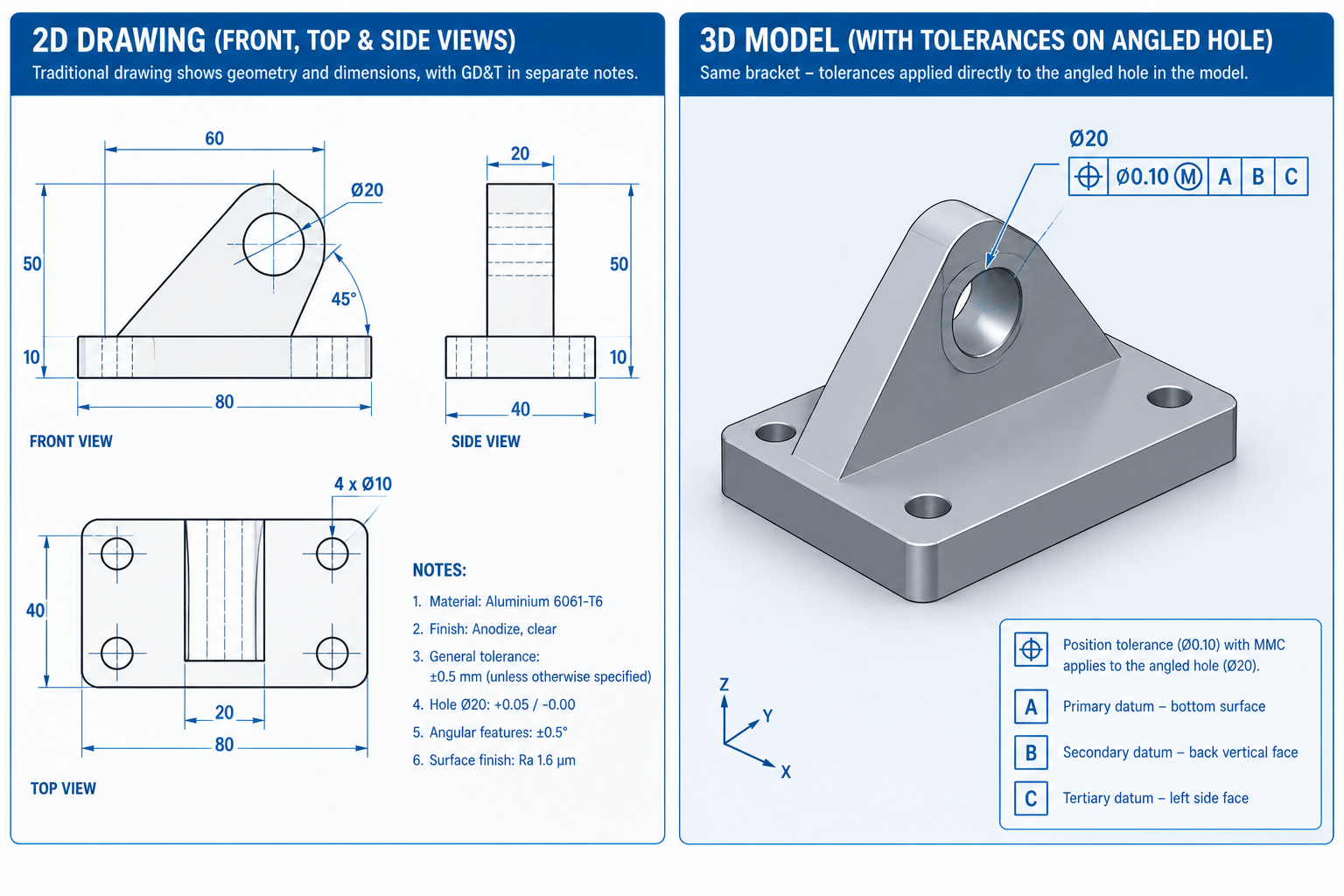
Why MBD Exists: A Problem 2D Drawings Can’t Fully Solve
Here is a scenario that plays out in real shops. A design change moves a hole. The engineer updates the 3D model correctly. But one of the three views on the drawing still shows the old hole position.
The CNC programmer works from that view. Parts are made to the wrong position. Nobody notices for months, because the shop machined exactly what the approved drawing showed.
The shop did nothing wrong. The process did. Two documents were meant to describe one design, and nothing forced them to stay in sync.
MBD fixes this by removing the second document. There is one model, so there is one place to keep current.
What Is Model-Based Definition, in Plain Terms?
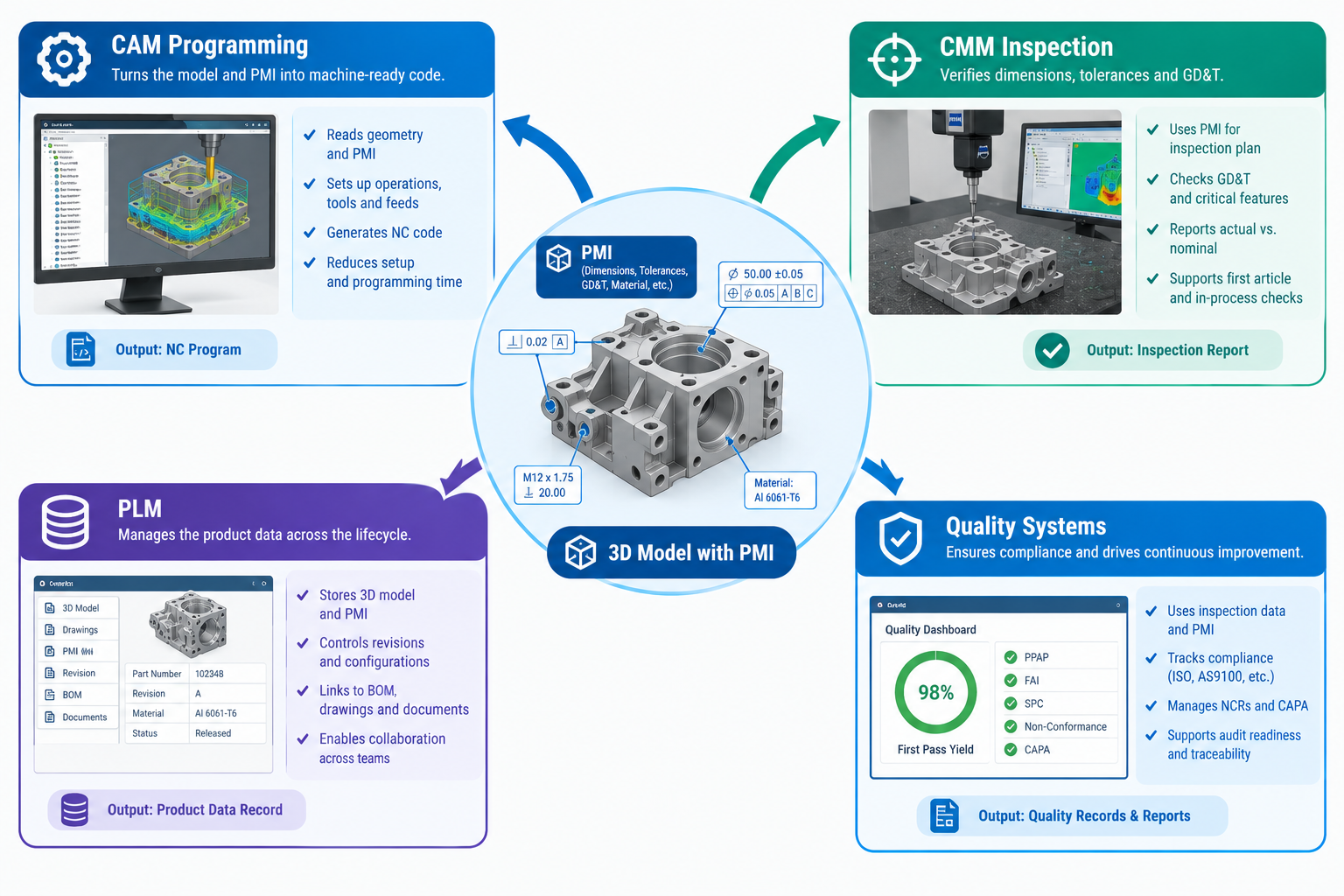
In MBD, the 3D model holds more than shape. It also carries product and manufacturing information (PMI). That includes dimensions, tolerances, GD&T symbols, surface finish, material and process notes.
Each note is attached to the exact feature it describes. A positional tolerance sits on the hole itself, not in the margin of a flat view.
MBD does not make engineering looser or simpler. The same GD&T rules, the same datum logic and the same tolerance discipline apply. What changes is where the information is stored and who, or what, can read it.
In a drawing, a person reads the note and types it into the next system. In MBD, software such as CAM and CMM programs can read the data directly.
MBD vs 2D Drawings: Key Differences
| Aspect | 2D drawing-based | Model-based definition |
|---|---|---|
| Source of truth | The drawing is legally binding. The 3D model is a reference. | The annotated 3D model is the only binding source. |
| Where tolerances live | On flat views. The reader rebuilds the 3D shape in their head. | Attached to the 3D feature, viewable from any angle. |
| Data use downstream | People read the drawing and re-enter data by hand. | CAM, CMM and quality software read PMI directly. |
| Design changes | Update the model and every drawing view, then check both. | Update one model. Everyone sees the current version. |
| Complex shapes | Curved or freeform surfaces are hard to define in 2D. | Tolerances attach straight to the curved surface. |
| Long-term reuse | Someone must re-interpret old drawings. | Structured data can be reused by future tools. |
The biggest row is the first one. Once only one document is binding, the sync problem goes away.
What a Complete MBD Dataset Contains
MBD is not “a 3D model with a few dimensions added.” A production-ready dataset has several parts, and each one has a job.
| Component | What it holds | Common standard or format |
|---|---|---|
| 3D geometry | The exact solid or surface shape of the part | Native CAD, or STEP AP242 (neutral format) |
| PMI | Dimensions, tolerances, GD&T, finish, material and process notes | ASME Y14.41, ISO 16792 |
| Datums and GD&T structure | The reference frame used to measure the part | ASME Y14.5 |
| Saved 3D views | Named, uncluttered views of selected annotations for easy review | Native CAD view tools, 3D PDF |
| Metadata | Part number, revision, material spec, weight, finish | PLM fields |
| Inspection data | Characteristics and acceptance criteria that drive CMM programs | QIF (Quality Information Framework) |
PMI does most of the work
Geometry alone can’t tell a CAM programmer the tolerance on a hole. It can’t tell a CMM which features to measure either. PMI carries that information.
A 3D model without properly authored PMI is just a reference model. It is not an MBD dataset, no matter how accurate the geometry is.
The Five Stages of MBD Adoption
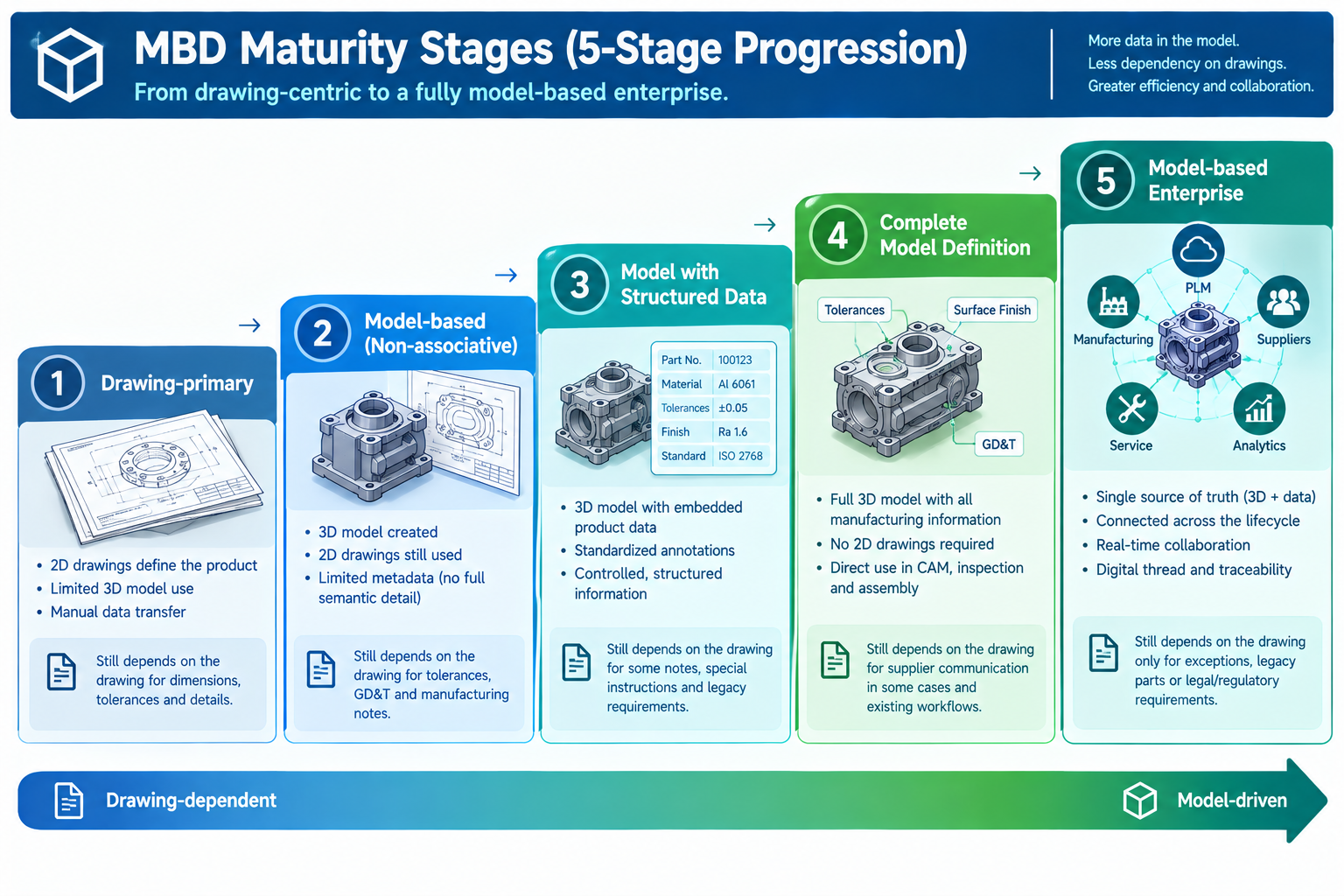
Few companies jump straight from drawings to full MBD. Most move through stages, handing more authority to the model at each step.
| Stage | What it means | What still relies on the drawing |
|---|---|---|
| 1. Drawing-primary | The drawing is the only binding document. The model mainly produces drawing views. | Everything |
| 2. Model and drawing hybrid | Both are controlled. The drawing is still binding. The model is used for CAM and visualisation. | Contract, quality acceptance, and any disputes |
| 3. Model-primary with reference drawing | The annotated model is binding. A simple drawing is made only for partners who can’t use the model yet. | Only external partners not yet equipped for models |
| 4. Model-only (full MBD) | The model is the only deliverable. No drawing is made. | Nothing |
| 5. Model-based enterprise (MBE) | The model feeds a full digital thread across design, planning, quality and support. | Nothing internally |
Why Stage 2 is the risky one
Most manufacturers sit in Stage 2. It keeps the main risk of drawings, two documents that can drift apart. It also delivers little of MBD’s benefit, because CAM and CMM programming often still starts from the drawing.
Think of Stage 2 as a stop on the way, not a destination. The opening scenario is exactly what Stage 2 looks like when it goes wrong.
Benefits of Model-Based Definition
The gains are easiest to judge when you tie them to metrics you already track.
- Fewer drawing-model mismatches. With one binding source, there is nothing to fall out of sync. Look at nonconformance reports and build-to-wrong-revision incidents.
- Faster CAM and CMM programming. Software reads the PMI instead of a person re-typing it. Track programming hours per part.
- Fewer misread tolerances on complex parts. Curved and freeform surfaces are easier to define in 3D than in a handful of section views.
- Shorter design change cycles. You update one dataset, not a model plus every affected view.
- Easier digital manufacturing. Structured data plugs into automation, digital inspection and digital thread systems.
Be realistic about the limits. Benefits only show up when the drawing truly loses its binding status. They also need CAM, CMM and PLM tools that can actually read PMI. And simple prismatic parts gain less than turbine blades, body panels or complex castings.
Where MBD Is Used Today
Adoption varies by industry. It depends on customer pressure, part complexity, volume and traceability rules.
| Industry | Why it adopts MBD | Maturity |
|---|---|---|
| Aerospace and defense | Prime contractors and government customers require model-based deliverables. Programs run for decades, so structured data has lasting value. | High |
| Automotive | High volumes and complex body and powertrain shapes. | Moderate to high, strongest at OEMs and Tier 1 suppliers |
| Medical devices | Strict traceability and tight control of safety-critical dimensions. | Moderate and growing |
| Electronics and precision instruments | Tiny, dense features are hard to dimension clearly in 2D. | Moderate to high |
| General industrial equipment | Pressure to cut programming time on high-mix, low-volume work. | Lower to moderate |
In defense work, MBD requirements often trace back to MIL-STD-31000 for technical data packages. Aerospace leads because large customers can require MBD from their suppliers. Other industries tend to adopt it from the shop floor up, usually to save programming time.
Common Barriers and How to Handle Them
| Barrier | Why it slows things down | What works |
|---|---|---|
| Customers and suppliers still want drawings | You end up maintaining both | Use Stage 3 deliberately. Make a reference drawing only when someone truly needs it. |
| Software and tooling cost | Downstream CAM and CMM tools must read PMI, and staff need training | Start with your most complex or highest-volume parts |
| Messy 3D annotation | Cluttered PMI is as hard to read as a bad drawing | Set an internal annotation standard with standard views and review checklists |
| Training gaps | Teams have years of 2D habits | Train each role. Pair new users with experienced mentors. |
| Long-term file access | Native CAD formats change across versions and vendors | Archive in a neutral format such as STEP AP242 as well |
| Culture | Experienced staff doubt that a new method is as rigorous | Involve drawing veterans when writing the standard |
How to Start With MBD: A Simple Plan
- Check your downstream tools first. Find out whether your CAM, CMM and quality software can read PMI. Authoring PMI that nothing consumes gives you almost no return.
- Pick a pilot group. Choose your most complex or highest-volume part families. They show the payoff fastest.
- Write an annotation standard. Define how PMI is placed, which saved views to use, and how reviewers check it.
- Train every role. Designers, programmers, machinists and inspectors all need to read the model.
- Retire the drawing’s authority. Make the model binding for the pilot parts. Produce a reference drawing only if a partner needs one.
- Measure and expand. Compare nonconformances, programming time and change cycle time against your own baseline. Then move to the next group of parts.
Frequently Asked Questions About MBD
What is model-based definition?
Model-based definition is a method where an annotated 3D CAD model, not a 2D drawing, is the authoritative description of a part. It carries geometry, tolerances, GD&T and notes together. Manufacturing and inspection software can read that data directly.
What is the difference between MBD and a 2D drawing?
A 2D drawing spreads dimensions across flat views, and people must interpret them. MBD attaches the same information to the 3D features and makes it machine-readable. The key difference is authority: in MBD, the model is the only binding document.
What is PMI in MBD?
PMI stands for product and manufacturing information. It covers dimensions, tolerances, GD&T symbols, surface finish and process notes attached to the 3D model. PMI is what CAM and CMM software reads to program machining and inspection.
Can you still make 2D drawings with MBD?
Yes. Many MBD users still make drawings for partners who can’t read models yet. The difference is that the drawing is non-binding and derived from the model. The model stays the only authoritative source.
What software do you need for MBD?
Most major CAD systems, including CATIA, NX, Creo and SolidWorks, can author 3D PMI. The bigger need is downstream: CAM and CMM tools that read PMI, and PLM systems tied to the model. Test those before a wide rollout.
Which standards govern MBD?
ASME Y14.41 covers digital product definition data practices, and ISO 16792 is its international counterpart. ASME Y14.5 covers the GD&T rules used inside the model. Defense programs may also cite MIL-STD-31000.
What is the difference between MBD and MBE?
MBD defines a single part using the model. Model-based enterprise (MBE) extends that model into a digital thread across planning, quality, supply chain and in-service support. MBD is the foundation that MBE builds on.
Conclusion: One Source of Truth Is the Point
The real value of MBD is not nicer 3D software. It is having one authoritative place where design intent lives.
When the model is the only binding document, a drawing can’t silently drift out of date. And when the data is structured, software can use it without anyone re-typing it.
If you are in Stage 2 today, the practical next step is simple. Pick one complex part family, confirm your downstream tools can read PMI, and make the model binding for that group.
For related reading, see our guides on why GD&T matters in high-precision industries, datum selection best practices, tolerance stack-up, digital twin applications in modern engineering and digital twins vs BIM.
Reference: ASME Y14.41, Digital Product Definition Data Practices, the US standard for 3D annotation and digital product data.