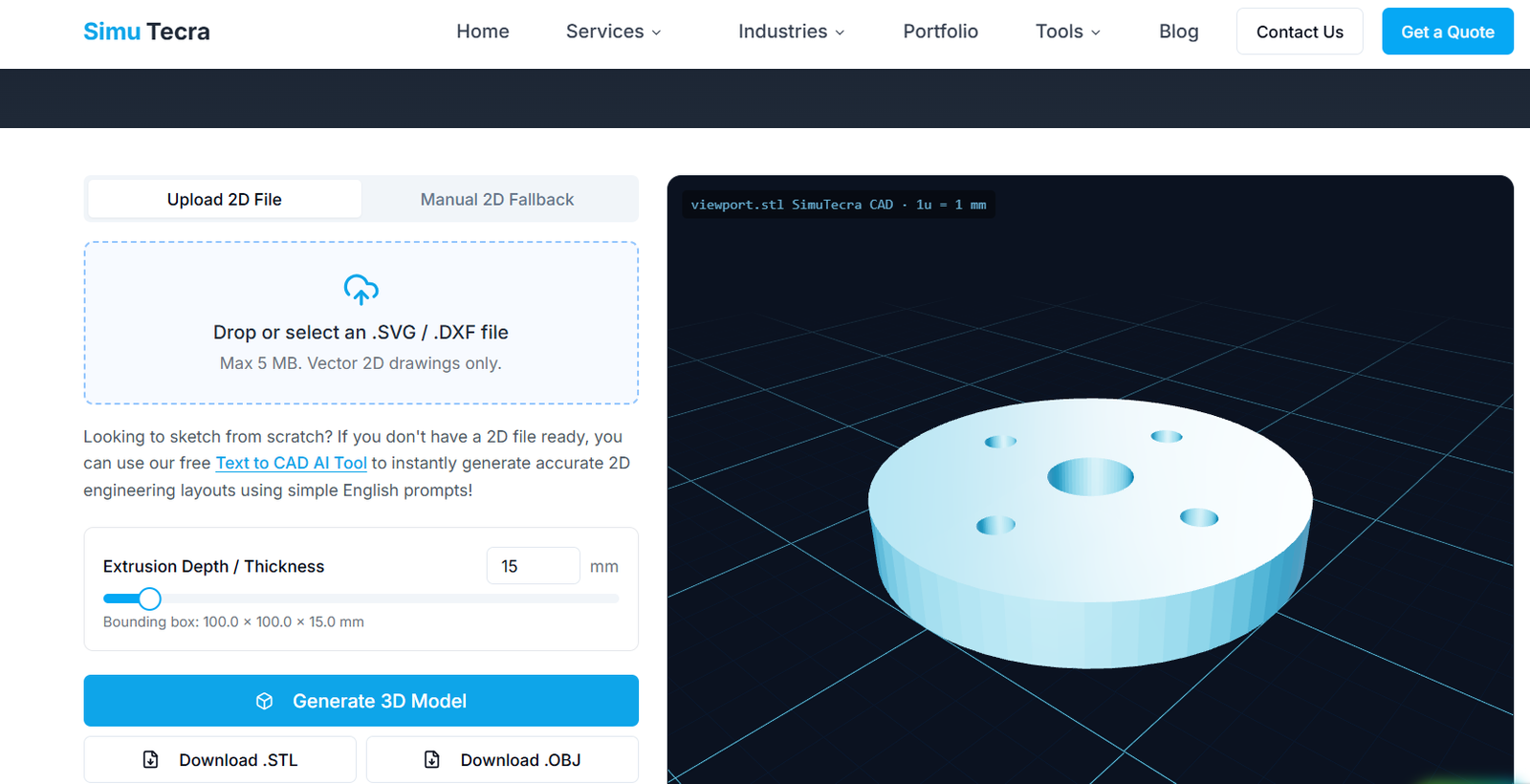
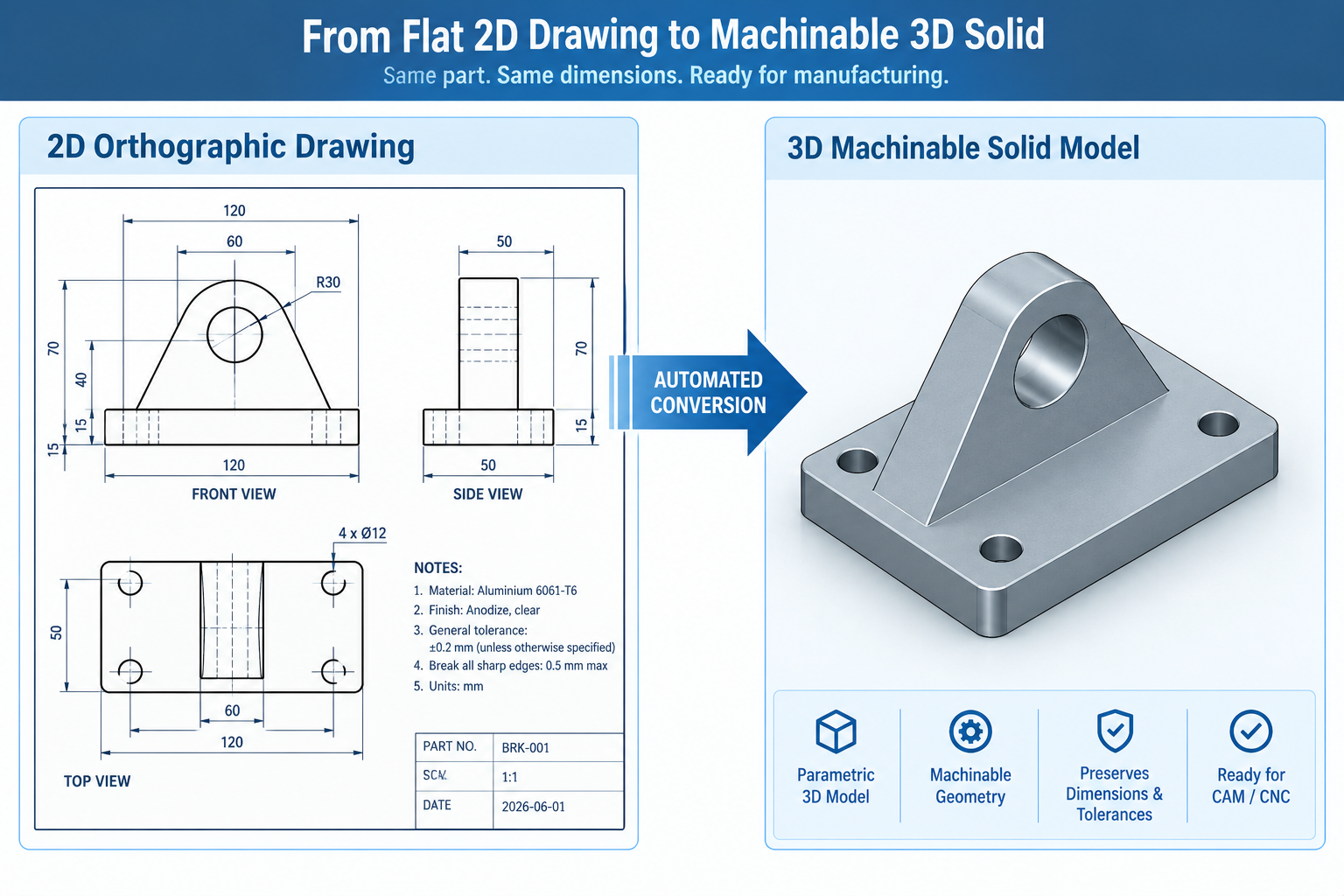
If you’re still manually rebuilding 3D models from old 2D drawings, you’re spending hours on work that modern tools can now do in minutes. Automating 2D to 3D CAD conversion for CNC machining means using software, rather than a person at a keyboard, to turn a flat drawing into a solid model a CAM program can actually machine from.
QUICK ANSWER Yes, you can automate 2D to 3D CAD conversion using one of four methods: native CAD conversion wizards, dedicated conversion software, AI-based reconstruction, or custom API scripting. For CNC machining specifically, the output needs to be a true parametric STEP solid, not just a visual mesh, and it should always be checked for dimensional accuracy before it goes to CAM.
This guide covers all four automation methods side by side, which file format actually works for CNC, how accurate automated conversion really is, and a step-by-step process to get from a flat drawing to a CNC-ready 3D model without wasting a machining run on a bad file.
What Does It Mean to Automate 2D to 3D CAD Conversion?
Automating 2D to 3D CAD conversion means letting software interpret a 2D drawing’s lines, arcs, and dimensions, and reconstruct it as a three-dimensional solid, without an engineer manually redrawing every feature by hand.
This matters specifically for CNC machining because CAM software doesn’t cut from a 2D drawing. It needs a 3D solid model to calculate toolpaths, cutter clearances, and machining operations. If your only source is an old drawing, a scanned PDF, or a customer sketch, automated conversion is what bridges that gap without a full manual rebuild.
4 Ways to Automate 2D to 3D CAD Conversion
There isn’t one single tool that does this for everyone. The right method depends on your drawing volume, your budget, and how much accuracy you need. Here are the four real approaches used in production today.
Automation Method
How It Works
Best For
Main Limitation
Native CAD conversion tools
Built-in wizards inside SolidWorks, Autodesk Inventor, Fusion 360, and Siemens NX that read a 2D DXF/DWG sketch and extrude, revolve, or auto-sequence it into a solid model
Teams already standardized on one CAD platform who need a fast, in-house way to rebuild simple to moderately complex parts
Struggles with parts that have implied features (fillets, complex holes) not explicitly drawn on every view
Dedicated CAD conversion software
Standalone tools such as Scan2CAD or Aspose.CAD that specialize in reading raster images, PDFs, or scanned drawings and outputting clean, editable vector or solid geometry, often with batch and API automation
Digitizing large archives of legacy paper drawings or scanned PDFs at scale, especially for spare-parts and MRO workflows
Output is typically a clean 2D vector file or basic solid, still needs review before it’s treated as production CAD
AI and deep-learning reconstruction
Machine learning models trained to recognize geometric features across multiple 2D views (or even photos) and infer a 3D shape, an active and fast-moving research area as well as a growing commercial category
Fast first-pass geometry when the original CAD file is lost but a drawing, PDF, or photo still exists, and speed matters more than final precision
Output is usually a mesh or an unverified solid: no GD&T, no material data, and dimensions that must be checked before machining
Scripting and API-driven automation
Custom scripts built on CAD APIs (NX Open, SolidWorks macros, Fusion 360’s Python API) that batch-process large sets of similar 2D drawings into 3D models using a repeatable, rule-based logic
Manufacturers with high volumes of similar, well-standardized drawings, such as a family of brackets or fasteners, where the same rules apply every time
Requires upfront engineering investment to build and maintain the script; not cost-effective for one-off or highly varied parts
Feature Recognition vs. AI Mesh Generation: Know the Difference
This is the distinction most articles on this topic skip, and it’s the one that actually matters most. Feature recognition (used by native CAD tools and dedicated conversion software) analyzes geometric intent, holes, pockets, fillets, and rebuilds them as true, editable, dimensioned solid features.
AI mesh generation (used by many newer AI tools) predicts an approximate 3D shape from limited 2D input. The result often looks convincing on screen, but it’s typically a mesh with no feature history, no tolerances, and no guarantee the dimensions match the original drawing exactly. Recent peer-reviewed research on deep-learning-based reconstruction confirms this gap is a structural limitation of current methods, not just a rough edge that will disappear with the next software update (more on that in the accuracy section below).
Which File Format Actually Works for CNC Machining?
Automation only helps if the output file is something your CAM software can actually use. Here’s how the common formats stack up.
File Format
Geometry Type
Good for CNC Machining?
Why
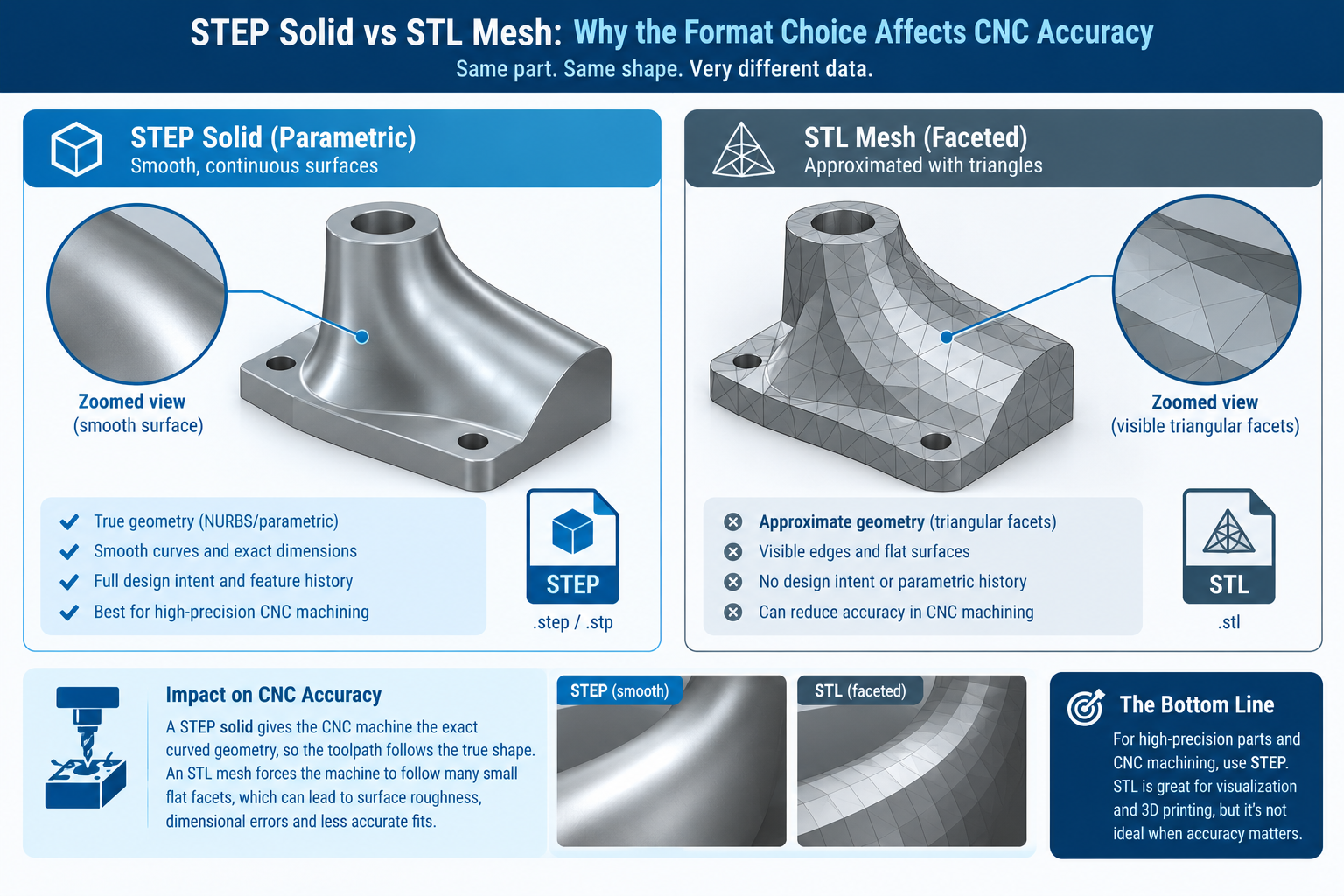
STEP (.step/.stp)
True parametric/B-rep solid
Yes , the standard choice
Preserves exact solid geometry that CAM software can read directly for toolpath generation
DXF/DWG
2D vector lines and arcs
Only for 2D profile cutting
Fine for laser, waterjet, or simple 2D milling; not a 3D solid on its own
STL
Triangulated mesh (approximation)
Not recommended for milling
Approximates curved surfaces with flat facets, which can introduce dimensional error on tight-tolerance features
IGES (.igs)
Surface/solid model
Usable, but aging
Still supported by most CAM systems, though STEP has largely replaced it as the preferred neutral format
If a conversion tool only offers STL output, treat it as a visualization step, not a finished CNC-ready file. For milled or turned parts, always push for a STEP solid before it goes anywhere near a CAM program.
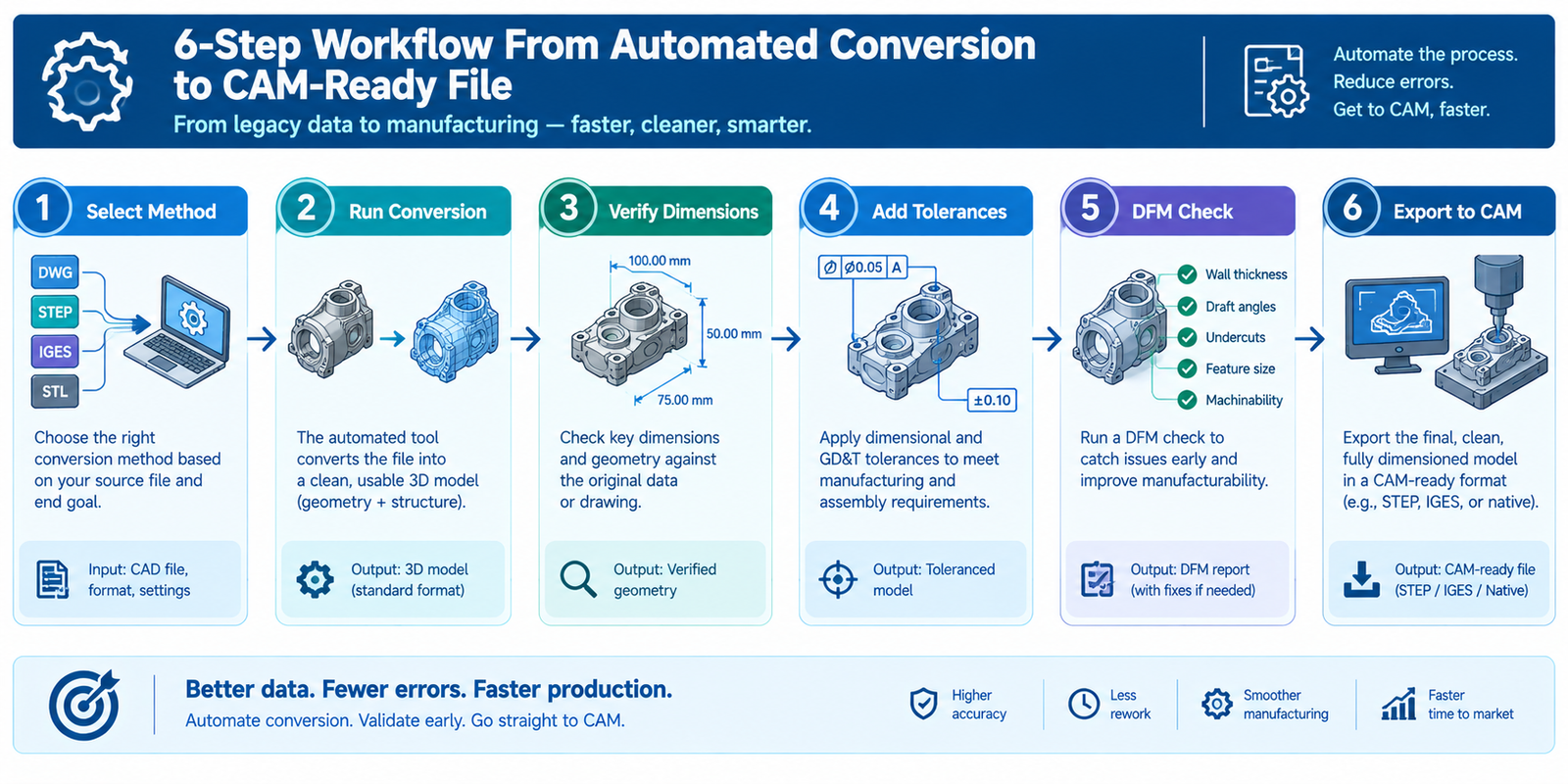
Step-by-Step: From 2D Drawing to CNC-Ready 3D Model
Choose the right automation method: match the method to your situation using the table above, don’t default to whatever tool you already own if it’s the wrong fit for the job.
Run the automated conversion: feed in the cleanest source file available, native DXF/DWG beats a scanned PDF, and a scanned PDF beats a blurry photo.
Verify every critical dimension: cross-check the converted model’s key dimensions against the original drawing before trusting it, especially on mating features and hole positions.
Add tolerances and GD&T: automated conversion rarely carries tolerance information forward, so this has to be added manually to define acceptable variation for the machinist.
Run a design-for-manufacturability (DFM) check: confirm the geometry is actually machinable, watch for internal corners, deep pockets, and wall thicknesses your specific CNC setup can’t reliably hold.
Export to STEP and import into CAM: generate toolpaths only once the solid model has passed the checks above, not directly from the raw conversion output.
How Accurate Is Automated 2D-to-3D Conversion, Really?
Accuracy depends entirely on the method and the source drawing quality. Native feature-recognition tools working from a complete, well-dimensioned DXF file can rebuild simple to moderately complex parts with very high fidelity, because they’re following explicit geometric rules, not guessing.
AI-based reconstruction is a different story. It’s genuinely useful for getting a fast first-pass shape when the original CAD file is gone and only a drawing or photo survives, but current research is clear that the output should be treated as a reference model, not production-ready CNC data, until an engineer verifies it. A 2026 peer-reviewed study on deep-learning-based 2D-to-3D conversion found that combining automated feature recognition with structured verification meaningfully reduced dimensional errors compared to AI inference alone, reinforcing that human review is still the difference between a usable model and a expensive machining mistake.
Common Mistakes to Avoid
Sending an STL straight to CAM: meshes approximate curves with flat facets, which can create real dimensional error on toleranced features.
Trusting AI-generated geometry without verification: a visually convincing model is not the same as a dimensionally accurate one.
Skipping GD&T entirely: without tolerance information, a machinist has no way to know what deviation is actually acceptable.
Using one tool for every job: a batch-scripting solution built for a family of brackets won’t serve you well for a single, highly custom part, and vice versa.
Assuming automation removes the need for review: automation speeds up the first draft; it doesn’t replace an engineer’s final check.
Frequently Asked Questions
Q: Can AI convert a 2D drawing into a CNC-ready 3D model?
AI can generate a 3D shape from a 2D drawing quickly, but the output is usually a mesh that needs dimensional verification before it’s safe to machine from. Treat it as a fast first draft, not a finished CNC file.
Q: What is the best file format for CAD to CNC conversion?
STEP is the best format for CNC milling and turning because it preserves true, editable solid geometry. STL is fine for 3D printing but can introduce dimensional error on machined parts.
Q: How accurate is automated 2D-to-3D CAD conversion?
Rule-based feature recognition from a clean, complete drawing is typically very accurate. AI-based reconstruction is faster but less reliable and should always be verified against the original dimensions before use.
Q: What software automatically converts 2D CAD drawings to 3D models?
Simutecra 2D CAD to 3D CAD, SolidWorks, Autodesk Inventor, and Fusion 360 include built-in conversion tools, while Scan2CAD and similar dedicated software specialize in converting scanned or legacy 2D drawings at scale.
Q: Do I still need an engineer to review an automatically converted 3D model?
Yes. Automation speeds up the initial rebuild, but dimension verification, tolerance assignment, and a manufacturability check still require engineering review before the file goes to CAM.
Conclusion
Automating 2D to 3D CAD conversion for CNC machining can save real time, but only if you match the method to the job and never skip verification. Use native or dedicated feature-recognition tools when accuracy matters most, reach for AI reconstruction when speed matters more than precision and the file can be reviewed afterward, and always export a true STEP solid, with tolerances added, before it reaches your CAM software.
The Problem: Your Design and Simulation Stages Are Still Disconnected
Here’s a situation most mechanical engineers know well. You finish a CAD model, export the geometry, hand it to a simulation analyst (or switch tools yourself), spend half a day setting up the mesh and boundary conditions, run the solver overnight, get results that point to a design change, and then go back to the beginning.
That cycle, design, export, setup, simulate, revise, is slow. It was designed for a world where simulation was expensive and rare. But in 2026, simulation tools are faster and AI is everywhere. The bottleneck isn’t the solver anymore. It’s the AI CAD pipelineconnecting everything together.
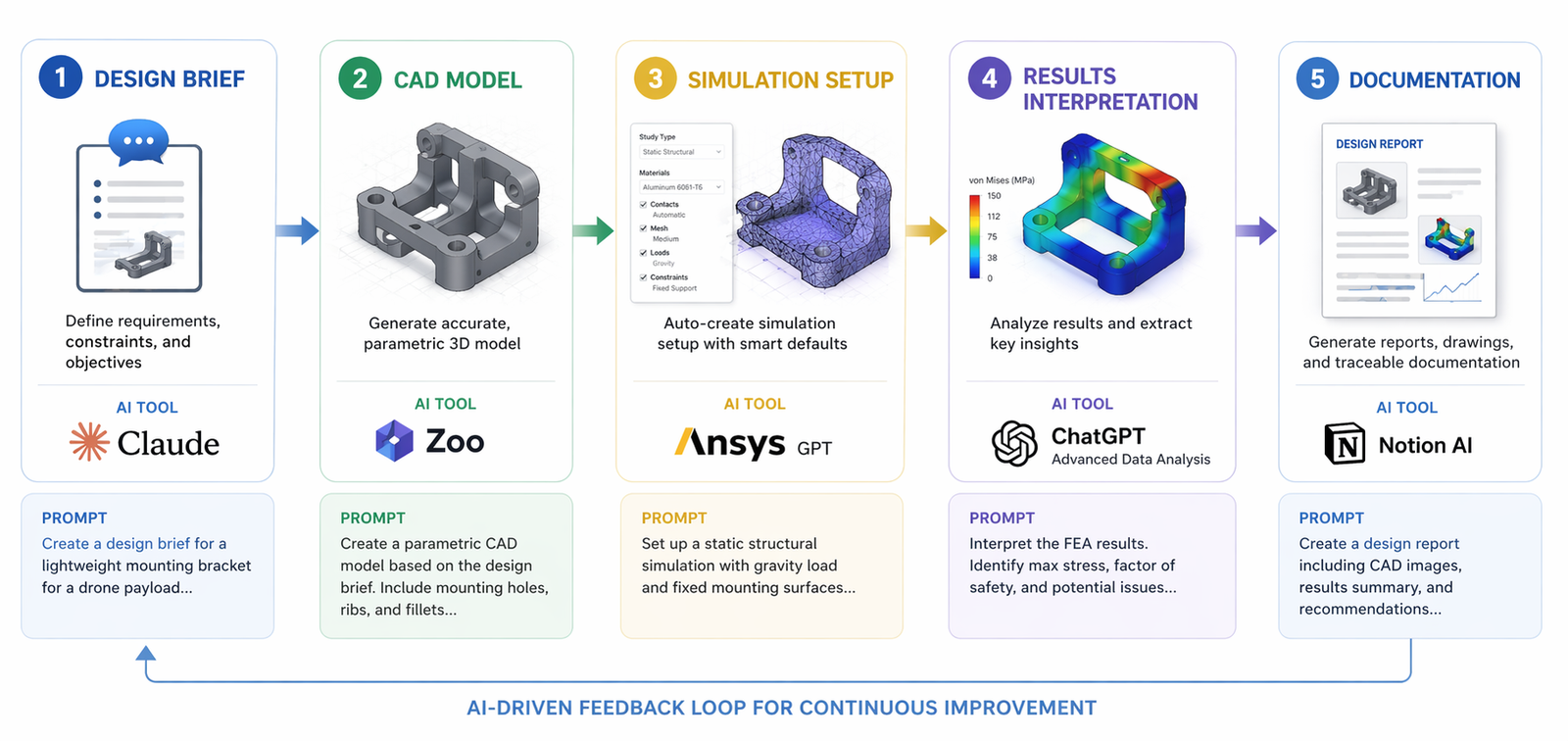
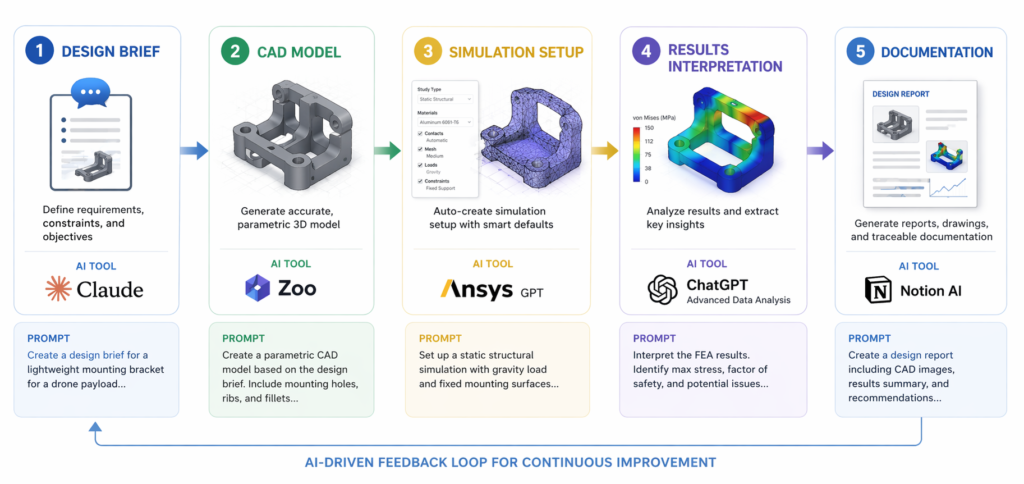
What engineers actually need is an AI-driven engineering pipeline, a connected sequence of intelligent tools and prompts that carries a design from concept through CAD modelling, FEA or CFD setup, results interpretation, and documentation without the constant manual handoffs that kill momentum.
That’s exactly what this guide builds. Step by step. With real prompts you can use today.
3 hrs/daysaved on average
Industry benchmarks for 2026 show that integrating AI into the CAD-to-simulation workflow saves engineers an average of 3 hours per day, reclaimed from manual data extraction, repetitive setup, and documentation (Energent.ai, 2026).
94.4% AI accuracy
Leading AI data agents now achieve up to 94.4% accuracy when reading complex unstructured engineering documents and schematics, dramatically reducing downstream specification errors.
What an AI Pipeline for CAD and Simulation Actually Looks Like
Before building one, it helps to have a clear mental model. An AI pipeline for CAD and simulation is not a single tool, it’s a chain of connected AI interactions, each stage feeding the next with better, more specific information.
Think of it like a relay race. The first runner (your LLM for engineering design) carries the design intent. The second (your CAD tool or text-to-CAD platform) turns that intent into geometry. The third (your FEA or CFD solver with AI setup) validates the geometry against physics. The fourth (your AI interpretation layer) tells you what the results mean and what to change. The baton never drops. The pipeline keeps moving.
What makes this different from just ‘using AI tools’ is the prompt-based CAD workflow that threads through every stage. Prompts aren’t just for chatting, they’re the connective tissue of the pipeline. The right prompt at each stage ensures the output of one tool becomes a clean, usable input for the next. That’s what CAD simulation using prompts actually means in practice.
Prompt as brief: At the design stage, a structured prompt is your engineering requirements document, it captures loads, materials, constraints, and manufacturing intent in a format AI tools can act on directly.
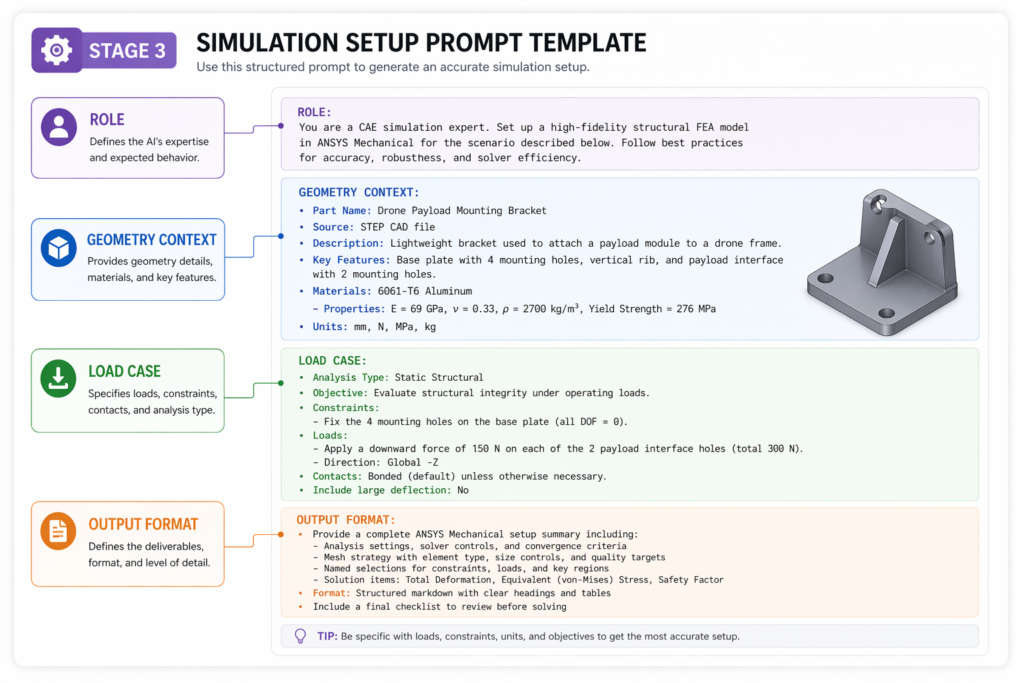
Prompt as translator: Between CAD and simulation, a prompt converts geometry decisions into AI prompts for FEA and simulation, boundary conditions, mesh guidance, load cases, and solver settings expressed in clear language.
Prompt as analyst: After simulation, a prompt frames your results for AI interpretation, ‘This stress concentration is at the fillet. What does that indicate and what geometry change would address it?’
Prompt as documenter: At the close of the pipeline, a prompt generates technical reports, design summaries, and revision notes automatically, closing the AI design loop cleanly.
How to Build an AI CAD Simulation Pipeline, The 5 Stages
Here is how to build a working AI pipeline for CAD and simulation using prompts. Each stage includes the tool stack, the prompt structure, and what to hand forward to the next stage. These aren’t theoretical, they’re the practices that effective AI simulation workflow teams are using in 2026.
1. Design Brief, Define Intent Before You Touch the Software Most pipeline failures start here. Engineers open CAD immediately and start modelling before the requirements are precise. An AI-driven pipeline starts with a structured brief that captures everything the downstream stages need: geometry constraints, loads, materials, manufacturing method, and success criteria. Prompt, Stage 1 Design Brief (use with Claude AI): “You are a senior mechanical engineer. I need to design [part description]. Loads: [specify]. Material: [specify]. Manufacturing: [specify, e.g. CNC aluminium]. Key constraints: [tolerances, fits, standards]. Output a structured engineering brief with: (1) critical dimensions to define, (2) primary failure modes to simulate, (3) recommended simulation type (FEA/CFD/thermal), (4) suggested boundary conditions.”
Keywords active: Claude AI engineering prompts · LLM for engineering design · prompt-based CAD workflow
2. CAD Modelling, Geometry From Your Brief Take your Stage 1 brief directly into your CAD or text-to-CAD tool. The brief is already formatted in the way AI geometry tools work best: specific, dimensioned, and constraint-aware. This is where connecting CAD to simulation with AI begins, the model you build now must be simulation-ready from the start. Prompt, Stage 2 CAD Model (use with Zoo, AdamCAD, or SolidWorks + Claude): Based on this engineering brief: [paste brief from Stage 1]. Generate a [STEP / parametric feature list / AutoLISP script] for this part. Ensure all simulation-critical features, fillets, contact surfaces, load application areas, are explicitly defined. Flag any geometry that may require simplification before meshing.” Keywords active: connecting CAD to simulation with AI · Zoo text-to-CAD pipeline · CAD AI prompts
3. Simulation Setup, The Bridge Most Engineers Get Wrong This is the stage where most manual pipelines collapse. Moving a CAD model into FEA or CFD correctly requires specialist knowledge of meshing, boundary conditions, and solver settings. AI FEA automation now handles the bulk of this, but only if you feed it well-structured prompts. Prompt, Stage 3 Simulation Setup (use with SimScale AI, Ansys, or Claude for setup notes): “I have a [material + geometry description] part. Load case: [describe loads and constraints]. I need to set up a [static structural / modal / CFD] simulation. Output: (1) recommended mesh density at critical features, (2) boundary condition checklist, (3) material properties to confirm, (4) expected failure modes to monitor in post-processing, (5) convergence criteria.” Keywords active: AI prompts for FEA and simulation · CAD to FEA automation · Ansys SimAI pipeline
4. Results Interpretation, From Numbers to Engineering Decisions Raw simulation output, stress plots, displacement fields, pressure distributions, is information, not insight. This is where the AI interpretation layer converts numbers into engineering decisions. The prompt structures your results in a way that surfaces the most important findings and recommends specific design changes. Prompt, Stage 4 Results Interpretation (use with Claude AI): “I have run a static FEA on a [part description]. Results: maximum von Mises stress = [X] MPa at [location], material yield = [Y] MPa, safety factor = [Z]. Displacement at load point = [A] mm. Tell me: (1) Is this design safe? (2) What is driving the peak stress, geometry or boundary conditions? (3) What are the top 2 design changes I should model next? (4) Are there any non-obvious failure modes I should check?” Keywords active: AI-powered design validation · automated simulation pipeline · AI design loop
4. Documentation, Closing the Pipeline Cleanly The last stage is where most AI pipelines leak value. Engineers interpret their results, make design changes, and move on, without recording the engineering rationale. A single prompt closes this gap and produces documentation that serves revision history, client reporting, and team knowledge transfer simultaneously. Prompt, Stage 5 Documentation (use with Claude AI): “Based on this design and simulation session: [paste summary of design brief, model choices, simulation results, and decisions made]. Write a structured engineering design note covering: (1) Design intent and requirements, (2) Key modelling decisions and rationale, (3) Simulation summary and findings, (4) Design changes implemented and why, (5) Open items and recommended next steps. Format for inclusion in a technical design review package.” Keywords active: prompt-to-simulation workflow · AI-driven engineering pipeline · AI simulation workflow
Going Further: The Surrogate-Driven Design Loop
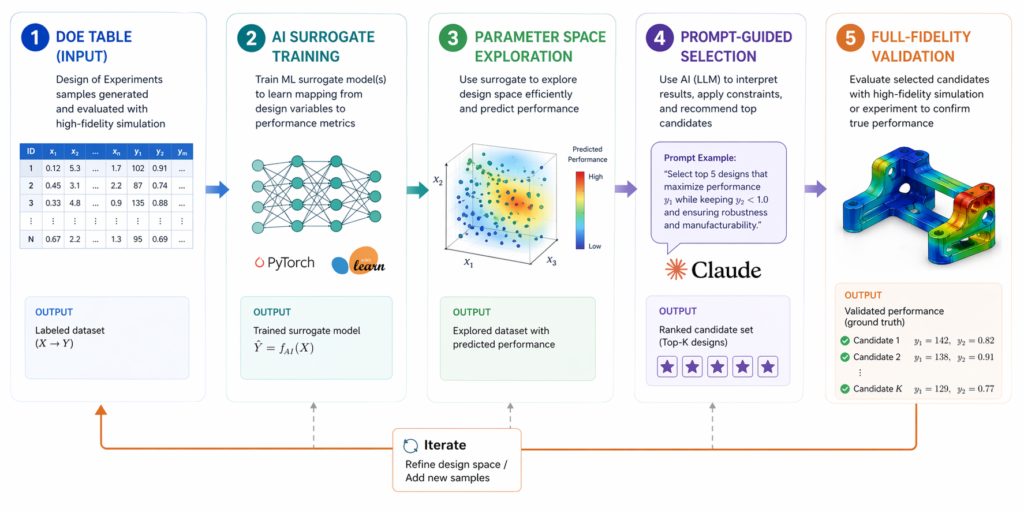
Once you have the basic five-stage pipeline working, the next level is the surrogate-driven design loop. This is where the AI pipeline for CAD and simulation becomes genuinely autonomous in the optimisation stage, running tens or hundreds of design variants without human intervention between each one.
What a Surrogate-Driven Loop Actually Is
A surrogate model is a lightweight AI trained on your simulation results. Instead of running the full solver for every new design variant, the surrogate predicts the outcome in milliseconds. You explore the parameter space, wall thickness, fillet radius, hole placement, across 50 or 100 points, then run full-fidelity AI-powered CAE simulations only on the most promising candidates.
Research published on arXiv (July 20251) demonstrated that LLMs can convert natural-language descriptions into valid CAD command sequences, essentially ‘prompt-to-feature-tree.’ When combined with surrogate-speed predictions, this creates a prompt-to-simulation workflow that is genuinely new, not just faster, but architecturally different from any previous engineering process.
Practical Surrogate Loop Using Prompts
Define your parameter space with a prompt: ‘I want to optimise a bracket for minimum weight with a safety factor ≥ 3. Variables: wall thickness 3–8mm, fillet radius 2–6mm, rib height 0–12mm. Generate a 25-point design of experiments (DOE) table spanning these ranges.’
Run initial simulations: Feed the DOE table into your Ansys SimAI pipeline or SimScale. Run all 25 variants, this takes hours, not days, with AI-accelerated solvers.
Build the surrogate: Use the 25 results to train a lightweight surrogate. Tools like Altair HyperWorks and Monolith AI handle this automatically. Your surrogate-driven design loop is now active.
Explore with prompts: Ask Claude: ‘Based on these surrogate predictions, which 3 design points offer the best weight-to-safety-factor trade-off? What would happen if I increased the rib height by 2mm at those points?’ Use AI interpretation to guide the next round.
Validate the winner: Run one full AI-powered CAE simulation on your selected design. Document with Stage 5 prompt. Pipeline complete.
The Tool Stack That Powers This Pipeline
You don’t need all of these tools on day one. Build the pipeline incrementally, starting with the prompt layer and adding specialist tools as your team grows into them. Here’s how the stack fits together for a complete AI-driven engineering pipeline:
Pipeline Stage
Tool(s)
AI Role
Prompt Use
Stage 1, Brief
Claude AI
LLM for engineering design
Requirements → structured brief
Stage 2, CAD
Zoo / AdamCAD / SolidWorks
Zoo text-to-CAD pipeline
Brief → geometry prompt
Stage 3, Sim Setup
SimScale AI / Ansys
Ansys SimAI pipeline
Brief + model → boundary conditions
Stage 4, Interpret
Claude AI
AI-powered design validation
Results → engineering decisions
Stage 5, Docs
Claude AI
prompt-to-simulation workflow
Session → design note
Optimisation Loop
Altair / Monolith AI
surrogate-driven design loop
DOE → surrogate → prompt queries
A note on tool choice: Claude AI engineering prompts are the unifying thread across all five stages. Claude handles design briefs, prompt refinement, results interpretation, and documentation, making it the single most versatile tool in the AI CAD pipeline. Specialist tools (Zoo for geometry, SimScale or Ansys for physics) handle what Claude can’t: actual geometry generation and physics solving. Together, they form a complete automated simulation pipeline.
Making the Pipeline Stick: Practical Guidance for Engineering Teams
An AI pipeline for CAD and simulation is only valuable if it actually gets used. Here’s what separates teams who build a lasting AI-driven engineering pipeline from those who run one project and revert to old habits.
Build a Prompt Library, Not Just Skills
Individual prompt skills don’t scale. What scales is a shared prompt library, a documented set of tested, refined prompts for each stage of the prompt-based CAD workflow. Every time someone writes a prompt that produces an excellent output, that prompt goes into the library. Within six months, the library becomes the team’s most valuable AI asset.
Organise it by stage and part type: Stage 1 briefs for brackets, housings, and pressure vessels. Stage 3 AI prompts for FEA and simulation for static structural, modal, and thermal studies. The prompt-to-simulation workflow becomes systematic, not tribal.
Start With One Bottleneck
Don’t try to deploy all five stages at once. Identify your team’s single biggest time sink, typically Stage 3 (simulation setup) or Stage 5 (documentation), and build the pipeline around that first. A team that reduces CAD to FEA automation setup time by 60% on one project type will have all the internal buy-in needed to expand the pipeline further.
Validate Ruthlessly at Every Stage
The AI simulation workflow must include validation checkpoints. Every Stage 3 setup should be reviewed against a checklist before the solver runs. Every Stage 4 interpretation should be confirmed by a qualified engineer before becoming a design decision. AI-powered design validation accelerates the process, it doesn’t replace the judgement that keeps your products safe.
Use the Surrogate Loop for Design Families, Not One-Offs
The surrogate-driven design loop is most powerful when applied to repeating design families, a family of brackets, a set of housing geometries, a series of pressure vessel variants. Building one surrogate for a design family and reusing it across multiple projects multiplies the ROI dramatically. The first project absorbs the setup cost; every subsequent project runs on near-instant predictions.
What an Excellent AI Pipeline Looks Like in Practice
Let’s make this concrete. Below is how a complete CAD simulation using prompts session plays out for a real engineering task, designing and validating a structural mounting bracket, using the five-stage pipeline.
Complete Pipeline Example: Steel Mounting Bracket
Part: Steel mounting bracket for industrial conveyor motor (2kN steady-state + 500N peak dynamic load)
Material: S275 structural steel, CNC machined
Standard: ISO 2768 medium tolerance, safety factor ≥ 3
Stage 1 prompt:
“You are a senior mechanical engineer. I need to design a CNC steel mounting bracket for a 45kg conveyor motor. Loads: 2kN static vertical, 500N horizontal dynamic. Material: S275 steel, 5mm minimum wall. Fixed to machine frame via 4 × M10 bolts. ISO 2768 medium. Output a structured brief with critical dimensions, failure modes to simulate, and recommended FEA boundary conditions.”
What Claude returns:
A fully structured design brief: 3 critical geometry dimensions with recommended ranges, 4 failure modes ranked by likelihood, meshing guidance, boundary condition checklist, and a FEA load case matrix, ready to use as the Stage 2 and Stage 3 inputs.
Stage 4 interpretation prompt (after FEA run):
“Max von Mises: 187 MPa at inside fillet radius on primary leg. S275 yield: 275 MPa. Safety factor: 1.47. This fails my ≥3 SF requirement. Displacement at motor mount: 0.8mm. What is driving the stress, fillet radius or wall thickness? What is the minimum wall change to meet SF ≥ 3?”
Claude identifies the fillet radius as the primary driver, recommends increasing the fillet from 3mm to 8mm as the highest-impact change (reducing peak stress 35–40% based on standard stress concentration data), and suggests a secondary wall increase from 5mm to 6mm as insurance. Total time for Stage 4: 4 minutes.
Conclusion: Prompts Are the Infrastructure of the Modern Engineering Pipeline
Building an AI pipeline for CAD and simulation isn’t about replacing engineering expertise, it’s about giving that expertise a faster, more connected environment to work in.
The five-stage framework covered in this guide, from structured design brief through CAD simulation using prompts, FEA setup with AI prompts for FEA and simulation, results interpretation, and automated documentation, is not a future vision. It’s a working system that engineering teams are deploying today.
What separates the teams getting the most from this approach is discipline in the prompt-based CAD workflow: specific inputs, clear output requirements at every stage, and a shared prompt library that compounds in value over time. The AI-driven engineering pipeline rewards consistency and specificity.
Start with one stage. Build the brief prompt first, it’s the cheapest, fastest change and it improves the quality of every downstream stage immediately. Add Stage 3 automated simulation pipeline prompts next. Within a month, your team will have the bones of a full AI simulation workflow that is genuinely faster, more documented, and more repeatable than anything you were doing before.
Ready to Build Your AI Engineering Pipeline? At Simutecra Engineering Services, we design and implement AI-driven CAD and simulation pipelines for mechanical engineering teams, from prompt strategy and tool integration to FEA automation and digital validation. We bring the engineering expertise and the AI know-how so your team can focus on building better products. Reach out to us today, www.simutecra.com Let’s engineer the future together.
Frequently Asked Questions
What is an AI pipeline for CAD and simulation?
An AI pipeline for CAD and simulation is a connected sequence of AI tools and structured prompts that carries an engineering project from concept design through CAD modelling, simulation setup, results interpretation, and documentation, without the manual handoffs that slow traditional workflows down. Each stage feeds clean, structured output into the next using a prompt-based CAD workflow, so information never gets lost in the gaps between tools. The result is a faster, more consistent, and better-documented AI-driven engineering pipeline.
Do I need specialist simulation knowledge to use this pipeline?
Not to get started, but you do need it to validate the outputs. The pipeline is designed so that AI prompts for FEA and simulation guide setup and interpretation, lowering the barrier for engineers who aren’t simulation specialists. But AI doesn’t replace engineering judgement. Every stage includes a validation step that requires an engineer to confirm the setup is physically sensible before proceeding. The automated simulation pipeline is faster because AI handles the repetitive parts, not because engineers have checked out.
What is the best way to start building an AI CAD simulation pipeline?
Start with Stage 1, the design brief prompt. It requires no new software, produces immediate value (a structured brief is better than an informal one in any workflow), and forces the kind of requirement clarity that improves every downstream stage. Use Claude AI engineering prompts to refine your brief format over 3–5 projects. Then add Stage 3, CAD to FEA automation prompts, once you have a feel for how structured AI outputs change the quality of your simulation setup. Build the pipeline stage by stage, not all at once.
How does a surrogate-driven design loop work with AI prompts?
A surrogate-driven design loop starts with a DOE (design of experiments) table, which you can generate with a prompt. You run the DOE points through high-fidelity simulation, train a lightweight surrogate model on the results, then use prompts to query the surrogate for engineering insights: which design points offer the best trade-off, what happens if you change a parameter, which candidates warrant full-fidelity validation. The surrogate handles prediction speed; the prompt-to-simulation workflow handles interpretation and decision-making. Together they make parametric optimisation practical for projects that would previously have required a dedicated optimisation specialist.
Can this pipeline be used for CFD as well as FEA?
Yes. The five-stage structure applies to any simulation type. For CFD, the Stage 1 brief captures flow conditions, fluid properties, and performance targets instead of structural loads. The Stage 3 AI prompts for FEA and simulation address mesh density at boundary layers, turbulence model selection, and convergence criteria rather than contact definitions. The AI simulation workflow is physics-agnostic, the prompt structure adapts to whatever physics your project requires.
How do I make sure AI pipeline outputs are trustworthy enough for production use?
Trustworthiness comes from validation discipline, not from the AI itself. Every stage should have a review checkpoint: the Stage 1 brief should be signed off by the lead engineer before geometry work begins; Stage 3 simulation setup should be checked against a standard boundary conditions checklist before the solver runs; Stage 4 interpretation should be confirmed by a qualified engineer before it drives a design decision. AI-powered design validation accelerates the process, the review checkpoints ensure the AI-driven engineering pipeline output meets the same engineering standards as any manually produced result.