The Writing You Were Not Hired to Do
Every product engineer, mechanical designer, and technical specialist knows the feeling. You spent three days designing a part, running analysis, and solving problems that genuinely needed an engineering brain. Then you spend another three days writing about it.
Technical documentation is not optional. User manuals, product spec sheets, installation guides, datasheets, engineering specifications, product descriptions for procurement: none of these can be skipped. But in 2025, a very large part of the writing work involved in creating them does not require your expertise. It requires structure, consistency, and clear language. Those are things Claude AI for technical documentation does exceptionally well.
This guide shows you exactly how to use Claude to cut documentation time by up to 80%, with real prompts for every major technical document type an engineering team produces.
| Verified Real-World Results: Claude AI Documentation Productivity 2025TELUS: Saved over 500,000 hours using Anthropic Claude writing workflows across engineering and documentation tasks, shipping code and content 30% faster. Mintlify: Uses Mintlify Claude technical writing via Claude Code as their primary technical writing assistant for product documentation, reporting that Claude handles drafting, structure, and consistency better than any previous tool. Claude 200K context: Claude 200K context technical docs means Claude holds an entire product manual, specification set, or documentation suite in a single session without losing context between sections. |
| 80%documentation time saved | Engineering teams using Claude for structured technical document drafting consistently report saving 70-80% of previous writing time. On a 40-hour week, that is 8-12 hours returned to engineering per writer per week. |
| 500K+hours saved by one company | TELUS saved over 500,000 hours using Claude-powered workflows across engineering, documentation, and development tasks in 2025, with 89% AI adoption across their entire organisation. |
What Claude AI Actually Does for Technical Writers and Engineers
Claude AI for technical documentation is not a template filler or a grammar checker. It is a structured reasoning tool with a 200,000-token context window that can read, understand, and produce professional technical content across the full range of documentation an engineering team creates.
Here is what makes it specifically suited to AI technical writing in engineering environments:
Why Claude Works Particularly Well for Technical Documentation
- Long-context coherence: Claude AI long-context documentation means Claude can read a 50-page product specification, understand the relationships between sections, and write documentation that is internally consistent across every page. No other general-purpose AI tool matches this for full-length technical documents.
- Low hallucination rate in technical contexts: Independent benchmarks rate Claude as the lowest-hallucination general-purpose LLM for engineering-adjacent tasks. When you give Claude accurate source data, it produces accurate, reliable documentation drafts.
- Consistency across documents: AI document consistency is one of the hardest things to maintain manually across a large documentation suite. Claude holds your style guide, terminology, and voice in context and applies them consistently across every section of a document or across multiple documents in a session.
- Speed without quality loss: Claude produces structured, well-written technical prose faster than any human writer. Claude AI writing productivity gains come not from cutting corners but from removing the blank-page problem: Claude always starts from a well-structured draft.
- Cross-document suite generation: For teams that need multiple coordinated documents (spec sheet, user manual, installation guide, and datasheet for the same product), Claude maintains coherence across all four in a single session because the context window holds all the relevant product information simultaneously.
How to Use Claude AI for Technical Writing: The Core Framework
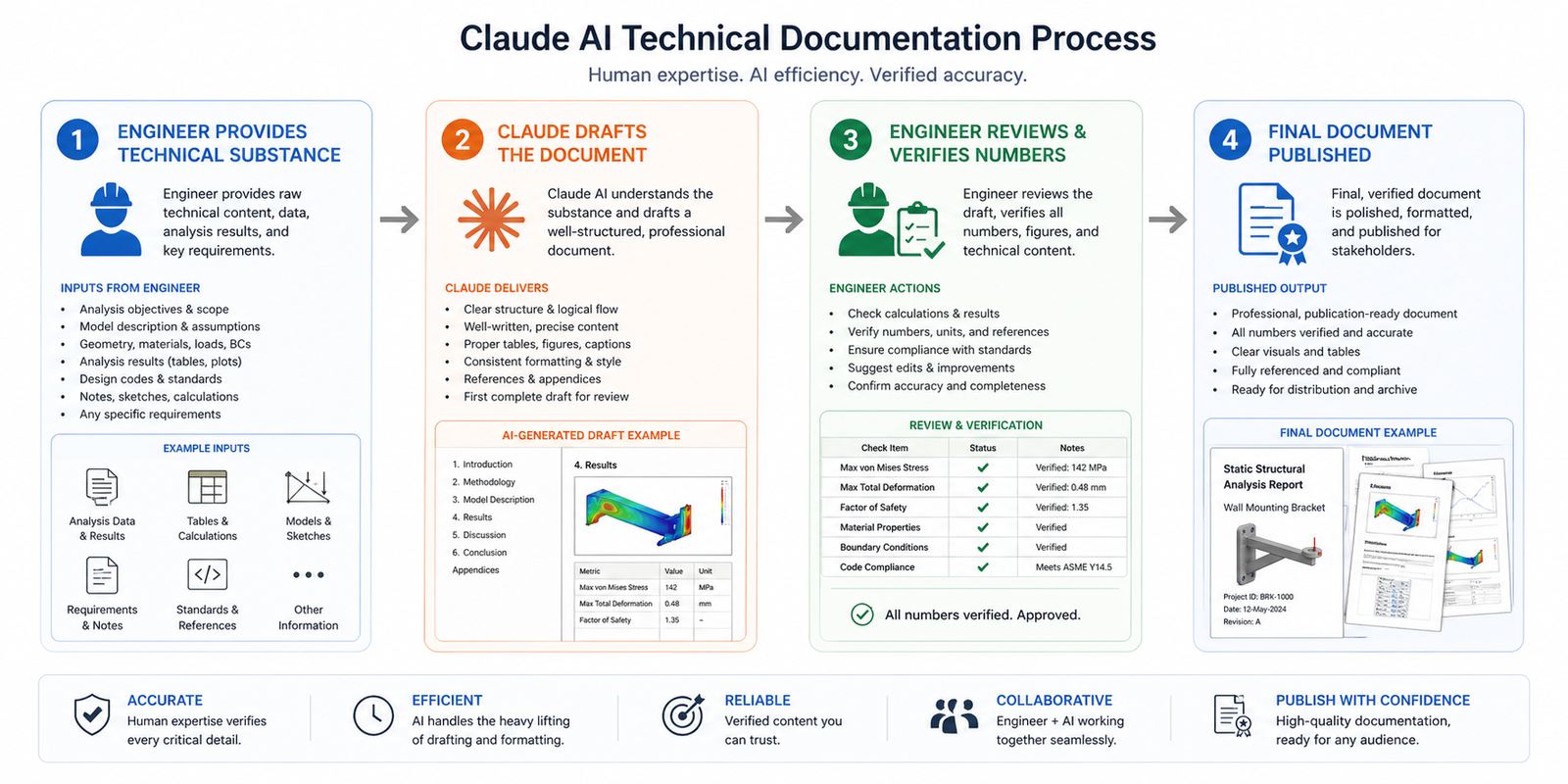
The core principle of how to use Claude AI for technical writing is this: you are the subject-matter expert and the accuracy authority. Claude is the structure expert and the writing engine. Your job is to give Claude the technical substance it needs to draft accurately. Claude’s job is to turn that substance into professional, consistent, well-formatted technical prose.
Step 1: Define the Document Purpose and Audience
Every documentation prompt starts with purpose and audience. A product datasheet for procurement has a different vocabulary, depth, and structure than a user installation guide for field technicians. A material specification for manufacturing has different requirements than a product description for a sales catalogue. Claude AI for technical documentation adapts to each when you are specific about who will read it and what they need to do with it.
Step 2: Provide the Technical Substance
Give Claude the technical inputs for the document: product name and description, specifications, dimensions, materials, tolerances, operating conditions, installation requirements, safety considerations, or whatever applies to your document type. Claude does not invent these. They come from you, your CAD model, your test data, or your product knowledge.
Step 3: Specify the Format and Standards
Tell Claude the output format. Is this an ISO-compliant technical specification? A PDF-ready two-page datasheet? A numbered installation procedure? A table-format product comparison sheet? Should it follow your company style guide? Specifying the format ensures the AI technical document automation output fits directly into your existing documentation system without restructuring.
Step 4: Review and Add the Numbers
Review every AI-generated document for technical accuracy before it becomes an official record. Claude writes around the data you give it faithfully, but you should verify all quantitative values, tolerances, and safety specifications personally. This review step typically takes 10-20 minutes for documents that previously took 3-4 hours to write from scratch. That is the 80% saving in practice.
The Documents Claude AI Writes Best: Eight Types With Ready-to-Use Prompts
These are the eight technical document types where Claude AI for technical documentation delivers the most time savings for engineering and product teams. Each section includes the document type, when to use it, and a complete prompt you can fill in and use today.
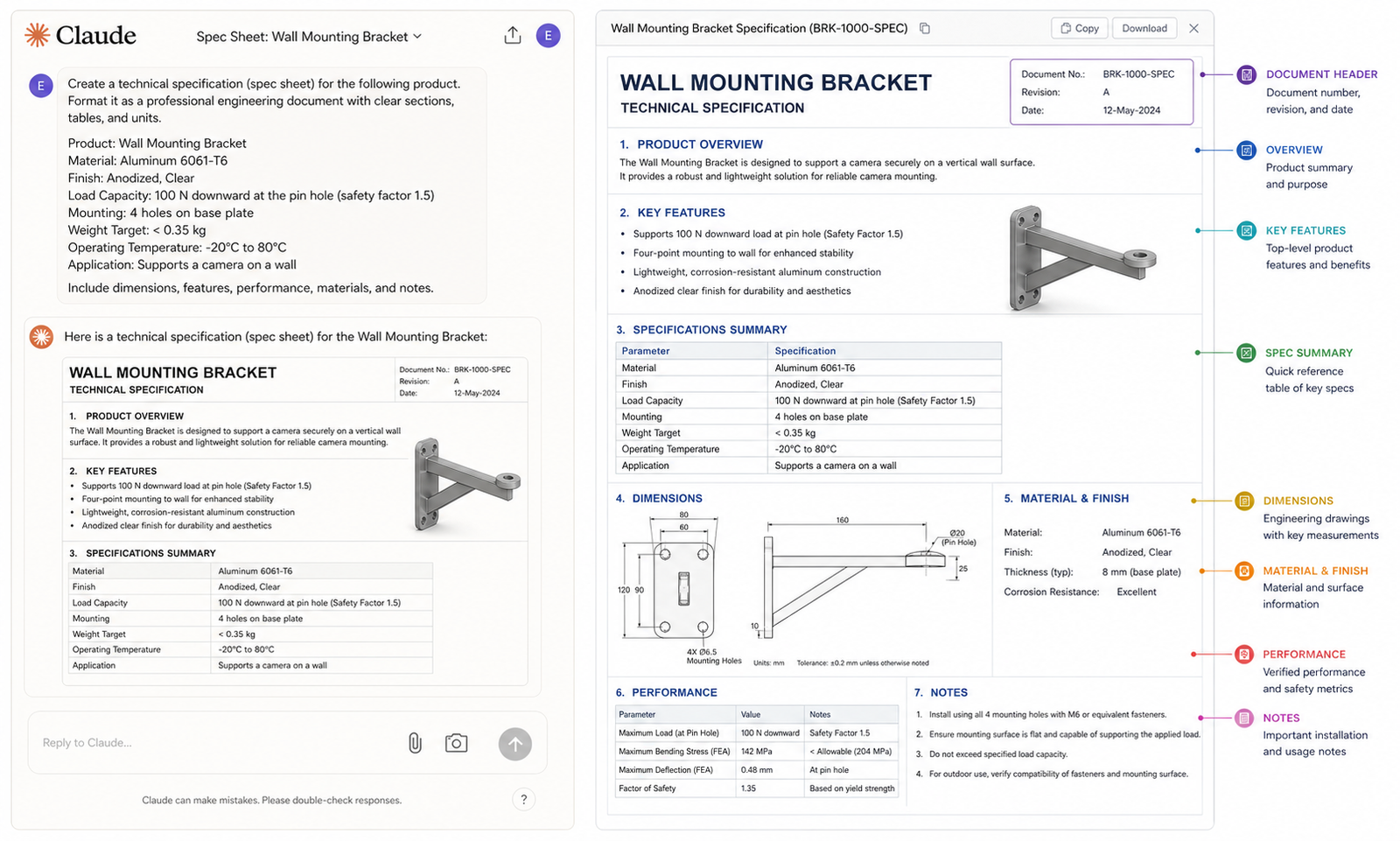
| 01 | Product Technical Specification Sheet A detailed technical document covering performance, dimensions, materials, tolerances, and standards for a product or component. Used for internal engineering records, procurement, and regulatory submissions. Claude AI spec sheet generator x technical spec automation | Time saved~80% |
| Prompt 1: Technical Specification Sheet You are a technical writer producing a formal product technical specification sheet for an engineering audience. Write a complete technical specification for the following product:Product name: [name]Product type and function: [description]Key performance parameters: [list values with units]Physical dimensions: [L x W x H, weight]Material specifications: [base material, surface finish, treatment]Operating conditions: [temperature range, pressure, load, environment]Applicable standards: [ISO, ASTM, DIN, BS etc.]Manufacturing method: [machining, casting, additive, etc.]Structure the document with: (1) Product Overview, (2) Technical Specifications table, (3) Performance Parameters, (4) Operating Conditions, (5) Materials and Finishes, (6) Applicable Standards and Compliance, (7) Ordering Information placeholder.Format for a two-page A4 technical document. Use SI units throughout.” ✔ What you get: A complete, publication-ready product specification sheet with all required sections, properly structured tables, and consistent technical language throughout. Claude AI spec sheet generator x AI product documentation |
| 02 | User Installation and Operation ManualStep-by-step instructions for installing, commissioning, operating, and maintaining a product or system. Used for field technicians, end users, and maintenance teams.AI user manual writing x AI for technical writers | Time saved~75% |
| Prompt 2: User Installation and Operation Manual Section “You are a technical writer creating a user manual for field technicians. Write a complete installation and commissioning section for the following product:Product: [name and brief description]Installation environment: [indoor/outdoor, temperature, IP rating requirement]Pre-installation requirements: [tools needed, services required, safety precautions]Installation steps: [describe the installation process in plain language; Claude will format into numbered steps]First-time commissioning procedure: [describe the startup sequence]Safety warnings: [list any relevant safety or hazard information]Common installation errors: [describe 2-3 frequent mistakes and how to avoid them]Format as an ISO-style installation procedure with: numbered steps, WARNING/CAUTION/NOTE callouts in the correct format, and a pre-installation checklist. Reading level: suitable for a qualified field technician without engineering degree.” ✔ What you get: A complete, field-ready installation manual section with numbered steps, safety callouts, a pre-installation checklist, and appropriate reading level for the intended audience. AI user manual writing x Claude AI documentation |
| 03 | Product DatasheetA concise one or two-page marketing-technical hybrid document covering key specifications, features, and ordering information. Used for sales catalogues, distributor materials, and customer-facing product pages.Claude AI datasheet generator x AI product documentation | Time saved~85% |
| Prompt 3: Product Datasheet Write a professional product datasheet for the following engineering product. The audience is technically literate customers and procurement engineers. Balance technical credibility with marketing clarity.Product: [name]Product category: [type]Key value proposition: [what problem does it solve / what makes it better]Core features: [list 4-6 key features]Key specifications: [most important performance specs]Dimensions and weight: [fill in]Materials and finishes: [fill in]Certifications and standards: [fill in]Ordering codes: [product codes or placeholder]Contact / company information: [placeholder]Format as a two-column A4 datasheet layout description. Include: product headline, features and benefits section (two columns), specifications table, ordering information, and a footer with company and compliance information. Write in present tense, active voice, third person.” ✔ What you get: A complete product datasheet with all sections written, specifications structured in table format, and marketing-technical balance calibrated for procurement and sales use. Claude AI datasheet generator x AI technical writing |
| 04 | Engineering Material SpecificationA formal material specification document defining approved materials, grades, treatments, and test requirements for a product family or manufacturing process. Used for procurement, quality control, and manufacturing.AI spec writer x technical spec automation | Time saved~78% |
| Prompt 4: Engineering Material Specification “Write a formal engineering material specification document for the following application:Application: [describe the component and its function]Service environment: [temperature, pressure, chemical exposure, load type]Required material properties: [key mechanical and physical properties needed]Approved material(s): [list grade/standard designations, e.g. SS316L, S275 EN10025]Forming/manufacturing method: [machining, casting, forging, additive]Required surface finish: [Ra values or descriptive finish requirements]Heat treatment requirements: [if applicable]Applicable standards: [material standards for testing and certification]Documentation required: [certificate of conformance, mill certificate, test reports]Substitution procedure: [how to request approved substitutes]Format as a formal controlled document with document number, revision, and approval signature placeholders. Include a scope statement, normative references, material requirements table, and inspection and certification requirements section.” ✔ What you get: A formally structured material specification document with normative references, material requirements table, inspection requirements, and document control fields ready for your quality management system. AI spec writer x Claude AI for technical documentation |
| 05 | Product Maintenance and Service ManualDetailed procedures for scheduled maintenance, inspection, fault diagnosis, and corrective actions. Used by maintenance teams, service engineers, and asset managers.AI-assisted product documentation x Claude AI documentation | Time saved~72% |
| Prompt 5: Maintenance Manual Section “Write a scheduled preventive maintenance procedure section for the following equipment:Equipment: [name and model]Maintenance interval: [daily / weekly / 500 hours / annually]Purpose of this maintenance: [what failure mode or degradation does this maintenance prevent]Required tools and consumables: [list]Safety precautions: [lockout/tagout, PPE, isolation requirements]Procedure steps: [describe what is inspected, measured, adjusted, lubricated, or replaced]Acceptance criteria: [how the technician knows the task is complete and correct]Recording requirements: [what must be logged and where]Format using: numbered procedure steps, safety callouts in standard WARNING/CAUTION/NOTE format, an inspection record table at the end, and estimated completion time. Comply with general ISO 9001 maintenance documentation requirements.” ✔ What you get: A complete preventive maintenance procedure section with numbered steps, safety callouts, acceptance criteria, and an inspection record table in ISO-compatible format. AI for technical writers x Claude AI for technical documentation |
Why Claude Outperforms Other AI Tools for Technical Documentation
Not all AI writing tools are equal for engineering documentation. Here is a clear breakdown of why Claude AI for technical documentation outperforms general-purpose writing tools in this specific context:
| What Matters for Technical Docs | Claude AI | Generic AI Writing Tools |
| Context length for long documents | Claude 200K context technical docs: reads and writes entire manuals without losing context | Typically 4K to 32K tokens. Loses context mid-document on anything over 25 pages. |
| Technical accuracy / hallucination rate | Lowest hallucination rate in independent engineering benchmarks. Accurate when given accurate input. | Higher hallucination rates on technical specifications and engineering terminology. Needs more correction. |
| Consistency across a document suite | AI document consistency: holds terminology, units, and voice across all sections of a session | Inconsistency between sections increases with document length and complexity. |
| Format and standards compliance | Adapts to ISO, IEC, DIN, ASME formats when specified in the prompt. Outputs structured tables, numbered steps. | Generic formatting. Standards compliance requires significant human reformatting. |
| Cross-document coherence | Claude AI documentation: single session can produce aligned spec sheet, manual, and datasheet from same product data | Each document is isolated. No context carries between documents. Manual alignment required. |
Advanced Tips: Getting Expert-Level Technical Documentation From Claude
Pro Tips for Engineering Teams Using Claude AI Technical Documentation
- Feed Claude your style guide at the start of every session. Paste your company’s documentation standards into the opening message. ‘All documents use SI units. Use ISO 80000 notation. Write in third person, present tense. Capitalise product names.’ Claude documentation will apply these rules consistently across every section.
- Use a master product facts file. Build a short reference document containing all the technical facts about a product: dimensions, weights, materials, certifications, ordering codes. Paste this at the start of every documentation session. Claude uses it as the source of truth for every document generated, eliminating inconsistencies across your AI product documentation suite.
- Generate related documents in a single session. After generating a spec sheet, ask Claude to produce the matching datasheet and then the installation guide in the same session. Because the context window holds all the product information, Claude AI for technical documentation maintains perfect consistency across all three documents without you having to re-enter the data.
- Specify document version and revision control fields. Ask Claude to include document control fields as placeholders: Document Number, Revision, Date, Author, Approved By. This saves the formatting step and makes the document immediately ready for your document management system.
- Use Claude to update existing documents, not just create new ones. Paste an existing out-of-date document into Claude and describe the changes that have been made to the product. Ask Claude to update every affected section. AI technical writing for revision tasks saves as much time as creation tasks, often more.
- Ask Claude to flag any missing required sections. After generating a document, ask: ‘For a product of this type intended for industrial sale in the EU, what documentation sections am I missing?’ Claude AI documentation will identify regulatory and standards gaps proactively.
- Build a prompt template library per document type. Prompts 1-5 in this guide are starting points. Refine each one for your specific product category, industry, and documentation standards. A team library of tested prompts is the foundation of a scalable AI documentation workflow that delivers consistent quality across every project.
What Claude Cannot Do in Technical Documentation
An honest guide on Claude AI for technical documentation has to include the limits. Understanding them makes you a more effective user, not a less enthusiastic one.
- Claude cannot verify your technical data. If you give Claude a yield strength of 250 MPa for a material that actually yields at 300 MPa, Claude will write 250 MPa into the document correctly and confidently. You are the accuracy authority. Always verify quantitative data before a document is released.
- Claude cannot read your CAD files directly. Unless you are using a specialist integration, Claude does not have direct access to your CAD models. Dimensions, tolerances, and specifications need to come from you. Future integrations may change this, but today the engineer is the bridge between the model and the AI technical writing layer.
- Claude does not know your proprietary standards. If your company has internal document templates, house style rules, or proprietary part numbering conventions, you need to describe them in the prompt or paste them in. Claude does not know your internal systems unless you tell it.
- Claude is not a replacement for a qualified technical writer. For documents with legal, regulatory, or safety implications, a qualified engineer or technical writer must review and approve the output. Claude AI documentation dramatically reduces the writing burden. It does not remove the review responsibility.
Conclusion:
The 80% documentation time saving from Claude AI for technical documentation is not just a productivity number. It represents engineering hours that go back to design, analysis, problem-solving, and innovation. Hours that were previously spent formatting tables and structuring sections that follow the same pattern every single time.
Claude is suited to AI technical writing for engineering environments specifically because it combines long-context coherence with technical accuracy and format flexibility. It produces consistent, professional documentation faster than any human writer. And when you own the accuracy review, the output is reliable.
The five prompts in this guide cover the most common and most time-consuming technical document types. Start with the one your team writes most often. Use the prompt on your next product. See the output. The AI-assisted product documentation workflow builds from there.
| Your Team Deserves to Spend Less Time Writing and More Time Engineering At Simutecra Engineering Services, e help mechanical engineering and manufacturing teams build Claude AI documentation workflows that save real hours every week. From technical spec sheets and user manuals to FEA reports and product datasheets, we design and implement the prompts, templates, and review processes that make it work.We do not just tell you what is possible. We build it with you. Reach out to us today, Simutecra |
Frequently Asked Questions
What is Claude AI for technical documentation?
Claude AI for technical documentation means using Anthropic’s Claude AI model to draft, structure, and format technical documents including product spec sheets, user manuals, datasheets, material specifications, and maintenance procedures. The engineer provides the technical substance and accuracy. Claude handles the writing, structuring, and formatting. The result is professional engineering documentation produced in 20 to 30 minutes instead of 3 to 4 hours. Claude documentation works across all standard engineering document types.
How much time does Claude AI actually save on documentation?
Verified data from Claude AI documentation productivity 2025 deployments shows consistent 70 to 80 percent time savings on documentation tasks. TELUS saved over 500,000 hours using Claude across their engineering and documentation workflows. Mintlify reports that Mintlify Claude technical writing handles their entire technical documentation drafting workflow. In engineering-specific contexts, teams typically report saving 2 to 4 hours per document on spec sheets, manuals, and datasheets.
Can Claude AI write engineering spec sheets?
Yes. Claude AI spec sheet generator prompts (like Prompt 1 in this guide) produce complete, structured technical specification sheets from your product data inputs. Claude generates all required sections including a specifications table, performance parameters, operating conditions, materials section, and applicable standards. You review for numerical accuracy and add your document control information. The result is a publication-ready AI product documentation output in under 30 minutes.
Is Claude AI good for writing user manuals?
Yes, particularly for structured procedural content. AI user manual writing with Claude is most effective for installation procedures, operation sequences, and maintenance procedures because these follow consistent numbered-step structures that Claude handles well. Claude adapts the reading level, technical depth, and format to your specified audience. It also correctly formats WARNING, CAUTION, and NOTE safety callouts in ISO-standard format when asked.
How does Claude handle long technical documents without losing context?
Claude 200K context technical docs means Claude can process and generate content for documents up to approximately 150,000 words in a single session without losing context between sections. This is the core technical advantage of Claude AI long-context documentation for engineering use. A 200-page product manual, a complete documentation suite for a product family, or a full specification set can all be handled in a single Claude session with consistent terminology, style, and cross-references throughout.
Can I use Claude to update existing technical documents?
Yes. Paste your existing document into Claude along with a description of the changes to the product. Ask Claude to update every section affected by the change and flag any sections it is uncertain about. This revision workflow is one of the most time-saving AI for technical writers applications because updating documentation after a design change is one of the most tedious tasks in engineering. AI technical writing for revisions typically saves as much time as creation, and often more when the existing document is long.
Does Claude understand engineering standards like ISO and ASME?
Claude has broad knowledge of major engineering standards including ISO, IEC, DIN, ASME, BS, and AS standards at the document structure and requirements level. When you specify a standard in your prompt, Claude structures the output to include the sections and elements that standard requires. However, Claude AI for technical documentation should not be relied upon as an authoritative source for the specific numeric requirements within a standard. Always verify standard-specific requirements against the current official publication, and have a qualified engineer confirm compliance.
For verified enterprise case study data on Claude productivity in technical and engineering workflows, including the TELUS 500,000 hours saved case study, see Anthropic’s official resources:
Eight Trends Defining How Software Gets Built in 2026, Anthropic (claude.com)