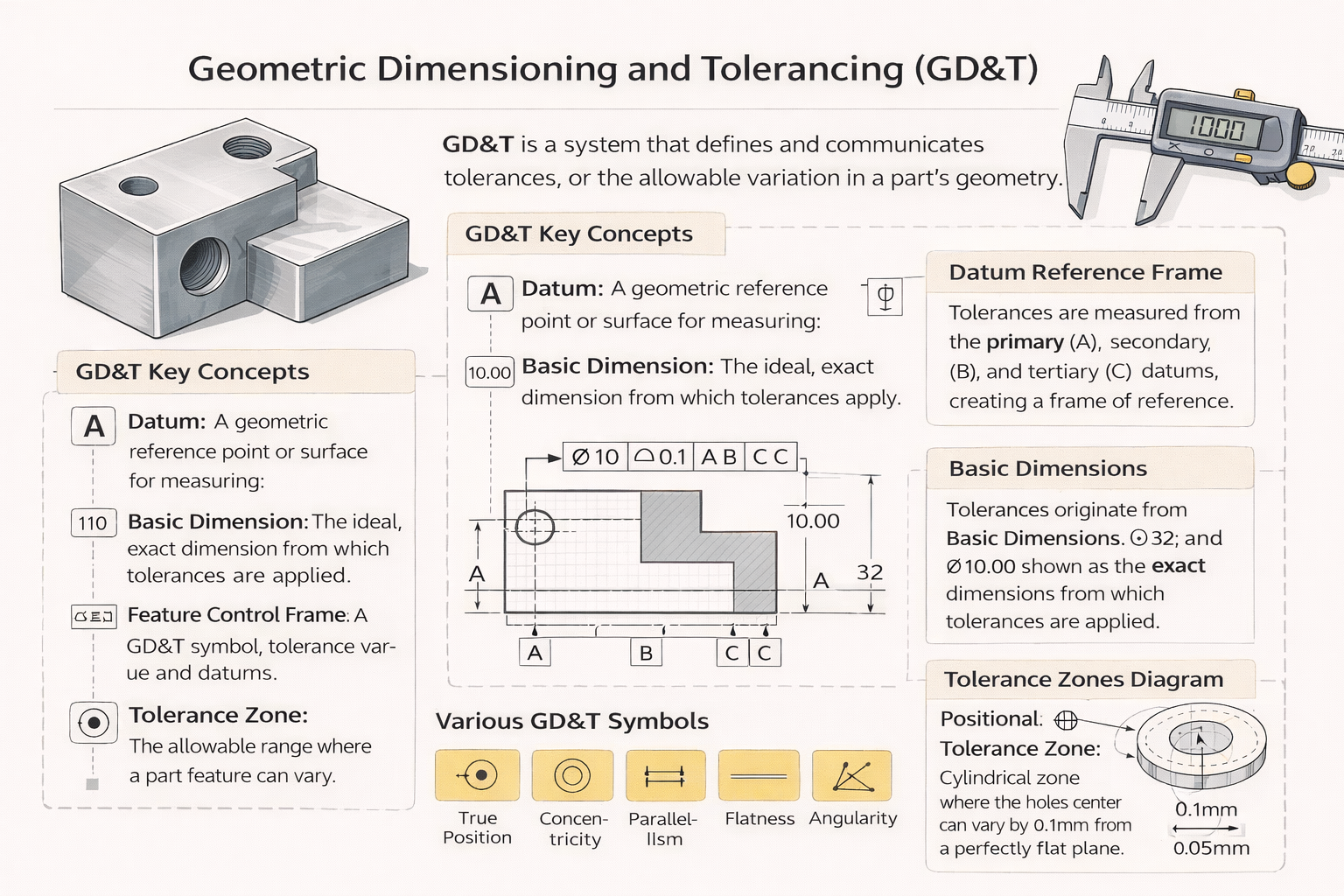
Two machined parts are designed to fit together. The drawing shows a diameter of 25.00 mm with a plus/minus tolerance of 0.10 mm, but it says nothing about whether that bore is allowed to be oval, tapered, or tilted relative to the mating face. The parts are made to the numbers on the drawing. They still do not fit.
This is the problem that Geometric Dimensioning and Tolerancing (GD&T) was developed to solve. Traditional plus/minus tolerancing defines size. GD&T defines shape, orientation, location, and form. It is the difference between telling a machinist how big to make a feature and telling them exactly how precise its geometry needs to be, in every dimension that matters functionally.
This guide covers what GD&T is, how it works, the 14 core symbols, how to read a feature control frame, and the most common mistakes that drive up manufacturing cost unnecessarily.
What Is GD&T and Why Does It Exist?
GD&T stands for Geometric Dimensioning and Tolerancing. It is a standardised symbolic language applied to engineering drawings to define the allowable variation in the shape, size, orientation, and location of part features. In the United States, it is governed by ASME Y14.5-2018 (the most recent revision of the standard). Internationally, the equivalent is ISO 1101.
The system exists because coordinate tolerancing, the older method of simply assigning plus/minus values to X, Y, and Z dimensions, is inherently limited. Consider a bolt hole pattern on a flange. A coordinate tolerance defines a square tolerance zone around each hole’s nominal position. GD&T’s True Position control defines a cylindrical tolerance zone centred on the exact theoretically perfect location. The cylindrical zone is 57% larger in area than the equivalent square zone for the same stated tolerance value, meaning more parts pass inspection without any compromise to the functional requirement. That directly reduces scrap and rework cost.
GD&T does not make tolerances tighter. Used correctly, it makes tolerances more precisely matched to functional requirements, which often means they can be looser in areas that do not affect fit or function.
Beyond the efficiency argument, GD&T eliminates ambiguity. A drawing annotated with GD&T controls is interpreted the same way by any engineer, machinist, or quality inspector who knows the standard, whether they are in your facility or a supplier facility on the other side of the world. That universality is essential when manufacturing is distributed across multiple suppliers or geographies.
The 5 Categories of GD&T Controls
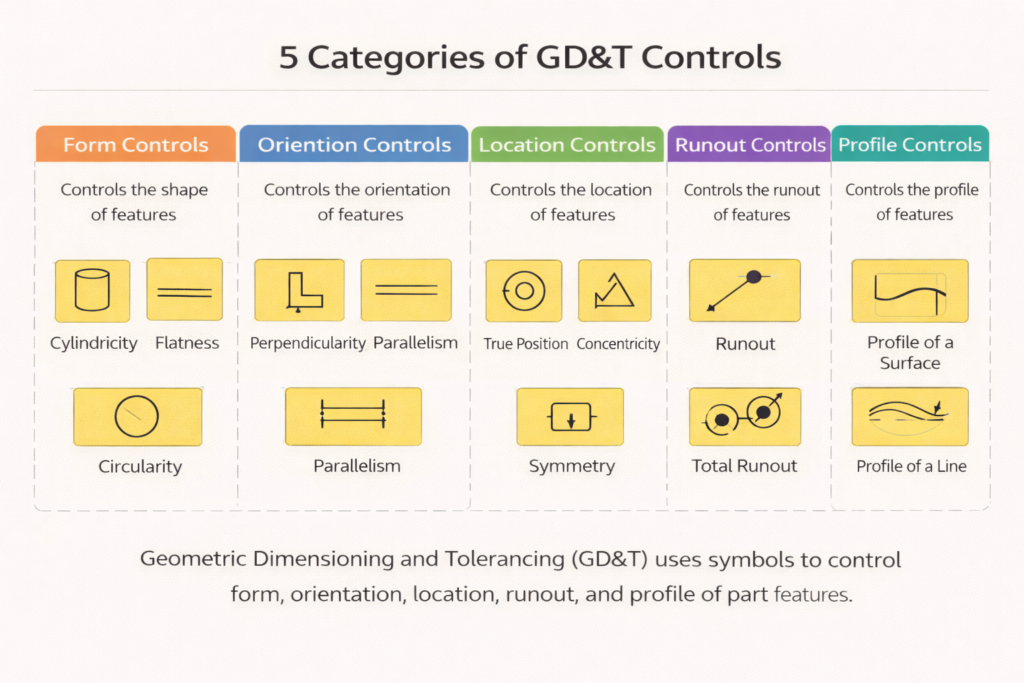
GD&T controls are grouped into five categories, each addressing a different aspect of geometric variation. Understanding these categories is the foundation for knowing which symbol to apply and when.
| Category | Controls | Symbols Included | Typical Use Case |
|---|---|---|---|
| Form | Shape of a surface or feature in isolation, no datum needed | Flatness, Straightness, Circularity, Cylindricity | Sealing faces, bearing bores, precision guide rails |
| Orientation | Angle of a feature relative to a datum | Parallelism, Perpendicularity, Angularity | Mating flanges, gearbox housings, mounting faces |
| Location | Position of a feature relative to a datum reference frame | True Position, Concentricity, Symmetry | Bolt hole patterns, shaft centrelines, symmetric slots |
| Runout | Variation of a surface as a part rotates about a datum axis | Circular Runout, Total Runout | Rotating shafts, pulleys, brake rotors |
| Profile | Shape and location of any surface or line | Profile of a Line, Profile of a Surface | Aerofoil sections, complex curves, cast/moulded surfaces |
The critical distinction between Form controls and all other categories is that Form controls, flatness, straightness, circularity, and cylindricity, do not reference a datum. They describe the shape of a feature in isolation. Every other control references at least one datum because it describes the relationship of a feature to something else.
The 14 GD&T Symbols: A Complete Reference
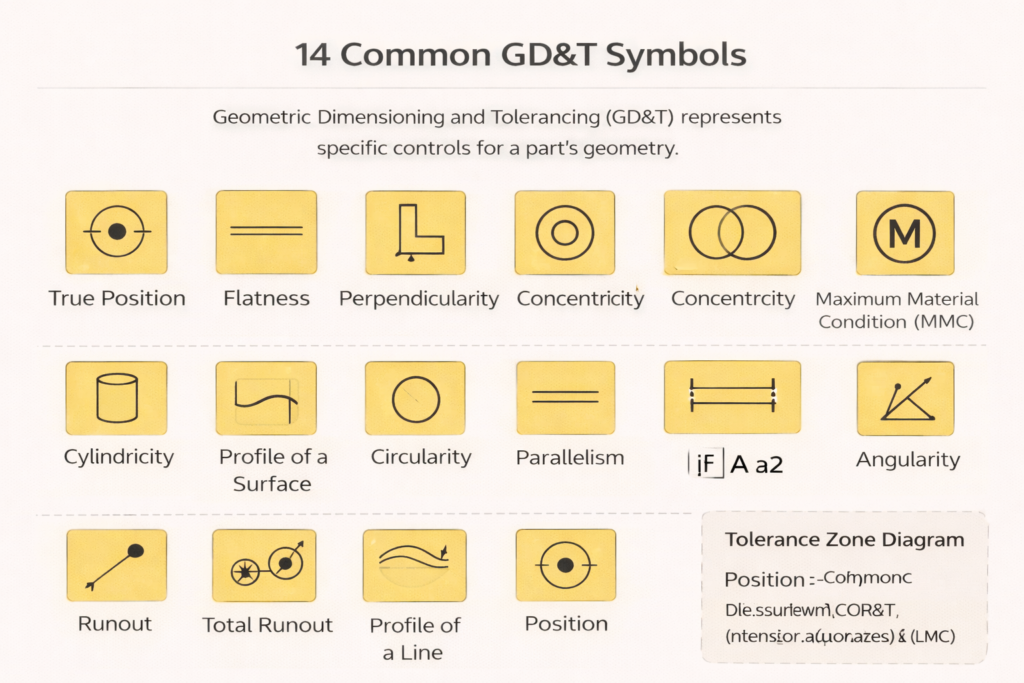
ASME Y14.5 defines 14 geometric characteristic symbols, one for each type of control. The table below provides the name, category, and a plain-English description of what each symbol controls. Keep this as a reference when annotating drawings or reviewing a drawing package from a supplier or design partner.
| Symbol Name | Category | Symbol / Abbr. | What It Controls |
|---|---|---|---|
| Flatness | Form | Flat symbol | How flat a surface is, all points must lie within two parallel planes |
| Straightness | Form | Straight symbol | How straight a line or axis is, applies to surface lines or feature axes |
| Circularity | Form | Circle symbol | How round a circular cross-section is at any given point along its length |
| Cylindricity | Form | Cylinder symbol | Combines roundness and straightness, controls the full cylinder surface |
| Parallelism | Orientation | // symbol | Controls a surface or axis to be parallel within a tolerance to a datum |
| Perpendicularity | Orientation | 90 deg symbol | Controls a surface or axis to be perpendicular within a tolerance to a datum |
| Angularity | Orientation | Angle symbol | Controls a surface or axis to be at a specified angle to a datum |
| True Position | Location | Target symbol | Defines the exact (theoretically perfect) location of a feature from datums |
| Concentricity | Location | Circle-dot | Controls the axis of a feature to coincide with a datum axis (rarely used now) |
| Symmetry | Location | = symbol | Controls the median points of a feature to lie in a datum plane (rarely used) |
| Circular Runout | Runout | Single arrow | Controls surface variation at any single cross-section when part rotates |
| Total Runout | Runout | Double arrow | Controls cumulative variation across the entire surface as the part rotates |
| Profile of a Line | Profile | Arc open symbol | Controls the shape of a cross-sectional curve relative to a true profile |
| Profile of a Surface | Profile | Arc filled sym. | Controls the shape of an entire surface relative to its true theoretic form |
Note on Concentricity and Symmetry: Both symbols are retained in ASME Y14.5-2018 but their use is now actively discouraged for most applications. They require median-point measurement, which is expensive and difficult to inspect reliably. In most cases, True Position with an appropriate material condition modifier achieves the same functional result and is far easier to measure. When you see these symbols on a drawing, it is worth questioning whether they are the right choice.
How to Read a Feature Control Frame
The feature control frame is the rectangular annotation box on a drawing that specifies a GD&T requirement. Every GD&T callout uses one. Reading it correctly is a fundamental skill for anyone working with engineering drawings.
A feature control frame is divided into compartments read from left to right:
| Box 1 | Box 2 | Box 3 | Box 4 (optional) |
|---|---|---|---|
| True Position symbol | Diameter symbol + 0.5 | A (primary datum) | B (secondary datum) |
| Which geometric characteristic is being controlled | The tolerance value (and shape of the tolerance zone, diameter symbol = cylindrical zone) | The primary datum this control references | Additional datums if needed (up to three) |
Worked example: A True Position callout reads as follows, the leftmost compartment shows the True Position symbol (a circle with crosshairs). The second compartment shows the diameter symbol followed by 0.5. The third compartment shows ‘A’. This means: the axis of this feature must fall within a cylindrical tolerance zone of diameter 0.5 mm, centred on the theoretically exact position defined relative to datum A. If a second datum ‘B’ appears in a fourth compartment, the position is also constrained relative to that secondary reference.
Geometric Dimensioning and Tolerancing (GD&T) is governed by internationally recognized standards such as the ASME Y14.5 standard, which provides rules, symbols, and guidelines for interpreting engineering drawings accurately.
Geometric Dimensioning and Tolerancing (GD&T)
Understanding Datums
A datum is a theoretically exact point, axis, or plane from which measurements on a drawing are taken. In practice, datums are established by physical contact with datum features, the real surfaces, bores, or faces on the actual part that approximate the theoretical datum.
Datums are hierarchical. The primary datum (A) constrains the most degrees of freedom, typically established by the largest flat surface, which removes three degrees of freedom in a Cartesian system. The secondary datum (B) constrains two more. The tertiary datum (C) constrains the final degree of freedom. Together, the three-datum reference frame fully defines where the part sits in space, making every measurement repeatable and unambiguous.
The selection of datums is one of the most important decisions in applying GD&T. Datums should reflect the functional interface of the part, how it is located, constrained, and mated when it is in service. A datum chosen for manufacturing convenience rather than functional interface will produce parts that are easy to make but difficult to assemble correctly.
Real-World Example: A Precision Pump Housing
A pump housing has a central bore that must align accurately with the motor shaft axis. The mating face (the flat surface that bolts to the motor) is established as Datum A. The central bore of the housing is Datum B. The bolt hole pattern is controlled with True Position relative to Datums A and B.
Without GD&T: the bolt holes are dimensioned from an edge with plus/minus tolerances. The machinist makes the holes to the numbers. But if the mating face is not perfectly square to the bore, the holes end up in the right coordinate positions but the housing does not align when assembled. The parts are technically within tolerance and still fail functionally.
With GD&T: the perpendicularity of the bore axis to the mating face is controlled explicitly. The bolt hole positions are defined relative to the bore centreline. The machinist and the inspector both have unambiguous requirements. Parts made to the drawing will assemble correctly, not because they happened to be made well, but because the drawing required it.
Common GD&T Mistakes That Drive Up Manufacturing Cost
GD&T applied well reduces manufacturing cost by ensuring tolerances match functional requirements, no tighter, no looser. Applied poorly, it can make drawings unnecessarily expensive to manufacture and inspect. These are the most frequent errors seen in GD&T annotations:
| Mistake | What Goes Wrong | How to Avoid It |
|---|---|---|
| Over-tolerancing | Every feature is given a very tight tolerance ‘just to be safe’. Machining costs skyrocket because tight tolerances require slower speeds, more passes, and inspection at every stage. | Apply tight tolerances only where fit or function genuinely requires them. Most features can tolerate far more variation than designers assume. |
| Missing datum references | A positional or orientation tolerance is called out with no datum specified. The machinist has no reference frame, the control is unenforceable. | Every location and orientation control requires at least one datum. Form controls (flatness, circularity) are the exception, they do not need datums. |
| Redundant dimensions | Dimensions are duplicated across views, creating a closed loop. When tolerances stack up, it becomes mathematically impossible to satisfy all of them simultaneously. | Use reference dimensions (marked REF) for informational dimensions that already appear elsewhere. Never create a fully closed dimension chain. |
| Ignoring material condition modifiers | MMC (Maximum Material Condition) and LMC (Least Material Condition) modifiers allow tolerances to vary with feature size. Ignoring them means leaving allowable tolerance on the table, which raises manufacturing cost unnecessarily. | Understand MMC and LMC for hole-shaft fits and bolt patterns. Apply the appropriate modifier when the function of the part allows it. |
| Applying GD&T to the wrong features | A surface finish control is applied to a non-functional surface that has no mating or sealing requirement. This adds inspection cost for no functional benefit. | Apply controls only where they serve a functional purpose. Ask: ‘What breaks if this is out of specification?’ If nothing breaks, the control is unnecessary. |
GD&T in CAD Software
Most professional 3D CAD platforms include GD&T annotation tools that apply feature control frames, datum labels, and tolerances directly to the model or to drawings generated from it. In SolidWorks, GD&T is added through the Annotations toolbar using the Geometric Tolerance dialog. CATIA uses its FT&A (Functional Tolerancing and Annotation) workbench. AutoCAD Mechanical includes a dedicated GD&T toolbar.
Increasingly, manufacturers and OEMs are moving towards Model-Based Definition (MBD), embedding all GD&T and drawing information directly in the 3D model rather than generating 2D drawings. Under MBD, the 3D model itself is the authoritative manufacturing document. While MBD is not yet universal, its adoption is accelerating in aerospace, automotive, and precision manufacturing sectors.
Regardless of whether GD&T is applied to 2D drawings or 3D models, the underlying standard, and the functional thinking behind it, remains the same.
Frequently Asked Questions
1. Is GD&T required on all engineering drawings?
No, Geometric Dimensioning and Tolerancing (GD&T) is not required on all drawings. It is only used when form, orientation, or location of a feature is functionally critical.
For simple parts, coordinate tolerancing is usually sufficient. The key is to apply GD&T based on functional requirements, not habit.
2. What is the difference between ASME Y14.5 vs ISO 1101?
ASME Y14.5 and ISO 1101 are both GD&T standards, but they differ in rules and usage:
- ASME Y14.5 → Common in the U.S., uses third-angle projection and specific rules for MMC, RFS
- ISO 1101 → Used in Europe & Asia, has different symbols and interpretations
Always confirm the standard used in drawings to avoid misinterpretation.
3. How does GD&T affect machining cost?
GD&T directly impacts manufacturing cost:
- Tighter tolerances = more machining time, tooling, and inspection
- Proper GD&T reduces scrap, rework, and errors
A well-defined GD&T drawing ensures precision only where needed, optimizing both cost and performance
4. Can GD&T be applied in 3D CAD models?
Yes. This is called Model-Based Definition (MBD).
GD&T is embedded directly into 3D CAD models using tools like:
- SolidWorks MBD
- CATIA FT&A
- NX PMI
Benefits include a single source of truth, reduced errors, and improved engineering communication.
5. What does MMC (Maximum Material Condition) mean?
MMC (Maximum Material Condition) refers to the state where a feature contains the maximum amount of material:
- Shaft → Largest diameter
- Hole → Smallest diameter
Using the MMC modifier allows bonus tolerance, increasing flexibility and reducing manufacturing rejection rates without affecting function.
The Bottom Line
GD&T is not an optional extra for complex parts, it is a precision tool for communicating exactly what a part needs to do geometrically, and exactly how much variation is acceptable before it stops doing it. Used correctly, it reduces manufacturing cost, eliminates inspection ambiguity, and prevents the most common class of fit-and-function failures: parts made to the right dimensions that still do not work when assembled.
The investment in understanding GD&T, whether you are an engineer annotating drawings, a buyer reviewing a supplier’s documentation, or a quality manager setting up inspection criteria, pays back directly in fewer scrapped parts, fewer assembly problems, and fewer drawing revisions after the fact.
If you are reviewing an existing drawing set and want a second opinion on whether the tolerances are appropriate, or if you need GD&T applied correctly to a new design, that is exactly the kind of review SimuTecra’s drafting team provides.
Getting GD&T Right the First Time Saves Significant Cost
SimuTecra’s drafters apply GD&T to ASME Y14.5-2018 and ISO 1101 standards. We review every tolerance callout against the functional requirements of your part, not just the geometry. That means your drawings are manufacturable, inspectable, and cost-appropriate.
Share your part requirements and we will review your current drawing or produce a new one, correctly toleranced from the start.