Tag: bim constructions

  • Scan-to-BIM: Capturing Accurate Existing Conditions for Renovation Projects

    Scan-to-BIM: Capturing Accurate Existing Conditions for Renovation Projects

    A regional health system planning a major renovation of a 1970s-era hospital wing commissioned the design based on the building’s original architectural drawings, supplemented by a handful of field measurements taken during a walkthrough.

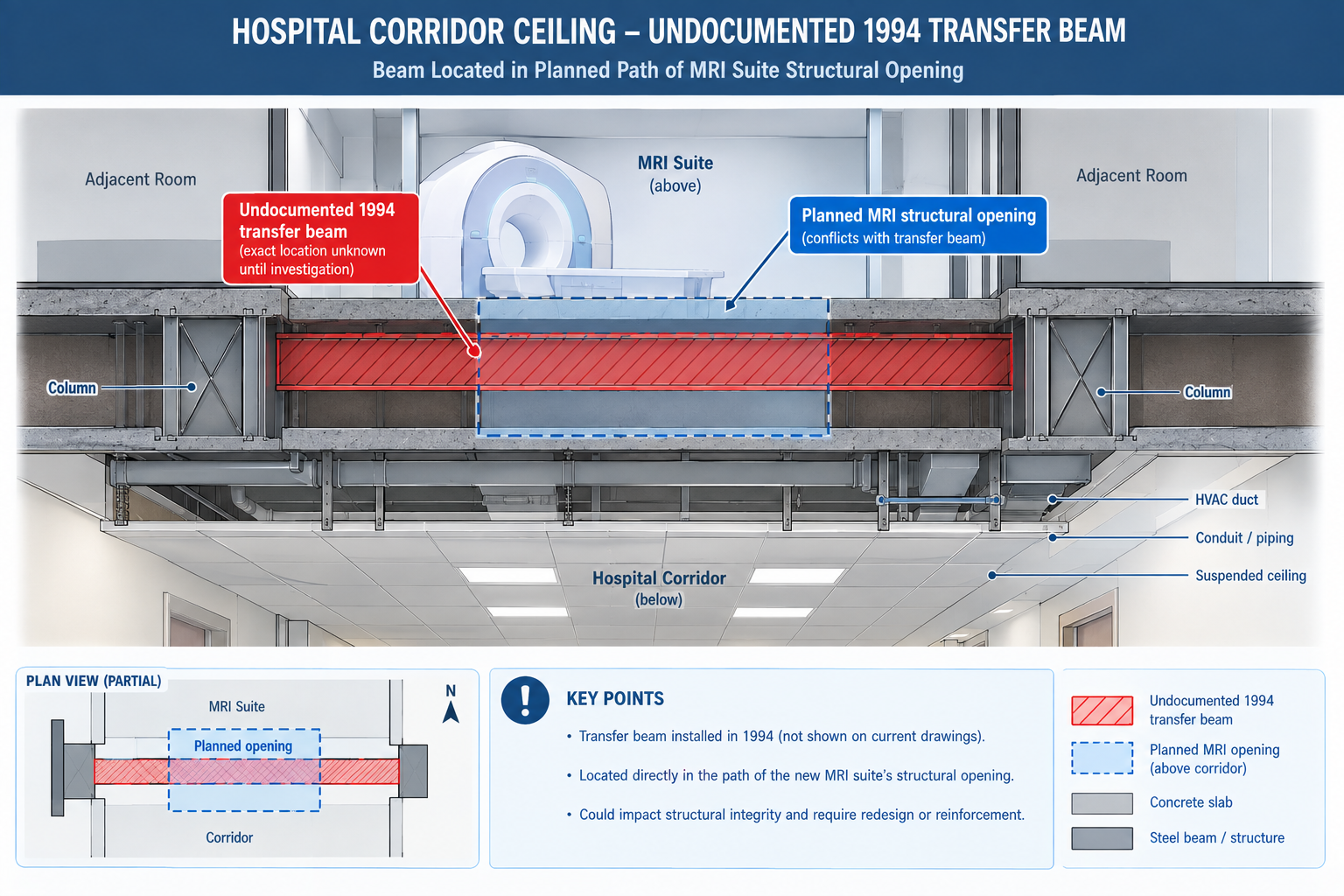
    Three weeks into demolition, the contractor discovered a section of corridor ceiling concealed a structural transfer beam that appeared nowhere in the drawings. It had been installed during an unrecorded 1994 renovation to support a rooftop mechanical unit added at that time. The beam sat directly in the path of a new MRI suite’s structural opening, already planned and approved.

    Quick answer: The discovery halted demolition for eleven days while a structural engineer assessed the beam, the design was revised around it, and the revision was resubmitted for approval. On an active hospital renovation that had to stay partially operational throughout construction, that delay carried significantly higher cost and disruption than it would have on a vacant building. The beam had been there the entire time. What was missing was a reliable way to capture it before the design was finalised. That’s the gap scan-to-BIM closes: converting a building’s true, current physical condition into an accurate 3D model the design team can trust, instead of relying on original drawings that quietly stopped matching reality years earlier.
    Cross-section diagram showing an undocumented structural beam conflicting with a planned MRI suite opening in a hospital renovation

    This article covers the reality capture technologies used to gather existing-conditions data, the six-stage scan-to-BIM process, the benefits specific to renovation and facilities projects, what drives project cost, and worked examples in practice.

    What Scan-to-BIM Actually Is

    Scan-to-BIM captures a building’s existing physical condition using 3D reality capture technology, most commonly laser scanning, and converts that data into a structured Building Information Model a design or facilities team can use the same way they’d use a model authored from scratch. The output isn’t the raw scan itself, a point cloud of millions of individually measured 3D points, but a modelled interpretation of it: walls, structure, and MEP systems traced and classified into an organised, element-based model.

    The point cloud and the finished model serve different purposes, and a complete deliverable should include both. The point cloud is the unfiltered record of physical reality, every visible surface at true measured accuracy, with no interpretation applied. The finished model is an interpreted simplification built to a defined level of development, so it can be federated and clash-tested using standard BIM workflows. Keeping the point cloud alongside the finished model lets anyone downstream independently verify what the model claims about a specific area, exactly the kind of check that would have caught the concealed hospital beam before, not after, demolition began.

    The Reality Capture Technologies Behind Scan-to-BIM

    Choosing the wrong technology for a given scope is one of the most common sources of both cost overrun and accuracy shortfall.

    TechnologyTypical AccuracyCapture SpeedBest Suited For
    Terrestrial laser scanner (tripod)2-5mm at building-interior rangeSlower per setup (2-8 min); many setups for full coverageHigh-precision interior coordination, MEP-dense spaces, historic preservation
    Handheld / SLAM scanner8-30mm, degrades over long walks without reference pointsFast; a full floor walk-through in minutesRapid existing-conditions capture, large open areas, feasibility studies
    Drone (UAV) photogrammetry10-50mm depending on altitude and overlapFast for exterior/site capture; not usable indoorsBuilding exteriors, roofs, site topography, facade condition assessment
    Mobile mapping (vehicle/backpack LiDAR)10-30mm depending on system and speedVery fast for large linear or campus-scale captureLarge campuses, infrastructure corridors, site-wide capture
    Structured-light / short-range scanner0.1-1mm at short rangeSlow; small components onlyMechanical components, reverse engineering, fine architectural detail

    The Scan-to-BIM Process: Six Stages From Scope to Handoff

    Scan-to-BIM is a structured production process, not a single scanning visit. The finished model’s quality depends as much on the planning and verification stages around the scan as on the technology itself.

    StageWhat HappensCommon Pitfall
    1. Scope definition and scan planningDefine required accuracy, target LOD, which systems to capture, and the technology mixScoping without confirming what the model will actually be used for, causing over-capture or missing detail
    2. Field data captureCrews capture the site, placing control points to tie scans into a consistent coordinate systemInsufficient overlap or control points, leaving gaps or accuracy drift expensive to fix later
    3. Registration and point cloud processingIndividual scans are aligned into a single, unified, cleaned point cloudAccepting a registered point cloud without verifying it against control points, letting errors propagate
    4. Model authoring to target LODModellers build the BIM model from the point cloud to the agreed level of detailModelling every visible feature indiscriminately instead of to the agreed LOD, producing an oversized, expensive model
    5. Quality assurance and accuracy verificationThe model is checked against the point cloud and survey control for accuracy and completenessSkipping independent QA and relying solely on the modelling team’s self-review
    6. Deliverable handoff and integrationThe model, point cloud, and documentation are delivered and integrated into the project workflowDelivering the model without the point cloud or QA documentation, leaving the client unable to verify it later

    Why Scope Definition Is the Highest-Leverage Stage

    Scope definition carries disproportionate weight because it sets the target accuracy and LOD every later stage is measured against. A scope specifying survey-grade accuracy and LOD 350 detail where LOD 200 general planning would suffice spends far more than the project needs. A scope that under-specifies LOD for a project that actually needs coordination-ready detail delivers a model that looks complete but can’t support the workflow the design team needs, forcing a costly re-scope later.

    The hospital renovation illustrates getting scope wrong in the other direction. Relying on original drawings and a walkthrough, rather than commissioning any capture at all, is itself a scope decision, one assuming the drawing record was reliable enough to design from directly. For buildings with any unrecorded modification history, that assumption is very often wrong.

    The Benefits of Scan-to-BIM, and Where Each One Applies Best

    Scan-to-BIM’s benefits concentrate on projects where existing conditions matter and can’t be fully trusted from drawings alone.

    BenefitMechanismBest Suited Project Type
    Accurate existing conditions for renovation designCaptures true, current geometry instead of relying on outdated or missing drawingsRenovation, retrofit, and adaptive reuse, especially buildings older than 20-30 years
    Reduced field verification tripsA complete point cloud eliminates repeated site visits to manually verify conditionsDesign teams not co-located with the site, or restricted-access sites
    Faster and more reliable design coordinationThe as-built model can be clash-tested against new design elements like any discipline modelRenovation projects coordinated using a full BIM workflow
    Reduced construction rework from unknown conditionsConflicts with undocumented existing structure are caught in the model, not by a demolition crewAny renovation, especially in occupied or operational buildings
    Reliable facilities management and space planning dataGives facilities teams a verified baseline for maintenance and future capital planningLarge portfolios without reliable current documentation

    Connecting Scan-to-BIM to the Rest of the Coordination Workflow

    A scan-to-BIM model delivers the most value when it’s not treated as a standalone deliverable but federated into the same coordination workflow used for new design: brought into the common data environment as the authoritative existing-conditions reference, clash-tested against new elements, and maintained through construction like an as-built model. Renovation projects that integrate the scan into a full coordination programme capture the benefit twice, once from the accuracy of the capture itself, and again from standard BIM coordination benefits, fewer RFIs, less rework, more reliable scheduling, now extended to a project that would otherwise have had no reliable existing-conditions model at all.
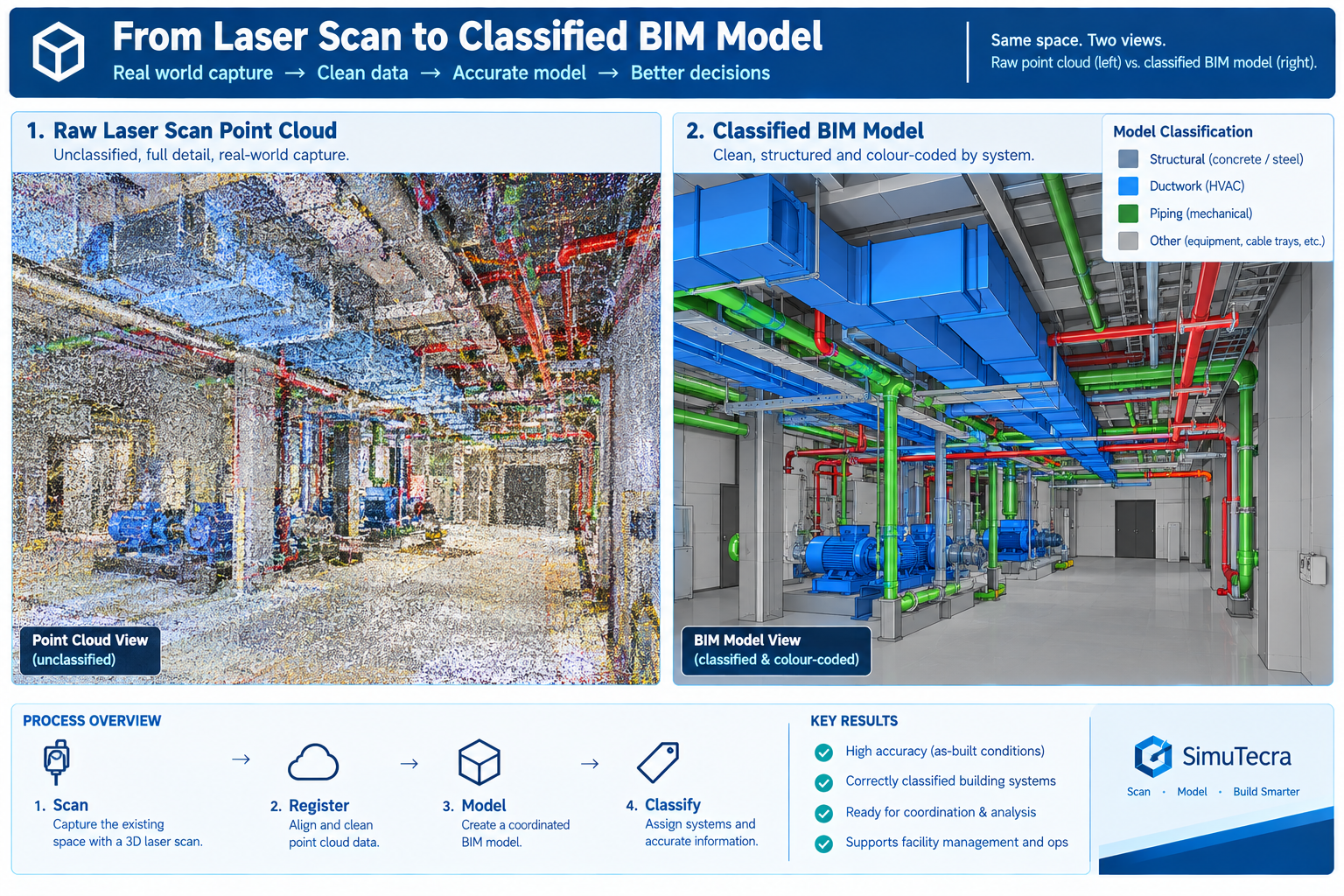
    Comparison of a raw laser scan point cloud versus the finished classified BIM model of a mechanical room

    What Drives Scan-to-BIM Project Cost

    Cost varies widely by project. A meaningful quote depends on the specific combination of these factors rather than a single per-square-foot number.

    Cost FactorDescriptionWhy It Varies
    Building size and site complexityTotal floor area and physical complexity, often the single largest cost driverOpen, simple spaces need fewer scan setups per unit area than congested, MEP-dense spaces
    Required accuracy and LODHigher accuracy and target LOD need slower scanning and significantly more modelling timeModelling time scales non-linearly with LOD; each added level needs proportionally more verification
    Site access and operating conditionsOccupied, hazardous, or restricted sites slow field capture and may need off-hours scanningRestricted access reduces effective scanning hours per day and adds safety/escort requirements
    Element categories and system detail requiredArchitectural-only versus full MEP-inclusive scope with ductwork and piping modelledMEP systems are geometrically dense and often partially concealed, needing more careful interpretation
    Deliverable format and software compatibilityThe required authoring platform, classification standard, and integration needsProviders experienced with a client’s specific platform work faster than those adapting for the first time

    Weighing Scan-to-BIM Cost Against the Cost of Not Doing It

    The more consequential comparison for most project decisions is against the cost of proceeding without a scan, relying on outdated drawings and field measurement, as the hospital renovation did. The eleven-day delay from the concealed beam, on an occupied hospital renovation, almost certainly cost more than a full scan of the affected wing would have. That comparison typically holds for any renovation of meaningful scope: weigh the cost of scan-to-BIM against the cost of the specific field discoveries and redesigns it’s likely to prevent, not as a standalone expense. Buildings with a long, undocumented modification history are where this comparison most reliably favours commissioning the scan.

    Worked Examples

    A historic theatre renovation: A 1920s-era theatre undergoing a seismic retrofit and accessibility renovation had no reliable original drawings, having been renovated at least four times with no consistent as-built record surviving. The retrofit design depended on knowing exactly how the existing structure was configured, not an assumed condition.

    The project commissioned a terrestrial laser scan of the entire building, prioritising survey-grade accuracy for the seismic engineering use case, combined with drone photogrammetry of the exterior facade and roof. The point cloud was modelled to LOD 300 for structural elements and LOD 200 for architectural finishes not relevant to the seismic scope, a deliberately mixed-LOD approach matched to how each part would actually be used.

    The scan revealed that a section of the original timber roof structure had been partially reinforced with steel during an undocumented 1960s repair, a condition the structural engineer needed to correctly model the existing structure’s seismic behaviour. Designing the retrofit without this information risked a design that misjudged the structure’s actual capacity. The scan-to-BIM model became the structural engineer’s primary reference for the entire retrofit, replacing the unreliable drawing record entirely.

    A manufacturing facility equipment relocation: A manufacturing company relocating a production line within an existing 1980s facility needed to verify that new equipment, with specific clearance requirements, would fit within an existing bay alongside structural columns, overhead crane rails, and utility routing, none of it documented in drawings that predated at least three prior equipment changes in the same bay.

    A handheld SLAM scan captured the full production bay in under two hours, prioritising speed over survey-grade accuracy since the use case was equipment fit and clearance checking, not structural design. The point cloud was modelled to LOD 200-300, sufficient to run a clearance check without the cost of a survey-grade capture the project didn’t need.

    The clearance check identified that the new equipment’s largest component wouldn’t clear an existing overhead crane rail bracket by the margin the manufacturer’s installation requirements specified, a conflict invisible in the facility’s outdated drawings, which didn’t reflect the bracket’s actual as-installed position after a prior modification. Catching the conflict before equipment delivery let the facility relocate the bracket during a scheduled maintenance window rather than during the tightly scheduled production line changeover, avoiding unplanned downtime.

    Frequently Asked Questions

    How accurate does a scan-to-BIM model need to be?

    It depends on the use case. Structural or seismic engineering, precision MEP coordination, and historic preservation typically need survey-grade accuracy (a few millimetres) from terrestrial laser scanning. General space planning and equipment clearance checks often only need 10-30mm accuracy, achievable faster with handheld SLAM scanning. Define the required accuracy before selecting the technology, rather than defaulting to the highest accuracy available.

    Can scan-to-BIM be used for an entire building, or only specific areas?

    Both are common. A full-building scan fits a renovation spanning the whole building or an owner wanting a complete facilities record. A targeted scan of specific floors or systems fits a limited project scope, like the manufacturing example here. Scoping the capture area precisely to what’s needed is one of the most effective ways to manage cost without sacrificing accuracy.

    How long does a typical scan-to-BIM project take from field capture to finished model?

    Field capture is often the fastest stage, from a single day for a small space to several weeks for a large or access-restricted building. Registration, modelling, and QA typically take substantially longer, often several times the field capture duration, since modelling to a coordination-ready LOD is a detailed manual process. Confirm the modelling and QA timeline with the provider based on the specific scope and target LOD.

    Is scan-to-BIM only useful for renovation projects, or does it have a role in new construction too?

    It has a role in new construction as well: capturing as-built structural or MEP work before it’s concealed by later construction, verifying fabricated components match design models within tolerance, and documenting final as-built conditions for facilities handover. The core value, replacing an assumed condition with a verified, measured one, applies any time there’s meaningful uncertainty about what’s actually built or what exists.

    What should a client look for when selecting a scan-to-BIM provider?

    Look for experience with the specific scanning technology the project needs, since not every provider is equally strong across terrestrial, SLAM, and photogrammetry capture. Check for a documented accuracy verification process, ideally a QA report comparing the model against survey control. Confirm they’ll deliver the underlying point cloud alongside the finished model, not just the model itself, so the accuracy can be independently verified.

    Handheld SLAM scanner capturing a manufacturing facility bay with real-time point cloud data building up around structural columns and crane rails

    Key Takeaways

    The concealed hospital beam, the undocumented theatre reinforcement, and the relocated crane rail bracket share a common thread: each was a physical condition that existed on site, invisible in the available drawings, found either expensively during construction or affordably during design depending on whether the project had commissioned an accurate capture beforehand. None of these discoveries needed unusual diligence to catch once a scan-to-BIM model existed; each was a straightforward measurement once the building’s true condition was actually captured rather than assumed from a drawing record that had quietly stopped being accurate.

    This is the core case for scan-to-BIM on any project involving an existing building. Original drawings and even careful field measurement can’t reliably substitute for a systematic, verified capture of current conditions, particularly for buildings with any undocumented modification history, which describes the large majority of buildings more than a decade or two old, a gap the reality capture guidance in the GSA BIM Guide for 3D Imaging was specifically developed to address for institutional projects.

    The six stages covered here, scope, capture, registration, modelling, QA, and handoff, exist to convert that physical reality into a model reliable enough to design and coordinate against, with the same confidence a design team would have working from a model of a building that doesn’t yet exist.

    Weighed against the cost of the field discoveries, redesigns, and schedule delays it prevents, scan-to-BIM is rarely the most expensive line item on a renovation budget. It’s one of the more reliable ways to make sure the rest of that budget is spent designing and building against what’s actually there, rather than against what an old drawing set assumed still was.
  • BIM Coordination Workflow for Large Building Projects

    BIM Coordination Workflow for Large Building Projects

    A university science and engineering campus project, four connected buildings, a central utility plant, and a below-grade parking structure, involved 28 separate design and engineering firms and, at peak construction, more than 60 trade contractors and fabricators.

    Eighteen months into design, the bim coordination lead discovered that three different mechanical subcontractors bidding on the central utility plant’s tie-in were working from three different versions of the campus utility corridor model. None matched the version the structural engineer had used to finalise the corridor’s concrete encasement dimensions two months earlier.

    Quick answer: No single organisation had done anything wrong within their own scope. Each had simply pulled the most recent model version available to them, from a shared network drive with no formal version control, no publish gate, and no way to know whether a newer version existed elsewhere. Reconciling the three versions took five weeks. On large, multi-firm building projects, the coordination workflow, not just clash detection software, is what determines whether dozens of independently working organisations stay synchronised on a single source of truth. The fix is a common data environment (CDE) with a defined publish gate, explicit coordination roles, and a level-of-development plan that matches checks to design maturity.
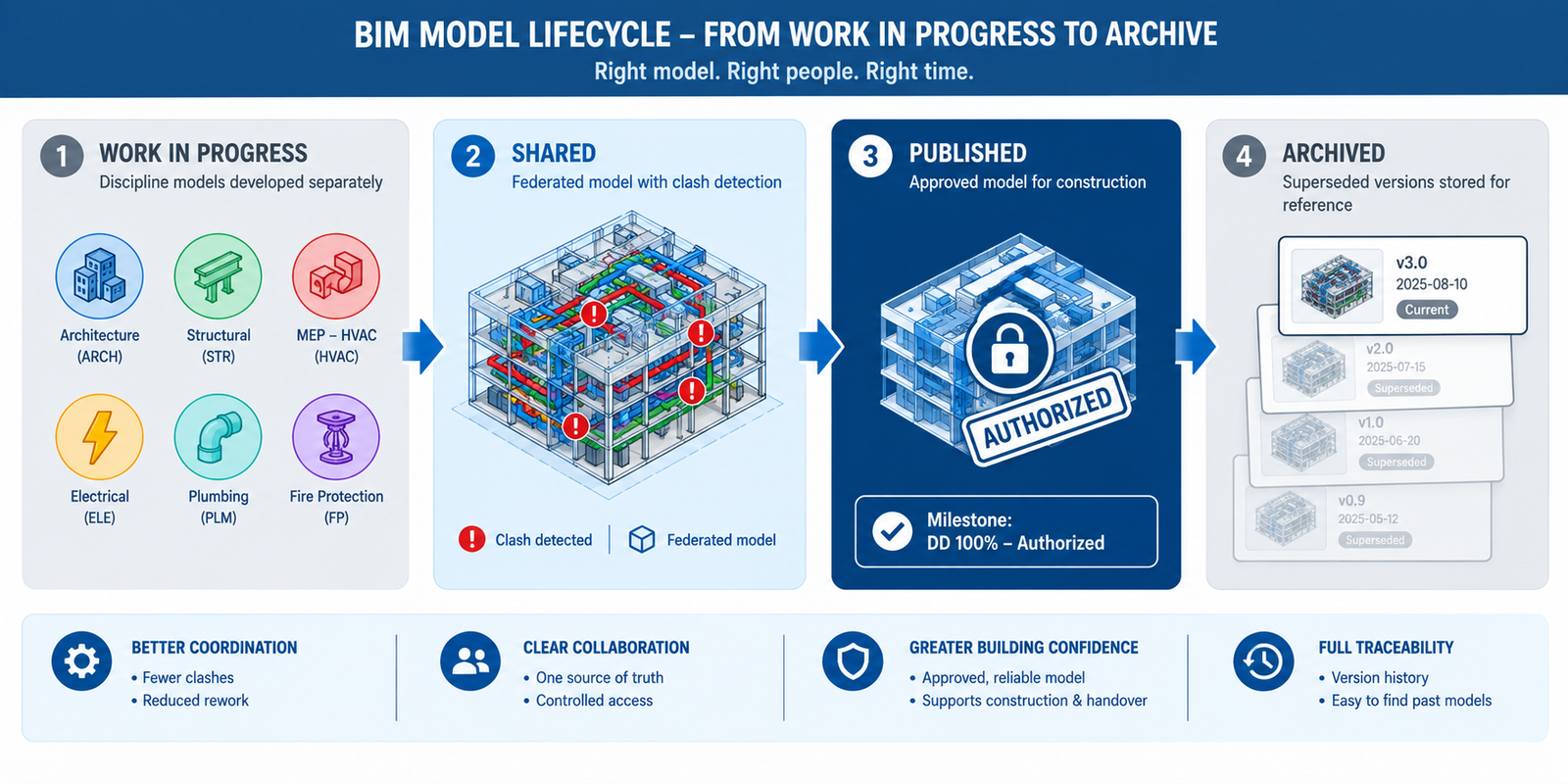
    CDE workflow diagram showing the Work in Progress, Shared, Published, and Archived stages of a large BIM coordination project

    This article sets out the workflow large building projects need to coordinate reliably at scale: the challenges that appear once a project crosses from a handful of firms into dozens, the coordination team roles that keep a large programme functioning, the level of development (LOD) progression that determines when checks become meaningful, the CDE workflow that prevents version-control failures, and worked examples in practice.

    What Changes When a Project Gets Large in Bim Coordination

    The coordination principles from this series’ companion article on clash detection, federate the models, define clash rules, run tests, review, resolve, verify, apply at any project scale. What changes on a large project is the operational load: more organisations producing more models on independent schedules, spanning more construction phases, over a longer duration, with more owner stakeholders to reconcile.

    A workflow that works informally on a project with four firms and an eighteen-month schedule breaks down, often invisibly at first, on a project with twenty-eight firms and a six-year schedule, unless it’s deliberately restructured.

    ChallengeWhy It Appears at ScaleWorkflow ResponseOwner
    Model volume and file sizeDozens of discipline models across buildings/phases become too large to federate as one file without performance lossSplit into coordination zones (building, floor band, system), federate each on its own cycle, aggregate summary resultsBIM manager, via the BIM execution plan
    Number of participating organisations15-40+ firms producing models on independent schedulesA CDE with defined publish points and version controlInformation manager / CDE administrator
    Multiple concurrent project phasesEarly phases under construction while later phases are still in designSeparate coordination tracks and clash matrices per phase, scoped by proximity to construction startProject BIM coordinator
    Long project duration5-10 year projects see software, staff, and firms changeA living BIM execution plan reissued at milestones, plus structured onboarding for new participantsBIM manager
    Owner and stakeholder complexityFacilities, operations, security, and sustainability requirements must all be reconciled against one modelA structured stakeholder requirement register with a defined review and sign-off workflowOwner’s project representative
    Interface coordination between buildings or zonesShared utility corridors and campus systems have no single owning design teamAn explicit interface management plan with a named responsible party per interfaceProject BIM coordinator

    The Coordination Team: Roles and Reporting Structure

    On a small project, one BIM coordinator can plausibly hold every coordination responsibility informally. On a large project, that responsibility has to be explicitly divided, since no single person can simultaneously manage model federation, CDE governance, discipline-level clash resolution, 4D construction coordination, and owner stakeholder review.

    RoleCore ResponsibilitiesKey DeliverableReports Coordination Status To
    Information manager / CDE administratorOwns the CDE; defines and enforces the WIP-Shared-Published-Archived workflow; manages access across all organisationsCDE governance procedure; version control standardProject executive and BIM manager
    Project BIM managerOwns the BIM execution plan; sets modelling standards and LOD requirements; oversees coordination across all zones/phasesBIM execution plan (BEP); coordination governance structureProject executive and steering committee
    Discipline BIM coordinatorManages one discipline’s model production, federation submission, and clash resolutionDiscipline model at required LOD; clash resolution logProject BIM manager
    General contractor’s BIM/VDC managerCoordinates the construction-phase model; integrates trade and fabrication models; links to schedule for 4DConstruction coordination model; 4D simulationProject BIM manager and GC’s project executive
    Trade contractor / fabricator modellerProduces fabrication-level models coordinated against the federated model before fabricationFabrication-ready model; as-built updatesGC’s BIM/VDC manager
    Owner’s facilities/operations representativeDefines asset and maintenance data requirements; reviews the model from an O&M perspectiveEIR input for facilities data; milestone review commentsProject executive and BIM manager

    Why the Information Manager Role Is Frequently Underinvested

    The information manager role is the one most commonly underinvested on large projects, often seen as administrative rather than coordination-critical. The campus utility corridor failure in the introduction is a direct consequence: no one owned the responsibility for a formal publish gate, so the project defaulted to ungoverned file-sharing that couldn’t tell twenty-eight organisations which version was current. On projects at this scale, the CDE administrator role is the foundation the rest of the coordination programme depends on.

    Level of Development: When Different Coordination Checks Become Meaningful

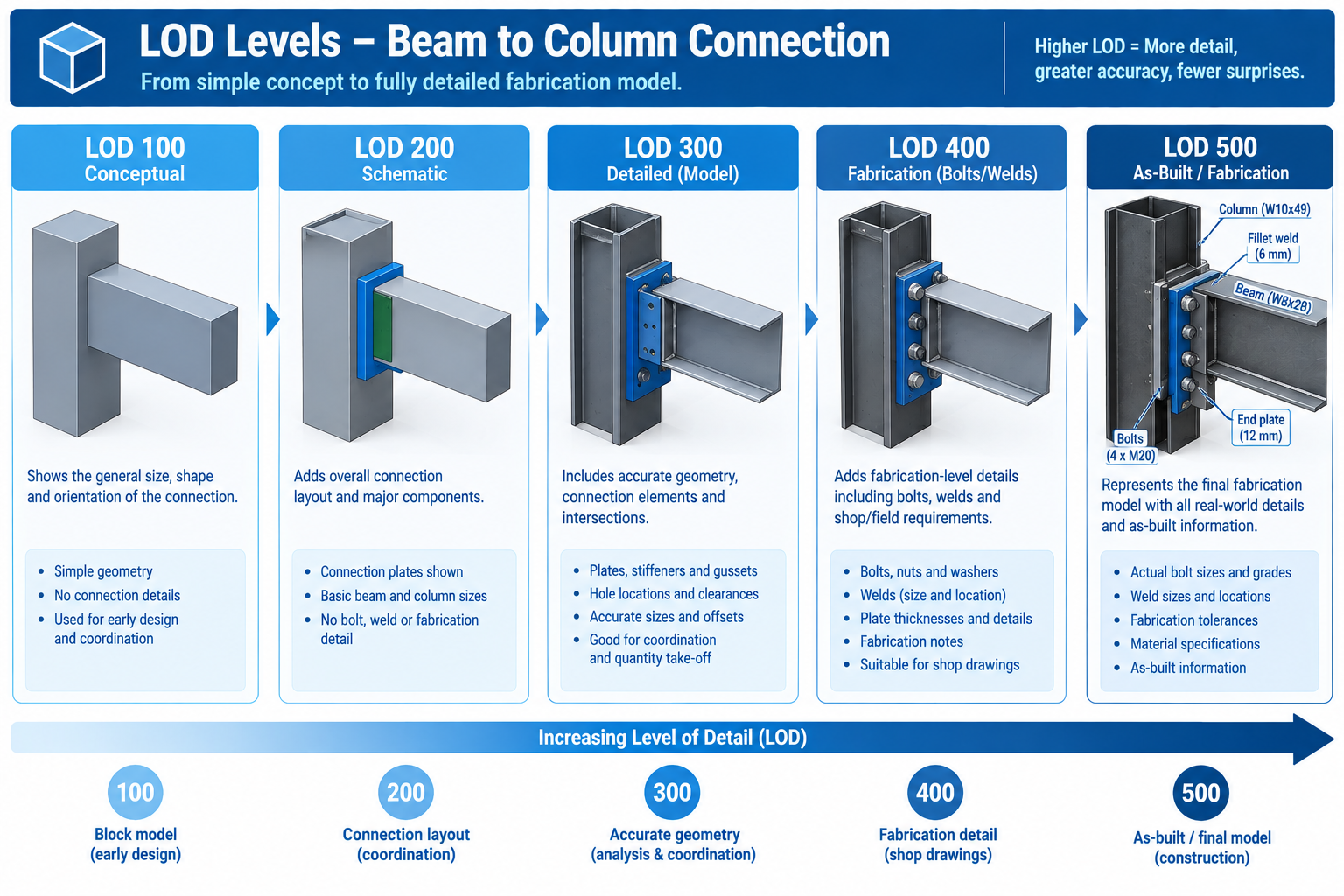
    A large project’s workflow has to account for different buildings, zones, or systems sitting at different levels of design maturity on the same calendar date, since phased design and construction is the norm at this scale. Level of Development (LOD) describes how much geometric and data detail a model element carries at a given stage, and it directly determines what coordination check that geometry can meaningfully support.

    LODWhat It ContainsTypical StageCoordination Implication
    LOD 100Conceptual massing, approximate size/shape/locationConcept designNot suitable for clash detection; visualisation and space planning only
    LOD 200Generalised systems with approximate quantities and orientationSchematic designFirst stage for checking basic, large-scale spatial conflicts
    LOD 300Specific systems accurately sized, shaped, located, orientedDesign developmentFormal, recurring clash detection across all disciplines should be fully underway
    LOD 350LOD 300 plus specific interfaces and connections (hangers, supports)Late DD / early construction docsInterface-level clashes (support/connection conflicts) become visible
    LOD 400Fabrication-level detail with manufacturer and fabrication infoConstruction docs / shop drawingsMust be re-coordinated against the current design model before fabrication starts
    LOD 500As-built, field-verified installed conditionConstruction completion / handoverSource of truth for the facilities model; discrepancies from LOD 400 should be captured

    Mixed-LOD Coordination: The Reality on Large Phased Projects

    A single coordination cycle may need to test an early-design Phase 3 building at LOD 200 against an under-construction Phase 1 building at LOD 400, particularly at shared interfaces like a connecting bridge or a common below-grade structure. This mixed-LOD condition is normal on large projects and needs explicit planning: for each interface between phases at different LOD, define which elements are fixed (adjacent phase already under construction) and which are still flexible.

    Level of development progression diagram showing a beam-column connection modeled at increasing detail from LOD 100 through LOD 500

    The Common Data Environment Workflow

    The common data environment (CDE), formalised internationally through the ISO 19650 series, is the information management structure that makes reliable coordination possible once a project has more participants than can informally track each other’s model versions through email and shared drives. The CDE defines four states every model version passes through.

    CDE StatePurposeWhat Moves It ForwardCommon Pitfall
    Work in Progress (WIP)Where each discipline develops and iterates privately before sharingInternal quality check and discipline lead approvalSharing WIP-quality models directly, bypassing the quality check
    SharedWhere models are federated and coordinated against each other; clash detection happens hereOutstanding critical clashes resolved; model authorised for formal issueTreating Shared as final and proceeding to construction from an unauthorised version
    PublishedThe formal, authorised milestone version used for issue, approval, and contractual purposesA new milestone is reached and a superseding version is publishedContinuing to reference a Published version after a newer one supersedes it
    ArchivedA permanent, immutable record of every previously Published versionNot applicable; retained for referenceFailing to retain a complete history, losing the ability to trace a decision later

    The Publish Gate: The Step That Would Have Prevented the Campus Corridor Failure

    The single workflow element most directly responsible for preventing a failure like the campus utility corridor breakdown is the formal gate between Shared and Published states. This is the point where the coordination team confirms a model version has been reviewed, critical clashes are resolved, and the version is authorised as the official reference for every downstream party. Without an enforced publish gate, every organisation independently judges which version is current, exactly the condition that produced three subcontractors working from three unreconciled corridor models.

    Implementing the gate well requires more than software; it requires an agreed governance procedure specifying who has authority to publish, what review must be completed first, and how participants are notified when a new version supersedes the last. This is typically documented in the BIM execution plan and owned by the information manager.

    Worked Examples

    A multi-terminal airport expansion: An international airport expansion added a new terminal, a connecting people-mover system, and renovations to two operational terminals, coordinated across 34 firms over seven years. Early coordination attempts, using the same informal single-coordinator approach that had worked on smaller projects, fell behind within the first year, with clash reports taking over three weeks since the coordinator was manually federating models from five different native platforms with no shared CDE.

    The project introduced a formal ISO 19650-aligned CDE with a dedicated information manager, split coordination into four parallel tracks (new terminal, people-mover, Terminal A, Terminal B), each with discipline BIM coordinators reporting to a project BIM manager, and defined an explicit interface register for connections between the new terminal and the existing operational terminals.

    Clash report turnaround dropped from three weeks to five days once models were federated from a governed CDE, and the interface register caught a fire life-safety systems conflict between the new terminal’s smoke control system and Terminal A’s existing system nine months before it would otherwise have surfaced during commissioning, a stage where the conflict on an operational, occupied terminal would have carried substantially higher risk.

    Read more on this article: How BIM Prevents Construction Delays: Six Causes and Their Fixes

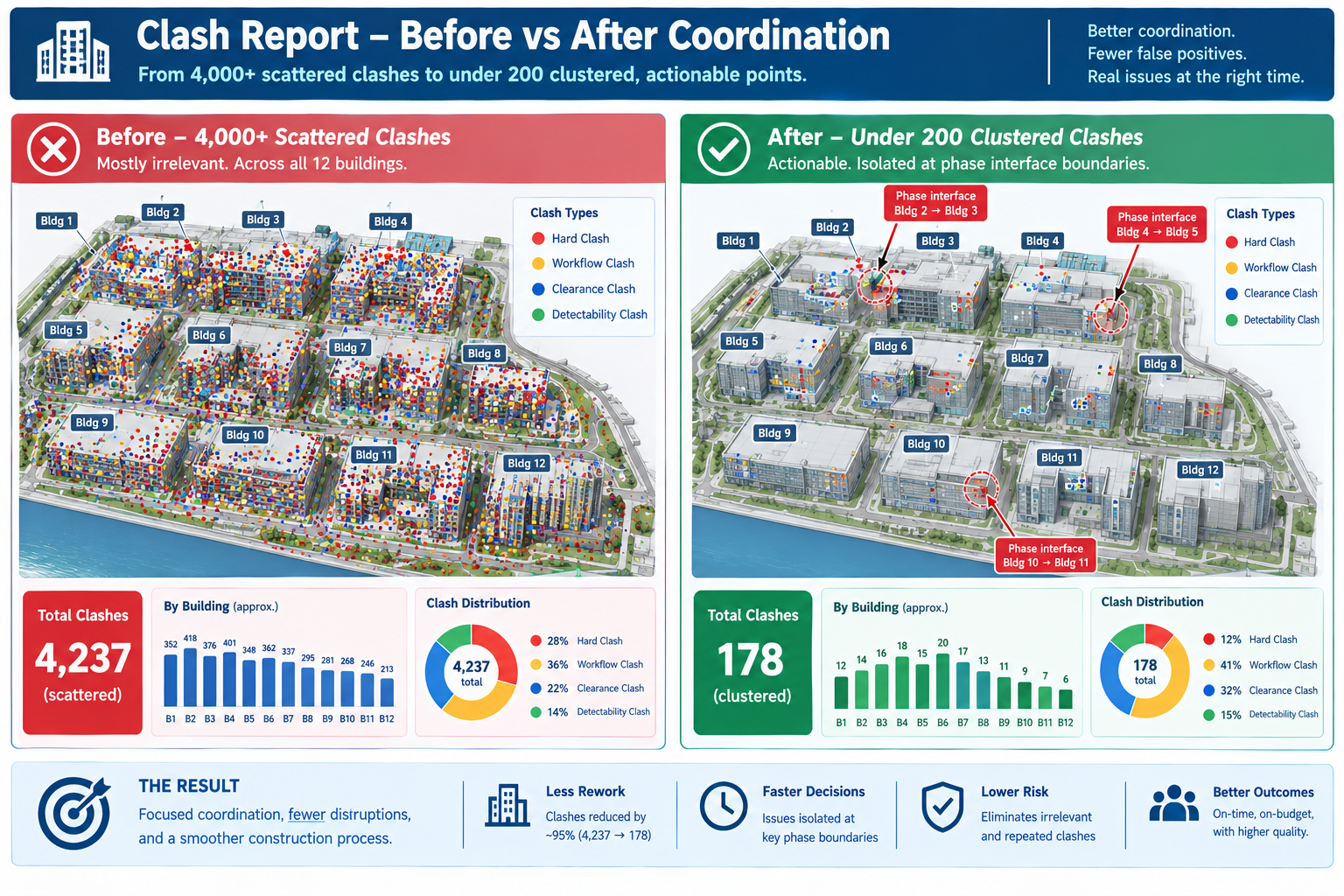
    A mixed-use residential and retail campus: A twelve-building campus was designed and built in four overlapping phases over five years, sharing a common below-grade parking structure and central utility infrastructure. By year three, Phase 1 was at LOD 500 (as-built), Phase 2 under construction at LOD 400, Phase 3 in construction documentation at LOD 350, and Phase 4 still in schematic design at LOD 200, all sharing the same infrastructure.

    Early attempts ran a single, uniform clash test across all twelve buildings together, producing an unmanageable mixed-LOD report where genuine Phase 3/Phase 4 interface conflicts were buried among thousands of low-value results from comparing precise LOD 400 geometry against approximate LOD 200 massing.

    The team restructured the clash matrix to test each phase against itself at full detail, plus a separate, explicitly scoped interface-only test at each phase boundary, limited to the specific shared elements crossing between phases. This cut the weekly clash report from over 4,000 largely irrelevant results to under 200 genuinely actionable ones, and the interface-only tests caught a below-grade utility riser conflict between Phase 3 and Phase 4 while Phase 4 was still in schematic design, cheap enough to resolve with a routing change on paper.

    Before and after clash report comparison showing 4,000 unfiltered results reduced to 200 actionable phase-interface clashes

    Frequently Asked Questions

    At what project size does a formal CDE and role structure become necessary?

    There’s no fixed threshold, but the practical signal is when informal coordination starts producing version-confusion failures. Most projects with more than 8-10 firms, concurrent design and construction phases, or a schedule over two years benefit from a formal CDE and defined roles, even in a lighter-weight form.

    Does ISO 19650 have to be formally adopted to get the benefit of a CDE workflow?

    No. ISO 19650 gives a well-tested structure and vocabulary, but a project can implement the same underlying workflow, a governed staging process with a publish gate and version control, without formally certifying compliance. Adopt it informally if it solves the coordination problem; engage a qualified advisor only if a contract requires certified compliance.

    How should a large project handle disciplines working at different LOD levels?

    This is normal, not a problem to eliminate. Don’t force every discipline to the same LOD artificially. Instead, define for each interface between different-LOD zones which elements need general spatial checking versus precise geometric checking that requires both sides at LOD 300 or higher.

    Who should own the BIM execution plan on a large, multi-stakeholder project?

    Typically the owner’s project team or a designated lead consultant acting on the owner’s behalf, since the plan needs authority across every participating firm, which no single design firm or contractor can enforce over the others. Very large projects often engage an independent BIM management consultant for this role.

    Why do large project coordination workflows break down even after being properly set up?

    Usually because the workflow is documented at kickoff but not actively maintained as the participant list, phases, and staff change over a multi-year duration. A correct publish gate and role structure can degrade silently as new firms join without onboarding or as shortcuts creep back in under schedule pressure. Audit and reinforce the workflow at defined milestones, not just once at setup.

    Key Takeaways

    The campus utility corridor failure, and the airport and mixed-use campus examples, share a common lesson: on a large project, the coordination methods themselves are only as reliable as the workflow governing who’s working from which model version, at what stage, reporting to whom, and authorised by what gate. None of these failures happened because a discipline modelled something incorrectly within their own scope. Each happened because the structure connecting dozens of independently working organisations had a gap.

    This is why large project coordination can’t simply be the same informal process used on a small project, scaled up by adding more people. It needs the explicit role structure, LOD-aware test planning, and governed CDE workflow set out here, built in from the earliest stages of the BIM execution plan and actively maintained through a duration that can span most of a decade.

    The projects that get this right don’t have fewer moving parts than the ones that struggle; a twelve-building, five-year, multi-phase campus carries the same underlying complexity regardless of coordination quality. What differs is whether that complexity is managed through a defined, governed workflow that catches version confusion and interface conflicts before they reach the field, or discovered the way the campus utility corridor conflict was: three subcontractors quietly working from three different answers to the same question, until someone finally asked which one was right.

  • How BIM Prevents Construction Delays: Six Causes and Their Fixes

    How BIM Prevents Construction Delays: Six Causes and Their Fixes

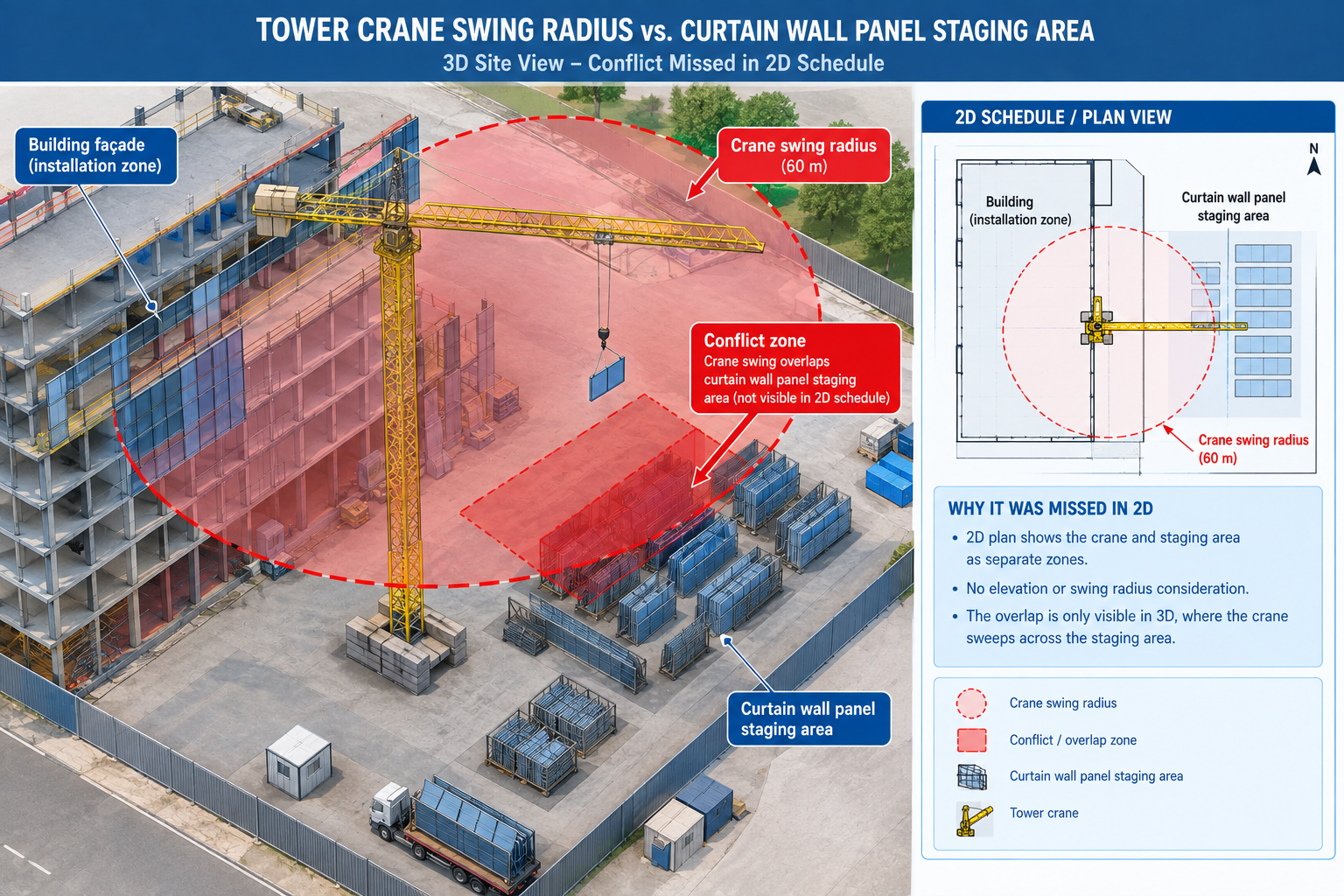
    A 22-storey mixed-use tower was seven months into structural erection when the general contractor’s superintendent discovered that the tower crane’s planned swing radius for lifting curtain wall panels to the sixth floor would sweep directly through the staging area where those same panels were scheduled to be stored before installation. Two activities, each individually scheduled correctly, had never been checked against each other in three dimensions.

    The schedule, built and maintained in a standalone scheduling tool with no link to the building model, showed both activities happening the same week because that week’s sequence looked correct on paper: steel substantially complete, curtain wall crew mobilised, crane available. Nobody had checked whether the crane could physically reach the panels without its swing path crossing the space where the panels themselves were sitting.

    Quick answer: The conflict cost eleven days: four to identify a temporary alternate staging location, three to renegotiate the crane’s lift sequence with the steel erector, and four of lost curtain wall progress implementing the new sequence. Every individual activity in the original schedule had been logically planned. What was missing wasn’t planning discipline; it was a way to test the plan against the physical, three-dimensional reality of the site before committing crews and equipment to it. This is what BIM does for delay prevention: it’s not one tool that fixes delays generally, but a set of distinct methods, each targeted at a specific delay mechanism, from clash detection for physical conflicts to 4D simulation for sequencing conflicts.
    3D diagram showing a tower crane swing radius overlapping a curtain wall panel staging area, a conflict invisible in a 2D schedule

    This article covers the six most common causes of construction delay, the specific BIM dimensions and methods that address each one, the six-stage process for implementing BIM in a way that actually prevents delays, and two worked examples showing the argument in practice.

    The Six Most Common Causes of Construction Delay, and What BIM Does About Each

    Construction delays rarely have a single cause; they accumulate from recurring, well-understood problems that appear on nearly every project. What varies is how early each is caught and how disruptive the fix is once found.

    Delay CauseDescriptionTypical Schedule ImpactBIM Method / Tool
    Design conflicts discovered on site2D drawings didn’t reveal a physical overlap between systems before construction1-4 weeks per major conflict3D clash detection (Navisworks, Solibri) run on a recurring cycle through design
    Inaccurate or incomplete quantity take-offsManual take-offs from 2D drawings are wrong, causing late reorders or oversupply1-3 weeks per major shortfall5D BIM quantity take-off and cost estimating tools, model-linked and auto-updating
    Unclear or outdated construction sequenceThe site team works from a static schedule that doesn’t reflect design evolution1-6 weeks cumulative from repeated resequencing4D BIM scheduling simulation, schedule linked directly to model elements
    Late or unresolved RFIsDesign ambiguities aren’t caught until a subcontractor in the field can’t proceed3-15 days per RFI cycle, multiplied by stalled critical-path workFederated model as a common reference; cloud-based CDE for RFI tracking
    Prefabrication and offsite fabrication errorsComponents fabricated from 2D shop drawings don’t fit as-built conditions2-8 weeks depending on re-fabrication lead timeModel-based fabrication with digital model handoff, bypassing 2D shop drawings
    Poor stakeholder communication and approval delaysOwners, architects, and contractors interpret drawings differently1-4 weeks per major disagreementCloud-based model viewers and common data environments for real-time shared visualisation

    Why RFIs Are the Clearest Early-Warning Signal

    Among these six causes, the volume and cycle time of requests for information (RFIs) deserves particular attention, since it’s the delay mechanism most directly visible in ongoing project data, long before the delay itself shows up in the schedule. An RFI is, by definition, a moment where the field can’t proceed without clarification, and every day it stays open is a day the affected activity, and often activities scheduled after it, can’t move forward with certainty. Projects that track RFI volume and cycle time as a leading indicator, rather than only reviewing schedule variance after the fact, can catch a coordination breakdown while it’s still a paperwork problem rather than a field delay.

    A shared, coordinated 3D model reduces RFI volume by resolving underlying ambiguity before construction reaches that point, and reduces RFI cycle time for the RFIs that still occur by giving the responding party an exact model location and geometry to reference rather than a written description requiring back-and-forth clarification. Both effects compound: fewer RFIs, each resolved faster, is a meaningfully different schedule risk profile than a project relying on 2D drawings alone.

    The BIM Dimensions That Do the Delay-Prevention Work

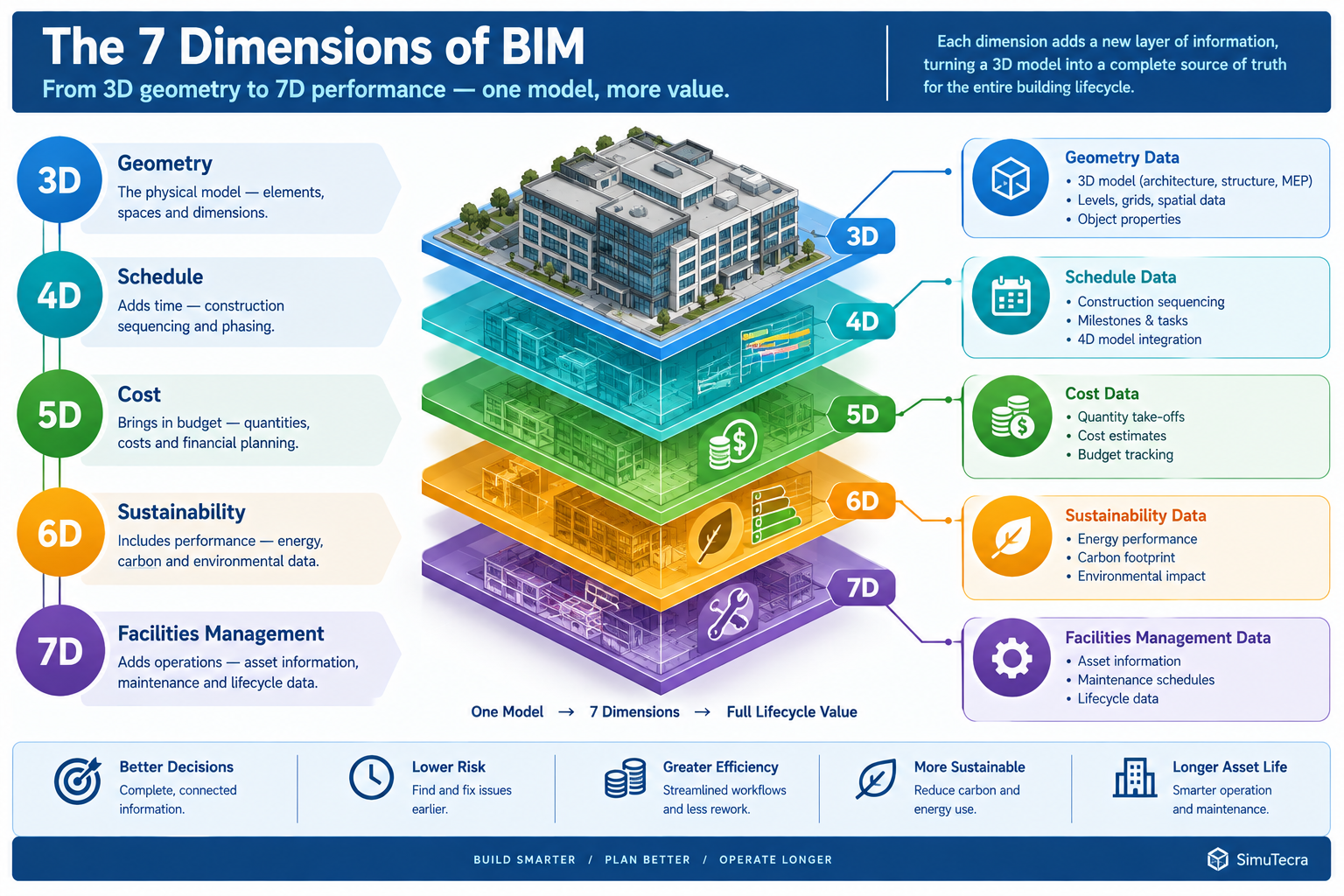
    The “dimension” numbering (4D, 5D, and so on) is more convenient shorthand than a strict technical hierarchy, but each does correspond to a distinct type of data linked to the model and a distinct delay-prevention mechanism.

    BIM DimensionWhat It AddsDelay-Prevention MechanismRepresentative Tools
    3D, GeometryThree-dimensional representation of every building element from every disciplineMakes physical conflicts visible before construction, replacing flat 2D overlay reviewRevit, ArchiCAD, Tekla Structures
    4D, ScheduleSchedule activities linked directly to model elementsReveals sequencing conflicts, an element scheduled before its access route or preceding trade is complete, before it reaches the fieldNavisworks TimeLiner, Synchro
    5D, CostCost data linked to model elements, auto-updating as design changesPrevents late-discovered budget overruns from triggering mid-construction redesign scope cutsAutodesk Assemble, CostX, Vico Office
    6D, SustainabilityEnergy and sustainability data linked to elementsPrevents late-stage code or certification compliance failures requiring redesign after construction startsAutodesk Insight, IES Virtual Environment
    7D, Facilities managementAsset and maintenance data linked to elements for post-construction useReduces commissioning delays from incomplete or inconsistent handover documentationFM:Systems, Archibus, Autodesk Tandem

    4D Scheduling: The Dimension Most Directly Tied to Delay Prevention

    Of these dimensions, 4D scheduling aims most directly at delay prevention, since it’s the only one that tests the time dimension of the project against the model rather than cost, sustainability, or facilities data. The tower crane conflict is a canonical 4D problem: two activities correctly scheduled in isolation created a physical conflict only visible when their spatial footprint was checked against each other during the same time window. A 4D simulation run before the schedule is finalised, and re-run as the schedule and design evolve through construction, catches exactly this category of conflict before crews, equipment, and materials commit to a sequence that can’t physically work.

    The practical value of 4D simulation depends heavily on keeping it current. A 4D model built once at project kickoff provides a useful early check but a false sense of security later if not updated as both the schedule and design continue to change. Projects that treat 4D simulation as a living tool, updated on the same recurring cycle as clash detection, catch sequencing conflicts throughout construction rather than only at the outset.

    Diagram of BIM dimensions 3D through 7D showing geometry, schedule, cost, sustainability, and facilities data layered on a shared model

    Implementing BIM for Delay Prevention: A Six-Stage Process

    Owning BIM software, or even having each discipline produce a 3D model, doesn’t by itself prevent delays. The delay-prevention benefit comes from a disciplined process built around the model.

    StageActivityCommon Pitfall
    1. BIM execution planningDefine BIM goals, level of development requirements, model ownership, and specific delay-prevention uses before design beginsTreating the BEP as a compliance formality that’s signed but not actually followed
    2. Model authoring and federationEach discipline authors to the agreed detail level and federates into a shared environment on a recurring cycleInconsistent levels of detail across disciplines, hiding conflicts because one discipline hasn’t modelled that scope yet
    3. 4D schedule linkingSchedule activities are linked to model elements and simulated to check access, logistics, and sequencing before the schedule is finalisedBuilding the simulation once at kickoff and never updating it as schedule and design evolve
    4. Ongoing coordination and clash resolutionClash detection continues on a recurring cycle through design and into early constructionCoordination slowing or stopping once construction starts, even though field conditions keep generating new conflicts
    5. Fabrication and construction model handoffModel geometry hands off directly to fabricators rather than being redrawn into 2D shop drawingsFabricators working from an outdated model version due to unclear version control
    6. Facilities handover and closeoutThe as-built model, updated with field-verified changes, is delivered to the owner with asset and maintenance dataDeferring model updates until the end, producing a rushed, incomplete as-built model

    The BIM Execution Plan: Where Delay Prevention Is Won or Lost

    The first stage is disproportionately important because it defines whether the remaining five are actually structured to prevent delays or are simply producing a coordinated model as a documentation exercise. A BIM execution plan (BEP) that specifies model federation and clash detection but not 4D schedule linking will catch physical conflicts but miss sequencing conflicts of exactly the kind that delayed the tower crane example.

    A BEP that doesn’t specify how the as-built model will be maintained through construction will produce a coordinated design model but a facilities handover gap at project close. Each specific delay-prevention use, clash detection, 4D sequencing, quantity take-off, fabrication handoff, facilities data, should be explicitly scoped in the BEP, since a model built without a defined use for a specific benefit rarely delivers that benefit by accident.

    Measured Benefits: Where BIM’s Delay Reduction Shows Up in Project Data

    Rather than treating “BIM reduces delays” as a single unmeasurable claim, each benefit ties to a specific project metric a scheduler or owner would already be tracking.

    BenefitMechanismWhere It Shows UpCaveats
    Fewer schedule-impacting RFIsGeometric ambiguities resolved in the coordinated model before constructionRFI logs and critical-path variance reportsLargest for MEP-heavy, congested-space projects; smaller relative benefit for simpler projects
    Reduced rework and change ordersConflicts caught in the model fixed as design changes rather than field improvisationsChange order logs and field rework trackingSavings depend on how disciplined the resolution and verification process actually is
    Faster procurement and fabrication cyclesAccurate, model-derived quantities shorten time from design finalisation to deliveryProcurement lead-time tracking and fabrication schedule adherenceDepends on trade contractors’ own fabrication capability and willingness to work from model data
    More reliable schedule commitments4D simulation identifies conflicts before the schedule is issuedSchedule variance reports and revision frequency during constructionSimulation quality depends on how current the underlying model and schedule data are
    Shorter commissioning and closeoutAccurate, continuously updated as-built model reduces documentation gapsCommissioning schedule adherence, substantial-to-final completion gapRequires the owner’s facilities team to have systems in place to actually use the handover data

    Why the Benefit Is Concentrated in Complex, Multi-Trade Projects

    The delay-reduction benefit isn’t uniform across project types; it scales with the density of interdependent systems and trades, since that density determines how many opportunities exist for the kind of conflict BIM catches. A single-storey warehouse with a simple structural system and minimal MEP scope has relatively few opportunities for a tower-crane-style sequencing conflict or ceiling-void congestion, so the absolute delay-prevention benefit of a full BIM programme is smaller, even though the underlying methods still apply.

    A hospital, laboratory, or high-rise mixed-use tower, with dense, interdependent MEP systems, tight sequencing, and multiple concurrent trades in the same physical space, is where the benefit concentrates most heavily, since those are exactly the conditions under which 2D-only coordination is least reliable.

    Worked Examples

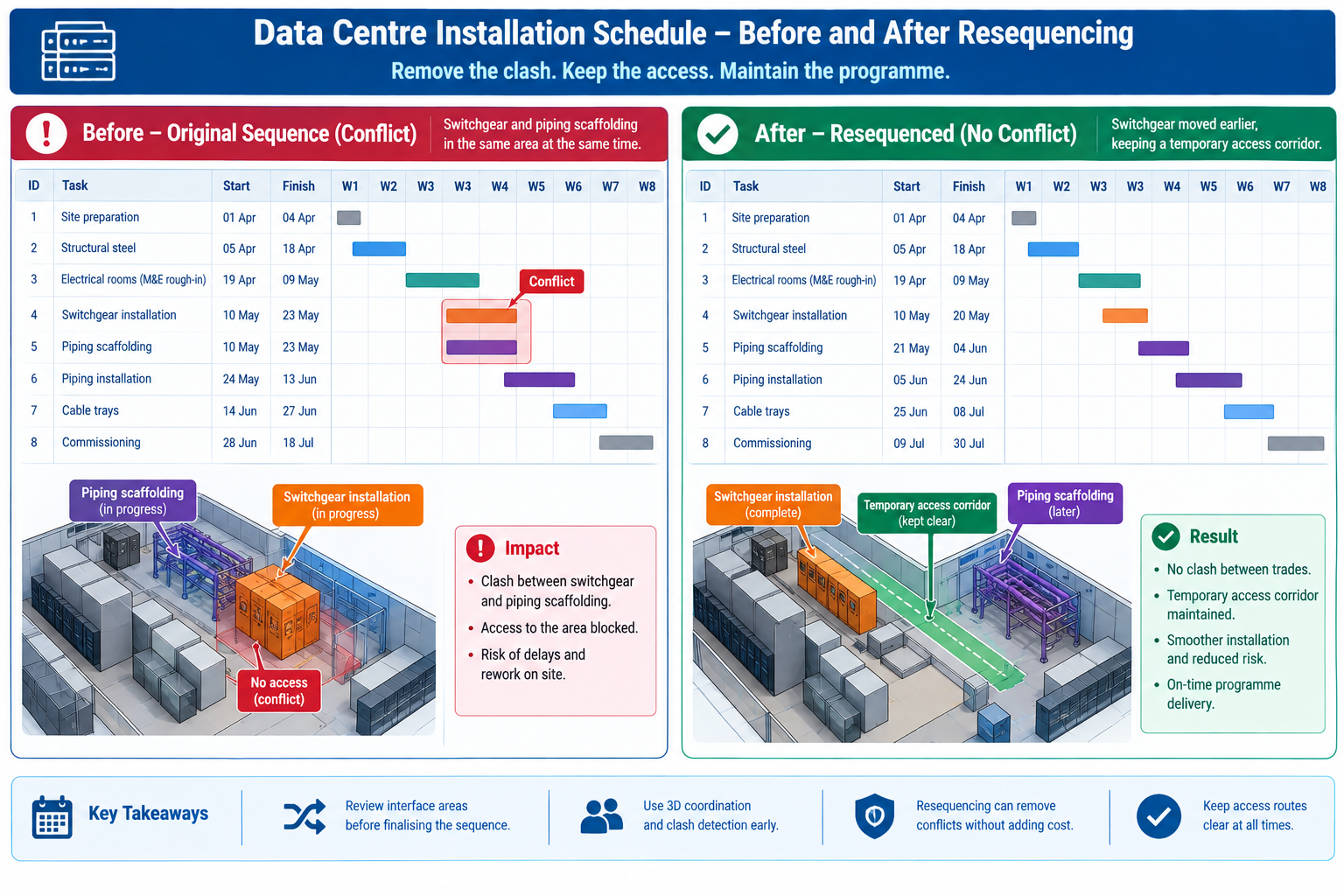
    A data centre fit-out schedule: A hyperscale data centre fit-out had an aggressive 34-week schedule driven by a fixed equipment delivery date, with cooling infrastructure, electrical switchgear, and server rack installation sequenced to overlap heavily in the same rooms. The original schedule, built in a standalone tool by an experienced scheduler, showed a logically sound sequence with appropriate lead and lag times.

    When linked to the coordinated model and simulated in 4D, the simulation revealed that the electrical switchgear installation crew, scheduled for weeks 18 through 21, would need access to a room that the cooling infrastructure crew’s overhead chilled-water piping, scheduled for week 17, would already have enclosed with scaffolding and temporary bracing blocking the switchgear’s only practical delivery path.

    The simulation gave the team six weeks of advance warning, time to resequence the chilled-water piping installation to leave a temporary access corridor open until the switchgear was delivered and positioned, then complete the remaining piping afterward, a one-day schedule logic change made in the office. This avoided what the team estimated would otherwise have been a two-to-three week delay bringing in additional rigging equipment to manoeuvre the switchgear around completed piping and scaffolding, a delay that would have directly threatened the fixed equipment delivery date the entire schedule was built around.

    A renovation project with unknown existing conditions: A hospital renovation involved gutting and rebuilding three floors of an operating 1980s-era building while adjacent floors stayed occupied and in clinical use. The original design was based on the building’s archived 2D drawings, known to be incomplete and, in places, inconsistent with the building’s actual as-built condition after four decades of undocumented modifications.

    The project team commissioned a 3D laser scan of existing conditions before finalising the renovation design, converting the point-cloud data into an as-built 3D model capturing the building’s true existing structure, ductwork, and piping routes, rather than relying on archived drawings. The new design was then coordinated directly against this verified as-built model.

    Scan-based coordination identified 47 locations where the building’s actual condition differed materially from the archived drawings, including a structural beam relocated during a 1990s renovation, reflected in no drawing set, that would have directly conflicted with a new mechanical shaft location in the original design.

    Because these discrepancies were identified against a verified model before construction began, the design was adjusted in the office rather than discovered by a demolition crew mid-renovation, in an occupied hospital where an unplanned structural or MEP discovery carries especially high schedule and safety risk. The team credited the upfront scanning investment with avoiding an estimated several weeks of cumulative delay that unknown existing-condition conflicts would otherwise have caused across the renovation’s three floors.

    Frequently Asked Questions

    Does BIM eliminate construction delays entirely?

    No single method eliminates delays entirely, since some causes, weather, material supply chain disruption, labour availability, sit outside what a coordinated model and schedule simulation can address. BIM’s delay-prevention benefit concentrates specifically in the categories covered here: design conflicts, sequencing conflicts, quantity and procurement errors, RFI cycle time, fabrication errors, and stakeholder miscommunication. Projects with a mature BIM programme still experience delays from external causes; the argument for BIM is that it removes a specific, large, and largely preventable category of delay, not that it removes delay risk altogether.

    How early in a project should 4D scheduling begin?

    As soon as the design model and construction schedule both have enough detail to link meaningfully, typically once design has progressed into construction documentation and the contractor’s detailed schedule is being developed, though a preliminary 4D simulation using design-development-level detail can still catch major sequencing and logistics conflicts earlier. Both examples in this article depended on the simulation being run and reviewed well before the affected activities were due to start; a simulation reviewed only in the same week as the activity it covers provides little of the warning time that makes the method valuable.

    Is BIM-driven delay prevention only relevant to large, complex projects?

    The underlying methods apply at any scale, but the benefit’s magnitude scales with project complexity. A small, simple project with few interdependent systems will still benefit from basic 3D coordination and clash checking, but is less likely to justify the full cost of a 5D cost-linked or 7D facilities-management programme. Scope the BIM execution plan to the specific delay risks the project actually carries, rather than applying every available BIM dimension uniformly regardless of size.

    Who is responsible for maintaining the 4D and coordination models through construction?

    This should be explicitly assigned during BIM execution planning, typically to a BIM coordinator role that may sit within the general contractor’s project team, a dedicated BIM management subcontractor, or occasionally the design team depending on delivery method. The key requirement, regardless of who holds the role, is that the same party or a clearly defined handoff maintains both the coordination model and its link to the live construction schedule throughout the project, since a simulation or clash register that falls out of sync with the current design and schedule loses much of its delay-prevention value.

    What is the most common reason a BIM programme fails to actually reduce delays?

    Treating model creation as the deliverable rather than the coordination and scheduling process built around the model. The model finds conflicts, but a defined process for reviewing, prioritising, resolving, and verifying those conflicts, and for keeping the schedule link current, is what actually converts that information into prevented delays. A beautifully modelled building with no defined clash resolution protocol, no 4D update cadence, and no clear model ownership through construction will still experience most of the delay causes in this article’s opening table, because the model alone resolves nothing; the process around it does.

    Gantt chart comparison showing a scheduling conflict between switchgear installation and piping scaffolding versus a resequenced version avoiding it

    Key Takeaways

    The tower crane conflict cost eleven days on a schedule where every individual activity had been planned correctly. The data centre and hospital renovation examples show what changes when the schedule and design are tested against each other, and against verified existing conditions, before crews and equipment commit to a sequence. In every case, the underlying problem was the same: a plan internally consistent on paper but never checked against the physical, three-dimensional, time-based reality of the actual site.

    BIM reduces construction delays specifically because it makes that check possible before commitment rather than after, whether the conflict is geometric (caught by clash detection), sequential (caught by 4D simulation), or based on existing conditions the original drawings never accurately captured (caught by as-built scanning and model verification). None of these methods work by accident; each requires the deliberate process described in the six implementation stages, from execution planning through facilities handover, following the coordination framework in the National BIM Standard-United States, to actually convert model and schedule data into prevented delays rather than an expensive but unused coordination exercise.

    Projects that build this process in from the start, and maintain it through the full construction period rather than treating coordination as a design-phase-only activity, consistently show fewer schedule-impacting RFIs, less rework, more reliable schedule commitments, and shorter closeout periods than projects relying on 2D coordination and standalone scheduling tools. The eleven days lost to the tower crane conflict, and the weeks avoided in the data centre and hospital examples, are the same underlying quantity viewed from opposite sides: the cost of not testing the plan against reality, and the value of testing it in time to still change course.