Tag: cad drawing

  • How to Create a 3D Model from 2D Views in AutoCAD

    How to Create a 3D Model from 2D Views in AutoCAD

    Most AutoCAD users start their careers working in 2D: drawing lines, arcs, and polylines on a flat plane. At some point, the need arises to take those 2D drawings, whether they are orthographic views from a hand drawing, a scanned technical sketch, or an existing 2D CAD file, and construct a proper 3D solid model from them. This is the fundamental skill that bridges 2D drafting and 3D engineering design.

    It is also, honestly, one of the tasks that AutoCAD tutorials handle poorly. Most guides either teach 3D modelling from scratch without explaining how to interpret existing 2D views, or they explain how to generate 2D drawings FROM an already-completed 3D model. Neither of those answers the question most engineers and students are actually asking: I have a set of 2D orthographic drawings and I need to build the 3D solid from them. Where do I start?

    This guide answers that question from beginning to end. It covers the complete workflow: understanding orthographic projection, setting up the AutoCAD 3D modelling workspace, configuring the User Coordinate System (UCS) for each operation, building the 3D solid using EXTRUDE, REVOLVE, LOFT, SWEEP, and PRESSPULL, adding features using Boolean operations, and finally generating professional 2D drawing views from the completed 3D model using FLATSHOT and VIEWBASE. Every section includes numbered steps and practical guidance that works in the real drawing environment.

    Quick Overview:  The process of creating a 3D model from 2D views in AutoCAD has five stages: (1) Read and understand the 2D orthographic views to mentally reconstruct the 3D shape. (2) Set up the 3D Modelling workspace and configure visual styles. (3) Draw 2D profiles on the correct planes using the UCS. (4) Use solid creation commands (EXTRUDE, REVOLVE, LOFT, SWEEP, PRESSPULL) to generate 3D geometry from those profiles. (5) Use Boolean operations (UNION, SUBTRACT, INTERSECT) to combine and cut geometry to produce the final form.

    Understanding Orthographic Projection: Reading 2D Views Correctly

    Before touching AutoCAD, the most important skill for creating a 3D model from 2D views is the ability to read orthographic projection drawings correctly. Orthographic projection is the system used to represent a 3D object on a 2D drawing sheet using multiple flat views, each showing the object from a different direction.

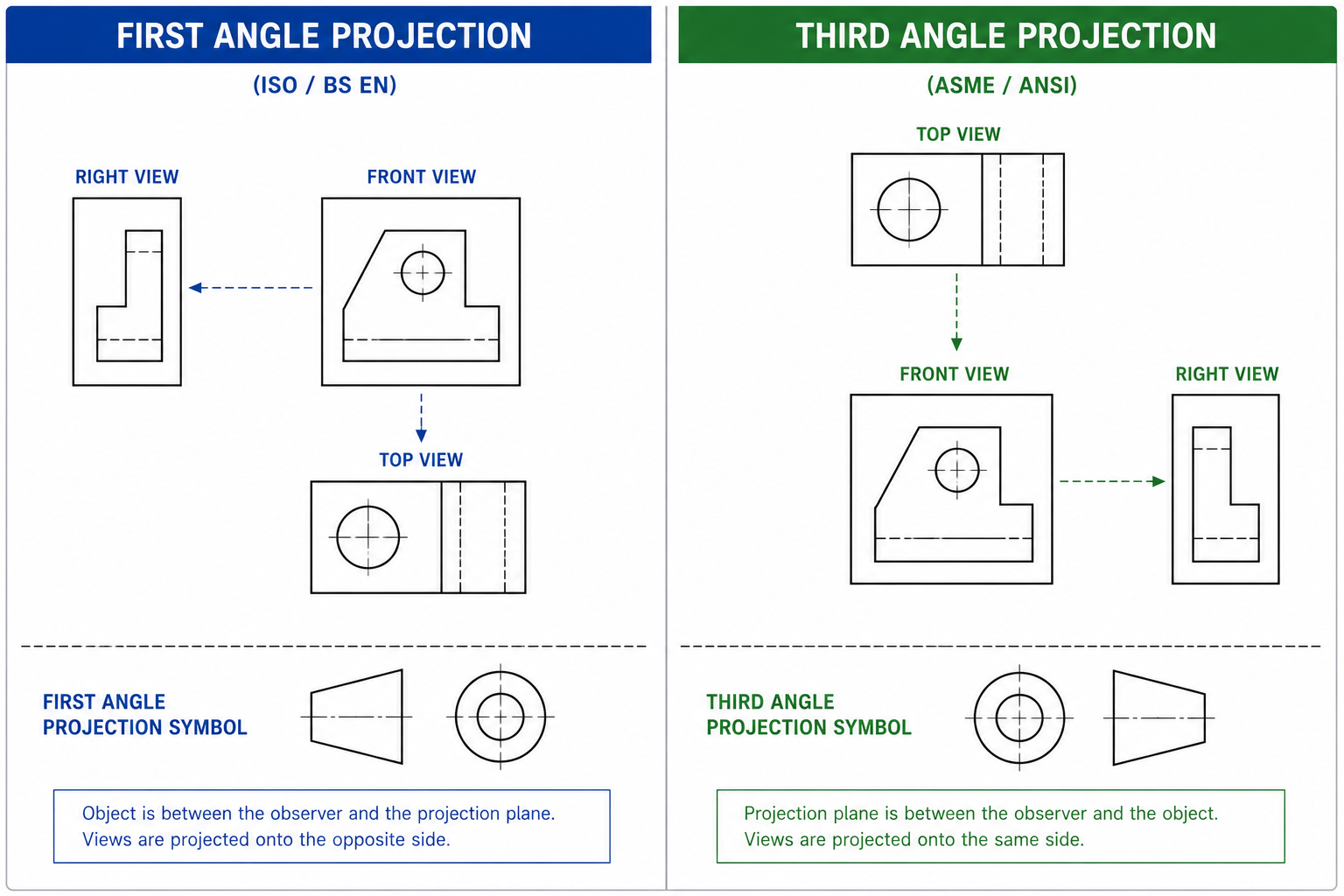
    First angle versus third angle orthographic projection diagram showing view arrangement and projection symbols for engineering drawing interpretation

    First Angle vs Third Angle Projection

    There are two projection systems used globally, and confusing them leads to completely wrong 3D models:

    Projection TypeUsed InView ArrangementSymbol
    First Angle (European)UK, Europe, Asia (except USA/Canada/Australia)The front view is in the centre. The right-side view is placed to the LEFT of the front view. The top view is placed BELOW the front view.Circle with a truncated cone pointing left
    Third Angle (American)USA, Canada, AustraliaThe front view is in the centre. The right-side view is placed to the RIGHT of the front view. The top view is placed ABOVE the front view.Circle with a truncated cone pointing right

    Always check which projection system a drawing uses before modelling. The projection symbol is usually located in the title block. Building from the wrong projection system produces a mirror-image or incorrectly oriented 3D model.

    The Three Standard Views and What Each Shows

    • Front View (Elevation): Shows the height and width of the object as seen from the front. This is almost always the most informative view and the starting point for 3D modelling.
    • Top View (Plan): Shows the width and depth of the object as seen from above. Reveals the footprint and any features on the top surface.
    • Side View (Right or Left): Shows the height and depth of the object. Reveals the profile of the side face and any features not visible from the front.
    The golden rule of orthographic reading: any dimension that appears in two adjacent views refers to the same feature. Width is shared between the front view and the top view. Height is shared between the front view and the side view. Depth is shared between the top view and the side view. When a feature is visible in all three views, it is fully defined: you know its exact position, shape, and size in 3D space.

    Hidden Lines and Centre Lines in 2D Views

    On engineering drawings, hidden lines (dashed lines) indicate edges and features that exist behind the visible surface being shown. These are critically important when 3D modelling: they reveal holes, channels, recesses, and internal features that are not visible in the current view but must be represented in the 3D solid. Centre lines (dashed-dot lines) indicate the axis of symmetry, the centre of circular features, and the position of holes. Always account for every hidden line in your 3D model.

    Read pillar content: AutoCAD tutorials for beginners and professionals

    Setting Up the AutoCAD 3D Modelling Workspace

    AutoCAD organises its tools into workspaces. The default Drafting and Annotation workspace is configured for 2D work and hides the 3D tools. Before any 3D modelling, switch to the dedicated 3D environment.

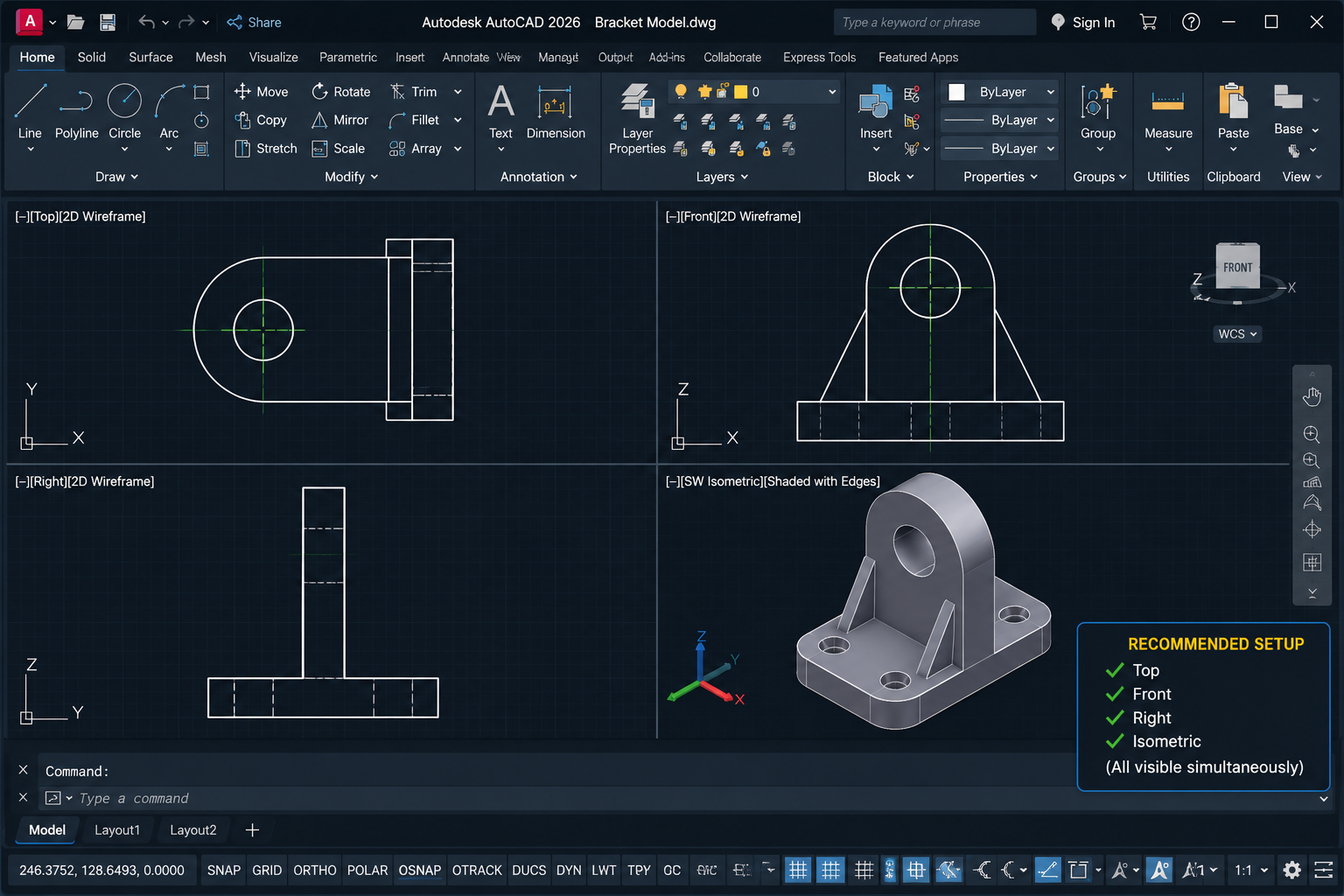
    AutoCAD 3D modelling four-viewport layout showing top, front, right, and isometric views of a 3D bracket model simultaneously

    Switching to the 3D Modelling Workspace

    1. Click the Workspace Switching icon in the bottom-right of the status bar (gear icon).
    2. Select 3D Modelling from the menu. The ribbon updates to show 3D-specific tabs and panels: Home (with 3D tools), Solid, Surface, Mesh, Visualize, and others.

    Setting Up the Visual Style

    AutoCAD’s visual style controls how 3D geometry is displayed on screen. For most 3D modelling work, the ideal visual style is Conceptual or Shades of Gray: these display solid faces with shading that makes the 3D form clearly visible while keeping edges defined.

    1. In the View tab > Visual Styles panel, click the dropdown and select Conceptual or Shades of Gray.
    2. Alternatively, type VSCURRENT in the command line, press Enter, and type C for Conceptual.

    Setting Up Multiple Viewports

    Working in 3D is significantly easier when you can see the model from multiple directions simultaneously. Setting up a four-viewport layout (Top, Front, Right, Isometric) at the start of any 3D session is strongly recommended.

    1. Go to View tab > Viewports panel > Named Viewports.
    2. Select Four: Equal from the standard viewports list and click OK.
    3. Click in each viewport and use the View Cube (top-right corner) or type VIEW to set each viewport to a different view direction: Top, Front, Right/Left, and SE Isometric.
    Professional Habit:  Before starting 3D work, set your 3D coordinate system to World UCS by typing UCS and pressing Enter, then W and Enter. This resets the UCS to the standard X (right), Y (up), Z (toward you) orientation. All subsequent modelling operations will reference a known, consistent coordinate base.

    Understanding the User Coordinate System (UCS) in 3D

    The User Coordinate System (UCS) is the single most important concept to understand in AutoCAD 3D modelling. Every drawing operation in AutoCAD happens relative to the current UCS. In 2D work, the UCS is always flat on the screen and most users never think about it. In 3D, you must actively control the UCS to draw profiles on the correct planes.

    Think of the UCS as a movable drawing board. When you draw a 2D profile to extrude, AutoCAD draws it on the current XY plane of the UCS. If the UCS is oriented with its XY plane aligned to the front face of your model, you will draw the front profile correctly. If you need to draw on the top face, you rotate or move the UCS so its XY plane aligns to the top. Getting the UCS wrong is the most common cause of 3D profiles appearing in the wrong position or orientation.

    Key UCS Commands

    Command / OptionWhat It DoesWhen to Use It
    UCS > W (World)Resets UCS to the default World coordinate system: X right, Y up, Z toward viewerAt the start of any modelling session and whenever you want to return to the global reference system
    UCS > F (Face)Aligns the UCS XY plane to a selected face of a 3D solidWhen you need to draw on or extrude from a specific face of an existing solid
    UCS > V (View)Aligns the UCS to the current view direction (XY plane perpendicular to the view)When you need to draw text or 2D annotation flat to the current view
    UCS > 3P (3 Points)Defines the UCS using three picked points: origin, X direction, Y directionWhen you need to define a custom inclined or angled plane not aligned to any standard view
    UCS > X / Y / ZRotates the current UCS around the specified axis by a defined angleWhen you need to tilt the drawing plane by a known angle from its current orientation
    UCSMAN (UCS Manager)Opens the UCS Manager dialogue to save, restore, and manage named UCS configurationsIn complex models where you use many different UCS orientations and need to switch between them reliably
    The Most Common UCS Mistake:  Drawing a 2D profile for extrusion without first verifying the current UCS orientation. If you draw what you think is a front-face profile but the UCS is still set to Top view orientation, the profile will be flat on the ground plane and the extrusion will go sideways rather than forward. Always check the UCS icon orientation before drawing. The X arrow should point in the direction you expect, and the Y arrow should point upward (for front-face profiles).

    Step 1: Draw Your 2D Profiles in the Correct Planes

    The foundation of AutoCAD 3D modelling is a correctly drawn 2D profile. A profile is a closed 2D shape (polyline, region, or a closed boundary of lines and arcs) that defines the cross-section or outline of a 3D feature. The accuracy of your 3D model depends entirely on the accuracy of these profiles.

    Rules for Profiles That Work Reliably

    • Profiles must be closed: A polyline must have its last segment connecting back to its first point. Use PEDIT > Close to close an open polyline, or REGION to convert a set of connected objects into a closed region.
    • Profiles must be on the correct plane: Set the UCS before drawing. Draw all profile geometry while the UCS XY plane is aligned to the intended extrusion plane.
    • Profiles must be drawn at true scale: Draw dimensions exactly as stated on the 2D drawing. Use the exact dimensions from the front, top, or side view as appropriate. Do not scale or approximate.
    • Use OSNAP for all intersections: Ensure endpoints connect precisely. Use PEDIT > Join to combine separate line segments into a single closed polyline before extruding.
    • One profile per closed region: If your profile has nested closed shapes (for example, an outer rectangle with a circular hole), you can create both as separate closed profiles and then subtract the inner from the outer after extrusion.

    Drawing a Profile from a 2D Front View

    1. Set the UCS to World (type UCS, Enter, W, Enter).
    2. In your isometric or front viewport, type PL (POLYLINE) and Enter.
    3. Draw the outline of the front view profile using the dimensions from the 2D drawing, using ORTHO (F8) to constrain to horizontal and vertical.
    4. When the polyline is closed back to the start point, type C and Enter to close it exactly. Verify closure with PEDIT > Close if needed.
    5. To include arcs within a polyline profile, switch between line and arc mode within the POLYLINE command using the A (Arc) and L (Line) sub-options.

    Step 2: EXTRUDE — Pushing a 2D Profile into a 3D Solid

    EXTRUDE is the most fundamental and widely used 3D solid creation command in AutoCAD. It takes a closed 2D profile and pushes it a specified distance perpendicular to its plane, generating a 3D solid with the cross-section of the profile.

    When to Use EXTRUDE

    Use EXTRUDE for any component that has a consistent cross-section along one axis: prismatic parts, beams, channels, frames, extruded aluminium profiles, panels, plates with cutouts, and most architectural elements. It is the right command when the front view and side view are different but the top view shows a uniform shape.

    Full Step-by-Step: EXTRUDE Command

    1. Draw your closed 2D profile on the correct UCS plane (see Step 1).
    2. Type EXT (EXTRUDE) and press Enter.
    3. Select the closed profile (polyline or region). Press Enter to confirm selection.
    4. AutoCAD prompts: Specify height of extrusion or [Direction/Path/Taper angle/Expression]:
    5. For a straight extrusion to a specific depth, type the depth dimension from your 2D side view and press Enter. The profile extrudes perpendicular to its drawing plane.
    6. The 3D solid appears. Use the orbit tool (type 3DORBIT or press Shift + middle mouse button) to inspect the result from different angles.

    EXTRUDE Advanced Options

    • Direction: Specify two points to define the direction vector of the extrusion instead of the default perpendicular. Allows diagonal extrusions.
    • Path: Extrude the profile along a drawn path (line, arc, polyline, or spline). Produces tapered or curved extrusions following the path. Similar to SWEEP (covered next).
    • Taper angle: Adds a draft angle to the extrusion walls. Positive angle tapers inward, negative angle tapers outward. Used for injection moulded parts and castings requiring draft.
    Best Practice:  After extruding, immediately check the result in the isometric viewport. The depth of the extrusion should match the depth dimension shown in the top view of your 2D drawing. If the solid looks correct in the front viewport but wrong from above, the extrusion direction may need to be reversed. Type EXTRUDE, select the profile, and enter a negative depth value to extrude in the opposite direction.

    Step 3: REVOLVE — Creating Solids of Revolution

    The REVOLVE command creates a 3D solid by rotating a 2D profile around a specified axis. It is the correct command for any object that is radially symmetric: shafts, bolts, cylinders, cones, pipes, flanges, turned components, and any part whose cross-section, when rotated 360 degrees around its centre axis, produces the complete 3D form.

    Identifying Parts That Require REVOLVE

    On 2D orthographic drawings, parts suited to REVOLVE are easy to identify: the front view and side view are identical or nearly identical (circular symmetry), and the top view shows a circle or concentric circles. The 2D profile for REVOLVE is drawn as a half-section: the right half of the cross-sectional outline from the centre axis outward.

    Full Step-by-Step: REVOLVE Command

    1. Draw the half-profile of the component as a closed polyline or region. Draw it on the side you want to revolve: one edge of the profile must lie exactly on the intended axis of revolution.
    2. Draw the axis line for the revolution, or identify that the profile’s straight edge will serve as the axis.
    3. Type REV (REVOLVE) and press Enter.
    4. Select the closed profile. Press Enter.
    5. AutoCAD prompts: Specify axis start point or define axis by [Object/X/Y/Z]:. Click the first point of the revolution axis.
    6. Click the second point of the revolution axis, or type X to revolve around the X axis, Y for Y axis, or Z for Z axis.
    7. AutoCAD prompts: Specify angle of revolution:. For a complete solid, type 360 and press Enter. For a partial revolution (e.g. a half-pipe or swept arc), enter the angle.

    Step 4: LOFT — Blending Between Two or More Profiles

    The LOFT command creates a 3D solid or surface that blends smoothly between two or more cross-section profiles located at different positions along the model. It is the correct command when a component changes shape from one cross-section to another: tapered housings, aircraft fuselage shapes, transitions between square and round ducts, and any component whose profile varies along its length.

    Full Step-by-Step: LOFT Command

    1. Draw at least two closed 2D profiles at different positions along the intended axis of the solid. Each profile defines the cross-section of the solid at that location.
    2. Type LOFT and press Enter.
    3. Select the cross-section profiles in order from one end of the solid to the other. Press Enter after selecting all profiles.
    4. AutoCAD prompts with options: Guides / Path / Cross-sections only / Settings. For most cases, press Enter to accept cross-sections only and AutoCAD creates the lofted solid.
    5. In the Loft Settings dialogue, choose Smooth Fit for organic shapes or Ruled for a linear (flat-faceted) transition between profiles.

    Step 5: SWEEP — Extruding a Profile Along a Path

    The SWEEP command extrudes a 2D profile along any drawn path: a line, arc, polyline, circle, ellipse, or spline. Unlike EXTRUDE (which always extrudes perpendicular to the profile plane), SWEEP follows the geometry of the path. It is the correct command for curved parts: pipe bends, handrails, spiral springs, cam profiles, and any component with a consistent cross-section following a curved or complex path.

    Full Step-by-Step: SWEEP Command

    1. Draw the cross-section profile (the shape you want to sweep). This must be a closed polyline or region.
    2. Draw the path that the profile will follow (a line, arc, polyline, circle, or spline).
    3. Type SWEEP and press Enter.
    4. Select the cross-section profile. Press Enter.
    5. AutoCAD prompts: Select sweep path or [Alignment/Base point/Scale/Twist]:. Click the path object.
    6. AutoCAD sweeps the profile along the entire path, generating the 3D solid.

    Step 6: PRESSPULL — The Fastest Way to Add or Remove Material

    PRESSPULL is one of the most intuitive and fastest tools for modifying 3D solids in AutoCAD. It detects closed bounded regions on the surface of a solid or within a 2D drawing and either pushes (removes material) or pulls (adds material) those regions to create features. It works like a physical push-and-pull action: click inside a bounded area and drag to add or subtract a boss or pocket.

    Full Step-by-Step: PRESSPULL Command

    1. Type PRESSPULL and press Enter.
    2. Move the cursor over the bounded region you want to press or pull (a face of a solid, a closed polyline on a solid face, or a 2D closed boundary in model space). The region highlights.
    3. Click inside the highlighted region.
    4. Move the cursor upward to pull (add material) or downward to press (remove material). The solid face deforms dynamically.
    5. Type the exact distance and press Enter, or click a second point to define the depth of the press or pull.
    PRESSPULL vs EXTRUDE:  PRESSPULL is best for quickly adding or removing features on an existing solid (adding a boss, cutting a pocket, pushing a hole). EXTRUDE is better for creating the initial solid from a flat profile or for complex extrusions with taper or path options. In practice, most engineers use EXTRUDE or REVOLVE to create the base solid and PRESSPULL to add or remove features.

    Step 7: Boolean Operations — Combining and Cutting Solids

    Boolean operations are the fundamental tools for combining, cutting, and intersecting 3D solids to create complex forms from simpler ones. In AutoCAD, the three Boolean commands are UNION, SUBTRACT, and INTERSECT. Together they form the backbone of constructive solid geometry (CSG) modelling, the approach underlying most 3D solid modelling workflows.

    AutoCAD SUBTRACT Boolean operation diagram showing 3D solid body and cylinder cutter before and after subtraction to create a through hole

    UNION — Combining Two or More Solids

    UNION merges two or more overlapping or touching 3D solids into a single combined solid object. Use it to combine separate solid features into one complete component.

    1. Type UNION and press Enter.
    2. Select all the 3D solid objects you want to combine. Press Enter.
    3. AutoCAD merges all selected solids into one unified solid.

    SUBTRACT — Cutting One Solid from Another

    SUBTRACT removes the volume of one solid from another. It is used to create holes, pockets, slots, recesses, and any feature that removes material. The workflow is: create the solid body first, then create the cutting solid (a cylinder for a hole, a box for a rectangular pocket), then subtract the cutter from the body.

    1. Create the body solid (the part from which material will be removed).
    2. Create the cutter solid (the shape of the material to be removed: a CYLINDER for a hole, BOX for a rectangular pocket, etc.). Position it precisely where the hole or pocket needs to be.
    3. Type SU (SUBTRACT) and press Enter.
    4. Select the body solid (the one you are cutting FROM). Press Enter.
    5. Select the cutter solid (the one being subtracted). Press Enter.
    6. AutoCAD removes the cutter volume from the body, creating the hole or pocket.

    INTERSECT — Keeping Only the Overlapping Volume

    INTERSECT retains only the volume where two or more solids overlap, discarding everything outside the intersection. It is useful for complex shapes that can be defined as the intersection of two simpler shapes, and for checking whether components clash in an assembly.

    1. Type INTERSECT and press Enter.
    2. Select the two or more solids to intersect. Press Enter.
    3. AutoCAD keeps only the overlapping volume.

    Step 8: Adding Holes, Fillets, and Chamfers to the 3D Model

    After the primary 3D form is established using EXTRUDE, REVOLVE, LOFT, or SWEEP and combined using Boolean operations, most mechanical components require additional features: holes, fillets (rounded edges), and chamfers (bevelled edges). These are added directly to the 3D solid.

    Adding Holes Using SUBTRACT

    To add a hole to a 3D solid: type CYLINDER and press Enter. Specify the centre of the hole (snap to the exact position using OSNAP and the dimensions from the 2D drawing), the radius (from the drawing), and the height (at least as deep as the solid thickness). Then use SUBTRACT: select the body solid, Enter, select the cylinder, Enter. The hole is cut.

    Adding Fillets Using the 3D FILLET Command

    The FILLET command works on 3D solid edges as well as 2D objects. Type FILLET (or F) and press Enter. Select the edge(s) of the 3D solid you want to round. Type the fillet radius from the engineering drawing and press Enter. AutoCAD rounds the selected edges.

    Adding Chamfers Using the 3D CHAMFER Command

    Similarly, the CHAMFER command (CHA) works on 3D solid edges. Select the base surface first (AutoCAD may highlight a face), confirm the correct face, select the edge to chamfer, and specify the chamfer distances. Chamfers on external edges of machined components are common and necessary to represent accurately for manufacturing.

    Step 9: Generating 2D Drawing Views from the 3D Model

    Once the 3D model is complete, the final step in the workflow is generating professional 2D drawing views from it for documentation, manufacturing, or client delivery. AutoCAD provides two main approaches: FLATSHOT for quick 2D projections directly in model space, and VIEWBASE/VIEWPROJ for full paper space drawing view management.

    Method A: FLATSHOT — Quick 2D Projections

    FLATSHOT creates a flat 2D projection of all visible geometry from the current view direction, placing the result as a block in model space. It is fast and simple, ideal for quickly generating a front, top, or side view outline.

    1. Set the current view to the direction you want to flatten (e.g. Front View using the View Cube).
    2. Type FLATSHOT and press Enter.
    3. In the Flatshot dialogue, set visible lines to a solid line and hidden lines to the HIDDEN linetype (or no hidden lines if not required).
    4. Click Create. AutoCAD asks where to insert the resulting block.
    5. Click a location in model space to place the 2D view. Scale it to your requirements.

    Method B: VIEWBASE — Professional Drawing Views in Paper Space

    VIEWBASE generates intelligent, associative 2D drawing views from a 3D model directly in a paper space layout. These views update automatically if the 3D model is modified, making VIEWBASE the professional standard for generating 2D documentation from AutoCAD 3D models.

    1. Switch to a Layout tab (paper space).
    2. Go to Layout tab > Create View panel > Base > From Model Space.
    3. In the Drawing View Creation tab that appears, set the view orientation (Front, Top, etc.) and scale.
    4. Click to place the base view on the layout sheet.
    5. AutoCAD automatically prompts you to add projected views. Click to the right of the base view to add a right-side view, above for a top view, and diagonally for an isometric view.
    6. Press Esc when all required views are placed.
    7. Add dimensions, annotations, and title block as normal. If you later modify the 3D model, all views update automatically.

    Complete Worked Example: Bracket from Orthographic Views

    To tie all of the above together, here is a complete step-by-step workflow for building a typical mounting bracket from a three-view orthographic drawing. The bracket is an L-shaped plate with two mounting holes and a fillet on the internal corner.

    StageWhat You DoCommands Used
    1. Read the drawingIdentify front, top, and side views. Note the L-shape in the front view, the depth dimension in the side view, and the hole positions in the top view.None — analysis only
    2. Set up workspaceSwitch to 3D Modelling workspace. Set visual style to Conceptual. Set up 4 viewports (Top, Front, Right, Isometric). Type UCS > W to reset to World.VSCURRENT, VPORTS, UCS
    3. Draw base profileOn World UCS (XY = front plane), draw closed polyline of the L-shape from the front view dimensions. Include the inner corner at exact coordinates.PL (POLYLINE), ORTHO (F8)
    4. Extrude baseSelect the L-profile, type EXT, press Enter. Enter the bracket thickness (depth from side view). 3D L-shape solid appears.EXT (EXTRUDE)
    5. Add fillet to internal cornerType F (FILLET), select the internal vertical edge of the L-solid, enter fillet radius from drawing.F (FILLET)
    6. Create hole cuttersType CYLINDER, snap to hole centre positions (from top view dimensions), enter hole radius and full height through bracket. Create one cylinder per hole.CYLINDER, OSNAP
    7. Subtract holesType SU (SUBTRACT). Select the L-solid (body). Press Enter. Select all cylinders (cutters). Press Enter. Holes are cut.SU (SUBTRACT)
    8. Inspect the modelUse 3DORBIT to rotate and inspect all faces. Check holes appear in correct positions, fillet is correct, proportions match the drawing.3DORBIT, ZOOM
    9. Generate 2D viewsSwitch to Layout tab. Use VIEWBASE > From Model Space to place Front, Top, Right, and Isometric views at correct scale in paper space.VIEWBASE, VIEWPROJ
    10. Add dimensions and annotationsDimension all views using DIMLINEAR, DIMRADIUS, etc. Add surface finish, GD&T, and title block information.DLI, DRA, MTEXT

    Common Mistakes When Creating 3D Models from 2D Views

    MistakeWhat HappensHow to Avoid It
    Drawing profiles without setting the UCS firstThe profile is created on the wrong plane, and the extrusion goes in the wrong direction or appears at an unexpected locationAlways type UCS > W (World) to reset first. Then reorient the UCS to the correct face before drawing any profile.
    Open polyline profileEXTRUDE fails with ‘Object is not a closed loop’ error, or creates a surface instead of a solidBefore extruding, type PEDIT, select the polyline, choose Close. Or use REGION to convert connected line objects into a closed region.
    Not checking projection type (First vs Third Angle)The side view is placed on the wrong side, leading to an incorrectly mirrored or rotated 3D modelAlways check the projection symbol in the title block before reading any orthographic drawing.
    Extruding in the wrong directionThe solid extrudes toward the viewer instead of into the screen, or vice versaAfter extruding, inspect in the isometric viewport. If depth is wrong, use EXTRUDE with a negative value, or use MOVE to reposition the solid.
    Forgetting to account for hidden linesThe 3D model represents only the visible features, missing internal channels, recesses, or holes shown by dashed lines in the 2D viewsGo through every dashed line in every view before starting the model. Create a checklist of features represented by hidden lines.
    SUBTRACT selecting objects in wrong orderThe wrong object gets subtracted, leaving the cutter solid and removing the body insteadSUBTRACT: first click selects the body (what you cut FROM). Second click selects the cutter (what you remove). Always confirm which is body and which is cutter before pressing Enter.
    Not verifying dimensions against all three viewsA feature looks correct in one view but is the wrong size or position when checked against another viewAfter completing each feature, check it against all three views. The object must read consistently from front, top, and side.

    Frequently Asked Questions (FAQ)

    How do you create a 3D model from 2D views in AutoCAD?

    To create a 3D model from 2D views in AutoCAD: (1) Read the orthographic projection views to understand the 3D shape. (2) Switch to the 3D Modelling workspace and set the visual style to Conceptual. (3) Set the UCS (User Coordinate System) to align with the plane you want to draw on. (4) Draw closed 2D profiles representing the cross-sections of the component. (5) Use EXTRUDE, REVOLVE, LOFT, or SWEEP to generate 3D solids from those profiles. (6) Use UNION and SUBTRACT to combine and cut solids. (7) Add fillets, chamfers, and holes. (8) Use VIEWBASE to generate 2D drawing views from the completed model.

    What is the EXTRUDE command in AutoCAD?

    The EXTRUDE command (EXT) in AutoCAD takes a closed 2D profile (polyline or region) and pushes it a specified distance perpendicular to its plane, creating a 3D solid with that profile’s cross-section. It is the most commonly used 3D modelling command for prismatic parts, plates, frames, and any component with a consistent cross-section. It supports tapered extrusions (with a draft angle) and path-following extrusions.

    What is the difference between EXTRUDE and REVOLVE in AutoCAD?

    EXTRUDE creates a 3D solid by pushing a 2D profile straight in one direction (or along a path). It is used for prismatic parts with a constant cross-section. REVOLVE creates a 3D solid by rotating a 2D profile around a specified axis, producing a radially symmetric solid. It is used for turned parts, shafts, cylinders, flanges, and any component that is symmetric around an axis of rotation. If the front and side views are identical in shape, REVOLVE is almost certainly the right command.

    What is the UCS in AutoCAD 3D and why does it matter?

    The User Coordinate System (UCS) defines the orientation of the drawing plane in AutoCAD 3D. All drawing operations happen relative to the current UCS’s XY plane. In 3D modelling, you must actively manage the UCS to ensure profiles are drawn on the correct face or plane of the model. If the UCS is on the wrong plane, your 2D profiles will be in the wrong position and your extrusions will go in the wrong direction. Type UCS > W to reset to World UCS, or UCS > F to align to a specific face of an existing solid.

    How do I generate 2D drawings from a 3D model in AutoCAD?

    AutoCAD provides two main methods. FLATSHOT creates a quick 2D projection from the current view direction directly in model space as a block. VIEWBASE (in a paper space layout) creates intelligent, associative drawing views that update automatically if the 3D model changes. VIEWBASE is the professional standard: switch to a Layout tab, go to Layout > Create View > Base > From Model Space, place the base view, then add projected views (right, top, isometric) using VIEWPROJ. Annotate with dimensions in the layout as normal.

    What are Boolean operations in AutoCAD 3D?

    Boolean operations are commands that combine or modify 3D solids by performing mathematical set operations on their volumes. UNION merges two or more solids into one. SUBTRACT removes one solid’s volume from another (used to cut holes, slots, and pockets). INTERSECT keeps only the overlapping volume of two solids. Together, these three commands allow complex 3D forms to be built from combinations of simpler solid primitives (boxes, cylinders, cones) and profile-based solids (extruded or revolved shapes).

    Can I create a 3D model from a scanned 2D drawing in AutoCAD?

    Yes, with some preparation. Insert the scanned 2D drawing as an image (use INSERT > Attach or the IMAGEATTACH command) and scale it to the correct dimensions using a known reference length. Then trace the 2D profiles over the image using POLYLINE with OSNAP. Once you have accurate traced profiles, delete or turn off the image reference and use EXTRUDE, REVOLVE, or other solid creation commands as normal. This method works well for relatively simple parts. For complex components, redrawing the profiles from the scanned dimensions (rather than tracing) typically produces more accurate results.

    Conclusion

    Creating a 3D model from 2D views in AutoCAD is the skill that completes the engineering CAD workflow. It transforms flat orthographic drawings into solid models that can be inspected from any angle, analysed, modified, and documented to manufacturing standards. The workflow is logical and methodical: read and understand the 2D views, set up the 3D environment correctly, draw accurate profiles on the right planes, build the solid geometry using the appropriate creation commands, combine and cut using Boolean operations, and generate professional 2D drawing output.

    The UCS is the key that unlocks everything in AutoCAD 3D. Getting comfortable with setting and re-setting the UCS to align with different faces and planes is the single skill that most transforms a beginner’s 3D modelling ability. Every other concept in this guide builds on it.

    Practise the worked example in this guide using a simple bracket or plate, then progress to more complex parts. The same workflow — read, profile, extrude/revolve, boolean, document — applies whether you are modelling a simple bracket or a multi-feature mechanical component.

    Continue building your AutoCAD 3D skills: read How to Make a 3D Solid from Profile Outlines for a deeper dive into profile-based modelling, or return to the full guide: AutoCAD Tutorials for Beginners and Professionals.

  • How Engineering Design Services Reduce Development Time & Cost

    How Engineering Design Services Reduce Development Time & Cost

    A mid-size manufacturer of industrial packaging equipment was eighteen months into a new product development cycle. The project had consumed significant internal engineering time, produced three physical prototypes, each requiring expensive rework, and was already six months behind the original launch date. When they finally brought in an external engineering design firm for a DFM (design for manufacturability) review, the outside team identified eleven design features that were unnecessarily expensive to produce and two assembly sequences that could be consolidated. The resulting redesign cut per-unit manufacturing cost by 23 percent and the remaining development timeline by four months.

    This is not an exceptional outcome. It is a typical one when engineering design services are applied at the right stage of product development. What is exceptional about that company’s situation is how long they waited before bringing outside expertise in.

    Engineering design services encompass a broad range of specialized capabilities: mechanical and industrial design, CAD modeling and detailing, design for manufacturability analysis, FEA and CFD simulation, value engineering, prototyping support, and full product development outsourcing. When applied strategically, they compress development timelines, reduce manufacturing costs, and prevent the expensive late-stage rework that consumes R&D budgets and delays market entry.

    This guide explains exactly how each mechanism works, backs every claim with published research and market data, and gives you a practical framework for identifying where engineering design services can create the most impact for your specific development challenge.

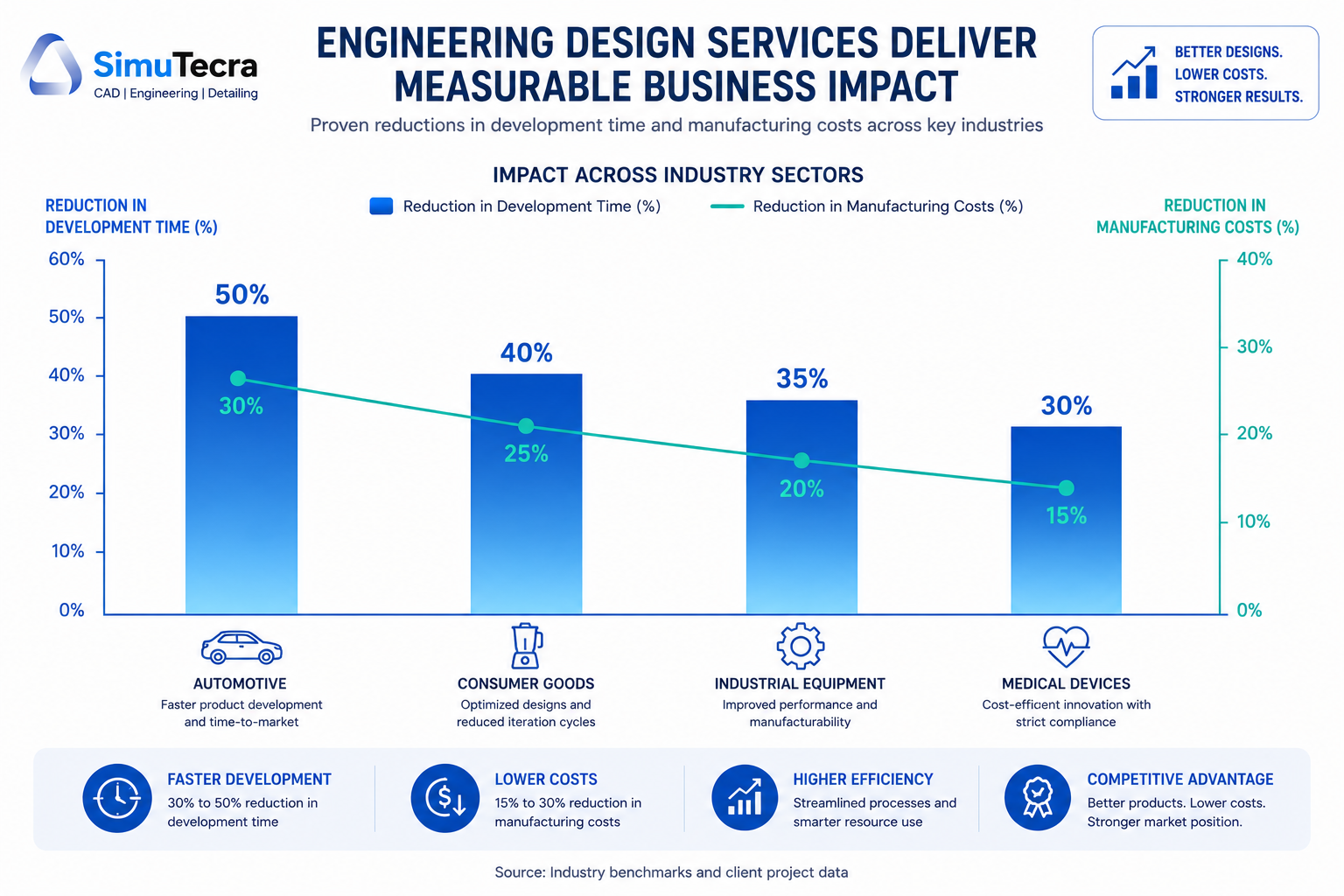
    Chart showing how engineering design services reduce product development time by 30-50% and manufacturing costs by 15-30% across automotive, consumer goods, and industrial sectors

    1. The Scale of the Problem: What Product Development Really Costs

    Before examining how engineering design services reduce development costs, it is worth establishing what those costs actually look like and where the largest waste occurs.

    Product development costs for a new physical product range from $20,000 for a simple consumer product with established manufacturing processes to well over $1 million for complex hardware in regulated industries. The wide range reflects differences in development complexity, required certifications, tooling costs, and the number of prototype iterations needed. For most industrial, mechanical, or electromechanical products, the realistic range is $150,000 to $500,000 from concept to production-ready design.

    DATA POINT:  PwC digital product development research. Digital product development is expected to increase efficiency by 19%, reduce time-to-market by 17%, and reduce production costs by 13% compared to conventional processes (PwC, cited in multiple 2025 research analyses).

    Where Development Waste Actually Occurs

    Most product development cost overruns and timeline delays share common root causes. Understanding where the waste occurs is essential to understanding how engineering design services address it.

    Waste CategoryDescriptionTypical Cost ImpactPrimary Cause
    Late-stage design changesChanges to design after tooling has been committed or prototypes have been built$10,000 – $500,000+ per significant changeManufacturability issues not identified in design phase
    Excess prototype iterationsBuilding more physical prototypes than necessary because simulation was insufficient$5,000 – $50,000 per iteration plus timeUnder-investment in simulation and analysis upfront
    Overly tight tolerancesSpecifying precision tighter than functional requirements demand15-40% cost increase on affected featuresDesign engineers specifying to what they can model, not what manufacturing requires
    Over-engineered componentsParts designed to perform beyond requirements, adding material and complexity cost10-30% avoidable material costLack of value engineering discipline; conservative design culture
    Rework from drawing errorsManufacturing errors caused by ambiguous or incorrect engineering drawings$2,000 – $50,000+ per incidentInadequate drafting standards, no QC review of drawings
    Sequential development delaysEach phase waiting for the previous to complete (design finishes before manufacturing input begins)4-12 additional weeks per projectLack of concurrent engineering approach
    KEY FINDING:  The 70% rule. Research consistently shows that approximately 70% of a product’s total manufacturing cost is determined by design decisions made in the early engineering phase. Changes made after tooling commitment are exponentially more expensive than those made on screen.

    2. The Data: How Engineering Design Services Impact Time and Cost

    The claims made about engineering design services, faster timelines and lower costs, are backed by a consistent body of research across industry reports, academic studies, and documented project outcomes. Here is what the evidence actually shows.

    MetricFindingSource / Context
    Project completion time reduction30-50% reduction in project completion times for companies outsourcing engineering servicesIDC research, cited across multiple 2025 engineering outsourcing analyses
    Manufacturing cost reduction via DFM15-30% manufacturing cost reduction typical when DFM is applied early in designMultiple DFM implementation studies; Modus Advanced, Source Engineering, SixSigma.us analyses
    CAD software prototype cost reductionUp to 25% reduction in physical prototype costs in some industries through advanced CAD-driven digital validationIntelevo Research Engineering Design Software Market Report, 2025
    DFM assembly time reduction30% reduction in assembly time demonstrated in smartphone manufacturing case study through DFM implementation from initial design phaseSixSigma.us DFM implementation analysis
    DFM ROI timeline15-25% ROI improvement within 12-24 months for companies implementing DFM disciplineSource Engineering DFM analysis, 2025
    Digital development efficiency19% efficiency increase, 17% time-to-market reduction, 13% production cost reduction from digital product developmentPwC digital product development research
    Engineering design software simulation savingsOrganizations report cuts of up to 30% in physical prototyping costs and time savings of several weeks per project from simulation-driven workflowsIntelevo Research, Engineering Design Software Market, 2025
    Cost savings vs. internal hiringClients save 30-50% compared to hiring equivalent engineering capability internallyEngon Technologies outsourced mechanical engineering analysis

    These figures deserve honest contextualization. The 30 to 50 percent project completion time reduction is an aggregate finding that reflects well-managed outsourcing arrangements on appropriate project types. It does not mean every project becomes half as long by bringing in external engineers. The savings are most pronounced in specific scenarios: projects where specialist skills are the bottleneck, organizations with under-resourced internal engineering teams, and products where DFM has not previously been applied. The following sections explain the specific mechanisms through which these savings are generated.

    3. Mechanism 1: Design for Manufacturability (DFM) — Solving Cost Problems at the Source

    Design for manufacturability is the single highest-impact mechanism through which engineering design services reduce product development cost. It is also the most consistently underused discipline in product development, particularly at small and mid-size manufacturers whose internal teams are primarily trained in design and modeling, not in manufacturing process optimization.

    What DFM Actually Does

    DFM is the engineering practice of designing a product to reduce the cost and complexity of its manufacture, without compromising its functional performance. It operates on a fundamental principle that is easy to state and surprisingly difficult to implement internally: the design phase is the cheapest and most powerful place to make cost decisions.

    Research from multiple DFM implementation studies confirms that approximately 70% of a product’s total manufacturing cost is locked in by design decisions made before a single physical part is produced. Material selection, part geometry, tolerance specifications, assembly sequence, and component count: each of these decisions, made on screen by a design engineer, determines what a machinist, fabricator, or assembler will spend years executing.

    When those decisions are made by engineers who understand manufacturing processes deeply, costs are naturally controlled. When they are made by designers optimizing primarily for function and aesthetics, manufacturing inefficiencies are designed in and discovered later, at much greater expense.

    Specific DFM Cost Levers

    • Tolerance rationalization: Overly tight tolerances are a pervasive and silent cost driver. A tolerance specification that requires specialized fixturing, slower machining, or 100% inspection adds cost with no functional benefit if the tolerance is tighter than the application demands. DFM review consistently finds opportunities to relax non-critical tolerances, often reducing machining costs by 20 to 40% on affected features.
    • Part count reduction: Every component in an assembly adds cost: material cost, machining or molding cost, inventory cost, assembly labor, inspection, and potential failure points. DFM analysis looks for opportunities to combine functions into fewer parts. A two-part assembly that becomes a one-part assembly eliminates an entire component’s cost stack.
    • Standardized hardware: Custom fasteners, specialty hardware, and non-standard materials add procurement cost and supply chain risk. DFM substitutes standard hardware wherever functional requirements permit, reducing both per-unit cost and purchasing complexity.
    • Manufacturing process alignment: A design that looks manufacturable in CAD may be difficult or impossible to produce efficiently with the actual manufacturing processes available to your supply chain. DFM bridges this gap, ensuring that geometry, features, and tolerances align with what your specific manufacturing partners can do efficiently.
    • Assembly sequence optimization: Assembly operations are labor-intensive and error-prone. DFM reviews assembly sequences to reduce the number of steps, eliminate orientations that require skilled judgment, and design for assembly automation where volume justifies it.
     REAL WORLD:  DFM cost reduction in practice. A smartphone manufacturer integrating DFM principles from the initial design phase achieved a 30% reduction in assembly time for their latest model (SixSigma.us case study). Effective DFM implementation typically reduces manufacturing costs by 15-30% without compromising functionality, with some comprehensive programs reporting even higher savings.

    Why Internal Teams Miss DFM Opportunities

    The reason DFM is underused is structural, not a matter of skill or intention. Internal design engineers are evaluated primarily on whether the product works. Their performance metrics rarely include manufacturing cost or assembly time. External engineering design service firms, whose value proposition includes manufacturability optimization, approach the same design from a different incentive structure. They are looking for cost and complexity that can be removed, not just function that needs to be preserved.

    This is not a criticism of internal engineering teams. It is an observation about organizational incentive structures. The most effective approach is to ensure that DFM discipline, whether delivered internally or through an engineering design service partner, is applied before tooling commitments are made.

    4. Mechanism 2: Expert CAD and Simulation — Fewer Prototypes, Faster Validation

    Physical prototyping is expensive. A machined prototype of a moderately complex mechanical component can cost $1,000 to $10,000 and take one to four weeks to produce. An injection-molded prototype, if the mold is purpose-built, can cost $5,000 to $50,000. Complex assembly prototypes for industrial products can run $50,000 to $200,000 each. Most product development programs require multiple iteration cycles.

    Engineering design services that include advanced CAD modeling, FEA (finite element analysis), and CFD (computational fluid dynamics) simulation reduce the number of physical prototypes required by validating designs digitally before physical production. The savings are substantial and well-documented.

    How Simulation Replaces Physical Prototyping

    FEA simulation allows engineers to apply virtual loads, stresses, temperatures, and forces to a 3D CAD model and observe how it responds, identifying failure points and optimization opportunities without building a physical part. CFD simulation models fluid flow, heat transfer, and pressure distribution for fluidic and thermal applications. Both capabilities are standard offerings of experienced engineering design service firms.

    Engineering design software market research published in late 2025 documents that organizations using simulation-driven workflows report cuts of up to 30% in physical prototyping costs and time savings of several weeks per project. The mechanism is straightforward: a simulation run that takes hours replaces a prototype iteration that takes weeks.

    DATA POINT:  Simulation-driven development. Organizations report up to 30% reduction in physical prototyping costs and several weeks of time savings per project when simulation-driven workflows replace or supplement physical prototyping (Intelevo Research Engineering Design Software Market Report, 2025).

    The Role of Expert CAD in Reducing Rework

    Beyond simulation, the quality of CAD modeling and drawing production directly affects downstream cost. Ambiguous drawings, incorrect tolerances, missing specifications, or drawing errors discovered during first article inspection create costly correction cycles. Engineering design service firms with experienced drafters and established QA processes produce fewer drawing errors, which translates directly to fewer manufacturing corrections and lower first article failure rates.

    This is a cost savings that is invisible until you calculate what manufacturing corrections actually cost: rescheduled production runs, material waste, expedited re-delivery, and the project management time spent resolving a problem that originated on a drawing. For complex mechanical assemblies, a single undetected drawing error can cost $10,000 to $50,000 in manufacturing consequences.

    Digital Twins and Their Growing Role

    At the enterprise end of engineering design services, the integration of digital twin capabilities is extending the simulation advantage further. A digital twin is not just a simulation model; it is a continuously updated virtual replica of the physical product that can be used throughout the product’s lifecycle for ongoing validation, maintenance prediction, and design iteration. Established engineering design service firms offering digital twin capabilities are enabling clients to compress not just initial development cycles but ongoing product evolution cycles as well.

    5. Mechanism 3: Concurrent Engineering — Compressing the Development Timeline

    Traditional product development follows a sequential model: concept is approved, then detailed design begins, then manufacturing planning begins, then procurement begins, then tooling is ordered. Each phase waits for the previous to complete. In a complex product development program, this sequential handoff structure can add 12 to 20 weeks of elapsed time to a development cycle that has no functional reason to be that long.

    Concurrent engineering, also called simultaneous engineering, overlaps development phases so that manufacturing planning, procurement qualification, and tooling design begin while detailed engineering is still in progress. Engineering design service firms that work alongside client engineering teams facilitate concurrent engineering in ways that internal teams often cannot, simply because a client’s internal engineers are already fully occupied with the design work itself.

    How It Works in Practice

    An external engineering design services partner can take ownership of detailed drawing production, BOM development, and supplier qualification while the client’s internal team focuses on design decisions and customer requirement management. This parallel workflow structure removes the sequential wait times that inflate development timelines.

    Research published by IDC and cited across multiple 2025 engineering services analyses finds that companies outsourcing engineering services experience 30 to 50 percent reductions in project completion times. The concurrent engineering effect is a primary driver of the upper end of this range.

      📊  DATA POINT:  Concurrent engineering timeline impact. Companies outsourcing engineering services to enable concurrent workflows experience 30-50% reduction in project completion times compared to sequential internal development models (IDC research, 2025).

    The Follow-the-Sun Advantage

    For organizations engaging offshore engineering design service partners, the time zone difference that initially sounds like a communication challenge can become a timeline accelerator. A design change reviewed internally at 5 PM can be modeled and returned as updated drawings by 8 AM the next morning, because the engineering team in a complementary time zone was working while the client team slept. For projects on tight timelines, this follow-the-sun workflow can reduce elapsed calendar time by 15 to 25 percent on drawing-intensive phases.

    6. Mechanism 4: Value Engineering — Cost Reduction Without Compromising Performance

    Value engineering is a structured methodology for analyzing the function of a product, component, or process and finding ways to deliver the same function at lower cost. It is different from cost-cutting in a critical way: cost-cutting reduces cost by reducing what you do. Value engineering reduces cost while preserving or improving what the product does.

    Engineering design service firms experienced in value engineering bring an external perspective that is extremely difficult to replicate internally. When your engineers have been working on a product for two years, they have cognitive ownership of design decisions that made sense when they were made. Questioning whether a part needs to be aluminum or whether a five-component assembly could be one injection-molded part requires fresh eyes and process discipline that external partners provide naturally.

    Value Engineering in Action: Key Techniques

    • Material substitution: Replacing an over-specified material with one that meets functional requirements at lower cost. Aluminum for steel where weight is not a concern, commodity-grade plastics for engineering polymers where chemical resistance requirements do not justify the premium.
    • Process substitution: Changing the manufacturing process to one that is more cost-effective for the required quantity. Switching from CNC machining to casting for high-volume components, or from welded fabrication to bent-and-formed sheet metal for certain enclosure geometries.
    • Assembly consolidation: Redesigning multi-component assemblies into single molded or formed parts. Fewer parts mean less assembly labor, fewer inventory line items, fewer potential failure points, and lower total cost.
    • Standard component substitution: Replacing custom or specialty components with standard catalog items. Standard bearings, fasteners, seals, and hardware are less expensive, more reliably available, and supported by established maintenance practices.
    • Tolerance optimization: Identifying and relaxing tolerances that are tighter than functional requirements. This is a DFM concept applied through a value engineering lens: every tolerance that can be relaxed reduces manufacturing cost without reducing product performance.
     INSIGHT:  When to apply value engineering. The highest-value window for value engineering is during design development, before tooling commitments. Applied after tooling, value engineering still has potential, but it must work within the constraints of existing tooling geometry. Applied at the design stage, it has full freedom.

    7. Mechanism 5: Access to Specialization — Solving Problems Faster with the Right Expertise

    One of the least quantified but most practically significant ways engineering design services reduce development time is by eliminating the learning curve that occurs when an internal team encounters a design challenge outside their primary expertise.

    A mechanical engineering team with deep expertise in rotating equipment may spend three weeks researching best practices for designing a compliant mechanism that is new to their portfolio. An engineering design service firm that has designed fifty compliant mechanisms can solve the same problem in three days. The difference is not capability; it is accumulated domain knowledge that is not worth building internally for a one-time challenge.

    Where Specialization Creates the Biggest Timeline Advantage

    Specialization AreaWhen It Creates Timeline AdvantageTypical Internal vs. External Timeline Difference
    Structural simulation (FEA)When internal team has limited simulation expertise and is iterating physically3-5 weeks physical vs. 3-5 days simulation
    GD&T and tolerance stack analysisWhen drawings are being returned by manufacturers due to ambiguous tolerancesDays of correction cycles vs. hours with an expert
    Medical device design controlsWhen product must meet FDA 21 CFR Part 820 or ISO 13485 requirementsMonths of compliance learning vs. weeks with a specialist
    BIM coordination and clash detectionWhen construction project has multi-discipline coordination requirementsWeeks of manual coordination vs. days with BIM specialists
    DFM for a new manufacturing processWhen product design requires a process the internal team has not used beforeMultiple prototype iterations vs. expert guidance upfront
    Sheet metal or injection mold design rulesWhen designers are modeling geometry that is expensive or impossible to produceMultiple quote rejections vs. producible geometry first time
    ASME Y14.5 GD&T complianceWhen drawings must meet standard for a defense, aerospace, or regulated clientRedline review cycles vs. correct first submission

    The market data reflects the economic value of this specialization access: the global product engineering services market was valued at approximately $1.38 billion in 2025 and is projected to grow at a compound annual growth rate of 9.7% through 2034, driven substantially by organizations accessing specialized engineering capabilities they do not maintain internally. According to Fortune Business Insights, the growing focus on faster product deliveries and time-to-market systems is a primary driver of this sustained market expansion.

    8. Mechanism 6: Elastic Capacity — Scaling Without Hiring Cycles

    Hiring a mechanical engineer in a competitive market takes three to six months from job posting to productive contributor. An experienced senior mechanical engineer with the specific specialization you need may take longer. During that period, your product development program either waits, proceeds with understaffed engineering resources and accepts the quality consequences, or pays premium contract rates for interim coverage.

    Engineering design services provide elastic capacity: the ability to scale engineering bandwidth up or down in response to project demand without the fixed cost commitment of employment or the delays of a recruiting cycle. This elasticity directly reduces development time by ensuring that engineering bandwidth is never the bottleneck.

    Where Elastic Capacity Has the Highest Impact

    • Program surges: When a large contract win or accelerated launch date requires engineering bandwidth that exceeds internal team capacity, engineering design services provide immediate scale-up without a hiring cycle.
    • Specialist gaps: When a specific phase of development requires expertise (BIM coordination, FEA simulation, medical device design controls) that the internal team does not maintain, engineering services fill the gap without requiring permanent headcount.
    • Geographic expansion: When projects require knowledge of local building codes, regional standards, or specific regulatory environments, engineering service partners with local expertise eliminate the learning curve.
    • Peak-and-valley workloads: Many product development organizations have inherently cyclical workloads: intense during design and development phases, lower during production. Engineering design services allow organizations to staff their engineering function for average load and supplement at peak, rather than staffing for peak and carrying idle capacity at valley.
     DATA POINT:  Elastic capacity economics. Large enterprises dominated the product engineering services market in 2025 with 61% market share, driven by their need for flexible, scalable engineering resources that can be deployed without fixed overhead commitments (SNS Insider Market Report, 2026).

    9. Industry-Specific Impact: Where Engineering Design Services Deliver the Most Value

    The impact of engineering design services is not uniform across industries. The following analysis identifies where the benefits of time reduction, cost savings, and specialized expertise are most pronounced.

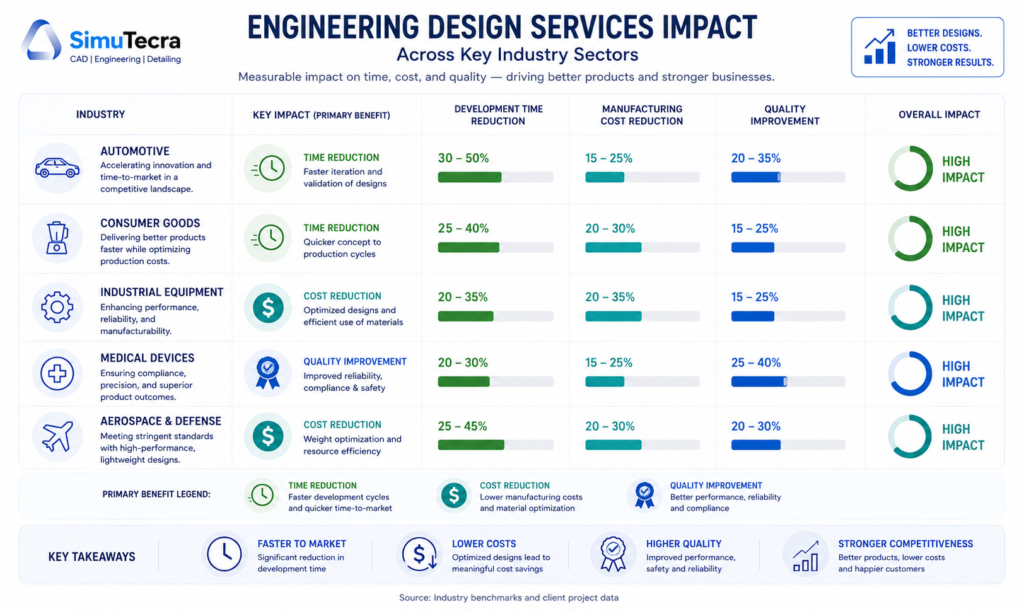
    Industry comparison infographic showing engineering design services impact across automotive, medical device, consumer goods, industrial equipment, and AEC sectors by primary benefit category
    IndustryPrimary Benefit AreaKey MechanismTypical Outcome
    Automotive and EVTime-to-market compressionConcurrent engineering, simulation-driven design, offshore parallel workflows30-50% development timeline reduction; significant DFM savings at production scale
    Medical devicesRegulatory compliance speedDesign control documentation, FDA/ISO 13485 expertise, risk management integrationMonths saved in FDA submission preparation; reduced design history record rework
    Consumer goods / CPGManufacturing cost reductionDFM, value engineering, tooling optimization for high-volume production15-30% manufacturing cost reduction; part count reduction reduces per-unit cost
    Industrial equipmentSpecialization accessFEA/CFD simulation, mechanical system design, custom component DFMPrototype reduction; fewer field failures from simulation-validated designs
    AEC (Architecture, Engineering, Construction)Drawing production speedBIM coordination, MEP drafting, structural detailing outsourcingProject schedule acceleration; fewer RFI and clash-driven delays
    Aerospace and defenseTechnical documentation qualityGD&T compliance, AS9100 drawing standards, configuration managementReduced first article rejections; lower audit finding rate
    SME manufacturersAccess to capabilities not maintained internallyFull product development outsourcing; DFM review; CAD modeling supportAccess to senior engineering capability without full-time employment cost

    10. Where Engineering Design Services Do NOT Reduce Costs or Time

    Intellectual honesty requires naming the situations where engineering design services do not produce the outcomes described in vendor marketing. Understanding these limits prevents misaligned expectations and poor procurement decisions.

    When the Brief Is Inadequate

    An engineering design service firm, however experienced, cannot produce accurate, manufacturable, cost-optimized drawings from a vague or incomplete brief. The output quality of engineering design services is directly bounded by the quality of input they receive. Organizations that engage external engineering partners without investing in clear scope definition, organized input materials, and responsive communication during execution will not see the timeline and cost benefits described in this guide. The fault will be on the client side, not the provider side, but the result is the same: wasted time and rework.

    When IP Risk Is Undermanaged

    For organizations with highly proprietary designs, outsourcing engineering work without proper contractual protections (work-for-hire clauses, NDAs, data handling agreements) creates IP risk that can offset the economic benefits. This does not mean outsourcing is inappropriate; it means the legal and contractual infrastructure must be established before any design files are shared. Organizations that skip this step, often because the procurement felt informal or the timeline was tight, create vulnerabilities that can be costly to resolve.

    When the Work Is Too Context-Dependent

    Some engineering design work is so deeply embedded in institutional knowledge, customer relationships, and ongoing system context that external partners cannot contribute effectively without a disproportionate knowledge transfer investment. If explaining the project context to an external partner would take longer than doing the work internally, the economics of outsourcing break down. This is particularly true for complex systems with years of accumulated design decisions, regulatory certifications, and customer-specific requirements.

    When Cost Savings Come at the Expense of Quality

    Selecting an engineering design service partner primarily on price, particularly for offshore providers at the lowest end of the market rate range, can produce drawings and models that require extensive internal correction before they are usable. The cost of that correction often exceeds the price savings from the low-cost provider. The quality of engineering design services varies significantly across providers, and the selection process must include portfolio review, standards compliance verification, and ideally a pilot project before committing to a major engagement.

     WATCH OUT:  The low-cost trap. A per-sheet rate that looks 60% cheaper than market rate may result in drawings that require three rounds of redlining before they are useful. Calculate the total cost of engagement, including your internal review time, not just the provider’s quoted rate.

    11. How to Evaluate Whether Engineering Design Services Are Right for Your Project

    Not every product development challenge benefits from external engineering design services. The following decision framework helps identify the scenarios where the time and cost benefits are most likely to be realized.

    The High-Value Indicators

    Engineering design services are most likely to reduce your development time and cost when one or more of the following conditions apply:

    • Specialist skill gap: Your project requires expertise your internal team does not have. Bringing in specialists is faster and cheaper than building the skill internally for a single application.
    • Capacity constraint: Your internal engineering team is already fully occupied. Adding external resources is more efficient than delaying the project or burning out internal staff on overtime.
    • DFM opportunity: Your product is in design development and has not yet undergone a formal manufacturability review. The 70% rule applies: this is your best window to lock in cost-efficient design decisions.
    • High prototype count: Your recent development programs have required more physical prototypes than planned. Simulation and expert design review can reduce that number on the next program.
    • Cyclical workload: Your engineering demand peaks during design phases and drops during production. External services allow you to match capacity to demand rather than staffing for peak.
    • Regulated environment with compliance gaps: Your product must meet FDA, AS9100, ITAR, or similar regulatory requirements that your team is not fully experienced with. External partners with compliance expertise reduce risk and timeline.

    The Low-Value Indicators

    Engineering design services are less likely to reduce time and cost when:

    • Institutional knowledge is the primary bottleneck: If the limiting factor is deep product-specific knowledge that cannot be efficiently transferred, external engineers will spend more time learning context than producing output.
    • The brief cannot be clearly defined: If the project scope is genuinely ambiguous and exploratory, an external partner working from an unclear brief will require extensive revision cycles that negate the timeline benefit.
    • IP sensitivity is high and legal infrastructure is not in place: If you cannot establish appropriate contractual protections before sharing design files, the risk may outweigh the benefit.
    • Volume is too low to justify onboarding: A single two-hour drafting task does not justify the time investment of briefing, standards transfer, and QC review for a new external partner. Minimum economics apply.

    12. FAQ: Engineering Design Services and Product Development Efficiency

    How much can engineering design services actually reduce development time?

    The documented range is 17 to 50 percent, depending on project type and the specific services applied. PwC research on digital product development documents a 17 percent time-to-market reduction from digital development practices. IDC research on engineering outsourcing documents 30 to 50 percent project completion time reduction. The upper end of that range reflects concurrent engineering arrangements where external resources run in parallel with internal development, compressing the elapsed timeline. The lower end reflects more targeted applications like simulation-based prototype reduction or specialist skills engagement. Neither figure applies universally. The specific impact on your program depends on where your current development process has the most friction.

    What is the most cost-effective first step when evaluating engineering design services?

    For most manufacturers, a DFM review of a product that is currently in design development or has recently entered production is the highest-confidence first engagement. It is contained in scope, has a clear deliverable (a list of design changes with estimated cost impact), and the ROI is directly measurable by comparing manufacturing costs before and after implementation. A DFM review for a moderately complex product typically costs $3,000 to $15,000 and can identify cost savings of $30,000 to $150,000 or more on a product with meaningful production volume. That is a risk-justified first engagement that establishes the value of the relationship.

    How do engineering design services compare to hiring internally for reducing development costs?

    The cost comparison favors external services when specialization access, capacity flexibility, or time-to-market speed is the primary objective. Published analyses from engineering outsourcing practitioners show cost savings of 30 to 50 percent compared to equivalent internal hiring when fully loaded employee costs (salary, benefits, software, training, onboarding) are included. The case for internal hiring is strongest when the design work is ongoing, deeply context-dependent, requires real-time collaboration throughout the day, or involves highly sensitive IP that needs to remain within your own infrastructure. Many organizations reach the optimal outcome with a hybrid model: core engineering capability internally, supplemented by external services for specialist tasks and volume overflow.

    Does outsourcing engineering design work create quality risks?

    It can, if the engagement is managed poorly. The quality risks associated with external engineering design services are well-understood and manageable: inadequate brief causing misaligned output, insufficient QC review before drawings enter production, and standards compliance gaps if the provider is not familiar with your applicable standards. Organizations that establish clear drawing standards documentation, include a defined QC review step in the workflow, and vet providers on their specific discipline experience routinely achieve quality equivalent to or better than their internal baseline. The risk is real but not inherent. It is a function of process discipline, not of the outsourcing model itself.

    At what stage of product development should engineering design services be engaged?

    The greatest leverage is at design development, before tooling commitments. This is where DFM review, value engineering, and simulation-driven prototype reduction deliver the most impact. The 70 percent cost-determination rule makes this timing critical. After tooling is committed, value engineering and DFM still have potential, but they work within constraints that limit the available savings. At concept stage, engineering services are most valuable for feasibility analysis and technology selection. At production stage, the primary engineering service value shifts to as-built documentation, manufacturing support drawings, and process improvement analysis.

    How do I measure ROI from engineering design services?

    The most accessible ROI metrics are manufacturing cost per unit before and after DFM engagement, number of prototype iterations per development program, elapsed development time from design freeze to production release, first article acceptance rate, and engineering revision cycles per drawing release. For an organization new to measuring engineering design service ROI, we recommend selecting one clear baseline metric from your most recent comparable development program and tracking it against the program where engineering design services are applied. A single metric tracked rigorously tells you more than multiple metrics tracked loosely.

    Conclusion: Engineering Design Services as a Strategic Investment, Not a Line-Item Cost

    The framing of engineering design services as a cost center, something to minimize or avoid, is the most expensive mistake organizations make in managing their product development operations. The data is consistent: applied strategically, engineering design services reduce product development costs by 15 to 30 percent, compress timelines by 17 to 50 percent, and produce ROI improvements of 15 to 25 percent within 12 to 24 months.

    Those outcomes are not generated by simply hiring a cheaper external engineer to do work your internal team would otherwise do. They are generated by applying specific mechanisms, DFM, simulation-driven validation, concurrent engineering, value engineering, and specialization access, at the right stage of development, with sufficient organizational discipline to act on what those services recommend.

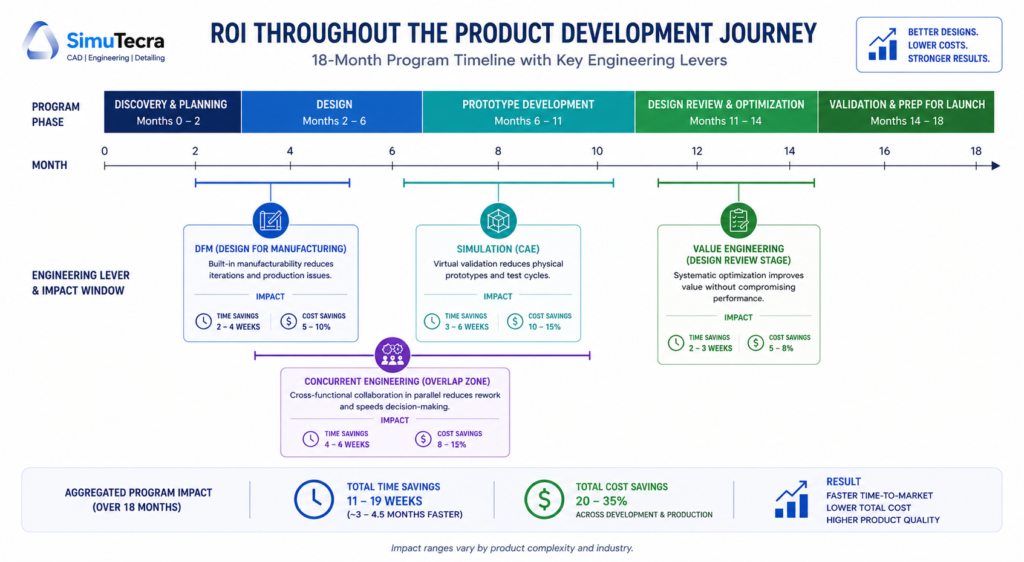
    8-month product development timeline showing where engineering design services — DFM, simulation, concurrent engineering, and value engineering — deliver time and cost savings at each phase'

    The 70 percent rule is the most important number in this entire discussion. Seventy percent of your product’s manufacturing cost is determined by design decisions made before a single physical part is produced. Every week you spend in design development without DFM discipline, simulation validation, and expert review is a week of cost decisions being locked in by default rather than by intent.

    Engineering design services give you the ability to make those decisions intentionally, with the specialized knowledge and fresh perspective that internal teams, however capable, often cannot provide for themselves. The organizations that treat this as a strategic investment rather than an operational cost are the ones whose products consistently reach market faster, cost less to produce, and require fewer post-launch corrections.

    Ready to reduce your product development time and cost?

    Explore our related guides on in-house versus outsourced CAD drafting, how to write a comprehensive RFQ for engineering design services, and what CAD drafting costs in 2026 to build a complete procurement and operational framework for your engineering projects.

  • How to Convert Hand-Drawn Sketches into Professional CAD Drawings | Sketch to CAD

    How to Convert Hand-Drawn Sketches into Professional CAD Drawings | Sketch to CAD

    Xometry Aug 2025  tested seven AI text-to-CAD tools and found all required substantial engineering refinement before the output could be used for manufacturing
    600 DPI  minimum scan resolution for clean raster-to-vector conversion; below this threshold, noise interferes with line recognition in both manual and AI workflows
    Ragnar CAD  February 2026 sketch-to-3D AI tool claims to close the gap between ‘I can see it’ and ‘I can model it’ for concept geometry from annotated sketches
    Gartner 2026  projects that a majority of digital design workflows will include some level of AI-assisted modelling, with sketch interpretation as a growing entry point

    Introduction:

    Before any engineer opens CAD software, before any parametric model is built, before any drawing is dimensioned, there is usually a sketch. On the back of an envelope, on a whiteboard, on graph paper in a site meeting, on a napkin at a client conversation. The sketch is where the design intent lives in its earliest, most honest form.

    The challenge is that a sketch, no matter how clear to the person who drew it, is not a manufacturing instruction. It has no scale guarantee, no tolerance definition, no projection convention, no standard symbol for surface finish or weld specification. A fabricator or machinist working from a hand sketch is working from engineering intent without the engineering rigour that turns that intent into a part.

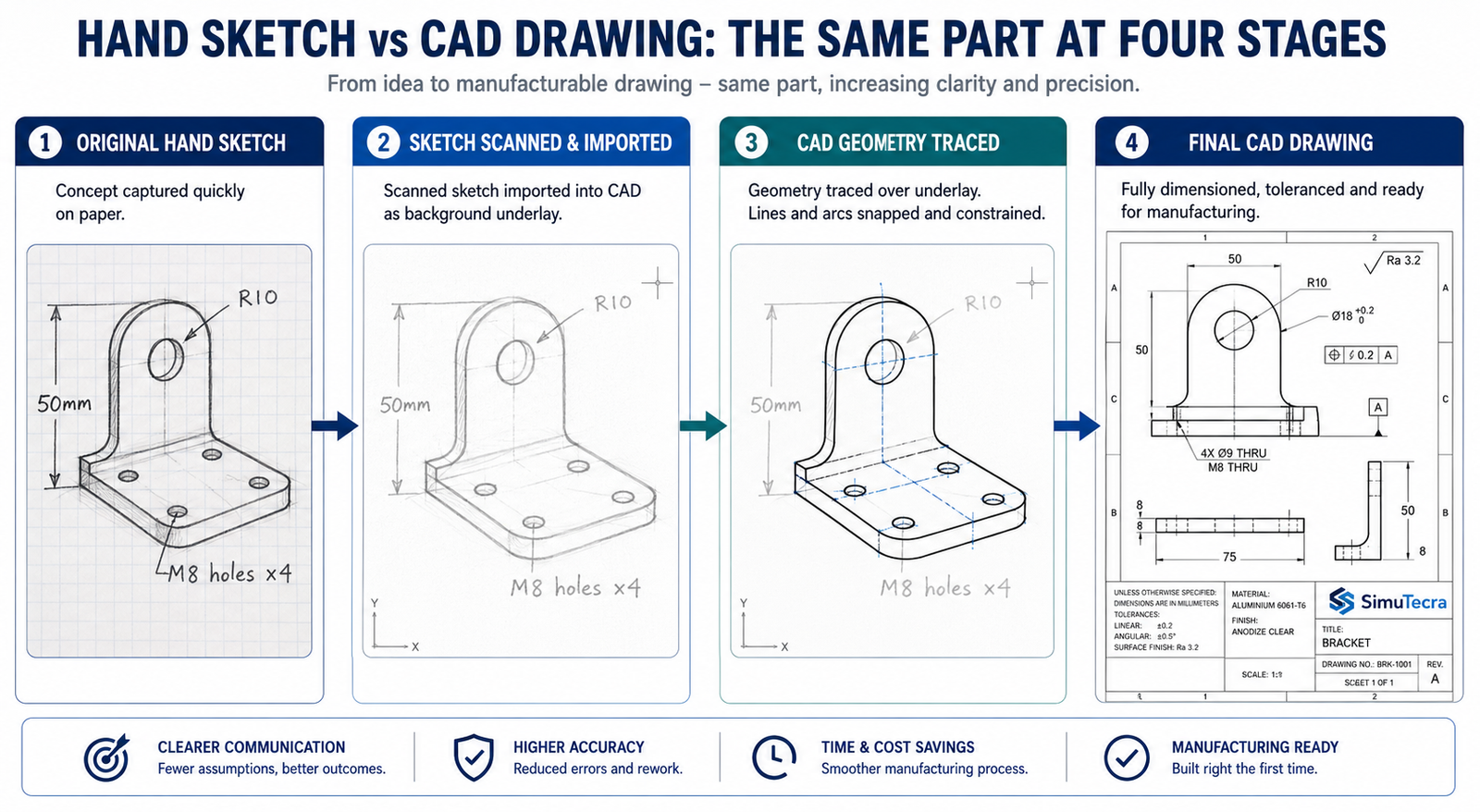
    Converting a hand drawn sketch to CAD is the process that bridges that gap. It is not simply tracing lines. It is a structured engineering activity that takes the intent captured in the sketch and translates it into a document that carries enough information for a manufacturer to build the part correctly without needing to contact the engineer for clarification.

    This guide covers the complete workflow for sketch to CAD conversion, from preparing the sketch before scanning to issuing the final drawing for manufacturing. It also covers where AI tools genuinely help in 2026, where they do not, and the mistakes that produce wrong geometry at every stage of the process.

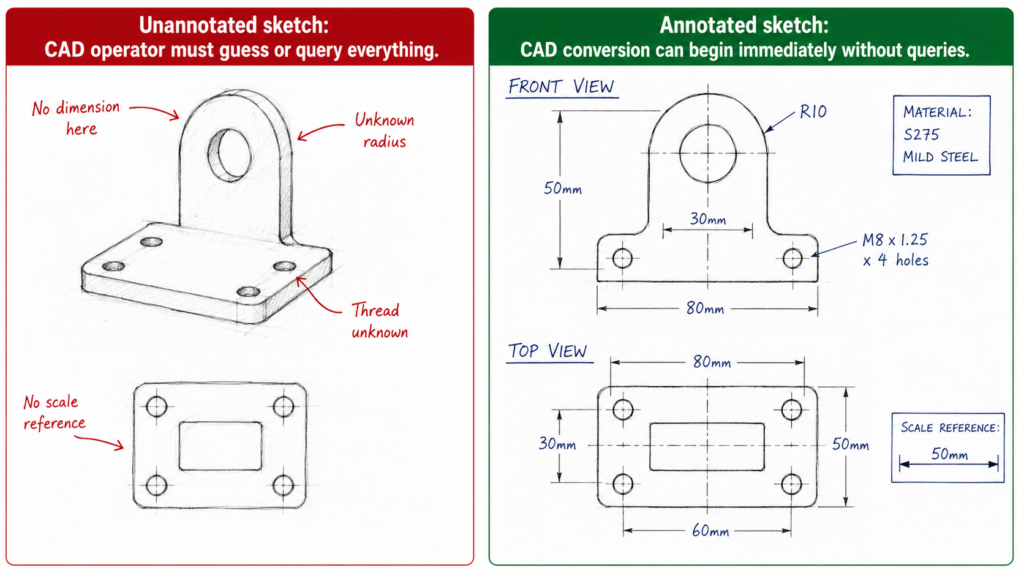
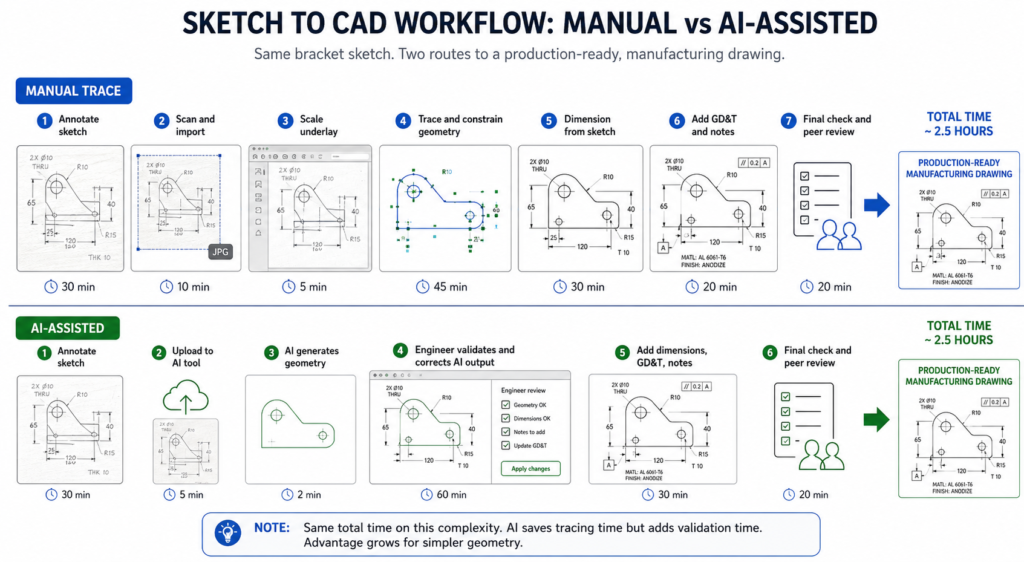
    Quick answer:  To convert a hand-drawn sketch into a CAD drawing: annotate the sketch with all critical dimensions before scanning, scan at 600 DPI minimum, import as a scaled underlay in your CAD software, trace geometry with geometric constraints applied, add dimensions from the sketch annotations, apply GD&T and manufacturing specifications, verify against the original sketch, and peer-review before issue. AI tools can assist with concept geometry but cannot yet produce manufacturing-ready drawings without engineering validation.
    How to Convert Hand-Drawn Sketches into Professional CAD Drawings  Sketch to CAD
    The sketch is the idea. The CAD drawing is the instruction. The conversion is an engineering activity, not a drawing exercise.

    Choosing Your Conversion Approach: Five Methods and When to Use Each

    Before starting any CAD drawing from sketch work, the most important decision is which conversion method is appropriate for the output required. The method determines how much time the conversion takes, what quality of output it produces, and whether that output is suitable for its intended use.

    ApproachWhat It InvolvesBest When
    Manual trace (2D CAD)Engineer imports scanned sketch as underlay, traces lines manually, applies dimensionsSketch is complex, requires GD&T, or is destined for a manufacturing drawing package
    AI-assisted sketch conversionUpload sketch to AI tool; AI generates geometry; engineer validates and refinesSimple geometry, concept visualisation, or getting a 3D starting point quickly
    AutoCAD Markup ImportImport scanned or PDF sketch; AutoCAD interprets marks and suggests geometryExisting AutoCAD workflow; sketch is relatively clean and line-based
    Photogrammetry + CADPhotograph physical object or model; import into CAD as reference mesh or point cloudPart physically exists but no drawing exists; RE workflow supplements sketch
    Outsourced sketch-to-CADProvide annotated sketch to a CAD specialist; they produce the drawingTeam lacks CAD capability; volume of conversions is high; deadline is tight

    The Honest Reality About AI Sketch Conversion in 2026

    The AI sketch-to-CAD landscape in 2026 is significantly more active than it was two years ago. Ragnar CAD, launched in February 2026, describes itself as purpose-built to close the gap between seeing an idea and modeling it. AutoCAD Markup Import has been present since the 2023 release and handles line-based sketches reasonably well. Autodesk Raster Design converts scanned images to editable vector geometry in AutoCAD.

    However, when Xometry, a major manufacturing marketplace, tested seven text-to-CAD and sketch-to-CAD tools in August 2025, the findings were consistent: all tools produced geometry that required significant engineering refinement before it could be used for manufacturing. The AI is interpreting visual patterns, not engineering intent. It does not know that a circle represents a through-hole of a specific standard size. It does not apply geometric constraints that would make two lines parallel. It does not understand that a tangent transition must be mathematically smooth.

    This does not make AI tools useless. For concept geometry, early-stage visualisation, and getting a 3D starting point from an annotated sketch, tools like Ragnar CAD can save meaningful time. But the output requires validation, refinement, and the addition of all manufacturing information before it can be used as a production drawing. The engineer remains responsible for every dimension that appears on the final drawing, regardless of how it was generated.

    AI sketch conversion red flag:  Any tool that claims to convert a hand sketch directly to a manufacturing-ready DWG or STEP file without engineering input is making a claim that current technology cannot support. A sketch has no tolerances, no GD&T, no datum structure, and no manufacturing specifications. None of these can be inferred from sketch geometry alone. They must be added by an engineer. The AI handles geometry interpretation. The engineer handles engineering.

    Preparing Your Sketch for CAD Conversion: The Step Most People Skip

    The quality of the CAD drawing you produce is determined before you open the software. A sketch that is fully annotated, clearly drawn, and systematically organised converts quickly and accurately. A sketch that is vague, proportionally distorted, and missing dimensions forces the CAD operator, whether that is you or an outsourcing partner, to make engineering decisions that should have been made by the designer.

    The time spent annotating the sketch thoroughly before scanning pays back immediately in the conversion process and many times over if the drawing is being produced by a CAD specialist. Every query raised during conversion, every dimension that must be estimated rather than read, adds cost and delay and risks introducing errors that the original sketch did not contain.

    Sketch ElementWhat Makes It CAD-ReadyWhat Causes Problems at the CAD Stage
    Line clarityBold, continuous lines; no broken strokesFaint pencil lines that digitise as noise; overlapping smudged strokes
    Dimension annotationsAll critical dimensions written clearly next to featuresMissing dimensions force CAD operator to guess or query; incorrect output guaranteed
    ProportionsSketch roughly to scale; major features proportionally correctWildly distorted proportions make the CAD baseline incorrect before any refinement
    Feature identificationEach feature clearly bounded; circles closed; arcs labelled as arcsAmbiguous lines that could be a tangency, a step, or a gap produce wrong geometry
    Orthographic viewsFront, top, and side views clearly labelled and positionedMissing view or mislabelled projection produces 3D model with features on wrong faces
    Reference planesCentre lines, axis of symmetry, and datum planes markedNo reference planes forces CAD operator to assume datum structure; may be wrong
    Notes and calloutsMaterial, finish, special requirements noted on the sketchUndocumented requirements surface after CAD is complete; rework cycle begins
    Scale referenceOne known dimension or scale bar presentNo scale reference means AI tools guess proportions; manual trace loses context

    The Annotation Checklist: What to Add Before You Scan

    1. All critical dimensions written in pen next to every feature. Length, width, height, hole diameter, radius, depth, thread specification. Not ‘approximately 50mm’. Exactly 50mm or the correct tolerance range.
    2. Orthographic view labels. Write ‘FRONT VIEW’, ‘TOP VIEW’, ‘RIGHT SIDE VIEW’ clearly next to each view. Label the projection method if you know it (first-angle or third-angle).
    3. Centre lines and axes of symmetry drawn as thin lines with alternating long-short dashes, or simply labelled ‘CL’ or ‘SYM’. These define the datum structure that the CAD model must reference.
    4. At least one scale reference. Either a dimensioned scale bar or one known dimension from which everything else can be scaled. Without this, the CAD operator has no way to set the underlay at the correct scale.
    5. Material and surface finish notes. Write the material grade and any surface finish requirement directly on the sketch. Add thread standards where relevant (M12x1.75, 1/2-13 UNC).
    6. Special requirements and constraints. If a feature must be concentric with another, write it. If a surface must be flat within a stated tolerance, note it. If there is a mating part, sketch the mating geometry or note the mating part number.
    The pre-scan annotation habit:  Treat the annotation step as a design review of your own sketch. If you cannot write a dimension next to a feature because you do not yet know what the dimension should be, the design is not ready for CAD conversion. The sketch annotation step forces every engineering decision to be made before the drawing production starts, which is exactly when those decisions cost the least to change.

    Step-by-Step: Converting a Hand Sketch to a CAD Drawing

    This is the complete workflow for converting a hand-drawn sketch into a professional CAD drawing in AutoCAD or SolidWorks. The same sequence applies for most CAD platforms. The tool names vary but the logic is the same.

    Sketch to Cad Annotated vs Unannotated sketch
    The annotation is not extra work. It is the engineering work. The CAD conversion is just the documentation
    StepWhat HappensKey Action RequiredCommon Error at This Step
    1. PrepareAnnotate sketch fully before scanningAdd all dimensions, labels, and reference marks to the physical sketchScanning first then trying to add annotation to the digital image
    2. Scan / photographCreate a clean digital image of the sketch600 DPI minimum for scanning; good lighting for photography; no distortionLow-resolution scan; angled photograph; shadow across sketch
    3. Import underlayBring the image into CAD as a reference underlayScale the underlay using a known dimension (INSUNITS + reference scale)Importing without scaling; drawing on top of wrong-scale reference
    4. Set up drawingConfigure units, projection method, layers, and templateUse company drawing template before creating any geometryStarting on Layer 0 with no template; default settings applied
    5. Trace 2D geometryDraw CAD lines and arcs over the underlayUse constraints to make geometry geometrically correct, not just visually closeTracing visually without applying geometric constraints; drawing remains unconstrained
    6. Apply dimensionsDimension every feature required for manufactureCheck every dimension against the sketch annotation; query anything unclearScaling dimensions from the underlay instead of reading the sketch annotation
    7. Add GD&TApply tolerances, datum structure, and surface finish calloutsUse the drawing standard appropriate to the manufacturing destinationSkipping GD&T entirely and relying on general tolerance for everything
    8. Add 3D modelExtrude or revolve 2D profile to create 3D solid if requiredVerify every sketch profile is a closed loop before 3D operationOpen profiles that prevent extrusion; missing fillet or chamfer detail
    9. Final checkOverlay CAD drawing on original sketch to verify correspondenceEvery feature in the sketch should be present in the CAD; every dimension should matchMissing features; dimensions that do not match the annotated sketch values
    10. IssueRelease drawing through normal review and approval processPeer review against the drawing standard; title block completeIssuing without peer review; reverting to the sketch as the production reference

    Step 1 to 3: Preparing and Importing the Sketch

    The first three steps happen before you draw a single CAD line. Sketch annotation ensures every engineering decision is made before conversion starts. Scanning at 600 DPI minimum produces an image with enough resolution for clean line recognition, whether you are tracing manually or using an AI assist tool. Anything below 400 DPI produces a raster image where sketch lines are broken or blurred at the edges, making accurate tracing significantly harder.

    Scaling the underlay correctly is the most technically critical step in the import process. The INSUNITS system variable in AutoCAD controls how the software interprets the scale of inserted content. If INSUNITS is set to millimetres and you import an image scanned at 96 DPI (standard screen resolution), the image will import at screen-pixel scale, not millimetre scale. Use the SCALE command with the reference option immediately after import: select the underlay, pick two points at either end of a known dimension on the sketch, and type the known dimension value. The software scales the underlay so that dimension matches exactly.

    Step 4 to 6: Setting Up, Tracing, and Dimensioning

    Setting up the drawing before tracing is not optional. Tracing on Layer 0 without a template is the single most common error in sketch-to-CAD conversion work. Layer 0 geometry cannot be managed by layer, cannot have line weights assigned correctly, and creates a drawing that does not meet any professional drawing standard. Open your company template file or create a new drawing with the correct layer structure, then import the underlay into that environment.

    When tracing, work with geometric constraints active. Every relationship visible in the sketch that should be geometric, not just visual, must be applied as a constraint. Two lines that look parallel are not necessarily parallel until a parallel constraint is applied. A circle that appears tangent to a line may not be until a tangent constraint is set. Geometry that is visually approximate but not mathematically constrained produces a drawing that cannot be used reliably for manufacturing because the relationships it shows are not guaranteed to hold.

    Dimensioning from the sketch annotation, not from the underlay geometry, is the rule that prevents scale errors from propagating into the drawing. The underlay is a reference image. Its geometric proportions may be accurate or may not, depending on how the original sketch was drawn. The annotations on the sketch are the engineering values. Always type the annotated value into the dimension, not the measured distance from the underlay.

    Step 7 to 10: GD&T, 3D, Checking, and Issue

    Adding GD&T from a sketch is a translation exercise. The sketch may show a circle with a note ‘concentric with boss’. The CAD drawing translates that into a position tolerance referenced to the appropriate datum axis. The sketch may show a surface with a note ‘flat, smooth surface’. The CAD drawing translates that into a flatness tolerance and an Ra surface finish callout. The sketch provides the design intent. The CAD drawing provides the engineering specification.

    For 3D modeling from a sketch, the critical check is profile closure. Every 2D sketch profile that will be extruded, revolved, or used as a sweep path must be a closed loop with no gaps, overlaps, or branching lines. In SolidWorks, use the Sketch Doctor tool before any 3D operation to identify open contours. In Fusion 360, the extrude command will warn if the profile is not closed. In AutoCAD, the BOUNDARY command helps identify closed regions from traced geometry.

    The final check is the overlay: place the completed CAD drawing alongside the original sketch and compare every feature. Every view that existed in the sketch should exist in the CAD drawing. Every dimension that was annotated on the sketch should appear on the CAD drawing with the correct value. Any feature present in the sketch that is absent from the CAD drawing is a missing element that must be added before issue.

    Using AutoCAD Markup Import for Sketch Conversion

    AutoCAD Markup Import, introduced in AutoCAD 2023 and developed further in subsequent releases, is Autodesk’s built-in tool for converting scanned drawings and markups into editable CAD geometry. It handles the most common use case for sketch to AutoCAD conversion: a sketch or marked-up drawing on paper, scanned to PDF or image, that needs to become editable DWG geometry.

    How Markup Import Works

    The workflow: import the scanned image or PDF markup into AutoCAD, which places it as a background reference. Markup Import’s AI analyses the image and identifies lines, arcs, circles, and text. It then overlays suggested geometry on the image, which the engineer accepts, rejects, or modifies. Accepted geometry becomes editable AutoCAD objects on specified layers.

    The tool is genuinely useful for drawings with clear, clean lines, straight edges, and simple geometry. It struggles with freehand curves, overlapping lines, and complex connection points. It does not interpret engineering intent: a circle with four lines radiating from it at 90-degree intervals might be a bolt circle pattern, a wheel, a connection diagram, or a structural element. Markup Import will create a circle and four lines. Deciding what they mean is an engineering judgment that the tool does not make.

    Autodesk Raster Design: The More Powerful Alternative

    For organisations with more demanding raster-to-vector conversion requirements, Autodesk Raster Design (a free add-on for AutoCAD subscribers) provides more comprehensive raster image processing. It cleans image noise, straightens lines, converts raster arcs to vector arcs, and handles complex legacy drawing conversion more reliably than Markup Import alone.

    Raster Design is particularly useful for converting large volumes of legacy scanned drawings to editable CAD, a common requirement in industries that have paper drawing archives from pre-CAD decades. For converting fresh hand sketches, Markup Import is usually sufficient.

    AI Sketch-to-CAD Tools: What Actually Works in 2026

    The AI sketch to CAD market in 2026 is loud and active. New tools appear regularly with significant marketing claims. The honest engineering assessment is that all current tools sit somewhere on the spectrum between ‘useful starting point for concept geometry’ and ‘requires complete engineering rebuild before manufacturing use’. None sits at ‘production-ready manufacturing drawing from sketch without engineering input’.

    ToolTypeWhat It Actually DoesBest Realistic Use CaseHonest Limitation
    Ragnar CADSketch-to-3D AIInterprets sketch geometry; generates 3D mesh or solidConcept geometry from annotated sketchOutput needs significant refinement for manufacturing use
    AutoCAD Markup ImportDrawing importRecognises lines and shapes in scanned markup; suggests CAD geometryUpgrading scanned 2D drawings to editable DWGDoes not understand engineering intent; produces dumb geometry
    Autodesk Raster DesignRaster-to-vectorConverts scanned raster image to vector lines in AutoCADExisting AutoCAD workflow with scan inputManual cleanup of noise and artefacts still required
    Leo AIEngineering AISearches existing CAD vault; assists with design intent; not sketch-to-CADFinding similar existing parts; reuse of previous designsNot a sketch conversion tool; often mispositioned in marketing
    Pixa / similarAI image-to-visualGenerates technical-style visual from sketch imageVisualisation and presentation imagesNot a CAD file; not manufacturable; not dimensioned
    SketchUpManual 3D modelingSimple push-pull 3D from 2D sketch input; not AI-drivenArchitecture concept models from floor plan sketchNo engineering GD&T capability; not suitable for manufacturing
    Traditional tracingManual CADEngineer manually traces sketch in AutoCAD or SolidWorksAny application requiring a production-ready drawingSlowest method; most reliable for manufacturing output

    The Xometry Test Results: What the Data Actually Shows

    When Xometry tested seven AI sketch and text-to-CAD tools in August 2025, the findings were consistent across all tools: simple prismatic geometry was handled reasonably; complex geometry with multiple interacting features was inconsistent; none produced output with tolerances, GD&T, or manufacturing specifications; all required significant engineering review and refinement.

    This is not a criticism of the tools. It reflects the fundamental challenge: interpreting sketch geometry is a different problem from understanding engineering intent. A sketch line that represents a wall might be 2mm thick, 20mm thick, or structural steel. The sketch looks the same. The engineering specification does not. Until AI tools can reliably infer engineering intent from visual sketch input, the engineer remains essential to every sketch-to-CAD workflow that produces a manufacturing deliverable.

    Where AI Sketch Tools Add Genuine Value

    • Concept geometry for client presentations. Getting a rough 3D view of a concept in minutes rather than days. The geometry does not need to be manufacturing-ready.
    • Starting point acceleration. A reasonable first-pass geometry from Ragnar CAD or Markup Import gives the engineer a starting model to refine rather than building from a blank file.
    • Legacy drawing digitisation at volume. Converting hundreds of scanned paper drawings to editable DWG where speed matters more than perfection on each individual drawing.
    • Rapid iteration on proportions. Testing multiple layout interpretations of the same sketch quickly before committing to detailed CAD work.
    Sketch to CAD Workflow: Manual vs AI-Assisted Side-by-Side Timeline
    AI tools accelerate the geometry step. The engineering steps remain the same.

    Working in SolidWorks: Converting a Sketch to a Parametric 3D Model

    When the end deliverable is a 3D parametric model rather than a 2D drawing, SolidWorks (or Creo, Inventor, or Fusion 360) is the appropriate tool. The workflow differs from AutoCAD in a fundamental way: instead of tracing the sketch as a 2D drawing, you trace it as a 2D sketch profile inside SolidWorks that will then be extruded, revolved, or used as a path sweep to create the 3D solid.

    The SolidWorks Sketch Import Workflow

    1. Create a new part document using your company SolidWorks template.
    2. Insert the scanned sketch as a sketch picture on the front plane or the plane most representative of the primary view in the sketch.
    3. Scale the sketch picture by dragging the scale handle or entering a scale factor. Use the same reference dimension method: identify a known dimension on the sketch and scale until the measured distance in SolidWorks matches the annotated value.
    4. Trace the 2D profile over the sketch picture using sketch tools. Apply all geometric constraints. Every relationship in the sketch that should be mathematical must be a constraint, not an approximation.
    5. Verify closure before any 3D operation. Use Sketch Doctor or the profile highlighting that appears when you hover over the Extrude feature to confirm the sketch is fully closed.
    6. Apply driving dimensions from the sketch annotations. Make the sketch fully defined before extruding.
    7. Extrude or revolve to create the 3D body. Delete or hide the sketch picture underlay after the 3D model is complete.
    8. Create the 2D drawing from the 3D model using SolidWorks Drawing. The drawing views are generated from the model, ensuring the drawing and model are always consistent.

    Why SolidWorks Produces a More Complete Output

    The SolidWorks workflow produces two deliverables from one sketch: a parametric 3D model and a manufacturing drawing derived from that model. The drawing and model are linked: change the dimension in the drawing and the model updates; change the model and the drawing views update. This is significantly more valuable than a 2D AutoCAD drawing alone for parts that will be revised, analysed, or used as the basis for a part family.

    For straightforward 2D applications (construction drawings, civil layouts, P&IDs, structural floor plans) AutoCAD is the more efficient route. For mechanical part design that will go through multiple iterations, SolidWorks or an equivalent parametric 3D platform produces an output that serves the full product development lifecycle, not just the initial manufacturing order.

    Outsourcing Sketch-to-CAD Conversion: When and How

    Sketch-to-CAD conversion is one of the most commonly outsourced engineering drawing activities, and for good reason. It is a well-defined scope of work with a clear input (the annotated sketch) and a clear output (the CAD drawing), and it benefits from specialists who do this type of work repeatedly and efficiently.

    The conditions under which outsourcing sketch-to-CAD conversion makes sense: the volume of conversions is higher than in-house capacity can handle efficiently, the in-house team lacks CAD capability or CAD proficiency for the specific type of drawing required, the deadline is tighter than the in-house workflow can meet, or the drawing type (architectural floor plans, structural steel, MEP schematics) requires specialist CAD knowledge that the in-house team does not have.

    What to Give an Outsourcing Partner for Sketch Conversion

    • The annotated sketch: fully dimensioned, labelled, with material and finish notes, and at least one scale reference. If the sketch is inadequately annotated, the partner will query or guess. Both add cost and risk.
    • The drawing specification: your drawing standard (ASME Y14.5 or ISO 1101), CAD software and version, file format required, layer naming convention, and title block template. Without these, the partner produces a technically competent drawing in their own style, not yours.
    • Go-by drawings: two or three representative drawings from your existing archive that show your exact style, layer structure, line weights, and annotation conventions. A written specification and a visual example together eliminate virtually all style-related rework.
    • A clear brief of any constraints not visible in the sketch: mating part requirements, assembly context, functional requirements that affect manufacturing priority. The sketch shows geometry. The brief provides the engineering context that the sketch cannot communicate.

    Common Mistakes in Sketch-to-CAD Conversion

    These are the errors that most consistently produce wrong output from sketch to CAD conversion, whether the work is done in-house or by an outsourcing partner.

    MistakeWhat Goes WrongPrevention
    Scanning sketch before annotating itDigital image has no dimensions; guessing from proportions throughoutComplete all annotations on the physical sketch before scanning. Scanning is the last step in sketch preparation.
    Importing at wrong scale (INSUNITS mismatch)All traced geometry is at the wrong scale; dimensions incorrectSet INSUNITS before import. Scale the underlay using one known dimension immediately after import.
    Tracing visually without geometric constraintsLines appear parallel but are not; circles appear tangent but are notApply constraints (parallel, perpendicular, tangent, concentric) to every geometric relationship in every sketch.
    Using scale from underlay for dimensionsDimensions reflect the scan proportions, not the design intentAlways read dimensions from the sketch annotation. Never scale from the underlay image.
    Treating AI-generated geometry as production-readyMesh or approximated geometry sent to manufacturer; parts cannot be madeAI tools produce starting points. Every AI output requires engineering validation before manufacturing release.
    Skipping the 3D profile closure checkExtrude fails or creates wrong solid because sketch profile is not closedCheck every sketch profile for closure before any 3D operation. Use the profile analysis tool before extruding.
    No peer review before issueDrawing released with errors that a second set of eyes would have caughtApply the pre-release checklist. Require a second engineer to sign off before any drawing is issued from a sketch.
    Losing the original sketch after CAD is completeConflict between sketch intent and CAD output cannot be resolvedArchive the annotated sketch alongside the CAD file as a permanent project record.
    The final overlay check:  The single most effective quality check in any sketch-to-CAD workflow is placing the finished CAD drawing alongside the original annotated sketch and comparing them feature by feature. Every view present in the sketch should be present in the CAD. Every annotated dimension should appear in the CAD with the correct value. Every note should be accounted for. This check takes five minutes and catches the majority of conversion errors before the drawing is issued.

    Conclusion:

    A hand-drawn sketch is the most natural form of engineering communication. It is fast, flexible, and honest. It captures proportions, relationships, and intent in a way that talking around a table cannot. But it is not an engineering instruction. It is the raw material that an engineering drawing is made from.

    The process of converting a hand drawn sketch to CAD is the process of translating that raw material into a precise, complete, and unambiguous manufacturing instruction. It requires engineering judgment at every step: which tolerances apply, which GD&T controls are needed, which dimensions govern assembly, and which features are critical versus general. These judgments cannot be made by tracing lines. They cannot be made by AI tools in 2026. They are made by the engineer who understood what the sketch was trying to say.

    AI tools are genuinely useful for concept geometry, for getting a 3D starting point from an annotated sketch, and for converting large volumes of legacy scanned drawings. They are not yet useful for producing manufacturing-ready engineering drawings from sketches without engineering validation. The tools are evolving quickly. The engineering requirement remains constant.

    Annotate the sketch fully. Import it correctly. Trace with constraints. Dimension from the sketch, not the underlay. Verify against the original. Then issue.

    Frequently Asked Questions

    How do you convert a hand-drawn sketch into a CAD drawing?

    To convert a hand-drawn sketch into a CAD drawing, follow this sequence: annotate the sketch with all critical dimensions, notes, and labels before scanning; scan at a minimum of 600 DPI or photograph with good even lighting; import the image into your CAD software as an underlay; scale the underlay using a known reference dimension; set up your drawing template with correct units, layers, and projection method; trace the geometry over the underlay and apply geometric constraints to all relationships; add dimensions, GD&T, surface finish, and material callouts; verify the CAD output against the original sketch by overlaying; and peer-review before issuing the drawing for manufacturing.

    Can AI tools convert a hand-drawn sketch to a CAD file automatically?

    AI tools can interpret sketch geometry and generate a starting point for a CAD model, but they cannot currently produce manufacturing-ready drawings from sketches without significant engineering input. When Xometry tested seven text-to-CAD tools in August 2025, all required substantial refinement for engineering use. Tools like Ragnar CAD (February 2026) and AutoCAD Markup Import can accelerate the process for simple geometry. For production drawings requiring GD&T, tolerances, and manufacturing specifications, human engineering validation remains essential regardless of which AI tool is used.

    What makes a hand-drawn sketch ready to convert to CAD?

    A hand-drawn sketch is ready to convert to CAD when it includes: all critical dimensions written clearly next to every feature, orthographic views labelled by name (front, top, side), centre lines and axes of symmetry marked, a scale reference or at least one known dimension, all feature boundaries clearly closed with no ambiguous lines, material and surface finish notes where relevant, and any special requirements or constraints annotated on the drawing. A sketch without dimensions is not a CAD input. It is a visual concept that requires engineering decisions before CAD work can begin.

    What is the difference between tracing a sketch in CAD and using AI conversion?

    Manual tracing in CAD involves importing the sketch as an underlay, drawing lines and arcs over it with geometric constraints applied, dimensioning every feature from the sketch annotations, and adding GD&T and manufacturing specifications. The result is an engineering drawing with full design intent. AI conversion interprets sketch geometry automatically and generates geometry without manual input. It is faster for simple shapes but produces approximate geometry without constraints, tolerances, or manufacturing specifications. Manual tracing is required for any drawing that will be used for manufacturing. AI conversion is useful for concept visualisation and early-stage geometry.

    How do I scale a hand-drawn sketch correctly in AutoCAD?

    To scale a hand-drawn sketch correctly in AutoCAD: first set the INSUNITS variable to match the unit system of your drawing before importing the image. Import the scanned image using the IMAGEATTACH command. Identify one dimension on the sketch where you know the exact real-world value. Use the SCALE command with the reference option to scale the image so that the known dimension matches its correct value in the drawing. Once the underlay is correctly scaled, all traced geometry will automatically be at the correct scale provided your INSUNITS setting is correct.

    Should I use AutoCAD or SolidWorks to convert a sketch to CAD?

    The choice between AutoCAD and SolidWorks depends on the output required. For 2D manufacturing drawings, construction drawings, or any application where a flat drawing set is the deliverable, AutoCAD is the more efficient tool. The underlay workflow is well-established and the 2D output is directly usable. For parts that require a 3D parametric model, assembly checking, FEA, or a manufacturing drawing derived from a 3D model, SolidWorks is more appropriate. The sketch becomes the reference for a 2D sketch profile in SolidWorks, which is then extruded or revolved to create the solid body. For most engineering manufacturing applications, SolidWorks produces a more complete and useful output from a hand sketch.


    ‘Autodesk: how AutoCAD Markup Import converts scanned drawings and sketches to editable geometry

  • What Does a Mechanical Engineer Do? Full Breakdown

    What Does a Mechanical Engineer Do? Full Breakdown

    Ask ten people what a mechanical engineer does and you will likely get ten different answers. Some will say they design cars. Others will say they build machines. A few might mention robots or rockets. All of them would be at least partially right, which says everything about just how broad this profession actually is.

    The honest answer is that mechanical engineering is one of the most diverse engineering disciplines in existence. A mechanical engineer working at a Formula 1 team and a mechanical engineer working at a medical device startup are both doing mechanical engineering, yet their daily tasks, tools, challenges, and outputs could hardly look more different.

    This guide cuts through the vagueness. We will break down exactly what mechanical engineers do, day by day and role by role, what problems they are paid to solve, what skills they need, what a typical week looks like at different career stages, and how the job varies across industries. Whether you are considering a career in engineering, hiring a mechanical engineer, or simply curious about the profession, this is the most complete and practical breakdown you will find.

    Quick Answer: A mechanical engineer designs, analyzes, builds, tests, and improves mechanical systems and devices. They apply principles of physics, thermodynamics, materials science, and mathematics to create solutions to real-world physical problems, from individual components to large complex systems.
    Mechanical engineer reviewing finite element analysis simulation results on a computer screen

    The Core Job of a Mechanical Engineer

    At its most fundamental level, the job of a mechanical engineer is to take a physical problem or need and design a reliable, efficient, and manufacturable solution for it. That sounds simple, but the range of physical problems that fall under mechanical engineering is enormous.

    Mechanical engineers work with forces, motion, heat, fluids, and materials. They design systems that generate power, transfer energy, move loads, control temperature, or manipulate objects. They use mathematics and physics to predict how their designs will behave before anything physical is built, and they use physical testing and prototyping to verify those predictions.

    The profession can be broadly divided into three core activities that repeat across almost every role and industry:

    Core ActivityWhat It InvolvesExample
    DesignCreating concepts, developing detailed designs, producing engineering drawings and CAD modelsDesigning a new heat exchanger for an HVAC system
    AnalysisUsing calculations, simulation, and testing to verify that a design meets its performance and safety requirementsRunning FEA on a bracket to confirm it will not fail under load
    Development & ImprovementRefining existing products, resolving field failures, optimizing performance or costRedesigning a pump seal to eliminate leaks reported by customers

    These three activities form a continuous cycle. Engineers design, analyze their design, build or test it, learn from the results, and then improve or redesign. Even a highly experienced engineer rarely gets a design perfect on the first attempt, so structured iteration is a core part of the engineering process.
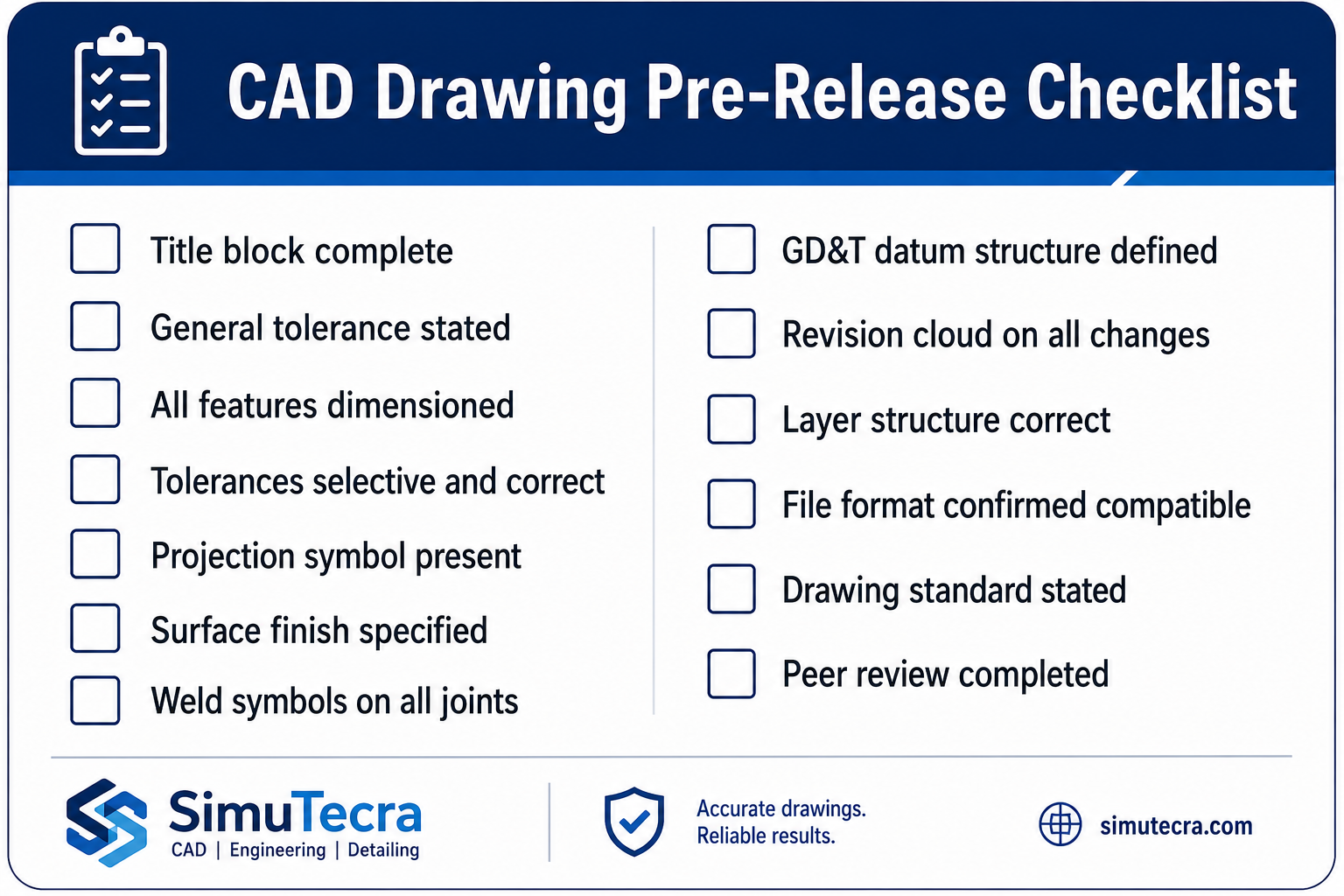
    What Mechanical Engineers Actually Do Day to Day
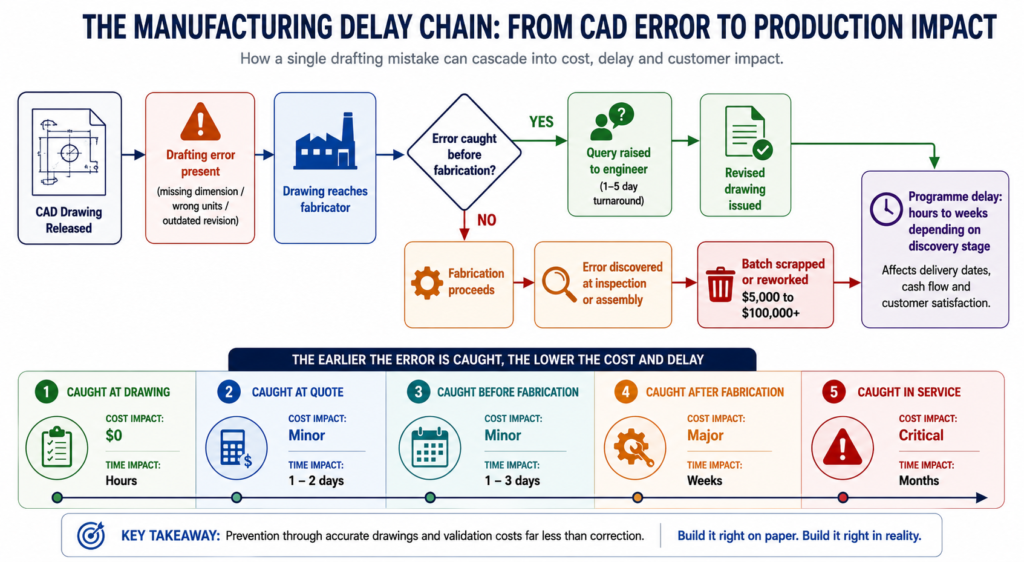
    If you want to understand what mechanical engineering really looks like in practice, the best way is to walk through the kinds of tasks that appear on an engineer’s schedule on a regular basis. These vary by role and seniority, but the following activities are common across most mechanical engineering positions.

    Working in CAD Software

    Computer-Aided Design is the primary technical tool for most mechanical engineers involved in product development. A typical engineer might spend anywhere from two to six hours a day inside a CAD environment such as SolidWorks, CATIA, or AutoCAD, creating new parts, modifying existing designs, building assemblies, checking fits and clearances, and generating engineering drawings for manufacturing.
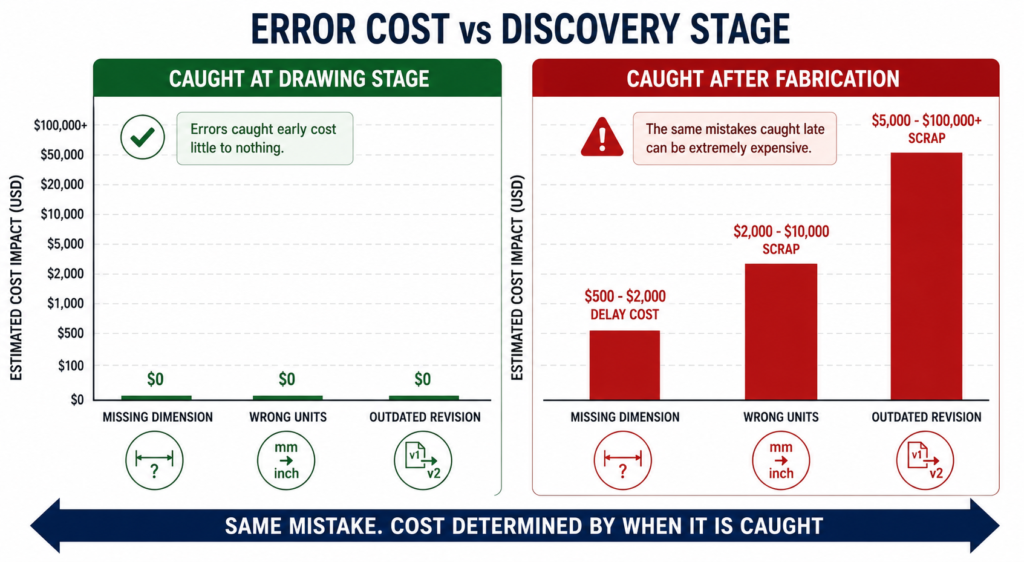
    CAD work is not just about drawing shapes. Good CAD practice involves designing parts that are easy to manufacture, assemble, and service. An engineer who understands manufacturing constraints and design for assembly principles will create significantly better CAD models than one who designs in isolation.

    Running Calculations and Simulations

    Before a design goes to manufacturing or physical testing, engineers use mathematical calculations and simulation software to predict how it will perform. This might involve hand calculations using textbook formulas, spreadsheet-based analysis, or advanced software tools such as ANSYS for Finite Element Analysis (FEA) or Computational Fluid Dynamics (CFD).
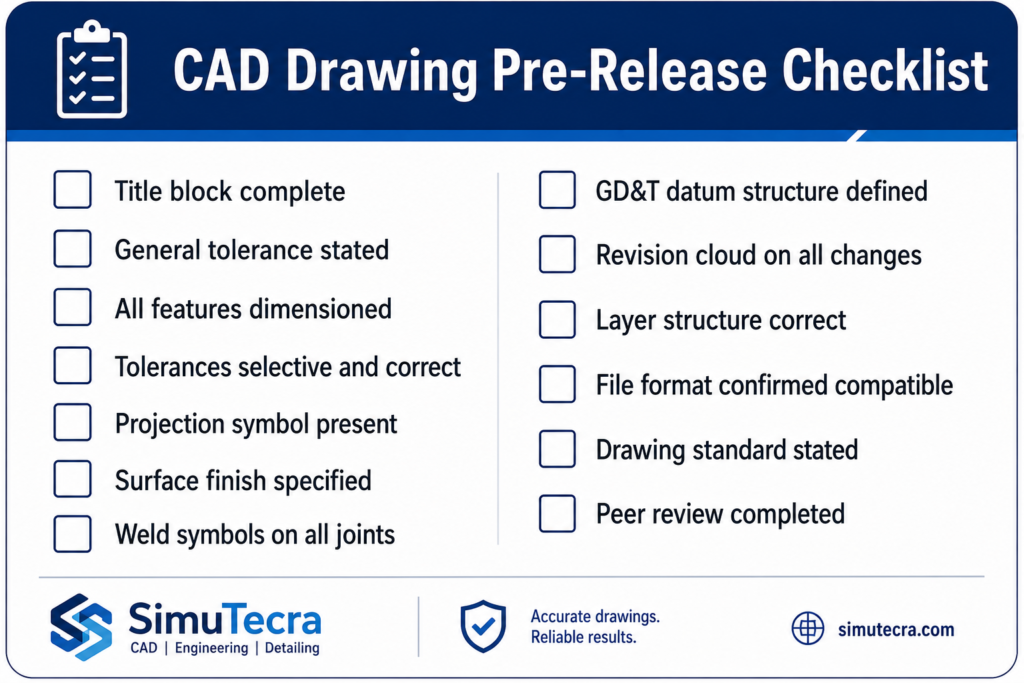
    The purpose of simulation is to catch problems early, when they are cheap and easy to fix, rather than discovering failures during testing or, worse, in the field after a product has been released to customers. A well-run simulation phase can save weeks of physical testing and significant costs.

    Writing and Reviewing Technical Documents

    Engineering is a profession built on documentation. Mechanical engineers regularly produce and review technical reports, design specifications, test plans, failure analyses, and engineering change requests. These documents are essential for communicating designs clearly to colleagues, suppliers, regulators, and customers.

    Strong technical writing is a skill that distinguishes good engineers from great ones. An engineer who can explain complex technical decisions clearly in writing is far more effective than one who can only communicate verbally or informally.

    Attending Design Reviews and Technical Meetings

    Mechanical engineering is a collaborative profession. Engineers regularly participate in design review meetings where a design is examined by a cross-functional team that might include other engineers, project managers, manufacturing specialists, quality engineers, and commercial representatives. These meetings exist to catch problems that an individual engineer might miss when working alone.

    Formal design review processes such as Preliminary Design Reviews (PDRs), Critical Design Reviews (CDRs), and Design Failure Modes and Effects Analysis (DFMEA) sessions are common in industries like aerospace, automotive, and medical devices.

    Working with Suppliers and Manufacturing

    Designs do not build themselves. Mechanical engineers spend meaningful time communicating with suppliers about material specifications, tolerances, surface finishes, and lead times. They also work closely with internal manufacturing teams to ensure designs can be produced efficiently and to the required quality level.

    This supplier and manufacturing interface is an area where junior engineers often underestimate the importance of relationship-building and clear communication. Understanding what a supplier or machine shop can and cannot do is as important as understanding the design itself.

    Physical Testing and Prototyping

    No amount of simulation replaces the insight gained from building and testing something in the real world. Mechanical engineers design test rigs, write test procedures, instrument prototypes with sensors, run tests, and analyse the data. This might involve testing structural strength, thermal performance, vibration characteristics, fluid flow behaviour, or fatigue life.

    Test data feeds back into the design cycle. Discrepancies between simulation predictions and test results often reveal important insights about material behaviour, manufacturing variation, or the limitations of the simulation model.

    Problem Solving and Root Cause Analysis

    When something goes wrong, whether it is a product failure in the field, a production quality problem, or a design that does not meet its performance targets, mechanical engineers are called on to diagnose the cause and develop a fix. Root cause analysis techniques such as the 5 Whys, fishbone diagrams, and fault tree analysis are standard tools in the engineer’s problem-solving toolkit.

    Bureau of Labor Statistics

    Key Responsibilities Across the Engineering Lifecycle

    Mechanical engineers are typically involved at multiple stages of a product’s life, from the initial concept right through to end-of-life considerations. The responsibilities shift at each stage.

    Diagram showing the mechanical engineering product development lifecycle from concept design to end of life
    Lifecycle StageMechanical Engineer’s Key Responsibilities
    Concept and FeasibilityGenerating design concepts, assessing technical feasibility, estimating costs and timelines, creating initial CAD sketches or layouts
    Detail DesignDeveloping fully detailed 3D CAD models and 2D drawings, specifying materials and tolerances, conducting FEA and CFD analysis, preparing design documentation
    PrototypingOverseeing prototype build, designing test equipment, writing test plans, conducting physical testing, analysing and reporting results
    Manufacturing Ramp-UpSupporting production with DFM feedback, resolving manufacturing issues, creating assembly procedures, training production staff
    Product in ServiceInvestigating field failures, issuing engineering change requests, providing technical support to service teams and customers
    End of LifeAdvising on disassembly, material recovery, and sustainable disposal options as part of lifecycle engineering practice

    Types of Mechanical Engineers and Their Specific Roles

    Because mechanical engineering is so broad, engineers typically specialise in a particular area after completing their general education. The following specialisations represent some of the most common and in-demand types of mechanical engineers.

    Design Engineer

    Design engineers focus on the creation of new products or the improvement of existing ones. They spend the majority of their time in CAD software and are the primary authors of engineering drawings and product specifications. Strong spatial reasoning, attention to detail, and a deep understanding of manufacturing processes are essential in this role.

    Stress and Structural Analyst

    Stress analysts use FEA and hand calculations to verify that components and structures can safely withstand their operating loads throughout their intended service life. This role is particularly common in aerospace, defence, automotive, and pressure vessel industries where structural failure can have catastrophic consequences. A stress analyst must be able to read FEA results critically and understand the limitations of numerical simulation.

    Thermal and Fluids Engineer

    Thermal and fluids engineers specialise in heat transfer, thermodynamics, and fluid mechanics. They design cooling systems for electronics, power generation equipment, and HVAC systems. They also work on fuel systems, hydraulic circuits, and aerodynamic shapes. CFD simulation is a primary tool for this type of engineer.

    Manufacturing and Process Engineer

    Manufacturing engineers focus on how products are made rather than what they look like. They optimise production processes, reduce waste, improve quality, and implement lean manufacturing and Six Sigma methodologies. This role sits at the interface of engineering and operations and is critical for companies that need to manufacture products at scale and at competitive cost.

    Mechatronics and Robotics Engineer

    Mechatronics engineers work at the intersection of mechanical, electrical, and software engineering. They design robots, automated machinery, and electromechanical systems. This role has grown enormously in importance over the past two decades as automation has expanded into logistics, healthcare, agriculture, and consumer products. Strong programming skills alongside traditional mechanical knowledge are increasingly required.

    R&D Engineer

    Research and development engineers work at the frontier of technology, exploring new materials, manufacturing processes, and design concepts. R&D roles tend to exist in large corporations with significant innovation budgets, government research institutions, and technology startups. These engineers typically have advanced degrees and enjoy a higher degree of intellectual freedom than their counterparts in production-focused roles.

    Field Service and Applications Engineer

    Not all mechanical engineers spend their careers at a desk. Field service engineers work on-site at customer facilities, commissioning equipment, diagnosing problems, and carrying out repairs. Applications engineers work closely with customers to understand their technical requirements and match them with appropriate products or solutions. Both roles require strong technical knowledge combined with excellent communication skills.

    What Problems Do Mechanical Engineers Solve?

    A useful way to understand the mechanical engineer’s role is to look at the types of problems they are expected to solve. These problems fall into a set of recurring categories.

    Structural and Safety Problems

    Will this part break? How much load can this structure carry before it yields? How long will this component last under repeated loading? These are structural integrity questions that mechanical engineers answer through a combination of calculation, simulation, and physical testing. Structural failure in industries like aerospace, nuclear, and medical devices can have fatal consequences, so this work carries enormous responsibility.

    Energy and Efficiency Problems

    How can this engine extract more work from the fuel it consumes? How can we reduce the heat losses in this industrial process? What is the most efficient way to cool this high-power electronics assembly? These are thermodynamic and energy efficiency challenges. With energy costs rising and sustainability targets becoming increasingly stringent, improving energy efficiency is one of the most commercially valuable things a mechanical engineer can do.

    Motion and Control Problems

    How can we make this robotic arm move more accurately? What is causing the vibration in this rotating machine? How should we design the suspension system for this vehicle to maximise ride comfort and handling? These are dynamics, vibration, and control problems that require a deep understanding of kinematics, dynamics, and often control theory.

    Manufacturing and Cost Problems

    How can we reduce the cost to manufacture this component by 20 percent without compromising performance? Can we redesign this assembly to eliminate two fasteners and reduce assembly time? These are design for manufacture and design for assembly challenges. Engineers who can identify cost reduction opportunities without sacrificing quality or reliability create direct commercial value for their employers.

    Reliability and Durability Problems

    Why did this pump fail after only 6 months of service when it was designed to last 10 years? What is causing the fatigue cracks in this weld? Root cause analysis and reliability engineering are specialised but highly valued skills within mechanical engineering, particularly in industries where unplanned equipment downtime is expensive.

    Key Insight: The best mechanical engineers are not just technically skilled. They are disciplined problem solvers who can define a problem clearly, select the most appropriate analytical approach, interpret results critically, and communicate their findings and recommendations in plain language.

    Industries and Work Environments

    Where a mechanical engineer works shapes everything about their day-to-day experience, the problems they encounter, the tools they use, and the culture of their workplace.

    IndustryWork EnvironmentTypical Focus Areas
    AutomotiveOpen-plan design offices, test tracks, assembly plantsPowertrain, chassis, NVH, safety systems, electrification
    Aerospace and DefenceSecure facilities, clean rooms, test hangarsStructural analysis, propulsion, thermal management, reliability
    Energy (Oil, Gas, Renewables)Offices, offshore platforms, wind farms, refineriesPressure systems, rotating machinery, pipeline integrity, turbines
    ManufacturingFactory floors, process labs, quality labsProcess optimisation, tooling, lean manufacturing, automation
    Medical DevicesRegulated cleanroom environments, R&D labsPrecision mechanisms, biocompatibility, miniaturisation, regulatory compliance
    Robotics and AutomationEngineering offices, lab environments, customer sitesRobot design, actuator selection, motion control, systems integration
    HVAC and Building ServicesOffices, construction sites, mechanical plant roomsHeat transfer, fluid systems, energy performance, commissioning
    Consumer ProductsDesign studios, prototype workshops, supply chain facilitiesErgonomics, aesthetics, DFM, cost reduction, reliability
    Mechanical engineer and manufacturing technician discussing a component on the production floor

    It is also worth noting that remote and hybrid work has become significantly more common for mechanical engineers involved in design, analysis, and documentation work. However, roles with strong manufacturing, field service, or laboratory components continue to require significant on-site presence.

    Skills a Mechanical Engineer Needs

    The skills required in mechanical engineering can be divided into technical competencies, software proficiency, and professional or soft skills. All three matter, and the balance between them shifts as an engineer progresses in their career.

    Core Technical Competencies

    • Solid understanding of statics, dynamics, and mechanics of materials
    • Proficiency in thermodynamics and heat transfer principles
    • Working knowledge of fluid mechanics
    • Understanding of manufacturing processes and design for manufacturability
    • Ability to read, create, and interpret engineering drawings and GD&T (Geometric Dimensioning and Tolerancing)
    • Familiarity with material science and materials selection methods

    Software Proficiency

    • 3D CAD modelling: SolidWorks, CATIA, NX, or Fusion 360
    • 2D drafting: AutoCAD or equivalent
    • FEA and simulation: ANSYS, SolidWorks Simulation, or COMSOL
    • Mathematical and data analysis: MATLAB, Python, or Excel
    • PDM / PLM systems: Teamcenter, Windchill, or equivalent

    Professional and Interpersonal Skills

    • Clear and precise written and verbal communication
    • Structured analytical problem-solving and critical thinking
    • Project management and time management under deadline pressure
    • Ability to collaborate effectively with cross-functional teams
    • Willingness to ask questions, challenge assumptions, and escalate concerns appropriately
    • Attention to detail and a methodical approach to checking work

    One skill that consistently separates high-performing mechanical engineers from average ones is the ability to translate between abstract technical concepts and practical real-world implications. An engineer who can explain to a non-engineer exactly why a design choice matters, and what the consequence of not addressing it would be, is immensely valuable to any organisation.

    What a Typical Week Looks Like at Different Career Levels

    The experience of being a mechanical engineer changes substantially as a career develops. Here is an honest picture of what a typical week might look like at three different career stages.

    Junior Mechanical Engineer (0 to 3 Years Experience)

    • Spending the majority of time on detailed CAD modelling and drawing updates directed by a senior engineer
    • Running defined analysis tasks using templates or methods established by more experienced colleagues
    • Attending design reviews as a listener and contributor, learning how senior engineers defend design decisions
    • Preparing test documentation and supporting physical testing activities
    • Responding to supplier and manufacturing queries about drawing tolerances and specifications
    • Working through formal graduate development programs where applicable

    At this stage, the primary goal is developing technical depth and learning how the team and company operate. Speed and independent decision-making develop gradually with experience.

    Mid-Level Mechanical Engineer (3 to 8 Years Experience)

    • Leading the design of discrete systems or subsystems within a larger product
    • Running and interpreting FEA and simulation independently, making engineering judgements about results
    • Owning specific technical areas within a project and presenting findings in design reviews
    • Mentoring junior engineers on technical methods, drawing standards, and company processes
    • Working more directly with suppliers to resolve technical issues and negotiate specification changes
    • Beginning to manage small projects or workstreams, balancing technical work with some project coordination

    At this stage, engineers are expected to work largely independently on technical tasks and to start developing the judgement to know when to escalate a problem versus when to resolve it within their own authority.

    Senior or Principal Mechanical Engineer (8+ Years Experience)

    • Setting the technical direction for major programs or product lines
    • Making high-stakes engineering decisions and taking accountability for technical outcomes
    • Representing the engineering team in customer, supplier, and executive-level meetings
    • Developing and enforcing technical standards and best practices across the team
    • Leading root cause investigations of significant field failures or customer complaints
    • Identifying technology gaps and driving investment in new tools, methods, and capabilities

    Senior engineers are defined by their judgement as much as their technical skills. They are expected to see around corners, anticipate problems before they occur, and provide steady technical leadership under pressure.

    How the Role Has Changed with Modern Technology

    The job of a mechanical engineer today looks considerably different from the same role 20 or even 10 years ago. Three technological shifts have had the most significant impact.

    CAD and Simulation Have Replaced the Drawing Board

    The transition from hand drafting to CAD was complete well before the turn of the millennium, but the capabilities of modern CAD and simulation tools continue to expand rapidly. Parametric modelling, generative design, cloud-based collaboration, and integrated simulation mean that engineers can explore far more design options in far less time than previous generations could.

    Additive Manufacturing Has Changed What Is Possible

    Industrial 3D printing, particularly metal additive manufacturing, has removed many of the geometric constraints that traditionally limited what a mechanical engineer could design. Components that were previously impossible or prohibitively expensive to machine can now be printed directly. This has opened up entirely new design languages, particularly in aerospace and medical devices.

    Data, Sensors, and Digital Twins Are Creating New Engineering Work

    Modern mechanical systems are increasingly instrumented with sensors that generate continuous streams of operational data. Mechanical engineers are now expected to understand how to use that data, whether for condition monitoring, predictive maintenance, performance optimisation, or regulatory compliance reporting. Digital twin technology, which creates a live virtual model of a physical asset updated by real-world sensor data, is becoming standard practice in industries like energy, aerospace, and advanced manufacturing.

    Sustainability and Circular Economy Considerations Are Now Standard

    The engineering profession is increasingly expected to design with the full environmental lifecycle of a product in mind. Life cycle assessment, material efficiency, repairability by design, and end-of-life recyclability are no longer niche specialisms; they are becoming standard requirements in product development processes across most major industries.

    Mechanical Engineer vs. Other Engineering Roles

    AspectMechanical EngineerCivil EngineerElectrical Engineer
    Primary DomainMachines, energy systems, thermal, fluid, and mechanical systemsStructures, infrastructure, geotechnics, waterCircuits, power systems, electronics, signals
    Daily ToolsCAD (SolidWorks, CATIA), FEA (ANSYS), MATLABAutoCAD Civil 3D, structural analysis software, GISCircuit design tools, PCB software, signal analysers
    Typical Outputs3D CAD models, engineering drawings, test reports, FEA resultsStructural drawings, site plans, geotechnical reportsCircuit schematics, firmware, wiring diagrams
    Team CollaborationManufacturing, quality, procurement, project managementArchitects, surveyors, construction contractorsSoftware engineers, PCB designers, systems engineers
    Physical Product?Almost always: engines, robots, turbines, consumer goodsAlways: bridges, roads, buildings, damsOften: PCBs, motors, power infrastructure

    It is also increasingly common to find mechanical engineers in roles that overlap with software, data science, and electrical engineering, particularly in the automotive, robotics, and energy storage sectors. The boundaries of the discipline are genuinely blurring, and engineers who can work fluently across traditional disciplinary lines command a significant premium in the job market.

    Frequently Asked Questions (FAQ)

    What does a mechanical engineer do on a daily basis?

    On a typical day, a mechanical engineer might work in CAD software to create or modify designs, run structural or thermal simulations to validate a design, attend design review or project meetings, communicate with suppliers about material or manufacturing specifications, review test data from physical prototypes, and prepare technical documentation. The exact mix of activities depends heavily on the engineer’s role, seniority, and industry.

    What type of problems do mechanical engineers solve?

    Mechanical engineers solve physical and engineering problems related to structures, machines, energy systems, and fluid flow. Common problems include ensuring components are strong enough to survive their operating loads, improving the energy efficiency of engines or thermal systems, diagnosing the cause of product failures, reducing manufacturing costs through design improvements, and developing new mechanisms or automated systems to perform specific tasks.

    Is mechanical engineering mostly desk work or hands-on?

    It depends on the specific role. Design, analysis, and R&D engineers spend the majority of their time at a computer working with CAD, simulation, and documentation tools. Manufacturing engineers, field service engineers, and test engineers spend significant time on the shop floor, in test facilities, or at customer sites. Most mechanical engineers experience both environments at some point in their career, and many find that the mix of desk work and physical work is one of the things they enjoy most about the profession.

    What industry pays mechanical engineers the most?

    In most countries, the highest-paying industries for mechanical engineers are aerospace and defence, oil and gas, semiconductor capital equipment, and medical devices. These sectors demand high precision, involve significant regulatory compliance overhead, and carry high consequences for failure, all of which push engineering salaries higher. Specialisations in areas such as FEA, CFD, and mechatronics also command salary premiums across industries.

    What skills do I need to become a mechanical engineer?

    The core technical skills required include solid mechanics, thermodynamics, fluid mechanics, and manufacturing process knowledge, typically built through a recognised university degree program. Proficiency with at least one major CAD platform and one simulation tool is expected in most roles. Equally important are problem-solving ability, clear technical communication, attention to detail, and the capacity to work collaboratively in cross-functional teams.

    Can a mechanical engineer work in the software or technology industry?

    Yes, and increasingly so. Mechanical engineers are hired in technology companies to work on hardware products, robotic systems, thermal management of electronics, and electromechanical systems. Engineers who develop Python or MATLAB programming skills alongside their mechanical knowledge are particularly well-positioned for roles in robotics, autonomous systems, digital simulation, and engineering software development.

    What is the difference between a mechanical engineer and a mechanical technician?

    A mechanical engineer is a professional trained to design, analyse, and develop mechanical systems, typically holding a university degree and taking responsibility for engineering decisions and technical outputs. A mechanical technician, by contrast, typically has a trade qualification or diploma and focuses on installation, maintenance, repair, and operation of mechanical equipment. Engineers tend to work earlier in the design and development process, while technicians work closer to the physical hardware in production, maintenance, and field service contexts.

    Conclusion

    The question ‘what does a mechanical engineer do?’ has no single short answer, and that is precisely what makes the profession so compelling. Mechanical engineers design the devices that improve lives, build the machines that power industries, and solve the physical problems that stand between a concept and a commercially successful product.

    Whether they are running stress simulations at a computer, testing a prototype on a rig, troubleshooting a field failure at a customer site, or collaborating with a cross-functional team to bring a new product to market, mechanical engineers are fundamentally problem solvers working at the intersection of science, creativity, and practical constraint.

    If this guide has given you a clearer picture of the role, the next step is to explore the specific tools, techniques, and specialisations that define the profession in practice. On this site, you will find in-depth tutorials and guides on the software, analytical methods, and career strategies that working mechanical engineers use every day.

    Ready to go deeper? Start with our pillar guide What Is Mechanical Engineering?, or explore our AutoCAD Tutorials for Beginners and Professionals to begin building the CAD skills that every mechanical engineer needs.

  • How Much Does CAD Drafting Cost? 2026 Pricing Guide

    How Much Does CAD Drafting Cost? 2026 Pricing Guide

    One of the most common questions engineering managers, architects, and small business owners ask when a new project lands on their desk is deceptively simple: what is this going to cost in drafting?

    The honest answer is that CAD drafting costs span a wide range, from under $50 for a basic conversion task to well over $50,000 for a complex commercial construction drawing package. The range is not arbitrary. It reflects real differences in drawing complexity, drafter experience, project discipline, delivery speed, and where in the world the work is being done.

    Most pricing articles on this topic give you a number and move on. This guide goes deeper. We break down costs by drawing type, discipline, pricing model, and provider category. We explain every factor that moves the price up or down. We include a practical budget-planning section and a red flag list for quotes that do not pass the smell test. By the end, you will know not just what CAD drafting costs, but why it costs what it does, and how to get better value from every dollar you spend.

    Quick Answer: CAD Drafting Cost at a Glance
    If you need a number right now, here is where most CAD drafting projects land based on current market data compiled from vendor pricing pages, industry surveys, and published rate data for 2026-2026:
    CAD drafting cost comparison chart showing price ranges for 2D drafting, 3D modeling, BIM services, and shop drawings in 2026
    Pricing MetricTypical RangeNotes
    Hourly rate (domestic freelancer)$45 – $95/hrVaries by discipline and experience
    Hourly rate (domestic firm)$75 – $150/hrIncludes overhead, QA, account management
    Hourly rate (offshore firm)$8 – $35/hrVaries significantly by region and quality tier
    Per-sheet rate (2D CAD conversion)$45 – $250/sheetRush turnaround doubles or triples cost
    Simple 2D drawing package$150 – $800Single-page layouts, basic floor plans
    Standard residential drawing set$800 – $3,500Full permit-ready plans for a home
    Commercial drafting package$5,000 – $30,000+Multi-discipline, multi-sheet sets
    3D CAD model (single component)$300 – $2,500Complexity and tolerance precision drive cost
    BIM model (full building)$8,000 – $50,000+Depends on LOD and number of disciplines
    Monthly retainer (outsourced)$1,200 – $6,000/moDedicated or shared resource block
     Important framing:  These ranges reflect real market data, not optimistic estimates. The bottom of each range represents straightforward work from lower-cost providers. The top reflects complex, high-stakes deliverables from experienced domestic firms. Most real projects land somewhere in the middle.

    2. What Determines CAD Drafting Pricing? The 7 Core Variables

    CAD drafting is not a commodity where one price fits all. Every quote you receive reflects a specific combination of the following factors. Understanding each one helps you assess whether a quote is fair, and gives you tools to control your costs.

    Infographic showing seven variables that determine CAD drafting cost complexity, drafter experience, software, turnaround time, provider location, revisions, and project volume

    Variable 1: Drawing Complexity

    Complexity is the single biggest cost driver in CAD drafting. A simple 2D floor plan redraw with clean linework and basic dimensions might take a skilled drafter three to five hours. The same space drawn with structural details, MEP coordination, material specifications, and permit-ready annotation can take fifteen to thirty hours. That difference directly multiplies your cost.

    Complexity factors include the number of distinct components or rooms, the level of annotation and dimensioning required, whether the drawing needs to meet code compliance or permit submission standards, how many layers and disciplines must be coordinated, and whether 3D modeling or BIM data is involved alongside 2D output.

    Variable 2: Drafter Experience and Specialization

    An entry-level drafter working in AutoCAD LT will produce basic 2D layouts accurately and affordably. A senior mechanical engineer who also drafts will charge three to four times more per hour, but may deliver a complete SolidWorks assembly package with GD&T annotations, BOM, and manufacturing notes in a fraction of the time. Specialization commands a premium. Structural steel detailing, medical device drafting, aerospace documentation, and MEP coordination drawings all require expertise that general drafters do not have, and the market rates for specialists reflect that.

    Variable 3: Software and Deliverable Format

    The software platform matters both for capability and cost. An AutoCAD 2D drawing is the most common and typically the least expensive output. SolidWorks or CATIA 3D models involve more complex workflows and higher-cost software licenses, which factor into quoted rates. Revit BIM deliverables require BIM-trained professionals and carry a premium over standard CAD. If you require deliverables in a specific format (native DWG, STEP, IFC, PDF, DXF), or need files structured to a specific standard like ISO or AIA layering, mention this upfront, as non-standard requirements affect time and cost.

    Variable 4: Turnaround Time

    Rush work costs more, often significantly more. Most CAD drafting providers have tiered pricing based on delivery speed. Standard turnaround (5 to 10 business days) is typically the baseline rate. Three-day delivery often carries a 25 to 50 percent premium. Same-day or next-day delivery, when available, can double the base price. If your timeline is flexible, communicate that clearly. Some providers discount work with relaxed deadlines, using it to fill gaps between priority projects.

    Variable 5: Provider Location

    Where the drafting is done dramatically affects what you pay. A domestic US firm in a major metropolitan area will charge two to five times what an equivalent-quality offshore firm in India or the Philippines charges for the same drawing. The cost difference is real, but so are the tradeoffs in communication, time zone overlap, and IP handling. The pricing section on domestic versus offshore providers covers this in detail.

    Variable 6: Number of Revisions

    Revisions are a significant and often underestimated cost driver. Most drawing packages include a defined number of revision rounds in the base quote (commonly one or two rounds of minor changes). Changes beyond that scope are billed at the hourly rate, which can substantially increase total project cost. Poor upfront briefing is the main cause of excessive revision cycles. The clearer and more complete your design intent and specifications are at the start, the fewer revision rounds you will need.

    Variable 7: Project Scale and Volume

    Volume pricing is real. A single drawing sheet costs proportionally more than a batch of fifty similar sheets. If you have an ongoing, high-volume drafting need, most firms will offer a reduced per-sheet or per-hour rate in exchange for a committed volume or retainer arrangement. Conversely, minimum project charges (typically $150 to $250 for most firms) mean that very small one-off requests are often not worth outsourcing individually.

    3. CAD Drafting Hourly Rates: A Realistic Breakdown

    Hourly billing is the most transparent and flexible pricing model for CAD drafting, and it is the dominant model for iterative or undefined-scope work. Here is what the market looks like in 2026-2026 across provider types and experience levels.

    Bar chart comparing CAD drafting hourly rates by provider type from entry-level freelancers to domestic firms in 2026
    Provider TypeEntry LevelMid LevelSenior / SpecialistNotes
    US Domestic Freelancer$30 – $45/hr$45 – $75/hr$75 – $120/hrRates vary by discipline; structural and MEP specialists at the top
    US Domestic Firm$60 – $80/hr$80 – $120/hr$100 – $175/hrIncludes project management, QA, software overhead
    UK / Western Europe Firm£45 – £65/hr£65 – £100/hr£95 – £150/hrComparable to US in GBP; EU regulations familiarity a plus
    Eastern Europe (Poland, Romania)$20 – $35/hr$35 – $55/hr$50 – $80/hrStrong technical quality; growing for BIM and complex drafting
    India-Based Firm$8 – $15/hr$15 – $25/hr$22 – $40/hrLargest offshore talent pool; quality varies significantly
    Philippines-Based Firm$10 – $18/hr$18 – $30/hr$25 – $45/hrStrong English proficiency; good AEC and MEP drafting capability

    What Is Included in an Hourly Rate?

    When you hire a domestic firm at $100 per hour, you are not just paying for the drafter’s hands on a mouse. That rate typically covers:

    • The drafter’s time and expertise
    • Software license costs (AutoCAD at $1,975/year, Revit at $2,310/year, SolidWorks at $4,000+ per year)
    • Internal quality review before delivery
    • File management and delivery infrastructure
    • Project management and communication overhead
    • The firm’s business overhead including insurance, office, and administrative staff

    When you hire a solo freelancer at $55 per hour, most of those costs are lower or absent, which explains the rate difference. Neither is inherently better — the right choice depends on your project’s complexity and what level of process and oversight you need.

    4. Per-Sheet and Per-Project Pricing: When Each Makes Sense

    Per-Sheet Pricing

    Per-sheet pricing is common for CAD conversion work, PDF-to-DWG conversion, permit drawing sets, and other tasks where each sheet is a discrete, standardized deliverable. It is popular with clients because it is predictable: you know how many sheets you need, you multiply by the rate, and you have your budget.

    Drawing Sheet TypeTypical Per-Sheet RateRush MultiplierNotes
    PDF to CAD conversion (basic)$45 – $90/sheet2 – 3xSimple linework, minimal annotation
    PDF to CAD conversion (detailed)$90 – $180/sheet2 – 4xFull annotation, dimensions, notation
    Architectural floor plan (new draw)$150 – $350/sheet1.5 – 2xOriginal drafting from sketches or notes
    Structural detail sheet$200 – $450/sheet1.5 – 2.5xIncludes member sizing, connection details
    MEP (mechanical/electrical/plumbing)$175 – $400/sheet1.5 – 3xCoordination complexity adds cost
    Shop drawing (fabrication)$150 – $350/sheet1.5 – 2xWeld symbols, tolerances, BOM
    Civil site plan$250 – $600/sheet1.5 – 2xSurvey data integration, grading, utilities
    On rush pricing:  One published provider (CAD/CAM Services) lists a flat rate of $185 per D or E size AutoCAD 2D sheet at standard turnaround. The same work at rush turnaround (24 hours) typically runs $370 to $550. Plan your deadlines accordingly.

    Per-Project (Fixed Fee) Pricing

    Fixed-fee pricing works well when the scope is clearly defined and the deliverables are well-understood. The drafter agrees to produce a specific set of outputs for a set price. You get budget certainty; the drafter accepts the risk if the job takes longer than estimated.

    Fixed-fee pricing is common for residential drawing packages, permit submission sets, and defined industrial or manufacturing drawing packages. It is less common for complex commercial or industrial projects where scope evolves during the engagement.

    Project TypeTypical Fixed-Fee RangeWhat Is Usually Included
    Simple 2D drawing (single sheet)$150 – $400Line conversion or basic redraw, one revision round
    Small residential renovation drawings$800 – $2,700Floor plans, elevations, basic sections for permit
    Full custom home drawing set$3,500 – $10,000+Full architectural set: plans, sections, elevations, details
    Small commercial building (permit set)$5,000 – $15,000Multi-discipline permit package, ADA compliance
    Medium commercial / industrial$15,000 – $35,000Full structural, MEP, architectural coordination
    Large commercial or industrial project$35,000 – $100,000+Multiple disciplines, extensive coordination, BIM deliverables
    Product design (simple mechanical part)$300 – $1,5003D model, 2D drawing package, BOM
    Product design (complex assembly)$2,000 – $15,000+Multi-component assembly, GD&T, manufacturing drawings

    5. Cost by Drawing Type and Discipline

    CAD drafting costs vary significantly across disciplines. The differences are not arbitrary: they reflect the level of specialized knowledge required, the complexity of applicable standards and codes, and the typical time investment per drawing.

    Architectural CAD Drafting Costs

    Architectural drafting is one of the most common CAD services and covers a wide range of work from basic floor plans to complex construction document sets. Costs are driven by the number of sheets, the level of detail, and whether permit submission formatting is required.

    • Basic floor plan (single level): $300 – $800
    • Full residential permit set (plans, elevations, sections, details): $1,500 – $5,000
    • Commercial permit-ready drawing package: $8,000 – $30,000+
    • As-built drawings (measured and drawn): $500 – $3,000 depending on size and complexity
    • PDF to AutoCAD conversion (per sheet): $45 – $180

    Architectural drafting rates for domestic freelancers average $75 to $125 per hour. This is substantially less than hiring a licensed architect, whose hourly rates run $200 to $400 per hour. For pure drafting work (translating a design into accurate CAD output), a skilled architectural drafter is the appropriate choice, not an architect.

    Mechanical Engineering CAD Drafting Costs

    Mechanical CAD drafting is where precision is paramount. Drawings must convey exact dimensions, tolerances, material specifications, and surface finish requirements in a format that machinists and fabricators can execute without ambiguity. This level of precision requires experienced drafters and commands higher rates than basic architectural work.

    • Simple machined part (2D drawing): $150 – $600
    • Complex machined part with GD&T: $400 – $1,500
    • 3D solid model (single component): $300 – $2,000
    • Sub-assembly drawing package: $800 – $4,000
    • Full product assembly with BOM and exploded views: $2,000 – $15,000+

    Mechanical CAD specialists in AutoCAD Mechanical, SolidWorks, or CATIA typically bill $65 to $120 per hour domestically. The premium over general drafting rates reflects the knowledge of manufacturing processes, GD&T standards (ASME Y14.5), and the criticality of getting tolerances right.

    Structural Engineering CAD Drafting Costs

    Structural drafting covers foundation plans, framing plans, structural steel details, rebar layouts, and connection details. It sits at the intersection of engineering judgment and drafting skill, meaning the best structural drafters have a solid understanding of structural behavior, not just drafting technique.

    • Foundation plan: $400 – $1,200
    • Structural steel shop drawings (per sheet): $200 – $450
    • Rebar detailing drawings (per sheet): $150 – $350
    • Full structural drawing package for a residential project: $1,500 – $4,000
    • Commercial structural documentation package: $8,000 – $40,000+

    Structural shop drawings are a category where outsourcing to specialized overseas firms is extremely common. Firms in India and the Philippines have built strong capabilities specifically in steel detailing and rebar drawings for US and UK markets, typically charging $15 to $30 per hour for what domestic firms bill at $90 to $150 per hour.

    Civil Engineering CAD Drafting Costs

    Civil CAD drafting covers site plans, grading plans, utility layouts, road designs, and land development drawings. Civil work often involves integration with survey data, GIS systems, and regulatory formatting requirements that vary by municipality.

    • Basic site plan: $500 – $1,500
    • Full land development drawing package: $3,000 – $15,000
    • Road design drawings (per sheet): $300 – $700
    • Utility layout drawings (per sheet): $200 – $500
    • Civil 3D model (grading and drainage): $1,500 – $8,000

    MEP (Mechanical, Electrical, Plumbing) Drafting Costs

    MEP drafting is among the most complex and expensive CAD work because it requires coordination between three distinct systems, all of which must occupy the same physical building space without conflict. MEP drawings are increasingly produced in BIM to enable clash detection.

    • HVAC layout drawing (per floor): $600 – $2,000
    • Electrical layout drawing (per floor): $400 – $1,500
    • Plumbing riser diagram: $300 – $900
    • Full MEP coordination package for a commercial building: $15,000 – $60,000+
    • BIM model with MEP coordination and clash detection: $20,000 – $80,000+

    BIM Modeling Costs

    Building Information Modeling (BIM) represents the highest tier of CAD-related drafting cost. BIM is not just drawing: it is a data-rich 3D model that carries information about every component in a building, including material properties, manufacturer data, maintenance requirements, and spatial relationships. The Level of Development (LOD) spec required significantly determines cost.

    BIM Level of DevelopmentWhat It IncludesTypical Cost Impact
    LOD 100 (Conceptual)Massing and overall form onlyLowest cost; schematic only
    LOD 200 (Approximate Geometry)Generic elements, approximate sizesModerate cost; early design phase
    LOD 300 (Specific Geometry)Accurate dimensions, coordination-readyStandard for permit/construction use
    LOD 350 (Construction)Interfaces with adjacent elements includedHigh cost; needed for fabrication coordination
    LOD 400 (Fabrication)Full fabrication and installation detailVery high cost; used for prefab and shop drawing production
    LOD 500 (As-Built)Verified field conditions, actual installed stateHighest cost; full as-built documentation

    6. Domestic vs Offshore CAD Drafting: The Real Cost Comparison

    The cost gap between domestic and offshore CAD drafting is large, and it is worth examining honestly rather than in generalities.

    Cost FactorDomestic (US/UK)Offshore (India/Philippines)Notes
    Hourly rate$65 – $150/hr$8 – $30/hr4 – 10x difference in base rate
    Time zone overlapFull overlapMinimal (8 – 12 hrs difference)Offshore requires asynchronous workflow
    Communication frictionLowModerate to HighDepends on provider’s English proficiency and process maturity
    Revision cycle timeHours1 – 2 daysTime zone gap extends correction loops
    IP risk levelLowModerateManageable with proper contracts; not eliminated
    Drawing quality ceilingVery highHigh for standardized work, variable for complexBest offshore firms deliver excellent output
    Total effective cost (with mgmt overhead)$75 – $160/hr est.$20 – $55/hr est.Offshore savings real but not as large as rate gap suggests

      💰 The real saving:  If a domestic firm charges $100/hr and an offshore firm charges $18/hr, your raw cost savings are 82%. But management overhead, revision cycles, and QA review typically consume 30 to 50% of those savings. Real net savings for well-managed offshore arrangements typically run 40 to 60% compared to equivalent domestic work. Still significant, but calibrate expectations honestly.

    7. Freelancer vs Firm vs Outsourcing Agency: Pricing Differences

    Beyond geography, the type of provider you hire shapes both cost and experience significantly.

    Provider ModelHourly Range (Domestic)Best ForRisk Factors
    Solo freelancer$30 – $95/hrWell-defined projects, cost-conscious budgetsSingle point of failure; limited capacity; inconsistent availability
    Small specialist firm (2-10 people)$65 – $130/hrMid-complexity projects needing some team depthLimited surge capacity; still owner-dependent
    Established CAD firm$85 – $175/hrComplex, multi-sheet, regulated-industry workHighest cost; best process and accountability
    Offshore outsourcing firm$8 – $35/hrVolume drafting, standardized work, cost reductionCommunication overhead; QA management required
    Freelance platform (Upwork, Freelancer)$15 – $80/hrQuick tasks, price testing, low-stakes projectsHighly variable quality; no accountability structure
    Retainer / dedicated resourceNegotiated monthly rateOngoing high-volume needsRequires volume commitment; not flexible for sporadic work

    8. The Hidden Costs No One Talks About

    The quoted price for a CAD drafting project is often not the final price. These additional costs catch clients off guard repeatedly, and they deserve direct attention.

    Revision Costs Beyond Scope

    Most quotes include one or two rounds of minor revisions. Changes beyond that, whether driven by a design change on your end or a misunderstanding in the brief, are billed at the hourly rate. On a complex drawing package, multiple out-of-scope revision cycles can easily add 20 to 40 percent to the original quote. The solution is a comprehensive brief at the start, not a fight with your provider at the end.

    Format Conversion and File Compatibility

    If your provider works in one software platform and you need files in another, expect conversion fees. DWG to DXF is simple. AutoCAD to CATIA native format is not. File format requirements should be specified clearly in the brief and confirmed as included in the quote. Discovering at delivery that your machine shop needs a STEP file when you were expecting DWG files is a costly surprise.

    Minimum Project Fees

    Most professional CAD drafting providers have minimum fees, typically between $150 and $250. A five-minute correction that takes 30 minutes of a drafter’s time, including file handling and delivery, may still cost you the minimum. For very small, frequent requests, a retainer arrangement or in-house capability is usually more economical than individual project billing.

    Rush Premiums

    Rush fees are real and significant. A drawing that costs $500 at standard turnaround may cost $800 to $1,200 at two-day delivery. For same-day or next-day delivery (when available), premiums of 100 percent or more are not unusual. If you find yourself frequently paying rush rates, the root problem is usually project planning and timeline management, not drafting capacity.

    Back-and-Forth Communication Time

    This cost is invisible but real. Every email thread chasing clarification, every video call to explain a markup, every iteration of a brief that was not clear the first time represents time you are paying for indirectly (in management overhead) or paying for directly (in revision billing). Investing 30 to 60 minutes in a thorough project brief almost always saves more time and money than it costs.

    Software License Fees (When Applicable)

    Some specialized deliverables require proprietary software licenses. If you need a Revit model and your preferred firm works in AutoCAD, either the firm will need to bring in a Revit resource (which costs more) or you will need to engage a different firm. Similarly, if you require CATIA or Creo deliverables, expect a reduced pool of providers and higher rates. Always specify required software in your brief.

     Cost trap:  The single most expensive mistake in CAD drafting procurement is providing an incomplete brief and assuming the drafter will figure out the rest. Ambiguity in scope almost always resolves at your expense.

    9. How to Budget for a CAD Drafting Project

    Accurate budget planning for CAD drafting requires more than looking up a price range. Here is a practical process that experienced project managers use.

    Step 1: Define Your Deliverables Before You Ask for a Quote

    Write down exactly what you need: how many drawing sheets, what views (plan, section, elevation, detail, isometric, 3D model), what software format, what layering standard, what annotation level, and what the final use will be (permit submission, fabrication, client presentation, internal reference). The more specific your scope, the more accurate your quote will be.

    Step 2: Identify Your Drawing Type and Discipline

    Use the cost ranges in Section 5 as your starting benchmark. Are you buying architectural, mechanical, structural, civil, or MEP drawings? Simple 2D or 3D? BIM or CAD? Each discipline and output type has a different cost baseline.

    Step 3: Add a Revision Buffer

    Whatever your base quote is, budget an additional 15 to 25 percent as a revision contingency. This is not pessimism; it is realistic planning. Design changes, client feedback, and engineering review comments are normal, and they generate revision work. If you use the full contingency, you accounted for it. If you do not, it is a pleasant surprise.

    Step 4: Get Multiple Quotes and Compare Apples to Apples

    Price alone does not tell you which quote is the best value. When comparing quotes, confirm that each includes the same deliverables (number of sheets, revision rounds, file formats), the same software, the same turnaround window, and the same QA process. A quote that looks 30 percent cheaper may include fewer revision rounds or exclude file format delivery in your required standard.

    Step 5: Consider the Total Engagement Cost, Not Just the Hourly Rate

    If you are evaluating an offshore option, account for your management time. If a $20/hr offshore provider requires three hours of your team’s coordination time per week that would not be needed with a domestic provider at $90/hr, the real cost difference is smaller than the rates suggest. Factor in communication overhead, QA review time, and revision cycle duration when comparing total engagement costs.

    Budget example:  A small manufacturing firm needs a product redesign: 3D model of a new bracket assembly plus 2D manufacturing drawings for five components. Based on current market data, a domestic mid-level freelancer at $65/hr would likely complete this in 15 to 22 hours, putting total cost at $975 to $1,430. An offshore firm at $18/hr for similar complexity would quote $270 to $396, but factor in 4 to 6 hours of your team’s coordination and review time at your internal cost rate. The real offshore cost is likely $450 to $650, still a significant saving, but not the 80% discount the headline rate implies.

    10. Red Flags in CAD Drafting Quotes

    Not every low quote is a bargain, and not every high quote is unjustified. These warning signs in a quote or provider relationship deserve attention before you commit.

    • Vague scope acceptance: A provider who accepts your project brief without asking any clarifying questions does not fully understand the scope. Good providers ask about software requirements, layering standards, revision expectations, and deliverable formats upfront.
    • Unusually low rates without explanation: If a quote is 50 percent below the market rate, ask why. It may reflect genuinely lower overhead (offshore team, minimal QA), or it may reflect inexperience, substandard software, or a plan to bill extensively for revisions.
    • No portfolio in your discipline: A general CAD firm that has never done structural shop drawings is probably not the right choice for your structural shop drawing project. Ask for samples of work similar to yours before committing.
    • No defined revision terms: If the quote does not specify how many revision rounds are included and what constitutes a billable change, you have no budget protection once the project starts.
    • Resistance to NDA: Any provider that hesitates to sign a non-disclosure agreement for a project involving proprietary designs is a serious IP risk. A reputable firm will have a standard NDA ready.
    • No QC process described: Ask directly: who reviews the drawings before they are delivered to you? If the answer is unclear or does not involve a second set of eyes, your QA burden just landed entirely on you.
    • No example of their actual layering standards: A firm that cannot show you a sample drawing in their preferred layering convention before you commit may not have consistent standards, which means more rework aligning their output to your workflow.

    11. How to Reduce Your CAD Drafting Costs Without Cutting Quality

    There are legitimate ways to get better value from your CAD drafting budget. None of them involve choosing the cheapest provider regardless of capability.

    • A thorough brief reduces revision cycles, which is the most controllable cost lever you have. Specify drawing types, view counts, standards, format, software, and final use. Drawings produced to a clear brief require fewer corrections.Write a complete project brief before requesting quotes
    • Disorganized sketches, conflicting markup sets, and unclear source files slow the drafter down, and you pay for that time. Organize your inputs, resolve conflicts internally, and present a clear package.Provide organized input files
    • Rush premiums are avoidable if you plan ahead. Build drafting time into your project schedule rather than treating it as a last-minute activity.Be flexible on turnaround when you can
    • If you have a regular, predictable drafting volume, negotiate a monthly retainer rate. Most providers offer 10 to 20 percent below standard hourly rates for committed volume.Use retainer pricing for ongoing needs
    • Keep complex, IP-sensitive, or fast-turnaround work with a domestic provider. Send standardized, well-defined, lower-risk work offshore. This captures most of the cost savings from offshore pricing while protecting your most sensitive projects.Consider a hybrid sourcing model
    • Volume discounts are real. Instead of requesting five individual drawings one at a time, batch them into a single package. Per-unit cost drops, and provider efficiency increases.Batch similar work together
    • A well-organized title block, layer standard, and annotation template that you provide to your provider eliminates the time they spend inferring or guessing your preferences. This speeds production and reduces errors.Invest in a good drawing standards template

    Frequently Asked Questions

    The following questions represent the most common cost-related queries from engineering managers, project owners, and business leaders evaluating CAD drafting services.

    How much does a CAD drafter charge per hour?

    In the United States, domestic freelance CAD drafters typically charge between $45 and $95 per hour depending on their experience and specialization. Established domestic firms charge $75 to $175 per hour inclusive of overhead, QA, and project management. Offshore firms in India and the Philippines charge $8 to $35 per hour for equivalent skill levels. Hourly rates for specialized disciplines (structural detailing, medical device documentation, aerospace drawings) fall at the upper end of each range.

    How much does a single CAD drawing cost?

    A single CAD drawing can cost anywhere from $45 for a simple PDF-to-DWG conversion to $600 or more for a complex mechanical drawing with full GD&T annotation and 3D model. A standard architectural floor plan sheet typically costs $150 to $350. Structural and MEP sheets generally run $175 to $450 each. The cost per sheet drops meaningfully when you order a full set rather than individual sheets.

    How long does it take to produce a CAD drawing?

    Time varies dramatically with complexity. A simple 2D layout redraw takes 3 to 6 hours. A standard architectural floor plan with annotation and dimensions takes 8 to 15 hours. A complex mechanical assembly model with associated 2D drawings can take 20 to 60 hours. A full construction document set for a residential project typically takes 40 to 120 hours of drafting time. Turnaround time in calendar days depends on how many hours the drafter can dedicate per day and their current workload.

    Is it cheaper to hire a freelancer or a CAD firm?

    A freelancer will almost always be cheaper on an hourly basis. But cheaper per hour does not always mean lower total project cost. Firms bring process discipline, QA review, project management, and the ability to replace a resource if your dedicated drafter is unavailable. For high-stakes, complex, or ongoing work, the overhead of a firm is often worth the premium. For well-defined, contained projects without regulatory requirements, a skilled freelancer can deliver excellent value.

    Why do CAD drafting prices vary so much?

    Because the work itself varies enormously. A simple 2D redraw of a clean sketch and a BIM coordination package for a 10-story commercial building are both called ‘CAD drafting,’ but they involve completely different skill levels, software platforms, time investments, and risk profiles. The price range reflects the reality of the work, not inconsistency in the market. When you understand which of the seven variables in Section 2 apply to your project, the price range for your specific situation narrows considerably.

    What is the cheapest way to get CAD drafting done?

    The cheapest option is typically an offshore firm in India or the Philippines with published hourly rates of $8 to $15 per hour. However, the cheapest option is not always the most cost-effective. Poor quality or misunderstood drawings that require extensive rework can cost more than a higher-priced provider who got it right the first time. The most cost-effective approach combines a well-written project brief (which you control), a provider who has experience with your drawing type, clear revision terms in the contract, and a defined QA review step before the drawings enter production.

    Do CAD drafting services include revision rounds?

    Most professional providers include one or two rounds of minor revisions in their base quote. ‘Minor revisions’ typically means corrections to the existing scope (fixing a dimension that was marked incorrectly, adjusting an annotation). Scope changes (adding a view that was not in the original brief, redesigning a component) are almost always billed additionally at the hourly rate. Clarify exactly what revision terms are included before you sign off on a quote.

    Conclusion:

    CAD drafting costs are not mysterious, but they are not one-size-fits-all either. The wide price range you encounter when researching this topic is real, and it reflects real differences in scope, discipline, complexity, provider type, and geography.

    The most important insight in this guide is this: the cost of your CAD drafting project is more controllable than most clients realize. The biggest cost variable is not the provider’s rate. It is the clarity of your brief. An ambiguous or incomplete brief generates revision cycles, and revision cycles are the primary mechanism by which a well-priced project becomes an expensive one.

    Invest time in defining your scope clearly. Match your provider choice to your project’s actual requirements rather than just choosing the cheapest rate. Build a revision buffer into your budget. And review the drawings before they enter your production workflow, not after they have already been used.

    Do those things consistently, and you will get better results from every CAD drafting dollar you spend.

    Ready to plan your next CAD drafting project?

    Explore our related guides on in-house versus outsourced CAD drafting, version control for engineering drawings, and how to select the right CAD software platform for your team.

  • In-House vs Outsourced CAD Drafting: How to Decide

    In-House vs Outsourced CAD Drafting: How to Decide

    A mid-size mechanical engineering firm in Ohio recently found itself in a familiar bind. Their one full-time CAD drafter was maxed out, a large product redesign project had just landed, and the choice was either hire someone new or send overflow work to an outside firm. The owner asked what most business leaders eventually ask: which model actually makes more sense for us?

    It is a question that sounds simple but gets complicated fast. The answer changes depending on how much drafting work you have, how sensitive your designs are, whether your projects are continuous or cyclical, and what your long-term business strategy looks like. Most articles on this topic give you a pros and cons list and leave the decision entirely to you. This guide does something different.

    We have researched real salary benchmarks, actual outsourcing cost structures, and the practical operational realities that both models create. By the end, you will have a concrete framework for making the right call for your specific business, including a decision scorecard you can apply immediately.

    Side-by-side comparison of in-house CAD drafting workstation versus outsourced remote CAD team on video call

    1. What Is CAD Drafting and Why the Sourcing Decision Matters

    CAD drafting is the process of creating precise technical drawings and 2D or 3D models using computer-aided design software such as AutoCAD, SolidWorks, Revit, CATIA, or MicroStation. These drawings serve as the authoritative technical language between designers, engineers, fabricators, contractors, and clients. A floor plan, a mechanical assembly drawing, an HVAC layout, a structural detail sheet: all of these are products of CAD drafting.

    For most businesses in engineering, architecture, construction, and manufacturing, CAD drafting is not an optional activity. It underpins every project. The question is not whether to do it, but how to staff it.

    Getting this decision wrong is expensive. Hire a full-time drafter when your workload does not justify it, and you are paying for idle capacity. Outsource when you should not, and you risk IP exposure, communication failure, and quality inconsistency. The right answer depends on a careful analysis of your workload pattern, budget, project complexity, and strategic direction.

    2. What the Top-Ranking Articles on This Topic Miss

    Before building this guide, we reviewed the articles currently ranking at the top of search results for this topic. They share a consistent set of weaknesses that leave business owners without the information they actually need to make this decision.

    • No real cost data: Most articles say outsourcing ‘saves money’ without citing any salary figures, hourly rates, or total cost calculations. We have included current 2025-2026 market data from salary.com, Glassdoor, and Indeed.
    • No hybrid model: Every top-ranking article treats this as a binary either/or choice. The reality is that most growing engineering businesses use a hybrid approach, and we cover exactly how that works.
    • No decision framework: Readers get a list of advantages and disadvantages but no structured way to weigh them against their specific situation. This guide includes a scored decision matrix you can actually use.
    • No vetting guidance: Articles that recommend outsourcing give no practical advice on how to find, evaluate, and manage an outsourcing partner responsibly.
    • No IP protection strategies: Intellectual property risk is mentioned as a concern but never addressed with actionable solutions like NDAs, data handling standards, or contractual protections.
    • No transition guidance: None of the top-ranking articles address what happens when your business needs to change models, either adding in-house capacity or transitioning to outsourcing.

    This guide fills those gaps directly.

    3. The Real Cost of In-House CAD Drafting

    The most common mistake businesses make when evaluating in-house CAD staffing is looking only at salary. Salary is the largest line item, but the true cost of an in-house employee runs significantly higher when you account for the full cost stack.

    Current CAD Drafter Salary Benchmarks (United States, 2025-2026)

    Based on data from Salary.com, Glassdoor, and Indeed as of early 2026:

    Experience LevelAnnual Salary RangeMedianHourly Rate
    Entry Level (0-2 years)$51,675 – $75,848$66,200~$32/hr
    Mid-Level (3-6 years)$65,000 – $90,000$75,335~$36/hr
    Senior / Experienced$75,433 – $105,809$91,290~$44/hr
    Specialist / Expert$100,000 – $138,000+$117,900~$57/hr

    Source: Salary.com, Glassdoor (May 2026). Rates vary by geography. California and Massachusetts average 10-15% above national median.

    The Full Cost of an In-House Employee: Beyond Salary

    When businesses calculate ‘what it costs to hire a drafter,’ they almost always undercount. A commonly accepted rule of thumb in HR is that the fully loaded cost of an employee runs 1.25 to 1.4 times their base salary, accounting for:

    • Benefits (health, dental, vision): Typically 15-30% of base salary for employer contributions.
    • Payroll taxes (FICA, FUTA, SUTA): Approximately 7.65% federal, plus state unemployment taxes.
    • Paid time off: 10-15 days PTO plus holidays represents roughly 5-7% of total work capacity that is paid but non-productive.
    • Software licenses: AutoCAD seats run $2,500 to $4,500 per year. SolidWorks with PDM ranges from $4,000 to $10,000+ per year. CATIA and similar enterprise platforms cost considerably more.
    • Hardware: A capable CAD workstation costs $2,000 to $5,000 upfront with a typical 3-4 year refresh cycle.
    • Training and onboarding: Industry estimates place onboarding costs at one to three months of salary. Ongoing training for software updates, new standards, or skill development adds further cost.
    • Recruitment: Recruiting fees (if using an agency) run 15-20% of first-year salary. Internal recruiting time has an opportunity cost even without an agency.
    Real-world example : A business that hires a mid-level CAD drafter at $75,000/year salary is likely incurring a true annual cost of $94,000 to $105,000 when all the above factors are included. A senior drafter at $91,000 salary likely costs $113,000 to $127,000 fully loaded.

    Overhead and Utilization: The Hidden Efficiency Problem

    In-house drafters have a fixed cost whether they are fully occupied or not. For businesses with cyclical project loads, this means paying for underutilized capacity during slow periods. If your drafting demand fluctuates significantly across quarters, the periods of low utilization are essentially a cost with no corresponding revenue-generating output.

    At the same time, if a key drafter leaves the company, you face recruiting, onboarding, and knowledge transfer costs all over again. Industry data suggests the cost of replacing a technical employee runs between 50% and 200% of annual salary when you factor in lost productivity, recruiting fees, and training time.

    4. The Real Cost of Outsourced CAD Drafting

    The appeal of outsourcing is straightforward: you pay only for the work you actually need, with no payroll overhead, benefits, or idle capacity. The reality is nuanced. Outsourcing costs vary enormously depending on the provider’s location, specialization level, and engagement model.

    Outsourced CAD Drafting Rate Ranges

    Provider Type / RegionTypical Hourly RateStrengthsConsiderations
    Domestic US freelancer$45 – $95/hrTime zone alignment, no language barrierHigher cost, limited scale
    Domestic US firm$65 – $150/hrAccountability, quality standardsMost expensive outsource option
    India-based firm$8 – $25/hrLarge talent pool, established industryTime zone gap, quality varies
    Philippines-based firm$10 – $30/hrEnglish proficiency, cultural alignmentStill requires vetting
    Eastern Europe (Poland, Romania)$25 – $55/hrHigh technical quality, EU complianceHigher than Asian rates
    Latin America (Mexico, Colombia)$20 – $45/hrNear-shore, time zone proximity to USGrowing but smaller talent pool
    Note: Rates as of 2025-2026. Actual pricing depends on project complexity, drawing type, software required, and contract structure (hourly vs. per-sheet vs. dedicated resource).

    Hidden Costs in Outsourcing That Are Rarely Discussed

    The advertised hourly rate is only part of the total outsourcing cost. Businesses that do not plan for these additional factors often find that their outsourcing savings are smaller than expected:

    • Management overhead: Someone on your internal team must coordinate with the outsourcing partner, review deliverables, and manage revisions. This is real labor time with a real cost.
    • Rework and revision cycles: If the outsourcing partner misunderstands your standards or specifications, correction cycles add time and cost. Proper brief writing and QC processes are essential.
    • Onboarding new partners: Every time you switch providers or onboard a new firm, there is a learning curve. They need to understand your drawing standards, title block formats, layer conventions, and project context.
    • Legal and compliance setup: NDAs, data handling agreements, and IP transfer clauses require legal review upfront.
    • Data transfer and file management: Secure file sharing platforms, version control, and format compatibility all have costs in time and sometimes in software.
    • Quality assurance: Building or buying a QA process for outsourced drawings adds cost that in-house work often absorbs implicitly. 
    Key insight : A project-based outsourced drawing that appears to cost $500 may actually cost $700 or more once management time, revision cycles, and QA are accounted for. This does not make outsourcing a bad choice – it simply means the comparison to in-house cost needs to be honest and complete on both sides.

    5. In-House CAD Drafting: Advantages and Honest Disadvantages

    'In-house CAD drafting team working at dual-monitor workstations with technical drawings displayed

    Genuine Advantages of an In-House Team

    • Contextual knowledge: An in-house drafter who has worked with your team for two years understands your design standards, preferred tolerances, drawing conventions, and client preferences without being told. This institutional knowledge has real value and is genuinely difficult to replicate with an outside provider.
    • Speed on urgent requests: When a last-minute client change comes in at 4 PM, an in-house drafter can respond immediately. Outsourcing introduces a communication and handoff step that adds time, even with the best partners.
    • Collaboration and iteration: When engineering design and CAD drafting happen in the same room (or on the same Slack channel), iteration cycles are faster. Engineers can sketch something on a whiteboard and a drafter can model it in real time.
    • Quality consistency: In-house teams develop consistent habits and standards over time. Drawing quality tends to be predictable once onboarding is complete.
    • IP security: Proprietary designs and sensitive technical data stay within your organization’s own infrastructure, under your own security policies.
    • Career investment: Building an in-house team allows you to develop people who grow with the business, take on more responsibility, and become genuine technical assets.

    Honest Disadvantages (That Articles Rarely Acknowledge)

    • Skills ceiling: A small in-house team’s expertise is bounded by who you hired. If a project requires specialized skills in, say, pressure vessel detailing or complex assembly animation, your team may simply not have that capability.
    • Single point of failure: One-person CAD teams are surprisingly common in small and mid-size firms. When that person is sick, on vacation, or resigns, the entire drafting workflow stops. This is a serious operational vulnerability.
    • Technology lag: Keeping an in-house team current on the latest CAD software versions, new BIM standards, and emerging tools requires dedicated investment in training. Busy teams often fall behind because there is never a ‘good time’ to upskill.
    • Recruiting difficulty: Skilled CAD drafters, particularly those with mechanical or structural specializations, are not always easy to hire. In markets with strong engineering employment, competition for qualified drafters is real.
    • Scalability limit: If a large project suddenly doubles your drafting workload for six months, an in-house team has limited ability to absorb the surge without significant overtime or delays.

    6. Outsourced CAD Drafting: Advantages and Honest Disadvantages

    Genuine Advantages of Outsourcing CAD Drafting

    • Cost flexibility: You pay only for the work performed, with no fixed overhead during slow periods. For businesses with irregular drafting workloads, this is a genuine and significant financial benefit.
    • Immediate access to specialization: Need BIM coordination drawings for a complex MEP project? Structural steel shop drawings for a one-off job? Outsourcing firms often have specialists in these areas ready to go, without the cost of maintaining those skills in-house year-round.
    • Scalability on demand: A reputable outsourcing firm can deploy multiple drafters to a large project simultaneously, compressing timelines in ways that a small in-house team simply cannot.
    • Around-the-clock production: Offshore partners in India or Southeast Asia can work while your team sleeps, creating a true follow-the-sun workflow that can significantly reduce project cycle times on deadline-driven engagements.
    • Access to current software: Established CAD outsourcing firms maintain current licenses across multiple platforms. You get access to those tools without carrying the license cost yourself.
    • Reduced management complexity: With a fixed-scope outsourcing arrangement, the provider manages their own team, quality control, and delivery. You own the brief and the outcome.

    Honest Disadvantages (That Deserve Direct Acknowledgment)

    • Communication overhead: Every instruction must be clearly documented. Ambiguities that would be resolved in 30 seconds face-to-face can become multi-day email chains with an offshore team. This is a manageable problem with good process, but it is a real one.
    • Time zone challenges: A 12-hour time zone difference means that a question asked at the end of your day may not be answered until the next morning. For fast-moving projects, this rhythm can create friction.
    • Knowledge transfer loss: Every time you use a new outsourcing partner, you start from scratch on standards and context. Switching partners frequently is inefficient and error-prone.
    • Quality control responsibility: With in-house work, quality problems surface naturally through daily interaction. With outsourcing, you need a deliberate QC process for every deliverable, or problems may not be caught until late in the project.
    • IP exposure: Proprietary designs are transmitted to external systems and sometimes to individuals in jurisdictions with different IP law frameworks. This is manageable but requires contractual and technical safeguards.
    • Dependency risk: If a key outsourcing partner loses staff, changes ownership, or closes, you may face a sudden gap in your drafting capability with no internal fallback.

    7. The Hybrid Model: Why the Best Answer Is Often ‘Both’

    One of the most significant gaps in the existing literature on this topic is the failure to address the hybrid model seriously. The framing of ‘in-house versus outsourced’ suggests these are mutually exclusive choices. They are not, and treating them as such leads many businesses to a suboptimal decision.

    The hybrid model involves maintaining a core in-house CAD capability while using outsourcing partners for specific, well-defined needs. This approach is increasingly common among mid-size engineering and architecture firms, and it often delivers better results than either pure model.

    What the Hybrid Model Looks Like in Practice

    • Core team for context-sensitive work: The in-house drafter or drafting team handles complex or confidential drawings, works directly with engineers and clients, manages document control, and builds institutional knowledge.
    • Outsourcing for volume overflow: During peak periods or large project surges, the outsourcing partner handles defined, standardized drafting tasks with a clear brief. This avoids overtime burn and hiring cycles.
    • Outsourcing for specialty disciplines: When a project requires a skill set not maintained in-house (BIM clash detection, 3D rendering, structural steel detailing), the outsourcing partner fills that gap without requiring permanent headcount.
    • In-house oversight of outsourced work: The in-house team serves as QC reviewers and project coordinators for the outsourced output, ensuring it meets your standards before it enters your workflow.
    Real-world example : A UK-based architectural firm maintains two in-house CAD technicians who handle all permit drawings and client-facing documentation. During planning submission seasons, they engage an outsourcing partner in the Philippines for as-built drawing production and drawing set formatting, reducing turnaround time by approximately one week without hiring additional permanent staff.

    When the Hybrid Model Makes the Most Sense

    • Workload pattern: If your drafting workload peaks predictably (end of quarter, permitting seasons, product launch cycles), hybrid is usually more cost-effective than pure in-house.
    • Confidentiality stratification: If some of your work is highly sensitive and some is routine, keeping the sensitive work in-house while outsourcing routine production is a natural and efficient division.
    • Growth stage: If your business is growing but not yet large enough to justify a full drafting department, a hybrid approach bridges the gap while you scale.

    8. Industry-Specific Guidance

    The right model varies by industry. The following guidelines reflect the practical norms and specific pressures of different sectors.

    IndustryTypical Best FitKey ReasonCommon Outsource Use Case
    Architecture / AECHybridHigh project volume with cyclical peaksAs-builts, permit sets, BIM modeling
    Mechanical / Product MfgIn-house or HybridIP sensitivity, tolerance precision, iteration speedOverflow drafting, 3D rendering
    Structural EngineeringHybridSpecialty detailing needs + standard productionSteel shop drawings, rebar detailing
    Civil EngineeringHybrid or OutsourceHigh drawing volume, standardized deliverablesSite plans, survey drawings, grading plans
    Defense / AerospaceIn-house onlyITAR and security restrictions (see below)N/A – regulatory prohibition
    MEP ContractingOutsource or HybridHigh drawing volume, tight marginsFabrication drawings, coordination drawings
    Medical DeviceIn-houseFDA design control, quality system requirementsTypically not outsourced for IP and regulatory reasons
    Construction ManagementOutsource or HybridProject-based, no sustained in-house needShop drawing review, record drawings

    A Note on ITAR and Export Control

    For US companies in defense, aerospace, or any program involving export-controlled technical data under ITAR (International Traffic in Arms Regulations), outsourcing CAD drafting to foreign nationals or overseas firms can constitute a violation of federal law without proper export licenses. ITAR restrictions apply to the sharing of technical drawings, not just physical items. If your projects involve defense hardware, munitions, or space systems, consult your legal counsel before considering any form of offshore outsourcing. The penalties for ITAR violations are severe.

    9. The Decision Framework: A Practical Scorecard

    Rather than leaving you with a list of considerations, this section gives you a structured scoring approach. Rate your business against each factor below using the scale provided, then total your score to see which model best fits your current situation.

    CAD drafting decision scorecard flowchart showing in-house, hybrid, and outsourced zones based on business scoring'

    Scoring Guide: Rate Each Factor 1-3

    FactorScore 1 (Points to Outsource)Score 2 (Neutral / Hybrid)Score 3 (Points to In-House)
    Monthly drafting volumeLow (less than 40 hrs/month)Medium (40-120 hrs/month)High (120+ hrs/month)
    Workload consistencyHighly variable / project-basedSeasonal peaks and valleysConsistent year-round
    IP sensitivityLow sensitivity, generic drawingsMixed sensitivity levelsHigh sensitivity, proprietary designs
    Drawing complexityStandardized, repeatable tasksMixed complexityComplex, iterative, specialized
    Response time needsDays or weeks acceptableSame-day to 48 hoursHours – face-to-face access needed
    Budget constraintMinimize fixed overheadBalance cost and qualityCan justify fixed headcount cost
    Industry regulationNo special restrictionsSome compliance needsITAR / FDA / AS9100 restricted
    Internal oversight capacityLimited (no one to manage outsourcing)Some management bandwidthSufficient to manage internal team
    Interpretation: Total scores of 8-13 suggest outsourcing is likely the better fit. Scores of 14-19 suggest a hybrid model. Scores of 20-24 suggest in-house staffing makes the most business sense. Use this as a starting framework, not an absolute answer.

    The One Question That Clarifies Most Decisions

    If you find the scorecard ambiguous, ask yourself this: Is CAD drafting a core competency of our business, or is it a support function?

    If drafting is core to your value proposition (a custom fabrication shop that differentiates on drawing quality, a design-build firm that competes on speed-to-drawing), in-house capability is a strategic asset worth the investment. If drafting is a support function that enables your core work but is not the reason clients choose you, it is a strong candidate for outsourcing or hybrid treatment.

    10. How to Vet and Manage an Outsourcing Partner

    If your decision scorecard points toward outsourcing or a hybrid model, the quality of your outsourcing partner will determine whether the arrangement succeeds or fails. These are the criteria that experienced firms use when evaluating CAD outsourcing providers.

    Vetting Criteria

    1. Portfolio and samplesReview actual deliverables from previous clients in your industry. Look for drawing quality, layering conventions, title block formatting, and annotation standards. Generic portfolio samples that do not reflect your type of work are a warning sign.
    2. Industry specializationA firm that does mechanical engineering shop drawings every day will outperform a general drafting service on mechanical work. Ask specifically about their experience with your drawing type and industry.
    3. Software capabilitiesConfirm the firm uses current, licensed versions of the CAD software your workflow requires. Ask about file format delivery (DWG, DXF, STEP, native CAD, PDF). Mismatched file formats create unnecessary friction.
    4. Communication practicesAsk how they handle questions during a project. What is their typical response time? Do they assign a dedicated project manager or coordinator? Good communication infrastructure is predictive of successful engagements.
    5. Quality control processAsk specifically: what does your internal QC process look like before drawings are delivered? A firm that cannot describe its QC process does not have one.
    6. Data security practicesAsk about their data handling protocols. Do they use encrypted file transfer? Do they have NDAs with their own staff? Are drawings stored on isolated servers or on shared infrastructure?
    7. ReferencesAsk for references from clients with similar project types and follow up with at least one call. A simple 10-minute reference conversation reveals more than any portfolio.

    Managing an Outsourcing Partner Effectively

    • Create a drawing standards brief: Document your layer conventions, title block requirements, dimension and annotation standards, and file naming rules. Share this at the start of every new engagement and update it when your standards change.
    • Start with a paid pilot project: Do not commit to a large engagement without first running a smaller, lower-stakes project to evaluate the partner’s actual output quality. This is worth the extra time investment.
    • Establish clear communication rhythms: Agree on communication channels (email, Slack, a project management tool), response time expectations, and who the point of contact is on both sides.
    • Build a review and approval step: No outsourced drawing should enter your production workflow without a QC review by someone on your team. Build this step into your project schedule explicitly.
    • Define escalation paths: If a drawing is wrong, who gets contacted? What is the correction turnaround commitment? Agree on this upfront, before problems occur.

    11. Protecting Your Intellectual Property When You Outsource

    IP risk is the most frequently cited concern about CAD outsourcing, and the least frequently addressed in practical terms. Here is what actually needs to happen to protect your designs.

    Contractual Protections

    • Non-Disclosure Agreement (NDA): Require a signed NDA before sharing any project files. The NDA should explicitly cover technical drawings, design concepts, specifications, and client information. Verify that the NDA is enforceable in the jurisdiction of both parties.
    • IP ownership clause: Your contract should explicitly state that all drawings produced by the outsourcing partner are work-for-hire and that IP ownership transfers to your organization upon delivery and payment. Do not assume this by default.
    • Data handling and deletion clause: Specify that the outsourcing partner must delete all project files from their systems within a defined period after project completion (typically 30-60 days). Request confirmation of deletion.
    • Subcontracting restriction: Some outsourcing firms subcontract work to additional third parties without disclosure. Require written approval for any subcontracting, and ensure that subcontractors are bound by the same IP and confidentiality terms.

    Technical Protections

    • Use secure file transfer: Avoid emailing design files as attachments. Use encrypted file sharing platforms (ShareFile, Box with enterprise encryption, or a dedicated engineering file exchange portal).
    • Watermark preliminary files: For early-stage drawings shared for review or briefing, consider using visible or embedded watermarks that identify the recipient. This does not prevent copying, but it creates a paper trail.
    • Limit access to what is needed: Share only the files required for the specific task at hand. Do not provide access to your full project file library, BOM data, or client information unless directly necessary.
    • Consider physical data security requirements: For highly sensitive projects, some firms require outsourced drafters to work in isolated virtual desktop environments where files cannot be downloaded locally. This is common among defense-adjacent commercial work.

    12. Transition Tips: Changing Models Without Disruption

    Businesses change. An outsourcing arrangement that made sense when you were a 12-person firm may need to evolve when you grow to 50 people. An in-house team built during a period of strong growth may become difficult to justify during a contraction. Here is how to manage transitions well.

    Transitioning from Outsourcing to In-House

    • Capture standards documentation before you hire: Use your outsourcing period to develop and document your drawing standards, approval workflows, and file management processes. This documentation becomes the onboarding foundation for your first in-house hire.
    • Overlap the transition: Keep your outsourcing relationship active for 90-120 days after your in-house drafter starts. This provides overflow coverage while your new hire comes up to speed and ensures no projects are disrupted.
    • Transfer institutional knowledge: Request that your outsourcing partner provide organized project file archives in a format your new hire can navigate. A clean handover file structure is worth negotiating as part of the contract wind-down.

    Transitioning from In-House to Outsourcing

    • Document before departure: If an in-house drafter is leaving and you are transitioning to outsourcing, ensure that all drawing standards, template files, project archives, and process documentation are organized and preserved before they leave.
    • Run a parallel period: Engage your outsourcing partner while your in-house drafter is still available, even if only for a few weeks. This allows the outgoing drafter to review and provide feedback on the outsourced output quality before you are fully dependent on the new arrangement.
    • Rebuild standards documentation for external use: Standards that live in a drafter’s head need to be externalized. Invest time in creating a clear drawing standards package that can be shared with any outsourcing partner.

    FAQ: In-House vs Outsourced CAD Drafting

    Is outsourced CAD drafting cheaper than hiring in-house?

    In most cases, outsourcing is cheaper on a per-drawing or per-hour basis, particularly when comparing offshore rates to fully-loaded domestic employee costs. However, the total cost comparison is more complex than the hourly rate gap suggests. You need to account for management overhead, revision cycles, onboarding, and QA processes on the outsourcing side, and set this against the true all-in cost (not just salary) of an in-house hire. For businesses with consistent, high-volume drafting needs, in-house may reach cost parity with a well-managed outsourcing arrangement, with the added benefit of institutional knowledge and faster turnaround.

    What types of CAD work should never be outsourced?

    Defense and aerospace work covered by ITAR, medical device design subject to FDA design control requirements, and drawings containing highly sensitive proprietary technology (novel processes, pending patent designs, core product innovations) are strong candidates for in-house-only handling. Beyond regulatory requirements, any work where the feedback iteration cycle is so rapid and context-dependent that external handoffs would be genuinely disruptive is also better suited for in-house treatment.

    How do I maintain drawing quality standards with an outsourcing partner?

    Quality management with an outsourcing partner requires three things: a clear, documented drawing standards brief that is shared at the start of every engagement; an internal QC review step built into your project schedule before outsourced drawings enter production; and a consistent, respectful feedback loop that helps the partner improve their understanding of your expectations over time. The firms that struggle with outsourcing quality are usually those that provide inadequate briefing, skip the review step, or change partners too frequently to build institutional knowledge.

    Can a small business benefit from outsourcing CAD drafting?

    Yes, and small businesses are often the best-suited candidates for CAD outsourcing. A 10-person engineering consultancy rarely has enough consistent drafting work to justify a full-time drafter, but needs high-quality drawings regularly. Outsourcing allows small firms to access professional drafting on a project basis, with no fixed overhead, while keeping their limited capital focused on revenue-generating work. The key is finding a reliable partner and investing in the brief and QC process, which takes effort upfront but pays off repeatedly.

    What is the typical turnaround time for outsourced CAD drawings?

    Turnaround varies significantly by complexity, drawing type, and provider. For straightforward 2D AutoCAD drawings (floor plans, layouts, simple mechanical details), turnaround from a good offshore provider is typically 24 to 72 hours after briefing. Complex assembly drawings, 3D models, or BIM deliverables may take several days. Offshore time zones can work in your favor for turnaround: a brief sent at 5 PM US Eastern Time may be answered with draft drawings by 8 AM the next morning.

    How do I handle a situation where my outsourcing partner’s work is consistently below standard?

    First, review whether the quality problem is caused by inadequate briefing on your side or poor execution on theirs. Many quality disputes are actually briefing failures. If the brief is clear and comprehensive and the work is still falling short, have a direct conversation with the firm’s project manager citing specific examples. A good outsourcing firm will take quality feedback seriously and make corrections. If the problem persists across multiple projects and conversations, it is time to find a different partner. Do not continue to invest in a relationship that is not delivering consistent results.

    Conclusion: The Right Answer for Your Business

    There is no universal correct answer to the in-house versus outsourced CAD drafting question. What there is, is a correct answer for your specific business, your workload pattern, your budget structure, your IP sensitivity, and your growth stage.

    If your drafting work is consistent, confidential, fast-turnaround, and central to your competitive value, invest in building a strong in-house team. If your workload is variable, your sensitivity levels are mixed, and your need for specialized skills exceeds what a small team can maintain, a hybrid model will likely serve you better than either pure approach.

    The businesses that consistently succeed with outsourcing are not those who went looking for the cheapest option. They are those who treated their outsourcing partner as a professional relationship, invested in clear communication and standards, and built a QC process that caught problems early. The businesses that succeed with in-house teams are those who planned for the full cost of employment, built redundancy against the single-point-of-failure risk, and invested in keeping their team’s skills current.

    Use the scorecard in Section 9 as your starting point. Re-evaluate your model every one to two years as your business evolves. And if you are considering a change, the transition guidance in Section 12 will help you make the switch without disrupting the projects that depend on you.

    Ready to make the right call for your business?

    Explore our related guides on CAD document management, version control for engineering drawings, and PLM system selection to build a complete engineering operations framework for your organization.

  • Common CAD Drafting Mistakes That Cause Manufacturing Delays (and How to Avoid Them)

    Common CAD Drafting Mistakes That Cause Manufacturing Delays (and How to Avoid Them)

    29%  of project reworks in design teams come from simple drafting errors, not complex design failures (CAD Drafter industry report, 2025)
    Top cause  simple drafting errors are among the top causes of rework on-site, per multiple 2026 construction and manufacturing industry sources
    10x  cost multiplier of fixing a design error at production vs at the drawing stage; the same drafting mistake that takes minutes to fix in CAD costs days or weeks to correct in fabricated metal
    Feb 2026  Printform published list of top 10 CAD design mistakes identifies DFM ignorance, incomplete GD&T, and revision control failures as the three most programme-impacting error categories

    Introduction: Why Drawings That Look Right Still Delay Manufacturing

    There is a specific kind of engineering problem that does not get caught by technical design review, does not show up in simulation, and does not appear in a structural calculation. It shows up when a drawing lands on a machinist’s desk and they cannot proceed because a dimension is missing, or when a fabricated batch arrives and the features are on the wrong face because the projection method was never stated.

    These are CAD drafting mistakes. They are not design errors. The design intent is usually correct. The problem is that the drawing, the document that translates that intent into manufactured reality, fails to communicate it accurately, completely, or unambiguously enough for the manufacturer to proceed without stopping, querying, or guessing.

    Industry data published in 2025 and 2026 consistently identifies simple engineering drawing errors as responsible for approximately 29 percent of project reworks. They are not caused by inadequate engineering knowledge. They are caused by habits, by shortcuts taken under time pressure, by the absence of a pre-release checklist, and by the assumption that if the drawing looks complete, it probably is.

    This guide covers fifteen of the most common CAD drawing errors that cause manufacturing delays, what each one costs in time and money, and the specific prevention that eliminates each one before the drawing leaves the engineer’s desk.

    Quick definition:  A CAD drafting mistake is a documentation error in an engineering drawing that prevents or misleads the manufacturer, even when the underlying design intent is correct. It is distinct from a design error. It is fixable at the drawing stage for the cost of engineering time. The same mistake discovered after fabrication costs orders of magnitude more.
    The Manufacturing Delay Chain From CAD Error to Production Impact which cause CAD Drafting Mistakes
    The same mistake. The cost is entirely determined by when it is caught.

    15 Common CAD Drafting Mistakes That Delay Manufacturing

    The table below covers fifteen of the most consistently occurring CAD drafting mistakes in mechanical, structural, and civil engineering drawing practice. Each is identified by type, manufacturing consequence, and the specific prevention that addresses it. Use this table as a reference during drawing review.

    CAD Drafting MistakeCategoryManufacturing ConsequenceHow to Avoid It
    Missing or incomplete dimensionsDrawing completenessManufacturer stops work to query; delay while engineer respondsEvery feature required for manufacture must be fully dimensioned. Run a dimension audit before release.
    Incorrect or undefined unitsSetup errorSteel plate designed in mm cut in inches; complete scrapping of material and orderSet units in template before modeling. Confirm units on every drawing import with INSUNITS.
    Outdated drawing revision issuedRevision controlTeam builds from superseded design; structural or functional error discovered after fabricationUse a revision control block on every sheet. Archive old versions. Single-source distribution only.
    Ambiguous or missing tolerancesGD&T and tolerancingManufacturer applies own judgment; parts fail assembly or inspectionApply ISO 2768-m as drawing default. Add explicit tolerances only where function requires them.
    Wrong or missing projection symbolDrawing standardViews read as mirrored; features on wrong faceAlways include the first-angle or third-angle projection symbol in the title block. Never omit it.
    Mismatched layer structureDrawing managementReviewer cannot separate structure from annotation; critical notes hidden on wrong layerUse a named layer standard file. Never draft on Layer 0. Assign line weights per layer.
    No general tolerance block in title blockDrawing completenessEvery undimensioned feature is ambiguous; manufacturer queries whole drawingAdd general tolerance reference (ISO 2768-mK or ASME equivalent) to title block on every drawing.
    Scale error in model spaceCAD setupBlocks and XREFs imported at wrong scale; printed dimensions do not match modelAlways draw at 1:1 in model space. Set viewport scale in layout. Mark NTS where applicable.
    Incorrect line weights and typesDrawing clarityHidden lines indistinguishable from visible; centre lines read as object linesAssign line weights through layers not individual entities. Follow ISO 128 or ASME Y14.2 line standards.
    No surface finish callout where requiredDrawing completenessManufacturer applies default finish; sealing or mating surfaces fail in serviceSpecify Ra value by zone: mating faces, sealing surfaces, general. Reference ISO 1302 or ASME B46.1.
    GD&T datum structure missing or inconsistentGD&T errorsInspection built on wrong reference; all positional measurements meaninglessDefine a three-plane datum reference frame. Apply datums consistently throughout all views.
    Single layer draftingDrawing managementImpossible to isolate discipline layers; collaboration, printing, and review all failMinimum layer set: Object, Hidden, Centre, Dimension, Annotation, Titleblock, Viewport. Never merge.
    No weld specification on welded assembliesFabrication documentationWeld size, type, and process left to fabricator judgment; structural integrity at riskApply AWS or ISO welding symbols to every weld joint. Specify process where it affects quality.
    File format incompatible with downstream toolFile managementFabricator cannot open DWG version; CNC controller cannot read STEP; programme delayedConfirm required format and version before release. Specify format in drawing notes or transmittal.
    No revision cloud on changed areasRevision managementReviewer cannot identify what changed; entire drawing re-checked; review time tripledAdd a revision cloud around every changed region. Log the change description in the revision table.

    What Each Type of Error Actually Costs: Discovery Stage vs Financial Impact

    The cost of a CAD drawing error is not fixed. It is determined almost entirely by the stage at which the error is discovered. The same missing dimension costs minutes to fix at the drawing stage and days of programme delay if it reaches the fabricator. This table puts real numbers on the cost spectrum for the most common error types.

    Error TypeDiscovery StageTypical Direct CostDelay Impact
    Missing dimensionQuoting stageEngineer time only: 0 to $200Hours: query and response turnaround
    Wrong units (mm vs inches)FabricationMaterial scrap plus rework: $500-$10,000Days to weeks: reorder and remake
    Outdated revision issuedPost-fabricationFull part batch scrapped: $5,000-$100,000+Weeks to months: tooling and remanufacture
    Wrong projection (1st vs 3rd angle)FabricationFeatures on wrong face: complete rejectionWeeks: remake of entire batch
    Missing tolerance on critical fitAssemblyReassembly or selective fitting: $1,000-$50,000Days to weeks: 100% inspection and rework
    File format incompatibleBefore fabricationConversion time: $0-$500Hours to days: format conversion or resupply
    Weld not specifiedPost-inspectionWeld rework or full re-fab: $2,000-$30,000Days to weeks: weld repair programme
    Surface finish missing on seal faceIn-service failureWarranty claim or field rework: $10,000+Weeks: field intervention plus investigation

    These ranges are conservative estimates based on published industry case studies and fabrication cost benchmarks. On larger programmes with multiple trades, the cascade effects of a single drawing error can multiply these figures significantly when downstream trades are waiting on the affected component.

    Error Cost vs Discovery Stage Before and After Bar Chart Common CAD Drafting Mistakes
    The engineering principle is the same at both stages. The economics are not.

    Missing and Incomplete Dimensions: The Most Frequent Delay Trigger

    Missing or incomplete dimensions are the single most reported engineering drawing error category across manufacturing, construction, and infrastructure sectors. They are also the most preventable because their absence is, in principle, detectable by anyone who checks the drawing systematically.

    The practical reason they persist is that engineers check drawings for correctness of what is there, not for completeness of what should be there. A drawing review that confirms every stated dimension is correct can still miss three dimensions that should have been stated but were not. The prevention requires a different type of check: a systematic audit of every feature against what is required for manufacture.

    Dimension Error TypeWhat a Manufacturer Cannot Do Without ItPractical Fix
    Missing linear dimension on a featureCannot set up machine to correct depth, width, or heightDimension audit: every feature must have at least one dimension defining each axis of extent
    Missing hole depth calloutDrills blind hole to default or to judgment; may break throughUse depth symbol with every blind hole callout. Specify depth from which face.
    Missing thread specificationTaps wrong thread standard or pitch; fastener will not engageCallout must include standard, nominal diameter, and pitch (M12x1.75 or 1/2-13 UNC)
    Conflicting dimensions on same featureMust choose one; chooses incorrectly; both can be wrongRemove driven dimensions or reference them explicitly. Check all views show consistent values.
    Reference dimension unmarkedTreated as production dimension; inspected; fails unnecessarilyMark all reference dimensions as REF or in parentheses (50) so manufacturer knows intent.
    Tolerance on non-critical feature too tightManufacturer applies premium process; cost uplift with no benefitAudit every tolerance. Ask: does function change if this is at the wrong end of its tolerance range?
    No GD&T on a feature that requires itSize tolerance controls nothing about form or positionApply GD&T where form, orientation, or position matters for assembly or function.

    The Dimension Audit Method

    A dimension audit is a feature-by-feature check of the drawing against the question: if a machinist builds this feature from this drawing alone, without reference to the 3D model, do they have everything they need? For each feature, identify: what defines its location in X, Y, and Z, what defines its size in every relevant direction, what defines its angular orientation where it is not parallel to a reference plane, and what defines its depth or extent.

    Any feature for which any of these questions cannot be answered from the drawing has a missing dimension. The audit takes five to fifteen minutes on a typical mechanical part drawing. The rework it prevents can save days of programme delay.

    The ‘machinist test’ for dimension completeness:  Before releasing any drawing, ask yourself: if I handed this drawing to a skilled machinist with no access to the 3D model, no access to me, and no ability to ask questions, could they build this part exactly as intended? Every gap in that scenario is a missing dimension or specification that needs to be added before the drawing is released.

    Unit and Scale Errors: Small Oversight, Catastrophic Consequence

    Unit errors are among the most expensive single drafting mistakes in manufacturing. A part designed in millimetres that is cut in inches is 25.4 times larger than intended. A part designed in inches that is cut in millimetres is 25.4 times too small. The material is scrapped entirely. The order is repriced. The lead time restarts from zero.

    The reason these errors happen is structural, not careless. CAD software assumes a unit system and does not always enforce it visibly. When drawing files are shared between teams using different unit conventions, the units embedded in the file may not match the units the recipient expects. An engineer who opens a file, checks the geometry looks right on screen, and proceeds without checking the unit setting is working from an assumption that may be wrong.

    How to Eliminate Unit Errors Permanently

    1. Use a company-standard drawing template (DWT file) with units set correctly for your primary manufacturing context. Every new drawing created from this template inherits the correct units automatically.
    2. Check INSUNITS before inserting any external block or XREF. The INSUNITS variable controls how the CAD software scales inserted content. Mismatched INSUNITS between the source file and the destination file cause scale errors on insertion.
    3. State the unit system explicitly in the title block. Millimetres or inches. Never leave it implicit. The title block statement is the authoritative reference for anyone who reviews or uses the drawing.
    4. Add a dimension of a known element to a new import as a first check. If an imported block shows 25mm where you know it should show 1 inch (25.4mm), the units have mismatch. Catch it immediately, not after the drawing is built around the wrong scale.
    The unit error that keeps happening:  A steel plate designed in AutoCAD in metric units is exported to DWG and opened by a contractor working in an imperial-unit environment. The plate appears at the correct proportional size on screen because AutoCAD scales intelligently, but the file’s internal units are now ambiguous. The fabricator cuts to the dimensions on screen. The plate is 25.4 times too small. This exact sequence is one of the most consistently reported manufacturing disasters from cross-border drawing sharing. The fix is one line in the title block and one INSUNITS check.

    Outdated Revisions on the Shop Floor: The Error That Cannot Be Unseen

    Of all the common drafting errors covered in this guide, issuing an outdated drawing revision to the manufacturing floor is the one with the most consistently catastrophic consequences. When a fabricator builds from a superseded design, the error is invisible until the part either fails to fit, fails inspection, or fails in service. By that point, the material is consumed, the machining time is spent, and the programme impact is measured in weeks, not days.

    Why Outdated Revisions Keep Reaching Manufacturing

    The root cause is almost always a distribution problem rather than a revision control problem. The revision table on the drawing is correctly maintained. The drawing number is correct. But the drawing that reaches the fabricator is a copy from a previous issue, saved to a personal drive, an unmanaged shared folder, or an email attachment that predates the current revision.

    The fabricator has no way of knowing the drawing is outdated because it looks identical to the current drawing in every visible respect. The only difference is the revision letter in the title block, which is easy to overlook if the process for checking revision currency before fabrication is not enforced.

    The Three-Part Revision Control System

    • Revision control block on every sheet: Current revision letter, change description, date, and approver name visible in the title block on every sheet of a multi-sheet drawing set. If sheet 3 carries a different revision from sheet 1, the set is not coherent and must not be issued.
    • Single-source distribution: One controlled location where fabricators and site teams access drawings. Any copy of a drawing outside this controlled source is a liability. Archive superseded revisions with a clear SUPERSEDED watermark or move them to a separated archive folder.
    • Transmittal acknowledgement: When a revised drawing is issued, the transmittal record documents who received it, which revision, and on what date. This creates an auditable chain of custody and eliminates the ‘I did not receive the updated drawing’ dispute at the root cause.

    Tolerance Errors: The Silent Cause of Failed Assemblies

    Tolerance errors in CAD drawings fall into two categories that cost in opposite directions. Over-specified tolerances add cost and lead time without improving function because they require premium machining processes and 100 percent inspection of features that do not need precision control. Under-specified tolerances, or no tolerances at all, allow parts to be made within a range that prevents correct assembly or function, leading to selective fitting, rework, or rejection.

    Both types of tolerance error are extremely common. A 2026 industry analysis by Printform identified incomplete GD&T and inconsistent tolerance application as one of the three most programme-impacting error categories in mechanical CAD design. The consistent pattern is engineers applying tight tolerances by default to all dimensions, or applying no GD&T at all and relying on plus/minus values that do not control form or position.

    The Tolerance Strategy That Prevents Both Problems

    The correct approach is selective tolerancing: apply tight tolerances only to features that genuinely require them for assembly or function, and let all other features default to a general tolerance standard. In practice, this means two steps before any drawing is released.

    First, add a general tolerance block to the title block referencing ISO 2768-m (for ISO drawings) or the equivalent ASME general tolerance note. This covers all undimensioned and unlabelled features with a documented default. Second, go through every dimension that carries an individual tolerance and ask: does the function of this assembly change measurably if this dimension is at the opposite end of its tolerance range? If yes, the tolerance is justified. If no, replace the individual tolerance with a general tolerance reference.

    This approach removes the cost of precision machining from features that do not require it, concentrates quality control effort on the features that genuinely matter, and communicates to the manufacturer which features are critical and which are not.

    The Pre-Release Drawing Checklist: 13 Checks Before Every Issue

    The majority of engineering drawing mistakes that cause manufacturing delays are detectable by a structured pre-release check. The following checklist addresses the most common error categories systematically. Build it into your drawing release workflow as a mandatory gate before any drawing is issued to manufacturing, procurement, or a client.

    General tolerance stated | All features dimensioned | Tolerances selective and correct | Projection symbol present | Surface finish specified | Weld symbols on all joints | GD&T datum structure defined | Revision cloud on all changes | Layer structure correct | File format confirmed compatible | Drawing standard stated | Peer review completed.
    This checklist takes three minutes to complete. It prevents rework that takes three weeks to fix.’
    Pre-Release CheckWhat to Verify
    Title block completeDrawing number, revision, date, scale, units, projection symbol, approval signature all populated
    General tolerance statedISO 2768-m or ASME equivalent in title block; no drawing issued without a general tolerance reference
    All features dimensionedEvery feature a manufacturer needs to produce is dimensioned; no feature defined by scale alone
    Tolerances selective and correctTight tolerances on mating and functional interfaces only; general tolerance everywhere else
    Projection symbol presentFirst-angle or third-angle symbol visible in title block; never omitted
    Surface finish specified by zoneRa value on all sealing, mating, and cosmetic surfaces; general finish in notes for remaining surfaces
    Weld symbols on all jointsEvery joint that will be welded carries the correct AWS or ISO symbol with process note where relevant
    GD&T datum structure definedPrimary, secondary, tertiary datums established and consistently referenced throughout all views
    Revision cloud on all changesEvery area changed from the previous revision is circled; revision table updated with description and date
    Layer structure correctAll content on named layers per convention; nothing on Layer 0; line weights assigned through layers
    File format confirmed compatibleFormat and version match the downstream requirement; INSUNITS set correctly before any XREFs inserted
    Drawing standard statedGeneral note referencing ASME Y14.5-2018, ISO 1101, or equivalent; standard clear to any reader
    Peer review completedA second engineer has checked the drawing; checker name and date in title block or review record
    The two-minute check that prevents two-week delays:  Print this checklist or keep it on your second monitor. Before issuing any drawing, run through every item. Cross off each one as you confirm it is present and correct. If any item cannot be crossed off, the drawing is not ready to issue. The checklist takes two minutes. The rework it prevents takes days or weeks.

    GD&T Errors: When Geometry Looks Right but Cannot Be Inspected

    Geometric Dimensioning and Tolerancing errors occupy a specific category of CAD drafting mistake because their consequences are not always visible at fabrication. A part made to a drawing with incorrect GD&T may be dimensionally correct by the manufacturer’s interpretation but fail inspection under the correct interpretation, or pass inspection and then fail to assemble correctly because the GD&T should have controlled a form error that the manufacturer did not realise was significant.

    The Most Common GD&T Drafting Errors

    • No datum reference frame: GD&T callouts for position, orientation, and runout are all meaningless without a defined datum structure. A positional tolerance of 0.2mm means nothing unless it is stated relative to a specific datum. Define primary, secondary, and tertiary datums that correspond to how the part will be fixtured and inspected.
    • Datum letters not consistent across views: Datum A references one face in the front view and appears to reference a different face in the right side view due to unclear label placement. Inspection builds on the wrong surface. All positional measurements are invalid.
    • Mixing ASME and ISO GD&T symbols: Concentricity is deprecated in ASME Y14.5-2018 but valid in ISO 1101. Using it on an ASME drawing creates an undefined callout. The drawing standard must be stated and symbols must be sourced from that standard alone.
    • GD&T applied where plus/minus is sufficient: Adding unnecessary feature control frames to every dimension adds complexity without adding information. GD&T should be applied where form, orientation, or position genuinely needs controlling beyond what a size tolerance provides.
    • Feature control frame referencing non-existent datum: The positional callout references datum D, but datum D is not labelled anywhere on the drawing. The manufacturer cannot inspect the feature to the stated control. The drawing must be re-issued before inspection can proceed.

    Layer Structure and File Management Errors: The Hidden Source of Review Time

    Layer management errors and file management mistakes do not always cause physical manufacturing problems, but they consistently cause review delays, collaboration failures, and the kind of confusion that makes a drawing set difficult to use efficiently. In an outsourcing or multi-discipline environment, a drawing with disorganised layers adds rework time at every stage of review, coordination, and update.

    Single-Layer Drafting: The Most Persistent Bad Habit

    Drawing all content on a single layer (or on Layer 0 in AutoCAD) is one of the most widespread CAD drafting mistakes in practice and one of the most difficult to correct retroactively. When all content is on a single layer, it is impossible to isolate object lines from annotations, to hide dimension layers for presentation, to control line weights by layer, or to extract specific content for coordination or fabrication.

    The minimum layer set for a mechanical drawing is: Object (visible geometry), Hidden (hidden lines), Centre (centre lines and axes), Dimension (dimension lines and text), Annotation (notes, leaders, hatching), Titleblock (title block content), Viewport (viewport borders in layout space). Every element on the drawing belongs to exactly one of these layers. No element should ever be on Layer 0 in a drawing issued for production.

    File Format and Version Incompatibility

    Specifying or delivering the wrong file format or wrong software version is a drafting workflow mistake that is entirely preventable and entirely common. The three most frequent situations: a DWG file saved in a newer format than the recipient’s software can open, a STEP file exported with the wrong geometry kernel for the recipient’s CAD system, and a PDF that is a rasterised image rather than a vector file, making text and dimensions unsearchable and non-scaleable.

    The prevention is a one-line confirmation: ask the recipient what format and version they require before the first file is delivered. State the required format in the drawing transmittal. For recurring partners, include format requirements in your CAD drawing specification document.

    How AI and DFM Tools Are Catching CAD Drafting Errors in 2026

    The category of CAD drawing errors that AI and automated DFM tools are most effective at catching in 2026 is geometric manufacturability violations: internal corners too tight for available tooling, pocket depths exceeding standard tool reach, walls lacking required draft angles, holes too close to bends. These are systematic, rule-based errors that human reviewers consistently miss because they are focused on technical content rather than process compliance.

    ToolWhat it checksCAD integration2026 status
    DFMXpress (SolidWorks)DFM violations: corner radii, draft, hole ratiosNative in SolidWorksBuilt-in, available to all SW users
    Fusion 360 DFM workspaceMachining, 3D printing, and sheet metal rulesNative in Fusion 360Active development, cloud-connected
    CoLab AutoReviewDrawing best practices, standard complianceBrowser-based, no CAD requiredComment on 3D models; emerging tool
    Xometry Instant DFMCNC, moulding, printing manufacturabilitySTEP file upload, cloudReturns feedback with quote instantly
    Autodesk Forma / ACCClash detection, coordination checkingCloud BIM environmentFor architecture and civil, not mechanical
    InfinitFormActive geometry optimisation for DFMFusion 360 and SolidWorksAutomated fix, not just flag
    GD&T AdvisorGD&T completeness and consistencyEmbedded in PTC CreoSpecialist GD&T checking tool

    What AI Tools Cannot Catch

    AI DFM tools in 2026 are strong on geometric rules and process compliance. They are weak on intent. A drawing that is geometrically manufacturable but functionally wrong, where the correct dimension was entered but the feature is in the wrong location relative to the datum, will pass most automated checks and fail only when the part is assembled. This category of error still requires human peer review.

    The most effective quality system in 2026 combines automated first-pass checking for geometric and format compliance (using DFMXpress, Xometry, or similar tools) with mandatory human peer review for technical content, and a structured pre-release checklist as the final gate before issue. Each layer catches what the others miss.

    Building Habits That Prevent CAD Drafting Mistakes

    The majority of common drafting errors are not caused by a lack of knowledge about what is correct. They are caused by habits, by defaults that were set up incorrectly long ago, by time pressure that shortcuts review, and by the absence of a system that makes the correct practice the path of least resistance.

    Use a Drawing Template, Not a Blank File

    Every engineering drawing should be started from a company-standard template that pre-configures units, projection method, title block, layer structure, text styles, dimension styles, and general tolerance reference. A blank file requires the engineer to set all of these correctly each time. A template makes the correct configuration automatic.

    A well-built DWT template file in AutoCAD, or a drawing template in SolidWorks, Revit, or Civil 3D, eliminates the unit setup error, the missing title block, the wrong projection symbol, and the default layer problem in one action. It is the single highest-leverage investment against systematic CAD drafting mistakes.

    Make Peer Review Non-Negotiable

    Industry data is unambiguous on this point: drawings reviewed by a second engineer before issue have significantly fewer drafting errors reaching manufacturing than drawings reviewed only by the drafter. The peer reviewer does not need to check every dimension for technical correctness. They need to run through the pre-release checklist and verify that the drawing is complete and internally consistent.

    In organisations where peer review is consistently applied, the rate of engineering drawing errors reaching manufacturing falls significantly. In organisations where it is treated as an optional step to be skipped under schedule pressure, the same errors recur in every batch of rework.

    Treat the Drawing as a Manufacturing Instruction, Not a Visual Record

    The most powerful mental shift for eliminating CAD drafting mistakes is to change how you think about what a drawing is. It is not a visual record of a 3D model. It is a manufacturing instruction set. Every element on the drawing is there to tell the manufacturer something they need to know. Every element that is missing prevents the manufacturer from knowing something they need to know.

    If an element on the drawing would not help a skilled machinist build the part correctly, it probably does not need to be there. If an element that would help the machinist is not there, it needs to be added. That single question, ‘what does this manufacturer need to know and have I told them?’, is the foundation of every effective drawing review.

    Conclusion:

    The CAD drafting mistakes covered in this guide are not the result of inadequate engineering skill. They are the result of process gaps: no template, no pre-release checklist, no peer review, no revision distribution system. Every one of them is preventable with a structured approach that takes less time to apply than the rework it prevents.

    The statistics are consistent: approximately 29 percent of project reworks start with simple drafting errors. The cost multiplier between fixing a drawing error at the CAD stage versus fixing it after fabrication is measured in orders of magnitude. The prevention investment, a proper template, a 13-item checklist, a peer review gate, and a revision distribution protocol, is measured in engineering hours per project.

    Start with the checklist. Apply it to the next drawing you release. Identify which items you are currently not checking. Those gaps are where your manufacturing delays are coming from.

    The drawing is the instruction. Write it so clearly that the manufacturer can follow it without stopping to ask a single question.

    Frequently Asked Questions

    What are the most common CAD drafting mistakes that cause manufacturing delays?

    The most common CAD drafting mistakes that cause manufacturing delays are: missing or incomplete dimensions that force the manufacturer to stop and query, incorrect or undefined units causing scale errors in fabrication, outdated drawing revisions issued to the shop floor, ambiguous or missing tolerances, missing projection symbols that cause views to be read as mirrored, and file formats incompatible with the downstream tool. Industry data shows approximately 29 percent of project reworks in design teams come from simple drafting errors.

    How do missing dimensions on a CAD drawing cause manufacturing delays?

    Missing dimensions cause manufacturing delays because the fabricator cannot proceed without knowing the exact size of a feature. When a dimension is missing, the standard workflow is to raise a query to the engineer, wait for the response, receive a revised drawing, and then begin fabrication. This cycle typically costs one to five days. On time-critical projects, a single missing dimension can push a part off a machine schedule entirely, adding weeks to the programme if the machinist’s capacity is allocated and cannot be immediately recovered.

    Why do wrong units in a CAD drawing cause such expensive problems?

    Wrong units in a CAD drawing cause expensive problems because the scale error is invisible until the fabricated part is measured or assembled. A part designed in millimetres and cut in inches is 25.4 times the intended size. A part designed in inches and cut in millimetres is 25.4 times too small. The material is scrapped, the order must be repriced, the lead time restarts, and the programme delay can range from days to weeks depending on material availability. Industry case studies consistently cite unit errors as one of the most expensive single-drawing mistakes.

    What is the difference between a drafting error and a design error in CAD?

    A design error is a technical decision that is wrong: the part will not function, the assembly will not fit, or the structure will not carry the load. A drafting error is a documentation error: the design intent is correct but the drawing fails to communicate it accurately to the manufacturer. A missing dimension is a drafting error. A hole in the wrong position is a design error. Both cause manufacturing delays, but drafting errors are generally cheaper to fix at the drawing stage and more expensive to catch after fabrication because they are easy to overlook during design review.

    How do I prevent outdated CAD drawings from reaching the manufacturing floor?

    Preventing outdated drawings from reaching the manufacturing floor requires three practices. First, a drawing distribution system where only the current approved revision is accessible to the manufacturing team, with older revisions archived and clearly marked as superseded. Second, a revision control block on every drawing sheet showing the current revision letter, change description, date, and approver. Third, a document transmittal process where every drawing issue is logged, dated, and acknowledged by the recipient, so there is an auditable record of who received which revision and when.

    Can AI tools catch CAD drafting mistakes before drawings are released?

    Yes. AI and automated DFM tools in 2026 can catch many common CAD drafting mistakes before drawings are released to manufacturing. DFMXpress in SolidWorks checks for geometric manufacturability violations. Xometry’s Instant DFM returns manufacturability feedback at the same time as a quote. CoLab AutoReview checks drawings against best practice standards. InfinitForm actively corrects geometry rather than just flagging it. These tools do not replace peer review, but they catch the systematic and geometric errors that human reviewers tend to miss because they are focused on technical content rather than drawing compliance.


    Printform 2026: the top 10 CAD design mistakes that delay manufacturing’

  • How to Write a Proper CAD Drawing Specification for Your Outsourcing Partner

    How to Write a Proper CAD Drawing Specification for Your Outsourcing Partner

    60%  cost saving reported by engineering firms outsourcing CAD drafting to specialist providers vs maintaining equivalent in-house capacity (C-Design, 2026)
    3-4x  higher cost of an in-house CAD and BIM team in the US or UK compared to specialist outsourcing, per published 2026 industry benchmarks
    Go-by set  the single most effective tool for reducing rework on outsourced drawings, per leading providers who make it a mandatory first step
    Free pilot  the most credible outsourcing partners offer a no-charge pilot on a representative sample before any volume commitment is made

    Introduction:

    Outsourcing CAD drawing work is a legitimate and increasingly common strategy for engineering teams in 2026. The cost advantage is real. Access to specialist skills is real. The ability to scale without permanent headcount is real. What is also real is the pattern of what happens when the briefing is done informally.

    An engineer sends a sketch, a PDF of an old drawing, and a brief email. The outsourcing partner, skilled and capable, produces drawings based on what they understood from those inputs. The drawings arrive. They are technically competent but in the wrong style, wrong file format, wrong drawing standard, with a title block the client has never seen, and layer names that make no sense in the client’s drawing management system.

    None of that is the partner’s fault. They were not told what was required. They applied their defaults. The rework is expensive and entirely avoidable, caused by the absence of a proper CAD drawing specification at the start of the engagement.

    This guide explains what a drawing specification must contain, how to use go-by drawings to communicate what a written document cannot, how to structure a pilot project that genuinely tests a partner before you commit production volume, and the mistakes that cause rework even when everyone involved is competent.

    Quick answer:  A CAD drawing specification for outsourcing is a written document defining the drawing standard, CAD software and version, file delivery formats, layer naming, title block requirements, revision protocol, and quality acceptance criteria. Without it, every assumption your partner makes is a potential source of rework. Provide go-by drawings alongside it to communicate style and quality that words alone cannot capture.
    How to Write a Proper CAD Drawing Specification for Your Outsourcing Partner
    A verbal briefing produces verbal results. A complete specification package produces drawings that match your standards from day one.

    Why a Written Specification Is Not Optional

    Every gap in the briefing becomes an assumption. Every assumption your partner makes that differs from your expectation becomes rework. The disciplines that benefit most from documented specifications are also the ones where rework is most expensive: mechanical drawing packages for manufacturing, structural drawing sets for construction, and MEP coordination drawings where errors propagate across multiple trades.

    What Happens Without a Specification

    • The partner applies their default drawing standard. If they work to ISO and your manufacturing base works to ASME, the GD&T interpretation is immediately wrong.
    • The partner uses their own title block template. Your drawing register uses a specific format. Every drawing must be recreated, not just corrected.
    • The partner uses their preferred layer naming convention. New drawings cannot be integrated with your existing archive without a conversion exercise.
    • The partner selects the file format they use most. If they deliver DWG 2024 and your CNC software requires DWG 2018, every file must be individually converted.
    • The revision protocol is improvised. Mark-ups go by email. Three revisions in, neither party has a reliable audit trail.

    Each problem is entirely preventable with a written drawing specification document provided before any work begins.

    What Your CAD Drawing Specification Must Contain

    A complete CAD drawing specification covers three categories: technical standards governing what the drawing contains, format requirements governing how files are delivered, and process requirements governing how work is managed. Missing any category produces avoidable rework.

    Specification ItemWhat to State PreciselyWhy It Matters If Missing
    Drawing standardASME Y14.5-2018, ISO 1101:2017, or DIN EN ISO equivalentPartner applies wrong GD&T defaults; form controls misinterpreted
    CAD software and versionSolidWorks 2025, AutoCAD 2026, Revit 2026, NX 2312Incompatible file format or missing features if version differs
    Deliverable file formatsDWG, STEP, PDF/A, IFC, native format, or combinationsWrong format blocks downstream workflow with manufacturer or client
    Sheet size and orientationASME A-E or ISO A4-A0, landscape or portrait per sheetPrinted sets misaligned; PDF pagination incorrect for review
    Title block templateProvide your template file; specify required fieldsPartner creates own title block; branding and fields are wrong
    Layer naming conventionProvide layer standard file or reference documentLayer chaos makes file management and overlay work impossible
    Line weights and typesSpecify or provide a line weight tableDrawings look inconsistent; printed output does not match standard
    General tolerance standardISO 2768-mK or ASME title block tolerance noteAmbiguous tolerances lead to over- or under-constrained parts
    Projection methodThird-angle (ASME) or first-angle (ISO)Views misread as mirrored; wrong features on wrong faces
    UnitsMillimetres, inches, or mixed (state clearly)Dimensional errors from unit conversion if mixed unwittingly
    Scale convention1:1 default; NTS where stated; scale bar requiredPrinted drawings used for measurement; wrong parts made
    Revision control systemRevision letter sequence, revision table format, ECN refRevision history lost; old revisions used in production
    Numbering and drawing registerPart number format, drawing number format, BOM numberingMismatched part numbers between drawing and procurement
    BOM format and contentRequired columns, hierarchy, link to drawing numbersBOM does not match drawing; procurement builds wrong assembly
    Confidentiality levelProprietary, controlled distribution, or openIntellectual property risk if unmarked drawings are shared

    The Drawing Standard Declaration

    This is the single most technically consequential element. State the standard by name and year: ASME Y14.5-2018, ISO 1101:2017, or DIN EN ISO 2768-mK. If your drawings use multiple standards, state each separately with a clear note about which governs which element.

    The Scope Document: Structure That Prevents Disputes

    Alongside the technical specification, provide a scope document defining the commercial and process boundaries of the engagement.

    Document SectionWhat It Must ContainCommon Gap If Missing
    Project overviewWhat is being designed, industry context, end usePartner draws without understanding function; misses safety-critical features
    Deliverable listEvery drawing type, quantity, and format requiredDrawing types or formats missed; argument about scope at invoice
    Input documentsGo-by drawings, sketches, models, specifications providedPartner works from memory or assumptions; wrong style or standard
    Drawing standard referenceStandard name, year, and which elements it governsPartner applies default standard; GD&T and projections conflict
    Software requirementsSoftware name, version, required plugins or templatesFile compatibility issues at delivery; cannot open without conversion
    Timeline and milestonesSubmission date per batch, review period, revision deadlineNo accountability; delivery slips without contractual reference
    Revision protocolHow mark-ups are sent, turnaround time, back-redline reqRevision cycles become unstructured; changes get lost or duplicated
    Quality check requirementWhat QA the partner must perform before submissionUnchecked errors submitted; review burden falls entirely on client
    Communication protocolPrimary contact, escalation path, response time SLACommunication gaps; decisions made without documentation
    IP and confidentialityNDA status, marking requirements, data security standardIntellectual property risk; no contractual protection if breach occurs
    Acceptance criteriaWhat constitutes a complete and acceptable deliverableDisputes about quality at completion; rework without clear definition

    Go-by Drawings: The Most Effective Tool in Your Specification Package

    A specification document tells a partner what you require. Go-by drawings show them. Leading CAD outsourcing providers ask for go-by drawings before beginning any work because a written description of dimension text height 3.5mm with closed filled arrowheads is not as unambiguous as a drawing where the engineer can see exactly what those requirements produce visually.

    Go-by drawing elementWhat it communicates to your outsourcing partner
    Title block layout and field positionsExactly which field goes where, how your company name and logo appear, what the revision table looks like
    Layer naming and colour assignmentsThe visual hierarchy of the drawing; what is visible in which colour on screen and in print
    Line weight hierarchyWhich features print heavy (object lines), medium (hidden), or fine (centre lines, dimension lines)
    Text height and fontAnnotation style throughout: dimension text, note text, title text, table text
    Dimension style and arrow typeClosed filled arrows vs open arrows; leader line style; tolerance annotation format
    View layout and spacingHow views are arranged on the sheet; spacing between views; section label placement
    General notes format and contentStandard notes your drawings carry: projection symbol note, general tolerance note, surface finish default
    BOM table formatColumn headers, row spacing, part number format, quantity and unit format
    Revision table formatColumn headers, revision letter format, description field length, approval field
    Section and detail view labellingHow section cuts are labelled (A-A, B-B), how detail enlargements are referenced
    Weld symbol and GD&T callout styleHow feature control frames are placed; leader line and flag note conventions

    How to Select Good Go-by Drawings

    The best go-by drawings are: technically complete with no missing information, representative of the complexity of work the partner will produce, free of known errors that crept in under schedule pressure, and recently produced to reflect your current standards. Provide at least two to three go-by drawings covering different drawing types and complexity levels.

    Go-by drawing rule:  Redact proprietary dimensional information from go-by drawings before sending if they show commercially sensitive products. Replace specific dimensions with representative values while keeping all stylistic and format information intact. The partner needs to see how the drawing is built, not the exact dimensions of the product.

    The Pilot Project: Testing a Partner Before Committing Volume

    A pilot project is the most reliable way to discover whether a partner can genuinely meet your specification before you commit significant volume. Every credible outsourcing provider offers pilot work, and many offer it at no charge because they understand it is the normal due diligence step before a production relationship begins.

    Pilot phaseWhat to includeWhat you are testing
    Scope selectionOne to three drawings of moderate complexityReal capability, not a showcase best effort on an easy drawing
    Full spec provisionProvide your complete specification, templates, and go-by drawings as if for full productionWhether partner can absorb and apply your standards correctly
    Defined timelineSet the same turnaround expectation as production; do not give extra timeReal delivery performance, not a padded demonstration
    Structured reviewReview against your specification point by point; document every findingWhether partner quality matches your requirement, not just your impression
    Revision roundIssue one complete set of mark-ups; request back-redlined copy with changes highlightedRevision discipline: how thoroughly and accurately changes are applied
    Communication logNote response times, question quality, escalation handling across the pilot periodWhether working relationship will be productive at scale
    Go/no-go decisionSet explicit criteria before the pilot; do not grade on a curve at the endWhether this partner can safely receive production work

    Evaluating the Pilot

    The pilot review should answer four questions. Did the partner apply your specification correctly without constant reminders? Are the drawings technically complete and accurate, not just visually correct? How did they handle gaps in the specification that required judgment? And was the revision round productive, with changes applied completely and a back-redlined copy returned? The go/no-go decision should be based on objective criteria defined before the pilot begins, not on a general impression.

    Defining Your Revision Protocol

    The revision protocol governs how changes are communicated between your team and the outsourcing partner. Without a documented protocol, mark-up cycles become an email chain where changes get applied partially and both parties lose track of the current revision state.

    • Mark-up format: Annotated PDF, redlined DWG, numbered comment list, or cloud review tool. State the format and provide a template.
    • Turnaround time: 24 hours, 48 hours, or by a named date. State it explicitly.
    • Back-redline requirement: After implementing changes, the partner should return a back-redlined copy showing exactly what changed. This confirms the mark-up was understood and applied completely.
    • Revision letter protocol: What triggers a revision letter increment? State it in advance.
    • Scope of change vs new drawing: When is a change large enough to become a new drawing? Define the threshold.
    The back-redline rule:  Always require a back-redlined copy after every revision round. A partner who returns a clean updated drawing without a back-redline cannot prove every mark-up was addressed. This single practice eliminates the majority of revision disputes.

    Quality Assurance: What to Require Before Submission

    Every drawing your outsourcing partner submits should have passed their own internal quality check before it reaches you. Specifying what that check must cover transfers the first-pass review burden to the partner.

    QA check itemWhat the partner should verify before submission
    Drawing standard complianceGD&T symbols, datum notation, and projection method match the stated standard
    Title block completenessAll mandatory fields populated: drawing number, revision, date, scale, units, approval
    Layer complianceAll content on correct layers per naming convention; no content on Layer 0 or default layers
    Revision table accuracyRevision letter, description, date, and approver fields match the current revision and change log
    BOM accuracy vs drawingEvery part called out on the drawing appears in the BOM with correct quantity and description
    Dimension completenessEvery feature required for manufacture is dimensioned; no features defined only by scale
    Tolerance consistencyNo dimension lacks a tolerance where one is required; general tolerance reference in title block
    View completenessAll referenced views exist on the sheet or a named sheet; all section cuts reference their views
    File format deliveryAll required formats delivered (DWG, PDF, STEP etc.); file naming matches drawing register convention
    Scale accuracy (model space)Model drawn at 1:1 in model space; viewports set to specified scales; NTS noted where applicable
    Spell check and nomenclatureNotes, labels, and BOM descriptions spell-checked; terminology consistent with client standards
     Revision Cycle Workflow in CAD Drawing Specification
    A documented revision cycle with back-redline requirement eliminates the most common revision disputes.

    Intellectual Property and Data Security

    When you outsource CAD drawings, you share information about your products, designs, and clients with a third party. That information needs legal and procedural protection before it is shared, not after a breach has occurred.

    The NDA: Sign Before You Brief

    A Non-Disclosure Agreement should be signed before any project information is shared, including during scope discussions and before providing go-by drawings. Make it a standing rule: NDA first, then specification, then go-by drawings, then project briefing.

    Drawing Confidentiality Markings

    Every drawing sheet should carry a confidentiality marking: PROPRIETARY, CONFIDENTIAL, or CONTROLLED DISTRIBUTION. Specify the required markings in your drawing specification and provide a template that includes them in the correct title block position.

    Data Security Requirements

    • File storage: State where project files must be stored. Prohibit storage on personal devices or consumer file-sharing services.
    • Access control: Who within the partner organisation may access the files?
    • Subcontracting: Is the partner permitted to pass work to subcontractors? Under what conditions?
    • File deletion: When and how are your files deleted at project end? Request written confirmation.
    • Software licensing: Confirm the partner uses fully licensed CAD software.
    The most common IP mistake in CAD outsourcing:  Providing go-by drawings and project sketches before the NDA is signed because the partner needs to see the scope to quote it. A responsible partner will sign the NDA before receiving any design information. If a prospective partner resists signing before the briefing, that is itself a red flag about their approach to client data.

    Managing the Outsourcing Relationship After It Starts

    Single Point of Contact

    Nominate one internal contact for all communication with the outsourcing partner. When multiple team members brief the partner independently, the partner receives conflicting instructions. The resulting drawings satisfy one internal stakeholder and disappoint another.

    Regular Output Review

    Do not wait for a large batch to be complete before reviewing quality. Schedule periodic light reviews of recent submissions against your specification. Drift happens gradually: a partner fully compliant at pilot end may begin taking shortcuts on elements rarely checked.

    Specification Version Control

    Treat the drawing specification exactly as you would treat an engineering drawing: version-control it, note what changed in each revision, and confirm the partner has received and understood the updated version before they produce work to it.

    10 CAD Outsourcing Briefing Failures That Produce Rework

    These are the patterns that appear most consistently when outsourced drawing quality falls short. Almost all trace back to something not specified at the start rather than any failure of partner capability.

    FailureWhat happensHow to prevent it
    Spec given verbally or by email threadPartner interprets differently; no audit trailAlways deliver a written specification document, not a call summary. Version control it.
    No go-by drawings providedPartner creates own style; training rework neededProvide go-by drawings before work starts. Allow no assumptions about style.
    Drawing standard not statedPartner applies their default; GD&T misinterpretedState the standard explicitly. ASME Y14.5-2018 or ISO 1101:2017.
    Software version not specifiedFile delivered in incompatible format or versionName the exact software and version. Include required plugins or template files.
    No pilot project runMisalignment discovered after full batch submittedAlways run a scoped pilot before committing full production volume to a new partner.
    Revision protocol undefinedMark-ups lost; changes applied inconsistentlyDefine revision turnaround, back-redline requirement, and mark-up format before work begins.
    NDA not signed before briefingIP disclosed before legal protection is in placeExecute NDA before any project information is shared, including during scope discussion.
    No acceptance criteria definedDisputes about what correct means at deliveryDefine acceptance criteria in the specification before work starts, not during review.
    Single point of contact not definedMultiple people brief partner inconsistentlyNominate one internal contact for all communication. Document this in the spec.
    No versioning on specification itselfSpec updated informally; partner works to old versionVersion-control your specification document. Treat it like an engineering drawing.
    The outsourcing briefing checklist:  Before assigning any work: (1) NDA signed. (2) Written specification provided and version-controlled. (3) Go-by drawings provided for all drawing types. (4) CAD template and layer standard files provided. (5) Pilot project scoped, run, and evaluated against objective criteria. (6) Revision protocol agreed. (7) QA checklist provided. (8) Single point of contact confirmed on both sides. (9) File format and software version confirmed compatible. (10) IP and data security requirements stated in writing. Ten items. All preventable rework if addressed before work begins.

    AI and Digital Collaboration Tools in CAD Outsourcing in 2026

    Cloud-based review platforms like Bluebeam Revu and Autodesk Construction Cloud allow mark-ups in a shared environment with every comment timestamped and tracked. AI-assisted review tools like CoLab AutoReview automate first-pass checks of submitted drawings against company standards. AI tools like Claude can draft a complete CAD drawing specification from a conversational description of requirements, reducing the time from ‘we need a spec’ to ‘the partner has it’ from days to hours.

    Conclusion:

    The quality of your CAD outsourcing relationship is determined before the first drawing is produced. It is determined by the completeness of the specification you provide, the relevance of the go-by drawings you include, the rigour of the pilot project you run, and the clarity of the protocols you define for revision, QA, and communication.

    Outsourcing partners in 2026 are generally capable. What they cannot invest in is your specific drawing standard, your specific title block, your specific revision convention, and your specific layer naming. That knowledge lives in your organisation and must travel to them in writing.

    A good specification is the contract between what you need and what you receive. Write it that way.

    Frequently Asked Questions

    What is a CAD drawing specification for outsourcing?

    A CAD drawing specification for outsourcing is a written document defining every technical, format, and process requirement your external CAD partner must meet. It covers the drawing standard, CAD software and version, file delivery formats, layer naming, title block requirements, general tolerance reference, revision control protocol, and quality acceptance criteria. Without it, every assumption your partner makes is a potential source of rework.

    What are go-by drawings in CAD outsourcing?

    Go-by drawings are representative examples from your existing drawing set provided to a partner as a visual reference for style, standard, and quality expected. They communicate what a written specification cannot: layer structure, line weights, text heights, dimension style, title block layout, and BOM format. A good go-by set covers a range of drawing types representative of the work the partner will produce.

    How do you run a pilot project with a new CAD outsourcing partner?

    A pilot project involves issuing one to three representative drawings to a new partner before committing full volume. Provide the complete specification, templates, and go-by drawings. Set the same timeline as production. Review output against your specification point by point. Issue one revision round and check whether all changes are applied correctly with a back-redlined copy returned. Define go/no-go criteria before the pilot begins.

    What file formats should I specify for CAD drawing outsourcing?

    File format for CAD drawing requirements depend on your downstream workflow. For manufacturing: DWG and PDF/A. For BIM coordination: Revit native plus IFC. For machining: STEP alongside 2D DWG. For sheet metal: DXF for flat patterns. Always specify the software version alongside the format because DWG from AutoCAD 2026 may not open correctly in AutoCAD 2019 without conversion.

    How do I protect my IP when outsourcing CAD drawings?

    IP protection requires three measures. First, a signed NDA before any project information is shared. Second, confidentiality markings on every drawing sheet. Third, data security requirements in the specification covering file storage location, access control, subcontracting restrictions, and file deletion procedures at project end.

    What should a CAD drawing outsourcing scope document contain?

    A scope document should contain: a project overview, a complete deliverable list, a list of input documents provided, the applicable drawing standard, software and version requirements, a timeline with milestones, the revision protocol, QA requirements the partner must perform before submission, communication protocols, IP and confidentiality requirements, and acceptance criteria defining what constitutes a complete and acceptable deliverable.


    ASME Y14.100: the engineering drawing practices standard governing drawing completeness and approval’