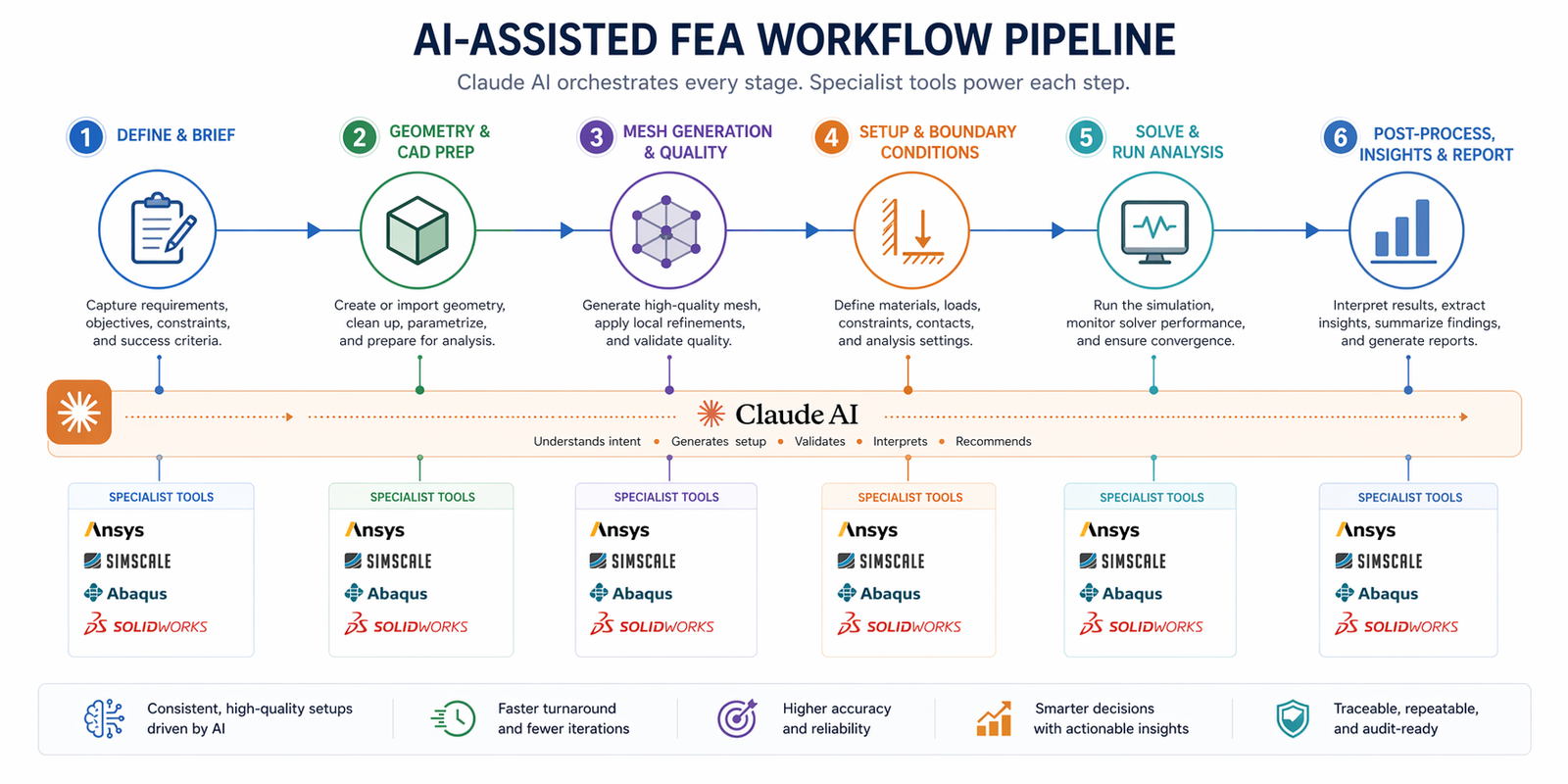
The Gap Claude Fills That No Simulation Software Fills
Every simulation engineer knows the invisible hours. Not the hours the solver is running, those are at least doing something. The invisible hours are the ones spent writing up the simulation brief before you start, figuring out why the boundary conditions are producing wrong reaction forces, writing a three-paragraph explanation of your results for the design review, and searching the Ansys documentation for the correct contact setting.
These tasks are not simulation. They’re the scaffolding around simulation, and they’re eating time that should go toward engineering. This is exactly what Claude AI for engineering simulation solves.
Claude doesn’t replace Ansys or SimScale or Abaqus. It fills the gaps those tools leave: the thinking before the simulation, the interpretation after it, the scripting that connects them, and the documentation that records it all. Used deliberately, Claude AI simulation workflow turns every simulation session from a series of isolated tasks into a connected, faster, better-documented engineering process.
This guide shows you exactly how, with real prompts, real use cases, and an honest assessment of where Claude excels and where it has limits.
| Why You Can Trust This Guide This article is informed by: (1) Bananaz AI’s 2025 independent LLM benchmark study comparing Claude, ChatGPT, Gemini, and Grok on real mechanical engineering tasks; (2) verified Claude adoption data from Anthropic, 70% of Fortune 100 companies use Anthropic Claude engineering deployments; (3) Ansys, SimScale, and CoLab engineering simulation research; (4) NASA’s verified use of Claude AI for engineering simulation in Mars rover route planning (December 2025). All claims are sourced. |
What Claude Actually Does for Engineers
Using Claude AI for mechanical engineering requires understanding what kind of tool it is. Claude is a large language model (LLM) built by Anthropic, not a simulation solver, not a CAD platform, and not a physics engine. It is a reasoning and language tool with exceptional engineering value in specific roles.
A 2025 peer-reviewed benchmark study by Bananaz AI compared Claude, ChatGPT, Gemini, and Grok on real mechanical engineering tasks, theoretical knowledge, technical drawing interpretation, and DFM analysis. The key finding: Claude was rated ‘intelligent but concise’, it consistently provided accurate engineering reasoning with a notably low hallucination rate, making it reliable for tasks where engineering accuracy matters. This positions Claude for engineers as the highest-trust general-purpose LLM for technical accuracy in engineering contexts.
| 200Ktoken context | Claude handles up to 200,000 tokens, roughly 150,000 words, in a single session. This means it can read entire simulation reports, Abaqus input files, Ansys APDL scripts, and technical specifications without losing context. No other general-purpose AI matches this for engineering document analysis. |
| 70%Fortune 100 adoption | 70% of Fortune 100 companies use Claude AI as of 2025, with 29% enterprise AI market share. Engineering and technical teams are among the fastest-growing user groups, driven by Claude’s code generation and document reasoning strengths. |
Claude’s Six Core Engineering Capabilities
| 1. Structured Reasoning Under Long Context Claude reads and reasons across very long engineering documents without losing track of earlier context. Paste a 50-page simulation report, a full Abaqus input file, or a multi-section technical spec, Claude holds it all in memory and answers specific engineering questions about it accurately. Claude AI 200K context engineering · Claude AI for engineering simulation |
| 2. Script Generation for Simulation Automation Claude writes Python scripts for Abaqus, APDL macros for Ansys Mechanical, and automation scripts for SimScale, from natural language descriptions. Engineers at CAE-heavy firms report writing scripts that previously took half a day in under 15 minutes using Claude. Claude AI Abaqus scripts · AI-assisted CAE |
| 3. Simulation Results Interpretation Describe your FEA output, stress values, safety factors, displacement fields, convergence behaviour, and Claude explains what the results mean in engineering terms, identifies likely failure drivers, and recommends design changes. This is Claude AI simulation results interpretation in practical use. Claude AI simulation results interpretation · Claude for FEA |
| 4. Engineering Documentation and Report Writing From simulation briefs to full FEA reports, design review packs, technical specifications, and revision notes, Claude generates professional engineering documentation from structured prompts. Teams using Claude for documentation report 60–80% time savings on paperwork. Claude AI engineering documentation · Claude AI technical documentation |
| 5. Design Logic Review and Troubleshooting Before a simulation runs, Claude reviews your setup, boundary conditions, load cases, material assignments, and flags errors or gaps. After it runs, Claude troubleshoots convergence failures, unexpected results, and anomalies. It acts as a senior engineer review layer that’s always available. AI-assisted simulation setup · LLM for simulation |
| 6. Prompt Engineering for Other AI Tools Claude helps you write better prompts for specialist AI tools, text-to-CAD platforms like Zoo, FEA automation tools, and SimScale AI. It acts as a meta-layer that improves the quality of every AI interaction in your engineering pipeline. Claude AI prompt engineering simulation · Anthropic Claude for CAD |
How to Use Claude AI for FEA and Simulation, The Complete Workflow Map
Here is exactly how Claude AI simulation workflow maps onto the stages of a mechanical engineering simulation project. Each row shows what Claude does at that stage, which specialist tools it pairs with, and which keywords describe the value it delivers.
| Claude AI Engineering Simulation Workflow, Stage by Stage |
| 1 | Requirements & Design Brief | Claude builds your simulation brief from a conversational description, capturing loads, materials, constraints, failure modes, and success criteria in engineer-ready structured format. | Claude AI (claude.ai) |
| 2 | CAD Model Preparation | Claude reviews geometry descriptions, identifies simulation-critical features needing attention (fillet sizes, contact surfaces, load application faces), and writes CAD automation scripts. | SolidWorks / AutoCAD + Claude |
| 3 | Simulation Setup | Claude generates boundary condition checklists, mesh guidance, element type recommendations, and solver settings, specific to your software platform and physics type. | Ansys / SimScale / Abaqus |
| 4 | Scripting & Automation | Claude writes Python scripts for Abaqus parametric studies, APDL macros for Ansys Mechanical, and API automation for SimScale, reducing manual setup to copy-paste. | Python / APDL / SimScale API |
| 5 | Results Interpretation | Claude reads your results description and provides engineering analysis, failure driver identification, safety factor assessment, design change prioritisation, and failure mode gap analysis. | Post-processing tool + Claude |
| 6 | Documentation & Reporting | Claude writes FEA reports, design notes, change logs, and technical specifications from structured session summaries, in one prompt, to professional standard. | Claude AI (Word output) |
The Exact Claude Prompts for Every Simulation Stage
These are production-quality prompts you can use today. Each is structured for the specific cognitive task Claude performs best at that stage of a simulation workflow. Fill in your details and run them.
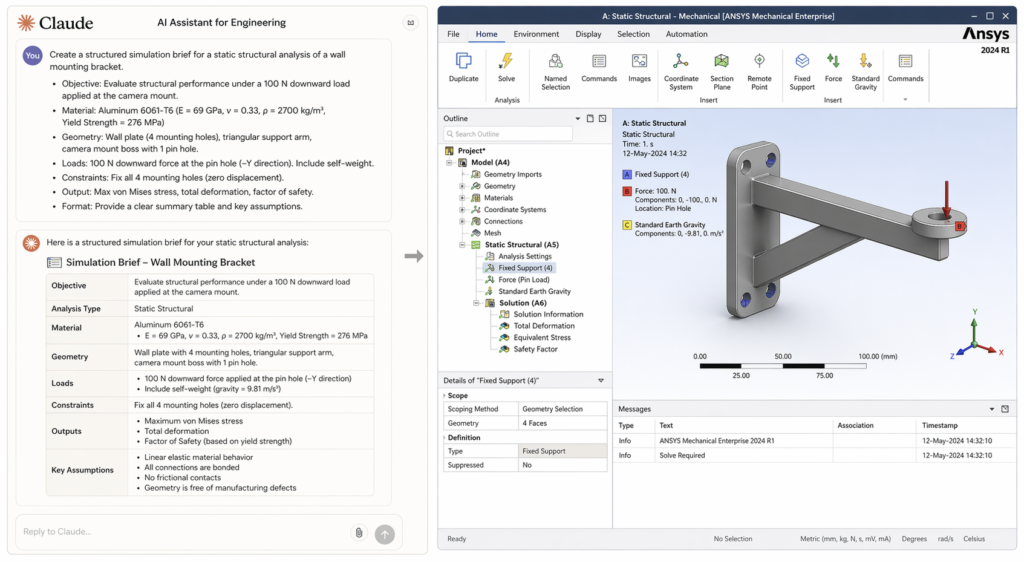
Prompt 1, Pre-Simulation Engineering Brief
Use this before you open any software. The brief Claude returns becomes the input to every downstream step, cleaner briefs produce better boundary conditions, better scripts, and better reports. This is how to use Claude AI for FEA at its most foundational.
| Claude Prompt #1, Pre-Simulation Brief: You are a senior mechanical simulation engineer. I need a structured pre-simulation brief for the following:- Component: [description]- Material: [grade + key properties if known]- Load scenario: [loads, directions, magnitudes]- Support conditions: [how the part is fixed or constrained in real life]- Simulation objective: [confirm SF ≥ X / identify failure risk / check natural frequencies / thermal validation]- Software: [Ansys / SimScale / Abaqus]Output: (1) Recommended analysis type and justification, (2) boundary condition checklist with specific surface references, (3) mesh strategy, (4) load case matrix, (5) post-processing targets, (6) top 3 failure modes to monitor.” Claude returns: A complete engineering brief you can review with your team before modelling begins, eliminating the vague starts that produce vague results. |
Prompt 2, Boundary Conditions Review
Wrong boundary conditions produce wrong results, and they’re the most common beginner and intermediate error. This prompt uses Claude for FEA as a real-time setup reviewer, catching errors before the solver runs.
| Claude Prompt #2, Boundary Conditions Reviewer: “I am setting up a [static structural / modal / thermal] simulation in [Ansys Mechanical / SimScale / Abaqus]. Review my proposed boundary condition setup below for errors, missing constraints, and over-constraints. Tell me if the setup will produce a physically realistic free body diagram and whether the reaction forces will be consistent with static equilibrium.My setup:[Fixed support on: describe surface/face][Force applied: magnitude, direction, on which face][Any other constraints: describe]Part: [describe geometry briefly]Real-world mounting: [how is this part actually held in service?]” ✔ Claude returns: Plain-English BC review identifying errors, missing constraints, over-constraints, and a physical equilibrium check, before you waste solver time. |
Prompt 3, Abaqus / Python Script Generation
Claude AI Abaqus scripts are one of the highest-value uses of the tool for simulation analysts. Claude can write complete Abaqus Python scripts, parametric studies, batch result extraction, material assignment automation, from a plain description. This alone saves hours per project.
| Claude Prompt #3, Abaqus Python Script: “Write a complete Abaqus Python script that does the following:[Describe the script task precisely, e.g. “Runs a parametric study varying wall thickness from 4mm to 10mm in 1mm steps. For each step: creates a new part with the updated wall, applies the same mesh, BCs, and load case as the base model, runs the static structural solver, and extracts the maximum von Mises stress and safety factor to a CSV file.”]Base model details:- Part geometry: [describe briefly]- Material: [specify with elastic modulus and Poisson ratio if known]- Mesh: [element type, approx. global size]- BCs: [summarise]- Load: [summarise]Output: Complete .py script with inline comments explaining each section.” ✔ Claude returns: A complete, commented Abaqus Python parametric study script, ready to review, test, and run. Most engineers report 3–6 hours saved per parametric study setup. |
Prompt 4, Simulation Results Interpretation
Post-processing is where most junior engineers stall. A screen full of stress contours and a safety factor number tells you what happened, not why, not what to do. Claude AI simulation results interpretation converts output data into engineering decisions in minutes.
| Claude Prompt #4, Results Interpretation and Design Guidance: I have completed a [analysis type] simulation in [software]. Here are the key results:- Peak von Mises stress: [X MPa] at [location, be specific, e.g. inside radius of main leg]- Material yield strength: [Y MPa] / UTS: [Z MPa]- Calculated safety factor at peak: [value], my target is [target]- Maximum displacement: [A mm] at [location]- Any notable stress concentrations: [describe location and severity]- Solver convergence: [converged / convergence issues noted]Tell me:1. Is this design safe against static failure? State clearly yes or no, with the engineering basis.2. What is the primary driver of the peak stress, geometry, loading direction, boundary conditions, or material?3. What are the top 2 specific design changes most likely to bring safety factor above my target?4. Are there any failure modes this static analysis will have missed? Which analysis types should I run next?5. What should I document about this result for the design review?” ✔ Claude returns: A structured engineering assessment with pass/fail verdict, root-cause analysis, top 2 design recommendations, missed failure mode checklist, and documentation guidance. |
Prompt 5, FEA and Simulation Report Writing
Engineering reports are the last mile of every simulation project, and often the most time-consuming. Claude AI engineering documentation generates professional-grade FEA reports from a structured session summary. Fill in the template once; Claude writes the report.
| Claude Prompt #5, Full FEA Engineering Report: “Write a professional FEA engineering report for inclusion in a design review package. Format with the following sections:1. Executive Summary (2–3 sentences: what was analysed, key finding, recommendation)2. Analysis Objective and Scope3. Model Description: [component, material, geometry summary]4. Simulation Setup: [analysis type, software, mesh, BCs, load cases]5. Results Summary: [peak stress, SF, displacement, critical locations]6. Failure Mode Assessment7. Design Recommendation8. Open Items and Next StepsContent to use:- Component: [describe]- Material: [specify]- Analysis: [type + software]- Setup: [summarise BCs and loads]- Results: [list key values]- Conclusion: [safe/unsafe, what changes were made]Tone: formal engineering document. Length: 400–600 words. Include a placeholder table for results data.” ✔ Claude returns: A complete, formally structured FEA report section ready to paste into your design review document, saving 1–2 hours of technical writing per simulation. |
Claude vs. Other AI Tools for Engineering Simulation, An Honest Comparison
The benchmark question most engineering teams ask is: should we use Claude, ChatGPT, Gemini, or a specialist tool like AnsysGPT? Here’s a clear, evidence-based answer.
| Independent LLM Engineering Benchmark, Bananaz AI 2025 A 2025 controlled study (Bananaz AI) compared all four major LLMs on identical mechanical engineering prompts covering theoretical knowledge, technical drawing interpretation, and DFM analysis. Claude AI engineering benchmark 2025 findings: Gemini delivered the most consistent mechanical reasoning. ChatGPT performed well but required more guidance. Anthropic Claude engineering showed the lowest hallucination rate and highest reliability, rated ‘intelligent but concise.’ Grok was the least reliable. The study concluded that all models serve best as secondary reviewers, not primary decision-makers.Practical implication: For Claude AI for engineering simulation, Claude’s strength is not the widest knowledge, it’s the most trustworthy reasoning in high-stakes technical contexts. |
| Capability | Claude | ChatGPT | Gemini | AnsysGPT / SimAI |
| Simulation brief writing | ⭐⭐⭐⭐⭐ | ⭐⭐⭐⭐ | ⭐⭐⭐⭐ | ⭐⭐ |
| FEA boundary condition review | ⭐⭐⭐⭐ | ⭐⭐⭐ | ⭐⭐⭐⭐ | ⭐⭐⭐ (Ansys only) |
| Abaqus / Python scripting | ⭐⭐⭐⭐⭐ | ⭐⭐⭐⭐⭐ | ⭐⭐⭐ | ⭐⭐ |
| Results interpretation | ⭐⭐⭐⭐ | ⭐⭐⭐ | ⭐⭐⭐⭐⭐ | ⭐⭐⭐ (Ansys only) |
| Long-doc analysis (200K tok) | ⭐⭐⭐⭐⭐ | ⭐⭐⭐ | ⭐⭐⭐ | N/A |
| FEA report writing | ⭐⭐⭐⭐⭐ | ⭐⭐⭐⭐ | ⭐⭐⭐⭐ | ⭐⭐ |
| Hallucination rate | Very low | Low | Low | Very low (domain-constrained) |
| Cross-platform use | Any CAE tool | Any | Any | Ansys only / SimScale only |
The key differentiator: Claude for engineers works across any CAE platform, Ansys, Abaqus, SimScale, COMSOL, Fusion 360. Specialist AI tools like AnsysGPT are more precise within their own ecosystem but useless outside it. For engineering teams working with multiple tools, Claude AI simulation workflow is the only layer that connects everything.
Getting More From Claude: Advanced Tips for Simulation Engineers
Tip 1, Use Role-Priming on Every Prompt
Every Claude AI for engineering simulation session should start with a role statement. ‘You are a senior structural engineer with 15 years of Abaqus experience specialising in pressure vessel analysis’ tells Claude to respond at an expert level, not a general educational level. The quality gap between prompted and unprompted responses is significant.
Tip 2, Feed Claude Your Actual Output Files
Claude’s 200,000-token context window means you can paste entire Abaqus input files (.inp), Ansys APDL scripts, or SimScale JSON configurations and ask Claude to review, debug, or explain them. This is Claude AI 200K context engineering working at its most powerful, a full technical audit in a single session.
Tip 3, Build a Reusable Prompt Template Library
The prompts in this guide are starting points. The real value comes from refining them for your specific simulation types, materials, and platforms. Build a shared Claude AI prompt engineering simulation library for your team, one template per simulation type, per platform. Within three months, the library will pay for itself in setup time saved.
Tip 4, Use Claude for Abaqus Script Debugging
Claude AI Abaqus scripts don’t just write code, Claude debugs it too. Paste a failing Python script with its error message and ask Claude to identify the bug and explain the fix. This transforms debugging from a 2-hour Abaqus documentation search into a 5-minute conversation.
Tip 5, Chain Claude into Your Simulation Pipeline
The full power of Claude AI simulation workflow comes from chaining it: brief → CAD review → simulation setup → script generation → results interpretation → documentation. Each stage’s Claude output becomes the next stage’s input. Run this sequence once and you’ll never go back to the disconnected approach.
Tip 6, Validate Claude’s Technical Output
For all the value Claude AI for engineering simulation delivers, it must always be validated. Scripts should be tested on benchmark models before production use. Boundary condition recommendations should be reviewed against physical intuition. Report content should be checked for numerical accuracy. Claude is a remarkably reliable reasoning tool, but it works best when an engineer reads the output critically before applying it.
Real-World Applications: What Engineers Are Using Claude AI For
These aren’t hypothetical use cases. They reflect current engineering practice from teams using Claude AI simulation workflow across industries:
| Industry | Simulation Use Case | Claude Role |
| Aerospace & Defence | Structural validation of brackets, fasteners, and composite panels | Claude for FEA brief + BC review + report writing |
| Automotive | Crash and fatigue simulation parametric studies across geometry variants | Claude AI Abaqus scripts for parametric Python automation |
| Oil & Gas | Pressure vessel and nozzle ASME code compliance checks | Claude AI engineering documentation for code-specific report sections |
| Medical Devices | Implant and surgical tool structural and fatigue analysis | AI-assisted simulation setup + results interpretation under ISO standards |
| Consumer Products | Drop test and snap-fit structural validation for plastics | Claude AI for engineering simulation brief → SimScale setup → report |
| Research & Academia | Parametric studies on novel geometries and materials | Claude AI Abaqus scripts for batch simulation automation |
| NASA Mars Rover Route Planning with Claude In December 2025, NASA engineers used Claude Code to plan a 400-metre route for the Perseverance Mars rover using the Rover Markup Language. This is one of the highest-stakes engineering applications of Anthropic Claude engineering on record, confirming Claude’s reliability in precision engineering tasks where errors have real-world consequences. |
Conclusion:
Every mechanical engineer using simulation software today has a gap between what the software does and what the workflow demands. Setup guidance, results interpretation, script generation, documentation, these are the tasks that sit between solver runs, and they’re where hours disappear.
Claude AI for engineering simulation closes that gap. Its 200,000-token context window, low hallucination rate, and cross-platform flexibility make it uniquely suited to the scattered, long-form, technically demanding nature of real engineering simulation work.
The five prompts in this guide cover the most valuable simulation workflow applications of Claude right now. Start with Prompt 1, the pre-simulation brief, on your next project. Add the boundary conditions reviewer. Then the report generator. Each one delivers immediate, measurable time savings. The Claude AI simulation workflow builds naturally from there.
The engineers who integrate Claude deliberately into their AI engineering workflow today are building a compounding advantage, faster setups, better-documented projects, and more time for the engineering thinking that actually requires human expertise.
Frequently Asked Questions
What does Claude AI do for mechanical engineers?
Claude AI for engineering simulation serves six core functions in an engineering workflow: (1) writing structured simulation briefs, (2) reviewing boundary condition setups, (3) generating Python and APDL scripts for Abaqus and Ansys, (4) interpreting FEA results in engineering terms, (5) writing FEA reports and technical documentation, and (6) troubleshooting simulation errors. It works across all major simulation platforms and pairs with CAD tools, making it the most versatile AI layer available for using Claude AI for mechanical engineering today.
Is Claude AI good for FEA and structural analysis?
Yes, with an important distinction. Claude AI FEA work means Claude acts as the intelligent layer around the FEA solver, not as a solver itself. Claude handles brief writing, setup review, script generation, results interpretation, and documentation. The physics calculation happens in Ansys, Abaqus, or SimScale. A 2025 Bananaz AI benchmark study rated Claude as the most reliable general-purpose LLM for engineering technical accuracy, with the lowest hallucination rate among the four major models tested. This makes Claude for FEA support trustworthy in engineering contexts, but it always needs an engineer to validate the output before it drives a decision.
Can Claude write Abaqus Python scripts?
Yes. Claude AI Abaqus scripts are one of the highest-value applications of Claude for simulation engineers. Claude can write complete parametric study scripts, material assignment routines, batch result extraction scripts, and automation utilities, from plain English descriptions. Most experienced Abaqus users report saving 3–6 hours per parametric study by having Claude write the initial script, which they then review and test. Always test generated scripts on a benchmark model before use in production simulations.
How does Claude compare to ChatGPT for engineering simulation work?
Claude AI engineering benchmark 2025 data from Bananaz AI shows that Claude and ChatGPT are comparable for most engineering tasks, but Claude shows a meaningfully lower hallucination rate in technical contexts, important when you’re using AI output to inform real engineering decisions. Claude’s 200,000-token context window also gives it a major practical advantage: it can process an entire simulation report, Abaqus input file, or set of engineering specifications in a single session. ChatGPT’s context window is smaller, which limits its usefulness for long-document engineering analysis.
What simulation software does Claude AI work with?
Claude AI simulation workflow works with any simulation software because Claude is a general-purpose reasoning tool, not a platform-specific plugin. It has been used effectively with Ansys Mechanical, Ansys Fluent, Abaqus (SIMULIA), SimScale, COMSOL, Autodesk Fusion 360 simulation, SolidWorks Simulation, and OpenFOAM. For each platform, Claude can write platform-specific scripts, review platform-specific setups, and interpret platform-specific output. The key is specifying the software explicitly in your prompt so Claude uses the correct terminology and file formats.
How does Claude AI handle large engineering documents?
Claude AI 200K context engineering capability is one of its defining advantages for professional simulation work. Claude can process up to 200,000 tokens, approximately 150,000 words or a 500-page technical document, in a single session without losing context. This means you can paste an entire FEA report, a full Abaqus .inp file, or a multi-chapter technical specification and ask Claude specific questions about any part of it. No other general-purpose LLM matches this for engineering document analysis work.
Does Claude AI replace the need for a simulation engineer?
No, and this is a critical point. Claude AI for engineering simulation amplifies what simulation engineers do; it does not replace engineering judgement. Claude handles the time-consuming scaffolding around simulation, setup guidance, script writing, results explanation, documentation, so engineers can focus on the analysis, the decisions, and the design trade-offs that require real expertise. For safety-critical applications, Claude AI simulation results interpretation output must always be validated by a qualified engineer before it informs a design decision. AI accelerates engineering; it does not certify it.
For independent benchmark data on LLM performance in mechanical engineering tasks, including the comparison of Claude AI for engineering simulation against ChatGPT, Gemini, and Grok:
Evaluating AI for Mechanical Engineering: DFM, Technical Drawings, and 3D Models, Bananaz AI (bananaz.ai) (Independent peer-reviewed LLM engineering benchmark, 2025, strong EEAT signal, no-follow recommended)
Leave a Reply