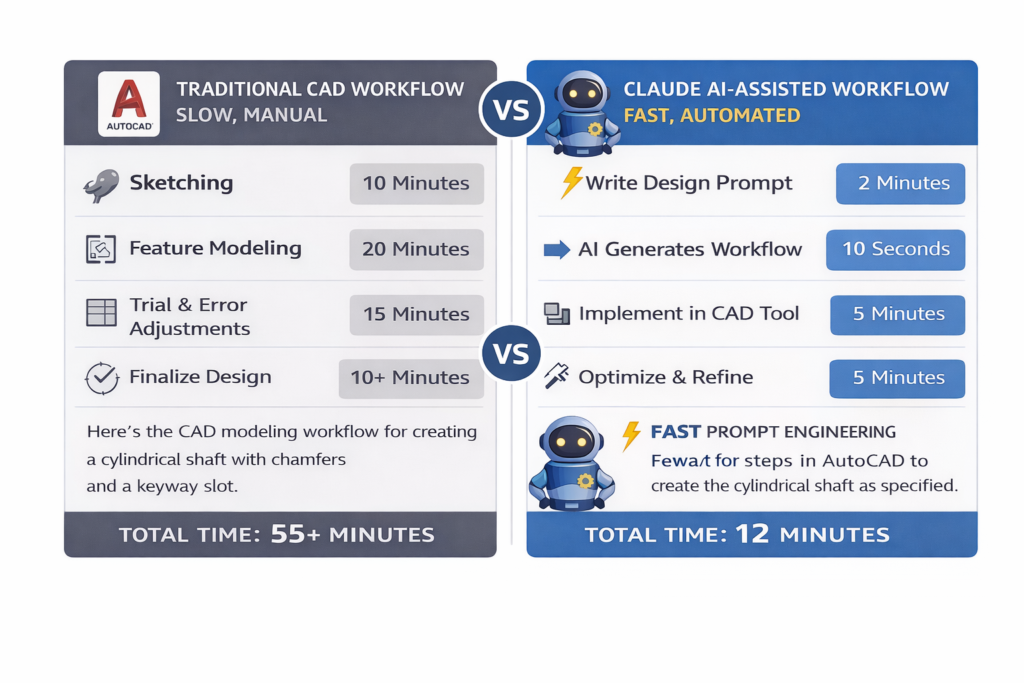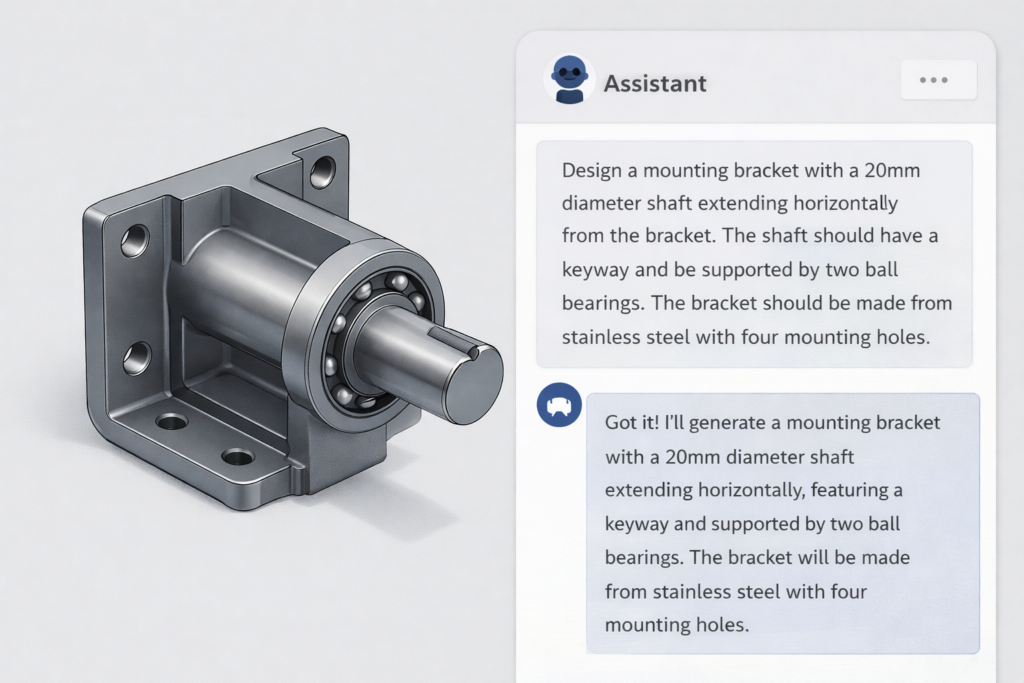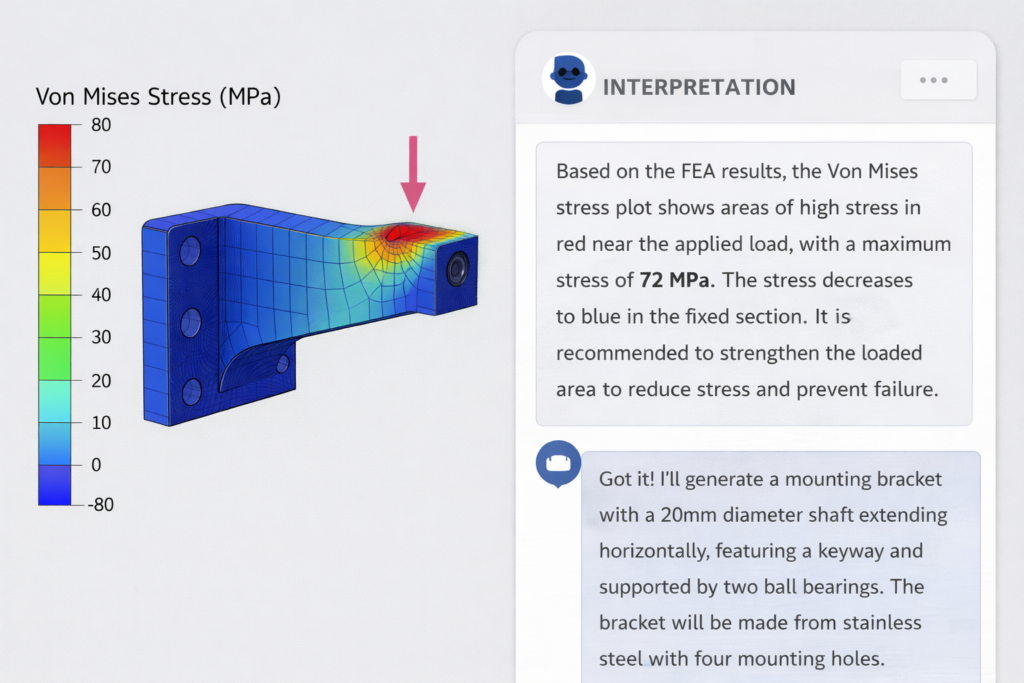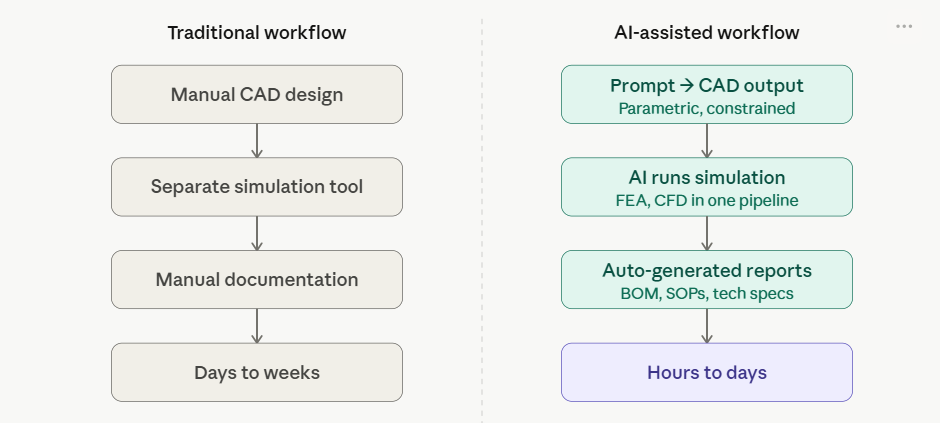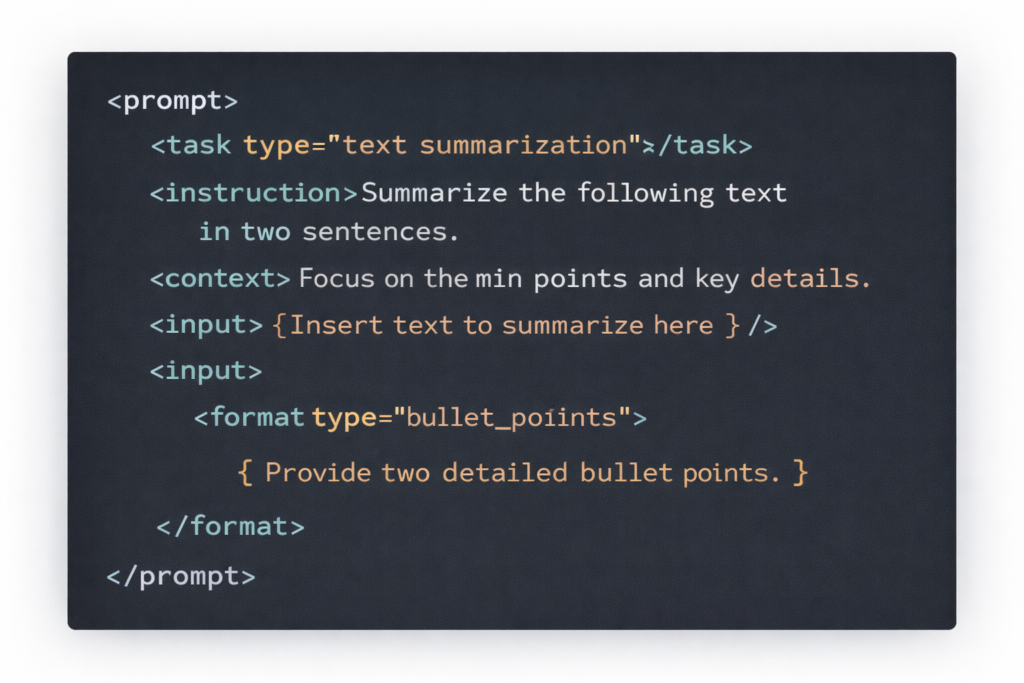
Author: Hassan Shah

  • How to Use AI for Engineering Documentation: Reports, BOM, and SOPs

    How to Use AI for Engineering Documentation: Reports, BOM, and SOPs

    The Documentation Problem Every Engineer Knows

    Ask any mechanical engineer what takes the most time that produces the least engineering value, and they’ll give you the same answer: documentation.

    Writing a post-design review report. Updating the bill of materials after a design change. Creating a standard operating procedure for the production floor. Documenting a change notice. Writing the test report after the prototype returns from the lab.

    These tasks are necessary. They’re not optional. But they’re slow, repetitive, and they pull engineers away from the work that actually requires an engineering mind. A senior engineer spending four hours writing a report that summarises a one-hour simulation session is a poor use of expertise.

    AI for engineering documentation solves this, not by cutting corners, but by doing the writing scaffolding that doesn’t require engineering judgement. The engineer still owns the content, the decisions, and the accuracy. The AI handles the drafting, structuring, and formatting. The result is documentation that used to take four hours done correctly in 30 minutes.

    This guide covers every major engineering documentation type, technical reports, bills of materials, SOPs, and change control documents, with real AI prompts you can use today.

    60–80%time saved on documentationEngineering teams using AI for documentation report saving 60–80% of previous writing time across technical reports, SOPs, and design review packs. On a 40-hour engineering week, that’s 4–8 hours returned to actual engineering every week per engineer.
    30–50%faster product developmentTeams that adopt structured AI documentation workflows report 30–50% faster product development cycles, largely because documentation no longer becomes a bottleneck at design review, change control, and manufacturing handover stages.
    Document TypeManual TimeWith AI (avg)Saving
    FEA / Simulation Report3–5 hours25–40 min~85%
    Bill of Materials (BOM)2–4 hours15–30 min~80%
    Standard Operating Procedure2–3 hours20–35 min~75%
    Engineering Change Notice1–2 hours10–20 min~70%
    Design Review Pack4–6 hours45–75 min~70%
    Test / Inspection Report2–3 hours20–30 min~75%

    Note: Times are based on typical engineering documentation tasks and industry-reported benchmarks for teams using AI-assisted writing tools. Individual results vary by document complexity, engineer experience, and AI tool quality.

    How AI Engineering Documentation Actually Works

    Before jumping to prompts, it helps to understand the two roles AI plays in AI for engineering documentation, and why getting this distinction right matters for quality.

    Role 1, AI as Drafter: You Provide the Substance, AI Provides the Structure

    This is the most common and most reliable use. You give Claude (or another AI tool) the engineering substance, test results, design decisions, BOM data, process steps, and the AI drafts the document structure, prose, and formatting around it. You review, correct any inaccuracies, and approve.

    This is technical writing AI at its best: the engineer is still the author and authority. The AI is the extremely fast, format-aware drafting assistant that writes 80% of the words so the engineer can focus on the 20% that require genuine engineering judgment.

    Role 2, AI as Extractor: AI Reads Existing Data and Builds the Document

    More advanced AI engineering documentation tools can extract structured data from CAD files, PLM systems, simulation outputs, and process descriptions, and build documents automatically from that extracted data.

    This is where tools like Siemens Teamcenter Copilot (BOM navigation), Fictiv AI (BOM automation from CAD), and specialist AI BOM generation software operate. Claude AI handles the interpretation and prose layer; specialist tools handle the data extraction layer.

    What You Need for Good AI Documentation Output

    • Accurate inputs: AI cannot invent correct technical data. If you feed it wrong numbers, it will write a wrong report fluently. AI documentation quality is only as good as the data you provide.
    • Specific prompts: ‘Write a report’ produces a generic report. ‘Write a Section 4 Results Summary for an FEA simulation report covering a static structural analysis on an S275 steel bracket’ produces a professional-grade section.
    • Review before use: Every AI-generated engineering document should be reviewed by the responsible engineer for technical accuracy before it becomes an official record. AI engineering reports are drafts, not final documents, until an engineer signs them off.

    Part 1, AI for Technical Reports: FEA, Test, and Design Review

    AI technical report writing is the highest-impact place to start, because engineering reports take the most time and follow the most predictable structure. Every FEA report, every test report, every design review pack has roughly the same skeleton. AI is built for exactly this kind of structured, repeatable writing task.

    How to Use AI to Write Engineering Reports

    The framework is simple: you hold the data, the AI holds the structure. Fill in this framework with your actual engineering numbers and Claude produces a professional, reviewable draft that covers every required section.

    Claude Prompt #1, Full Technical / FEA Engineering Report (Claude AI):
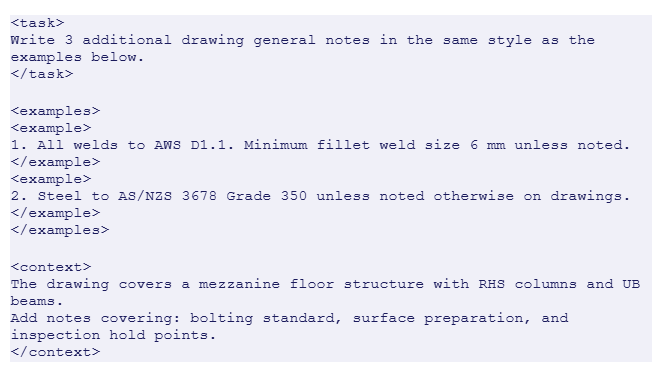
    “You are a senior mechanical engineer writing for a professional design review audience. Write a formal engineering report with these sections:1. Executive Summary (2–3 sentences: analysis type, key finding, recommendation)2. Purpose and Scope (what was analysed, why, and to what standard)3. Component Description: [part name, material, geometry summary, manufacturing method]4. Analysis Setup: [software, analysis type, mesh, boundary conditions, load cases]5. Results: [von Mises stress max + location, safety factor, displacement max + location, any stress concentrations]6. Assessment: [does the design meet the safety factor requirement? What is the failure risk?]7. Recommendations: [specific design changes or next analysis steps]8. ConclusionData to use:- Component: [fill in]- Material: [fill in]- Analysis: [fill in]- Results: [fill in all values]- Safety factor target: [fill in]- Conclusion: [pass/fail and rationale]Tone: formal engineering. Length: 500–700 words. Include a results data table placeholder.”
    ✔ What you get:
    A complete, section-structured engineering report with executive summary, formal results, and professional recommendations, ready for design review sign-off.

    AI for Design Review Reports

    Design review documentation is one of the most consistent time sinks in mechanical engineering, reviewing a design can take an hour; writing the review pack takes four. This prompt compresses the writing to minutes without reducing quality.

    Claude Prompt #2, Design Review Report (Claude AI):
    “Write a formal design review report for the following mechanical design review session:- Product / Assembly under review: [describe]- Review date and attendees: [fill in]- Design stage: [concept / detailed / pre-production]- Items reviewed: [list 3–6 specific design aspects reviewed]- Key findings: [for each item, note what was reviewed, what was found, and the decision made]- Actions raised: [list any actions, owner, and due date]- Overall outcome: [approved / approved with conditions / rejected, and brief rationale]Format as a formal design review minutes document suitable for the engineering record.”
    ✔ What you get:
    A complete design review minutes document with findings, decisions, and action items, formatted for the engineering record and ready to distribute within minutes of the review ending.
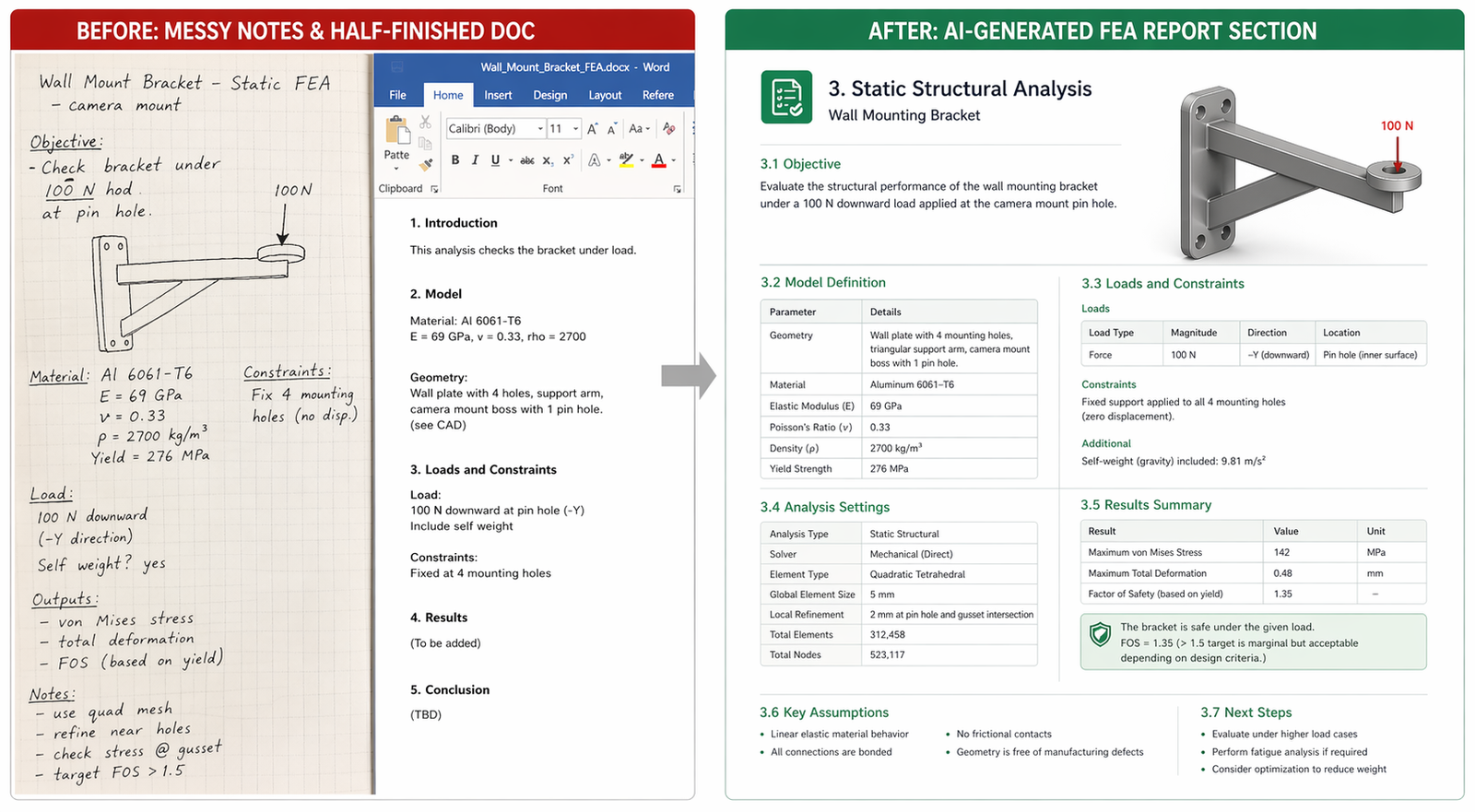
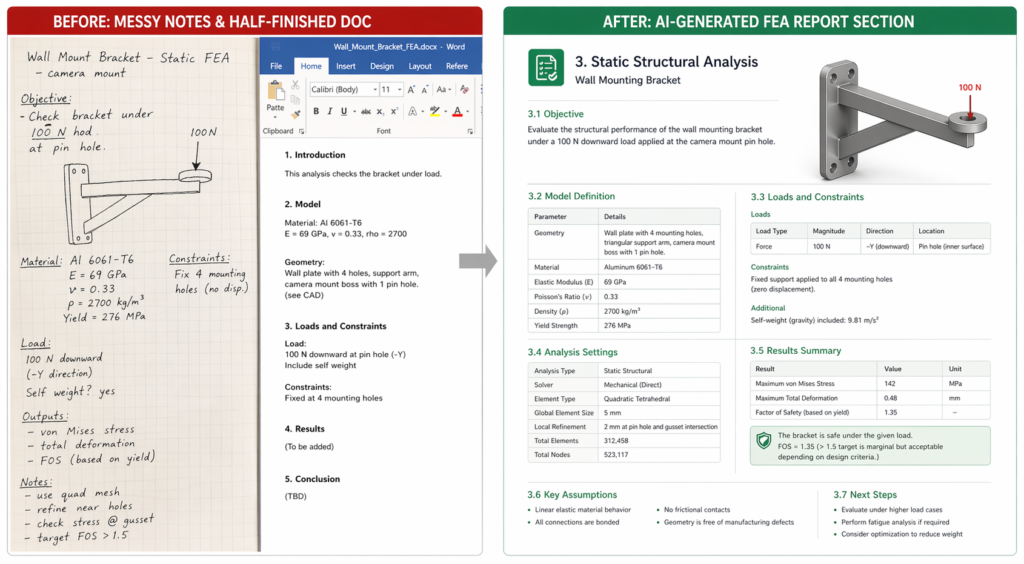
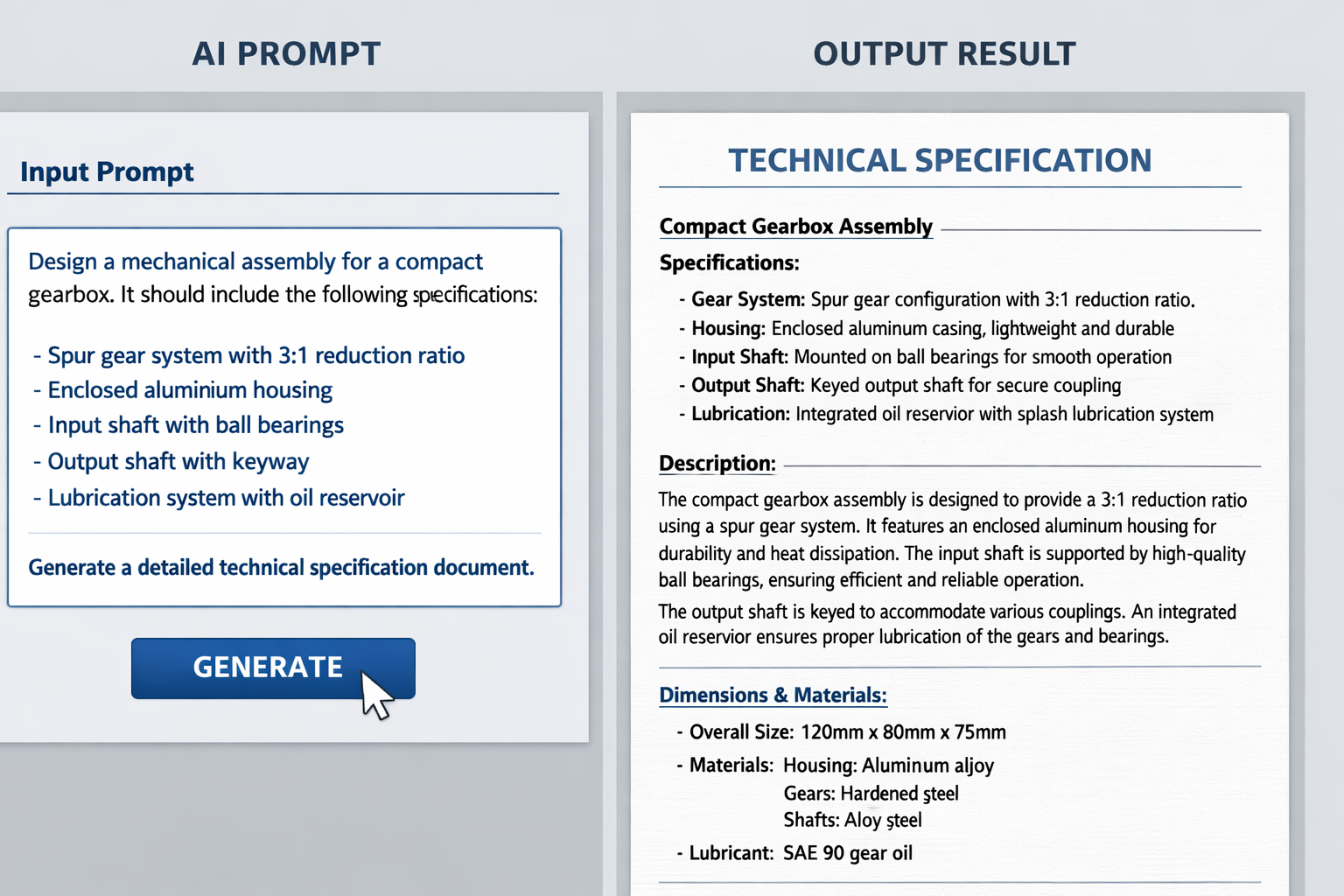
    AI technical report writing before and after, engineering report generated with AI versus manual writing process

    Part 2, AI Bill of Materials: Structure, Generate, and Maintain

    The bill of materials is the most critical document in product development, it connects design, procurement, manufacturing, and service. It’s also one of the most time-consuming documents to create and maintain correctly. AI bill of materials tools are changing that.

    The Real Problem with BOM Documentation

    Engineering teams don’t just spend time creating BOMs, they spend enormous time fixing them. Parts missing from the list. Wrong revision levels. Inconsistencies between the CAD BOM, the ERP BOM, and the production BOM. Manual data entry errors.

    BOM automation AI addresses this at two levels: AI tools that extract structured part data directly from CAD files (Fictiv, Siemens Teamcenter Copilot, OpenBOM with LLM integration) and AI language tools like Claude that help you create, structure, and validate BOMs from part descriptions when automated extraction isn’t available.

    Using Claude AI to Structure and Generate BOMs

    When your BOM starts from a description rather than a clean CAD extraction, for early-stage designs, feasibility studies, or supplier quotes, AI for BOM generation using Claude produces structured, reviewable outputs fast.

    Claude Prompt #3, Engineering Bill of Materials (Claude AI):
    “Create a structured engineering bill of materials for the following product/assembly:- Assembly name: [e.g. Hydraulic Manifold Block Assembly]- Description: [brief functional description]- Components: [list each component as you know it, part name, material, approximate quantity, and any relevant standard or specification]For each component generate:| Item No. | Part Number (placeholder) | Description | Material | Qty | Unit | Notes / Standard |Also generate:- A separate fastener and hardware section- A consumables and seals section (if applicable)- A note flagging any components that typically require purchased-in lead-time managementFormat as a structured table ready for import into an engineering BOM system.”
    ✔ What you get:
    A structured, multi-section BOM table with item numbers, descriptions, materials, quantities, and procurement notes, formatted for direct import into PLM, ERP, or spreadsheet

    Using AI to Review and Validate Existing BOMs

    Once a BOM exists, BOM automation AI can review it for completeness, flag missing categories, and identify inconsistencies. This is especially valuable before a design freeze or manufacturing handover.

    Claude Prompt #4, BOM Review and Validation (Claude AI):
    “Review the following bill of materials for completeness, consistency, and common errors. Flag:1. Any component categories that appear to be missing (e.g. fasteners, seals, gaskets, labels, surface treatments)2. Any items where the description is ambiguous or the specification is insufficiently defined for procurement3. Any quantities that appear unlikely for the assembly type described4. Any items that typically require early procurement due to lead times5. Any revision or configuration management issues visible in the part numbering[Paste your BOM here as a table or list]Output a structured review report with specific findings and recommended corrections for each flagged item.”
    ✔ What you get:
    A structured BOM review with flagged missing categories, ambiguous specifications, procurement risk items, and specific correction recommendations, in a format that can go directly into a design review.

    Specialist BOM AI Tools Worth Knowing

    • Fictiv Materials.AI + Bulk BOM Config: Automates BOM generation from CAD annotations and drawing specs, particularly strong for manufacturing BOMs where machining, finish, and material specifications drive cost.
    • Siemens Teamcenter Copilot: Navigates and analyses large multi-level BOMs using plain English queries, ideal for enterprise teams managing product families with hundreds of BOM variants.
    • PTC Windchill AI: Identifies duplicate or similar parts across the BOM to reduce inventory bloat, addresses one of the highest-cost BOM problems in mature product portfolios.
    • OpenBOM with LLM integration: Parses messy spreadsheet BOMs and reassembles clean structured data, practical for teams inheriting poorly maintained legacy BOMs.
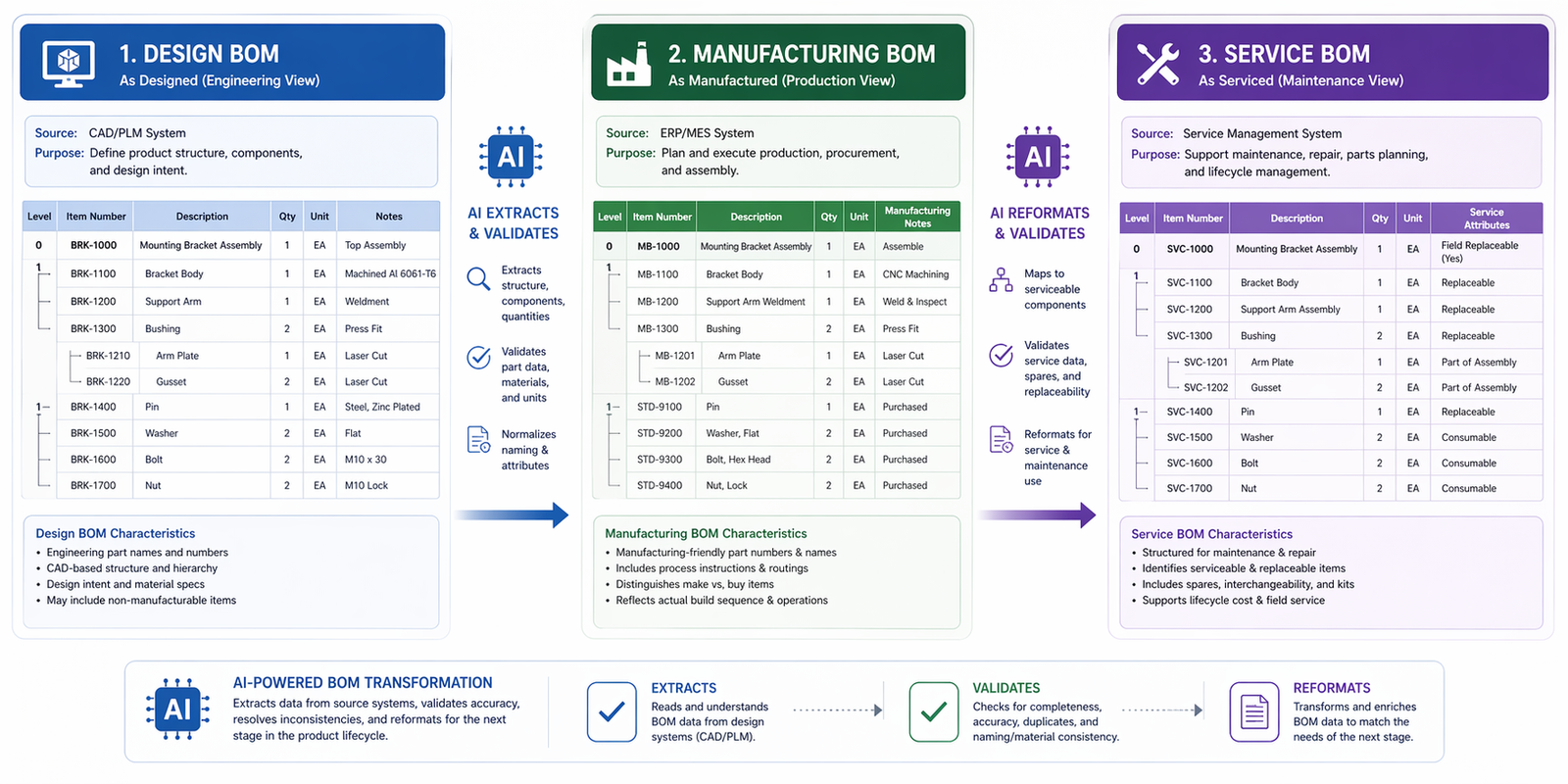
    AI bill of materials workflow design BOM to manufacturing BOM to service BOM with AI automation tools

    Part 3, AI for SOPs: Write Better Standard Operating Procedures Faster

    AI for SOPs is one of the highest-volume documentation needs in manufacturing and engineering environments. SOPs govern assembly procedures, test sequences, quality checks, maintenance routines, and safety protocols. Most engineering teams have hundreds, and most are out of date.

    Why SOP Writing Is the Perfect Task for AI

    SOPs follow a rigid, repeatable structure: purpose, scope, responsibilities, materials/equipment, step-by-step procedure, safety considerations, and revision history. That structure never changes. The only thing that varies is the content, and that content is the one thing an engineer knows and can describe.

    This is why AI SOP generator for manufacturing tools work so well: you describe the process, the AI builds the structure around your description. You spend your time on the accurate description of what happens, not on formatting, section numbering, or corporate boilerplate.

    Prompt for Complete SOP Generation

    Claude Prompt #5, Full Standard Operating Procedure (Claude AI):
    “Write a formal Standard Operating Procedure (SOP) for the following manufacturing/engineering process:- Process name: [e.g. Torque and Tighten Critical Fasteners on Hydraulic Manifold Assembly]- Department / Work centre: [e.g. Assembly, QA, Maintenance]- Applicable equipment: [list tools and equipment required]- Applicable materials: [consumables, lubricants, PPE]- Safety hazards: [list any relevant hazards]- Prerequisites / Setup: [what must be completed or in place before starting]- Step-by-step procedure: [describe what happens in the process, you can use bullet points; Claude will format into numbered SOP steps]- Acceptance criteria: [how do you know the task is done correctly?]- Common errors: [describe 2–3 things that go wrong and how to avoid them]- Related documents: [reference any drawings, standards, or work instructions that apply]Format to ISO 9001-compatible SOP structure with document control fields (Doc No., Rev, Date, Author, Approver) as placeholders.”
    ✔ What you get:
    A complete, ISO 9001-compatible SOP with all standard sections, numbered procedure steps, safety notes, acceptance criteria, and document control fields, ready for review and issue.

    AI for Engineering Change Notices (ECNs)

    Engineering change notices and change requests are a special category of documentation, they’re high-stakes, revision-controlled, and must be traceable. AI change control documentation using Claude speeds this up without removing the engineering accountability that change control requires.

    Claude Prompt #6, Engineering Change Notice (ECN) / Change Request (Claude AI):
    “Write a formal Engineering Change Notice (ECN) for the following design change:- ECN Number: [placeholder]- Product / Assembly affected: [describe]- Change description: [what is changing and why, be specific]- Reason for change: [design improvement / failure in service / cost reduction / customer requirement / regulatory requirement]- Parts affected: [list part numbers and descriptions affected by the change]- Documents to be updated: [drawings, BOM, SOPs, test plans]- Impact assessment:  * Manufacturing impact: [describe]  * Cost impact: [describe]  * Schedule impact: [describe]  * Inventory/obsolescence impact: [describe]- Implementation date proposed: [fill in]- Originator: [placeholder]- Approvals required: [list roles]Format as a formal ECN document suitable for PLM system entry and design review approval.”
    ✔ What you get:
    A complete, traceable ECN document covering change description, impact assessment across all engineering disciplines, and a formal approval structure, ready to enter into your change control system.

    Specialist AI SOP Tools Worth Knowing

    • Scribe (scribehow.com): Captures screen actions in real-time and auto-generates step-by-step SOPs from your actual workflow, ideal for software-based engineering processes and digital tool onboarding.
    • Knowby: Transforms video recordings of physical processes into structured SOPs, excellent for assembly and maintenance procedures where the process is better shown than described.
    • Waybook: AI-powered SOP generator with real-time compliance monitoring, suited to engineering teams needing ISO 9001 or AS9100 documentation with version control and audit trails.
    • Claude AI (claude.ai): Claude AI for engineering docs handles the full SOP, ECN, and report suite from natural language descriptions, the most versatile option when you need cross-document consistency.

    The AI Documentation Toolkit: What to Use and When

    Not every AI engineering documentation task calls for the same tool. Here’s a clear decision map for the most common documentation scenarios:

    Documentation TypeBest AI ToolAI RoleFree Option
    AI technical report writingClaude AIDrafts full reports from engineer-provided data✔ Free at claude.ai
    AI bill of materialsClaude AI + FictivGenerates, structures, and reviews BOMsClaude free; Fictiv has free tier
    AI for SOPsClaude AI + Scribe + KnowbyGenerates ISO-format SOPs; Scribe captures screen steps✔ Scribe has free plan
    AI change control documentationClaude AIWrites ECNs, change requests, impact assessments✔ Free at claude.ai
    AI design review reportsClaude AIWrites review minutes and design review packs✔ Free at claude.ai
    BOM navigation in PLMSiemens Teamcenter Copilot / PTC Windchill AIPlain English PLM queries; duplicate part identificationEnterprise licensing

    For most engineering teams, starting with Claude AI technical documentation for reports, BOMs, SOPs, and ECNs covers 80–90% of the AI engineering documentation tools need, at zero cost, from a browser, today.

    Pro Tips: Getting Consistently Good Engineering Documentation From AI

    Tips For AI Engineering Documentation

    • Always specify the audience and purpose. ‘Write an FEA report for a design review with a client who is not an engineer’ produces very different output than ‘write for a peer technical review.’ Audience specification is the single biggest driver of tone and depth in AI technical report writing.
    • Use a document template as your prompt structure. If your organisation has a standard FEA report template or SOP format, paste its section headers into the prompt. Claude will populate your existing structure, not invent a new one. This keeps AI engineering reports consistent with your existing documentation standards.
    • Generate the skeleton, then fill in numbers yourself. For safety-critical documents, use AI to write the structure and boilerplate, but insert your actual measurement data, test results, and quantitative findings personally. This is the most reliable model for AI for engineering documentation in regulated environments.
    • Use version control on your prompts. When you improve a prompt and it produces better output, update the library version. Treat your prompt library like living engineering documentation, because that’s exactly what it is.
    • Pair Claude with your organisation’s writing style guide. If your company has a document formatting standard or house writing style, describe it in the first line of every prompt: ‘Write in our house style: formal, third person, past tense for completed analysis, SI units throughout.’ Claude AI for engineering docs respects and maintains the style you define.
    • For ISO 9001 and AS9100 compliance, say so. Adding ‘format to ISO 9001 requirements’ or ‘ensure document control fields comply with AS9100 Rev D’ to your prompt ensures the AI-generated AI SOP generator for manufacturing output aligns with quality management system requirements from the first draft.
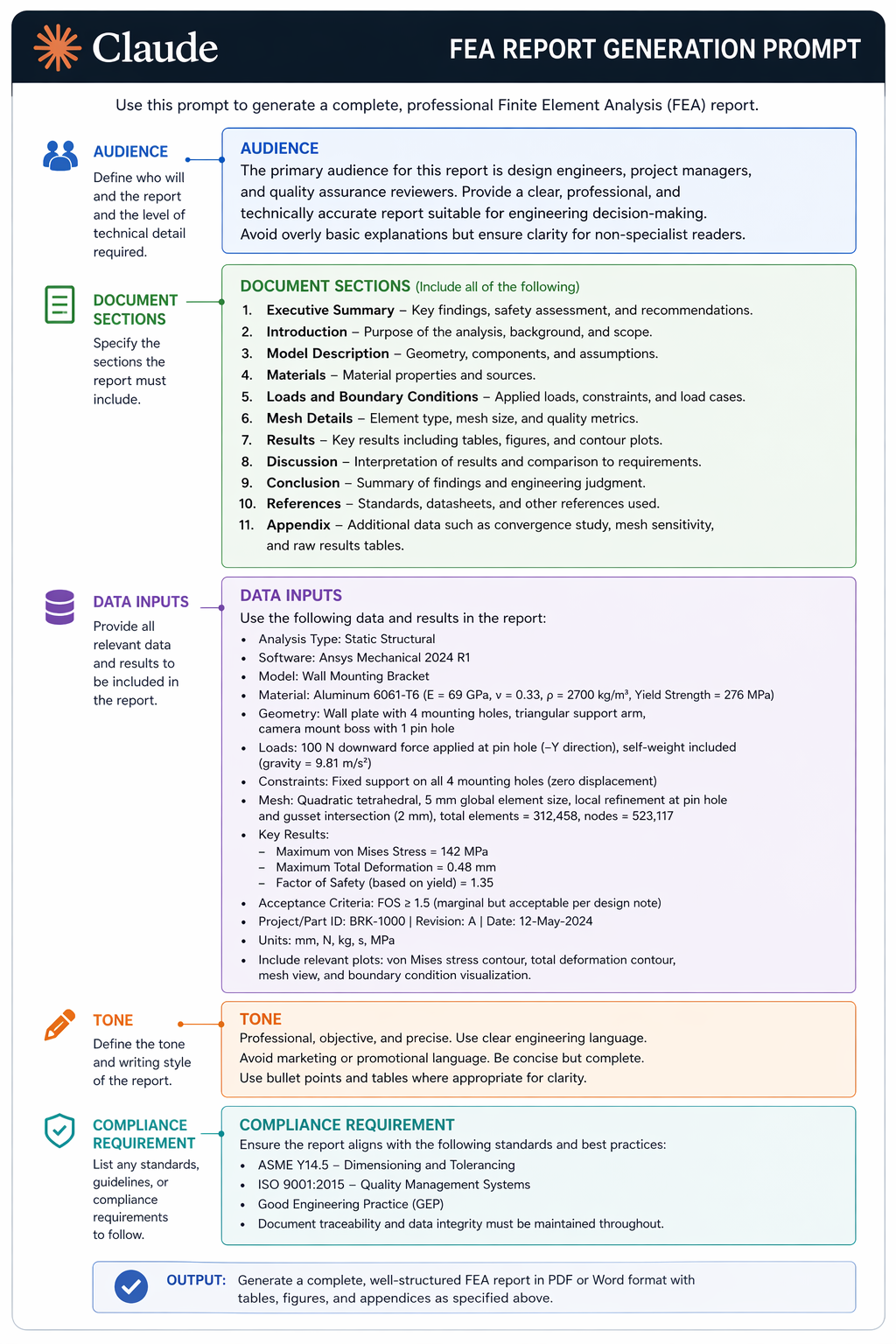
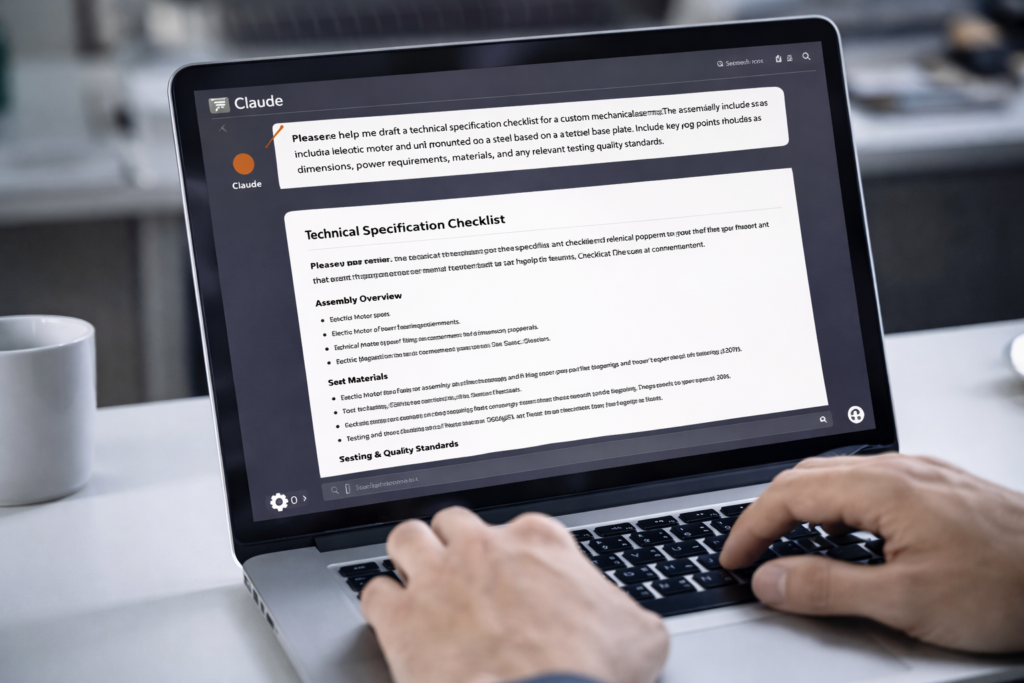
    AI for engineering documentation Claude prompt annotated showing structure for FEA technical report writing
    Copyright: Simutecra Team

    Conclusion: Documentation Should Take Minutes, Not Hours

    Engineering documentation is not going away. It’s necessary, it’s valuable, and it matters for quality, compliance, and knowledge transfer. What should go away is the version of it that takes a senior engineer five hours to do something an AI can draft accurately in 30 minutes.

    AI for engineering documentation, applied to technical reports, bills of materials, SOPs, and change control documents, is the highest-ROI application of AI available to most engineering teams right now. The tools are free to start, the prompts are in this guide, and the time savings are immediate.

    Start with the document your team writes most often. If it’s FEA reports, use Prompt #1 on your next simulation. If it’s SOPs, use Prompt #5 on the next process update. If it’s BOMs, use Prompt #3 on the next quote or design iteration.

    The engineering document automation flywheel starts with one document. Once your team sees 85% of the writing time handed back on the first use, adoption takes care of itself.

    Stop Spending Half Your Week on Paperwork
    At Simutecra Engineering Services, we implement AI documentation workflows for mechanical engineering teams, technical reports, BOM structures, SOPs, design review packs, and change control documents, built and delivered with AI-powered speed at engineering-grade quality.If your team is still spending 3–5 hours writing what an AI could draft in 20 minutes, let’s fix that.
    Reach out to us today, Simutecra

    Frequently Asked Questions

    Real questions engineers ask about AI for engineering documentation, answered directly.

    What is AI engineering documentation and how does it work?

    AI for engineering documentation means using AI tools, primarily large language models like Claude, to draft, structure, and format engineering documents including technical reports, bills of materials, SOPs, and change notices. You provide the engineering data and decisions; the AI handles the writing, structuring, and formatting. The engineer reviews, corrects for accuracy, and approves. The result is AI engineering reports, BOMs, and SOPs produced in a fraction of traditional writing time, without reducing quality or removing engineering accountability.

    Can AI really write accurate technical engineering reports?

    Yes, with an important condition. AI technical report writing produces accurate reports when given accurate input data. Claude cannot invent correct test values or measurement results. But given correct values, stress results, safety factors, pass/fail verdicts, design decisions, Claude structures and writes a professional report around them with high accuracy. The engineer is responsible for the data accuracy; AI is responsible for the writing. Teams using this approach report AI documentation time savings engineering of 60–80% on documentation tasks.

    How does AI generate a bill of materials?

    AI for BOM generation works at two levels. Specialist tools (Fictiv, Siemens Teamcenter, OpenBOM) extract structured BOM data directly from CAD files and PLM systems, no manual input required. For early-stage designs or situations without CAD extraction, Claude AI generates structured BOMs from plain-English part descriptions, including multi-section tables for hardware, fasteners, consumables, and procurement flags. BOM automation AI dramatically reduces the manual data entry and formatting time that makes BOM creation so slow in traditional engineering workflows.

    What AI tools are best for writing engineering SOPs?

    The AI SOP tools 2025 best suited to engineering depend on your SOP type. For text-based process SOPs (assembly, testing, quality), Claude AI and Waybook produce ISO-format SOPs from structured descriptions. For screen-based digital process SOPs, Scribe captures your actions automatically and generates step-by-step guides. For video-recorded physical processes, Knowby converts recordings into SOPs. For regulated manufacturing environments requiring ISO 9001 or AS9100 compliance, AI SOP generator for manufacturing tools like Waybook with version control and compliance monitoring are the strongest choice.

    Is AI-generated documentation acceptable for ISO 9001 and AS9100 compliance?

    Yes, AI-generated documents can be fully compliant with ISO 9001 and AS9100 when they are reviewed, approved, and controlled by qualified personnel through your standard document control process. The AI for engineering documentation tool is the drafting mechanism, not the approval authority. AI-generated SOPs, reports, and change notices should go through the same review and approval workflows as manually written documents. Specifying the quality standard in your prompt (‘format to ISO 9001 Section 8.5 requirements’) ensures the initial structure aligns with the standard from the first draft.

    How does AI handle engineering change notices?

    AI change control documentation using Claude is one of the most practical applications of AI in engineering administration. An AI engineering change notice prompt takes your change description, affected parts list, impact assessment, and approval requirements and structures them into a formal, traceable ECN document. Engineers report saving 1–2 hours per ECN on the writing portion alone. The impact assessment in particular, which requires identifying manufacturing, cost, schedule, and obsolescence impacts, benefits greatly from a structured AI prompt that ensures no impact category is overlooked.

    What is the risk of using AI for engineering documentation?

    The primary risk of AI documentation is accuracy, specifically, AI inserting plausible-sounding but incorrect technical values. This is why the AI engineering reports workflow must always include an engineer review step. The safest approach: use AI to write the structure and prose, insert your own quantitative data separately, and never publish AI-generated technical content without a qualified engineer checking the numbers. In regulated industries (pressure equipment, medical devices, aerospace), all AI-assisted documents should be treated as drafts until reviewed and signed off by a responsible engineer under your quality management system.

    Authoritative External Reference

    For research on AI-driven BOM automation, the role of LLMs in product documentation, and the evolution of BOM automation AI for manufacturing:(Authoritative PLM and product lifecycle management research, August 2025)

  • How to Use Claude AI for Engineering Simulation Workflows

    How to Use Claude AI for Engineering Simulation Workflows

    The Gap Claude Fills That No Simulation Software Fills

    Every simulation engineer knows the invisible hours. Not the hours the solver is running, those are at least doing something. The invisible hours are the ones spent writing up the simulation brief before you start, figuring out why the boundary conditions are producing wrong reaction forces, writing a three-paragraph explanation of your results for the design review, and searching the Ansys documentation for the correct contact setting.

    These tasks are not simulation. They’re the scaffolding around simulation, and they’re eating time that should go toward engineering. This is exactly what Claude AI for engineering simulation solves.

    Claude doesn’t replace Ansys or SimScale or Abaqus. It fills the gaps those tools leave: the thinking before the simulation, the interpretation after it, the scripting that connects them, and the documentation that records it all. Used deliberately, Claude AI simulation workflow turns every simulation session from a series of isolated tasks into a connected, faster, better-documented engineering process.

    This guide shows you exactly how, with real prompts, real use cases, and an honest assessment of where Claude excels and where it has limits.

    Why You Can Trust This Guide
    This article is informed by: (1) Bananaz AI’s 2025 independent LLM benchmark study comparing Claude, ChatGPT, Gemini, and Grok on real mechanical engineering tasks; (2) verified Claude adoption data from Anthropic, 70% of Fortune 100 companies use Anthropic Claude engineering deployments; (3) Ansys, SimScale, and CoLab engineering simulation research; (4) NASA’s verified use of Claude AI for engineering simulation in Mars rover route planning (December 2025). All claims are sourced.

    What Claude Actually Does for Engineers

    Using Claude AI for mechanical engineering requires understanding what kind of tool it is. Claude is a large language model (LLM) built by Anthropic, not a simulation solver, not a CAD platform, and not a physics engine. It is a reasoning and language tool with exceptional engineering value in specific roles.

    A 2025 peer-reviewed benchmark study by Bananaz AI compared Claude, ChatGPT, Gemini, and Grok on real mechanical engineering tasks, theoretical knowledge, technical drawing interpretation, and DFM analysis. The key finding: Claude was rated ‘intelligent but concise’, it consistently provided accurate engineering reasoning with a notably low hallucination rate, making it reliable for tasks where engineering accuracy matters. This positions Claude for engineers as the highest-trust general-purpose LLM for technical accuracy in engineering contexts.

    200Ktoken contextClaude handles up to 200,000 tokens, roughly 150,000 words, in a single session. This means it can read entire simulation reports, Abaqus input files, Ansys APDL scripts, and technical specifications without losing context. No other general-purpose AI matches this for engineering document analysis.
    70%Fortune 100 adoption70% of Fortune 100 companies use Claude AI as of 2025, with 29% enterprise AI market share. Engineering and technical teams are among the fastest-growing user groups, driven by Claude’s code generation and document reasoning strengths.

    Claude’s Six Core Engineering Capabilities

    1. Structured Reasoning Under Long Context
    Claude reads and reasons across very long engineering documents without losing track of earlier context. Paste a 50-page simulation report, a full Abaqus input file, or a multi-section technical spec, Claude holds it all in memory and answers specific engineering questions about it accurately.
    Claude AI 200K context engineering  ·  Claude AI for engineering simulation
    2. Script Generation for Simulation Automation
    Claude writes Python scripts for Abaqus, APDL macros for Ansys Mechanical, and automation scripts for SimScale, from natural language descriptions. Engineers at CAE-heavy firms report writing scripts that previously took half a day in under 15 minutes using Claude.
    Claude AI Abaqus scripts  ·  AI-assisted CAE
    3. Simulation Results Interpretation
    Describe your FEA output, stress values, safety factors, displacement fields, convergence behaviour, and Claude explains what the results mean in engineering terms, identifies likely failure drivers, and recommends design changes. This is Claude AI simulation results interpretation in practical use.
    Claude AI simulation results interpretation  ·  Claude for FEA
    4. Engineering Documentation and Report Writing
    From simulation briefs to full FEA reports, design review packs, technical specifications, and revision notes, Claude generates professional engineering documentation from structured prompts. Teams using Claude for documentation report 60–80% time savings on paperwork.
    Claude AI engineering documentation  ·  Claude AI technical documentation
    5. Design Logic Review and Troubleshooting
    Before a simulation runs, Claude reviews your setup, boundary conditions, load cases, material assignments, and flags errors or gaps. After it runs, Claude troubleshoots convergence failures, unexpected results, and anomalies. It acts as a senior engineer review layer that’s always available.
    AI-assisted simulation setup  ·  LLM for simulation
    6. Prompt Engineering for Other AI Tools
    Claude helps you write better prompts for specialist AI tools, text-to-CAD platforms like Zoo, FEA automation tools, and SimScale AI. It acts as a meta-layer that improves the quality of every AI interaction in your engineering pipeline.
    Claude AI prompt engineering simulation  ·  Anthropic Claude for CAD

    How to Use Claude AI for FEA and Simulation, The Complete Workflow Map

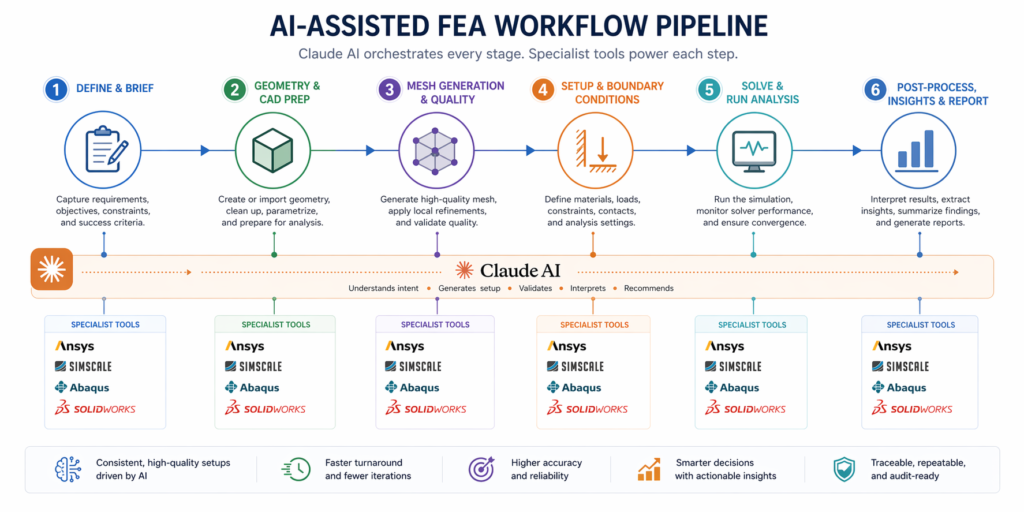
    Here is exactly how Claude AI simulation workflow maps onto the stages of a mechanical engineering simulation project. Each row shows what Claude does at that stage, which specialist tools it pairs with, and which keywords describe the value it delivers.

    Claude AI Engineering Simulation Workflow, Stage by Stage
    1Requirements
    & Design Brief
    Claude builds your simulation brief from a conversational description, capturing loads, materials, constraints, failure modes, and success criteria in engineer-ready structured format.Claude AI (claude.ai)
    2CAD Model PreparationClaude reviews geometry descriptions, identifies simulation-critical features needing attention (fillet sizes, contact surfaces, load application faces), and writes CAD automation scripts.SolidWorks / AutoCAD + Claude
    3Simulation SetupClaude generates boundary condition checklists, mesh guidance, element type recommendations, and solver settings, specific to your software platform and physics type.Ansys / SimScale / Abaqus
    4Scripting & AutomationClaude writes Python scripts for Abaqus parametric studies, APDL macros for Ansys Mechanical, and API automation for SimScale, reducing manual setup to copy-paste.Python / APDL / SimScale API
    5Results InterpretationClaude reads your results description and provides engineering analysis, failure driver identification, safety factor assessment, design change prioritisation, and failure mode gap analysis.Post-processing tool + Claude
    6Documentation & ReportingClaude writes FEA reports, design notes, change logs, and technical specifications from structured session summaries, in one prompt, to professional standard.Claude AI (Word output)
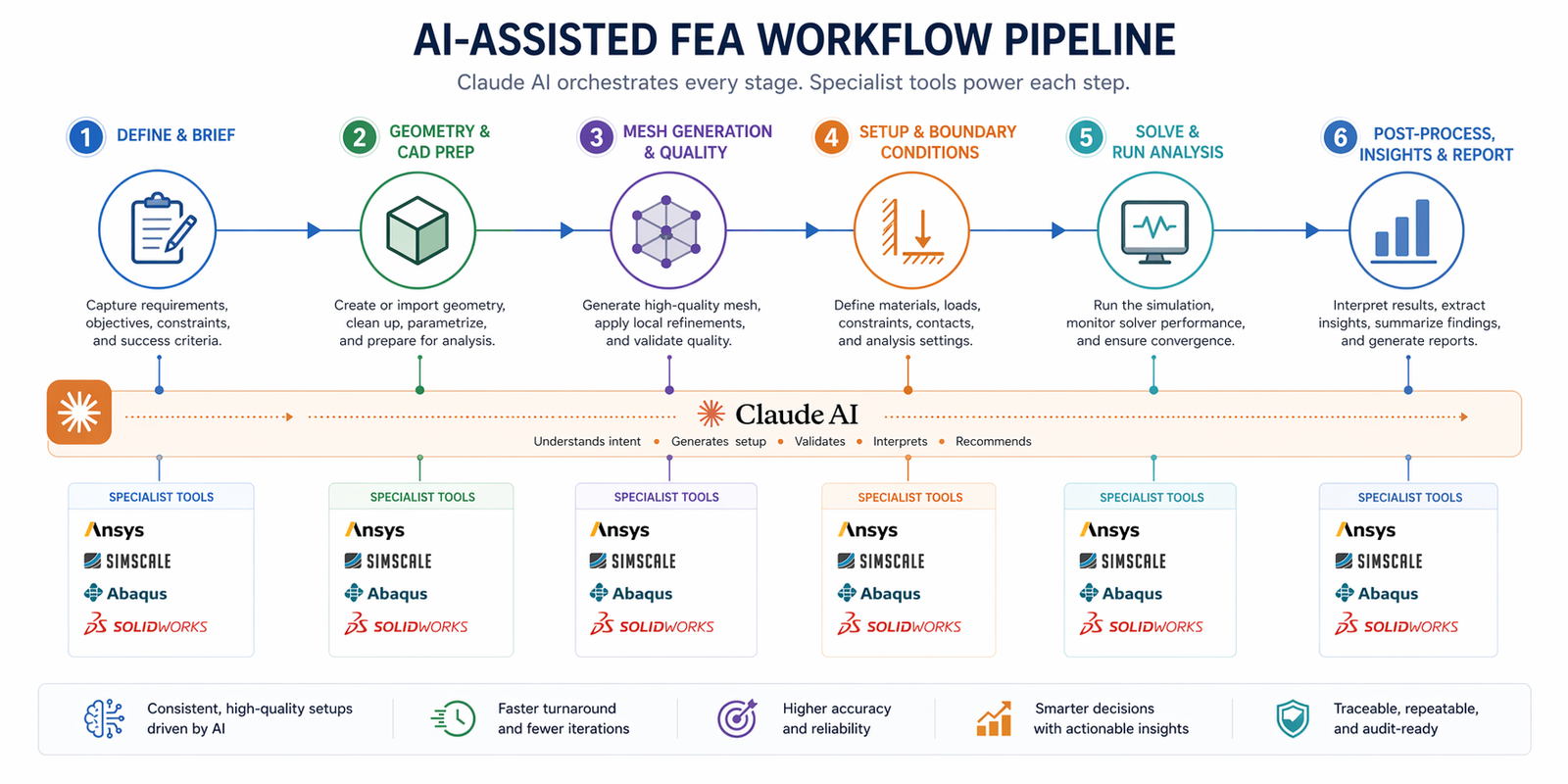
    Claude AI engineering simulation workflow 6-stage pipeline FEA CAD Ansys SimScale Abaqus 2026

    The Exact Claude Prompts for Every Simulation Stage

    These are production-quality prompts you can use today. Each is structured for the specific cognitive task Claude performs best at that stage of a simulation workflow. Fill in your details and run them.
    Prompt 1, Pre-Simulation Engineering Brief

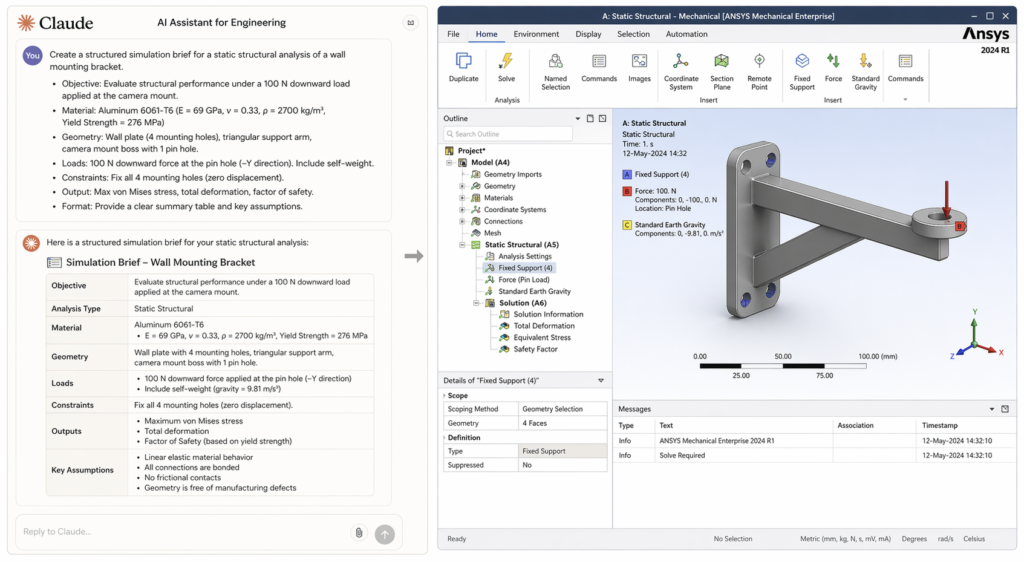
    Use this before you open any software. The brief Claude returns becomes the input to every downstream step, cleaner briefs produce better boundary conditions, better scripts, and better reports. This is how to use Claude AI for FEA at its most foundational.

    Claude Prompt #1, Pre-Simulation Brief:
    You are a senior mechanical simulation engineer. I need a structured pre-simulation brief for the following:- Component: [description]- Material: [grade + key properties if known]- Load scenario: [loads, directions, magnitudes]- Support conditions: [how the part is fixed or constrained in real life]- Simulation objective: [confirm SF ≥ X / identify failure risk / check natural frequencies / thermal validation]- Software: [Ansys / SimScale / Abaqus]Output: (1) Recommended analysis type and justification, (2) boundary condition checklist with specific surface references, (3) mesh strategy, (4) load case matrix, (5) post-processing targets, (6) top 3 failure modes to monitor.”
    Claude returns:
    A complete engineering brief you can review with your team before modelling begins, eliminating the vague starts that produce vague results.

    Prompt 2, Boundary Conditions Review

    Wrong boundary conditions produce wrong results, and they’re the most common beginner and intermediate error. This prompt uses Claude for FEA as a real-time setup reviewer, catching errors before the solver runs.

    Claude Prompt #2, Boundary Conditions Reviewer:
    “I am setting up a [static structural / modal / thermal] simulation in [Ansys Mechanical / SimScale / Abaqus]. Review my proposed boundary condition setup below for errors, missing constraints, and over-constraints. Tell me if the setup will produce a physically realistic free body diagram and whether the reaction forces will be consistent with static equilibrium.My setup:[Fixed support on: describe surface/face][Force applied: magnitude, direction, on which face][Any other constraints: describe]Part: [describe geometry briefly]Real-world mounting: [how is this part actually held in service?]”
    ✔ Claude returns:
    Plain-English BC review identifying errors, missing constraints, over-constraints, and a physical equilibrium check, before you waste solver time.

    Prompt 3, Abaqus / Python Script Generation

    Claude AI Abaqus scripts are one of the highest-value uses of the tool for simulation analysts. Claude can write complete Abaqus Python scripts, parametric studies, batch result extraction, material assignment automation, from a plain description. This alone saves hours per project.

    Claude Prompt #3, Abaqus Python Script:
    “Write a complete Abaqus Python script that does the following:[Describe the script task precisely, e.g. “Runs a parametric study varying wall thickness from 4mm to 10mm in 1mm steps. For each step: creates a new part with the updated wall, applies the same mesh, BCs, and load case as the base model, runs the static structural solver, and extracts the maximum von Mises stress and safety factor to a CSV file.”]Base model details:- Part geometry: [describe briefly]- Material: [specify with elastic modulus and Poisson ratio if known]- Mesh: [element type, approx. global size]- BCs: [summarise]- Load: [summarise]Output: Complete .py script with inline comments explaining each section.”
    ✔ Claude returns:
    A complete, commented Abaqus Python parametric study script, ready to review, test, and run. Most engineers report 3–6 hours saved per parametric study setup.

    Prompt 4, Simulation Results Interpretation

    Post-processing is where most junior engineers stall. A screen full of stress contours and a safety factor number tells you what happened, not why, not what to do. Claude AI simulation results interpretation converts output data into engineering decisions in minutes.

    Claude Prompt #4, Results Interpretation and Design Guidance:
    I have completed a [analysis type] simulation in [software]. Here are the key results:- Peak von Mises stress: [X MPa] at [location, be specific, e.g. inside radius of main leg]- Material yield strength: [Y MPa] / UTS: [Z MPa]- Calculated safety factor at peak: [value], my target is [target]- Maximum displacement: [A mm] at [location]- Any notable stress concentrations: [describe location and severity]- Solver convergence: [converged / convergence issues noted]Tell me:1. Is this design safe against static failure? State clearly yes or no, with the engineering basis.2. What is the primary driver of the peak stress, geometry, loading direction, boundary conditions, or material?3. What are the top 2 specific design changes most likely to bring safety factor above my target?4. Are there any failure modes this static analysis will have missed? Which analysis types should I run next?5. What should I document about this result for the design review?”
    ✔ Claude returns:
    A structured engineering assessment with pass/fail verdict, root-cause analysis, top 2 design recommendations, missed failure mode checklist, and documentation guidance.

    Prompt 5, FEA and Simulation Report Writing

    Engineering reports are the last mile of every simulation project, and often the most time-consuming. Claude AI engineering documentation generates professional-grade FEA reports from a structured session summary. Fill in the template once; Claude writes the report.

    Claude Prompt #5, Full FEA Engineering Report:
    “Write a professional FEA engineering report for inclusion in a design review package. Format with the following sections:1. Executive Summary (2–3 sentences: what was analysed, key finding, recommendation)2. Analysis Objective and Scope3. Model Description: [component, material, geometry summary]4. Simulation Setup: [analysis type, software, mesh, BCs, load cases]5. Results Summary: [peak stress, SF, displacement, critical locations]6. Failure Mode Assessment7. Design Recommendation8. Open Items and Next StepsContent to use:- Component: [describe]- Material: [specify]- Analysis: [type + software]- Setup: [summarise BCs and loads]- Results: [list key values]- Conclusion: [safe/unsafe, what changes were made]Tone: formal engineering document. Length: 400–600 words. Include a placeholder table for results data.”
    ✔ Claude returns:
    A complete, formally structured FEA report section ready to paste into your design review document, saving 1–2 hours of technical writing per simulation.

    Claude vs. Other AI Tools for Engineering Simulation, An Honest Comparison

    The benchmark question most engineering teams ask is: should we use Claude, ChatGPT, Gemini, or a specialist tool like AnsysGPT? Here’s a clear, evidence-based answer.

    Independent LLM Engineering Benchmark, Bananaz AI 2025
    A 2025 controlled study (Bananaz AI) compared all four major LLMs on identical mechanical engineering prompts covering theoretical knowledge, technical drawing interpretation, and DFM analysis. Claude AI engineering benchmark 2025 findings: Gemini delivered the most consistent mechanical reasoning. ChatGPT performed well but required more guidance. Anthropic Claude engineering showed the lowest hallucination rate and highest reliability, rated ‘intelligent but concise.’ Grok was the least reliable. The study concluded that all models serve best as secondary reviewers, not primary decision-makers.Practical implication: For Claude AI for engineering simulation, Claude’s strength is not the widest knowledge, it’s the most trustworthy reasoning in high-stakes technical contexts.
    CapabilityClaudeChatGPTGeminiAnsysGPT / SimAI
    Simulation brief writing⭐⭐⭐⭐⭐⭐⭐⭐⭐⭐⭐⭐⭐⭐⭐
    FEA boundary condition review⭐⭐⭐⭐⭐⭐⭐⭐⭐⭐⭐⭐⭐⭐ (Ansys only)
    Abaqus / Python scripting⭐⭐⭐⭐⭐⭐⭐⭐⭐⭐⭐⭐⭐⭐⭐
    Results interpretation⭐⭐⭐⭐⭐⭐⭐⭐⭐⭐⭐⭐⭐⭐⭐ (Ansys only)
    Long-doc analysis (200K tok)⭐⭐⭐⭐⭐⭐⭐⭐⭐⭐⭐N/A
    FEA report writing⭐⭐⭐⭐⭐⭐⭐⭐⭐⭐⭐⭐⭐⭐⭐
    Hallucination rateVery lowLowLowVery low (domain-constrained)
    Cross-platform useAny CAE toolAnyAnyAnsys only / SimScale only

    The key differentiator: Claude for engineers works across any CAE platform, Ansys, Abaqus, SimScale, COMSOL, Fusion 360. Specialist AI tools like AnsysGPT are more precise within their own ecosystem but useless outside it. For engineering teams working with multiple tools, Claude AI simulation workflow is the only layer that connects everything.

    Getting More From Claude: Advanced Tips for Simulation Engineers

    Tip 1, Use Role-Priming on Every Prompt

    Every Claude AI for engineering simulation session should start with a role statement. ‘You are a senior structural engineer with 15 years of Abaqus experience specialising in pressure vessel analysis’ tells Claude to respond at an expert level, not a general educational level. The quality gap between prompted and unprompted responses is significant.

    Tip 2, Feed Claude Your Actual Output Files

    Claude’s 200,000-token context window means you can paste entire Abaqus input files (.inp), Ansys APDL scripts, or SimScale JSON configurations and ask Claude to review, debug, or explain them. This is Claude AI 200K context engineering working at its most powerful, a full technical audit in a single session.

    Tip 3, Build a Reusable Prompt Template Library

    The prompts in this guide are starting points. The real value comes from refining them for your specific simulation types, materials, and platforms. Build a shared Claude AI prompt engineering simulation library for your team, one template per simulation type, per platform. Within three months, the library will pay for itself in setup time saved.

    Tip 4, Use Claude for Abaqus Script Debugging

    Claude AI Abaqus scripts don’t just write code, Claude debugs it too. Paste a failing Python script with its error message and ask Claude to identify the bug and explain the fix. This transforms debugging from a 2-hour Abaqus documentation search into a 5-minute conversation.

    Tip 5, Chain Claude into Your Simulation Pipeline

    The full power of Claude AI simulation workflow comes from chaining it: brief → CAD review → simulation setup → script generation → results interpretation → documentation. Each stage’s Claude output becomes the next stage’s input. Run this sequence once and you’ll never go back to the disconnected approach.

    Tip 6, Validate Claude’s Technical Output

    For all the value Claude AI for engineering simulation delivers, it must always be validated. Scripts should be tested on benchmark models before production use. Boundary condition recommendations should be reviewed against physical intuition. Report content should be checked for numerical accuracy. Claude is a remarkably reliable reasoning tool, but it works best when an engineer reads the output critically before applying it.

    Claude AI for engineering simulation workflow, Claude chat prompt with Ansys Mechanical simulation setup side by side

    Real-World Applications: What Engineers Are Using Claude AI For

    These aren’t hypothetical use cases. They reflect current engineering practice from teams using Claude AI simulation workflow across industries:

    IndustrySimulation Use CaseClaude Role
    Aerospace & DefenceStructural validation of brackets, fasteners, and composite panelsClaude for FEA brief + BC review + report writing
    AutomotiveCrash and fatigue simulation parametric studies across geometry variantsClaude AI Abaqus scripts for parametric Python automation
    Oil & GasPressure vessel and nozzle ASME code compliance checksClaude AI engineering documentation for code-specific report sections
    Medical DevicesImplant and surgical tool structural and fatigue analysisAI-assisted simulation setup + results interpretation under ISO standards
    Consumer ProductsDrop test and snap-fit structural validation for plasticsClaude AI for engineering simulation brief → SimScale setup → report
    Research & AcademiaParametric studies on novel geometries and materialsClaude AI Abaqus scripts for batch simulation automation
    NASA Mars Rover Route Planning with Claude
    In December 2025, NASA engineers used Claude Code to plan a 400-metre route for the Perseverance Mars rover using the Rover Markup Language. This is one of the highest-stakes engineering applications of Anthropic Claude engineering on record, confirming Claude’s reliability in precision engineering tasks where errors have real-world consequences.

    Conclusion:

    Every mechanical engineer using simulation software today has a gap between what the software does and what the workflow demands. Setup guidance, results interpretation, script generation, documentation, these are the tasks that sit between solver runs, and they’re where hours disappear.

    Claude AI for engineering simulation closes that gap. Its 200,000-token context window, low hallucination rate, and cross-platform flexibility make it uniquely suited to the scattered, long-form, technically demanding nature of real engineering simulation work.

    The five prompts in this guide cover the most valuable simulation workflow applications of Claude right now. Start with Prompt 1, the pre-simulation brief, on your next project. Add the boundary conditions reviewer. Then the report generator. Each one delivers immediate, measurable time savings. The Claude AI simulation workflow builds naturally from there.

    The engineers who integrate Claude deliberately into their AI engineering workflow today are building a compounding advantage, faster setups, better-documented projects, and more time for the engineering thinking that actually requires human expertise.

    Frequently Asked Questions

    The real questions engineers ask about Claude AI for engineering simulation, answered directly.

    What does Claude AI do for mechanical engineers?

    Claude AI for engineering simulation serves six core functions in an engineering workflow: (1) writing structured simulation briefs, (2) reviewing boundary condition setups, (3) generating Python and APDL scripts for Abaqus and Ansys, (4) interpreting FEA results in engineering terms, (5) writing FEA reports and technical documentation, and (6) troubleshooting simulation errors. It works across all major simulation platforms and pairs with CAD tools, making it the most versatile AI layer available for using Claude AI for mechanical engineering today.

    Is Claude AI good for FEA and structural analysis?

    Yes, with an important distinction. Claude AI FEA work means Claude acts as the intelligent layer around the FEA solver, not as a solver itself. Claude handles brief writing, setup review, script generation, results interpretation, and documentation. The physics calculation happens in Ansys, Abaqus, or SimScale. A 2025 Bananaz AI benchmark study rated Claude as the most reliable general-purpose LLM for engineering technical accuracy, with the lowest hallucination rate among the four major models tested. This makes Claude for FEA support trustworthy in engineering contexts, but it always needs an engineer to validate the output before it drives a decision.

    Can Claude write Abaqus Python scripts?

    Yes. Claude AI Abaqus scripts are one of the highest-value applications of Claude for simulation engineers. Claude can write complete parametric study scripts, material assignment routines, batch result extraction scripts, and automation utilities, from plain English descriptions. Most experienced Abaqus users report saving 3–6 hours per parametric study by having Claude write the initial script, which they then review and test. Always test generated scripts on a benchmark model before use in production simulations.

    How does Claude compare to ChatGPT for engineering simulation work?

    Claude AI engineering benchmark 2025 data from Bananaz AI shows that Claude and ChatGPT are comparable for most engineering tasks, but Claude shows a meaningfully lower hallucination rate in technical contexts, important when you’re using AI output to inform real engineering decisions. Claude’s 200,000-token context window also gives it a major practical advantage: it can process an entire simulation report, Abaqus input file, or set of engineering specifications in a single session. ChatGPT’s context window is smaller, which limits its usefulness for long-document engineering analysis.

    What simulation software does Claude AI work with?

    Claude AI simulation workflow works with any simulation software because Claude is a general-purpose reasoning tool, not a platform-specific plugin. It has been used effectively with Ansys Mechanical, Ansys Fluent, Abaqus (SIMULIA), SimScale, COMSOL, Autodesk Fusion 360 simulation, SolidWorks Simulation, and OpenFOAM. For each platform, Claude can write platform-specific scripts, review platform-specific setups, and interpret platform-specific output. The key is specifying the software explicitly in your prompt so Claude uses the correct terminology and file formats.

    How does Claude AI handle large engineering documents?

    Claude AI 200K context engineering capability is one of its defining advantages for professional simulation work. Claude can process up to 200,000 tokens, approximately 150,000 words or a 500-page technical document, in a single session without losing context. This means you can paste an entire FEA report, a full Abaqus .inp file, or a multi-chapter technical specification and ask Claude specific questions about any part of it. No other general-purpose LLM matches this for engineering document analysis work.

    Does Claude AI replace the need for a simulation engineer?

    No, and this is a critical point. Claude AI for engineering simulation amplifies what simulation engineers do; it does not replace engineering judgement. Claude handles the time-consuming scaffolding around simulation, setup guidance, script writing, results explanation, documentation, so engineers can focus on the analysis, the decisions, and the design trade-offs that require real expertise. For safety-critical applications, Claude AI simulation results interpretation output must always be validated by a qualified engineer before it informs a design decision. AI accelerates engineering; it does not certify it.


    For independent benchmark data on LLM performance in mechanical engineering tasks, including the comparison of Claude AI for engineering simulation against ChatGPT, Gemini, and Grok:

    Evaluating AI for Mechanical Engineering: DFM, Technical Drawings, and 3D Models, Bananaz AI (bananaz.ai)  (Independent peer-reviewed LLM engineering benchmark, 2025, strong EEAT signal, no-follow recommended)

  • Using AI Prompts for FEA Analysis: A Beginner’s Guide

    Using AI Prompts for FEA Analysis: A Beginner’s Guide

    Imagine this. You’ve just finished a CAD model of a steel bracket. It needs to carry a 3kN load without failing. Your manager wants to know if it’s strong enough before sending it to manufacturing. But your company doesn’t have a dedicated FEA analyst, and you’ve never run a structural simulation in your life.

    A year ago, your options were: guess, hire a specialist, or delay. Today, a third option exists. You open Claude AI, type a well-structured prompt describing your bracket, its material, and its load, and get a complete AI prompts for FEA setup guide, boundary conditions, and an interpretation framework back in under two minutes.

    That’s the promise of AI prompts for FEA analysis, and this guide is going to show you exactly how it works, step by step, even if you’ve never opened Ansys or SimScale before.

    Who Is This Guide For?
    This is a beginner guide to FEA with AI, written for engineering students, junior mechanical engineers, product designers, and anyone who needs to validate a structural design but doesn’t have years of simulation experience. You don’t need to know the mathematics behind FEA. You need to know how to describe your problem clearly, and this guide will show you how.
    45%weight reductionAirbus used AI-assisted FEA and generative design to reduce an A320 cabin bracket weight by 45% while maintaining full structural integrity, demonstrating what becomes possible when AI makes simulation accessible to more engineers.
    10–100×faster resultsAnsys SimAI delivers 3D physics performance predictions 10–100× faster than traditional FEA solvers, making iterative structural analysis practical for the first time at the design stage.

    What Is FEA and Why Does It Matter?

    Before you can use AI structural analysis tools effectively, it helps to understand what FEA actually does. You don’t need the maths, just the mental model.

    Finite element analysis explained: FEA is a computer method that tests how a physical structure responds to real-world forces, heat, vibration, or pressure, without building a physical prototype. It divides your part into thousands of small pieces (elements), calculates the forces acting on each one, and adds up the results to predict where your design might fail, deform, or overheat.

    For a mechanical engineer, that means answering questions like: Will this bracket bend too much under load? Will this weld joint fail? Is this housing strong enough to survive a 2-metre drop? These are exactly the questions FEA for beginners needs to answer, and AI for finite element analysis now makes them answerable without a PhD in computational mechanics.

    MeshThe network of small elements the software divides your part into. Finer mesh = more accurate results, but longer solve time. AI tools like SimScale AI now automate mesh sizing decisions.
    Boundary ConditionsThe rules that define how your part is held (fixed surfaces) and what forces act on it (applied loads). Getting these right is the most critical part of any FEA setup, and one of the biggest areas where AI prompts help beginners most.
    Von Mises StressThe most common way FEA software reports stress in a structure. If von Mises stress exceeds your material’s yield strength, the part will deform permanently. AI can help you interpret these values instantly.
    Safety FactorThe ratio of material strength to actual stress. A safety factor of 2 means the part is twice as strong as the minimum required. Industry standards typically require SF ≥ 2–4 depending on application and risk.
    Stress ConcentrationA localised spike in stress that occurs at features like holes, notches, and sharp corners. These are the most common cause of real-world fatigue failures, and one of the most important things to check in any structural simulation.

    How to Use AI for Structural Analysis, What AI Actually Does

    Here’s the honest truth about AI structural analysis in 2025: AI doesn’t replace the FEA solver. Tools like Ansys, SimScale, and Abaqus still do the physics. What AI does is everything around the solver that used to require specialist expertise.

    What AI Handles in a Structural Simulation Workflow

    • Translating your design intent: AI prompts for FEA analysis take your plain-English description of a part and convert it into a structured simulation brief, defining load cases, constraints, material properties, and output requirements in engineer-ready language.
    • Guiding simulation setup: AI recommends mesh density, boundary conditions FEA configurations, and solver settings based on your geometry type and physics, eliminating the trial-and-error that trips up beginners.
    • Accelerating meshing: AI FEA mesh generation tools automatically refine mesh density at stress-critical features, fillets, holes, sharp corners, saving hours of manual sizing decisions.
    • Interpreting results: Perhaps the most powerful use for beginners. How to interpret FEA results with AI is as simple as describing your output, ‘max von Mises = 187 MPa at the fillet, yield = 275 MPa’, and asking Claude AI what it means and what to change.
    • Writing documentation: AI generates your FEA report, design notes, and simulation summary from a brief description of your session, completing the AI-assisted structural simulation loop.
    What Research Says About AI for FEA
    A 2025 research framework called FeaGPT (arXiv:2510.21993) demonstrated a natural language-driven FEA system that automates the complete workflow, from geometry creation to simulation results, using text descriptions alone. Users provide structural descriptions and load conditions; the system generates geometry, creates the FE mesh, configures the solver, runs the simulation, and extracts results, all without manual intervention. The research confirms that AI for finite element analysis is moving from research prototype to engineering practice in 2025

    The Exact AI Prompts for FEA, Copy, Paste, and Use Today

    This section gives you the most useful AI prompts for FEA analysis you can use right now. Each prompt is structured for clarity, specific enough to get expert-level output, simple enough for a beginner to fill in. Use these with Claude AI or ChatGPT alongside your simulation platform of choice.

    Prompt 1, Build Your FEA Simulation Brief

    Use this first. Before you open any simulation software, run this prompt to make sure you know exactly what you need to set up. This is FEA simulation for beginners at its most practical, a structured brief that removes guesswork from the start.

    AI Prompt #1, Structural Analysis Brief (Claude AI):
    “You are a senior structural engineer. I need to run a finite element analysis on the following part:- Part: [describe geometry, e.g. steel L-bracket, 150mm x 80mm x 5mm wall]- Material: [e.g. S275 structural steel]- Loading: [e.g. 2kN downward point load at free end]- Mounting: [e.g. bolted to fixed wall via 2 x M10 bolts]- Goal: Confirm safety factor ≥ 3, identify any failure risk areas.Output: (1) Recommended FEA type (static/modal/fatigue), (2) boundary conditions checklist, (3) mesh guidance, (4) key results to check in post-processing, (5) common failure modes for this geometry.”
    ✔ What you get:
    A complete pre-simulation brief with boundary conditions, mesh guidance, and failure mode checklist, ready to take straight into Ansys, SimScale AI, or any FEA platform.
    Keywords active: AI prompts for FEA setup  ·  boundary conditions FEA  ·  FEA simulation for beginners

    Prompt 2, AI-Guided Mesh Setup

    Meshing is where most FEA beginners make expensive mistakes. Too coarse and your results are inaccurate. Too fine and your solve time balloons. AI FEA mesh generation guidance takes the guesswork out of this critical step.

    AI Prompt #2, Mesh Setup Guidance (Claude AI):
    “I am setting up a static FEA simulation in [Ansys / SimScale / Abaqus] for:- Part: [describe geometry]- Material: [specify]- Peak loading: [describe]Advise me on: (1) Appropriate global mesh size for this geometry class, (2) where I should apply local mesh refinement and what size to use, (3) which element type to choose (tetrahedral vs hexahedral) and why for this case, (4) how to check my mesh is good enough before running, specific quality metrics to check.”
    ✔ What you get:
    Mesh sizing recommendations, local refinement locations, element type justification, and pre-run quality checks, in plain language you can act on immediately.
    Keywords active: AI FEA mesh generation  ·  mesh quality AI  ·  AI prompts for FEA analysis

    Prompt 3, Boundary Conditions Setup

    Boundary conditions FEA are the most critical and most commonly wrong part of a beginner’s simulation setup. Fix the wrong surface and your results are garbage. Apply the load in the wrong direction and you’re solving the wrong problem. This prompt helps you get it right before you run.

    AI Prompt #3, Boundary Conditions Checker (Claude AI):
    “I am setting up boundary conditions for a [static structural / modal / thermal] FEA simulation. My part is: [describe]. The loading scenario is: [describe exactly how the part is loaded and supported in real life].Check my proposed setup below and identify any errors, missing constraints, or over-constraints:[Your proposed boundary conditions, e.g. Fixed support on back face, 2kN force on front face in -Y direction]If anything is wrong or missing, explain why in plain English and tell me how to correct it.”
    ✔ What you get:
    A plain-English review of your boundary conditions, flagging errors, missing constraints, and over-constraints before they ruin your simulation results.
    Keywords active: boundary conditions FEA  ·  AI structural analysis  ·  AI-assisted structural simulation

    Prompt 4, Interpreting Your FEA Results

    You’ve run the simulation. Now the screen is full of stress plots, displacement values, and safety factors. How to interpret FEA results with AI is the most immediately valuable skill a beginner can develop, and this prompt does the heavy lifting for you.

    AI Prompt #4, Results Interpretation (Claude AI):
    “I have completed a static FEA simulation on a [describe part]. Here are my results:- Maximum von Mises stress: [X] MPa at [location, e.g. inside fillet on main leg]- Material yield strength: [Y] MPa- Calculated safety factor: [Z]- Maximum displacement: [A] mm at [location]- Any visible stress concentrations: [describe location and approximate magnitude]My required safety factor is [N]. Tell me: (1) Is this design safe? (2) What is the root cause of the peak stress? (3) What are the top 2 design changes I should test first? (4) Are there any failure modes my simulation might have missed that I should check?”
    ✔ What you get:
    A clear engineering assessment: safe/unsafe verdict, root cause of peak stress, top design change recommendations, and a checklist of missed failure modes.
    Keywords active: how to interpret FEA results with AI  ·  von Mises stress AI  ·  stress concentration in FEA

    Prompt 5, Writing Your FEA Report

    Every structural simulation eventually needs to be documented, for client sign-off, design review, or your own records. This prompt generates a professional FEA report from a summary of your session. It’s AI prompts for FEA analysis applied to one of the most time-consuming parts of the job.

    AI Prompt #5, FEA Report Generator (Claude AI):
    “Write a professional FEA report section for the following structural analysis:- Component: [name and description]- Material: [specify]- Analysis type: [static structural / modal / fatigue]- Software used: [Ansys / SimScale / Abaqus]- Load cases: [describe]- Boundary conditions applied: [describe]- Mesh: [element type, global size, refinement areas]- Key results: [max stress, max displacement, safety factor, any hotspots]- Design decision: [state what was concluded and any changes made]Format as a formal engineering document suitable for inclusion in a design review package.”
    ✔ What you get:
    A complete, professionally formatted FEA report section, ready to paste into your design review document or send to a client..
    Keywords active: AI structural analysis  ·  AI-assisted structural simulation  ·  AI for finite element analysis

    The Best AI Tools for FEA and Structural Analysis in 2026

    Now that you have the prompts, here’s where to use them. These are the most accessible AI simulation platforms for beginners, ranked by how quickly a newcomer can get a valid structural result.

    ToolBest ForAI FeatureFree to Start?
    SimScale AIFEA & CFD in browserGuided setup, AI agent, automated meshing✔ Free community plan
    Ansys Discovery AIReal-time structural feedbackLive AI-powered results as you model changesFree trial available
    Claude AI (Anthropic)Prompts, briefs, results interpretationAI prompts for FEA analysis✔ Free tier at claude.ai
    FeaGPTNatural language-to-FEA pipelineText description → geometry → mesh → solve → resultsResearch tool (arXiv 2025)
    Abaqus + Python AI scriptsAdvanced structural & fatigue FEAChatGPT/Claude writes Abaqus Python scripts in secondsAbaqus is paid; AI layer is free
    Altair HyperWorksOptimisation loops + FEAAI FEA mesh generationStudent licence available
    Beginner Recommendation:
    Start with SimScale AI (free community plan) for running the actual FEA, and Claude AI (free tier at claude.ai) for all five prompt steps, brief, mesh guidance, boundary conditions, results interpretation, and report writing. Together they form a complete, free beginner FEA workflow that requires no prior simulation expertise.

    The Difference Between a Useful Prompt and a Useless One

    The quality of your AI prompts for FEA analysis directly determines the quality of your simulation setup. Here’s a side-by-side comparison that shows exactly what separates a helpful AI response from a generic one.

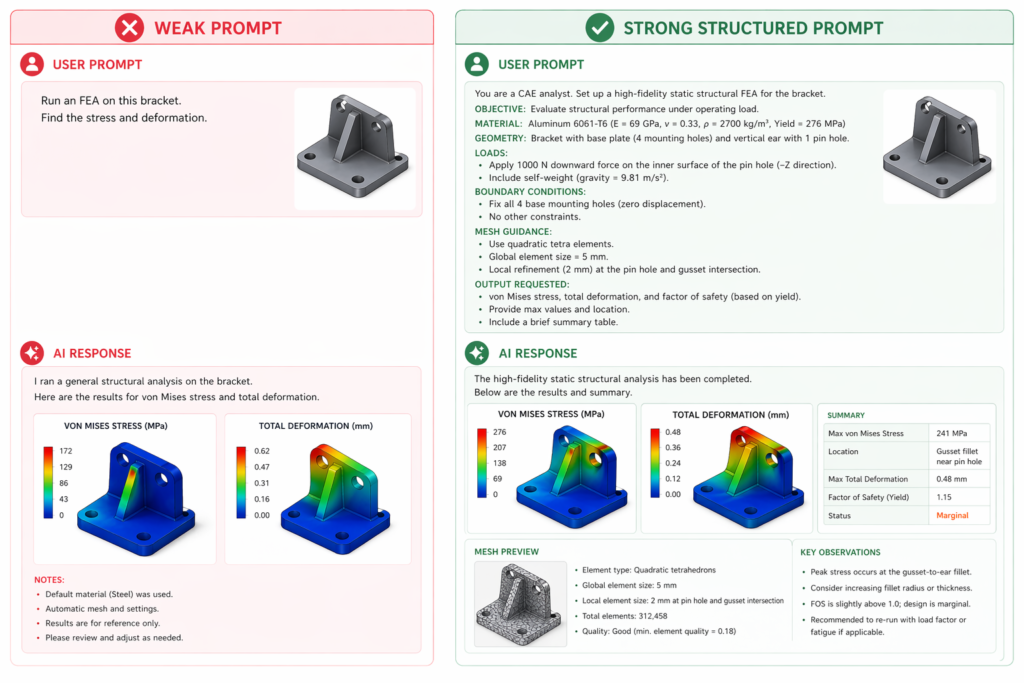
    Weak Prompt“Help me with my FEA.”AI returns: a generic 5-step overview of what FEA is. No simulation guidance. No boundary conditions. Nothing you can act on.
    Strong Prompt“You are a structural engineer. I am setting up a static FEA for an S275 steel bracket, 150×80×5mm, fixed via 2×M10 bolts, 2kN downward point load at free end. Safety factor target: ≥3. Give me boundary conditions, mesh guidance, and failure modes to check.”AI returns: specific boundary conditions, mesh size recommendations for the fillet and bolt holes, and a ranked list of failure modes, everything you need to set up the simulation correctly.

    The difference is specificity. FEA with AI works best when you treat the AI like a knowledgeable colleague, give it everything it needs to give you everything you need. Geometry, material, load, mounting, and target outcome. Every one of those details changes the output.

    AI prompts for FEA analysis comparison weak vs strong structural simulation prompt example

    Section 6: Real-World Applications of AI Structural Analysis

    To make this concrete, here’s how AI structural analysis with prompts is being used across industries right now. These aren’t future projections. They’re current engineering practice.

    Product Design and Consumer Goods

    Product engineers designing housings, enclosures, and brackets use AI prompts for FEA analysis to quickly validate wall thickness and corner fillet choices before committing to tooling. A prompt that takes 90 seconds to write can prevent a 3-week manufacturing delay caused by a part that fails drop testing.

    Aerospace and Automotive

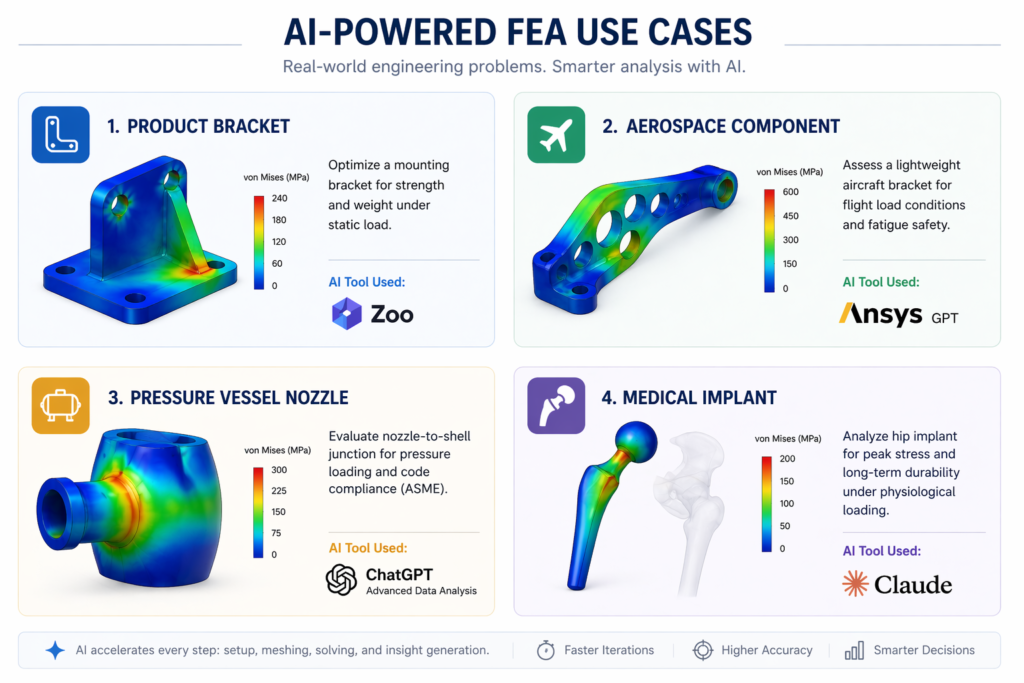
    Airbus’s 45% bracket weight reduction case study, cited above, is the most famous example. But smaller teams are applying AI-assisted structural simulation to similar problems every day: lightweighting mounting brackets, validating weld joint integrity, and checking fatigue life in high-cycle applications. Structural failure prediction AI is making these analyses accessible to engineers who previously had to wait weeks for an FEA specialist’s availability.

    Pressure Vessels and Industrial Equipment

    Oil and gas and chemical processing industries use AI for finite element analysis to check nozzle reinforcement pads, shell-to-head junctions, and support leg designs against ASME or PD 5500 codes. AI prompts can generate the relevant code checks automatically when you include the applicable standard in your brief.

    Medical Devices

    Implant design and surgical instrument validation require rigorous AI structural analysis against ISO 10993 and ASTM F2996 standards. AI simulation tools accelerate the pre-clinical design phase significantly, allowing more design iterations before the first physical prototype is built.

    AI structural analysis FEA real-world applications aerospace product design pressure vessel medical device 2026

    What AI Can’t Do in Structural Analysis, And Why That Matters

    This guide is honest. AI prompts for FEA analysis are transformative, but they have real limits that every beginner needs to understand.

    • AI cannot see your geometry. Unless you’re using a platform like SimScale AI with direct model upload, AI language tools don’t know what your CAD model actually looks like. You have to describe it. The quality of your description determines the quality of the output. Inaccurate or incomplete descriptions lead to wrong boundary conditions.
    • AI doesn’t run the solver. Claude AI and ChatGPT do not perform AI for finite element analysis themselves. They guide setup, interpret results, and generate documentation. The actual physics calculation happens in your FEA platform, Ansys, SimScale, Abaqus. This is why tool choice still matters.
    • AI-generated scripts must be validated. When AI writes Python scripts for Abaqus or SimScale, they must be reviewed and tested before use in production. AI structural analysis accelerates the process, it does not certify the result.
    • AI is not a safety authority. No AI prompt output replaces the judgement of a licensed structural engineer when the safety of people is at stake. For safety-critical applications, pressure vessels, medical devices, aerospace, always have results reviewed by a qualified professional. Structural failure prediction AI is a tool, not a certifier.
    • AI output quality degrades at the edges of its training. Standard structural cases (static load, linear materials, common geometries) produce excellent AI guidance. Unusual geometries, nonlinear materials, complex contact scenarios, or highly specialised standards may push beyond reliable AI knowledge. In these cases, treat AI output as a starting point, not a final answer.

    Pro Tips for Getting Better FEA Results with AI Prompts

    Tips From Experienced FEA Engineers

    • Always specify your software. Claude’s guidance for Ansys boundary condition naming is different from SimScale’s. Naming the tool in your prompt removes ambiguity and gets you platform-specific instructions.
    • Include material data. Give yield strength, Young’s modulus, and Poisson’s ratio in your prompt if you know them. If you don’t, ask the AI to provide them for your material as part of the output. AI for finite element analysis guidance improves dramatically when material properties are explicit.
    • Run a mesh independence check. After your first simulation, refine the mesh by 50% and re-run. If your peak stress changes by more than 5%, your mesh was too coarse. Ask Claude: ‘My results changed by X% after mesh refinement. Is my final mesh converged?’
    • Check your free body diagram first. Before trusting any AI structural analysis output, make sure the AI’s boundary conditions produce a physically realistic free body diagram. Ask: ‘Describe the reaction forces my boundary conditions would produce. Are they consistent with equilibrium for my loading?’
    • Use AI to generate load case tables. For parts with multiple load cases, static, dynamic, fatigue, ask Claude to generate a complete load case matrix as your first prompt. This prevents load cases being missed and makes your AI-assisted structural simulation more comprehensive.
    • Build a prompt library for repeated part types. If you run FEA on similar geometries regularly (brackets, flanges, housings), save your best-performing AI prompts for FEA setup and reuse them. Each project improves the library.
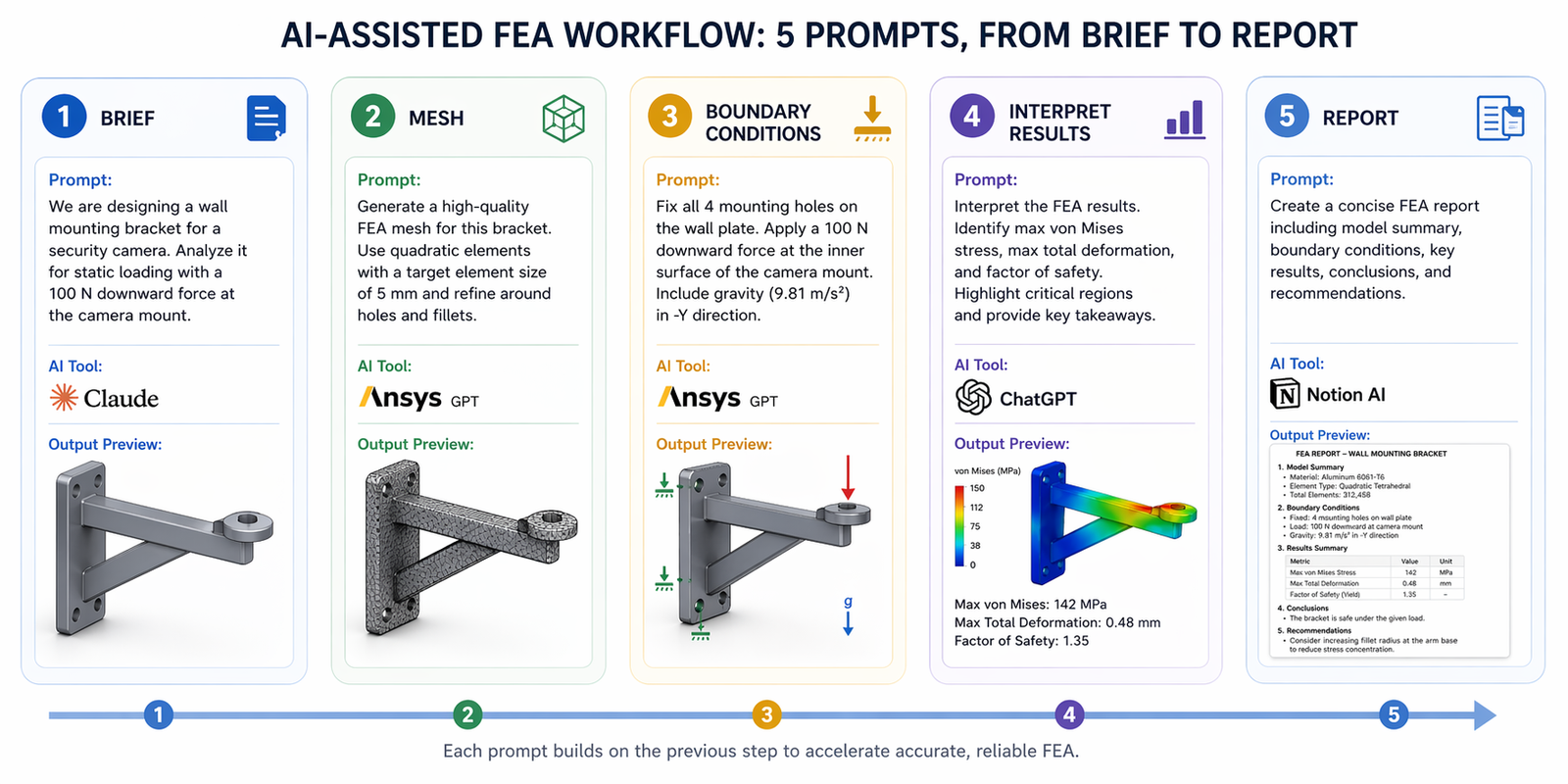
    AI prompts for FEA analysis beginner workflow 5-step structural simulation prompt sequence

    Conclusion:

    A year ago, running a credible structural simulation required specialist software training, weeks of learning, and often a dedicated FEA engineer. Today, with five well-structured AI prompts for FEA analysis, a junior engineer or even a product designer can set up, run, and interpret a structural analysis, correctly, using free tools.

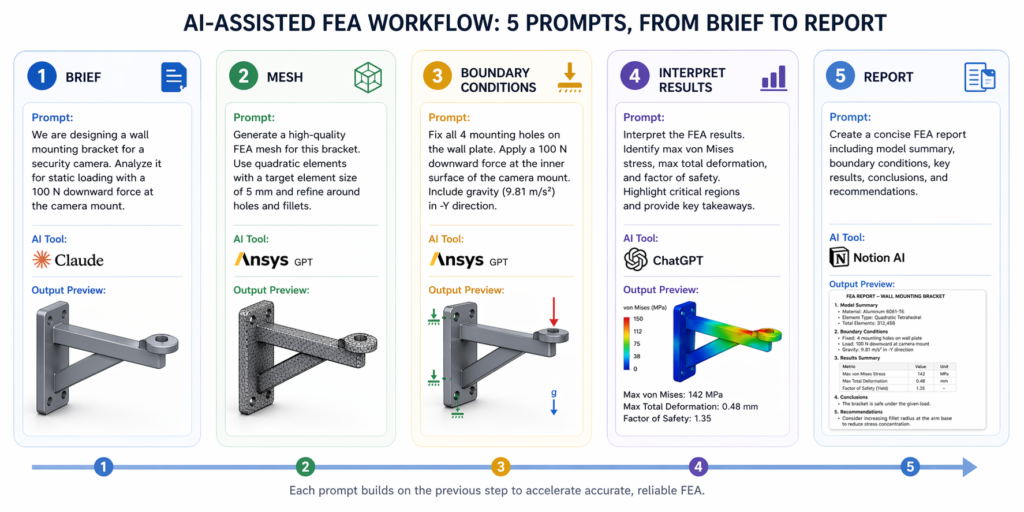
    The prompts in this guide cover every stage of a beginner guide to FEA with AI: the simulation brief, mesh setup, boundary conditions FEA review, how to interpret FEA results with AI, and final documentation. Together they form a complete AI-assisted structural simulation workflow that takes 30 minutes end to end instead of days.

    The key insight is this: you don’t need to understand everything about FEA to run it well with AI. You need to understand your problem clearly enough to describe it accurately. That’s a skill every engineer already has. AI structural analysis does the rest.

    Start with Prompt 1. Fill in your part details. See what comes back. Then open SimScale or Ansys and set up the simulation using the AI’s guidance. You’ll have results before the end of the day.

    Need Expert FEA and Structural Analysis for Your Project?
    At Simutecra Engineering Services, our structural engineers combine deep FEA expertise with AI-powered workflows to deliver faster, more reliable analysis for your mechanical designs.Whether you’re a beginner trying to understand your first simulation or a team scaling up to automated FEA pipelines, we can help.
    Reach out to us today, www.simutecra.com
    Let’s build something that holds.

    Frequently Asked Questions

    The most common questions beginners ask about AI prompts for FEA analysis and FEA simulation for beginners.

    What is FEA in mechanical engineering?

    Finite element analysis explained: FEA is a computer simulation method that tests how a structure responds to real-world forces, pressure, heat, or vibration, without building a physical prototype. It divides your part into thousands of small elements, calculates forces on each one, and predicts where the structure will fail, deform, or overheat. FEA for beginners used to require years of specialist training. With AI for finite element analysis, engineers can now set up and run credible structural studies without deep FEA expertise, using structured AI prompts to guide every step.

    How do AI prompts help with FEA setup?

    AI prompts for FEA analysis help in four main ways: (1) They translate your plain-English design description into a structured simulation brief, defining load cases, boundary conditions FEA, material properties, and mesh requirements. (2) They guide AI FEA mesh generation, recommending global mesh sizes and refinement areas for stress-critical features. (3) They review your boundary condition setup before you run, catching common beginner errors. (4) After the simulation, they interpret your results, explaining von Mises stress AI values, safety factors, and design changes in plain English.

    Can a complete beginner use AI for structural analysis?

    Yes, and this is genuinely new in 2025. FEA simulation for beginners has been revolutionised by AI tools. You don’t need to know the finite element mathematics. You need to know your part geometry, its material, how it is loaded, and how it is mounted. With that information, the five prompts in this guide will carry you through the entire AI-assisted structural simulation process, from setup through results interpretation and documentation. The free SimScale AI + Claude AI combination is the best starting point for beginners.

    What is von Mises stress and why does it matter in FEA?

    Von Mises stress AI interpretation is one of the most common beginner questions after running a simulation. Von Mises stress is a single combined stress value that FEA software calculates to represent the overall stress state at any point in your part. If your von Mises stress exceeds your material’s yield strength, the part will deform permanently. If it exceeds the ultimate tensile strength, it will fracture. Stress concentration in FEA, localised von Mises peaks at fillets, holes, and sharp corners, is the most common indicator of a potential failure zone. AI can interpret these values instantly when you describe them in a prompt.

    What is the best free AI tool for FEA beginners?

    The best free combination for FEA with AI beginners is SimScale AI (free community plan) for the FEA solver and Claude AI (free tier at claude.ai) for the prompt-based guidance layer. SimScale AI handles mesh generation, boundary condition setup guidance, and solving in a browser, no installation needed. Claude AI handles the simulation brief, AI prompts for FEA setup, results interpretation, and FEA report writing. Together they make AI structural analysis accessible to anyone with a web browser and a CAD model.

    Is AI FEA reliable enough for real engineering decisions?

    For standard structural cases, static loads, linear materials, common geometries, AI-guided AI-assisted structural simulation produces reliable setup guidance and accurate results interpretation. However, AI output should always be validated by a qualified engineer before driving safety-critical design decisions. Structural failure prediction AI accelerates the analysis process significantly, but it does not replace engineering judgement or formal certification. For safety-critical applications, pressure vessels, medical devices, aerospace structures, always have FEA results reviewed by a licensed structural engineer.

    What types of structural analysis can AI prompts help with?

    AI prompts for FEA analysis work across all common structural simulation types: static structural analysis (the most common, checks stress and deflection under steady loads), modal analysis (finds natural frequencies and vibration modes), fatigue analysis (predicts service life under cyclic loading), thermal-structural analysis (combines heat transfer and structural stress), and buckling analysis (checks for column or panel collapse under compressive load). The prompt structure is similar across all types, you describe the physics of your problem, and the AI adapts its guidance accordingly.

  • Claude AI for CAD Drafting: The Smarter Way to Design Faster in 2026

    Claude AI for CAD Drafting: The Smarter Way to Design Faster in 2026

     Is CAD Drafting Taking Too Long?

    If you’ve ever spent hours drawing the same part over and over, writing technical notes, or searching for the right command in AutoCAD — you’re not alone.

    CAD drafting is powerful. But it’s also slow, repetitive, and frustrating, especially for beginners.

    That’s where Claude AI for CAD drafting comes in — a growing part of modern AI for CAD design workflows.

    Claude is an AI assistant made by Anthropic. It can help you write commands, generate design ideas, automate documentation, and even help you learn CAD faster — all through simple, plain-English conversation.

    You don’t need to be a tech expert. You don’t need to know coding. You just need to know what you want to build.

    Quick Answer
    Claude AI for CAD drafting means using Claude (an AI by Anthropic) to help you write CAD commands, generate design parameters, create technical documentation, and automate repetitive drawing tasks — all by typing simple prompts in plain English using natural language CAD commands.

    It works alongside tools like AutoCAD, SolidWorks, and FreeCAD to make your workflow faster and smarter as part of an AI CAD software ecosystem.

    What Is Claude AI and Why Should CAD Users Care?

    Claude is a large language model (LLM) built by Anthropic. Think of it as a very smart assistant that understands what you type and gives you helpful, detailed responses — making it one of the most practical AI CAD tools for engineers today.

    For CAD drafters, Claude is useful because:

    • It understands engineering language — tolerances, dimensions, material properties, GD&T
    • It can generate ready-to-use code scripts for AutoCAD (like AutoLISP or macros), supporting AutoCAD AI automation 2025
    • It explains complex design concepts in simple terms, helping with AI engineering design
    • It helps write professional technical documentation without starting from scratch using AI-assisted technical drawing
    • It suggests design improvements based on your description

    In short, Claude acts like a smart design partner sitting next to you — available 24/7, never tired, and always patient, enhancing your Claude AI mechanical design workflow.

    How Claude AI Helps With CAD Drafting — Practical Use Cases

    1. Generating AutoCAD Scripts and Macros

    One of the most time-saving things Claude can do is write AutoCAD scripts for you. Instead of spending an hour figuring out AutoLISP syntax, you just describe what you want using prompt engineering for designers.

    For example, you can type:

    💬 Example Prompt:
    “Write an AutoLISP script that draws a rectangle 200mm x 100mm at the origin and adds a center mark.”

    Claude will produce a working script. You paste it into AutoCAD and run it. Done.

    This works for batch renaming layers, setting up drawing templates, inserting title blocks, and much more — a core part of AI CAD tools for engineers.

    2. Creating Design Parameters and Calculations

    Let’s say you’re designing a steel bracket. You need to figure out wall thickness, load capacity, or material selection. Claude can help you reason through these decisions quickly — supporting AI engineering design workflows.

    Just describe your situation: the load, the material, the environment — and Claude will walk you through the engineering logic in simple steps.

    This is especially helpful for beginners who are still learning how to use Claude AI for CAD modeling.

    3. Writing Technical Documentation

    Every CAD project eventually needs documentation — drawing notes, revision histories, part descriptions, material call-outs.

    Claude can generate all of this from a short description. You tell it what the part does, and it writes clean, professional technical notes that you can paste right into your drawing — improving AI-assisted technical drawing efficiency.

    4. Learning CAD Commands Faster

    Stuck on a command? Don’t understand what a dimension constraint does? Instead of watching a 20-minute YouTube tutorial, ask Claude.

    Claude explains things in plain English. It gives examples. It adjusts its explanation if you ask it to simplify.

    It’s like having a patient teacher available every time you’re confused — making it easier to understand how to use Claude AI for CAD modeling.

    5. Reviewing and Suggesting Design Improvements

    You can describe your design to Claude and ask if there are any common problems or improvements. While Claude can’t see your actual CAD file, it can give general design guidance based on your description — enhancing your Claude AI mechanical design workflow.

    For example: “I’m designing a plastic enclosure that needs to snap together without screws. What design features should I include?” — Claude will give you a detailed, practical answer using principles from AI for CAD design.

    Step-by-Step Guide: Using Claude AI for Your CAD Drafting Workflow

    Here is a simple workflow you can start using today, even if you’re a complete beginner.

    1. Open Claude at claude.ai (free version available) in your browser alongside your CAD software.
    2. Describe your project clearly. Include dimensions, materials, and what the part needs to do — this is key to effective prompt engineering for designers.
    3. Ask for what you need — a script, a formula, documentation text, or design advice using natural language CAD commands.
    4. Review Claude’s output. Read it carefully and ask follow-up questions if anything is unclear.
    5. Paste or apply the output. Use scripts directly in AutoCAD, copy documentation into your drawing, or apply the design suggestion in your model.
    6. Iterate. Ask Claude to revise, expand, or simplify any output until it fits your needs exactly.

    That’s it. The whole process takes minutes — not hours — thanks to AI CAD software and automation.

    Step-by-step workflow using Claude AI alongside AutoCAD for mechanical CAD drafting

    Real-World Benefits of Using Claude AI for CAD Drafting

    Key Benefits at a Glance

    • Save 30–50% of time on repetitive documentation and scripting tasks using AutoCAD AI automation 2026
    • Reduce errors by checking your design logic with AI before finalizing
    • Learn CAD concepts faster through conversational explanations
    • Generate professional-quality technical text in seconds
    • Work through design challenges even when no colleague is available
    • Speed up onboarding for junior drafters and new team members
    • Improve drawing quality with AI-assisted technical drawing best practices

    These aren’t just theoretical benefits. Engineers are already using AI CAD tools for engineers to do more work in less time.

    Who Should Use Claude AI for CAD Drafting?

    Claude AI is useful across a wide range of users. Here’s a quick breakdown:

    User TypeHow Claude Helps
    Beginners / StudentsGet explanations, learn commands, understand design concepts without overwhelming documentation
    Freelance DraftersSpeed up documentation, script generation using AI for CAD design
    Mechanical EngineersAutomate calculations documentation and improve AI engineering design
    Architecture DraftersGenerate room schedules, material notes using AI-assisted technical drawing
    Non-Engineers / ManagersUnderstand drawings using natural language CAD commands
    Claude AI for mechanical CAD drafting before and after workflow comparison 2026

    Common Mistakes to Avoid When Using Claude for CAD

    Like any tool, Claude works best when you use it correctly. Here are the most common mistakes — and how to avoid them.

    Mistake #1: Vague Prompts
    BAD: “Draw a part for me.”
    GOOD: Use best AI prompts for AutoCAD drafting with clear details.

    Mistake #2: Trusting Output Without Review

    Always validate results, even when using advanced AI CAD software.

    Mistake #3: Trying to Replace CAD Completely

    Claude supports your workflow — it doesn’t replace AI CAD tools for engineers.
    Mistake #4: Not Iterating

    The real power comes from refining prompts — a core part of prompt engineering for designers.

    Pro Tips: Getting the Most Out of Claude AI for CAD Work

    Expert Insights

    • Use the “role” technique: Start your prompt with “You are an experienced mechanical engineer…”
    • Be specific with units
    • Ask Claude to explain its output
    • Save your best AI prompts for AutoCAD drafting
    • Combine Claude with CAD plugins for better results
    • Use Claude for reports and communication
    • Improve your Claude AI mechanical design workflow over time

    Conclusion:

    CAD drafting doesn’t have to be a slow, frustrating process.

    With Claude AI for CAD drafting, you have a powerful assistant that can help you write scripts, generate documentation, learn commands, and solve design problems — all through a simple conversation.

    Whether you’re a beginner or an experienced engineer, adopting AI for CAD design and AI engineering design tools will transform how you work.

    The best part? You can start for free, right now, at claude.ai.

    Want to go deeper?Read our complete Pillar Guide: Prompt Engineering in Mechanical Engineering — the ultimate resource for using AI in every part of your engineering workflow.

    Frequently Asked Questions (FAQ)

    Q1. Can Claude AI actually help with CAD drafting if I’m not an engineer?

    Yes — tools like AI CAD tools for engineers are beginner-friendly and designed for accessibility.

    Q2. Does Claude AI work directly inside AutoCAD or SolidWorks?

    Not directly, but it enhances workflows involving AI CAD software.

    Q3. Is Claude AI free to use for CAD drafting?

    Yes, and it’s one of the easiest ways to explore how to use Claude AI for CAD modeling.

    Q4. What is the difference between Claude AI and ChatGPT for CAD work?

    Both support AI engineering design, but differ in approach and strengths.

    Q5. Can Claude AI write AutoLISP scripts for AutoCAD?

    Yes — especially when using best AI prompts for AutoCAD drafting.

    Q6. Is it safe to use AI-generated CAD scripts in professional projects?

    Yes, but always validate outputs when working with AI CAD tools for engineers.

    Q7. What is prompt engineering and why does it matter for CAD drafting?

    It’s the process of writing better inputs to get better outputs — essential in prompt engineering for designers and modern AI for CAD design workflows.

  • Prompt Engineering in Mechanical Engineering: The Complete 2026 Guide

    Prompt Engineering in Mechanical Engineering: The Complete 2026 Guide

    Let me be honest with you. I’ve spent years watching engineers, smart, experienced people — spend 60% of their time on work that shouldn’t take that long. Redrawing the same shaft geometry with slightly different dimensions. Writing the same fatigue analysis report with different numbers plugged in. Setting up simulation boundary conditions that any trained model could handle in seconds.

    That’s not engineering. That’s data entry with better tools.

    In 2026, something shifted. AI in mechanical engineering stopped being a novelty that could write you a poem and started becoming genuinely useful in technical workflows. The engineers who understood this early aren’t working faster — they’re working on harder problems, because the repetitive layer is handled.

    The key skill that separates engineers who use AI effectively from those who don’t? Prompt engineering in mechanical engineering. Knowing how to write instructions that get you useful, technically accurate output — not vague summaries you’d never use on the shop floor.

    This guide covers CAD, simulation, documentation, and full AI pipelines, with real prompt examples you can actually use.

    What Is Prompt Engineering? (For Engineers)

    A prompt is an instruction to an AI model. That’s it. If you’ve ever written a CAD macro, defined a simulation load case, or written a test procedure, you already understand the concept: you’re giving a system a precise set of conditions and expecting a specific output. The difference is that AI works in natural language — but ‘natural’ doesn’t mean imprecise. The best prompts read more like engineering specifications than casual conversation.

    Think of it this way:

    • CAD command: EXTRUDE distance=50mm direction=Z material=SS316
    • Engineering prompt: “Create a cylindrical shaft, diameter 50mm, length 200mm, stainless steel 316. Add 2mm chamfers on both ends. Output dimensions in SI units.”

    Same precision. Different interface.

    Why Engineers Need Structured Prompts

    Here’s where most people go wrong. They treat AI like a search engine — throw in a vague query and hope for a useful answer.

    • Vague prompt: “Design a bracket.” → Generic, unusable output. No material. No load case. No mounting pattern.
    • Structured prompt: “Design a steel mounting bracket for a 5kg motor. Mounting surface: 120mm × 80mm. Bolt pattern: M8 bolts, 4-hole, 60mm × 40mm PCD. Expected load: 50N lateral, 20N vertical. Provide thickness recommendation with basic stress justification.” → Something you can take into a design review.

    The pattern: be specific, define constraints, use engineering language.

    Role of AI in Mechanical Engineering — The 2026 Shift

    Where AI Is Actually Being Used

    Stop reading about what AI might do someday. Here’s where AI in mechanical engineering is being used right now in real engineering teams:

    • CAD and product design — generating initial geometry, automating parametric variations, suggesting topology optimizations.
    • Simulation pre-processing — writing boundary condition setups, mesh strategy recommendations, interpreting FEA and CFD results in plain language.
    • Documentation — probably the biggest win. BOMs, inspection reports, SOPs, technical data sheets. Hours of writing, cut to minutes.
    • Manufacturing planning — DFM checks, tolerance stackup analysis, process selection recommendations.

    From Prompting to AI Workflows

    Single prompts are useful. But the real leverage comes from chained AI workflow engineering — where the output of one AI step becomes the input for the next. A design prompt generates a geometry description → that feeds a simulation setup prompt → simulation results feed a report generation prompt → report gets reviewed by the engineer. Each step is still engineer-directed. The AI doesn’t make the call — you do. But you’re making calls, not copying numbers into a template.

    Prompt Engineering for CAD & Product Design

    How AI Helps in the CAD Design Process

    Prompt Engineering for CAD & Product Design

    AI can’t open SolidWorks and move your mouse. Let’s be clear about that. What prompt engineering for CAD actually enables:

    • Generate parametric model descriptions that you or a CAD tool can execute
    • Suggest geometry based on functional requirements
    • Review your design intent and flag potential issues before you model anything
    • Automate repetitive variants — same component, twenty different sizes

    Real Prompt Example — CAD Design

    Create a 3D model specification for a cylindrical shaft with the following:

    - Outer diameter: 50mm

    - Length: 200mm

    - Chamfer both ends: 2mm x 45 degrees

    - Central keyway: 12mm wide, 5mm deep, 150mm long

    - Material: 316 stainless steel

    - Surface finish: Ra 0.8um on bearing seats

    - Tolerance: h6 on journal diameters

    Output: dimension table + GD&T callouts suitable for a manufacturing drawing

    Compare that to “design a shaft.” The structured version gives you something you can take into a design review.

    The Text-to-CAD Concept

    Text-to-CAD is still maturing, but the trajectory is clear. Tools are moving toward accepting engineering specifications in natural language and generating parametric geometry directly. The underlying skill — writing specifications that are complete and unambiguous — is the same skill that makes you a good engineer. Prompt engineering for CAD just gives it a new application.

    You may like: Claude AI for CAD Drafting: The Smarter Way to Design Faster in 2026

    Prompt Engineering for Simulation & Analysis

    Use Cases That Are Actually Ready

    Not everything in simulation is AI-ready. But these areas are solid for AI for simulation and documentation:

    • Structural analysis setup — defining loads, constraints, mesh strategy recommendations
    • Thermal analysis — boundary conditions, material properties, solver settings guidance
    • Results interpretation — explaining von Mises stress plots, identifying failure modes in plain language
    • Load combination generation — creating the matrix of cases for fatigue or safety factor checks

    Real Prompt Example — FEA Setup

    Set up a structural analysis for the following scenario:

    Component: steel I-beam (S275 grade)

    Geometry: 2000mm length, 200mm x 100mm x 8mm web, 10mm flanges

    Loading: 500N point load at midspan, applied vertically downward

    Boundary conditions: simply supported — pinned at both ends

    Required outputs:

      - Maximum bending stress

      - Mid-span deflection

      - Safety factor vs yield (target SF >= 2.5)

    Provide: hand calculation verification + recommended mesh density for FEA

    Prompt Engineering for Simulation & Analysis

    This is the kind of prompt that gets you something reviewable. Sanity check the hand calc, run the FEA, compare — and if they diverge, you know to look deeper.

    Benefits in Practice

    The time savings in simulation aren’t in the solver — it’s in the setup and interpretation. A junior engineer might spend half a day getting boundary conditions right and another half-day writing up what the results mean. A well-structured AI for simulation and documentation workflow cuts both significantly, freeing that engineer to spend time on decisions that require actual judgment.

    AI for Engineering Documentation — The Hidden Gold

    Nobody talks about this enough. Documentation is where AI pays for itself fastest.

    What Can Be Automated

    • Technical reports — test reports, design review summaries, failure analysis write-ups
    • Bills of Materials — formatted, cross-referenced, with material callouts
    • Standard Operating Procedures — step-by-step process docs from a rough description
    • Inspection plans — characteristic-by-characteristic inspection criteria from a drawing
    • Engineering Change Notices — structured change documentation with revision history

    Real Prompt Example — Technical Report

    Generate a technical report for the following mechanical assembly:

    Assembly: Pump impeller, centrifugal, single-stage

    Material: CA6NM stainless steel casting

    Manufacturing process: Investment casting + CNC machining of wearing surfaces

    Key dimensions: 320mm OD, 8 vanes, 45 degree vane angle

    Report must include:

    1. Material specification with relevant ASTM standard

    2. Manufacturing process description and key tolerances

    3. Surface finish requirements by zone

    4. Pressure test requirements (hydrostatic at 1.5x working pressure)

    5. Safety considerations for handling and installation

    6. Quality acceptance criteria

    Format: Section headings, metric units, formal engineering tone

    Draft in 30 seconds. Review and revise in 10 minutes. Compare that to writing from scratch.

    AI Workflows in Mechanical Engineering — The Real Game Changer

    Traditional Workflow vs AI Workflow

    traditional workflow vs AI assistance workflow

    Building a Real AI Workflow — Complete Example

    Here’s a complete AI workflow engineering example — a bracket design through to documentation:

    Step 1 — Design Prompt:

    Specify geometry for a cantilever bracket:

    – Wall-mounted, single bolt row, M10 x 4 bolts

    – 200mm projection

    – Supports 80kg static load (785N) at tip

    – Material: mild steel, S235

    Output: recommended plate thickness, weld size at wall

    Step 2 — Simulation Prompt (using output from Step 1):

    Verify the following bracket by hand calculation:

    – 10mm plate, 200mm cantilever, 785N tip load

    – Fixed at wall (full restraint)

    Calculate: maximum bending stress, tip deflection

    Compare against S235 yield (235MPa), target SF = 2.0

    Step 3 — Documentation Prompt:

    Write a one-page design verification note for the bracket described above.

    Include: design intent, load assumptions, stress calculations (insert values),

    safety factor achieved, material spec, weld inspection requirement.

    Format: engineering memo, signed/dated fields at footer.

    Three prompts. One coherent output. The engineer reviews each step, catches errors, and makes judgment calls — not the arithmetic.

    Claude AI vs Other AI Tools for Engineers

    Where Claude AI Engineering Workflows Excel

    Claude AI engineering workflows handle long, complex technical context better than most general-purpose models. If you’re writing a prompt that includes a full component specification, multiple load cases, material properties, and output formatting requirements — Claude maintains that context reliably through the response. It’s also strong on structured outputs — tables, numbered procedures, formatted reports — and it reasons through engineering problems step by step rather than jumping to answers, which matters when you need to audit the logic.

    When to Use Other Tools

    • CAD-specific AI tools (SolidWorks, Fusion) — better for direct geometry manipulation. They have direct API access to the CAD kernel.
    • Simulation software AI (ANSYS, Simcenter) — better for direct solver interaction.

    The pattern: use domain-specific tools for execution, use Claude AI engineering for reasoning, structuring, and documentation.

    Best Practices for Prompt Engineering — What Actually Works

    Five Rules That Matter

    1. Be specific about units, standards, and formats. “Metric units, SI, ASTM standards, decimal notation” should be in every engineering prompt.
    2. Define constraints before asking for output. Put loads, materials, geometry, and standards compliance before your question.
    3. Ask for justification, not just answers. Add “show the calculation” or “explain the reasoning” to any prompt where you need to audit the output.
    4. Use engineering vocabulary. “Von Mises stress,” “fixed-fixed boundary condition,” “h6 tolerance” — use correct terms. Vague language produces vague responses.
    5. Iterate deliberately. First output is rarely final. Treat it like a first draft from a junior engineer — review, identify gaps, write a refined prompt.

    Common Mistakes Engineers Make

    • Writing vague prompts and blaming AI. If your prompt doesn’t have enough constraints, the output can’t be better than random.
    • Ignoring units and standards. Imperial vs metric. ASTM vs BS vs DIN. This kills usability fast.
    • Expecting perfect output on the first try. AI is a first-pass tool, not a stamp-and-approve tool. Build review into your workflow.
    • Not verifying against hand calculations. Any structural or thermal result from AI should be sanity-checked analytically. You’re the engineer of record.
    • Using it in isolation. The power is in chained workflows. A full design-simulate-document pipeline saves hours.

    Future of Prompt Engineering in Mechanical Engineering

    What’s Coming That’s Actually Credible

    • AI agents for engineering tasks — systems that take a high-level objective and autonomously run geometry check, stress calc, documentation — flagging anything that needs engineer review.
    • Multimodal design — AI that reads your 2D drawings or 3D screenshots and responds to them. Some tools already do this; quality will improve significantly.
    • Context engineering — moving beyond single prompts to persistent engineering contexts. AI that knows your company’s standard materials, preferred suppliers, design standards, and past designs.
    • Autonomous simulation pre-processing — prompt-driven mesh generation, load case setup, and solver configuration that outputs directly to your FEA/CFD tool. The gap between “describing” and “running” a simulation is closing.

    Conclusion — Engineers Who Learn This Will Win

    Prompt engineering in mechanical engineering isn’t magic, and it doesn’t replace engineering judgment. What it does is eliminate the overhead — the time spent on setup, documentation, and repetitive analysis that adds no intellectual value to your work.

    The engineers who master AI workflow engineering in the next two years will have a significant competitive advantage. Not because they’re using AI, but because they’ll spend more time on the problems that actually require an engineer — the judgment calls, the creative design work, the decisions that carry consequences.

    Start with one workflow. Pick prompt engineering for CAD, simulation, or documentation — whichever eats the most of your time right now. Build a handful of well-structured prompts. Iterate them. Build a library. Then expand.

    The shift from manual to AI-assisted engineering doesn’t happen all at once. It happens one well-written prompt at a time.

    Frequently Asked Questions (FAQs)

    Q1: Can AI actually generate usable CAD models from text prompts?

    Text-to-CAD is improving rapidly. In 2026, tools like Autodesk’s AI integration and standalone text-to-3D platforms can generate geometry from structured prompts. Output quality scales directly with prompt precision. Complex assemblies still require significant engineer review and refinement — but the starting point is dramatically faster.

    Q2: Is prompt engineering a real skill worth learning for engineers?

    Yes — it’s becoming as foundational as knowing how to write a good test spec or engineering memo. Vague prompts return vague results. Engineers who invest in structured prompt techniques consistently get higher-quality, usable AI output compared to those who treat it like a search engine.

    Q3: Will AI replace mechanical engineers?

    No — and the reason is practical, not philosophical. Engineering involves accountability, judgment under uncertainty, and design decisions with safety consequences. AI accelerates the repetitive analytical layer. It doesn’t replace the engineer who signs off on the design. The risk: engineers who don’t learn AI tools may lose ground to those who do.

    Q4: Which AI is best for engineering documentation and simulation?

    For documentation, report writing, and analytical reasoning — Claude AI engineering workflows perform well due to strong context handling and structured output quality. For direct CAD manipulation and simulation execution, domain-specific tools embedded in ANSYS, SolidWorks, or Fusion 360 are better. Use them in combination, not competition.

    Q5: How do I start using prompt engineering in my current engineering role today?

    Start with documentation — it has the lowest risk and highest immediate payoff. Take your next inspection report, technical memo, or SOP and draft a structured prompt including the component description, key specifications, required sections, and output format. Review critically, iterate, and refine. Once you have two or three reliable prompt templates, move to simulation or design specification work.

  • Stop Wasting Claude AI: Prompt Guide for Engineers | Simutecra

    Stop Wasting Claude AI: Prompt Guide for Engineers | Simutecra

    Most people use Claude AI the same way they use a search engine — type a vague question, read the answer, move on. They get average results, conclude that AI is overrated, and miss the point entirely.

    Claude AI is not a search engine. It is a reasoning engine. And like any precision tool, the quality of output depends almost entirely on the quality of input. The engineers, drafters, and technical teams getting genuinely useful results from Claude AI for engineers are not smarter — they are writing better prompts.

    This is where prompt engineering Claude AI becomes critical.

    Specifically, they are writing Claude prompts for engineering that match how Claude processes information — which is fundamentally different from other tools. If you are learning how to use Claude AI effectively, understanding this difference is the starting point.

    This guide covers what makes Claude different, the techniques that unlock its real capability, and exactly how to apply prompt engineering Claude AI engineering design in real workflows.

    Claude AI chat interface by Anthropic showing a structured prompt input and response
    Claude AI by Anthropic is built differently from other AI models — and prompting it the same way you prompt ChatGPT leaves most of its capability unused.

    Why Claude Responds Differently — and Why It Matters for How You Prompt

    Understanding how Anthropic Claude works directly impacts how to write better prompts for Claude AI.

    Claude was built by Anthropic using Constitutional AI, a training approach that prioritises careful instruction-following, structured reasoning, and nuanced context understanding. The practical result: Claude treats your prompt like a contract. What you specify, it delivers. What you leave vague, it fills with reasonable assumptions — and those assumptions may not match what you actually need.

    That’s why structured prompts are essential.

    Two specific architectural features set Claude AI apart for technical and professional work:

    1. XML-native processing:

      Claude is designed to understand XML tags Claude structure natively.

      Using tags like:

      • <role>
      • <context>
      • <task>
      • <example>

      …helps create clear boundaries in your prompt. This is the foundation of any Claude AI XML tags tutorial and one of the biggest differences in Claude vs ChatGPT prompt engineering.

      This approach improves:

      • Accuracy
      • Consistency
      • Output formatting

      2. Massive context window:

      Claude models like Claude Sonnet and Claude Opus support extremely large context window sizes (up to ~200K tokens).

      This makes Claude ideal for:

      • Full engineering documents
      • Drawing notes
      • Large specifications

      This is where Claude AI for engineers clearly stands out in real workflows.

      Claude 4.x models also follow instructions more literally than previous versions. If you do not ask for something, you will not get it. This is a feature, not a bug — it means you get predictable, controllable outputs. But it requires you to be explicit. Vague prompts now produce vague results more reliably than ever.

      Anthropic publishes its own prompting best practices at docs.anthropic.com/en/docs/build-with-claude/prompt-engineering. It is worth reading directly — the official guidance is more useful than most third-party articles.

      The Claude-Specific Techniques That Actually Make a Difference

      These are not generic AI tips. These are techniques specific to how Claude processes prompts — techniques that do not work as well, or work differently, with ChatGPT or Gemini.

      1. Use XML Tags to Structure Complex Prompts

      This is the single highest-impact change most engineers can make to their Claude prompts. When your prompt has multiple distinct components — instructions, context, examples, variable inputs — wrap each in clearly labelled XML tags.

      <role>

      You are a structural engineer producing fabrication notes to AISC standards.

      </role>

      <context>

      The client is a steel fabricator in the US. They need material and weld notes

      for a 310UB46.2 floor beam, Grade 350 steel, connected via bolted end plates.

      </context>

      <task>

      Write 5 general notes for inclusion on the fabrication shop drawing.

      Cover: steel grade, weld standard, bolt specification, surface prep, inspection.

      </task>

      <format>

      Numbered list. Maximum 15 words per note. Plain language. No abbreviations.

      </format>

      Without XML tags, Claude treats the entire prompt as one undifferentiated block and has to guess how much weight to give each section. With tags, it processes each section independently — role informs tone, context informs accuracy, task defines the output goal, format controls structure. The result is more focused, more consistent, and far less likely to blend irrelevant information into the output.

      Pro tip: Use consistent tag names across all your prompts and save them as reusable templates. Once Claude has learned your tag structure from context, outputs become even more predictable across sessions.

      Structured XML-tagged prompt example showing role, context, task, and format sections for Claude AI
      XML tagging is Claude’s native structuring language — it creates clear semantic boundaries that produce dramatically more consistent outputs on complex, multi-part engineering tasks.

      2. Write Role Prompts with Specific Depth

      Role assignment works in all major AI models, but Claude responds to deeper specificity more reliably than most. The difference between ‘you are a structural engineer’ and ‘you are a structural engineer with 15 years of experience in industrial steel fabrication, familiar with AISC 360 and AWS D1.1, currently reviewing a drawing package before issue to a US fabricator’ is not cosmetic — it meaningfully shifts the accuracy and depth of the output.

      This improves accuracy in Claude prompts for engineering and ensures outputs match real-world standards.

      3. Activate Extended Thinking for Complex Problems

      Claude’s Extended Thinking mode allows the model to reason through a problem step by step before producing its final answer. For engineering tasks — load calculations, design decisions, drawing review, specification writing — this produces substantially better outputs than a single-pass response.

      To activate it in a prompt, you do not need special commands. Simply ask Claude to think through the problem before answering:

      Before writing the specification, work through the following:

      1. What are the key functional requirements for this part?

      2. Which tolerances are safety-critical vs non-critical?

      3. Which notes are mandatory vs informational?

      Then write the final specification based on your reasoning.

      This is particularly powerful for drawing reviews, where asking Claude to ‘check for completeness before summarising findings’ catches issues that a direct question would miss. It’s a core part of advanced prompt engineering workflows.

      4. Give Claude Positive Instructions, Not Just Prohibitions

      Claude 4.x models respond significantly better to positive framing than to prohibitions. ‘Only use data provided in the context below’ consistently outperforms ‘Do not make up information.’ ‘Use bullet points with one sentence each’ outperforms ‘Don’t write long paragraphs.’

      This is not a minor stylistic point — it is a documented pattern in how the model processes instructions. Every time you write ‘don’t do X’ in a prompt, reframe it as ‘do Y instead.’

      Avoid: Using aggressive capitalisation like ‘CRITICAL!’ or ‘YOU MUST NEVER’ in Claude prompts. According to practitioners and Anthropic’s own documentation, this overtriggers the model and produces worse outputs than calm, direct instructions. Just say what you want. Claude follows instructions precisely when they are clearly stated.

      5. Use Few-Shot Examples Inside <example> Tags

      When you need Claude to match a very specific format — a particular house style for drawing notes, a specific BOM layout, a client-specified specification format — provide one or two examples directly in the prompt wrapped in <example> tags.

      Example tags of prompt code in claude ai

      This technique eliminates most of the editing you would otherwise do after the fact. Claude matches the length, tone, structure, and technical register of your examples with high fidelity — because the tags signal clearly what is an instruction and what is a model to follow.

      Claude vs ChatGPT for Engineering Work: What’s Actually Different

      Both models are capable. Choosing the right one for the task saves time and produces better results than defaulting to one tool for everything. When comparing Claude vs ChatGPT for engineering tasks, the difference comes down to workflow needs.

      Task TypeClaude AdvantageChatGPT Advantage
      Long document analysis200K token context handles entire specification packages, full drawing sets, or long project histories in one sessionShorter documents where conversational back-and-forth refines the output
      Structured outputs (specs, notes, BOMs)XML tag structuring produces highly consistent, format-controlled outputs across multiple runsMore flexible when format requirements are loose or undefined
      Complex multi-step reasoningExtended Thinking mode excels at design reviews, multi-condition checks, and reasoned engineering decisionsChain-of-thought prompting works well but is less systematically consistent
      Following detailed instructionsLiteral instruction-following — what you specify is what you get, highly predictableMore forgiving of vague prompts, fills gaps with reasonable defaults
      Real-time web researchNo native web search in standard use — all context must be in the promptWeb search integration available — better for tasks requiring current data
      Creative, open-ended tasksStrong but benefits from explicit style/tone instructionsSlightly more natural for freeform creative output without heavy structuring

      The most productive professionals in 2026 do not pick one model and stick to it. They use Claude for structured, long-context, precision-critical tasks and ChatGPT when they need web access or conversational iteration. The right tool for the task — not loyalty to a brand.

      Claude prompts for engineers | AI engineering workflow | Claude AI CAD design

      Ready-to-Use Claude Prompt Templates for Engineering Tasks

      Copy, adapt, and save these. Each uses the XML structure and technique principles covered above — they are not hypothetical examples, they are the starting point for real engineering workflow tasks.

      TaskClaude Prompt Template (adapt for your project)
      Drawing general notes<role>Structural drafter, AISC standards, US projects.</role><task>Write 5 general notes for a steel fabrication drawing. Cover: steel grade (A992/A36), weld standard (AWS D1.1), bolt grade (ASTM A325), surface prep (SSPC-SP6), and inspection requirements.</task><format>Numbered list. Max 12 words per note. No abbreviations.</format>
      Design brief summary<role>Senior mechanical engineer.</role><task>Convert the requirements below into a one-paragraph engineering brief for a CAD outsource partner. Include: part function, key dimensions, material, tolerance class, and required file format.</task><context>[Paste your raw requirements here]</context><format>Max 120 words. Plain English. No jargon.</format>
      Drawing review checklist<role>Senior structural engineer reviewing a drawing package before issue to fabrication.</role><task>Review the following drawing notes and flag any issues. Check for: missing tolerances, unspecified materials, ambiguous weld callouts, missing revision references, conflicting dimensions.</task><context>[Paste drawing notes here]</context><format>Bullet list. Each issue: flag as HIGH/MED/LOW. One sentence per item.</format>
      Specification writing<role>Mechanical engineer, pressure vessel experience, ASME BPVC knowledge.</role><task>Write a material and fabrication specification for the component described in <context>. Think through key functional requirements first, then write the spec.</task><context>[Paste component description]</context><format>Numbered paragraphs. Max 200 words total. Reference ASME standards where relevant.</format>
      RFI response<role>Project structural engineer responding to a steel fabricator RFI.</role><task>Write a formal RFI response to the query in <context>. Be precise and conclusive. Reference the drawing number provided.</task><context>[Paste RFI text and drawing number]</context><format>Max 150 words. Professional tone. Conclude with a clear decision or instruction.</format>

      Save these as Projects in Claude: Claude’s Projects feature lets you save a system prompt that applies to every conversation in that project. Set your role, standards, and output format preferences once — and every task you bring to that project inherits them automatically. This is the single fastest way to eliminate repetitive prompt setup.

      Frequently Asked Questions

      1. What is prompt engineering for Claude AI?

      Prompt engineering Claude AI is the process of structuring instructions using techniques like XML tags Claude, role prompting, and constraints to get accurate outputs.

      2. What are XML tags in Claude AI?
      XML tags Claude
      are structured labels that separate instructions, context, and examples — improving clarity and output quality.

      3. What makes Claude different from ChatGPT?
      The key difference in Claude vs ChatGPT prompt engineering is:

      ChatGPT → flexible, conversational tasks

      Claude → structured, precise, long-context tasks

      4. How do I activate extended thinking in Claude?

      Ask Claude to reason through the problem step by step before giving its final answer. For Claude API users, there is also an extended_thinking parameter. In the chat interface, explicitly asking Claude to ‘think through’ a problem activates deeper reasoning.

      5. Can Claude read full engineering drawing packages?

      Yes — Claude supports up to 200,000 tokens of context (approximately 500 pages of text). You can paste full specification documents, drawing notes, or project histories and ask Claude to analyse, summarise, or cross-reference across all of it.

      6. What is the Claude Projects feature?

      Claude Projects lets you set a persistent system prompt that applies to every conversation in that project — your role, standards preferences, output format rules, and context. It eliminates repetitive setup and makes outputs more consistent across sessions.

      7. Do I need coding skills to use Claude for engineering tasks?

      No. XML tags look like code but require no programming knowledge — they are just labelled brackets around sections of your prompt. All the techniques in this guide work in plain text in the Claude.ai chat interface.

      8. How do I write better prompts for Claude AI?
      Learn how to write better prompts for Claude AI by using:

      • Structured inputs
      • Role definitions
      • Clear format instructions
      • Context-based prompting

      The Bottom Line

      Claude AI is genuinely one of the most capable tools available for professional engineering work in 2026 — for writing specifications, reviewing drawings, structuring technical documents, and reasoning through design decisions. But it rewards structured input. Vague prompts produce vague outputs.

      The techniques in this guide — XML tagging, specific role prompts, extended thinking, positive framing, and few-shot examples — are not advanced developer tricks. They are practical communication habits that take about a week to build and pay back every time you use Claude for a real task.

      Start with one change: the next prompt you write for Claude, add a <role>, a <task>, and a <format> tag. Compare that output to what you were getting before. The difference is usually immediate and obvious.

      Put Claude to Work on Your Engineering Projects — Without the Learning Curve

      SimuTecra uses Claude AI and other AI tools inside our drafting and design workflows — so the speed and accuracy benefits pass directly to you. Every drawing still goes through expert human review before delivery. You get faster turnaround without trading quality for it.

      Tell us about your project and we will come back with a clear scope and quote.

    1. Claude Prompts for Engineers: 20 Ready-to-Use Prompts for CAD, Design, and Manufacturing

      Claude Prompts for Engineers: 20 Ready-to-Use Prompts for CAD, Design, and Manufacturing

      Engineers are not short of things to do. Documentation, drawing reviews, specification writing, supplier communication, tolerance analysis, DFM checks — the work that surrounds the actual engineering is substantial, and most of it follows repeatable patterns. Claude prompts for engineers handles repeatable patterns well.

      This is a working reference guide: 20 prompts across five categories, each one built for a specific engineering task. They are written to be used directly — copy, adapt to your context, and go. The goal is to save you time on the surrounding work so you can spend it on the engineering that actually requires your expertise.

      How to Get the Most Out of These Claude Prompts for Engineers

      Claude’s output quality scales directly with the context you give it. Every prompt below includes placeholder brackets — fill these with your actual project details before sending. A prompt with specifics gets a specific, usable answer. A vague prompt gets a generic one.

      A few principles that apply across all of these:

      • Tell Claude your role and context upfront. ‘I am a mechanical engineer reviewing a supplier’s drawing package for a precision machined housing’ gives Claude a framework it uses throughout the conversation.
      • Iterate. The first response is a starting point, not a final output. Push back, ask for more depth on a specific section, ask it to rewrite something in a different format.
      • Use Claude’s output as a first draft. Everything it produces — specifications, checklists, documentation — should be reviewed by a qualified engineer before it is used in production. Claude accelerates the writing; the engineering judgment is still yours.
      Claude engineering prompt categories | AI prompts CAD manufacturing | engineering AI use cases

      Category 1: Drawing Review and Documentation

      Drawing review and documentation are among the highest-value areas for Claude in an engineering context. The work is structured, the requirements are well-defined, and the output — checklists, review notes, revision summaries — is exactly the kind of writing Claude does well.

      Prompt 1 — Drawing Review Checklist

      DRAWING & DOCUMENTATION
      Generate a drawing review checklist
      I am reviewing a [2D detail drawing / assembly drawing / general arrangement drawing] for a [describe the part or assembly — e.g. ‘precision machined aluminium housing for an industrial pump’]. The drawing was produced to [ASME Y14.5 / ISO 128] standards.Generate a structured review checklist covering:1. Title block completeness2. View and projection correctness3. Dimensioning completeness and correctness4. Tolerance specification (GD&T and general)5. Material and surface finish callouts6. Notes and special requirements7. Drawing standard complianceFormat as a checklist I can work through during the review.

      Prompt 2 — Revision Description

      DRAWING & DOCUMENTATION
      Write a drawing revision description
      I need to write a revision description for an engineering drawing. The revision number is [e.g. Rev C]. The changes made from the previous revision are:[List the changes — e.g. ‘Added 2x M6 tapped holes on the top face, increased wall thickness from 4mm to 6mm on the side flanges, updated surface finish callout from Ra 3.2 to Ra 1.6 on the bore’]Write a concise, professional revision description suitable for the drawing title block revision history table. Maximum 3 sentences.

      Prompt 3 — Drawing Notes Section

      DRAWING & DOCUMENTATION
      Draft a general notes section
      I need to write the general notes section for a manufacturing drawing for a [describe the part — material, manufacturing method, any special requirements].Draft a complete general notes section covering:- Applicable drawing standard- Default tolerances for dimensions without explicit callouts- Surface finish unless otherwise specified- Material and heat treatment- Any special manufacturing or inspection requirements- Deburring and edge break requirementsUse professional engineering drawing language.

      Prompt 4 — Bill of Materials

      DRAWING & DOCUMENTATION
      Structure a Bill of Materials
      I need to create a Bill of Materials for an assembly. The assembly consists of:[List each component: description, quantity, material or part number if known — e.g. ‘1x aluminium housing (custom machined), 4x M8x25 cap head screws (ISO 4762), 2x lip seals (NBR, 25mm bore)’]Format this as a structured BOM table with columns for: Item No., Description, Quantity, Part Number / Standard Reference, Material, Notes. Flag any items where I have not provided enough information.

      Category 2: Design Review and DFM

      Design for Manufacturability (DFM) reviews and design checks are time-consuming when done from scratch. Claude helps you structure the review, generate the right questions, and document findings consistently.

      Prompt 5 — DFM Review

      DESIGN REVIEW & DFM
      Run a Design for Manufacturability check
      I need to conduct a DFM review on a [describe the part: geometry, material, manufacturing method — e.g. ‘injection moulded ABS housing with snap-fit clips and external ribbing’]. The part will be manufactured by [describe the process and any constraints — e.g. ‘a Tier 2 injection moulding supplier, target unit cost under £3 at 10,000 units per year’].Review the following DFM considerations and flag any potential issues:1. Wall thickness uniformity2. Draft angles3. Undercuts and mould release4. Gate location and sink mark risk5. Tolerance achievability for the process6. Feature accessibility for tooling7. Part consolidation opportunitiesI will provide additional geometry details as needed.

      Prompt 6 — Tolerance Stack-Up Explanation

      DESIGN REVIEW & DFM
      Explain a tolerance stack-up scenario
      I have a tolerance stack-up question. In my assembly:[Describe the assembly and the dimensional chain — e.g. ‘Part A has a length of 50mm ±0.1mm. Part B has a bore depth of 52mm ±0.15mm. These parts must interface so that Part A sits 2mm below the face of Part B with a tolerance of ±0.05mm’]Please:1. Explain whether the stated tolerances are compatible with the assembly requirement2. Show the worst-case tolerance calculation3. Identify which tolerances are driving the stack and which have the most room to relax4. Suggest options if the stack does not close

      Prompt 7 — Material Selection Comparison

      DESIGN REVIEW & DFM
      Compare material options for a specific application
      I am selecting a material for a [describe the part and its application — e.g. ‘bracket that will be exposed to outdoor weather, moderate mechanical load from vibration, needs to be painted, manufactured by laser cutting and bending’].Please compare the following materials for this application: [list your candidate materials — e.g. ‘mild steel (S275), 316 stainless steel, 6082-T6 aluminium’]Compare on: strength-to-weight, corrosion resistance, machinability/formability, relative material cost, weldability, and suitability for the manufacturing method. Recommend the best option and explain the tradeoffs.

      Prompt 8 — Design Change Impact Assessment

      DESIGN REVIEW & DFM
      Assess the impact of a proposed design change
      I am considering a design change on an existing part. The current design is [describe briefly]. The proposed change is [describe the change — e.g. ‘increasing the wall thickness from 3mm to 5mm on one face to improve stiffness under bending load’].Please assess the likely impact of this change on:1. Part mass2. Manufacturing cost (machining time, material use)3. Lead time4. Any adjacent features or assembly interfaces that may be affected5. Whether the change is likely to require a drawing revision or a full re-qualificationFlag any downstream effects I may not have considered.

      Category 3: Specification and Technical Writing

      Engineering specifications, inspection plans, test procedures, and technical reports follow consistent structures. Claude drafts these faster than starting from a blank page — and with the right prompt, the structure it produces is close to what you would write yourself.

      Prompt 9 — Incoming Inspection Plan

      SPECIFICATION WRITING
      Draft an incoming inspection plan
      I need to create an incoming inspection plan for a purchased component. The component is: [describe — material, dimensions, manufacturing method, critical features].The key quality requirements are: [list — e.g. ‘bolt hole position within 0.3mm, surface finish Ra 1.6 on sealing face, hardness 200-240 HB, no visible porosity on machined surfaces’].Draft an inspection plan with:- Inspection scope (100% or sample-based, with rationale)- Measurement method for each characteristic- Acceptance criteria- Non-conformance disposition instructionsFormat as a table I can use directly.

      Prompt 10 — Technical Specification Document

      SPECIFICATION WRITING
      Write a part or assembly specification
      I need to write a technical specification document for [describe the part or assembly]. This specification will be used by [describe the audience — supplier, internal manufacturing team, QA department].The specification must cover:[List the key requirements — dimensions, material, surface treatment, functional performance requirements, applicable standards, test requirements]Structure the document with: Scope, References, Material Requirements, Dimensional Requirements, Surface and Finish Requirements, Functional Requirements, Inspection and Test Requirements, Packaging and Marking.Write in formal technical language appropriate for a supplier-facing document.

      Prompt 11 — Engineering Change Notice

      SPECIFICATION WRITING
      Draft an Engineering Change Notice (ECN)
      I need to draft an Engineering Change Notice for the following change:- Part / Assembly affected: [name and number]- Drawing revision: from [Rev X] to [Rev Y]- Description of change: [describe what changed and why]- Reason for change: [technical issue, cost reduction, supplier change, customer requirement, etc.]- Effectivity: [when the change takes effect — e.g. ‘from serial number 1247’, ‘from batch date 01/06/2025’, ‘immediate’]- Impact on existing stock / WIP: [describe]Draft a complete ECN document in a format suitable for internal engineering records and supplier notification.
      Claude AI engineering documentation | AI specification writing engineer | Claude prompts technical writing

      Category 4: Supplier and Procurement Communication

      Supplier communication eats engineering time. RFQ preparation, technical queries, non-conformance documentation, and supplier evaluation all involve structured writing that follows established patterns. These prompts handle the structure so you can focus on the content.

      Prompt 12 — RFQ Technical Package

      SUPPLIER & PROCUREMENT
      Draft the technical section of an RFQ
      I am preparing a Request for Quotation for the manufacture of [describe the part — quantity, material, manufacturing method, key specifications].Draft the technical requirements section of the RFQ, covering:1. Part description and function2. Material specification and certification requirements3. Manufacturing process requirements4. Quality and inspection requirements5. Drawing and document requirements (what the supplier must confirm they have reviewed)6. Packaging and delivery requirements7. Supplier qualification requirementsWrite in formal, supplier-facing language.

      Prompt 13 — Non-Conformance Report

      SUPPLIER & PROCUREMENT
      Draft a supplier non-conformance report
      I need to raise a non-conformance report against a supplier. The details are:- Supplier name: [name]- Part: [part name and number]- Batch / delivery reference: [reference]- Nature of non-conformance: [describe what is wrong — e.g. ‘bore diameter measured at 24.85mm against a drawing requirement of 25.00 +0.00/-0.05mm on 6 of 20 parts inspected’]- Discovery point: [incoming inspection / during assembly / in field]- Disposition of affected parts: [return to supplier / scrap / use as-is with deviation / rework]Draft a formal NCR document requesting a corrective action response within [timeframe].

      Prompt 14 — Supplier Technical Query Response

      SUPPLIER & PROCUREMENT
      Draft a response to a supplier technical query
      A supplier has raised the following technical query on our drawing: [paste or describe the supplier’s query exactly].The correct technical answer is: [describe what the answer is — even if you are not sure how to phrase it formally].Draft a formal written response to the supplier that:1. Acknowledges their query clearly2. Provides the technical clarification3. Confirms whether a drawing revision is required or whether this is a clarification only4. States any action required from the supplier before proceeding

      Category 5: Technical Communication and Reporting

      Engineering findings, project updates, and technical reports are often written under time pressure and read by audiences with varying levels of technical background. These prompts help you communicate findings clearly without spending hours on the writing.

      Prompt 15 — Engineering Summary for a Non-Technical Audience

      TECHNICAL COMMUNICATION
      Translate engineering findings for a non-technical audience
      I need to explain the following engineering finding to a non-technical audience [e.g. senior management, a client, a procurement team]:[Describe the finding in technical terms — e.g. ‘FEA results show that the current bracket design experiences peak von Mises stress of 287 MPa at the fillet radius under the specified 5kN load, exceeding the yield strength of 6082-T6 aluminium at 260 MPa by 10%’]Rewrite this finding in plain language that:1. Explains what was found2. Explains why it matters (what will happen if unaddressed)3. States what the recommended action is4. Avoids engineering jargon without losing technical accuracy

      Prompt 16 — Lessons Learned Document

      TECHNICAL COMMUNICATION
      Document project lessons learned
      I need to document lessons learned from a recently completed engineering project. The project was [brief description]. Key issues that arose were:[List the issues — e.g. ‘tolerance stack-up not identified until assembly stage, causing rework on 30% of first-article parts; supplier changed material grade without notification; drawing revision control not enforced, resulting in manufacturer working from an outdated revision’]For each lesson, structure the entry as:- What happened- Root cause- Impact- Corrective action taken- Process change for future projectsWrite in a format suitable for an internal engineering knowledge base.

      Prompt 17 — Design Review Meeting Agenda

      TECHNICAL COMMUNICATION
      Draft a design review meeting agenda
      I am running a [Preliminary Design Review / Critical Design Review / Drawing Review] for [describe the project or product]. The review will be attended by [list attendees and their roles — e.g. ‘lead mechanical engineer, manufacturing engineer, QA manager, project manager, supplier representative’].Key topics to cover include: [list the main items — e.g. ‘design concept confirmation, material selection rationale, tolerance review, supplier capability assessment, outstanding design actions, timeline to first article’]Draft a structured agenda with time allocations, objectives for each agenda item, and a list of pre-read documents attendees should review before the meeting.

      Prompt 18 — Root Cause Analysis Framework

      TECHNICAL COMMUNICATION
      Structure a root cause analysis
      I need to conduct a root cause analysis for the following problem: [describe the problem clearly — what happened, when, on what product or process, and what the impact was].Please structure a 5-Why analysis for this problem, starting from the observable symptom and working back to the root cause. For each ‘Why’, provide the most likely answer based on the information I have given you, and flag where I need to gather additional data before the analysis can proceed with confidence.At the end, suggest a corrective action targeted at the root cause rather than the symptom.

      Prompt 19 — Progress Report to Client

      TECHNICAL COMMUNICATION
      Write a project progress report
      I need to write a progress report for a client on an engineering project. The project is [brief description]. This report covers [time period].Progress this period:[List what has been completed]Current status:[Describe where the project stands — on schedule / delayed / ahead]Issues and risks:[List any issues or risks and what is being done about them]Next steps:[List what will be completed in the next period]Write a concise, professional progress report suitable for sending directly to the client. Positive but honest in tone. No jargon.

      Prompt 20 — Technical Handover Document

      TECHNICAL COMMUNICATION
      Draft a design handover document
      I need to document a design handover for [describe the project — part, assembly, or system being handed over]. The handover is from [design team / CAD engineer / project engineer] to [manufacturing team / new engineer / client / supplier].The document should cover:1. Design overview and intent2. Key design decisions and their rationale3. Known constraints and limitations4. Critical features and why they are critical5. Outstanding actions or unresolved issues6. Document register (drawings, specifications, analysis reports)7. Contact information for technical queriesWrite in a format that a new team member with engineering background but no prior knowledge of this project can follow.

      The Bottom Line

      These 20 prompts cover the recurring writing and documentation tasks that surround engineering work — the ones that take time without requiring the engineering judgment that is actually your competitive advantage. Claude handles the structure; you supply the context and the technical calls.

      The best way to use this guide is not to work through it sequentially, but to bookmark it and come back to the relevant section when the task arises. The prompts will save you time most consistently when you use them as starting points for an ongoing conversation rather than one-shot generators — iterate, push back, and ask Claude to refine until the output is exactly what you need.

      When Claude Helps You Think — SimuTecra Handles the Execution

      Claude helps you think through problems, structure requirements, and make better decisions. SimuTecra’s engineering team handles the CAD drafting, 3D modeling, and structural analysis that turns those decisions into production-ready deliverables. Use the prompts in this guide to develop your brief — then send it to us.Tell us what you are building and we will take it from there.

    2. 2D vs 3D CAD Drafting: What’s the Difference and When to Use Each

      2D vs 3D CAD Drafting: What’s the Difference and When to Use Each

      2D vs 3D CAD drafting! A supplier just asked you to send over ‘the CAD files’ — and you’re not sure whether to hand them a 2D drawing package or a full 3D model. Get it wrong and you’re looking at delays, rework, and a bill for work you didn’t need.

      This is one of the most common points of confusion in engineering projects, especially for teams that work with outsourced design partners or are newer to commissioning technical drawings. The truth is that 2D and 3D CAD are not competing approaches — they solve different problems at different stages of a project. Knowing which one you need, and when, saves time and money.

      This guide breaks down the practical differences between 2D CAD drafting and 3D CAD modeling, explains the strengths of each, and gives you a clear framework for choosing the right approach on your next project.

      What Is 2D CAD Drafting?

      2D CAD drafting is the process of creating flat, precise technical drawings that communicate the geometry, dimensions, tolerances, and specifications of a part, structure, or system. Rather than showing an object as it looks in the real world, a 2D drawing presents multiple standardised views — typically a front view, a top view, and one or more side views — using a technique called orthographic projection.

      Think of it as a highly structured set of instructions. A machinist reading a 2D drawing knows the exact diameter of every hole, the tolerance on every dimension, the surface finish required on a mating face, and the material the part should be made from. Everything is defined — nothing is left to interpretation.

      2D CAD Drafting by Simutecra

      The dominant tool for 2D drafting is AutoCAD, developed by Autodesk and widely used across architecture, civil engineering, and manufacturing. Other commonly used platforms include DraftSight and BricsCAD. Drawings are typically delivered as DWG or DXF files, or as locked PDFs for review and approval.

      What a 2D Drawing Includes

      • Multiple orthographic views of the part (front, top, side, section views)
      • Fully annotated dimensions and tolerances
      • Material specification and surface finish callouts
      • GD&T symbols where geometric controls are required
      • A title block with part number, revision level, scale, and drafter information
      • A bill of materials (BOM) for assembly drawings

      2D drawings remain the universal language of manufacturing. Even when a 3D model is used during the design phase, a 2D drawing package is almost always required before a part goes into production — because it defines the legal and contractual specification of what is to be made.

      What Is 3D CAD Modeling?

      3D CAD modeling creates a digital solid or surface representation of a part or assembly in three dimensions. Rather than describing a shape through projected views, a 3D model IS the shape — a virtual object that can be rotated, measured, assembled with other parts, and analysed for stress, heat, or fluid flow.

      Most professional 3D CAD tools are parametric, which means every feature of the model is driven by dimensions and relationships rather than fixed geometry. Change the diameter of a shaft in SolidWorks, and every downstream feature — the shoulder, the thread, the associated drawings — updates automatically. This makes 3D modeling particularly powerful during the design and development phase, where changes are frequent.

      3D CAD Modeling by Simutecra

      The most widely used 3D CAD platforms include SolidWorks and Autodesk Inventor for mechanical and product design, CATIA for aerospace and automotive applications, and Fusion 360 for smaller teams and startups. Files are typically shared in STEP or IGES format for interoperability, or in native formats such as .sldprt (SolidWorks) and .ipt (Inventor) when working within the same software environment.

      What a 3D Model Enables

      • Full visualisation and rotation before anything is physically made
      • Automatic generation of 2D drawings from the 3D geometry
      • Assembly modeling — checking how parts fit together and detecting clashes
      • Finite Element Analysis (FEA) for structural stress and deflection testing
      • Computational Fluid Dynamics (CFD) for airflow and thermal analysis
      • Integration with BIM platforms for coordination on construction projects
      • Direct export to 3D printing (STL format) or CNC toolpath generation

      3D modeling shifts a significant amount of problem-solving earlier in the process. Issues that would previously surface on the shop floor — two pipes clashing inside a wall, a bracket that doesn’t have enough clearance for a fastener — are caught on-screen instead. That upstream investment typically pays for itself.

      2D vs 3D CAD Drafting: Key Differences at a Glance

      The table below summarises the most practically relevant differences between the two approaches. Keep this as a reference when briefing your design team or outsourcing partner on what deliverables you need.

      Feature2D CAD Drafting3D CAD Modeling
      OutputFlat technical drawings (orthographic views)Digital solid/surface model + auto-generated drawings
      DimensionalityLength and width (X, Y axes)Length, width, and depth (X, Y, Z axes)
      Primary toolsAutoCAD, DraftSight, BricsCADSolidWorks, Fusion 360, CATIA, Inventor
      File outputsDWG, DXF, PDFSTEP, IGES, native formats (.sldprt, .ipt)
      Best forShop drawings, permits, simple part fabricationNew product development, assemblies, FEA, visualisation
      ComplexityFaster for straightforward geometryBetter for complex, interdependent parts
      Cost to produceLower — fewer hours for standard partsHigher upfront; saves time in revisions and prototyping
      EditabilityManual updates to each viewChange one parameter; all views update automatically

      Important: these two approaches are not mutually exclusive. In most professional engineering workflows, a project begins in 3D and ends with 2D. The 3D model is the design tool; the 2D drawing package is the manufacturing deliverable.

      A Real-World Example: Designing a Custom Mounting Bracket

      A structural fabrication company needs to design a custom steel bracket for mounting industrial HVAC units to a rooftop frame. Here is how both approaches play out on the same project:

      Using 2D drafting only: The drafter produces a set of orthographic drawings showing the bracket geometry, hole positions, weld locations, and material callout (e.g. 50x50x5 RHS, Grade 350 steel). The fabricator quotes and builds directly from those drawings. This works perfectly well — the bracket is straightforward, the geometry is easy to convey in flat views, and the drawings take half a day to produce.

      Using 3D modeling first: For a complex variant of the same job — say, a bespoke bracket that interfaces with three different beam profiles and needs to accommodate variable HVAC unit sizes — the engineer builds a parametric 3D model first. The model allows the team to test fit across all configurations before committing, check that nothing clashes with the rooftop drainage, and automatically generate the 2D drawings for each bracket variant. What would have taken multiple drawing revisions is resolved in the model.

      The simple bracket warrants 2D. The complex multi-variant bracket warrants 3D. Same industry, same client, different choice — made based on geometry complexity and the cost of getting it wrong.

      When to Use 2D Drafting vs 3D Modeling: A Practical Decision Guide

      Choose 2D CAD Drafting When:

      • The geometry is straightforward. Parts with simple, well-understood shapes — flat plates, standard brackets, sheet metal panels — are faster and cheaper to document in 2D.
      • You are producing fabrication or shop drawings. The end deliverable for a fabricator, welder, or machinist is almost always a 2D drawing package. Even if you modelled in 3D, you will produce 2D drawings for manufacturing.
      • You need construction or permit drawings. Architectural and civil permit submissions, site plans, structural general arrangement drawings, and MEP coordination drawings are typically 2D.
      • You are updating legacy documentation. Existing drawing sets from older projects are in 2D. If you are revising rather than redesigning, maintaining the existing format is more efficient.
      • Speed and cost are the priority. For a single, clearly defined part with no complex interfaces, 2D is quicker to produce and cheaper to commission.

      Choose 3D CAD Modeling When:

      • You are developing a new product or assembly. When the design intent is not yet fully resolved, 3D lets you explore, test, and iterate far more efficiently than redrawing views manually.
      • Multiple parts need to fit together. 3D assembly modeling allows you to check every interface before anything is made. Clash detection on-screen is dramatically cheaper than discovering a fit problem after fabrication.
      • You need to run simulation or analysis. FEA for structural loads, CFD for airflow, thermal analysis — all of these require a 3D model. You cannot run meaningful simulation on a 2D drawing.
      • Your client needs to visualise the design. 3D renders and walkthroughs are far more effective communication tools than orthographic views for non-technical stakeholders, clients, and approval bodies.
      • The design will change. Parametric 3D models update automatically when dimensions change. If you anticipate multiple iterations, the upfront investment in a 3D model pays back quickly in time saved on revisions.

      Can You Use Both on the Same Project?

      Absolutely — and in most professional engineering environments, that is exactly what happens. The 3D model is produced first as the design tool. Once the design is locked, 2D drawings are generated directly from the model, complete with dimensions, tolerances, and annotations. The 2D drawing becomes the manufacturing and contractual document; the 3D model is the source of truth for geometry.

      This workflow eliminates a significant source of error: the mismatch between a manually drawn 2D document and the actual intended 3D geometry. When drawings are derived from a 3D model, they are always geometrically consistent.

      Frequently Asked Questions

      QuestionAnswer
      Is 3D CAD always better than 2D?Not at all. 3D is more powerful for complex design work, but 2D is faster and more cost-effective for simple parts, standard fabrication drawings, and permit submissions. The right choice depends entirely on the project requirements.
      Can a 3D model replace a 2D drawing for manufacturing?In some advanced manufacturing environments using Model-Based Definition (MBD), yes — all specifications are embedded directly in the 3D model. But the vast majority of fabricators, machinists, and contractors still work from 2D drawings. Until MBD is universally adopted, a 2D drawing package remains the standard manufacturing deliverable.
      What software produces both 2D drawings and 3D models?Most professional CAD platforms do both. SolidWorks, Inventor, CATIA, and Fusion 360 all allow you to create a 3D model and then generate fully annotated 2D drawings from it within the same environment. AutoCAD has 3D capabilities but is primarily used for 2D drafting.
      How do I know which format to request from my CAD provider?For manufacturing: request a 2D drawing package (PDF + DWG/DXF). For design review or simulation: request a 3D model in STEP format, which is readable by all major CAD platforms. For 3D printing: request an STL file. When in doubt, ask your provider — a good engineering partner will recommend the right format for your workflow.

      The Bottom Line

      2D and 3D CAD are not rivals — they are tools designed for different jobs. 2D drafting is the language of manufacturing: precise, standardised, and universally understood on the shop floor. 3D modeling is the language of design: powerful for exploring complex geometry, catching fit issues early, and communicating ideas to stakeholders.

      Most engineering projects benefit from both. The key is knowing at which stage to use each — and working with a drafting partner who can deliver the right format for where your project actually is.

    3. From Concept to Reality: The Complete Product Design Workflow

      From Concept to Reality: The Complete Product Design Workflow

      Introduction: The Journey from Idea to Market

      Product design is a complex journey that requires careful planning, iterative refinement, and seamless collaboration between multiple disciplines. Our comprehensive workflow ensures that every project moves efficiently from initial concept to market-ready product while maintaining the highest standards of quality, functionality, and manufacturability.

      In this detailed guide, we’ll walk you through our proven seven-phase methodology that has helped hundreds of clients successfully bring innovative products to market. Whether you’re developing a simple consumer product or a complex industrial system, this framework provides the structure and discipline needed for successful product development.

      Phase 1: Discovery and Requirements Definition

      Every successful product begins with a thorough understanding of the problem it’s designed to solve and the context in which it will operate. The discovery phase establishes the foundation for all subsequent design decisions.

      Market Research and User Analysis

      Understanding your target market and users is crucial for developing products that will succeed in the marketplace.

      Key Research Activities:

      • User Interviews: Direct conversations with potential users to understand needs, frustrations, and workflows
      • Competitive Analysis: Evaluation of existing solutions, their strengths, weaknesses, and market positioning
      • Market Sizing: Assessment of market opportunity and potential customer segments
      • Technology Trends: Understanding of relevant technological developments and future directions
      • Regulatory Landscape: Identification of applicable standards, certifications, and compliance requirements

      Requirements Gathering and Prioritization

      Clear, well-prioritized requirements are essential for focused design efforts and successful project outcomes.

      Requirement Categories:

      • Functional Requirements: What the product must do
      • Performance Requirements: How well it must perform
      • Design Constraints: Limitations on size, weight, cost, materials, etc.
      • User Experience Requirements: Ease of use, accessibility, and aesthetic considerations
      • Manufacturing Requirements: Production volume, cost targets, and manufacturing constraints
      • Compliance Requirements: Safety, environmental, and regulatory standards

      Stakeholder Alignment

      Ensuring all stakeholders share a common understanding of project goals and constraints prevents costly misalignments later in the process.

      Stakeholder Alignment Activities:

      • Requirements review and sign-off
      • Success criteria definition
      • Risk assessment and mitigation planning
      • Resource and timeline planning
      • Communication protocols establishment

      Phase 2: Concept Development and Ideation

      With a solid understanding of requirements and constraints, the concept development phase focuses on generating and evaluating potential solutions.

      Ideation Techniques

      Effective ideation requires structured approaches that encourage creative thinking while maintaining focus on user needs and technical feasibility.

      Proven Ideation Methods:

      • Brainstorming Sessions: Structured group creativity sessions with diverse perspectives
      • Mind Mapping: Visual exploration of concept relationships and dependencies
      • SCAMPER Technique: Systematic approach to modifying and improving existing solutions
      • Biomimicry: Learning from natural systems and processes
      • Cross-Industry Analysis: Adapting solutions from other industries and applications

      Concept Evaluation and Selection

      Systematic evaluation ensures that the most promising concepts advance to detailed development.

      Evaluation Criteria:

      • Technical Feasibility: Can it be built with available technology and resources?
      • Market Viability: Will customers want it and pay for it?
      • Manufacturing Feasibility: Can it be produced at target cost and volume?
      • Competitive Advantage: Does it offer meaningful differentiation?
      • Risk Assessment: What are the technical, market, and business risks?
      • Resource Requirements: Development time, cost, and expertise needed

      Concept Visualization

      Clear visualization helps stakeholders understand and evaluate concepts effectively.

      Visualization Tools:

      • Sketches and renderings
      • Concept models and mockups
      • Storyboards and use case scenarios
      • Technical architecture diagrams
      • Functional block diagrams

      Phase 3: Detailed Design and Engineering

      The detailed design phase transforms selected concepts into fully specified products ready for manufacturing.

      Design for Manufacturing (DFM)

      Incorporating manufacturing considerations early in the design process prevents costly redesigns and ensures producibility.

      DFM Principles:

      • Material Selection: Choosing materials that balance performance, cost, and manufacturability
      • Process Optimization: Designing parts for efficient manufacturing processes
      • Tolerance Analysis: Ensuring parts fit and function properly when manufactured
      • Assembly Design: Simplifying assembly processes and reducing labor costs
      • Quality Considerations: Designing features that facilitate inspection and quality control

      3D Modeling and Documentation

      Precise 3D models and comprehensive documentation ensure accurate communication of design intent.

      Modeling Best Practices:

      • Parametric modeling for design flexibility
      • Feature-based modeling for design intent capture
      • Assembly modeling for fit and function verification
      • Configuration management for design variants
      • Standard modeling practices for team consistency

      Documentation Requirements:

      • Detailed drawings with dimensions and tolerances
      • Material specifications and finish requirements
      • Assembly instructions and procedures
      • Quality requirements and inspection criteria
      • Packaging and shipping specifications

      Engineering Analysis and Validation

      Comprehensive analysis ensures that designs meet all performance requirements before physical testing.

      Analysis Types:

      • Structural Analysis: Stress, deflection, and failure prediction
      • Thermal Analysis: Heat transfer and temperature distribution
      • Fluid Analysis: Flow patterns and pressure distributions
      • Modal Analysis: Vibration characteristics and resonance avoidance
      • Fatigue Analysis: Long-term durability under cyclic loading

      Phase 4: Prototyping and Testing

      Prototyping validates design concepts, verifies performance, and identifies issues that require resolution before production.

      Prototyping Strategy

      Effective prototyping requires a strategic approach that balances cost, time, and validation objectives.

      Prototype Types:

      • Concept Prototypes: Early models to verify basic functionality and user interaction
      • Form Prototypes: Appearance models for aesthetic evaluation and user feedback
      • Functional Prototypes: Working models that demonstrate key features and performance
      • Production Prototypes: Parts made using production processes and materials
      • Pilot Production: Small-scale production runs to validate manufacturing processes

      Rapid Prototyping Technologies

      Modern prototyping technologies enable faster iteration and more comprehensive testing.

      Prototyping Methods:

      • 3D Printing: Fast, flexible prototyping for complex geometries
      • CNC Machining: High-precision prototypes in production materials
      • Injection Molding: Low-volume tooling for production-like parts
      • Sheet Metal Fabrication: Rapid prototyping of metal components
      • Electronic Prototyping: Breadboarding and PCB prototyping for electronic systems

      Testing and Validation

      Comprehensive testing ensures that products meet all requirements and perform reliably in real-world conditions.

      Testing Categories:

      • Functional Testing: Verification that all features work as intended
      • Performance Testing: Measurement of key performance parameters
      • Environmental Testing: Performance under various environmental conditions
      • Durability Testing: Long-term reliability and wear characteristics
      • Safety Testing: Compliance with relevant safety standards
      • User Testing: Real-world usability and user experience validation

      Phase 5: Design Optimization and Refinement

      Based on testing results and stakeholder feedback, designs are refined and optimized for final production.

      Performance Optimization

      Systematic optimization ensures that products achieve the best possible performance within cost and manufacturing constraints.

      Optimization Approaches:

      • Parametric Optimization: Fine-tuning design parameters for optimal performance
      • Material Optimization: Selecting the best materials for each application
      • Geometric Optimization: Refining shapes and features for improved function
      • Weight Optimization: Minimizing weight while maintaining performance
      • Cost Optimization: Reducing costs through design and process improvements

      Design for Assembly (DFA)

      Optimizing assembly processes reduces manufacturing costs and improves product quality.

      DFA Principles:

      • Minimize the number of parts and fasteners
      • Design for single-direction assembly
      • Eliminate or simplify adjustments
      • Use self-aligning and self-locating features
      • Design for automated assembly when appropriate

      Quality and Reliability Engineering

      Building quality and reliability into the design prevents field failures and reduces warranty costs.

      Quality Engineering Techniques:

      • Failure Mode and Effects Analysis (FMEA): Systematic identification of potential failures
      • Design of Experiments (DOE): Optimization of multiple design variables simultaneously
      • Statistical Tolerance Analysis: Ensuring robust performance despite manufacturing variations
      • Reliability Prediction: Estimating product life and maintenance requirements
      • Design Reviews: Cross-functional evaluation of design quality and completeness

      Phase 6: Production Planning and Implementation

      Successful product launch requires careful planning and coordination of manufacturing, supply chain, and quality systems.

      Manufacturing Process Development

      Developing robust manufacturing processes ensures consistent quality and efficient production.

      Process Development Activities:

      • Process Selection: Choosing optimal manufacturing processes for each component
      • Tooling Design: Developing jigs, fixtures, and production tooling
      • Process Optimization: Fine-tuning processes for quality and efficiency
      • Quality Planning: Developing inspection and quality control procedures
      • Operator Training: Ensuring production teams understand processes and requirements

      Supply Chain Development

      Reliable supply chains are essential for successful product launches and ongoing production.

      Supply Chain Considerations:

      • Supplier Selection: Evaluating and qualifying component suppliers
      • Supply Chain Risk Management: Identifying and mitigating supply chain risks
      • Inventory Management: Balancing inventory costs with production flexibility
      • Logistics Planning: Optimizing transportation and distribution
      • Supplier Relationships: Building long-term partnerships for continuous improvement

      Quality Systems Implementation

      Robust quality systems ensure that products consistently meet specifications and customer expectations.

      Quality System Elements:

      • Quality planning and control procedures
      • Inspection and testing protocols
      • Statistical process control systems
      • Nonconforming material procedures
      • Continuous improvement processes

      Phase 7: Launch and Post-Launch Support

      Product launch is just the beginning of the product lifecycle. Ongoing support ensures customer satisfaction and provides insights for future improvements.

      Product Launch Planning

      Successful launches require coordination across multiple functions and careful attention to customer needs.

      Launch Activities:

      • Production Ramp-up: Gradually increasing production to full capacity
      • Quality Monitoring: Intensive quality oversight during early production
      • Customer Training: Ensuring customers can use products effectively
      • Technical Support: Providing responsive support for customer questions and issues
      • Marketing Support: Developing technical marketing materials and support

      Post-Launch Monitoring and Improvement

      Continuous monitoring and improvement ensure long-term product success and customer satisfaction.

      Post-Launch Activities:

      • Performance Monitoring: Tracking key performance indicators and customer feedback
      • Quality Tracking: Monitoring field performance and warranty claims
      • Cost Optimization: Ongoing efforts to reduce costs and improve margins
      • Product Updates: Implementing improvements and addressing issues
      • Next Generation Planning: Using insights to inform future product development

      Knowledge Capture and Transfer

      Capturing and sharing lessons learned improves future projects and builds organizational capabilities.

      Knowledge Management:

      • Project retrospectives and lessons learned documentation
      • Best practices capture and sharing
      • Design guideline development and updates
      • Team knowledge transfer and training
      • Organizational capability building

      Best Practices for Successful Product Development

      Cross-Functional Collaboration

      Successful product development requires seamless collaboration between engineering, manufacturing, marketing, and other functions.

      Collaboration Strategies:

      • Regular cross-functional design reviews
      • Co-located teams when possible
      • Shared project management tools and systems
      • Clear communication protocols and expectations
      • Conflict resolution procedures

      Risk Management

      Proactive risk management prevents surprises and keeps projects on track.

      Risk Management Approach:

      • Early risk identification and assessment
      • Risk mitigation planning and implementation
      • Regular risk review and updates
      • Contingency planning for critical risks
      • Risk communication and escalation procedures

      Customer Focus

      Maintaining focus on customer needs throughout the development process ensures market success.

      Customer Focus Techniques:

      • Regular customer feedback collection and analysis
      • User testing at multiple development stages
      • Customer advisory panels and beta programs
      • Voice of customer integration in design decisions
      • Customer satisfaction tracking and improvement

      Conclusion

      Successful product development requires a systematic approach that balances creativity with discipline, innovation with practicality, and speed with quality. Our seven-phase methodology provides the structure and best practices needed to navigate the complex journey from concept to market-ready product.

      The key to success lies in adapting this framework to your specific needs while maintaining focus on the fundamental principles: clear requirements, systematic design, thorough testing, and continuous improvement. By following these principles and leveraging the right expertise and tools, organizations can consistently deliver products that delight customers and succeed in the marketplace.

      At SimuTecra, we’ve refined this methodology through hundreds of successful projects across diverse industries. Our experienced team can guide you through every phase of product development, from initial concept through successful market launch. Whether you need support for a specific phase or comprehensive product development services, we’re here to help you turn your ideas into reality. Contact us today to discuss how we can accelerate your product development and ensure your success in the marketplace.

    4. Finite Element Analysis: When and Why Your Project Needs FEA

      Finite Element Analysis: When and Why Your Project Needs FEA

      Introduction: The Power of Virtual Testing

      Finite Element Analysis (FEA) has become an indispensable tool in modern engineering, allowing designers to predict how products will behave under real-world conditions before they’re manufactured. This powerful simulation technique can identify potential failures, optimize designs, and reduce development costs by minimizing the need for physical prototypes and testing.

      However, many engineers and project managers struggle with understanding when FEA is necessary, what types of analysis are available, and how to implement FEA effectively in their development process. This comprehensive guide will help you make informed decisions about incorporating FEA into your engineering projects.

      What is Finite Element Analysis?

      Finite Element Analysis is a computational method that breaks down complex structures into smaller, simpler elements to analyze their behavior under various conditions. By solving mathematical equations for each element and combining the results, FEA provides detailed insights into how structures respond to forces, heat, vibrations, and other physical phenomena.

      The FEA Process:

      1. Preprocessing: Creating the model, defining materials, and setting up boundary conditions
      2. Solving: The computer calculates the response of each element
      3. Post-processing: Visualizing and interpreting the results

      Types of FEA Analysis:

      • Structural Analysis: Stress, strain, and displacement under mechanical loads
      • Thermal Analysis: Heat transfer and temperature distribution
      • Modal Analysis: Natural frequencies and vibration modes
      • Fluid Dynamics: Fluid flow and pressure distribution
      • Fatigue Analysis: Prediction of failure under cyclic loading
      • Buckling Analysis: Stability under compressive loads

      When Your Project Needs FEA

      Critical Safety Applications

      FEA is essential when failure could result in injury, property damage, or loss of life. Industries such as aerospace, automotive, medical devices, and structural engineering rely heavily on FEA to ensure safety margins are adequate.

      Examples of Critical Applications:

      • Aircraft components subjected to extreme loads and temperatures
      • Automotive crash structures and safety systems
      • Medical implants that must withstand cyclic loading
      • Pressure vessels operating under high pressure and temperature
      • Structural elements in buildings and bridges

      High-Value Projects

      When development costs are high or failure would be extremely expensive, FEA provides valuable risk mitigation. The cost of simulation is typically a small fraction of the cost of physical testing or product failure in the field.

      Cost-Benefit Considerations:

      • Projects with expensive prototyping and testing requirements
      • Products with long development cycles where late-stage changes are costly
      • High-volume production where small improvements yield significant savings
      • Custom or one-off designs where testing isn’t practical

      Performance Optimization Requirements

      FEA excels at identifying optimization opportunities that aren’t obvious through traditional design methods. This is particularly valuable in competitive industries where performance advantages translate to market success.

      Optimization Scenarios:

      • Weight reduction while maintaining strength requirements
      • Improving thermal management in electronic devices
      • Minimizing vibration and noise in mechanical systems
      • Optimizing flow characteristics in fluid systems
      • Maximizing efficiency in rotating machinery

      Complex Loading Conditions

      When parts experience complex combinations of loads, temperatures, or environmental conditions, FEA provides insights that simple hand calculations cannot achieve.

      Complex Loading Examples:

      • Components subjected to multiple load paths simultaneously
      • Parts experiencing thermal cycling and mechanical stress
      • Structures under dynamic or impact loading
      • Systems with significant geometric nonlinearities
      • Assemblies with complex contact interactions

      Types of FEA and Their Applications

      Structural Analysis

      The most common type of FEA, structural analysis determines how parts deform and what stresses develop under mechanical loads.

      Linear Static Analysis:

      • When to Use: Small deformations, linear material behavior, steady loads
      • Applications: Basic strength verification, deflection calculations
      • Benefits: Fast computation, straightforward interpretation
      • Limitations: Cannot handle large deformations or nonlinear effects

      Nonlinear Analysis:

      • When to Use: Large deformations, material plasticity, contact problems
      • Applications: Crash analysis, forming simulations, rubber components
      • Benefits: Accurate representation of real-world behavior
      • Limitations: More complex setup, longer computation times

      Thermal Analysis

      Thermal FEA predicts temperature distributions and heat flow through structures, critical for managing thermal stresses and ensuring proper operation.

      Steady-State Thermal Analysis:

      • Applications: Electronics cooling, heat sink design, insulation effectiveness
      • Key Outputs: Temperature distribution, heat flux, thermal gradients
      • Design Insights: Hot spot identification, cooling optimization

      Transient Thermal Analysis:

      • Applications: Startup/shutdown cycles, thermal shock analysis
      • Key Outputs: Temperature vs. time, thermal cycling effects
      • Design Insights: Thermal stress development, cool-down strategies

      Modal Analysis

      Modal analysis identifies natural frequencies and mode shapes, essential for avoiding resonance problems and designing for dynamic stability.

      When Modal Analysis is Critical:

      • Rotating machinery operating near critical speeds
      • Structures subjected to dynamic loading
      • Systems requiring vibration isolation
      • Parts that must avoid specific frequency ranges

      Key Design Insights:

      • Natural frequency identification
      • Mode shape visualization
      • Damping requirements
      • Stiffness optimization strategies

      Fatigue Analysis

      Fatigue analysis predicts how long parts will last under cyclic loading, crucial for components that experience repeated stress cycles.

      Fatigue Analysis Applications:

      • Automotive suspension components
      • Aircraft structural elements
      • Rotating machinery shafts
      • Pressure vessel nozzles
      • Electronic component solder joints

      Fatigue Analysis Benefits:

      • Life prediction for maintenance scheduling
      • Identification of crack initiation sites
      • Optimization of stress concentrations
      • Material selection guidance

      Implementing FEA in Your Development Process

      Early-Stage Design Validation

      Incorporating FEA early in the design process provides maximum value by identifying issues when changes are still inexpensive to implement.

      Early-Stage FEA Benefits:

      • Concept feasibility verification
      • Material selection guidance
      • Preliminary sizing and optimization
      • Risk identification and mitigation

      Design Optimization

      FEA enables systematic design optimization that would be impractical with physical testing alone.

      Optimization Strategies:

      • Parametric Studies: Varying design parameters to understand sensitivities
      • Topology Optimization: Finding optimal material distribution
      • Shape Optimization: Refining geometry for improved performance
      • Multi-objective Optimization: Balancing competing requirements

      Virtual Testing and Validation

      FEA can supplement or replace physical testing in many scenarios, reducing development time and cost.

      Virtual Testing Advantages:

      • Test conditions that are difficult or dangerous to replicate physically
      • Evaluate multiple design variants quickly
      • Investigate failure mechanisms in detail
      • Reduce the number of physical prototypes required

      Common FEA Mistakes and How to Avoid Them

      Inadequate Model Validation

      One of the most serious mistakes is using FEA results without proper validation against known solutions or experimental data.

      Validation Best Practices:

      • Compare results to analytical solutions when available
      • Perform mesh convergence studies
      • Validate against experimental data or previous designs
      • Check results for physical reasonableness

      Poor Mesh Quality

      The finite element mesh is the foundation of any FEA simulation. Poor mesh quality leads to inaccurate results and convergence problems.

      Mesh Quality Guidelines:

      • Use appropriate element types for the physics being analyzed
      • Refine mesh in high-stress regions
      • Maintain good aspect ratios and avoid highly distorted elements
      • Perform mesh convergence studies to ensure adequate refinement

      Inappropriate Boundary Conditions

      Boundary conditions must accurately represent the real-world constraints and loading conditions.

      Boundary Condition Best Practices:

      • Carefully consider how parts are actually supported and loaded
      • Avoid over-constraining the model
      • Use appropriate load distribution methods
      • Consider thermal expansion effects in constrained systems

      Ignoring Material Nonlinearities

      Many materials exhibit nonlinear behavior, especially at high stress levels or temperatures.

      Material Modeling Considerations:

      • Use appropriate material models for the loading conditions
      • Consider temperature effects on material properties
      • Account for strain rate sensitivity when applicable
      • Validate material models against test data

      Building FEA Capabilities

      In-House vs. Outsourced FEA

      Organizations must decide whether to develop internal FEA capabilities or outsource analysis work.

      In-House FEA Advantages:

      • Greater control over analysis timing and priorities
      • Better integration with design process
      • Accumulated knowledge and experience
      • Ability to perform iterative optimization

      Outsourced FEA Advantages:

      • Access to specialized expertise
      • No capital investment in software and hardware
      • Scalable capacity for project peaks
      • Independent validation of critical analyses

      Training and Skill Development

      Successful FEA implementation requires ongoing investment in training and skill development.

      Essential FEA Skills:

      • Understanding of fundamental mechanics and physics
      • Software-specific training and certification
      • Post-processing and results interpretation
      • Experimental validation techniques

      Software Selection Criteria

      Choosing the right FEA software depends on your specific needs, budget, and organizational capabilities.

      Key Selection Factors:

      • Types of analysis required
      • Integration with CAD systems
      • Ease of use and learning curve
      • Technical support and training availability
      • Total cost of ownership

      Future Trends in FEA

      Cloud-Based Simulation

      Cloud computing is making high-performance FEA more accessible to smaller organizations and enabling new collaborative workflows.

      AI and Machine Learning Integration

      Artificial intelligence is beginning to automate mesh generation, optimize solver settings, and interpret results, making FEA more accessible to non-experts.

      Real-Time Simulation

      Advances in computing power and algorithms are enabling real-time FEA for interactive design optimization and virtual reality applications.

      Multiphysics Integration

      Modern products often involve complex interactions between structural, thermal, electromagnetic, and fluid phenomena, driving demand for integrated multiphysics simulation.

      Conclusion

      Finite Element Analysis is a powerful tool that can significantly improve product quality, reduce development costs, and accelerate time to market when properly implemented. The key to success lies in understanding when FEA adds value, choosing appropriate analysis types, and following best practices for model development and validation.

      Whether your project involves ensuring safety-critical performance, optimizing designs for competitive advantage, or reducing development risk, FEA can provide the insights needed to make informed engineering decisions. The investment in FEA capabilities—whether in-house or through partnerships—often pays for itself many times over through improved products and reduced development cycles.

      At SimuTecra, we specialize in providing comprehensive FEA services across all major analysis types and industries. Our experienced team can help you determine when FEA is beneficial for your projects and provide the analysis and insights needed to optimize your designs. Contact us today to discuss how FEA can accelerate your product development and improve your competitive position.