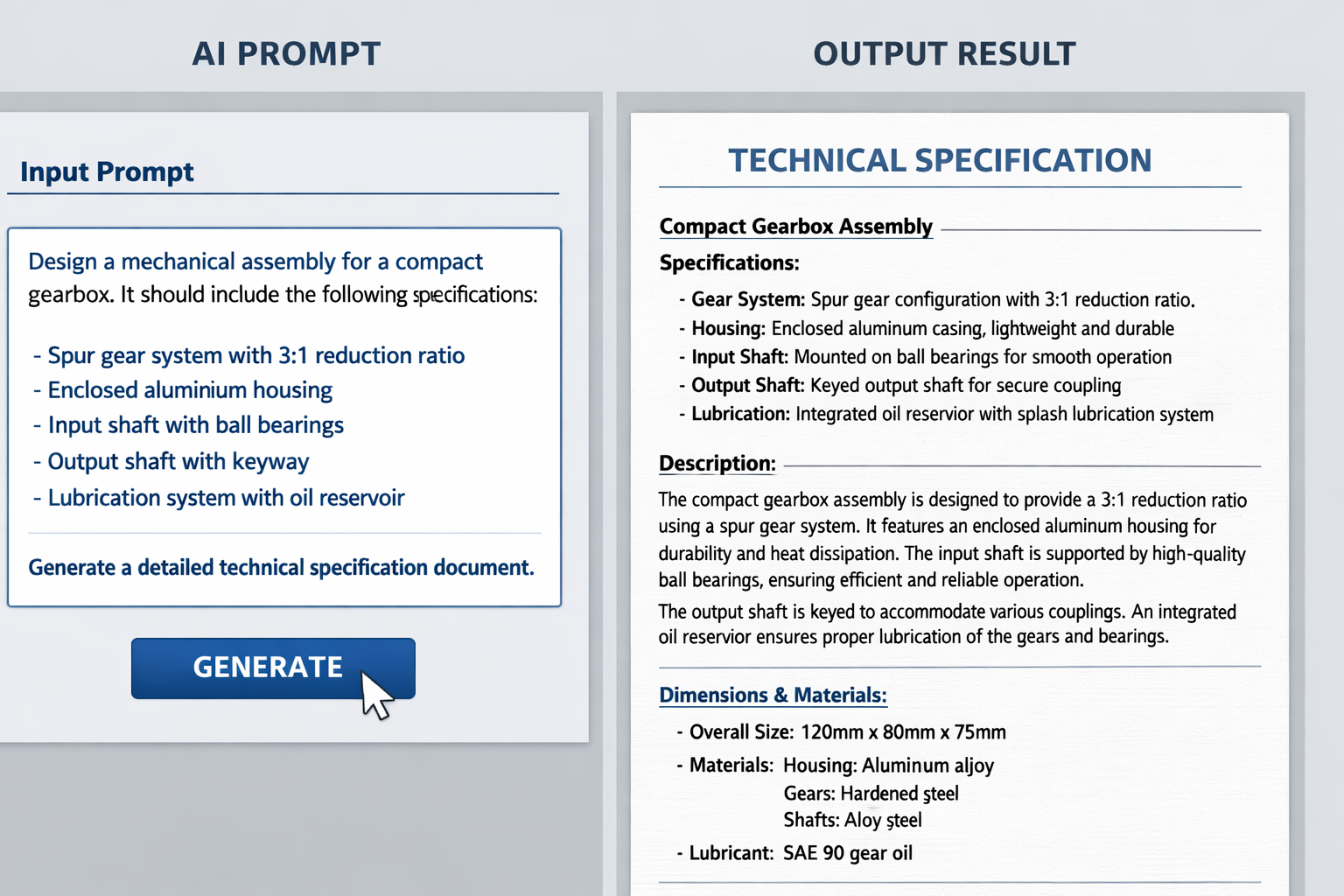
Let me be honest with you. I’ve spent years watching engineers, smart, experienced people, spend 60% of their time on work that shouldn’t take that long. Redrawing the same shaft geometry with slightly different dimensions. Writing the same fatigue analysis report with different numbers plugged in. Setting up simulation boundary conditions that any trained model could handle in seconds.
That’s not engineering. That’s data entry with better tools.
In 2026, something shifted. AI in mechanical engineering stopped being a novelty that could write you a poem and started becoming genuinely useful in technical workflows. The engineers who understood this early aren’t working faster they’re working on harder problems, because the repetitive layer is handled.
The key skill that separates engineers who use AI effectively from those who don’t? Prompt engineering in mechanical engineering. Knowing how to write instructions that get you useful, technically accurate output, not vague summaries you’d never use on the shop floor.
This guide covers CAD, simulation, documentation, and full AI pipelines, with real prompt examples you can actually use.
What Is Prompt Engineering? (For Engineers)
A prompt is an instruction to an AI model. That’s it. If you’ve ever written a CAD macro, defined a simulation load case, or written a test procedure, you already understand the concept: you’re giving a system a precise set of conditions and expecting a specific output. The difference is that AI works in natural language, but ‘natural’ doesn’t mean imprecise. The best prompts read more like engineering specifications than casual conversation.
Think of it this way:
CAD command: EXTRUDE distance=50mm direction=Z material=SS316- Engineering prompt: “Create a cylindrical shaft, diameter 50mm, length 200mm, stainless steel 316. Add 2mm chamfers on both ends. Output dimensions in SI units.”
Same precision. Different interface.
Why Engineers Need Structured Prompts
Here’s where most people go wrong. They treat AI like a search engine — throw in a vague query and hope for a useful answer.
- Vague prompt: “Design a bracket.” → Generic, unusable output. No material. No load case. No mounting pattern.
- Structured prompt: “Design a steel mounting bracket for a 5kg motor. Mounting surface: 120mm × 80mm. Bolt pattern: M8 bolts, 4-hole, 60mm × 40mm PCD. Expected load: 50N lateral, 20N vertical. Provide thickness recommendation with basic stress justification.” → Something you can take into a design review.
The pattern: be specific, define constraints, use engineering language.
Role of AI in Mechanical Engineering: The 2026 Shift
Where AI Is Actually Being Used
Stop reading about what AI might do someday. Here’s where AI in mechanical engineering is being used right now in real engineering teams:
- CAD and product design: generating initial geometry, automating parametric variations, suggesting topology optimizations.
- Simulation pre-processing: writing boundary condition setups, mesh strategy recommendations, interpreting FEA and CFD results in plain language.
- Documentation: probably the biggest win. BOMs, inspection reports, SOPs, technical data sheets. Hours of writing, cut to minutes.
- Manufacturing planning: DFM checks, tolerance stackup analysis, process selection recommendations.
From Prompting to AI Workflows
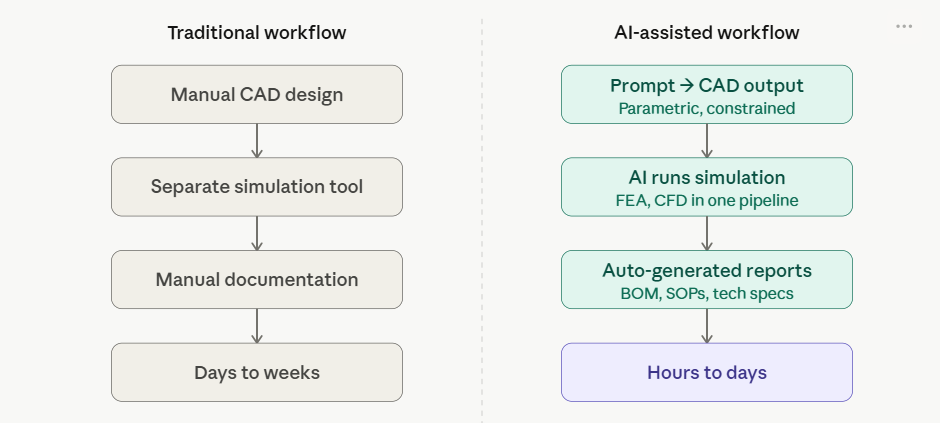
Single prompts are useful. But the real leverage comes from chained AI workflow engineering, where the output of one AI step becomes the input for the next. A design prompt generates a geometry description → that feeds a simulation setup prompt → simulation results feed a report generation prompt → report gets reviewed by the engineer. Each step is still engineer-directed. The AI doesn’t make the call — you do. But you’re making calls, not copying numbers into a template.
Prompt Engineering for CAD & Product Design
How AI Helps in the CAD Design Process
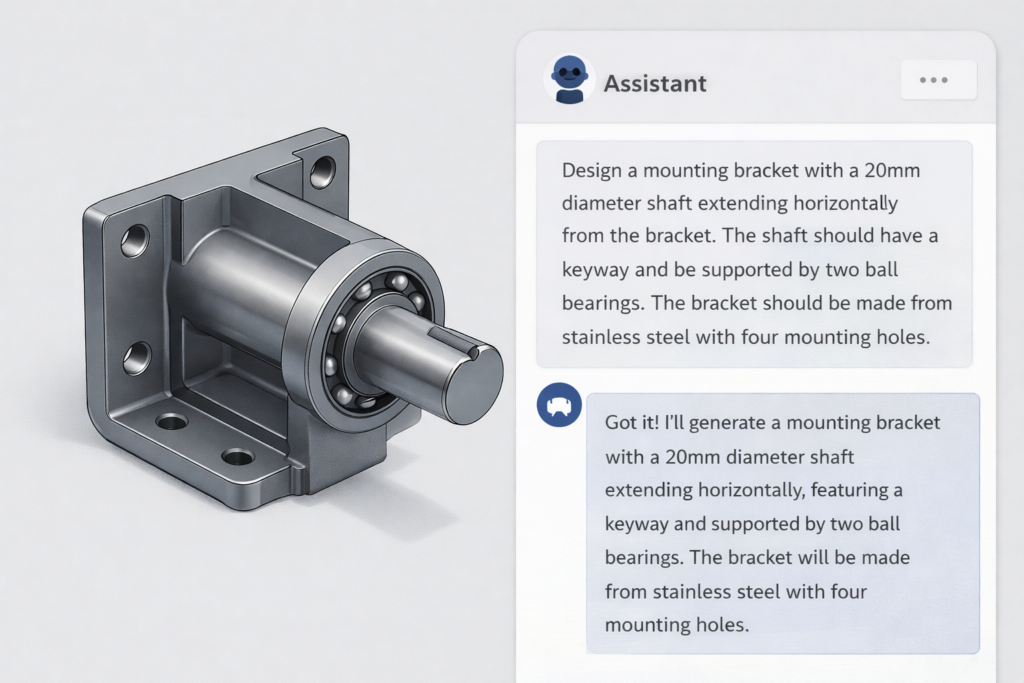
AI can’t open SolidWorks and move your mouse. Let’s be clear about that. What prompt engineering for CAD actually enables:
- Generate parametric model descriptions that you or a CAD tool can execute
- Suggest geometry based on functional requirements
- Review your design intent and flag potential issues before you model anything
- Automate repetitive variants, same component, twenty different sizes
Real Prompt Example: CAD Design
Create a 3D model specification for a cylindrical shaft with the following:
- Outer diameter: 50mm
- Length: 200mm
- Chamfer both ends: 2mm x 45 degrees
- Central keyway: 12mm wide, 5mm deep, 150mm long
- Material: 316 stainless steel
- Surface finish: Ra 0.8um on bearing seats
- Tolerance: h6 on journal diameters
Output: dimension table + GD&T callouts suitable for a manufacturing drawing
Compare that to “design a shaft.” The structured version gives you something you can take into a design review.
The Text-to-CAD Concept
Text-to-CAD is still maturing, but the trajectory is clear. Tools are moving toward accepting engineering specifications in natural language and generating parametric geometry directly. The underlying skill, writing specifications that are complete and unambiguous, is the same skill that makes you a good engineer. Prompt engineering for CAD just gives it a new application.
You may like: Claude AI for CAD Drafting: The Smarter Way to Design Faster in 2026
Prompt Engineering for Simulation & Analysis
Use Cases That Are Actually Ready
Not everything in simulation is AI-ready. But these areas are solid for AI for simulation and documentation:
- Structural analysis setup: defining loads, constraints, mesh strategy recommendations
- Thermal analysis: boundary conditions, material properties, solver settings guidance
- Results interpretation: explaining von Mises stress plots, identifying failure modes in plain language
- Load combination generation: creating the matrix of cases for fatigue or safety factor checks
Real Prompt Example: FEA Setup
Set up a structural analysis for the following scenario:
Component: steel I-beam (S275 grade)
Geometry: 2000mm length, 200mm x 100mm x 8mm web, 10mm flanges
Loading: 500N point load at midspan, applied vertically downward
Boundary conditions: simply supported — pinned at both ends
Required outputs:
- Maximum bending stress
- Mid-span deflection
- Safety factor vs yield (target SF >= 2.5)
Provide: hand calculation verification + recommended mesh density for FEA
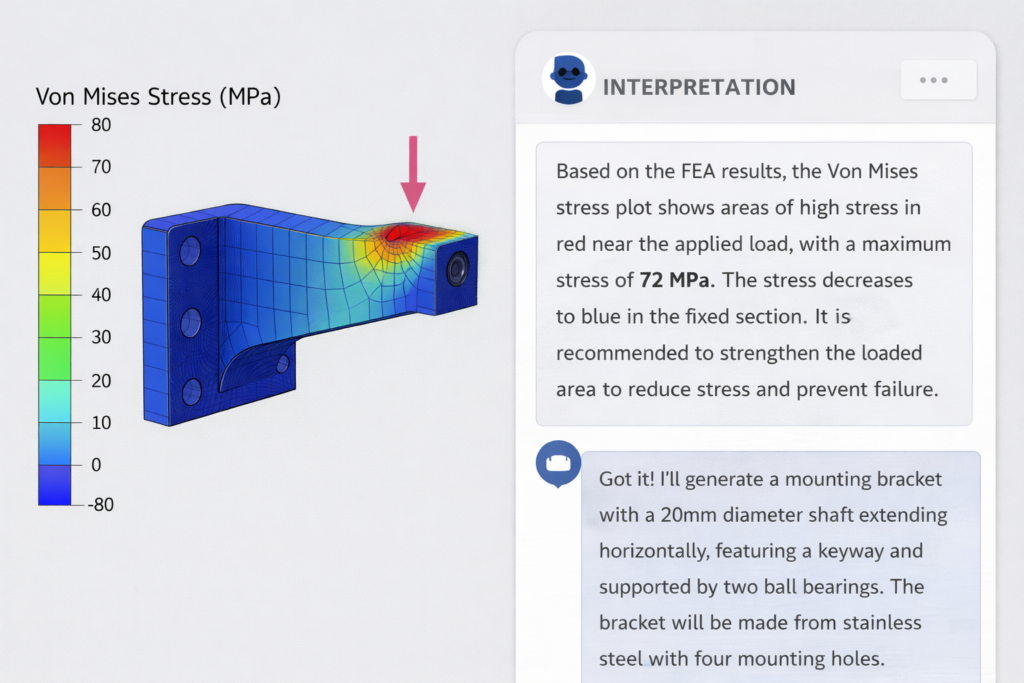
This is the kind of prompt that gets you something reviewable. Sanity check the hand calc, run the FEA, compare, and if they diverge, you know to look deeper.
Benefits in Practice
The time savings in simulation aren’t in the solver, it’s in the setup and interpretation. A junior engineer might spend half a day getting boundary conditions right and another half-day writing up what the results mean. A well-structured AI for simulation and documentation workflow cuts both significantly, freeing that engineer to spend time on decisions that require actual judgment.
AI for Engineering Documentation: The Hidden Gold
Nobody talks about this enough. Documentation is where AI pays for itself fastest.
What Can Be Automated
- Technical reports: test reports, design review summaries, failure analysis write-ups
- Bills of Materials: formatted, cross-referenced, with material callouts
- Standard Operating Procedures: step-by-step process docs from a rough description
- Inspection plans: characteristic-by-characteristic inspection criteria from a drawing
- Engineering Change Notices: structured change documentation with revision history
Real Prompt Example: Technical Report
Generate a technical report for the following mechanical assembly:
Assembly: Pump impeller, centrifugal, single-stage
Material: CA6NM stainless steel casting
Manufacturing process: Investment casting + CNC machining of wearing surfaces
Key dimensions: 320mm OD, 8 vanes, 45 degree vane angle
Report must include:
1. Material specification with relevant ASTM standard
2. Manufacturing process description and key tolerances
3. Surface finish requirements by zone
4. Pressure test requirements (hydrostatic at 1.5x working pressure)
5. Safety considerations for handling and installation
6. Quality acceptance criteria
Format: Section headings, metric units, formal engineering tone
Draft in 30 seconds. Review and revise in 10 minutes. Compare that to writing from scratch.
AI Workflows in Mechanical Engineering: The Real Game Changer
Traditional Workflow vs AI Workflow
Building a Real AI Workflow: Complete Example
Here’s a complete AI workflow engineering example: a bracket design through to documentation:
Step 1 Design Prompt:
Specify geometry for a cantilever bracket:
– Wall-mounted, single bolt row, M10 x 4 bolts
– 200mm projection
– Supports 80kg static load (785N) at tip
– Material: mild steel, S235
Output: recommended plate thickness, weld size at wall
Step 2 Simulation Prompt (using output from Step 1):
Verify the following bracket by hand calculation:
– 10mm plate, 200mm cantilever, 785N tip load
– Fixed at wall (full restraint)
Calculate: maximum bending stress, tip deflection
Compare against S235 yield (235MPa), target SF = 2.0
Step 3 Documentation Prompt:
Write a one-page design verification note for the bracket described above.
Include: design intent, load assumptions, stress calculations (insert values),
safety factor achieved, material spec, weld inspection requirement.
Format: engineering memo, signed/dated fields at footer.
Three prompts. One coherent output. The engineer reviews each step, catches errors, and makes judgment calls, not the arithmetic.
Claude AI vs Other AI Tools for Engineers
Where Claude AI Engineering Workflows Excel
Claude AI engineering workflows handle long, complex technical context better than most general-purpose models. If you’re writing a prompt that includes a full component specification, multiple load cases, material properties, and output formatting requirements, Claude maintains that context reliably through the response. It’s also strong on structured outputs, tables, numbered procedures, formatted reports, and it reasons through engineering problems step by step rather than jumping to answers, which matters when you need to audit the logic.
When to Use Other Tools
- CAD-specific AI tools (SolidWorks, Fusion), better for direct geometry manipulation. They have direct API access to the CAD kernel.
- Simulation software AI (ANSYS, Simcenter), better for direct solver interaction.
The pattern: use domain-specific tools for execution, use Claude AI engineering for reasoning, structuring, and documentation.
Best Practices for Prompt Engineering: What Actually Works
Five Rules That Matter
- Be specific about units, standards, and formats. “Metric units, SI, ASTM standards, decimal notation” should be in every engineering prompt.
- Define constraints before asking for output. Put loads, materials, geometry, and standards compliance before your question.
- Ask for justification, not just answers. Add “show the calculation” or “explain the reasoning” to any prompt where you need to audit the output.
- Use engineering vocabulary. “Von Mises stress,” “fixed-fixed boundary condition,” “h6 tolerance” use correct terms. Vague language produces vague responses.
- Iterate deliberately. First output is rarely final. Treat it like a first draft from a junior engineer review, identify gaps, write a refined prompt.
Common Mistakes Engineers Make
- Writing vague prompts and blaming AI. If your prompt doesn’t have enough constraints, the output can’t be better than random.
- Ignoring units and standards. Imperial vs metric. ASTM vs BS vs DIN. This kills usability fast.
- Expecting perfect output on the first try. AI is a first-pass tool, not a stamp-and-approve tool. Build review into your workflow.
- Not verifying against hand calculations. Any structural or thermal result from AI should be sanity-checked analytically. You’re the engineer of record.
- Using it in isolation. The power is in chained workflows. A full design-simulate-document pipeline saves hours.
Future of Prompt Engineering in Mechanical Engineering
What’s Coming That’s Actually Credible
- AI agents for engineering tasks: systems that take a high-level objective and autonomously run geometry check, stress calc, documentation, flagging anything that needs engineer review.
- Multimodal design: AI that reads your 2D drawings or 3D screenshots and responds to them. Some tools already do this; quality will improve significantly.
- Context engineering: moving beyond single prompts to persistent engineering contexts. AI that knows your company’s standard materials, preferred suppliers, design standards, and past designs.
- Autonomous simulation pre-processing: prompt-driven mesh generation, load case setup, and solver configuration that outputs directly to your FEA/CFD tool. The gap between “describing” and “running” a simulation is closing.
Conclusion
Prompt engineering in mechanical engineering isn’t magic, and it doesn’t replace engineering judgment. What it does is eliminate the overhead, the time spent on setup, documentation, and repetitive analysis that adds no intellectual value to your work.
The engineers who master AI workflow engineering in the next two years will have a significant competitive advantage. Not because they’re using AI, but because they’ll spend more time on the problems that actually require an engineer, the judgment calls, the creative design work, the decisions that carry consequences.
Start with one workflow. Pick prompt engineering for CAD, simulation, or documentation, whichever eats the most of your time right now. Build a handful of well-structured prompts. Iterate them. Build a library. Then expand.
The shift from manual to AI-assisted engineering doesn’t happen all at once. It happens one well-written prompt at a time.
Frequently Asked Questions (FAQs)
Q1: Can AI actually generate usable CAD models from text prompts?
Text-to-CAD is improving rapidly. In 2026, tools like Autodesk’s AI integration and standalone text-to-3D platforms can generate geometry from structured prompts. Output quality scales directly with prompt precision. Complex assemblies still require significant engineer review and refinement, but the starting point is dramatically faster.
Q2: Is prompt engineering a real skill worth learning for engineers?
Yes, it’s becoming as foundational as knowing how to write a good test spec or engineering memo. Vague prompts return vague results. Engineers who invest in structured prompt techniques consistently get higher-quality, usable AI output compared to those who treat it like a search engine.
Q3: Will AI replace mechanical engineers?
No, and the reason is practical, not philosophical. Engineering involves accountability, judgment under uncertainty, and design decisions with safety consequences. AI accelerates the repetitive analytical layer. It doesn’t replace the engineer who signs off on the design. The risk: engineers who don’t learn AI tools may lose ground to those who do.
Q4: Which AI is best for engineering documentation and simulation?
For documentation, report writing, and analytical reasoning Claude AI engineering workflows perform well due to strong context handling and structured output quality. For direct CAD manipulation and simulation execution, domain-specific tools embedded in ANSYS, SolidWorks, or Fusion 360 are better. Use them in combination, not competition.
Q5: How do I start using prompt engineering in my current engineering role today?
Start with documentation, it has the lowest risk and highest immediate payoff. Take your next inspection report, technical memo, or SOP and draft a structured prompt including the component description, key specifications, required sections, and output format. Review critically, iterate, and refine. Once you have two or three reliable prompt templates, move to simulation or design specification work.

Leave a Reply