A gearbox housing kept failing its final assembly check. Not often, maybe one unit in forty, but often enough to stop the line every shift over a shaft that wouldn’t seat against its retaining ring. Every individual part had passed inspection. Every dimension on every drawing sat within its stated tolerance stack up.
The engineering team spent two weeks chasing a phantom defect before someone laid all five parts in the stack-up out on a bench, added up their tolerances by hand, and found the answer. The design had been toleranced as if the parts would average out around nominal, but nobody had checked what happened if four of the five parts landed near the same edge of their range at once. When that happened, a small but real fraction of the time, the stack came up short by just over a tenth of a millimetre, and the shaft wouldn’t seat.
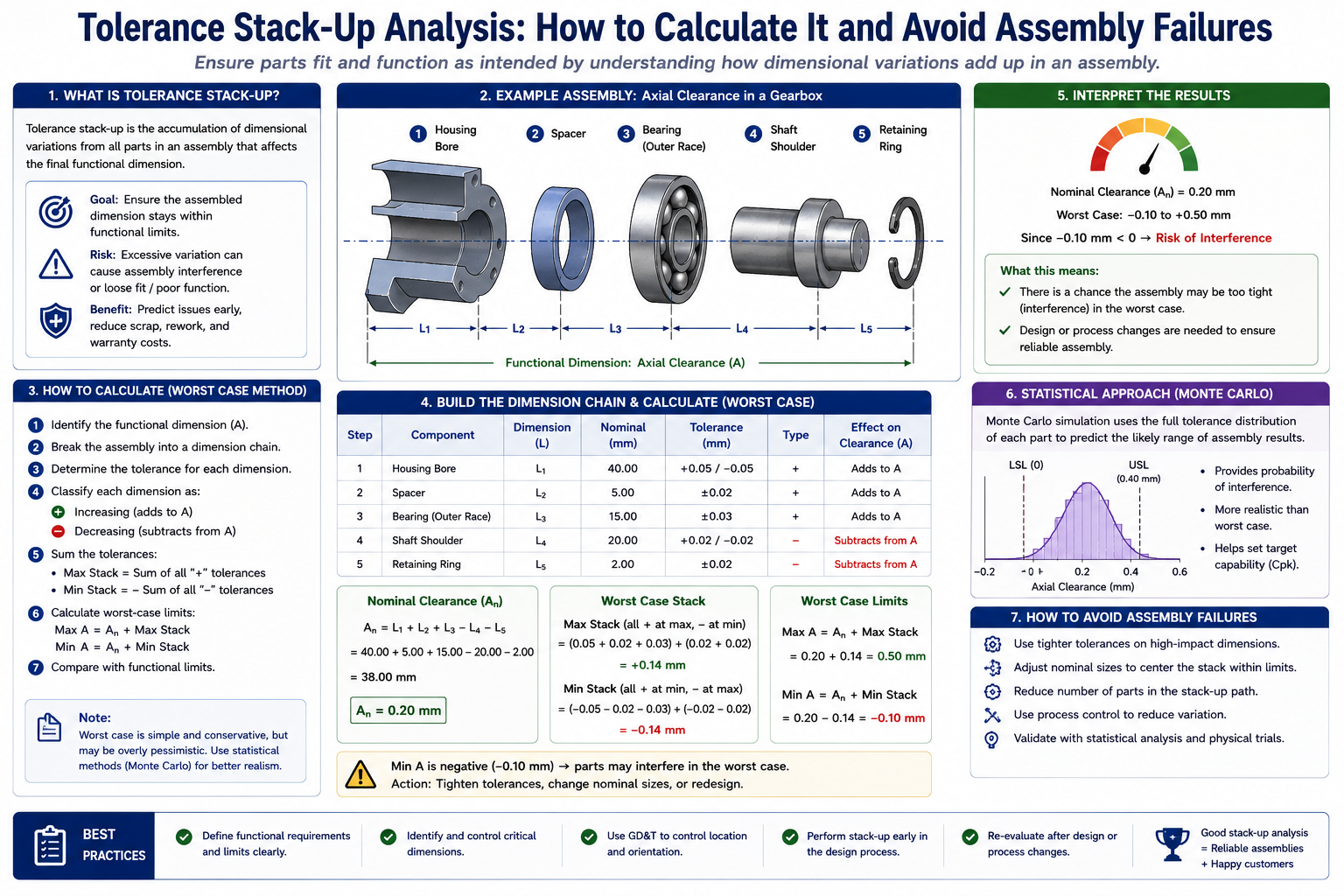
Quick answer: Tolerance stack-up is the accumulated effect of individual part tolerances on a final assembled dimension. It’s one of the most common ways a product that looks correct on every individual drawing still fails when the parts come together, because no single part is wrong; the problem lives in how several correct tolerances combine. The four standard calculation methods are worst-case, RSS (root sum square), Cpk-adjusted statistical analysis, and Monte Carlo simulation, and choosing between them is a real engineering decision with direct cost and quality consequences.
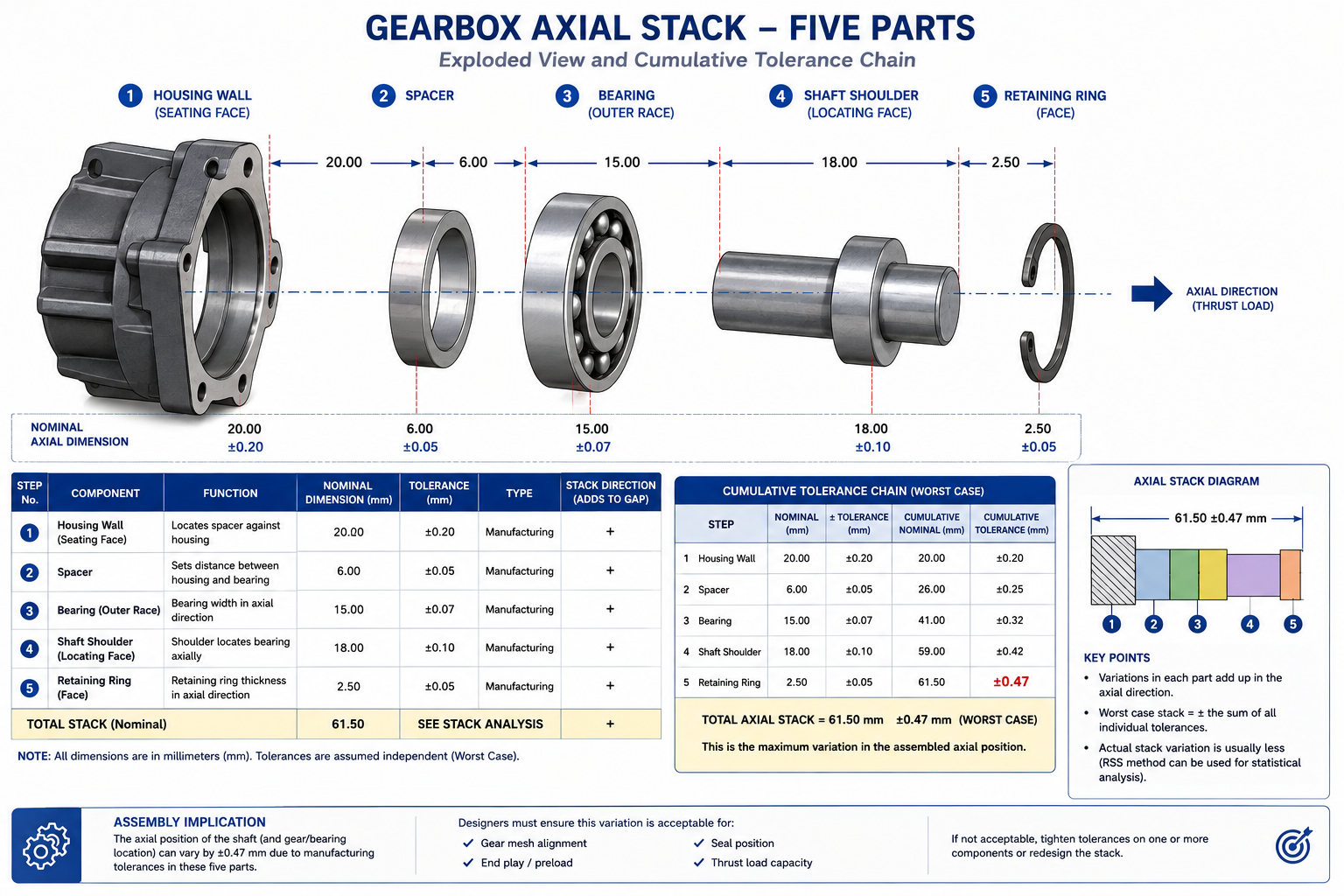
[Image suggestion 1: An exploded-view diagram of the five-part gearbox axial stack (housing wall, spacer, bearing, shaft shoulder, retaining ring) with dimension callouts and arrows showing the cumulative tolerance chain. Alt text: “Exploded diagram of a five-part gearbox tolerance stack-up showing housing, spacer, bearing, shaft, and retaining ring dimensions”]
What a Tolerance Stack-Up Actually Is
Every dimension on a drawing has a tolerance, a permitted range of variation around nominal. On its own, that tolerance describes how much one feature on one part can vary and still be acceptable. A stack-up happens whenever an assembled dimension, a gap, a clearance, an alignment, depends on more than one of those individually toleranced dimensions adding together. The assembled dimension inherits variation from every contributor in the chain, and a stack-up calculation answers a single question: how much can that final dimension actually vary, given everything feeding into it?
The gearbox chain had five links: housing wall location, spacer thickness, bearing width, shaft shoulder position, and retaining ring thickness. Each tolerance was individually reasonable and individually achievable. None of them was the problem. The problem was that nobody had calculated what all five could produce in the worst case, and the design was sized as though nominal values alone would always be close enough.
This is the trap that catches engineers comfortable with individual part tolerancing but who haven’t built the habit of tracing assembled dimensions back through every contributor. A stack-up isn’t a single calculation done once. It’s a discipline: identify every dimension contributing to a critical assembled feature, decide how those contributions combine, and check the result against what the assembly actually needs. Skip any one of those steps and the calculation, even with correct arithmetic, won’t tell you what you need to know.
Four Ways to Calculate a Stack-Up
There’s more than one accepted way to combine individual tolerances into a predicted range for the final assembled dimension, and the methods don’t agree with each other. Two engineers looking at the same five-part gearbox stack could reach different conclusions about whether the design is safe, depending entirely on which method they used.
Method
Formula (linear stack)
What It Assumes
Resulting Range
When to Use
Worst-case (arithmetic)
T_total = T1+T2+…+Tn
Every dimension simultaneously at its limit, worst combination, every time
Widest possible; guarantees 100% fit but most conservative and expensive
Each dimension varies independently, roughly normal distribution
Typically 40-60% tighter than worst-case for 4+ dimensions
Medium/high volume with statistically stable independent processes
Six Sigma (Cpk-adjusted RSS)
T_total = sqrt(sum((Ti/Cpki)²))
Each input has a known or assumed process capability, not just a tolerance
Tighter or looser than basic RSS depending on real Cpk
Mature processes with historical Cpk data; automotive, medical, aerospace
Monte Carlo simulation
Numerical: thousands of randomized trials
Each input’s actual distribution shape is known or reasonably estimated
Most accurate real-yield representation; handles non-linear stacks
Complex assemblies with 6+ contributors or non-normal distributions
Worst-Case: Simple, Safe, and Often Too Expensive
The worst-case method is the one most engineers learn first because the logic is completely intuitive: add every plus tolerance for the maximum stack, every minus tolerance for the minimum, and you have a guaranteed range covering every physically possible part combination. If the assembly works at both ends of that range, it works no matter what actually gets built. No statistical assumption hides in the background. It’s a hard guarantee.
The cost of that guarantee grows quickly as more dimensions join the chain. In reality, the chance that five independent parts all land at the same tolerance edge simultaneously is vanishingly small, smaller as more parts join the stack. Worst-case tolerancing protects against an outcome that’s real but rare for most production processes. That protection is worth paying for on a safety-critical aerospace joint, and much harder to justify on a cosmetic gap that would be far cheaper to fix with a slightly tighter tolerance somewhere else in the chain.
RSS: Letting Statistics Do the Work
RSS takes a different view of the same problem. Instead of assuming every part lands at its tolerance extreme simultaneously, it assumes each dimension varies independently around its own nominal, the way a real, statistically stable process actually behaves. Most parts come out close to nominal. Fewer land near the limits. The chance that several independent dimensions all land at an extreme together is much lower than the chance that any single one does, and RSS reflects that by combining tolerances as the square root of the sum of squares rather than a simple sum.
The result is almost always tighter than worst-case, often forty to sixty percent tighter once a stack has four or more contributors. That’s exactly why RSS is attractive: it predicts, correctly for processes that actually behave this way, that the assembled result varies less than worst-case suggests. The catch is real: RSS only holds up if the assumption is true. If a contributing process isn’t statistically stable, or if two dimensions in the stack aren’t actually independent because they come from the same tool or fixture, RSS understates the real variation, and a gearbox-style failure becomes a possibility the calculation never warned anyone about.
Cpk-Adjusted Statistical Methods: Bringing Real Process Data In
Basic RSS treats every contributing dimension as if its real variation exactly fills its stated tolerance band. In practice that’s rarely true. A mature, well-controlled process often clusters much more tightly around nominal than the tolerance alone suggests, while a newer process might run close to its limits. Process capability, expressed as Cpk, captures that difference.
Cpk Value
Sigma Level
Defect Rate (PPM)
What It Means
Typical Process Maturity
0.67
2 sigma
~22,750 ppm (2.3%)
Process spread nearly fills the band; frequent defects expected
New or poorly controlled; pilot run before optimisation
1.00
3 sigma
~1,350 ppm
Spread just fits under ideal centring; any drift causes defects
Marginal control; acceptable for low-consequence features
Variation a small fraction of the band; defects effectively eliminated
Six Sigma mature; semiconductor, medical, aerospace critical
Using actual Cpk data instead of a flat industry-default value changes the calculation meaningfully. A dimension running at Cpk = 2.0 barely uses its tolerance band and contributes very little real variation, while one at Cpk = 1.0 fills its band almost completely. A stack-up treating both the same, assuming a uniform Cpk across every contributor, will be wrong in one direction or the other. The only way to know which is to look at the actual process data, following the process capability framework laid out in the AIAG Statistical Process Control reference manual, rather than assume it.
Monte Carlo: When the Maths Gets Too Complicated for a Formula
Worst-case and RSS work cleanly for simple linear chains, but real assemblies aren’t always that simple. Some stack-ups involve trigonometric relationships, angular tolerances combining with linear ones, or contributors whose distribution isn’t close to normal, none of which fits neatly into the RSS formula. Monte Carlo sidesteps the problem entirely: it randomly samples each contributing dimension thousands of times according to its actual or assumed distribution, calculates the resulting assembled dimension for every random combination, and builds a complete picture of the likely outcome from the simulated results directly.
The advantage is that Monte Carlo handles almost any complexity, non-linear relationships, mixed distribution shapes, correlated inputs, without needing a closed-form formula for the specific geometry. The cost is that it requires dedicated tolerance analysis software or custom calculation setup, and the result is only as good as the distribution assumptions fed into it. For complex assemblies with six or more contributing dimensions, or stacks mixing angular and positional tolerances with linear ones, Monte Carlo is usually the most trustworthy method available.
A Worked Calculation: The Gearbox Stack-Up Revisited
Laying out the five contributing dimensions and running each method is exactly the exercise that would have caught the gearbox problem before it reached the assembly line.
CONTRIBUTING DIMENSIONS (mm):
  Housing wall to bearing seat:    25.00 +/- 0.10
  Spacer thickness:                 5.00 +/- 0.05
  Bearing width:                   12.00 +/- 0.08
  Shaft shoulder position:          8.00 +/- 0.06
  Retaining ring thickness:         2.00 +/- 0.03

NOMINAL STACK: 25.00 + 5.00 + 12.00 + 8.00 + 2.00 = 52.00 mm
Required clearance for correct seating: 52.00 mm +0.05 / -0.00

METHOD 1: WORST-CASE
  T_total = 0.10 + 0.05 + 0.08 + 0.06 + 0.03 = 0.32 mm
  Predicted range: 51.68 to 52.32 mm
  Against required +0.05/-0.00: EXCEEDS limit in worst case

METHOD 2: RSS (Cpk = 1.33 assumed, normal distribution)
  T_total = sqrt(0.10²+0.05²+0.08²+0.06²+0.03²) = sqrt(0.0234) = 0.153 mm
  Predicted range: 51.85 to 52.15 mm
  Against required +0.05/-0.00: STILL EXCEEDS the +0.05 limit

WHAT THIS REVEALS:
  Even the more forgiving RSS prediction (0.153mm) exceeds the
  functional requirement (0.05mm). This is not a method problem,
  it is a genuine design problem: the individual tolerances are
  too loose for the function.

CORRECTIVE ACTION TAKEN:
  Bearing width tightened from +/-0.08 to +/-0.03 (tighter-spec bearing)
  Housing wall tightened from +/-0.10 to +/-0.05 (reaming vs. as-drilled)
  New RSS: sqrt(0.05²+0.05²+0.03²+0.06²+0.03²) = 0.102mm
  Still tight vs. +0.05/-0.00 -- requires selective assembly
  or further tightening; escalated for design review
Every one of the five original tolerances was perfectly reasonable on its own drawing. None would have raised a flag in an isolated review. It was only adding them together, in the actual functional direction they combine, that revealed the design couldn’t meet its own clearance requirement. That revelation is the entire value of a stack-up calculation.
How Stack-Up Errors Show Up in Real Products
The same underlying problem, accumulated variation across a chain of dimensions, shows up differently depending on what’s being built.
Industry / Product
Example Stack-Up
Consequence
Typical Method Used
Automotive body-in-white
Door gap/flush: panel, hinge, striker, body opening
Visible gaps, wind noise, water leaks, warranty claims
RSS or Six Sigma Cpk-adjusted; Cpk >= 1.33 typical
Why Automotive Panel Gaps Are the Textbook Example
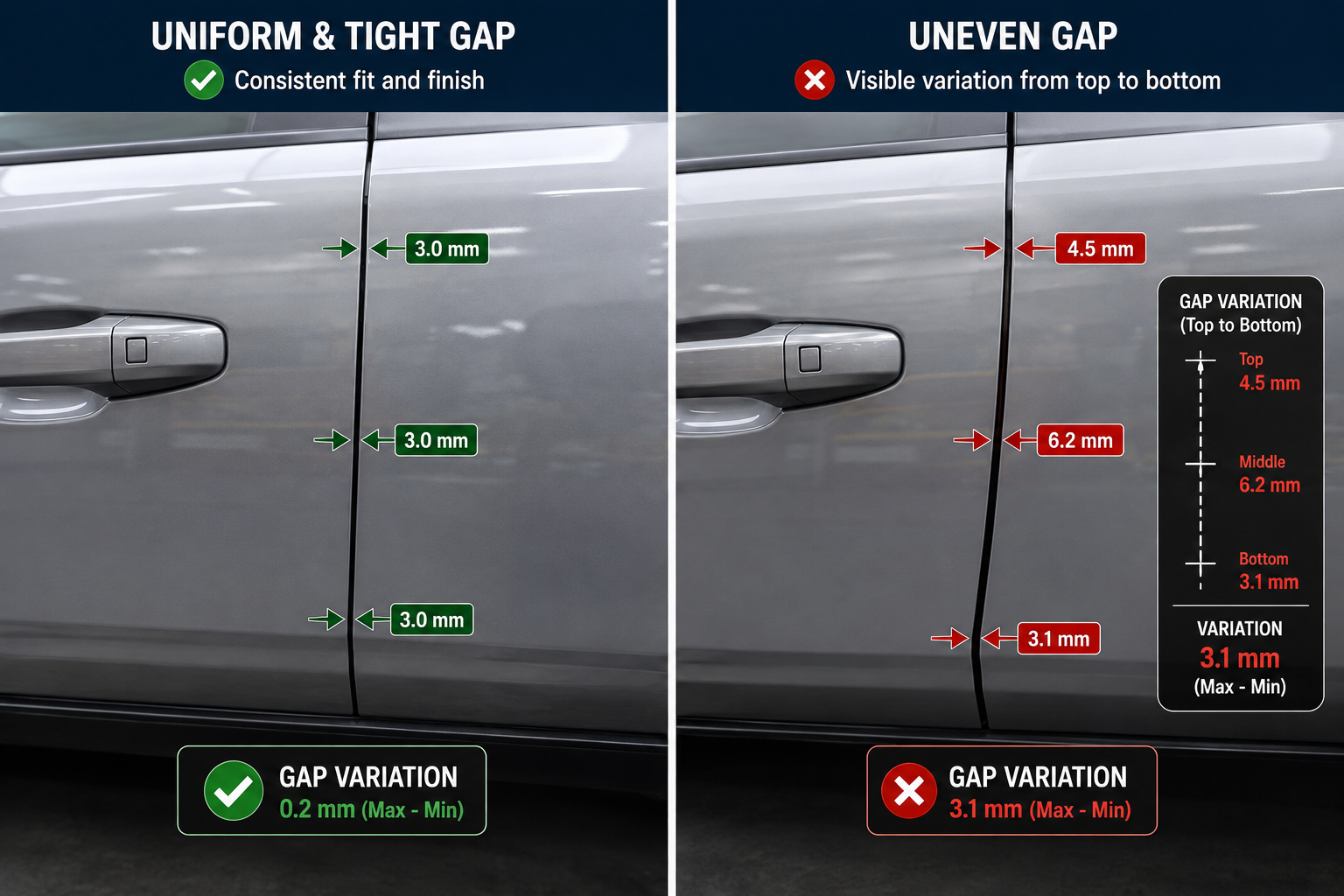
Door gaps and panel flush conditions are among the most visible, most photographed examples of tolerance stack-up in everyday life, because the human eye is extremely sensitive to uneven gaps between adjacent panels. A door gap varying from 4mm at the top to 6mm at the bottom is immediately obvious to a customer, even though both values might individually sit within a reasonable-looking tolerance.
That sensitivity is exactly why automotive OEMs push hard on statistical process control and Cpk targets for body panel dimensions. The stack-up producing a door gap runs through the body structure, hinge, striker, and door panel, and a worst-case approach applied to that whole chain would require individual tolerances so tight the parts would be prohibitively expensive at automotive volumes. The only way to hit both the cosmetic requirement and a sane production cost is statistical tolerancing backed by real, monitored process capability, which is why Cpk targets of 1.33 or higher on body panel dimensions are standard rather than an unusual aspiration.
Common Mistakes That Undermine a Stack-Up Calculation
A stack-up calculation can be arithmetically correct and still mislead, because the maths is only as good as the assumptions and completeness feeding into it.
Mistake
Why It Happens
Consequence
Fix
Mixing worst-case and statistical dimensions without flagging it
Different engineers contribute dimensions without agreeing on a shared method
Result is neither a valid worst-case bound nor a valid statistical estimate
Agree on the method per chain before dimensions are finalised; document it
Leaving out a contributor because it “shouldn’t matter”
Stack diagram built from the drawing without a deliberate walk of every contact
Calculated tolerance is optimistic; real assemblies show more variation
Build the stack from a physical or simulated walk of the actual load path
Treating a bilateral tolerance as one number instead of plus/minus
Quick mental math collapses +/-0.1 into 0.1 without tracking direction
Sign errors that understate or overstate the range, sometimes by 2x
Carry plus and minus contributions separately; use tools that enforce this
Assuming RSS without verifying independence and normal distribution
RSS is the default in most software, applied without checking assumptions
Correlated dimensions (shared tooling/fixture) make RSS understate variation
Identify shared process dependencies first; use Monte Carlo if correlated
Using Cpk = 1.33 for every dimension regardless of real history
It’s the common default and easier than pulling real capability data
Calculated yield is fictional if a process actually runs lower
Pull actual Cpk data wherever it exists; flag assumed values explicitly
Stacking only nominal dimensions and ignoring GD&T
Linear stacks are easier to set up than full GD&T-based stacks
Assemblies fail even when every linear dimension is in tolerance
Include position, perpendicularity, and flatness as contributors
The Independence Assumption Is the One Worth Double-Checking Most
Assuming statistical independence when it doesn’t actually exist is probably the mistake that causes the most damage while being hardest to spot from drawings alone. RSS and Cpk-adjusted methods both depend on each contributing dimension varying independently of the others. That holds reasonably well when each dimension comes from a genuinely separate process, machine, or setup.
It breaks down when two or more dimensions in the same stack are produced on the same fixture, machined in the same setup, or molded in the same cavity, because whatever makes that shared process drift, tool wear, thermal expansion, fixture wear, tends to push those dimensions in a correlated direction rather than randomly and independently. A stack-up treating correlated dimensions as independent understates real variation, sometimes significantly, which is exactly the gap between calculation and reality that produced the gearbox failure. The fix: before defaulting to RSS, ask whether any two contributors share a fixture, a tool, or a process step, and treat those as correlated if they do.
Building Stack-Up Analysis Into the Design Process
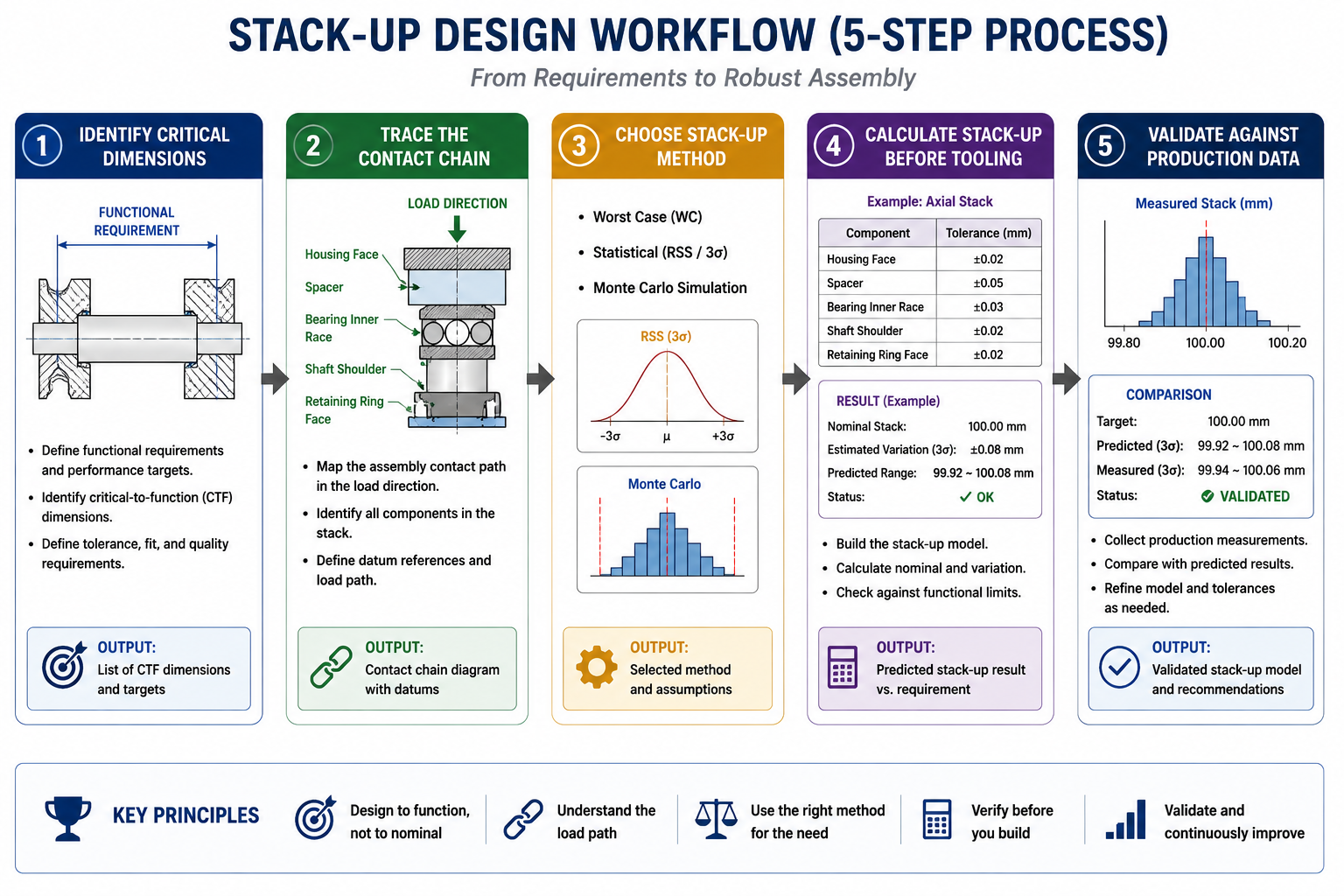
The gearbox failure wasn’t caused by a lack of skill. It was caused by the stack-up calculation simply not happening until after parts were already failing on the line. The fix isn’t a better formula, it’s a process change: deciding, as a matter of routine, which assembled dimensions warrant a formal stack-up calculation, and doing it before tooling is committed rather than after a quality problem forces the question.
Identify the critical assembled dimensions first. Walk the assembly and identify every gap, clearance, or alignment that actually matters functionally or cosmetically, deliberately rather than after a failure.
Trace the actual contact chain for each critical dimension. Trace every part, feature, and contact surface that physically contributes, the way the gearbox team eventually did on the bench. This step gets skipped or done from memory more often than any other.
Choose a stack-up method deliberately, and document the choice. Base it on the consequence of failure and the maturity of the contributing processes, and write the decision down.
Calculate before tooling, not after. Run it while the design is still in CAD and individual tolerances can still be adjusted cheaply.
Validate against real measured data once production starts. Compare the actual assembled dimension to the prediction, and use any gap to correct the assumptions feeding future stack-ups.
The minimum question to ask before releasing any assembly drawing: if every contributing dimension landed at the worst end of its tolerance simultaneously, would this still function? If the honest answer is no, and the design is relying on statistics to save it, that reliance needs to be a deliberate, documented decision, not an assumption nobody checked.
Frequently Asked Questions
What is the difference between worst-case and statistical tolerance stack-up? Worst-case adds up every individual tolerance directly, guaranteeing the assembly works for every physically possible part combination, but the predicted range grows quickly as dimensions join the chain, usually demanding tighter and more expensive individual tolerances. RSS assumes each dimension varies independently around nominal and combines tolerances as the square root of the sum of squares, producing a tighter, more realistic range, but only if the dimensions are genuinely independent and statistically stable.
When should I use worst-case instead of RSS for a stack-up? Use worst-case when the consequence of an out-of-tolerance assembly is severe: safety-critical interfaces, low-volume production, or any case where reliable process capability data isn’t available. Use RSS or Cpk-adjusted methods when volume is high enough that the processes are genuinely stable, the consequence of an occasional miss is manageable, and you can support the independence assumption. Many designs mix both: worst-case for the dimensions that matter most, RSS for the rest of the same stack.
What does Cpk actually measure and why does it matter for stack-up? Cpk measures how well a process’s actual output variation fits within the specified tolerance band, accounting for how centred the process is on nominal. A Cpk of 1.33 leaves a comfortable margin, roughly 32 defects per million. A Cpk of 1.0 barely fits the band, roughly 1,350 defects per million, with little margin for drift. Cpk matters because basic RSS assumes every dimension’s variation fills its tolerance band evenly, which is rarely true. Folding in real Cpk data lets the prediction reflect how parts are actually being made.
How many dimensions need to be in a chain before stack-up becomes a real concern? There’s no fixed number; it depends on the size of each tolerance relative to the functional requirement, not just the dimension count. As a practical rule, any assembled dimension built from three or more individually toleranced contributors deserves a deliberate calculation rather than an assumption that nominal values will be close enough. A five-part stack feeding a tight clearance, like the gearbox example, almost always needs one.
Can a tolerance stack-up calculation be wrong even if the arithmetic is correct? Yes. The arithmetic in a worst-case or RSS calculation is simple and rarely the source of error. The calculation goes wrong when the inputs are wrong: a contributor left out because it seemed unimportant, an assumed Cpk that doesn’t match the real process, an independence assumption applied to dimensions that actually share a fixture, or a sign error from collapsing a bilateral tolerance without tracking direction. A stack-up is only as trustworthy as the completeness and accuracy of what feeds into it.
Is Monte Carlo simulation always better than RSS for tolerance analysis? Not always, though it’s more broadly capable. RSS is fast, needs no special software, and gives a perfectly good answer for simple linear stacks with normally distributed, independent inputs, which describes a large share of real-world stack-ups. Monte Carlo earns its extra setup cost for non-linear relationships, non-normal distributions, or enough contributors and complexity that a closed-form RSS formula becomes difficult to set up correctly. For a five-part linear stack like the gearbox example, RSS is entirely adequate; for a complex multi-axis assembly mixing angular, position, and linear tolerances, Monte Carlo is usually more trustworthy.
Key Takeaways
Every individual dimension on every drawing in the gearbox assembly was correct. That’s exactly what makes tolerance stack-up worth taking seriously: it’s one of the few places in engineering where every individual piece of work can be done right and the overall result can still fail, because nobody added the pieces together and checked. The product didn’t fail from a mistake on a drawing. It failed because the relationship between five correct drawings was never examined.
Worst-case, RSS, Cpk-adjusted analysis, and Monte Carlo simulation aren’t competing answers to the same question. They’re different tools suited to different situations, and choosing between them is itself an engineering decision deserving the same deliberate attention as any individual tolerance. They all share the same purpose: turning a collection of individually reasonable tolerances into an honest answer about whether the assembled product will actually work, calculated before tooling is cut, not discovered after parts are already failing on the line.
Two engineers open the same CFD solver for the first time. One picks k-omega SST because that’s what the tutorial used. The other picks LES because it sounds more accurate. Three days later, the first engineer has a converged result within 5 percent of the experimental reference. The second engineer’s simulation is still running, has burned through 40 times more compute time, and is showing instabilities because the mesh was never designed for LES.
Neither engineer understood what actually drives the choice.
Quick answer: There is no single best turbulence model. The right choice depends on whether your flow is attached, mildly separated, or massively separated. Attached flow (aircraft cruise, pipe flow) works well with k-omega SST or Spalart-Allmaras. Massively separated flow (bluff bodies, post-stall wings, aeroacoustics) needs DES or LES, since RANS models cannot represent large-scale unsteady separation correctly at any mesh resolution.
Turbulence model selection is one of the most consequential decisions in CFD setup, and one of the least understood outside fluid dynamics specialists. The names are intimidating, the math involves closure assumptions most mechanical engineers never studied in depth, and solver documentation tends to be dense and hedged. This guide gives you a practical framework instead: what each model does, when it works, and how to choose for your specific problem.
Why Turbulence Needs Modelling
Turbulent flow is chaotic. At any point, velocity fluctuates rapidly around a mean value, across a huge range of scales at once. Large eddies, the size of the flow geometry, break down into medium eddies, then small eddies, all the way to the Kolmogorov scale, where turbulent kinetic energy finally dissipates into heat.
In a turbine passage, large eddies might span a centimetre. The Kolmogorov scale might be 10 to 50 micrometres. That’s roughly a 1,000-to-1 ratio in length, which becomes a 10⁹ ratio in required computational cells across three dimensions.
This is why turbulence gets modelled instead of resolved directly. The Navier-Stokes equations describe turbulence exactly, but solving them exactly, called Direct Numerical Simulation (DNS), requires meshes of 10¹² to 10¹⁶ cells and thousands of years of compute time at engineering Reynolds numbers. DNS is reserved for low-Re academic research and model calibration. Every practical engineering simulation needs a modelling strategy.
Three Strategies for Handling the Eddy Cascade
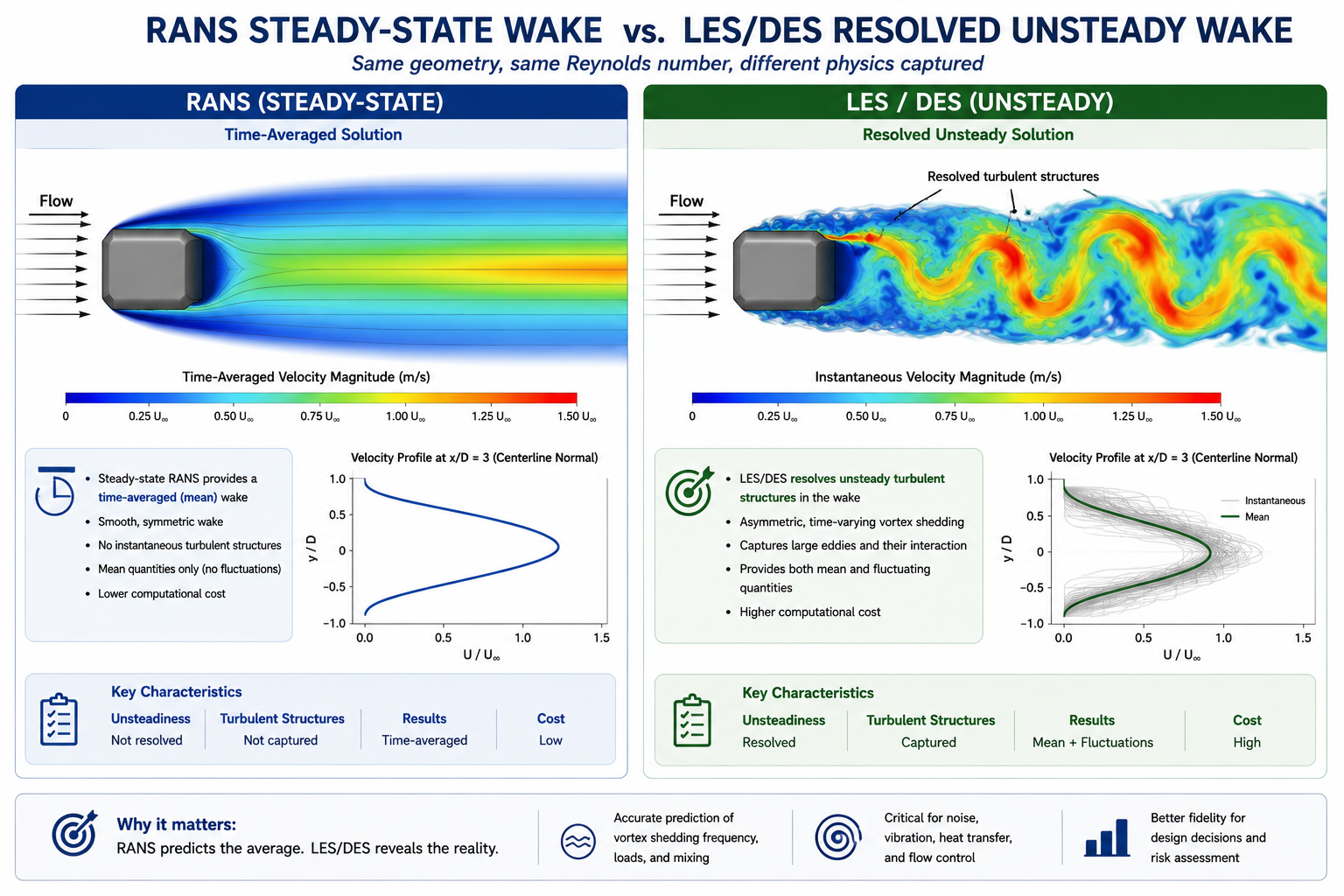
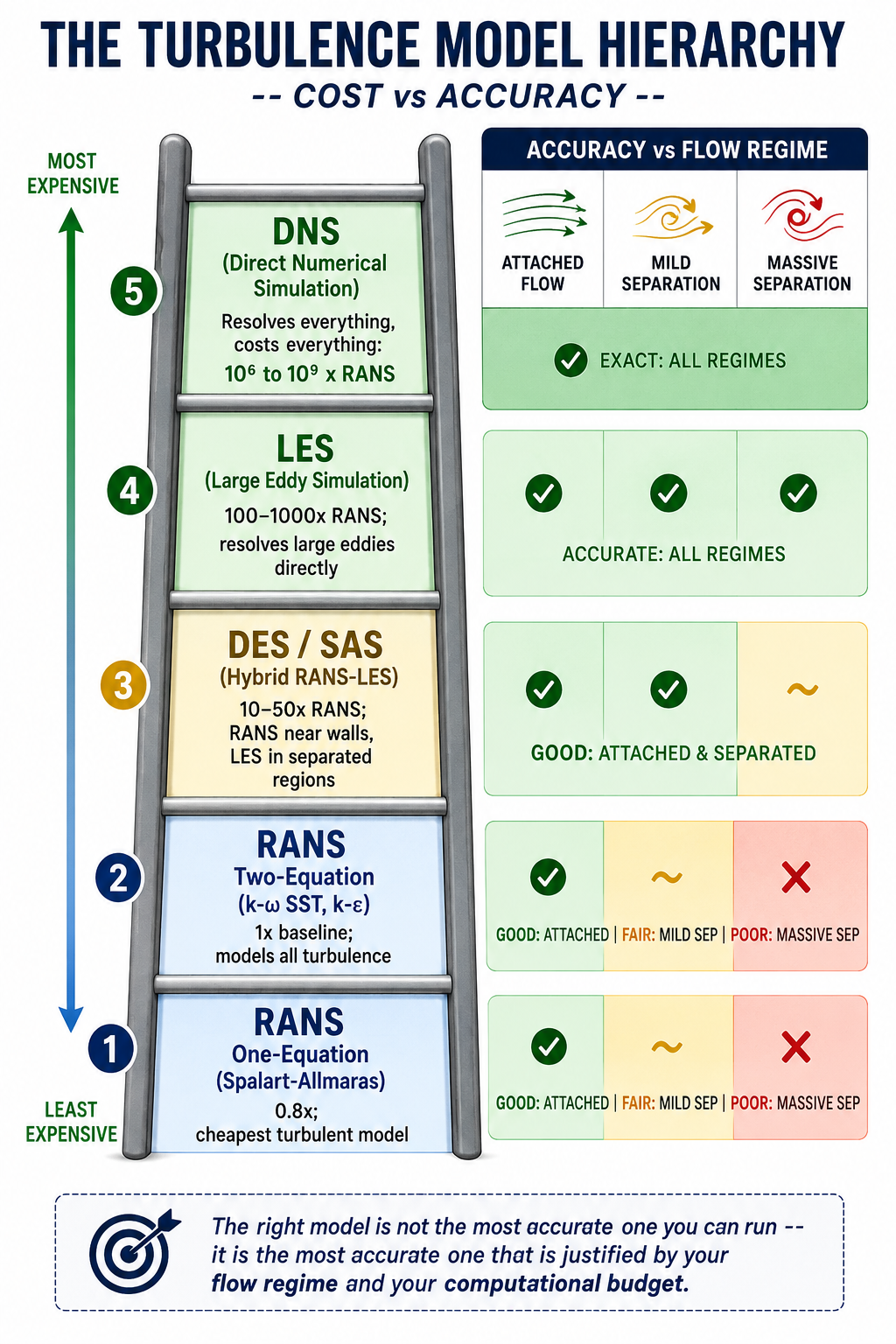
Model everything (RANS). Reynolds-Averaged Navier-Stokes models time-average the governing equations, removing turbulent fluctuations and replacing their effect with a turbulent viscosity term. RANS gives a single steady-state flow field. It’s the fastest approach and handles attached or mildly separated flow well.
Resolve the large eddies, model the small ones (LES and hybrids). Large Eddy Simulation filters the equations to resolve large, energy-containing eddies directly while modelling only the sub-grid scale eddies. It’s far more accurate than RANS for separated flows, but cost scales roughly with Re², making full LES impractical for high-Reynolds-number engineering problems.
Hybrid RANS-LES. Methods like Detached Eddy Simulation (DES) and Scale-Adaptive Simulation (SAS) use RANS near walls, where it’s accurate and cheap, and switch to LES-like behavior in separated regions, where large unsteady eddies dominate. This captures the physics that matters most at roughly 10 to 50 times RANS cost, versus 100 to 1,000 times for full LES.
RANS Models: The Workhorses of Industrial CFD
RANS handles the large majority of engineering CFD work, from automotive aerodynamics to HVAC design to turbomachinery. Knowing what each model is calibrated for, and where it breaks down, is the core practical knowledge.
Spalart-Allmaras: One Equation, One Purpose
Developed by Spalart and Allmaras at Boeing in 1992, this is the simplest widely used turbulence model. It solves a single transport equation for turbulent kinematic viscosity directly, skipping the k-epsilon or k-omega equations. That makes it the cheapest and most numerically robust RANS option.
SA was built specifically for external aircraft aerodynamics in attached or mildly separated flow, calibrated on flat plate and aerofoil boundary layers. It remains standard in NASA’s CFD codes. It is not designed for free shear flows, strongly separated flows, or anisotropic turbulence. Using it on a bluff body or a post-stall wing will produce wrong results no matter how good the mesh is.
The k-epsilon Family: Robust but Flawed Near Walls
Standard k-epsilon (Jones and Launder, 1972) was the first widely adopted two-equation model and remains common in non-aerospace industrial CFD. Its known weakness is poor near-wall behavior: the epsilon equation goes singular near the wall, forcing reliance on wall functions and limiting its usefulness where near-wall physics matters. In adverse pressure gradients, it over-predicts skin friction and delays predicted separation.
Realizable k-epsilon (Shih et al., 1994) improves on this by making the C_mu coefficient vary with local strain rate and enforcing mathematical realizability constraints. It performs noticeably better for round jets, mixing layers, and mildly separated flows, making it the preferred choice for combustion chambers and industrial internal flows.
k-omega SST: Why It Became the Default
Developed by Florian Menter and published in 1994, k-omega SST is now the standard model for industrial external aerodynamics and the default in most general-purpose solvers. It fixes the two biggest weaknesses of its predecessors: k-epsilon’s poor near-wall behavior and standard k-omega’s oversensitivity to freestream conditions.
SST does this with a blending function that transitions between k-omega near walls, where it gives excellent near-wall accuracy without wall functions at y+ below 1, and k-epsilon in the freestream, where it’s more robust. The switch is automatic based on wall distance. A built-in stress limiter also prevents over-production of turbulent viscosity in adverse pressure gradients, one reason SST predicts separation onset more accurately than either parent model, as detailed in Menter’s original AIAA paper introducing the model.
SST isn’t perfect. It still under-predicts separation onset in strongly adverse pressure gradients and misrepresents massively separated flow. A cylinder in crossflow, a stalled wing, or a blunt truck rear will all produce results that mesh refinement cannot fix. Those cases need a higher-fidelity model, or explicit acknowledgment that the RANS result carries large uncertainty.
Reynolds Stress Model: When Anisotropy Matters
Two-equation models rely on the Boussinesq assumption, that turbulent stress is proportional to mean strain rate. That assumption breaks down under strong swirl, curvature, buoyancy, or multiple concurrent shear stresses.
The Reynolds Stress Model solves transport equations for all six Reynolds stress components directly, abandoning Boussinesq. It handles anisotropic turbulence correctly, which helps for rotating machinery, strongly swirling combustors, and buoyancy-driven flows. The cost is 3 to 5 times higher than two-equation models, and it’s numerically less stable. For most industrial work, the accuracy gain over SST doesn’t justify the cost. Reserve RSM for cases where anisotropy is the governing physics, not a minor correction.
The 10-Model Comparison
Cost is relative to standard k-epsilon at equivalent mesh density. Accuracy is assessed separately for attached and separated flow, since these are fundamentally different challenges for a turbulence model.
Model
Type
Cost vs RANS k-e
Attached Flow Accuracy
Separated Flow Accuracy
Best Use Case
Avoid When
Spalart-Allmaras
RANS
0.8x
Good for thin boundary layers
Poor
Thin airfoil, attached aero
Any significant separation
k-epsilon (standard)
RANS
1.0x
Moderate; poor near walls
Poor
Internal duct/pipe flows
Near-wall or adverse gradient regions
k-epsilon (Realizable)
RANS
1.05x
Better for jets
Still poor for massive separation
Jet mixing, combustion
High-AoA aerodynamics
k-omega (standard)
RANS
1.0x
Excellent near-wall
Poor in freestream
Near-wall/transitional flow
Freestream-dominated problems
k-omega SST
RANS
1.1x
Excellent
Moderate
Default for most external/internal flow
Massively separated/bluff wake flows
Reynolds Stress Model
RANS
3-5x
Excellent for anisotropic turbulence
Better than 2-eq
Rotating machinery, swirl, buoyancy
General use (high cost, marginal gain)
DES
Hybrid
10-50x
Good
Good
High AoA, bluff bodies, separated wakes
Thin boundary layers, unrefined RANS zone
SAS
Hybrid
5-20x
Good
Good for massive separation
DES alternative
Weakly separated flows
LES
Scale-resolving
100-1000x
Excellent
Excellent
Aeroacoustics, fundamental studies
High-Re engineering flows (Re > 10^6)
DNS
Exact
10^6-10^9x
Exact
Exact
Academic turbulence research
Any engineering application
When RANS Isn’t Enough: DES, SAS, and LES
If a flow has large-scale, energetic, unsteady separation that governs the quantity you care about (drag, pressure fluctuation, noise, heat transfer in a separated region), RANS gives the wrong answer regardless of which two-equation model you pick. Time-averaging removes exactly the dynamics that dominate these flows.
Detached Eddy Simulation: The Practical Hybrid
Introduced by Spalart and colleagues in 1997, DES uses RANS in the attached boundary layer and switches to LES-like treatment in the separated region, based automatically on local mesh size relative to the model’s length scale. The widely used variant, Delayed DES (DDES), adds a shielding function to stop the model from switching to LES prematurely inside thick boundary layers, which early DES implementations sometimes did, causing modelled stress depletion and incorrect wall shear stress.
DES gives significantly better results than SST for bluff body aerodynamics, aerofoils near stall, and any separated flow where force coefficients or vortex structure matter. The 10 to 50 times cost penalty is real but manageable for problems where RANS produces 20 to 30 percent errors.
LES: When Only Resolved Unsteady Physics Will Do
LES is the right choice for aeroacoustics, where noise comes from turbulent pressure fluctuations at frequencies RANS can’t resolve, and for heat transfer in highly unsteady separated regions. Its biggest constraint is the near-wall mesh requirement: at Re = 10⁶, wall-resolved LES needs cell sizes on the order of micrometres, making a full vehicle or aircraft prohibitively expensive. Wall-modelled LES (WMLES), which blends a RANS-like near-wall model with outer-region LES, reduces this cost and is an active area of commercial solver development.
Scale-Adaptive Simulation: A DES Alternative
SAS, developed by Menter and Egorov, adds a von Karman length scale term to the omega equation instead of relying on DES’s grid-based trigger. It activates when the local flow length scale drops below the RANS equilibrium scale, letting the model resolve turbulent structures without needing a carefully designed RANS-to-LES transition mesh. In practice, SAS gives similar results to DES for strongly separated flows and is often more robust in transition regions.
Turbulence Model Selection for 12 Engineering Applications
This table is a starting reference, not a substitute for project-specific validation.
Engineering Problem
Recommended Model
Why
Watch For
Aircraft wing at cruise
k-omega SST
Best near-wall accuracy for attached flow
May predict separation 2-3° too late at high AoA
Automotive exterior (sedan)
SST for baseline; DES for wake detail
SST gives Cd within 5-8%; DES resolves unsteady wake
SST can under-predict blunt-rear separation by 10-20%
Circular cylinder in crossflow
DES or LES
RANS misrepresents wake width and shedding frequency
Run at least 10 shedding periods before extracting statistics
SST with ABL modifications; LES for pedestrian comfort
Handles time-averaged wind loads
Inlet profile must match ABL log-law and roughness
Gas turbine blade cooling
SST with gamma-Re_theta transition
Captures laminar-to-turbulent onset for heat transfer
Requires accurate inlet turbulence intensity
Centrifugal pump impeller
SST in rotating frame (MRF or sliding mesh)
Handles body forces and secondary flows
Needs rotation-corrected turbulence production term
Combustion chamber / burner
Realizable k-epsilon or RSM with combustion model
Compatible with combustion models; RSM better for swirl
Include radiation model for high-temperature flames
Aeroacoustic noise from aerofoil
LES with Ffowcs Williams-Hawkings analogy
Only LES resolves noise-generating structures
Mesh must resolve eddies at frequencies of interest
Ship hull resistance
SST with Volume of Fluid (VOF)
Standard for hydrodynamics; VOF captures wave resistance
Free surface mesh needs 20+ cells per wave height
Blood flow through a stent
Laminar/transitional SST with Carreau non-Newtonian model
Physiological Re is mostly laminar to transitional
Requires pulsatile BCs from measured waveforms
Understanding Model Constants
Every turbulence model contains empirical constants calibrated against experimental data for specific canonical flows. These aren’t free parameters to tune for a better match on one result. Adjusting them to fit a specific experiment is curve-fitting, not physics, and the modified constants will produce wrong results for any flow outside the case they were tuned to.
Model
Key Constant
Default
Controls
When to Modify
k-omega SST
a1 (stress limiter)
0.31
Max ratio of shear stress to k
Rarely; some codes use 0.302
k-omega SST
beta* (k dissipation)
0.09
Dissipation-to-k-omega relationship
Never
k-epsilon standard
C_mu
0.09
Overall turbulence level
Sometimes 0.06-0.07 for round jets
k-epsilon standard
C1_epsilon, C2_epsilon
1.44, 1.92
Production/destruction in epsilon equation
Only with specific swirl validation
Spalart-Allmaras
cb1, cb2, cv1
0.1355, 0.622, 7.1
Production, destruction, viscosity ratio
Only for transition modeling
The only legitimate reasons to change a constant: a published, peer-reviewed modification exists for a known model deficiency in your specific flow class, or you’re calibrating a transition model against measured data for one specific geometry and condition. Any other adjustment turns the simulation into result-tuning with zero predictive value for new conditions, even if it matches the calibration case perfectly.
Laminar-to-Turbulent Transition
Standard RANS models assume fully turbulent flow from the inlet. That’s fine at high Reynolds numbers, but for gas turbine blades at altitude, fan and compressor blades, low-speed wind turbine aerofoils, and small propellers, a meaningful part of the surface may still be laminar. Treating it as turbulent overestimates skin friction and misrepresents heat transfer.
The gamma-Re_theta transition model, developed by Menter, Langtry, and colleagues as an add-on to SST, solves two extra transport equations: one for intermittency (the fraction of time flow is turbulent at a point) and one for the transition momentum thickness Reynolds number. It compares local flow conditions against empirical transition-onset correlations and progressively activates the full turbulence model across the transition region.
This model matters most for gas turbine blade heat transfer, where laminar-versus-turbulent regions shift the local Nusselt number by a factor of 3 to 5, and for low-speed aerofoil performance, where leading-edge laminar separation bubbles govern maximum lift. It adds roughly 20 percent compute cost and needs correct freestream turbulence intensity to predict bypass transition accurately.
Practical Setup: Getting the Inlet Values Right
For k-omega SST, turbulent kinetic energy k and specific dissipation rate omega must be set at every inlet. Getting them wrong rarely causes divergence, but it shifts turbulence levels throughout the domain, especially near separated regions.
GIVEN: Freestream velocity V, turbulence intensity Tu, length scale L

k = 1.5 * (V * Tu)^2
Example: V=50 m/s, Tu=0.005 -> k = 1.5 * (0.25)^2 = 0.9375 m^2/s^2

omega = k^0.5 / (C_mu^0.25 * L), where C_mu = 0.09
Example: k=0.9375, L=0.01m -> omega ≈ 176.6 s^-1

epsilon = C_mu^0.75 * k^1.5 / L (for k-epsilon)
Example: k=0.9375, L=0.01m -> epsilon ≈ 14.9 m^2/s^3

Turbulent viscosity ratio target: 1-10 for low-Tu freestream; 10-100 for internal flows
Turbulence intensity guide:
Low-turbulence wind tunnel: 0.05 to 0.3 percent
Atmospheric boundary layer: 5 to 15 percent
Industrial pipe/duct flow: 3 to 8 percent
Turbomachinery inlet: 3 to 10 percent
Combustion chamber inlet: 5 to 20 percent
Turbulent length scale guide:
Pipe/duct flow: 0.07 × hydraulic diameter
Flat plate: 0.4 × boundary layer thickness
Wind tunnel: 0.01 × tunnel width
Atmospheric: 100 to 300 m at reference height
Steady RANS vs. URANS
URANS is appropriate when large-scale unsteadiness is periodic and much larger in scale than turbulence itself: vortex shedding, periodic stall, pulsatile pipe flow. It’s not a substitute for LES. It still models all turbulence, but lets large-scale unsteady structure develop instead of being averaged away.
If a steady RANS run oscillates and won’t converge, that’s a signal the flow is unsteady, not a convergence problem to push through with more iterations. Either time-average a URANS result or move to DES or LES. An arbitrary instantaneous snapshot of an unsteady solution has no defined physical meaning.
Running a Turbulence Model Sensitivity Study
For any result feeding a design decision, run the same geometry, mesh, and boundary conditions through two or three models (say, SST, Realizable k-epsilon, and Spalart-Allmaras for external aero) and compare. Agreement within 5 percent for Cd and 2 percent for Cl means turbulence model choice isn’t the dominant uncertainty. Disagreement above 10 percent means it is, and the choice needs justification against experimental or higher-fidelity data.
A Cp comparison along the surface also shows where the models diverge: leading edge points to transition or stagnation issues, suction surface points to adverse pressure gradient handling, trailing edge points to separation and base pressure.
Worked Examples
Wind load on a low-rise industrial building: A team needed pressure coefficients on a 10m tall, 40m wide, 20m deep building in open terrain for structural loading. They used k-omega SST with an ABL inlet profile matched to a roughness length of 0.03m, generating 15 percent turbulence intensity at roof height. Time-averaged Cp on windward and side walls landed within 10 to 15 percent of wind tunnel data, adequate for code compliance.
The roof was the exception: leading-edge separation over the first 20 to 30 percent of the roof width under-predicted suction by 15 to 25 percent, since SST can’t fully capture that separated zone. LES or wind tunnel data would be needed if the roof were the governing structural case.
Pump impeller at part-load: At 60 percent of design flow, incidence angle at the impeller inlet risked leading-edge separation and rotating stall. The team used SST in a rotating reference frame with sliding mesh for full transient impeller-volute interaction, since steady MRF averages away the tongue-blade interaction that dominates at off-design. Running through 5 impeller revolutions after reaching a stationary state gave head and efficiency predictions within 3 to 5 percent and 2 to 3 percentage points of the test curve at design point, with correct off-design trends even where absolute values differed by 5 to 10 percent.
Frequently Asked Questions
What is the best turbulence model for CFD? There isn’t one. k-omega SST is the industry standard for attached or mildly separated external aerodynamics. Massively separated flows need DES or LES. Aeroacoustics requires LES, since RANS can’t predict the pressure fluctuations that generate noise. Start with SST, validate against a reference, and upgrade only when SST shows a real discrepancy in the regime that matters.
What’s the difference between k-omega and k-omega SST? Standard k-omega has excellent near-wall behavior but is highly sensitive to the omega value set at the freestream inlet, which makes it unreliable for external flows. SST blends k-omega near walls with k-epsilon in the freestream, switching automatically based on wall distance, and adds a stress limiter that improves separation prediction. That combination is why SST outperforms both parent models for external aerodynamics.
When should I use DES instead of RANS? When the flow is separated over a significant area at your operating condition, and the drag, pressure distribution, or acoustic output you’re predicting depends on the structure of that separated region. Common triggers: bluff bodies with large wakes, aerofoils within 3 to 5 degrees of stall, deployed flaps or spoilers, and any case where unsteady loads or vortex structure matter. Budget 10 to 50 times the cost of SST.
Can I use RANS for unsteady problems? Yes, as URANS, when the dominant unsteadiness is large-scale and periodic, like vortex shedding or pulsatile flow. It’s not appropriate when the unsteadiness comes from the turbulence itself or from separated-region dynamics at a scale close to the turbulence scale; those cases need DES or LES.
How much does turbulence model choice affect the final result? For attached flow, different RANS models typically agree within 3 to 8 percent for drag and 1 to 3 percent for lift, so model choice isn’t the dominant error source. For separated flows, RANS models can disagree by 20 to 50 percent, making model choice the largest source of uncertainty. For acoustics, RANS is wrong by orders of magnitude regardless of model, since it averages away the noise source entirely.
What does y+ have to do with turbulence model selection? Different models need the first wall cell in different parts of the boundary layer. Low-Re models and SA need y+ below 1. Standard wall functions need y+ between 30 and 300. Mismatching the mesh to the model, or landing in the 5-to-30 buffer layer, produces wall shear stress errors of 10 to 40 percent regardless of which model you chose. Decide the near-wall treatment before generating the mesh, then check y+ post-solution.
Key Takeaways
Turbulence model selection isn’t about running the most accurate model available. It’s about matching the physics that governs your quantity of interest to a cost justified by the engineering decision at hand. LES on a duct pressure drop wastes compute resolving detail that changes the answer by under 1 percent. SST on a bluff body aeroacoustics problem gives noise predictions wrong by orders of magnitude. Both are the wrong choice, just in opposite directions.
Start by classifying the flow: attached, mildly separated, or massively separated. Attached flow needs SST or SA. Massive separation needs DES or LES. Mild separation needs SST plus a sensitivity study against a higher-fidelity reference. Then check secondary physics: rotation needs correction terms, transition needs the gamma model, strong anisotropy may need RSM. Finally, match the near-wall treatment and mesh to the y+ range that treatment requires.
None of this removes the need for validation against a reference before trusting a result for a design decision. The models here have documented accuracy ranges and known failure modes. Working inside those ranges, with validation, gives reliable results. Working outside them without validation gives results indistinguishable from wrong ones.
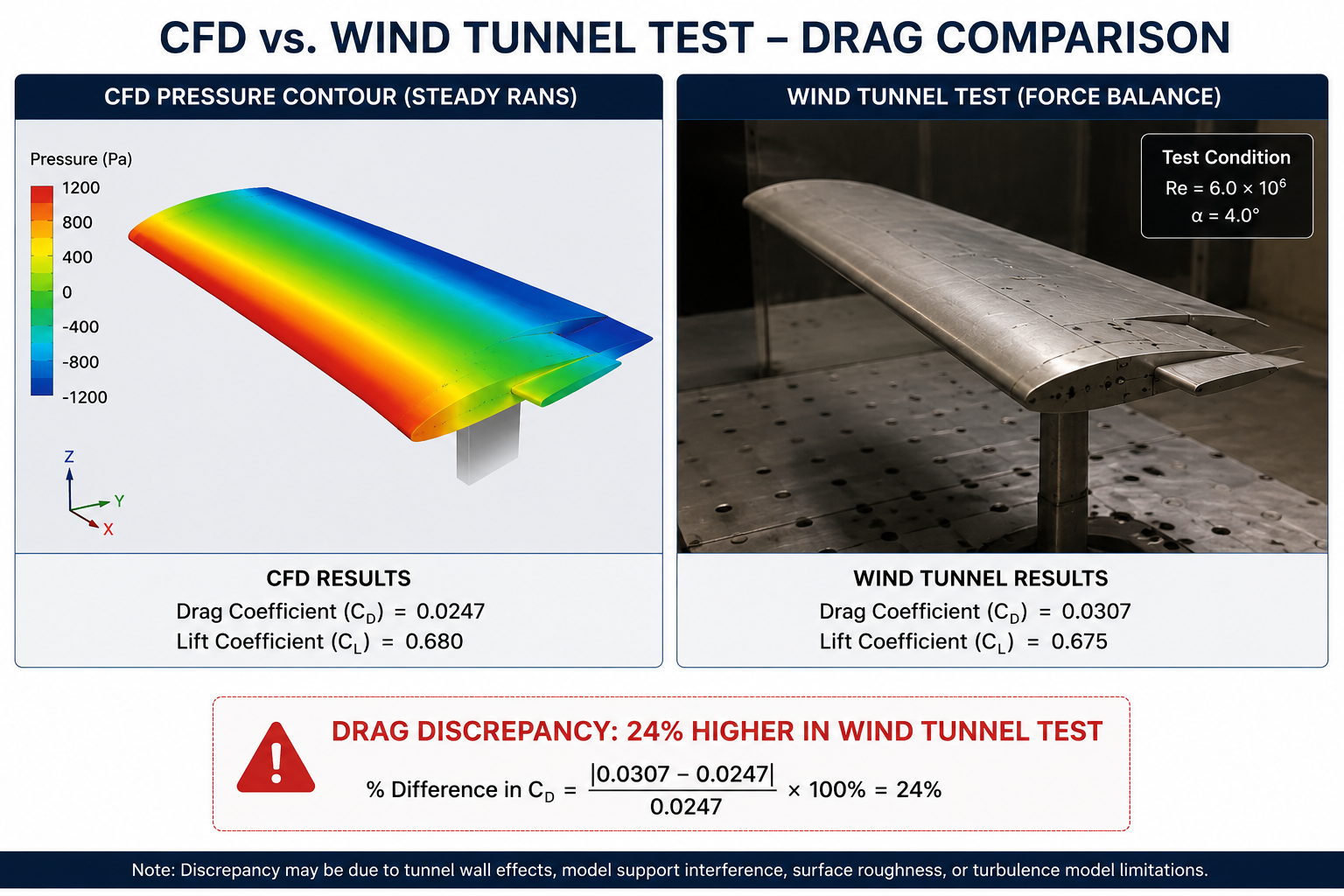
A recent CFD run took four days to set up and 16 hours to run on a 128-core cluster. The predicted drag coefficient was 0.287. The wind tunnel measurement for the same configuration was 0.231. That’s a 24 percent error, and it had nothing to do with turbulence model uncertainty or geometry mismatches.
The real cause was three stacked setup errors: a domain that ended too soon behind the wing, a first-cell y+ value stuck in the unreliable buffer layer, and a convergence call made from residuals alone while the drag coefficient was still drifting. Each error alone would have cost 5 to 10 percent accuracy. Together, they made the result useless for the design decision it was meant to support.
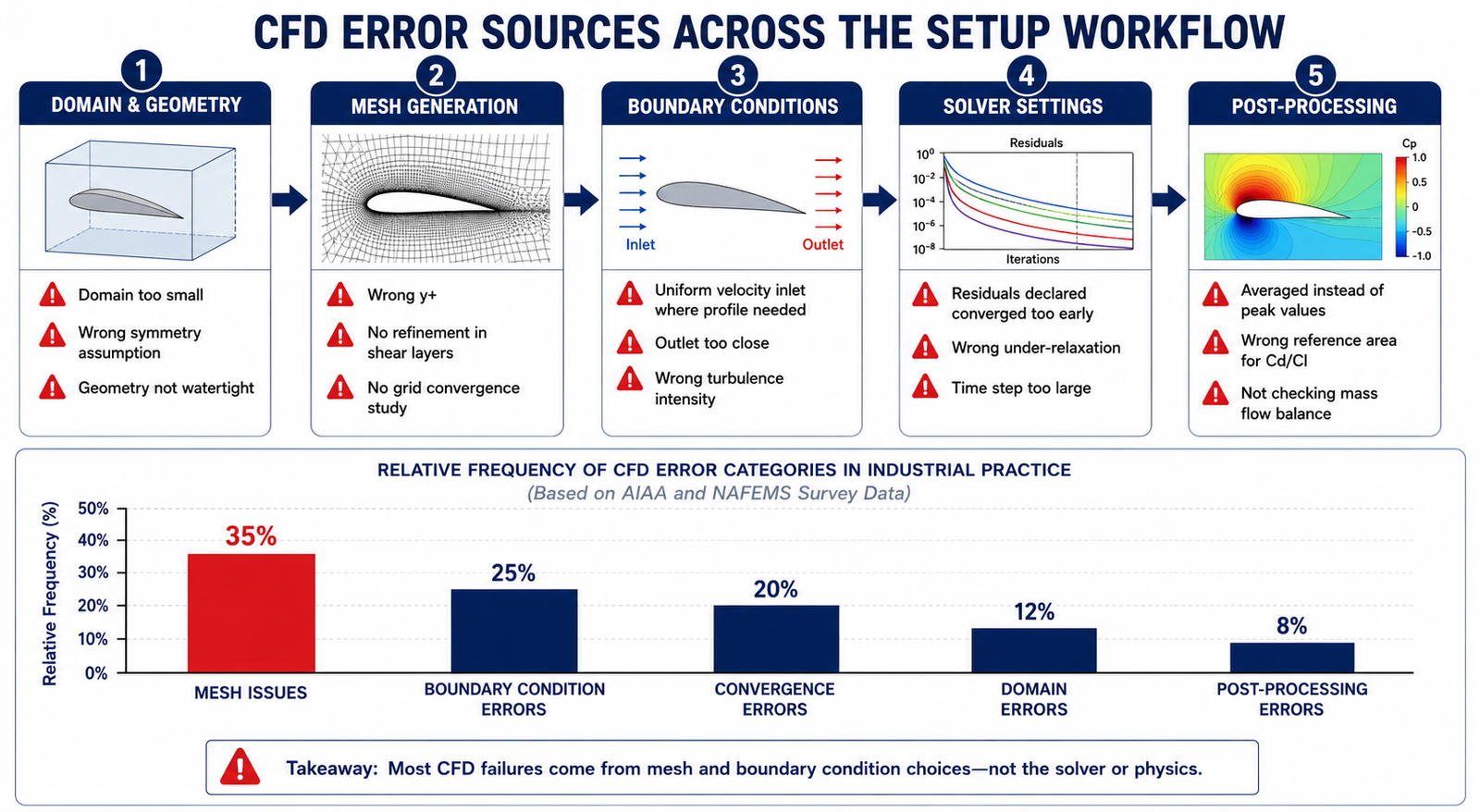
Quick answer: The most common CFD setup mistakes fall into five categories: domain and geometry, mesh quality, boundary conditions, solver settings and convergence, and post-processing. None of them show up as solver errors. The simulation still converges, the plots still look smooth, and the numbers still look plausible. That’s what makes them dangerous, and why systematic checking, not visual inspection, is the only reliable way to catch them.
CFD setup mistakes happen before the solver ever runs, in decisions about domain size, mesh topology, boundary conditions, and solver parameters. Like FEA preprocessing errors, they produce output that looks completely valid: smooth contours, stable force coefficients, clean convergence histories. The solver never flags them. Only systematic verification, domain independence, mesh independence, y+ checks, mass conservation, and monitored-quantity convergence, can catch them before a bad result reaches a design review.
The 20 Most Common CFD Setup Mistakes at a Glance
The table below lists all 20 mistakes by category, typical error magnitude, how to detect them, and priority. Critical items produce errors above 10 percent and cannot be trusted without correction. High priority items introduce meaningful risk that compounds with other errors. Medium items are good practice that improves reliability and prevents downstream post-processing problems.
#
Mistake
Category
Typical Error
Detection Method
Priority
1
Domain too small
Domain / Geometry
5–30% in force coefficients
Extend boundaries and rerun; compare results
Critical
2
Wrong turbulence model for the regime
Physics
10–50% drag error in separated flow
Compare RANS vs DES/LES against test data
Critical
3
y+ wrong for the near-wall model
Mesh
10–40% skin friction error
Check y+ distribution post-solve
Critical
4
Insufficient mesh in shear layers/wakes
Mesh
10–40% wake drag error
Grid convergence study
Critical
5
Wrong inlet turbulence intensity/length scale
Boundary Conditions
5–20% error in transition/separation
Match Tu and length scale to real conditions
High
6
Outlet too close to the body
Boundary Conditions
Divergence or false backflow
Move outlet 10–20 diameters downstream
Critical
7
Symmetry plane on asymmetric flow
Boundary Conditions
Fundamentally wrong result
Verify symmetry with a full-domain reference run
Critical
8
Wrong pressure-velocity coupling scheme
Solver Settings
Slow convergence or divergence
Use COUPLED for high-Re external aero
High
9
Convergence declared from residuals alone
Convergence
5–25% error
Monitor lift, drag, and mass flow vs. iteration
Critical
10
Too few iterations for steady state
Convergence
Scattered, unstable averages
Run until monitors vary < 0.1% over 200 iterations
High
11
Wrong reference area/velocity for Cd/Cl
Post-processing
Error equal to the ratio of areas used
Document reference values before computing
High
12
Averaged instead of peak values reported
Post-processing
10–40% under-reporting at peaks
Use unaveraged, cell-centred values at critical points
High
13
Wall functions applied at y+ < 30
Mesh
10–30% skin friction over-prediction
Target 30 < y+ < 300 for wall functions
High
14
Missing refinement at leading/trailing edges
Mesh
Wrong pressure distribution, circulation
Cluster mesh at stagnation and wake regions
High
15
Periodic BC on non-periodic flow
Boundary Conditions
Artificial forced periodicity
Verify true periodicity before applying
Medium
16
Wrong fluid properties at operating temperature
Physics
Re error scales all downstream results
Compute Re from actual target conditions
High
17
Time step too large in transient runs
Solver Settings
Aliased or missed unsteady features
Keep Courant number in the recommended range
High
18
Mass flow imbalance not checked
Convergence
Non-physical pressure and force fields
Confirm imbalance < 0.1% of inlet mass flow
Critical
19
Default under-relaxation for all cases
Solver Settings
Divergence or oscillation
Reduce to 0.3–0.5 for difficult problems
Medium
20
No grid convergence study
Mesh
Unknown discretisation error
Run coarse/medium/fine mesh; report GCI
Critical
Category 1: Domain Size and Geometry
Domain size errors are the hardest CFD mistakes to catch from a single run. A domain that’s too small still converges cleanly and looks physically reasonable. The error only surfaces when you enlarge the domain and the results shift, or when you compare against test data and find a systematic bias.
Mistake 1: Domain Too Small
The downstream extent is the dimension analysts underestimate most. If the outlet boundary intersects the wake, or the body’s pressure field reaches it, the outlet condition distorts pressure around the body and skews the drag prediction. Lateral extents should keep blockage ratio below roughly 5 percent.
How to check it: run the original domain, then extend every boundary by 50 percent and rerun. If drag or lift changes by more than 1 percent, the domain was too small. This domain independence study should be standard practice before any result is reported.
Flow Configuration
Inlet Distance
Outlet Distance
Lateral Extent
Top/Bottom Extent
External aerofoil/wing (2D)
10–15 chords
20–30 chords
10–15 chords
10–15 chords
External body (car, building), 3D
5–10 lengths
15–20 lengths
5 widths each side
5 heights + ground clearance
Internal duct/pipe flow
10–20 diameters
30–50 diameters
Wall boundary
Wall boundary
Bluff body (cylinder, facade)
10 diameters
30–40 diameters
10 diameters each side
10 diameters
Turbomachinery blade passage
1–2 chords
2–3 chords
Periodic at blade pitch
Periodic or hub/tip wall
Wind over terrain (ABL)
5–10 building heights
15–20 building heights
5 heights each side
6 heights or to gradient height
Mistake 7: Symmetry Applied to Asymmetric Flow
A symmetry plane halves the computational cost, but only when the physics is genuinely symmetric. Many flows that look symmetric aren’t. A cylinder produces an alternating vortex street. A sphere develops an off-axis wake at moderate Reynolds number. A wing at high angle of attack can separate asymmetrically even with symmetric geometry.
Forcing symmetry on an asymmetric flow produces wrong separation onset, wrong stall angle, and often solver oscillation as it fights the imposed constraint. Test it with a full-domain run and no symmetry plane. If the result is symmetric to within 0.1 percent, the assumption holds.
Category 2: Mesh Quality and Refinement
Mesh errors cause roughly 35 percent of all CFD accuracy problems in industrial practice, making this the single largest error source. Unlike domain errors, mesh errors can be local, affecting only a poorly resolved feature, which makes them harder to catch with a simple sensitivity study.
Mistake 3: Wrong y+ Value for the Near-Wall Treatment
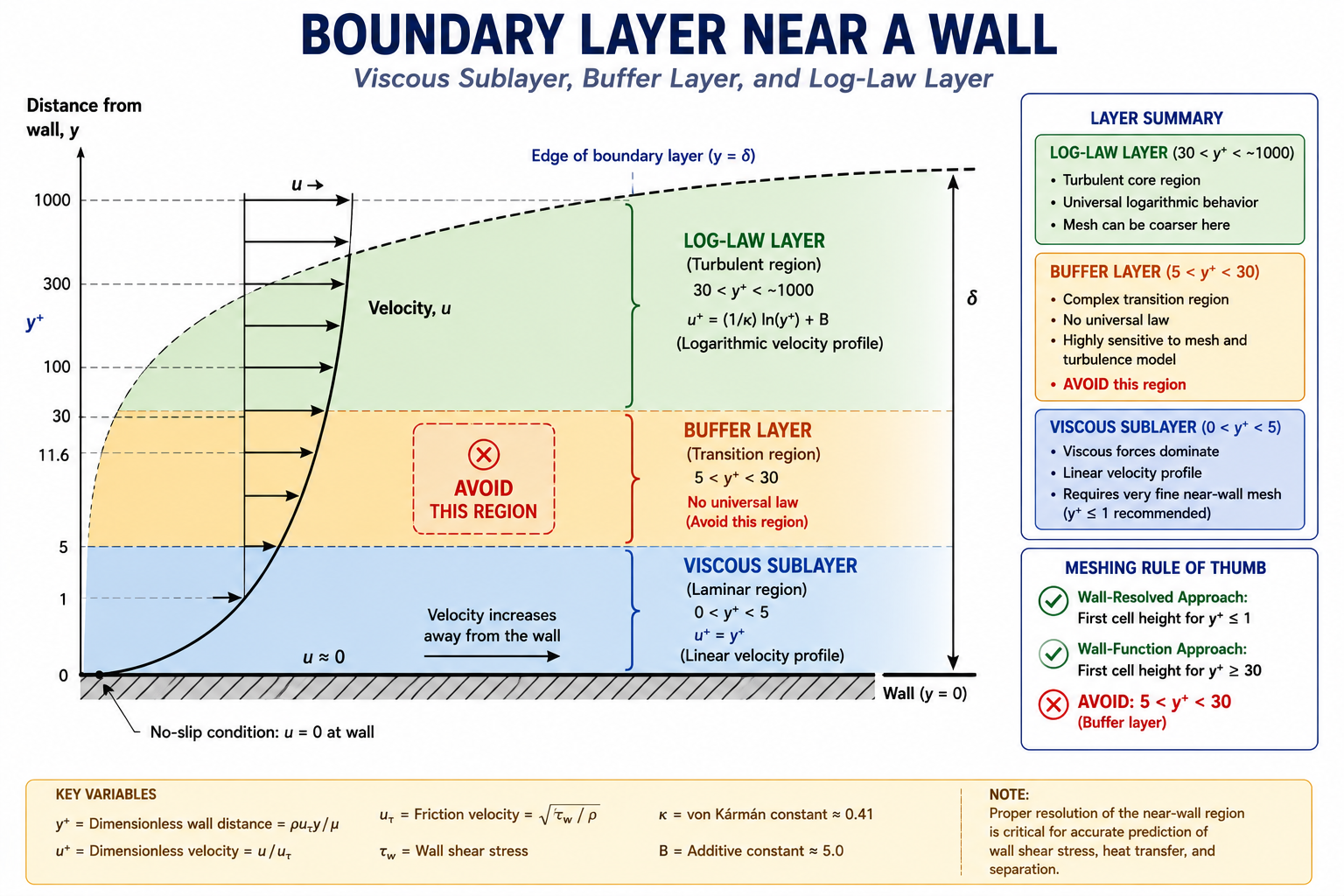
The y+ value of the first wall cell determines which part of the boundary layer that cell sits in. Below 5 is the viscous sublayer. Between 5 and 30 is the buffer layer, where neither wall functions nor low-Re models are accurate. Above 30 is the log-law layer.
Wall functions are only valid in the log-law region, typically y+ between 30 and 300. Landing in the buffer layer produces wall shear stress errors of 10 to 40 percent. Low-Reynolds-number models resolve the sublayer directly but need much finer meshes, usually 15 to 20 cells across the boundary layer with the first cell at y+ below 1.
Near-Wall Treatment
y+ Target
What Happens if Wrong
When to Use
Low-Re (resolves boundary layer)
y+ < 1
1–5: transition error; > 5: wall function takes over
Reporting a single-mesh result as your final answer isn’t defensible engineering practice. Every CFD solution carries discretisation error, the gap between the numerical result on a finite mesh and the true solution on an infinitely fine one. That error can range from 0.1 to 30 percent depending on flow complexity and mesh quality.
The standard method for quantifying it is the Grid Convergence Index (GCI), defined by Celik et al. in the ASME Journal of Fluids Engineering. The procedure: run three systematically refined meshes, compute the observed order of convergence, then calculate GCI as a percentage uncertainty band on the fine-mesh result. Below 3 percent is acceptable for most engineering work. Below 1 percent is the bar for certification-grade results.
Worked example:
Coarse mesh (500,000 cells):   Cd = 0.312
Medium mesh (2,000,000 cells): Cd = 0.295
Fine mesh (8,000,000 cells):   Cd = 0.289

Refinement ratio r = 4^(1/3) = 1.587
Observed order p = ln(|-0.017 / -0.006|) / ln(1.587) ≈ 2.25
Richardson extrapolated Cd ≈ 0.286
GCI (fine mesh) ≈ 1.4%

Result: Cd = 0.289 ± 1.4% (acceptable for engineering; < 3% target)
Category 3: Boundary Condition Errors
CFD boundary conditions prescribe the flow state, velocity, pressure, temperature, turbulence, at every domain boundary. The solver builds the interior solution from those values. Get the boundary wrong, and the interior solution is wrong even if the mesh and turbulence model are perfect.
Inlet BC Type
When Correct
Common Mistake
Velocity inlet (uniform)
Known uniform freestream
Applied to non-uniform duct flow
Velocity inlet (profile)
Complex upstream history matters
Skipped when profile data is available
Pressure inlet
Pressure-driven flow (fans, buoyancy)
Used when mass flow is actually known
Mass flow inlet
Metered or fixed-delivery systems
Used at compressible high-speed inlets
Periodic/cyclic
Truly repeating geometry and flow
Applied without verifying periodicity
Turbulence intensity + length scale
Always required
Left at solver default (5%)
Mistake 5: Wrong Inlet Turbulence Intensity
This is one of the most frequently mis-set boundary parameters, largely because analysts leave it at the solver default of 5 percent instead of matching it to the real upstream source.
Low-turbulence wind tunnel: 0.05 to 0.3 percent
Atmospheric boundary layer: 5 to 20 percent, matched to a log-law profile
Industrial fan or blower discharge: 3 to 8 percent
Fully developed pipe flow: roughly 2 to 5 percent
Using the 5 percent default in a low-turbulence wind tunnel case inflates inlet turbulence energy by a factor of 15 to 100, artificially delaying separation and skewing the stall prediction.
Mistake 6: Outlet Boundary Too Close to the Body
A pressure outlet only behaves correctly when the flow there is roughly parallel with small velocity gradients, conditions that exist well downstream of any wake or recirculation. If the outlet sits too close, the prescribed pressure propagates upstream and distorts the flow around the body.
The tell-tale sign: isobars near the outlet curve toward the boundary instead of running parallel to it. If the wake velocity deficit at the outlet exceeds 5 percent of freestream, move the outlet back. For highly separated flows, that can mean 30 to 50 body diameters downstream, further than most analysts initially expect.
Category 4: Solver Settings and Convergence
These are the most deceptive mistakes because they leave no visible trace in the output. A run with wrong under-relaxation, wrong convergence criteria, or too large a time step looks identical to a correctly configured one.
Mistake 9: Declaring Convergence From Residuals Alone
Residuals measure the global imbalance of the governing equations across every cell. Standard guidance says to run until residuals drop 3 to 4 orders of magnitude. That’s necessary, but not sufficient.
A simulation can show residuals down 6 orders of magnitude while drag is still changing by several percent every 100 iterations. This happens because a small, slowly evolving region, a separation bubble or corner vortex, can be invisible to the global residual while still driving the forces you actually care about. Monitor lift, drag, and mass flow directly. Declare convergence when those stabilize, not when residuals hit a target.
Convergence Indicator
Adequate Value
Recommended Action if Not Met
Residual (continuity)
< 1×10⁻⁴ engineering; < 1×10⁻⁶ high-accuracy
Continue iterating; check mesh quality
Residual (momentum)
< 1×10⁻⁴ engineering; < 1×10⁻⁵ aero
Check mesh; reduce time step for transient
Cd stabilisation
< 0.1% change over last 200 iterations
Continue iterating; consider transient RANS
Cl stabilisation
< 0.1% change over last 200 iterations
Time-average or switch to unsteady
Mass flow imbalance
< 0.1% of inlet mass flow
Check for boundary or geometry errors
Mistake 18: Not Checking Mass Flow Imbalance
Mass conservation is the most basic requirement of any incompressible CFD solution. Inlet mass flow should equal outlet mass flow to within 0.1 percent. A larger imbalance means the run hasn’t converged, or there’s a geometry gap or boundary condition mismatch letting mass leak through a wall.
This is the simplest, most reliable check available and should be the first thing you look at, before force, pressure, or temperature results. If mass isn’t conserved, nothing downstream is trustworthy.
Category 5: Post-Processing Errors
These mistakes happen after a correctly run simulation, in how the results get extracted, displayed, or interpreted. They’re the CFD equivalent of FEA post-processing errors.
Mistake 11: Wrong Reference Values for Force Coefficients
Cd = Drag / (0.5 × ρ × V² × A_ref). The reference area A_ref isn’t universal:
Aircraft: wing planform area
Automobiles: frontal projected area
Bluff bodies: frontal projected area (diameter × length, or πd²/4 for a sphere)
Buildings: depends on loading direction
Using the wrong reference area shifts Cd by the ratio between the correct and incorrect areas, which can be 20 to 50 percent for geometries where planform and frontal area diverge significantly. Document the reference area used before publishing any coefficient, and confirm it matches when comparing across codes or against test data.
Mistake 12: Averaged Instead of Peak Values
Contour plots often average nodal values from surrounding elements. At high-gradient locations, stagnation points, suction peaks, separation onset, that averaging can under-report the true peak by 10 to 40 percent. For surface Cp plots, always pull unaveraged, cell-centred values at critical points. The leading-edge suction peak, in particular, determines boundary layer transition and is exactly where averaging does the most damage.
The CFD Validation Workflow
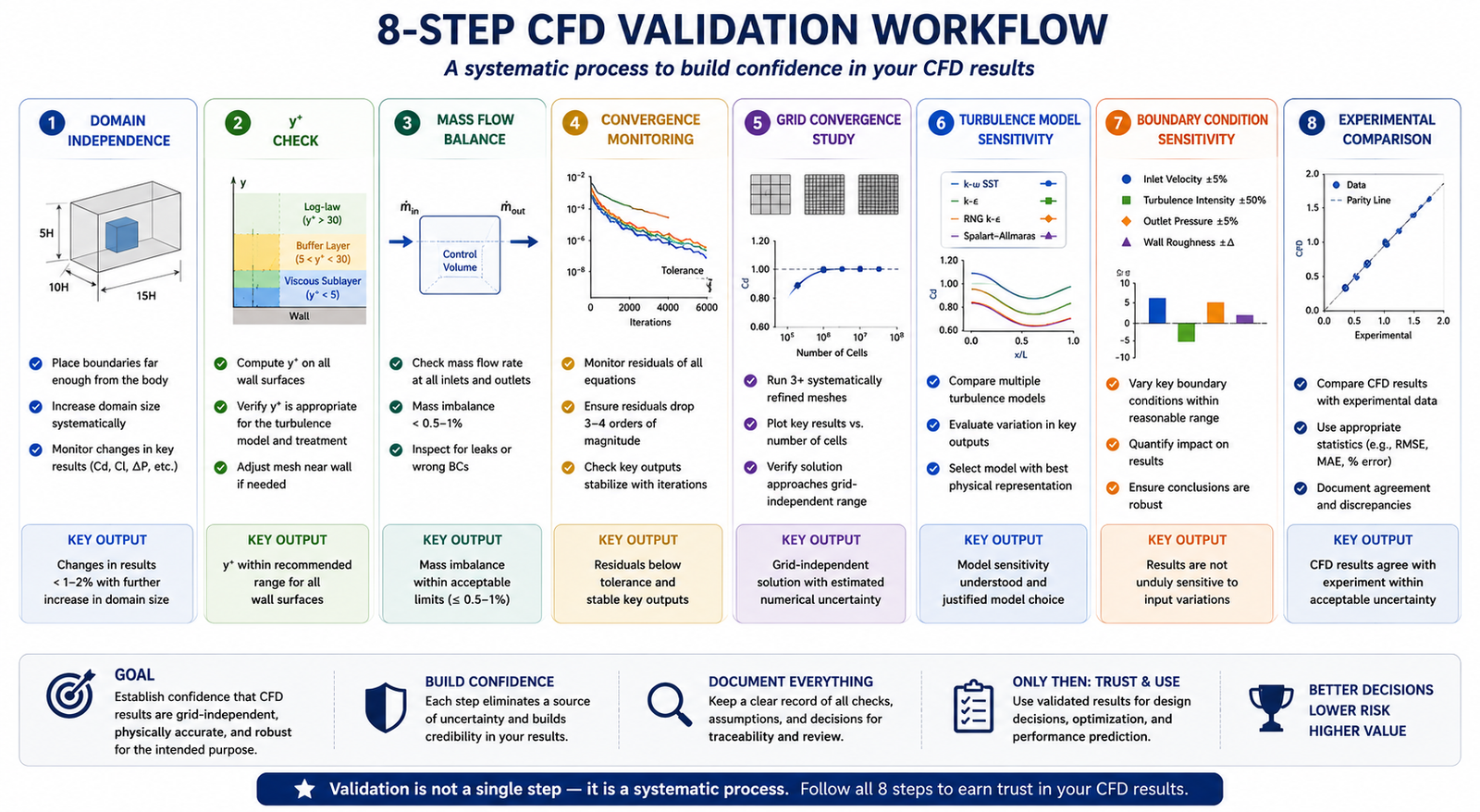
No single check catches every mistake. Domain independence doesn’t catch y+ errors. y+ checks don’t catch convergence errors. The full workflow runs every check in sequence:
Domain independence: extend each boundary 50 percent and compare Cd, Cl, and surface Cp. Repeat until results change less than 1 percent.
y+ check: plot y+ on all walls after the first converged run and confirm it matches your near-wall model.
Mass flow balance: confirm imbalance is under 0.1 percent of inlet mass flow.
Convergence by monitored quantities: track Cd, Cl, mass flow, and pressure versus iteration, not just residuals.
Grid convergence study: run coarse, medium, and fine meshes and report GCI.
Turbulence model sensitivity: compare two models (for example, SST versus Realizable k-ε). Agreement within 5 percent means model choice isn’t the dominant uncertainty.
Boundary condition sensitivity: vary uncertain inlet turbulence by a factor of 3 and check the impact.
Comparison with reference data: validate against a known analytical or experimental case before trusting the target geometry result.
What a Reportable CFD Result Must Include
A CFD result isn’t ready for an engineering decision unless it documents: domain extent and independence study, mesh count and y+ distribution with GCI, turbulence model and justification, boundary conditions with values, convergence history of monitored quantities, mass flow balance, and reference values for any force coefficients. Without this, the result can’t be peer-reviewed, reproduced, or trusted.
Worked Examples
Domain independence failure, ground vehicle aerodynamics: A team ran a 3D RANS simulation at highway speed with an 8-vehicle-length downstream domain and got Cd = 0.298. Extending to 20 lengths dropped Cd to 0.271, a 9.1 percent change. The outlet had been sitting inside the vehicle’s near-wake, pulling base pressure down and inflating drag. Had the original number been used for a compliance check against a 0.28 target, the vehicle would have failed a target it actually met.
False convergence, aerofoil near stall: A NACA 0015 simulation at 15 degrees angle of attack showed residuals down 4 orders of magnitude after 2,000 iterations, reporting Cl = 1.34. Reviewing the Cl history revealed oscillation between 1.28 and 1.41 with a 150-iteration period, meaning it had never actually converged. Switching to unsteady RANS and time-averaging over five shedding periods gave Cl = 1.31 and Cd = 0.094, 8 percent higher than the false-converged steady value.
Frequently Asked Questions
How do I know if my CFD domain is large enough? Run a domain independence study. Extend every boundary by at least 50 percent and compare drag, lift, and surface pressure. If any coefficient shifts more than 1 percent, the domain was too small. For external aerodynamics, the downstream boundary is usually the critical one: 15 to 20 body lengths for streamlined shapes, 30 to 50 for bluff bodies.
What y+ value should I target? Use y+ = 0.5 to 1.0 for low-Reynolds-number models, or 30 to 100 for standard wall functions. Avoid the 5 to 30 buffer layer regardless of which near-wall treatment you’re using.
Why are my residuals converged but my drag coefficient is still changing? Residuals measure global imbalance, not local flow features. A slowly evolving separation bubble or corner vortex can keep drifting the drag coefficient while contributing almost nothing to the global residual. Monitor drag and lift directly and declare convergence only when they stabilize.
What is the Grid Convergence Index and do I need to compute it? GCI quantifies the discretisation error in your result, how far the numerical answer sits from the theoretical infinite-mesh solution. For anything feeding a design decision, regulatory submission, or published comparison, yes, you need it. A three-mesh study costs roughly three times a single run but gives you a defensible uncertainty bound.
How do I handle backflow at my pressure outlet? Move the outlet farther downstream past the recirculation zone; this is the most reliable fix. If that’s not practical, use a backflow prevention option to prescribe flow direction at the boundary, though this only reduces the boundary effect rather than eliminating the underlying accuracy problem.
What turbulence model should I use? k-ω SST is the standard general-purpose choice for external aerodynamics. For strongly separated flows, switch to DES or LES at significantly higher computational cost. Avoid standard k-ε for external aero; it has worse near-wall behavior than SST with no real advantage.
Key Takeaways
CFD setup mistakes happen before the solver runs and produce output that looks completely valid. The 20 mistakes covered here, from an undersized domain through false convergence, account for most CFD accuracy failures in industrial practice. Each has a clear detection method and a known fix.
Build the verification workflow into your process from the first run, not as damage control after someone questions the result. Domain independence and y+ checks cost one or two extra runs. A GCI study costs about three times a single run. Convergence monitoring costs nothing beyond plotting force coefficients alongside residuals. That’s a small price for results with a documented, defensible uncertainty bound.
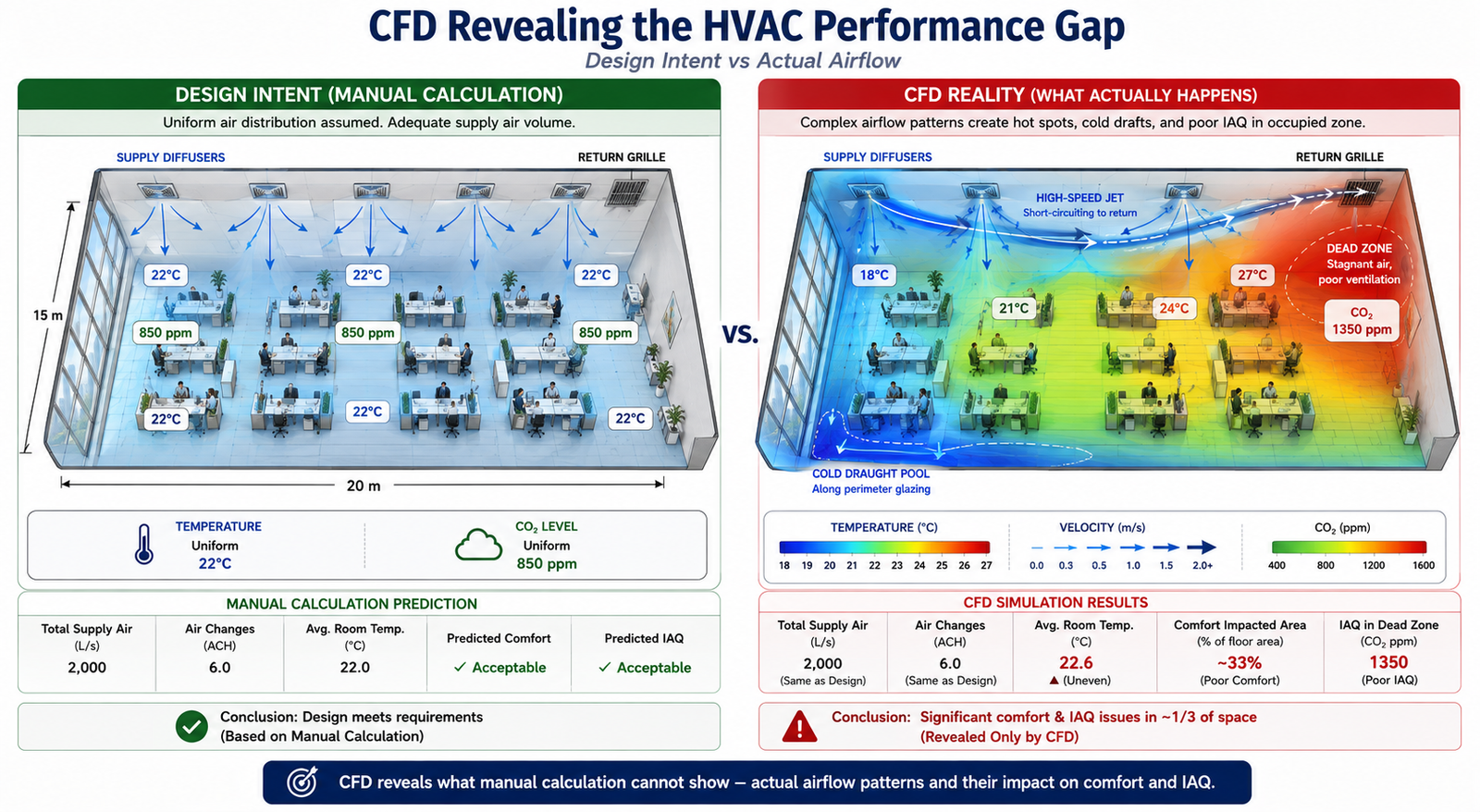
The 15,000 m² office building was designed to meet ASHRAE 55 thermal comfort standards. Mechanical calculations confirmed adequate supply airflow, diffuser throw distances, and a 12 air-change rate in every zone, while BMS commissioning data showed that the fans were delivering the required airflow. Yet six months after occupancy, 34% of occupants rated their thermal comfort as unacceptable. The calculations were correct, but the airflow distribution was not. Two of the eight ceiling diffusers created a Coanda jet that travelled directly toward the return grille, short-circuiting about 12% of the supply air before it reached the occupied zone. A far corner received almost no fresh supply air, resulting in elevated CO₂ levels and uncomfortable conditions.
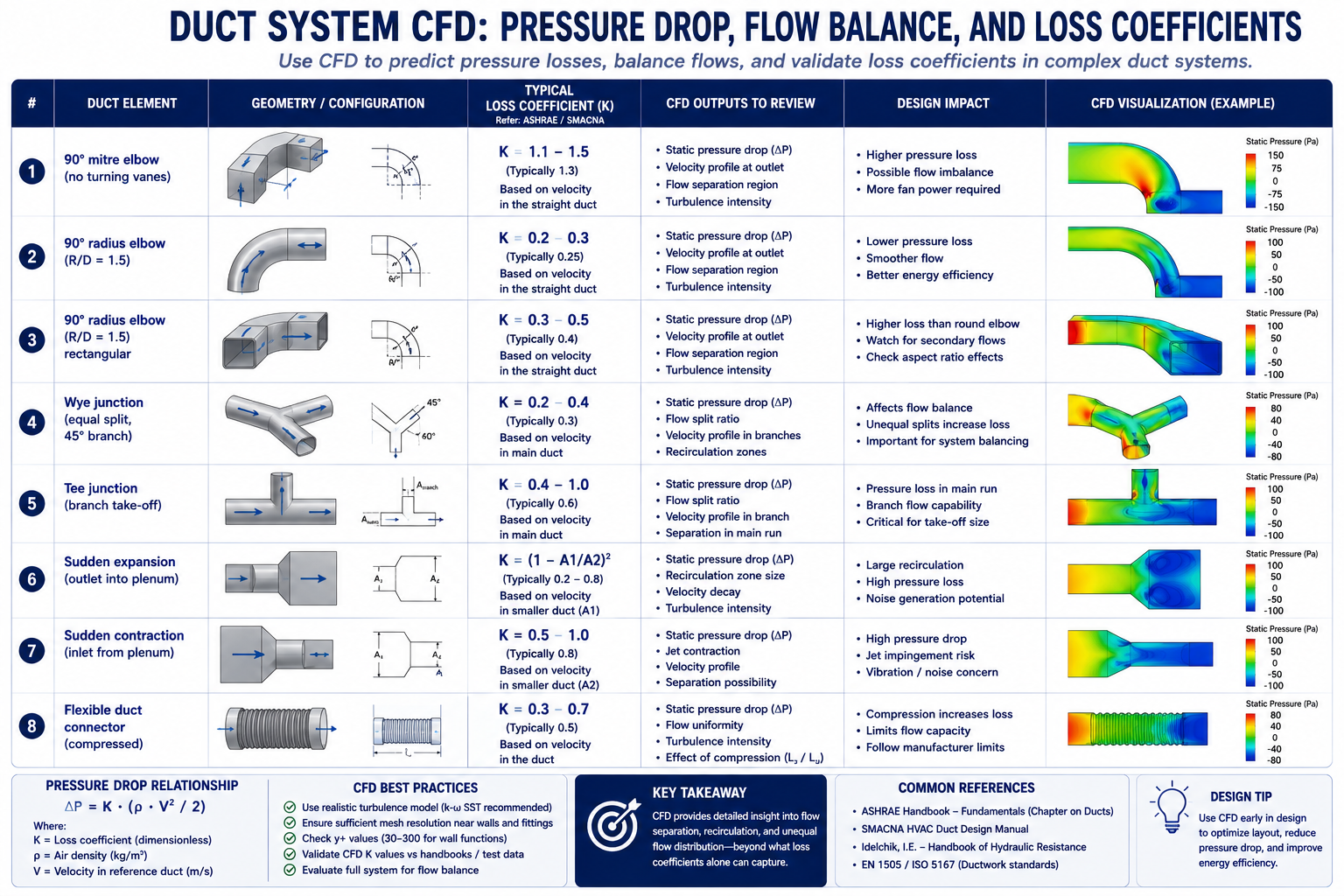
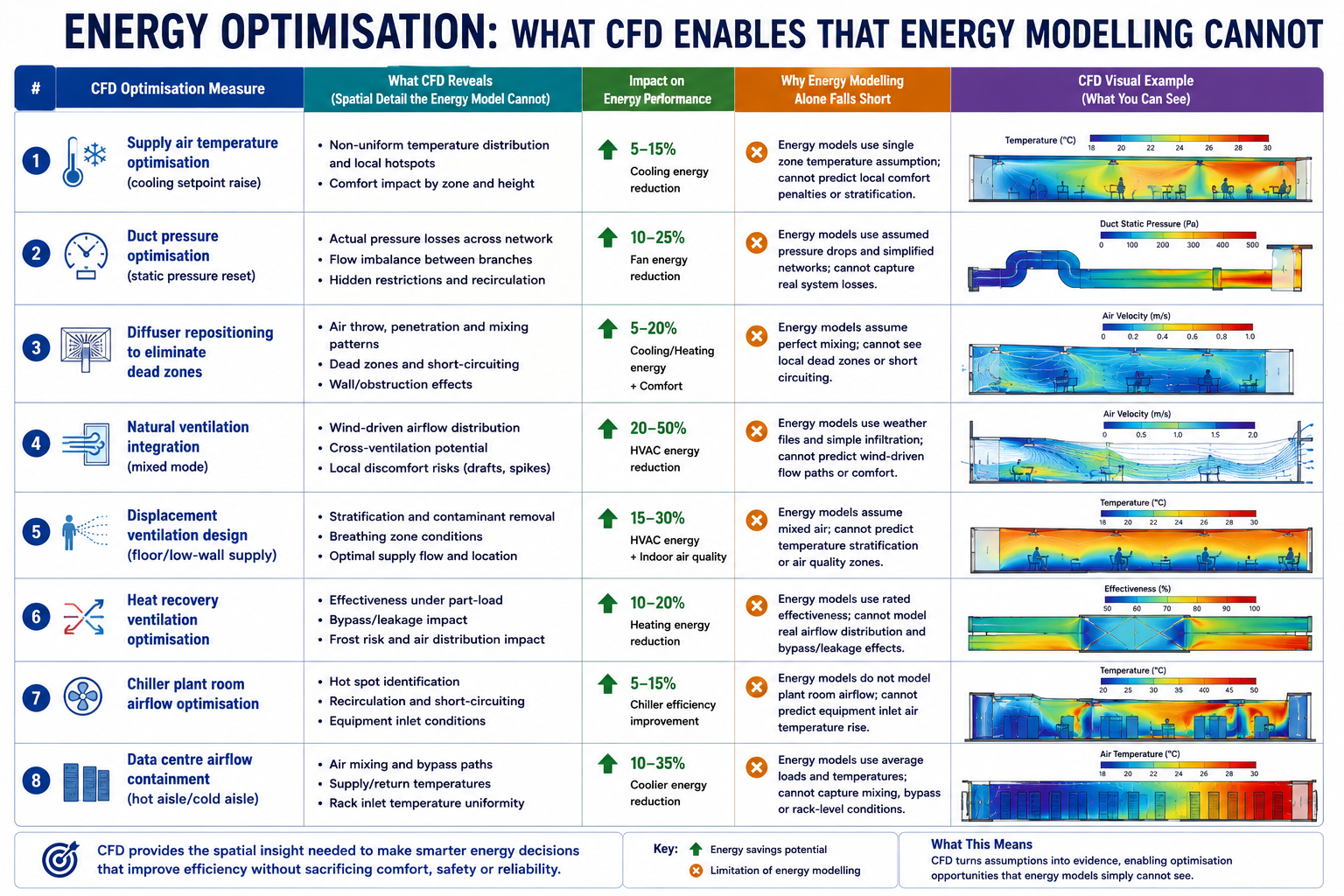
This illustrates a fundamental HVAC design challenge: correct airflow quantity does not guarantee correct airflow distribution. Manual calculations can determine supply volume, cooling load, and diffuser velocity, but they cannot fully predict how air moves through a complex three-dimensional space. Computational fluid dynamics (CFD) can reveal airflow patterns, temperature distribution, draught risk, short-circuiting, and stagnant zones before commissioning. This article explores the key applications of CFD in HVAC performance, including thermal comfort, duct pressure losses, airflow distribution, cleanrooms, data centres, smoke control, and energy optimization, with practical examples showing how CFD results translate into specific design improvements.
Where CFD Adds Value in HVAC: The Ten Application Areas
CFD is not the right tool for every HVAC engineering task. Sizing a duct run, selecting a chiller, or calculating a heating load are manual calculation tasks where CFD adds no value, the physics is one-dimensional and the established methods are accurate. CFD becomes valuable when the flow is three-dimensional and the interactions between geometry, thermal loads, and airflow patterns determine the outcome. The following table maps the ten HVAC application areas where CFD provides information that manual methods cannot, with the physics, key outputs, design decisions enabled, and fidelity level required.
HVAC Application
CFD Physics Required
Key Output Metrics
Design Decision Enabled
Fidelity Level
Room airflow distribution and comfort
3D RANS with buoyancy; energy equation for temperature; humidity transport optional
Air temperature at 0.6m, 1.1m, 1.7m above floor; air velocity at occupied zone; draught rate (DR) per ISO 7730
Diffuser type, location, and throw distance; return grille placement; supply air volume and temperature
Medium, standard RANS k-ω SST; steady-state
Duct system pressure drop and flow balancing
3D RANS in duct network; or 1D network model with CFD-derived loss coefficients
Pressure drop per duct section; flow velocity distribution; balancing damper requirements
Duct sizing, transition geometry, elbow radius, junction design; fan selection and speed
Low to medium, duct segments can be modeled individually; full-network 1D is most efficient
Diffuser and grille performance
3D RANS with fine mesh at diffuser slots; jet throw prediction
Jet throw distance; entrainment ratio; Coanda effect along ceiling; terminal velocity at 0.25 m/s
Diffuser type selection (linear, radial, displacement); supply angle; slot velocity
Medium-High, fine mesh required for slot geometry; validates manufacturer performance curves
Chilled beam and radiant cooling
3D coupled radiation + convection CFD; buoyancy-driven flow
Mean radiant temperature (MRT); operative temperature; natural convection plume from occupants
Chilled beam spacing; supply water temperature; ceiling height requirements
High, radiation model required; occupant thermal plume modelling adds complexity
Clean room and ISO class compliance
3D LES or high-quality RANS; particle transport; filtration efficiency
Air change rate; non-uniformity of velocity; particle concentration; pressure differential to adjacent zones
HEPA/ULPA filter placement; number of air changes per hour; supply/return pattern for ISO 14644 compliance
High, particle tracking and contaminant transport require validated CFD
Data centre hot aisle/cold aisle cooling
3D RANS with server rack power dissipation as volumetric heat source; bypass airflow
Server inlet temperature; rack temperature non-uniformity; bypass ratio (cold air short-circuit); PUE impact
3D FDS (Fire Dynamics Simulator) or RANS with combustion; species transport; radiation
Smoke layer height; visibility; CO concentration; time to untenable conditions; pressure differential for stairwell pressurisation
Smoke extract fan sizing and location; pressure differential requirements; fire-rated damper locations; egress path validation
High, regulatory requirement for complex buildings; fire codes (NFPA 92, BS EN 12101) specify acceptance criteria
Thermal Comfort Metrics: What CFD Computes That Calculations Cannot
The thermal comfort metrics defined by ASHRAE 55 and ISO 7730, including PMV, PPD, operative temperature, and draught rate, depend on local conditions at the occupant’s position. These include air temperature, air velocity, turbulence intensity, mean radiant temperature, and relative humidity.
Manual HVAC calculations typically estimate room-average conditions, while CFD can predict the spatial distribution of these parameters throughout the occupied zone. This allows engineers to identify specific areas where thermal comfort criteria are not met, which room-average calculations cannot reveal.
Comfort Metric
Definition
CFD Output Required
Acceptable Range (ASHRAE 55)
What Poor Performance Looks Like
Air temperature at occupied zone
Dry-bulb air temperature at 0.6m (seated) and 1.1m (standing) above finished floor
Temperature scalar field; extract values at specified heights across occupied zone
20–26°C cooling season; 18–24°C heating season; non-uniformity < 2°C across zone
Stratification > 4°C from ankle to head; cold perimeter pools near glazing; hot spots above equipment
Air velocity / draught rate
Mean air velocity at occupied zone; draught rate DR = (34-T_a)(V-0.05)^{0.62}(0.37VT_u+3.14)
Velocity magnitude field; turbulence intensity Tu at occupied zone; extract at grid of points at 0.1m above floor and 1.1m
< 0.15 m/s for sedentary; < 0.25 m/s for light work; DR < 15% per ISO 7730
High-velocity jets reaching occupied zone from ceiling diffusers; draught from perimeter induction units; floor-level cold air pools
Vertical temperature stratification
Temperature difference between ankle level (0.1m) and head level (1.7m) in seated person
Temperature profile from floor to ceiling extracted at multiple room locations
< 3°C ankle-to-head temperature difference per ASHRAE 55
Displacement ventilation with excessive supply-to-room temperature difference creates > 3°C gradient; hot ceiling / cold floor in cooling mode
Mean Radiant Temperature (MRT)
Area-weighted average temperature of all surfaces ‘seen’ by the occupant from their position
Surface temperature field on all enclosure faces; view factor calculation from occupant position
MRT within ±2°C of air temperature preferred; large glazing or exposed hot/cold surfaces can deviate significantly
Winter: cold glazing with U-value > 2.0 W/m²K creates MRT depression; Summer: solar gain through glass creates high MRT even with cool air temperature
Predicted Mean Vote (PMV)
ASHRAE/ISO 7730 thermal comfort index from -3 (cold) to +3 (hot); combines air temp, MRT, velocity, humidity, activity, clothing
All above metrics combined in post-processing; requires user metabolic rate and clothing level input
-0.5 to +0.5 for at least 80% of occupants (Category B per ISO 7730)
PMV > +1.0 in summer peak load with undersized cooling; PMV < -1.0 near perimeter in winter heating mode with cold glazing and low-temperature supply air
Air change effectiveness (ACE)
Ratio of nominal air change time to actual mean age of air in occupied zone
Mean age of air scalar field computed by solving additional transport equation for air age
> 1.0 for displacement ventilation (plug flow); 0.8–1.0 for mixing ventilation; < 0.5 indicates significant short-circuiting
ACE < 0.5 when supply diffuser is positioned directly above return grille; short-circuit flow bypasses occupied zone entirely
CO2 / contaminant concentration
CO2 as proxy for ventilation effectiveness; contaminant dilution from internal sources
Species transport equation for CO2 or contaminant; steady-state concentration field
CO2 < 1000 ppm in occupied zone (ASHRAE 62.1); < 800 ppm for enhanced ventilation
CO2 > 1200 ppm in poorly mixed corner zones not served by supply air; dead zones created by furniture arrangement blocking flow paths
The Draught Rate Problem: Why High-Throw Diffusers Cause Complaints
Draught, the sensation of unwanted local cooling produced by air movement at velocities above approximately 0.15 m/s at occupant level, is the most frequent comfort complaint in mechanically ventilated offices. The draught rate (DR) formula from ISO 7730 combines air temperature, mean air velocity, and turbulence intensity: DR = (34 – T_a)(V – 0.05)^{0.62}(0.37VT_u + 3.14), where T_a is the air temperature in °C, V is the mean air velocity in m/s, and T_u is the turbulence intensity in percent.
Manual HVAC design uses diffuser throw distance, the distance from the diffuser to the point where jet velocity falls to 0.25 m/s, to determine whether supply air reaches the occupied zone safely. However, this calculation typically assumes an isothermal jet in an open room and may not capture real airflow behavior.
Factors such as the Coanda effect, thermal buoyancy, room geometry, and interaction between multiple diffusers can significantly change the actual airflow path. CFD accounts for these effects and predicts air velocity and turbulence at occupant level, providing the data needed to assess draught risk more accurately.
Mean Radiant Temperature: The Invisible Comfort Driver
Mean radiant temperature (MRT) is the area-weighted average temperature of all surfaces visible from the occupant’s position. It is the dominant thermal comfort parameter in spaces with large areas of cold glass (winter), sunlit surfaces (summer), or radiant heating or cooling systems. Operative temperature, the average of air temperature and MRT, is a better predictor of thermal comfort than air temperature alone, and a space can feel hot even with cool supply air if the MRT from sun-heated surfaces is elevated.
Mean radiant temperature (MRT) depends on both the temperature of surrounding surfaces and their geometric relationship to the occupant. CFD with a radiation model can calculate MRT throughout the room by accounting for surface temperatures and occupant-to-surface view factors.
Manual methods can estimate MRT for simple rooms with uniform surface temperatures, but they become less reliable with complex glazing, shading fins, solar penetration, atria, or radiant panels. For spaces where radiant effects strongly influence comfort, CFD with radiation modeling provides a more detailed way to evaluate thermal comfort.
Duct System CFD: Pressure Drop, Flow Balance, and Loss Coefficients
Duct systems are commonly designed using the equal friction, static regain, or T-method to size duct sections and estimate pressure losses. These methods rely on tabulated fitting loss coefficients from the ASHRAE Handbook, Fundamentals, Chapter 21, covering elbows, tees, wyes, transitions, and grilles.
However, these coefficients are based on controlled test conditions and standard fitting geometries. Real duct systems often differ significantly, with rectangular ducts, high aspect ratios, closely spaced fittings, insufficient upstream development lengths, and modified geometries that may not match the available ASHRAE data. In such cases, the tabulated coefficients may not accurately represent the actual airflow and pressure losses.
CFD fills this gap by computing the actual pressure drop and loss coefficient for the specific fitting geometry in the actual installation condition, including the non-ideal inlet flow profile from the preceding fitting. The table below shows the standard ASHRAE loss coefficients for common duct fittings, the CFD-computed values for the same fittings under typical installation conditions, and the design guidance that CFD reveals.
Duct Element
Loss Coefficient (C or K)
Pressure Drop Formula
CFD vs Standard Value
Design Guidance
90° mitre elbow (no turning vanes)
C = 1.2–1.5 (based on velocity pressure)
ΔP = C × (ρV²/2)
CFD: 1.3–1.5; ASHRAE: 1.2; poor agreement for rectangular ducts
Avoid mitre elbows, use radius elbows (R/D ≥ 1.5) or add turning vanes
90° radius elbow (R/D = 1.5)
C = 0.11–0.15
ΔP = C × (ρV²/2)
CFD: 0.12–0.14; ASHRAE: 0.11; good agreement at low turbulence intensity
Standard choice for main duct bends; CFD confirms ASHRAE values for round duct
90° radius elbow (R/D = 1.5) rectangular
C = 0.22–0.35 depending on aspect ratio
ΔP = C × (ρV²/2)
CFD reveals 25–40% higher loss than round for same R/D due to secondary flow
Use turning vanes for rectangular elbows with aspect ratio > 2:1
Wye junction (equal split, 45° branch)
C_branch = 0.5–0.8; C_straight = 0.1
ΔP branch = C × (ρV²/2) of incoming velocity
CFD shows strong sensitivity to branch angle and incoming velocity profile
Ensure uniform velocity approaching junction; reduce branch angle to 30° to lower C_branch
Tee junction (branch take-off)
C_branch = 0.9–1.5; C_straight = 0.05–0.2
Separate C for straight-through and branch
CFD critical here, standard C values assume fully developed upstream flow
Straight duct of ≥ 10 diameters upstream of tee required for ASHRAE C to be valid
Sudden expansion (outlet into plenum)
C = 1.0 (full dynamic pressure loss)
ΔP = ρV²/2 (full velocity pressure)
CFD and theory agree well for attached flow; divergence at high expansion ratios
Always add a grille or diffuser cone at duct exit to duct, avoids full dynamic pressure loss
Sudden contraction (inlet from plenum)
C = 0.5 (typical); 0.04 for well-rounded inlet
ΔP = C × (ρV²/2) of outlet velocity
CFD shows vena contracta inside duct; rounding inlet reduces C from 0.5 to < 0.1
Round or bell-mouth duct inlets reduce inlet loss by factor of 5+ vs sharp-edged
Flexible duct connector (compressed)
C = 1.5–6.0 depending on compression and bends
ΔP = C × (ρV²/2)
CFD: highly variable; standard values unreliable for compressed flex duct
Keep flex duct fully extended and straight; limit to < 1.8m runs; avoid bends in flex
Fan Curve Intersection and System Resistance
The fan operating point is determined by where the fan pressure-flow curve intersects the system resistance curve. If the actual system resistance is higher than expected because of underestimated fitting losses or additional bends, the operating point shifts to lower airflow and higher pressure. As a result, the fan may deliver less airflow than the design requires.
CFD can evaluate pressure losses using the as-built duct geometry rather than the original design. For example, replacing a radius elbow with a mitre elbow or placing a branch immediately after a bend can significantly increase system resistance. CFD identifies where the additional pressure drop occurs and helps determine whether balancing dampers or duct modifications are needed to restore the required airflow.
Pressure Balancing in Multi-Branch Systems
In a multi-branch supply duct system, each branch must deliver its design airflow to maintain proper zone performance. Manual balancing dampers are commonly used during commissioning, but they add resistance to the system and can increase the fan’s energy demand. In poorly designed systems, this additional resistance can account for a significant portion of fan power.
CFD optimization can improve flow distribution by adjusting branch sizing, tee angles, and junction geometry so that branches achieve more balanced airflow naturally. By iterating the geometry and pressure losses, engineers can reduce reliance on balancing dampers and avoid unnecessary pressure losses. This approach is particularly useful for complex multi-branch systems where conventional calculations cannot fully capture the detailed pressure distribution at junctions.
Special HVAC Applications: Clean Rooms, Smoke Control, and Data Centres
Clean Room Airflow: ISO 14644 Compliance Through Simulation
Clean room HVAC design must comply with ISO 14644-1, which classifies clean rooms by particle count (ISO Class 1 through 9) and specifies the maximum allowable particle concentration at each class. The air distribution system must deliver clean air to the entire work zone without creating turbulent eddies that could carry particles from less-clean regions into the critical process area. ISO 14644-3 specifically accepts CFD as a method for predicting airflow patterns and validating that the specified air change rate and unidirectionality achieve the required cleanliness class before construction
Cleanroom CFD models typically include the supply HEPA or ULPA filter banks as pressure-drop boundaries, recirculation fan arrays, process equipment as heat sources, operators with metabolic heat output, and low-level return grilles.
The key output is not simply air velocity, but flow unidirectionality, which shows how consistently the supply air moves in the intended direction, typically downward, without excessive lateral mixing. ISO 14644-3 provides criteria for evaluating airflow characteristics. CFD velocity-vector plots across multiple horizontal and vertical planes can reveal whether unidirectional flow is maintained throughout the critical zone or whether recirculation regions could promote particle accumulation.
Smoke Control: CFD for Life Safety Compliance
Smoke control systems in large buildings, atria, underground car parks, shopping centres, airport terminals, must be designed to maintain a clear layer of breathable air below the smoke layer for sufficient time to enable safe evacuation. The performance criteria are defined in fire codes (NFPA 92, BS EN 12101-6, CIBSE Guide E) and typically include: smoke layer height above 2.5 metres from floor level for the first 10 minutes; visibility of at least 10 metres in the clear layer; and CO concentration below 1,500 ppm in the clear layer.
CFD for smoke control uses tools such as Fire Dynamics Simulator (FDS) or general-purpose CFD with combustion and species-transport models. The simulation represents the fire source, its heat-release rate and growth, the rising thermal plume, smoke-layer development, smoke extraction, and make-up airflows.
The main output is the smoke-layer height and clear-layer conditions over time, typically from ignition through the first 20 minutes. This helps engineers determine whether the smoke-control system is adequately sized and where modifications may be needed. Unlike analytical models, which are generally limited to simpler geometries, CFD can evaluate smoke movement in complex building layouts.
Data Centre Hot Aisle/Cold Aisle: CFD as the Primary Design Tool
Data centre thermal management is a critical CFD application because high-density server racks can generate 10–30 kW of heat within a compact footprint. Cold aisle/hot aisle layouts help manage this heat, but real airflow is more complex than the layout suggests. Cold air can bypass unused rack spaces, hot exhaust can recirculate into cold aisles, and airflow from perforated floor tiles can vary because of underfloor pressure differences.
CFD models the data hall, server racks, floor tiles, CRAC units, and underfloor plenum to predict these airflow and temperature patterns. The key metric is the server rack inlet temperature, which must remain within the manufacturer’s specified limit at every rack. CFD also identifies hot spots, cold-air bypass, and hot-air recirculation, helping engineers optimize cooling capacity, improve Power Usage Effectiveness (PUE), and maintain sufficient thermal margin for future capacity increases.
Energy Optimisation: What CFD Enables That Energy Modelling Cannot
Building energy modelling tools such as EnergyPlus, IES-VE, and DesignBuilder simulate building thermal loads and HVAC performance hour by hour throughout the year. They are widely used for energy-code compliance and for predicting annual energy use intensity (EUI).
However, these models typically use simplified, zone-based airflow assumptions and cannot show the detailed airflow distribution within a room. They may therefore be unable to determine whether strategies such as displacement ventilation, natural ventilation, or lower air-change rates can maintain required comfort and indoor air quality. For these decisions, CFD provides the detailed airflow analysis that zone-based energy models cannot.
The energy optimisation measures in the table below are enabled by CFD because each one requires confirming that a changed ventilation strategy, lower airflow, higher supply temperature, different distribution, still meets comfort and indoor air quality criteria. Without CFD, the engineer cannot confirm this and must fall back to conservative assumptions that preserve the original over-designed system
CFD Optimisation Measure
Typical Energy Saving
Mechanism
Payback Period
Best Applicable Building Type
Supply air temperature optimisation (cooling setpoint raise)
5–15% cooling energy
CFD confirms that raising supply air temperature by 1–2°C while repositioning diffusers maintains comfort, reduced chiller lift
Immediate, no capital cost for existing system with variable supply temp
CFD validates that lower air change rates achieve same air quality due to ACE > 1.0 for displacement vs 0.8 for mixing, less fan power for same IAQ
Premium for displacement diffusers vs ceiling diffusers; ROI 3–7 years in energy costs
High-ceiling spaces: offices, theatres, airports, atriums; not suitable for spaces requiring rapid temperature response
Heat recovery ventilation optimisation
30–50% ventilation heating/cooling energy
CFD models cross-contamination risk in heat exchanger bypass conditions; validates minimum outdoor air rates while maximising heat recovery
Heat recovery units: 3–6 years payback in heating-dominated climates
Any building with high ventilation rates: laboratories, schools, hospitals, commercial kitchens
Chiller plant room airflow optimisation
2–8% chiller energy
CFD of chiller room reveals recirculation of condenser air; repositioning fans or adding baffles reduces condenser entering air temperature by 1–3°C, improving COP
Low capital: baffles $1,000–$10,000; saves 2–5% of chiller energy year-round
Any air-cooled chiller plant; greatest benefit in confined plant rooms with multiple units
Data centre airflow containment (hot aisle/cold aisle)
20–40% cooling energy for data centre
CFD quantifies bypass and recirculation flows; hot aisle containment eliminates mixing; supply air temperature can be raised 5–10°C with same server inlet temperature
12–24 months typical for hot aisle containment installation in existing data centre
Data centres and server rooms; any high-density electronics cooling application
Worked Examples: CFD Driving HVAC Design Changes
Example 1: Open-Plan Office, Resolving the Dead Zone
A 400 m² open-plan office floor plate is served by 16 ceiling swirl diffusers at 5m × 5m grid spacing, each supplying 180 L/s at 14°C in cooling mode. The HVAC engineer’s calculation confirmed adequate air change rate (11 ACH) and design throw distance for each diffuser. Post-occupancy surveys showed 28 percent dissatisfaction, concentrated in the two corners farthest from the main supply duct riser.
CFD model: 3D RANS k-ω SST with buoyancy (Boussinesq approximation); 52 million cell mesh resolving diffuser geometry; steady-state; 26 occupants as heat sources at 75W sensible each; 8 workstation computers at 120W each; perimeter glazing as boundary condition at 35°C surface temperature (peak summer).
CFD findings: The two corner zones had air velocities below 0.05 m/s and temperatures of 27.5°C, well above the 24°C design point. Mean age of air in the corners was 42 minutes versus 9 minutes (nominal), indicating that only 21 percent of the design air change rate was being achieved in those zones. The failure mode: the corner diffusers were positioned 2.8m from the perimeter wall, within the Coanda attachment zone. The jets attached to the ceiling and ran parallel to the perimeter wall rather than projecting into the room, then short-circuited to return grilles positioned along the corridor.
CFD-driven design change: Relocate two corner diffusers to 1.2m from the perimeter wall to project jets perpendicular to the glazing, breaking the Coanda attachment and directing air into the unserved zone. Add two additional linear slot diffusers at the perimeter glazing supplying 60 L/s each at 14°C to counteract the solar gain and cold glass convection currents. Reposition one return grille from the corridor side to the interior of the corner zone.
Predicted outcome from CFD: Corner zone temperatures reduced from 27.5°C to 23.8°C. Air velocity in corner zone increased from 0.05 to 0.12 m/s, below draught threshold. PMV in corner zone improved from +1.4 (warm, 34% dissatisfied) to +0.2 (neutral, 6% dissatisfied). Mean age of air reduced from 42 minutes to 11 minutes. Total supply airflow unchanged, comfort achieved by redistribution, not additional air volume.
BEFORE (existing diffuser positions):
  Corner zone air temperature:      27.5 °C
  Corner zone air velocity:         0.04–0.06 m/s
  Corner zone CO2:                  1,340 ppm
  Mean age of air (corner):         42 min  (nominal 9 min = 11 ACH)
  Air change effectiveness (ACE):   0.21  (ideal mixing = 1.0)
  PMV corner zone:                  +1.4  (warm)
  PPD corner zone:                  34%   (above 20% threshold)

AFTER (repositioned diffusers + perimeter slots):
  Corner zone air temperature:      23.8 °C    (-3.7 °C)
  Corner zone air velocity:         0.10–0.13 m/s
  Corner zone CO2:                  870 ppm    (-470 ppm)
  Mean age of air (corner):         11 min     (-31 min)
  Air change effectiveness (ACE):   0.82  (mixing ventilation target = 0.8)
  PMV corner zone:                  +0.2  (neutral)
  PPD corner zone:                  6%    (ASHRAE Class A: < 10%)

DESIGN COST:
  Diffuser relocation: 2 diffusers moved  ~ $800 labour
  Perimeter linear slots: 2 × 3m runs     ~ $2,400 material + labour
  Duct extension to perimeter slots:       ~ $1,200
  Total remediation cost:                  ~ $4,400

COMPARISON WITH ALTERNATIVE:
  Increasing total supply airflow by 40% to dilute corner CO2:
    Fan energy increase: +28% (~$3,200/year electricity at $0.15/kWh)
    Does NOT fix temperature non-uniformity or Coanda jet problem
  CFD-guided repositioning achieves better comfort at $4,400 one-time cost
  vs $32,000 ten-year energy cost of the 'more air' alternative
Example 2: Hospital Operating Theatre, Validating Unidirectional Flow
A new 36 m² operating theatre is designed with a 3.4 m × 3.4 m HEPA-filtered unidirectional flow (UDF) canopy supplying 0.36 m/s downward air velocity across the surgical site. The theatre also has peripheral low-velocity induction diffusers around the room perimeter. Building regulations (HTM 03-01 in the UK) require that the critical zone around the operating table maintains ISO Class 5 cleanliness (< 3,520 particles ≥ 0.5μm per cubic metre).
CFD model: 3D RANS; HEPA canopy as uniform velocity inlet; peripheral diffusers as momentum sources; surgical team as heat sources (5 persons at 80W each + 60W metabolic); anaesthetic equipment as obstruction; operating table at body temperature; surgical lights as 400W overhead heat source.
CFD findings: The unidirectional zone was maintained correctly for 80 percent of the canopy area. However, the anaesthetic screen at the head of the table, a vertical partition 1.2m tall running perpendicular to the airflow, created a recirculation zone on the downstream side. The vortex behind the screen carried particles from the periphery of the theatre back into the lower portion of the UDF zone at the incision site. The contamination risk was highest during patient intubation, when the anaesthetic screen was at its maximum height.
Design change: Tilt the UDF canopy 3 degrees toward the head of the table to direct the primary jet slightly away from the anaesthetic screen wake. Add two supplementary slot supply points at the head of the table, supplied from the UDF plenum at 0.15 m/s, to fill the recirculation zone behind the screen with clean air. The supplementary slots are integrated into the anaesthetic equipment mounting rail, no additional ceiling penetrations required.
Outcome: Recirculation zone behind anaesthetic screen eliminated at the incision site level. Particle tracking simulation confirms < 10 particles ≥ 0.5μm per cubic metre at the incision site under worst-case conditions (anaesthetic screen at maximum height, all personnel in position). ISO Class 5 compliance confirmed across the full critical zone. Modification identified before construction, the supplementary slots are built into the equipment rail during factory manufacture at a cost of approximately £800, versus a post-construction modification cost estimated at £15,000 to £25,000 if the problem had been discovered during commissioning testing.
Example 3: Data Centre, Hot Aisle Containment ROI Analysis
A 200-rack data centre hall with 2,000m² floor area is operating at average rack power of 6 kW per rack (1,200 kW total IT load). Current cooling configuration uses 12 CRAC units each rated at 150 kW at 18°C supply. The measured average server inlet temperature is 28°C, within specification but with 15 percent of racks showing inlet temperatures above 30°C at peak load. PUE is 1.72.
CFD findings before containment: Bypass ratio (cold air flowing from cold aisle to hot aisle overhead without passing through racks) was 23 percent of total CRAC supply. Recirculation fraction (hot exhaust air re-entering cold aisle over rack tops) was 18 percent. The combined effect was that 41 percent of cooling capacity was wasted on air that either bypassed the racks or was pre-heated by recirculation before entering the servers.
CFD model of hot aisle containment: Install full height containment doors at the ends of each hot aisle and a solid ceiling above the hot aisle to the raised floor plenum return. All CRAC units relocated to the hot aisle side to take in the warmest air directly. Supply perforated tiles repositioned to ensure uniform cold aisle pressure.
CFD Results After Containment
After hot aisle containment, the bypass ratio decreased from 23% to 3%, while the recirculation fraction dropped from 18% to 2%. Supply air entering the CRAC units increased from an average of 24°C to 34°C, allowing the units to cool directly from the hot aisle rather than a mixed-air environment.
This made it possible to increase the CRAC supply temperature from 18°C to 23°C while maintaining a server inlet temperature of 28°C. The higher supply temperature improved chiller COP by approximately 18%, contributing to a 24% reduction in cooling energy.
For a 1,200 kW IT load operating 8,760 hours per year at $0.12/kWh, the improved PUE from 1.72 to 1.42 results in estimated annual savings of approximately $432,000. With a hot aisle containment installation cost of $180,000, the calculated simple payback is about 5 months.
Building an Accurate HVAC CFD Model: Setup Decisions That Determine Accuracy
HVAC CFD models have specific setup decisions that differ from structural or external aerodynamics CFD. The following covers the most important HVAC-specific decisions that govern result accuracy.
Turbulence Model Selection for HVAC
The RANS k-ω SST model is a common choice for HVAC CFD because it handles wall-bounded flows, supply jets, and room-scale convection at a reasonable computational cost. For typical HVAC temperature differences, the Boussinesq approximation is widely used to model buoyancy. When temperature differences become large or buoyancy dominates, a full variable-density model using the ideal gas law provides greater accuracy.
The k-ε model is also used for HVAC simulations, but it can be less accurate near walls and in regions with strong flow curvature, such as duct bends and diffuser jets. The SST model combines k-ω behavior near walls with k-ε behavior in the free stream, making it suitable for a broad range of HVAC flow conditions.
For natural ventilation and low-velocity spaces, where buoyancy-driven flow and thermal stratification dominate, LES or unsteady RANS may be needed to capture transient flow structures. However, these approaches require significantly more computational resources and are generally reserved for research-grade or compliance-critical analyses.
Diffuser Modelling: The Room Inlet Boundary Condition
Diffusers are the most challenging element of HVAC CFD because their complex internal geometry, slot vanes, swirl blades, perforated faces, cannot be practically meshed in a room-scale simulation without creating a prohibitively large model. Several simplified approaches are used:
Momentum source method (MSM): The diffuser is replaced by a volumetric momentum source in the cells occupying the diffuser location. The source term injects momentum in the correct direction and magnitude to match the diffuser’s throw and spread. Computationally efficient and accurate for the room-scale flow prediction; less accurate near the diffuser itself.
Prescribed velocity profile method: A measured or manufacturer-specified velocity profile is applied as an inlet boundary condition at the diffuser face. Requires manufacturer CFD data or physical measurement; more accurate than MSM near the diffuser.
Simplified box model: A box representing the diffuser envelope is included in the room geometry, with appropriate inlet faces for the supply slots. Requires fine mesh at the diffuser but correctly predicts the near-diffuser flow pattern including Coanda attachment.
For most comfort assessment applications, the momentum source method with manufacturer-specified throw characteristics is adequate and is the standard approach in HVAC-specific CFD software (Flovent, Flomerics, Simscale HVAC). For applications where the near-diffuser flow pattern is critical, theatre ventilation, clean room UDF validation, operating theatre compliance, the simplified box or prescribed profile method is preferred.
Occupant and Equipment Heat Loads
People and equipment are heat sources that drive the thermal plumes and buoyancy currents that govern room airflow in spaces with moderate to low forced convection. The thermal plume from a seated person (sensible heat output approximately 75W) rises at 0.1 to 0.3 m/s and reaches the ceiling in 3 to 5 seconds in a 3m high room, interacting with the ceiling jet from supply diffusers and creating complex mixed convection patterns that no manual method can predict.
In HVAC CFD models, people are typically represented as simplified geometry (a seated or standing cylinder or box) with a specified sensible heat flux on the body surface. The exact shape has less influence on the room-scale flow than the heat flux magnitude and the relative positions of people and supply diffusers. Equipment is represented as block geometries with specified heat dissipation rates. For applications where the precise thermal plume from an individual person or workstation matters (operating theatre, clean room, personal comfort ventilation systems), higher-fidelity occupant models with segmented body heat release are used.
Validating HVAC CFD: When Results Can Be Trusted
HVAC CFD results are more variable in accuracy than external aerodynamics CFD because the buoyancy-driven flows, diffuser jets, and room-scale turbulence are harder to model correctly than attached boundary layers at cruise conditions. The standard validation approach for HVAC CFD is comparison against ASHRAE Standard 129 benchmark cases, a set of generic room configurations with published experimental data for temperature and velocity distributions that CFD codes can be compared against before being applied to real projects.
In addition to benchmark case validation, project-specific validation uses one or more of the following:
Air temperature measurement: Calibrated temperature sensors at standardised heights (0.1m, 0.6m, 1.1m, 1.7m above floor per ASHRAE 55) at multiple room locations. CFD predictions within ±1.5°C of measured values are considered good agreement for room temperature. Large discrepancies (> 3°C) indicate errors in supply air conditions, thermal load estimates, or diffuser modelling.
Air velocity measurement: Omnidirectional anemometers at occupied zone locations. Agreement within ±0.05 m/s or 20 percent of measured velocity (whichever is larger) is typical for HVAC CFD. High-velocity regions near diffusers require accurate diffuser modelling for velocity agreement.
CO2 tracer gas: SF6 or CO2 tracer gas injected at the supply and measured at multiple return and room locations. The tracer gas concentration distribution validates the CFD-computed flow distribution and age-of-air predictions. This is the most sensitive validation for ventilation effectiveness, concentration non-uniformities that temperature measurements miss are revealed by tracer gas.
Smoke visualisation: Theatrical smoke or titanium tetrachloride smoke bombs reveal the actual flow pattern in a room, showing jet directions, recirculation zones, and dead zones. Not quantitative but provides immediate qualitative confirmation of the CFD-predicted flow pattern, or reveals patterns that the CFD model did not predict, indicating modelling errors to correct.
Frequently Asked Questions
Q: Can CFD replace manual HVAC design calculations?
No. CFD complements manual HVAC calculations rather than replacing them. Manual methods determine loads, airflow, duct sizing, pressure drops, and equipment selection, while CFD evaluates how air actually moves through the space, including temperature distribution, occupant comfort, and draught risk. The best approach is to use manual calculations for system sizing and CFD for airflow distribution validation and optimization.
Q: What is the Coanda effect and why does it matter for HVAC diffuser design?
The Coanda effect causes a fluid jet to remain attached to a nearby surface. In HVAC, ceiling-mounted supply jets can attach to the ceiling and travel farther across the room before dropping into the occupied zone, helping reduce draughts. However, excessive attachment can carry the jet past its intended path and cause short-circuiting or dead zones near return grilles and perimeter walls. CFD can predict how jet momentum, supply temperature, and ceiling geometry affect Coanda attachment and detachment, which simplified throw-distance calculations cannot fully capture.
Q: How does CFD help with HVAC energy optimisation?
CFD enables HVAC energy optimization by confirming that lower-energy operating strategies still meet thermal comfort and indoor air quality requirements. For example, raising supply air temperature from 13°C to 16°C can improve chiller efficiency, but it also changes jet buoyancy, Coanda attachment, and occupied-zone temperature distribution. CFD can verify whether comfort is maintained before the change is implemented. If the criteria are met, the higher setpoint can reduce cooling energy without major capital changes.
Q: What is air change effectiveness and how does CFD compute it?
Air change effectiveness (ACE) measures how effectively fresh supply air reaches the occupied zone. An ACE of 1.0 represents ideal mixing, while values above 1.0 indicate more effective air delivery, such as displacement ventilation. Values below 1.0 indicate poor distribution or short-circuiting between supply and return air.
CFD calculates ACE by tracking the age of air throughout the room using an additional transport equation. This provides the local and zone-average air age and shows where fresh air reaches occupants efficiently or where it is bypassing the occupied zone. Because ACE depends on the full three-dimensional airflow field, it cannot be accurately determined from conventional manual HVAC calculations alone.
Q: How accurate is HVAC CFD compared to physical measurement?
HVAC CFD accuracy depends on the application and model quality. For forced-convection rooms, temperature predictions are typically within ±1.5–3°C and occupied-zone velocity within ±0.03–0.08 m/s of measurements. Naturally ventilated spaces can have larger temperature errors of ±3–5°C, while CO₂ predictions are typically within 10–20% when airflow distribution is accurately captured. For code compliance, CFD should be validated against benchmark data or physical measurements.
Q: When is HVAC CFD required rather than just beneficial?
HVAC CFD becomes essential in four situations: regulatory compliance for applications such as operating theatres, smoke control, and cleanrooms; complex or non-standard geometries such as atria and large open halls; mixed-mode or natural ventilation, where wind and buoyancy-driven flows interact; and post-occupancy problems, where CFD can identify airflow deficiencies in an as-built system and guide targeted corrective measures instead of trial-and-error adjustments.
Conclusion: CFD as the Design Verification Tool for HVAC Performance
HVAC systems can be correctly sized using established manual calculation methods, yet still fail to perform as expected when supply air does not reach occupants at the right quantity, temperature, and velocity. The actual distribution of airflow and temperature depends on three-dimensional effects such as Coanda attachment, buoyancy plumes, furniture and partitions, and supply-to-return short-circuiting. CFD captures these effects and can identify comfort problems, CO₂ accumulation, inadequate diffuser throw, and airflow deficiencies before commissioning. This makes CFD particularly valuable when air distribution directly affects building performance and occupant comfort.
The strongest approach is to use manual calculations for HVAC system sizing and CFD for airflow distribution validation and optimization. CFD can also support energy-saving strategies such as higher supply temperatures, lower air-change rates, displacement ventilation, and hot aisle containment. By identifying problems and testing design changes before construction or commissioning, CFD can reduce costly remediation, improve occupant comfort, and help HVAC systems perform as designed from day one.
Explore related simulation topics: thermal simulation in electronics, CFD vs wind tunnel testing, static vs dynamic analysis, why simulation fails, and how leading industries deploy simulation to improve performance and reduce cost.
The power management IC (PMIC) passed every electrical test and had a maximum junction temperature of 125°C. The thermal budget allowed a 40°C rise from the 25°C ambient condition, giving an apparently comfortable margin. Yet the product experienced a 23% field failure rate after 18 months, far short of its 10-year reliability target. Failure analysis identified electromigration damage in the PMIC’s metal interconnects.
The problem was not the datasheet value itself, but the thermal assumptions used in the design. The analysis used the PMIC’s junction-to-case thermal resistance and a generic board-level convection coefficient, but did not account for the 6 W DSP located just 8 mm away on a 4-layer FR4 board with minimal copper pour. Heat from the DSP raised the PMIC’s local ambient temperature by 28°C, increasing its junction temperature from the estimated 65°C to 93°C under full load. Because electromigration is highly temperature-dependent, this temperature increase made the electromigration rate 11 times higher than assumed.
This is the failure mode of inadequate thermal simulation: the calculation may be correct, but the model can still be too simple for the physical situation. A one-dimensional thermal resistance network cannot capture heat transfer between adjacent components, non-uniform PCB temperatures, actual enclosure airflow, or transient temperature changes during power cycling. Each effect can shift junction temperature by 10–30°C, potentially increasing the rate of thermally activated failure mechanisms by several times.
This article examines the complete application of thermal simulation in electronics design, from thermal-resistance networks to full conjugate heat-transfer CFD. It covers seven levels of simulation fidelity, eight thermally activated failure mechanisms, heat-sink optimization, transient and power-cycling analysis, and thermal-structural coupling for solder-joint fatigue and PCB warpage. The goal is practical: to show how thermal simulation converts temperature predictions into design decisions and helps engineers determine whether an electronic product can meet its reliability target.
The Thermal Resistance Framework: From Junction to Ambient
Every thermal analysis in electronics begins with the same fundamental equation: T_junction = T_ambient + P × R_total, where P is the power dissipated in the component and R_total is the sum of all thermal resistances in the heat flow path from the silicon junction to the ambient environment. This equation is exact for one-dimensional steady-state heat flow through a single stack of thermal resistances in series. It is an approximation, sometimes a poor one, for the actual three-dimensional, multi-path, time-dependent thermal situation in a real electronics system.
Thermal simulation allows engineers to predict temperature distributions in electronics assemblies before hardware is built, helping identify thermal risks, optimize cooling, and evaluate worst-case operating conditions.1
The power of the framework is that it decomposes the thermal problem into individual resistances that can be independently analyzed, optimized, and validated. Each resistance element has a physical identity (die attach, TIM, heat sink), a formula or datasheet source for its value, and a set of design variables that control it. Simulation’s role is to compute these resistances accurately for the actual three-dimensional geometry, something the 1D formula cannot do for complex geometries, and to identify which resistance elements dominate the total, guiding optimization effort toward the highest-leverage design changes.
Resistance Element
Symbol
Formula / Source
Typical Value Range
What It Governs
How to Reduce It
Junction to case (die)
R_jc
Provided in component datasheet; governed by die size, bond wire layout, die attach material
0.1–5.0 °C/W for ICs; 0.01–0.5 °C/W for power modules
Maximum power density the die can dissipate before junction temperature is exceeded
Larger die area; better die attach material (sintered silver vs solder); flip-chip vs wire bond
Die attach (solder/adhesive)
R_da
t/(k × A); t = thickness, k = thermal conductivity, A = area
0.05–0.5 °C/W; sintered silver ~0.01 °C/W
Heat flow from die to substrate; first interface resistance below die
Reduce solder thickness; use sintered silver (k=200 W/mK) vs SAC solder (k=57 W/mK); maximize die attach area
Substrate / PCB spreading
R_spread
Depends on copper layer count, via density, board thickness
0.5–5.0 °C/W for FR4 PCB; 0.1–1.0 °C/W for metal-core PCB (MCPCB)
Lateral heat spreading from component footprint to board area available for convection
Add copper pours; use thermal vias under component; switch to MCPCB or ceramic substrate for high-flux components
Convection from heat sink to ambient air, governs total system thermal resistance floor
Increase fin area; reduce fin pitch for forced convection; use vapor chamber or heat pipe for spreading
Case to ambient (no heat sink)
R_ca
Complex, governed by board layout, enclosure, airflow
2–20 °C/W for natural convection in enclosure
Total temperature rise from component case to ambient when no dedicated heat sink is used
Add local copper thermal pad; ensure airflow path; space high-power components for mutual air convection
PCB to ambient (conduction-cooled)
R_board
Depends on copper layer count and conduction path to chassis
1–10 °C/W from component to chassis edge
Heat flow via PCB copper to chassis ground plane, dominant path in conduction-cooled military/space electronics
Maximize copper fill between component and chassis attachment; use copper-core PCB; minimize PCB-to-chassis thermal resistance
When the 1D Model Fails: The Spreading Resistance Problem
The 1D thermal resistance model assumes heat flows in one direction, from the die straight down through the stack to the ambient. In reality, heat spreads laterally through every layer it passes through, expanding the effective heat transfer area as it moves away from the concentrated die heat source. This spreading increases the effective area for convection and reduces the thermal resistance below the 1D prediction, which sounds beneficial, but the spreading also creates lateral temperature gradients that the 1D model misses entirely
Spreading resistance (Rspread) depends on the heat-source area, spreading-layer area, layer thickness, and thermal conductivity. For a small 5 × 5 mm die on a large 150 × 100 mm PCB, a simple 1D model can underestimate the local temperature because it does not capture how heat spreads outward from the die.
A 2D or 3D thermal simulation captures this temperature gradient and shows whether the design is limited by poor heat spreading—requiring more copper or thermal vias—or by insufficient convection area, which may require a heat sink or increased airflow.
Thermal simulation software such as SimScale enables engineers to model heat transfer, temperature distribution, and cooling performance before physical prototypes are built.
The Effect of Adjacent Components: The Mutual Heating Problem
In a densely populated PCB, every high-power component raises the local ambient temperature for its neighbors. A component that dissipates 3W in isolation might operate at 55°C junction temperature. The same component placed 10mm from a 5W DSP, which raises the local air temperature by 15°C through its convective plume, operates at 70°C. This mutual heating effect is invisible to single-component thermal analysis and is one of the most common causes of field failures in products where each individual component was analyzed in isolation and found to be thermally safe.
System-level PCB thermal simulation, modeling the entire board with all components, their power dissipations, and the enclosure airflow, captures mutual heating automatically. The temperature at each component location includes contributions from all neighbors, not just the component’s own self-heating. The highest-risk components in a dense layout are not necessarily the highest-power ones, they are the ones with high thermal sensitivity (steep Arrhenius slope) placed in the thermal shadow of high-power neighbors. Identifying these components requires system-level simulation, not component-level analysis.
Thermal Simulation Fidelity Levels: Choosing the Right Tool
Electronics thermal simulation spans seven distinct fidelity levels, from a spreadsheet thermal resistance calculation to a full conjugate heat transfer CFD model with turbulent airflow, radiation, and thermal-structural coupling. Choosing the right fidelity level for each design decision is as important as building an accurate model, over-specifying the fidelity wastes time and compute resources on information that is not needed for the current design decision; under-specifying misses the physics that governs the outcome. The following table maps each method to its physics, accuracy, cost, and optimal use case.
Tool / Method
Physics Captured
Accuracy Level
Computational Cost
Best For
Limitation
Thermal resistance network (1D/lumped)
Conduction only; 1D steady-state from junction to ambient via Rth chain
Order-of-magnitude; ±20–50% for complex geometries
Negligible, spreadsheet calculation
Early design, budgeting junction temperature, comparing cooling strategies at system level
Cannot predict spreading resistance, temperature gradients within PCB, or hotspot location
2.5D PCB thermal analysis (layer-averaged)
Conduction through PCB layers; simplified convection boundary; copper spreading
Moderate, ±10–20% for temperature rise
Low, seconds to minutes
PCB layout thermal optimization; identifying hotspot components; copper pour placement
Misses 3D effects; cannot model component-level airflow; simplified convection not accurate in ducted or complex enclosures
3D conduction FEA (no CFD)
Full 3D conduction; radiation (if included); boundary convection from convection coefficients
Good, ±5–15% with accurate convection coefficients
Requires both accurate thermal model and accurate structural model; CTE mismatch data must be source-verified
The Compact Thermal Model: Bridging Component and System Analysis
The JEDEC DELPHI compact thermal model standard provides a practical solution to the tension between component-level accuracy and system-level analysis efficiency. A JEDEC DELPHI model represents a complete IC package as a behavioural network of thermal resistances calibrated to match the detailed package thermal simulation across a range of board conditions, different copper areas, airflow rates, and power levels. The compact model captures the package’s thermal behaviour correctly without requiring the analyst to model every internal layer of the package explicitly.
The compact model’s input is the power dissipated by the component; its output is the junction temperature, given the board thermal conditions at the component’s attachment footprint. Because the model is computationally trivial (a small network of resistances), boards with 50 to 500 components can be analyzed in minutes using compact models for all components, a board-level analysis that would take days or weeks if every component were modeled in full 3D detail. The tradeoff: compact models are only accurate within their calibration envelope, and their accuracy degrades if the board conditions deviate significantly from the conditions under which they were calibrated.
The CFD Conjugate Heat Transfer Model: When Full Physics Is Required
Conjugate heat transfer (CHT) CFD simultaneously solves the Navier-Stokes equations for the fluid domain (airflow in the enclosure or heat sink) and the heat conduction equation for the solid domain (PCB, components, heat sink, enclosure), coupling them at all fluid-solid interfaces. The fluid temperature affects the solid temperature through convection; the solid temperature affects the fluid density and viscosity through buoyancy and property variation. CHT CFD is the only method that correctly computes the convection heat transfer coefficient h for complex enclosure geometries, the h that all lower-fidelity methods require as an input.
The applications where CHT CFD is necessary rather than optional: natural convection systems (where buoyancy-driven flow depends on the temperature field in a coupled manner that cannot be prescribed as a boundary condition), complex forced convection with multiple airflow paths and obstructions, fan operating point determination in a specific duct geometry, and any system where the thermal design is being optimized rather than validated. A heat sink fin pitch optimization without CHT CFD is not an optimization, it is a guess, because the convection coefficient and pressure drop change with fin pitch in ways that cannot be captured by a simple h boundary condition applied to a conduction-only model.
Thermally Activated Failure Mechanisms: What Simulation Must Predict
The value of thermal simulation in electronics is not temperature for its own sake, it is failure rate prediction. Every thermally activated failure mechanism has a quantitative relationship between temperature and failure rate, described by the Arrhenius equation: failure rate scales as exp(-E_a / kT), where E_a is the activation energy, k is Boltzmann’s constant, and T is the absolute temperature in Kelvin. The implication is direct: every 10°C reduction in junction temperature approximately halves the failure rate for mechanisms with activation energy around 0.7 eV, the most common range for semiconductor failure mechanisms. Conversely, every 10°C increase approximately doubles the failure rate.
The failure rate relationship means that the thermal simulation’s accuracy requirement is set by the failure rate sensitivity, not by an absolute temperature accuracy. For a mechanism with 2x failure rate per 10°C, a 10°C error in junction temperature prediction doubles or halves the predicted failure rate, producing a reliability prediction that is off by a factor of 2 from the actual field failure rate. For safety-critical electronics (automotive, aerospace, medical) where the reliability target may be 1,000 to 10,000 FIT (failures per billion device hours), a factor-of-2 reliability prediction error is the difference between a compliant design and a field recall.
Failure Mechanism
Temperature Dependence
Simulation Output Needed
Arrhenius Acceleration Factor (per 10°C)
Design Target
Electromigration (metal interconnects)
Exponential, activation energy 0.7–1.0 eV; doubles failure rate every 8–12°C
Peak metal layer temperature; current density distribution at via and metal necks
2.0–2.8x per 10°C at operating range
Keep Tj < 85°C for standard ICs; < 105°C for automotive; via current density < 5×10^5 A/cm^2
Solder joint fatigue (thermal cycling)
Coffin-Manson: N_f proportional to delta_T^{-alpha}; cycles to failure drop with temperature range
Temperature range delta_T per cycle; mean temperature Tm; plastic strain amplitude in solder
Cycle life halves for every 15–20°C increase in delta_T
Minimize delta_T per cycle; keep Tj < 100°C for SnAgCu solder on FR4; use underfill for fine-pitch BGA
Gate oxide breakdown (TDDB)
Strong temperature dependence, activation energy 0.7–1.1 eV; time-to-breakdown halves every 7–10°C above threshold
Gate oxide temperature, closely tracks junction temperature
2.0–3.0x per 10°C
Keep Tj < datasheet maximum; typically 125°C for silicon CMOS; 150–175°C for automotive-grade
Hot carrier injection (HCI)
Worst at intermediate temperatures (25–75°C); less dominant at highest temperatures vs electromigration
Peak channel electric field; device current density; junction temperature
~1.5–2.0x per 10°C for drain current stress | weakly temperature-dependent
Voltage derating at elevated temperature; transistor sizing to limit peak field
Dielectric breakdown in capacitors (ceramic MLCC)
Exponential, time to failure scales as exp(-E_a/kT); strong dependence above rated temperature
Capacitor body temperature; voltage stress
2–4x per 10°C above rated temperature
Derate voltage to 50–80% of rated at operating temperature; keep temperature < 85°C or use 125°C rated parts
Thermal runaway (power transistors)
Positive feedback: higher T → lower R_ds(on) for BJT → more current → higher T
Dynamic junction temperature during switching; thermal impedance Z_th transient
Runaway threshold: depends on device and load line intersection
Ensure load line does not cross device’s safe operating area (SOA); use thermal protection circuit; verify Z_th(t) under pulse conditions
Bond wire fatigue (power cycling)
Thermal cycling between bond wire and die: CTE mismatch drives plastic deformation at heel of bond
Number of power cycles; peak and trough Tj per cycle; bond wire temperature gradient
Cycle life halves for every 10–15°C increase in delta_Tj per power cycle
Limit power cycle amplitude; use heavy aluminium or copper wire for power modules; use silver sintering instead of wire bond where possible
Accelerated by high temperature + high humidity; CAF growth rate exponential with temperature
PCB temperature map; identify copper features at risk of CAF between adjacent conductors
3–5x per 10°C acceleration in highly accelerated life test (HALT/HAST)
Limit PCB temperature < 85°C for standard FR4; use halogen-free low-CTE laminates for high-reliability applications
Electromigration: The Temperature-Current Density Interaction
Electromigration, the migration of metal atoms along grain boundaries under the force of electron momentum transfer, is the dominant long-term failure mechanism in semiconductor interconnects. The Black’s equation for electromigration mean time to failure is: MTF = A × J^{-n} × exp(E_a / kT), where J is the current density in the metal conductor, n is typically 1–2 for modern interconnects, and E_a is the activation energy (0.7–1.0 eV depending on the metal and interface).
Thermal simulation for electromigration must provide two outputs: the temperature at each metal layer (to evaluate the exp(E_a/kT) term) and the current density distribution (for the J^{-n} term). In practice, current density is computed by electrical simulation (IR drop analysis), and temperature is computed by thermal simulation with the current-density-dependent Joule heating as the heat source. The two simulations are coupled: current density generates heat, heat changes resistivity, changed resistivity changes current distribution. For high-current-density designs, an electrothermal co-simulation that couples the electrical and thermal solvers is required to correctly capture this interaction, a thermal-only simulation with fixed current density underestimates the temperature at high-current vias and metal necks.
Solder Joint Fatigue: Linking Thermal Cycling to Mechanical Failure
Solder joint fatigue is the most common thermally driven mechanical failure mode in electronic assemblies. The failure mechanism is thermal cycling: as the PCB temperature rises during operation and falls during standby, the differential thermal expansion between the component package (CTE ~6–15 ppm/°C depending on package type) and the PCB (CTE ~14–18 ppm/°C for FR4) drives plastic deformation in the solder joint. Each thermal cycle accumulates a small increment of plastic strain; after enough cycles, the accumulated damage initiates a fatigue crack that propagates to electrical open failure.
The Coffin-Manson relationship for solder fatigue is: N_f = C × (delta_epsilon_p)^{-alpha}, where N_f is the cycles to failure, delta_epsilon_p is the plastic strain range per cycle, and C and alpha are material constants (alpha ≈ 1.9 for SnAgCu lead-free solder). Thermal simulation provides the temperature range delta_T at the solder joint level; structural simulation converts this temperature range to plastic strain amplitude using CTE mismatch, package geometry, and solder constitutive behavior. Neither the thermal model alone nor the structural model alone can predict solder fatigue life, the coupled thermal-structural analysis is required, and accuracy demands that both the temperature field and the material plasticity model be correctly specified.
Heat Sink Design Optimization Through Simulation
Heat sink design is one of the most valuable applications of thermal simulation because the relationship between fin geometry and thermal performance is highly nonlinear. Simple analytical correlations can estimate the performance of an isolated fin array under uniform airflow, but they cannot fully capture real-world effects such as flow non-uniformity between fins, pressure drop and its impact on fan performance, heat spreading through the base, or thermal contact resistance at the component interface.
Conjugate heat transfer (CHT) CFD captures these effects together, allowing engineers to optimize the heat sink rather than simply select a standard catalog design. Fin pitch, height, thickness, and base thickness can be varied systematically to identify the geometry that provides the lowest thermal resistance for a specific fan, enclosure, power density, and airflow constraint.
Heat Sink Type
Thermal Resistance Range
Airflow Requirement
Power Density (W/cm²)
Typical Application
Key Design Variable for Simulation
Bare PCB copper pour
10–30 °C/W component-to-ambient
None (natural convection from copper surface)
< 0.1 W/cm²
Low-power ICs, microcontrollers, small regulators on consumer PCB
Copper pour size and shape; distance to board edge; copper layer count
Extruded aluminium fin heat sink (natural convection)
2–10 °C/W
None, buoyancy-driven natural convection between fins
0.1–0.5 W/cm²
Linear voltage regulators, small power supplies, industrial control modules
Fin height, pitch, thickness, base plate thickness, optimised by CFD natural convection sweep
Extruded aluminium fin heat sink (forced convection)
0.2–2.0 °C/W
0.5–5 m/s air velocity across fins
0.5–5 W/cm²
Server CPUs, power amplifiers, motor drives, industrial electronics
Fin pitch optimisation for given fan curve; pressure drop vs flow rate; fan operating point intersection
Skived or folded fin heat sink
0.05–0.5 °C/W forced convection
2–10 m/s; dedicated blower or axial fan
2–20 W/cm²
High-performance CPUs/GPUs, IGBT power modules, telecom base stations
Very thin fin pitch (0.5–1.5 mm) requires CFD for accurate pressure drop; fin-to-fin airflow uniformity
Vapour chamber heat spreader + fin array
0.02–0.2 °C/W (spreading resistance near zero)
Any, separate from spreading function
10–100 W/cm² on die; spreads to fin area
High-flux processors (>100W TDP), GPU packages, 5G mmWave power amplifiers
Effective spreading resistance vs die size; interface resistance at vapour chamber base; fin array optimisation above VC
Liquid cold plate (single phase)
0.01–0.2 °C/W liquid-to-coolant
Coolant flow rate 1–10 L/min at 20–60°C inlet
50–500 W/cm²
High-power server CPUs, IGBT stacks in EV inverters, data centre liquid cooling
Internal channel geometry (serpentine, pin-fin, micro-channel); pressure drop vs flow; coolant inlet/outlet temperature
Two-phase immersion cooling
0.001–0.05 °C/W effective
Passive (pool boiling) or pumped two-phase
> 500 W/cm² peak; > 100 W/cm² sustainable
Extreme density data centres, HPC accelerator nodes, power electronics in electrified aviation
Boiling curve (heat flux vs superheat); nucleation site density; vapour bubble dynamics, requires specialised two-phase CFD
Fin Pitch Optimization: Where CFD is Essential
The fin pitch optimization problem illustrates why CFD cannot be replaced by analytical formulas for heat sink design. Decreasing fin pitch increases the fin area per unit volume (good for heat transfer) but also increases the flow resistance through the fin channels (bad, reduces airflow for a given fan pressure). The optimal fin pitch is the one that maximizes heat transfer given the actual fan operating point, which itself depends on the fin array pressure drop.
The analytical approach: compute heat transfer coefficient h for a given pitch using the Dittus-Boelter correlation for turbulent channel flow; compute fin efficiency; compute thermal resistance. This approach misses: the entrance length effect (h is higher near the leading edge of each fin); the fin tip-to-shroud clearance effect (bypass flow reduces effective airflow through fins); the heat sink inlet flow non-uniformity; and the fan curve intersection with the system resistance curve. Each of these effects changes the optimum pitch by 10 to 30 percent.
CFD optimization workflow: parametrically vary fin pitch from 1.0mm to 4.0mm in 0.5mm steps, holding fin height, base thickness, and fan constant. For each pitch, the CHT CFD simulation computes: the actual airflow rate through the fin array (from the fan curve intersection with the computed system resistance), the local heat transfer coefficient distribution along each fin, the fin temperature distribution, and the junction temperature. The pitch that minimizes T_junction is the optimal design, and the result is typically 15 to 30 percent better thermally than the pitch selected by the analytical approach alone.
Vapour Chamber Integration: Simulation for Spreading-Limited Systems
When the die heat flux exceeds approximately 50 W/cm², the spreading resistance in a solid aluminium or copper heat sink base becomes the dominant thermal resistance, the fin array performance is irrelevant if the heat cannot spread from the die to the fin area fast enough. Vapour chambers, flat two-phase heat spreaders that use the evaporation-condensation cycle of a working fluid (typically water) to transport heat laterally with near-zero effective thermal resistance, address this limitation.
Thermal simulation of vapour chamber systems replaces the high spreading resistance of a conventional solid base with the much higher effective thermal conductivity of the vapour chamber. This effective conductivity is typically modeled at 5,000–50,000 W/mK, compared with about 200 W/mK for copper and 150 W/mK for aluminium.
The simulation applies this equivalent conductivity to the spreading layer, with conduction FEA or conjugate heat transfer (CHT) CFD used above and below it. The result is a more uniform base temperature and smaller temperature gradients across the heat sink. This also improves fin efficiency because the fins operate at more similar temperatures instead of the fins directly above the die running significantly hotter than those farther away.
Power Cycling and Transient Thermal Analysis
Steady-state thermal analysis answers the question: what is the junction temperature when the device has been operating at constant power long enough for the temperature to stabilize? Transient thermal analysis answers the question: what is the junction temperature at every moment in time during a time-varying power profile? For many electronics applications, the transient answer is more important than the steady-state answer, peak junction temperature may occur during a brief power spike that lasts milliseconds, not during sustained operation, and the failure mechanisms that respond to peak temperature (gate oxide breakdown, hot carrier injection, thermal runaway) are determined by the transient peak, not the steady-state average.
The Thermal Impedance Z_th: The Transient Thermal Resistance
The transient thermal behaviour of an electronic component is described by its thermal impedance Z_th(t), the ratio of junction temperature rise to applied power, as a function of time after a power step is applied. Unlike the steady-state thermal resistance R_th, which is a single number, Z_th(t) is a function that starts near zero (immediately after the power step, only the small thermal mass of the die itself has been heated) and rises asymptotically to R_th as the heat diffuses through all the thermal layers to the ambient.
The Z_th(t) curve is directly measurable from the die junction using the electrical test method (JEDEC JESD51-14) and is provided in power semiconductor datasheets as a standard parameter. For FEA thermal simulation, Z_th(t) is a primary validation target: a correctly built transient thermal model should match the measured Z_th(t) curve within 5 to 10 percent across the entire time range from 1 microsecond to steady state. Discrepancies at short time scales indicate incorrect material heat capacity (Cp × rho × volume) for the die or die attach; discrepancies at long time scales indicate incorrect thermal resistance in the package-to-board or board-to-ambient path.
Power Cycling Reliability: Simulation for Automotive and Industrial Applications
Power cycling, the repeated thermal cycling of a power semiconductor under electrical load, with junction temperature swings of 50 to 150°C per cycle, is the most accelerated degradation mechanism in power electronics. IGBTs in electric vehicle inverters may experience millions of power cycles over the vehicle lifetime, driven by the motor control current profile that generates hundreds of milliseconds-long current pulses at each motor commutation. Each current pulse heats the IGBT junction; each pulse off-time cools it. The repeated thermal strain accumulates fatigue damage in the bond wires and the solder die attach layers until one of them fails.
Transient thermal simulation for power cycling reliability requires: the junction temperature waveform T_j(t) for the actual drive cycle (current profile, ambient temperature, cooling conditions); the extraction of delta_T_j (the peak-to-trough junction temperature swing per power cycle); the mean junction temperature T_j_mean; and the number of cycles per hour of operation. These are fed into the power cycling lifetime model (typically a modified LESIT model or the Coffin-Manson-Arrhenius model from IEC 60747): N_f = A × (delta_T_j)^{-alpha} × exp(E_a / k T_j_mean). The simulation output directly predicts the number of power cycles to failure, which maps to vehicle lifetime in hours of operation given the drive cycle statistics.
Worked Example: Power Cycling Lifetime Calculation for EV Inverter IGBT GIVEN: IGBT module: 650V, 400A, R_jc = 0.04 °C/W, P_sw = 800W peak (switching losses) Drive cycle: 200ms ON (800W) / 200ms OFF, 2.5 Hz cycling frequency Cooling: liquid cold plate, T_coolant_in = 65°C, R_thermal_cold_plate = 0.015 °C/W Z_th(t) for 200ms pulse: Z_th(0.2s) = 0.028 °C/W (from datasheet curve)
STEP 1: Junction temperature during ON pulse T_j_peak = T_coolant + P × [R_cold_plate + Z_th(0.2s)] = 65 + 800 × [0.015 + 0.028] = 65 + 800 × 0.043 = 65 + 34.4 = 99.4 °C
STEP 2: Junction temperature at end of OFF pulse After 200ms OFF, junction cools toward steady-state T_j at zero power. T_j_min ≈ T_coolant + P_idle × R_total ≈ 65 + 10 × 0.055 ≈ 65.6 °C (P_idle = 10W conduction losses at zero switching)
STEP 3: Power cycling parameters delta_T_j = T_j_peak - T_j_min = 99.4 - 65.6 = 33.8 °C T_j_mean = (99.4 + 65.6) / 2 = 82.5 °C = 355.5 K
STEP 5: Vehicle lifetime At 2.5 Hz cycling: cycles/hour = 2.5 × 3600 = 9,000 cycles/hr Hours to failure: 18,900,000 / 9,000 = 2,100 hours At 15,000 km/year, 100 km/hr average: 150 hours/year drive time Vehicle lifetime: 2,100 / 150 = 14 years, MEETS 10-year target
SENSITIVITY: If T_coolant rises to 75°C (hot summer, stuck traffic): T_j_peak = 109.4°C, delta_T_j = 43.8°C N_f drops to ~4,800,000 cycles → 533 hours → 3.6 years, FAILS ACTION: Either improve cold plate or limit switching losses at high
Thermal-Structural Coupling: PCB Warpage and Solder Joint Stress
Thermal-structural coupling, using the temperature field from a thermal simulation as the input load to a structural FEA model, extends thermal simulation from temperature prediction to mechanical failure prediction. The two most important thermal-structural applications in electronics design are PCB warpage during reflow soldering (which determines whether components can be placed and soldered reliably) and solder joint fatigue under thermal cycling in service (which determines the product’s long-term reliability in the field).
PCB Warpage During Reflow: The Assembly Yield Problem
During reflow soldering, lead-free SAC assemblies typically reach peak temperatures of 230–260°C before cooling. Differences in thermal expansion between the PCB, components, and solder, combined with laminate relaxation at high temperatures, can cause permanent board warpage after cooling. Excessive warpage can lead to solder bridging, solder voiding, and head-in-pillow defects, particularly in large BGA packages.
Thermal-structural simulation of reflow warpage accounts for temperature-dependent material behavior, CTE mismatch between PCB layers and components, and the complete reflow temperature profile. The analysis predicts warpage throughout the heating and cooling cycle and after the board returns to room temperature. Engineers can then adjust the PCB stackup, copper distribution, or stiffening features before production, reducing assembly defects and improving manufacturing yield.
Solder Joint Stress Under Thermal Cycling: Field Life Prediction
For products that will experience thermal cycling in service, automotive electronics between -40°C and 125°C, outdoor telecom equipment between -40°C and 85°C, consumer electronics in daily use between 15°C and 85°C, solder joint fatigue life prediction through thermal-structural simulation is the primary reliability design tool. The simulation provides what no accelerated test can provide: a physics-based prediction of solder joint life at the actual field thermal cycle profile, mapped to an equivalent number of field cycles from the accelerated test conditions.
The thermal-structural workflow for solder joint reliability involves four steps: (1) simulate the thermal cycle to determine the temperature history at each solder joint; (2) use temperature-dependent SAC solder properties to calculate plastic strain accumulation during each cycle; (3) apply a Coffin-Manson fatigue model to estimate cycles to failure; and (4) compare the predicted fatigue life with the expected number of thermal cycles over the product’s design life.
The most critical solder joints are typically located at the corners of large BGA, QFP, and LGA packages. These joints have the greatest distance from the package center, known as the distance to neutral point (DNP). Because CTE mismatch displacement increases with DNP, corner joints generally experience the highest cyclic strain and fatigue risk.
Battery and EV Power Electronics: The Emerging Frontier
The electrification of transportation has created two new high-priority applications for thermal simulation in electronics: battery pack thermal management and high-voltage power electronics cooling for inverters, DC-DC converters, and on-board chargers. Both applications involve higher power densities, higher voltages, and more demanding duty cycles than traditional electronics, and both have failure modes (thermal runaway in batteries, bond wire fatigue in inverter IGBTs) where thermal simulation directly prevents catastrophic failures.
Thermal runaway, the uncontrolled self-heating of a lithium-ion battery cell that leads to electrolyte vaporization, separator failure, and potentially fire, is the catastrophic failure mode that battery thermal management simulation is specifically designed to prevent. The simulation challenge is that thermal runaway is a nonlinear positive feedback event: heat generation from the electrochemical reactions in the cell increases exponentially with temperature, and if the heat generation exceeds the heat removal capacity of the thermal management system, the temperature rises until the cell vents and ignites.
Battery thermal simulation supports thermal runaway prevention through three key analysis types: steady-state thermal analysis for normal operation, transient thermal analysis for fast charging and peak discharge, and thermal propagation analysis for single-cell runaway scenarios. These analyses help verify cell temperatures, predict temperature rise during high-power operation, and determine how effectively the thermal management system limits heat propagation to neighboring cells.
Thermal propagation analysis is particularly important for EV battery safety, where regulations such as UN ECE R100 and GB/T 38661 address thermal safety and propagation risks. Simulation helps engineers evaluate these scenarios early, identify thermal management weaknesses, and improve battery pack safety before physical testing.
SiC and GaN Power Electronics: Higher Temperature, Higher Frequency
Silicon carbide (SiC) and gallium nitride (GaN) power semiconductors are increasingly replacing silicon IGBTs in high-efficiency power electronics. Their ability to switch at higher frequencies with lower switching losses enables smaller passive components and higher power density. However, their higher power density also creates new thermal-management challenges. SiC MOSFETs can operate at junction temperatures up to 175°C, while some GaN devices can reach 200°C, creating high local heat fluxes in compact packages.
Thermal simulation for SiC and GaN systems must account for temperature-dependent material properties across a wider temperature range than traditional silicon-based designs. The power loop’s parasitic inductance also affects switching speed and losses, creating stronger coupling between electrical and thermal behavior. For high-fidelity analysis, electrothermal co-simulation simultaneously solves the circuit and thermal equations, capturing how switching losses affect temperature and how temperature, in turn, changes device performance.
The Electronics Thermal Simulation Workflow: From Schematic to Reliability Prediction
The complete thermal simulation workflow in electronics design follows a defined sequence of increasing fidelity, with decision gates at each stage that determine whether to proceed, iterate, or escalate to a higher-fidelity model. This workflow maps directly to the design stage, the fidelity of the thermal analysis should match the maturity of the design, with simple models at early concept stages and full CHT CFD and thermal-structural analysis at the detailed design stage before manufacturing release.
Schematic / concept stage, 1D thermal resistance network: Compute T_junction for each high-power component using the datasheet R_jc, estimated board R_ca, and the cooling system R_hs. Identify components within 20°C of their maximum rated junction temperature. Flag these for closer attention in subsequent stages. This analysis takes hours and can be done in a spreadsheet before any PCB layout exists.
PCB layout stage, 2.5D board-level thermal map: Import the PCB layout and component power dissipations. Run a 2.5D thermal analysis to generate the board temperature map. Identify hotspot locations and the components in the thermal shadow of high-power neighbors. Optimize copper pour placement, component spacing, and thermal via pattern based on the temperature map. This iteration loop runs in minutes per variant and can be completed within the PCB layout process.
Detailed design stage, 3D conjugate heat transfer CFD: Build the full 3D enclosure model with fan or blower, PCB with all significant components, and detailed heat sink geometry. Run CHT CFD to determine the actual airflow distribution, the fan operating point in the system, the temperature distribution throughout the enclosure, and the junction temperatures of all critical components. Use this model to finalize heat sink geometry, fan selection, and component placement before tooling release.
Reliability verification, thermal-structural coupled analysis: For the finalized design, run the coupled thermal-structural analysis to predict solder joint fatigue life under the field thermal cycle profile. Run transient analysis with the power profile to predict Z_th(t) correlation and peak junction temperature under pulsed loads. Verify that the design meets all thermal reliability targets before first article prototype builds.
Prototype correlation, simulation update: Instrument the prototype with thermocouples or infrared measurement at key locations. Compare measured temperatures against simulation predictions. Update the simulation model to match measurements, typically by adjusting TIM thermal resistance and convection coefficients. The updated model becomes the validated model for design variant analysis and for extrapolating to environmental conditions not tested in the prototype phase.
CRITICAL: Thermal Simulation Must Use Worst-Case Conditions, Not Typical One of the most common mistakes in electronics thermal simulation is analyzing only nominal conditions, typical power, 25°C ambient temperature, sea-level pressure, and unrestricted airflow. A design that passes under these conditions may still fail in the field when maximum power, high ambient temperature, altitude, and restricted airflow occur together. For reliable thermal design, simulations should evaluate worst-case operating conditions, including maximum power, maximum ambient temperature, reduced air density at altitude, and potential airflow restrictions such as clogged filters or blocked intakes. Nominal-condition analysis is useful for understanding normal operation, but worst-case thermal analysis is essential for establishing thermal compliance and reliability.
Frequently Asked Questions
Q: What is junction temperature and why is it the primary output of electronics thermal simulation?
Junction temperature (Tj) is the temperature at the active semiconductor junction where switching and current conduction occur. It is the key output of electronics thermal simulation because semiconductor reliability models and datasheet temperature limits are based on Tj.
Case or package temperature is lower than Tj because heat flows through the junction-to-case thermal resistance. For example, a device with a 60°C case temperature can still have a 125°C junction temperature if power dissipation creates a 65°C temperature difference. Accurate Tj prediction therefore requires thermal simulation or direct thermal measurement.
Q: How accurate does thermal simulation need to be for electronics reliability prediction?
The required thermal simulation accuracy depends on the failure mechanism and how close the device operates to its junction-temperature limit. For electromigration and other Arrhenius-based mechanisms, a ±5°C error can produce about a 1.4× error in failure-rate prediction, while a ±10°C error can produce roughly a 2× error, which may be unacceptable for safety-critical applications.
For solder joint fatigue, accuracy in the temperature range (ΔT) per cycle is more important. A ±5°C error in ΔT can change predicted fatigue life by approximately 25%. In practice, validated CHT CFD models can achieve ±3–8°C junction-temperature accuracy compared with thermocouple measurements. However, uncertainty in input power and ambient-temperature distribution can often have a greater impact than simulation accuracy itself.
Q: What is a thermal via and how does simulation determine how many are needed?
A thermal via is a plated through-hole designed to transfer heat from a component’s top copper layer through the low-conductivity FR4 laminate to inner or bottom copper layers. PCB thermal simulation can optimize the via count and pattern by evaluating spreading resistance based on via diameter, spacing, fill material, and geometry.
For example, a 4×4 array of 0.3 mm solder-filled vias at 0.6 mm pitch under a QFN package can reduce PCB spreading resistance by 40–60% compared with no thermal vias. For a 2 W device on standard FR4, this can reduce junction temperature by approximately 8–15°C.
Q: What is the difference between thermal resistance and thermal impedance?
Thermal resistance (Rth) is a steady-state measure of temperature rise per unit of power dissipation once the system reaches thermal equilibrium. Thermal impedance (Zth) is a transient measure that describes how temperature rises after a power step is applied. Zth starts near zero and gradually approaches Rth as heat spreads through the device and surrounding materials.
This distinction is important for pulsed-power applications. For example, a device with an Rjc of 1.0°C/W may have a Zth of only 0.05°C/W at 1 ms, allowing much higher short-duration power without exceeding the maximum junction temperature. Thermal simulation should therefore account for both steady-state thermal resistance and transient thermal impedance.
Q: Can I use a thermal simulation to replace thermal testing of prototypes?
Thermal simulation should complement prototype testing, not replace it. Its purpose is to identify and resolve most thermal problems before the first prototype is built, turning prototype testing into a validation exercise rather than a problem-discovery exercise.
Once the simulation is correlated with thermocouple or infrared measurements, the validated model can be used to evaluate design variants, operating conditions, and environmental scenarios that were not physically tested. The ideal workflow is simulate → prototype → validate → optimize. Simulation reduces interim test iterations, while physical testing remains essential for final qualification where required by standards such as AEC-Q and MIL-STD-810.
Q: What material properties are most critical for accurate electronics thermal simulation?
The material properties with the greatest impact on thermal simulation accuracy are:
TIM thermal conductivity (kTIM): The thermal interface material between the component and heat sink can be a major source of thermal resistance. Its conductivity ranges from about 0.5–80 W/m·K, depending on the material.
PCB through-plane conductivity (kz): FR4 typically has a low kz of about 0.3 W/m·K. Copper via fill can significantly improve heat transfer to inner layers, so the correct effective conductivity is important.
Die-attach conductivity: Standard SAC solder has a conductivity of about 57 W/m·K, while sintered silver can reach approximately 200 W/m·K. Using incorrect values can distort the predicted thermal resistance below the die.
Heat capacity (Cp × ρ): This is critical for transient analysis because it determines the thermal time constant and affects the predicted thermal impedance Zth(t).
For reliable results, use material properties from supplier datasheets or certified databases rather than generic textbook values.
Conclusion:
The thermal failure mechanisms that govern electronics reliability, including electromigration, solder joint fatigue, gate oxide breakdown, and bond wire failure, are highly sensitive to temperature. Even a small error in junction temperature can significantly affect predicted failure rates. For products with demanding reliability targets, accurate thermal prediction is therefore a critical part of the design process.
Thermal simulation provides engineers with a way to predict junction temperatures before prototypes exist and across a wide range of operating conditions. While a 1D thermal resistance model is useful for early estimates, it may miss mutual heating between components, PCB temperature gradients, airflow variations, and transient temperature peaks. These effects can shift junction temperature enough to produce non-conservative reliability predictions.
The seven thermal simulation fidelity levels discussed in this article provide a practical path from early design screening to detailed validation. Simple thermal resistance models are useful for initial decisions, while CHT CFD, transient thermal analysis, and thermal-structural simulation provide greater detail when the design requires it. Used progressively and validated against physical testing, thermal simulation helps engineers identify thermal risks earlier, reduce prototype iterations, and build greater confidence in electronics reliability before production.
Deepen your simulation knowledge with our guides on CFD vs wind tunnel testing, why simulation fails, FEA preprocessing, static vs dynamic analysis, and how leading industries deploy simulation to prevent failures and reduce development cost.