Two engineers open the same CFD solver for the first time. One picks k-omega SST because that’s what the tutorial used. The other picks LES because it sounds more accurate. Three days later, the first engineer has a converged result within 5 percent of the experimental reference. The second engineer’s simulation is still running, has burned through 40 times more compute time, and is showing instabilities because the mesh was never designed for LES.
Neither engineer understood what actually drives the choice.
| Quick answer: There is no single best turbulence model. The right choice depends on whether your flow is attached, mildly separated, or massively separated. Attached flow (aircraft cruise, pipe flow) works well with k-omega SST or Spalart-Allmaras. Massively separated flow (bluff bodies, post-stall wings, aeroacoustics) needs DES or LES, since RANS models cannot represent large-scale unsteady separation correctly at any mesh resolution. |
Turbulence model selection is one of the most consequential decisions in CFD setup, and one of the least understood outside fluid dynamics specialists. The names are intimidating, the math involves closure assumptions most mechanical engineers never studied in depth, and solver documentation tends to be dense and hedged. This guide gives you a practical framework instead: what each model does, when it works, and how to choose for your specific problem.
Why Turbulence Needs Modelling
Turbulent flow is chaotic. At any point, velocity fluctuates rapidly around a mean value, across a huge range of scales at once. Large eddies, the size of the flow geometry, break down into medium eddies, then small eddies, all the way to the Kolmogorov scale, where turbulent kinetic energy finally dissipates into heat.
In a turbine passage, large eddies might span a centimetre. The Kolmogorov scale might be 10 to 50 micrometres. That’s roughly a 1,000-to-1 ratio in length, which becomes a 10⁹ ratio in required computational cells across three dimensions.
This is why turbulence gets modelled instead of resolved directly. The Navier-Stokes equations describe turbulence exactly, but solving them exactly, called Direct Numerical Simulation (DNS), requires meshes of 10¹² to 10¹⁶ cells and thousands of years of compute time at engineering Reynolds numbers. DNS is reserved for low-Re academic research and model calibration. Every practical engineering simulation needs a modelling strategy.
Three Strategies for Handling the Eddy Cascade
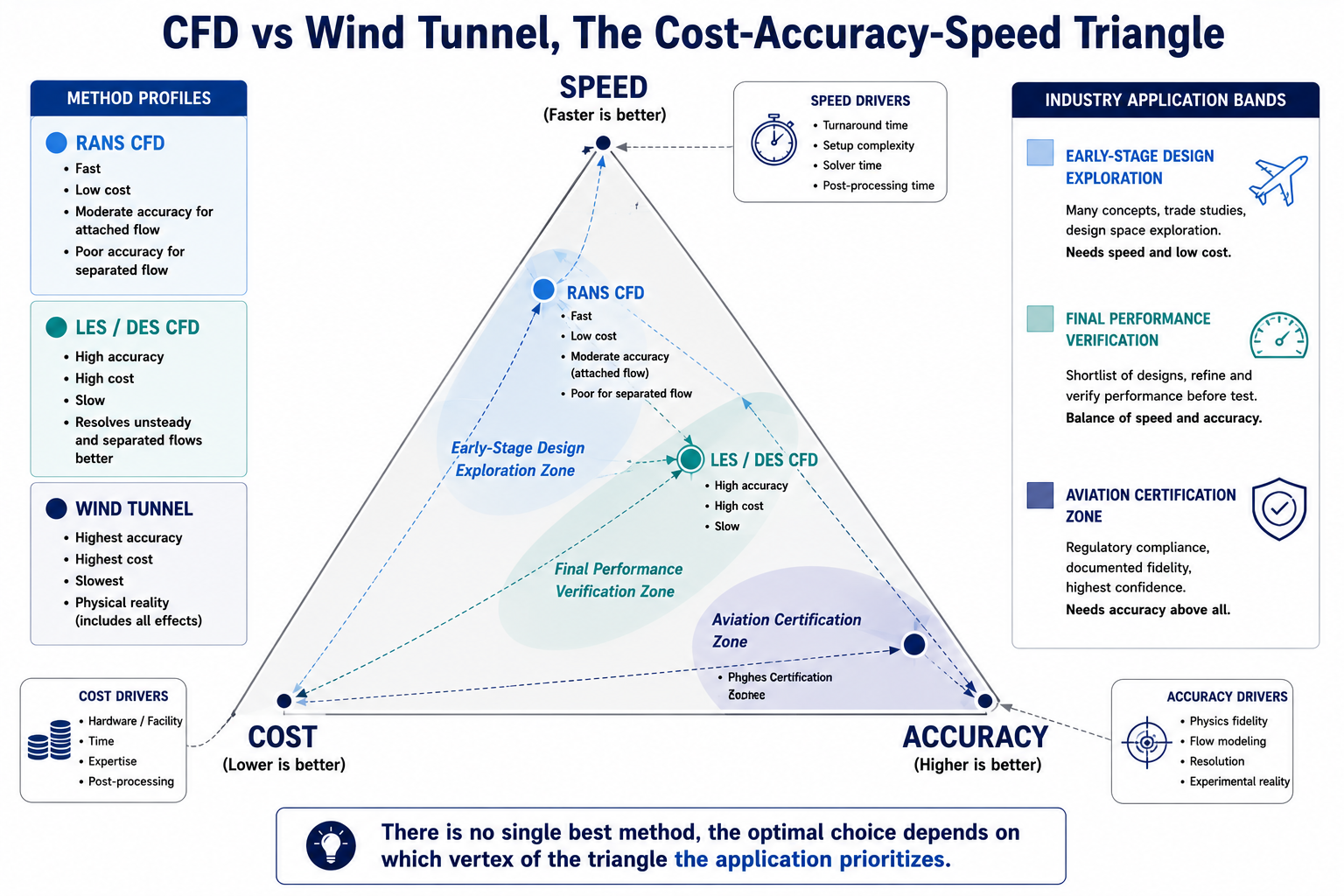
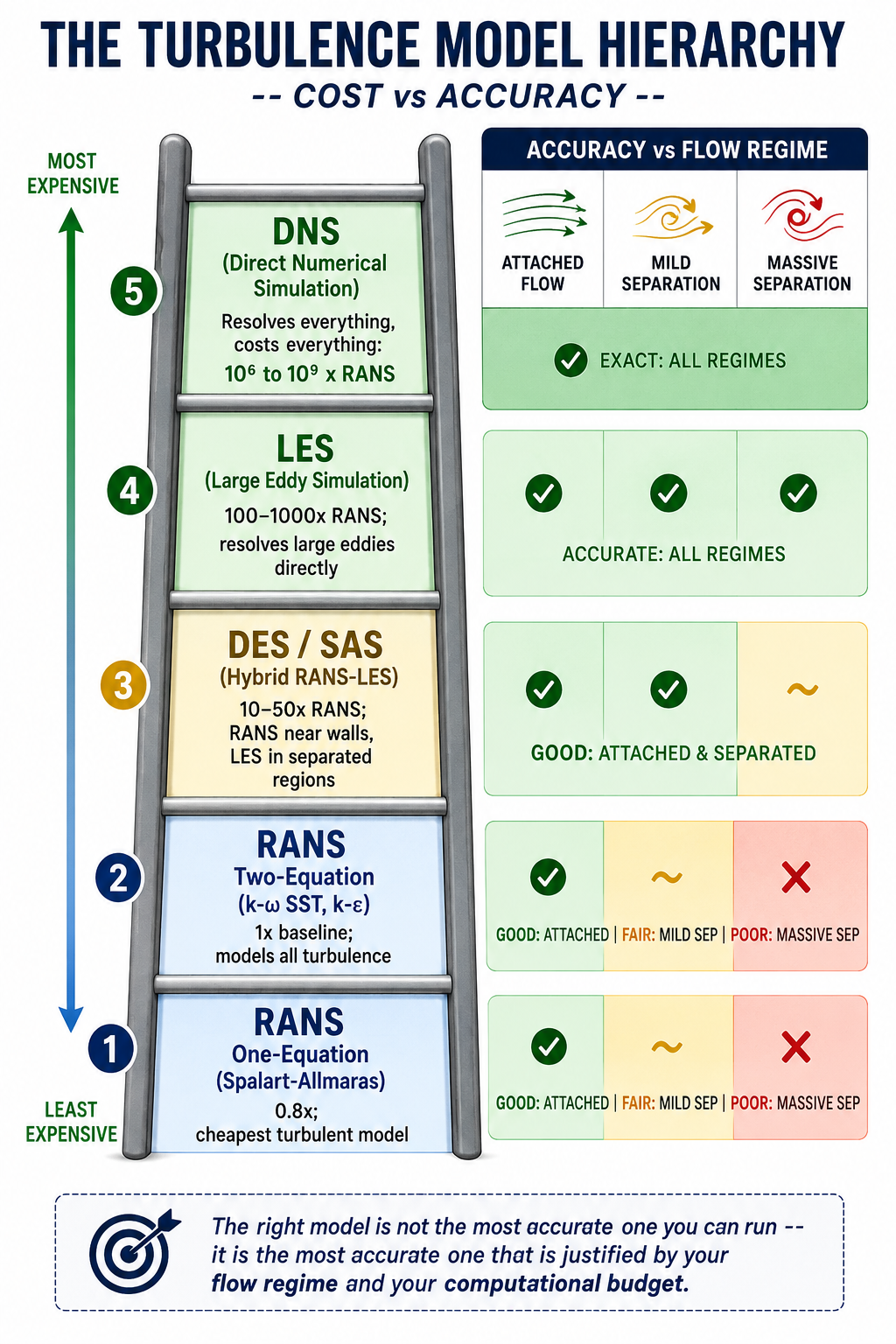
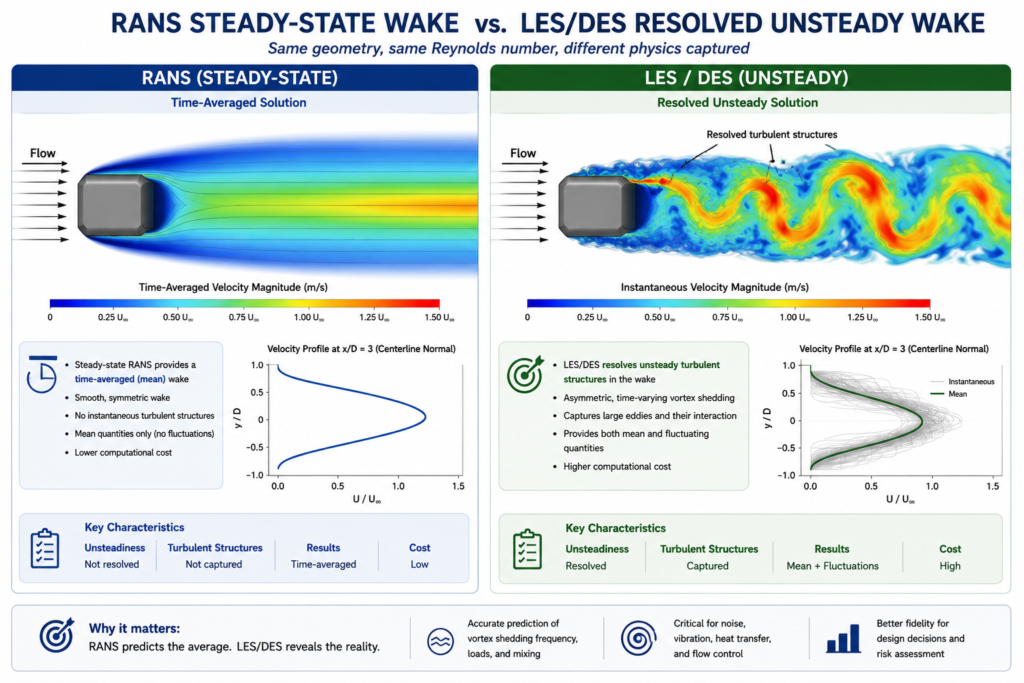
Model everything (RANS). Reynolds-Averaged Navier-Stokes models time-average the governing equations, removing turbulent fluctuations and replacing their effect with a turbulent viscosity term. RANS gives a single steady-state flow field. It’s the fastest approach and handles attached or mildly separated flow well.
Resolve the large eddies, model the small ones (LES and hybrids). Large Eddy Simulation filters the equations to resolve large, energy-containing eddies directly while modelling only the sub-grid scale eddies. It’s far more accurate than RANS for separated flows, but cost scales roughly with Re², making full LES impractical for high-Reynolds-number engineering problems.
Hybrid RANS-LES. Methods like Detached Eddy Simulation (DES) and Scale-Adaptive Simulation (SAS) use RANS near walls, where it’s accurate and cheap, and switch to LES-like behavior in separated regions, where large unsteady eddies dominate. This captures the physics that matters most at roughly 10 to 50 times RANS cost, versus 100 to 1,000 times for full LES.
RANS Models: The Workhorses of Industrial CFD
RANS handles the large majority of engineering CFD work, from automotive aerodynamics to HVAC design to turbomachinery. Knowing what each model is calibrated for, and where it breaks down, is the core practical knowledge.
Spalart-Allmaras: One Equation, One Purpose
Developed by Spalart and Allmaras at Boeing in 1992, this is the simplest widely used turbulence model. It solves a single transport equation for turbulent kinematic viscosity directly, skipping the k-epsilon or k-omega equations. That makes it the cheapest and most numerically robust RANS option.
SA was built specifically for external aircraft aerodynamics in attached or mildly separated flow, calibrated on flat plate and aerofoil boundary layers. It remains standard in NASA’s CFD codes. It is not designed for free shear flows, strongly separated flows, or anisotropic turbulence. Using it on a bluff body or a post-stall wing will produce wrong results no matter how good the mesh is.
The k-epsilon Family: Robust but Flawed Near Walls
Standard k-epsilon (Jones and Launder, 1972) was the first widely adopted two-equation model and remains common in non-aerospace industrial CFD. Its known weakness is poor near-wall behavior: the epsilon equation goes singular near the wall, forcing reliance on wall functions and limiting its usefulness where near-wall physics matters. In adverse pressure gradients, it over-predicts skin friction and delays predicted separation.
Realizable k-epsilon (Shih et al., 1994) improves on this by making the C_mu coefficient vary with local strain rate and enforcing mathematical realizability constraints. It performs noticeably better for round jets, mixing layers, and mildly separated flows, making it the preferred choice for combustion chambers and industrial internal flows.
k-omega SST: Why It Became the Default
Developed by Florian Menter and published in 1994, k-omega SST is now the standard model for industrial external aerodynamics and the default in most general-purpose solvers. It fixes the two biggest weaknesses of its predecessors: k-epsilon’s poor near-wall behavior and standard k-omega’s oversensitivity to freestream conditions.
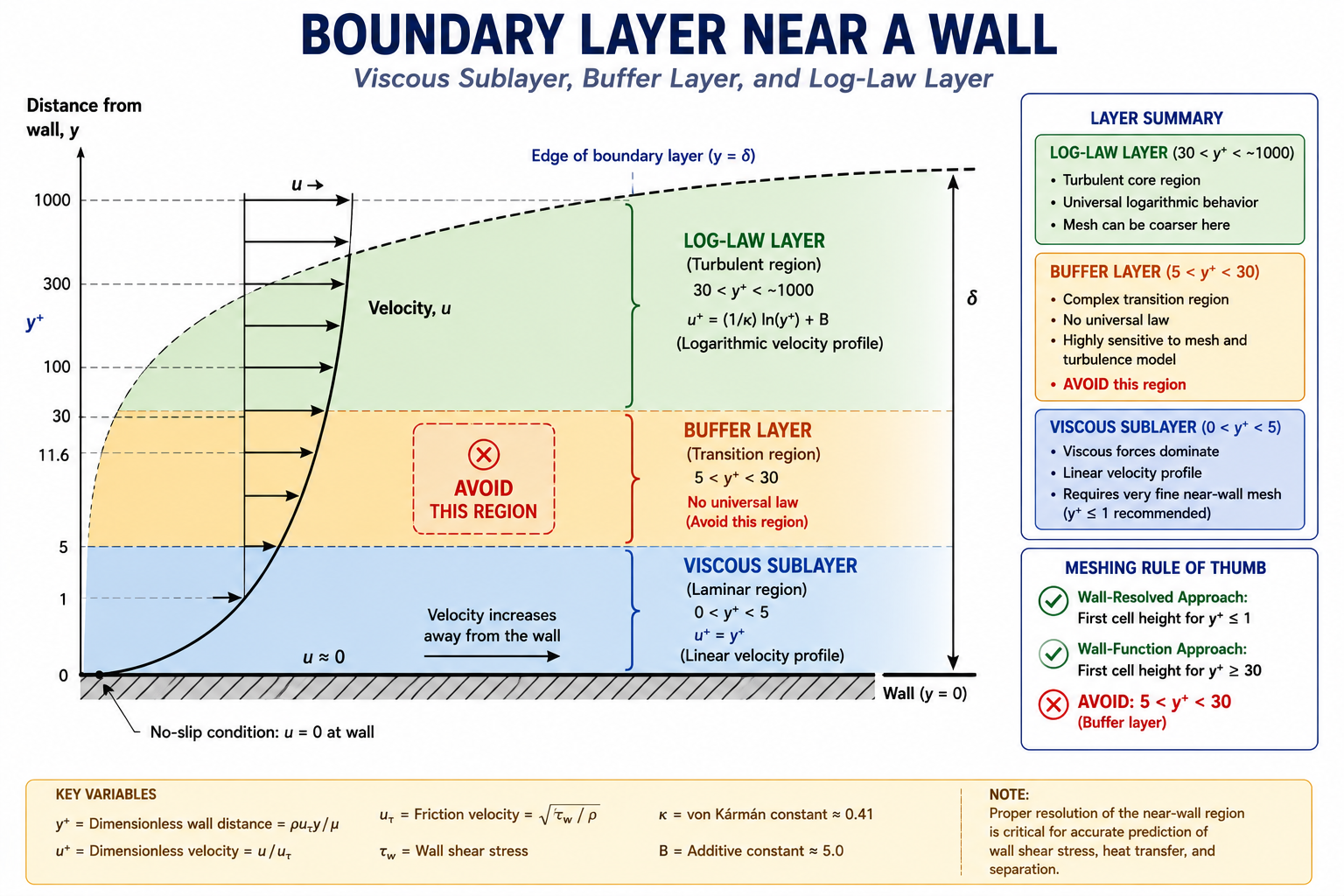
SST does this with a blending function that transitions between k-omega near walls, where it gives excellent near-wall accuracy without wall functions at y+ below 1, and k-epsilon in the freestream, where it’s more robust. The switch is automatic based on wall distance. A built-in stress limiter also prevents over-production of turbulent viscosity in adverse pressure gradients, one reason SST predicts separation onset more accurately than either parent model, as detailed in Menter’s original AIAA paper introducing the model.
SST isn’t perfect. It still under-predicts separation onset in strongly adverse pressure gradients and misrepresents massively separated flow. A cylinder in crossflow, a stalled wing, or a blunt truck rear will all produce results that mesh refinement cannot fix. Those cases need a higher-fidelity model, or explicit acknowledgment that the RANS result carries large uncertainty.
Reynolds Stress Model: When Anisotropy Matters
Two-equation models rely on the Boussinesq assumption, that turbulent stress is proportional to mean strain rate. That assumption breaks down under strong swirl, curvature, buoyancy, or multiple concurrent shear stresses.
The Reynolds Stress Model solves transport equations for all six Reynolds stress components directly, abandoning Boussinesq. It handles anisotropic turbulence correctly, which helps for rotating machinery, strongly swirling combustors, and buoyancy-driven flows. The cost is 3 to 5 times higher than two-equation models, and it’s numerically less stable. For most industrial work, the accuracy gain over SST doesn’t justify the cost. Reserve RSM for cases where anisotropy is the governing physics, not a minor correction.
The 10-Model Comparison
Cost is relative to standard k-epsilon at equivalent mesh density. Accuracy is assessed separately for attached and separated flow, since these are fundamentally different challenges for a turbulence model.
| Model | Type | Cost vs RANS k-e | Attached Flow Accuracy | Separated Flow Accuracy | Best Use Case | Avoid When |
|---|---|---|---|---|---|---|
| Spalart-Allmaras | RANS | 0.8x | Good for thin boundary layers | Poor | Thin airfoil, attached aero | Any significant separation |
| k-epsilon (standard) | RANS | 1.0x | Moderate; poor near walls | Poor | Internal duct/pipe flows | Near-wall or adverse gradient regions |
| k-epsilon (Realizable) | RANS | 1.05x | Better for jets | Still poor for massive separation | Jet mixing, combustion | High-AoA aerodynamics |
| k-omega (standard) | RANS | 1.0x | Excellent near-wall | Poor in freestream | Near-wall/transitional flow | Freestream-dominated problems |
| k-omega SST | RANS | 1.1x | Excellent | Moderate | Default for most external/internal flow | Massively separated/bluff wake flows |
| Reynolds Stress Model | RANS | 3-5x | Excellent for anisotropic turbulence | Better than 2-eq | Rotating machinery, swirl, buoyancy | General use (high cost, marginal gain) |
| DES | Hybrid | 10-50x | Good | Good | High AoA, bluff bodies, separated wakes | Thin boundary layers, unrefined RANS zone |
| SAS | Hybrid | 5-20x | Good | Good for massive separation | DES alternative | Weakly separated flows |
| LES | Scale-resolving | 100-1000x | Excellent | Excellent | Aeroacoustics, fundamental studies | High-Re engineering flows (Re > 10^6) |
| DNS | Exact | 10^6-10^9x | Exact | Exact | Academic turbulence research | Any engineering application |
When RANS Isn’t Enough: DES, SAS, and LES
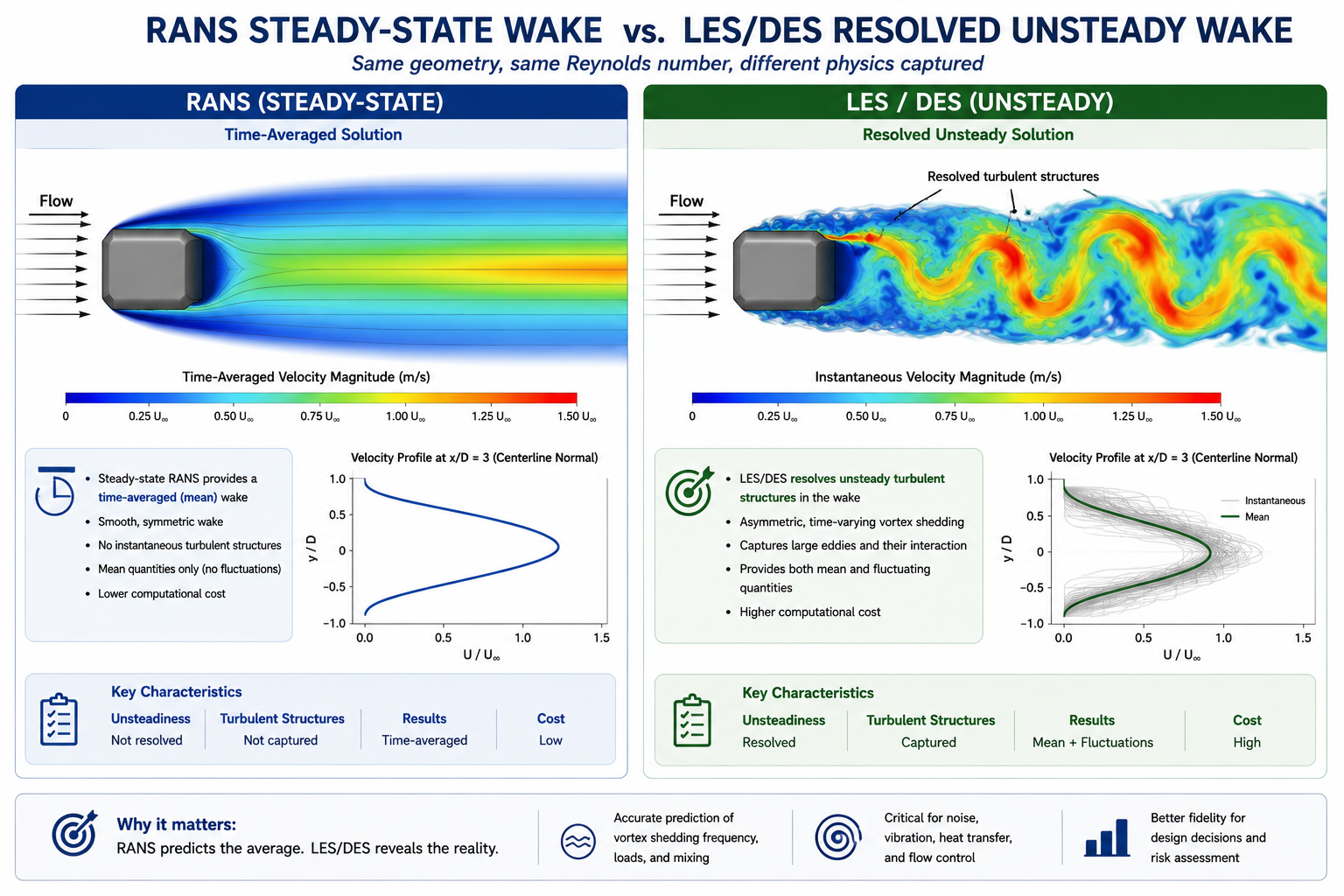
If a flow has large-scale, energetic, unsteady separation that governs the quantity you care about (drag, pressure fluctuation, noise, heat transfer in a separated region), RANS gives the wrong answer regardless of which two-equation model you pick. Time-averaging removes exactly the dynamics that dominate these flows.
Detached Eddy Simulation: The Practical Hybrid
Introduced by Spalart and colleagues in 1997, DES uses RANS in the attached boundary layer and switches to LES-like treatment in the separated region, based automatically on local mesh size relative to the model’s length scale. The widely used variant, Delayed DES (DDES), adds a shielding function to stop the model from switching to LES prematurely inside thick boundary layers, which early DES implementations sometimes did, causing modelled stress depletion and incorrect wall shear stress.
DES gives significantly better results than SST for bluff body aerodynamics, aerofoils near stall, and any separated flow where force coefficients or vortex structure matter. The 10 to 50 times cost penalty is real but manageable for problems where RANS produces 20 to 30 percent errors.
LES: When Only Resolved Unsteady Physics Will Do
LES is the right choice for aeroacoustics, where noise comes from turbulent pressure fluctuations at frequencies RANS can’t resolve, and for heat transfer in highly unsteady separated regions. Its biggest constraint is the near-wall mesh requirement: at Re = 10⁶, wall-resolved LES needs cell sizes on the order of micrometres, making a full vehicle or aircraft prohibitively expensive. Wall-modelled LES (WMLES), which blends a RANS-like near-wall model with outer-region LES, reduces this cost and is an active area of commercial solver development.
Scale-Adaptive Simulation: A DES Alternative
SAS, developed by Menter and Egorov, adds a von Karman length scale term to the omega equation instead of relying on DES’s grid-based trigger. It activates when the local flow length scale drops below the RANS equilibrium scale, letting the model resolve turbulent structures without needing a carefully designed RANS-to-LES transition mesh. In practice, SAS gives similar results to DES for strongly separated flows and is often more robust in transition regions.
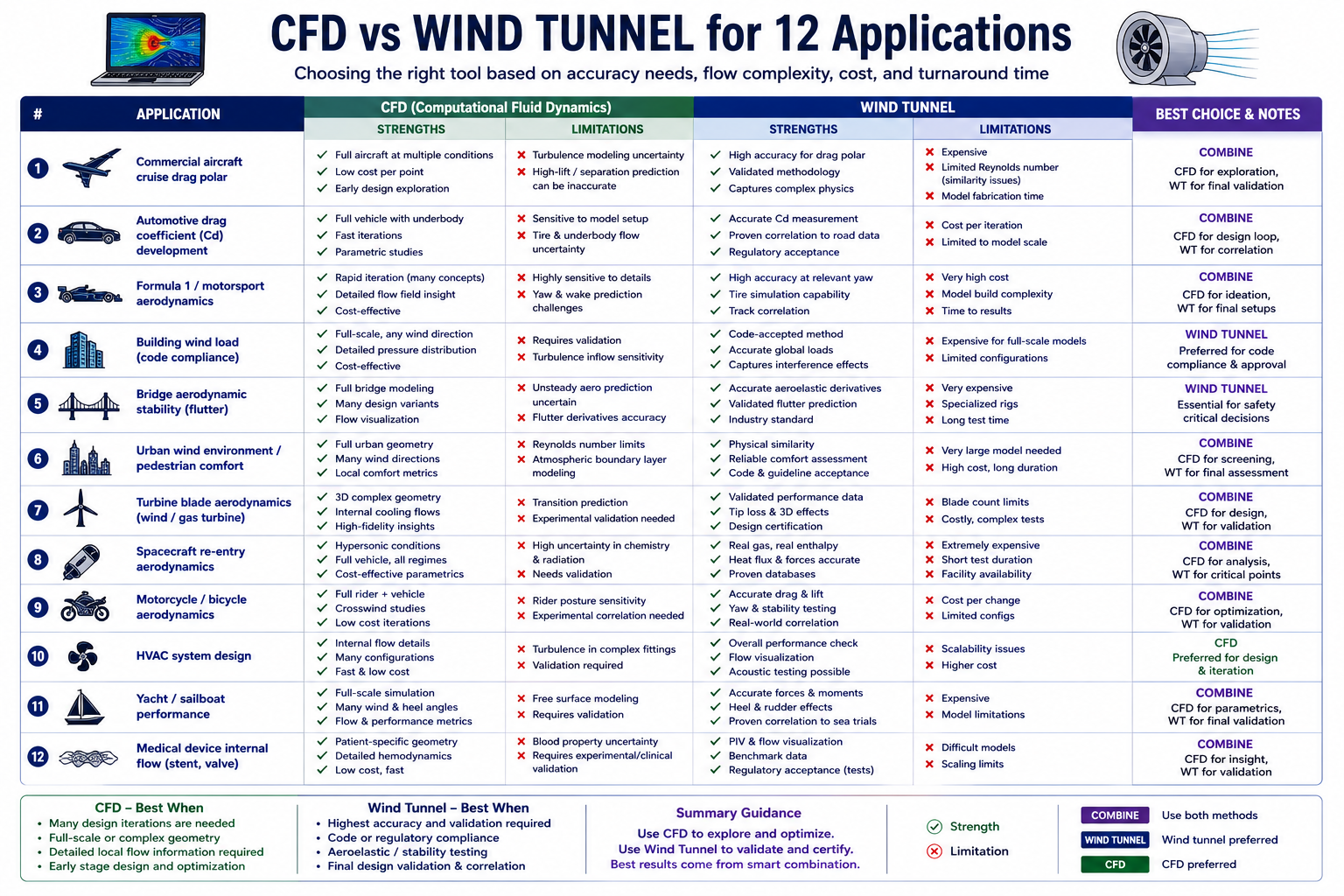
Turbulence Model Selection for 12 Engineering Applications
This table is a starting reference, not a substitute for project-specific validation.
| Engineering Problem | Recommended Model | Why | Watch For |
|---|---|---|---|
| Aircraft wing at cruise | k-omega SST | Best near-wall accuracy for attached flow | May predict separation 2-3° too late at high AoA |
| Automotive exterior (sedan) | SST for baseline; DES for wake detail | SST gives Cd within 5-8%; DES resolves unsteady wake | SST can under-predict blunt-rear separation by 10-20% |
| Circular cylinder in crossflow | DES or LES | RANS misrepresents wake width and shedding frequency | Run at least 10 shedding periods before extracting statistics |
| Internal pipe flow (developed) | k-omega SST or Realizable k-epsilon | Well-captured by either two-equation model | Confirm y+ matches chosen near-wall treatment |
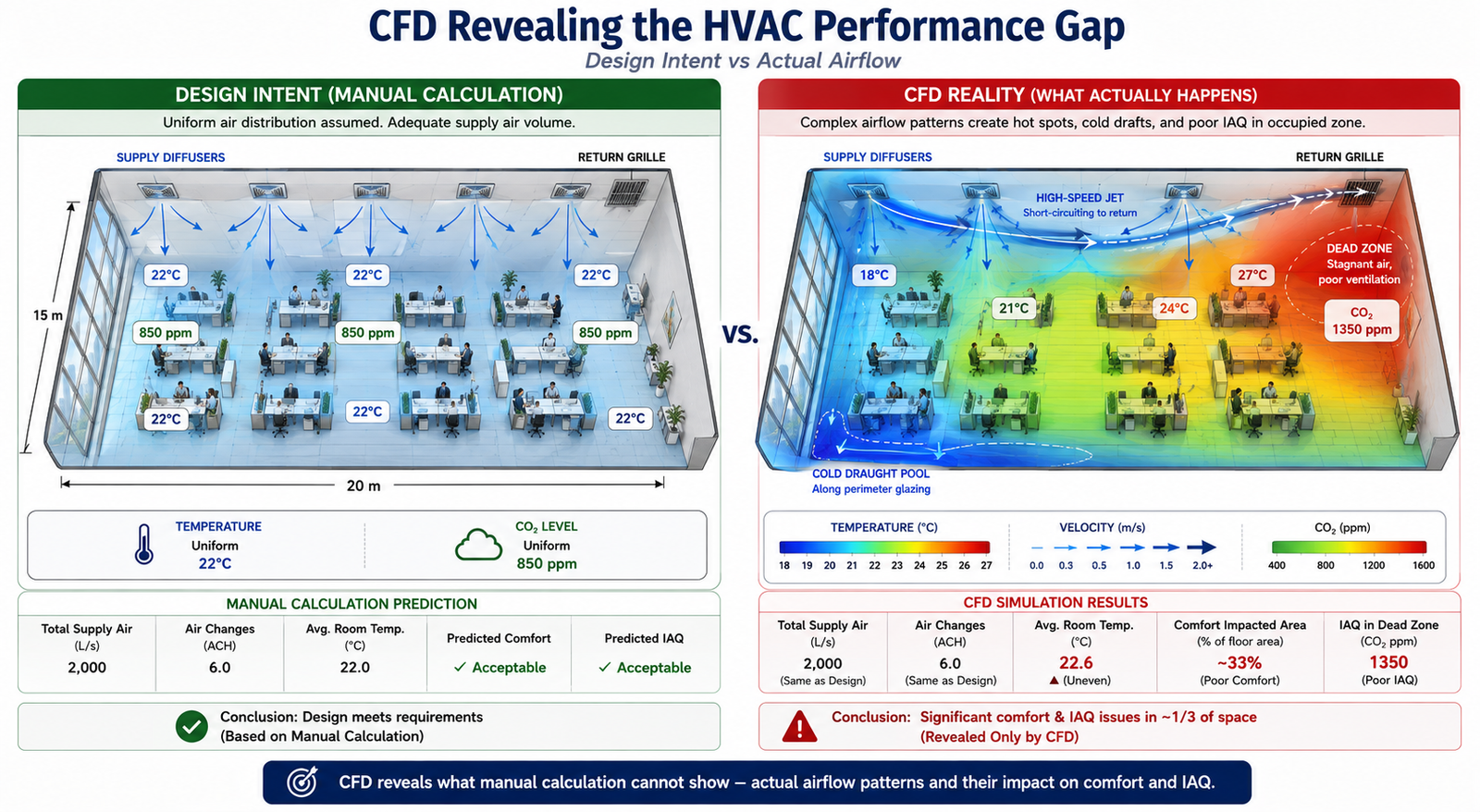
| HVAC room airflow | SST with Boussinesq buoyancy | Standard for room CFD; buoyancy term essential | Diffuser modelling detail strongly affects jet throw |
| Wind around a tall building | SST with ABL modifications; LES for pedestrian comfort | Handles time-averaged wind loads | Inlet profile must match ABL log-law and roughness |
| Gas turbine blade cooling | SST with gamma-Re_theta transition | Captures laminar-to-turbulent onset for heat transfer | Requires accurate inlet turbulence intensity |
| Centrifugal pump impeller | SST in rotating frame (MRF or sliding mesh) | Handles body forces and secondary flows | Needs rotation-corrected turbulence production term |
| Combustion chamber / burner | Realizable k-epsilon or RSM with combustion model | Compatible with combustion models; RSM better for swirl | Include radiation model for high-temperature flames |
| Aeroacoustic noise from aerofoil | LES with Ffowcs Williams-Hawkings analogy | Only LES resolves noise-generating structures | Mesh must resolve eddies at frequencies of interest |
| Ship hull resistance | SST with Volume of Fluid (VOF) | Standard for hydrodynamics; VOF captures wave resistance | Free surface mesh needs 20+ cells per wave height |
| Blood flow through a stent | Laminar/transitional SST with Carreau non-Newtonian model | Physiological Re is mostly laminar to transitional | Requires pulsatile BCs from measured waveforms |
Understanding Model Constants
Every turbulence model contains empirical constants calibrated against experimental data for specific canonical flows. These aren’t free parameters to tune for a better match on one result. Adjusting them to fit a specific experiment is curve-fitting, not physics, and the modified constants will produce wrong results for any flow outside the case they were tuned to.
| Model | Key Constant | Default | Controls | When to Modify |
|---|---|---|---|---|
| k-omega SST | a1 (stress limiter) | 0.31 | Max ratio of shear stress to k | Rarely; some codes use 0.302 |
| k-omega SST | beta* (k dissipation) | 0.09 | Dissipation-to-k-omega relationship | Never |
| k-epsilon standard | C_mu | 0.09 | Overall turbulence level | Sometimes 0.06-0.07 for round jets |
| k-epsilon standard | C1_epsilon, C2_epsilon | 1.44, 1.92 | Production/destruction in epsilon equation | Only with specific swirl validation |
| Spalart-Allmaras | cb1, cb2, cv1 | 0.1355, 0.622, 7.1 | Production, destruction, viscosity ratio | Only for transition modeling |
The only legitimate reasons to change a constant: a published, peer-reviewed modification exists for a known model deficiency in your specific flow class, or you’re calibrating a transition model against measured data for one specific geometry and condition. Any other adjustment turns the simulation into result-tuning with zero predictive value for new conditions, even if it matches the calibration case perfectly.
Laminar-to-Turbulent Transition
Standard RANS models assume fully turbulent flow from the inlet. That’s fine at high Reynolds numbers, but for gas turbine blades at altitude, fan and compressor blades, low-speed wind turbine aerofoils, and small propellers, a meaningful part of the surface may still be laminar. Treating it as turbulent overestimates skin friction and misrepresents heat transfer.
The gamma-Re_theta transition model, developed by Menter, Langtry, and colleagues as an add-on to SST, solves two extra transport equations: one for intermittency (the fraction of time flow is turbulent at a point) and one for the transition momentum thickness Reynolds number. It compares local flow conditions against empirical transition-onset correlations and progressively activates the full turbulence model across the transition region.
This model matters most for gas turbine blade heat transfer, where laminar-versus-turbulent regions shift the local Nusselt number by a factor of 3 to 5, and for low-speed aerofoil performance, where leading-edge laminar separation bubbles govern maximum lift. It adds roughly 20 percent compute cost and needs correct freestream turbulence intensity to predict bypass transition accurately.
Practical Setup: Getting the Inlet Values Right
For k-omega SST, turbulent kinetic energy k and specific dissipation rate omega must be set at every inlet. Getting them wrong rarely causes divergence, but it shifts turbulence levels throughout the domain, especially near separated regions.
GIVEN: Freestream velocity V, turbulence intensity Tu, length scale L

k = 1.5 * (V * Tu)^2
Example: V=50 m/s, Tu=0.005 -> k = 1.5 * (0.25)^2 = 0.9375 m^2/s^2

omega = k^0.5 / (C_mu^0.25 * L), where C_mu = 0.09
Example: k=0.9375, L=0.01m -> omega ≈ 176.6 s^-1

epsilon = C_mu^0.75 * k^1.5 / L (for k-epsilon)
Example: k=0.9375, L=0.01m -> epsilon ≈ 14.9 m^2/s^3

Turbulent viscosity ratio target: 1-10 for low-Tu freestream; 10-100 for internal flows
Turbulence intensity guide:
- Low-turbulence wind tunnel: 0.05 to 0.3 percent
- Atmospheric boundary layer: 5 to 15 percent
- Industrial pipe/duct flow: 3 to 8 percent
- Turbomachinery inlet: 3 to 10 percent
- Combustion chamber inlet: 5 to 20 percent
Turbulent length scale guide:
- Pipe/duct flow: 0.07 × hydraulic diameter
- Flat plate: 0.4 × boundary layer thickness
- Wind tunnel: 0.01 × tunnel width
- Atmospheric: 100 to 300 m at reference height
Steady RANS vs. URANS
URANS is appropriate when large-scale unsteadiness is periodic and much larger in scale than turbulence itself: vortex shedding, periodic stall, pulsatile pipe flow. It’s not a substitute for LES. It still models all turbulence, but lets large-scale unsteady structure develop instead of being averaged away.
If a steady RANS run oscillates and won’t converge, that’s a signal the flow is unsteady, not a convergence problem to push through with more iterations. Either time-average a URANS result or move to DES or LES. An arbitrary instantaneous snapshot of an unsteady solution has no defined physical meaning.
Running a Turbulence Model Sensitivity Study
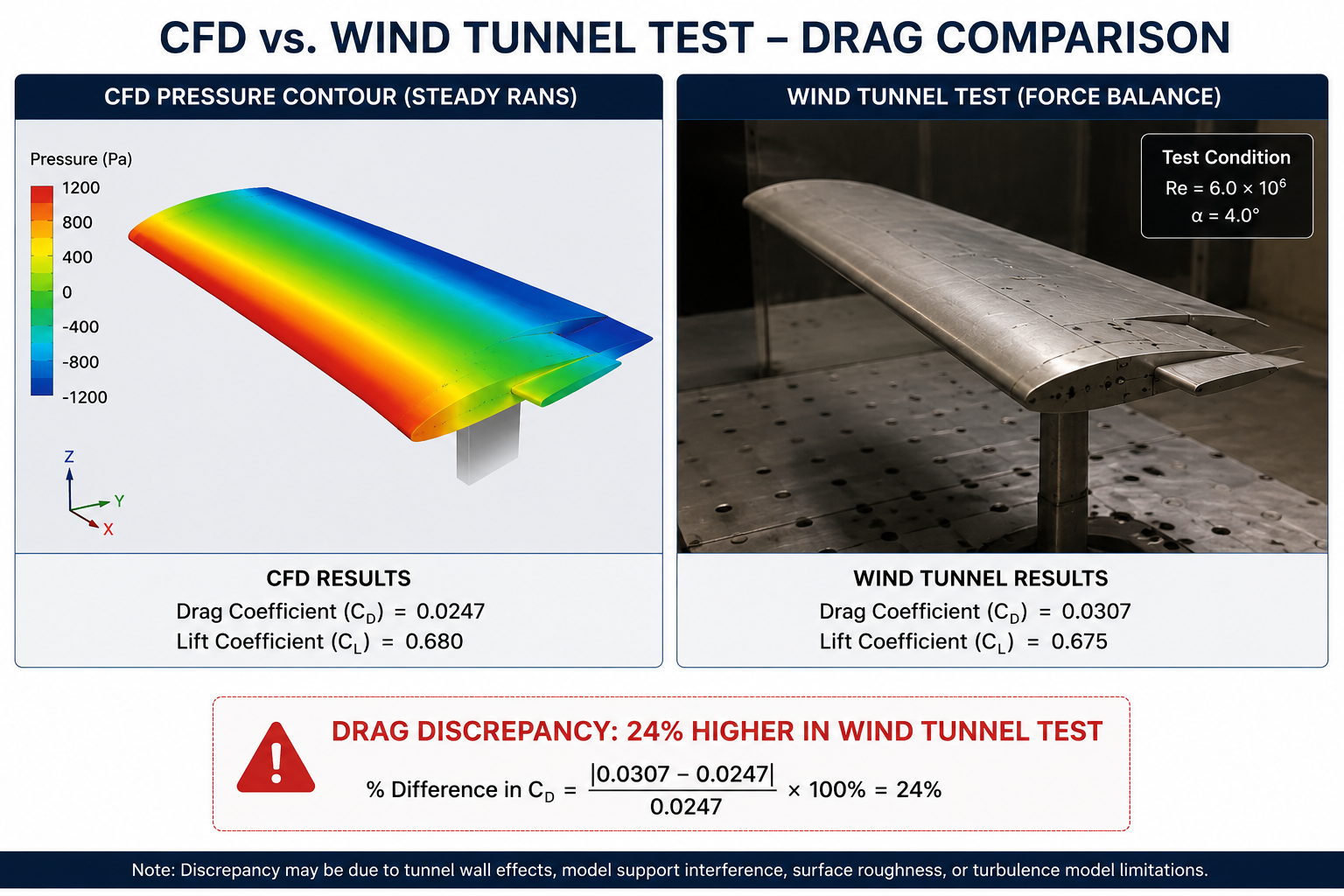
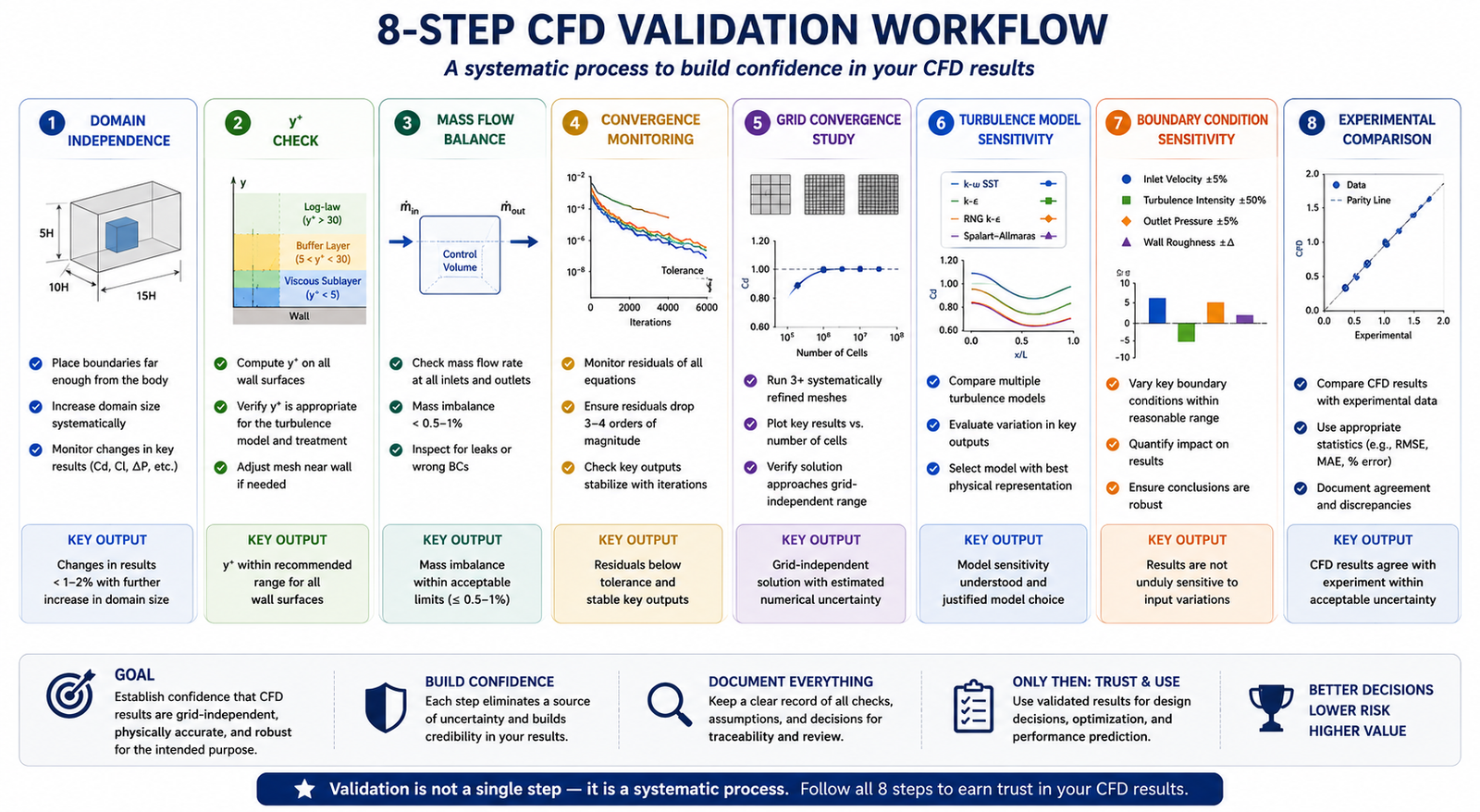
For any result feeding a design decision, run the same geometry, mesh, and boundary conditions through two or three models (say, SST, Realizable k-epsilon, and Spalart-Allmaras for external aero) and compare. Agreement within 5 percent for Cd and 2 percent for Cl means turbulence model choice isn’t the dominant uncertainty. Disagreement above 10 percent means it is, and the choice needs justification against experimental or higher-fidelity data.
A Cp comparison along the surface also shows where the models diverge: leading edge points to transition or stagnation issues, suction surface points to adverse pressure gradient handling, trailing edge points to separation and base pressure.
Worked Examples
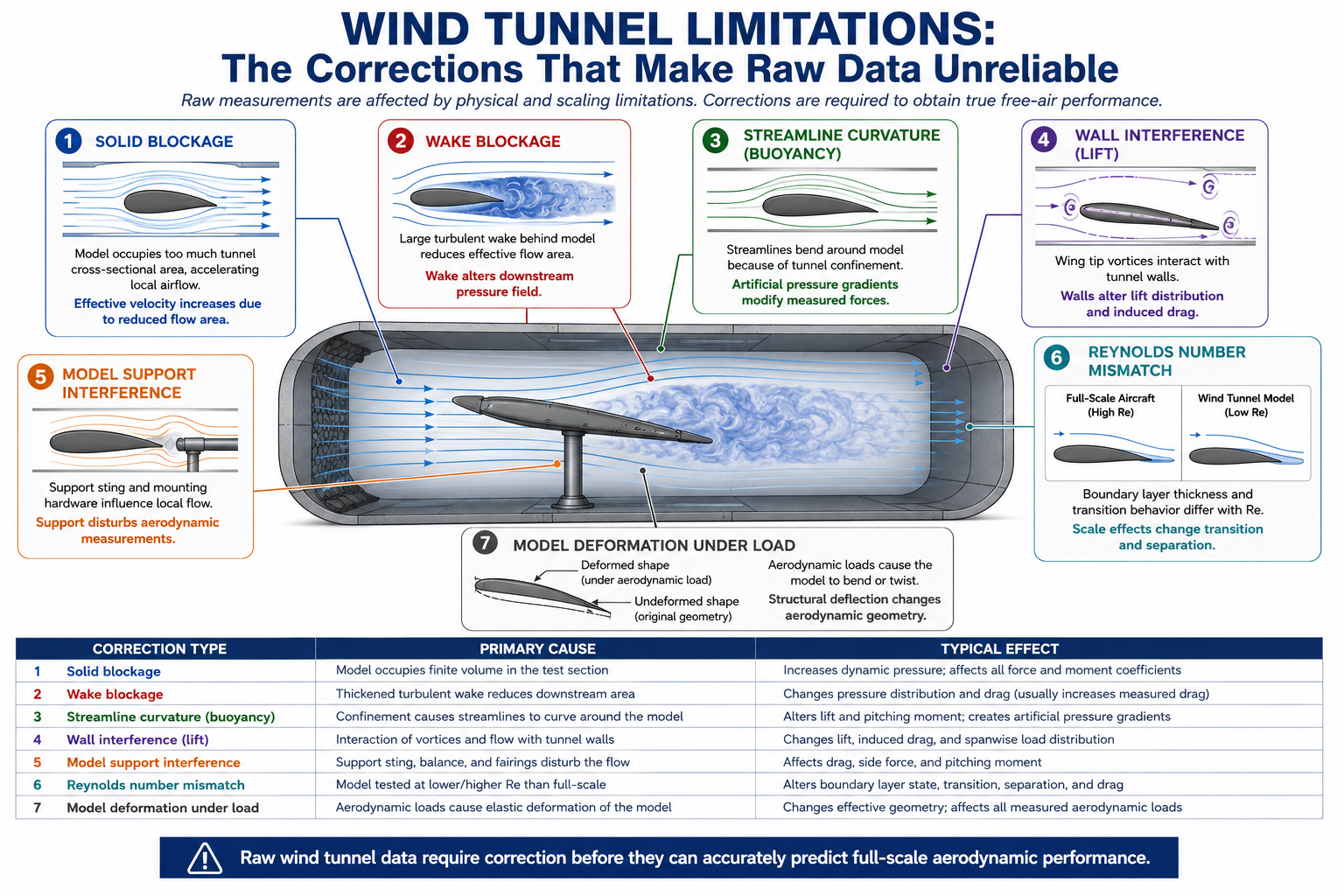
Wind load on a low-rise industrial building: A team needed pressure coefficients on a 10m tall, 40m wide, 20m deep building in open terrain for structural loading. They used k-omega SST with an ABL inlet profile matched to a roughness length of 0.03m, generating 15 percent turbulence intensity at roof height. Time-averaged Cp on windward and side walls landed within 10 to 15 percent of wind tunnel data, adequate for code compliance.
The roof was the exception: leading-edge separation over the first 20 to 30 percent of the roof width under-predicted suction by 15 to 25 percent, since SST can’t fully capture that separated zone. LES or wind tunnel data would be needed if the roof were the governing structural case.
Pump impeller at part-load: At 60 percent of design flow, incidence angle at the impeller inlet risked leading-edge separation and rotating stall. The team used SST in a rotating reference frame with sliding mesh for full transient impeller-volute interaction, since steady MRF averages away the tongue-blade interaction that dominates at off-design. Running through 5 impeller revolutions after reaching a stationary state gave head and efficiency predictions within 3 to 5 percent and 2 to 3 percentage points of the test curve at design point, with correct off-design trends even where absolute values differed by 5 to 10 percent.
Frequently Asked Questions
What is the best turbulence model for CFD? There isn’t one. k-omega SST is the industry standard for attached or mildly separated external aerodynamics. Massively separated flows need DES or LES. Aeroacoustics requires LES, since RANS can’t predict the pressure fluctuations that generate noise. Start with SST, validate against a reference, and upgrade only when SST shows a real discrepancy in the regime that matters.
What’s the difference between k-omega and k-omega SST? Standard k-omega has excellent near-wall behavior but is highly sensitive to the omega value set at the freestream inlet, which makes it unreliable for external flows. SST blends k-omega near walls with k-epsilon in the freestream, switching automatically based on wall distance, and adds a stress limiter that improves separation prediction. That combination is why SST outperforms both parent models for external aerodynamics.
When should I use DES instead of RANS? When the flow is separated over a significant area at your operating condition, and the drag, pressure distribution, or acoustic output you’re predicting depends on the structure of that separated region. Common triggers: bluff bodies with large wakes, aerofoils within 3 to 5 degrees of stall, deployed flaps or spoilers, and any case where unsteady loads or vortex structure matter. Budget 10 to 50 times the cost of SST.
Can I use RANS for unsteady problems? Yes, as URANS, when the dominant unsteadiness is large-scale and periodic, like vortex shedding or pulsatile flow. It’s not appropriate when the unsteadiness comes from the turbulence itself or from separated-region dynamics at a scale close to the turbulence scale; those cases need DES or LES.
How much does turbulence model choice affect the final result? For attached flow, different RANS models typically agree within 3 to 8 percent for drag and 1 to 3 percent for lift, so model choice isn’t the dominant error source. For separated flows, RANS models can disagree by 20 to 50 percent, making model choice the largest source of uncertainty. For acoustics, RANS is wrong by orders of magnitude regardless of model, since it averages away the noise source entirely.
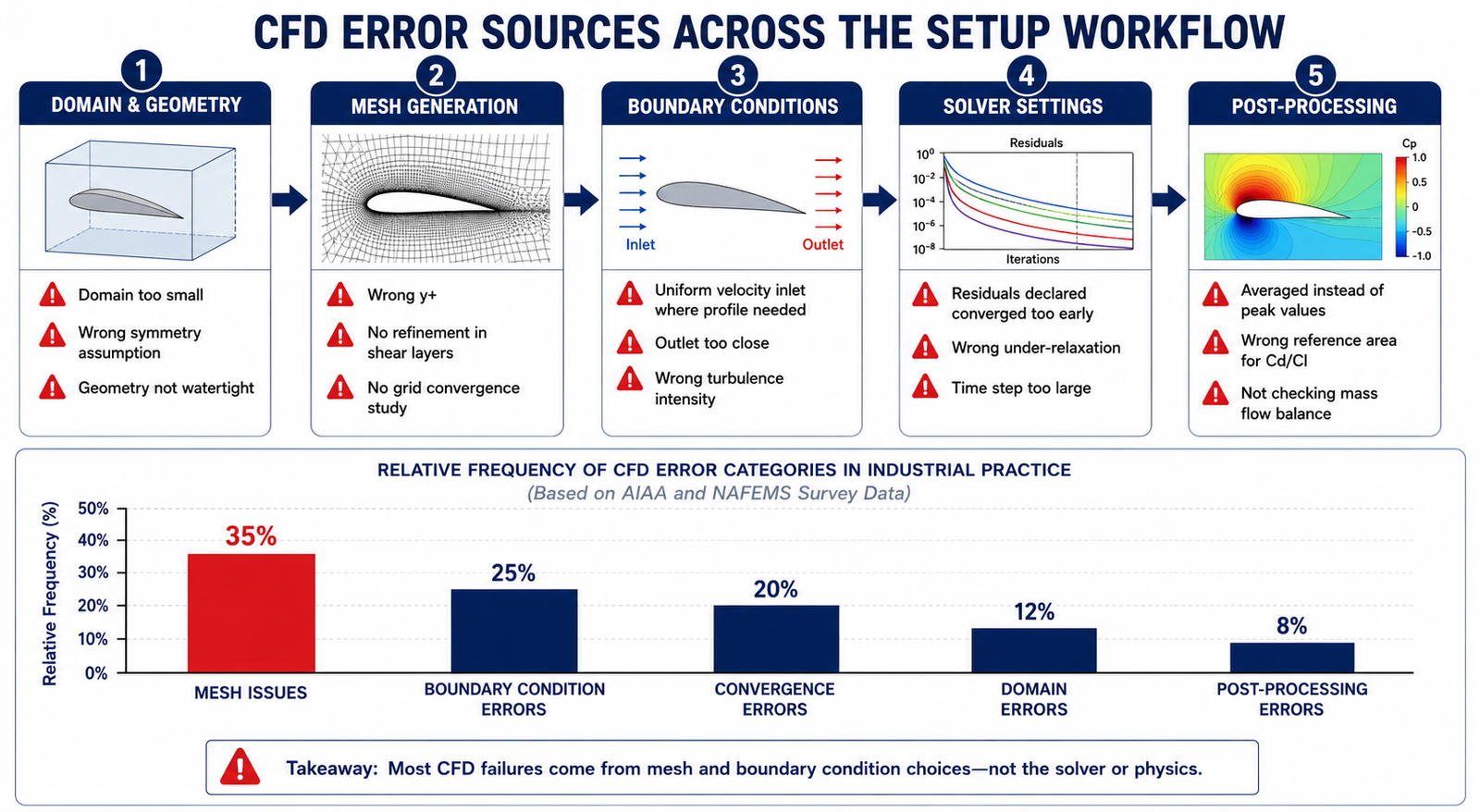
What does y+ have to do with turbulence model selection? Different models need the first wall cell in different parts of the boundary layer. Low-Re models and SA need y+ below 1. Standard wall functions need y+ between 30 and 300. Mismatching the mesh to the model, or landing in the 5-to-30 buffer layer, produces wall shear stress errors of 10 to 40 percent regardless of which model you chose. Decide the near-wall treatment before generating the mesh, then check y+ post-solution.
Key Takeaways
Turbulence model selection isn’t about running the most accurate model available. It’s about matching the physics that governs your quantity of interest to a cost justified by the engineering decision at hand. LES on a duct pressure drop wastes compute resolving detail that changes the answer by under 1 percent. SST on a bluff body aeroacoustics problem gives noise predictions wrong by orders of magnitude. Both are the wrong choice, just in opposite directions.
Start by classifying the flow: attached, mildly separated, or massively separated. Attached flow needs SST or SA. Massive separation needs DES or LES. Mild separation needs SST plus a sensitivity study against a higher-fidelity reference. Then check secondary physics: rotation needs correction terms, transition needs the gamma model, strong anisotropy may need RSM. Finally, match the near-wall treatment and mesh to the y+ range that treatment requires.
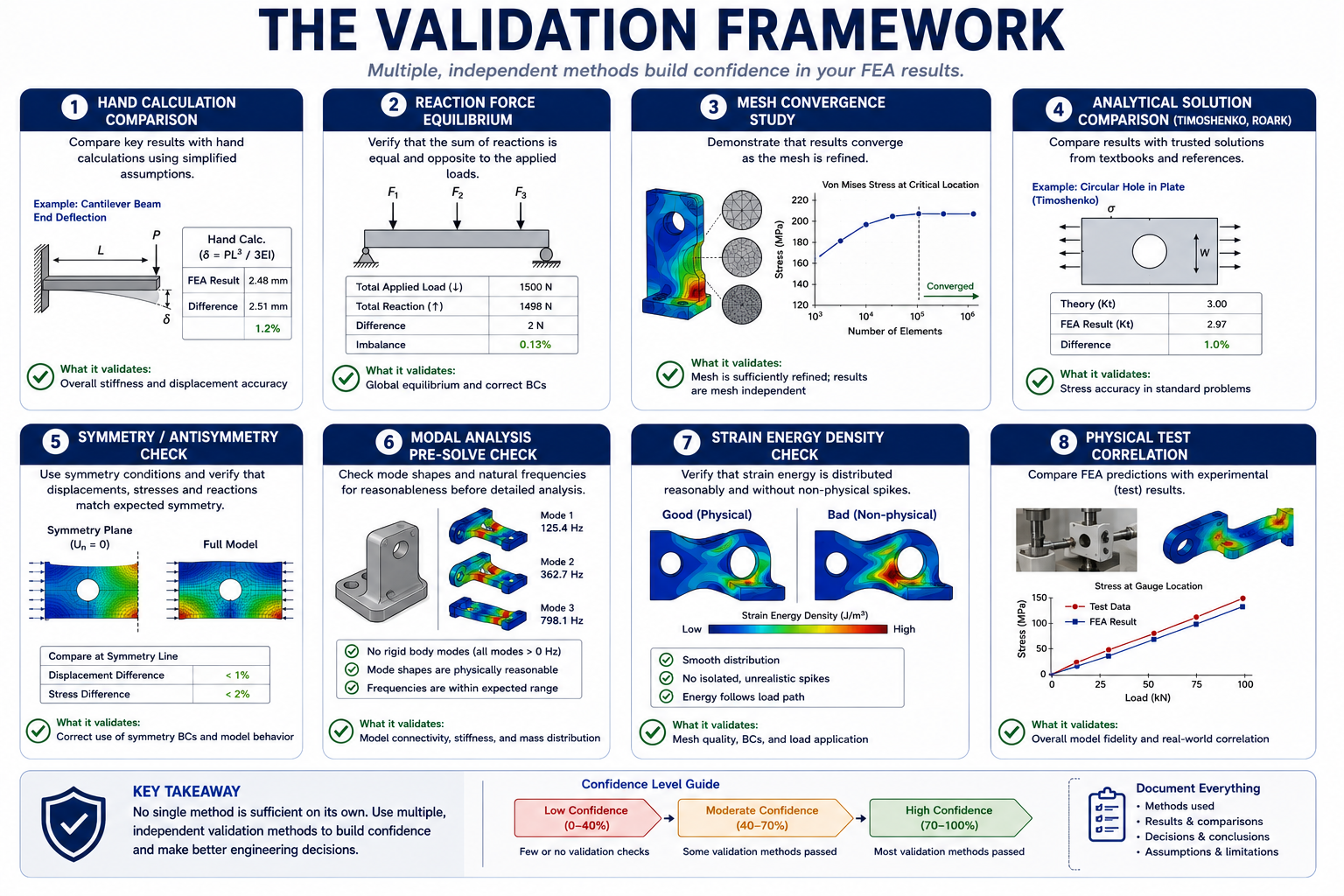
None of this removes the need for validation against a reference before trusting a result for a design decision. The models here have documented accuracy ranges and known failure modes. Working inside those ranges, with validation, gives reliable results. Working outside them without validation gives results indistinguishable from wrong ones.