Tag: prompt engineering

  • AI Agents in Mechanical Engineering: Beyond Prompt Engineering

    AI Agents in Mechanical Engineering: Beyond Prompt Engineering

    The Tool You Are Using Right Now Might Already Be Obsolete

    Most engineering teams using AI today follow the same basic pattern. An engineer types a question. The AI responds. The engineer reads the answer, copies what is useful, and manually applies it. Then they type the next question.

    This is useful. It is also the first generation of AI agents engineering thinking, and in 2026 it is being rapidly surpassed by something more capable.

    AI agents in mechanical engineering do not wait for the next prompt. They execute multi-step workflows autonomously: read CAD geometry, check against your standards, run the review, flag the issues, and deliver a structured report. The engineer reviews findings and makes the decisions. The agent handles everything between.

    This article explains what agentic AI engineering is today, what it looks like in real engineering deployments, which tools lead the space, and how your team can start building agent workflows without overhauling what already works.

    Industry Data: AI Agents Engineering 2026 Survey
    DataCoLab survey of 250 engineering leaders (2025): 95% view AI adoption as essential over the next two years, with nearly half calling it a matter of survival. Only 3% report achieving transformational impact so far.
    SimScale State of Engineering AI 2025: 93% expect AI to deliver substantial productivity gains. The 10:1 expectation gap exists because most teams are deploying AI tools on top of outdated workflows rather than integrating agents deeply.
    Gartner 2026:
    50% of cross-functional supply chain management solutions will use intelligent agents to autonomously execute decisions by 2030. Engineering is among the fastest-moving sectors.
    McKinsey:
    AI-centric organisations are achieving 20-40% reductions in operating costs through automation, faster cycle times, and more efficient talent allocation.

    What Is an AI Agent and How Is It Different From a Chatbot

    The distinction matters enormously for engineering teams choosing tools. Here is how do AI agents work in engineering explained clearly.

    Definition: What Is an AI Agent in Mechanical Engineering
    what is an AI agent in engineering: An AI agent in mechanical engineering is a software system that uses an LLM as its reasoning engine, has direct access to engineering data (CAD models, drawings, standards, simulation outputs), and executes multi-step workflows autonomously. Unlike a chatbot that responds to one prompt at a time, an agent understands the goal, plans the steps, takes actions using real engineering data, checks results, and iterates until the task is complete.

    AI Agent vs Chatbot Engineering: The Difference at a Glance

    What MattersChatbot / LLM Prompt ToolAI Agent
    How it worksOne prompt, one response, waitagentic AI: plans and runs a full workflow
    What triggers itYou type a promptAn event: file upload, design request, review submission
    Data accessOnly what you paste inReads native CAD, drawings, PLM data, standards library
    ActionsGenerates text onlyTakes real actions: runs checks, flags issues, updates outputs
    OutputText you apply manuallyStructured report integrated into your engineering workflow
    MemorySession onlyPersistent across tasks, learns from your engineering context
    90%faster design reviewsEngineering teams using bananaz AI agents report completing design reviews up to 90% faster than their previous manual process (bananaz AI, 2026).
    3%achieving transformational resultsOnly 3% of hardware engineering companies report significant AI gains despite 95% viewing it as essential. The gap: most teams use AI as a chatbot, not as an agent. (CoLab survey, 250 engineering leaders, 2025)

    Five Types of AI Agents Already in Production in Engineering

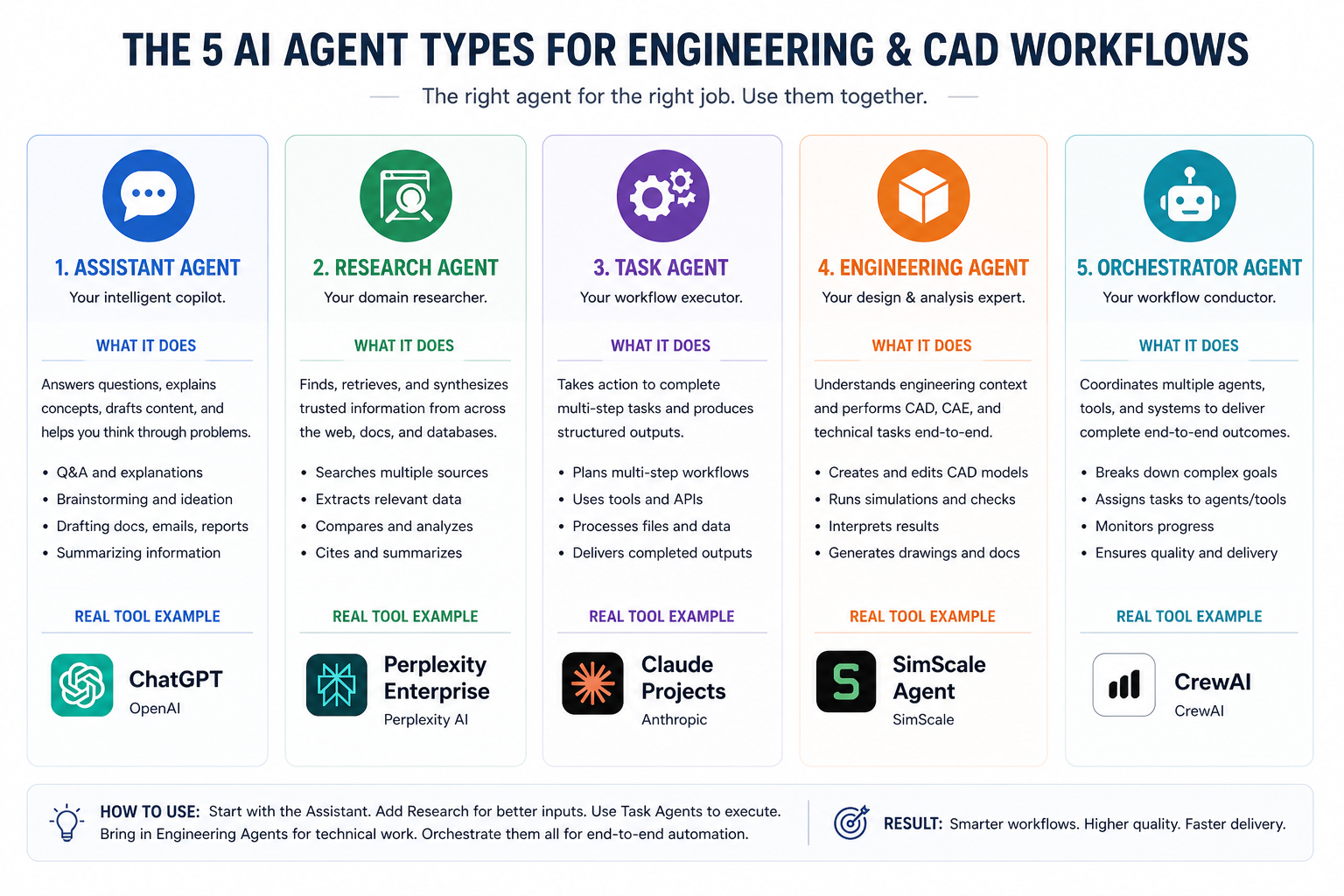
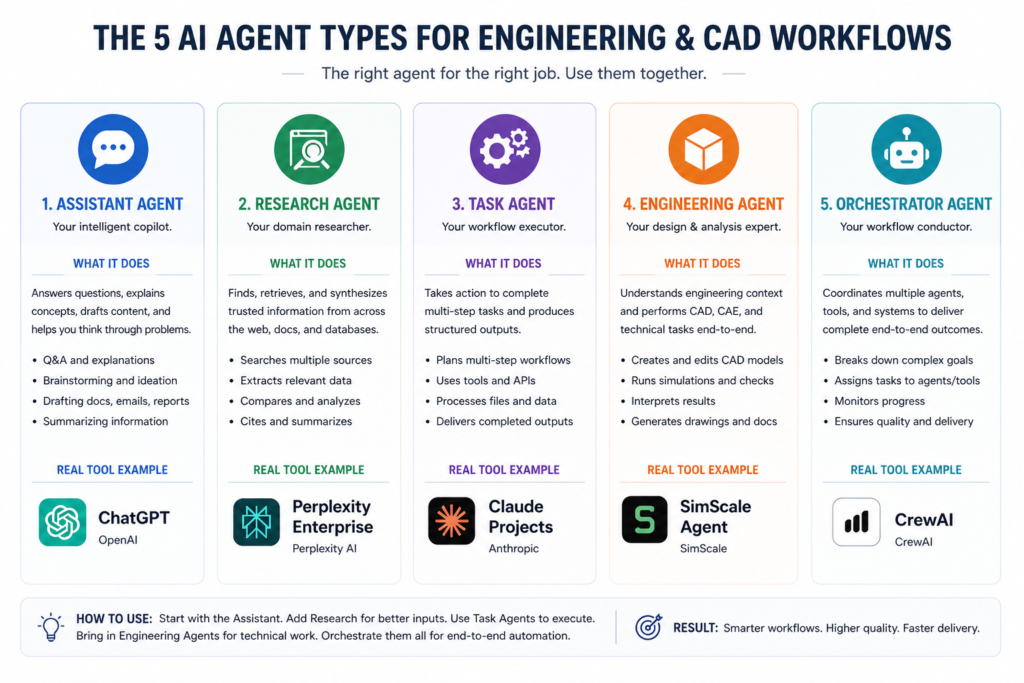
    Not all AI agents in mechanical engineering do the same thing. Each agent type targets a specific workflow stage. Here are the five categories in production use in 2026, with the real tools behind each one.

    01CAD Copilot Agents: In-Software Automation
    What it does: Operate directly inside the CAD environment. Automate repetitive sequences (bulk exports, drawing templates, fillet updates across assemblies), suggest design improvements from assembly context, check standards compliance in real time, and execute multi-step operations that previously took dozens of manual clicks.
    Real tools: MecAgent (SolidWorks, Inventor, Fusion 360, Creo). Onshape AI Advisor (PTC). SolidWorks AURA (Dassault).
    CAD AI agent  x  MecAgent CAD copilot
    02Design Review Agents: Automated Drawing and CAD Checks
    What it does: Read native CAD geometry and 2D drawings. Check against your organisational standards and custom checklists. Flag DFM issues, identify cross-sheet inconsistencies, check title blocks and BOM consistency. Generate structured markup reports. Run the same checks identically every time, eliminating the variability of rotating human reviewers.
    Real tools: CoLab AutoReview (native CAD, DFM analysis, standards checklists). bananaz AI (model comparison, change tracking, 90% faster reviews).
    AI agent design review  x  CoLab AutoReview agent  x  autonomous CAD review
    03Simulation Setup Agents: Geometry to Ready-to-Run
    What it does: Interpret CAD geometry and simulation objectives. Recommend boundary conditions, configure mesh settings, set up load cases. Reduce FEA and CFD setup time from hours to minutes. Accessible to engineers without specialist simulation expertise.
    Real tools: SimScale AI (guided setup, automated meshing, cloud simulation). Ansys Discovery AI (real-time structural feedback during modelling). MecAgent (FEA prep from inside CAD).
    AI agents for FEA automation  x  AI agent simulation setup  x  SimScale agentic AI 2026
    04Generative Design Agents: Constraints to Geometry
    What it does: Accept engineering requirements (load paths, material grades, weight targets, manufacturing method) and autonomously generate and rank geometry candidates. Run the generative optimisation loop without requiring manual iteration.
    Real tools: Autodesk Fusion Generative Design. PTC Creo GDX (results returned as editable B-Rep). Siemens NX Generative Engineering. nTop (complex lattice and gyroid geometries for aerospace and medical).
    agentic AI for mechanical design  x  autonomous engineering AI
    05Workflow Orchestration Agents: Connecting the Full Pipeline
    What it does: Coordinate multiple specialist agents across the complete design-to-manufacturing workflow. Read requirements, trigger CAD generation, run simulation, check results, iterate the design, produce documentation. One goal triggers a coordinated multi-agent sequence across all engineering tools.
    Real tools: Synera (orchestrates across 76+ CAx and PLM tools. Deployed at NASA, automotive OEMs, Fortune 500 manufacturers. RFQ responses completed autonomously overnight).
    multi-agent engineering workflow  x  Synera AI engineering  x  AI agent RFQ automation
    AI agents in mechanical engineering five types CAD copilot design review simulation setup generative orchestration 2026

    What a Real Multi-Agent Workflow Looks Like: Synera at NASA

    Abstract descriptions of AI agents in mechanical engineering are useful up to a point. The Synera NASA deployment makes the capability concrete.

    Real Deployment: Synera AI Agents at NASA
    NASA deployed multiple Synera AI engineering agents to transform engineering requirements into validated part designs. A supervisor agent interprets goals and requirements. Specialist agents handle optical design, mechanical layout, structural validation, harnessing, and reporting. These agents coordinate like a virtual engineering team.
    Result:
    Hundreds of design iterations completed in an hour, meeting strict performance and safety requirements.
    The same platform handles commercial AI agent RFQ automation: when an urgent request arrives, Synera agents simulate performance, verify requirements, calculate cost, and compile a qualified response before the engineering team meets on Monday. A proposal workflow that previously took days runs autonomously overnight.

    Autonomous engineering AI at this level is not coming in 2030. It is working today at automotive OEMs, tier one suppliers, and aerospace manufacturers. The question is not whether this capability exists. It is whether your team is adopting it.

    What AI Agents Mean for Mechanical Engineers Day to Day

    The natural question is whether AI agents in mechanical engineering replace engineers. Every credible source, including CoLab, SimScale, McKinsey, and Gartner, gives the same answer: no.

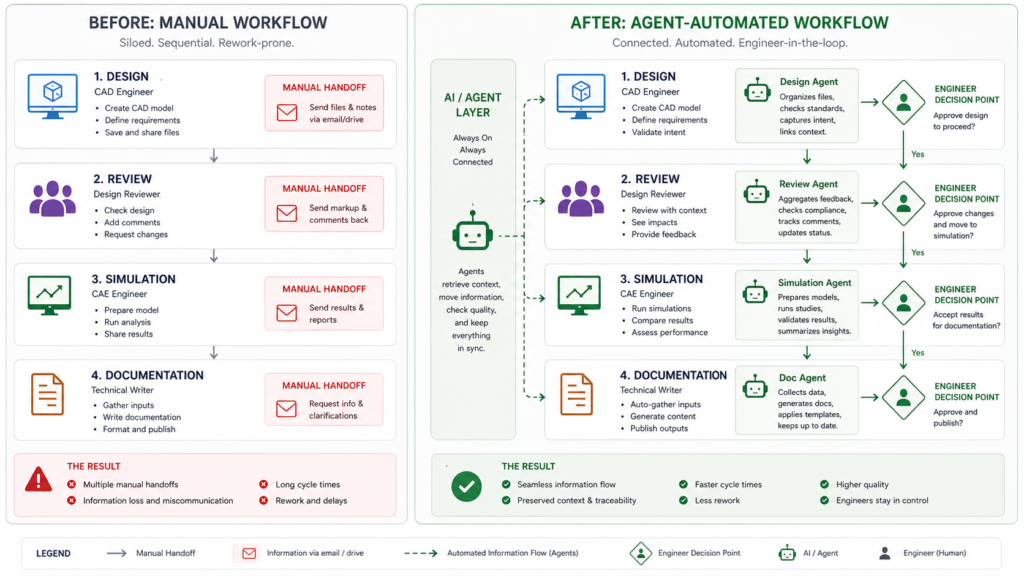
    Agentic AI engineering automates high-volume, consistency-dependent, data-intensive work. Engineers focus on creative, judgmental, and safety-critical decisions. The ratio of interesting work to tedious work shifts dramatically in the engineer’s favour.

    Where Engineers Spend Less Time With Agents

    • Design reviews: The AI agent design review runs the full drawing and CAD check in minutes and delivers a structured markup report. The engineer reviews findings and decides on exceptions. From 2-3 hours to 15-20 minutes.
    • FEA setup: AI agents for FEA automation interpret geometry and configure simulation studies. The engineer validates the setup and interprets results.
    • CAD operations: MecAgent CAD copilot automates sequences that previously took dozens of clicks. Exporting 50 DXFs in 2 minutes instead of 2 hours, per verified user reports.
    • Documentation: Agents generate specifications, reports, and change notices from structured data. Engineers verify accuracy and approve.

    Where Engineers Remain Irreplaceable

    Engineering judgment on safety-critical design decisions. Customer and supplier relationships. Creative problem framing. Cross-discipline trade-off reasoning. Strategic product direction. These remain human responsibilities in every realistic agentic AI engineering deployment in 2026.

    AI agents mechanical engineering workflow before and after manual versus agentic automated design pipeline 2026

    Engineering AI Agent Tools 2026: Reference Table

    A concise reference for the most significant engineering AI agent tools 2026 available today:

    Agent / ToolStageAgent CapabilityBest Fit
    MecAgent CAD copilotCAD modellingIn-software task automation, standards compliance, sequencesSolidWorks, Inventor, Creo, Fusion 360
    CoLab AutoReview agentDesign reviewAI agent design review: DFM, drawing checks, checklistsHigh-volume drawing review teams
    bananaz AI mechanicalReview + changeModel comparison, 90% faster reviews, change trackingHardware product development
    SimScale agentic AI 2026FEA and CFDAI agent simulation setup: guided config, auto-meshTeams without CAE specialists
    Ansys Discovery AIReal-time FEALive structural feedback as geometry changesDesign engineers needing instant analysis
    Synera AI engineeringFull pipelinemulti-agent engineering workflow: req to outputEnterprise OEMs, aerospace, automotive

    How Engineering Teams Should Start With AI Agents

    The 3% of engineering teams achieving transformational AI impact share one characteristic: they deploy one agent against one bottleneck and measure the result before expanding.

    1. Identify the bottleneck. Where does work pile up most consistently? Design reviews, FEA setup, drawing exports, and BOM management are the most common answers for mechanical engineering teams.
    2. Choose workflow-specific agents. A CAD AI agent that reads native CAD geometry outperforms a general LLM prompted to help with CAD. Engineering agents built for engineering data produce engineering-grade outputs.
    3. Build the context layer first. Agents without your standards, materials, and checklist library produce generic outputs. AI agents in mechanical engineering work best when they have rich organisational engineering context loaded before they start.
    4. Define human checkpoints deliberately. Every autonomous engineering AI deployment needs explicit engineer review points. The agent executes. The engineer reviews flags and decides on exceptions.
    5. Measure before and after. Time the workflow before deployment. Time it after. The data builds internal buy-in and justifies expanding to the next workflow stage.

    Pro Tips for Engineering Teams Deploying AI Agents

    • Start with review agents. Design review and drawing check agents have the clearest ROI, the most mature tooling, and the lowest safety risk. They are the best entry point into AI agents engineering for most teams.
    • Integrate into existing tools. Agents that plug into your current CAD, PDM, and PLM systems get adopted. Agents requiring workflow changes get resisted. MecAgent CAD copilot and CoLab AutoReview agent both operate inside existing environments.
    • Capture organisational knowledge now. Your design standards, lessons learned, and supplier constraints are the training fuel for autonomous CAD review and simulation agents. Start structuring this knowledge before deployment.
    • Fix the workflow first. SimScale’s research found that the execution gap exists because teams bolt AI onto outdated workflows. Agents work best on clean, documented, consistent processes.
    • Plan for machine users in your software licensing. Gartner recommends negotiating pricing terms for machine users ahead of vendors standardising terms. agentic AI engineering creates a new software user category your existing licences may not cover.

    Where AI Agents in Engineering Are Going

    The AI agents in mechanical engineering landscape is accelerating fast. Here is the near-term trajectory based on tools and research already in development.

    Physics AI: Simulation Built Into the Design Environment

    Physics AI engineering tools embed physical reasoning directly into design tools. Autodesk’s 2025 foundation models reason about forces, materials, and motion as geometry changes. CMU’s TAG U-NET predicts stress fields in seconds. These become the prediction engines that make AI agents for FEA automation deliver near-real-time structural feedback during modelling, not just after it.

    Multi-Agent Pipelines Becoming Standard Practice

    The multi-agent engineering workflow that Synera pioneered at NASA and Fortune 500 manufacturers is becoming the template for full product development pipelines. Requirements agent, CAD generation agent, simulation agent, DFM review agent, documentation agent. A supervisor coordinates the sequence. This architecture is in production now. The question is when your team joins it.

    Context Engineering and Agent Capability Converging

    Context engineering (Blog 11) and agentic AI for mechanical design are two sides of the same system. Agents need structured engineering context to perform reliably and consistently. Teams that have built strong context systems will find agent deployment far more effective. Both skills are worth developing simultaneously.

    Conclusion:

    AI agents in mechanical engineering are in production today. CoLab AutoReview checks CAD drawings autonomously. MecAgent runs task sequences inside SolidWorks. Synera orchestrates full RFQ workflows overnight. bananaz delivers 90% faster design reviews.

    The gap between 3% with transformational results and 97% using AI as a chatbot is not a technology gap. It is a deployment gap. Workflow-specific agents, a rich context layer, and clear human checkpoints are what make the difference.

    That is the path from AI agents engineering as a concept to agentic AI engineering as a daily reality. One bottleneck. One agent. Measure the result. Build from there.

    tart Your AI Agent Journey in Engineering
    At Simutecra Engineering Services, we help engineering teams move from passive AI chat tools to active AI agent workflows. We design the agent architecture, build the context systems, and implement the pipelines that deliver real productivity gains.95% of engineering leaders say AI is essential. We help you be in the 3% that actually sees the results.
    Reach out to us today, Simutecra

    Frequently Asked Questions

    Concise answers optimised for featured snippets and AI Overviews.

    What is an AI agent in mechanical engineering?

    AI agents in mechanical engineering are systems that use an LLM as a reasoning engine, have access to engineering data (CAD, drawings, standards), and execute complete multi-step workflows autonomously. Unlike chatbots that respond to one prompt, agents plan, act, check results, and iterate without repeated prompting.

    How are AI agents different from chatbots for engineers?

    A chatbot responds to one prompt and waits. An AI agent CAD workflow tool executes a full workflow: reads your geometry, applies your standards, checks the drawing, flags issues, and delivers a report. No repeated prompting needed. The engineer reviews findings and makes decisions.

    What do AI agents actually do in CAD and engineering workflows?

    Agentic AI engineering tools automate design review checks, drawing validation, DFM analysis, simulation setup, bulk CAD operations, and documentation generation. CoLab AutoReview checks drawings autonomously. MecAgent automates CAD task sequences. SimScale AI configures simulations from geometry.

    Can AI agents replace FEA engineers?

    No. AI agents for FEA automation handle setup, meshing, and boundary conditions. Engineers validate the setup, interpret results, and own safety-critical decisions. Agents remove the expertise barrier to running simulations. They do not remove the need for engineering judgment.

    What is a multi-agent engineering workflow?

    A multi-agent engineering workflow coordinates specialist agents across a full pipeline: one for requirements, one for CAD, one for simulation, one for review, one for documentation. Synera AI engineering orchestrates this across 76+ CAx and PLM tools and has been deployed at NASA and major automotive OEMs.

    Which AI agent tools are best for mechanical engineers in 2026?

    The best engineering AI agent tools 2026 by use case: MecAgent CAD copilot for in-software automation. CoLab AutoReview agent for design review. SimScale agentic AI 2026 for FEA and CFD setup. bananaz AI mechanical for model comparison and change tracking. Synera AI engineering for enterprise multi-agent pipelines.

    How should an engineering team start deploying AI agents?

    Start with one high-volume, consistent workflow. Design review is the safest entry point. Choose a CAD AI agent that integrates with your existing tools. Build the context layer first (standards, checklists, materials). Define human review checkpoints. Measure before and after. Expand from the result.


    For production-grade research on AI agents in mechanical engineering including real workflow examples and how to evaluate agent maturity:

    AI Agents for Engineering Design: Real Examples, Capabilities, and How to Evaluate Them, CoLab Software (January 2026)  (Authoritative engineering-specific AI agent research, January 2026)

  • Context Engineering for CAD Systems: The Future of Prompting

    Context Engineering for CAD Systems: The Future of Prompting

    You Have Been Optimising the Wrong Thing

    If your AI-assisted CAD workflow produces inconsistent results, you have probably been trying to fix it the same way. You rewrite the prompt. You try a different phrasing. You add more detail or remove it. Sometimes it helps. Often it does not.

    Here is why: the prompt is not the problem. The problem is everything around the prompt. What the AI knows, what it remembers, what context it is operating in, and what information gets loaded before it generates an answer.

    This is the insight behind context engineering for CAD and why it is replacing basic prompt engineering as the core skill for engineers working with AI. In June 2025, Shopify CEO Tobi Lutke and former OpenAI researcher Andrej Karpathy publicly endorsed the term. By July 2025, Gartner declared that context engineering was in and prompt engineering was out. Anthropic published its own definition and framework shortly after.

    This article explains what context engineering 2025 actually means, why it matters specifically for CAD and engineering workflows, and how to start building it into the way you work with AI today.

    The 2025 Context Engineering Moment
    Gartner (July 2025): Gartner context engineering 2025: Declared that context engineering is in and prompt engineering is out, advising AI leaders to prioritise context-aware architectures with dynamic data pipelines over prompt optimisation.
    Anthropic (2025): Anthropic context engineering: Published a formal definition of context engineering as the set of strategies for curating and maintaining the optimal set of tokens during LLM inference, covering system prompts, retrieved documents, memory, tools, and conversation history.
    Tobi Lutke + Andrej Karpathy (June 2025):
    context engineering Tobi Lutke and context engineering Andrej Karpathy: Both publicly endorsed context engineering as the correct framing for production AI, triggering rapid adoption across the AI community within weeks.

    What Is Context Engineering and Why Do Engineers Need to Know It

    The cleanest way to understand context engineering vs prompt engineering is with a single contrast: prompt engineering focuses on what you say to the AI. Context engineering focuses on what the AI knows when you say it.

    A prompt is a single instruction. Context is the full environment the AI operates in: the system message that defines its role, the conversation history it carries, the relevant documents or data it can access, the tools it can call, and the constraints it operates under.

    Think of it this way. You can write the most perfectly crafted prompt in the world. But if the AI is receiving that prompt without knowing your design standards, your material library, your company tolerances, or which project you are working on, it will give you a generic answer. Context engineering for CAD is the practice of making sure the AI always has the right information loaded before it responds.

    Why Context Engineering Emerged in 2025

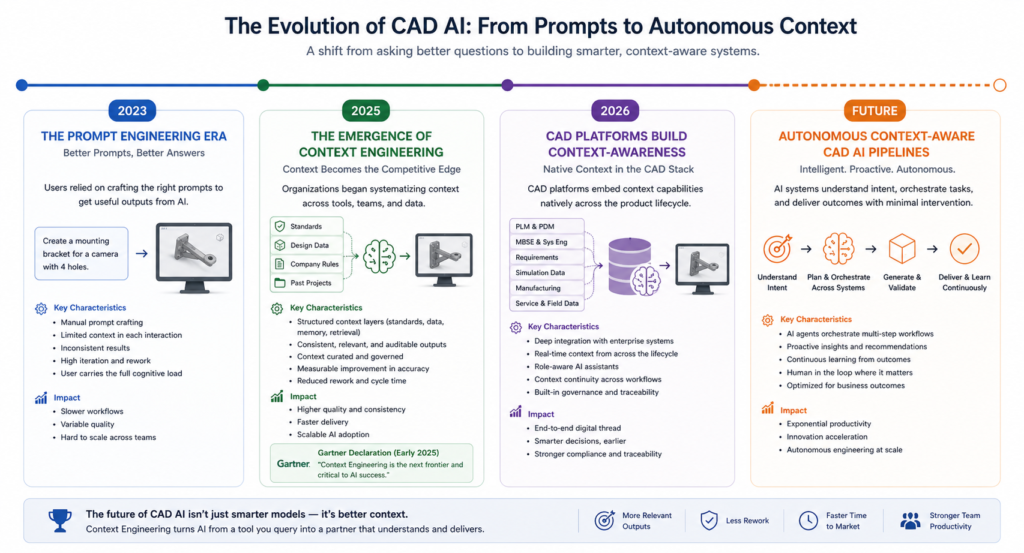
    The transition from prompt engineering limitations CAD to context engineering reflects how AI has changed. In 2023, most AI interactions were single-turn: ask a question, get an answer. Those interactions could be improved significantly by writing better prompts.

    By 2025, engineering teams started building multi-step AI workflows: design brief to CAD to FEA to documentation, with the AI involved at every stage. Single prompts were not sufficient. The AI needed persistent knowledge about the project, the constraints, the standards, and the decisions made in previous steps. That need for persistent, structured knowledge is exactly what context engineering 2025 is designed to address.

    What Is Context Engineering for Mechanical Engineers

    Definition: What Is Context Engineering for Mechanical Engineers
    what is context engineering for mechanical engineers: Context engineering is the practice of deliberately designing and managing all the information that an AI model has access to before and during an engineering task. This includes the role and rules you give the AI at the start of a session (the system prompt), the design standards and material specifications you load into the context window, the conversation history that carries design decisions forward, and any external data you retrieve from your parts library or PLM system. Rather than hoping a good prompt will compensate for missing information, context engineering ensures the AI always starts from a well-informed position.

    The Problem With Prompt-Only Approaches in CAD Workflows

    To understand why context engineering for CAD matters, you need to understand the three ways that prompt-only AI interactions fail in engineering environments.

    Problem 1: The AI Does Not Know Your Design Environment

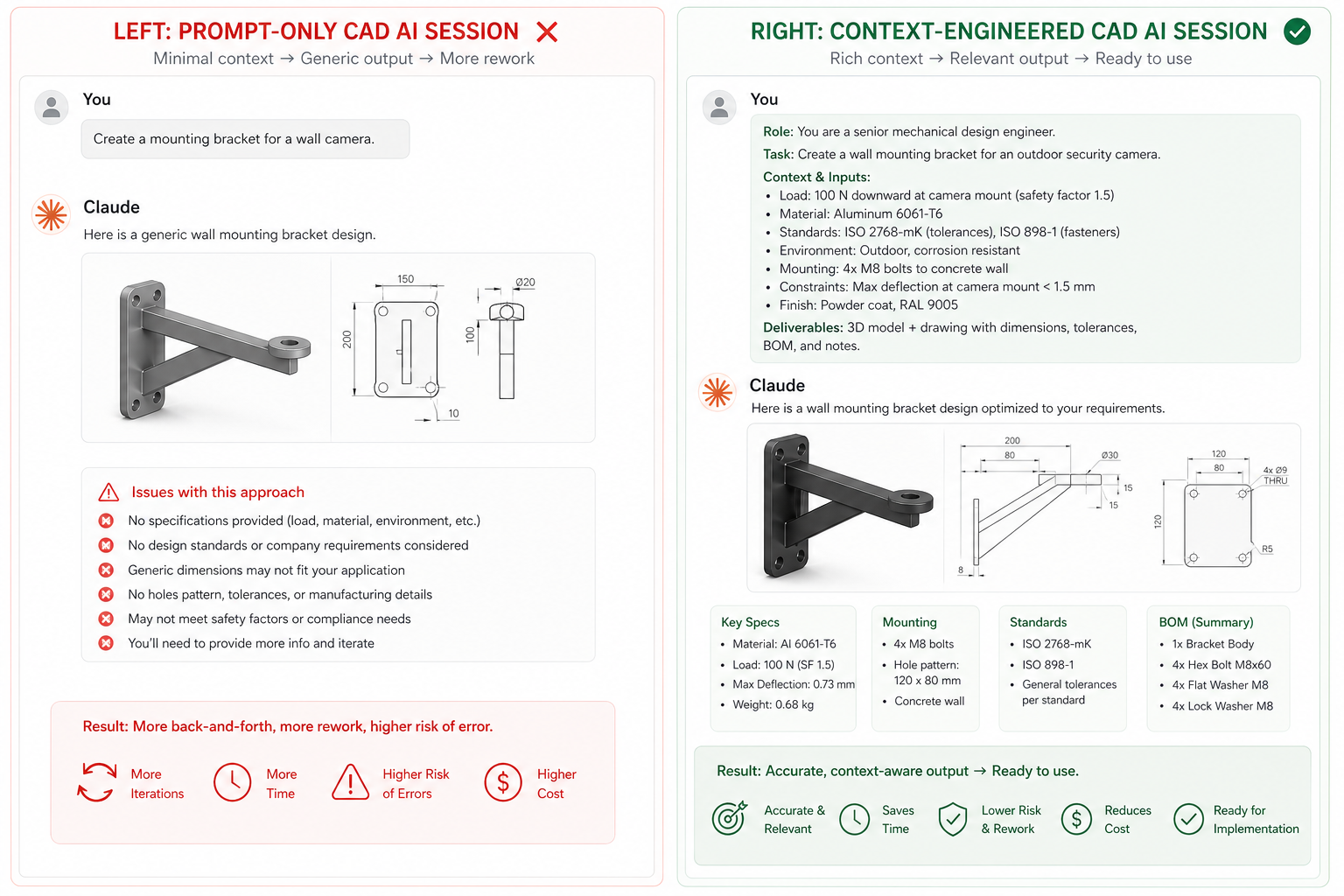
    When you open a new Claude session and type a prompt about designing a bracket, the AI has no knowledge of your company standards, your preferred material grades, your tolerance conventions, the existing parts already in your library, or the design intent of the system this bracket will join. It answers from general engineering knowledge.

    This is not a prompting problem. You could write the most detailed prompt ever constructed and still not cover everything the AI would need to know to give you an expert-level, company-specific answer. CAD knowledge graph AI and structured context loading is the correct solution, not better prompting.

    Problem 2: Context Rot Across Multi-Step Workflows

    Context rot engineering is the gradual degradation of AI response quality as a conversation grows longer. Research from Stanford found that LLM accuracy drops by 24.2 percent when relevant information is buried in long contexts, even when the model has theoretically received all the necessary information.

    In a long CAD session, the design brief you wrote in turn one gradually loses influence as the context window fills with subsequent exchanges. By turn fifteen, the AI is less reliably grounded in the original constraints. CAD AI context window management means actively curating what stays visible and what gets summarised or removed.

    Problem 3: No Memory Between Sessions

    Every time you start a new Claude session, the AI has forgotten everything from the previous session. The design decisions, the material choices, the reasoning behind the configuration: all gone. Engineering projects span days or weeks. A prompt-only approach means re-explaining the project context every single time, which is exactly the kind of repetitive work AI is supposed to eliminate.

    Proper AI context for CAD design includes a persistent context document that carries project information forward across sessions, eliminating the re-explanation problem entirely.

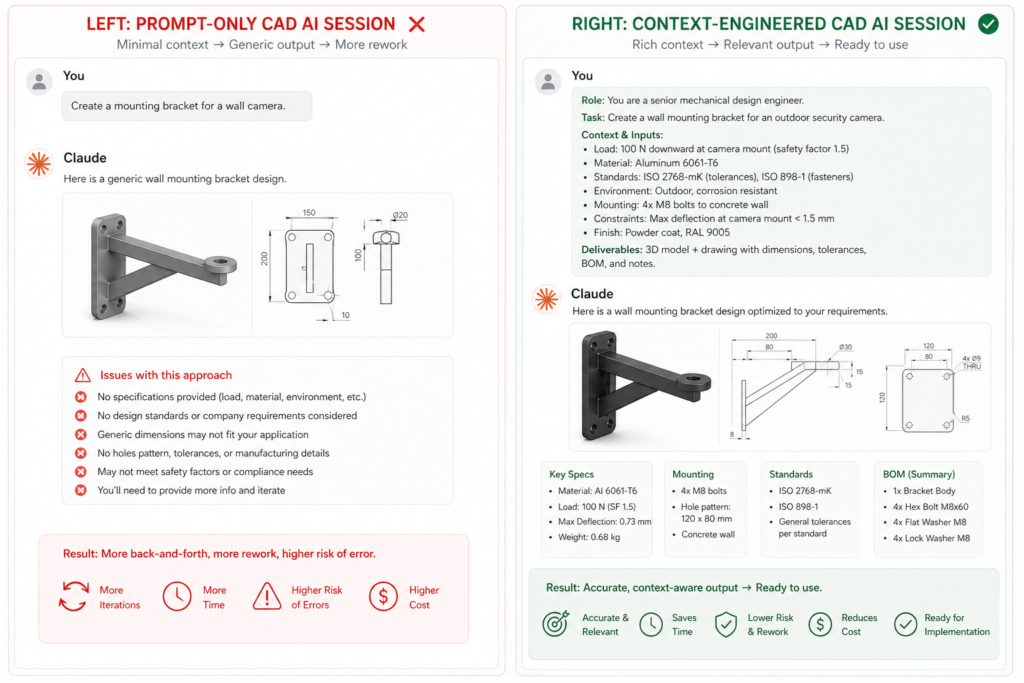
    Context engineering for CAD vs prompt-only approach showing improved AI output quality with structured context design

    How to Use Context Engineering in CAD: Building Your Context System

    Here is the practical framework for how to use context engineering in CAD today. You do not need to build complex software systems. You need to be deliberate about what information the AI has before every engineering session.

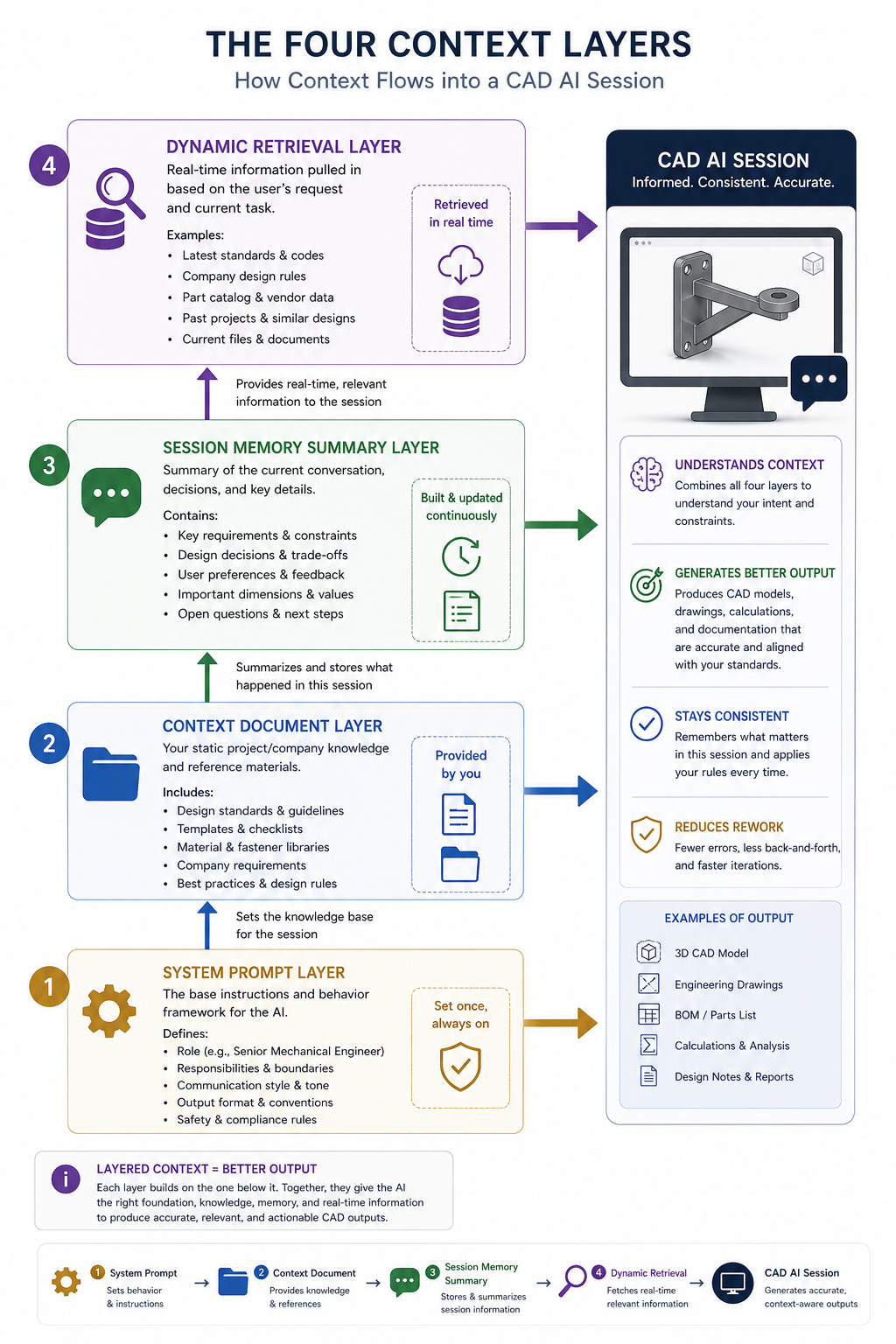
    Layer 1: The System Prompt (Role and Rules)

    Every CAD AI session should start with a well-defined role and a set of operating rules. This is the foundation of AI system prompt CAD design. The system prompt tells the AI who it is, what standards it applies, what format it uses, and how it handles uncertainty.

    Example: Context-Engineered CAD System
    Prompt“You are a senior mechanical design engineer at [company name] working on [product type]. You apply the following standards to all design and documentation: SI units throughout, ISO 2768 medium general tolerance, ISO surface roughness notation, and internal material standards from the context document provided. You always ask for clarification before making design recommendations that affect safety-critical features. You flag any design choices that conflict with the loaded standards rather than silently overriding them.”
    ✔ What you get:
    A role-defined, standards-aware AI session that produces company-consistent outputs from the very first response.
    AI system prompt CAD  x  context engineering for CAD

    Layer 2: The Context Document (Persistent Knowledge)

    A context document is a short reference file (200 to 500 words) that captures everything the AI needs to know about a specific project, product, or design environment. You paste it into every session before starting work. This is the single most practical step in context engineering CAD workflow 2025, and it takes about 20 minutes to create the first time.

    What Goes Into a CAD Context Document

    • Project identity: Product name, project number, revision status, applicable standards
    • Material library: Approved materials with grades, yield strengths, and any substitution rules
    • Dimensional conventions: Unit system, preferred tolerance grades, critical fits and clearances
    • Design constraints: Weight limits, envelope limits, mounting interface requirements, safety classifications
    • Decisions already made: Key design choices from previous sessions, reasons for any non-standard approaches
    • Things to avoid: Specific materials, geometries, or approaches ruled out earlier in the project

    Layer 3: Session Memory Summary (Preventing Context Rot)

    At the end of each working session, ask the AI to generate a summary of the key decisions, dimensions, and constraints established during the session. Paste this summary into the context document before the next session. This prevents context rot engineering and ensures knowledge carries forward without the AI needing to re-derive everything from scratch.

    Prompt: End-of-Session Context Summary
    “Summarise the key engineering decisions, dimensions, constraints, and design choices we established in this session. Format as a structured context update I can add to my project context document. Flag any open items or unresolved decisions.”
    ✔ What you get:
    A clean, structured summary of session decisions that maintains the continuity of your context-aware CAD workflow across multiple sessions.
    context-aware CAD workflow  x  AI context management for engineering design

    Layer 4: Dynamic Context Retrieval (Advanced)

    The most advanced form of context engineering for CAD uses retrieval-augmented generation (RAG) to pull specific relevant information from a larger knowledge base into the context window on demand. Instead of manually loading everything, the system retrieves only what is relevant to the current task.

    For engineering teams, this means building a searchable library of design standards, test reports, approved material data sheets, and simulation results. When you ask a question about a specific material or design scenario, the system automatically retrieves the relevant sections and includes them in the context. This is RAG for engineering applied at the team level, and it is the direction that enterprise CAD AI tools like Siemens Teamcenter Copilot and PTC Windchill AI are already moving toward.

    Context engineering for CAD four-layer framework system prompt context document session memory dynamic retrieval

    Context Engineering vs Prompt Engineering: What Changes for CAD

    Here is a direct comparison of what context engineering vs prompt engineering means in day-to-day CAD and engineering AI work:

    What Prompt Engineering DoesWhat Context Engineering DoesWhy It Matters for CAD
    Optimises the words in a single instruction to get a better response in this sessionDesigns the entire information environment the AI operates in, across sessions and toolsAI prompt CAD systems: prompts alone cannot carry company standards or project memory
    Requires re-explaining context every session from scratchcontext-aware CAD workflow: persistent context documents carry project knowledge forward automaticallySaves 20-30 min per session not re-explaining project context
    Quality degrades when context window fills up (context rot)context rot engineering mitigation: regular session summaries keep context clean and relevantLonger sessions remain reliable without accuracy degradation
    Works well for isolated one-off taskscontext engineering CAD workflow 2025: designed for multi-step workflows where AI must retain design intent across stagesEssential for design-to-simulation-to-documentation pipelines
    No memory of design decisions made in previous sessionsAI context management for engineering design: structured session summaries create continuity across the project lifecycleAI builds on previous work rather than starting over every time

    Putting Context Engineering Into Practice: A CAD Session Workflow

    Here is exactly how to run a context engineering for CAD session using Claude or any similar AI tool. This workflow takes about five minutes to set up and produces consistently better outputs than cold-start prompting.

    1. Open a new session. Do not start with your question. Start by pasting your system prompt (Layer 1) to establish the AI role and operating rules.
    2. Load your context document. Paste your project context document immediately after the system prompt. This gives the AI everything it needs to know about the design environment before you ask a single question. This is AI context for CAD working as designed.
    3. Work normally. Ask your design questions, iterate on geometry, check calculations, generate documentation. The AI now responds with your specific standards, materials, and constraints in mind rather than general engineering knowledge.
    4. Maintain the window. If the session grows long (over 20 exchanges), ask the AI to summarise the decisions made so far and paste that summary as a new message at the top of the thread. This prevents context rot engineering and keeps the AI grounded.
    5. Close with a summary. At the end of each session, use the end-of-session prompt to generate a structured decisions summary. Add it to your context document. Your context-aware CAD workflow now carries forward seamlessly to the next session.

    Where Context Engineering for CAD Is Going

    What engineers are doing manually today with context documents and session summaries, CAD software will do automatically within the next two to three years. Context engineering CAD workflow 2025 is the leading edge of a shift that major platforms are already building toward.

    CAD Software Is Becoming Context-Aware

    AutoCAD 2026 introduced AI-powered Smart Blocks and an Autodesk Assistant that understands the project context within the design environment. SolidWorks AURA learns from user habits and project history to provide contextual suggestions. PTC Creo AI embeds context from PLM data directly into design assistance. These are all early implementations of context engineering for CAD at the platform level.

    The CAD Knowledge Graph Is Coming

    The next step is CAD knowledge graph AI: a structured representation of your entire design knowledge including parts, standards, materials, simulation results, and project history, all queryable by an AI in real time. Siemens Teamcenter Copilot already lets engineers query BOM structures and design documents using plain English. PTC Windchill AI identifies duplicate parts across the enterprise BOM. These are knowledge graph retrieval systems applied to engineering data.

    When these systems mature, context engineering for CAD will not require manual context documents. The platform will assemble the relevant context automatically from your PLM, PDM, and simulation data every time you start an AI-assisted design session.

    Multi-Agent CAD Pipelines

    The furthest edge of LLM context design for engineering is multi-agent CAD pipelines: networks of specialised AI agents where each agent has a carefully engineered context for its specific role. One agent holds the design intent context. Another holds the simulation constraints context. A third holds the manufacturing process context. They collaborate within a shared project knowledge environment.

    This is already emerging in research environments and early enterprise deployments. Teams that understand context engineering 2025 today are the ones best positioned to work effectively with these systems as they reach production.

    Context engineering for CAD timeline 2023 to future from prompt engineering to context-aware CAD AI systems

    Pro Tips for Context Engineering in Engineering Teams

    Practical Guidance for Engineering Teams Starting With Context Engineering

    • Start with one project context document. Pick your most active project and write a 300-word context document covering role, standards, materials, constraints, and current design status. Use it for every AI session this week. The quality difference will convince your team.
    • Keep context documents in version control. Your context documents are engineering artefacts. Store them alongside your drawings, specifications, and models. Update them when design decisions change. AI context management for engineering design is a discipline, not a one-time setup.
    • Make the system prompt a team standard. Write one shared system prompt for your engineering team that defines the AI role, applicable standards, and documentation conventions. Everyone who uses AI for CAD work starts from the same AI system prompt CAD baseline.
    • Use session summaries as meeting notes. End-of-session summaries are not just context management tools. They are a record of what the AI helped you decide in that session. Store them as project documentation.
    • Build your context library incrementally. Your first context document covers one project. Over six months, you build a library covering your common material grades, tolerance standards, manufacturing processes, and customer requirements. Each new project benefits from everything that came before. This compound effect is how context engineering for CAD becomes a team capability rather than an individual practice.

    Conclusion: The Engineers Who Master This Now Will Lead

    Context engineering for CAD is the natural evolution of how engineers work with AI. Prompt engineering was the first step: learning how to ask AI the right questions. Context engineering is the second step: learning how to build the right environment so AI can answer those questions well every time.

    Gartner declared in July 2025 that context engineering was in and prompt engineering was out. Anthropic formalised the practice. Andrej Karpathy and Tobi Lutke endorsed it publicly. CAD platforms like AutoCAD, SolidWorks, and PTC Creo are building it into their products. The shift is real and it is already underway.

    What engineers can do right now is begin the transition deliberately. Write the system prompt. Build the context document. Start a context-aware CAD workflow on one project. Within three sessions, the difference in output quality will be clear.

    The engineers who understand context engineering 2025 today will be the most effective users of the context-aware CAD platforms arriving over the next two years. That is the practical case for learning this now rather than later.

    Ready to Build a Smarter CAD Workflow With Context Engineering
    At Simutecra Engineering Services, e help engineering teams move beyond single-prompt interactions and build structured AI context systems for CAD, simulation, and documentation workflows. We design the context architecture so your AI always knows what it needs to know.
    Smarter context means better outputs, less rework, and more time on actual engineering.
    Reach out today at Simutecra

    Frequently Asked Questions

    Brief answers to the most common questions about context engineering for CAD.

    What is context engineering?

    Context engineering 2025 is the practice of designing and managing everything the AI model has access to during a task: the system prompt, relevant documents, conversation history, tools, and memory. It goes beyond writing better prompts by ensuring the AI always operates in a well-informed environment.

    How is context engineering different from prompt engineering?

    Context engineering vs prompt engineering: prompt engineering optimises a single instruction. Context engineering designs the entire information system around the AI. Prompt engineering is what you say. Context engineering is what the AI knows when you say it.

    Why does context engineering matter for CAD?

    CAD workflows are multi-step and project-specific. Context engineering for CAD ensures the AI knows your design standards, materials, constraints, and past decisions across every session. Without it, the AI answers from generic engineering knowledge instead of your specific engineering environment.

    What is a context document for CAD?

    A context document is a 200 to 500 word reference file covering your project identity, approved materials, dimensional conventions, design constraints, and current decisions. You paste it at the start of every AI session to give the AI the context it needs before you ask your first question.

    What is context rot in engineering AI?

    Context rot engineering is the gradual loss of accuracy as a long AI session grows. Earlier instructions and constraints get diluted by the volume of later exchanges. Managing the CAD AI context window with regular summaries prevents this.

    Is context engineering the same as RAG?

    No, but RAG is one component of it. RAG for engineering retrieves relevant documents into the context window at query time. Context engineering is the broader discipline that includes RAG, system prompt design, memory management, and tool use.

    How do I start using context engineering for CAD today?

    Start with two steps. Write a system prompt defining the AI role and your engineering standards. Create a context document for your current project covering materials, constraints, and design status. Paste both at the start of every AI context for CAD session. That is a working context-aware CAD workflow you can use immediately.

    External Reference

    For Anthropic’s official research and guidance on context engineering principles and agent context management:

    Effective Context Engineering for AI Agents, Anthropic Engineering Blog (anthropic.com)  (Official Anthropic source, primary research reference for context engineering)

  • Claude AI for Technical Documentation: Save 80% of Your Writing Time

    Claude AI for Technical Documentation: Save 80% of Your Writing Time

    The Writing You Were Not Hired to Do

    Every product engineer, mechanical designer, and technical specialist knows the feeling. You spent three days designing a part, running analysis, and solving problems that genuinely needed an engineering brain. Then you spend another three days writing about it.

    Technical documentation is not optional. User manuals, product spec sheets, installation guides, datasheets, engineering specifications, product descriptions for procurement: none of these can be skipped. But in 2025, a very large part of the writing work involved in creating them does not require your expertise. It requires structure, consistency, and clear language. Those are things Claude AI for technical documentation does exceptionally well.

    This guide shows you exactly how to use Claude to cut documentation time by up to 80%, with real prompts for every major technical document type an engineering team produces.

    Verified Real-World Results: Claude AI Documentation Productivity 2025TELUS:
    Saved over 500,000 hours using Anthropic Claude writing workflows across engineering and documentation tasks, shipping code and content 30% faster.
    Mintlify: Uses Mintlify Claude technical writing via Claude Code as their primary technical writing assistant for product documentation, reporting that Claude handles drafting, structure, and consistency better than any previous tool.
    Claude 200K context:
    Claude 200K context technical docs means Claude holds an entire product manual, specification set, or documentation suite in a single session without losing context between sections.
    80%documentation time savedEngineering teams using Claude for structured technical document drafting consistently report saving 70-80% of previous writing time. On a 40-hour week, that is 8-12 hours returned to engineering per writer per week.
    500K+hours saved by one companyTELUS saved over 500,000 hours using Claude-powered workflows across engineering, documentation, and development tasks in 2025, with 89% AI adoption across their entire organisation.

    What Claude AI Actually Does for Technical Writers and Engineers

    Claude AI for technical documentation is not a template filler or a grammar checker. It is a structured reasoning tool with a 200,000-token context window that can read, understand, and produce professional technical content across the full range of documentation an engineering team creates.

    Here is what makes it specifically suited to AI technical writing in engineering environments:

    Why Claude Works Particularly Well for Technical Documentation

    • Long-context coherence: Claude AI long-context documentation means Claude can read a 50-page product specification, understand the relationships between sections, and write documentation that is internally consistent across every page. No other general-purpose AI tool matches this for full-length technical documents.
    • Low hallucination rate in technical contexts: Independent benchmarks rate Claude as the lowest-hallucination general-purpose LLM for engineering-adjacent tasks. When you give Claude accurate source data, it produces accurate, reliable documentation drafts.
    • Consistency across documents: AI document consistency is one of the hardest things to maintain manually across a large documentation suite. Claude holds your style guide, terminology, and voice in context and applies them consistently across every section of a document or across multiple documents in a session.
    • Speed without quality loss: Claude produces structured, well-written technical prose faster than any human writer. Claude AI writing productivity gains come not from cutting corners but from removing the blank-page problem: Claude always starts from a well-structured draft.
    • Cross-document suite generation: For teams that need multiple coordinated documents (spec sheet, user manual, installation guide, and datasheet for the same product), Claude maintains coherence across all four in a single session because the context window holds all the relevant product information simultaneously.

    How to Use Claude AI for Technical Writing: The Core Framework

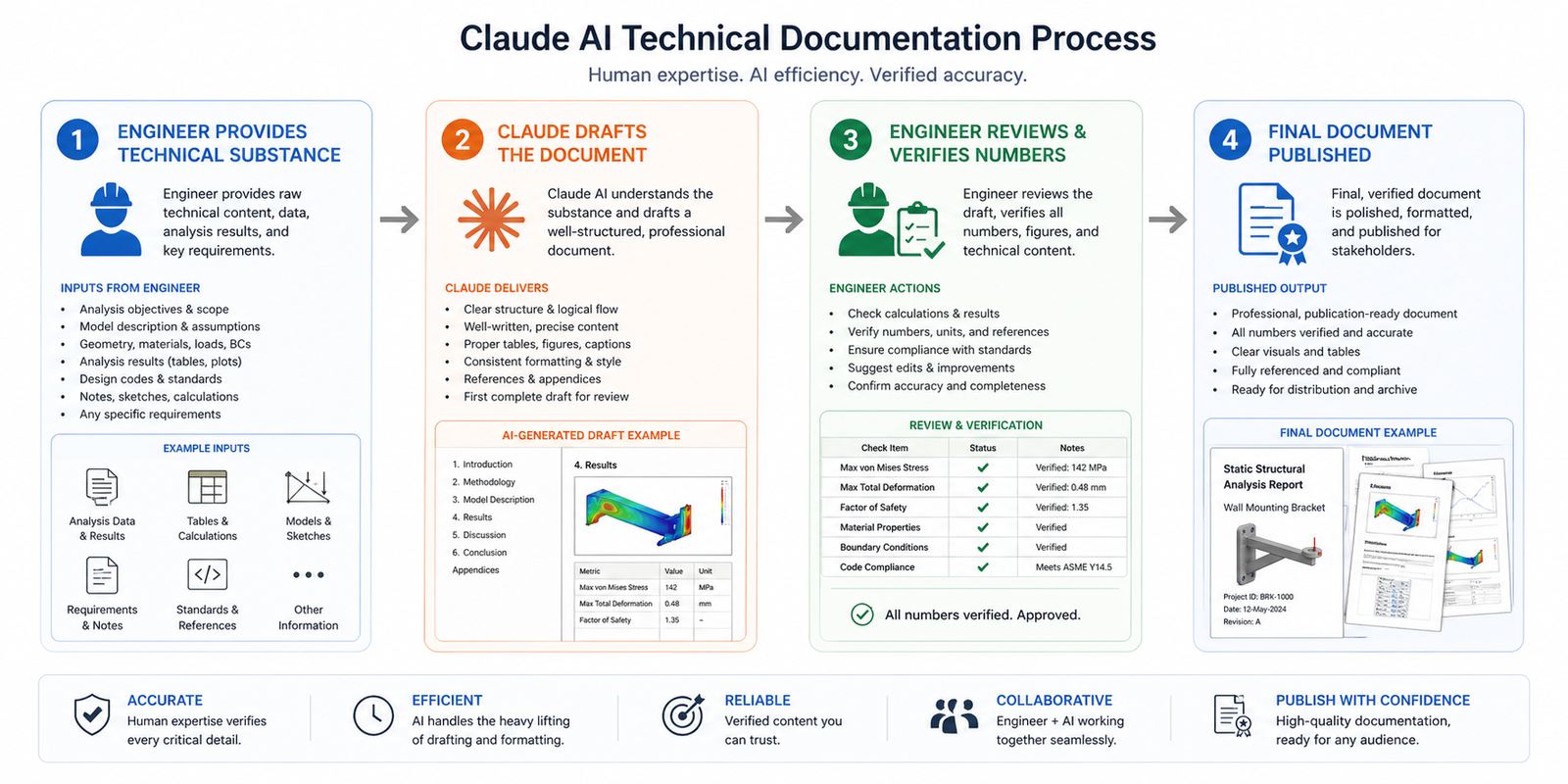
    The core principle of how to use Claude AI for technical writing is this: you are the subject-matter expert and the accuracy authority. Claude is the structure expert and the writing engine. Your job is to give Claude the technical substance it needs to draft accurately. Claude’s job is to turn that substance into professional, consistent, well-formatted technical prose.

    Step 1: Define the Document Purpose and Audience

    Every documentation prompt starts with purpose and audience. A product datasheet for procurement has a different vocabulary, depth, and structure than a user installation guide for field technicians. A material specification for manufacturing has different requirements than a product description for a sales catalogue. Claude AI for technical documentation adapts to each when you are specific about who will read it and what they need to do with it.

    Step 2: Provide the Technical Substance

    Give Claude the technical inputs for the document: product name and description, specifications, dimensions, materials, tolerances, operating conditions, installation requirements, safety considerations, or whatever applies to your document type. Claude does not invent these. They come from you, your CAD model, your test data, or your product knowledge.

    Step 3: Specify the Format and Standards

    Tell Claude the output format. Is this an ISO-compliant technical specification? A PDF-ready two-page datasheet? A numbered installation procedure? A table-format product comparison sheet? Should it follow your company style guide? Specifying the format ensures the AI technical document automation output fits directly into your existing documentation system without restructuring.

    Step 4: Review and Add the Numbers

    Review every AI-generated document for technical accuracy before it becomes an official record. Claude writes around the data you give it faithfully, but you should verify all quantitative values, tolerances, and safety specifications personally. This review step typically takes 10-20 minutes for documents that previously took 3-4 hours to write from scratch. That is the 80% saving in practice.

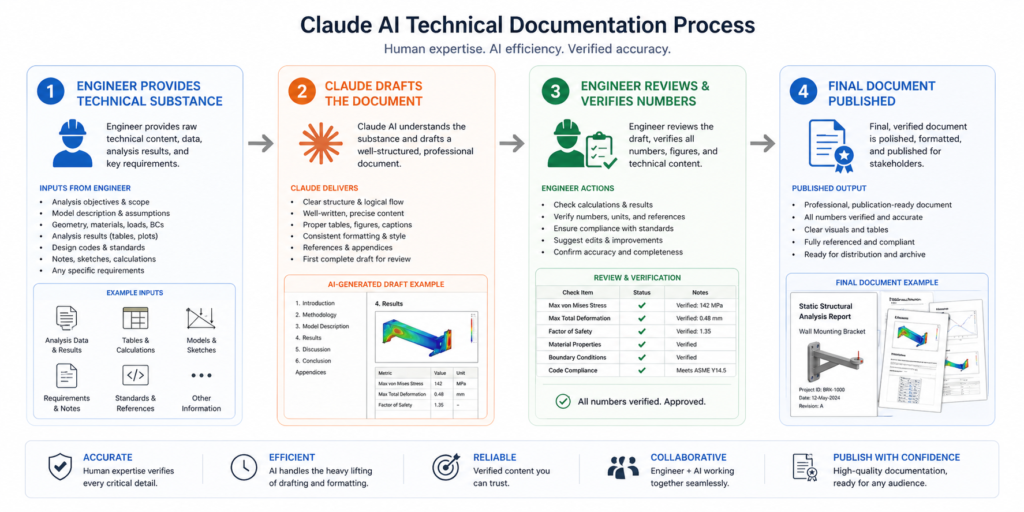
    Claude AI for technical documentation 4-step process framework engineering spec sheets user manuals

    The Documents Claude AI Writes Best: Eight Types With Ready-to-Use Prompts

    These are the eight technical document types where Claude AI for technical documentation delivers the most time savings for engineering and product teams. Each section includes the document type, when to use it, and a complete prompt you can fill in and use today.

    01Product Technical Specification Sheet
    A detailed technical document covering performance, dimensions, materials, tolerances, and standards for a product or component. Used for internal engineering records, procurement, and regulatory submissions.
    Claude AI spec sheet generator  x  technical spec automation
    Time saved~80%
    Prompt 1: Technical Specification Sheet
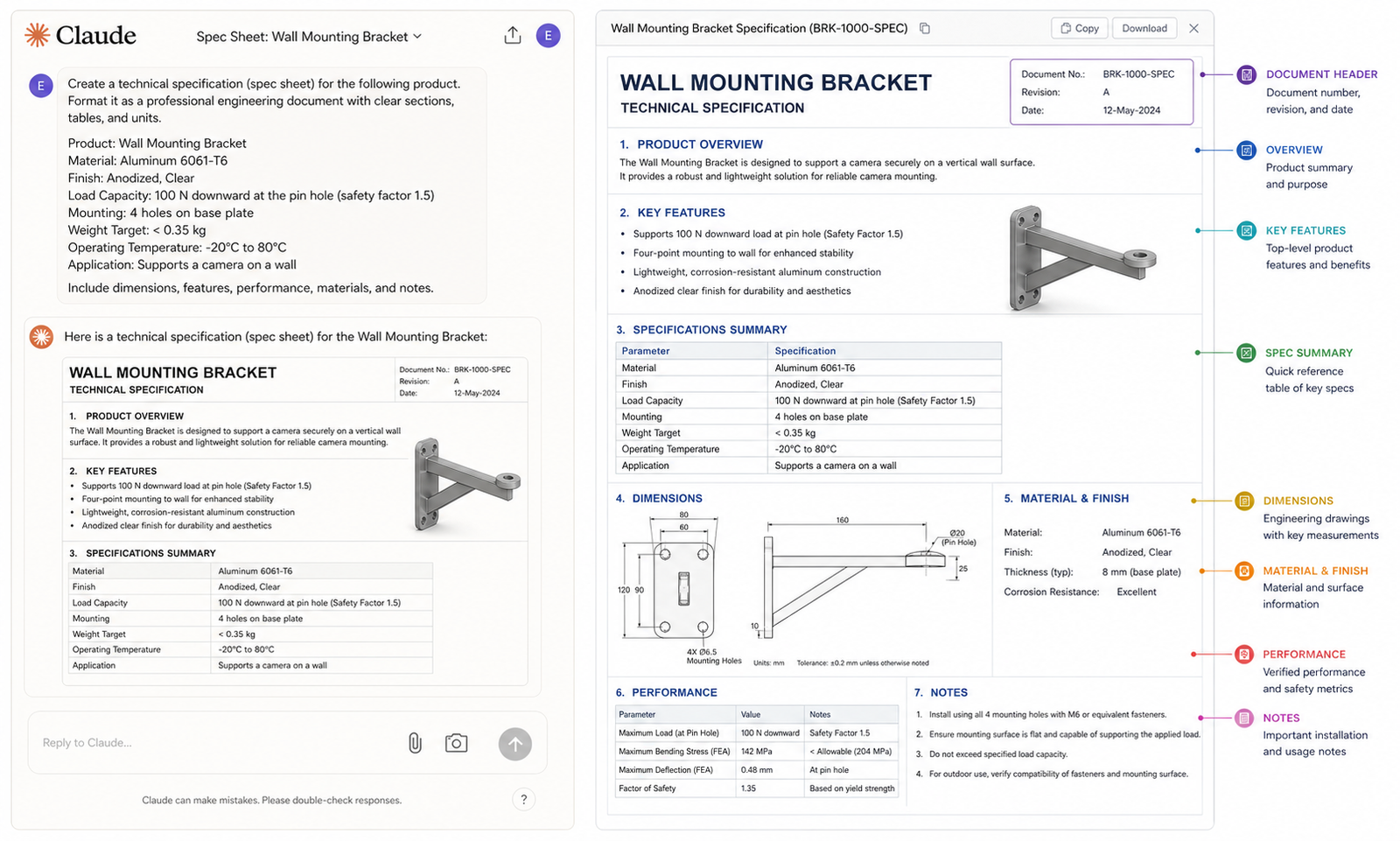
    You are a technical writer producing a formal product technical specification sheet for an engineering audience. Write a complete technical specification for the following product:Product name: [name]Product type and function: [description]Key performance parameters: [list values with units]Physical dimensions: [L x W x H, weight]Material specifications: [base material, surface finish, treatment]Operating conditions: [temperature range, pressure, load, environment]Applicable standards: [ISO, ASTM, DIN, BS etc.]Manufacturing method: [machining, casting, additive, etc.]Structure the document with: (1) Product Overview, (2) Technical Specifications table, (3) Performance Parameters, (4) Operating Conditions, (5) Materials and Finishes, (6) Applicable Standards and Compliance, (7) Ordering Information placeholder.Format for a two-page A4 technical document. Use SI units throughout.”
    ✔ What you get:
    A complete, publication-ready product specification sheet with all required sections, properly structured tables, and consistent technical language throughout.
    Claude AI spec sheet generator  x  AI product documentation
    02User Installation and Operation ManualStep-by-step instructions for installing, commissioning, operating, and maintaining a product or system. Used for field technicians, end users, and maintenance teams.AI user manual writing  x  AI for technical writersTime saved~75%
    Prompt 2: User Installation and Operation Manual Section
    “You are a technical writer creating a user manual for field technicians. Write a complete installation and commissioning section for the following product:Product: [name and brief description]Installation environment: [indoor/outdoor, temperature, IP rating requirement]Pre-installation requirements: [tools needed, services required, safety precautions]Installation steps: [describe the installation process in plain language; Claude will format into numbered steps]First-time commissioning procedure: [describe the startup sequence]Safety warnings: [list any relevant safety or hazard information]Common installation errors: [describe 2-3 frequent mistakes and how to avoid them]Format as an ISO-style installation procedure with: numbered steps, WARNING/CAUTION/NOTE callouts in the correct format, and a pre-installation checklist. Reading level: suitable for a qualified field technician without engineering degree.”
    ✔ What you get:
    A complete, field-ready installation manual section with numbered steps, safety callouts, a pre-installation checklist, and appropriate reading level for the intended audience.
    AI user manual writing  x  Claude AI documentation
    03Product DatasheetA concise one or two-page marketing-technical hybrid document covering key specifications, features, and ordering information. Used for sales catalogues, distributor materials, and customer-facing product pages.Claude AI datasheet generator  x  AI product documentationTime saved~85%
    Prompt 3: Product Datasheet
    Write a professional product datasheet for the following engineering product. The audience is technically literate customers and procurement engineers. Balance technical credibility with marketing clarity.Product: [name]Product category: [type]Key value proposition: [what problem does it solve / what makes it better]Core features: [list 4-6 key features]Key specifications: [most important performance specs]Dimensions and weight: [fill in]Materials and finishes: [fill in]Certifications and standards: [fill in]Ordering codes: [product codes or placeholder]Contact / company information: [placeholder]Format as a two-column A4 datasheet layout description. Include: product headline, features and benefits section (two columns), specifications table, ordering information, and a footer with company and compliance information. Write in present tense, active voice, third person.”
    ✔ What you get:
    A complete product datasheet with all sections written, specifications structured in table format, and marketing-technical balance calibrated for procurement and sales use.
    Claude AI datasheet generator  x  AI technical writing
    04Engineering Material SpecificationA formal material specification document defining approved materials, grades, treatments, and test requirements for a product family or manufacturing process. Used for procurement, quality control, and manufacturing.AI spec writer  x  technical spec automationTime saved~78%
    Prompt 4: Engineering Material Specification
    “Write a formal engineering material specification document for the following application:Application: [describe the component and its function]Service environment: [temperature, pressure, chemical exposure, load type]Required material properties: [key mechanical and physical properties needed]Approved material(s): [list grade/standard designations, e.g. SS316L, S275 EN10025]Forming/manufacturing method: [machining, casting, forging, additive]Required surface finish: [Ra values or descriptive finish requirements]Heat treatment requirements: [if applicable]Applicable standards: [material standards for testing and certification]Documentation required: [certificate of conformance, mill certificate, test reports]Substitution procedure: [how to request approved substitutes]Format as a formal controlled document with document number, revision, and approval signature placeholders. Include a scope statement, normative references, material requirements table, and inspection and certification requirements section.”
    ✔ What you get:
    A formally structured material specification document with normative references, material requirements table, inspection requirements, and document control fields ready for your quality management system.
    AI spec writer  x  Claude AI for technical documentation
    05Product Maintenance and Service ManualDetailed procedures for scheduled maintenance, inspection, fault diagnosis, and corrective actions. Used by maintenance teams, service engineers, and asset managers.AI-assisted product documentation  x  Claude AI documentationTime saved~72%
    Prompt 5: Maintenance Manual Section
    “Write a scheduled preventive maintenance procedure section for the following equipment:Equipment: [name and model]Maintenance interval: [daily / weekly / 500 hours / annually]Purpose of this maintenance: [what failure mode or degradation does this maintenance prevent]Required tools and consumables: [list]Safety precautions: [lockout/tagout, PPE, isolation requirements]Procedure steps: [describe what is inspected, measured, adjusted, lubricated, or replaced]Acceptance criteria: [how the technician knows the task is complete and correct]Recording requirements: [what must be logged and where]Format using: numbered procedure steps, safety callouts in standard WARNING/CAUTION/NOTE format, an inspection record table at the end, and estimated completion time. Comply with general ISO 9001 maintenance documentation requirements.”
    ✔ What you get:
    A complete preventive maintenance procedure section with numbered steps, safety callouts, acceptance criteria, and an inspection record table in ISO-compatible format.
    AI for technical writers  x  Claude AI for technical documentation

    Why Claude Outperforms Other AI Tools for Technical Documentation

    Not all AI writing tools are equal for engineering documentation. Here is a clear breakdown of why Claude AI for technical documentation outperforms general-purpose writing tools in this specific context:

    What Matters for Technical DocsClaude AIGeneric AI Writing Tools
    Context length for long documentsClaude 200K context technical docs: reads and writes entire manuals without losing contextTypically 4K to 32K tokens. Loses context mid-document on anything over 25 pages.
    Technical accuracy / hallucination rateLowest hallucination rate in independent engineering benchmarks. Accurate when given accurate input.Higher hallucination rates on technical specifications and engineering terminology. Needs more correction.
    Consistency across a document suiteAI document consistency: holds terminology, units, and voice across all sections of a sessionInconsistency between sections increases with document length and complexity.
    Format and standards complianceAdapts to ISO, IEC, DIN, ASME formats when specified in the prompt. Outputs structured tables, numbered steps.Generic formatting. Standards compliance requires significant human reformatting.
    Cross-document coherenceClaude AI documentation: single session can produce aligned spec sheet, manual, and datasheet from same product dataEach document is isolated. No context carries between documents. Manual alignment required.

    Advanced Tips: Getting Expert-Level Technical Documentation From Claude

    Pro Tips for Engineering Teams Using Claude AI Technical Documentation

    • Feed Claude your style guide at the start of every session. Paste your company’s documentation standards into the opening message. ‘All documents use SI units. Use ISO 80000 notation. Write in third person, present tense. Capitalise product names.’ Claude documentation will apply these rules consistently across every section.
    • Use a master product facts file. Build a short reference document containing all the technical facts about a product: dimensions, weights, materials, certifications, ordering codes. Paste this at the start of every documentation session. Claude uses it as the source of truth for every document generated, eliminating inconsistencies across your AI product documentation suite.
    • Generate related documents in a single session. After generating a spec sheet, ask Claude to produce the matching datasheet and then the installation guide in the same session. Because the context window holds all the product information, Claude AI for technical documentation maintains perfect consistency across all three documents without you having to re-enter the data.
    • Specify document version and revision control fields. Ask Claude to include document control fields as placeholders: Document Number, Revision, Date, Author, Approved By. This saves the formatting step and makes the document immediately ready for your document management system.
    • Use Claude to update existing documents, not just create new ones. Paste an existing out-of-date document into Claude and describe the changes that have been made to the product. Ask Claude to update every affected section. AI technical writing for revision tasks saves as much time as creation tasks, often more.
    • Ask Claude to flag any missing required sections. After generating a document, ask: ‘For a product of this type intended for industrial sale in the EU, what documentation sections am I missing?’ Claude AI documentation will identify regulatory and standards gaps proactively.
    • Build a prompt template library per document type. Prompts 1-5 in this guide are starting points. Refine each one for your specific product category, industry, and documentation standards. A team library of tested prompts is the foundation of a scalable AI documentation workflow that delivers consistent quality across every project.
    Claude AI for technical documentation prompt example generating engineering spec sheet with structured output

    What Claude Cannot Do in Technical Documentation

    An honest guide on Claude AI for technical documentation has to include the limits. Understanding them makes you a more effective user, not a less enthusiastic one.

    • Claude cannot verify your technical data. If you give Claude a yield strength of 250 MPa for a material that actually yields at 300 MPa, Claude will write 250 MPa into the document correctly and confidently. You are the accuracy authority. Always verify quantitative data before a document is released.
    • Claude cannot read your CAD files directly. Unless you are using a specialist integration, Claude does not have direct access to your CAD models. Dimensions, tolerances, and specifications need to come from you. Future integrations may change this, but today the engineer is the bridge between the model and the AI technical writing layer.
    • Claude does not know your proprietary standards. If your company has internal document templates, house style rules, or proprietary part numbering conventions, you need to describe them in the prompt or paste them in. Claude does not know your internal systems unless you tell it.
    • Claude is not a replacement for a qualified technical writer. For documents with legal, regulatory, or safety implications, a qualified engineer or technical writer must review and approve the output. Claude AI documentation dramatically reduces the writing burden. It does not remove the review responsibility.

    Conclusion: 80% Less Writing Time Is Not the Goal. Better Engineering Time Is.

    The 80% documentation time saving from Claude AI for technical documentation is not just a productivity number. It represents engineering hours that go back to design, analysis, problem-solving, and innovation. Hours that were previously spent formatting tables and structuring sections that follow the same pattern every single time.

    Claude is suited to AI technical writing for engineering environments specifically because it combines long-context coherence with technical accuracy and format flexibility. It produces consistent, professional documentation faster than any human writer. And when you own the accuracy review, the output is reliable.

    The five prompts in this guide cover the most common and most time-consuming technical document types. Start with the one your team writes most often. Use the prompt on your next product. See the output. The AI-assisted product documentation workflow builds from there.

    Your Team Deserves to Spend Less Time Writing and More Time Engineering
    At Simutecra Engineering Services, e help mechanical engineering and manufacturing teams build Claude AI documentation workflows that save real hours every week. From technical spec sheets and user manuals to FEA reports and product datasheets, we design and implement the prompts, templates, and review processes that make it work.We do not just tell you what is possible. We build it with you.
    Reach out to us today, Simutecra

    Frequently Asked Questions

    Real questions people ask about Claude AI for technical documentation and AI technical writing.

    What is Claude AI for technical documentation?

    Claude AI for technical documentation means using Anthropic’s Claude AI model to draft, structure, and format technical documents including product spec sheets, user manuals, datasheets, material specifications, and maintenance procedures. The engineer provides the technical substance and accuracy. Claude handles the writing, structuring, and formatting. The result is professional engineering documentation produced in 20 to 30 minutes instead of 3 to 4 hours. Claude documentation works across all standard engineering document types.

    How much time does Claude AI actually save on documentation?

    Verified data from Claude AI documentation productivity 2025 deployments shows consistent 70 to 80 percent time savings on documentation tasks. TELUS saved over 500,000 hours using Claude across their engineering and documentation workflows. Mintlify reports that Mintlify Claude technical writing handles their entire technical documentation drafting workflow. In engineering-specific contexts, teams typically report saving 2 to 4 hours per document on spec sheets, manuals, and datasheets.

    Can Claude AI write engineering spec sheets?

    Yes. Claude AI spec sheet generator prompts (like Prompt 1 in this guide) produce complete, structured technical specification sheets from your product data inputs. Claude generates all required sections including a specifications table, performance parameters, operating conditions, materials section, and applicable standards. You review for numerical accuracy and add your document control information. The result is a publication-ready AI product documentation output in under 30 minutes.

    Is Claude AI good for writing user manuals?

    Yes, particularly for structured procedural content. AI user manual writing with Claude is most effective for installation procedures, operation sequences, and maintenance procedures because these follow consistent numbered-step structures that Claude handles well. Claude adapts the reading level, technical depth, and format to your specified audience. It also correctly formats WARNING, CAUTION, and NOTE safety callouts in ISO-standard format when asked.

    How does Claude handle long technical documents without losing context?

    Claude 200K context technical docs means Claude can process and generate content for documents up to approximately 150,000 words in a single session without losing context between sections. This is the core technical advantage of Claude AI long-context documentation for engineering use. A 200-page product manual, a complete documentation suite for a product family, or a full specification set can all be handled in a single Claude session with consistent terminology, style, and cross-references throughout.

    Can I use Claude to update existing technical documents?

    Yes. Paste your existing document into Claude along with a description of the changes to the product. Ask Claude to update every section affected by the change and flag any sections it is uncertain about. This revision workflow is one of the most time-saving AI for technical writers applications because updating documentation after a design change is one of the most tedious tasks in engineering. AI technical writing for revisions typically saves as much time as creation, and often more when the existing document is long.

    Does Claude understand engineering standards like ISO and ASME?

    Claude has broad knowledge of major engineering standards including ISO, IEC, DIN, ASME, BS, and AS standards at the document structure and requirements level. When you specify a standard in your prompt, Claude structures the output to include the sections and elements that standard requires. However, Claude AI for technical documentation should not be relied upon as an authoritative source for the specific numeric requirements within a standard. Always verify standard-specific requirements against the current official publication, and have a qualified engineer confirm compliance.


    For verified enterprise case study data on Claude productivity in technical and engineering workflows, including the TELUS 500,000 hours saved case study, see Anthropic’s official resources:

    Eight Trends Defining How Software Gets Built in 2026, Anthropic (claude.com) 

  • Prompt Engineering for CAD Modeling: Write Better AI Prompts and Design Faster in 2026

    Prompt Engineering for CAD Modeling: Write Better AI Prompts and Design Faster in 2026

    The Skill Every CAD Engineer Needs Right Now

    You’ve probably heard about AI changing the engineering world. But here’s what most people don’t talk about: the quality of your results depends almost entirely on how you write your prompts.

    That’s what prompt engineering for CAD modeling is all about. It’s the skill of writing clear, specific instructions to an AI — like Claude — so it gives you exactly what you need for your CAD project, not a generic guess.

    Whether you’re working with AI prompts for CAD design in AutoCAD, generating geometry parameters in SolidWorks, or drafting technical specs — a well-written prompt is the difference between wasting 20 minutes and getting a perfect result in 30 seconds.

    This guide is for anyone using CAD AI tools today. Beginners, students, professionals — this one is for you.

    ⚡ Quick Answer
    Prompt engineering for CAD modeling means writing structured, specific instructions to an AI tool so it produces accurate CAD outputs — such as scripts, design parameters, technical documentation, or geometry calculations. A good AI prompt for CAD design includes: the part type, exact dimensions, material, software name (e.g. AutoCAD / SolidWorks), and desired output format. The better your prompt, the better your AI-assisted CAD workflow.

    What Is Prompt Engineering and Why Does It Matter for CAD?

    Prompt engineering is simply the art of writing good instructions for an AI. Think of it like this: when you search Google, you’ve learned to write better search queries over time. Prompt engineering is the same idea — but for AI systems like Claude, ChatGPT, or any other AI mechanical design assistant.

    In CAD modeling with AI, this matters enormously because:

    • A vague prompt gives a vague answer — useless for engineering work
    • A specific, structured prompt gives you working scripts, calculations, or design logic
    • The right natural language CAD commands unlock capabilities most engineers never discover
    • Good prompts turn a general AI into a focused AI CAD software assistant

    Here’s a simple example of the difference between a bad prompt and a great one:

    Weak Prompt:
    Create a part for me.”Result: Generic, unusable, requires 5 follow-up questions.
    Strong Prompt
    Write an AutoLISP script for AutoCAD that draws a steel bracket: 150mm x 80mm x 6mm wall thickness, with 4 x M8 bolt holes at 20mm from each corner. Output as a ready-to-run .lsp script.”Result: Working code, ready to paste and run.

    The 5 Elements of a Perfect AI Prompt for CAD Design

    After testing hundreds of AI prompts for CAD design, the best ones always include these five elements. Master these and your AI-assisted CAD workflow will transform overnight.

    Element 1: Role Definition

    Start your prompt with a role. This primes the AI to think like an expert. Example: “You are a senior mechanical engineer specializing in SolidWorks parametric design.” This simple step dramatically improves the precision of every Claude AI CAD modeling prompt you write.

    Element 2: Specific Context

    Tell the AI exactly what software, material, and constraints you’re working with. For best AI prompts for AutoCAD, always include: the AutoCAD version if relevant, the units (mm/inches), layer names, and drawing standards (ISO, ANSI, etc.).

    Element 3: Precise Dimensions and Parameters

    Never leave out numbers. Prompt engineering for CAD modeling fails most often when people say ‘make it big’ instead of ‘250mm x 180mm x 12mm.’ Always specify dimensions, tolerances, thread types, radii, and material grades.

    Element 4: Desired Output Format

    Tell the AI what you want back. Do you need an AutoLISP script? A table of parameters? A written specification? A step-by-step design plan? Specifying the output format is critical for CAD modeling with AI — otherwise the AI decides for you, and it often guesses wrong.

    Element 5: Constraints and Standards

    Include any real-world constraints: load limits, manufacturing method (CNC, 3D printing, casting), applicable standards (ISO 2768, ASME Y14.5), or client requirements. This is what separates a beginner prompt from a professional-grade AI prompt for mechanical drawing.

    Step-by-Step Guide: How to Write AI Prompts for SolidWorks, AutoCAD & More

    Let’s walk through the exact process for how to write AI prompts for SolidWorks, AutoCAD, and FreeCAD. The framework is the same for all three — only the software-specific details change.

    1. Open your AI tool (Claude at claude.ai, or your preferred platform) alongside your CAD software.
    2. Start with a role statement. Type: “You are an expert mechanical engineer working in [SolidWorks / AutoCAD / FreeCAD].”
    3. Add your context — project type, industry, drawing standard, and units.
    4. Describe the part or task in full detail — shape, dimensions, tolerances, material, and finish.
    5. Specify your output. ‘Give me a ready-to-run script,’ or ‘Give me a parameter table,’ or ‘Write the GD&T notes for this drawing.’
    6. Read the response carefully. If something is off, follow up: ‘Change the wall thickness to 8mm and add a 2mm fillet on all inside edges.’
    7. Test and apply. Paste scripts into your software. Validate the logic of any calculations.

    Real Prompt Example: AutoCAD AI Automation 2026

    Here is a full, working example of AutoCAD AI automation 2026 using Claude:

    💬 Full Prompt for AutoCAD (Copy & Use):“You are a senior AutoCAD drafter. Write an AutoLISP script that does the following: (1) Creates a new layer called STEEL_FRAME with color red. (2) Draws a rectangular frame 400mm x 250mm centered at 0,0. (3) Adds 4 circles of diameter 20mm at each corner, inset 25mm from each edge. (4) Adds the text FRAME-01 in the center at 10mm height. Output only the complete .lsp code with no explanation.”

    Result: Claude produces a clean, ready-to-run script in seconds. No syntax errors. No guessing.

    Real Prompt Example: How to Write AI Prompts for SolidWorks

    For how to write AI prompts for SolidWorks, the focus shifts from scripts to design parameters and feature logic:

    💬 Full Prompt for SolidWorks Parametric Design:“You are a SolidWorks expert. I am designing a plastic snap-fit enclosure for a PCB (120mm x 80mm). The enclosure must: use ABS plastic at 2mm wall thickness, have a snap-fit lid with 0.3mm interference fit, include 4 x M3 boss inserts at each PCB mounting corner, and meet IEC 60529 IP54 rating. List all the key parametric design features I need to model, with recommended dimensions for each feature

    Result: Claude returns a structured feature list with exact dimensions, ready to model directly in SolidWorks.

    Advanced Prompt Techniques: Generative CAD and Parametric Design with AI

    Once you have the basics down, these advanced techniques take your CAD AI tools usage to the next level.

    Chained Prompts for Complex Assemblies

    Instead of trying to do everything in one prompt, break complex assemblies into a chain. First prompt: overall dimensions and material. Second prompt: fastener and joint specifications. Third prompt: GD&T and tolerance stack-up. This approach is the backbone of serious generative CAD design workflows.

    Using AI for Parametric Design Reviews

    Describe your parametric design with AI intent — for example, a gear train where the module changes drive the entire assembly — and ask Claude to flag potential interference issues or suggest which parameters should be driven vs. driving. This kind of logic review catches problems before you even open SolidWorks.

    Text-to-CAD AI Workflows

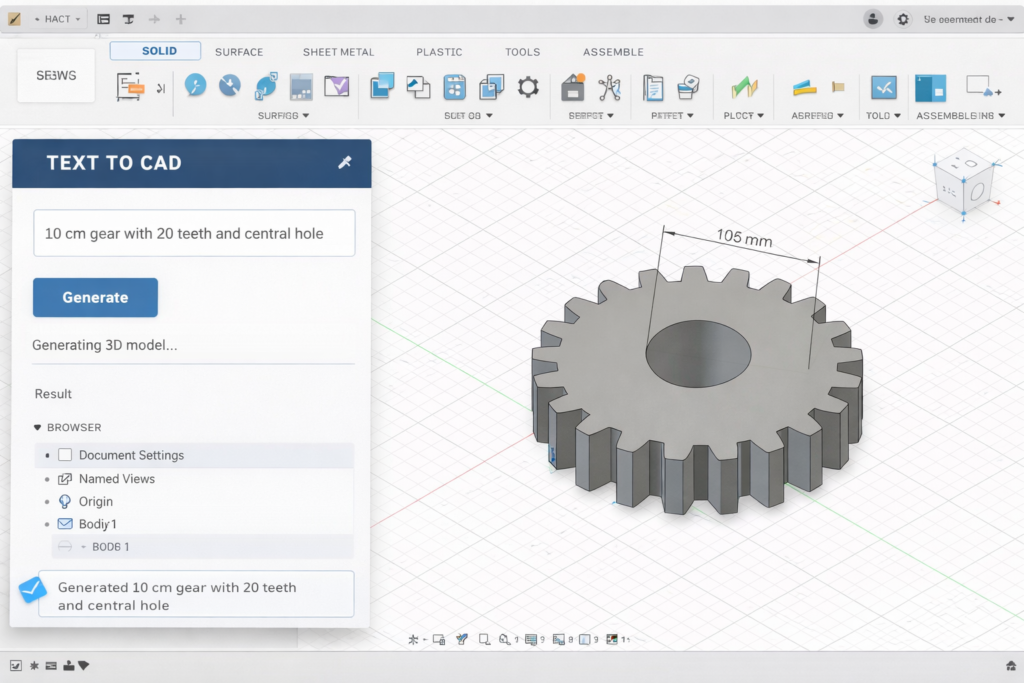
    The frontier of text-to-CAD AI is moving fast. Tools like Autodesk’s AI features, combined with a well-engineered prompt from Claude, can now produce rough geometry from a text description. While full automation is still maturing, using natural language CAD commands to generate parameter sheets and design intent documents is production-ready right now.

    Iterative Refinement — The Power Move

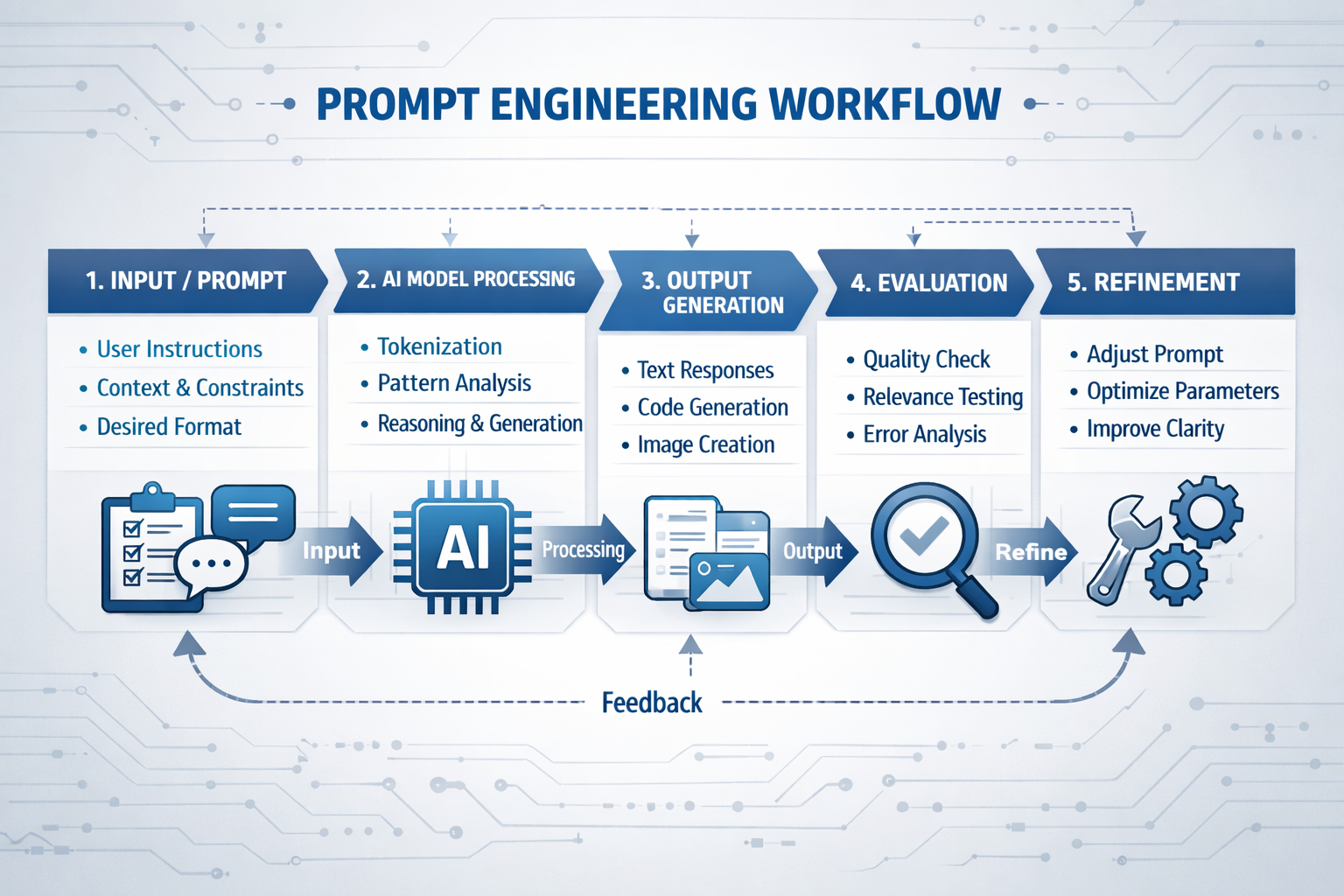
    The best AI-assisted CAD workflow professionals use iteration as a core strategy. They start with a broad prompt, review the output, then ask the AI to refine, tighten, or expand specific sections. Each round gets them closer to the exact output they need — far faster than traditional trial and error.

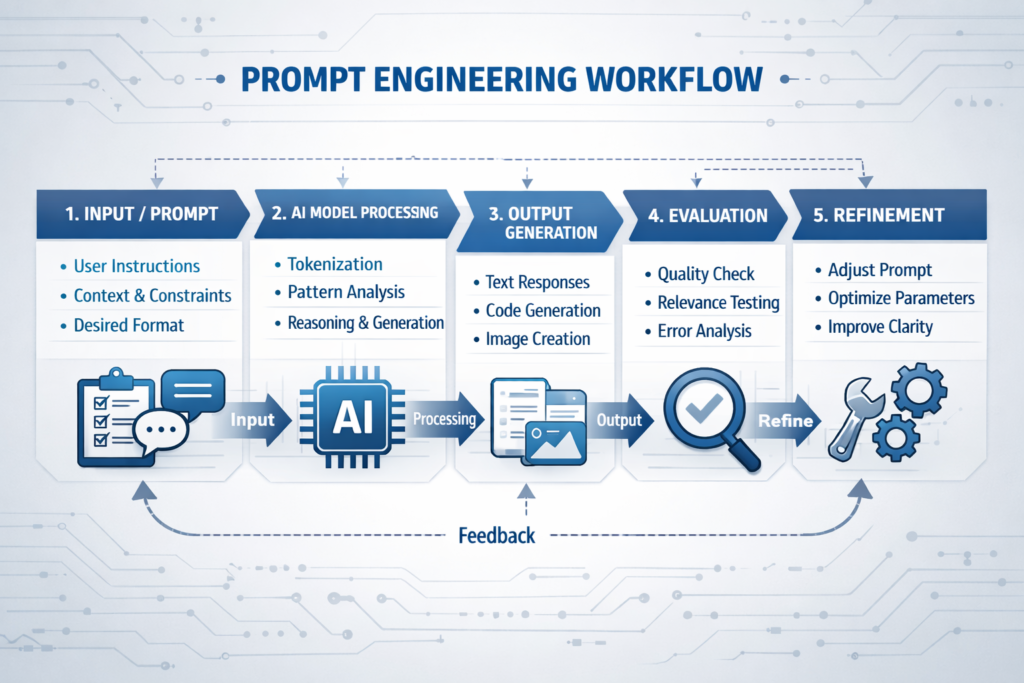
    a perfect prompt engineering for CAD modeling workflow with AI tools

    Benefits of Prompt Engineering for CAD Modeling — By User Type

    User TypeBenefit from AI Prompts for CAD DesignTime Saved Per Week
    Engineering StudentsLearn CAD faster with AI explanations and instant feedback on prompts3–5 hrs
    Freelance DraftersAutomate documentation, scripts, and client specs using CAD modeling with AI5–8 hrs
    Mechanical EngineersSpeed up calculations, tolerance reviews, and GD&T using AI-assisted CAD workflow4–7 hrs
    CAD Managers / TeamsStandardize prompt templates across the team for AutoCAD AI automation 20268–12 hrs
    Non-Engineers / PMsUnderstand drawing specs and design intent with plain-English AI explanations2–3 hrs

    Common Mistakes in AI Prompt Engineering for CAD (And How to Fix Them)

    Even experienced engineers make these mistakes when they first start using AI prompts for CAD design. Avoid these and you’ll be ahead of 90% of users.

    Mistake 1: Using Generic Prompts
    ‘Make me a CAD design’ tells the AI nothing. You get nothing useful back. Prompt engineering for CAD modeling starts with specificity. Always include software, dimensions, material, and output type.
    Mistake 2: Skipping the Role Statement
    Skipping ‘You are a senior mechanical engineer…’ means you get a generalist answer. Always set the role first. This single habit transforms your Claude AI CAD modeling prompts from average to expert-level.
    Mistake 3: Not Specifying Units
    In engineering, mm and inches are worlds apart. Any AI prompt for mechanical drawing must include the unit system explicitly — metric (ISO), imperial (ANSI), or both. Never leave this to the AI to guess.
    Mistake 4: One-and-Done Prompts
    The biggest mistake in CAD modeling with AI is expecting a single prompt to do everything. The most productive workflows are iterative. Write a prompt, review the output, refine. Each iteration gets you closer to the perfect result.
    Mistake 5: Not Validating AI Output
    Whether it’s an AutoLISP script or a calculation table, always review AI output before applying it. AI CAD software assistance is powerful, but it’s not infallible. A quick sanity check takes 2 minutes and saves hours of rework.

    Pro Tips: Expert-Level Prompt Engineering for CAD Modeling

    Pro Tips from the Field

    • Build a Prompt Library: Save your best AI prompts for CAD design in a shared document. A team prompt library is the fastest route to consistent results.
    • Use the ‘Explain Your Reasoning’ Trick: Add ‘Explain each decision’ to your prompt. This turns any AI mechanical design assistant into a learning tool — you understand the engineering, not just get an answer.
    • Combine Claude with AutoCAD AI Automation: Use Claude to write and debug your AutoCAD AI automation 2026 scripts, then run them inside AutoCAD. Best of both worlds.
    • Reference Drawing Standards: Mention ISO 2768, ASME Y14.5, or DIN standards in your prompt. This lifts your output to professional quality automatically.
    • Unlock Generative CAD Design: For complex assemblies, ask Claude to propose multiple generative CAD design alternatives with trade-offs. You get options, not just one answer.
    • Parametric First: When working in SolidWorks or Inventor, always ask Claude to structure outputs as parametric design with AI recommendations — driven dimensions, relations, and design intent — not just static values.
    • Use Structured Output Requests: End every complex prompt with ‘Format your answer as a table / numbered list / .lsp script.’ Clear format requests are the single biggest upgrade you can make to any CAD modeling with AI workflow.
    Annotated example of prompt engineering for CAD modeling in Claude AI showing all 5 prompt elements

    For the latest research on AI-assisted design and generative CAD design developments, see Autodesk’s official AI research hub: 

    Conclusion:

    Prompt engineering for CAD modeling is not a nice-to-have skill in 2026 — it’s the core skill that separates engineers who struggle with AI tools from those who use them to design faster, better, and smarter.

    You’ve now learned the five elements of a great AI prompt for CAD design, seen real working examples for both how to write AI prompts for SolidWorks and best AI prompts for AutoCAD, and picked up pro-level techniques for generative CAD design and parametric design with AI.

    The next step? Open Claude, write your first structured prompt, and see the results for yourself. Your AI-assisted CAD workflow starts today.

    Want the complete picture?
    Read our Pillar Guide: Prompt Engineering in Mechanical Engineering — Complete Guide — the ultimate resource for using AI across every part of your engineering workflow.

    Frequently Asked Questions

    These questions are based on real Google ‘People Also Ask’ queries for prompt engineering for CAD modeling.

    Q1. What is prompt engineering for CAD modeling?

    Prompt engineering for CAD modeling is the practice of writing structured, detailed instructions to an AI (like Claude) so it generates accurate CAD outputs — such as scripts, parameters, technical specs, or design logic. The more specific and well-structured your prompt, the better the output. It requires no coding — just clear, detailed writing about what you need.

    Q2. What are the best AI prompts for AutoCAD in 2026?

    The best AI prompts for AutoCAD always include: the software name (AutoCAD), the desired output (AutoLISP script / command sequence / macro), exact dimensions with units, layer specifications, and any drawing standards. Always add ‘Output only the ready-to-run code with no explanation’ for script requests. This is the core of AutoCAD AI automation 2026.

    Q3. How do I write AI prompts for SolidWorks?

    For how to write AI prompts for SolidWorks: start with a role statement (‘You are a SolidWorks expert’), then specify your part type, material, key dimensions, manufacturing method, and applicable standards. Ask for a parametric feature list or design intent document as your output. This structure works for any CAD modeling with AI platform.

    Q4. Is Claude AI good for CAD modeling prompts?

    Claude AI CAD modeling prompts work exceptionally well because Claude handles long, detailed technical instructions with high accuracy. It understands engineering terminology, material science, GD&T notation, and software-specific scripting. It also remembers context throughout a conversation, making it ideal for iterative AI-assisted CAD workflow sessions.

    Q5. What is generative CAD design and can AI help with it?

    Generative CAD design means using algorithms or AI to automatically generate design options based on goals and constraints — like minimizing weight while meeting load requirements. AI tools like Claude can help you define the parameters, explore trade-offs, and generate design intent documents that feed into software like Autodesk Fusion or SolidWorks Simulation.

    Q6. Do I need coding skills to use AI prompts for CAD design?

    No. AI prompts for CAD design require no coding knowledge. You write in plain English and the AI produces scripts, code, or calculations for you. If you want the output in a specific format (e.g. AutoLISP or a parameter table), just say so in your prompt. Natural language CAD commands via AI are accessible to complete beginners.

    Q7. How does text-to-CAD AI work alongside prompt engineering?

    Text-to-CAD AI tools take a text description and generate 3D geometry or 2D drawings directly. Prompt engineering for CAD modeling sits one layer upstream — it helps you write the right description to feed into these tools, or generates detailed parameter sheets and scripts when full text-to-CAD isn’t available. Together they form the most powerful AI CAD software workflow available in 2026.

  • How to Use Claude to Understand Engineering Drawings (A Guide for Non-Engineers)

    How to Use Claude to Understand Engineering Drawings (A Guide for Non-Engineers)

    You are in a project meeting. The engineer slides a drawing across the table — or emails you a PDF — and asks if you are happy with it. It is full of lines, numbers, symbols, and notations that mean nothing to you. You nod along, take a copy, and plan to figure it out later. This happens constantly in product development, procurement, and construction management, and it creates real risk: decisions made without understanding what is actually being decided.

    Claude AI gives non-engineers a practical way out of this situation. You do not need to learn to read engineering drawings from scratch. You need to be able to ask the right questions about a specific drawing in front of you — and get answers in plain language that let you make informed decisions. This guide shows you exactly how to do that.

    Why Engineering Drawings Are Hard to Read Without Training

    Engineering drawings use a standardised visual language developed over more than a century. Views that show the same object from multiple angles simultaneously. Dimension lines with tolerances expressed in notation most people never encounter outside an engineering context. Symbols for surface finish, geometric tolerancing, and material treatment that have precise technical meanings invisible to the untrained eye.

    Engineering drawings are the standardized,2D technical representations of 3D objects, essential for manufacturing and engineering communication. They are governed by international standards (ISO, ASME) and are critical, with roughly 70% of modern industrial product quality problems originating from drawing errors. 

    Source: Wikipedia — Engineering Drawing

    This language exists for good reason. It communicates information precisely and unambiguously between trained engineers and machinists around the world — without that precision, manufactured parts would not fit together reliably. But that same precision makes drawings opaque to anyone who did not spend years learning the notation.

    The gap this creates is significant. Project managers approve designs they cannot fully evaluate. Procurement teams sign off on drawing packages without knowing whether a tolerance is achievable or a specification is realistic. Founders receive deliverables from CAD partners without being able to verify they got what they paid for. Claude does not replace engineering knowledge — but it closes this gap meaningfully for the people who need it most.

    You do not need to become an engineer to have a useful conversation about an engineering drawing. You need to know what to ask and how to ask it. Claude handles the translation.
    engineering drawing explained for beginners | how to read technical drawing | engineering blueprint parts labelled

    What Claude Can Actually Help You Decode

    Before walking through the prompts, it helps to know what kinds of information are on a typical engineering drawing — and which of those Claude can explain in plain language when you describe or paste them in.

    The Title Block

    Every engineering drawing has a title block — usually in the bottom-right corner — that contains the part name, drawing number, revision level, material specification, scale, drawing standard (ASME or ISO), and the name of the engineer who created and approved it. This block tells you what you are looking at and whether the drawing is current. Claude can explain any field in the title block if you describe what you see.

    Views and Projections

    Engineering drawings typically show the same object from multiple angles — front, top, and side views — arranged in a standard layout. There may also be section views (which cut through the part to show internal features) and detail views (which zoom in on complex areas). Claude can explain why each view exists and what it is showing you.

    Dimensions and Tolerances

    Numbers on a drawing tell the manufacturer how big each feature is. The tolerance — shown as a plus/minus value or as a range — tells them how much variation is acceptable. When you see a dimension like ‘25.0 ±0.1’, Claude can explain what that means in practice: how precise the machinist needs to be, and what happens functionally if that tolerance is not met.

    GD&T Symbols

    Geometric Dimensioning and Tolerancing symbols are the most opaque part of a drawing for non-engineers. Small boxes containing geometric symbols and numbers define requirements for flatness, perpendicularity, position, and other geometric properties of features. Claude can translate these into plain language and explain why each control matters.

    Notes and Specifications

    Most drawings include a general notes section that specifies things like surface finish requirements, heat treatment, cleaning specifications, and drawing standards that apply across the whole part. Claude can explain any note you copy and paste in.

    The Prompts to Use — and When to Use Them

    These prompts are designed for the specific situations a non-engineer typically faces when dealing with engineering drawings. Use them directly in Claude — describe what you are seeing, paste text from the drawing where possible, and ask follow-up questions until you have clarity.

    When You Need to Understand the Drawing Overall

    PROMPT 1 — General Understanding
    I have received an engineering drawing and I am not an engineer. I will describe what I can see on it. Please explain each element in plain language — what it means, why it is there, and what a manufacturer needs to do with it.[Describe the drawing: how many views there are, what the part appears to be, what numbers and symbols you can see, what the title block says, any notes sections, anything else that stands out]

    This is your starting point when you are looking at an unfamiliar drawing for the first time. Claude will give you a structured explanation of what each part of the drawing communicates. Take notes on the things you want to follow up on.

    When You Need to Verify a Specific Dimension or Tolerance

    PROMPT 2 — Tolerance Check
    On this engineering drawing, there is a dimension that reads [describe the dimension exactly — e.g. ‘18.5 +0.0/-0.2 mm on a shaft diameter’]. Can you explain:1. What this means in plain language2. How precise the machinist needs to be3. Whether this is a tight tolerance or a loose one for this type of feature4. What would happen functionally if this tolerance was not met

    Use this when a specific dimension is being discussed in a meeting or when you want to understand whether a quoted tolerance is reasonable for the application. Claude’s answer gives you informed questions to ask your engineering team rather than having to take their answer on faith.

    Read more on Prompt Engineering for CAD Drafting and Engineering Design

    When You See a GD&T Symbol You Do Not Recognise

    PROMPT 3 — GD&T Symbol Explanation
    On this engineering drawing, there is a rectangular box with symbols in it. From left to right it shows: [describe what you see — e.g. ‘a circle with a cross inside it, then the diameter symbol and 0.5, then the letter A’].Please explain:1. What type of geometric control this is2. What it is requiring the manufacturer to achieve3. Why this control might be on this particular feature4. What would go wrong if this requirement was ignored

    GD&T symbols are the most intimidating part of a drawing for non-engineers. This prompt turns any symbol combination into a plain-language explanation. You do not need to know what the symbol is called — just describe what you see.

    When You Are Reviewing a Drawing Before Approving It

    PROMPT 4 — Pre-Approval Review
    I need to review and approve an engineering drawing before it goes to a manufacturer. I am not an engineer but I am responsible for sign-off.I will describe the drawing to you. Please help me:1. Identify the most important things to check before approving2. Flag any information that appears to be missing or incomplete3. Suggest questions I should ask the engineer before I sign off4. Highlight anything that seems unusual or worth querying[Describe the drawing in as much detail as you can]

    This prompt is for procurement leads, project managers, and technical directors who need to sign off on drawing packages without having the engineering background to evaluate them independently. Claude acts as a structured second pair of eyes — not verifying the engineering, but identifying gaps and generating informed questions.

    When You Want to Understand How the Part Is Made

    PROMPT 5 — Manufacturing Context
    Based on this engineering drawing, I want to understand how this part would typically be manufactured. The drawing shows [describe: the part shape, material noted, any surface finish callouts, any notes about manufacturing process].Please explain:1. What manufacturing process would most likely be used to make this part2. Which features are the most difficult or expensive to machine3. Whether the tolerances specified look typical or unusually tight for this type of part4. What I should understand about the manufacturing process when reviewing the timeline and cost estimate

    This is particularly useful when you are evaluating a quote from a manufacturer. Understanding which features drive cost and lead time means you can have a much more productive conversation about schedule and price — and spot if something in the quote does not add up.

    Claude AI explaining GD&T symbol | AI for engineering drawings | Claude technical drawing help

    What to Do With Claude’s Answers

    Claude gives you information and language. What you do with it determines the value. A few habits that make the most of Claude’s explanations in a real engineering context:

    • Write down the questions Claude’s answers generate. The goal is not to become an engineer overnight — it is to have better conversations with the engineers you work with. Use Claude to develop specific, informed questions and then take those questions to your engineering team or CAD partner.
    • Do not use Claude’s output as a substitute for engineering sign-off. Claude explains and interprets — it does not verify that a design is correct, that tolerances are achievable, or that a material is appropriate for the application. Those judgments require a qualified engineer.
    • Use the vocabulary Claude gives you. When Claude explains that the symbol on the drawing is a True Position control with a cylindrical tolerance zone referenced to Datum A, you now have the right terminology to ask your engineer a specific, targeted question. That changes the conversation.
    • Keep a running note of terms you have looked up. Engineering drawing vocabulary is consistent — once you have learned what a feature control frame is, that knowledge applies to every drawing you encounter. Build your own glossary as you go.

    Check our blog to get free 20 prompts every engineer should know

    The Limits of What Claude Can Do

    Claude works from descriptions. It cannot see images or PDFs directly — you need to describe what you are looking at in text. This means some nuance is inevitably lost: the exact geometry of a complex surface, the precise arrangement of views, the specific layout of a drawing that a trained engineer would read at a glance. For complex drawings, describing everything accurately enough to get a fully useful response takes effort.

    Claude also cannot tell you whether the engineering itself is correct. It can explain what a tolerance means but not whether that tolerance is achievable with the manufacturing process specified. It can explain what a material designation refers to but not whether that material is appropriate for the operating environment. It can tell you what questions to ask — not whether the answers are right.

    For high-stakes approvals — drawings that will go directly to manufacturing, structural components, pressure-containing parts — there is no substitute for a qualified engineering review. What Claude offers is the ability to participate meaningfully in that review process rather than being a passive spectator.

    Claude is the most useful engineering drawing tool you have access to if you are not an engineer. It is most valuable not as an answer machine, but as a question generator — giving you the language and confidence to have better conversations with the people who are.

    The Bottom Line

    Engineering drawings communicate with precision in a language most people never learn. That language barrier creates real risk in product development and procurement — decisions made by people who do not fully understand what they are deciding on. Claude does not eliminate that risk, but it reduces it meaningfully by giving non-engineers a way to engage with technical drawings in plain language.

    The five prompts in this guide cover the situations non-engineers encounter most often: understanding a drawing from scratch, checking a specific dimension, decoding a GD&T symbol, preparing for a sign-off review, and understanding the manufacturing implications of what is specified. Start there, follow up on anything that is not clear, and use what you learn to have better conversations with the engineers and CAD partners you work with.

    Working With Engineers But Not One Yourself?SimuTecra works with clients at every level of technical experience. Whether you are an engineer reviewing a complex drawing package or a project manager trying to understand what you are signing off on, our team communicates clearly and ensures you have the context you need at every stage of the project.Send us your drawings or your brief — we’ll take it from there.

  • Prompt Engineering for CAD Drafting and Engineering Design: A Practical Guide | SimuTecra

    Prompt Engineering for CAD Drafting and Engineering Design: A Practical Guide | SimuTecra

    The engineers getting the most out of AI tools right now are not the ones with the best software — they are the ones mastering prompt engineering for engineering design. In CAD drafting and design workflows, the difference between a useful AI output and a useless one often comes down to a single sentence.

    Prompt engineering for engineering design — the skill of writing precise, structured instructions that guide AI models — is rapidly becoming one of the most valuable technical skills. Whether you are using ChatGPT for engineers, working with AI prompts for CAD drafting, or experimenting with text-to-CAD tools, the quality of your prompt determines the quality of your result.

    This guide is written for engineers, CAD drafters, and technical managers who want to understand prompt engineering CAD workflows, improve efficiency, and use AI engineering tools 2026 effectively.

    This guide is written specifically for engineers, CAD drafters, and technical managers. It covers what prompt engineering is, why it matters for engineering workflows, how to write prompts that actually work for design and drafting tasks, and the common mistakes that waste time.

    What Is Prompt Engineering — and Why Should Engineers Care?

    Prompt engineering is the practice of designing structured inputs to generate accurate and useful outputs from AI systems. In the context of AI for CAD, this means giving detailed, technical instructions that align with real engineering requirements.

    For engineers, this matters because AI-assisted drafting and generative CAD tools are becoming part of daily workflows. Platforms like Autodesk AI, SolidWorks AI, and other CAD AI tools are enabling faster design iterations, automation, and even generative design prompts for complex parts.

    But these tools depend heavily on how well you communicate with them.

    None of these tools work well with vague instructions. Tell an AI to ‘design a bracket’ and you will get something generic that requires significant rework. Tell it to ‘design a steel mounting bracket for a 15 kg HVAC unit, bolted to a 150×150 RHS column, with four M12 bolt holes on a 100 mm bolt circle, material grade 350’ and you get something you can actually evaluate.

    Prompt engineering is not a skill reserved for software developers. Any engineer or drafter who uses AI tools is already doing it — the question is whether they are doing it well.

    According to the Prompt Engineering Guide — one of the most widely cited references in the field — the key principles are specificity, context, format instructions, and iterative refinement. All four apply directly to engineering AI tasks.

    This is where prompt engineering CAD becomes critical.

    The Anatomy of a Good Engineering Prompt

    Most engineers who are disappointed with AI outputs are writing prompts that are too short, too vague, or missing critical context. A well-structured engineering prompt has five components — and most poorly written prompts are missing at least three of them.

    ComponentWhat It DoesEngineering Example
    Role / contextTells the AI who it is and what domain it is working in“You are a structural engineer producing fabrication drawings to AISC standards.”
    TaskStates clearly what you want the AI to produce“Write a material specification note for a hot-dip galvanised steel handrail.”
    ConstraintsDefines the boundaries — standards, dimensions, format, word count“Use ASTM A123 for galvanising. Maximum 80 words. Use bullet points.”
    Context / inputsProvides the specific data, dimensions, or design parameters the AI needs“The handrail is 1100 mm high, 48.3 mm OD tube, Grade 350 steel, outdoor exposed environment.”
    Output formatTells the AI how to structure or present the result“Present as a numbered list suitable for inclusion in a drawing general notes section.”

    Weak Prompt vs Strong Prompt: Side-by-Side

    Weak PromptStrong Prompt
    Write a specification for a steel beam.You are a structural engineer. Write a material and fabrication specification note for a 310UB46.2 Grade 350 steel floor beam. Include: steel standard (AS/NZS 3678), surface preparation (Sa 2.5), primer coat (75 micron epoxy zinc phosphate), and web stiffener requirements at point load locations. Maximum 100 words. Format as numbered notes for inclusion on a shop drawing.
    Create a 3D model of a bracket.Generate a parametric 3D model of a flat plate mounting bracket. Plate dimensions: 150 mm x 100 mm x 8 mm thick. Four M10 clearance holes (11 mm diameter) at 20 mm from each corner. Material: mild steel, Grade 250. Two 10 mm radius fillets at the base. Output as a STEP file compatible with SolidWorks.
    Summarise this drawing.You are reviewing an engineering drawing for a pressure vessel flange. Summarise the following drawing notes in plain English for a non-technical project manager. Include: material grade, pressure rating, surface finish requirement, and any special inspection notes. Maximum 150 words.

    Key insight: The strong prompt takes about 30 seconds longer to write. The output it produces takes minutes less to rework. In a workflow where you run dozens of AI tasks per day, that ratio compounds quickly.

    You may also like 20 Best Claude Prompt Every Engineer Should Used

    Text-to-CAD AI software interface showing a natural language prompt input field and the resulting 3D CAD model geometry
    Text-to-CAD tools like Zoo Design Studio and Leo AI generate editable 3D models directly from structured text prompts — the quality of the prompt directly determines the usability of the output.

    Prompt Engineering Techniques That Work in Engineering Contexts

    Several well-established prompting techniques from the AI field translate directly into engineering and CAD workflows. These are not theoretical — they produce measurably better outputs on the kinds of tasks engineers do every day.

    1. Few-Shot Prompting

    Few-shot prompting means showing the AI one or two examples of exactly what you want before making your actual request. This is one of the most reliable techniques for enforcing a specific format or terminology standard.

    Engineering application: If you want drawing notes written in a specific house style, provide one or two examples of your existing notes before asking the AI to write the new one. The AI will match the format, tone, and structure precisely — saving significant editing time.

    2. Chain-of-Thought Prompting

    Chain-of-thought prompting asks the AI to reason through a problem step by step before giving a final answer. For engineering design decisions, this is particularly useful because it forces the AI to surface its assumptions — which you can then verify or correct.

    Engineering application: When using AI to evaluate whether a connection detail is appropriate, ask it to ‘first list the load conditions, then check the bolt capacity, then check the plate thickness, then give a pass/fail verdict.’ The step-by-step reasoning is far easier to audit than a single-sentence answer.

    3. Role Assignment

    Assigning the AI a specific expert role at the start of the prompt significantly improves output quality for technical tasks. ‘You are a mechanical engineer specialising in pressure vessels’ produces more technically accurate output than no role assignment at all — because it activates the relevant domain knowledge the model has been trained on.

    Engineering application: Use role assignment every time you need domain-specific accuracy — ‘You are a structural drafter working to AISC standards,’ ‘You are a civil engineer reviewing a drainage calculation,’ ‘You are a CAD technician producing a BOM from an assembly list.’

    4. Constraint Setting

    One of the most common prompt failures in engineering contexts is not setting explicit constraints on format, length, or standards compliance. Without constraints, the AI defaults to verbose, generic output. With them, you get precise, usable content.

    Engineering application: Always specify: the applicable standard (ASME, ISO, AISC, AS/NZS), the output format (bullet list, table, numbered notes, paragraph), the length limit (maximum 100 words, one sentence per item), and the audience (fabricator, project manager, inspecting engineer).

    5. Iterative Refinement

    Iterative prompting treats AI output as a draft, not a final answer. After the first output, follow up with specific correction instructions — ‘Change the bolt grade from 8.8 to 10.9,’ ‘Remove the reference to ISO and replace with ASME Y14.5,’ ‘Shorten the second note to one sentence.’ This is far faster than rewriting from scratch and gives you full control over the final result.

    Common mistake: Treating AI output as final without review. AI tools do not know your project-specific constraints, your client’s preferences, or your jurisdiction’s code requirements. Prompt engineering improves the starting point — human engineering judgment remains non-negotiable for review and sign-off.

    Real-World Prompt Engineering Use Cases in CAD and Engineering Design

    Here’s how engineers are applying prompt engineering for engineering design in real workflows:

    TaskAI Tool TypeExample Prompt Skeleton
    Generating drawing general notesChatGPT / Claude“You are a mechanical drafter. Write 5 general notes for a machined aluminium part drawing to ASME Y14.5. Include: material spec, surface finish default, deburring requirement, heat treatment, and inspection standard. Maximum 15 words per note.”
    Writing a design brief summaryChatGPT / Claude“Summarise the following design requirements into a one-paragraph engineering brief suitable for issuing to a CAD outsource partner. Include: part function, key dimensions, material, tolerance class, and delivery format. [Paste requirements below]”
    Generating 3D geometry from descriptionZoo / Leo AI / Fusion 360 AI“Generate a parametric 3D model of a [part name]. Dimensions: [list]. Material: [grade]. Key features: [holes, threads, fillets]. Output format: STEP AP214. Optimise for CNC machining.”
    Automating BOM descriptionsChatGPT / Claude“You are a structural drafter. Convert the following list of steel members into a formatted Bill of Materials table with columns: Mark, Description, Section Size, Grade, Length (mm), Qty, Finish. Apply consistent naming to AISC conventions. [Paste member list]”
    Reviewing a drawing for completenessChatGPT / Claude“You are a senior mechanical engineer reviewing a drawing for issue to fabrication. Check the following drawing notes for: missing tolerances, unspecified material, ambiguous surface finish callouts, and missing revision references. Flag each issue as HIGH / MEDIUM / LOW priority. [Paste drawing notes]”
    Drafting an RFI responseChatGPT / Claude“You are a structural engineer. Write a formal RFI response addressing the following query from a steel fabricator. Tone: professional and concise. Maximum 150 words. Reference the relevant drawing number. [Paste RFI query]”
    Engineer using AI-assisted CAD tools at a workstation, with design software and AI interface visible on screen
    Prompt engineering is now a practical daily skill for engineers who want to get faster, more accurate results from AI tools — without sacrificing technical quality.

    The Most Common Prompt Engineering Mistakes Engineers Make

    • Being too vague on dimensions and standards: ‘Design a structural connection’ gives the AI nothing to work with. Always specify member sizes, loads, applicable standard, and material grade.
    • Skipping the role assignment: Without a defined role, AI defaults to a generalist voice. Set the role in every prompt that requires domain-specific accuracy.
    • Asking multiple unrelated questions in one prompt: Break complex tasks into sequential prompts. Each prompt should have one clear output goal.
    • Not specifying the output format: If you need bullet points, say so. If you need a table, say so. If you need the output in 80 words for a drawing note, state the limit.
    • Accepting the first output: The first output is a draft. Use follow-up prompts to refine, correct, and shorten until the result meets your standard.
    • Assuming AI knows your project context: AI has no memory of your project unless you include it in the prompt. Paste the relevant context — drawing notes, specifications, design parameters — into every prompt that needs it.

    Frequently Asked Questions

    1. What is prompt engineering in simple terms?

    It’s the process of writing structured inputs for AI tools to improve outputs in engineering design, CAD drafting, and modeling.

    2. Can prompt engineering be used for CAD drafting?

    Yes — it’s widely used in AI prompts for CAD drafting, documentation, and text-to-CAD modeling.

    3. What AI tools do engineers use for CAD and design?

    The most widely used are ChatGPT and Claude for text tasks, Zoo Design Studio and Leo AI for text-to-CAD generation, DraftAid for automated drawing annotation, and Autodesk Fusion 360 AI and SolidWorks 2026 for AI-assisted modeling and drawing creation.

    4. Do I need coding skills for prompt engineering?

    No. Prompt engineering for most engineering tasks requires no coding — just clear, structured writing. Advanced applications like prompt chaining or API integration do benefit from coding knowledge, but everyday use does not.

    5. What is text-to-CAD?

    Text-to-CAD is a category of AI tools that generate 3D CAD models or 2D drawings from natural language text prompts. You describe the part, the AI generates the geometry as an editable CAD file.

    6. How do I write a good prompt for engineering drawings?

    Include: a role assignment (‘You are a structural drafter’), the specific task, the applicable standard, key dimensions and material, and the required output format. Be explicit — vague prompts produce generic outputs.

    7. Is AI replacing CAD engineers and drafters?

    No. AI tools handle repetitive, formulaic tasks faster — but engineering judgment, design problem-solving, and drawing review still require human expertise. AI makes skilled drafters faster, not redundant.

    The Bottom Line

    Prompt engineering is not a passing trend for engineers — it is a practical, learnable skill that directly improves the speed and quality of AI-assisted design and drafting work. The engineers who invest 20 minutes learning how to write a well-structured prompt are consistently getting better outputs from the same tools their colleagues are frustrated with.

    The five components of a good engineering prompt — role, task, constraints, context, and output format — apply whether you are writing drawing notes, generating 3D geometry, drafting specifications, or reviewing documentation. Build the habit of including all five, and the quality of your AI outputs will improve immediately.

    At SimuTecra, we have built AI-assisted workflows into our CAD drafting and engineering design services — which means clients get the speed benefits of AI tools without the learning curve or the quality risk of unreviewed outputs.

    Want AI-Ready Engineering Drawings Without the Learning Curve?

    SimuTecra’s engineering team combines deep CAD expertise with AI-assisted workflows to deliver faster, more accurate 2D drafting packages and 3D models. You get the output — without needing to master any prompting tools yourself.

    Share your project brief and get a clear quote — no obligation.