Introduction:
What if you could describe a product idea in plain English, and watch a 3D model appear in seconds?
That’s no longer a fantasy. Text-to-CAD AI is here, it’s improving fast, and it’s already changing how engineers, product designers, and startups bring ideas to life.
In 2026, a new generation of AI CAD tools can take a simple text description, like ‘a steel bracket 150mm x 80mm with four M8 bolt holes’, and generate a fully editable AI-generated 3D model in seconds. No CAD degree required. No hours of manual sketching. Just clear, well-written AI prompts for product design.
This is the biggest shift in AI product design since CAD replaced the drafting table. And whether you’re an experienced mechanical engineer or a complete beginner, understanding text to CAD today puts you ahead of the curve.
In this guide, you’ll learn exactly how text-to-CAD AI works, which tools are leading the space, how to write effective prompts, and what real engineers are doing with this technology right now.
| Quick Answer: What Is Text-to-CAD AI? Text-to-CAD AI is technology that converts plain-language text descriptions into editable 2D drawings or 3D CAD models using artificial intelligence. You type a description, including dimensions, materials, and design intent, and the AI generates a prompt to 3D model output, typically in standard formats like STEP, STL, DXF, or DWG. Leading AI CAD software 2026 platforms doing this include Zoo, AdamCAD, and integrations with Claude AI. The technology uses natural language to CAD processing to interpret your intent and produce geometry. |
What Is Text-to-CAD AI and Why Is It a Big Deal?
Traditional CAD design is powerful, but it demands skill, time, and expensive software licences. Learning AutoCAD or SolidWorks takes months. Even experienced designers spend hours on routine geometry. That’s the gap text-to-CAD AI fills.
At its core, text to CAD means using AI design tools to interpret your written description and generate usable geometry, just like telling a colleague what you need, but faster and available 24/7.
Why Engineers and Designers Are Paying Attention
- AI product design tools cut concept-to-prototype time dramatically, often from days to hours
- You don’t need to be a CAD expert to produce a text to CAD model from description, beginners can generate real models
- AI-generated 3D models export to industry-standard formats (STEP, STL, DWG) for immediate use
- AI mechanical design workflows reduce repetitive drafting and free engineers for higher-value thinking
- The technology is evolving from simple shapes to complex, physics-aware, parametric CAD automation, 2026 has seen major leaps
Major players, Autodesk, PTC, Zoo, AdamCAD, are all investing heavily. According to PTC’s 2026 CAD trends report, manufacturers who adopt AI-assisted design today are seeing measurable advantages in quality, cost, and time-to-market. AI CAD software 2026 is not a future trend. It’s the current reality.
How Does Text-to-CAD AI Work? (Plain English Explanation)
This is the question most beginners ask first. Here’s a clear, simple breakdown.
How Does Text-to-CAD AI Work, The Step-by-Step Process
- You type a description. Example: ‘AI prompts for product design‘: a cylindrical housing, 80mm diameter, 50mm tall, with a 20mm hole through the centre and M5 thread at the top opening.
- Natural language to CAD processing interprets your text, identifying dimensions, geometry type, features, and design intent.
- The AI generates a prompt to 3D model, either as a parametric B-Rep solid, a mesh, or a 2D DXF/DWG drawing, depending on the tool.
- You receive an AI-generated 3D model in a standard format: STEP, STL, OBJ, DXF, ready to import into SolidWorks, AutoCAD, Fusion 360, or your printer.
- You refine with follow-up prompts. No re-drawing from scratch: just describe the change and the AI updates the model.
What Makes a Good Prompt for Text-to-CAD?
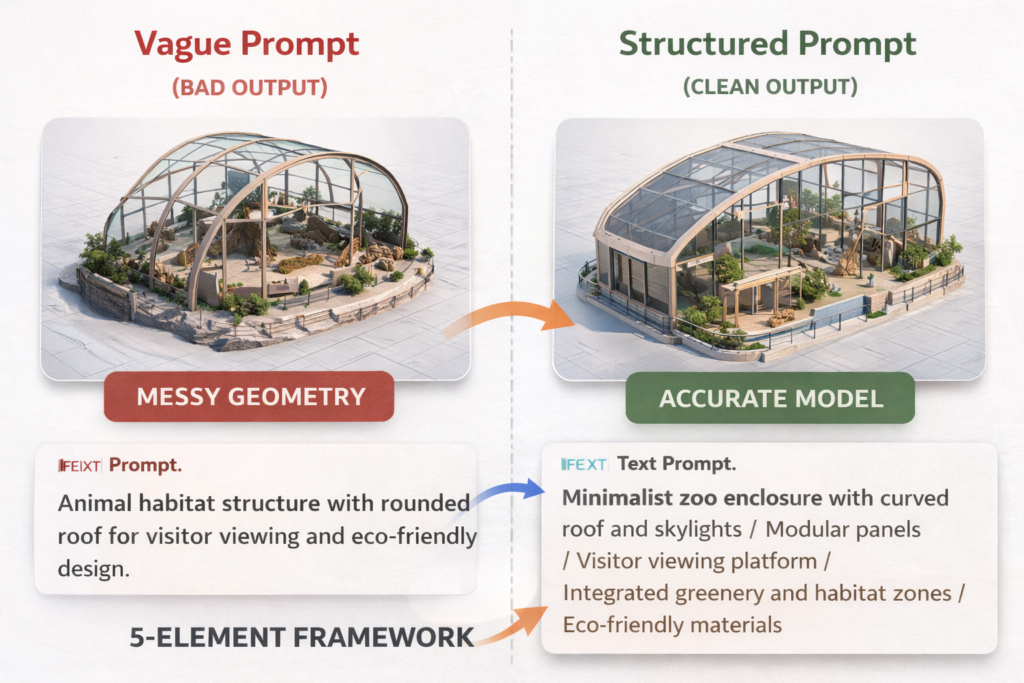
The quality of your output depends entirely on the quality of your input. This is exactly why AI prompts for product design are a skill worth learning. Here’s what separates good prompts from great ones:
- Include exact dimensions: ‘150mm x 80mm x 6mm’ not ‘medium-sized’
- Specify the material or standard: ‘ABS plastic, 2mm wall’ or ‘stainless steel, ISO tolerance h7′
- Name the output format: ‘Output as STEP file’ or ‘generate a DXF 2D drawing’
- Describe the function: ‘designed for CNC machining’ or ‘3D print-ready, no overhangs’
- Use one key feature per sentence: text-to-CAD AI handles stacked descriptions better when they’re broken into clear, separate statements
| Example: Text-to-CAD AI Prompt for a Mechanical Part “Design a rectangular aluminium mounting plate: 200mm x 120mm x 5mm thick. Add 4 x M6 counterbore holes (10mm diameter, 3mm deep) at each corner, inset 15mm from edges. Add a central slot 60mm x 20mm. Output as a STEP file, suitable for CNC machining.” Result: Tools like Zoo or AdamCAD produce a solid B-Rep model from this prompt in under 60 seconds. |
How Text-to-CAD AI Is Changing the Product Design Process
The impact of text-to-CAD AI goes far beyond just ‘drawing faster.’ It’s fundamentally reshaping the AI-driven CAD workflow from end to end.
1. From Idea to Prototype in Hours, Not Weeks
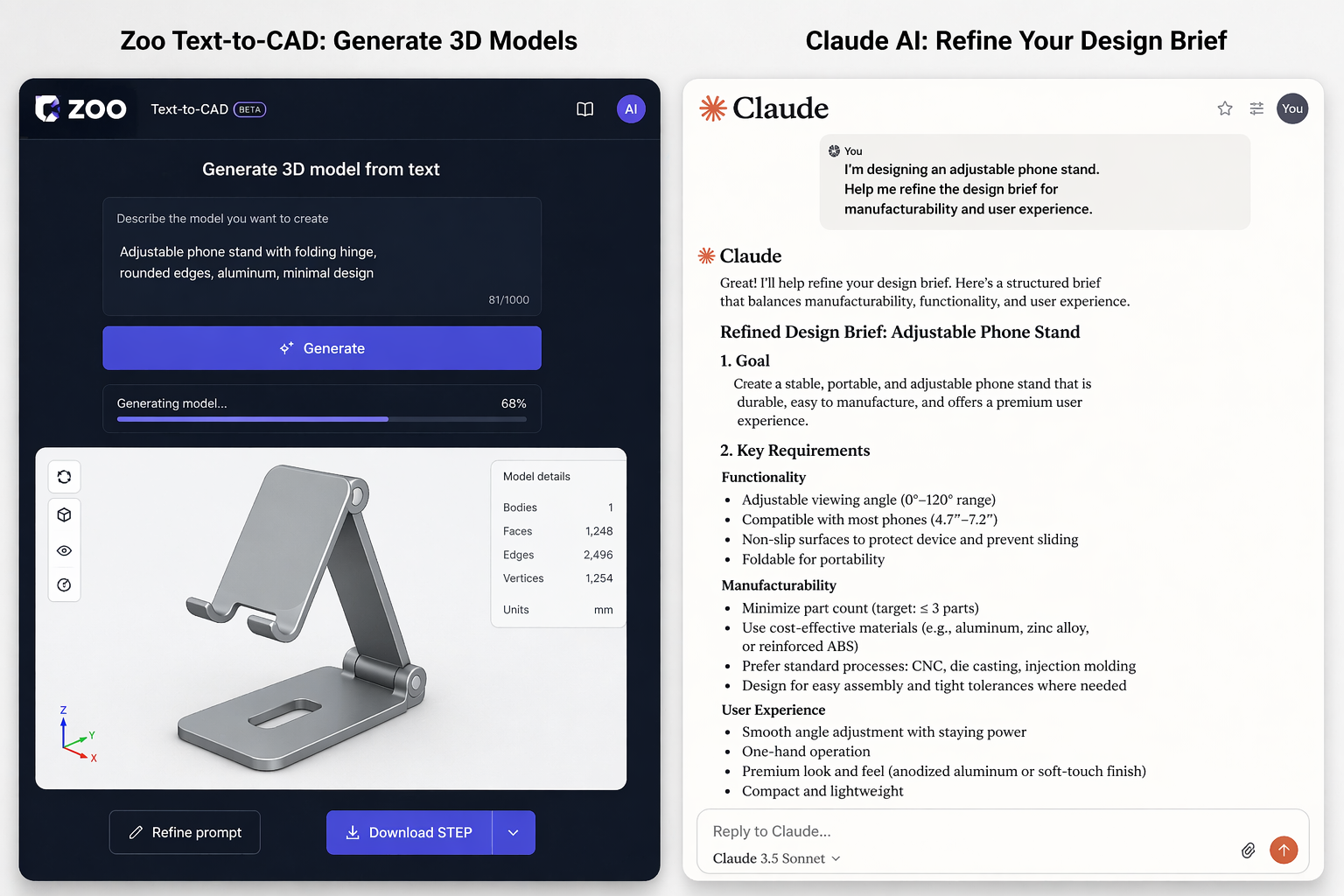
Traditional product development moves from idea → sketch → CAD model → prototype → review, a cycle that can take days or weeks. With AI product design tools, the idea-to-model step collapses from hours to minutes. Designers iterate faster, test more ideas, and catch problems earlier.
A founder at a hardware startup described using text to CAD to go from a napkin sketch to a prompt to 3D model in a single afternoon, something that previously required hiring a contract drafter for 3–5 days.
2. Democratizing Engineering, No CAD Experience Needed
One of the most transformative aspects of text-to-CAD AI is accessibility. Today, a product manager, a small business owner, or a student with zero CAD training can generate a usable AI-generated 3D model from a description. This is AI mechanical design becoming genuinely inclusive.
Tools like Zoo and AdamCAD are specifically designed with this accessibility goal in mind. And when combined with Claude AI for CAD design, for prompt refinement, technical documentation, and design advice, even complete beginners produce professional-grade outputs.
3. Accelerating Generative Design Exploration
Senior engineers are using generative design AI to explore dozens of design variants at once. Instead of modelling each option manually, they describe the constraints, material, weight limit, load path, and let the AI generate multiple options for comparison.
This is parametric CAD automation at its most powerful: the engineer focuses on decisions and trade-offs, while the AI handles the geometry. The AI-driven CAD workflow becomes a creative and analytical partnership, not just automation.
4. Smarter Iteration, Text Edits Instead of Re-Draws
With traditional CAD, changing a wall thickness means finding the right feature, modifying a sketch, and potentially fixing downstream errors. With text-to-CAD AI, you type: ‘Change the wall thickness to 8mm and add 2mm fillets on all internal edges.’ The model updates instantly.
This natural language to CAD editing approach makes the tool feel less like software and more like a conversation, which is exactly the direction AI CAD software 2026 is heading.
Best Text-to-CAD Tools for Engineers in 2026
The best text-to-CAD tools for engineers in 2026 range from dedicated AI-powered CAD generation platforms to AI assistants that plug into your existing software. Here’s a clear comparison:
| Tool | Best For | Output Format | Price | Skill Level |
| Zoo (zoo.dev) | text-to-CAD AI mechanical prototyping, editable B-Rep models | STEP, STL, FBX, OBJ | Free / credit-based | All levels |
| SimuTecra Text-to-CAD | text-to-CAD AI Free instant 2D parametric drawings (gears, flanges, brackets, plates) | DXF, SVG | Free | Beginner-friendly |
| AdamCAD | AI-generated 3D models fast 2D/3D parametric output | STL, OBJ, DXF | Free trial / paid | Beginner-friendly |
| Claude AI | Claude AI for CAD design: scripts, specs, docs, prompt refinement | Scripts, text, tables | Free / Pro | All levels |
| DraftAid | AI-driven CAD workflow: auto-dimensioning 2D drawings from 3D | DWG, DXF, PDF | Paid plans | Intermediate |
| CADGPT | AI CAD tools: AutoCAD scripts, LISP code, CAD Q&A | Scripts, code | Free trial / paid | Intermediate |
| Autodesk Fusion 360 AI | generative design AI: topology optimisation, simulation | Native F360, STEP | Subscription | Professional |
For quick convert text to 3D CAD model free prototyping, Zoo and AdamCAD are excellent starting points, and for fast 2D parametric drawings like gears, flanges, and brackets, SimuTecra’s free Text-to-CAD tool generates a downloadable DXF or SVG in seconds, no signup required. For documentation, scripting, and design guidance, Claude AI for CAD design is the strongest pairing. For professional AI mechanical design with simulation, Autodesk Fusion 360’s generative design AI features are industry-leading.
Step-by-Step: Using Text-to-CAD AI for Product Design (Practical Workflow)
Here’s the exact workflow you can follow today to go from a product idea to a usable AI-generated 3D model: using a combination of text-to-CAD AI and Claude AI for CAD design.
- Define your design intent: Write 3–5 sentences describing what the part does, what material it needs, and how it will be made (3D printed, CNC, injection moulded). This is the foundation of all great AI prompts for product design.
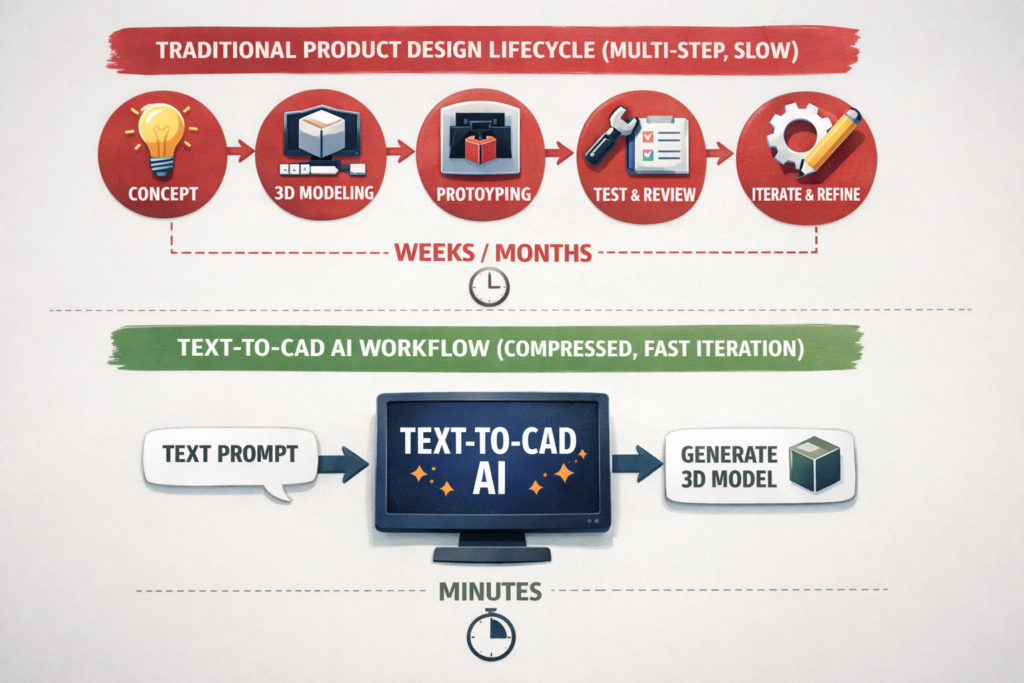
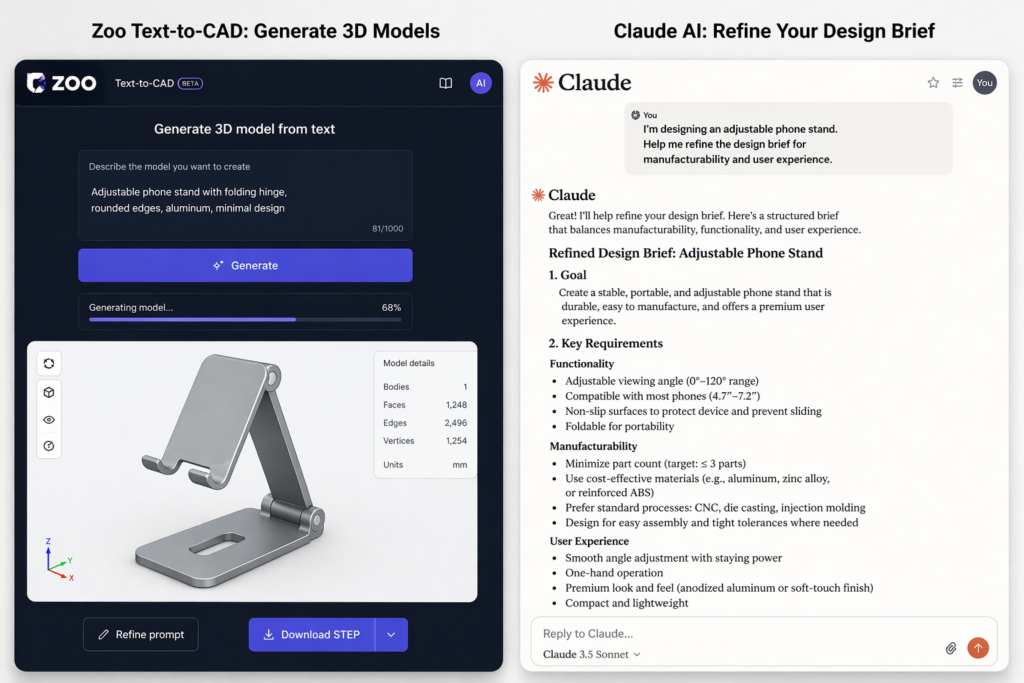
- Refine your brief with Claude: Paste your description into Claude and ask: ‘I am designing [description]. What key dimensions, features, and constraints should I include in my prompt for a text-to-CAD AI tool?’ Claude will sharpen your brief.
- Generate your model: Take your refined prompt to Zoo, AdamCAD, or your chosen AI CAD software 2026. Enter the prompt and generate your text to CAD model from description.
- Review and iterate: Check the output against your requirements. Use follow-up prompts to adjust. The AI-driven CAD workflow is iterative, expect 2–4 rounds before the model is right.
- Export and integrate: Download the file in STEP, STL, or DXF format and import into SolidWorks, Fusion 360, or your slicer. Your AI product design output is ready for prototyping or manufacturing review.
- Document with Claude: Use Claude AI to generate your BOM, technical spec, or drawing notes from a description of the final design. This completes a full AI-driven CAD workflow from brief to documentation.
Common Mistakes When Using Text-to-CAD AI (And How to Avoid Them)
Even great technology gets misused. Here are the most common mistakes engineers and designers make with text-to-CAD AI, and the fixes:
| Mistake 1: Expecting One Prompt to Do Everything Text-to-CAD AI works best iteratively. Start with the main geometry, then add features in follow-up prompts. Trying to describe a complex assembly in one 200-word prompt usually results in garbled output. |
| Mistake 2: Leaving Out Dimensions Make a bracket’ tells the AI nothing. Every good AI prompts for product design includes exact measurements, length, width, height, radius, thread size. Natural language to CAD requires specificity to produce accurate geometry. |
| Mistake 3: Not Specifying the Output Format Want a STEP file for SolidWorks? A DXF for laser cutting? Say so explicitly. AI-generated 3D models come in multiple formats, the tool won’t guess which one you need. |
| Mistake 4: Skipping Validation Always validate AI-powered CAD generation outputs before sending to manufacturing. Check critical dimensions, wall thicknesses, and fit tolerances. AI CAD tools are powerful assistants, but they don’t replace engineering judgment. |
| Mistake 5: Ignoring Claude for Design Guidance Many users jump straight to geometry tools and skip the briefing step. Claude AI for CAD design is the perfect tool to refine your brief, check your design logic, and prepare better prompts before you generate. Skipping this step produces worse outputs. |
Pro Tips: Getting Expert Results from Text-to-CAD AI
Expert Tips for Text-to-CAD AI in 2026
- Layer your prompts: Generate the base shape first, then add features (holes, threads, fillets) in separate prompts. This mirrors how real parametric CAD automation works and produces cleaner geometry.
- Use manufacturing method as context: ‘Designed for FDM 3D printing, no overhangs above 45 degrees’ immediately improves AI product design output quality.
- Combine Claude + Zoo for maximum output: Use Claude AI for CAD design to write and refine your design brief, then paste it into Zoo or AdamCAD. This two-step approach is the AI-driven CAD workflow that experienced users swear by.
- Reference existing standards: Adding ‘ISO 2768 medium tolerance’ or ‘DIN 912 socket head cap screw’ to your prompt lifts AI-generated 3D models to professional quality instantly.
- Ask for design alternatives: Type ‘Give me three design variants for this part’ to unlock the full power of generative design AI thinking.
- Save your best prompts: Build a prompt library for repeated part types, brackets, enclosures, flanges. This turns text-to-CAD AI from a one-off tool into a systematic design accelerator.
- Push the boundaries with free tools: You can convert text to 3D CAD model free using Zoo’s free plan (1,205 credits/month) or AdamCAD’s free trial, If you just need a clean 2D DXF for a gear, flange, or bracket without any account setup, SimuTecra’s Text-to-CAD tool is free and runs entirely in-browser describe the part and export instantly. Enough to explore AI CAD software 2026 capabilities before committing to a paid plan.
Benefits of Text-to-CAD AI: At a Glance
| Benefit | Traditional CAD | With Text-to-CAD AI |
| Concept-to-model speed | Days to weeks | Hours to minutes |
| Skill requirement | Months of CAD training | AI design tools, plain English |
| Iteration speed | Slow rebuild each change | Fast natural language to CAD edits |
| Documentation | Manual, time-consuming | Automated with Claude AI for CAD design |
| Design exploration | 1–2 options per session | Generative design AI: 5–10+ variants |
| Cost (early stage) | High (drafter/engineer hours) | Low, convert text to 3D CAD model free |
For the latest testing data on best text-to-CAD tools for engineers, including hands-on results from seven platforms tested in 2026, see:
We Tested 7 Text-to-CAD Tools, Xometry Pro (xometry.pro)
Conclusion:
Text-to-CAD AI is no longer experimental. In 2026, it is a practical, production-ready capability that is already saving engineers and designers hours every week, and it’s only getting better.
Whether you’re a complete beginner wanting to convert text to 3D CAD model free, a product designer speeding up AI product design iteration, or an engineer building a smarter AI-driven CAD workflow, the tools and techniques you need are available right now.
The key is combining the right AI CAD software 2026 with well-crafted AI prompts for product design. Use Claude AI for CAD design to refine your brief and your logic. Use Zoo, AdamCAD, or SimuTecra’s own Text-to-CAD tool for AI-powered CAD generation. And use generative design AI thinking to explore more options than you ever could manually.
The designers who learn this skill now will be the ones leading their industries in two years.
Frequently Asked Questions
Q1. What is text-to-CAD AI and how does it work?
Text-to-CAD AI is technology that converts plain-text descriptions into editable 2D or 3D CAD models using artificial intelligence and natural language to CAD processing. You type a description including dimensions, material, and output format. The AI interprets your intent and generates a prompt to 3D model output in formats like STEP, STL, or DXF. It works best with specific, detailed prompts.
Q2. Can AI actually generate accurate CAD models from text?
Yes, for simple to medium-complexity parts, AI-generated 3D models from platforms like Zoo and AdamCAD are accurate and export-ready. Results are best when AI prompts for product design include exact dimensions, material specs, and manufacturing context. Complex multi-part assemblies are still challenging, but single-component text-to-CAD AI is production-ready in 2026.
Q3. What are the best text-to-CAD tools for engineers in 2026?
The best text-to-CAD tools for engineers in 2026 include Zoo (best for mechanical prototyping with editable B-Rep models), AdamCAD (fast 2D/3D parametric output), CADGPT (AutoCAD scripts), and Claude AI for CAD design (design briefs, documentation, prompt refinement). For enterprise-level generative design AI, Autodesk Fusion 360 leads the market.
Q4. Is there a way to convert text to 3D CAD model for free?
Yes. You can convert text to 3D CAD model free using Zoo’s free plan (1,205 credits/month) or AdamCAD’s free trial. Claude AI also offers a free tier for AI prompts for product design, design guidance, and script generation. These free tiers are more than enough to explore text-to-CAD AI and test workflows before upgrading. For quick 2D engineering drawings (gears, flanges, brackets, plates), SimuTecra’s free Text-to-CAD tool is another option, no login, instant DXF/SVG export.
Q5. How does text-to-CAD AI differ from generative design AI?
Text-to-CAD AI converts a user’s text description into CAD geometry, you define the shape. Generative design AI (like Autodesk Fusion’s Generative Design) uses constraints (loads, materials, boundaries) to automatically optimise geometry, the AI proposes the shape. Both are part of the broader AI product design revolution, but they operate at different stages of the design process.
Q6. Do I need CAD software experience to use text-to-CAD AI?
No. Text-to-CAD AI tools are specifically designed to remove the technical barrier. You describe what you need in plain English, the AI design tools handle the geometry. That said, having basic knowledge of dimensions, materials, and manufacturing processes will dramatically improve the quality of your AI prompts for product design.
Q7. How does Claude AI help with text-to-CAD and product design?
Claude AI for CAD design works as a design intelligence layer alongside dedicated text-to-CAD AI geometry tools. Claude helps you refine your design brief, write better AI prompts for product design, generate technical documentation, perform design logic reviews, and write AutoCAD scripts. It’s the thinking partner that makes your AI-driven CAD workflow more precise and more productive.

Leave a Reply