CAD model review is one of the most time-consuming quality gates in any engineering design process, and one of the most inconsistently performed. On a good day, a thorough model review catches non-manifold geometry before it causes a mesh failure in FEA, identifies a missing draft angle before the mould tool is cut, flags a tolerance stack-up error before the assembly goes together wrong, and confirms the drawing fully describes the part before it reaches the machine shop. On a typical day, the review is rushed, incomplete, and most of those issues are found later, at significantly higher cost.
AI is changing this in two ways. First, AI-powered specialist tools (DFM checkers, model quality validators, specification compliance engines) are automating the rule-based checking that previously required a DFM engineer, a quality engineer, and a senior designer to cover simultaneously. Second, large language models (Claude, ChatGPT, Gemini) are providing intelligent reasoning support for the judgment-intensive parts of model review, interpreting GD&T callouts, assessing tolerance stack-up logic, evaluating mass properties against estimates, and helping engineers structure and document review findings.
This guide covers the complete AI-assisted CAD model review workflow for 2025: what categories of review AI can accelerate, the specific tools and LLM prompting strategies for each, the review checklists that ensure nothing is missed, and the time savings realistic engineers can expect when they implement these workflows. It is written for mechanical engineers, CAD designers, BIM engineers, and product design engineers who review models as part of their professional work, not as a conceptual overview, but as an operating guide.
| What counts as a CAD model review? In this guide, CAD model review covers the full set of checks performed on a 3D CAD model and its associated 2D drawing before it is released from Work In Progress (WIP) state for manufacture, simulation, or client issue. This includes: geometric quality checking (is the model a valid solid?); DFM review (can it be manufactured?); drawing annotation review (is the drawing complete and correct?); tolerance and GD&T review (are tolerances correctly specified and achievable?); mass properties verification (do the mass and centre of gravity make engineering sense?); clash and interference checking (does the part fit in the assembly?); and specification compliance checking (does the model satisfy the design requirements?). AI tools and LLMs can assist with every one of these categories. |
Why Traditional CAD Model Review Fails (and What AI Fixes)
Before examining what AI does in model review, it is worth understanding why traditional model review fails so consistently, because the same root causes that break traditional review are exactly what AI-assisted review addresses.
| Traditional Review Failure Mode | Why It Happens | What AI Fixes |
| Review is performed too late | Design review is a stage gate, not a continuous process, the model is only reviewed when it is submitted for release, by which point significant rework cost is incurred if issues are found | AI DFM tools (DFMPro, Xometry instant DFM) provide automated feedback as the model is being created, not only at release, moving review from a gate to a continuous process |
| Reviewer covers some categories but not all | A single reviewer cannot be expert in geometry quality, DFM for all processes, GD&T, tolerance analysis, mass properties, and specification compliance simultaneously, something always falls through | AI tools cover their specific category exhaustively and consistently on every review, regardless of reviewer expertise or workload |
| Review quality depends on reviewer experience | Junior engineers miss what senior engineers catch; experienced reviewers review quickly and miss things that take time; fatigued reviewers at end of day miss what alert reviewers catch | AI tools apply the same rule set with the same thoroughness every time, independent of experience, expertise, or time of day |
| Review findings are not systematically recorded | Review comments are captured informally in emails, meeting notes, or markup PDFs rather than structured review records, making it impossible to verify that all findings have been actioned | AI review tools produce structured reports (BCF issues for BIM, DFM violation reports, specification compliance matrices) that create an auditable review record linked to specific model elements |
| Review does not cover all elements | For large assemblies or complex parts with hundreds of features, manual review inevitably spot-checks rather than covers every feature, leaving systematic issues undetected | AI tools check every feature, every face, every dimension without sampling, a wall thickness violation on feature 247 is as likely to be caught as one on feature 3 |
The pattern is consistent: traditional model review is expert-dependent, gate-based, incomplete, and poorly recorded. AI-assisted model review is systematic, continuous, exhaustive, and documented. The two approaches are complementary, AI handles the rule-based checking; the engineer applies judgement to AI findings and covers the judgment-intensive review categories that AI cannot yet perform reliably.
Review Category 1: AI for Geometric Quality Checking
Geometric quality checking, verifying that the CAD model is a valid, watertight, manifold solid without degenerate geometry, is the foundational review that all downstream processes depend on. A model with non-manifold geometry will fail to mesh in FEA. A model with gaps between faces will produce incorrect mass properties. A model with zero-thickness faces will fail to export correctly to STEP. These issues are structural failures in the CAD data, not design problems, and they must be fixed before any other review is meaningful.
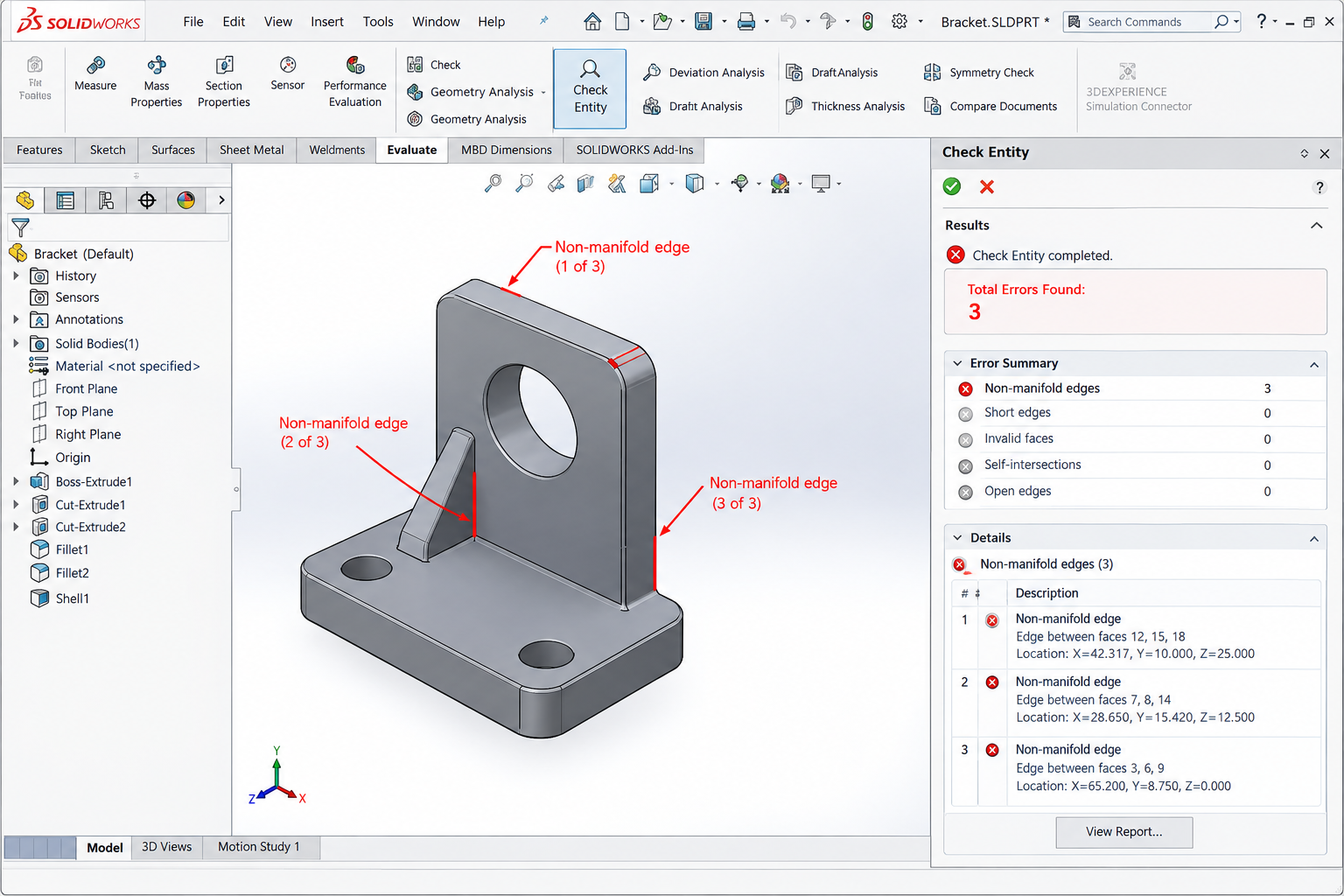
What AI Geometry Checking Does
AI and automated geometry checking tools go beyond the basic rebuild-and-check workflow in parametric CAD tools. They apply computational geometry algorithms to detect:
- Non-manifold edges: Edges shared by more than two faces, a topological impossibility in a valid solid. Often introduced by Boolean operations that produce T-intersections.
- Self-intersecting faces: Faces that cross each other within the model interior, creating regions of undefined inside/outside.
- Zero-area faces and zero-length edges: Degenerate geometry that causes meshing failures and export corruption.
- Open surface boundaries (gaps): Edges on a surface body that have no adjacent face, indicating the solid is not watertight.
- Inconsistent face normals: Faces whose normal vectors point inward rather than outward, causing rendering and FEA orientation errors.
- Short edges and sliver faces: Very small geometry features that create poor quality mesh elements and slow processing.
AI Geometry Tools and Workflows by Platform
| Platform | AI / Automated Geometry Check Tool | How to Access | What It Detects |
| SolidWorks | Check Entity (Tools > Check) + Geometry Analysis | Tools menu > Check; Tools > Geometry Analysis | Non-manifold geometry, open surfaces, short edges, small faces, sliver faces, invalid solid |
| Fusion 360 | Inspect > Interference + Inspect > Curvature Comb (for surface quality) | Inspect menu; also Utilities > 3D Print for watertight check | Interference between bodies, open mesh boundaries, surface quality issues |
| CATIA V5/V6 | Check Model (Tools > Check Model) + Healing Assistant | Tools menu > Check Model; Insert > Analysis > Healing Assistant | Geometric inconsistencies, gaps, duplicates, overlaps; healing suggestions for each issue |
| Siemens NX | Examine Geometry (Analysis > Examine Geometry) | Analysis menu > Examine Geometry | Faces, edges, vertex consistency; sheet metal, solid and surface model validity |
| Ansys SpaceClaim | Interference + Repair tools in the Repair group | Repair ribbon group (automatic detection and fixing) | Gaps, slivers, duplicates, extra edges; auto-repair for many issue types |
| Solibri (IFC models) | AI model quality rules + IFC validation | Solibri rule sets; import IFC and run quality ruleset | IFC schema compliance, element classification, duplicate geometry, overlapping elements |
| Netfabb / Materialise Magics | Mesh repair with AI-assisted detection | Analysis panel; auto-repair functions | Mesh holes, self-intersections, inverted normals, degenerate triangles, focused on AM readiness |
| Time Saving: Automated geometry checking in SolidWorks Check Entity or CATIA Check Model takes under 30 seconds for a typical machined component model. A manual geometry review by a skilled engineer reviewing screen-by-screen takes 15-30 minutes for the same model. The automated check catches more issues and takes 60x less time. There is no engineering justification for not running automated geometry checks before every model release. |
Review Category 2: AI for DFM and Manufacturing Process Review
DFM review is the category of model review with the highest cost-consequence if missed. A part that fails DFM review before tooling release costs an engineer’s time to fix. The same part after tooling release costs tens of thousands of pounds or dollars in tool modifications. AI DFM tools apply manufacturing process rules systematically to every geometric feature of the model, a thoroughness that manual DFM review by a single reviewer can rarely match.
How AI DFM Review Works
AI DFM tools work by applying parametric rules to CAD geometry. For injection moulding, the tool measures every face’s draft angle relative to the specified pull direction, calculates wall thickness at every point in the model, identifies every internal corner radius, detects every undercut relative to the parting line, and checks every boss and rib geometry against material-specific design rules. The rules are quantitative, not qualitative, ‘draft angle on this face is 0.3 degrees, minimum required is 1.0 degree’ rather than ‘may need more draft’.
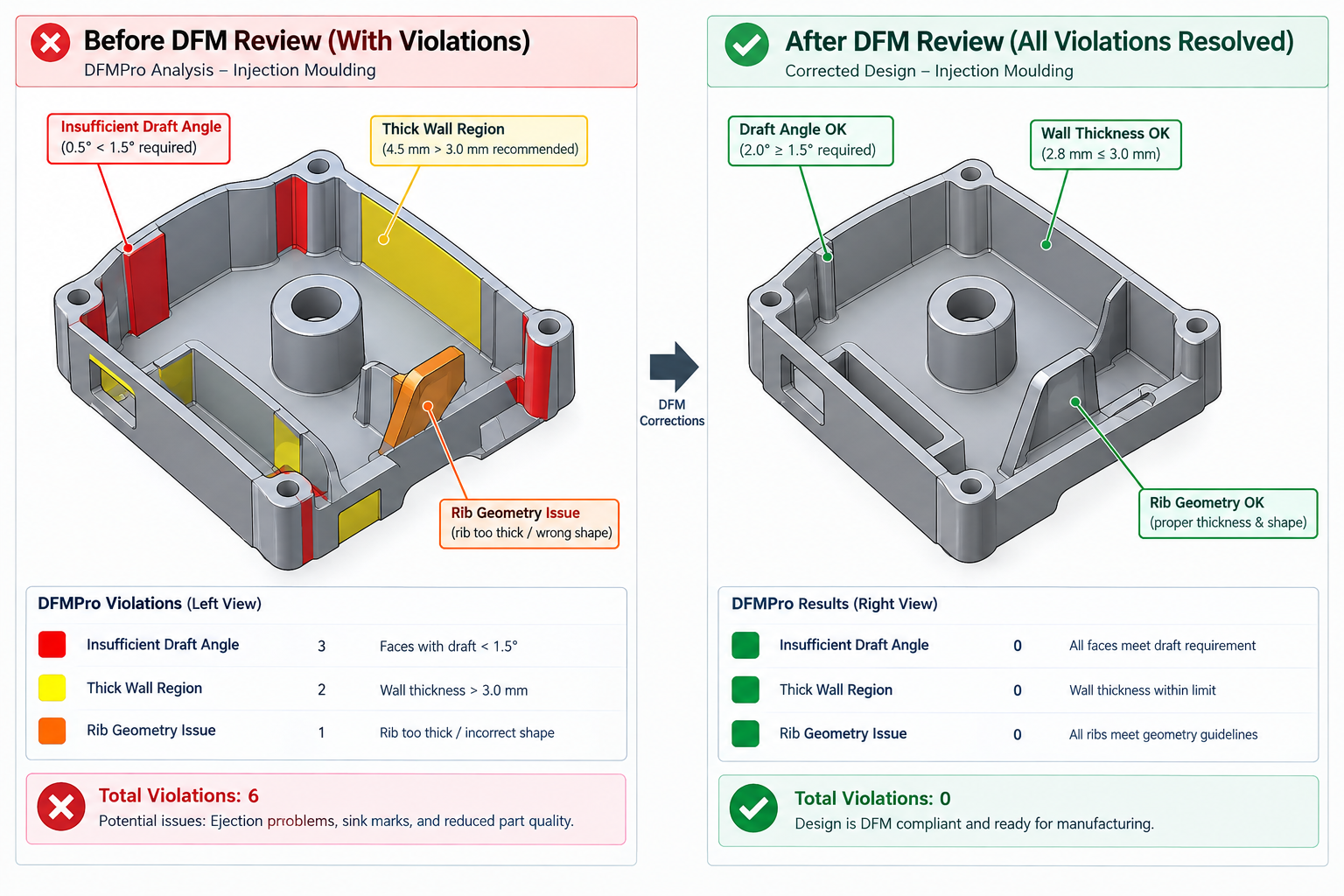
| Manufacturing Process | AI DFM Tool | Key Rules Checked | Time vs Manual Review |
| Injection moulding | DFMPro (SolidWorks/CATIA/NX/Creo plugin), Moldex3D DFM Advisor, Protolabs instant DFM | Draft angles (all surfaces vs draw direction), wall thickness uniformity (max 25% variation), rib height:thickness ratio, boss outer diameter, internal corner radii, undercuts, sink mark risk zones, weld line prediction | Manual: 1-3 hours with experienced DFM engineer. AI: 5-15 minutes including report generation. 6-15x faster. |
| CNC machining (3-axis) | DFMPro machining, Xometry instant DFM, Protolabs instant DFM | Feature accessibility on 3-axis (flags features requiring 5-axis or repositioning), minimum internal corner radius vs standard end mill, deep pocket aspect ratio, non-standard thread specifications, tight tolerance feasibility | Manual: 30-90 minutes. AI: 2-5 minutes. 15-30x faster. |
| Sheet metal fabrication | DFMPro sheet metal, Fictiv DFM, SendCutSend DFM | Bend radius vs material thickness, hole-to-edge distance, hole-to-bend distance, minimum flange length, notch width, flat pattern nesting efficiency | Manual: 20-45 minutes. AI: 1-3 minutes. 15-20x faster. |
| Die casting | DFMPro casting, Magmasoft DFM, Flow3D CAST | Draft angles (draw direction), wall thickness uniformity and minimum, shrinkage porosity risk (isolated thick sections), core print requirements, parting line feasibility | Manual: 1-2 hours. AI: 10-20 minutes. 5-10x faster. |
| Additive manufacturing (DMLS/FDM) | Materialise Magics AI, Autodesk Netfabb, nTop | Overhanging features vs process angle threshold, minimum wall thickness, enclosed void printability, support removal access, build orientation optimisation, minimum feature size | Manual: 30-60 minutes. AI: 3-10 minutes. 8-12x faster. |
| DFM Review Without Specialist Software: If your team does not have access to DFMPro, Moldex3D, or similar specialist DFM tools, LLMs (Claude, ChatGPT) provide a surprisingly capable DFM reasoning review when given a detailed description of the part geometry and manufacturing process. The LLM cannot measure your model geometrically, but it can systematically work through DFM criteria for the specified process and flag areas that warrant closer manual inspection. See the LLM Prompt Templates section for the specific prompt structure that produces the most useful DFM review output from an LLM. |
Review Category 3: AI for Drawing Annotation and GD&T Review
Engineering drawing review is one of the most painstaking manual tasks in design engineering, and one that most engineers approach inconsistently because the criteria for a ‘complete’ drawing are numerous, interrelated, and require knowledge of GD&T standards (ASME Y14.5 or ISO 1101), general tolerance standards (ISO 2768), surface finish standards (ISO 1302), thread notation standards, and title block requirements simultaneously. AI can check many of these criteria automatically.
AI Drawing Annotation Completeness Checking
AI tools that read engineering drawings check for completeness and consistency automatically. The two types of AI drawing review tools are:
- CAD-integrated drawing checkers: Tools embedded in the CAD drawing environment that check the drawing against rules. SolidWorks’ Drawing Checker (add-in), Autodesk’s Drawing Insights, and CATIA’s Interactive Drafting Rules check for: missing title block fields, views without scale annotations, dimensions with no tolerance specification where tolerances are required, GD&T callouts with incomplete datum reference frames, and surface finish symbols on surfaces without dimension references.
- AI drawing reading tools: LLMs (Claude, ChatGPT) can read drawing PDFs or images and perform intelligent annotation review. When a drawing is attached to a Claude or ChatGPT conversation, the LLM can identify: missing views for fully defining the geometry, GD&T callouts that do not fully constrain the datum reference frame, surface finish callouts on functional surfaces that appear to be missing, thread callouts that use non-standard notation, and title block fields that are incomplete or inconsistent with the part number in the model.
AI for GD&T Review and Interpretation
GD&T review is one of the clearest applications of LLMs in engineering drawing work, for three reasons: GD&T interpretation is rules-based (the interpretation of a feature control frame follows defined rules from ASME Y14.5 or ISO 1101); GD&T errors are common and consequential (incorrect GD&T is one of the most frequent causes of manufacturing queries and inspection failures); and the correct GD&T interpretation is often not obvious to less experienced engineers.
LLMs can perform three types of GD&T review that add genuine value:
- Callout interpretation: Given a GD&T callout in text form (e.g. ‘position, diameter 0.2mm at MMC, referenced to datum A primary plane, datum B secondary cylinder, datum C tertiary plane’), Claude or ChatGPT will explain the tolerance zone geometry, the physical meaning of the MMC modifier and bonus tolerance calculation, how the part would be set up on a CMM to establish the datum reference frame, and what manufacturing non-conformance would look like. This is particularly useful when reviewing drawings from suppliers or other design teams.
- Functional requirement check: The reviewer describes the functional requirement for a feature (what must this tolerance control achieve in the assembly?) and the GD&T callout applied, and asks the LLM whether the callout correctly captures the functional requirement. This catches the common mistake of applying a GD&T symbol that looks appropriate but does not actually control the required geometric characteristic.
- Completeness check: The reviewer lists all the GD&T callouts on the drawing and asks the LLM to identify any functional surfaces that appear to lack a GD&T callout, any datum reference frames that are incomplete (missing the third datum for full constraint), and any modifiers that appear incorrect for the feature type.
| GD&T AI Accuracy Note: LLMs are generally reliable for GD&T interpretation when the standard is specified (ASME Y14.5-2018 vs ISO 1101:2017) and the callout is described precisely. They are less reliable for edge cases in less common controls (profile of a surface with non-uniform tolerance zones, complex composite position tolerances). Always verify LLM GD&T interpretations against the published standard for safety-critical or regulatory applications. |
Review Category 4: AI for Tolerance Stack-Up and Fit Review
Tolerance stack-up analysis, calculating the accumulated effect of multiple tolerances on a critical assembly gap or interference, is one of the most important and most frequently skipped review activities in engineering design. It is skipped because it is tedious to perform manually and because its absence is invisible until the assembly either jams or rattles. AI-assisted tolerance analysis changes this cost-benefit calculation.
LLM-Assisted Tolerance Stack-Up
Tolerance stack-up analysis follows a well-defined mathematical procedure (worst-case arithmetic or RSS statistical) that LLMs can execute reliably when given complete, correctly specified inputs. The key requirement is providing:
- Every dimension in the stack-up loop with its nominal value and bilateral tolerance
- The direction of each dimension (contributing positively or negatively to the gap)
- Whether worst-case (arithmetic) or RSS (statistical with Cp assumption) analysis is required
- The acceptance criterion for the gap (must be positive, or must be within specified limits)
Given these inputs, Claude or ChatGPT produces a complete tolerance stack-up calculation with: the mean gap value, the worst-case minimum and maximum gap, the RSS minimum gap at 3-sigma and 6-sigma, a statement of whether the assembly passes the acceptance criterion at worst case and at RSS, and a recommendation of which tolerance in the stack contributes most to the variation (the dominant tolerance, the one to tighten if the stack fails).
This LLM-assisted workflow reduces tolerance stack-up calculation time from 30-90 minutes (spreadsheet setup, formula entry, checking) to 5-10 minutes (structured prompt preparation and LLM result review). The time saving is most significant for complex multi-dimensional stacks that cross multiple components.
AI Tools for Tolerance Analysis
| Tool | Type | Capability | Integration | Best For |
| 3DCS Variation Analyst (DCS) | Dedicated tolerance analysis software | Monte Carlo tolerance simulation; 3D stack-up with geometric variation; GD&T-aware | SolidWorks, CATIA, NX, Creo plugin | Complex assemblies with 3D geometric variation, automotive and aerospace applications |
| CETOL 6 Sigma (Sigmetrix) | Dedicated tolerance analysis software | Sensitivity analysis; RSS and worst-case; 3D variation; integrates with GD&T callouts | SolidWorks, CATIA, NX, Creo plugin | High-precision mechanical assemblies where tolerance analysis is required at every design review |
| SolidWorks TolAnalyst | Integrated SolidWorks tool | Linear 1D stack-up analysis with automatic loop identification from assembly mates | Native SolidWorks assembly | SolidWorks users needing quick 1D stack-up analysis without separate software |
| Excel with manual formulas | Manual spreadsheet | Worst-case and RSS formulas; flexible but error-prone | None, manual data entry | Simple stack-ups where dedicated software is not available |
| LLMs (Claude, ChatGPT) | AI reasoning tool | Worst-case and RSS calculation from described inputs; dominant tolerance identification; ISO 286 fit analysis | Via conversation with described parameters | Any stack-up; particularly valuable when dedicated software is unavailable or for quick sanity checks |
Review Category 5: AI for Mass Properties Verification
Mass properties verification, checking that the CAD model’s calculated mass, volume, centre of gravity, and moments of inertia are consistent with engineering expectations, is one of the simplest and most powerful model review checks available. It is also one of the most frequently skipped. A mass that is 40% higher than expected almost always indicates a geometry error (duplicated solid bodies, a solid volume where a void should be, or incorrect material assignment). A centre of gravity that is clearly wrong indicates a feature placement error or a mirroring mistake. These are issues that are invisible in the viewport and in the feature tree but immediately apparent in the mass properties report.
AI-Assisted Mass Properties Review Workflow
AI assists with mass properties review in two ways: automated calculation (which all CAD tools do natively) and AI-assisted sanity checking (where LLMs add value).
- Calculate mass properties: In SolidWorks: Evaluate > Mass Properties. In Fusion 360: Inspect > Physical Properties. In CATIA: Analyse > Inertia. Assign the correct material before calculating, a common error is calculating mass with the default material (steel) for a part designed in aluminium.
- Generate an expected value estimate: Before comparing the calculated value against anything, generate an independent estimate. For simple geometries, this is a hand calculation (density x estimated volume). For complex geometries, ask an LLM: ‘A 6061-T6 aluminium component occupying approximately [describe geometry] should have a mass in the range of approximately [X] grams. The CAD tool calculates [Y] grams. Is this consistent, and if not, what are the most likely causes of the discrepancy?’
- Investigate discrepancies: If calculated mass differs by more than 10% from the estimate, investigate before proceeding. Common causes: multiple overlapping solid bodies (mass is double-counted); incorrect material assignment (steel density 7,850 kg/m3 instead of aluminium 2,700 kg/m3, a factor of 2.9 error); a filled pocket that should be a cut; a solid body where a shell or void was intended.
- Verify centre of gravity location: The CoG should be at the geometric centre for symmetric parts. For asymmetric parts, the CoG should be on the correct side of the dominant mass. A CoG clearly in the wrong location (on the light side of an asymmetric part) indicates a mirroring or material assignment error.
- Document results: Record the mass, CoG coordinates, and material assignment in the drawing title block or model properties. This creates a traceable record that subsequent reviewers and manufacturing teams can reference.
| LLM Prompt for Mass Properties Sanity Check: ‘I have a CNC machined aluminium (6061-T6, density 2.70 g/cm3) component. It is approximately [DESCRIBE GEOMETRY: e.g. a rectangular plate 200mm x 100mm x 20mm with a central pocket 150mm x 60mm x 15mm deep and 4 through-holes of 10mm diameter]. Estimate the expected mass range for this geometry. My CAD model calculates [X] grams. Is this consistent with the expected range, and if not, what should I investigate?’ |
Review Category 6: AI for Clash and Interference Detection
Clash and interference detection, checking that parts in an assembly do not physically overlap and that clearances between moving parts are sufficient, is one of the earliest CAD review capabilities and is now well-established as an automated workflow. AI is extending this capability beyond simple geometric intersection detection.
Traditional vs AI-Assisted Clash Detection
| Capability | Traditional Clash Detection (Navisworks, SolidWorks Interference) | AI-Assisted Clash Detection |
| Hard clash detection (physical overlap) | Full support, detects all geometric intersections between solid bodies | Same geometric detection + AI prioritisation of which clashes are genuine conflicts vs false positives from known clearances |
| Soft clash / clearance violation | Supports clearance zone checking but produces very high false positive volume | AI filters out acceptable clearances (fastener-to-fastener, intentional close fits), significantly reduces review time |
| Thread engagement check | Not typically supported, thread geometry is usually simplified | LLMs can assess thread engagement length adequacy from described thread specification and joint loading |
| Kinematic interference (moving parts) | Supported in dedicated kinematics tools (CATIA DMU, SolidWorks Motion) | AI simulation tools beginning to predict interference during motion from CAD data |
| Specification compliance clash (element does not meet spec) | Not supported in traditional geometric clash tools | AI specification checking tools (Solibri AI rules, Intellicheck) check element parameters against specification requirements, a new category of ‘clash’ beyond geometry |
Clash Detection Workflow for Mechanical Assemblies
- Set up the assembly in the CAD tool or neutral viewer (Navisworks, Solibri for IFC, eDrawings for SolidWorks)
- Define the clash matrix, which discipline/component pairs should be checked against each other. Not all pairs are relevant: two fixed structural elements need checking; a bolt and the chamfer leading it into a hole does not.
- Run interference detection: SolidWorks Evaluate > Interference Detection; Navisworks Clash Detective; Solibri Clash rules.
- Apply AI prioritisation if available (Navisworks with AI plugins, Autodesk Construction Cloud AI coordination) to separate predicted genuine conflicts from predicted false positives.
- Review genuine conflicts, assign to responsible engineer, create BCF or markup issue for tracking.
- Verify that all identified genuine conflicts have been resolved before re-running the check.
Review Category 7: AI for Specification Compliance Checking
Specification compliance checking, verifying that the CAD model satisfies the design requirements specification, the employer’s information requirements, or the customer’s technical specification, is the review category most dependent on connecting the model’s data to external documents. This is exactly where LLMs add the most value, because they can read specification documents and reason about whether the model’s described characteristics satisfy the stated requirements.
LLM-Based Specification Compliance Review
The workflow for LLM-based specification compliance review is:
- Prepare the specification: Attach the relevant sections of the design requirements specification, customer technical specification, or EIR to the LLM conversation (as a PDF or pasted text).
- Describe the model’s relevant characteristics: Provide the model’s key parameters: material, dimensions of critical features, tolerances, surface finishes, weight, operating temperature range, assembly clearances, thread specifications, and any other measurable attributes the specification requires.
- Request a structured compliance matrix: Ask the LLM to produce a compliance matrix with columns: Requirement (from specification), Model/Drawing Value, Pass/Fail/TBD, and Notes for any non-compliance or incomplete verification.
- Review and act: The compliance matrix identifies which requirements are satisfied, which fail, and which require further analysis or testing to verify. The engineer reviews, confirms the assessments, and initiates design changes or verification activities for non-compliant or unverified items.
This workflow is particularly powerful for regulated products (medical devices, aerospace components, pressure equipment) where a structured compliance matrix against the design requirements is a regulatory deliverable, not just a quality check. LLMs can produce a first-draft compliance matrix from a specification document and model description in minutes, a task that previously required a quality engineer building a traceability matrix from scratch.
AI-Assisted Model Review by CAD Platform
| CAD Platform | Native AI/Automated Review Tools | Best Third-Party AI Review Tools | LLM Integration Points |
| SolidWorks | Interference Detection, Mass Properties, Drawing Checker add-in, TolAnalyst, Geometry Check (Check Entity) | DFMPro (plugin), 3DCS, CETOL 6 Sigma, Xometry instant DFM at quoting | Export drawing as PDF for LLM review; describe model geometry for LLM DFM/GD&T reasoning; paste feature tree for rebuild error diagnosis |
| Autodesk Fusion 360 | Interference check, Physical Properties, Simulation (FEA pre-check), DFM feedback in manufacturing workspace | Xometry instant DFM, Protolabs instant DFM, Netfabb for AM models | Describe model and manufacturing intent to LLM for DFM review; export drawing PDF for annotation review; describe tolerance requirements for stack-up calculation |
| CATIA V5 / V6 / 3DEXPERIENCE | Check Model, DMU Fitting (clash), Measure tools, FTA (3D tolerancing and annotation) | DFMPro for CATIA, 3DCS (assembly variation), CETOL 6 Sigma | LLM for FTA/PMI interpretation, specification compliance matrix, DFMEA drafting from model description |
| Siemens NX | Examine Geometry, Assembly Clearance Analysis, Check-Mate (model quality rules) | DFMPro for NX, 3DCS, Simcenter FEA pre-check | LLM for NX Journal debugging, specification review, GD&T interpretation |
| PTC Creo | Analysis > Geometry Check, Assembly interference, GD&T Advisor | DFMPro for Creo, 3DCS, CETOL 6 Sigma | LLM for GD&T callout review, tolerance analysis, DFMEA drafting |
| AutoCAD (2D drawing review) | Drawing Standards (dwgcheck), Layer validation, DIM style checking | Limited specialist tools, primarily manual review | LLM can review 2D drawing described in text or from image/PDF for dimensioning completeness, GD&T, title block; AutoLISP script generation for automated layer and dimension checks |
| IFC / openBIM models | Solibri rule checking, BIMcollab Zoom, Navisworks clash | Solibri AI rules, Autodesk Construction Cloud AI, custom IFC validation tools | LLM for specification compliance (EIR checking), COBie parameter completeness, BCF issue description drafting |
Using LLMs (Claude, ChatGPT) in CAD Model Review: Prompt Templates
The following prompt templates are structured for direct use in Claude or ChatGPT during a model review session. Replace [BRACKETED] items with your specific project parameters.
Prompt Template 1: DFM Review for Injection Moulding
I am reviewing an injection-moulded plastic part for DFM compliance before sending for tooling. Material: [e.g. ABS, MFI 15 g/10min]. I will describe the key geometric features: [DESCRIBE WALL SECTIONS, BOSSES, RIBS, SNAP-FITS, LIVING HINGES, DRAFT-DIRECTION FACES]. For each of the following criteria, tell me whether the described geometry is compliant, marginal, or non-compliant, and provide the specific correction needed: (1) Wall thickness uniformity (max 25% variation). (2) Draft angles on pull-direction faces (minimum 1 degree per side for ABS). (3) Boss outer diameter and height relative to nominal wall. (4) Rib height-to-thickness ratio and base fillet radius. (5) Snap-fit cantilever geometry: length, thickness, deflection angle. (6) Gate location feasibility given the geometry. (7) Sink mark risk at thick sections.
Prompt Template 2: GD&T Callout Review
Review the following GD&T callouts on my engineering drawing to [ASME Y14.5-2018 / ISO 1101:2017]. For each callout, tell me: (1) What the tolerance zone is geometrically. (2) Whether the datum reference frame is complete and correctly specified for full constraint. (3) Whether the callout correctly captures the functional requirement I will describe. (4) Any modifier (MMC, LMC, tangent plane) that is missing or incorrectly applied. Callout 1: [DESCRIBE FEATURE CONTROL FRAME IN TEXT]. Functional requirement: [DESCRIBE]. Callout 2: [DESCRIBE]. Functional requirement: [DESCRIBE]. Also, identify any functional surfaces in my described geometry that appear to lack a GD&T callout: [DESCRIBE ALL FEATURES AND THEIR FUNCTION].
Prompt Template 3: Tolerance Stack-Up Analysis
Perform a worst-case and RSS tolerance stack-up analysis for the following assembly gap. The gap must always be positive (no interference). Dimensions and tolerances in the stack loop (positive dimensions open the gap, negative dimensions close it): [LIST EACH: Dimension name, nominal value mm, bilateral tolerance +/- mm, direction (+/-)]. Assume all tolerances are 3-sigma values for RSS analysis (Cp = 1.0). Provide: (1) The mean gap. (2) The worst-case minimum and maximum gap. (3) The RSS minimum gap at 3-sigma and 6-sigma. (4) Whether the assembly passes at worst-case and at RSS. (5) The dominant tolerance (the single tolerance contributing most to the total variation). (6) The tolerance tightening required on the dominant contributor to achieve a worst-case minimum gap of zero.
Prompt Template 4: Drawing Annotation Completeness Check
Review the following engineering drawing description for annotation completeness. Manufacturing process: [e.g. CNC machined aluminium]. I will describe all annotations currently on the drawing: [LIST ALL DIMENSIONS AND THEIR TOLERANCES, ALL GD&T CALLOUTS, ALL SURFACE FINISH CALLOUTS, MATERIAL CALLOUT, TITLE BLOCK FIELDS, GENERAL TOLERANCE NOTE]. Check for: (1) Fully defined geometry, are all dimensions needed to manufacture the part present, with no ambiguity or over-dimensioning? (2) Correct GD&T application, does each callout address a functional requirement? (3) Datum reference frame completeness. (4) Surface finish callouts on all functional surfaces (bore, sealing face, mating faces). (5) Material and heat treatment specification completeness. (6) Title block completeness per ISO 7200. (7) Any dimension that cannot be measured with standard equipment at the specified tolerance.
Prompt Template 5: Mass Properties Sanity Check
I need a sanity check on the mass properties calculated by my CAD tool for the following component. Material: [NAME AND DENSITY in g/cm3]. Approximate geometry: [DESCRIBE MAJOR GEOMETRIC FEATURES WITH DIMENSIONS: e.g. ‘a hollow cylinder 200mm long, 80mm outer diameter, 60mm inner diameter, with 4 bosses on the outer face each 20mm diameter x 15mm tall, and 6 clearance holes of 8mm diameter evenly spaced on a 90mm bolt circle through the end face’]. My CAD tool calculates: Mass: [VALUE] g, Volume: [VALUE] cm3, Centre of gravity: [X, Y, Z coordinates]. (1) Calculate the expected mass from the described geometry and verify it is consistent with the CAD value. (2) If there is a significant discrepancy (>10%), identify the most likely causes. (3) Verify the centre of gravity coordinates are consistent with the described geometry. (4) Calculate the principal moments of inertia Ixx, Iyy, Izz about the stated CoG location.
The Complete AI-Assisted CAD Model Review Checklist
Use this checklist for every model review. AI/automated items can be completed in minutes; LLM-assisted items require a prompt preparation step; manual items require engineering judgment that AI does not yet replace.
| Review Item | Method | Tool / Approach | Pass Criterion |
| 1. Feature tree rebuilds with zero errors | Automated | Force Rebuild All (Ctrl+Q in SolidWorks; Ctrl+B in Fusion 360) | Zero rebuild errors and warnings in feature tree or timeline |
| 2. All sketches fully constrained | Automated | Check sketch status in feature tree (SolidWorks shows fully defined/under defined/over defined) | All sketches show as fully defined; no under-defined or over-defined sketches |
| 3. Model is a valid watertight solid | Automated | SolidWorks Check Entity; CATIA Check Model; Ansys SpaceClaim Repair tools | No non-manifold edges, no open surfaces, no zero-area faces |
| 4. Mass properties verified | LLM-assisted + automated | CAD mass properties tool + LLM sanity check prompt | Calculated mass within 10% of LLM/hand-calculated estimate; CoG in expected location |
| 5. Material assignment correct | Manual check | SolidWorks: right-click body > Material; Fusion 360: Physical Material in properties | Material matches drawing callout and density is appropriate for the alloy specified |
| 6. DFM check passed for manufacturing process | Automated (DFMPro / Xometry) or LLM-assisted | DFMPro plugin; Xometry instant DFM at quote; LLM DFM prompt template | No critical DFM violations for the specified manufacturing process |
| 7. Interference/clash check passed (assemblies) | Automated | SolidWorks Interference Detection; Navisworks Clash Detective; Fusion 360 Interference | Zero hard interferences between components; all soft clearances within specified limits |
| 8. Drawing: all geometry fully dimensioned | LLM-assisted + manual | LLM drawing annotation prompt; SolidWorks Drawing Checker add-in | All features manufacturable from drawing dimensions without scaling or assumption |
| 9. Drawing: GD&T callouts complete and correct | LLM-assisted + manual | LLM GD&T review prompt; verify against ASME Y14.5 or ISO 1101 | All functional features have GD&T callouts; all datum reference frames complete; all modifiers correct |
| 10. Drawing: surface finish callouts present on all functional surfaces | Manual + LLM-assisted | Visual check; LLM annotation completeness prompt | All bearing surfaces, sealing faces, mating interfaces, and sliding surfaces have Ra callouts |
| 11. Tolerance stack-up for critical gaps | LLM-assisted or dedicated tool | LLM stack-up prompt; SolidWorks TolAnalyst; 3DCS; CETOL | Critical gaps positive at worst-case (or RSS at specified yield) under all tolerance conditions |
| 12. Thread specifications complete and standard | LLM-assisted + manual | Check all thread callouts against ISO metric or ANSI standard notation | All threads use standard callout format; tap drill sizes achievable; engagement lengths specified |
| 13. General tolerance standard called out | Manual | Title block and general notes on drawing | ISO 2768 grade (or equivalent) specified; specific tolerances applied where general tolerance is insufficient |
| 14. Specification compliance matrix complete | LLM-assisted | LLM specification compliance prompt with requirements spec and model description | All design requirements have a corresponding model/drawing attribute; no requirements fail |
| 15. STEP AP242 export tested | Automated | Export to STEP AP242; import into neutral viewer (eDrawings, Solibri) to verify geometry integrity | STEP file imports correctly with all geometry intact; no missing faces or bodies in neutral viewer |
| 16. PDM/PLM check-in completed | Manual + automated PDM | PDM/PLM check-in workflow (SolidWorks PDM, Vault, Windchill, Teamcenter) | Model stored under version control at correct revision; not held in local working copy only |
Time Savings: What AI-Assisted Review Actually Delivers
The time savings from AI-assisted CAD model review are substantial and well-supported by documented engineering experience, but they are not evenly distributed across review categories. The largest savings are in the rule-based checking categories where AI tools are most mature; the smallest savings are in the judgment-intensive categories where LLMs assist rather than replace the engineer.
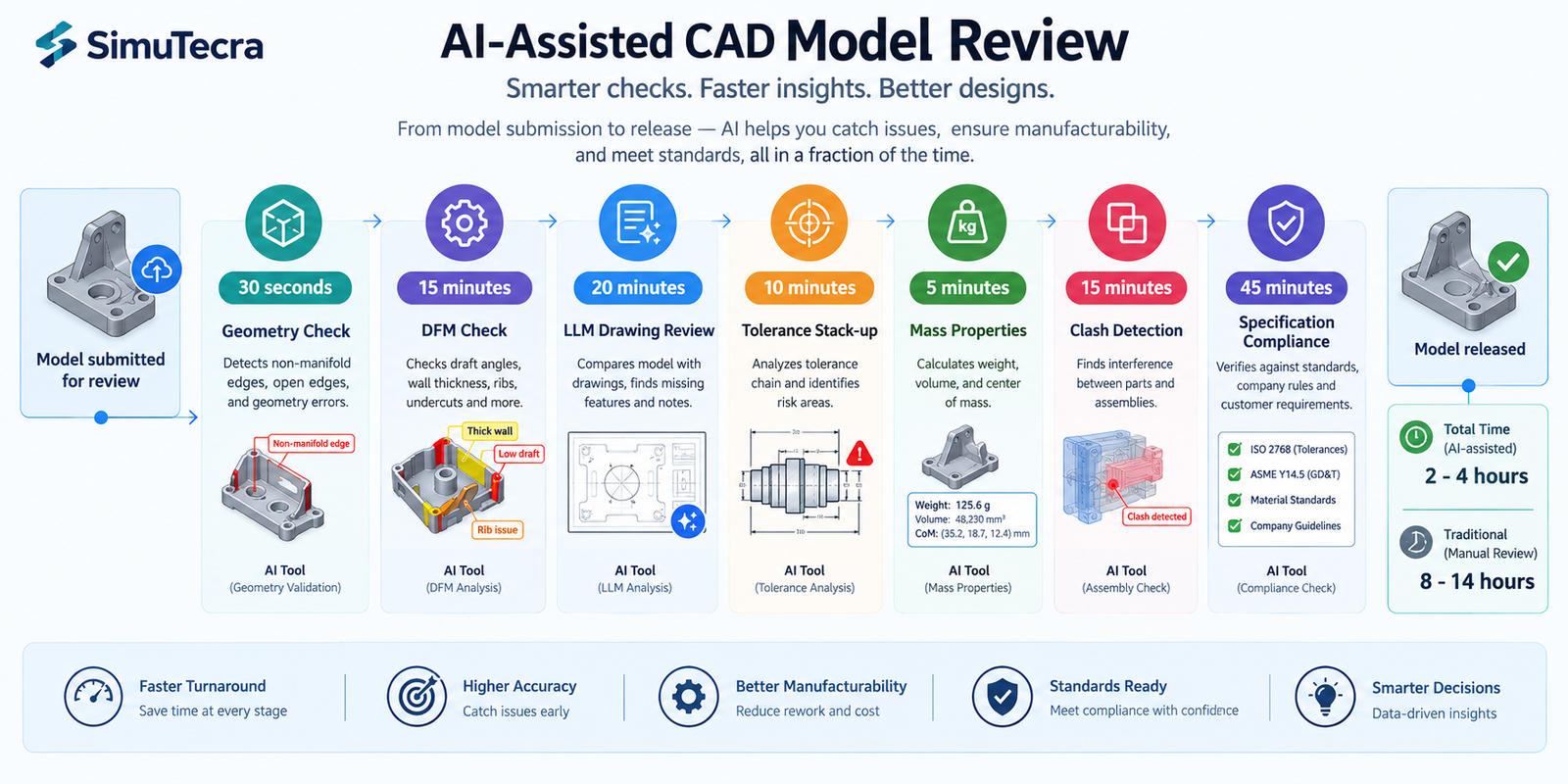
| Review Category | Traditional Manual Time | AI-Assisted Time | Time Saving | Where AI Saves Most |
| Geometric quality check | 15-30 min (manual screen inspection) | 30-60 seconds (automated check entity) | 95%+ | Every feature is checked systematically rather than spot-checked |
| DFM review (injection moulding) | 1-3 hours (experienced DFM engineer) | 10-20 min (DFMPro + review of findings) | 70-85% | Every face, every radius, every wall section checked vs manual spot-check |
| DFM review (CNC machining) | 30-90 min | 5-15 min (AI DFM tool + LLM support) | 75-85% | Axis accessibility and corner radii checked on all features simultaneously |
| Drawing annotation completeness | 45-90 min (systematic manual review) | 20-35 min (LLM-assisted review) | 50-65% | LLM identifies omissions; engineer verifies, reduces missed items substantially |
| GD&T review and interpretation | 30-60 min per drawing | 15-25 min (LLM interpretation + manual validation) | 50-60% | LLM explains callouts instantly; engineer validates against standard |
| Tolerance stack-up analysis | 30-90 min (spreadsheet setup and checking) | 10-20 min (LLM calculation + review) | 70-80% | LLM executes calculation instantly; engineer defines inputs and reviews results |
| Mass properties verification | 10-20 min (manual estimation and comparison) | 5-8 min (CAD tool + LLM sanity check) | 50-60% | LLM provides instant expected value estimate for comparison |
| Clash/interference detection | 60-180 min (manual visual inspection) | 10-20 min (automated clash detection + AI prioritisation) | 80-90% | Automated detection checks every component pair; AI filters false positives |
| Specification compliance matrix | 2-4 hours (manual traceability review) | 30-60 min (LLM compliance matrix from spec + model description) | 70-75% | LLM produces first-draft matrix; engineer verifies assessments |
| Cumulative Impact: For a typical complex machined component with a full drawing package, a complete traditional model review covering all nine categories takes approximately 8-14 hours across multiple reviewers with different specialisms. The same review with full AI assistance (specialist DFM tools + LLM support + automated geometry and clash checking) takes approximately 2-4 hours for a single engineer. This represents a 3-5x overall acceleration of the complete model review process, and critically, the AI-assisted review is more thorough (fewer missed items) and better documented (structured AI-generated review reports) than the traditional approach. |
Frequently Asked Questions (FAQ)
How do engineers use AI to review CAD models?
AI reviews CAD models across seven key areas: geometric quality, design for manufacturing (DFM), drawing and GD&T accuracy, tolerance stack-up, mass properties, clash detection, and specification compliance. It helps engineers identify design errors, verify dimensions and tolerances, detect interference, and check manufacturing and specification requirements faster.
What is the best AI tool for CAD model DFM review?
The best AI DFM tool depends on the manufacturing process: DFMPro for injection moulding, Xometry and Protolabs for CNC machining, Materialise Magics and Autodesk Netfabb for 3D printing, and Claude or ChatGPT for preliminary DFM reviews based on geometry descriptions.
Can AI review GD&T on engineering drawings?
Yes. Claude and ChatGPT can assist with GD&T reviews by interpreting feature control frames, checking tolerances against functional requirements, and identifying missing GD&T callouts. Specify the applicable standard (ASME Y14.5 or ISO 1101) for better accuracy. Always verify safety-critical interpretations with a qualified GD&T professional.
How does AI help with tolerance stack-up analysis in CAD review?
LLMs like ChatGPT and Claude can calculate worst-case and RSS tolerance stack-ups when provided with complete dimensions, tolerances, and acceptance criteria. They can estimate gap limits, check pass/fail status, and identify major tolerance contributors. For complex 3D assemblies, dedicated tools such as 3DCS, CETOL, and SolidWorks TolAnalyst are preferred.
What CAD model review checks can AI not perform reliably?
AI cannot fully verify design intent, safety-critical structural performance, supplier-specific process capability, novel geometries, or system-level assembly interactions. These checks require engineering judgment, supplier input, and independent validation by qualified professionals.
How long does an AI-assisted CAD model review take?
AI-assisted CAD model review typically takes 2–4 hours, compared with 8–14 hours for traditional manual review. The biggest time savings come from automated DFM checks, clash detection, and AI-generated specification compliance matrices. Actual time savings depend on model complexity and the tools used.
Can I use Claude or ChatGPT to review a SolidWorks or Fusion 360 model directly?
Claude and ChatGPT cannot directly process native CAD files such as SLDPRT, SLDASM, or F3D. For AI-assisted review, upload a drawing PDF, describe the geometry in text, or extract geometry data from a STEP file using a third-party tool. PDFs work best for drawing reviews, while geometry descriptions support preliminary DFM and engineering checks.
Conclusion
The 16-item review checklist in this article represents the complete CAD model review workflow, every check that should be performed before a model is released, and the AI or automated tool that makes each check faster and more thorough than traditional manual review. The cumulative result is a 3-5x reduction in total review time with higher completeness than manual review, because AI tools check every feature systematically rather than sampling, and LLMs apply relevant engineering knowledge consistently regardless of reviewer expertise or workload.
The most important shift is not in any single review category, it is in the relationship between review and design. Traditional model review is a gate: work stops, the model is reviewed, issues are found, work restarts with rework. AI-assisted review is a continuous process: DFM tools provide feedback as the model is being created; LLM prompts can be used to check a specific feature or tolerance the moment it is designed; mass properties are checked every time a significant geometry change is made. This moves error discovery from after the fact to in the moment, at a tiny fraction of the cost.
The engineers who implement this workflow comprehensively will not just review models faster, they will release better models, with fewer manufacturing queries, fewer prototype failures, and fewer post-release engineering changes. In an industry where the cost of a design error found in manufacturing is 10x the cost of finding it at design review, AI-assisted model review is not a productivity tool. It is a quality investment with the highest return of any AI application available to engineers today.
Related Reading: 3D Modeling in CAD: The Complete 2025 Guide | 50 Claude Prompts for Mechanical Engineers | 50 ChatGPT Prompts for CAD Designers | AI for Product Design Engineers | AI for BIM Engineers
Leave a Reply