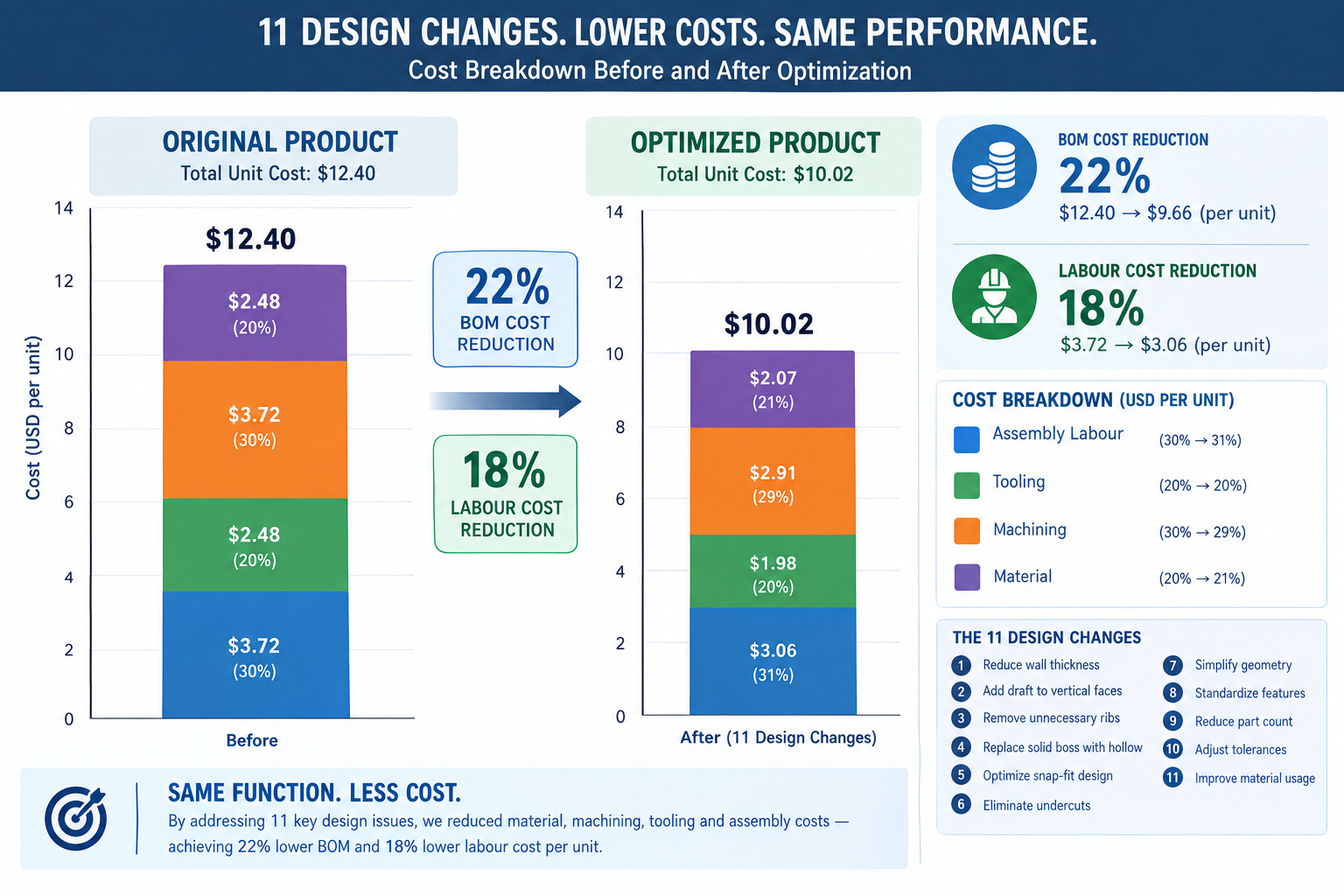
An industrial product had been in production for three years when the sales team brought a problem to engineering: a competitor had launched a similar product thirty percent cheaper, and orders were shifting. Finance looked at the bill of materials and said there wasn’t much room to move on material costs. Operations looked at labour and said the processes were already efficient. The conclusion was that product cost was essentially fixed.
Engineering took a different approach. Instead of asking what the product cost and how to reduce it, they asked what the product was designed to be and whether any of those design decisions cost more than they needed to. Within six weeks, they found eleven specific changes: two parts consolidated into one, a machined block replaced by an extrusion, three tight tolerances relaxed to commercial grade after a stack-up analysis showed they weren’t functionally required, a five-setup CNC part redesigned to three, and four custom fasteners replaced with standard hardware.
Quick answer: No change compromised function or quality. The bill of materials dropped twenty-two percent and assembly labour dropped eighteen percent, together producing the cost reduction finance had said wasn’t available. The highest-leverage design changes for cutting product cost are part count reduction, CNC setup elimination, tolerance relaxation to commercial grade, and switching to standard stock forms or fasteners, each targeting a specific, identifiable cost driver rather than guessing at across-the-board trims.
This article is built around that same approach: specific, actionable design changes that address real cost drivers, with quantified savings ranges, the CAD effort required, and the functional risk to watch for. None of them require accepting a lower-quality product. All of them require understanding what’s actually driving the cost.
The Cost Reduction Mindset: Attacking the Right Cost Driver
Cost reduction only works if it targets the right cost driver. A team that spends two weeks trimming five percent of material from an injection moulded part, when tooling amortisation represents forty percent of unit cost and material represents fifteen percent, has invested significant effort for a result that moves the needle by less than one percent of total cost. The same two weeks spent eliminating a side action from the mould would cut tooling cost by twenty to thirty percent, a far larger saving that compounds across the entire run.
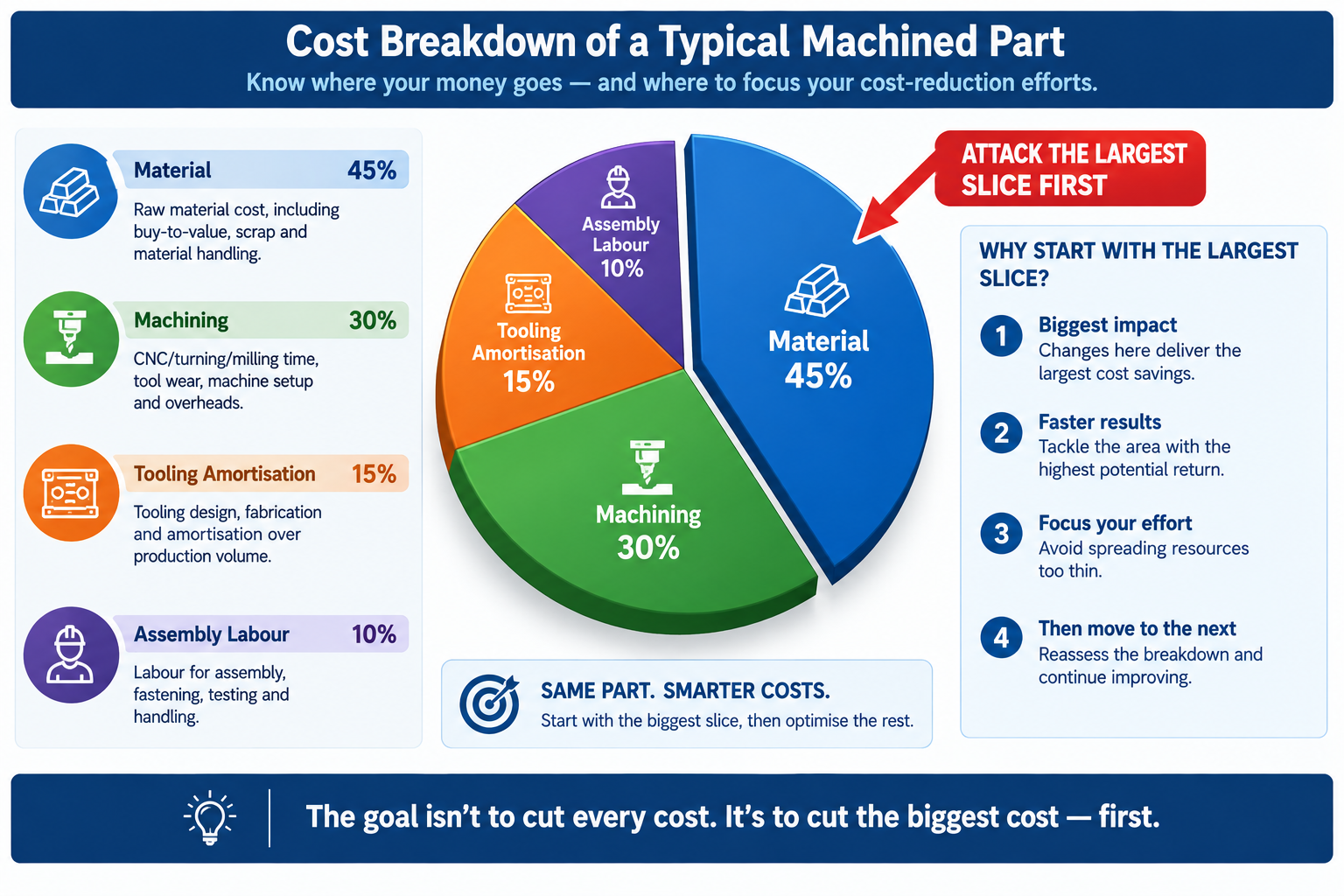
The first step in any cost reduction review is understanding the cost breakdown of the part or assembly. A machined metal assembly is dominated by machining time and setup cost, so reducing setups and simplifying features pays off there. A high-volume injection moulded product is often dominated by tooling amortisation at lower volumes and assembly labour at higher volumes, so eliminating side actions and cutting part count are the highest-leverage moves. A sheet metal enclosure is driven by material and forming time at low volumes and assembly at moderate volumes, so switching from welded to snap-fit assembly pays off there.
None of these strategies require a redesign from scratch. They’re targeted, specific changes, each addressing a specific cost driver, each leaving function and quality intact.
Twelve Design Changes and Their Cost Impact
Savings ranges are representative of typical engineering components, not minimums or maximums; actual savings depend on the specific design, supplier pricing, and volume. CAD effort: “very low” means a drawing revision with no geometry change, “low” means a minor geometry or spec change, “medium” means a feature relocation or cross-section redesign.
Design Change
Process
Typical Cost Saving
CAD Effort
Functional Risk if Applied Incorrectly
Reduce part count via consolidation
All assembly processes
15-40% of assembly cost per part eliminated
Medium
Must not compromise serviceable, differently-materialed, or moving parts
Switch machined part to standard stock profile
CNC machining
20-50% material/machining reduction
Low
Standard dimensions may affect fit; confirm with stack-up analysis
Eliminate or relocate undercuts
Injection moulding, die casting
20-50% tooling cost reduction
Medium
Snap-fits may need redesign; validate relocated feature function
Loosen tolerances to commercial grade
CNC machining, all processes
30-60% on tightened dimensions
Very low
Verify tolerance isn’t required for fit, function, or stack-up
Reduce number of CNC setups
CNC machining
20-40% per setup eliminated
Medium
Relocated features must stay accessible and hold positional accuracy
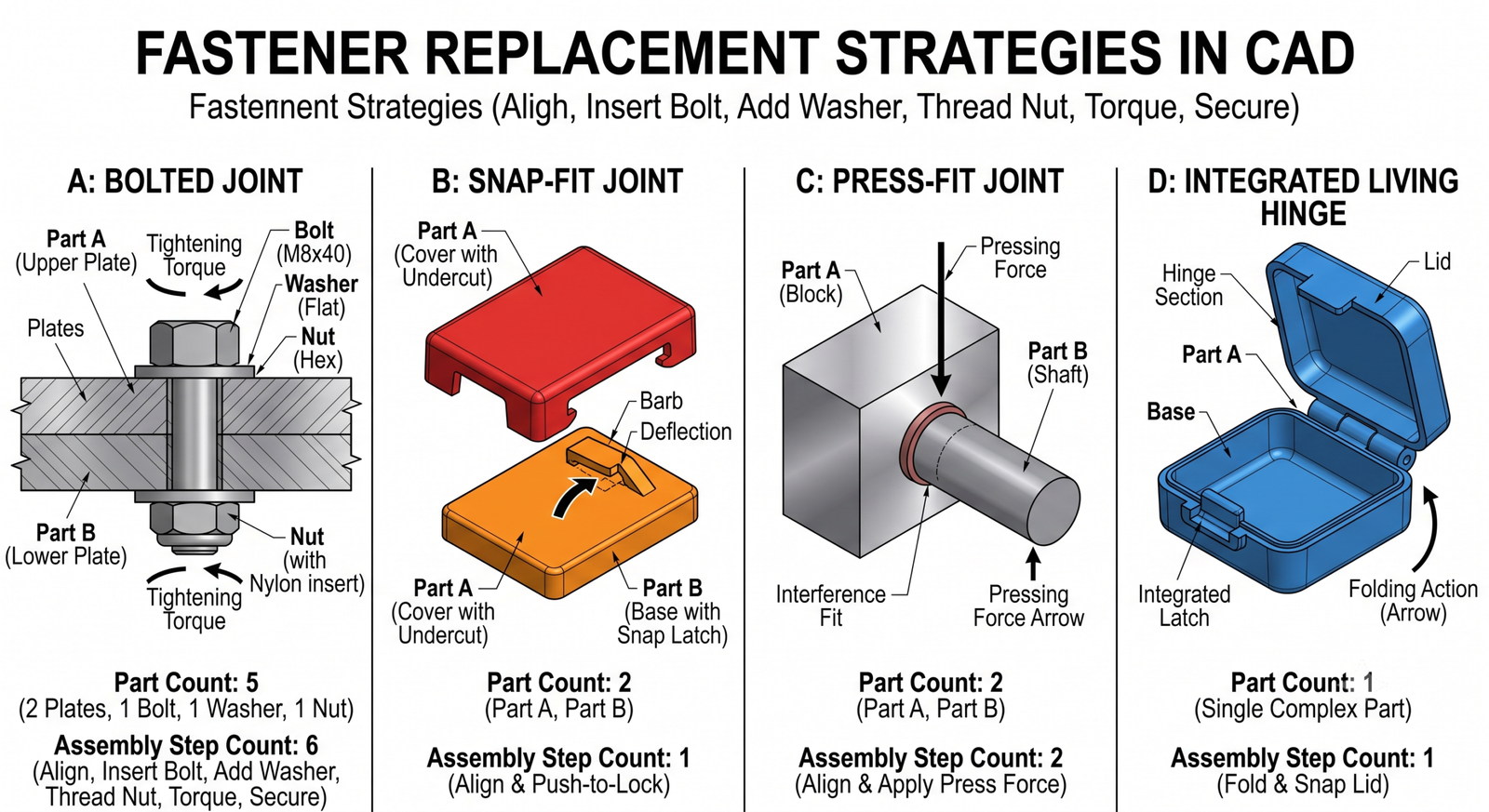
Replace custom fasteners with standard hardware
Assembly, all processes
50-90% fastener cost reduction
Very low
Standard sizes must meet load; check thread engagement and clamping
Redesign rib/boss geometry to eliminate sink marks
Injection moulding
10-30% finishing cost saving
Low
Preserve rib’s structural function after thinning; may need gusset
Switch 5-axis to 3-axis via geometry redesign
CNC machining
30-60% machine rate reduction
Medium
Compound-angle functional surfaces may need to stay; confirm with team
Increase moulded wall thickness uniformity
Injection moulding
10-25% cycle time; scrap improvement
Medium
Thicker sections need more cooling if not corrected
Use self-clinching fasteners instead of weld nuts
Sheet metal assembly
30-60% labour reduction; no weld distortion
Low
Verify gauge meets PEM series minimum thickness
Change welded assembly to formed features
Sheet metal forming
20-40% assembly/welding labour reduction
Medium
Formed features differ structurally from welded joints; verify under load
Start with the largest cost driver, not the easiest change. The temptation is to go for easy wins first, loosen a few tolerances, switch a fastener size, call it a win. These are fast, low-risk, and real, but rarely address the dominant driver. Spend thirty minutes mapping the cost breakdown first: what fraction is material, machining, tooling amortisation, and assembly labour. Direct the first and most effort toward whatever fraction is largest. A three percent material saving sounds good; a thirty percent tooling saving from eliminating one side action saves more in absolute terms and requires less ongoing effort, since the saving is structural, not incremental.
Part Count Reduction: The Highest-Leverage Single Change
Part count reduction consistently delivers the largest total savings per design-change hour invested, for a reason easy to underestimate until you calculate it: every part in an assembly carries cost entirely separate from its own material and processing, supplier management, purchase orders, receiving inspection, inventory, kitting, assembly labour, and quality tracking. Eliminating one part eliminates all of that overhead for every unit ever produced.
The Boothroyd-Dewhurst criterion for evaluating whether a part can be eliminated is three questions: does it need to move relative to other parts during operation, does it need to be a different material for functional reasons, and does it need to be removable for service? If the honest answer to all three is no, there’s a strong case for consolidating it with an adjacent part. This analysis frequently reveals that parts separate since the original design became separate because of how the design was built in CAD, not a genuine functional requirement.
How to Identify Consolidation Opportunities
Walk the bill of materials and ask the three questions for every pair of adjacent parts, not just ones that obviously look redundant. Some of the highest-value consolidations involve parts that aren’t visually similar at all. A separate threaded insert press-fit into a plastic housing fails all three criteria: it doesn’t move, it’s a metal insert in a plastic part (a material difference), and it could reasonably be replaced by a moulded thread or self-tapping screw feature, depending on pull-out strength and insertion cycle requirements.
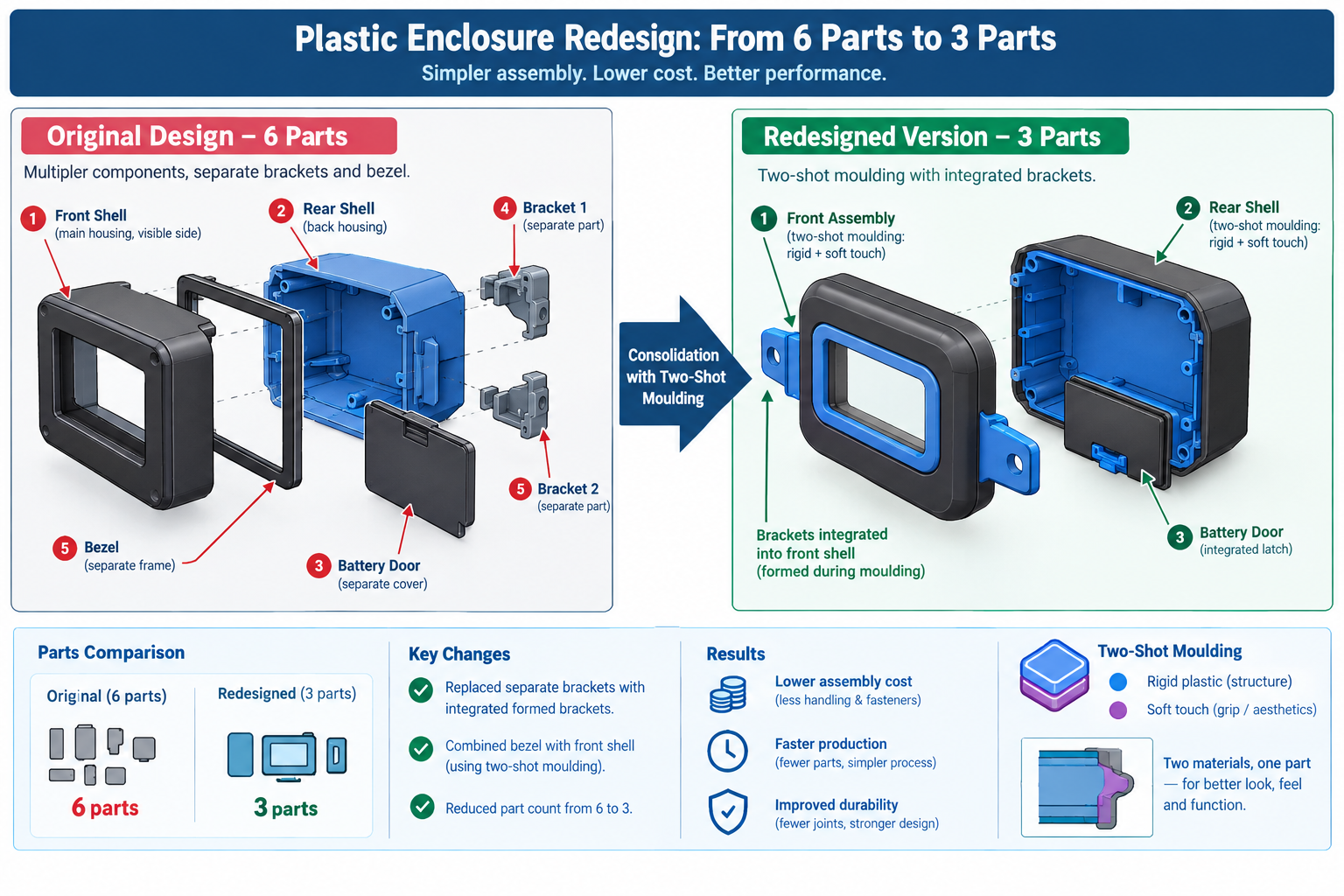
A concrete example: a plastic consumer electronics housing had a separate moulded lens bezel, a different colour, bonded on during assembly. It didn’t move relative to the housing and didn’t need removal for service. The only reason it was separate was that the original designer hadn’t considered in-mould painting or two-shot moulding as alternatives. Switching to two-shot moulding of the main housing combined both colours in one operation, eliminating the bezel as a separate part, the bonding adhesive, and the bonding assembly station. The saving was roughly $0.80 per unit at 50,000 units per year, $40,000 annually that had been a design decision made without asking whether the bezel needed to be separate.
CNC Setup Reduction: Designing Out the Repositioning Cost
In CNC machining, setup time is non-productive: the machine is available but not cutting. Every repositioning means removing the part, refixturing it, and reprobing to establish a new datum, anywhere from fifteen minutes for a simple flip to two hours for complex refixturing with tight positional requirements. At $80 to $200 per hour of machine time, even a thirty-minute setup is a meaningful cost per part, and for parts with three or more setups, that cost is often a larger fraction of the total than most engineers realise.
Setup count is almost always a design decision, not a physical constraint of the part’s function. Most multi-setup parts can be redesigned to fewer setups without changing any functional surface, usually by moving a feature to an adjacent face reachable in an existing setup, or accepting a minor positional shift in a non-critical feature.
Design Situation
Original Setups
Redesigned To
How
Cost Impact
Bracket with features on all six faces
6
2
Moved features from two minor faces to adjacent faces; one relocated 4mm
38% cost reduction; shorter lead time
Cylindrical part with off-axis tapped holes
2 (lathe + mill)
1 (lathe with live tooling)
Redesigned holes to align with lathe’s live tooling angular positions
40% cost reduction; eliminated transfer
Housing with internal pocket and external features
3
2
Deepened pocket 3mm to let the same tool reach features from third setup
25% cost reduction; better positional accuracy
Shaft with keyway and cross-drilled holes
3
2
Both features reached with the same rotary fixture positioning
30% cost reduction; better relative accuracy
Plate with tapped holes on top and bottom
2
1
Switched to press-fit Helicoils installed from one side
45% cost reduction; simplified inspection
The Five-Minute Setup Audit
Before sending any machined part out for quoting, spend five minutes walking the feature list, asking which machine orientation each feature needs and whether it’s already accounted for in the setup count. This map often reveals one or two features driving a dedicated extra setup that everything else on that face doesn’t need. Moving those features, often just a few millimetres, to a position accessible in an existing setup eliminates the extra setup without changing any functional dimension.
Each setup eliminated saves roughly twenty to forty percent of the machining cost for the features that would have been in it, plus the refixturing time savings. For a four-setup part where the fourth setup contains only two movable features, eliminating it saves the refixturing time (say thirty minutes at $120/hour = $60) plus reprobing time. Over a 200-part run, that’s $12,000 saved for an afternoon of design work.
Tolerance Relaxation: Finding the Tolerances That Don’t Need to Be Tight
Tight tolerances cost money non-linearly: loosening from a precision class to a commercial class doesn’t cost a little less, it can cost dramatically less, since precision classes often require additional operations like reaming, grinding, or environmental control that commercial classes don’t. Understanding which tolerances are genuinely load-bearing and which inherited their value from a previous design or a default title block setting is one of the most reliable ways to find cost reduction without changing a single physical dimension.
The audit is straightforward: for every dimension tighter than commercial grade (roughly tighter than +/-0.1 to 0.25mm for a machined part), ask what happens if it were at the loose end of commercial tolerance instead. Does it prevent assembly, cause interference, compromise sealing, or affect load-bearing performance? Or does nothing actually happen? If nothing consequential changes, the tolerance is tighter than it needs to be.
The Tolerance Audit in Practice
A machined aluminium bracket carried a title block default of +/-0.05mm, a precision-class tolerance, applied to every dimension not otherwise called out. The bracket mounted a PCB on four bosses and bolted to the chassis on two datum pads, with real functional requirements of 0.15mm positional accuracy on the PCB bosses and 0.05mm flatness on the datum pads. Everything else, envelope dimensions, chamfers, overall thickness, non-datum fastener holes, was carrying the precision-class default for no functional reason.
The audit confirmed the PCB boss positions and datum pad flatness needed to stay precise, while everything else could move to commercial tolerance (+/-0.15mm) with no consequence. Revising the title block default and adding specific callouts for the two critical features relaxed roughly sixty percent of the part’s dimensions, cutting machining cost by roughly twenty-five percent since several slow, careful operations were no longer needed once only two features required that level of care.
Material and Stock Form Switches: Changing What Comes In the Door
Material cost is often treated as fixed, since engineers are comfortable changing feature geometry but less comfortable changing material specifications. In reality, material changes are sometimes the simplest way to reduce cost, since many material specifications represent defaults or conservative choices rather than genuine minimums. A part specified in 304 stainless when 303 would serve equally well pays a twenty to thirty percent machining premium for a benefit it doesn’t use.
Original Material/Form
Alternative
Cost Saving
When the Switch Is Valid
Machined aluminium 6061 block
6061 extrusion profiled to cross-section
30-60% material/machining reduction
Constant cross-section along length; extrusion economical at 500+ kg/year
1018 mild steel
1215 free-machining steel
20-40% machining reduction
No welding or heat treatment required; similar tensile strength
304 stainless machined part
303 stainless
30-50% machining reduction
Environment doesn’t need 304’s higher corrosion resistance
Steel machined bracket
Sheet metal formed bracket
40-70% reduction at moderate volume
No precision machined datum surfaces required
Custom-sized bar stock
Nearest standard bar size
15-35% material cost reduction
Almost always valid; standard stock is cheaper and stocked
Aluminium die cast at low volume
CNC machined aluminium
Lower tooling investment and risk
Volume below die cast breakeven (typically 5,000-10,000 units)
Injection moulded PC
Injection moulded ABS where strength permits
15-25% material cost reduction
Part doesn’t need PC’s impact resistance or 90°C+ temperature limit
The Standard Stock Form Review
For any machined part, ask whether a standard stock form in the specified material approximates the finished cross-section. Bar, tube, angle, channel, I-section, and flat plate are available in a wide range of alloys. An extrusion matching the part’s cross-section needs far less material removal than machining from a block, which means less machining time, less chip disposal, and lower material cost.
A structural bracket designed as a 50mm x 50mm x 200mm aluminium 6061 block with a T-shaped slot milled through it was redesigned around a standard T-slot aluminium extrusion in the same alloy. The extrusion cost thirty percent of the raw block per unit length, and machining dropped from two setups (rough and finish slot milling) to a single saw cut and two drilled holes. Total cost reduction was roughly fifty-five percent, for a change requiring two hours in CAD to verify the standard profile met the functional requirements.
Fastener and Hardware Standardisation: The Invisible Cost Driver
Custom fasteners, non-standard thread forms, and proprietary hardware are among the quietest cost drivers in a BOM because each item seems inexpensive individually. A custom-headed screw in a non-standard length might cost $0.18 per unit versus $0.04 for the nearest standard equivalent. That sixty percent premium sounds trivial until multiplied by the fastener count in the assembly, the number of assemblies produced, and the stocking cost of a dedicated part number requiring separate ordering, receiving, and inspection.
The audit: list every fastener and hardware item in the BOM and check it against the standard catalogue. Question anything not a standard length or head type, is the non-standard feature genuinely required, or did it end up there because the original designer picked it without checking standard availability? For most non-standard fasteners, it’s the latter, and substituting the nearest standard alternative usually needs at most a minor check of clearance hole, countersink depth, or thread engagement length.
Worked Examples
The industrial pump housing: A pump housing machined from an aluminium 6061-T6 billet had five setups (top, front, back, left, right faces). Material cost was $28 per part, machining $142, for a total annual cost of roughly $30,600 at 180 parts per year.
The billet was replaced with a near-net extruded profile matching the outer envelope more closely, eliminating roughly forty percent of raw material and dropping material cost from $28 to $17. The drain plug hole and sensor port, reviewed against functional requirements, were relocated onto faces accessible in existing setups, since the sensor measured cavity pressure rather than flow direction, eliminating two setups and dropping machining from $142 to $94. An O-ring groove tolerance audit against the O-ring manufacturer’s gland design guide confirmed +/-0.08mm on width and +/-0.05mm on depth met spec, versus the conservative +/-0.03mm originally specified, eliminating a precision grinding pass.
Total per-part cost dropped from $170 to $103, a thirty-nine percent reduction, saving roughly $12,000 annually from four days of engineering work with no change to hydraulic performance or assembly.
The consumer device enclosure: A handheld device’s six-part enclosure (front shell, rear shell, battery door, two internal brackets, separate display bezel) took roughly four minutes per unit to assemble. The two internal brackets, whose function was positional rather than structural, were redesigned as integrated formed features folded up from the rear shell, eliminating two parts and cutting assembly time by roughly a minute.
The separate bezel was eliminated by switching to two-shot injection moulding, combining both colours in one operation and removing the bonding adhesive and assembly station; at 40,000 units per year, the higher two-shot tooling cost paid back within eight months. A drop simulation confirmed ABS alone met the one-metre drop specification once bezel delamination (now eliminated) was no longer the failure mode, allowing a switch from ABS/PC blend to plain ABS for a roughly fifteen percent material saving.
Part count dropped from six to three, assembly time from four minutes to two and a half, and total enclosure unit cost dropped roughly thirty percent, worth about $48,000 annually, from three weeks of engineering work.
Frequently Asked Questions
Where should I start a cost reduction review on an existing product? Map the cost breakdown first: what fraction is material, machining or forming labour, tooling amortisation, assembly labour, and finishing. This is almost always more revealing than looking at the BOM in dollar terms alone. Direct the first review effort toward the largest category. If assembly labour dominates, part count reduction is the highest-leverage move. If tooling amortisation dominates, eliminating side actions gives the largest return. If machining time dominates, setup reduction gives the most.
Can cost reduction design changes compromise quality or reliability? Not if applied correctly and verified against functional requirements first. Every change in this article carries a functional risk if applied without checking, relaxing a tolerance that’s actually load-bearing reduces quality, and eliminating a part that genuinely needs a different material causes a field failure. The changes themselves aren’t risky; applying them without verification is. That discipline is what separates a cost reduction that works from one that creates a warranty problem six months after launch.
How much cost reduction is realistically achievable through design changes alone? On products that haven’t been through a formal cost reduction review, twenty to forty percent reduction in total unit cost is achievable for most mechanical assemblies through part count reduction, setup elimination, tolerance relaxation, and material switching combined. Products that went through rigorous DFM during initial development have less room, perhaps ten to twenty percent. Products designed primarily for function without cost consideration often have forty to sixty percent available, consistent with the findings documented in Anderson’s Design for Manufacturability, before any supplier negotiation is considered.
Does part count reduction always reduce cost? It reduces cost when savings in assembly labour, inventory, and supplier management exceed the incremental cost of the more complex consolidated part, almost always true when two parts become one moulded or formed part. It’s not always true when consolidation requires a significantly more expensive process, like requiring a five-axis machined part where the original components were simple sheet metal. The test is whether total production cost, including all parts and assembly steps, is lower after consolidation than before.
Is it too late to make cost reduction changes after production has started? Never too late, but the cost of implementing the change, drawing revision, supplier notification, validation, any regulatory resubmission, grows with time, and the opportunity to recover the saving shrinks as the production run progresses. Changes made in year one have years of saving left to recover; changes made in year five may have only months left before a next-generation product replaces it. This is the strongest argument for doing cost reduction reviews early, before release, rather than as a reaction to competitive pressure.
What is the easiest cost reduction change with the lowest functional risk? Fastener standardisation, since it requires only that the standard replacement meets the same load requirements, a simple check against published load data. The per-unit saving is usually small, but the change needs essentially no engineering analysis beyond a load and clearance check, takes an hour of drawing revision, and doesn’t affect any functional surface. Combined with a tolerance audit, these two changes together often represent the quickest five to fifteen percent cost reduction available on any machined product.
Key Takeaways
The product team from the opening story found twenty-two percent cost reduction in six weeks, not by squeezing suppliers or substituting lower-quality materials, but by asking a different question: not what the product needs to do, but whether every design decision is as cost-efficient as it could be while still doing what it needs to do.
The twelve design changes, the setup reduction examples, and the material switch scenarios in this article are all answers to that second question, cases where a design decision serving a function could be made differently while still serving it, at meaningfully lower cost. None require accepting reduced quality or performance. All require understanding enough about manufacturing to know where the cost is coming from.
The habit worth building isn’t a periodic review triggered by competitive pressure. It’s a design practice with cost awareness from the start: checking the cost breakdown as a routine part of design review, asking the three part-count consolidation questions for every pair of adjacent parts, auditing tolerances against their functional justification, and confirming material and stock form choices are driven by function rather than historical default.
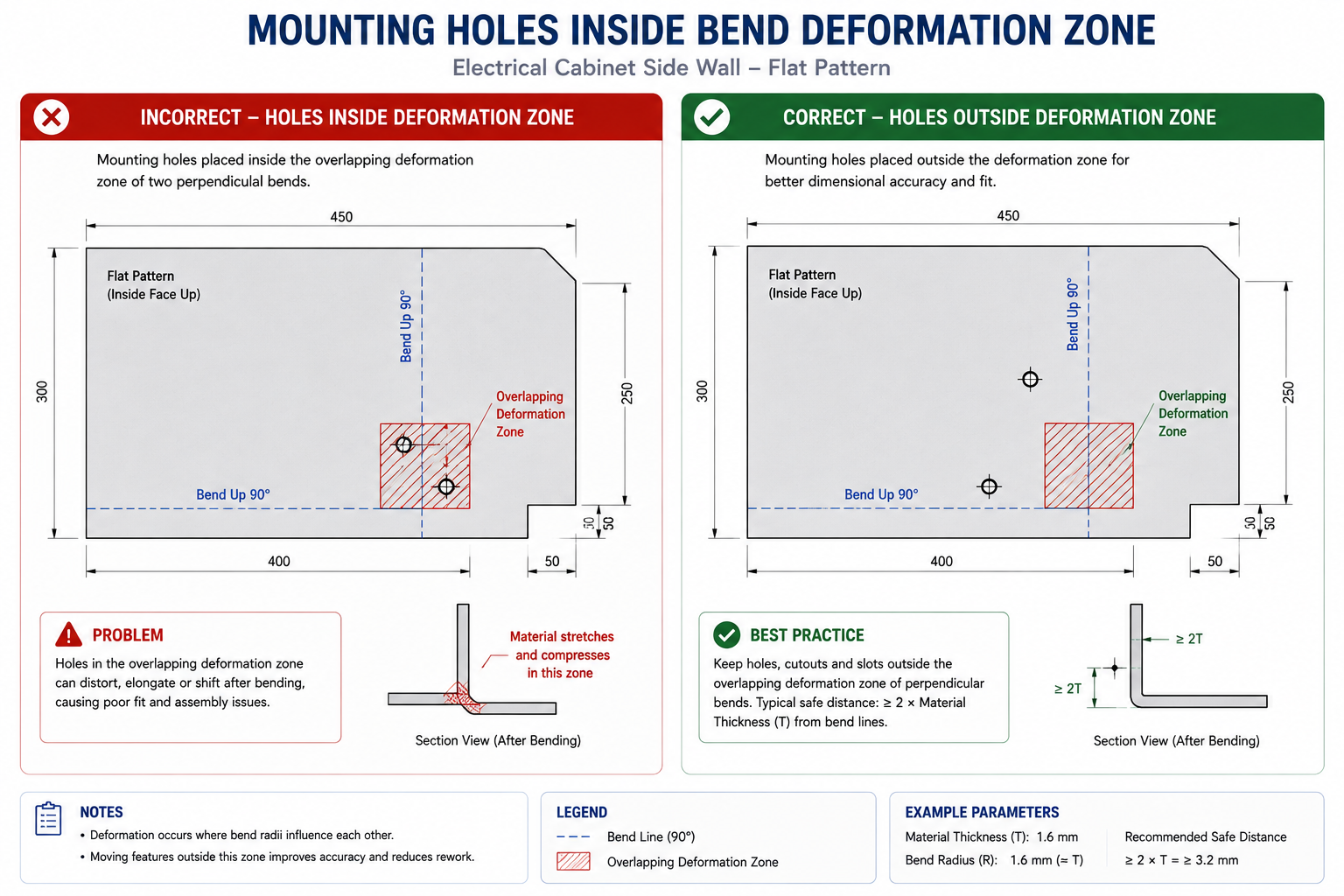
An enclosure had been designed and drawn in about a day. It was a straightforward electrical cabinet: four walls folded up from a base, a bolt-on lid, four mounting holes on each side wall. The designer had worked with sheet metal before and knew the basic rules. What they missed was that two mounting holes sat 8mm from a corner where two bend lines met, squarely inside the deformation zone of both bends at once.
When the flat blanks came back from the laser cutter and went to the press brake, the operator called before making the first bend. Those two holes would distort into ovals on both walls, badly enough that the mating hardware wouldn’t align. The fix took ten minutes in CAD: move the holes 5mm toward the centre of the wall face, outside the deformation zone. But the flat blanks had already been cut, so that first set became scrap, and a new set had to be laser cut from fresh stock. The design change was trivial. The timing of when it was caught was the entire problem.
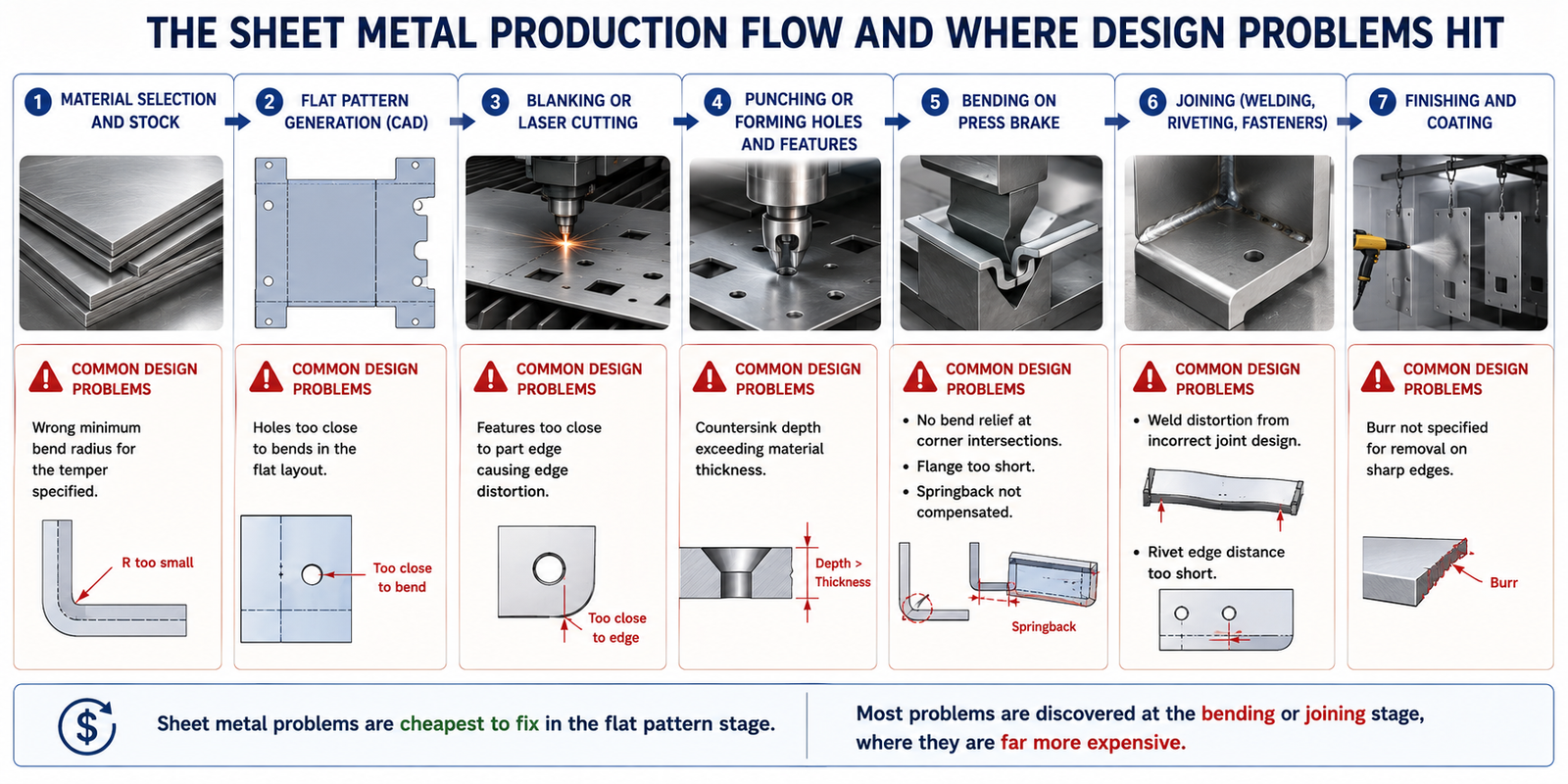
Quick answer: Sheet metal design rules are directly tied to the physics of how thin material stretches and compresses during bending. The core ones: keep the bend radius above the material’s minimum, keep holes and features outside the deformation zone near a bend line, add relief notches wherever two bends meet at a corner, and account for springback in the bend angle rather than assuming it away. Every one of these is free to fix in CAD and expensive to fix after the material is cut.
When a press brake bends a sheet, the material on the outside of the bend stretches in tension while the inside compresses. Between the two zones sits a neutral axis where, in theory, material length is unchanged. In practice, that neutral axis shifts toward the inside of the bend as the radius tightens, so the outside surface works harder than simple geometry would suggest.
This is why a minimum bend radius exists: it’s the radius below which the outer surface experiences enough tensile strain to exceed the material’s ductility limit and crack. Different materials have different ductility, so they have different minimum radii, and the same material in a harder temper needs a tighter minimum than it would annealed. Minimum bend radius is typically expressed as a multiple of material thickness rather than an absolute dimension, since the physics scales proportionally with thickness.
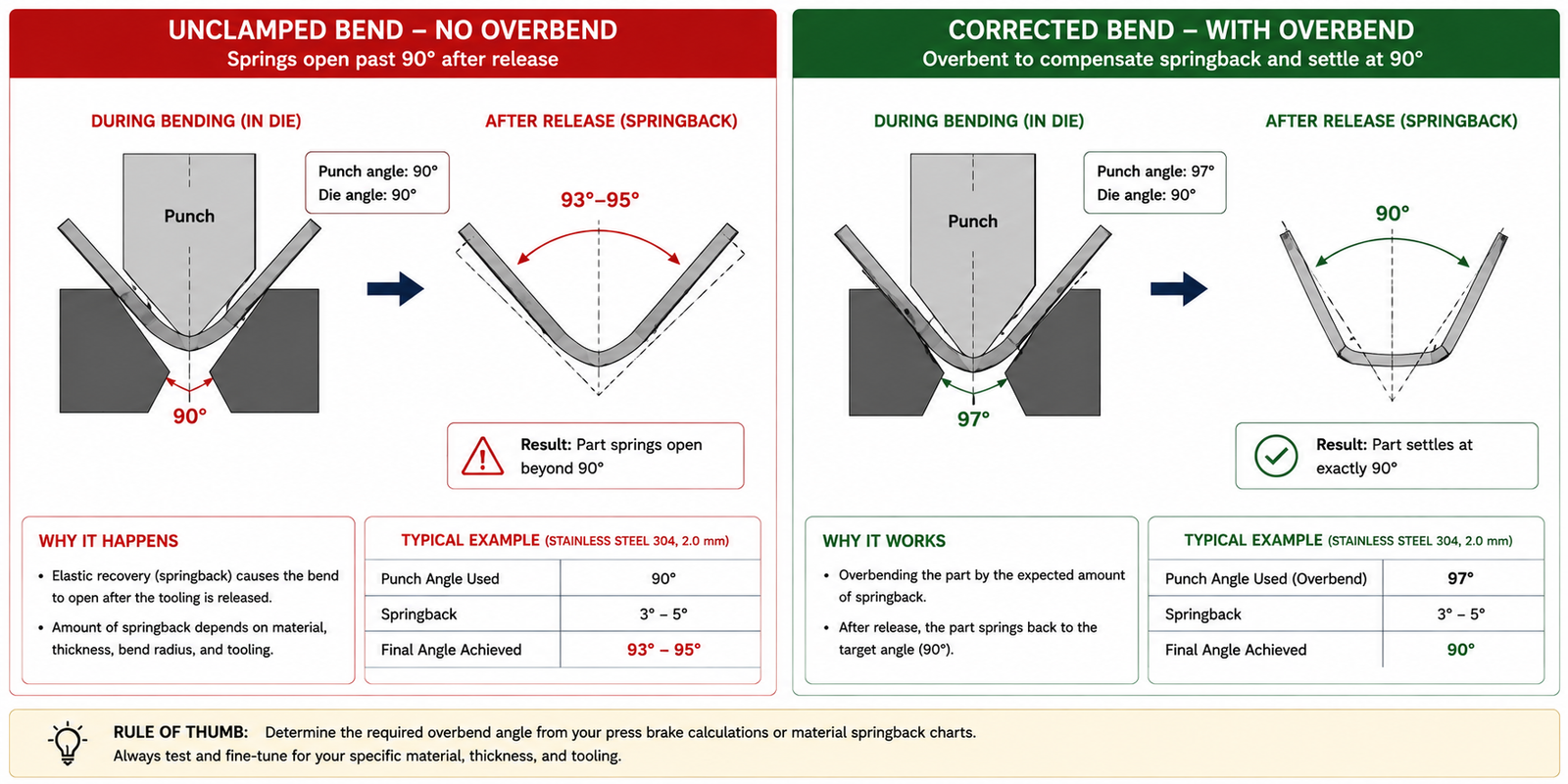
The other phenomenon every sheet metal designer needs to understand is springback: the elastic recovery that happens when bending load is removed. Metal deforms both elastically and plastically during bending. The plastic deformation stays permanent and forms the bend, but the elastic portion springs back toward the original flat shape when the punch lifts.
The part opens slightly beyond the intended angle after the tool releases it. Mild steel at 90 degrees might spring back one to two degrees. Stainless at the same angle might spring back five to ten degrees. High-strength steel might spring back twenty degrees or more. This isn’t a manufacturing defect; it’s predictable behavior that has to be designed into the flat pattern and tooling setup, not discovered as a surprise at first-article inspection.
Minimum Bend Radii by Material and Condition
These values assume bending perpendicular to the rolling direction. Bending parallel to the grain requires a larger radius, particularly in harder steels, following the bending data documented in Machinery’s Handbook’s sheet metal forming section. When in doubt, bend across the grain or confirm the minimum with a bend test sample before committing a production run.
Material
Condition
Min Bend Radius (x thickness)
Cracking Risk
Mild steel (CR)
Annealed/soft
0.5x to 1x
Low
Mild steel (CR)
Half-hard/work-hardened
1x to 1.5x
Medium if under-radiused
Aluminium 5052
H32
0.5x to 1x
Low
Aluminium 6061
T6
2x to 3x
High without adequate radius
Aluminium 3003
H14
0.5x
Very low
Stainless steel 304
Annealed
1x to 1.5x
Medium; springback more of a concern than cracking
Stainless steel 316
Annealed
1x to 2x
Medium
Copper (ETP)
Annealed
0.5x
Very low
Brass (70/30)
Half-hard
1x to 1.5x
Low to medium
Galvanised steel
Same as base steel
Same as uncoated mild steel
Low for base metal; medium for coating integrity
High-strength steel (HSLA)
As-rolled
2x to 4x
High without adequate radius
Always confirm minimum bend radius with a test bend before production. Real sheet material varies between coils, suppliers, and batches of the same nominal spec. For any critical or unusual material, ask your fabricator to cut two test blanks and form a trial bend before the full production batch is cut. A test bend costs one blank and ten minutes. A full batch of cracked parts costs the material, the laser time, and the press brake time, plus the investigation delay.
Feature Proximity to Bends and Edges
Sheet metal deformation during bending isn’t confined to the exact line where the punch touches the material. The stretched and compressed zone extends outward from the bend line, in both directions, by roughly the material thickness. Features landing inside this zone get pulled, stretched, or torn as the surrounding material moves during forming: holes become ovals, slots tear toward the bend line, carefully positioned mounting features end up in the wrong spot after forming.
The distances below are measured in the flat pattern before forming, not the final formed dimensions. If the flat pattern layout violates them, the feature distorts on the first bend and can’t be corrected afterward without scrapping the part.
Feature
Min. Distance to Bend Line
Min. Distance to Part Edge
Fix if Feature Must Be Closer
Round hole (punched)
2.5x thickness + bend radius
1.5x thickness
Move to flat development away from bend; or punch after forming
Slot (punched)
4x thickness, slot edge to bend line
1.5-2x thickness, edge to edge
Add a bridge between slot end and bend line; or form first, cut second
Notch (open slot to edge)
3x thickness, notch end to bend line
N/A (reaches the edge)
Add circular relief at notch end, sized at least 1.5x thickness diameter
Embossed feature (bead, dimple)
3x thickness + feature height
2x thickness
Complete bending before embossing; or locate emboss well away from bend
Tab or lance
2x thickness from any other bend/feature
1.5x thickness, tab base to edge
Space tabs evenly; avoid tabs within 10mm of corners
Louver
4x thickness to nearest bend
3x thickness to edge
Locate louvers in flat regions, well away from bends and edges
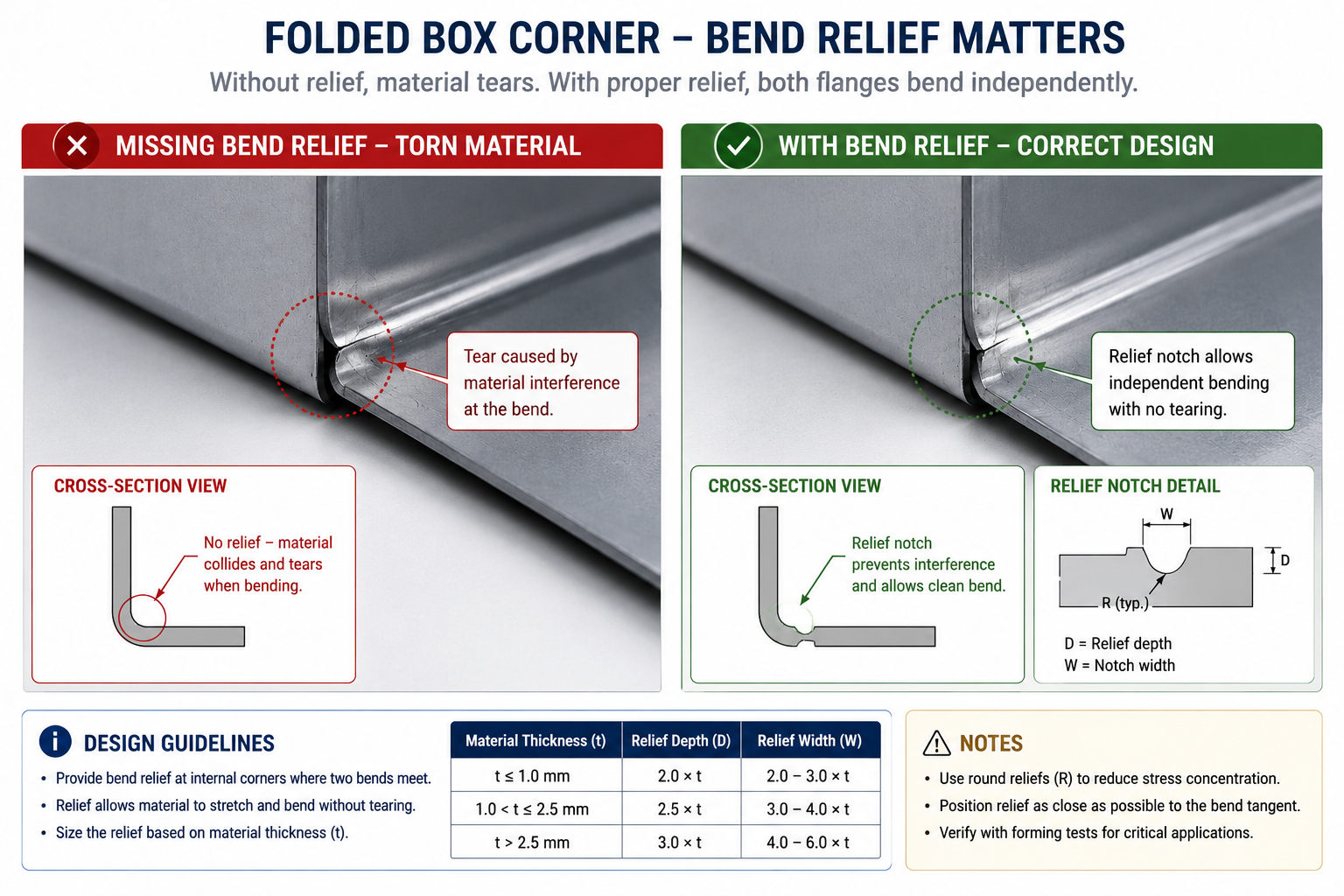
The Bend Relief: Small Feature, Large Consequence
A bend relief is a small notch cut into the flat blank at every location where two bend lines would otherwise meet at an interior corner. Without it, the material at that corner is asked to bend in two directions simultaneously, more than thin sheet material can accommodate without tearing or buckling. The tear propagates from the corner into the adjacent face, splitting the part.
The relief notch gives the material somewhere to go, removing the constrained corner and letting each adjacent flange bend independently. The minimum relief width is typically one to two times material thickness, with the depth extending slightly past the bend line, usually half the thickness, to ensure the bend clears the notch geometry before it begins. Most CAD sheet metal tools generate reliefs automatically during flat pattern creation, but default sizes are sometimes smaller than the actual material and bend radius require. Check the flat pattern geometry, particularly on corners where thin gauge meets a tight bend radius, before the drawing goes for quoting.
Springback: Designing the Angle In Rather Than Out
Springback is one of the most reliably mishandled aspects of sheet metal design, not because it’s complicated but because it’s invisible in a CAD model. A 3D model shows the desired final angle. The springback that happens when the press brake releases the material exists only in the relationship between material, tooling, and process, and it has to be accounted for before the flat pattern is finalised.
The principle is simple: overbend the part by the expected springback angle so it lands at the intended angle once it springs back. A 90-degree bend in mild steel with two degrees of springback needs to be bent to 88 degrees at the punch. The same bend in high-strength steel with twenty degrees of springback needs to be bent to 70 degrees. Springback doesn’t change the final part geometry, since it’s built into the tooling setup, but it does change the punch angle, and that information needs to be documented, not assumed to be zero.
What controls the springback angle:
Yield strength: higher yield strength means larger elastic recovery and larger springback, why high-strength steels spring back dramatically more than mild steel at the same geometry
Elastic modulus: springback scales inversely with modulus; aluminium tends to spring back more than mild steel of equivalent yield strength
Bend radius to thickness ratio: tighter bends have less springback, since more of the deformation is plastic rather than elastic at smaller radii
Material temper: harder tempers have higher yield strength and therefore more springback than annealed versions of the same alloy
The most reliable way to determine actual springback for a specific batch and geometry is a trial bend on a test piece cut from the actual production material, eliminating the guesswork from published springback factors, which are averages rather than values specific to any one coil.
Flange Length, Hems, and Returns
A flange is the portion of a part bent away from the main body. The minimum usable flange length is set by the press brake tooling: the V-die needs to support material on both sides of the bend line, and the punch needs to form the bend without the material slipping out. Flanges shorter than the tooling’s minimum grip length produce inaccurate, inconsistent bends because the material isn’t properly constrained during forming.
The practical minimum flange length for most setups is three times material thickness plus the inside bend radius. For 2mm mild steel with a 2mm inside bend radius, that’s 3 x 2 + 2 = 8mm minimum. Very thin gauge with tight bend radii can sometimes work with shorter flanges given specialised tooling, but that needs fabricator confirmation, not a design assumption.
Hems: Folding an Edge Back on Itself
A hem folds the sheet edge back onto itself, creating a double thickness at the edge. Hems stiffen an edge that would otherwise flex and eliminate the sharp cut edge that creates a hazard and tear point on thin sheet metal. Open hems fold to a specific radius and leave a gap; closed hems press all the way flat for a solid double layer.
The minimum radius for an open hem is roughly the material thickness. A closed hem needs enough ductility to fold all the way flat without cracking on the outer surface. Closed hems work reliably in annealed mild steel and soft aluminium alloys. They’re not reliable in stainless steel or hard aluminium tempers, where the outer surface cracks during the second fold. Specifying a closed hem on stainless or 6061-T6 will produce a first-article failure requiring either an open hem or an annealed temper for the hem operation, adding a separate heat treatment step.
Joining Methods for Sheet Metal Assemblies
The joining method affects structural performance, appearance, material compatibility, and total cost including labour and equipment.
Joining Method
Typical Strength
Best Material Combinations
Design Consideration
MIG/MAG welding
Full parent strength achievable with correct procedure
Bond line 0.1-0.5mm optimal; joint must load the adhesive in shear, not peel
Folded interlocking seams
Comparable to light spot welding for non-structural panels
Same material both sides; thin gauge ductile materials
Interlocking tabs give square alignment; common for HVAC and light enclosures
Weld Distortion: The Problem Every Sheet Metal Designer Underestimates
Welding puts intense, localised heat into sheet metal, and as it dissipates, differential contraction of the heated and cooled zones warps the surrounding material. Thin gauge sheet, with low thermal mass, heats and cools quickly and unevenly, so this warping can be severe enough to destroy an assembly’s dimensional accuracy if the weld sequence and joint design aren’t planned in advance.
Symmetric joint placement, distributing welds evenly rather than concentrating them on one side, reduces net distortion because shrinkage in one location partly cancels shrinkage in a symmetric one. Intermittent welds, short runs with gaps, reduce total heat input for a given joint length. Back-stepping, welding short segments in the opposite direction to the overall weld path, keeps the heat zone moving away from already-welded material. None of these need special equipment, just a weld sequence plan made during design, not discovered on the weld table when the third weld pulls the first two out of square.
Eight Common Sheet Metal Design Mistakes and Their Fixes
Every one of these is a design decision correctable in CAD before the material is cut.
Mistake
Process Impact
Fix
Bend radius tighter than material minimum
Material cracks on the outside of the bend; fails at first forming attempt
Specify radius at or above the material/temper minimum; confirm with supplier for unusual materials
Holes too close to a bend line
Round holes distort oval; slots tear toward the bend
Move holes at least 2.5x thickness plus bend radius from the bend line; or punch after forming
The cabinet with holes in the deformation zone: The electrical cabinet from the opening had two mounting holes 8mm from a corner where two perpendicular bends met. For 2mm mild steel, the deformation zone extends approximately 2.5 times thickness plus bend radius from each bend line, 2.5 x 2 + 2 = 7mm here. The holes at 8mm were marginally outside the zone for a single adjacent bend considered alone, but the corner involved two bends approaching from perpendicular directions, and the combined zones overlapped at the hole locations.
Moving the two holes 5mm further toward the centre, to 13mm from the nearest bend line, placed them well outside both individual and combined deformation zones. The mating component had slotted holes, so the shift was absorbed without any change to the mating part. The first set of already-cut blanks was used for a distortion test, confirming the expected oval distortion at the original position. The second set, cut with corrected positions, formed cleanly. The fix itself was five minutes in CAD; the cost was the scrapped first batch, and the lesson: check every hole against the minimum distance-to-bend rule before the drawing goes for cutting.
The stainless panel with springback on the first bend: A 304 stainless control panel had two 90-degree bends forming a U-channel profile. The flat pattern and bend line locations were correct, but the drawing didn’t specify springback compensation, since the designer assumed the operator would handle it during setup. Stainless 304 in 2mm gauge at a 4mm inside bend radius has roughly 5 to 7 degrees of springback.
The operator initially set the brake to 90 degrees as drawn, got parts sitting at 95 to 97 degrees, and corrected by trial-and-error to roughly 84 degrees on the first piece, but the correction wasn’t documented or passed to the next shift, so the second batch formed at the uncorrected angle and failed inspection.
The drawing was revised with an explicit forming note: bend to 84 degrees at punch for a 90-degree finished angle, verify with protractor after forming the first piece. The compensation angle came from the fabricator’s first-article experience rather than a generic table, since batch and tool condition both affect the exact value. The second batch formed correctly, and treating springback as a documented design parameter rather than an operator skill eliminated the root cause.
Frequently Asked Questions
What is the minimum bend radius for sheet metal and why does it vary by material? It’s the smallest inside radius formable without cracking the outer surface, and it varies because different metals have different ductility. A highly ductile material like annealed copper bends to half its thickness or less without cracking. A hard material like 6061-T6 aluminium needs two to three times its thickness minimum, since low ductility means the outer surface hits fracture strain at a much gentler bend angle. The same alloy in a softer temper, 6061-O, is far more ductile and bends much tighter. Always identify both alloy and temper when specifying a minimum radius.
Why do holes need to be so far from bend lines? Material in the deformation zone on both sides of a bend line stretches on the tension side and compresses on the compression side, extending outward roughly 2.5 to 3 times the material thickness. Any feature within that zone distorts along with the surrounding material: a round hole becomes an oval, a slot tears toward the bend line. The most practical fix when a functional feature must sit closer than the minimum is to cut or punch it after forming, so the material has already completed its deformation before the feature is introduced.
What is a bend relief and when is it necessary? A bend relief is a small notch cut into the flat blank wherever two bend lines would otherwise meet at an interior corner. Without it, the corner material is constrained in two directions simultaneously during forming and tears or buckles as each flange tries to bend independently. It’s necessary at every folded corner of a box or enclosure. Typical relief size is one to two times material thickness in width, with depth extending just past the bend line. Verify default CAD-generated relief sizes against the actual material and bend radius before releasing the drawing.
How do I design for springback without knowing the exact material properties? Design with a nominal compensation based on material family and temper, then verify and adjust on the first-article part. For mild steel, one to two degrees at a 90-degree bend. For stainless 304, four to eight degrees. For high-strength steel, fifteen to twenty-five degrees, treating the first article as a calibration exercise. Put the compensation angle on the drawing as a forming note so the calibrated value transfers into the work instructions regardless of who runs the job.
When should I use welding versus mechanical fastening for a sheet metal assembly? Use welding when the joint needs to be permanent, sealed, or load-bearing across its full area, and the materials are weldable. Use mechanical fastening when the assembly must be field-serviceable, the materials aren’t weld-compatible (steel to aluminium), weld heat distortion would compromise accuracy, or production volume doesn’t justify setting up a weld operation. Many assemblies combine both: structural welds at primary load-bearing corners and self-clinching fasteners for component attachment points that may need future access. Make this decision during design, not at the fabricator, since flange widths, rivet spacing, and fastener hole sizes all need to be in the drawing.
How tight a tolerance can sheet metal fabrication actually hold? Standard press brake bending holds angle tolerances of plus or minus one to two degrees and linear tolerances on bent dimensions of plus or minus 0.5mm to 1.0mm. Laser-cut or punched flat features hold plus or minus 0.1 to 0.25mm on hole positions, depending on equipment and gauge.
Note that a bent dimension’s tolerance isn’t the same as a cut dimension’s: a hole positioned at plus or minus 0.1mm in the flat may vary by plus or minus 0.5mm relative to a flange edge after forming, due to springback and material variation. For assemblies where multiple bent dimensions stack together, run a stack-up analysis against the press brake’s actual capability.
Key Takeaways
Every bend in a sheet metal part starts as a straight line in a flat pattern. Every hole starts as a circle. Every notch, tab, and slot has a specific position in that flat layout determining whether the part forms correctly. Features positioned correctly in the flat pattern form correctly. Features that violate the proximity or geometry rules produce first-article failures that are always cheaper to catch in CAD than on the shop floor.
Keep the bend radius above the material minimum. Keep holes and features outside the deformation zone of adjacent bends. Add bend relief at every corner where two bends intersect. Specify springback compensation on the forming note for stainless and high-strength materials. Design flanges long enough for the press brake tooling to grip. Choose a joining method during design, not at the fabricator. These are the habits that turn a drawing into a part that comes back from the shop matching the CAD model, rather than a part that comes back with a call from the operator asking what to do about a feature that didn’t form the way the drawing shows.
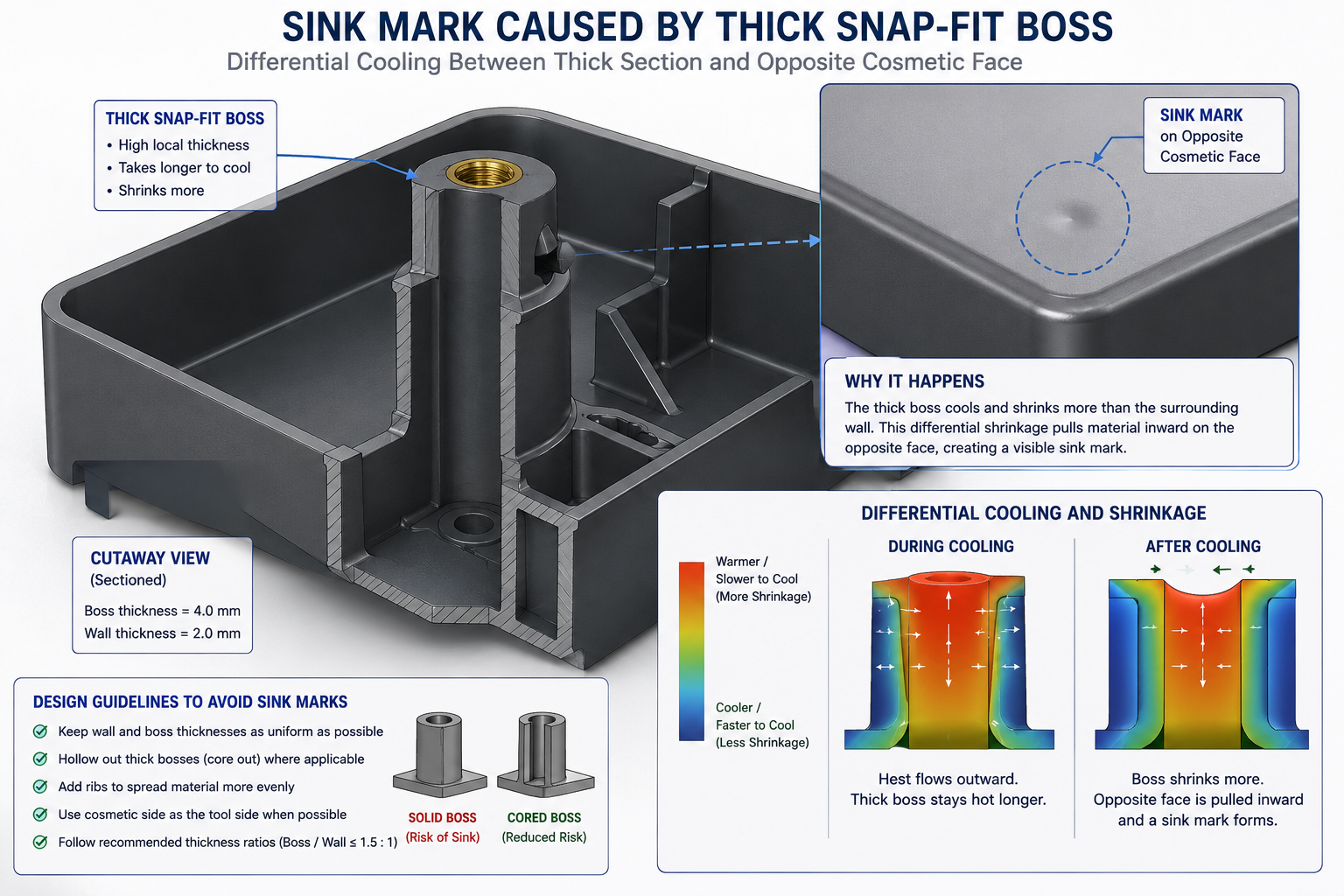
A housing had been designed by an engineer who understood enclosures well. It had good snap-fit latches, correct wall clearances for the PCB inside, adequate rib structure for the drop test, and a textured grip area the product team liked. What it also had, discovered only after tooling was cut, was a 4.8mm wall directly behind a snap-fit boss, unflagged internal undercuts around a USB port, and zero draft on the grip texture.
The molder called with an itemised problem list. The undercuts needed side actions that weren’t in the original tool quote. The thick boss caused a visible sink mark the product team rejected immediately. The textured surface with no draft was tearing on ejection.
Quick answer: The costliest injection molding design mistakes are non-uniform wall thickness, insufficient draft angle, sharp internal corners, unplanned undercuts, and boss or rib walls too close to the nominal wall thickness. All of them are avoidable at the CAD stage with knowledge that costs nothing to apply, and all of them become expensive, sometimes very expensive, once tooling has already been cut.
Three separate design issues, three separate remedies, each avoidable in CAD. The tool rework, delayed launch, and first-shot rejection cost the programme significantly more than the original tooling budget, and all of it traced back to design decisions made without a working understanding of how plastic flows, how moulds open, and what happens to a part between injection and ejection.
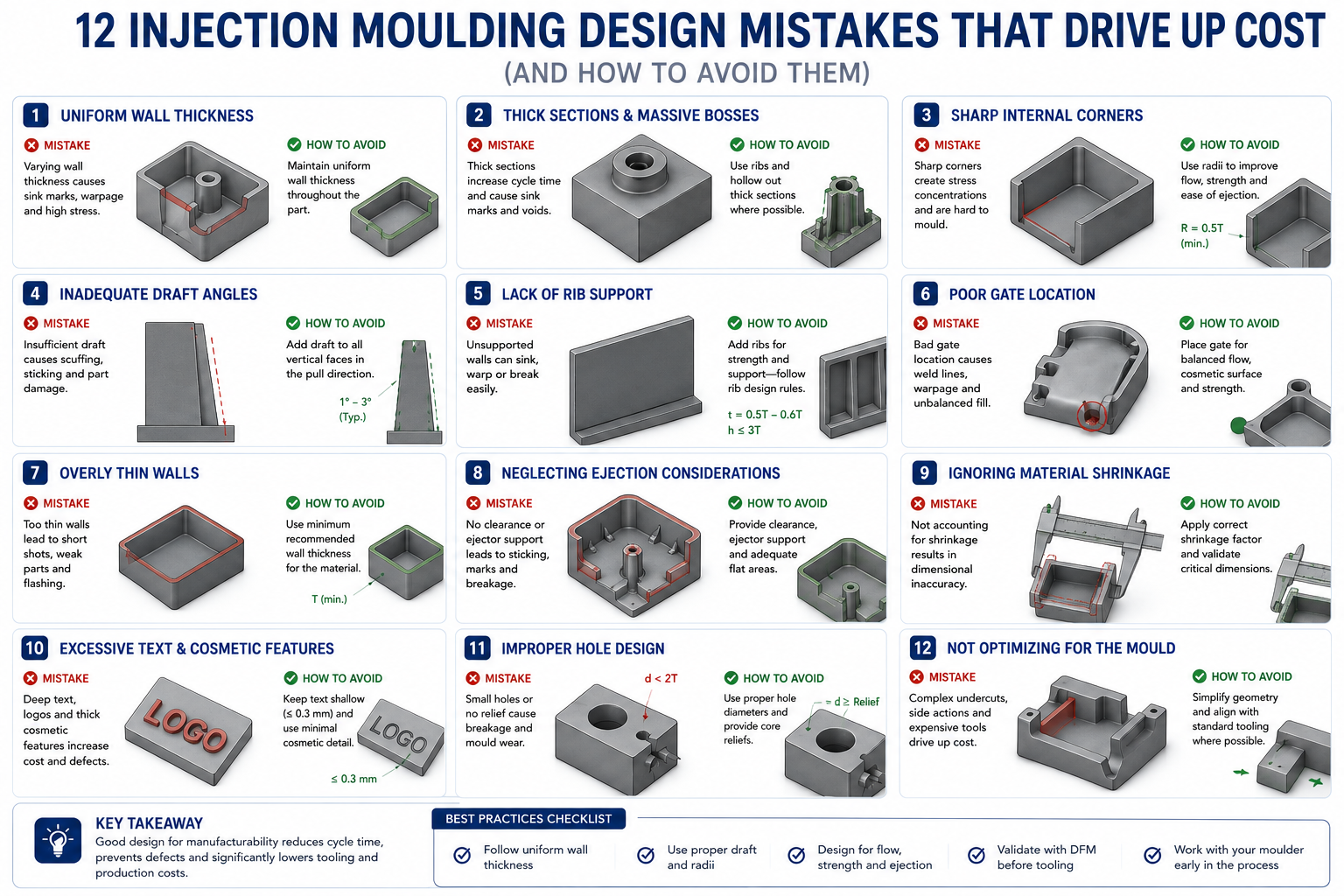
The 12 Most Costly Injection Molding Design Mistakes
Each mistake below is a CAD decision with direct consequences at the tool shop, on the injection press, or in the quality inspection booth. All are avoidable at the design stage.
#
Mistake
Root Cause
Typical Cost Impact
Fix
1
Non-uniform wall thickness
Hollowing a solid CAD model without checking resulting variation
Sink marks, warping, longer cycle time; scrap 10-30% on first shots
Keep variation within 10-15% of nominal throughout
2
Insufficient draft angle
Draft added as an afterthought, not designed in
Part sticks; drag marks; ejector pin stress and tool damage
Typical range +/-0.1 to 0.25mm; tighter may not be achievable
The single most important habit: run a draft analysis before releasing any drawing. Most CAD packages colour-code every face relative to a specified pull direction, green for adequate draft, red for insufficient or negative draft. It takes two minutes and catches problems that cost thousands of dollars per face and weeks of delay once tooling is cut.
Mistakes 1 and 2: Non-Uniform and Wrong Wall Thickness
Wall thickness is the single design parameter that most directly controls whether a moulded part looks acceptable, holds its shape, and produces at the assumed cycle time. Get it right and the mould fills evenly, cools uniformly, and ejects cleanly. Get it wrong and the problems cascade: thick sections cool slower than thin ones, so thin sections solidify first while the thick sections pull inward as they cool, creating visible sink marks and internal voids. Severe variation warps the entire part out of flat.
The target isn’t a specific thickness but a specific relationship between walls, following the process fundamentals documented in the Rosato Injection Molding Handbook: keep variation within roughly ten to fifteen percent of nominal throughout the part. A part with a 2.0mm nominal wall shouldn’t have regions thicker than 2.3mm or thinner than 1.7mm without a gradual transition. Where a thick section is unavoidable, taper into it over a distance of at least three times the thickness difference.
Resin Family
Min Wall (mm)
Typical Nominal (mm)
Max Practical Wall (mm)
Key Notes
ABS
1.2
1.5-3.0
4.5
Versatile, forgiving flow; avoid exceeding 3mm without gas assist
Polycarbonate (PC)
1.0
1.5-4.5
6.0
Higher flow resistance; thick walls fill reliably but cycle time is long
PC/ABS blend
1.2
1.5-3.5
5.0
Popular for electronics enclosures; easier than pure PC
Nylon (PA6, PA66)
0.8
1.5-3.0
4.0
Absorbs moisture; design to nominal dry dimension
Polypropylene (PP)
0.8
1.5-3.0
3.5
High shrinkage (1.5-2.0%); excellent for living hinges
Acetal/Delrin (POM)
0.8
1.5-3.0
3.0
Excellent dimensional stability; good for precision gears
PEEK
0.5
1.0-2.5
3.5
Very high processing temperature; expensive resin and process
HDPE
1.0
2.0-4.0
6.0
High shrinkage; waxy surface complicates bonding and painting
PETG
0.8
1.5-3.0
4.0
Good clarity; lower impact resistance than PC
Liquid Silicone Rubber
0.3
0.6-2.5
6.0
Two-component thermoset; excellent for seals, soft-touch grips
How the Solidification Sequence Governs Sink Marks
The mould is cold. The injected plastic is hot. Thin sections next to the cool steel lose heat quickly and solidify into a rigid skin. Thick sections take longer. As a thick section keeps cooling and shrinking after its skin has solidified, the still-soft interior gets pulled inward, and since the far skin is already rigid, the only surface that can move is the opposite face of the thin section adjacent to the thick one. That face dimples inward, producing the sink mark that appears on the cosmetic surface directly opposite the rib or boss.
This is why rib and boss thickness rules are expressed as ratios to the adjacent wall, not absolute values. A 1.5mm rib base next to a 3mm wall, at fifty percent, follows the rule. The same 1.5mm base next to a 1.0mm wall, at one hundred fifty percent, violates it by creating exactly the local thickness excess the rule exists to avoid. Track the ratio, not the dimension alone.
Mistake 2: No Draft Angle on Vertical Walls
When a mould opens, the part has to slide off the core without the walls dragging against the steel. Without draft, the part grips the core tightly as it cools and shrinks onto it, forcing the ejector pins to push it off. The result is drag marks, distortion from uneven ejector loading, and in the worst case a part that sticks entirely, destroying surface finish and risking broken ejector pins.
Draft doesn’t need to be large. On a smooth surface, one degree per side is typically adequate for clean ejection. The fix is applying the right taper before the drawing goes to the mould maker, since draft affects tool steel geometry, parting line position, and ejection layout. Asking for draft after the cavity and core are already machined means re-machining steel already cut to size, expensive and sometimes impossible without scrapping the insert.
Textured Surfaces Need More Draft Than You’d Expect
A smooth surface with one degree of draft ejects cleanly. The same surface with a leather-grain texture and the same one degree won’t. Texture creates physical interlocking with the tool steel, so the part has to tear away rather than slide cleanly, damaging the texture. The standard rule of thumb is one degree of additional draft for every 0.025mm of texture depth, so a leather grain at 0.075mm needs three additional degrees, four degrees total minimum. A heavy texture at 0.150mm needs six additional degrees beyond base draft.
Mistakes 4 and 10: Undercuts and Side Actions
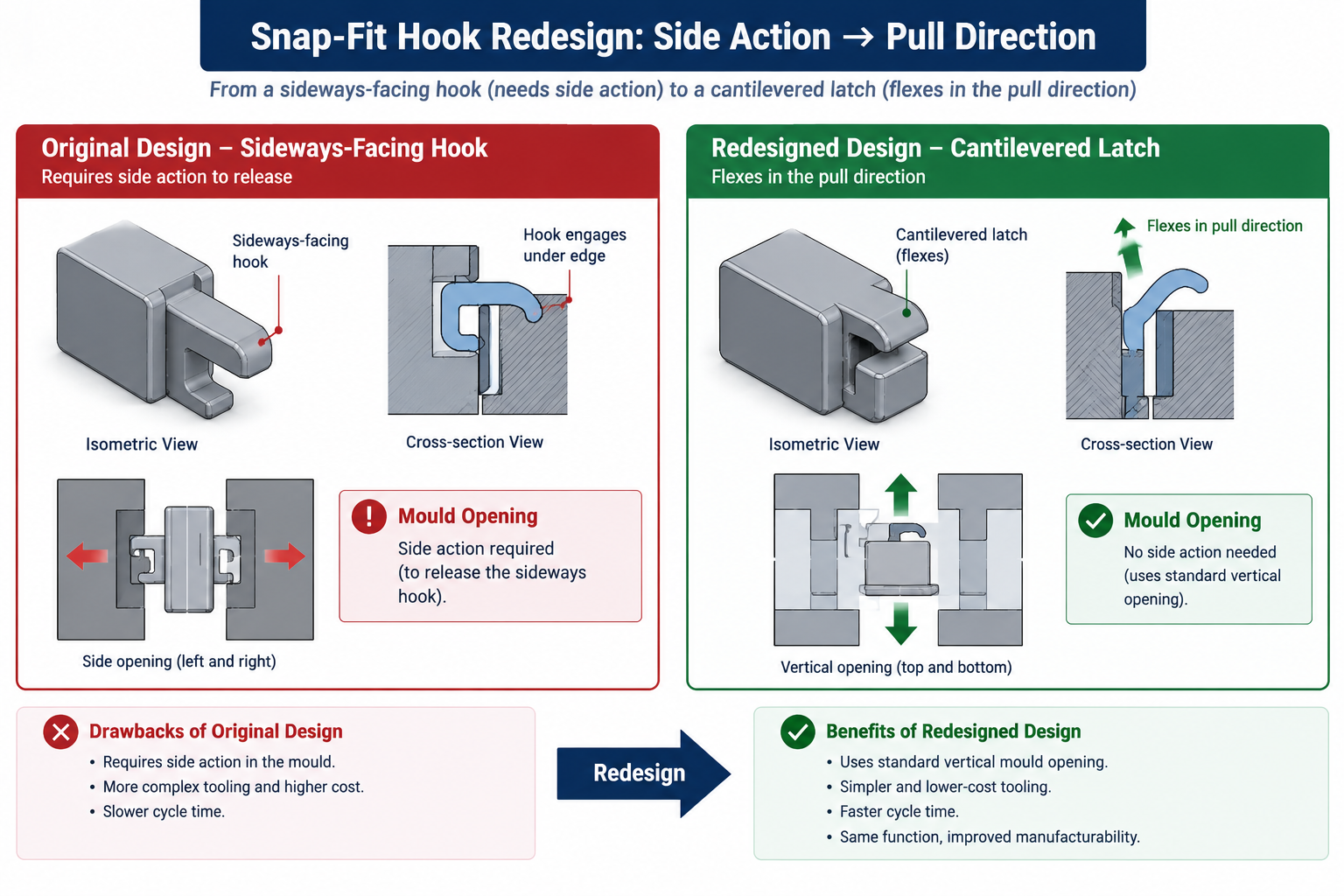
An undercut is any feature preventing the part from being pulled straight out of the mould in the opening direction. Sideways-facing snap-fit hooks, holes on vertical walls, internal threads, wrap-around lips: all trap the part if the mould tries to open in a straight line. The solutions, slides, lifters, collapsible cores, are proven mechanisms used on millions of parts every year, but each adds cost, tool complexity, lead time, and ongoing maintenance considerations.
Undercut Type
Tooling Solution
Cost Premium
Lead Time Impact
When to Accept vs. Redesign
External undercut (lip, sideways hook)
Side action (slide)
+20-35% tooling cost
+2-4 weeks
Accept if function is genuinely required; redesign to a hinged snap if possible
Internal undercut (thread, groove)
Internal lifter or collapsible core
+25-50% tooling cost
+3-6 weeks
Consider a threaded insert or two-piece design before committing
Shallow undercut, flexible material
Forced ejection (stripped over)
No premium
No impact
Accept if material flexes without tearing; typically under 0.5mm depth
Through-hole perpendicular to draw
Simple core pin
No premium
No impact
Always prefer over a blind hole where function allows
Hole on a side face (parallel to parting line)
Side core or split cavity
+10-20% tooling cost
+1-2 weeks
Accept when genuinely functional; verify parting line flash is acceptable
How to Spot an Undercut Before the Drawing Goes Out
Set the pull direction in CAD and run draft analysis, which flags any negative-draft faces as potential undercuts. Sideways-facing faces relative to the pull direction are the most common source. A hole drilled through a vertical wall is a simple example: the core pin forming it runs perpendicular to the pull direction, trapping the surrounding steel unless a slide is provided.
Before budgeting for a side action, ask whether the feature causing it can be moved or redesigned. A sideways-facing snap hook can sometimes become a cantilevered latch that flexes in the pull direction, eliminating the undercut entirely. A hole on a vertical side wall can sometimes move to the parting surface, becoming a through-feature both halves of the tool form, needing no slide. These redesigns take minutes in CAD and save thousands in tooling cost.
Mistakes 7 and 8: Gate Location and Weld Lines
Gate location, where plastic enters the cavity, is one of the most consequential decisions in mould design, and one many designers leave entirely to the mould maker without guidance. That’s a missed opportunity. The design engineer knows which surfaces are cosmetic and cannot show a gate mark, and which features are structural and shouldn’t have weld lines running through them. The mould maker knows injection molding but doesn’t know which is which unless told. Gate location should be a conversation during design, not a surprise after the tool is built.
Gate Type
Appearance
Weld Line Risk
Best For
Avoid When
Edge gate (tab)
Visible stub on parting line; needs degating
Low for simple parts; higher with multiple features
Simple flat parts, prototype tooling
Cosmetic surfaces on the parting line edge
Submarine (tunnel) gate
Auto-degated, small dimple below parting surface
Moderate
High-volume production, labour savings
Brittle resins that crack at the shear point
Pin point gate (3-plate)
Small round mark, auto-degated
Low; positionable away from critical areas
Multi-cavity tools, specific face gating
Large parts with high flow resistance
Hot tip gate
Small vestige only; no cold runner waste
Low, precisely controlled
High-volume, multi-cavity balanced filling
Low-volume runs; heat-sensitive resins
Fan gate
Wide, shallow, visible at parting edge
Very low; distributes flow evenly
Flat sheet-like parts, optical components
Cosmetic surfaces along the gated edge
Valve gate (hot runner)
No or minimal vestige
Low, controllable via timing
Cosmetic surfaces; sequential fill control
High complexity/cost; not for low-volume tools
Weld Lines: Where They Come From and Why They Matter
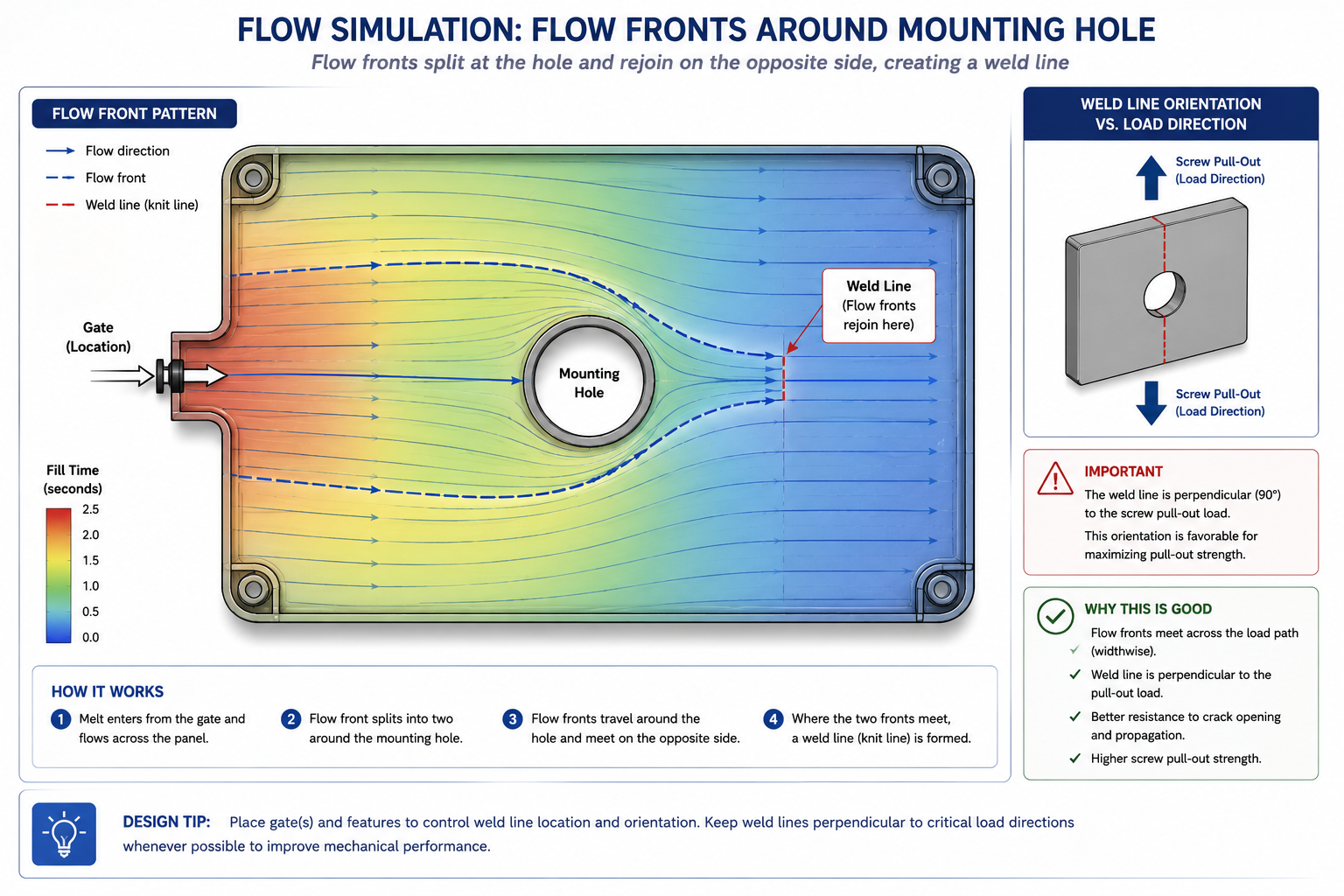
A weld line forms wherever two flow fronts of molten plastic meet and fuse during filling. Every hole in a moulded part creates one downstream of it, since flow splits around the hole and rejoins on the far side. A part with four holes has at least four potential weld lines. Their location relative to structural loads and cosmetic surfaces is set by gate placement and flow path geometry, and moving the gate can move the weld lines without changing the part’s functional geometry.
Weld lines are mechanically weaker than the surrounding material because the two flow fronts have cooled slightly by the time they meet, and molecular chains and glass fibres (in filled resins) orient parallel to the weld line rather than across it. In unfilled amorphous plastics like ABS, strength reduction might be ten to twenty percent. In glass-filled semi-crystalline plastics like PA66 GF30, it can reach fifty percent, since the fibres that carry load in the base material leave the weld line essentially unreinforced. A weld line running through the root of a snap-fit latch or a screw hole edge is designed to fail there under repeated loading.
Mistakes 5 and 6: Bosses and Ribs That Cause Sink Marks
Bosses and ribs account for more sink mark problems than any other feature type, since both need local material thickness to function, and local thickness excess is exactly what causes sink marks. The rules are simple and widely published, but frequently violated by an instinct to make the boss wall thicker for strength or the rib taller and thicker for stiffness, both of which push directly toward the sink mark the rule exists to prevent.
The Boss Wall Rule
A screw boss needs enough wall thickness to resist hoop stress from screw insertion without cracking, and enough depth for adequate thread engagement. That functional wall thickness is approximately sixty percent of the adjacent nominal wall, providing adequate strength for normal self-tapping screw torque without visible sink marks.
When a designer increases the boss wall beyond sixty to seventy-five percent, the local thickness increase becomes large enough that differential cooling pulls the opposite face inward, producing a visible circular sink mark on the cosmetic surface. The fix once the mould already exists is either texturing the cosmetic surface to hide it or reworking the boss geometry in the tool, both costing money the sixty percent rule would have avoided. Adding a gusset rib from the boss to the nearest structural wall satisfies both the structural requirement and the sink mark rule simultaneously.
The Rib Thickness Rule
Ribs add stiffness without the wall thickness that would increase cooling time, weight, and sink mark risk. But a rib is itself a local thickness increase where it meets the wall, and if the rib base is too thick relative to the wall, it creates exactly the local thick section it was supposed to avoid. The rule: rib base should be fifty to sixty percent of the adjacent nominal wall. A 2mm nominal wall should have ribs no more than 1.0 to 1.2mm thick at the base.
When a designer specifies a rib at seventy-five or a hundred percent of wall thickness for extra structural confidence, the rib creates a local thickness the molding process faithfully converts into a sink mark opposite the rib junction. The fix isn’t a thicker rib, it’s more ribs, each following the fifty to sixty percent rule, distributed over the area needing stiffness. Multiple thin ribs outperform a single thick rib in structural efficiency, sink mark avoidance, and material usage.
Worked Examples
The consumer electronics housing: A mould maker’s pre-tooling review flagged three issues: a 5mm wall behind a snap-fit boss where the designer had added material for strength, a USB port opening on a side wall creating an internal undercut requiring a lifter, and a textured grip area specified with only one degree of draft against a 0.08mm texture depth.
The boss wall was reduced to 1.8mm, sixty percent of the 3mm nominal wall adjacent to it, with a gusset rib added to the nearest internal rib for the structural connection the extra material had been trying to provide. The USB port was relocated so its axis ran parallel to the mould pull direction, converting the undercut into a simple through-feature formed by a core pin, a 4mm position shift the product team accepted after an ergonomics check. The textured faces were redesigned with four degrees of draft, one base plus three for the texture depth.
The tooling was cut to the revised design without any of the three original issues. First shots showed no sink marks, no ejection damage, clean texture release, and matched the original quote. The two days of CAD work prevented what the mould maker estimated would have been a three-to-four-week rework programme costing thirty-five percent of the original tool budget.
The automotive interior component with weld line failures: A trim panel with two mounting holes was gated at the centre of the top edge, sending flow symmetrically toward mounting holes on either side. The flow fronts that split around each hole rejoined directly in line with the screw thread pull-out direction, the axis of highest stress in service. The panel was failing at forty percent of target pull-out force, with clean, planar failure surfaces, the classic morphology of a weld line fracture.
The resin was PA66 GF30, where weld line strength can drop to forty to fifty percent of base material strength. Moving the gate to one end of the panel sent a single flow front across it, still splitting around each hole but rejoining at angles roughly perpendicular to the panel face rather than aligned with the pull-out direction, and the shorter flow path to the far hole reduced the temperature drop before rejoining, improving fusion. Pull-out results improved to ninety-two percent of target, meeting spec, from a runner-only tool modification completed in two days with no cavity or core rework needed.
Frequently Asked Questions
What is the most common injection molding design mistake? Non-uniform wall thickness, and the one with the most visible consequences, since the sink marks it causes show up on cosmetic surfaces where every customer and quality inspector can see them. It’s also the mistake most common among engineers experienced with machined parts, where a thick section just takes longer to cut rather than cooling differently and producing surface defects.
How much draft angle do injection moulded parts actually need? One degree per side is the practical minimum for smooth surfaces, with two degrees giving comfortable margin. For textured surfaces, add roughly one additional degree per 0.025mm of texture depth beyond the base one degree. A light orange-peel texture at 0.025mm needs about two degrees total; a leather grain at 0.075mm needs about four; a heavy tactile texture at 0.15mm may need six or more.
Can I get away without draft angle if I use a good ejection system? Not reliably. Stripper plates, air blast, and heavy ejector pin layouts can push a part off a zero-draft surface, but that force transmits through the part, distorting it or leaving ejector pin marks. For production tooling where appearance and consistency matter, no ejection system reliably substitutes for adequate draft.
What is a weld line and does it always need to be avoided? A weld line is the seam where two flow fronts of molten plastic meet and fuse during filling. They form wherever flow splits and rejoins, downstream of every hole, protrusion, and obstacle, and can’t be eliminated from parts with multiple flow-splitting features. What matters is location and load: a weld line on a hidden, non-structural surface is typically fine, while one through a snap-fit latch root or a mounting boss in glass-filled nylon is a real structural risk.
How tight a tolerance can injection molding actually hold? Typical production parts hold +/- 0.1 to 0.25mm on linear dimensions. Down to +/- 0.05mm is achievable on small parts with controlled process conditions, high-quality tooling, and predictable-shrinkage resins, but needs careful monitoring. Tighter than +/- 0.05mm generally requires secondary operations like machining on specific surfaces. Semi-crystalline resins (nylon, PP) shrink more and less predictably than amorphous resins (ABS, PC).
When should I use a hot runner instead of a cold runner? Hot runners eliminate the cold runner that would otherwise be ejected and scrapped or recycled each cycle, saving material cost and allowing faster cycle times. The manifold itself adds two thousand to twenty thousand dollars to tooling cost depending on complexity, recovered through material and cycle time savings over the production run. This makes economic sense above roughly fifty thousand parts per year for moderate-cost resins, lower for expensive engineering resins like PEEK, and doesn’t make sense for prototype or low-volume tools.
Key Takeaways
The twelve mistakes in this article aren’t exotic edge cases. They’re the items that generate the most tool rework, the most first-shot rejection, and the most programme delays across consumer electronics, automotive, medical, and industrial moulded products. Nearly all of them are avoidable at the CAD stage by an engineer who knows what to look for, and free to fix while the part is still on screen.
The housing story at the start of this article wasn’t a failure of engineering skill. It was a failure of knowledge applied at the right time. Every one of the three problems the mould maker called about has a straightforward CAD fix that takes minutes. The same fix in tooling takes days to weeks and costs real money. Run the draft analysis on every moulded part before the drawing is released. Check every boss and rib against the sixty and fifty percent wall ratio rules.
Walk the pull direction and flag every trapped face. Agree gate location with the mould maker before the tool is designed, not after. These habits are inexpensive in CAD and genuinely expensive to substitute for afterward.
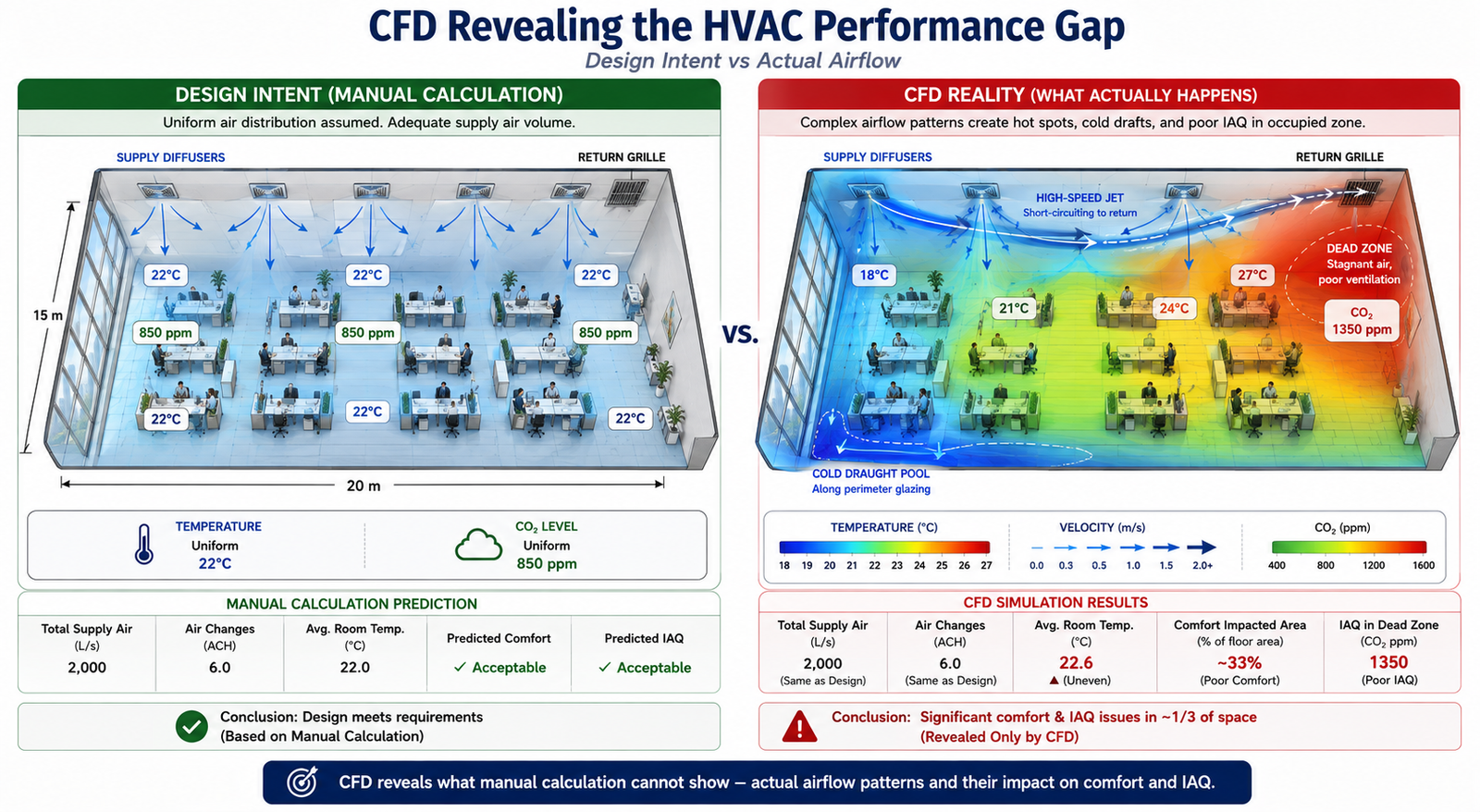
The 15,000 m² office building was designed to meet ASHRAE 55 thermal comfort standards. Mechanical calculations confirmed adequate supply airflow, diffuser throw distances, and a 12 air-change rate in every zone, while BMS commissioning data showed that the fans were delivering the required airflow. Yet six months after occupancy, 34% of occupants rated their thermal comfort as unacceptable. The calculations were correct, but the airflow distribution was not. Two of the eight ceiling diffusers created a Coanda jet that travelled directly toward the return grille, short-circuiting about 12% of the supply air before it reached the occupied zone. A far corner received almost no fresh supply air, resulting in elevated CO₂ levels and uncomfortable conditions.
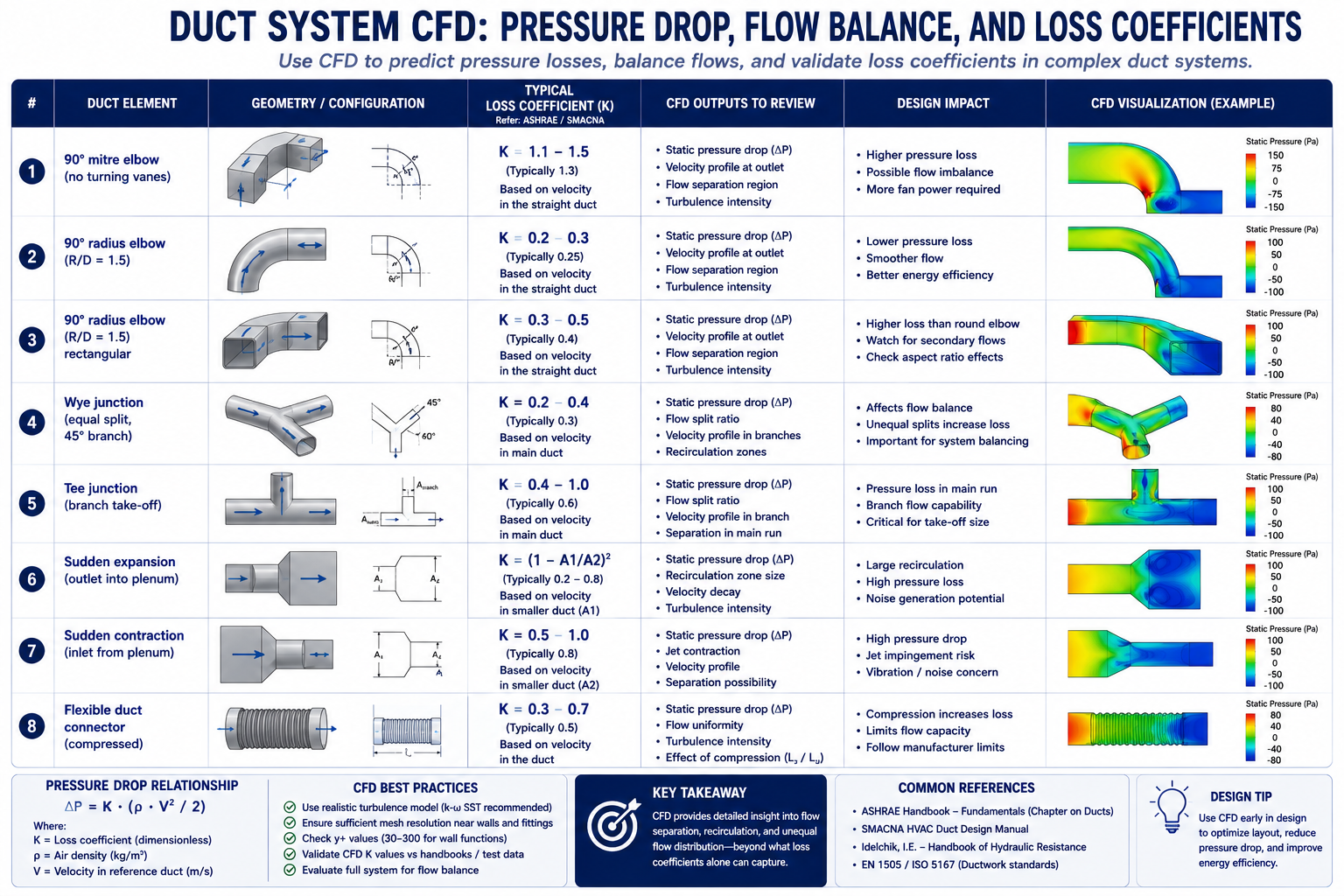
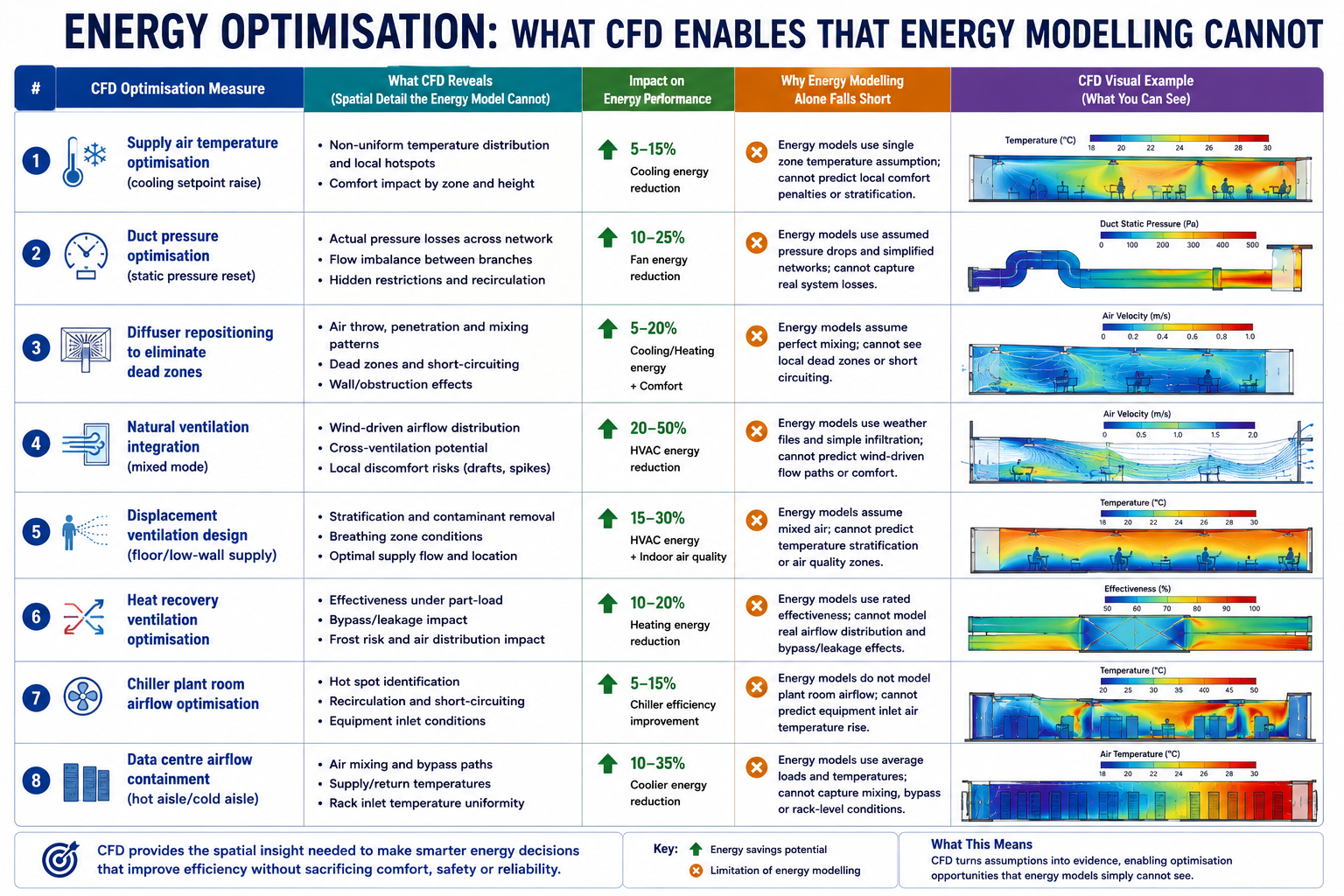
This illustrates a fundamental HVAC design challenge: correct airflow quantity does not guarantee correct airflow distribution. Manual calculations can determine supply volume, cooling load, and diffuser velocity, but they cannot fully predict how air moves through a complex three-dimensional space. Computational fluid dynamics (CFD) can reveal airflow patterns, temperature distribution, draught risk, short-circuiting, and stagnant zones before commissioning. This article explores the key applications of CFD in HVAC performance, including thermal comfort, duct pressure losses, airflow distribution, cleanrooms, data centres, smoke control, and energy optimization, with practical examples showing how CFD results translate into specific design improvements.
Where CFD Adds Value in HVAC: The Ten Application Areas
CFD is not the right tool for every HVAC engineering task. Sizing a duct run, selecting a chiller, or calculating a heating load are manual calculation tasks where CFD adds no value, the physics is one-dimensional and the established methods are accurate. CFD becomes valuable when the flow is three-dimensional and the interactions between geometry, thermal loads, and airflow patterns determine the outcome. The following table maps the ten HVAC application areas where CFD provides information that manual methods cannot, with the physics, key outputs, design decisions enabled, and fidelity level required.
HVAC Application
CFD Physics Required
Key Output Metrics
Design Decision Enabled
Fidelity Level
Room airflow distribution and comfort
3D RANS with buoyancy; energy equation for temperature; humidity transport optional
Air temperature at 0.6m, 1.1m, 1.7m above floor; air velocity at occupied zone; draught rate (DR) per ISO 7730
Diffuser type, location, and throw distance; return grille placement; supply air volume and temperature
Medium, standard RANS k-ω SST; steady-state
Duct system pressure drop and flow balancing
3D RANS in duct network; or 1D network model with CFD-derived loss coefficients
Pressure drop per duct section; flow velocity distribution; balancing damper requirements
Duct sizing, transition geometry, elbow radius, junction design; fan selection and speed
Low to medium, duct segments can be modeled individually; full-network 1D is most efficient
Diffuser and grille performance
3D RANS with fine mesh at diffuser slots; jet throw prediction
Jet throw distance; entrainment ratio; Coanda effect along ceiling; terminal velocity at 0.25 m/s
Diffuser type selection (linear, radial, displacement); supply angle; slot velocity
Medium-High, fine mesh required for slot geometry; validates manufacturer performance curves
Chilled beam and radiant cooling
3D coupled radiation + convection CFD; buoyancy-driven flow
Mean radiant temperature (MRT); operative temperature; natural convection plume from occupants
Chilled beam spacing; supply water temperature; ceiling height requirements
High, radiation model required; occupant thermal plume modelling adds complexity
Clean room and ISO class compliance
3D LES or high-quality RANS; particle transport; filtration efficiency
Air change rate; non-uniformity of velocity; particle concentration; pressure differential to adjacent zones
HEPA/ULPA filter placement; number of air changes per hour; supply/return pattern for ISO 14644 compliance
High, particle tracking and contaminant transport require validated CFD
Data centre hot aisle/cold aisle cooling
3D RANS with server rack power dissipation as volumetric heat source; bypass airflow
Server inlet temperature; rack temperature non-uniformity; bypass ratio (cold air short-circuit); PUE impact
3D FDS (Fire Dynamics Simulator) or RANS with combustion; species transport; radiation
Smoke layer height; visibility; CO concentration; time to untenable conditions; pressure differential for stairwell pressurisation
Smoke extract fan sizing and location; pressure differential requirements; fire-rated damper locations; egress path validation
High, regulatory requirement for complex buildings; fire codes (NFPA 92, BS EN 12101) specify acceptance criteria
Thermal Comfort Metrics: What CFD Computes That Calculations Cannot
The thermal comfort metrics defined by ASHRAE 55 and ISO 7730, including PMV, PPD, operative temperature, and draught rate, depend on local conditions at the occupant’s position. These include air temperature, air velocity, turbulence intensity, mean radiant temperature, and relative humidity.
Manual HVAC calculations typically estimate room-average conditions, while CFD can predict the spatial distribution of these parameters throughout the occupied zone. This allows engineers to identify specific areas where thermal comfort criteria are not met, which room-average calculations cannot reveal.
Comfort Metric
Definition
CFD Output Required
Acceptable Range (ASHRAE 55)
What Poor Performance Looks Like
Air temperature at occupied zone
Dry-bulb air temperature at 0.6m (seated) and 1.1m (standing) above finished floor
Temperature scalar field; extract values at specified heights across occupied zone
20–26°C cooling season; 18–24°C heating season; non-uniformity < 2°C across zone
Stratification > 4°C from ankle to head; cold perimeter pools near glazing; hot spots above equipment
Air velocity / draught rate
Mean air velocity at occupied zone; draught rate DR = (34-T_a)(V-0.05)^{0.62}(0.37VT_u+3.14)
Velocity magnitude field; turbulence intensity Tu at occupied zone; extract at grid of points at 0.1m above floor and 1.1m
< 0.15 m/s for sedentary; < 0.25 m/s for light work; DR < 15% per ISO 7730
High-velocity jets reaching occupied zone from ceiling diffusers; draught from perimeter induction units; floor-level cold air pools
Vertical temperature stratification
Temperature difference between ankle level (0.1m) and head level (1.7m) in seated person
Temperature profile from floor to ceiling extracted at multiple room locations
< 3°C ankle-to-head temperature difference per ASHRAE 55
Displacement ventilation with excessive supply-to-room temperature difference creates > 3°C gradient; hot ceiling / cold floor in cooling mode
Mean Radiant Temperature (MRT)
Area-weighted average temperature of all surfaces ‘seen’ by the occupant from their position
Surface temperature field on all enclosure faces; view factor calculation from occupant position
MRT within ±2°C of air temperature preferred; large glazing or exposed hot/cold surfaces can deviate significantly
Winter: cold glazing with U-value > 2.0 W/m²K creates MRT depression; Summer: solar gain through glass creates high MRT even with cool air temperature
Predicted Mean Vote (PMV)
ASHRAE/ISO 7730 thermal comfort index from -3 (cold) to +3 (hot); combines air temp, MRT, velocity, humidity, activity, clothing
All above metrics combined in post-processing; requires user metabolic rate and clothing level input
-0.5 to +0.5 for at least 80% of occupants (Category B per ISO 7730)
PMV > +1.0 in summer peak load with undersized cooling; PMV < -1.0 near perimeter in winter heating mode with cold glazing and low-temperature supply air
Air change effectiveness (ACE)
Ratio of nominal air change time to actual mean age of air in occupied zone
Mean age of air scalar field computed by solving additional transport equation for air age
> 1.0 for displacement ventilation (plug flow); 0.8–1.0 for mixing ventilation; < 0.5 indicates significant short-circuiting
ACE < 0.5 when supply diffuser is positioned directly above return grille; short-circuit flow bypasses occupied zone entirely
CO2 / contaminant concentration
CO2 as proxy for ventilation effectiveness; contaminant dilution from internal sources
Species transport equation for CO2 or contaminant; steady-state concentration field
CO2 < 1000 ppm in occupied zone (ASHRAE 62.1); < 800 ppm for enhanced ventilation
CO2 > 1200 ppm in poorly mixed corner zones not served by supply air; dead zones created by furniture arrangement blocking flow paths
The Draught Rate Problem: Why High-Throw Diffusers Cause Complaints
Draught, the sensation of unwanted local cooling produced by air movement at velocities above approximately 0.15 m/s at occupant level, is the most frequent comfort complaint in mechanically ventilated offices. The draught rate (DR) formula from ISO 7730 combines air temperature, mean air velocity, and turbulence intensity: DR = (34 – T_a)(V – 0.05)^{0.62}(0.37VT_u + 3.14), where T_a is the air temperature in °C, V is the mean air velocity in m/s, and T_u is the turbulence intensity in percent.
Manual HVAC design uses diffuser throw distance, the distance from the diffuser to the point where jet velocity falls to 0.25 m/s, to determine whether supply air reaches the occupied zone safely. However, this calculation typically assumes an isothermal jet in an open room and may not capture real airflow behavior.
Factors such as the Coanda effect, thermal buoyancy, room geometry, and interaction between multiple diffusers can significantly change the actual airflow path. CFD accounts for these effects and predicts air velocity and turbulence at occupant level, providing the data needed to assess draught risk more accurately.
Mean Radiant Temperature: The Invisible Comfort Driver
Mean radiant temperature (MRT) is the area-weighted average temperature of all surfaces visible from the occupant’s position. It is the dominant thermal comfort parameter in spaces with large areas of cold glass (winter), sunlit surfaces (summer), or radiant heating or cooling systems. Operative temperature, the average of air temperature and MRT, is a better predictor of thermal comfort than air temperature alone, and a space can feel hot even with cool supply air if the MRT from sun-heated surfaces is elevated.
Mean radiant temperature (MRT) depends on both the temperature of surrounding surfaces and their geometric relationship to the occupant. CFD with a radiation model can calculate MRT throughout the room by accounting for surface temperatures and occupant-to-surface view factors.
Manual methods can estimate MRT for simple rooms with uniform surface temperatures, but they become less reliable with complex glazing, shading fins, solar penetration, atria, or radiant panels. For spaces where radiant effects strongly influence comfort, CFD with radiation modeling provides a more detailed way to evaluate thermal comfort.
Duct System CFD: Pressure Drop, Flow Balance, and Loss Coefficients
Duct systems are commonly designed using the equal friction, static regain, or T-method to size duct sections and estimate pressure losses. These methods rely on tabulated fitting loss coefficients from the ASHRAE Handbook, Fundamentals, Chapter 21, covering elbows, tees, wyes, transitions, and grilles.
However, these coefficients are based on controlled test conditions and standard fitting geometries. Real duct systems often differ significantly, with rectangular ducts, high aspect ratios, closely spaced fittings, insufficient upstream development lengths, and modified geometries that may not match the available ASHRAE data. In such cases, the tabulated coefficients may not accurately represent the actual airflow and pressure losses.
CFD fills this gap by computing the actual pressure drop and loss coefficient for the specific fitting geometry in the actual installation condition, including the non-ideal inlet flow profile from the preceding fitting. The table below shows the standard ASHRAE loss coefficients for common duct fittings, the CFD-computed values for the same fittings under typical installation conditions, and the design guidance that CFD reveals.
Duct Element
Loss Coefficient (C or K)
Pressure Drop Formula
CFD vs Standard Value
Design Guidance
90° mitre elbow (no turning vanes)
C = 1.2–1.5 (based on velocity pressure)
ΔP = C × (ρV²/2)
CFD: 1.3–1.5; ASHRAE: 1.2; poor agreement for rectangular ducts
Avoid mitre elbows, use radius elbows (R/D ≥ 1.5) or add turning vanes
90° radius elbow (R/D = 1.5)
C = 0.11–0.15
ΔP = C × (ρV²/2)
CFD: 0.12–0.14; ASHRAE: 0.11; good agreement at low turbulence intensity
Standard choice for main duct bends; CFD confirms ASHRAE values for round duct
90° radius elbow (R/D = 1.5) rectangular
C = 0.22–0.35 depending on aspect ratio
ΔP = C × (ρV²/2)
CFD reveals 25–40% higher loss than round for same R/D due to secondary flow
Use turning vanes for rectangular elbows with aspect ratio > 2:1
Wye junction (equal split, 45° branch)
C_branch = 0.5–0.8; C_straight = 0.1
ΔP branch = C × (ρV²/2) of incoming velocity
CFD shows strong sensitivity to branch angle and incoming velocity profile
Ensure uniform velocity approaching junction; reduce branch angle to 30° to lower C_branch
Tee junction (branch take-off)
C_branch = 0.9–1.5; C_straight = 0.05–0.2
Separate C for straight-through and branch
CFD critical here, standard C values assume fully developed upstream flow
Straight duct of ≥ 10 diameters upstream of tee required for ASHRAE C to be valid
Sudden expansion (outlet into plenum)
C = 1.0 (full dynamic pressure loss)
ΔP = ρV²/2 (full velocity pressure)
CFD and theory agree well for attached flow; divergence at high expansion ratios
Always add a grille or diffuser cone at duct exit to duct, avoids full dynamic pressure loss
Sudden contraction (inlet from plenum)
C = 0.5 (typical); 0.04 for well-rounded inlet
ΔP = C × (ρV²/2) of outlet velocity
CFD shows vena contracta inside duct; rounding inlet reduces C from 0.5 to < 0.1
Round or bell-mouth duct inlets reduce inlet loss by factor of 5+ vs sharp-edged
Flexible duct connector (compressed)
C = 1.5–6.0 depending on compression and bends
ΔP = C × (ρV²/2)
CFD: highly variable; standard values unreliable for compressed flex duct
Keep flex duct fully extended and straight; limit to < 1.8m runs; avoid bends in flex
Fan Curve Intersection and System Resistance
The fan operating point is determined by where the fan pressure-flow curve intersects the system resistance curve. If the actual system resistance is higher than expected because of underestimated fitting losses or additional bends, the operating point shifts to lower airflow and higher pressure. As a result, the fan may deliver less airflow than the design requires.
CFD can evaluate pressure losses using the as-built duct geometry rather than the original design. For example, replacing a radius elbow with a mitre elbow or placing a branch immediately after a bend can significantly increase system resistance. CFD identifies where the additional pressure drop occurs and helps determine whether balancing dampers or duct modifications are needed to restore the required airflow.
Pressure Balancing in Multi-Branch Systems
In a multi-branch supply duct system, each branch must deliver its design airflow to maintain proper zone performance. Manual balancing dampers are commonly used during commissioning, but they add resistance to the system and can increase the fan’s energy demand. In poorly designed systems, this additional resistance can account for a significant portion of fan power.
CFD optimization can improve flow distribution by adjusting branch sizing, tee angles, and junction geometry so that branches achieve more balanced airflow naturally. By iterating the geometry and pressure losses, engineers can reduce reliance on balancing dampers and avoid unnecessary pressure losses. This approach is particularly useful for complex multi-branch systems where conventional calculations cannot fully capture the detailed pressure distribution at junctions.
Special HVAC Applications: Clean Rooms, Smoke Control, and Data Centres
Clean Room Airflow: ISO 14644 Compliance Through Simulation
Clean room HVAC design must comply with ISO 14644-1, which classifies clean rooms by particle count (ISO Class 1 through 9) and specifies the maximum allowable particle concentration at each class. The air distribution system must deliver clean air to the entire work zone without creating turbulent eddies that could carry particles from less-clean regions into the critical process area. ISO 14644-3 specifically accepts CFD as a method for predicting airflow patterns and validating that the specified air change rate and unidirectionality achieve the required cleanliness class before construction
Cleanroom CFD models typically include the supply HEPA or ULPA filter banks as pressure-drop boundaries, recirculation fan arrays, process equipment as heat sources, operators with metabolic heat output, and low-level return grilles.
The key output is not simply air velocity, but flow unidirectionality, which shows how consistently the supply air moves in the intended direction, typically downward, without excessive lateral mixing. ISO 14644-3 provides criteria for evaluating airflow characteristics. CFD velocity-vector plots across multiple horizontal and vertical planes can reveal whether unidirectional flow is maintained throughout the critical zone or whether recirculation regions could promote particle accumulation.
Smoke Control: CFD for Life Safety Compliance
Smoke control systems in large buildings, atria, underground car parks, shopping centres, airport terminals, must be designed to maintain a clear layer of breathable air below the smoke layer for sufficient time to enable safe evacuation. The performance criteria are defined in fire codes (NFPA 92, BS EN 12101-6, CIBSE Guide E) and typically include: smoke layer height above 2.5 metres from floor level for the first 10 minutes; visibility of at least 10 metres in the clear layer; and CO concentration below 1,500 ppm in the clear layer.
CFD for smoke control uses tools such as Fire Dynamics Simulator (FDS) or general-purpose CFD with combustion and species-transport models. The simulation represents the fire source, its heat-release rate and growth, the rising thermal plume, smoke-layer development, smoke extraction, and make-up airflows.
The main output is the smoke-layer height and clear-layer conditions over time, typically from ignition through the first 20 minutes. This helps engineers determine whether the smoke-control system is adequately sized and where modifications may be needed. Unlike analytical models, which are generally limited to simpler geometries, CFD can evaluate smoke movement in complex building layouts.
Data Centre Hot Aisle/Cold Aisle: CFD as the Primary Design Tool
Data centre thermal management is a critical CFD application because high-density server racks can generate 10–30 kW of heat within a compact footprint. Cold aisle/hot aisle layouts help manage this heat, but real airflow is more complex than the layout suggests. Cold air can bypass unused rack spaces, hot exhaust can recirculate into cold aisles, and airflow from perforated floor tiles can vary because of underfloor pressure differences.
CFD models the data hall, server racks, floor tiles, CRAC units, and underfloor plenum to predict these airflow and temperature patterns. The key metric is the server rack inlet temperature, which must remain within the manufacturer’s specified limit at every rack. CFD also identifies hot spots, cold-air bypass, and hot-air recirculation, helping engineers optimize cooling capacity, improve Power Usage Effectiveness (PUE), and maintain sufficient thermal margin for future capacity increases.
Energy Optimisation: What CFD Enables That Energy Modelling Cannot
Building energy modelling tools such as EnergyPlus, IES-VE, and DesignBuilder simulate building thermal loads and HVAC performance hour by hour throughout the year. They are widely used for energy-code compliance and for predicting annual energy use intensity (EUI).
However, these models typically use simplified, zone-based airflow assumptions and cannot show the detailed airflow distribution within a room. They may therefore be unable to determine whether strategies such as displacement ventilation, natural ventilation, or lower air-change rates can maintain required comfort and indoor air quality. For these decisions, CFD provides the detailed airflow analysis that zone-based energy models cannot.
The energy optimisation measures in the table below are enabled by CFD because each one requires confirming that a changed ventilation strategy, lower airflow, higher supply temperature, different distribution, still meets comfort and indoor air quality criteria. Without CFD, the engineer cannot confirm this and must fall back to conservative assumptions that preserve the original over-designed system
CFD Optimisation Measure
Typical Energy Saving
Mechanism
Payback Period
Best Applicable Building Type
Supply air temperature optimisation (cooling setpoint raise)
5–15% cooling energy
CFD confirms that raising supply air temperature by 1–2°C while repositioning diffusers maintains comfort, reduced chiller lift
Immediate, no capital cost for existing system with variable supply temp
CFD validates that lower air change rates achieve same air quality due to ACE > 1.0 for displacement vs 0.8 for mixing, less fan power for same IAQ
Premium for displacement diffusers vs ceiling diffusers; ROI 3–7 years in energy costs
High-ceiling spaces: offices, theatres, airports, atriums; not suitable for spaces requiring rapid temperature response
Heat recovery ventilation optimisation
30–50% ventilation heating/cooling energy
CFD models cross-contamination risk in heat exchanger bypass conditions; validates minimum outdoor air rates while maximising heat recovery
Heat recovery units: 3–6 years payback in heating-dominated climates
Any building with high ventilation rates: laboratories, schools, hospitals, commercial kitchens
Chiller plant room airflow optimisation
2–8% chiller energy
CFD of chiller room reveals recirculation of condenser air; repositioning fans or adding baffles reduces condenser entering air temperature by 1–3°C, improving COP
Low capital: baffles $1,000–$10,000; saves 2–5% of chiller energy year-round
Any air-cooled chiller plant; greatest benefit in confined plant rooms with multiple units
Data centre airflow containment (hot aisle/cold aisle)
20–40% cooling energy for data centre
CFD quantifies bypass and recirculation flows; hot aisle containment eliminates mixing; supply air temperature can be raised 5–10°C with same server inlet temperature
12–24 months typical for hot aisle containment installation in existing data centre
Data centres and server rooms; any high-density electronics cooling application
Worked Examples: CFD Driving HVAC Design Changes
Example 1: Open-Plan Office, Resolving the Dead Zone
A 400 m² open-plan office floor plate is served by 16 ceiling swirl diffusers at 5m × 5m grid spacing, each supplying 180 L/s at 14°C in cooling mode. The HVAC engineer’s calculation confirmed adequate air change rate (11 ACH) and design throw distance for each diffuser. Post-occupancy surveys showed 28 percent dissatisfaction, concentrated in the two corners farthest from the main supply duct riser.
CFD model: 3D RANS k-ω SST with buoyancy (Boussinesq approximation); 52 million cell mesh resolving diffuser geometry; steady-state; 26 occupants as heat sources at 75W sensible each; 8 workstation computers at 120W each; perimeter glazing as boundary condition at 35°C surface temperature (peak summer).
CFD findings: The two corner zones had air velocities below 0.05 m/s and temperatures of 27.5°C, well above the 24°C design point. Mean age of air in the corners was 42 minutes versus 9 minutes (nominal), indicating that only 21 percent of the design air change rate was being achieved in those zones. The failure mode: the corner diffusers were positioned 2.8m from the perimeter wall, within the Coanda attachment zone. The jets attached to the ceiling and ran parallel to the perimeter wall rather than projecting into the room, then short-circuited to return grilles positioned along the corridor.
CFD-driven design change: Relocate two corner diffusers to 1.2m from the perimeter wall to project jets perpendicular to the glazing, breaking the Coanda attachment and directing air into the unserved zone. Add two additional linear slot diffusers at the perimeter glazing supplying 60 L/s each at 14°C to counteract the solar gain and cold glass convection currents. Reposition one return grille from the corridor side to the interior of the corner zone.
Predicted outcome from CFD: Corner zone temperatures reduced from 27.5°C to 23.8°C. Air velocity in corner zone increased from 0.05 to 0.12 m/s, below draught threshold. PMV in corner zone improved from +1.4 (warm, 34% dissatisfied) to +0.2 (neutral, 6% dissatisfied). Mean age of air reduced from 42 minutes to 11 minutes. Total supply airflow unchanged, comfort achieved by redistribution, not additional air volume.
BEFORE (existing diffuser positions):
  Corner zone air temperature:      27.5 °C
  Corner zone air velocity:         0.04–0.06 m/s
  Corner zone CO2:                  1,340 ppm
  Mean age of air (corner):         42 min  (nominal 9 min = 11 ACH)
  Air change effectiveness (ACE):   0.21  (ideal mixing = 1.0)
  PMV corner zone:                  +1.4  (warm)
  PPD corner zone:                  34%   (above 20% threshold)

AFTER (repositioned diffusers + perimeter slots):
  Corner zone air temperature:      23.8 °C    (-3.7 °C)
  Corner zone air velocity:         0.10–0.13 m/s
  Corner zone CO2:                  870 ppm    (-470 ppm)
  Mean age of air (corner):         11 min     (-31 min)
  Air change effectiveness (ACE):   0.82  (mixing ventilation target = 0.8)
  PMV corner zone:                  +0.2  (neutral)
  PPD corner zone:                  6%    (ASHRAE Class A: < 10%)

DESIGN COST:
  Diffuser relocation: 2 diffusers moved  ~ $800 labour
  Perimeter linear slots: 2 × 3m runs     ~ $2,400 material + labour
  Duct extension to perimeter slots:       ~ $1,200
  Total remediation cost:                  ~ $4,400

COMPARISON WITH ALTERNATIVE:
  Increasing total supply airflow by 40% to dilute corner CO2:
    Fan energy increase: +28% (~$3,200/year electricity at $0.15/kWh)
    Does NOT fix temperature non-uniformity or Coanda jet problem
  CFD-guided repositioning achieves better comfort at $4,400 one-time cost
  vs $32,000 ten-year energy cost of the 'more air' alternative
Example 2: Hospital Operating Theatre, Validating Unidirectional Flow
A new 36 m² operating theatre is designed with a 3.4 m × 3.4 m HEPA-filtered unidirectional flow (UDF) canopy supplying 0.36 m/s downward air velocity across the surgical site. The theatre also has peripheral low-velocity induction diffusers around the room perimeter. Building regulations (HTM 03-01 in the UK) require that the critical zone around the operating table maintains ISO Class 5 cleanliness (< 3,520 particles ≥ 0.5μm per cubic metre).
CFD model: 3D RANS; HEPA canopy as uniform velocity inlet; peripheral diffusers as momentum sources; surgical team as heat sources (5 persons at 80W each + 60W metabolic); anaesthetic equipment as obstruction; operating table at body temperature; surgical lights as 400W overhead heat source.
CFD findings: The unidirectional zone was maintained correctly for 80 percent of the canopy area. However, the anaesthetic screen at the head of the table, a vertical partition 1.2m tall running perpendicular to the airflow, created a recirculation zone on the downstream side. The vortex behind the screen carried particles from the periphery of the theatre back into the lower portion of the UDF zone at the incision site. The contamination risk was highest during patient intubation, when the anaesthetic screen was at its maximum height.
Design change: Tilt the UDF canopy 3 degrees toward the head of the table to direct the primary jet slightly away from the anaesthetic screen wake. Add two supplementary slot supply points at the head of the table, supplied from the UDF plenum at 0.15 m/s, to fill the recirculation zone behind the screen with clean air. The supplementary slots are integrated into the anaesthetic equipment mounting rail, no additional ceiling penetrations required.
Outcome: Recirculation zone behind anaesthetic screen eliminated at the incision site level. Particle tracking simulation confirms < 10 particles ≥ 0.5μm per cubic metre at the incision site under worst-case conditions (anaesthetic screen at maximum height, all personnel in position). ISO Class 5 compliance confirmed across the full critical zone. Modification identified before construction, the supplementary slots are built into the equipment rail during factory manufacture at a cost of approximately £800, versus a post-construction modification cost estimated at £15,000 to £25,000 if the problem had been discovered during commissioning testing.
Example 3: Data Centre, Hot Aisle Containment ROI Analysis
A 200-rack data centre hall with 2,000m² floor area is operating at average rack power of 6 kW per rack (1,200 kW total IT load). Current cooling configuration uses 12 CRAC units each rated at 150 kW at 18°C supply. The measured average server inlet temperature is 28°C, within specification but with 15 percent of racks showing inlet temperatures above 30°C at peak load. PUE is 1.72.
CFD findings before containment: Bypass ratio (cold air flowing from cold aisle to hot aisle overhead without passing through racks) was 23 percent of total CRAC supply. Recirculation fraction (hot exhaust air re-entering cold aisle over rack tops) was 18 percent. The combined effect was that 41 percent of cooling capacity was wasted on air that either bypassed the racks or was pre-heated by recirculation before entering the servers.
CFD model of hot aisle containment: Install full height containment doors at the ends of each hot aisle and a solid ceiling above the hot aisle to the raised floor plenum return. All CRAC units relocated to the hot aisle side to take in the warmest air directly. Supply perforated tiles repositioned to ensure uniform cold aisle pressure.
CFD Results After Containment
After hot aisle containment, the bypass ratio decreased from 23% to 3%, while the recirculation fraction dropped from 18% to 2%. Supply air entering the CRAC units increased from an average of 24°C to 34°C, allowing the units to cool directly from the hot aisle rather than a mixed-air environment.
This made it possible to increase the CRAC supply temperature from 18°C to 23°C while maintaining a server inlet temperature of 28°C. The higher supply temperature improved chiller COP by approximately 18%, contributing to a 24% reduction in cooling energy.
For a 1,200 kW IT load operating 8,760 hours per year at $0.12/kWh, the improved PUE from 1.72 to 1.42 results in estimated annual savings of approximately $432,000. With a hot aisle containment installation cost of $180,000, the calculated simple payback is about 5 months.
Building an Accurate HVAC CFD Model: Setup Decisions That Determine Accuracy
HVAC CFD models have specific setup decisions that differ from structural or external aerodynamics CFD. The following covers the most important HVAC-specific decisions that govern result accuracy.
Turbulence Model Selection for HVAC
The RANS k-ω SST model is a common choice for HVAC CFD because it handles wall-bounded flows, supply jets, and room-scale convection at a reasonable computational cost. For typical HVAC temperature differences, the Boussinesq approximation is widely used to model buoyancy. When temperature differences become large or buoyancy dominates, a full variable-density model using the ideal gas law provides greater accuracy.
The k-ε model is also used for HVAC simulations, but it can be less accurate near walls and in regions with strong flow curvature, such as duct bends and diffuser jets. The SST model combines k-ω behavior near walls with k-ε behavior in the free stream, making it suitable for a broad range of HVAC flow conditions.
For natural ventilation and low-velocity spaces, where buoyancy-driven flow and thermal stratification dominate, LES or unsteady RANS may be needed to capture transient flow structures. However, these approaches require significantly more computational resources and are generally reserved for research-grade or compliance-critical analyses.
Diffuser Modelling: The Room Inlet Boundary Condition
Diffusers are the most challenging element of HVAC CFD because their complex internal geometry, slot vanes, swirl blades, perforated faces, cannot be practically meshed in a room-scale simulation without creating a prohibitively large model. Several simplified approaches are used:
Momentum source method (MSM): The diffuser is replaced by a volumetric momentum source in the cells occupying the diffuser location. The source term injects momentum in the correct direction and magnitude to match the diffuser’s throw and spread. Computationally efficient and accurate for the room-scale flow prediction; less accurate near the diffuser itself.
Prescribed velocity profile method: A measured or manufacturer-specified velocity profile is applied as an inlet boundary condition at the diffuser face. Requires manufacturer CFD data or physical measurement; more accurate than MSM near the diffuser.
Simplified box model: A box representing the diffuser envelope is included in the room geometry, with appropriate inlet faces for the supply slots. Requires fine mesh at the diffuser but correctly predicts the near-diffuser flow pattern including Coanda attachment.
For most comfort assessment applications, the momentum source method with manufacturer-specified throw characteristics is adequate and is the standard approach in HVAC-specific CFD software (Flovent, Flomerics, Simscale HVAC). For applications where the near-diffuser flow pattern is critical, theatre ventilation, clean room UDF validation, operating theatre compliance, the simplified box or prescribed profile method is preferred.
Occupant and Equipment Heat Loads
People and equipment are heat sources that drive the thermal plumes and buoyancy currents that govern room airflow in spaces with moderate to low forced convection. The thermal plume from a seated person (sensible heat output approximately 75W) rises at 0.1 to 0.3 m/s and reaches the ceiling in 3 to 5 seconds in a 3m high room, interacting with the ceiling jet from supply diffusers and creating complex mixed convection patterns that no manual method can predict.
In HVAC CFD models, people are typically represented as simplified geometry (a seated or standing cylinder or box) with a specified sensible heat flux on the body surface. The exact shape has less influence on the room-scale flow than the heat flux magnitude and the relative positions of people and supply diffusers. Equipment is represented as block geometries with specified heat dissipation rates. For applications where the precise thermal plume from an individual person or workstation matters (operating theatre, clean room, personal comfort ventilation systems), higher-fidelity occupant models with segmented body heat release are used.
Validating HVAC CFD: When Results Can Be Trusted
HVAC CFD results are more variable in accuracy than external aerodynamics CFD because the buoyancy-driven flows, diffuser jets, and room-scale turbulence are harder to model correctly than attached boundary layers at cruise conditions. The standard validation approach for HVAC CFD is comparison against ASHRAE Standard 129 benchmark cases, a set of generic room configurations with published experimental data for temperature and velocity distributions that CFD codes can be compared against before being applied to real projects.
In addition to benchmark case validation, project-specific validation uses one or more of the following:
Air temperature measurement: Calibrated temperature sensors at standardised heights (0.1m, 0.6m, 1.1m, 1.7m above floor per ASHRAE 55) at multiple room locations. CFD predictions within ±1.5°C of measured values are considered good agreement for room temperature. Large discrepancies (> 3°C) indicate errors in supply air conditions, thermal load estimates, or diffuser modelling.
Air velocity measurement: Omnidirectional anemometers at occupied zone locations. Agreement within ±0.05 m/s or 20 percent of measured velocity (whichever is larger) is typical for HVAC CFD. High-velocity regions near diffusers require accurate diffuser modelling for velocity agreement.
CO2 tracer gas: SF6 or CO2 tracer gas injected at the supply and measured at multiple return and room locations. The tracer gas concentration distribution validates the CFD-computed flow distribution and age-of-air predictions. This is the most sensitive validation for ventilation effectiveness, concentration non-uniformities that temperature measurements miss are revealed by tracer gas.
Smoke visualisation: Theatrical smoke or titanium tetrachloride smoke bombs reveal the actual flow pattern in a room, showing jet directions, recirculation zones, and dead zones. Not quantitative but provides immediate qualitative confirmation of the CFD-predicted flow pattern, or reveals patterns that the CFD model did not predict, indicating modelling errors to correct.
Frequently Asked Questions
Q: Can CFD replace manual HVAC design calculations?
No. CFD complements manual HVAC calculations rather than replacing them. Manual methods determine loads, airflow, duct sizing, pressure drops, and equipment selection, while CFD evaluates how air actually moves through the space, including temperature distribution, occupant comfort, and draught risk. The best approach is to use manual calculations for system sizing and CFD for airflow distribution validation and optimization.
Q: What is the Coanda effect and why does it matter for HVAC diffuser design?
The Coanda effect causes a fluid jet to remain attached to a nearby surface. In HVAC, ceiling-mounted supply jets can attach to the ceiling and travel farther across the room before dropping into the occupied zone, helping reduce draughts. However, excessive attachment can carry the jet past its intended path and cause short-circuiting or dead zones near return grilles and perimeter walls. CFD can predict how jet momentum, supply temperature, and ceiling geometry affect Coanda attachment and detachment, which simplified throw-distance calculations cannot fully capture.
Q: How does CFD help with HVAC energy optimisation?
CFD enables HVAC energy optimization by confirming that lower-energy operating strategies still meet thermal comfort and indoor air quality requirements. For example, raising supply air temperature from 13°C to 16°C can improve chiller efficiency, but it also changes jet buoyancy, Coanda attachment, and occupied-zone temperature distribution. CFD can verify whether comfort is maintained before the change is implemented. If the criteria are met, the higher setpoint can reduce cooling energy without major capital changes.
Q: What is air change effectiveness and how does CFD compute it?
Air change effectiveness (ACE) measures how effectively fresh supply air reaches the occupied zone. An ACE of 1.0 represents ideal mixing, while values above 1.0 indicate more effective air delivery, such as displacement ventilation. Values below 1.0 indicate poor distribution or short-circuiting between supply and return air.
CFD calculates ACE by tracking the age of air throughout the room using an additional transport equation. This provides the local and zone-average air age and shows where fresh air reaches occupants efficiently or where it is bypassing the occupied zone. Because ACE depends on the full three-dimensional airflow field, it cannot be accurately determined from conventional manual HVAC calculations alone.
Q: How accurate is HVAC CFD compared to physical measurement?
HVAC CFD accuracy depends on the application and model quality. For forced-convection rooms, temperature predictions are typically within ±1.5–3°C and occupied-zone velocity within ±0.03–0.08 m/s of measurements. Naturally ventilated spaces can have larger temperature errors of ±3–5°C, while CO₂ predictions are typically within 10–20% when airflow distribution is accurately captured. For code compliance, CFD should be validated against benchmark data or physical measurements.
Q: When is HVAC CFD required rather than just beneficial?
HVAC CFD becomes essential in four situations: regulatory compliance for applications such as operating theatres, smoke control, and cleanrooms; complex or non-standard geometries such as atria and large open halls; mixed-mode or natural ventilation, where wind and buoyancy-driven flows interact; and post-occupancy problems, where CFD can identify airflow deficiencies in an as-built system and guide targeted corrective measures instead of trial-and-error adjustments.
Conclusion: CFD as the Design Verification Tool for HVAC Performance
HVAC systems can be correctly sized using established manual calculation methods, yet still fail to perform as expected when supply air does not reach occupants at the right quantity, temperature, and velocity. The actual distribution of airflow and temperature depends on three-dimensional effects such as Coanda attachment, buoyancy plumes, furniture and partitions, and supply-to-return short-circuiting. CFD captures these effects and can identify comfort problems, CO₂ accumulation, inadequate diffuser throw, and airflow deficiencies before commissioning. This makes CFD particularly valuable when air distribution directly affects building performance and occupant comfort.
The strongest approach is to use manual calculations for HVAC system sizing and CFD for airflow distribution validation and optimization. CFD can also support energy-saving strategies such as higher supply temperatures, lower air-change rates, displacement ventilation, and hot aisle containment. By identifying problems and testing design changes before construction or commissioning, CFD can reduce costly remediation, improve occupant comfort, and help HVAC systems perform as designed from day one.
Explore related simulation topics: thermal simulation in electronics, CFD vs wind tunnel testing, static vs dynamic analysis, why simulation fails, and how leading industries deploy simulation to improve performance and reduce cost.
The question most engineering managers ask when considering 3D scanning for reverse engineering is not whether it produces better geometry. Most engineers accept that answer without much debate. The real question is whether it justifies the investment: the capital cost of the scanner, the software license, the training time, and the ongoing operational overhead. Does all of that add up to a lower total cost than having a skilled engineer measure the part and model it by hand?
The honest answer: it depends on part complexity, project volume, quality requirements, and whether you are building in-house capability or using a service bureau. For simple prismatic parts at low volumes, manual modeling is often cheaper. For complex organic geometry, worn legacy parts, large variant families, or regulated applications requiring measurement traceability, scan-to-CAD is typically both faster and cheaper in total cost, and qualitatively superior.
This article builds the cost model that makes that decision quantitative rather than intuitive. It maps every cost element of both approaches, builds seven scenario-specific comparisons with realistic hour and dollar estimates, identifies the crossover point at which scanning becomes economically dominant, and provides a breakeven calculator for in-house scanner investment.
What Manual Modeling Actually Costs: The Full Picture
Manual modeling for reverse engineering is deceptively simple to estimate at the surface level: an engineer measures a part and builds a CAD model. The visible cost is the engineer’s time. But the full cost includes several elements consistently overlooked in informal comparisons, producing estimates significantly lower than reality.
The Measurement Phase: More Time Than It Looks
Manual measurement of a complex mechanical part is not quick. A simple prismatic bracket with ten defined features might take 30 to 60 minutes to measure thoroughly with calipers, depth gauges, and a surface plate. A complex casting with curved surfaces, multiple angled features, and critical bore-to-bore relationships might take 4 to 8 hours of careful measurement, often requiring CMM time for spatial relationships handheld tools cannot capture reliably.
Engineers consistently underestimate measurement time for two reasons. First, the initial pass captures obvious dimensions, and subsequent CAD modeling reveals dimensions that were not initially measured, creating back-and-forth between physical part and CAD that adds 20 to 50 percent to total measurement time. Second, complex geometry requires multiple fixture setups to reach features from different orientations.
The Modeling Phase: Where Complexity Multiplies Cost
For a simple prismatic part, an experienced engineer might spend 2 to 4 hours in CAD. For a complex casting with organic geometry, rib structures, and multiple angled bosses, the same engineer might spend 20 to 40 hours, because complex geometry requires reasoning about design intent behind every measurement: which surfaces are nominally flat, which radii are standard nominal values, which surfaces are true freeform curves? Getting this wrong produces a model reproducing worn or imprecise geometry rather than original design intent.
The Hidden Cost of Manual Measurement Errors
The most significant hidden cost in manual modeling is the error rework cycle. Manual measurement introduces errors at every step: misreading a caliper, misidentifying the datum surface, transposing a recorded value. These errors propagate into the CAD model and are typically not discovered until the model is used to manufacture a part that does not fit.
The rework cost when an error reaches manufacturing includes the incorrectly manufactured part (material, machining time, setup), the schedule delay while the error is diagnosed, and potentially production downtime costs. For a machined part with a three-day lead time, a measurement error adds three to five days to the project timeline plus the full cost of the first-off part, typically $500 to $5,000 depending on material and complexity.
Manual Modeling True Cost FormulaTotal manual cost = Measurement time + CAD modeling time + Quality check time + (Error probability x Expected rework cost). The error probability and rework cost are consistently omitted from informal comparisons. For complex parts with many interrelated dimensions, a 20 to 30 percent error rate requiring significant rework is not unusual. Including probability-weighted rework typically increases true manual modeling cost by 25 to 50 percent over a best-case estimate.
What Scan-to-CAD Actually Costs: Beyond the Scanner Price Tag
The most common objection to scan-to-CAD investment is the capital cost. This is real, typically $15,000 to $80,000 for a quality structured light system, plus $3,000 to $12,000 per year for reconstruction software. But focusing on capital cost in isolation misrepresents the economics, because this cost is amortized across every part the system processes over its operational life.
Amortizing the Capital Cost
A structured light scanning system has a practical operational life of 5 to 8 years with regular calibration. Divided over 5 years, a $40,000 scanner costs $8,000 per year in capital amortization. At 100 parts per year the scanner adds $80 of capital cost per part. At 400 parts per year, it adds $20. These numbers are negligible relative to engineer labor cost for any part of moderate complexity.
Software at $6,000 to $8,000 per year adds $15 to $80 per part at the same volumes. Consumables add approximately $5 to $20 per part. Total non-labor overhead per part ranges from $40 at high volume to $180 at low volume, both well within the labor savings for anything beyond the simplest parts.
Scan-to-CAD Labor: Where the Real Savings Appear
The scan capture phase typically takes 0.5 to 2 hours for a medium-sized industrial part across 6 to 15 scan positions. This compares to 1 to 8 hours of manual measurement for the same part, with the scan capturing more complete geometry without back-to-the-part re-measurement cycles.
The reconstruction phase using scan-guided CAD modeling in tools like Geomagic Design X is genuinely faster than equivalent manual parametric modeling for complex geometry. For simple prismatic parts, the time saving is small. For complex castings and organic forms, scan-guided reconstruction can be 50 to 70 percent faster than equivalent manual modeling because the engineer is tracing known geometry rather than reasoning about unmeasured surfaces.
Quality Verification: The Comprehensive Advantage
Deviation analysis, comparing the reconstructed CAD model against the original scan data, takes 1 to 3 hours for a thorough review. This has no direct equivalent in manual modeling, where verification typically means re-measuring a subset of critical dimensions. The scan verification is more comprehensive: it checks every surface simultaneously, rather than a spot-check of selected features.
This also provides a downstream asset: the scan data serves as a permanent archive of the physical geometry at the time of scanning. If questions arise months later, the scan data can be re-examined without physical access to the original part. Manual modeling produces no equivalent record.
Complete Cost Breakdown: Every Element Side by Side
The following table maps every significant cost element of both approaches with realistic ranges. All labor costs assume $100 to $150 per hour, reflecting mid-range senior engineering costs in most North American and European markets.
Scan checks entire surface; manual checks selected dimensions only
Rework risk
High – errors propagate silently to model
Low – errors visible immediately in deviation map
Manual errors typically found only at first-off manufacturing
Error rework cost (when occurs)
4-20 hrs (re-measure, re-model affected sections)
1-4 hrs (re-examine scan data, update model)
Scan data archived; no physical part access needed for re-check
Documentation package
Engineer notes only – minimal audit trail
Scan + deviation report = full traceable audit trail
Critical difference for aerospace, medical, and regulated applications
The key observation: the two approaches have similar per-part costs for simple parts but diverge dramatically as complexity increases. The scan approach’s labor time scales more slowly with complexity because the scanner captures full geometry regardless of how complex the part is, while manual measurement time scales nearly linearly with geometric complexity.
The following seven scenarios cover the range of reverse engineering situations engineering teams typically encounter, from the simplest part where manual modeling wins to the complex assembly where scanning wins decisively.
Scenario
Complexity
Manual Total
Scan-to-CAD Total
Cost Winner
Quality Winner
Simple prismatic bracket, well-documented
Low
$450-$900
$600-$1,200 (incl. scanner amortization)
Manual
Tie
Complex organic component, no drawings
High
$3,000-$9,000 (high error risk)
$1,500-$3,500
Scan-to-CAD (2-3x cheaper)
Scan-to-CAD
Worn legacy part, design intent uncertain
Med-High
$2,000-$6,000 + rework risk
$1,200-$2,500
Scan-to-CAD clearly
Scan-to-CAD
Precision machined part, H7/H6 fits
Medium
$900-$2,400
$1,400-$2,800 (CMM hybrid needed)
Tie or Manual
CMM hybrid
Family of 10 size variants
Med x10
$4,500-$9,000
$2,000-$4,000 (scan one, table for variants)
Scan-to-CAD strongly
Scan-to-CAD
Single one-off, simple geometry
Low
$300-$600
$800-$1,500 (overhead dominates)
Manual
Tie
Assembly of 15 interacting parts
High
$15,000-$45,000
$5,000-$12,000
Scan-to-CAD (3-4x cheaper)
Scan-to-CAD
The most important pattern: for simple single parts, manual wins on cost. From moderate complexity onward, and for any scenario involving multiple related parts, scan-to-CAD wins because labor savings compound while capital cost per part decreases with volume. The quality column is consistent: scanning wins for virtually every scenario beyond the simplest, because deviation analysis verifies the entire model comprehensively.
The Crossover Point: When Does Scanning Pay Off?
The crossover is a function of three variables: part complexity (determines per-part labor saving), project volume (determines capital cost amortization per part), and quality requirements (determines whether scan verification’s comprehensive documentation has additional financial value).
Complexity-Based Crossover
At 50 parts per year, scanning becomes cost-competitive at moderate complexity: roughly 20 to 50 geometric features and several organic surfaces, corresponding to approximately 10 to 20 hours of manual modeling time per part. Parts below this threshold are generally cheaper to model manually. Parts above it are almost always cheaper with scanning, often dramatically so for the most complex cases.
Volume-Based Crossover
At constant moderate complexity, each part generates roughly $500 to $1,000 in labor savings from scan-assisted modeling at $125 per hour. A $40,000 scanner with $8,000 per year software has a total annual cost of $16,000. At $750 per part average savings, the annual breakeven volume is 21 parts per year, fewer than two parts per month. This is achievable for any organization doing regular reverse engineering work. Above this volume, every additional part generates pure financial benefit.
Quality Requirement Crossover
For regulated industries, the crossover improves further because the scan verification report is a compliance asset with quantifiable financial value that reduces regulatory risk and supports quality management system audits. Including the avoided cost of alternative CMM inspection programs significantly improves scanning economics even for simpler parts in these contexts.
The Breakeven Calculator: Building Your Own Business Case
The following framework provides a structured calculation for determining the financial return on investment from a scan-to-CAD program. Adapt the numbers to your actual labor rates, scanner quotation, and part mix.
Scan-to-CAD ROI Calculator Framework
INPUTS (replace with your actual values):

  Engineer labor rate (fully loaded):         $125 / hr
  Scanner capital cost (5yr amortization):    $40,000 / 5yr = $8,000/yr
  Scan software license (annual):             $7,000 / yr
  Consumables + calibration (annual):         $1,500 / yr
  Training investment (amortized over 5yr):   $3,000 / 5yr = $600/yr

  Total annual scanning overhead:             $17,100 / yr

PER-PART ANALYSIS (adjust for your part mix):

  Average manual modeling hours per part:     18 hrs
  Average scan-to-CAD hours per part:         9 hrs
  Hours saved per part:                       9 hrs
  Labor cost saved per part:                  9 x $125 = $1,125
  Rework cost avoided (15% rate, 6hr avg):    0.15 x 6 x $125 = $112
  Total value per part:                       $1,237

BREAKEVEN VOLUME:
  Breakeven = Annual overhead / Value per part
            = $17,100 / $1,237
            = 13.8 parts/yr (round to 14)

ROI AT VARIOUS VOLUMES:
   20 parts/yr:  ($1,237 x 20)  - $17,100 =   $7,640 net annual benefit
   50 parts/yr:  ($1,237 x 50)  - $17,100 =  $44,750 net annual benefit
  100 parts/yr:  ($1,237 x 100) - $17,100 = $106,600 net annual benefit

SENSITIVITY: Simpler parts (8hr manual / 6hr scan, 2hr saving)?
  Value per part: 2hr x $125 + $112 rework avoided = $362
  Breakeven: $17,100 / $362 = 47 parts/yr (still achievable for most teams)
The most important sensitivity is the average complexity of your part mix. Teams primarily dealing with complex parts find this calculation strongly favorable even at modest volumes. Teams primarily dealing with simple prismatic parts find the breakeven higher and may be better served by accessing scanning as a service for the minority of parts that justify it.
In-House Scanning vs. Scanning as a Service
For organizations with lower volumes or highly variable project requirements, accessing 3D scanning as a service from specialist bureaus provides the quality benefits of scanning without capital investment. Understanding when each model makes sense is as important as understanding when scanning makes sense at all.
The Service Bureau Model
3D scanning service bureaus typically charge $150 to $500 per part for scan capture and mesh delivery, or $800 to $3,000 per part including full parametric reconstruction, depending on complexity and turnaround. At these rates, service bureau scanning is cost-effective for organizations doing fewer than 10 to 15 scan projects per year, or for organizations with occasional high-complexity parts within a general part mix too simple to amortize in-house equipment.
When In-House Investment Is Clearly Better
In-house scanning is the better economic choice when: the annual part volume exceeds the breakeven (typically 15 to 50 parts per year depending on complexity), when turnaround time is critical to operations, when parts are sensitive or proprietary and cannot leave the facility, or when the organization wants to develop internal scanning capability as a strategic asset. The hybrid model works well for many organizations: in-house for the majority of parts, service bureau for occasional projects requiring specialized technology.
Quality-Adjusted Cost: The Dimension Pure Cost Analysis Misses
A cost comparison looking only at labor hours and capital costs misses a genuinely important dimension: quality-adjusted cost, which accounts for the value of the quality difference between the two approaches and the cost implications of that difference over the part’s operational life.
The Verification Coverage Difference
Manual modeling produces a CAD model with spot-checked quality assurance where a subset of dimensions have been verified against the physical part. Scan-to-CAD produces a model with comprehensive surface verification through deviation analysis: every surface compared against measurement data simultaneously, rather than a spot-check of selected features.
For a replacement part that must function correctly in production equipment, a part manufactured from a spot-checked manual model carries higher residual risk of fit and function failure than one from a scan-verified model. If that residual risk materializes, the cost of the failure can easily exceed the entire cost of the original reverse engineering program.
The Documentation Value in Regulated Environments
In regulated industries, the scan data and deviation analysis report are valuable engineering documents supporting regulatory compliance, quality management system audits, and litigation defense. A manual modeling process produces essentially no documentation of the measurement process. A scan-to-CAD process produces a complete traceable chain of evidence that can be reproduced and audited years later. For pharmaceutical equipment, medical devices, aerospace components, and other regulated products, this traceability is a financial asset that reduces regulatory risk and audit response costs.
Frequently Asked Questions
Q: Is scan-to-CAD faster than manual modeling?
For complex parts, yes, significantly. For simple prismatic parts, the difference is small or nonexistent and manual modeling may be marginally faster. The time advantage grows with complexity because the scanner captures complete geometry regardless of how complex the part is, while manual measurement time scales nearly linearly. For a complex casting taking 30 to 60 hours to measure and model manually, scan-guided reconstruction typically takes 10 to 22 hours, a two to three times reduction. For a simple bracket taking 4 hours manually, scanning saves roughly 1 hour, not enough to justify scanner capital cost on a single part.
In-house structured light scanning equipment costs $15,000 to $80,000 for the scanner, plus $3,000 to $12,000 per year for professional reconstruction software. Amortized over 5 years at 50 to 100 parts per year, non-labor overhead per part is approximately $100 to $350. Scanning as a service costs $150 to $500 per part for scan capture and mesh delivery, or $800 to $3,000 per part including full parametric reconstruction, depending on complexity and turnaround requirements.
Q: What is the breakeven volume for investing in a 3D scanner for reverse engineering?
For a mid-range structured light scanner ($40,000) with professional reconstruction software ($7,000 per year) applied to moderately complex parts (15 to 20 hours manual modeling time), the typical breakeven volume is 14 to 25 parts per year. At 50 parts per year, a typical in-house scanning program generates $40,000 to $80,000 of net annual benefit beyond equipment cost.
Q: When should I use manual modeling instead of scan-to-CAD?
Manual modeling is the better choice when: the part is simple and prismatic with fewer than 10 hours of expected modeling time, project volume is too low to amortize scanner investment and service bureau pricing would exceed the manual labor cost, the part has a surviving original drawing providing complete dimensional information, or critical features are threads and precision bores requiring CMM hybrid measurement regardless of scanning approach.
Q: Does 3D scanning produce better CAD models than manual modeling?
For complex geometry, yes. Scan-to-CAD models are dimensionally referenced against comprehensive scan data throughout reconstruction, and the completed model is verified against scan data through deviation analysis. This produces a model with documented, verifiable accuracy across every surface. Manual modeling produces a model with spot-checked accuracy on selected dimensions. For simple prismatic parts, the quality difference is smaller, but the documentation advantage of scan-to-CAD remains significant for regulated applications.
Q: How do I calculate the ROI of a 3D scanner for my engineering team?
Calculate average manual modeling hours per part (measurement plus CAD plus verification plus estimated rework). Calculate expected scan-to-CAD hours per part. Multiply the difference by your fully loaded engineer labor rate to get value per part. Divide total annual scanner cost (amortized capital plus software plus consumables plus training) by value per part to get breakeven volume. If projected annual part volume exceeds breakeven, the investment is financially justified. Also include the quality value of comprehensive scan verification if your application is in a regulated industry.
Conclusion:
The cost comparison resolves into a clear framework once all relevant cost elements are accounted for. For simple parts at low volumes, manual modeling is typically cheaper because scanner overhead is not recovered from modest labor savings on straightforward geometry. For complex parts, high volumes, families of related parts, or applications with quality documentation requirements, scan-to-CAD is typically both cheaper in total cost and better in quality.
The two insights that most change how engineering managers approach this decision: first, manual modeling’s true cost includes error rework risk that is frequently omitted from informal comparisons. Second, the scan verification report is a financial asset, not just a technical product, because it reduces regulatory risk, supports quality management system audits, and provides a permanent archive proving the CAD model was correctly derived from the physical part.
Run the breakeven calculation with your own numbers. The breakeven volume for most organizations doing moderately complex reverse engineering falls at 15 to 25 parts per year, a threshold many engineering teams exceed in their first month of a serious RE program. The financial case is usually not as close as it appears before the full cost model is built.
Reverse engineering has quietly become standard practice across a far wider range of industries than most engineers realize. The image that comes to mind for most people, an aerospace engineer scanning a turbine blade or an automotive supplier benchmarking a competitor’s transmission, is accurate but represents only a fraction of where this technology now delivers value. From patient-specific orthopedic implants designed from CT scans of an individual’s anatomy, to wind farm operators scanning damaged turbine blades for repair, to museums digitizing fragile artifacts before they degrade further, reverse engineering has become a general-purpose tool for converting physical reality into usable digital design data.
What makes this article different from the lists of industries that appear elsewhere is the level of specificity. Every industry has different reasons for using reverse engineering, different accuracy requirements, different regulatory constraints, and different dominant scanning technologies. An aerospace engineer reverse engineering a structural bracket for a legacy aircraft operates under entirely different requirements than a museum conservator digitizing a sculpture, even though both processes start with a 3D scan and end with a digital model. Treating these as the same activity, as most overview content does, obscures the genuinely useful information: what does reverse engineering actually look like in your industry, specifically?
This article covers eight industry sectors where reverse engineering has become integral to operations, with the specific technical drivers, accuracy requirements, dominant technologies, and regulatory frameworks that define reverse engineering practice in each. It draws on the metrology framework and scanning technology knowledge covered in the rest of this series to explain not just that these industries use reverse engineering, but precisely how and why.
Industry Overview: Drivers, Accuracy, Technology, and Regulation
The table below summarizes the eight industries covered in this article, mapping each to its primary reverse engineering driver, typical accuracy requirement, dominant scanning technology, and the regulatory framework that governs the application. Use this as a quick reference, and refer to the detailed sections for the technical reasoning behind each entry.
Industry
Primary RE Driver
Typical Accuracy Need
Dominant Technology
Regulatory Framework
Aerospace & Defense
Legacy parts (DMSMS), OEM tooling loss
0.01 to 0.05 mm
Structured light + CMM hybrid, CT for internals
AS9100, MIL-SPEC config management
Automotive (OEM + Aftermarket)
Competitive benchmarking, legacy parts, EV development
0.02 to 0.10 mm
Structured light (ATOS), photogrammetry for large body panels
The pattern across this table reflects a consistent principle from earlier in this series: accuracy and technology requirements are driven by the application, not the industry label. Aerospace and medical devices both demand precision because of the consequences of failure, but the specific accuracy numbers and scanning technologies differ based on part geometry, material, and the specific decision the scan data will support.
1. Aerospace and Defense: Legacy Parts and DMSMS Management
Aerospace and defense represent the most mature application of reverse engineering, and the primary driver has a name that every aerospace sustainment engineer knows well: DMSMS, Diminishing Manufacturing Sources and Material Shortages. Military and commercial aircraft remain in service for 30 to 50 years or longer. The suppliers who originally manufactured specific components frequently go out of business, discontinue product lines, or lose the tooling and technical data needed to remanufacture a part long before the aircraft itself is retired.
When a part becomes unavailable through DMSMS, the operating organization faces a choice: ground the aircraft until an alternative is found, redesign the system to use a different component (an expensive and time-consuming engineering change that may require requalification), or reverse engineer the original part to enable manufacture from a new source. Reverse engineering is frequently the fastest and most cost-effective path, particularly for mechanical components, brackets, housings, and structural parts where the original design intent can be recovered reliably from the physical part.
The Aerospace Reverse Engineering Workflow
Aerospace reverse engineering follows the most rigorous version of the workflow covered earlier in this series, because the output must support airworthiness certification. The CAD model produced from the scan is not just a reference; it becomes the basis for a new technical data package that must demonstrate equivalence to the original part’s form, fit, and function. This means the deviation analysis step is not optional documentation, it is evidence submitted as part of the certification basis.
Structured light scanning combined with CMM probing for critical features is the dominant technology combination, consistent with the 10:1 measurement uncertainty ratio requirements for parts with tight tolerances. Industrial CT scanning is increasingly used for castings and complex internal geometry common in aerospace hydraulic and pneumatic components, where internal porosity assessment is also part of the material qualification process alongside geometric capture.
Configuration Management and Traceability
Every reverse engineered aerospace part must be traceable to its source data under AS9100 configuration management requirements. The scan data, the deviation analysis, the engineering judgment applied to distinguish design intent from wear (covered in detail in the previous article on scan-to-CAD challenges), and the resulting CAD model all become part of a permanent design record. This record must demonstrate that the new part is equivalent to the original in every dimension that affects form, fit, or function, with documented justification for any dimension that was idealized away from the as-scanned value.
The financial scale of this application is significant. A single grounded aircraft costs an operator tens of thousands of dollars per day in lost revenue or mission capability. A reverse engineering program that takes two weeks to produce a certified replacement part, versus a redesign and requalification process that could take a year, represents a direct and substantial cost avoidance that justifies the rigor of the aerospace reverse engineering process.
2. Automotive: Benchmarking, Legacy Parts, and EV Development
The automotive industry uses reverse engineering across three distinct applications that are often conflated in general discussions but involve different workflows and different stakeholders: competitive benchmarking, legacy and classic vehicle part reproduction, and electric vehicle development
Competitive Benchmarking
Automotive OEMs and tier-one suppliers routinely purchase competitor vehicles, disassemble them, and scan key components to understand design approaches, manufacturing methods, and material specifications. This is a legitimate and widespread practice, and it sits squarely within the legal framework for reverse engineering covered in the previous article: studying a lawfully purchased product to understand the engineering approach used by a competitor, in order to inform the design of a non-infringing alternative or to benchmark performance, is broadly protected activity in most jurisdictions.
Benchmarking scans typically focus on weight reduction opportunities (scanning a competitor’s structural component to measure wall thicknesses and rib geometry that achieve a target stiffness at lower mass), packaging efficiency (understanding how a competitor fits more functionality into a smaller volume), and manufacturing process inference (analyzing surface finish, parting lines, and feature geometry to determine whether a part is cast, forged, or machined, and what tooling approach was used). Structured light scanning with ATOS-class systems is the standard technology, providing the 0.02 to 0.05mm accuracy needed to extract meaningful wall thickness and geometry data.
Legacy and Classic Vehicle Parts
The classic car restoration market has grown into a substantial reverse engineering application in its own right. Parts for vehicles that have been out of production for decades, trim pieces, brackets, interior components, and mechanical parts, are frequently unavailable from any source. Specialist reverse engineering shops scan original parts (often the only surviving examples, sometimes in worn or damaged condition) and produce CAD models suitable for small-batch manufacturing via CNC machining, investment casting, or 3D printing.
This application directly exercises the wear-versus-design-intent challenge covered in the previous article: a 60-year-old trim part has accumulated wear, corrosion, and possibly previous repair attempts, and the reverse engineering process must distinguish what the part looked like when new from what it looks like now. The accuracy requirements are generally more relaxed than aerospace (0.1 to 0.5mm is often adequate for non-structural trim and interior parts), but the design intent recovery judgment is just as demanding.
Electric Vehicle Development
EV development has created new reverse engineering applications specific to battery and drivetrain systems. Battery pack housings, with their complex internal structures for cell modules, cooling channels, and structural support, are frequently reverse engineered during competitive analysis to understand packaging density and thermal management approaches. Drivetrain components, particularly the housings for electric motors and reduction gearboxes, are reverse engineered to support both benchmarking and the increasingly common practice of localizing manufacturing of components originally designed by a different supplier or in a different region, requiring a complete CAD redefinition from physical parts when original design data is not transferable across the supply chain relationship.
3. Medical Devices and Orthopedics: Patient-Specific Design
Medical devices represent the most technically sophisticated application of reverse engineering in this entire list, because the most advanced use case, patient-specific implant design, inverts the traditional reverse engineering workflow. Instead of scanning an existing manufactured part to recreate its design, the scan captures a patient’s individual anatomy, and the CAD model produced is an entirely new design customized to that anatomy.
Patient-Specific Implants and Surgical Guides
Orthopedic reconstruction, particularly for complex fractures, tumor resections, and revision joint replacements, increasingly uses CT scanning of the patient’s affected anatomy as the input to a design process that produces a custom implant or surgical guide matched to that individual’s bone geometry. The CT scan captures both the external bone surface and, critically, the internal trabecular bone structure and any remaining healthy bone stock after a tumor resection or in a revision surgery where previous implant material must be accommodated.
The CAD reconstruction process for these applications often references the patient’s own anatomy on the contralateral (opposite) side of the body as a mirrored design reference, applying the symmetry analysis techniques covered in the previous article, but in this case the mirrored anatomy is the design target rather than a verification check. A custom cranial implant, for example, is designed to match the mirror image of the patient’s intact skull on the opposite side, reconstructed from the CT data and verified through deviation analysis against the mirrored geometry before the implant design proceeds to manufacturing.
Legacy Device Documentation and Sustaining Engineering
Medical device manufacturers also use reverse engineering for sustaining engineering on legacy products: devices that remain on the market or in clinical use but whose original CAD data has been lost, was created in CAD software no longer supported, or belongs to a component supplier relationship that has ended. ISO 13485 and FDA 21 CFR Part 820 quality system requirements mandate that manufacturers maintain design history files for devices they support, and reverse engineering is the mechanism for reconstructing this documentation when original records are incomplete.
This application carries particular weight because medical device design changes, even changes intended only to recreate existing approved geometry, may require regulatory notification or resubmission depending on the jurisdiction and the nature of the change. The reverse engineering documentation package, including the scan data, deviation analysis, and design rationale for any idealization decisions, becomes part of the regulatory submission supporting evidence that the recreated design is equivalent to the originally approved device.
Accuracy Requirements for Medical Applications
Accuracy requirements vary significantly within medical applications. External anatomical capture for surgical planning and visualization can tolerate 0.5 to 1mm accuracy. Implant interface surfaces, the regions where the implant contacts bone or articulates with another implant component, require 0.05 to 0.1mm accuracy to ensure proper fit and function. For legacy device component reverse engineering where the device has tight manufacturing tolerances (precision mechanisms in surgical instruments, for example), the same 10:1 measurement uncertainty principles from the metrology framework apply directly.
4. Industrial Machinery and Equipment: Keeping Production Running
For manufacturing plants operating equipment that may be decades old, reverse engineering has become the primary tool for maintaining production continuity when original equipment manufacturer support has ended. This is perhaps the broadest application by sheer volume of parts: every manufacturing plant with aging equipment has wear parts, custom brackets, gearbox components, and mechanical assemblies that periodically fail and need replacement, often from OEMs that no longer exist or no longer support the specific equipment generation.
The Wear Part Reproduction Cycle
Industrial machinery reverse engineering most commonly addresses wear parts: components subject to abrasion, impact, or cyclic loading that fail predictably over time. Conveyor system components, gearbox housings, pump impellers, and custom tooling for production lines are typical examples. Because these parts fail repeatedly, plants often build a digital inventory: reverse engineer the part once, store the CAD model, and manufacture replacements on demand without needing to reverse engineer the same part again.
The wear-versus-design-intent challenge is central to this application. The part being scanned is, by definition, often a worn or partially failed example, since the failure is what triggered the need for a replacement. Engineers must distinguish the original design geometry (what the part looked like when new and functioning correctly) from the accumulated wear pattern (the geometry change that led to the failure). Reproducing the worn geometry would simply create a replacement part that fails the same way.
Custom Tooling and Fixture Reproduction
Beyond wear parts, industrial reverse engineering frequently addresses custom tooling and fixtures: jigs, gauges, and production tooling that were designed in-house or by a contract toolmaker decades ago, with no surviving CAD data. When this tooling is damaged or when a plant needs to duplicate a fixture for a second production line, scanning the existing tooling and reconstructing a CAD model is typically faster and cheaper than redesigning the fixture from functional requirements alone, particularly when the existing tooling has been refined through years of production use to address practical issues that are not documented anywhere except in the tooling’s actual geometry.
5. Energy: Oil, Gas, and Power Generation
The energy sector, encompassing oil and gas production, refining, and conventional power generation, operates some of the longest-lived capital equipment of any industry. Power generation turbines, compressors, and large valve assemblies are designed for 30 to 50 year operational lifespans, and reverse engineering has become essential for maintaining this equipment as original manufacturer support diminishes over that timeframe.
Turbine Blade Reverse Engineering
Gas and steam turbine blades are among the most demanding reverse engineering applications in any industry because they combine extremely tight aerodynamic tolerances with complex freeform organic geometry and operate in conditions that cause measurable wear and erosion over their service life. The airfoil profile of a turbine blade directly determines its aerodynamic performance, and even small deviations from the design profile measurably affect efficiency.
Reverse engineering turbine blades for repair or replacement requires structured light scanning at 0.02 to 0.05mm accuracy combined with NURBS surface reconstruction techniques (covered in the reverse engineering workflow article) to capture the complex 3D airfoil twist and camber. The wear-versus-design-intent challenge is especially significant here: blades that have been in service show erosion at the leading edge and tip, and the reconstructed CAD model must represent the original design profile, not the eroded profile, for the blade to perform correctly after repair or replacement.
Valve Bodies, Pump Casings, and Pressure Vessel Components
Large valve bodies, pump casings, and pressure vessel nozzles in process plants are frequently reverse engineered when replacement parts are needed for equipment whose original manufacturer has been acquired, merged, or gone out of business. These components often have complex internal flow passages that benefit from industrial CT scanning when the internal geometry significantly affects flow performance, combined with external structured light or laser scanning for the overall envelope and mounting interfaces.
The regulatory context for these components involves pressure equipment standards (ASME Boiler and Pressure Vessel Code, API standards for oil and gas equipment) that govern material specifications, wall thickness requirements, and pressure ratings. Reverse engineering for pressure-retaining components must verify not just geometric accuracy but also confirm that wall thicknesses meet the pressure rating requirements for the service conditions, which may require the CT-based wall thickness measurement capability covered in the previous articles.
6. Renewable Energy: Wind Turbine Blade and Component Repair
The renewable energy sector, particularly wind power, has become one of the fastest-growing applications of reverse engineering, driven by the simple economics of turbine fleet maintenance at scale. A utility-scale wind farm operator manages dozens to hundreds of turbines, each with blades that experience leading-edge erosion, lightning strike damage, and occasional structural damage from extreme weather events.
Blade Damage Assessment and Repair Design
When a wind turbine blade is damaged, whether from erosion, impact, or lightning strike, drone-based photogrammetry has become the standard technology for capturing the blade’s current geometry without requiring the turbine to be taken offline for a manual inspection that would require climbing or rope access. The drone flies a defined pattern around the blade, capturing overlapping photographs that are processed into a 3D model using the photogrammetry techniques covered earlier in this series.
The accuracy requirements for blade damage assessment are more relaxed than the metrology applications discussed elsewhere, typically 0.5 to 2mm is adequate, because the primary decisions being made are whether damage exceeds repair thresholds defined by the blade manufacturer’s maintenance manual, and what repair geometry (filler material extent, aerodynamic fairing shape) is needed to restore the blade profile. This is squarely in the category of application where, as discussed in the accuracy requirements article, the required accuracy should be matched to the engineering decision being made rather than defaulting to precision metrology standards.
Gearbox and Drivetrain Component Reverse Engineering
Wind turbine gearboxes and main bearing housings represent a higher-accuracy application within the renewable sector. These components have precision-toleranced interfaces (bearing bores, gear mounting faces) that require 0.05 to 0.2mm accuracy consistent with general mechanical reverse engineering requirements. As the wind energy sector matures and the first generation of utility-scale turbines reaches the end of their original manufacturer’s support lifecycle (a similar dynamic to the DMSMS challenges in aerospace), reverse engineering of drivetrain components for fleet-wide spare parts programs is becoming increasingly common.
Solar energy applications are more limited but include reverse engineering of mounting hardware and tracking system components for older installations where the original racking manufacturer is no longer in business, a smaller-scale version of the same legacy parts dynamic seen throughout this article.
7. Rail and Heavy Transportation
Rail systems, encompassing passenger and freight rolling stock, signaling infrastructure, and track equipment, share the long-service-life characteristics of aerospace and energy equipment, with rolling stock often remaining in service for 30 to 40 years and signaling infrastructure sometimes for even longer. The reverse engineering applications in this sector closely parallel those in industrial machinery and aerospace, but with their own regulatory framework and specific component types.
Bogie and Running Gear Components
The bogie (the wheeled chassis units under a railcar) contains numerous precision mechanical components: axle boxes, suspension elements, brake system components, and coupling hardware. When these components require replacement for older rolling stock and the original manufacturer’s parts are unavailable, reverse engineering under EN 15085 (the European standard for railway vehicle welding) and equivalent regional standards governs the process for structural and safety-critical components.
Accuracy requirements for bogie components are generally in the 0.05 to 0.5mm range depending on the specific component’s function, consistent with general mechanical engineering tolerances. The structural and safety-critical nature of many rail components means that, similar to aerospace, the reverse engineering documentation package becomes part of the safety case for the component’s continued use, requiring the same rigor in distinguishing design intent from wear and damage covered throughout this series.
Signaling and Interlocking Equipment
Rail signaling equipment, much of which was installed decades ago and remains in service due to the enormous cost and operational disruption of replacing entire signaling systems, includes mechanical components, relay housings, and interface hardware that may need reverse engineering when original parts fail. This application is closer to the industrial machinery category in its accuracy requirements and workflow, but operates within rail-specific safety certification frameworks that govern any change to safety-critical signaling infrastructure.
8. Heritage, Museums, and Entertainment
The final industry in this list represents the most different application of reverse engineering from the engineering-focused applications above, but it has grown into a substantial and technically interesting field in its own right. Cultural heritage digitization, museum conservation, and entertainment production all use 3D scanning and CAD reconstruction, but the goals, accuracy requirements, and downstream uses differ significantly from manufacturing applications.
Artifact Digitization and Conservation
Museums and cultural institutions increasingly digitize their collections for multiple purposes: creating permanent digital records of fragile artifacts before they degrade further, enabling virtual access to objects that cannot be safely displayed or handled, and supporting conservation work by documenting an object’s condition at a point in time for comparison with future condition assessments. Photogrammetry and structured light scanning are both used depending on the object’s size, material, and fragility.
Accuracy requirements for heritage digitization vary enormously depending on purpose. A digital record intended for public access through a web viewer may need only 1 to 2mm accuracy, sufficient for visual fidelity. A conservation documentation project intended to detect subtle changes in an artifact’s condition over years or decades, such as monitoring crack propagation in a stone sculpture, may require sub-millimeter accuracy to reliably detect changes that are smaller than the natural variation in repeated measurements.
Entertainment: Props, Costumes, and Practical Effects
Film, television, and themed entertainment production uses reverse engineering for a different but related purpose: reproducing physical props, costume elements, and practical effects pieces at different scales, in different materials, or in multiple copies for production needs. A hero prop (the primary, screen-used version of an object) might be scanned so that stunt doubles, backup copies, or merchandise versions can be produced with consistent geometry.
This application has more relaxed accuracy requirements than virtually any other in this article, typically 0.5 to 2mm, because the output is judged by visual and tactile fidelity rather than dimensional conformance to an engineering tolerance. However, the reconstruction workflow still benefits from the parametric vs. mesh-based reconstruction decision covered in the original reverse engineering workflow article: props intended for CNC machining or 3D printing in multiple scales benefit from parametric reconstruction that can be scaled cleanly, while one-off visual reproductions may be adequately served by direct mesh output.
The Common Thread Across all eight industries, the same underlying technical framework applies: define the engineering intent before scanning, select scanning technology and accuracy appropriate to that intent (not to the most precise option available), apply the wear-versus-design-intent judgment when the scanned object has a service history, and verify the final output through deviation analysis appropriate to the application’s accuracy requirement. The industries differ in their specific drivers, regulatory frameworks, and typical accuracy targets, but the underlying engineering discipline is the same discipline covered throughout this series.
Frequently Asked Questions
Q: Which industries use reverse engineering the most?
Aerospace and defense, automotive, medical devices, industrial machinery and equipment, energy (oil, gas, and power generation), renewable energy (particularly wind power), rail and heavy transportation, and heritage/entertainment are the eight major industry sectors with established reverse engineering practices. Aerospace and defense have the longest history of formalized reverse engineering due to DMSMS (Diminishing Manufacturing Sources and Material Shortages) challenges with long-service-life aircraft. Industrial machinery represents the broadest application by volume, as every manufacturing plant with aging equipment encounters parts that need reverse engineering when original manufacturers are no longer available.
Q: What is DMSMS and why does it drive reverse engineering in aerospace?
DMSMS stands for Diminishing Manufacturing Sources and Material Shortages, a formal term used in aerospace and defense to describe the loss of suppliers, manufacturing capability, or technical data for components in long-service-life systems. Military and commercial aircraft remain in service for 30 to 50 years, far longer than the typical lifespan of the original component suppliers. When a part becomes unavailable due to DMSMS, reverse engineering is often the fastest path to producing a certified replacement, by scanning a surviving example of the part, reconstructing a CAD model, performing deviation analysis to verify accuracy, and developing a new technical data package that demonstrates equivalence to the original part for airworthiness certification.
Q: How is reverse engineering used in medical device manufacturing?
Medical device reverse engineering has two main applications. First, patient-specific implant design uses CT scanning of an individual patient’s anatomy as input to design a custom implant or surgical guide matched to that patient, often using the mirror image of the patient’s healthy contralateral anatomy as the design reference. Second, legacy device sustaining engineering reconstructs CAD models and design history documentation for devices whose original design data has been lost, required under ISO 13485 and FDA 21 CFR Part 820 quality system regulations. Accuracy requirements range from 0.5-1mm for general anatomical visualization to 0.05-0.1mm for implant interface surfaces that must fit precisely against bone or other implant components.
Q: Why do wind farms use reverse engineering for turbine blades?
Wind turbine blades experience leading-edge erosion, lightning strike damage, and occasional structural damage over their 20+ year service life. Drone-based photogrammetry has become the standard method for capturing blade geometry without requiring the turbine to be taken offline for manual rope-access inspection. The resulting 3D model is compared against the blade’s nominal design profile through deviation analysis to assess whether damage exceeds repair thresholds and to design the repair geometry (filler material, aerodynamic fairing) needed to restore the blade’s aerodynamic profile. Accuracy requirements are typically 0.5 to 2mm, matched to the repair decision rather than precision metrology standards.
Q: What accuracy is needed for industrial machinery reverse engineering?
Industrial machinery reverse engineering, primarily for wear part reproduction and custom tooling, typically requires 0.05 to 0.3mm accuracy depending on the component’s function and fit requirements. The most significant technical challenge is distinguishing the original design geometry from accumulated wear, since the part being scanned is often the worn or partially failed example that triggered the need for a replacement. Reproducing the worn geometry would create a replacement that fails the same way. This requires the wear-versus-design-intent analysis covered in scan-to-CAD conversion best practices, using evidence such as surviving unworn surfaces and manufacturing process knowledge to identify the original design dimensions.
Q: Is reverse engineering legal for automotive competitive benchmarking?
In most jurisdictions, reverse engineering a lawfully purchased competitor vehicle or component for the purpose of understanding design approaches, benchmarking performance, or informing the design of a non-infringing alternative is a legally protected activity. This is distinct from reproducing patented functionality or infringing registered trade dress, which carries legal risk regardless of how the design information was obtained. Automotive OEMs and suppliers routinely purchase and disassemble competitor vehicles for benchmarking. As with any competitive reverse engineering program, documenting the purpose clearly and consulting intellectual property counsel for programs that may result in commercial products is recommended.
Conclusion:
The eight industries covered in this article appear, at first glance, to have little in common. An aerospace sustainment engineer recreating a certified aircraft bracket, a surgeon’s engineering team designing a custom cranial implant, and a museum conservator digitizing a fragile sculpture are working in entirely different worlds, with different stakeholders, different consequences for error, and different definitions of success.
But the underlying discipline is the same. Every one of these applications starts with the same question covered at the beginning of the reverse engineering workflow article in this series: what is the engineering intent of this project, and what accuracy does that intent actually require? Every one of them benefits from the same technology selection framework, the same understanding of how accuracy, resolution, and measurement uncertainty relate to the decision being made, and the same engineering judgment required to separate original design geometry from the wear, damage, or individual variation present in the physical object being scanned.
As 3D scanning technology continues to become faster, more accessible, and more affordable, the range of industries and applications that benefit from reverse engineering will continue to expand. The engineers and organizations that get the most value from this expansion will be the ones who understand the underlying discipline well enough to apply it correctly to whatever new application comes next, rather than treating each new application as an entirely new problem to solve from scratch.
The engineer who has never encountered a scan-to-CAD conversion problem has not done enough scan-to-CAD conversion. The workflow looks straightforward in theory: scan the part, process the data, reconstruct the CAD model. In practice, the gap between those three steps contains ten categories of problems that each have their own technical root cause, their own detection method, and their own fix strategy. Understanding them transforms what feels like a frustrating collection of random failures into a systematic set of manageable engineering challenges.
This article exists because the previous article in this series, covering the complete reverse engineering workflow from scan to CAD model, documents what a successful workflow looks like. This article covers what happens when it does not go according to plan, which in practical engineering work is frequently. The challenges described here are not edge cases. They are the routine obstacles that every engineer executing scan-to-CAD conversion at production quality will encounter within their first ten projects.
Each challenge is covered with the specificity that makes it actionable: the underlying cause that explains why the problem occurs, the detection method that identifies it reliably (because many of these challenges are not immediately obvious), the primary fix strategy, and the alternative approaches when the primary fix is not sufficient or not applicable. The article closes with the legal and intellectual property considerations that every engineer doing competitive reverse engineering must understand, a topic that most technical content on this subject ignores entirely.
Challenge Overview: Root Cause, Detection, and Fix Strategy at a Glance
The following table maps all ten major challenge categories to their root cause, detection method, primary fix strategy, and severity classification. Use it as a quick reference when diagnosing a specific problem, and refer to the detailed section for each challenge for the full technical explanation.
Challenge
Root Cause
Detection Method
Primary Fix Strategy
Severity
Reflective and dark surface scan failure
Specular reflection or light absorption prevents pattern capture
Different materials reflect light differently within same scan
Boundary noise at material interfaces
Separate scan sessions per material, CT for embedded parts
High
CAD reconstruction quality vs mesh fidelity
Parametric reconstruction cannot capture all mesh detail
Deviation analysis of reconstructed CAD vs mesh
Hybrid approach: parametric for prismatic, NURBS for organic
Medium
Color and texture loss in geometry-only formats
STEP and IGES carry no color or texture data
Visual comparison, missing appearance data
Supplement with OBJ+MTL, VRML, or 3D PDF with texture
Low to Medium
The severity ratings reflect the impact on final CAD model quality if the challenge is not addressed: Very High challenges produce CAD models that are dimensionally incorrect and cannot be used for reproduction or manufacturing without causing failures. High challenges produce models with specific inaccurate regions. Medium challenges degrade model quality or workflow efficiency without necessarily invalidating the output.
Challenge 1: Reflective, Dark, and Transparent Surfaces
Surface optical properties are the most frequently encountered obstacle in structured light and laser line scanning, and they cause the most varied and unpredictable data quality problems. Three distinct surface conditions each create different failure modes: highly reflective surfaces, dark or absorptive surfaces, and transparent or translucent surfaces.
Reflective Surfaces: Specular Glare and Data Voids
Polished metals, chrome plating, mirror finishes, and wet surfaces create specular reflection: they reflect the scanner’s projected light pattern back at a specific angle rather than diffusing it across the field of view. When the camera is not positioned at the exact specular angle, it receives no light from that surface area and records no data. When it is near the specular angle, it receives saturated light that overwhelms the camera sensor, producing blown-out pixels with no useful fringe deformation information.
The characteristic signature of specular reflection in a point cloud is a pattern of voids surrounded by noisy data: the center of the reflection zone has no points (the camera received no return), surrounded by a fringe of noisy points (the camera received partially saturated return with corrupted fringe data). Attempting to fill these voids during mesh repair produces geometrically incorrect surfaces because the hole-filling algorithm has no scan data to work from in that region.
The primary fix is matte scanning spray: a temporary aerosol coating of white titanium dioxide or zinc oxide particles that provides a diffuse, lambertian-reflective surface for consistent light return from any camera angle. Applied correctly in 2 to 3 thin coats from 200 to 300mm distance, the coating is 5 to 15 microns thick and dries to a matte white finish that the scanner reads easily. For most mechanical engineering applications, this coating thickness is negligible relative to part tolerances. For precision surface measurements where the coating thickness matters, use the thinnest possible application and account for the coating thickness in your dimensional analysis.
A secondary approach is to adjust the scanner’s exposure settings to reduce sensitivity and capture less of the saturated reflection, or to reposition the scanner to avoid the specular angle for the most problematic surfaces. Most professional scanning systems allow per-scan exposure adjustment, and some support automatic multi-exposure capture (HDR scanning) that takes multiple exposures in the same position and combines the best data from each, effectively handling mixed reflectivity across a complex surface in a single capture.
Dark and Black Surfaces: Light Absorption
Dark surfaces, particularly matte black coatings, anodized aluminum, carbon fiber, and black rubber, absorb 80 to 95 percent of incident light. The scanner’s projected pattern reaches the surface but the reflected intensity is too low for the camera to detect reliable fringe deformation. The result is sparse, noisy point data rather than complete voids, because some light does return but the signal-to-noise ratio is too low for accurate position calculation.
The fix is the same matte scanning spray, which converts the dark surface to a diffuse white reflector. For parts where spray cannot be used (due to temperature sensitivity, chemical incompatibility, or requirement for an absolutely uncoated surface), alternative approaches include increasing the scanner’s projector intensity (if the system supports it), increasing exposure time, or switching to a laser line scanner rather than a structured light system, as laser line scanners are generally less sensitive to surface color than white-light structured light systems.
Transparent and Translucent Surfaces: Subsurface Scattering
Transparent materials (glass, clear acrylic, polycarbonate lenses) transmit the scanner’s light pattern rather than reflecting it, producing no data at all from the surface. Translucent materials (frosted plastic, skin, some composites) allow light to penetrate the surface and scatter within the material before returning, a phenomenon called subsurface scattering. This produces surface data that is systematically displaced from the true surface position by the scattering depth, typically 0.1 to 2 mm depending on material type and thickness.
Scanning spray converts transparent surfaces to opaque reflectors, resolving both problems. For parts where transparency is a functional property that must be preserved (optical components, light pipes, lenses), CT scanning is the only practical alternative for capturing the surface geometry without any surface preparation.
Surface Preparation Quick Reference Polished steel, chrome, aluminum mirror finish: 2 to 3 coats matte scanning spray. Anodized aluminum, black paint, carbon fiber: 2 to 3 coats matte scanning spray. Clear glass, polycarbonate, acrylic: 2 to 3 coats matte scanning spray (destroys transparency – use CT if optical function must be preserved). Rubber or silicone: Spray carefully – rubber can absorb spray solvent. Test on an inconspicuous area first. Alternative: use blue LED structured light rather than white LED for better rubber surface response.
Challenge 2: Inaccessible Geometry and Scan Shadows
Optical scanners, including structured light, laser line, and photogrammetry systems, share an absolute limitation: they can only capture surfaces they can see. Every feature that is occluded, recessed, or hidden behind another surface during scanning creates a scan shadow: a region of the point cloud with no data because no scan position had line-of-sight access to that surface.
Common examples include the interior of deep pockets, undercut features, the back face of a flange, the interior of a tube or bore, and the region under an overhang. In complex assemblies, adjacent components shadow each other, leaving interface surfaces without scan coverage.
Multi-Position Scanning to Minimize Shadows
The primary strategy for managing scan shadows is systematic multi-position scanning: planning the scan sequence so that every surface receives at least one scan position with acceptable line-of-sight access, even if that position is geometrically difficult to achieve. Before beginning any scan session on a complex part, walk around the part and identify every surface that will be difficult to access optically. Then plan the scanner positions, fixture orientations, and part repositioning steps needed to capture each of those surfaces.
For deep pockets and internal channels, scan from inside the pocket with the scanner tilted to the maximum possible angle. Most structured light systems capture data reliably at angles up to 45 degrees from the surface normal. Beyond this angle, the projected pattern becomes too foreshortened for accurate fringe deformation measurement, and data quality degrades rapidly. Laser line scanners generally have wider acceptance angles and can capture data at 60 to 70 degrees from normal in some configurations.
Industrial CT for Enclosed Internal Geometry
When optical scanning cannot capture required internal geometry regardless of the number of scan positions, industrial CT scanning is the definitive solution. CT sees through the material from all angles simultaneously, capturing internal surfaces, channels, wall thicknesses, and enclosed features that no optical scanner can reach. For hydraulic manifolds, castings with complex internal passages, sealed housings, and any assembly with interior surfaces that define function, CT is not an optional alternative to optical scanning. It is the only technology that captures the complete geometry.
The practical limitation is that CT requires access to a CT system (either in-house or as a service), it is slower than optical scanning, and it has part size constraints. For engineering teams that regularly reverse engineer complex internal geometry, CT scanning as a service from an industrial metrology provider is a practical and cost-effective solution for the cases where optical scanning cannot reach the needed surfaces.
Reconstructing Inaccessible Geometry by Inference
When CT scanning is not available and scan shadows cannot be eliminated through multi-position scanning, the engineer must reconstruct the unseen geometry by inference: using the surrounding scan data to determine what the hidden geometry must be, based on engineering knowledge, visual reference images, or measured cross-sections.
For features that follow predictable manufacturing patterns (a drilled and tapped hole that continues through to a visible back surface, a groove that follows a radius consistent with the cutter diameter visible in the surrounding material, a blind bore whose depth can be estimated from the visible part thickness minus a minimum wall thickness), reasoned reconstruction produces reliable results. For truly arbitrary hidden geometry with no inferential constraints, the CAD model must document the unknown region explicitly in its drawing annotations and inspection requirements.
Challenge 3: Part Deformation During Scanning
Part deformation during scanning is the most damaging challenge in the list because it is invisible in the scan data. The scanner captures the geometry of the part as it actually is during the scan, including any deformation caused by its own weight, by the fixture holding it, or by the thermal environment. The resulting CAD model accurately represents the deformed part, not the part’s true geometry, and the engineer may not discover the problem until a manufactured replacement using the CAD model does not fit correctly.
Gravity Sag in Large or Flexible Parts
Gravity sag is a common deformation mode for large parts, thin flexible sheets, rubber and elastomer components, and any part where the ratio of part mass to stiffness is high enough that measurable deflection occurs under self-weight. A long, thin aluminum extrusion lying horizontally will sag at its center. A rubber seal gasket deforms significantly under its own weight if unsupported. Even a relatively stiff steel bracket can show 50 to 200 microns of sag at its free end when cantilevered, which exceeds the accuracy of a high-quality structured light scan and would produce measurable dimensional error in the resulting CAD model.
The fix is fixture design: supporting the part in a way that replicates its functional configuration, or in a way that eliminates all gravity-induced deflection. For a part that is normally bolted flat to a surface, scan it in that bolted configuration with the mounting surface as the primary datum. For a part whose functional configuration cannot be determined, scan it from multiple orientations and compare the results to identify any gravity-dependent deformation in the data.
Fixture-Induced Stress
Fixtures that clamp or constrain a flexible part to hold it for scanning introduce their own deformation. The clamping force distorts the part geometry in the clamped region and can induce bending or twisting throughout the part. This is particularly problematic for thin-walled plastic parts, sheet metal, and rubber or silicone components. Fixture-induced deformation can be worse than unconstrained gravity sag if the fixture is not designed carefully.
Use the minimum clamping force required to hold the part stable during scanning. For very flexible parts, consider non-contact fixturing: a conformal nest made from foam or sand that supports the part across its full surface without applying point or line loads. For parts where any deformation is unacceptable, use gravity-independent measurement methods: CMM probing with the part in its functional installation configuration, or CT scanning where the part can be scanned while resting naturally without clamping.
Thermal Deformation
Temperature differences between the scan environment and the part’s functional operating temperature cause dimensional changes through thermal expansion. For a 200mm aluminum part (coefficient of thermal expansion approximately 23 microns per millimeter per degree Celsius), a 10 degree Celsius temperature difference between the scan environment and the nominal temperature produces 46 microns of dimensional change, which exceeds the measurement tolerance for precision features.
Ensure the part is at thermal equilibrium with the scan environment before scanning begins. For a part that has been transported from a cold or hot environment, allow 30 to 60 minutes of equilibration time before scanning. For precision work, record the ambient temperature during scanning and apply a thermal expansion correction to the scan data if the scanning temperature differs from the reference temperature (typically 20 degrees Celsius for engineering dimensional measurement per ISO 1 standard).
Deformation Risk Assessment Low risk: Rigid metal parts under 300mm, wall thickness over 5mm, scanned in ambient conditions. Medium risk: Parts over 500mm, thin-walled structures under 3mm, machined from stock (residual stress). High risk: Rubber/elastomer parts, flexible plastics, large sheet metal, assembled multi-material parts, parts transported from extreme temperatures. For High risk parts: design a dedicated scanning fixture, verify deformation by comparing scans in two different orientations, and consult a metrology engineer before committing the scan data to a CAD reconstruction.
Challenge 4: Distinguishing Wear and Damage from Original Geometry
This is the most engineering-intensive challenge in the entire scan-to-CAD conversion process because it cannot be resolved by any software tool or measurement technique alone. It requires engineering judgment informed by multiple lines of evidence, and getting it wrong produces a CAD model that faithfully reproduces a damaged part rather than the original design.
The specific problem: the scanned part has been in service and has accumulated geometric changes from in-service wear, impact damage, corrosion, plastic deformation, or fatigue-related distortion. The scan accurately captures the current state of the part, but the reverse engineering goal is typically to reproduce the original design geometry, not the worn state. The scan data alone cannot tell you what is original design geometry and what is accumulated damage.
Types of Geometric Change from Service Life
Abrasive wear produces gradual, smooth reduction in material at contact surfaces. It is typically most severe at sliding interfaces, sealing surfaces, and bearing surfaces. In a scan, worn surfaces appear as slight concavities or reduced thicknesses relative to the expected nominal geometry. Wear patterns are often asymmetric (one side wears faster than the other due to loading direction) and have a smooth, gradual boundary with unworn regions.
Impact damage produces local depressions, cracks, or material loss at specific locations from point loading events. These are typically more localized than wear and have sharper boundaries between damaged and undamaged regions. Impact damage can produce significant local deformations: a 20mm dent in a steel plate from a dropped tool can represent 2 to 5mm of surface displacement.
Corrosion produces surface texture changes and material loss at chemically active surfaces. Early-stage corrosion produces a roughening of the surface texture that increases scan noise without significant dimensional change. Advanced corrosion produces measurable material loss and surface pitting that significantly corrupts the scan data in affected regions.
Plastic deformation from overloading produces permanent geometric change throughout the affected region. Unlike wear (which only removes material from contact surfaces) or impact damage (which is localized), plastic deformation can alter the geometry of large regions of the part in ways that are difficult to identify from the scan alone without reference to the original design dimensions.
Strategies for Identifying Wear and Damage
Use multiple evidence sources in combination to identify which geometric deviations are wear and which are original design features:
Compare to surviving unworn regions: Most worn parts have some surfaces that were not in contact with anything during service and remain at or near the original geometry. Comparing the worn surfaces to these reference regions establishes what the original dimensions likely were.
Statistical analysis of the point cloud: Wear and damage produce localized outlier deviations from the general surface geometry. Fitting a geometric primitive to the entire surface and examining the residual deviation distribution identifies regions where the deviation is anomalously large, indicating either damage or an intentional geometric feature. Large, localized positive deviations suggest material buildup or deformation. Large, localized negative deviations suggest wear or removal.
Multiple part comparison: If more than one example of the same part is available, scanning multiple examples and comparing them isolates genuine design geometry (consistent across all parts) from wear and damage (variable between parts depending on service history).
Physical reference standards: Assembly drawings, inspection sheets, or supplier part numbers from the original program may establish nominal dimensions against which the scan can be compared, identifying the magnitude and location of all deviations from nominal.
Manufacturing process inference: An engineer familiar with the manufacturing process for the part type can identify which surfaces would have been machined to a precise nominal and which would have been cast or formed with greater variation. Machined surfaces in an unworn state should have scan residuals close to the scanner’s measurement uncertainty. Larger residuals on machined surfaces indicate either wear or damage.
Challenge 5: The Symmetry Assumption Trap
The symmetry assumption trap is a specific error pattern that is extremely common among engineers who are new to scan-to-CAD conversion and surprisingly persistent among experienced ones. It occurs when an engineer, modeling a part that appears symmetric from visual inspection, applies symmetry in the CAD reconstruction without verifying from the scan data whether the part is actually symmetric within measurement precision. The result is a CAD model that is more symmetric than the physical part, which can cause fit errors in asymmetric assembly interfaces and incorrect mass properties.
Most manufactured parts that are nominally symmetric are not perfectly symmetric in their as-built state. Casting, forging, and injection molding processes all introduce manufacturing variation that is rarely perfectly symmetric. In-service loading can induce asymmetric wear or deformation. And some parts that appear symmetric actually have subtle intentional asymmetry that serves a functional purpose, such as a poka-yoke feature that prevents incorrect installation.
Detecting Asymmetry in Scan Data
The detection method is a mirror comparison analysis: reflect the scan data about the presumed plane of symmetry and compute the deviation between the original data and its mirror image. If the part is truly symmetric within the measurement uncertainty of the scanner, the deviation between original and mirror should be uniformly distributed at or below the scanner’s noise level. If specific regions show systematic deviation above the noise level, those regions are genuinely asymmetric.
Most professional scan processing software (Geomagic, PolyWorks, ZEISS Inspect) includes symmetry analysis tools that perform this comparison automatically and display the results as a color map. This analysis should be performed before any symmetry is applied in the CAD reconstruction, and its results should be documented in the project record.
The Right Response to Detected Asymmetry
When the symmetry analysis reveals asymmetry, the engineer must determine whether it represents manufacturing variation that should be idealized away or intentional design asymmetry that must be preserved. Manufacturing variation is typically random in distribution and magnitude, with no consistent directionality. Intentional design asymmetry is typically consistent across multiple examples of the same part and associated with a functional interface or assembly constraint.
For manufacturing variation: apply symmetry in the CAD model and document the decision with the measured asymmetry magnitude. For intentional asymmetry: model the asymmetric geometry explicitly and investigate whether the asymmetry is a poka-yoke feature, a balancing provision, or a functionally significant geometric difference that affects part performance or assembly.
Challenge 6: Thread and Fine Feature Reconstruction
Thread reconstruction from scan data is a universally acknowledged limitation of optical scanning, and it is one area where the standard workflow must be supplemented by a different measurement approach. No current optical 3D scanner reliably captures thread geometry with enough accuracy for thread profile reconstruction. Thread pitches for common metric threads range from 0.35 mm for M2 to 3 mm for M36. The helix angle, flank angle, root radius, and crest geometry of a standard thread are all at a scale that is either below the resolution of most industrial scanners or creates such extreme surface angle variation that the scan data is too noisy to extract meaningful thread geometry.
Why Threads Cannot Be Scanned Reliably
The fundamental problem is geometry, not scanner quality. Thread flanks on a metric thread have a 60-degree included angle, meaning the thread faces are inclined at 30 degrees from the axis. At the root of the thread, the scanner must capture a surface that is deeply recessed between two flanks, at an angle that may exceed the scanner’s angular acceptance. Even when data is captured in the thread region, the thread root and crest radii are typically below the spatial resolution of most structured light systems (typically 0.1 to 0.3 mm point spacing for medium parts). The resulting point cloud in the threaded region is too sparse and noisy to extract reliable thread profile data.
The Hybrid Measurement Approach
The correct approach for threaded features is hybrid measurement: scan the part optically to capture all non-threaded geometry, and measure all threaded features separately using a method appropriate for thread metrology: optical comparator, thread gauge, thread micrometer, or CMM probing with a thread-pitch measuring strategy.
The optical scan provides the position of the threaded bore’s axis (captured from the cylindrical bore surface surrounding the thread), the bore diameter (from the cylinder fit to the major diameter region), and the depth of blind holes. CMM measurement or gauge measurement provides the thread specification: pitch, thread form (metric, UNC, UNF, ACME, etc.), tolerance class, and depth of engagement. The CAD reconstruction combines both sources: the scan-derived position and the gauge-derived thread specification.
Fine Features Below Scanner Resolution
Beyond threads, any geometric feature whose characteristic dimension is smaller than the scanner’s point spacing is potentially affected by resolution-limited reconstruction. Knurling, fine surface textures, small radii (under 0.2 mm), sharp edges (the scanner captures a blend radius that does not exist in the physical part), and fine engraved markings are all below the resolution of most industrial scanners.
For sharp edges and small radii: document the expected nominal value (based on manufacturing process knowledge or reference drawings) and use this nominal value in the CAD model rather than trying to extract it from the scan. A milled part has sharp internal corner radii equal to the end mill radius used. A cast part has minimum radii defined by the mold tool design. These values are more reliably determined from manufacturing process knowledge than from scan data.
Challenge 7: Data Volume and Processing Performance
Modern structured light scanners produce point clouds of 5 to 50 million points per scan position, and complex parts requiring 20 to 40 scan positions produce raw datasets of 100 million to 2 billion points. Processing, registering, and reconstructing CAD geometry from datasets at this scale places substantial demands on workstation hardware, and underpowered workstations are one of the most common practical bottlenecks in scan-to-CAD workflows, causing software crashes, multi-hour processing times for operations that should take minutes, and workflow interruptions that disrupt the engineer’s focus.
The Computational Bottleneck Explained
Point cloud processing operations, particularly ICP registration (which iteratively compares millions of point pairs), mesh generation (which builds topological relationships across hundreds of millions of points), and NURBS surface fitting (which involves large matrix operations), are computationally intensive in specific ways that determine which workstation specifications are most impactful.
RAM is the primary constraint for large dataset operations: a 500-million-point dataset requires 6 to 10 GB of RAM just to hold the point coordinates in memory before any processing begins, and processing operations create temporary copies and work arrays that multiply the memory requirement by 3 to 5 times. Geomagic Design X recommends a minimum of 32 GB RAM for complex scan projects. 64 GB is strongly preferred for large industrial parts. 128 GB is appropriate for very large assemblies or complex organic forms with dense scan data.
CPU performance matters for single-threaded operations like ICP refinement and geometry healing, which benefit from high per-core clock speeds. GPU acceleration is increasingly used by modern scan processing software for mesh generation and surface fitting. Fast NVMe SSD storage is essential because scan datasets routinely exceed the size that fits in RAM and must be streamed from disk during processing. A mechanical hard drive accessing 100 GB of scan data during processing creates wait times that can multiply the total workflow time by 5 to 10 times compared to NVMe storage at the same dataset size.
Practical Strategies for Managing Data Volume
Uniform downsampling before any processing: Reduce the point cloud to the minimum density that preserves all relevant geometric detail (typically 0.05 to 0.2mm point spacing for industrial parts). This reduction alone cuts processing time by 80 to 95 percent for most operations.
Region-of-interest processing: Process the scan in sections rather than all at once. Work on each sub-region at the resolution it requires, combining the final processed regions at a later stage.
64-bit operating system and application: Verify that the scan processing software is running in 64-bit mode (not 32-bit compatibility mode), which allows access to more than 4 GB of RAM per process.
Temporary file location: Configure the scan software’s scratch/temporary file directory to point to the fastest available storage (NVMe SSD, not a network drive or mechanical HDD).
Background process management: Close all non-essential applications during intensive scan processing operations to maximize available RAM and CPU bandwidth for the scan software.
Minimum Workstation Specification for Scan-to-CAD Work WORKSTATION REQUIREMENTS FOR SCAN-TO-CAD CONVERSION:
SMALL PARTS (under 200mm, single setup, < 50M points): CPU: Intel i7 or AMD Ryzen 7, 8+ cores, 3.5GHz+ RAM: 32 GB DDR4 (3200MHz recommended) GPU: NVIDIA Quadro/RTX 4000+ or AMD Radeon Pro equivalent Storage: 500 GB NVMe SSD (OS+Software) + 1TB NVMe SSD (project data) Display: 2560x1440 IPS or better (color accuracy matters for deviation maps)
LARGE ASSEMBLIES (600mm+, complex multi-material, >500M points): CPU: Dual-socket Xeon or AMD EPYC, 32+ cores total RAM: 128 GB minimum - 256 GB preferred GPU: NVIDIA RTX A6000 or better (VRAM >= 24 GB) Storage: RAID-0 NVMe array for scratch data, minimum 4 TB Note: Consider cloud processing for extreme dataset sizes
Challenge 8: Multi-Material Scan Artifacts
Parts made from multiple materials with different optical properties create a specific and often overlooked scan challenge: the scanner is calibrated and optimized for one set of optical conditions, but the part presents multiple different conditions simultaneously. At the boundary between materials with different reflectivity or color, the scanner produces noisy or incorrect data in a zone that extends 1 to 5 millimeters on either side of the material interface.
A metal housing with a rubber gasket face is a classic example. The metal face may require normal exposure settings for the structured light projector. The rubber gasket may require higher exposure and a different angle because it is darker and absorbs more light. At the gasket-to-metal interface, the scan data transitions between these two conditions and produces a noisy boundary zone. The CAD reconstructed from this data shows an inaccurate representation of the interface geometry, which may be the most functionally critical surface in the whole part.
Material Boundary Management Strategies
Strategy 1: Separate scan sessions per material region. Scan the metal faces first with the optimal settings for metal, and the rubber faces in a separate session with adjusted settings. The two sessions are registered together in the same coordinate system using the common coded targets that remain in place throughout both sessions. This approach produces optimal data quality for each material region but requires careful planning to ensure that every surface region belongs clearly to one session or the other, and that enough overlap exists at the boundaries for registration.
Strategy 2: HDR multi-exposure scanning. Some advanced structured light systems support High Dynamic Range scanning, where multiple exposures are taken at each scan position and merged to produce a single point cloud that combines the best data from each exposure level. This effectively handles mixed reflectivity within a single scan session and is the most convenient solution when the equipment supports it.
Strategy 3: Industrial CT for embedded and multi-material assemblies. When the multi-material interface is critical for dimensional accuracy and optical scanning consistently produces poor results at that interface, CT scanning provides accurate geometry for both materials simultaneously, independent of their optical properties. The CT image segments each material based on its X-ray attenuation, which varies by density and atomic composition, providing clean boundaries between material regions even when their optical properties are similar.
Overmolded Parts: A Specific Multi-Material Challenge
Overmolded components, where a soft material is molded over a rigid substrate, present a particular challenge because the soft overmold material deforms differently from the rigid substrate during scanning. If the part is handled or fixtured, the soft overmold deforms at the handling points. If it is scanned without support, gravity causes the overmold to sag. And at the interface between the rigid substrate and the soft overmold, the scan data captures the outer surface of the overmold but provides no information about the substrate geometry beneath it. For overmolded parts where the substrate geometry is functionally critical, CT scanning is the only method that captures both surfaces reliably
Challenge 9: Balancing CAD Model Quality Against Mesh Fidelity
There is an inherent tension in scan-to-CAD conversion between two competing quality goals: geometric fidelity to the scan data and CAD model quality and usability. The mesh produced from the scan data captures every surface irregularity in the physical part: manufacturing variation, surface roughness, minor damage, and scan noise are all present in the mesh as genuine geometric features. A CAD model that precisely reproduces every detail of the mesh is geometrically accurate to the scan but may be extremely difficult to use for design modification, drawing generation, or FEA because of its complexity and lack of parametric structure.
The engineer must make deliberate decisions about how much mesh detail to preserve in the CAD model and how much to idealize. These decisions should be documented so that anyone reviewing the CAD model can understand what level of idealization was applied and what the underlying scan data showed.
The Four Levels of Mesh Detail in CAD Reconstruction
Level 1: Exact mesh representation – The mesh itself is the CAD output. No parametric reconstruction is performed. The mesh is cleaned, repaired, and exported as STL, OBJ, or similar format. Appropriate when the output is for 3D printing, visualization, or simulation where mesh input is accepted and parametric CAD is not required.
Level 2: NURBS surface fit to mesh – NURBS surfaces are fitted to the mesh regions, capturing the general shape including manufacturing variation. The resulting surfaces are smooth but not perfectly prismatic. Appropriate for organic forms and consumer product surfaces where the general manufactured shape is what needs to be captured.
Level 3: Fitted primitives with as-built dimensions – Geometric primitives (planes, cylinders, spheres) are fitted to the mesh and the as-built dimensions are extracted. The CAD model uses these as-built values directly as driving dimensions. Appropriate for exact reproduction where every dimensional deviation from nominal is intentional and must be preserved.
Level 4: Idealized parametric reconstruction – Geometric primitives are fitted to the mesh, nominal dimensions are inferred by rounding to standard values, and the CAD model is built as a fully parametric part with clean feature tree, named parameters, and nominal dimensions. Appropriate for design intent recovery and downstream modification.
The choice between these levels should be made explicitly at the beginning of the project based on the engineering intent defined in the previous article. Defaulting to Level 4 for all projects adds unnecessary modeling time. Defaulting to Level 1 produces output that is often unusable for engineering purposes. Matching the level to the application makes the project efficient and the output fit for purpose.
Challenge 10: Legal and Intellectual Property Considerations
This challenge is categorically different from the nine technical challenges above. It is not a data quality problem or a workflow efficiency problem. It is a legal risk that applies specifically to competitive reverse engineering: the process of scanning and recreating a product manufactured by another organization for the purpose of understanding, competing with, or reproducing that product.
Most scan-to-CAD content for engineers treats this topic as outside scope. That is a significant disservice, because engineers executing competitive reverse engineering programs without understanding the applicable legal framework are exposing their organizations to significant liability. The legal landscape is complex, jurisdiction-dependent, and evolving, and this article is not a substitute for qualified legal advice. But the framework below provides the starting orientation that every engineer doing competitive reverse engineering needs.
What Is and Is Not Protected by Intellectual Property Law
Patents protect functional inventions for a limited term (typically 20 years from filing). A patented mechanism, assembly method, or process cannot be reproduced without a license regardless of how the reproduction is achieved, including by scanning the patented product. Before conducting reverse engineering of a competitor’s product, check whether the functional aspects of interest are patented in the jurisdictions where the reproduction will be manufactured and sold.
Trade dress protects the distinctive visual appearance of a product or its packaging. If the exterior appearance of a product has been registered as trade dress, creating a CAD model that reproduces that appearance and using it to manufacture a competing product may infringe the trade dress even if the functional geometry is not patented.
Copyrights do not typically protect functional three-dimensional objects (as opposed to artistic or sculptural works), but software embedded in a product, digital design files obtained directly from a manufacturer, and decorative or artistic surface features may be copyright-protected.
Trade secrets protect confidential information that has economic value from its secrecy. If information about a product was obtained through a confidential relationship (such as a supplier agreement that included non-disclosure obligations), using that information in a reverse engineering program may breach the confidentiality agreement regardless of whether the information itself is patented.
The Legitimate Uses of Competitive Reverse Engineering
In most jurisdictions, reverse engineering a legally purchased product for interoperability, compatibility, or research purposes is a legally protected activity, provided the product was purchased lawfully and no contractual restriction on analysis was agreed to at purchase. Manufacturing and selling a competing product that reproduces patented functionality is not protected. Manufacturing and selling a competing product that provides the same function through a non-infringing design (informed by understanding the competitor’s approach through reverse engineering) is generally protected.
The practical implication for engineering teams is: document the purpose of the reverse engineering program clearly at its outset. Engineering understanding of a competitor’s design approach for the purpose of designing a non-infringing alternative is legally very different from engineering a direct copy. If the purpose is not clearly documented, a court may draw unfavorable inferences about intent from the existence of scan data and CAD models of a competitor’s product.
Legal Caution This section provides only a general orientation to intellectual property considerations in reverse engineering. It does not constitute legal advice. Before committing to any competitive reverse engineering program that will result in a commercial product, consult qualified intellectual property counsel in the relevant jurisdictions. The legal framework varies significantly between countries (particularly between the US, EU, and Asian jurisdictions), between industries, and based on the specific facts of each situation.
Frequently Asked Questions
Q: Why do I get holes and voids in my 3D scan data?
Holes and voids in 3D scan data have three main causes: line-of-sight limitations (the scanner cannot see surfaces hidden behind other geometry), surface optical properties (reflective surfaces create specular glare voids, dark surfaces create sparse data, transparent surfaces produce no data), and scanner standoff angle violations (data captured at too shallow an angle to the surface produces noise or voids). The fix depends on the cause: add scan positions to reach hidden surfaces, apply matte scanning spray for optical surface issues, or use industrial CT scanning for enclosed internal features that optical scanners cannot reach.
Q: How do I scan reflective metal parts without getting glare artifacts?
Apply a matte anti-glare scanning spray (titanium dioxide or zinc oxide aerosol) to the reflective surface in 2 to 3 thin coats from 200 to 300mm distance. The 5 to 15 micron coating provides a diffuse, lambertian-reflective surface that the structured light scanner can capture accurately from any angle. The coating is temporary and can be washed off after scanning with water or a mild solvent. For highly polished precision surfaces where coating thickness matters, apply the thinnest possible coat and account for the coating thickness (typically 5 to 10 microns) in your dimensional analysis. Alternative approaches include HDR multi-exposure scanning or adjusting the scanner angle to avoid the specular reflection zone.
Q: Can I accurately reconstruct thread dimensions from a 3D scan?
No, optical 3D scanning cannot reliably capture thread geometry at the accuracy required for thread specification reconstruction. Thread pitches for common fasteners range from 0.35mm to 3mm, and the thread root radius and flank geometry are at a scale below the resolution of most industrial scanners. The correct approach is hybrid measurement: scan the part optically to capture the bore position and major diameter, then measure the thread specification separately using a thread gauge, optical comparator, or CMM probing. Combine both data sources in the CAD reconstruction: scan-derived position and gauge-derived thread specification.
Q: How do I tell whether a dimensional deviation in my scan is wear or original design geometry?
Compare the deviation against multiple evidence sources: surviving unworn surfaces on the same part (which should remain near the original design geometry), statistical analysis of the point cloud to identify systematic vs random deviations (wear is typically smooth and directional, design features are consistent and bounded), comparison across multiple examples of the same part if available (wear varies with service history, design features are consistent), and manufacturing process inference (machined surfaces should have scan residuals near the scanner noise level if unworn). When in doubt, document the uncertainty explicitly and flag the affected dimensions for verification before any manufacturing commitment.
Q: What workstation specifications do I need for scan-to-CAD work?
For medium-complexity industrial parts producing 50 to 500 million points: 64 GB RAM (minimum, 128 GB preferred), Intel i9 or AMD Threadripper CPU with 16+ cores, NVIDIA RTX 4080 or better GPU with at least 16 GB VRAM, and NVMe SSD storage for both the operating system and project data. RAM is the primary bottleneck: scan processing creates multiple temporary copies of large datasets simultaneously. NVMe SSD storage is the second most impactful specification because large datasets must be streamed from disk during processing. A mechanical hard drive accessing large scan data can multiply total processing time by 5 to 10 compared to NVMe storage.
Q: Is reverse engineering a competitor’s product legal?
It depends on the jurisdiction and the specific purpose. In most jurisdictions, reverse engineering a legally purchased product for purposes of interoperability, research, or designing a non-infringing alternative is a legally protected activity. However, reproducing patented functionality, infringing registered trade dress, or using information obtained under a confidentiality obligation can create significant legal liability regardless of how the reverse engineering was conducted. The specific legal framework varies between countries and industries. Before commencing any competitive reverse engineering program intended to result in a commercial product, obtain qualified legal advice from intellectual property counsel in the relevant jurisdictions. Document the purpose of the program clearly at its outset.
Q: Why does my CAD model not match the scan data in the final deviation analysis?
Large deviation analysis discrepancies have several common causes: incorrect primitive fitting (the plane or cylinder fit did not capture the true geometry of that region), design intent rounding to nominal that moved a dimension outside the measurement uncertainty range, part deformation during scanning that was not detected and corrected, wear or damage on the scanned part that was inadvertently reproduced in the CAD model, or a registration error in the point cloud that introduced a systematic misalignment. The deviation analysis color map identifies exactly where the CAD model deviates from the scan. Return to the reconstruction for each high-deviation region and re-examine the fitting or modeling decision that produced the deviation.
Conclusion:
The ten challenges covered in this article account for the overwhelming majority of the problems that engineers encounter in scan-to-CAD conversion workflows. None of them are random or unpredictable. Each has a specific root cause that explains why it occurs, a specific detection method that identifies it before it corrupts the final output, and a specific fix strategy that resolves it when it is detected.
The pattern across all ten challenges is consistent: problems that are detected early in the workflow are solved cheaply. Problems that reach the CAD reconstruction stage, or worse, the deviation analysis stage, are solved expensively. Surface preparation before scanning is ten minutes. Discovering missing scan data after the scanner has been returned to its case and the part has been cleaned is a rescan request. Detecting asymmetry before applying symmetry in CAD is a five-minute analysis. Discovering the asymmetry error after completing the parametric reconstruction is an hours-long rework.
Build the pre-scan checklist, the intermediate quality checks, and the final deviation analysis into every scan-to-CAD project as non-negotiable workflow steps. The engineers who execute scan-to-CAD conversion at the highest reliability are not the ones who never encounter these challenges. They are the ones who detect and address each challenge at the earliest possible workflow stage, before it becomes a project-level problem.
Build your complete scan-to-CAD knowledge with our guide to the full reverse engineering workflow, CAD data translation problems, parametric modeling best practices, and multi-body modeling techniques.
When a large engineering program runs into trouble, the diagnosis almost always traces back to the same category of failure: the left-hand team did not know what the right-hand team was doing until the two sub-systems came together for integration, and the interface between them was wrong. Not slightly wrong. Wrong in ways that require significant redesign, tooling rework, and schedule recovery that consumes the program’s margin and sometimes exceeds it.
This failure mode has a name in systems engineering: interface mismanagement. And it has a technical solution in CAD: the master model. A master model is a CAD architecture in which a single controlled source file defines the critical interfaces, envelope geometry, and spatial constraints that all other components in the program must respect. It is the engineering equivalent of a master plan: drawn first, referenced by everyone, and changed only through a controlled process that propagates the change to every dependent design automatically.
Master models are not a new idea. Aerospace programs have used skeleton-driven assembly design in CATIA and NX for decades. Automotive programs at tier-one suppliers have built complex powertrain and chassis designs using Creo skeleton models for nearly as long. The challenge is that this approach, which transforms how large teams work together, is rarely documented comprehensively enough for engineering leaders to make the decision to adopt it with confidence, or for the engineers who will implement it to do so correctly from the beginning.
This article provides that comprehensive foundation. It covers what master models are and why they work at a structural level, the specific benefits they deliver on large programs with specific and quantified examples, how master models are implemented differently across the major CAD platforms, how to govern them so they remain an asset rather than becoming a bottleneck, and where master models break down and how to prevent those failures. For engineering teams deciding whether to adopt master modeling on an upcoming program, this article gives you the information to make that decision with confidence.
What a Master Model Is and How It Works
A master model in CAD is a specially designated file or set of files that serves as the single authoritative source of critical geometric information for an entire assembly or program. Every component in the program that depends on that information references it from the master model rather than defining it independently. When the master model changes, all dependent components update automatically through the parametric linkages that connect them to the master.
The most immediately apparent benefit is change propagation: a design change that affects ten components in the program requires one edit to the master model rather than ten edits to ten separate part files. The less immediately obvious but ultimately more valuable benefit is interface integrity: because all components that share an interface draw that interface geometry from the same master model source, the interface is inherently consistent. There is no scenario in which two components define the same interface differently and diverge over time.
Master Models vs. Skeleton Models: Understanding the Distinction
The terms master model and skeleton model are often used interchangeably, but they describe slightly different concepts that are worth distinguishing precisely. A skeleton model is a lightweight geometry file that contains reference geometry only: planes, axes, curves, and key points that define the layout and interfaces of an assembly, with no solid bodies and no mass properties. Its purpose is to serve as a spatial reference framework.
A master model is a broader concept that encompasses skeleton models but extends to any controlling file that drives dependent geometry. A master model may contain solid bodies (for multi-body modeling approaches where components are extracted from a solid master), surface bodies (for surface-driven product designs), or purely reference geometry (in which case it is functionally identical to a skeleton).
In Creo, the formal skeleton model is a specific file type with a special designation. In SolidWorks, the closest equivalent is a layout sketch or master sketch in a part file or an in-context driven assembly. In NX, the WAVE Geometry Linker establishes similar inter-part relationships without requiring a dedicated skeleton file type.
For the purposes of this article, master model refers to the broader architecture: any CAD design in which a designated controlling file or set of files defines the critical shared geometry that drives all dependent components. The specific implementation varies by platform, but the architectural principle and the benefits it delivers are consistent.
The Reference Architecture: What the Master Model Contains
A well-designed master model does not contain everything. It contains only the information that must be consistent across multiple components or sub-systems. Putting too much in the master model creates an unwieldy file that is slow to open and difficult to manage. Putting too little defeats the purpose by leaving critical interfaces undefined at the system level.
The appropriate content of a master model for a complex mechanical assembly includes:
Critical interface surfaces and planes: the mounting faces, parting surfaces, and contact planes between major sub-systems that must be consistent for the assembly to close correctly
Envelope geometry: the maximum space claim of each sub-system, defined as a volume or set of bounding surfaces that establishes what space each sub-system owns and what space is available to adjacent sub-systems
Key dimensions and parameters: the hole patterns, bolt circles, shaft diameters, channel widths, and other dimensions that appear in multiple components and must be changed synchronously when any one of them changes
System-level axes and reference planes: the coordinate system and primary reference planes that establish a consistent orientation framework for the entire program
Kinematic constraints: the motion limits, travel envelopes, and clearance volumes for moving components within the assembly, defined at the system level so all fixed components can verify clearance against them
What is a master model in CAD? A master model in CAD is a designated controlling file that defines critical interface geometry, envelope dimensions, and system-level parameters for a complex assembly. All component files in the program reference the master model parametrically, so design changes made in the master propagate automatically to every dependent component. Master models enable large engineering teams to work concurrently on different sub-systems with confidence that their interfaces will be compatible at integration.
The Five Core Benefits of Master Model Architecture on Large Programs
The case for master models on large engineering programs is not made by theory alone. It is made by specific, measurable benefits that affect program schedule, cost, quality, and team productivity in ways that are directly traceable to the master model architecture. The following five benefits represent the consistent outcomes reported by engineering teams that have implemented master modeling on complex programs.
Benefit 1: Interface Integrity by Design
The most costly category of engineering failure in complex assembly programs is interface mismatch: two components, designed by different engineers or different teams, that do not fit together at their shared interface. These mismatches are discovered during integration, which is the most expensive stage of development to make corrections.
A published study in product development literature finds that design changes made during integration cost 10 to 100 times more than the same changes made during detailed design, due to the cascading effect on tooling, procurement, testing, and schedule.
Master model architecture eliminates this failure mode for all interfaces that are defined in the master. When two components both draw their shared interface from the master model, they are by construction geometrically compatible. The interface surface is not defined twice by two engineers who must agree: it is defined once in the master and referenced by both.
Interface mismatch at that boundary is geometrically impossible unless the master itself is wrong, and the master is controlled by a governance process that prevents unauthorized changes.
A tier-one automotive supplier implementing master model-based design for a new transmission housing program reported that first-assembly fit issues dropped by 78 percent compared to the previous program, which was designed using bottom-up assembly without a master model. The reduction was directly attributable to the master model architecture eliminating the category of interface mismatch errors that had been the dominant source of assembly failures on the previous program.
Benefit 2: Concurrent Engineering at Full Team Scale
Bottom-up assembly design serializes the work: mechanical team finishes before systems team starts, electrical team waits for mechanical to define routing space, manufacturing engineering cannot begin fixture design until all parts are final.
This serialization is not inefficiency through poor planning. It is a structural consequence of not having a defined spatial framework within which teams can work concurrently. Without a master model, there is nothing reliable for the second team to reference until the first team’s work is complete.
A master model breaks this serialization. Once the master model is established with the envelope geometry, key interfaces, and system-level parameters, every sub-system team has a defined spatial contract within which they can work simultaneously. The mechanical team knows the space available to them. The electrical team knows where they cannot run cables.
The manufacturing engineering team knows the part envelope and can begin fixture and tooling design in parallel with the detailed design phase.
In a program without a master model, these teams work sequentially, and the total program schedule is the sum of all phases. In a program with a master model, the teams work concurrently, and the total program schedule is approximately the length of the longest critical path.
For a program with four major sub-system teams, the theoretical schedule compression from full parallelism is up to 75 percent of the sequential duration. In practice, dependencies and integration requirements limit the actual compression, but programs consistently achieve 30 to 50 percent schedule compression on the concurrent engineering phases through master model-enabled parallelism.
Benefit 3: Change Propagation That Scales With Program Complexity
In a bottom-up assembly, a single change to a critical interface dimension requires finding and updating every component that references that dimension. For a program with 200 components that share a common mounting bolt pattern, changing the bolt circle diameter means visiting 200 files. Each visit carries the risk of missing the change in one file, of introducing an error during the manual update, or of the change triggering a downstream failure in that file’s feature tree that requires additional repair.
The manual update burden scales linearly with the number of affected components. The error probability scales with the update burden.
With a master model, the same change requires one edit: the bolt circle diameter parameter in the master model. Every component that references the master model’s bolt pattern updates automatically on the next rebuild. The engineer does not need to identify which components are affected, does not need to open each one individually, and does not risk missing a component or introducing an error during manual update. The change propagation is complete, consistent, and automatic.
For a medical device design team that rebuilt their primary platform using master model architecture, a customer-requested envelope size change that would have taken three weeks in their previous bottom-up workflow was completed in two days. The master model defined the envelope geometry. All 87 components in the assembly referenced it.
Changing the master envelope dimensions triggered a full rebuild that updated all 87 components simultaneously. Two days of verification and review replaced three weeks of manual updates.
Benefit 4: Design Intent Preserved at the System Level
Individual component design intent, the parametric relationships within a single part file, is preserved by the techniques covered in the article on reducing CAD rework through design intent. But system-level design intent, the reasoning behind why components relate to each other the way they do, is rarely captured anywhere in a bottom-up assembly. It exists in the engineer’s memory, in meeting notes, and in email threads, but not in the CAD model itself.
A master model makes system-level design intent explicit and self-documenting. The critical interfaces are in the master model, named and organized according to what they represent. The envelope geometry is in the master, with dimensions driven by parameters named after the requirements they encode.
When a new engineer joins the program six months in, they can open the master model and understand the system-level geometry of the entire program in one place, without needing to synthesize that understanding from two hundred individual part files.
This preserved design intent has compounding value: it accelerates onboarding of new team members, it makes the design explainable during customer and regulatory reviews, and it provides the geometric traceability that regulated industries require to demonstrate that design requirements are reflected in the physical geometry of the product.
Benefit 5: Reduced Rework Cost at the Most Expensive Stage
The cost of rework in product development follows a well-documented exponential increase as a program progresses. A design change made at the concept phase costs dollars. Made during detailed design, it costs hundreds. Made after tooling release, it costs tens of thousands. Made during production ramp-up, it can cost hundreds of thousands when tooling changes, scrap, retest, and schedule impact are totaled.
Master models reduce rework cost by moving error detection to the earliest possible stage: the moment the master model is built, all interface errors that would have been discovered at integration are visible and correctable.
This is not a theoretical benefit. It is the direct consequence of the interface integrity benefit described above. Interface mismatches that are caught at the master model stage, weeks or months before any physical parts exist, cost only engineering time to fix. The same mismatches caught at first prototype build cost parts, tooling, assembly labor, test resources, and schedule. The master model’s primary economic value is the elimination of the latter category.
Master Model vs Bottom-Up Assembly: A Scenario-by-Scenario Comparison
The decision to use master model architecture versus a conventional bottom-up assembly approach is not a blanket choice for or against either method. It depends on the nature of the program, the team structure, and the specific design challenges involved. The following comparison provides decision criteria for ten common engineering scenarios.
Design Scenario
Bottom-Up Assembly
Master Model / Top-Down
Winner
First interface fit check
Late (after all parts exist)
Immediate (interfaces in master)
Master Model
Late-stage design change affecting 20+ parts
2+ weeks (manual updates per part)
Hours (propagates from master)
Master Model
Parallel team working concurrently on sub-systems
Risk of interface mismatch at integration
Teams work from shared master interfaces
Master Model
Simple product, single engineer, few parts
Faster to start
Overhead not justified
Bottom-Up
Reusing existing standard components unchanged
Copy files directly, place in assembly
Skeleton references add unnecessary complexity
Bottom-Up
Design exploration before concept is set
Flexible, minimal commitment
Skeleton setup before concept is premature
Bottom-Up
Complex assembly, 50+ parts, multiple engineers
High integration risk, rework-heavy
Controlled interfaces, disciplined change
Master Model
Assembly with critical interface dimensions
Mating errors found at build
Errors caught at master model stage
Master Model
PDM-managed long-lifecycle product
Individual file control sufficient
Master model enables system-level change control
Master Model
Regulated product requiring design traceability
Tracing to root cause is difficult
Master model is single traceable origin of all geometry
Master Model
The pattern in this table reflects the fundamental economics of master model architecture: the benefits are proportional to complexity and team size, while the overhead is fixed. For a simple product designed by one engineer, the master model overhead is not justified by the benefits. For a complex program with multiple concurrent engineering teams and many shared interfaces, the master model is not an optimization. It is a prerequisite for the program to succeed at schedule and cost targets.
Platform-Specific Implementation: How Master Models Work in Your CAD Tool
The architectural principle of master modeling is consistent across platforms, but the specific tools, file types, and workflows differ significantly. Understanding your platform’s implementation is essential for building a master model that leverages the platform’s strengths and avoids its specific failure modes.
CAD Platform
Master Model Tool
Skeleton/Linker Feature
Multi-Level Hierarchy
Performance Tool
Key Strength
PTC Creo
Skeleton Model (.prt skeleton)
Publish Geometry / Copy Geometry
Yes (nested skeletons)
Simplified Representation
Industry-leading skeleton architecture, formal skeleton part type
Siemens NX
Master Part / Assembly Context
WAVE Geometry Linker
Yes (multi-level WAVE)
Lightweight Reference Sets
Most powerful inter-part linking, used in aerospace/auto programs
Dassault CATIA V5/V6
Skeleton (Structured Design)
External Parameters / Publication
Yes (Structured Design)
CGR Visualization Mode
Standard in aerospace (Airbus, Boeing CATIA programs)
SolidWorks
Master Sketch / Layout Sketch
In-Context References
Limited (2 levels practical)
SpeedPak / Lightweight Mode
Accessible, but external reference management requires discipline
Autodesk Inventor
Skeleton Part / iAssembly
Derived Part / Adaptivity
Limited
Substitutes (simplified)
Good for mid-complexity programs, integrates with Vault PDM
Cloud-native, suited for smaller teams, real-time collaboration
Siemens Solid Edge
Skeleton Model
Inter-Part Copy
Partial
Simplify Part
Strong for SME-level programs, synchronous technology integration
PTC Creo: The Formal Skeleton Architecture
Creo’s skeleton model is a formal, platform-recognized file type rather than an ordinary part file used as a master. When you create a skeleton in Creo, the system assigns it a special designation that distinguishes it from regular parts in the assembly tree. The skeleton is excluded from mass properties calculations, excluded from the BOM, and excluded from clash analysis because it is not a physical component. It is infrastructure.
The Publish Geometry and Copy Geometry features in Creo are the mechanisms by which skeleton geometry is transferred to component parts. Publish Geometry in the skeleton identifies specific curves, surfaces, planes, and axes that are available for external reference. Copy Geometry in the component part creates a parametric link to those published elements. The component’s features then reference the copied geometry, which updates whenever the skeleton changes.
Creo’s multi-skeleton capability supports hierarchical master model architectures: a program-level skeleton, sub-system skeletons that reference the program skeleton, and component parts that reference the sub-system skeletons. Changes propagate top-down through this hierarchy automatically.
This architecture is used in complex aerospace and defense programs where hundreds of engineers work concurrently on different sub-systems, each owning their sub-system skeleton while the program team controls the top-level skeleton.
Siemens NX: The WAVE Geometry Linker
WAVE (What-if Alternative Value Engineering) is NX’s inter-part linking technology, and it is arguably the most powerful master model implementation available in any commercial CAD platform. WAVE creates associative geometry links between any two parts or assemblies in the same NX session, with full parametric update propagation across any number of levels in the linking hierarchy.
Unlike Creo’s skeleton-based approach, WAVE does not require a designated skeleton file type. Any NX part can be the source of WAVE-linked geometry for any other NX part. The WAVE Geometry Linker creates a link that can transfer individual faces, edges, curves, datums, or entire bodies between parts, with the linked geometry updating in the target part whenever the source changes.
Multiple levels of WAVE linking are fully supported, allowing a program-level master to drive sub-system models that in turn drive component models through a chain of WAVE links.
WAVE is the standard master model technology in NX-based aerospace and automotive programs. Airbus uses NX with WAVE-based master models on major structural programs. Several major automotive OEMs and tier-one suppliers use WAVE-linked skeleton architectures for body-in-white, powertrain, and chassis programs.
The technology’s strength is its flexibility: it does not impose a fixed architectural pattern, allowing each program to structure its linking hierarchy according to its own organizational and technical requirements.
SolidWorks: In-Context References and Layout Sketches
SolidWorks implements master model concepts through in-context references: features in one part file that reference geometry from another part in the same open assembly. An in-context extrude can reference a face in a different component. An in-context cut can be sized by a dimension in the layout sketch. These references create the parametric linkage that makes the master model pattern work.
The layout sketch approach uses a part file (typically named Master.sldprt or Layout.sldprt) containing only sketch geometry: reference lines, circles, and points that define the system-level geometry. This file is placed as the first component in the top-level assembly and used as the reference source for all other components’ in-context features. It is functionally equivalent to a Creo skeleton but without the formal platform designation as a skeleton type.
The critical failure mode for SolidWorks master models is the out-of-context reference. When a part with in-context references is opened outside the context of the assembly that contains the master model file, SolidWorks cannot resolve the references. Features turn gray in the feature tree with a warning icon. If the engineer makes changes to the part in this out-of-context state, SolidWorks may break the in-context reference permanently.
Managing this requires strict discipline: components with in-context references must always be opened through the assembly, never as standalone files.
Autodesk Inventor: Skeleton Parts and Adaptivity
Inventor supports master modeling through two mechanisms: the skeleton part approach (similar to Creo’s skeleton, a designated reference geometry file placed in the assembly) and adaptivity, which allows a part’s features to automatically adjust their dimensions based on the mating geometry of other components in the assembly.
Adaptivity is more automated than explicit skeleton referencing but less controlled, and it can produce unexpected behavior in complex assemblies when multiple adaptive relationships create conflicting constraints.
For complex programs in Inventor, the skeleton part approach is more reliable than adaptivity. A skeleton part is created as an ordinary part file that contains only sketch geometry and reference planes, placed in the assembly as the first component, and referenced by other components through the Derive Part feature or through in-context editing.
The workflow is similar to SolidWorks but with Inventor-specific tools for managing the external reference structure.
Building a Multi-Level Master Model Hierarchy for Enterprise Programs
For programs at the scale of aircraft, vehicles, complex industrial machines, or large medical systems, a single master model file is not architecturally sufficient. The information needed at the program level (the overall vehicle envelope, the primary structural axes, the system-level kinematic travel) is different from the information needed at the sub-system level (the engine bay envelope, the powertrain mounting interfaces), which is different again from what is needed at the component level (the specific bolt pattern on a specific bracket).
Enterprise-scale programs require a hierarchical master model architecture: multiple skeleton or master files organized in a parent-child hierarchy, each level defining the information appropriate to its scope, with lower levels referencing higher levels through parametric links. Changes made at the program level propagate automatically through all levels of the hierarchy to every dependent component.
The Three-Level Hierarchy: Program, Sub-System, Component
The most common hierarchical architecture for large programs uses three levels. At the top, the program-level master model defines the overall envelope, primary coordinate systems, system-level kinematic travel, and the space claims assigned to each major sub-system. This file is owned by the chief engineer or lead systems engineer and is the most tightly controlled file in the program.
At the second level, sub-system skeleton models define the detailed geometry within each sub-system’s space claim. The powertrain sub-system skeleton defines the engine mounting interfaces, the transmission attachment points, the cooling system envelope, and the exhaust routing space.
The structural sub-system skeleton defines the primary frame geometry, the cross-member locations, and the attachment interfaces to adjacent sub-systems. Each sub-system skeleton references the program master for its envelope and primary interfaces, and adds the detail geometry needed within its own scope.
At the third level, individual component parts reference the sub-system skeleton for the interfaces and constraints relevant to their design. A bracket references the frame attachment geometry from the structural sub-system skeleton.
A heat shield references the exhaust envelope from the powertrain sub-system skeleton. The component’s features are driven by the sub-system skeleton, which is in turn driven by the program master.
Change Propagation Through the Hierarchy
The parametric chain through the hierarchy means that a change at any level propagates automatically to all levels below it. A change to the program-level master updates all sub-system skeletons that reference it, which in turn updates all component parts that reference those sub-system skeletons. For a large program with three skeleton levels and several hundred component parts, this automatic propagation is the capability that makes large-scale concurrent engineering tractable.
The propagation is not instantaneous in large assemblies. A full rebuild of a three-level hierarchy with hundreds of dependent parts can take minutes in complex programs. Performance management is essential for making this workflow practical. Every major CAD platform includes tools for managing rebuild performance in hierarchical master model architectures: Simplified Representations in Creo, Reference Sets in NX, SpeedPak in SolidWorks.
Using these tools to control which geometry is loaded and rebuilt during the iterative design phase, reserving full rebuilds for milestone checks, keeps the architecture usable during active design work.
Multi-Level Master Model File Naming Convention HIERARCHICAL MASTER MODEL FILE STRUCTURE:
Level 1 - Program Master (one file per program): PROG001-MASTER-SKELETON.prt <- Program-level skeleton PROG001-MASTER-ENVELOPE.prt <- Overall envelope / space claim
Level 3 - Component Parts (reference their sub-system skeleton): PROG001-10045-A.prt <- Standard part numbering [Internal note: references SS-STRUCTURE-SKELETON at feature REF_MOUNT_FACE_1]
GOVERNANCE RULES: - Level 1: Chief Engineer / Program Architect only. ECO required for any change. - Level 2: Sub-System Lead Engineer. Change notification to all downstream owners. - Level 3: Component Engineer. Must verify rebuild after any Level 1 or 2 change. - All skeletons stored in PDM vault, revision-controlled separately from components. - Skeleton revision B = formal program baseline. Freeze unless ECO authorized.
Master Model Governance: Ownership, Change Control, and Access
A master model without governance is a liability rather than an asset. If any engineer can modify the master model at any time, the change propagation that makes the master model valuable becomes the mechanism by which a single careless edit triggers unwanted geometry updates in hundreds of dependent component files, potentially undetected until first article inspection.
Master model governance establishes clear rules for who can change the master, how changes are authorized, how affected teams are notified, and how the integrity of the master is verified after each change. The governance framework is not bureaucracy. It is the control system that converts the master model’s raw propagation power into a reliable engineering tool.
Defining Master Model Ownership
Every level of the master model hierarchy must have a designated owner: a specific engineer or engineering role that is responsible for the integrity, currency, and governance of that file. For the program-level master, the owner is typically the chief engineer or lead systems engineer. For sub-system skeletons, the owner is the sub-system lead. Ownership means responsibility for authorizing changes, not necessarily for making them
The owner’s responsibilities include: reviewing all proposed changes before they are made, assessing the downstream impact of proposed changes on all teams that reference the file, notifying all affected teams before implementing changes, verifying the integrity of the master after changes are made, and ensuring that the revision history accurately records what changed and why.
These responsibilities are manageable when the master model has a clear, single owner. They become unmanageable when ownership is informal or collective.
The Change Authorization Process
Changes to the master model should follow a lightweight but formal change authorization process. Unlike a full Engineering Change Order, which may be appropriate for released production-level masters, the process during the design phase should be fast enough not to impede design progress while controlled enough to prevent unauthorized changes from propagating to dependent teams.
A practical change authorization process for a master model during the design phase includes:
Change request: The requesting engineer describes the proposed change and its technical justification. Takes ten minutes to document.
Impact assessment: The master model owner identifies which teams and which files will be affected by the change. Takes thirty minutes to one hour depending on program complexity.
Notification: All affected teams are notified of the pending change with enough advance notice to prepare for the rebuild, typically 24 to 48 hours.
Implementation: The change is made to the master model by its owner or under the owner’s direct supervision.
Rebuild and verification: The full hierarchy is rebuilt and inspected for unexpected failures or unintended geometry changes in dependent components.
Communication: All affected teams are notified that the change is implemented and are asked to verify their components rebuilt correctly.
This six-step process takes one to two days for a well-managed master model. The two-day overhead per master model change sounds significant until it is compared to the alternative: uncontrolled changes that silently break dependent components and are discovered days or weeks later when those components are used.
PDM Integration for Master Model Version Control
Master model files must be under PDM version control with stricter settings than ordinary component files. In SolidWorks PDM, this means configuring the skeleton file to require an elevated permission level for checkout, ensuring that only authorized engineers can edit it. In Creo Windchill, the skeleton model should be in a controlled state that prevents editing without an explicit lifecycle state transition approved by the owner.
In NX with Teamcenter, the master model file should be on a controlled lifecycle that triggers a change management workflow for any state transition that permits editing.
The revision history of the master model is the chronological record of all interface and system-level changes made to the program. It should document not just what changed but why: the requirement change, the customer input, the structural analysis result, or the interference detection that drove the master model revision.
This documentation transforms the master model’s revision history into a design rationale record that is invaluable for program reviews, regulatory submissions, and the engineering memory that new team members need to understand how the program reached its current state.
Managing the External Reference Problem in SolidWorks Master Models
SolidWorks engineers who implement master model workflows consistently encounter the same challenge: external reference management. When a component file contains in-context references to a master model or to other components in the assembly, those references are only resolvable when the entire assembly is open and all referenced files are accessible.
Opening the component file in isolation produces the out-of-context warning, and any changes made in the out-of-context state risk breaking the reference permanently. This is not a flaw in SolidWorks. It is a fundamental property of parametric inter-file referencing. The reference is a relationship between two files. Resolving it requires both files to be present.
The challenge is that engineers naturally want to open individual part files for quick edits without loading the entire assembly context, and the master model architecture makes this simple habit potentially destructive.
The Out-of-Context Reference Failure Mode
When SolidWorks cannot find a referenced file, it marks the affected features with an out-of-context indicator. If the engineer proceeds to edit the part while out-of-context, SolidWorks must decide what to do with features that depend on the missing reference: it typically freezes the feature at its last known state.
If the engineer then modifies a dimension that overrides the in-context reference, the override becomes permanent and the parametric link to the master model is severed. The next time the assembly is opened with all files present, the feature does not update from the master model because the link has been broken by the out-of-context edit
This silent link breakage is the most damaging failure mode in SolidWorks master model workflows. The component looks correct in the assembly because the last-known master model geometry was used. But it will not update when the master model changes, defeating the entire purpose of the master model architecture.
Systematic Prevention of Out-of-Context Edits
Prevention requires both technical and procedural measures:
Technical: Configure the SolidWorks external reference settings to lock out-of-context features rather than allowing them to be edited. Under Tools > Options > External References, set the option to not allow modification of out-of-context features. This makes the out-of-context state obviously non-functional and forces engineers to open the assembly before editing.
Technical: Use the SolidWorks Open in context option, available by right-clicking a component in the assembly tree, to open the component file within the assembly context without loading the full assembly graphics. This provides the component editing experience with the external references resolved.
Technical: Configure SpeedPak or Simplified Representations for the master model assembly so that the full assembly can be opened quickly without loading all component details, making the assembly context the natural starting point for component editing.
Procedural: Establish a team rule that components with external references are never edited through Windows Explorer double-click or through the Recent Files list, which opens them without assembly context. All editing of externally-referenced components begins by opening the parent assembly first.
Procedural: Include an external reference audit in the pre-release checklist for any component with in-context features. The audit verifies that all external references are resolved, no references are dangling or out-of-context, and all dependent features are updating correctly from the master model.
Master Models in Regulated Industries: Aerospace, Medical, and Defense
Regulated industries apply additional requirements to master model governance beyond what product development programs in general industry typically need. In aerospace (AS9100), medical devices (ISO 13485), and defense (MIL-SPEC design configuration management), the geometric definition of a product must be traceable, controllable, and auditable to a degree that requires specific master model architecture decisions.
Design Traceability Through the Master Model
In regulated product development, design traceability means the ability to demonstrate that every geometric feature in the released product design can be traced back to a specific requirement.
For products designed with a master model architecture, the master model itself becomes the primary traceability artifact: the critical interfaces and envelope geometry in the master are driven by specific design requirements, and the master model’s revision history documents how requirements changes translated into geometry changes over the program’s development history.
This traceability is difficult or impossible to establish in a bottom-up assembly where critical interfaces are defined independently in individual component files with no system-level reference. When a regulatory auditor asks why the mounting bolt pattern has a specific diameter and PCD, the answer must trace back to a design requirement.
In a master model, that answer is in the master model parameter definition: the bolt circle diameter is driven by a named parameter that was set to the value derived from the load calculation in the design record. In a bottom-up assembly, the engineer who chose that value may no longer be with the organization.
Configuration Control for the Baseline Master Model
Aerospace and defense programs use the concept of a design baseline: a formally released configuration of the design at a specific program milestone (Preliminary Design Review, Critical Design Review, production release) that becomes the reference configuration for all subsequent changes. In a master model architecture, the baseline includes the master model files at their revision levels at the baseline date, along with all dependent component files.
The PDM system must be configured to capture and restore the complete baseline configuration, including all skeleton levels and all dependent component files, as a coherent snapshot. When a change is proposed after baseline, it must be processed through the Engineering Change Order workflow, and the change’s impact must be assessed against the baseline configuration.
The master model’s parametric structure makes this impact assessment tractable: the owner of the master can identify all downstream files affected by a proposed master model change by querying the PDM system’s where-used analysis for the master model file.
Multi-Site Programs and Distributed Master Model Access
Large regulated programs often involve engineering teams at multiple geographic locations, different organizations, or different subsidiaries. A master model architecture for these programs must address how the master model is accessed by teams that are not co-located and may be operating under different PDM environments or organizational security requirements.
The standard approach for multi-site programs is to designate the program management organization as the custodian of the program-level master model, with other organizations accessing it through controlled read-only copies or through a federated PLM environment that maintains synchronization between sites.
Changes to the master follow the change authorization process described in the governance section, with the additional step of distributing the changed master to all site repositories before requesting dependent teams to rebuild their components.
When Master Models Break Down: Failure Modes and How to Prevent Them
Master model architecture delivers its benefits when it is implemented correctly and governed consistently. When either condition fails, the master model does not simply underperform: it can actively harm the program by creating a false sense of interface control while the actual interfaces drift out of alignment due to broken references, unauthorized edits, or an overgrown master that no one can maintain.
The Overgrown Master Model
The most common master model failure mode on programs that start with good discipline is the overgrown master. The master model starts with the appropriate content: critical interfaces, envelope geometry, key dimensions. Over time, as the program evolves, engineers add more geometry to the master because it is convenient to put shared information in one place. The master grows. It becomes slower to open.
Rebuilds take longer. Engineers start opening components without the assembly context to avoid the rebuild time. External references begin breaking. The master model, which was supposed to be the lightweight coordination layer, has become the heaviest file in the program.
Prevention requires scope discipline enforced by the master model owner: a clear, written definition of what belongs in the master and what does not, reviewed at each major program milestone and enforced through the change authorization process.
When an engineer requests to add geometry to the master, the owner asks: does this geometry need to be shared across two or more sub-systems? If yes, it belongs in the master or the appropriate sub-system skeleton. If it is specific to one component or one sub-system, it belongs in that component or sub-system skeleton, not in the master.
The Unresolvable Reference Chain
In multi-level skeleton hierarchies, long chains of parametric references can create performance and reliability problems. A program-level master drives a sub-system skeleton, which drives a component skeleton, which drives three component parts. Each link in this chain adds rebuild time and each link is a potential point of failure if any file in the chain moves, is renamed, or has its reference broken.
Keep reference chains as short as possible. A component that needs information from the program-level master should reference it directly (through its sub-system skeleton, not through two or three intermediate skeletons) to minimize the chain length.
Every additional link in a reference chain adds fragility and rebuild time without adding design control value. Design the skeleton hierarchy to provide the right information at each level rather than building long pass-through chains that carry information from the top level all the way down without modification.
The Abandoned Master Model
The most damaging failure mode is the master model that is abandoned mid-program because the governance overhead became unmanageable, the master model owner left the program, or the program transitioned to a faster-paced development phase where waiting for change authorization felt too slow. When the master model is no longer maintained, teams stop referencing it.
References go out of date. The master model no longer reflects the actual design. Engineers continue to reference it because it is in the assembly, but the references are stale and the propagated geometry is wrong.
Prevent abandonment by designing governance for the program’s pace: lighter processes for early concept development, heavier processes for post-baseline design. If the change authorization process is taking two weeks in a phase where the design changes daily, the process is wrong for the phase. Streamline it.
If no one has budget to maintain the master model, the program needs to recognize master model maintenance as a funded activity rather than an assumed background task. A master model that is 90 percent maintained is a liability: teams will not know which references are current and which are stale, and the false confidence of having a master model is more dangerous than having no master model at all.
Frequently Asked Questions
Q: What is a master model in CAD?
A master model in CAD is a designated controlling file that defines the critical interface geometry, envelope dimensions, and system-level parameters for a complex assembly or engineering program. All component files in the program reference the master model parametrically through features that update automatically when the master model changes.
The master model ensures that all components sharing a critical interface draw that interface from the same geometric source, preventing interface mismatch errors and enabling controlled, automatic propagation of design changes across all dependent components.
Q: What is the difference between a master model and a skeleton model in CAD?
A skeleton model is a type of master model that contains only reference geometry (planes, axes, curves, and points) without solid bodies, mass properties, or a BOM entry. In PTC Creo, skeleton models are a dedicated file type with special system behavior. A master model is a broader concept that can also include solid or surface bodies for multi-body design workflows. In SolidWorks and Autodesk Inventor, master models are typically standard part files using layout or master sketches, since no dedicated skeleton file type exists.
Q: How does a master model reduce design changes in large engineering programs?
A master model simplifies design changes by automatically propagating updates to all linked components through parametric references. A single change in the master model updates every dependent part during assembly rebuild, eliminating repetitive manual edits. This reduces engineering effort, prevents inconsistencies, and minimizes the risk of missed updates.
Q: What is the WAVE Geometry Linker in Siemens NX and how does it support master modeling?
WAVE is Siemens NX’s inter-part linking technology that enables associative master model workflows by automatically propagating geometry changes between linked parts. It supports hierarchical multi-level links without requiring a dedicated skeleton file, making it widely used in large aerospace and automotive programs.
Q: What are the risks of using in-context references in SolidWorks master models?
The biggest risk is out-of-context reference failure, where editing a linked part outside its assembly can permanently break its connection to the master model. This prevents future automatic updates and is avoided by opening parts through the assembly and restricting out-of-context editing.
Q: How should master models be governed in a large engineering team?
Effective master model governance requires clear ownership, controlled change approval, and PDM-based version control with restricted editing permissions. All changes should be documented with their justification and impact, with governance becoming more formal as the project matures.
Q: When should you use a master model versus a bottom-up assembly approach?
Use a master model for complex, multi-team projects with shared interfaces, frequent design changes, or traceability requirements. Use a bottom-up assembly for small, simple projects, reusable standard components, or early-stage concept development.
Conclusion:
The difference between a large engineering program that integrates smoothly and one that spends months recovering from interface mismatches and design change rework is rarely a difference in individual engineering skill. It is a difference in system-level design architecture. Master models are that architecture.
By defining critical interfaces, envelope geometry, and system-level parameters in a single controlled source that all teams reference, master models eliminate the category of interface mismatch errors entirely for any interface they control. By propagating changes automatically through the hierarchy, they make large-scale design changes manageable rather than overwhelming. By enabling concurrent engineering, they compress program schedules in ways that no improvement to individual engineer productivity can match.
The investment in master model architecture is real: the planning time to design the skeleton hierarchy, the discipline to govern it correctly, the learning curve for teams implementing it for the first time. But it is a one-time investment per program that delivers returns throughout the entire program lifecycle.
The programs that make this investment at the beginning consistently outperform those that attempt to retrofit organization onto a bottom-up assembly that grew organically, because retrofit is always more expensive than planning.
Start with the program-level master model. Define the critical interfaces. Assign ownership. Establish the change authorization process before the first change is needed. Then build the sub-system skeletons and onboard the component teams. The architecture will feel like overhead in the first two weeks and like infrastructure for the rest of the program.
Most engineers learn the hard way that the decisions made during CAD modeling determine the majority of a product’s production cost. Not the decisions made on the factory floor, not the choices made during production planning, not the negotiations with suppliers. The modeling decisions. The geometry of each part. The number of fasteners. The direction each component inserts into the assembly. The presence or absence of locating features. These choices, made by an engineer in front of a screen weeks or months before a single unit is built, lock in somewhere between 70 and 80 percent of the total production cost before manufacturing has been given any input at all.
Design for Assembly (DFA) is the discipline of making those modeling decisions deliberately, with the assembly process in mind. Its roots trace to the formal methodology developed by Dr. Geoffrey Boothroyd and Dr. Peter Dewhurst at the University of Rhode Island in the early 1980s, which gave manufacturing engineering its first rigorous, quantifiable method for evaluating and improving assembly efficiency at the design stage. Four decades later, the core principles remain as relevant as ever, and modern CAD tools have made them faster to apply than at any previous point in history.
The gap between what DFA says and what most engineering teams actually do in their CAD models remains wide. The principles are known. The benefits are documented in hundreds of industry case studies. But most teams apply them inconsistently, late, or not at all, usually because no one has translated the methodology into the specific CAD modeling actions that implement each principle in practice.
This article closes that gap. Each principle is explained with the precision it deserves, connected to the specific CAD modeling technique that implements it, and grounded in the real production cost consequences of getting it right or wrong. The result is a resource that engineering teams can use immediately in their active design work, not after a DFA training course, not during a production debrief, but at the keyboard while the model is still being built.
Why Assembly Cost Is a CAD Problem, Not a Manufacturing Problem
The single most important concept in Design for Assembly is also the one most consistently misunderstood: assembly cost is determined by design decisions, not by assembly operations. Once a design is released to manufacturing, the assembly team can optimize their process, refine their tooling, train their workers, and implement lean principles, but they cannot change the fundamental cost structure that the design has locked in. They can only execute the assembly that the design requires.
This is why DFA must happen in the CAD environment, during the design phase, while changes are cheap. The cost of changing a part geometry in a CAD model is measured in engineer-hours. The cost of changing a part geometry after tooling has been cut is measured in tens of thousands of dollars and weeks of delay. The cost of discovering an assembly inefficiency during production ramp-up is measured in labor variances, yield losses, and missed launch targets.
The 80 Percent Cost Lock-In Reality
The figure cited most often in design economics literature is that approximately 80 percent of a product’s total cost is determined during the design phase. The specific percentage varies by product type and industry, but the directional truth is consistent across virtually every product category: the majority of manufacturing cost is embedded in the design before manufacturing has started.
This is not an abstract principle. It has a direct, mechanical explanation. Production cost is determined by part count (more parts equal more assembly operations), part geometry (complex geometry means complex tooling and handling), fastener count (every fastener is an insertion, torque, and verification operation), and assembly sequence complexity (more steps mean more opportunities for error and more labor time). Every one of these cost drivers is a direct output of CAD modeling decisions.
The DFA Efficiency Ratio: A Number Every Designer Should Know
The Boothroyd-Dewhurst methodology introduced a quantitative metric called the DFA efficiency ratio, which provides a numerical score for how efficiently a design can be assembled. The ratio is calculated by dividing the theoretical minimum assembly time (based on the minimum number of parts, each taking approximately three seconds to assemble perfectly) by the actual estimated assembly time for the current design.
A product with a DFA efficiency ratio of 30 percent is using only 30 percent of its theoretical assembly potential. The remaining 70 percent is being consumed by unnecessary parts, inefficient insertion operations, complex fastening sequences, and handling difficulties that could be eliminated through design changes. Most first-pass designs have efficiency ratios in the range of 15 to 35 percent. Products redesigned with DFA principles typically achieve ratios of 50 to 70 percent, representing a proportional reduction in assembly cost.
For a team that has never calculated their DFA efficiency ratio, the exercise alone is valuable: it quantifies the gap between the current design and its theoretical optimum and gives leadership a number-based justification for the time invested in DFA review.
Industry Data Point A published Boothroyd-Dewhurst case study on a pedestrian traffic light controller showed that applying DFA methodology reduced assembly time from 758 seconds to 319 seconds per unit, a reduction of more than 57 percent, while cutting assembly cost by more than 82 percent. The part count reduction from the redesign was the primary driver of both improvements. This scale of improvement is not exceptional in DFA work. It is typical.
The Minimum Part Criteria: The Most Powerful DFA Tool in Your Hands
Before any other DFA technique, before any discussion of fastener reduction or self-locating features, there is one question that every part in every assembly must answer. It is the foundation of the Boothroyd-Dewhurst methodology and the single most cost-impactful tool available to a design engineer applying DFA principles.
The minimum part criteria test asks three questions about each part in an assembly. If the part cannot answer yes to at least one of the three questions, it is a candidate for elimination or combination with another part. The three questions are:
Does the part move relative to all other parts already assembled? Motion that is fundamental to the function of the product (a rotating shaft, a sliding mechanism, a pivoting lever) is a legitimate reason for a part to exist separately. Motion that is incidental or could be achieved through a different design (a separate cover that opens rather than being designed as a snap-on integrated feature) is not.
Must the part be made of a different material than adjacent parts? Electrical insulation, thermal isolation, chemical resistance, or structural requirements that cannot be met by the same material as the surrounding parts justify a separate part. Cosmetic differences in material appearance generally do not.
Must the part be separate to allow assembly of other parts? Some parts must be separate because their presence would prevent the assembly of everything else: a fastener that secures two halves together, a retaining ring that locks a shaft in position. If removing the part would make the rest of the assembly impossible, it justifies its existence. If the assembly could proceed equally well with the function integrated into an adjacent part, it does not.
Applying the Minimum Part Criteria in Your CAD Assembly
The practical way to apply this test is to open the assembly model and work through the BOM systematically, asking the three questions about every component. This is not a theoretical exercise: it requires looking at the 3D model and understanding the functional purpose of each part in the context of the complete assembly.
Parts that fail all three criteria are primary targets for elimination or combination. The CAD action is direct: use multi-body modeling or part consolidation to merge the function of the eliminated part into an adjacent component. Model the consolidated part, verify that the combined component can still be manufactured by the intended process, and update the assembly.
Parts that are borderline, where the answer to one of the three questions is uncertain, are targets for creative redesign. A part that might need to be separate because of its material requirement deserves a design question: could the same material serve both parts, or could a material change to one of them resolve the conflict? This kind of design question, prompted by the minimum part criteria test, often leads to more innovative solutions than the original design contained.
Real Application A precision instrument manufacturer applied the minimum part criteria to a sensor mounting assembly with 23 components. Seventeen of those components failed all three criteria tests. After consolidation and elimination, the redesigned assembly used 9 components. Assembly time dropped by 61 percent. The redesigned parts were more complex individually but simpler collectively, and the manufacturing cost of the 9 complex parts was lower than the manufacturing and assembly cost of the original 23 simple ones.
The True Cost of a Fastener: Why Every Screw Deserves Scrutiny
Nothing in DFA has a greater cost impact per unit than the decision to use a fastener. Engineers and product managers often focus on the procurement cost of fasteners, which is typically small, and miss the far larger system cost that every fastener generates. A fastener is not a ten-cent item. It is a ten-cent item surrounded by fifteen to forty-five dollars of associated costs that accumulate through the entire production process.
Cost Element
Description
Typical Cost Multiplier vs Part Cost
Part procurement
Purchasing the fastener itself
1x (base cost)
Inventory carrying
Stocking, tracking, reordering
0.25x to 0.5x per year
Hole preparation
Drilling, tapping, counterboring
2x to 5x part cost
Insertion labor
Manual or automated placement
3x to 10x part cost
Torquing and verification
Torque wrench, click or electronic
2x to 4x part cost
Inspection and rework
Missed fasteners, cross-threading
5x to 20x (per defect)
Assembly tooling
Fixtures, bit sets, torque tools amortized
0.5x to 2x part cost
Documentation
Assembly instruction authoring per fastener step
1x to 3x part cost
Total system cost per fastener
Sum of all above elements
15x to 45x part price
The table above illustrates why DFA methodology treats fastener elimination as one of the highest-priority cost reduction opportunities in product design. The part cost of a standard M5 socket cap screw might be eight cents. The total system cost of that screw, including hole preparation, insertion, torquing, verification, tooling amortization, and the portion of assembly instruction authoring attributable to that step, commonly reaches several dollars per unit. Multiply by the fastener count per product and by the annual production volume, and the cumulative cost of fasteners across a product’s lifecycle becomes a significant financial target.
Fastener Reduction Strategies and Their CAD Implementation
Snap-fit joints are the most common fastener replacement strategy in injection-molded plastic components. A cantilever snap-fit is a feature integrated directly into one of the mating parts: a flexible arm with a catch geometry that deflects during assembly and springs back to lock the joint. Designing effective snap-fits in CAD requires attention to the arm length, thickness, and deflection angle, as well as the catch geometry and the retention force. Most CAD platforms include simulation tools for snap-fit deflection analysis.
Press-fit and interference-fit joints eliminate fasteners for components that require permanent or semi-permanent assembly. A shaft pressed into a bore, a bearing pressed into a housing, an insert pressed into a plastic molding. The CAD design requires precise specification of the interference value, which must account for both parts’ dimensional tolerances and material modulus. Typical metal-to-metal interference fits specify between 0.01 and 0.05 mm of interference depending on diameter and application.
Integral hinge features replace separate hinge hardware in plastic and thin-sheet metal designs. A living hinge in a plastic part is a thin section connecting two thicker sections, flexible enough to bend repeatedly without fracture. Designing a living hinge in CAD requires specifying the hinge thickness (typically 0.3 to 0.5 mm for polypropylene), the hinge width, and the mold geometry that produces a consistent cross-section along the full hinge length.
Clinching and self-piercing rivets replace bolted joints in sheet metal assemblies where access for tightening is limited. These cold-forming operations create permanent joints without heat or consumables. CAD design requirements include specifying the minimum sheet thickness for the process, the edge distances from the clinch point, and the clearance for the tool head in the assembly.
Welding and adhesive bonding are appropriate replacements for fasteners when the joint is permanent and the materials are compatible. Designing for welding requires attention to joint accessibility for the welding process, minimum material thickness for the process, and the weld bead geometry that can be inspected after joining.
When Fasteners Are the Right Answer
DFA does not mean zero fasteners. It means every fastener is justified. Fasteners remain appropriate when the joint must be serviceable (accessible for disassembly and reassembly during maintenance), when material combinations make bonding or forming joints impractical, when the joint must transmit specific loads that integral features cannot reliably handle, or when regulatory requirements mandate bolted connections with torque verification for safety-critical joints.
The discipline is to make this justification explicit during design review. For every fastener that remains in the design after a DFA review, the engineer should be able to state which of these conditions it satisfies. A fastener whose presence cannot be justified by functional necessity is a candidate for elimination regardless of how conventional its use may seem.
Top-Down Assembly Direction: The One Principle That Transforms Assembly Lines
Of all the geometric principles in DFA, the assembly direction principle has the most direct and measurable impact on production line efficiency. It is also the one that is most consistently violated in product designs that were modeled without assembly process in mind.
The principle is simple: all components should insert into the assembly from the same direction, ideally from above along the vertical axis, using gravity as an assembly aid rather than working against it. When every part drops or slides into position from above, the assembly line can be optimized for a single-direction workflow. Fixtures are simpler. Automation is feasible. Operators develop consistent, repeatable motions. Inspection can verify the complete assembly state at each stage with a single visual check.
What Violations of the Assembly Direction Principle Look Like
Violations of the top-down assembly principle are easily identified in the CAD model: any component that requires a horizontal insertion, an upward insertion against gravity, or a rotation during insertion is a violation. Any fastener that must be accessed from the bottom of an assembly is a violation. Any subassembly that must be inverted at any point during the assembly sequence is a violation.
These violations are modeled into the design when engineers focus on the product’s functional geometry without considering the sequence of operations required to assemble it. A side-entry connector that is functionally equivalent to a top-entry connector but requires a different insertion direction, a bottom-mounted PCB that requires flipping the chassis, a horizontal cross-bolt that could be replaced by a vertical fastener, all of these are assembly direction violations that add cost with no functional benefit.
Auditing Assembly Direction in Your CAD Model
The CAD model makes this audit straightforward. In your assembly model, create a rendering or screenshot with the nominal assembly orientation (the orientation in which the product would sit on the assembly line). Then review every component’s insertion path:
Does the component insert from above? Green light.
Does the component insert horizontally? Evaluate whether the geometry can be redesigned to allow top-down insertion.
Does the component insert from below? This is the most expensive violation. Redesign for top-down access is strongly recommended.
Does the component require rotation during insertion? Model the rotation motion in the assembly to quantify the access space required and the operator motion involved.
Most CAD assembly tools allow you to define assembly sequences and animate the assembly process. Using this animation to verify insertion direction is one of the fastest ways to identify direction violations before they reach the shop floor.
Designing the Assembly Sequence Into the CAD Model
Beyond auditing insertion directions, experienced DFA practitioners design the assembly sequence into the CAD model explicitly. This means creating exploded views that represent the assembly sequence step by step, with each step showing one insertion operation in the correct direction. Exploded view drawings that are generated from the CAD model serve double duty: they communicate assembly intent to the production team and they force the design engineer to mentally rehearse the assembly process during the design phase, catching direction violations before they are molded into physical tooling.
Self-Locating and Self-Aligning Features: Eliminating Positioning Labor
Positioning and locating parts during assembly is invisible labor. It happens at every assembly step, takes time, introduces variability, and is almost never captured in standard time studies. An assembler who picks up a component and spends three seconds rotating it, translating it, and visual-checking its position before seating it is performing positioning labor that does not appear in the assembly work instruction but contributes directly to cycle time and quality risk.
Self-locating features built into CAD geometry eliminate this positioning labor by making the correct assembly position the only position the part can occupy. The part drops into position, guided by its own geometry, and requires no visual positioning check because the geometry itself provides the confirmation of correct placement.
Types of Self-Locating Features and Their CAD Implementation
Locating pins and mating holes are the most common self-locating feature pair. A cylindrical pin on one part mates with a corresponding hole on the adjacent part. The pin diameter and hole diameter are specified with a clearance fit that allows insertion without jamming while providing positioning accuracy. For most applications, a locational clearance fit (H7/h6 tolerance class) provides the right balance between ease of insertion and positional repeatability.
Mating bosses and recesses provide location in two axes simultaneously. A rectangular boss on one part seats in a corresponding rectangular recess on the mating part, locating the component laterally in both the X and Y directions simultaneously. Chamfers or lead-in radii on the boss edges guide the component into position during insertion, reducing the precision required of the assembler’s hand placement.
Shoulder steps and rabbet joints provide location in the assembly direction as well as in the plane perpendicular to it. A stepped shoulder on one part seats against a corresponding step on the mating part, providing a positive stop in the assembly direction and lateral location simultaneously. This feature type is common in optical and electronic assemblies where component positioning must be precise in all three dimensions.
V-groove and cone features provide self-centering location for circular components. A conical lead-in on a shaft end guides the shaft into a matching bore without requiring the assembler to align the shaft precisely before insertion begins. The cone geometry converts lateral misalignment into a guided insertion motion, reducing insertion difficulty significantly for components that must be assembled without visual access to the mating bore.
The Clearance Fit Balance in Self-Locating Design
Self-locating features must balance two competing requirements: tight enough clearances to provide useful positional accuracy, and loose enough clearances to allow easy insertion without jamming. The correct clearance depends on the positional accuracy required by the function of the part and the manufacturing tolerances achievable for the locating features.
A common error is specifying self-locating features with clearances appropriate for a precision measurement instrument in a product that only requires assembly-level positional accuracy. The result is expensive tight-tolerance machining on locating features that do not need to be precise, adding manufacturing cost without improving function. Calculate the required positional accuracy from the functional requirements, specify the minimum clearance that achieves that accuracy, and do not tighten the tolerance further without a specific functional justification.
Poka-Yoke in CAD: Designing Out the Possibility of Mis-Assembly
Poka-yoke is a Japanese manufacturing term meaning mistake-proofing. In the context of DFA and CAD modeling, it refers to designing geometric features into parts that make incorrect assembly physically impossible. A part that can only be assembled in one orientation cannot be assembled backwards. A connector with a polarizing key cannot be plugged in reversed. A cover with an asymmetric boss pattern cannot be installed on the wrong side.
Poka-yoke is one of the highest-value DFA investments because it eliminates an entire category of quality cost: mis-assembly detection and rework. When a part cannot be assembled incorrectly, there is no need to inspect for incorrect assembly, no rework when incorrect assembly is detected, and no field return when incorrect assembly escapes into a shipped product.
Designing Asymmetry as a Mistake-Proofing Tool
The most straightforward poka-yoke technique is deliberate asymmetry. A symmetric part can always be assembled in multiple orientations. If not all of those orientations are correct, the symmetric design is an assembly error waiting to happen. The CAD fix is to introduce asymmetry that makes the correct orientation geometrically unique.
This asymmetry can be subtle: an off-center boss, a chamfer on one corner but not the others, a hole shifted slightly from the centerline. It does not need to be large enough to change the visual appearance of the part significantly. It only needs to be large enough that the part physically cannot be seated correctly in the wrong orientation. The assembly operation itself becomes the test: if the part seats correctly, it is correctly oriented.
Keying and Polarizing Features in CAD
Keyed joints are poka-yoke features for rotational components. A key on a shaft mating with a keyway in a hub ensures that the hub can only be installed in the designed angular orientation. This is functional as well as mistake-proofing: the key transmits torque, so its presence is justified by the minimum part criteria. The poka-yoke benefit comes for free as part of the functional design.
Polarizing keys for electrical connectors follow the same principle. A polarizing rib on one half of a connector body mates with a corresponding groove on the other half, preventing incorrect orientation of the mating connector. Designing this feature into the CAD model requires attention to the rib geometry, the mating clearance, and the interference with adjacent connector bodies if multiple connectors are present in close proximity.
Part Numbering and Color Coding as Poka-Yoke
Physical poka-yoke extends to documentation and visual management. Parts that are visually similar but functionally different are a persistent source of assembly errors. Two O-rings of slightly different diameters, two springs with different stiffnesses, two PCBs with different firmware, cannot be distinguished at the assembly station without deliberate design intervention.
The CAD-level response is to design visible differentiation into similar parts wherever possible: different colors specified in the model appearance settings and called out on the drawing, dimensional differences large enough to be visible without measurement, or part marking requirements (laser etching, embossed part numbers) designed into the model geometry. The assembly instruction, generated from the CAD model, calls attention to the difference at the step where the correct part must be selected.
Part Standardization: The Supply Chain DFA Dividend
DFA is most commonly discussed as a part count and assembly time problem. Its impact on the supply chain is equally significant but receives far less attention. Every unique part in a product requires its own procurement relationship, its own incoming inspection protocol, its own storage location, its own reorder point calculation, and its own obsolescence management. The administrative cost of part variety is a real and substantial component of total product cost.
Part standardization reduces this cost by consolidating variety: using one common fastener size across an entire product family rather than five different sizes, using one standard bearing type wherever bearing interfaces appear, using one O-ring compound and one set of standard sizes rather than specifying custom seals for each application. Every part that can be standardized reduces the supply chain complexity that the organization must manage.
Building a Standard Parts Library in CAD
The most effective way to enforce part standardization at the design level is through a standard parts library within the CAD environment. A library of approved standard components, fasteners, bearings, seals, connectors, and hardware, configured in the CAD tool as drag-and-drop components with pre-defined parameters, makes selecting a standard part faster than creating a custom one. When the path of least resistance is to use a standard part, most engineers will take it.
Building this library is a team-level investment: it requires agreement on which standard parts are approved, collaboration with procurement to verify that approved parts are reliably available, and maintenance of the library as standards evolve. But the investment is repaid every time an engineer reaches for the library instead of specifying a new custom component. In a team of ten engineers, the library saves hours per week in aggregate and prevents the supply chain complexity that custom parts generate.
Standardizing Interfaces, Not Just Parts
Beyond standardizing individual parts, DFA at the platform level means standardizing the interfaces between parts: the bolt patterns, the pilot diameters, the connector pinouts, the mounting feature envelopes that define how components attach to each other. When interfaces are standardized, components become interchangeable: a replacement sensor that fits the same mounting interface as the original requires no chassis modification. An updated motor with the same shaft diameter and keyway specification drops into the same assembly without change.
This kind of interface standardization is the basis of product platform strategy: designing a family of products that share common interfaces, common structural elements, and common procurement items. The DFA benefit at the platform level is multiplicative: every assembly efficiency improvement made to a shared interface or common component applies to every product in the platform, not just to the one that was being designed when the improvement was made.
Designing for Automated Assembly: The Future-Proofing Dimension of DFA
Many engineering teams design for manual assembly and then discover later that the product cannot be economically automated when production volumes increase. Retrofitting a design for automated assembly after it has been released to production is expensive and time-consuming. Designing for both manual and automated assembly from the beginning, with no additional cost, is a DFA discipline that pays off when the automation decision is made.
Automated assembly systems, whether robotic pick-and-place, vibratory bowl feeding, or vision-guided placement, have specific geometric requirements that manual assembly does not. Parts that are not designed to these requirements cannot be economically fed, oriented, or placed by automation, regardless of how efficiently a human assembler can handle them.
Design Rules for Automation Compatibility
Part geometry must support reliable bowl feeding. Vibratory bowl feeders work by using the part’s geometry to self-orient it as it moves along the feeder track. Parts must be stable in at least one preferred orientation and must not tangle with each other in bulk storage. Thin, flexible parts, parts with hooks or protrusions that interlock, and parts with no stable flat reference surface cannot be reliably bowl-fed. The CAD fix is to ensure that the part has a stable, flat surface for bowl-feeding orientation and no features that cause entanglement.
Part symmetry should be maximized or made completely functional. A part that is symmetric about all axes can be placed by an automated system in any orientation and it will always be correct. A part that is nearly symmetric but has a subtle asymmetric feature requires expensive vision-guided orientation correction. If functional asymmetry is required, make it obvious and large enough for reliable vision detection. If the asymmetry is not functionally required, remove it and design a poka-yoke feature into the mating part instead.
Insertion forces must be within robot gripper specifications. Press-fit and snap-fit joints that require large insertion forces may exceed the force capability of standard robotic end-effectors. Specify insertion forces in the design documentation and verify them against the planned automation system’s force capacity. High insertion forces are also more likely to cause part damage during automated assembly, so minimizing them improves both automation compatibility and part quality.
Compliant lead-ins are essential for blind assembly operations. When a robot cannot visually verify alignment before insertion, compliant geometry on the mating features guides the part into position despite small positional errors in the robot’s placement. Large chamfers (typically 30 to 45 degrees), generous radii on lead-in surfaces, and spring-loaded compliance mechanisms in the robot gripper work together to accommodate the positional uncertainty that all automated assembly systems exhibit.
Connecting DFA for Automation to CAD Tolerancing
The tolerances specified in the CAD model have a direct bearing on automation compatibility. Tight tolerances on locating features relative to the positional repeatability of the planned automation system create systematic assembly failures: the robot places the part, the tolerance is at the tight end, and the snap-fit or press-fit feature jams rather than engaging. Designing tolerances to accommodate the repeatability of the automation system, not just the functional requirement of the joint, is a DFA discipline that prevents costly automation debug after first-of-production builds.
The DFA CAD Checklist: A Pre-Release Audit for Every Assembly
The following checklist operationalizes all of the DFA principles covered in this article into a structured pre-release audit that any engineer can complete against their CAD assembly before design freeze. Each checkpoint is paired with the question that triggers it and the specific CAD action to take if the checkpoint is not passed.
DFA Checkpoint
Check
CAD Action if Failed
Each part passes minimum part criteria
Does it move? Different material? Must be separate?
Combine or eliminate the part
Part count is at or below DFA efficiency target
Count parts, calculate efficiency ratio
Identify lowest-efficiency parts first
No part requires two-hand insertion
Simulate one-handed handling in assembly model
Add lead-in, reduce mass, add grip feature
All parts insert from one direction (top-down)
Check all insertion vectors in assembly
Redesign to align insertion to Z-axis
Every fastener has been challenged
Can this joint use snap-fit, press-fit, or weld?
Replace fastener with integral joint feature
Self-locating features present on all parts
Do parts have pins, bosses, pockets to locate?
Add alignment features to mating parts
Poka-yoke geometry prevents all mis-assembly
Can this part be installed wrong?
Add asymmetry, key, or polarity feature
Standard fasteners only (where fasteners remain)
Are all fastener types from approved standard list?
Replace non-standard with closest standard
No blind assembly steps required
Can operator see every insertion?
Redesign for visual access during assembly
Simulation run for assembly sequence
Has DMU or motion study confirmed access?
Adjust geometry for tool and hand clearance
BOM reviewed for duplicate part numbers
Identical parts carry same part number?
Consolidate to single part, update BOM
Assembly instructions authored from CAD
Are instructions generated from model?
Create assembly exploded view in CAD
This checklist is most effective when it is applied before design freeze rather than after it. Apply it during detailed design, when the model is complete enough to audit but before tooling commitments have been made and before drawings have been released. The cost of acting on checklist findings during design is the engineer’s time. The cost of acting on the same findings after tooling release is an order of magnitude higher.
Frequently Asked Questions
Q: What is Design for Assembly (DFA) and why does it matter for CAD engineers?
Design for Assembly is the practice of designing products so that they are faster, cheaper, and more reliable to assemble. It was formalized by Dr. Geoffrey Boothroyd and Dr. Peter Dewhurst in the 1980s and remains one of the highest-ROI practices in product development. It matters for CAD engineers specifically because assembly cost is determined by design decisions, not manufacturing decisions. The geometry of each part, the number of fasteners, the insertion direction, the presence or absence of self-locating features: all of these are CAD modeling choices that lock in assembly cost before manufacturing has started. Applying DFA during modeling, not after release, is when the impact is greatest.
Q: What is the minimum part criteria test in DFA?
The minimum part criteria is a three-question test applied to every component in an assembly to determine whether it genuinely needs to be a separate part. The three questions are: Does it move relative to all other parts? Must it be made of a different material? Must it be separate to allow the assembly of other components? A part that cannot answer yes to at least one of these questions is a candidate for elimination or combination with an adjacent part. Applying this test systematically to every component in a design is typically the single highest-impact DFA activity.
Q: How does reducing part count reduce production costs?
Reducing part count reduces production cost through multiple simultaneous mechanisms. Fewer parts mean fewer assembly operations, reducing direct labor time. Fewer parts mean fewer procurement relationships, reducing supply chain administrative cost. Fewer parts mean fewer storage locations and lower inventory carrying cost. Fewer parts mean fewer interfaces where dimensional variation accumulates, reducing the probability of fit issues and rework. And fewer parts mean simpler assembly instructions, shorter operator training, and lower probability of assembly errors reaching finished goods.
Q: What are self-locating features in CAD and how do they reduce assembly cost?
Self-locating features are geometric elements designed into mating parts that guide each component into its correct assembled position automatically, without requiring the assembler to manually position and check alignment. Examples include locating pins and mating holes, mating bosses and recesses, shoulder steps and rabbet joints, and conical lead-ins on shaft ends. They reduce assembly cost by eliminating the positioning labor that assemblers perform at each step without it appearing in the assembly work instruction. They also improve quality by ensuring consistent positioning regardless of the individual assembler’s skill level.
Q: How does poka-yoke apply to CAD design?
Poka-yoke in CAD means designing geometric features that make incorrect assembly physically impossible. Deliberate asymmetry prevents symmetric parts from being installed in wrong orientations. Polarizing keys prevent connectors from being inserted reversed. Off-center boss patterns prevent covers from being installed on the wrong face. The value of poka-yoke features is that they eliminate an entire category of quality cost: mis-assembly detection, rework, and field returns caused by incorrectly assembled products. A part that cannot be assembled wrong needs no downstream inspection for incorrect assembly.
Q: What is the DFA efficiency ratio and how is it calculated?
The DFA efficiency ratio is a quantitative metric from the Boothroyd-Dewhurst methodology that measures how efficiently a design can be assembled. It is calculated by dividing the theoretical minimum assembly time (the minimum number of parts multiplied by approximately three seconds per part for a perfect assembly operation) by the estimated actual assembly time for the current design. A ratio of 30 percent means the design is using 30 percent of its theoretical assembly efficiency potential. Most first-pass designs score between 15 and 35 percent. DFA-optimized designs typically reach 50 to 70 percent. The ratio provides a quantifiable improvement target and helps prioritize which assembly steps to address first.
Q: How do you design for automated assembly in CAD?
Designing for automated assembly requires ensuring that part geometry supports reliable bowl feeding or vision-guided placement, that part symmetry is either maximized (so any orientation is correct) or made obviously asymmetric (so vision systems can reliably detect orientation), that insertion forces are within robotic end-effector specifications, and that compliant lead-in geometry accommodates the positional uncertainty of the robot. Tolerances on locating features must be specified relative to the positional repeatability of the automation system, not just the functional requirement of the joint. These design decisions should be made during CAD modeling using the automation system specifications as design inputs.
Conclusion:
Every principle covered in this article reduces production cost. None of them require special software. None require a dedicated DFA team or a separate methodology certification. They require an engineer in front of a CAD model who knows what questions to ask about each component and each joint before the design is released.
The minimum part criteria test takes an afternoon to apply systematically to a mature assembly design. The assembly direction audit takes an hour with the 3D model open. Adding self-locating features to critical interfaces takes a day. Challenging every fastener against the alternatives takes a design review meeting. None of these activities cost more than a fraction of what they save when they catch an assembly inefficiency that would otherwise be built into production tooling
What DFA ultimately requires is a change in the question engineers ask themselves while modeling. The default question is: does this design meet the functional requirements? The DFA question adds: and can it be assembled efficiently, reliably, and without error? Adding the second question does not make the first one harder to answer. It makes the first answer more valuable, because a design that is both functional and assembly-optimized is genuinely better than one that is functional alone.
The Boothroyd-Dewhurst research that formalized DFA methodology showed that the biggest gains come from the earliest interventions: changes made during concept design cost almost nothing and can eliminate entire categories of assembly cost. Changes made during detailed design cost engineer-hours but save tooling investment. Changes made after tooling release cost serious money. The CAD model, open on your screen right now, is the cheapest intervention point in that sequence.
Continue building your engineering design expertise with our guides on CAD modeling mistakes that delay manufacturing, multi-body modeling techniques, design tables for product families, and parametric modeling best practices.
Most CAD designers learn one fundamental rule early in their training: one part file equals one solid body. The file contains a single, continuous chunk of geometry, built feature by feature from a base extrusion upward. It is a clean mental model and it works perfectly well for the majority of individual parts an engineer will ever design.
But it breaks down the moment the problem becomes more complex. How do you model a casting and its machined features as a unified, parametrically linked design? How do you create a mold cavity that updates automatically when the part it molds changes? How do you design the components of a weldment as a single coherent structure without building a full assembly for what is ultimately one piece of steel? How do you use one geometric body as a tool to carve a precise pocket into another?
The answer to all of these questions is multi-body modeling: the technique of working with multiple independent solid bodies within a single part file, each with its own geometry, material assignment, and role in the modeling workflow. It is one of the most powerful capabilities in modern parametric CAD, consistently underused by engineers who were trained on the one-part-one-body rule and never shown what becomes possible when you deliberately break it.
This article covers the full scope of multi-body modeling: how it actually works at a structural level, the specific techniques that unlock the most engineering value, how to manage bodies correctly so your models remain maintainable, the platform-specific tools you need to know, and the decision framework that tells you when to use multi-body modeling versus when a conventional assembly is the right answer.
What Multi-Body Modeling Actually Is: The Foundation
In a standard parametric part, every feature that is created merges with the existing solid to form a single continuous body. An extrusion adds material. A cut removes it. A fillet rounds an edge. At every step, there is one body, and every operation either adds to or removes from that one body.
Multi-body modeling changes this by allowing features to create new, separate bodies rather than merging with the existing one. In SolidWorks, unchecking the ‘Merge Result’ checkbox when creating an extrusion produces a second independent body in the same part file. In Creo 7.0 and later, you can specify which body a feature belongs to. In Inventor, the Combine command lets you work with separate bodies and control whether they merge. The result is a single part file containing multiple distinct solid geometries, each with its own boundaries, its own identity, and its own role in the design.
Bodies vs. Features vs. Parts: Getting the Terminology Right
A feature is an operation: an extrusion, a cut, a fillet. A body is the geometric result of one or more features that share continuous solid material. A part is the file that contains one or more bodies. In standard single-body modeling, these three levels collapse into one: one part, one body, many features. In multi-body modeling, the part level is separated from the body level: one part file, multiple bodies, each body consisting of its own feature history.
This structural distinction matters because it determines what you can do with each body independently. Bodies within a multi-body part can be assigned different materials, different appearances, different custom properties, and in most platforms, different feature trees within the same overall feature tree. Bodies can be combined with each other through Boolean operations, split from each other using planes or surfaces, and individually extracted into separate part files when the design is ready for production.
The Solid Bodies Folder: Your Control Center
In SolidWorks, the Solid Bodies folder in the feature tree is the central management location for all bodies in the part. Every body appears in this folder with its own listing. You can right-click any body to hide it, make it transparent, select it for Boolean operations, assign a material to it, or insert it into a new part file. The folder also shows the body count, which is a quick sanity check: if you expect three bodies and the folder shows four, something merged or split unexpectedly during the last rebuild.
Creo uses a Bodies folder in the Model Tree with similar functionality, extended by the ability to assign a body to the Construction state, meaning it contributes to the modeling geometry but is excluded from mass properties calculations and from the physical product output. This construction body concept is one of the most powerful and least documented features in multi-body modeling, and we will cover it in depth in the technique sections below.
Foundation Principle The key mental shift in multi-body modeling is separating the concept of a part file from the concept of a physical part. A part file is a container for geometry. It can contain one body that represents one physical component, or it can contain ten bodies that represent ten components, tool geometries, reference shapes, or construction aids. What matters is not how many bodies are in the file but whether each body has a clear, intentional role in the design workflow.
Boolean Operations: The Engine of Multi-Body Modeling
Boolean operations are the fundamental tools that give multi-body modeling its power. Named after mathematician George Boole, these operations combine two or more bodies using set logic to produce a new body or set of bodies. Every major CAD platform implements them. Understanding them thoroughly is the prerequisite for every advanced multi-body technique in this article.
Union (Add / Join): Combining Bodies Into One
A Boolean Union takes two separate bodies and combines them into a single continuous solid. All material from both bodies becomes part of the result. Internal interfaces between the two original bodies disappear. The result is one body with the combined volume of both inputs.
The most common use case is building complex geometry in stages: model each component of a complex form as a separate body, position them correctly relative to each other, then union them into a single body for downstream operations. This is often cleaner than trying to build the entire complex form in a single continuous feature sequence, especially when different sections of the form have different modeling logic.
Union is also the operation that finalizes weldment design. Individual weld members modeled as separate bodies for clarity during design are unioned into the finished weldment solid when the design is complete and ready for FEA or manufacturing output.
Subtraction (Cut / Remove): One Body Carving Another
A Boolean Subtraction removes the volume of one body from another. The subtracting body is used as a tool to cut material from the target body. The tool body itself is consumed by the operation and no longer exists as a separate body in the result. What remains is the target body with a void in the precise shape of the tool body that was subtracted from it.
This operation is the foundation of mold and tooling design. You model the part to be molded as one body. You model the mold block as another body, positioned to enclose the part. A Boolean Subtraction removes the part body’s volume from the mold block body, leaving a cavity in the precise shape of the part. Because the cavity is derived directly from the part geometry, any change to the part automatically updates the cavity when the subtraction operation rebuilds, giving you a parametrically linked mold design without manual cavity reconstruction.
SolidWorks implements subtraction through the Combine tool with the Subtract option. The 2024 enhancement introduced the ability to make the main body transparent during a subtract operation, which makes it significantly easier to visually verify that the cavity is correct before committing to the operation. Creo, NX, CATIA, and Inventor all implement equivalent subtraction functionality under different menu names.
Intersection: Isolating Shared Volume
A Boolean Intersection keeps only the volume that is common to two overlapping bodies and discards everything else. The result is the geometric overlap region, expressed as a solid body.
Intersection is used less frequently than union or subtraction but has specific applications in quality analysis and complex geometry derivation. In quality analysis, the intersection of a nominal CAD model with a scan-derived body of a manufactured part can identify regions of material deviation. In complex geometry work, intersection can extract the exact shared region between two complex surfaces expressed as solids, which is sometimes cleaner than trying to derive the same shape through surface trimming operations.
The Indent Tool: A Specialized Subtraction for Clearance Creation
SolidWorks includes a specialized Boolean tool called Indent that is not available by name in all platforms but represents an important concept. The Indent tool creates a clearance void in one body based on the shape of another body, with a configurable offset. Instead of cutting the exact volume of the tool body, it cuts a slightly larger void based on the tool body’s shape plus a specified clearance value.
The industrial application is interference prevention in complex assemblies modeled within a single part: you can create the precise clearance pocket for a component in a housing without manually constructing the offset surface, letting the Indent tool handle the geometry derivation automatically. Any change to the component body updates the clearance pocket in the housing body through the parametric Indent feature.
The Master Model Technique: Designing Multiple Parts as One
The master model technique is the most strategically important application of multi-body modeling for engineers who design assemblies. It inverts the conventional design sequence: instead of building individual parts and assembling them, you model the entire assembly geometry in a single part file as multiple bodies, then extract each body into its own part file once the overall form is correct.
The advantage is profound: all interface geometry is inherently correct by construction. When you model two mating bodies in the same part file, their shared surfaces are identical by definition. There is no possibility of a mismatch between a housing bore and the shaft that fits into it because both geometries exist in the same coordinate space, driven by the same reference geometry. The fit is guaranteed at the modeling stage, before a single mate has been defined in an assembly.
How the Master Model Workflow Operates
The sequence is deliberately staged. In the first stage, you build the complete product geometry in a single part file as multiple bodies. Each body represents one component of the eventual assembly. Because they share the same coordinate system and reference geometry, all interfaces, clearances, and fit conditions are defined and visible in one place. Interference can be detected immediately by visual inspection or by running an interference check within the part environment.
In the second stage, once the overall geometry is validated, you extract each body into its own part file using the Save Bodies command in SolidWorks, the Extract Body or Publish Geometry feature in Creo, the Derive Part command in Inventor, or the WAVE Geometry Linker in NX. The extracted part files are linked to the master: changes to the master body propagate to the extracted part files, maintaining the parametric connection between the overall form and the individual components.
In the third stage, each extracted part file receives its own detailed features: the additional machining operations that cannot be captured in the master body, the thread specifications, the surface finish annotations, and the drawing. The assembly is built by placing the extracted part files together, which is fast because the mating geometry is already guaranteed to be correct.
Master Model for Surface-Dominated Design
The master model technique is especially powerful in industrial design and consumer product development, where the outer surface form of a product must be established before individual parts are split from it. Consider the shell of a handheld device: the overall ergonomic form, the button openings, the screen aperture, and the speaker grille geometry are all properties of the product’s outer surface, not of any individual part.
A surface designer models this outer form as a single surface body. A CAD engineer then uses that surface as the reference for splitting the form into its component parts: front shell, back shell, internal chassis, button cap. Each part is derived from the master surface by thickening, trimming, and splitting, ensuring that all part edges, parting lines, and split interfaces are geometrically consistent with the original design intent. This workflow is standard practice in consumer electronics and automotive interior design.
Real-World Application A medical device company redesigned a handheld diagnostic tool using the master model technique after their previous approach of building parts independently had resulted in chronic interface mismatches that required assembly shimming. The master model approach meant that the first physical prototype assembled without shimming for the first time in the product’s history. The investment in learning the technique was recovered in the first prototype build cycle.
If there is one application that demonstrates the productivity advantage of multi-body modeling more convincingly than any other, it is weldment design. A weldment is a fabricated structure built by welding structural profiles together: I-beams, square tubes, round tubes, angle iron, channel sections, and custom profiles. In a traditional assembly approach, every individual cut piece of structural steel is a separate part file with its own part number, its own drawing, and its own BOM entry. A complex machine frame with two hundred structural members generates two hundred part files, two hundred drawings, and a BOM that no purchasing team wants to work with.
Weldment modeling in SolidWorks collapses this entirely. Structural profiles are defined using library profiles and path sketches. The CAD tool places the profiles along the sketch paths, trims them at intersections, and manages them as separate bodies within a single part file. The result is a complete structural frame modeled as one file, with each member as a body, and a Cut List (not a BOM) that automatically identifies identical members, calculates lengths, and groups them for manufacturing.
The Cut List: How Weldments Handle BOM Differently
The Cut List is the weldment-specific equivalent of the BOM. Unlike a standard BOM that lists every component as a unique item, the cut list identifies groups of identical members. If your frame has twelve identical 500mm lengths of 50x50x3mm square tube, the cut list shows one line item for that profile with a quantity of twelve. The purchasing team orders twelve identical cuts. The welder receives one instruction for that profile size.
This automatic grouping is one of the most practically valuable features in the entire CAD weldment workflow. In a complex frame with many identical members, it eliminates both the modeling overhead of creating individual part files and the purchasing overhead of processing individual BOM line items. Changing the length of a profile type propagates through all instances of that profile automatically, because they are driven by the same sketch path.
Custom Weldment Profiles
The standard profile libraries cover the most common structural sections, but engineering applications frequently require custom profiles: proprietary extrusions, non-standard channels, composite sections, or profiles designed for a specific structural application. Most platforms allow custom profiles to be created as sketch profiles and added to the weldment library, after which they behave identically to standard profiles in the weldment workflow.
Creating a well-organized custom profile library is a significant one-time investment that pays dividends across every weldment project that uses those profiles. A mechanical engineering team at a custom machine builder that standardizes on five custom aluminum extrusion profiles should build those profiles into the library once, document their dimensions and material properties, and draw from the library for every subsequent frame design rather than rebuilding the profiles each time.
Weldment Performance: Why Multi-Body Wins Over Assembly for Frames
There is a practical performance argument for weldment modeling over assembly modeling that does not get enough attention in CAD educational content. An assembly with two hundred individual part files must load and resolve two hundred separate file references every time it opens. Every mate between parts must be recalculated. Assembly rebuild times scale with part count.
A weldment of two hundred members in a single part file loads one file. There are no external references to resolve, no mates to recalculate. Rebuild performance is dramatically better because the CAD engine is operating within a single part context rather than managing a complex network of inter-file dependencies. For large structural assemblies where fast iteration speed matters, this performance advantage alone can justify the weldment approach over a conventional assembly.
Mold and Tooling Design: Where Boolean Subtraction Earns Its Keep
Mold and tooling design is the domain where multi-body modeling, and specifically Boolean subtraction, is most clearly the correct approach. The relationship between a molded part and its mold cavity is inherently a geometric derivation relationship: the cavity is the inverse of the part. Any workflow that treats them as separately modeled entities loses this derivation link and requires manual updates to the cavity every time the part changes.
The Parametric Mold Cavity Workflow
The parametric approach to mold cavity creation using multi-body modeling follows a clean logical sequence. You model the part to be molded as the primary body, incorporating all the geometric details that the mold must capture. You model the mold block as a second body, sized and positioned to fully enclose the part with appropriate stock allowance on all sides.
You then apply a Boolean Subtraction that removes the part body’s volume from the mold block body. The operation leaves a cavity in the mold block that is the precise negative of the part geometry. Because this cavity is a parametric feature driven by the part body geometry, any subsequent change to the part body automatically updates the cavity when the model rebuilds. The mold designer does not need to manually adjust cavity surfaces, draft angles, or interface geometry after a part change. The Boolean feature handles it.
This parametric linkage is particularly valuable during the iterative design phase, when part geometry is still evolving and the mold design must evolve in parallel. In a traditional workflow, every part change requires a corresponding manual update to the mold cavity. In the multi-body parametric workflow, the mold updates automatically with each part revision, allowing the mold and part to be co-developed without manual synchronization overhead.
Parting Line and Cavity Split Operations
Beyond the basic cavity creation, mold design requires splitting the mold block into core and cavity halves along a parting surface that allows the mold to open and release the part. The Split feature in SolidWorks, and equivalent features in other platforms, uses a surface or sketch to divide one body into two or more bodies along a defined boundary. Applied to the mold block body, this split operation produces the core and cavity halves that will become the two sides of the physical mold tool.
The parting surface itself can be modeled as a surface body within the same part file, derived from the part geometry using parting line analysis tools. This keeps the entire mold design, including the part, the mold block, the parting surface, and the split core and cavity halves, within a single integrated part file where all elements are parametrically linked and update together when any upstream geometry changes.
Side Actions and Lifters as Additional Bodies
Complex molded parts with undercuts, holes perpendicular to the mold opening direction, or recesses that cannot be demoulded in the primary opening direction require side actions (slides) or lifters. These mechanisms move independently of the primary mold opening and must have their own geometry, clearances, and interface surfaces defined precisely.
Multi-body modeling handles this by representing each slide or lifter mechanism as its own body or set of bodies within the mold part file. Boolean operations define the interaction geometries: the slide body is subtracted from the mold block to create the slide pocket, the part body geometry is applied to the slide face to create the forming surface. All interactions are captured in one file, all parametrically linked to the part geometry.
Construction Bodies: The Advanced Technique Most Engineers Miss
Construction geometry is a familiar concept in CAD sketching: reference lines and arcs that guide the creation of real geometry but do not themselves become part of the model output. The same concept applied at the body level is far less widely understood, and it represents one of the most powerful advanced techniques in multi-body modeling.
A construction body is a solid body within a multi-body part that is used purely as a modeling tool or reference geometry. It is not intended to become a physical part, it does not contribute to mass properties calculations, and it is suppressed or hidden before the model is used for manufacturing output. Its purpose is to enable geometric operations that would be difficult or impossible to achieve through normal feature creation alone.
Using Construction Bodies as Machining Simulation Tools
One of the most useful applications of construction bodies is simulating a machining operation to verify that the machine will correctly produce a desired geometry without creating a dedicated simulation environment. You model the cutting tool as a construction body, sized and shaped to represent the actual end mill, drill, or form tool that will be used. You position it at the intended machining location. You apply a Boolean Subtraction using the tool body to remove its volume from the workpiece body.
The result is the workpiece geometry after the machining operation, produced by the same geometric logic as the actual machining process. You can verify that the resulting cavity geometry matches the design intent, that the tool can access the feature without interference, and that the resulting geometry is achievable with the specified tool geometry. The construction tool body is then hidden or suppressed, leaving the machined workpiece geometry as the visible model output.
Construction Bodies for Casting-Plus-Machining Workflows
A common multi-body modeling workflow for cast-and-machine parts uses construction bodies to represent manufacturing stages. The casting body represents the part as it comes out of the mold, including all casting-specific geometry: parting line draft, casting allowances, and rough surfaces. A set of machining construction bodies represents the material removed by each machining operation.
Boolean operations applied sequentially from the casting body and construction machining bodies produce the final machined part geometry. Because each stage of manufacturing is explicitly modeled as a body or construction body, the design captures not just the final part geometry but the manufacturing sequence that produces it. This is particularly valuable for components where the relationship between the casting geometry and the machined geometry must be verified for feasibility before tooling is committed.
Construction Bodies in Generative Design Workflows
Modern generative design and topology optimization tools, available in Fusion 360, NX, and as integrated modules in SolidWorks and Creo, use construction body concepts under different names. Preserve regions are bodies that define geometry that must not be removed by the optimization algorithm (interface surfaces, load points, attachment features). Obstacle regions are construction bodies that define spatial regions the optimized geometry must avoid (clearance volumes for adjacent components, assembly access spaces).
Setting up these optimization inputs is itself a multi-body modeling task: you define the design space as one body, the preserve regions as additional bodies, and the obstacle regions as further bodies, all within the same part file. The optimization algorithm operates on this multi-body setup to produce optimized geometry that meets the structural requirements while respecting the manufacturing and assembly constraints represented by the construction bodies.
Multi-Material Body Assignment and Simulation
One of the practical advantages of multi-body modeling that is rarely covered in introductory material is the ability to assign different materials to different bodies within the same part file. This capability directly affects mass properties calculations, simulation accuracy, and documentation of multi-material components.
A bracket that is cast from aluminum but has a steel insert press-fitted into a bore can be modeled as two bodies: the aluminum casting body and the steel insert body. Assigning aluminum alloy to the first body and tool steel to the second allows the CAD tool to calculate accurate mass properties for the complete component, accounting for the density difference between the two materials. The reported mass, center of gravity, and moments of inertia reflect the actual physical component rather than a single-material approximation.
Multi-Material for Overmolded and Insert-Molded Parts
Overmolding and insert molding produce components that are genuinely multi-material by design: a rigid substrate material overmolded with a soft grip material, a metal insert embedded in a plastic housing, a hard plastic core with a soft-touch surface skin. These components are single assemblable items but they contain multiple materials with different properties.
Multi-body modeling with material assignment provides a clean way to document these components: one body per material, each assigned its appropriate material specification, with the combined mass properties reflecting the multi-material reality. The drawing can reference both bodies, calling out the substrate material on one detail view and the overmold material on another, with a single part file serving as the authoritative geometry source for the entire component.
Using Multi-Body Models for FEA and Structural Simulation
Finite Element Analysis of multi-material components benefits significantly from multi-body models with correct material assignments. When a multi-body part is imported into an FEA environment, the material boundaries are preserved as distinct regions within the mesh. The solver applies the correct material properties to each region, producing stress and deformation results that account for the stiffness differences between materials at their interface.
Without multi-body modeling and material assignment, the same analysis requires either meshing the component as a uniform material (which introduces error at material interfaces) or preparing separate geometry for each material region (which requires manual effort to ensure the interface surfaces are correctly coincident). The multi-body approach provides both geometric accuracy and material accuracy with no additional preparation work.
Body Management: Naming, Organization, and Discipline
A multi-body part with two or three bodies is manageable with minimal organization effort. A multi-body part with fifteen bodies, representing a complete assembly modeled before extraction, or a mold with part body, core, cavity, slide bodies, and construction tool bodies, becomes genuinely difficult to work with unless body management discipline is applied from the beginning.
Naming Every Body Descriptively
The default body names in most CAD platforms are uninformative: Body 1, Body 2, Solid Body 3. In a part with many bodies, these names tell you nothing about which body represents what. Name every body immediately upon creation with a name that describes its role in the design: Casting-Aluminum-Main, MachiningTool-EndMill-D12, CavityBlock-Steel, SlideAction-Left, ConstructionTool-Draft-Check. These names make the Solid Bodies folder readable, make Boolean operation selections unambiguous, and make the model understandable to any engineer who opens it.
Most platforms allow body renaming directly in the Solid Bodies folder or Model Tree. In SolidWorks, right-click the body in the Solid Bodies folder and select Rename. In Creo, the body name is editable in the Bodies folder properties. Make renaming an immediate habit: name the body at the moment you create it, before you forget its intended role.
Color Coding for Visual Clarity
Assign distinct colors or appearances to each body to make them visually distinguishable in the graphics window. In a mold design with a part body, a mold block body, and multiple slide bodies, color-coding makes it immediately obvious which body is which without reading the feature tree. Use consistent color conventions across your team: for example, blue for part bodies, gray for tooling bodies, transparent yellow for construction bodies, red for interference check regions.
This visual coding costs nothing and saves significant time during modeling and review. The mental overhead of identifying which body you are looking at, every time you need to select one for a Boolean operation or a property assignment, accumulates into a meaningful time cost over the life of a complex multi-body part.
Folder Organization in the Feature Tree
In SolidWorks, features can be organized into folders within the feature tree. In a multi-body part, use folders to group the features that belong to each body: a ‘CastingBody’ folder containing all the features that build the casting geometry, a ‘MachiningFeatures’ folder containing the Boolean operations that add machined detail, a ‘ToolingBodies’ folder containing the construction body features. This folder structure makes the feature tree navigable rather than a flat list of hundreds of operations with no organizational logic.
Body Management Conventions Reference
NAMING CONVENTION FOR BODIES:
  Format: [Role]-[Material]-[Description]
  Examples:
    Casting-AlSi9Cu3-MainBody
    MachiningTool-D10-BorePocket        (construction, suppress before release)
    MoldBlock-P20Steel-CoreHalf
    MoldBlock-P20Steel-CavityHalf
    SlideAction-S7Steel-LeftUndercut
    Insert-SS316-PressurePort

COLOR CODING CONVENTION:
    Blue         -> Physical part bodies (final product geometry)
    Dark gray    -> Tooling and mold bodies
    Yellow 40%   -> Construction bodies (suppress before release)
    Red          -> Interference check reference bodies
    Green        -> Preserve regions (generative design)

PRE-RELEASE CHECKLIST FOR MULTI-BODY PARTS:
    [ ] All construction bodies suppressed or hidden
    [ ] All bodies named descriptively
    [ ] Correct material assigned to each body
    [ ] Mass properties verified against expected values
    [ ] Extracted part files linked and up to date
    [ ] Solid Bodies folder count matches expected body count
Multi-Body vs Assembly: When to Use Each
The most practically important question for any engineer learning multi-body modeling is when to use it instead of a conventional assembly. The honest answer is that neither approach is universally superior. Each is the right tool for specific design situations, and understanding the criteria that distinguish those situations is more valuable than a blanket rule in either direction.
Criterion
Use Multi-Body Part
Use Separate Assembly
Key Reason
Parts made from same stock in one operation
Yes
No
Same machining setup, same raw material tracking
Parts with different materials
Usually No
Yes
BOM and material tracking require separate part files
Complex weldments with cut list
Yes
No
Cut list BOM from weldment profiles is faster than assembly BOM
More than 20 discrete components
No
Yes
Assembly mates provide positional control at scale
Mold core and cavity design
Yes
No
Boolean subtraction logic is native to multi-body workflow
Parts that will be separately purchased
No
Yes
Each purchased part needs its own part number and file
Concept modeling for part count reduction
Yes
No
Explore splits and combinations before committing to assembly structure
Casting with machined features
Yes (then split)
No initially
Model rough casting, add machining bodies, then extract
PDM revision control requires one file per controlled item
Reading the Decision Table Correctly
The key insight from the decision table is that multi-body modeling excels when bodies are geometrically interdependent and share manufacturing context, and assembly modeling excels when components are independently procured, independently revised, or managed through separate lifecycle processes. These are different kinds of complexity: geometric complexity favors multi-body, organizational and lifecycle complexity favors assembly.
Most real-world products involve both kinds of complexity in different areas of the design. A machine frame is geometric complexity: it is one structural object made by welding, and multi-body weldment modeling is clearly correct. The motors, gearboxes, and sensors mounted to that frame are organizational complexity: they are separately purchased, separately revised, and separately managed, and assembly modeling is clearly correct for them. The full product design uses both approaches in the areas where each excels.
The Hybrid Approach: Master Model Leading Into Assembly
The most sophisticated engineering teams use a hybrid: multi-body master modeling to establish geometry and interface relationships, followed by body extraction into individual part files, followed by assembly of those parts. This sequence captures the geometric integrity advantages of multi-body modeling at the concept and detail design stages while ending up with the file structure of a conventional assembly for PDM management, drawing generation, and procurement.
The transition from master model to extracted assembly is the workflow that many engineers find most difficult to implement, because it requires understanding both multi-body techniques and assembly management simultaneously. But for products where interface fit is critical and design iteration speed matters, it is consistently the most effective approach available in modern parametric CAD.
Multi-Body Modeling Across CAD Platforms
Multi-body modeling is not a SolidWorks-exclusive capability. Every major professional CAD platform supports it, though implementation details, feature names, and tool availability vary. The following table maps the key multi-body capabilities across platforms to help engineers working in different environments locate the equivalent functionality.
CAD Platform
Multi-Body Support
Boolean Operations
Body Extract Tool
Notable Capability
SolidWorks
Full (native)
Add, Subtract, Intersect (Combine)
Save Bodies / Insert into New Part
Weldment profiles, Indent tool for cavity creation
PTC Creo 7.0+
Full (from v7.0)
Merge, Cut, Mirror bodies
Extract Body / Publish Geometry
Verification instances, construction body state
Autodesk Inventor
Full (native)
Combine (Join, Cut, Intersect)
Derived Part / Shrinkwrap
Multi-body for weldments, iPart with bodies
Siemens NX
Full (native)
Unite, Subtract, Intersect
WAVE Geometry Linker
Industry-leading for mold and die, synchronous editing of bodies
CATIA V5/V6
Full (native)
Boolean Operations in Part Design
Publish / External References
Multi-body standard in complex surface-solid workflows
Autodesk Fusion 360
Full (native)
Combine (Join, Cut, Intersect)
Break Link / Save As Component
Streamlined for additive manufacturing workflows
Onshape
Full (native)
Boolean (Add, Subtract, Intersect)
Add to Assembly as separate part
Cloud-native, real-time collaboration on multi-body parts
Siemens NX deserves specific mention for its WAVE Geometry Linker, which is arguably the most powerful body extraction and linking tool available in any commercial CAD platform. WAVE (What-if Alternative Value Engineering) creates associative links between bodies across part files, allowing geometry changes in a master body to propagate through a linked chain of derived part files automatically. It is the enterprise-scale implementation of the master model concept, used extensively in aerospace and automotive programs where hundreds of parts must maintain geometric consistency with master assembly structures.
Frequently Asked Questions
Q: What is multi-body modeling in CAD?
Multi-body modeling is the technique of working with multiple independent solid bodies within a single CAD part file. Instead of the conventional approach where one part file contains one continuous solid body, multi-body modeling allows a single file to contain two, ten, or more distinct bodies that can each have their own geometry, material assignment, and role in the design workflow. Bodies can be combined, subtracted from each other, intersected, and individually extracted into separate part files using Boolean operations and body management tools.
Q: When should I use multi-body modeling instead of an assembly?
Use multi-body modeling when bodies are geometrically interdependent and share manufacturing context: weldments, mold and tooling design, cast-and-machine parts, and master model workflows where interface geometry must be established before individual parts are split out. Use assembly modeling when components are independently purchased, independently revised, managed under separate lifecycle processes, or when the component count makes assembly mates the more appropriate positional control mechanism. Most complex products use both approaches in different areas of the design.
Q: What are Boolean operations in multi-body CAD modeling?
Boolean operations are geometric operations that combine two solid bodies using set logic. Union (also called Add or Join) combines two bodies into one continuous solid. Subtraction (also called Cut or Remove) removes the volume of one body from another, leaving a void in the shape of the removed body. Intersection keeps only the volume that is shared by two overlapping bodies. These three operations are the foundation of all multi-body modeling workflows, from mold cavity creation to weldment assembly to construction body-based machining simulation.
Q: What is the master model technique in CAD?
The master model technique is a multi-body modeling workflow where the complete geometry of an assembly is modeled in a single part file as multiple bodies, one body per component. This establishes all interface geometry as inherently correct by construction, since all bodies share the same coordinate system and reference geometry. Individual bodies are then extracted into separate part files using the platform’s body extraction tools, and the assembly is built from those extracted files. Changes to the master body propagate to extracted parts, maintaining parametric consistency between the overall design and individual components.
Q: How does multi-body modeling improve mold design?
Multi-body modeling enables parametrically linked mold cavity creation using Boolean subtraction. The part to be molded is modeled as one body. The mold block is modeled as a second body. A Boolean Subtraction removes the part body’s volume from the mold block, creating a cavity in the precise shape of the part. Because this cavity is a parametric feature, any change to the part body automatically updates the cavity when the model rebuilds. This eliminates the manual cavity reconstruction that conventional mold design workflows require after every part revision.
Q: What is a construction body in multi-body CAD modeling?
A construction body is a solid body used purely as a modeling or reference tool within a multi-body part, not intended to become part of the physical product output. Construction bodies enable complex operations such as machining simulation, casting geometry verification, and generative design boundary definition. They are suppressed or hidden before the model is used for manufacturing output. In Creo, the Construction state flag formally designates a body as non-physical, excluding it from mass properties calculations. In other platforms, the same concept is implemented through body suppression and hidden state management.
Q: Can multi-body parts be used in assemblies and drawings?
Yes. Multi-body parts can be placed in assemblies like any other part file, where all bodies within the part move together as a unit. Individual bodies within a multi-body part can also be extracted into separate part files using the platform’s Save Bodies, Extract Body, or equivalent tools, and those extracted files can be individually placed in assemblies. For drawings, individual bodies can be shown in separate views with independent annotations, or bodies can be hidden selectively to show only the geometry relevant to a specific drawing view.
Conclusion:
The engineers who use multi-body modeling most effectively are not those who know the most button sequences or who have memorized every Boolean operation option. They are the engineers who have internalized a fundamentally different way of thinking about the relationship between a CAD file and a physical design.
A CAD file is not a representation of one physical object. It is a workspace for geometric reasoning. Multiple bodies in that workspace can represent physical components, manufacturing tools, reference geometries, simulation boundaries, and construction aids simultaneously. The workspace contains whatever geometry is needed to solve the design problem correctly, and it outputs to the manufacturing world only the bodies that represent real physical things.
Boolean operations are not just geometry manipulation tools. They encode the logic of manufacturing processes: subtraction encodes material removal, union encodes welding and bonding, intersection encodes overlap analysis. Using them deliberately means embedding manufacturing process knowledge directly into the geometry creation workflow.
And body management discipline, including naming, color coding, material assignment, and construction body governance, is what separates a multi-body model that is genuinely useful from one that is technically correct but impossible to work with three months after it was created.
Start with one technique from this article. If you design weldments, try the weldment workflow in your platform. If you design molds, try the Boolean subtraction cavity technique. If you design assembled products with critical interfaces, try modeling two adjacent components as bodies in a single master file before extracting them. Each technique you internalize adds a new kind of problem you can solve with confidence.
Continue building your CAD expertise with our guides on design intent, parametric modeling best practices, design tables for product families, and CAD file management for engineering teams.