Introduction: The Question Every Engineer and Architect Faces
At some point in your career in construction, architecture, or civil engineering, someone has asked you about BIM. Maybe your firm just mandated it. Maybe a client put it in the project specification. Maybe you have been using AutoCAD for a decade and you are trying to understand what all the noise is about.
The short version: Building Information Modeling is not just a software upgrade. It is a fundamentally different way of thinking about what a design file is supposed to do. A CAD drawing shows what a building looks like. A BIM model knows what a building is made of, how much it costs, when each piece gets installed, and how it should be maintained for the next 50 years.
That distinction has enormous practical consequences for how projects are designed, coordinated, built, and operated. This guide walks through exactly how BIM works, where it overlaps with CAD software, where the two serve different purposes, and what this means for engineers and architects working on real projects today.
| Quick definition: BIM (Building Information Modeling) is a digital process that creates an intelligent, data-rich model of a building or infrastructure project. Unlike CAD which stores geometry, BIM stores information about materials, costs, schedules, and specifications linked directly to every element in the model. |
What Is BIM? A Clear, No-Jargon Explanation
BIM stands for Building Information Modeling. Each word matters.
- Building: It covers not just buildings but infrastructure, bridges, tunnels, roads, utilities, and any constructed asset.
- Information: Every element in the model carries data. A wall knows its material, fire rating, acoustic performance, cost, and the date it is scheduled for installation.
- Modeling: The representation is three-dimensional and parametric, meaning changes to the model propagate intelligently across all views and documentation.
The result is a living, coordinated digital asset that serves the entire project team, from design and engineering through construction and facility management. That is what BIM is in practice.
BIM Is a Process, Not Just Software
This is the part most people miss when they first encounter BIM. Buying a Revit license does not mean you are doing BIM. BIM methodology is about how information flows between disciplines, who owns which part of the model, how changes are communicated, and how the model is used after the building is constructed.
A project team that uses Revit but still coordinates via emailed PDFs and resolves clashes on site is using BIM software without a BIM workflow. The software is only the tool. The process is the point.
What Information Does a BIM Model Actually Contain?
This is what separates BIM from geometry-only CAD approaches:
- Physical properties: dimensions, material, weight, volume
- Performance data: thermal resistance, fire rating, acoustic value, structural capacity
- Cost data: unit rates, estimated totals, procurement status
- Schedule data: installation sequence linked to the construction programme
- Supplier information: manufacturer, product code, lead time, warranty
- Maintenance data: service intervals, replacement parts, expected lifespan
- Regulatory information: compliance with building codes and environmental standards
When all of this sits inside the model rather than in disconnected spreadsheets and specification documents, the information stays coordinated and current as the design evolves. That is the fundamental value proposition of BIM in construction.
BIM Dimensions Explained: From 3D to 7D
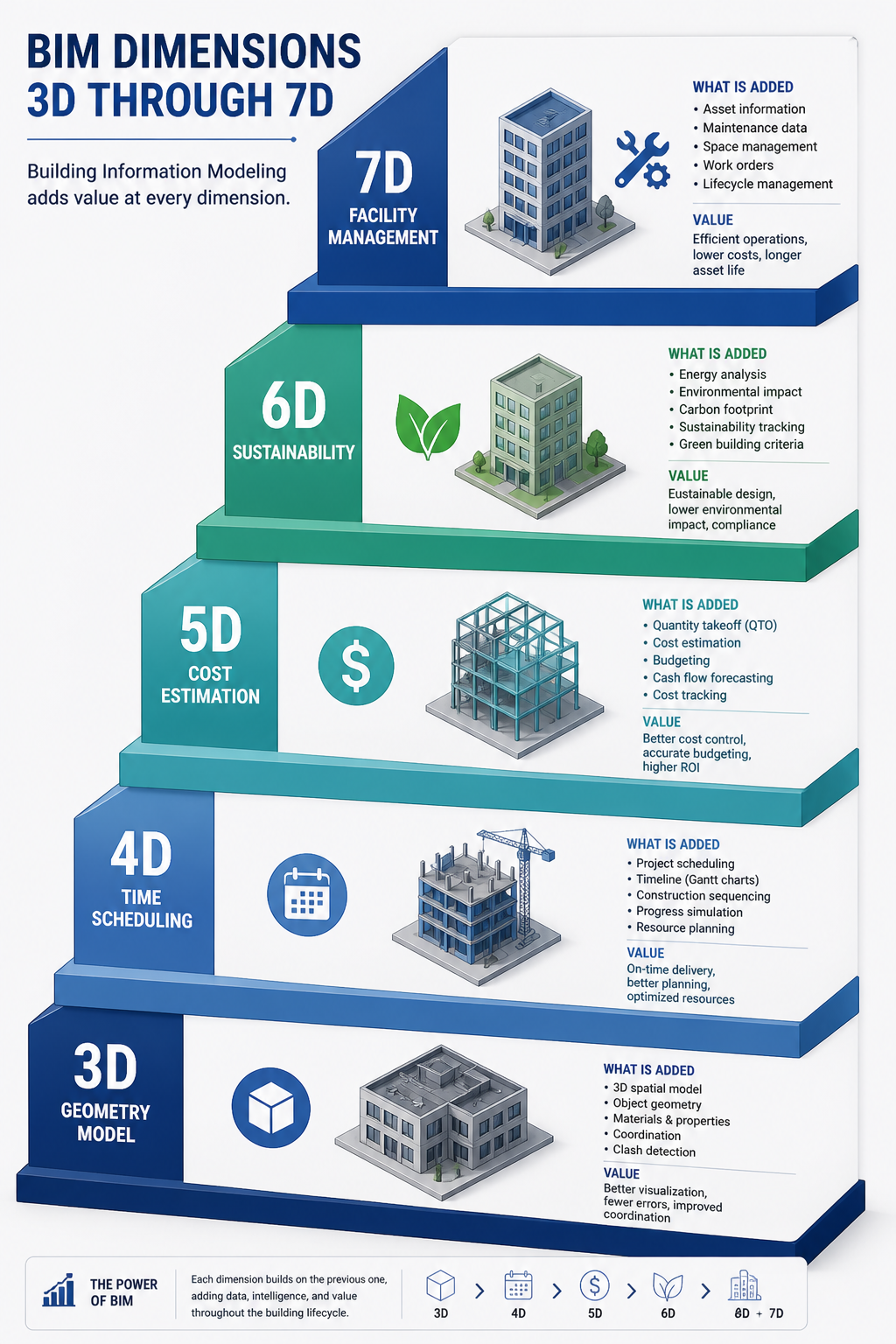
You will often see BIM described in terms of dimensions: 3D BIM, 4D BIM, 5D BIM, and so on. Each dimension adds a layer of information to the model. Here is what each one means in practice.
| BIM Dimension | What It Adds | Practical meaning for your project |
| 3D | Geometry and space | Visual model, clash detection, spatial coordination |
| 4D | Time / schedule | Construction sequencing linked to model elements |
| 5D | Cost / quantities | Quantities auto-extracted, cost tracking per element |
| 6D | Sustainability | Energy analysis, carbon footprint, material lifecycle |
| 7D | Facility management | Operations data, maintenance schedules, asset tracking |
Which Dimensions Matter Most on Real Projects?
3D BIM is now standard on any serious construction project. 4D and 5D BIM are increasingly required on large public sector and infrastructure projects, particularly in the UK, Australia, and Scandinavia where government mandates have pushed adoption. 6D and 7D are growing fastest in the data center, healthcare, and commercial real estate sectors where whole-life cost and facility operations justify the upfront investment in richer data.
BIM vs CAD: What Is the Actual Difference?
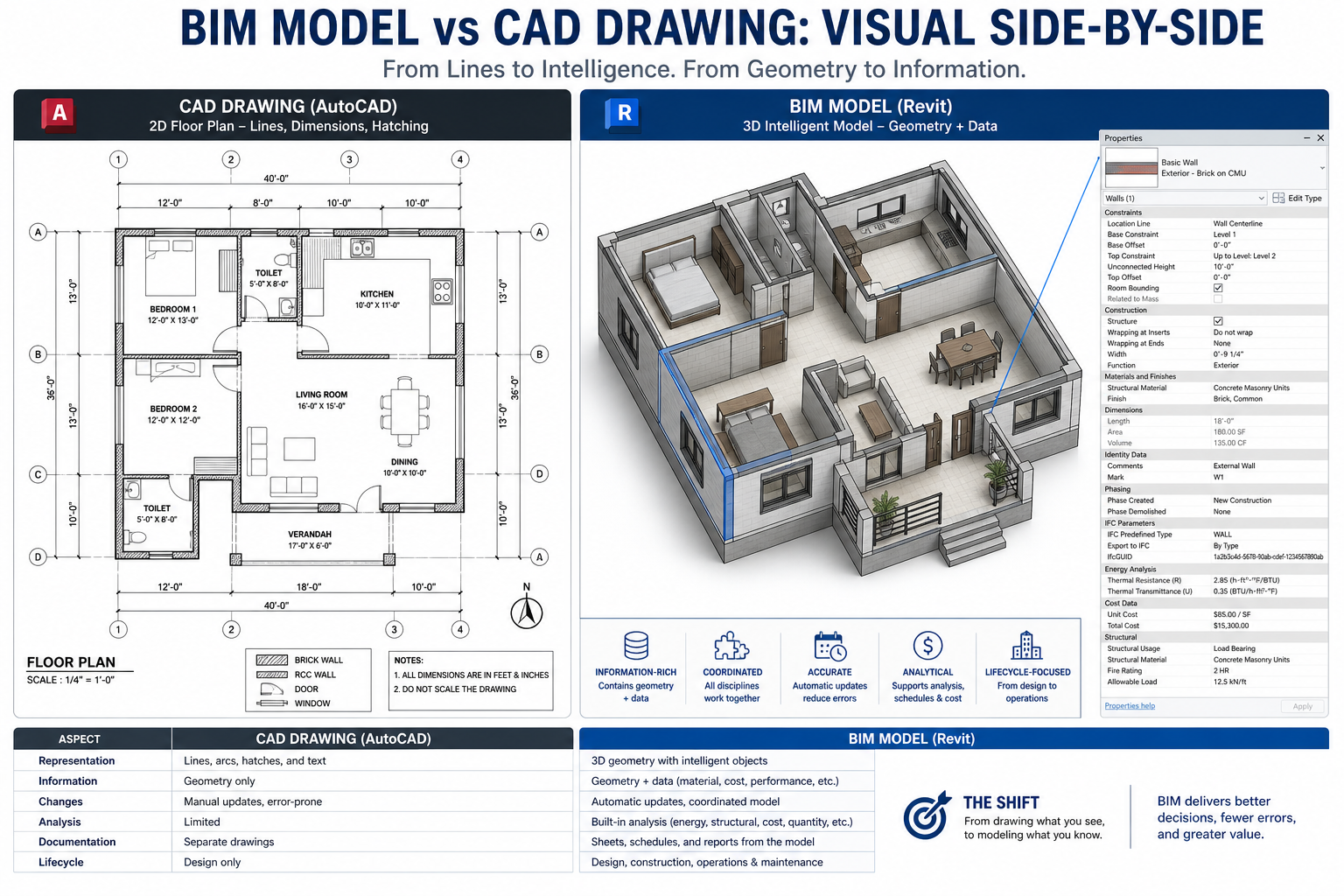
This is the most commonly searched question in this space and it deserves a direct, honest answer. The difference between BIM and CAD is not about 2D versus 3D. It is about what the file contains.
| Aspect | Traditional CAD | BIM |
| Core output | 2D drawings or 3D geometry | Intelligent data-rich model |
| Information stored | Lines, arcs, dimensions | Materials, costs, schedules, specs |
| Collaboration | File-sharing, version confusion | Shared model environment |
| Design changes | Manual redraw across sheets | Model updates propagate everywhere |
| Clash detection | Manual review, often missed | Automated, real-time detection |
| Lifecycle coverage | Design and drafting phase only | Design through demolition |
| Stakeholder access | Engineers and architects only | All disciplines, owners, FM teams |
| Data intelligence | None embedded in geometry | Each element carries rich metadata |
| Primary tools | AutoCAD, MicroStation | Revit, ArchiCAD, OpenBIM tools |
The Wall Analogy
Here is the clearest way to understand the distinction. Draw a wall in AutoCAD. You have drawn two parallel lines with some hatching between them. The file knows nothing else. It does not know it is a wall. It does not know what it is made of, whether it meets fire rating requirements, or how much it costs.
Model a wall in Revit. The model element knows it is a wall. It knows its type, its layers, the material of each layer, the thermal properties of each material, the cost per square meter, the fire rating, and the structural load it can carry. Change the wall type and every drawing that includes that wall updates automatically. The wall is not a drawing element. It is an intelligent object.
That is not a small difference. That is a different category of tool serving a different purpose. Understanding this is the foundation of understanding how BIM and CAD work together rather than treating them as competitors.
| Key point: BIM does not make CAD obsolete. It changes where CAD fits in the workflow. CAD handles precision detailing and fabrication documentation. BIM handles model coordination, information management, and lifecycle data. |
How BIM Works: The Workflow Step by Step
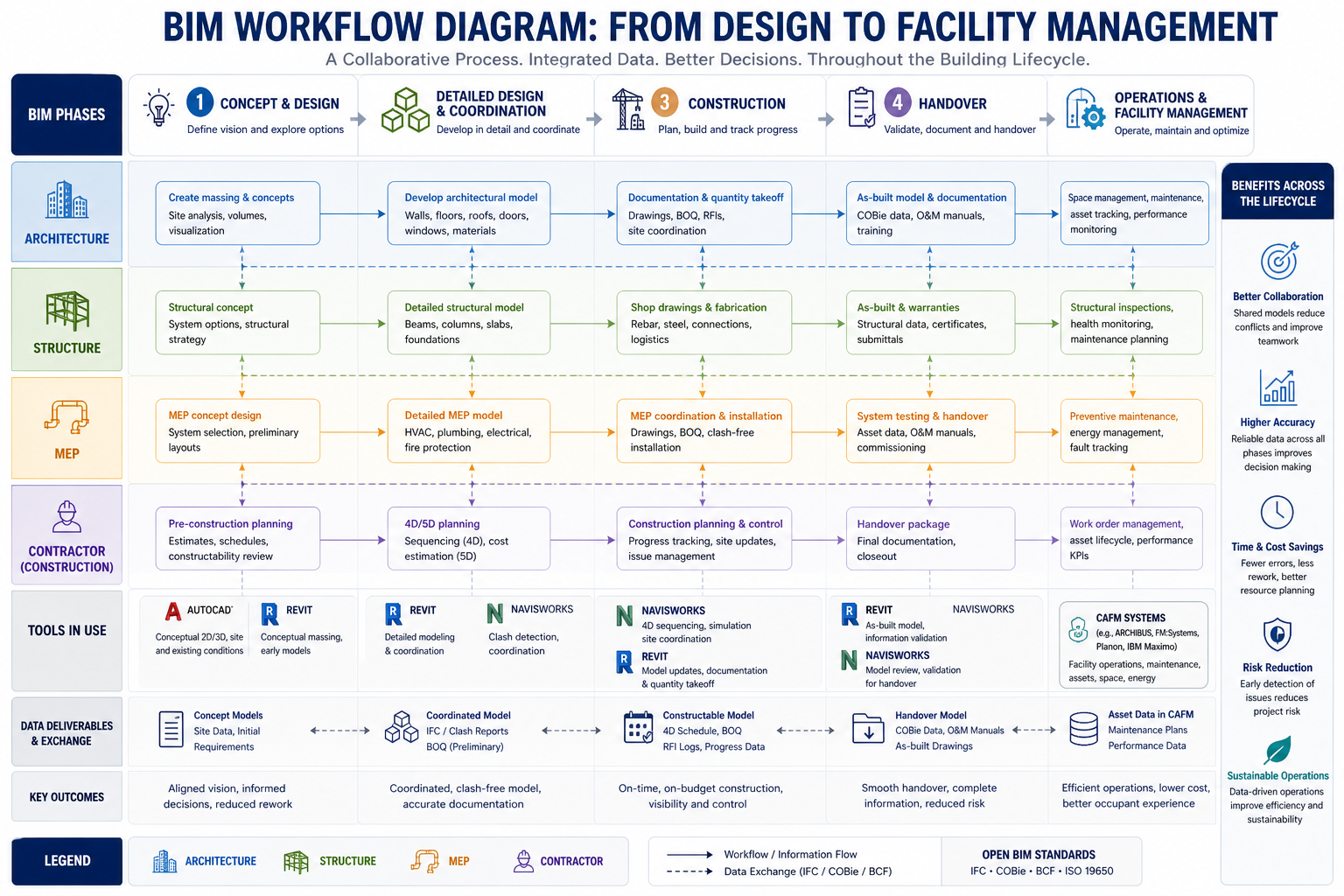
Understanding how BIM works in practice requires looking at how a typical project progresses through the BIM process. This is not the theory. This is the actual workflow on a coordinated BIM project.
Step 1: Setting Up the BIM Execution Plan
Before any modeling begins, the project team establishes a BIM Execution Plan (BEP). This defines the BIM standards for the project: which software will be used, what level of detail is required at each stage, who owns which model, how files will be shared, and what the Common Data Environment (CDE) platform will be.
Getting this right at the start is critical. Projects that skip the BEP and jump straight into modeling almost always create coordination problems later when different disciplines are using incompatible file formats, naming conventions, and coordinate systems.
Step 2: Developing Discipline Models
Each discipline builds its own model. The architect models walls, floors, roofs, doors, and windows in Revit Architecture. The structural engineer models the frame, columns, beams, and foundations in Revit Structure or a structural analysis tool. The MEP engineer models ductwork, pipework, cable trays, and equipment in Revit MEP.
Each model is developed to the required Level of Development (LOD) for that project stage. LOD 100 is a conceptual massing model. LOD 400 is fabrication-ready with construction-level detail. The LOD framework gives the entire team a shared language for how much information each element should contain at each stage.
Step 3: Model Coordination and Clash Detection
The discipline models are federated (combined) in a coordination platform such as Navisworks or BIM Collaborate Pro. The coordination team runs clash detection in BIM to identify where elements from different models intersect or conflict.
A duct from the mechanical model passing through a structural beam. A drainage pipe conflicting with a foundation element. A lighting fixture too close to a sprinkler head. These are the clashes that cost money to fix on site and pennies to resolve on screen. Clash detection is one of the highest-value outputs of a properly coordinated BIM process.
Step 4: Drawing Production from the BIM Model
Here is where CAD and BIM most directly intersect. Floor plans, sections, elevations, and details are generated directly from the BIM model as drawing views. Because the views are driven by the model, they update automatically when the model changes. No more updating the plan and forgetting to update the section.
Complex fabrication details, specialist trade drawings, and certain annotation-heavy documents are still often completed in AutoCAD or exported to CAD format for specialist contractors. The BIM model produces the coordinated geometry. CAD tools add the fabrication-level detail.
Step 5: Quantity Takeoffs and Cost Planning
One of the most immediately valuable BIM benefits for construction is automated quantity extraction. Because every element in the model has material and dimensional properties, the software can generate a complete schedule of quantities directly from the model. Concrete volume, reinforcement weight, number of windows by type, area of external cladding by material: all of it extracted in minutes rather than days.
Cost planners and quantity surveyors connect these schedules to cost databases to produce early-stage estimates that are directly tied to design decisions. Change the structural system and the cost updates. That feedback loop accelerates decision-making significantly.
Step 6: Construction and Site Integration
During construction, the BIM model is used for site coordination, progress tracking, and as-built recording. 4D BIM links model elements to the construction programme so the site team can visualize construction sequencing and identify logistical clashes before they happen on site.
Mobile BIM viewers allow site engineers and foremen to access the model on tablets directly on site, comparing as-built conditions to the design model and recording issues for resolution.
Step 7: Handover and Facility Management
At project completion, the BIM model is handed over to the building owner or facilities management team as an as-built record. The BIM for facilities management use case is arguably the most valuable and the most underutilized. The model contains equipment schedules, maintenance intervals, warranty information, and spare parts data that FM teams need for the entire operational life of the building.
When BIM handover is done properly, the FM team receives a digital twin of the building they can use to plan maintenance, simulate changes, and manage assets through the building’s entire life.
How BIM and CAD Work Together on Real Projects
The framing of BIM vs CAD as a competition misrepresents how most projects actually operate. In practice, the two coexist and complement each other throughout the project lifecycle.
Where BIM Leads
- Multidiscipline coordination and clash detection
- Automated quantity takeoffs and schedule generation
- Design change management and drawing coordination
- Energy analysis and building performance simulation
- Construction sequencing and programme integration
- Asset data management and FM handover packages
Where CAD Still Leads
- Complex fabrication drawings for specialist subcontractors
- Site engineering and setting-out drawings
- Detailed civil and infrastructure drawings where BIM tools are less mature
- 2D annotation-heavy documentation like drainage networks and road layouts
- Disciplines and regions where BIM adoption has not yet reached standard
- Export to DWG format for contractors and consultants outside the BIM environment
The IFC Bridge Between BIM and CAD
IFC (Industry Foundation Classes) is the open standard that allows different BIM software platforms and CAD tools to share data without being locked to one vendor. An architect working in ArchiCAD can share an IFC model with a structural engineer using Tekla Structures and an MEP consultant using Revit, without any of them needing to own the same software.
IFC is the file format equivalent of DWG in the CAD world: the common language that makes cross-platform collaboration possible. Understanding OpenBIM and IFC is increasingly important for anyone working in a multidiscipline project environment.
BIM Software: Key Platforms and What They Do
The BIM software market is dominated by a few major platforms, each with particular strengths for different disciplines and project types.
| Software | Type | Best for | BIM standard | CAD output |
| Autodesk Revit | Full BIM | Architecture / MEP | Industry-wide | DWG, IFC, NWC |
| AutoCAD | CAD / 2D | Drafting, documentation | Limited | DWG universal |
| ArchiCAD | Full BIM | Architecture | OpenBIM / IFC | DWG, IFC, BCF |
| Navisworks | BIM review | Clash detection | Coordination | NWD, NWF |
| Civil 3D | BIM + Civil | Infrastructure | Growing | DWG, LandXML |
| Bentley AECOsim | Full BIM | Large infrastructure | ISO standards | DGN, IFC |
| OpenBIM / IFC | Standard | Cross-platform share | ISO 16739 | IFC (open) |
Autodesk Revit: The Market Standard
Autodesk Revit is the most widely adopted BIM software for architects and MEP engineers globally. It handles architectural modeling, structural framing, and building services in a single environment with strong interoperability within the Autodesk ecosystem. Its dominance in the UK, US, Australia, and most of Europe makes Revit proficiency effectively mandatory for BIM practitioners in those markets.
Navisworks: Coordination and Clash Detection
Navisworks is not a modeling tool. It is a coordination and review platform that aggregates models from different software packages into a single federated model for clash detection, 4D construction simulation, and project review. Most major BIM projects use Navisworks at the coordination stage regardless of which modeling tools the disciplines use.
ArchiCAD: The OpenBIM Alternative
Graphisoft ArchiCAD has a strong following particularly in Europe and Australasia. Its commitment to OpenBIM and IFC export is more mature than Revit’s historically, making it a strong choice for projects involving international teams or public clients requiring vendor-neutral data exchange. The BCF (BIM Collaboration Format) standard for issue tracking also originated in the ArchiCAD ecosystem.
BIM Maturity Levels: Where Your Project or Organisation Sits
BIM adoption does not happen all at once. The BIM maturity levels framework describes the stages of adoption from paper-based working to fully integrated digital delivery.
BIM Level 0
No digital collaboration. Paper-based or 2D CAD only with no data sharing. Still found in smaller firms and specialist trades in some markets but increasingly rare on commercial projects.
BIM Level 1
CAD use in 2D or 3D but with no shared model environment. Files are shared by email or FTP. Each discipline works in isolation. The drawing set is the primary coordination mechanism. Most construction firms operated at Level 1 through most of the 2000s and 2010s.
BIM Level 2
The current UK government mandate and the target standard for major infrastructure and public sector construction globally. Disciplines produce their own BIM models and share them in a Common Data Environment (CDE). Models are federated for coordination. The client receives a data-rich handover package at project completion. BIM Level 2 is where most large commercial and public sector construction projects currently operate.
BIM Level 3 (OpenBIM / iBIM)
A single, integrated, cloud-based model shared across all disciplines in real time. Full lifecycle data integration from design through demolition. True digital twin capability where the model reflects the actual state of the built asset continuously. Level 3 is the direction the industry is moving but is not yet standard practice on most projects in 2026.
AI in BIM Workflows: What Is Actually Changing in 2026
Artificial intelligence is starting to have a measurable impact on how BIM workflows operate, and it is worth understanding where the real value is showing up rather than the hype.
Automated Clash Detection and Resolution
Traditional clash detection flags every geometric conflict and asks the coordination team to resolve them one by one. AI-assisted clash detection is beginning to prioritize clashes by severity and suggest standard resolutions for common conflict types, reducing the time coordination teams spend on routine issues.
Generative Design in BIM
Autodesk’s generative design tools within the 3DEXPERIENCE platform and integrated with Revit can explore thousands of design configurations against performance constraints such as structural efficiency, daylighting, energy consumption, and cost. The engineer or architect sets the constraints. The AI generates the options. The human selects and refines the most promising direction. This is a genuine workflow change, not a demonstration feature.
AI for BIM Documentation
This is where tools like Claude have a direct and practical application. BIM models produce enormous amounts of structured data: quantity schedules, room data sheets, equipment schedules, material specifications, inspection records. Turning that data into readable technical documents, reports, and handover packages has historically been a significant manual effort.
Using AI for BIM documentation and AI workflow engineering principles, engineers and BIM managers can now prompt an AI tool with structured BIM data exports and receive formatted technical reports, FM handover documentation, specification clauses, and RFI responses in minutes rather than days. The BIM model supplies the data. AI handles the communication layer.
Natural Language Queries on BIM Data
Emerging tools are connecting natural language interfaces directly to BIM databases, allowing project team members to ask questions like ‘show me all the doors in the building that are not fire rated to the required standard’ or ‘what is the total volume of concrete in the ground floor slab’ without needing to build custom schedules or run database queries.
For engineers and architects who want to understand how AI tools fit into technical workflows more broadly, the is the authoritative reference for BIM standards including IFC, BCF, and the full OpenBIM specification suite.
BIM Mandates and Industry Adoption: Where the World Stands in 2026
Government and institutional mandates have been the most powerful driver of BIM adoption globally. Understanding where mandates exist helps engineers and firms prioritize their investment in BIM capability.
- United Kingdom: BIM Level 2 has been mandatory on all UK government-funded construction projects since 2016. The UK is now moving toward ISO 19650 compliance as the new standard framework, which builds on Level 2 and provides an internationally aligned methodology.
- Europe: The EU’s public procurement directive encourages BIM on public projects, and countries including Finland, Norway, the Netherlands, Denmark, and Germany have active BIM mandates or strong government-backed adoption programs.
- United States: The GSA (General Services Administration) has required BIM on major federal projects since 2007. State-level and sector-specific mandates vary but adoption is high in commercial construction, healthcare, and education.
- Australia: BIM is required on major federal infrastructure projects and is increasingly standard in state government construction programs. Australian standards largely follow the UK and ISO 19650 framework.
- Middle East: The UAE, Saudi Arabia, and Qatar have driven significant BIM adoption through major infrastructure programs. Dubai’s BIM mandate for buildings above a certain scale has made Revit proficiency a standard requirement for firms working in the region.
Common BIM Mistakes and How to Avoid Them
- Treating BIM as a software purchase rather than a process change. Buying Revit licenses without changing coordination workflows produces expensive, poorly managed models. The process redesign is harder than the software training.
- Skipping the BIM Execution Plan. Without an agreed BEP, each discipline makes different assumptions about coordinate systems, naming conventions, model ownership, and file sharing. The coordination model becomes unusable.
- Over-modeling at early stages. Adding LOD 400 detail at a concept stage wastes time and creates a model that is too rigid to accommodate the design changes that inevitably come in early project phases.
- Ignoring the handover requirement. Many project teams build excellent BIM models during design and construction and then hand over a PDF set at completion. The client receives none of the operational value that BIM makes possible.
- Not training the full team. BIM coordination only works if all disciplines on a project are producing compatible models. A project where the architect uses Revit but the structural engineer sends DWG files is a coordination project, not a BIM project.
Who Benefits Most from BIM and Who Still Needs CAD
BIM Is the Right Tool If You Are:
- An architect or designer on commercial, healthcare, education, or public sector buildings
- An MEP engineer coordinating services across multiple disciplines on a large project
- A structural engineer working on projects where digital coordination with architect and MEP is required
- A main contractor managing subcontractor coordination and construction programming
- A facilities manager responsible for a complex building asset over its operational life
- A client or owner investing in infrastructure who wants digital asset data at handover
CAD Remains the Right Tool If You Are:
- A specialist subcontractor producing fabrication shop drawings in a trade-specific tool
- A civil engineer working on roads, drainage, and utilities where BIM tool maturity is still developing
- A small design practice on residential or small-scale commercial work where BIM overhead is not justified
- An engineer in a sector or region where BIM is not yet the coordination standard
- Producing detailed annotation-heavy drawings for regulatory submission where CAD workflow is faster
Conclusion: BIM and CAD Are Better Together Than Either Is Alone
The question ‘what is BIM‘ has a technical answer and a practical answer. Technically: it is a data-rich parametric modeling process where every element carries structured information about what it is, not just what it looks like. Practically: it is the infrastructure that allows complex building projects to be designed, coordinated, built, and operated without the information loss and rework that has characterized the construction industry for decades.
BIM does not replace CAD. It changes where CAD belongs in the process. CAD tools handle precision detailing, specialist fabrication documentation, and disciplines where BIM tool maturity has not yet reached the same level. BIM handles coordination, information management, lifecycle data, and the intelligent model that the whole project team works from.
The engineers and architects who understand how to operate effectively in both environments, who know when to use Revit for BIM coordination and when to use AutoCAD for detailed documentation, and who are beginning to incorporate AI tools to handle the documentation and data communication layer, are the ones who will do the most valuable work on the most complex projects in the years ahead.
Learn the process first. The software follows from understanding the workflow.
Frequently Asked Questions
What is BIM in simple terms?
BIM stands for Building Information Modeling. It is a process of creating and managing a digital representation of a building or infrastructure project that contains not just geometry but also data such as materials, costs, schedules, and specifications. Unlike a CAD drawing that shows what something looks like, a BIM model contains information about what it is and how it behaves throughout its entire lifecycle.
What is the difference between BIM and CAD?
CAD produces geometry: lines, arcs, and surfaces that represent a design visually. BIM produces intelligent models where every element carries embedded data. A wall in AutoCAD is a set of lines. The same wall in Revit knows its material, thermal resistance, cost, fire rating, and structural load. BIM enables automatic quantity takeoffs, clash detection, and lifecycle management that CAD cannot support.
Does BIM replace CAD?
BIM does not fully replace CAD. CAD tools like AutoCAD remain essential for 2D documentation, detailed fabrication drawings, and disciplines where BIM tools are not yet standard. In practice, most large construction projects use both: BIM platforms for coordination and model management, and CAD tools for detailed drawing production and specialist trade work.
What software is used for BIM?
The most widely used BIM software includes Autodesk Revit (dominant in architecture and MEP), Navisworks (clash detection and coordination), ArchiCAD, Bentley AECOsim, and Civil 3D for infrastructure. The IFC open standard allows different BIM tools to share data across platforms without being locked to one vendor.
What are the levels of BIM?
BIM maturity is described in levels: Level 0 is paper-based drawing with no collaboration. Level 1 is basic CAD in 2D or 3D without data sharing. Level 2 is collaborative BIM with data-rich models shared between disciplines, currently the UK government mandate standard. Level 3 is fully integrated, cloud-based BIM with a single shared model across the entire project lifecycle, often called OpenBIM or iBIM.
Can AI be used in BIM workflows?
Yes. AI tools are being used in BIM workflows for automated clash detection, generative design exploration, energy performance prediction, and natural language documentation. Tools like Claude can assist with BIM documentation, specification writing, quantity takeoff interpretation, and structuring the data outputs from BIM models into readable technical reports, making the information layer of BIM significantly faster to produce and communicate.
buildingSMART International: BIM standards and OpenBIM specifications’
Leave a Reply