Introduction: Why This Comparison Actually Matters
If you have ever searched ‘AutoCAD vs SolidWorks vs CATIA‘ you have probably landed on articles that list features without telling you anything useful. This is not that article.
The truth is that picking the wrong CAD tool costs real money. Not just the license fee. The bigger cost is time spent learning a tool that is not standard in your industry, delivering drawings in a format your clients cannot open, or trying to manage an aerospace assembly in software built for 2D floor plans.
This guide gives you a straight CAD software comparison with a clear verdict for each situation. We cover the technical differences, the industry fit, the learning curve, the cost reality, and where AI in CAD design is starting to change the picture for all three platforms.
By the end you will know exactly which tool belongs in your workflow and why.
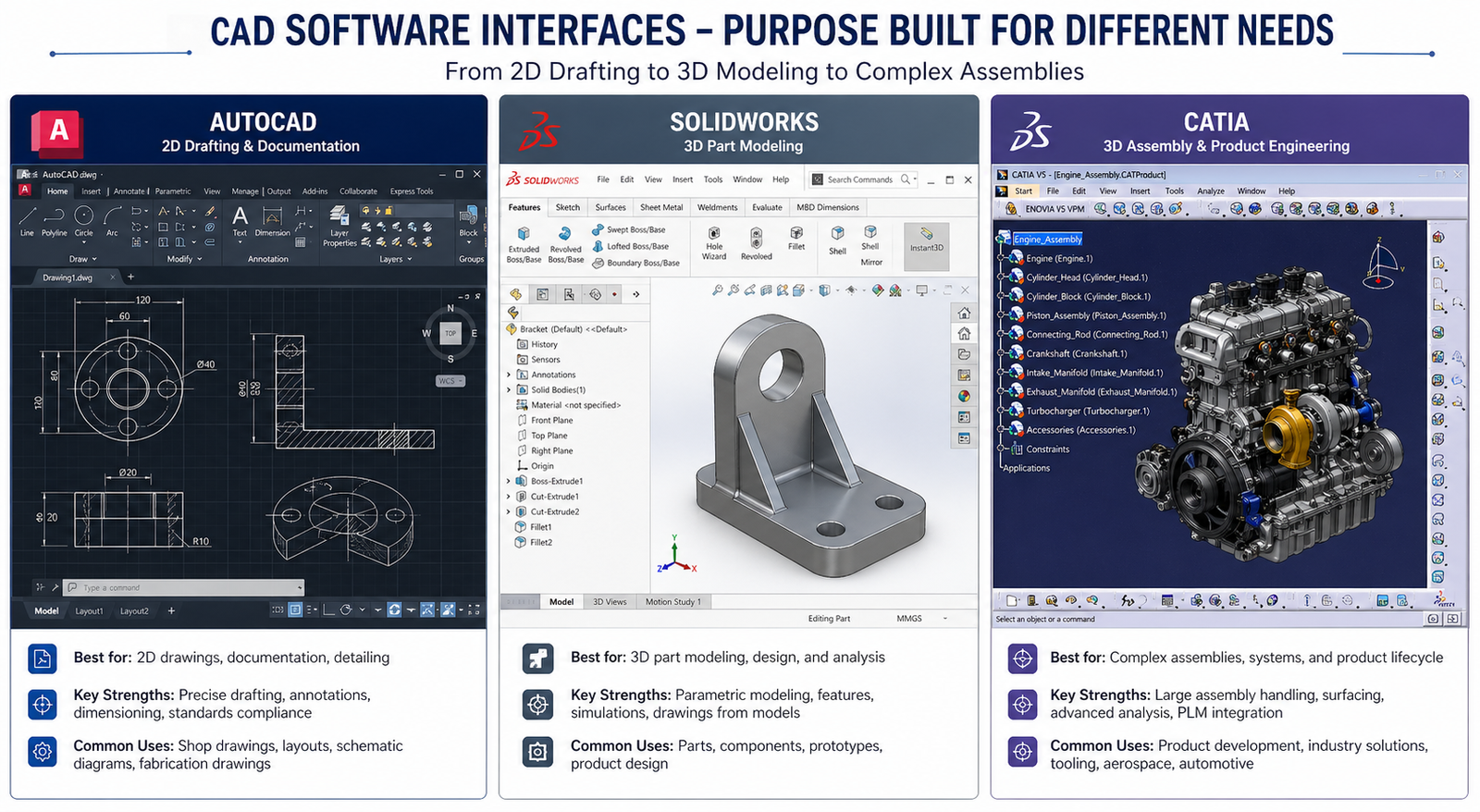
| Quick answer: AutoCAD is best for 2D drafting and architecture. SolidWorks is best for 3D mechanical product design and manufacturing. CATIA is best for aerospace, automotive, and large complex assemblies. The right choice depends on your industry, project complexity, and team size. |
What Each CAD Tool Actually Does
AutoCAD: The 2D Drafting Standard
AutoCAD has been in engineering offices since 1982. It is the industry-standard CAD software for 2D technical drawings and has earned that reputation through decades of refinement and near-universal adoption across architecture, civil engineering, MEP, and construction.
AutoCAD does have 3D capabilities, and those have improved significantly in recent years. But it is not a parametric solid modeler. If you change a dimension in AutoCAD, you are not driving geometry the way you would in SolidWorks. You are editing lines and arcs. That distinction matters enormously when you are doing iterative mechanical design.
Where AutoCAD genuinely excels:
- 2D technical drawings and construction documentation
- DWG format compatibility across the entire industry
- Discipline-specific toolsets: AutoCAD MEP, AutoCAD Electrical, AutoCAD Civil 3D
- Annotation, title blocks, sheet sets, and drawing management
- Scripting and automation with LISP, Python, and the newer AutoCAD API
SolidWorks: Parametric 3D Modeling for Mechanical Engineers
SolidWorks is the dominant 3D CAD software for mechanical engineers in general manufacturing, consumer products, industrial equipment, and medical devices. It uses a feature-based parametric approach: your model is driven by a sequence of features, each controlled by dimensions and relationships. Change a dimension and the entire model updates.
That parametric approach is what makes SolidWorks so efficient for iterative design. You are not redrawing geometry when the spec changes. You are updating a value in the feature tree.
SolidWorks core strengths:
- Parametric part and assembly modeling with full design intent
- Sheet metal design with bend tables, K-factors, and flat pattern output
- Weldments, structural frames, and pipe routing
- Built-in simulation with SolidWorks Simulation (FEA) and Flow Simulation (CFD)
- PhotoView 360 rendering and SolidWorks Visualize for product presentations
- BOMs, drawing views, and tight integration with manufacturing workflows
CATIA: Engineering at Scale for Complex Programs
CATIA is in a different category from the other two. It is not just a professional CAD software for individual engineers, it is a full product lifecycle platform used by engineering organizations running programs with hundreds of contributors, millions of parts, and tolerance requirements measured in fractions of a millimeter.
Boeing, Airbus, Dassault Aviation, BMW, Ferrari, and most major automotive and aerospace OEMs run CATIA. Not because it is the easiest tool in the room, but because at the scale of an A380 or a new vehicle platform, nothing else handles the complexity with the same reliability.
What sets CATIA apart:
- Class-A surface modeling for automotive body design
- Extremely large assembly management without performance collapse
- Generative Shape Design for complex aerodynamic surfaces
- Deep integration with ENOVIA for PLM, change management, and multi-site collaboration
- Systems engineering capabilities that go beyond pure geometry
- Kinematics, tolerancing, ergonomics, and manufacturing simulation in one environment
AutoCAD vs SolidWorks vs CATIA: Feature-by-Feature Breakdown
Here is the honest breakdown across the criteria that matter most when choosing a CAD platform.
| Feature | AutoCAD | SolidWorks | CATIA | Best For |
| Primary use | 2D drafting / 3D | 3D mechanical | Complex assemblies | Depends on project |
| Learning curve | Moderate | Moderate | Steep | AutoCAD / SolidWorks |
| Parametric modeling | Limited | Excellent | Excellent | SolidWorks / CATIA |
| Large assemblies | Not ideal | Good | Industry-leading | CATIA |
| Sheet metal | Basic | Very strong | Strong | SolidWorks |
| Simulation (FEA/CFD) | Minimal | Built-in (basic) | Advanced | CATIA |
| Industry standard in | Architecture / MEP | Mfg / Consumer | Aerospace / Auto | Varies by sector |
| Licensing cost | Subscription | Mid-high | High / enterprise | AutoCAD (entry) |
| File collaboration | DWG universal | PDM / Vault | ENOVIA / PLM | CATIA (enterprise) |
| AI / automation | Basic scripting | Growing | Growing | Watch this space |
Parametric Modeling: Where SolidWorks and CATIA Pull Ahead
AutoCAD is not a parametric modeler in the mechanical engineering sense. If you need parametric CAD modeling where geometry is driven by fully constrained sketches, feature trees, and dimensional relationships, you are in SolidWorks and CATIA territory. Both handle this well. CATIA goes further with knowledge-based engineering where design rules and formulas can drive geometry automatically.
Assembly Management: CATIA Wins at Scale
For assemblies with hundreds of components, SolidWorks handles it well but can slow down on very large models even with lightweight mode enabled. CATIA’s architecture was specifically built for massive assemblies. It manages hundreds of thousands of parts with multi-site collaboration through ENOVIA without the performance degradation you would see in SolidWorks at that scale.
For most mechanical engineering projects, SolidWorks assembly management is more than adequate. The CATIA advantage only becomes critical at aerospace or automotive program scale.
Simulation Capabilities
AutoCAD’s simulation story is minimal. SolidWorks includes a built-in FEA package (SolidWorks Simulation) that covers linear static, thermal, fatigue, frequency, and drop test analysis. It is solid for most manufacturing applications. For more advanced nonlinear or coupled physics problems, you would typically export to ANSYS or Abaqus regardless of which CAD tool you are using.
CATIA includes more advanced simulation capabilities through its Simulia integration, but the real advantage is workflow: simulation is tightly linked to the geometry model and the PLM data, which matters in programs where design changes need to be tracked and re-simulated systematically.
Learning Curve: Honest Assessment
This is one of the most common questions in any SolidWorks vs CATIA vs AutoCAD discussion, and the honest answer is:
- AutoCAD: Moderate. The interface is logical for 2D work. 3D adds complexity. Most people are productive in basic AutoCAD within 2 to 4 weeks of focused learning.
- SolidWorks: Moderate to steep depending on depth. Basic part modeling: a few weeks. Assemblies, drawings, simulation, and advanced features: several months to use fluently. Very well documented with a large community.
- CATIA: Steep. The interface is less intuitive than SolidWorks. The sheer number of workbenches and modules is overwhelming at first. Expect months before you are productive, and years before you are truly proficient.
| Key insight: Learning curve should be weighed against industry fit. CATIA’s steep curve is worth it if your career target is aerospace or automotive. If you are designing consumer products or machine components, SolidWorks gives you more output per hour of learning time. |
Cost and Licensing
AutoCAD runs on a subscription model starting at roughly $255/month or $2,031/year for a single license in 2025/2026. The industry-specific toolsets are included in the higher-tier subscriptions.
SolidWorks pricing varies by reseller and region but a SolidWorks Standard license typically runs $3,000 to $4,000 per year for subscription. SolidWorks Professional and Premium add simulation, rendering, and PDM tools at higher cost tiers.
CATIA is enterprise-priced and typically sold through Dassault Systemes resellers or directly to large organizations. Expect $10,000 to $40,000+ per seat annually depending on the configuration and modules. Individual licenses for independent engineers are not the typical model, though the 3DEXPERIENCE platform has introduced more flexible options.
| Budget reality: For independent engineers, startups, and small teams: AutoCAD or SolidWorks. CATIA economics only make sense in an organizational context where the PLM and collaboration value justifies the per-seat cost. |
Which CAD Software Is Right for Your Industry
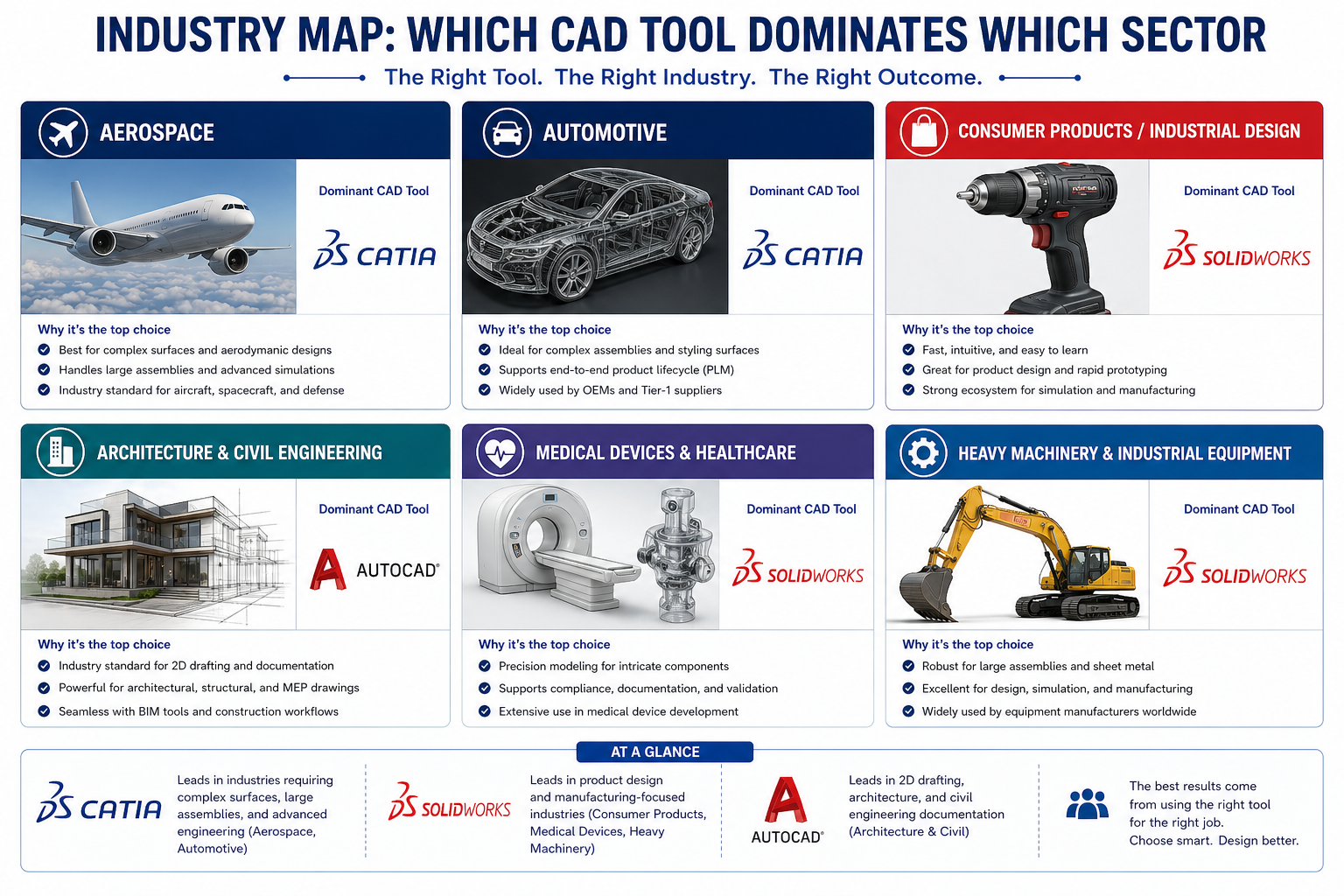
Aerospace and Defense
CATIA is the dominant platform and has been for decades. If you are targeting a career at Boeing, Airbus, Lockheed, Northrop Grumman, or any major aerospace tier-one supplier, learning CATIA is not optional. CATIA for aerospace engineering is effectively an industry requirement at the program level. SolidWorks appears at smaller aerospace firms and in prototyping contexts, but at the OEM level, CATIA and its ecosystem are the standard.
Automotive
CATIA again, particularly for body design, powertrain, and chassis systems. Class-A surfacing for exterior body panels requires CATIA’s Generative Shape Design capabilities. However, SolidWorks is used extensively at tier-two and tier-three automotive suppliers for component design where the complexity level does not require CATIA’s full capability.
General Manufacturing and Industrial Equipment
This is SolidWorks territory. Machine design, industrial automation equipment, pumps, valves, conveyors, presses, custom machinery: SolidWorks handles all of it with an efficiency that justifies the learning investment. The integration with manufacturing toolchains (CAM software like HSMWorks, GibbsCAM, and Mastercam) is strong and the DXF/DWG interoperability with AutoCAD for 2D drawings is good.
Consumer Product Design
SolidWorks is the most common choice for consumer product development because it handles the full workflow: concept modeling, detailed design, sheet metal enclosures, injection molding geometry with draft angles and parting surfaces, rendering for marketing, and BOM generation for procurement. SolidWorks for product design is a well-established workflow that most product development agencies have standardized on.
Architecture, Construction, and MEP
AutoCAD is the standard here, supplemented by Autodesk Revit for BIM workflows. An architect or construction professional asking whether to learn SolidWorks for building design is asking the wrong question. The AutoCAD ecosystem, particularly AutoCAD Architecture and AutoCAD MEP, has the discipline-specific tools, the DWG-based collaboration standard, and the contractor integration that the construction industry runs on.
Medical Device Engineering
SolidWorks is the most common choice in medical device development, particularly for Class I and Class II devices. The SolidWorks PDM system handles the design history and approval workflows that FDA submissions require. Some complex implant geometry and medical robotics programs use CATIA, but for most medical device companies, SolidWorks covers the need at a more accessible cost.
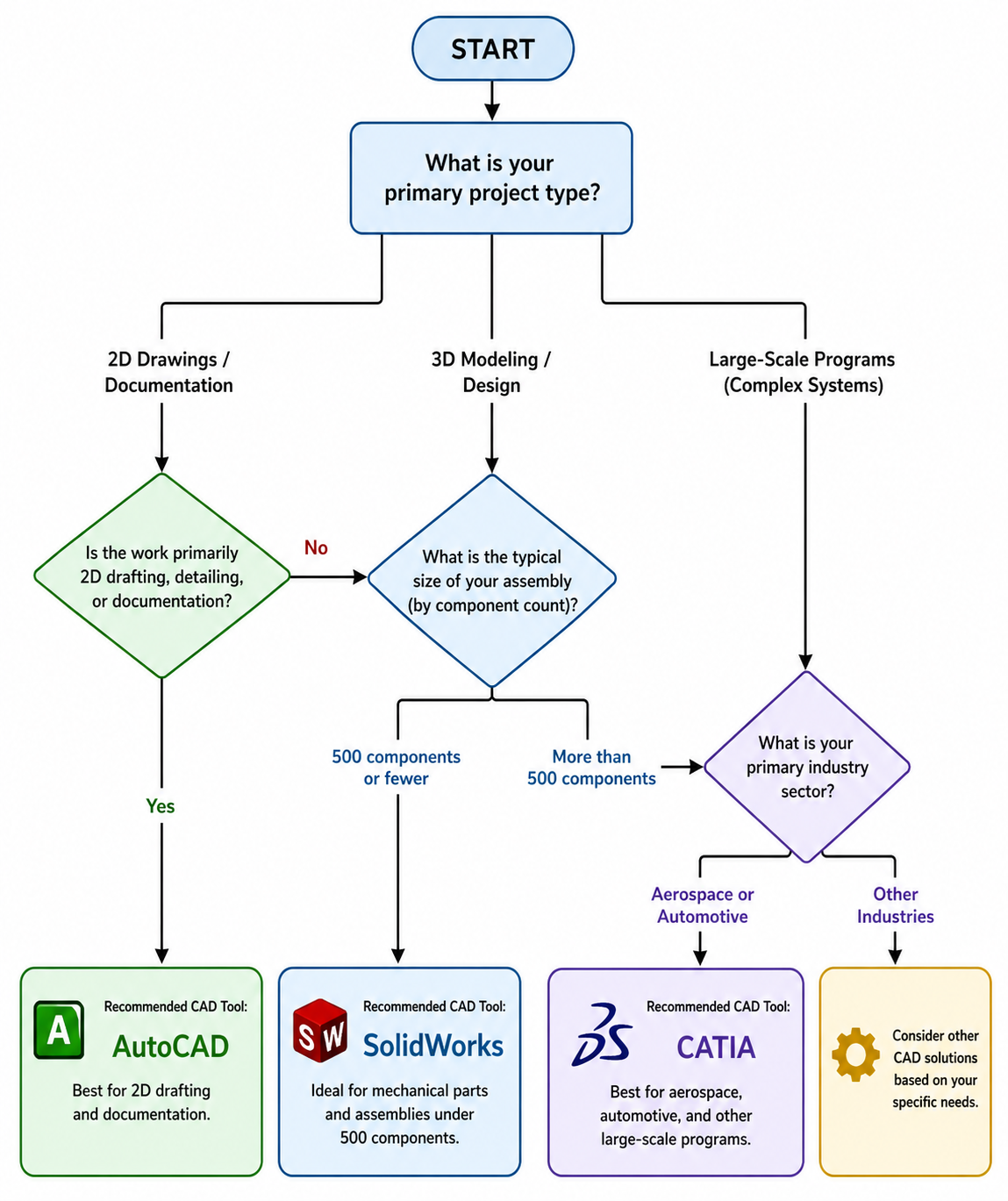
Quick Project-to-Tool Reference
Use this table to find your situation and get a direct recommendation.
| Your project type | Best CAD software | Why |
| Architecture / construction | AutoCAD | DWG standard, 2D-first workflow |
| Consumer product design | SolidWorks | Parametric ease, sheet metal, rendering |
| Aerospace components | CATIA | Handles complex surfaces, tight tolerances |
| Automotive body design | CATIA | Class-A surfacing, OEM integration |
| Small machine shop parts | SolidWorks | Affordable, fast CAM integration |
| Construction MEP | AutoCAD MEP | Discipline-specific toolsets |
| Large multi-team programs | CATIA | PLM / ENOVIA data management |
| Startup / solo engineer | SolidWorks | Best balance of power and cost |
AI in CAD Design: How It Changes the Picture in 2026
All three platforms are incorporating AI capabilities, and understanding where those capabilities are heading matters when you are making a long-term tool investment. AI in CAD design is no longer theoretical: it is showing up in generative design, automated drawing creation, simulation setup, and natural language interfaces.
AutoCAD and AI
Autodesk has been rolling out AI features across its platform including intelligent block insertion, automated linework cleanup, and early natural language tools through Project Bernini and related research. The AutoCAD API also integrates well with external AI tools for scripting and workflow automation. For engineers interested in AI workflow engineering in a drafting context, AutoCAD’s scripting layer is accessible and well-documented.
SolidWorks and AI
Dassault Systemes has been building AI into the 3DEXPERIENCE platform. SolidWorks Topology Optimization is already an AI-adjacent tool that optimizes part geometry against load conditions and manufacturing constraints. The platform is moving toward more intelligent design suggestions, automated simulation setup, and natural language-driven design assistance. This is where prompt engineering for CAD starts to have a direct workflow application.
CATIA and AI
CATIA’s AI integration is primarily through the 3DEXPERIENCE platform at the program level: AI-assisted configuration management, automated rule-based design checks, and intelligent assembly guidance. The focus is less on individual productivity and more on managing program-level complexity. For large organizations, this is where AI delivers the most measurable return.
SolidWorks official blog on CAD and AI design trends
| The bigger picture: Regardless of which CAD tool you use, AI assistants like Claude can dramatically accelerate your specification writing, simulation setup documentation, technical reporting, and design review preparation. The CAD tool handles the geometry. AI handles the language layer around it. Learning to use both effectively is the 2026 engineering advantage. |
For engineers who want to go deeper on this topic, the regularly covers how 3D CAD workflows are evolving alongside AI and simulation tools, with practical case studies from real engineering projects.
Should You Learn More Than One CAD Tool?
This question comes up a lot, especially from engineering students. The practical answer: go deep on one first, then build familiarity with others as your career demands it.
The core skills of parametric modeling, assembly management, GD&T, and drawing interpretation transfer across platforms. An engineer who is genuinely proficient in SolidWorks will pick up CATIA fundamentals faster than someone starting from zero, because the underlying thinking is similar. The command names differ; the logic is the same.
Where multiple tool knowledge becomes genuinely valuable: consulting roles where you work across different client environments, careers that span both concept design (often SolidWorks) and production program support (often CATIA), and roles at suppliers who serve multiple OEMs with different CAD standards.
- Start with: the tool most used in your target industry or your current employer’s environment
- Add later: whichever tool appears most in the job listings you want to be qualified for in three to five years
- Do not spread thin: surface-level knowledge of five tools is less valuable than genuine proficiency in two
Common Mistakes When Choosing CAD Software
- Choosing by what your university taught. Universities teach what they have licenses for, not necessarily what industry uses. Always check the job listings in your target sector before defaulting to the tool you learned in school.
- Picking based on YouTube tutorials rather than workflow fit. The most popular tutorials are for the most popular tools. That is not the same as the right tool for your project type.
- Underestimating CATIA’s complexity. Engineers who have used SolidWorks extensively sometimes assume CATIA is a straightforward step up. It is not. Budget serious time for CATIA onboarding.
- Overestimating AutoCAD’s 3D capability. AutoCAD 3D is not equivalent to parametric solid modeling. If your work involves mechanical assemblies with design intent and simulation, you need SolidWorks or CATIA.
- Ignoring the ecosystem. The CAD tool is only part of the decision. The PDM/PLM system, the CAM integration, the simulation tool, and the collaboration workflow all connect to your CAD choice. Evaluate the full stack.
Conclusion: Make the Decision Based on Your Actual Work
The AutoCAD vs SolidWorks vs CATIA question does not have a universal winner. It has a right answer for each engineering context, and now you have the information to find yours.
If you are in architecture, construction, or civil engineering: AutoCAD is your tool. If you are in mechanical product design, manufacturing, or medical devices: SolidWorks is your tool. If you are in aerospace, automotive, or large-scale multi-discipline programs: CATIA is the standard you need to meet.
Whichever platform you choose, the skills around it matter as much as the tool itself. Knowing how to write a complete design specification, structure a simulation correctly, document a design decision clearly, and communicate technical intent accurately: these are the skills that AI tools like Claude can help you develop faster and execute more consistently.
Choose the right tool for the work in front of you. Go deep. Then build outward.
Frequently Asked Questions
1. Which is better: AutoCAD, SolidWorks, or CATIA?
There is no single best option. AutoCAD is best for 2D drafting and architecture. SolidWorks is best for mechanical product design and manufacturing. CATIA is best for aerospace, automotive, and large-scale complex assemblies. The right choice depends entirely on your industry, project type, team size, and budget.
2. Is SolidWorks easier to learn than CATIA?
Yes, SolidWorks has a significantly shorter learning curve than CATIA. Most mechanical engineers become productive in SolidWorks within weeks. CATIA is a deeper, more complex platform designed for large engineering organizations and typically requires months of structured training to use effectively.
3. Can AutoCAD do 3D modeling like SolidWorks?
AutoCAD has basic 3D modeling tools but it is not a parametric solid modeler. SolidWorks uses a feature-based parametric approach where dimensions drive geometry. For serious 3D mechanical design with design intent, simulation, and BOMs, SolidWorks is significantly more capable than AutoCAD.
4. Which CAD software is used in aerospace?
CATIA is the dominant CAD software in the aerospace industry. Boeing, Airbus, and most major aerospace OEMs use CATIA for design, assembly management, and systems engineering. Its ability to handle extremely large assemblies, surface complexity, and integration with PLM systems like ENOVIA makes it the aerospace industry standard.
5. Is CATIA worth learning for mechanical engineers?
CATIA is worth learning if you plan to work in aerospace, automotive, or large defense programs. If your career target is general mechanical product design, manufacturing, or consumer goods, SolidWorks is more practical and widely used. Check the job listings in your target sector and choose based on what employers are asking for.
6. Can I use prompt engineering to improve my CAD workflow in any of these tools?
Yes. Prompt engineering techniques, particularly with AI tools like Claude, can significantly improve how you document designs, generate specifications, set up simulation inputs, and write technical reports, regardless of whether you use AutoCAD, SolidWorks, or CATIA as your primary modeling tool.
Leave a Reply