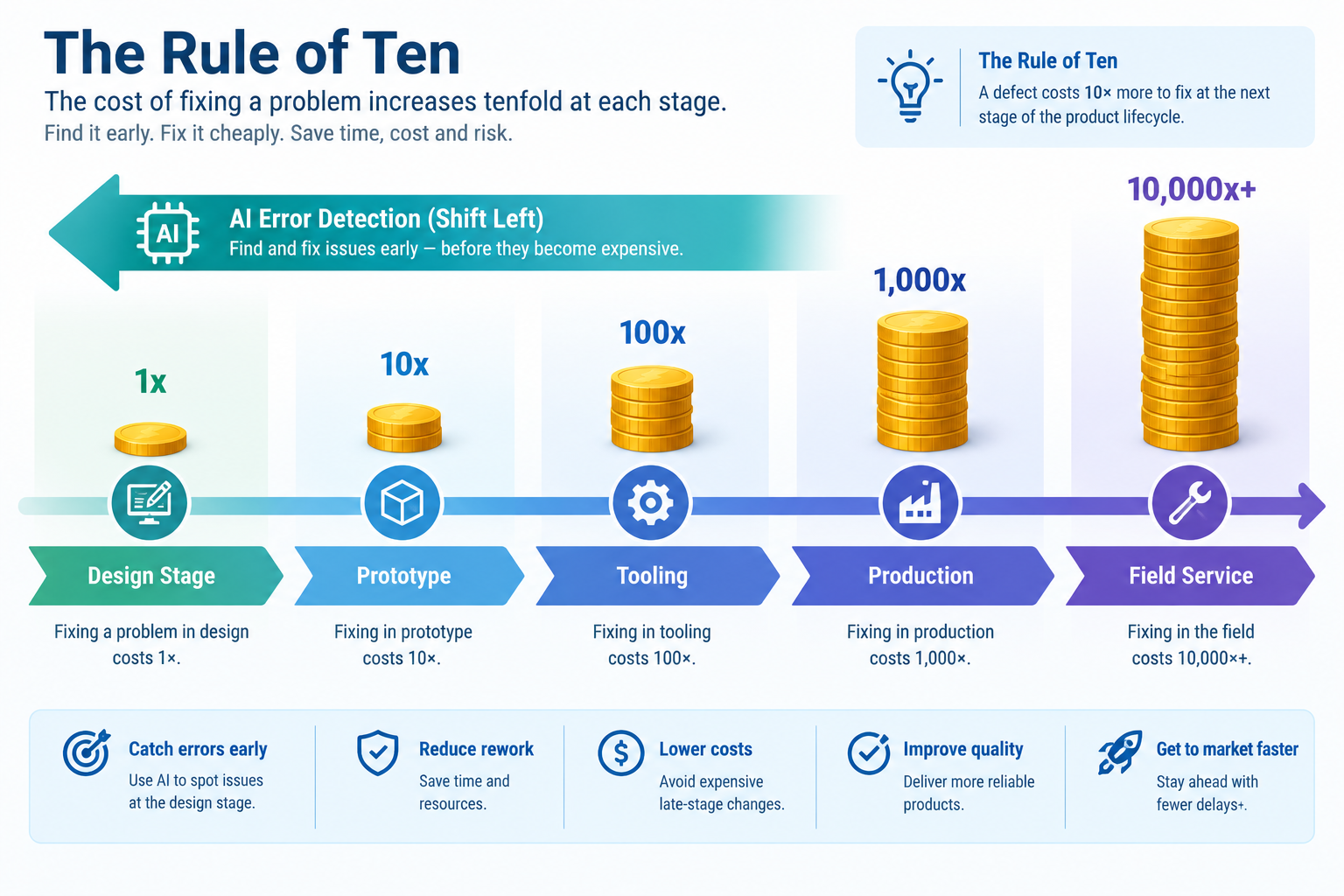
The Rule of Ten is one of the most important and most ignored principles in engineering quality management. It states that the cost of correcting a design error multiplies by approximately ten at each successive stage of the product development and manufacturing process. An error caught during the design phase costs one unit to fix. The same error found during prototype build costs ten units. Found during production tooling, one hundred units. Found in field service after product launch, one thousand units, plus warranty costs, recall risk, reputation damage, and potential liability.
The mathematical implication is stark: an investment in AI tools that detects and prevents even a fraction of design errors before manufacturing pays back orders of magnitude more than the same investment in production-stage quality inspection. Yet most engineering quality investment goes into production inspection, the expensive end of the value chain, because the errors are visible there. Design errors are invisible until they become physical problems.
AI is making design-stage error detection practical, systematic, and fast in 2025. Not as a future concept, but as a set of tools available today that mechanical engineers, CAD designers, product design engineers, and BIM engineers can implement in their current workflow. This guide covers the seven major categories of design errors that AI can detect before manufacturing, the specific tools and LLM workflows that detect them, the cost savings that justify the investment, and the implementation approach that makes AI error detection a standard part of the design release process rather than an occasional extra step.
| The Seven Design Error Categories AI Can Detect: (1) Geometric errors (non-manifold, degenerate, invalid solid geometry) | (2) DFM violations (process-specific manufacturability rule failures) | (3) Tolerance and fit errors (stack-up failures, impossible fits) | (4) Drawing annotation errors (missing dimensions, incorrect GD&T, incomplete specifications) | (5) Specification non-compliance (design attributes that fail stated requirements) | (6) Interface and assembly errors (clash, incorrect mating geometry, assembly sequence impossibility) | (7) Material specification errors (incorrect, unavailable, or non-compliant material assignments) |
The True Cost of Design Errors: The Rule of Ten in Practice
The Rule of Ten (also documented as the 1-10-100 rule and referenced in ISO 9000 cost of quality frameworks) describes the exponential cost escalation of design errors as they propagate through the product lifecycle. The specific multipliers vary by industry and product complexity, but the directional principle is well-supported by engineering cost data across automotive, aerospace, medical device, and industrial manufacturing sectors.
Rule of Ten cost of quality infographic showing exponential design error correction cost from 1x at design stage to 10000x at field service with AI error detection shift-left arrow
| Stage Where Error is Found | Relative Cost to Fix | Industry Example | What ‘Fixing’ Involves |
| During design (before release) | 1x | Designer corrects the CAD model and drawing in 2 hours | Model edit, drawing update, review sign-off |
| During design review (before tooling) | 5-10x | Design review finds a DFM violation; tooling has been quoted but not released | Model revision, revised DFM review, revised quote, schedule delay |
| During first article / prototype build | 10-100x | Prototype reveals a clearance interference discovered at assembly | Model revision, revised drawing, new prototype parts, schedule delay of weeks |
| After tooling release (tool modification) | 100-1,000x | Injection mould tool requires a steel insert to correct a sink mark from wall thickness violation | Tool modification (days of machining), trial shots, revised PPAP submission, production delay |
| During production ramp / early production | 1,000-10,000x | Production parts are failing dimensional inspection due to a tolerance specification error | Drawing change, ECO, updated PPAP, 100% inspection during transition, scrap/rework of non-conforming stock |
| In field service / after market launch | 10,000-100,000x+ | Field failure due to a fatigue crack at an underspecified fillet radius; warranty returns and recall | Product recall or field service campaign, warranty costs, customer claims, regulatory notification, reputational damage |
The practical implication for engineering teams evaluating AI error detection tools is straightforward: if an AI DFM tool costs $10,000 per year and prevents one injection mould tool modification per year (saving $50,000-$200,000 in tool rework, delayed production, and scrap), the tool pays back 5-20x in the first year. The same logic applies to every error category, the earlier in the design process an error is detected, the lower the cost of correction and the higher the return on investment in AI detection capability.
| The Hidden Cost of Design Errors: The Rule of Ten captures direct correction costs but understates the full cost of design errors, which also includes: programme schedule delay (prototype rebuilds and tool modifications add weeks to months to a development timeline); engineering opportunity cost (engineers diverted to rework cannot work on new programmes); supplier relationship damage (repeated design changes after tooling release damage the trust and willingness to quote of precision manufacturing suppliers); and product quality impact (rushed corrections to meet schedule often introduce secondary errors that are not caught before the next cycle). |
Error Category 1: Geometric Errors in CAD Models
Geometric errors, invalid solid geometry, non-manifold topology, open surface boundaries, and degenerate faces, are the most fundamental category of design error because they affect every downstream process simultaneously. A model with non-manifold geometry will fail to mesh in FEA (producing incorrect or absent simulation results), fail to export correctly to STEP or STL (producing corrupt files that cause manufacturing confusion), fail to generate correct mass properties (producing wrong weight and centre of gravity data), and fail to produce correct 2D views in drawing generation (producing missing or incorrect section views).
How Geometric Errors Enter CAD Models
Understanding how geometric errors are introduced is as important as knowing how to detect them, because prevention is more efficient than detection:
- Boolean operation failures: When a Union, Subtract, or Intersect operation produces a result with zero-thickness regions or T-intersections at the operation boundary. These are often invisible in the viewport but detectable by geometry checking tools.
- Import from foreign CAD systems: STEP, IGES, and Parasolid imports from other CAD tools sometimes introduce geometry healing failures, gaps between faces, duplicate faces, or face normal inconsistencies that the importing kernel could not resolve automatically.
- Surface modeling patching: When multiple NURBS surface patches are stitched into a solid, small geometric inconsistencies at patch boundaries can produce open edges that make the resulting solid non-watertight.
- Fillet and chamfer failures: Complex fillets at multi-face junctions can produce degenerate faces or self-intersecting geometry when the fillet radius is too large for the local geometry.
- Sketch over-constraint resolution: When a parametric model rebuilds with a different parameter value, some features may resolve to degenerate or zero-thickness geometry rather than failing cleanly with an error.
AI Detection: What Tools Catch Geometric Errors
| Geometric Error Type | AI / Automated Detection Tool | Detection Time | False Positive Rate | Severity if Undetected |
| Non-manifold edges and faces | SolidWorks Check Entity, CATIA Check Model, Ansys SpaceClaim Repair, NX Examine Geometry | < 1 minute for typical parts | Very low, non-manifold geometry is definitively identifiable | High, causes FEA mesh failure, incorrect mass properties, STEP export corruption |
| Open surface boundaries (non-watertight solid) | Same geometry checking tools; Netfabb for AM models | < 1 minute | Very low | High, incorrect mass properties, FEA failure, STL export holes causing AM print failure |
| Zero-area faces and zero-length edges | SolidWorks Check Entity, Ansys SpaceClaim (degenerate geometry detection) | < 1 minute | Very low | Medium, may pass without error in some tools but causes mesh quality issues and rendering artefacts |
| Short edges and sliver faces | SolidWorks Check Entity (small face detection), SpaceClaim Repair, Netfabb | < 1 minute | Low, threshold depends on part scale; may flag intentional small features | Medium, causes poor mesh elements in FEA; may require manual cleanup before export |
| Self-intersecting geometry | SpaceClaim Repair, CATIA Healing Assistant, CADfix | < 2 minutes | Very low, self-intersection is definitively detectable | Very High, geometry is physically impossible; undefined inside/outside region; FEA solver failure |
| Inconsistent face normals | Netfabb, Magics, Meshmixer (for mesh models) | < 1 minute | Very low for mesh models | Medium-High, causes rendering errors and FEA orientation mistakes |
| Implementation Rule: Run automated geometry checking as a mandatory step in the PDM/PLM check-in workflow, not as an optional extra review step. If your PDM system (SolidWorks PDM, PTC Windchill, Siemens Teamcenter) allows custom check-in validation rules, configure it to require a clean geometry check before a model can be promoted from WIP to Shared status. This shifts geometric error detection from ‘whenever the engineer remembers to run it’ to ‘every time a model is submitted for review’. |
Error Category 2: DFM Violations by Manufacturing Process
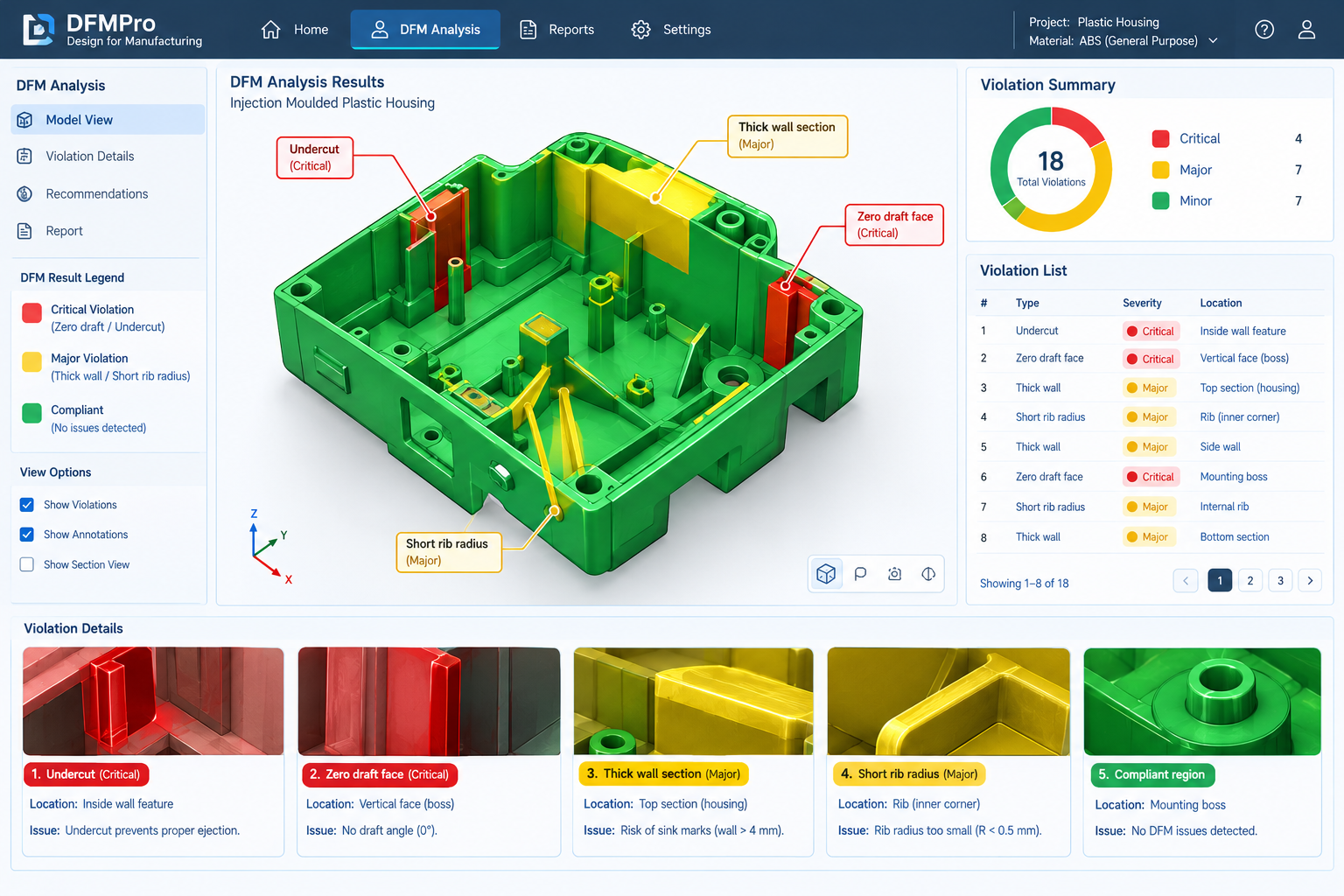
DFM (Design for Manufacturing) violations are the design error category with the most direct and quantifiable manufacturing cost consequence. A missing draft angle on an injection-moulded part does not produce an error message in CAD, the model looks perfect in the viewport. But it produces a part that either cannot be ejected from the mould (if the undercut is severe) or that ejects with surface drag marks and cosmetic defects (if the undercut is mild). Discovering this violation after tool steel has been cut costs tool rework time and delayed production. AI DFM tools detect it in minutes, before a single tool path has been generated.
| Manufacturing Process | Most Consequential DFM Error Types | AI Detection Tool | Cost if Found After Tooling | AI Detection Time |
| Injection moulding | Missing/insufficient draft angle, wall thickness non-uniformity (sink marks, weld lines), undercuts not in tool design, boss and rib design violations, gate location conflicts | DFMPro (SolidWorks/CATIA/NX/Creo), Moldex3D DFM Advisor, Protolabs instant DFM | $5,000-$50,000 per tool modification + 2-8 week delay | 5-15 minutes for complete part analysis |
| CNC machining (3-axis) | Features inaccessible to 3-axis tooling (require 5-axis or repositioning), internal corners tighter than minimum end mill radius, deep pockets exceeding tool aspect ratio limits, non-standard threads | DFMPro machining, Xometry DFM, Protolabs DFM | $500-$5,000 per rework + schedule delay | 2-5 minutes |
| Sheet metal | Bend radius tighter than material minimum, hole-to-bend distance violation, flange length too short for press brake tooling, flat pattern nesting inefficiency | DFMPro sheet metal, Fictiv DFM, SendCutSend DFM | $200-$2,000 per rework (lower tooling cost) | 1-3 minutes |
| Die casting | Insufficient draft angle, isolated thick sections (shrinkage porosity), walls thinner than minimum for alloy, core complexity beyond tooling capability | DFMPro casting, Magmasoft, Flow3D CAST DFM | $10,000-$100,000 per die modification | 10-20 minutes |
| Additive manufacturing (DMLS) | Overhanging features requiring excessive support, enclosed voids trapping powder, minimum wall below process threshold, support removal inaccessible | Materialise Magics AI, Autodesk Netfabb, nTop | $500-$5,000 per failed build + material waste | 3-10 minutes |
| Investment casting | Section changes too abrupt (hot tearing risk), minimum section thickness violation, parting surface complexity | DFMPro casting, specialist foundry review tools | $5,000-$30,000 per pattern modification | 10-20 minutes |
The DFM Error Detection Gap: What AI Finds That Manual Review Misses
AI DFM tools are not simply faster than manual DFM review, they are more thorough. A manual DFM review by an experienced engineer checks the obvious features: the visible faces for draft angle, the clearly thick sections for sink risk, the recognisable undercuts. AI DFM tools check every face, every wall section, every radius on every feature of every part, including the features on the back of the component, the faces inside cavities, the radii at the bottom of deep pockets, and the wall sections in regions the human reviewer’s eye never reaches.
The most valuable DFM errors that AI consistently finds and manual review misses are: (1) Wall thickness violations in internal rib intersections that are invisible from the exterior view; (2) Draft angle violations on interior pocket walls that are not visible in the standard orientation; (3) Weld line locations that will occur in cosmetic or structural regions, predicted by mould flow physics from gate location and geometry; (4) Sink mark risk at boss bases where the junction of boss outer wall and part wall creates a local thick section; (5) Flat pattern nesting inefficiency that increases raw material cost but is only visible when the flat pattern is unfolded.
Error Category 3: Tolerance and Fit Errors
Tolerance errors, incorrect tolerance specifications, impossible fits, and tolerance stack-ups that produce interference or excessive clearance in the final assembly, are among the most consequential design errors because they affect multiple parts simultaneously and are often not discovered until first article assembly. A tolerance error that makes two mating bores incompatible requires dimensional changes to both parts, or acceptance of a non-conforming assembly that will leak, bind, or wear prematurely.
The Three Classes of Tolerance Error AI Can Detect
- Class 1, Impossible tolerance specification: The specified tolerance is tighter than the manufacturing process is capable of achieving for the material and feature type. A bore tolerance of ±0.002mm (2 microns) specified for an injection-moulded plastic bore is physically unachievable, injection moulding process capability for bore dimensions is typically ±0.05-0.15mm for most thermoplastics. AI detection: LLMs can assess tolerance achievability when given the feature type, material, and manufacturing process. Specialist tools including Protolabs instant DFM report tolerance achievability by process.
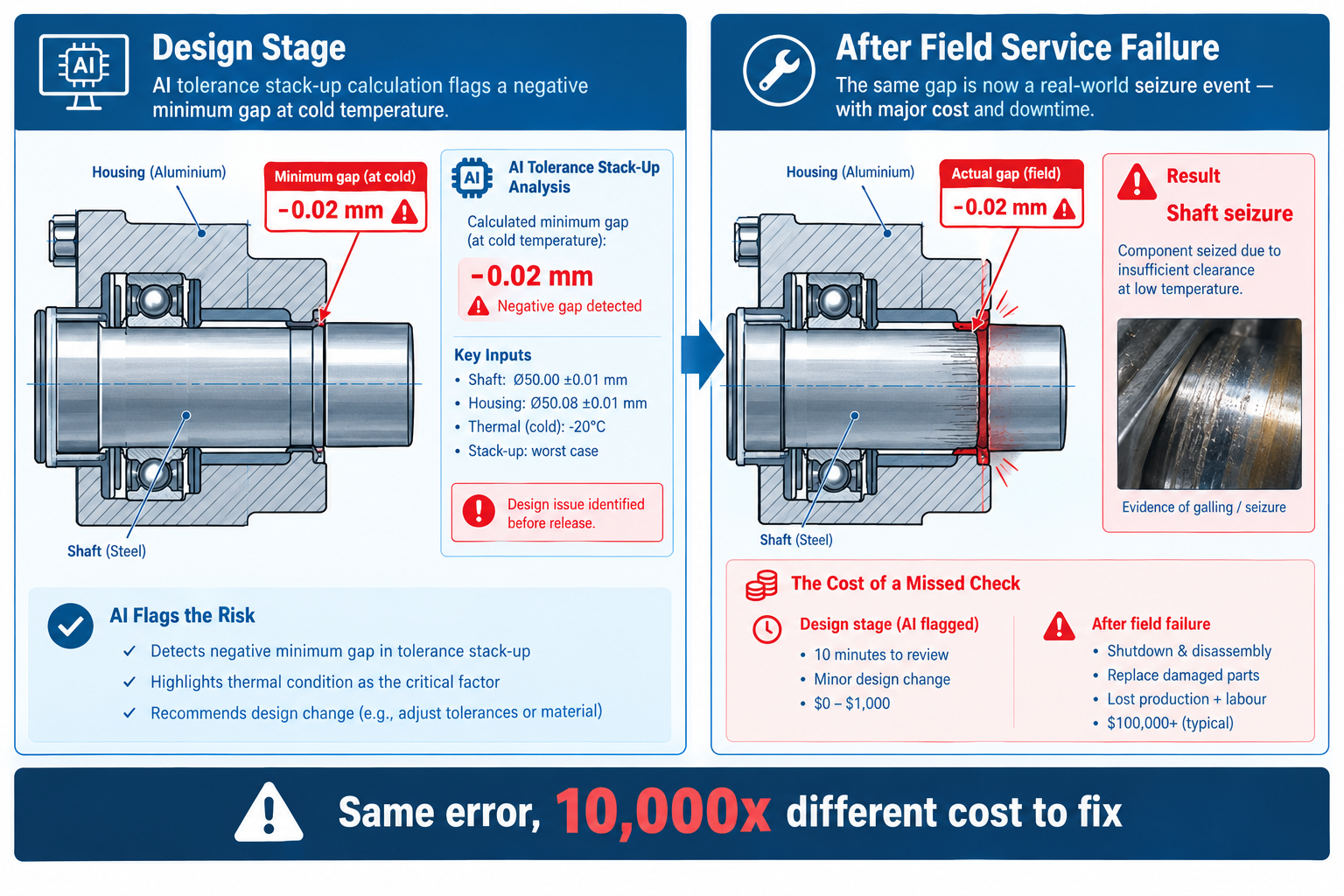
- Class 2, Stack-up failure: The combination of tolerances across multiple components in an assembly produces a minimum gap that is negative (interference) or a maximum gap that is excessive (insufficient location). The individual component tolerances may each be reasonable, but their accumulation creates an assembly problem. AI detection: LLMs perform worst-case and RSS tolerance stack-up calculations from described dimension chains (see the Claude Prompts article for the stack-up prompt template). Dedicated tools (3DCS, CETOL 6 Sigma, SolidWorks TolAnalyst) perform 3D stack-up analysis.
- Class 3, ISO fit misspecification: An ISO 286 shaft-and-hole fit designation is incorrectly chosen for the assembly function, a clearance fit specified where a transition fit is required, or a press-fit interference that exceeds the assembly equipment capability. AI detection: LLMs can assess ISO fit appropriateness when given the assembly function (rotating, sliding, press-fit), the shaft and bore nominal diameter, the operating conditions (temperature range, speed, load), and the material combination. Thermal expansion effects at temperature extremes are a critical check that LLMs perform reliably.
AI Tolerance Error Detection in Practice
The most effective AI workflow for tolerance error detection combines automated stack-up tools (for complex multi-part chains) with LLM reasoning (for fit appropriateness and process capability assessment):
- Identify critical assembly gaps and interfaces (mating bores, sliding fits, sealed joints, fastener patterns)
- For each critical interface: run the ISO 286 fit specification through an LLM with operating condition description to verify fit selection
- For each critical assembly gap: run a stack-up calculation (LLM for simple chains, 3DCS/TolAnalyst for complex 3D chains)
- For each tolerance on a feature with a manufacturing process constraint: assess achievability against process capability data
- Document findings in a tolerance analysis report that links each stack-up result to the affected drawing dimensions
| The Most Missed Tolerance Error: The tolerance error most consistently missed in engineering design reviews is the thermal expansion stack-up error, the failure to calculate whether a press-fit or clearance fit remains within its intended category across the full operating temperature range. A shaft-and-bore assembly designed as a transition fit at room temperature may become a clearance fit at operating temperature (aluminium bore expanding faster than steel shaft) or an interference fit at cold soak (both contracting but at different rates). LLMs reliably calculate thermal expansion effects when given CTE values, temperature range, and nominal fit parameters, a calculation that takes under two minutes to set up as a prompt and is frequently not performed manually at all. |
Error Category 4: Drawing Annotation and GD&T Errors
Drawing annotation errors, missing dimensions, incorrect GD&T callouts, incomplete datum reference frames, absent surface finish specifications, and non-standard thread notations, do not prevent manufacturing. They cause manufacturing queries (RFIs and NCRs) that delay production, generate interpretation ambiguity that leads to non-conforming parts, and produce legal liability when the drawing is the contractual manufacturing specification. In regulated industries, an annotation error that results in a non-conforming manufactured part is a regulatory non-compliance event, not just a quality problem.
The Most Consequential Drawing Annotation Errors
| Annotation Error Type | Manufacturing Consequence | AI Detection Method | Frequency in Practice |
| Missing dimension for a functional feature | Manufacturer cannot determine the required dimension; RFI raised; production delay; or manufacturer assumes a value that may be incorrect | SolidWorks Drawing Checker, LLM annotation completeness review from drawing description or PDF | Very common, dimensions on features added late in design are frequently omitted from drawings |
| GD&T callout with incomplete datum reference frame | GD&T callout is unenforceable, the tolerance zone is undefined without all three degrees of constraint from the DRF. Manufacturer and CMM operator interpret differently | LLM GD&T review, check each feature control frame for complete DRF against ASME Y14.5 or ISO 1101 | Common, designers apply GD&T symbols without completing the full DRF, particularly for secondary and tertiary datums |
| Surface finish callout missing on functional surface | Bearing bore, sealing face, or mating surface produced to undefined finish; may not meet functional requirement for friction, wear, or sealing | LLM annotation review, check all functional surfaces (bores, sealing faces, mating interfaces, sliding surfaces) for Ra callouts | Common, surface finish is often specified only on ‘obvious’ surfaces; functional surfaces added late or on back faces are missed |
| Non-standard thread callout notation | Manufacturer mis-reads the thread specification; produces wrong thread form, pitch, or tolerance class; assembly failure at first build | LLM thread specification review, check all thread callouts against ISO metric or ANSI/ASME Unified standard notation | Moderate, particularly common when mixing metric and imperial threads on the same assembly |
| General tolerance note absent or inconsistent | No tolerance basis for undimensioned features; manufacturer applies their own standard which may differ from design intent | LLM annotation completeness review; drawing checker | Common, general tolerance note (ISO 2768 or equivalent) is frequently missing from drawings created from templates without verification |
| Conflicting dimensions (over-dimensioning) | Manufacturer cannot determine which dimension governs; inspection cannot pass drawing because one dimension cannot satisfy both conflicting values simultaneously | LLM or drawing checker, flag any geometry that appears over-dimensioned (multiple route from datum to feature) | Moderate, introduced when dimensions are added or modified without checking for conflicts with existing dimensions |
Error Category 5: Specification Non-Compliance Errors
Specification non-compliance errors occur when a design attribute, a dimension, a material, a surface finish, a weight, a structural performance parameter, fails to satisfy a stated design requirement. These errors are distinct from drawing annotation errors (which affect manufacturability) and from DFM errors (which affect process feasibility). Specification non-compliance means the design, as specified, does not do what the requirement says it must do.
Specification non-compliance errors are the most expensive category to find late because they may require fundamental design changes, not just dimensional adjustments or annotation corrections. A component that does not meet its load capacity requirement may need a complete structural redesign. A product that does not meet its weight requirement may need a material change. A device that does not meet its operating temperature requirement may need a different material specification, heat treatment, or sealing system.
AI for Specification Compliance Checking
LLMs perform specification compliance checking by reading the requirements specification (or a described set of requirements) and comparing them against the design attributes (dimensions, material, performance analysis results, weight). The output is a compliance matrix: for each requirement, whether the design attribute satisfies it, partially satisfies it, or fails it, with evidence for each assessment.
The most valuable specification compliance checks AI performs are those that would be tedious or easily skipped manually:
- Mass and weight budget compliance: The CAD-calculated mass is compared against the mass budget or maximum weight requirement. LLMs can also calculate the mass of design alternatives and compare them against the budget, supporting design decisions that keep the product within weight limits.
- Dimensional envelope compliance: The product envelope dimensions are compared against specified packaging, installation space, or interface dimensional constraints. Interference with adjacent systems or installation boundaries is checked systematically.
- Performance requirement traceability: Each performance requirement (load capacity, deflection limit, fatigue life, thermal resistance) is traced to an analysis result (FEA, hand calculation, test result) that demonstrates compliance. LLMs identify requirements that lack a corresponding verification activity.
- Regulatory requirement compliance: For products subject to regulatory standards (CE marking, UL certification, FDA requirements, ATEX), LLMs check the design specification against the applicable standard requirements and flag non-compliant attributes.
- Customer-specific requirements (CSR) compliance: In automotive and aerospace supply chains, customer-specific requirements supplement the general standard. LLMs can read CSR documents and check design compliance against customer-specific requirements that may differ from industry-wide standards.
Error Category 6: Interface and Assembly Errors
Interface and assembly errors, geometric clash between components, incorrect mating feature geometry, assembly sequence impossibility, and access constraints that prevent assembly or maintenance, are uniquely dangerous because they are invisible in individual component design and only become apparent when multiple components are brought together. The more complex the assembly and the more disciplines involved in its design, the higher the probability of interface errors that no individual designer can detect by reviewing their own work.
Geometric Interference: The Most Detectable Interface Error
Geometric interference, where two solid bodies occupy the same physical space, is the most straightforward interface error for AI to detect because it is mathematically unambiguous. Automated interference detection tools (SolidWorks Evaluate > Interference Detection; Navisworks Clash Detective; CATIA DMU Fitting) identify every pair of components whose bounding volumes overlap and calculate the exact overlap volume.
The AI-enhanced version of interference detection goes beyond identifying that interference exists to predicting which interferences are genuine design conflicts and which are acceptable overlaps (thread engagement, intentional press fits, clearance violations within defined tolerance limits). Machine learning models trained on historical clash resolution data (Autodesk Construction Cloud AI, Solibri AI rules) classify clashes by predicted severity, reducing the false positive review burden that makes traditional clash reports overwhelming on complex multi-discipline assemblies.
Assembly Sequence Error Detection
Assembly sequence errors, components that cannot physically be installed in the required order because a previously installed component blocks access, are one of the most common and most expensive late-discovered design errors. The classic example: a fastener that can only be installed before an adjacent component is fitted, but the assembly drawing shows them assembled simultaneously. The only way this error is traditionally found is by someone physically attempting the assembly, often a production worker on the first production run.
AI-assisted assembly sequence checking is an emerging capability implemented in DELMIA (Dassault Systemes), Tecnomatix (Siemens), and as custom Dynamo or Python scripts driven by LLMs. The approach: define the assembly sequence in the simulation environment; AI checks whether each assembly step is physically achievable (does the component fit through the access space available after previous components are installed? Does the tool required for the fastener have clearance in the assembled state?).
LLMs can also reason about assembly sequence from a text description of the assembly: ‘The M6 bolt on the inner face of the bracket is installed through a 20mm access hole in the outer casing. The bolt head is 10mm diameter and 6mm tall. Is there sufficient clearance to insert and torque the bolt with a standard hex key when the outer casing is in position?’
Maintenance Access Error Detection
Maintenance access errors, components that cannot be removed for service without first removing multiple other components, or service interfaces that require tool access in positions that are geometrically blocked, are found during service life, not during initial assembly. By that point, the design is frozen and the service procedure is the only variable that can be changed, often resulting in unnecessarily long and complex maintenance operations that increase operating cost and reduce asset availability.
LLMs can reason about maintenance access from assembly geometry descriptions: ‘The air filter on this assembly is mounted inside a housing. The housing is secured by 4 M8 bolts on the top face. The top face clearance to the ceiling in the installation environment is 80mm. The bolt head requires a 13mm spanner with a minimum of 90mm of handle clearance above the head. Is routine air filter replacement achievable in this installation environment?’
Error Category 7: Material Specification Errors
Material specification errors are among the most consequential and least visible design errors. A component designed with the wrong material specification looks identical to a correctly specified component in the CAD model and on the drawing, the error only becomes apparent when the material is purchased, tested, or used in service. Material errors fall into five distinct categories, each with different AI detection approaches.
| Material Error Type | Example | Manufacturing Consequence | AI Detection Approach |
| Incorrect alloy designation | 6061-T6 aluminium specified instead of 7075-T6 for a highly loaded structural application; 30% lower yield strength than required | Part passes dimensional inspection but fails structural test or field loading. May not be detected until service failure. | LLM materials review: compare specified material properties against structural requirements from FEA analysis. Flag any material where the design margin is < 2x with the specified material. |
| Non-available or long-lead material | A custom aluminium alloy specified that is not stocked by any distributor and requires 16-week lead time minimum order quantity | Production delay of months; pressure to substitute an unqualified material during the delay | LLM supply chain check: query material availability and lead time from described specification; flag non-standard alloys, special tempers, and custom specifications that are likely long-lead |
| Galvanic incompatibility | Aluminium 6061 component in direct contact with stainless steel 316 fastener in a marine environment; galvanic cell drives rapid aluminium corrosion | Accelerated corrosion of anodic material; structural integrity loss well before design life | LLM galvanic assessment: given material pair and environment, assess galvanic potential difference and area ratio risk; recommend isolation or material substitution |
| RoHS / REACH restricted substance | Lead-containing solder or cadmium plating specified on a product for the European market where both are restricted under RoHS/REACH | Product cannot be legally sold in the target market; redesign required for regulatory compliance | LLM regulatory compliance check: given material specification and target market, identify any substances restricted under RoHS2, REACH SVHC list, PFAS regulations, or California Prop 65 |
| Temperature rating mismatch | A sealing material specified with a maximum continuous service temperature of 120C in an application where operating temperature reaches 180C | Seal failure in service; product leak or functional failure at operating temperature | LLM thermal compatibility check: given operating temperature range and material specification, verify that all specified materials (seals, lubricants, adhesives, coatings) have appropriate temperature ratings |
Building an AI-First Design Error Prevention Workflow
The seven error categories described above are most effectively addressed by an integrated, staged detection workflow that applies the right AI tool at the right point in the design process, not as a single gate at release, but as a series of progressively more thorough checks as the design matures.
| Design Stage | Error Categories to Check | AI Tools to Apply | Threshold for Progression |
| Concept / early design (LOD 100-200) | Specification compliance (mass, envelope, performance requirements); interface definition completeness | LLM requirements gap analysis; LLM mass estimate vs requirement | All requirements addressed at concept level; no specification non-compliances in primary performance requirements |
| Preliminary design (LOD 200-300) | DFM violations (major process constraints); material specification (alloy selection, regulatory compliance); tolerance feasibility (critical fits identified and checked for achievability) | AI DFM first pass (DFMPro or LLM); LLM material review; LLM ISO fit assessment for critical interfaces | No critical DFM violations for primary manufacturing process; material selections validated for availability and compliance; critical fits confirmed as achievable |
| Detailed design / pre-CDR (LOD 300-350) | All DFM violations (complete process-specific check); tolerance stack-up (all critical assembly gaps); geometric errors; drawing annotation completeness and GD&T correctness | Full AI DFM check (DFMPro complete); automated geometry check (Check Entity / SpaceClaim); LLM tolerance stack-up for all critical gaps; LLM drawing annotation review | Zero critical DFM violations; geometry checks clean; all critical stack-ups positive at worst case; drawing annotation 90%+ complete |
| Pre-release / CDR (LOD 350-400) | All categories, comprehensive final check; assembly interference; specification compliance matrix complete; all drawing annotation errors resolved | Full AI DFM; geometry check; interference detection; LLM specification compliance matrix; LLM drawing completeness review; material specification final review | Zero errors in any category; or all identified errors documented as accepted deviations with engineering sign-off; complete specification compliance matrix |
| Post-CDR change (ECO) | Impact assessment: which error categories are affected by the change? Re-run applicable AI checks for changed geometry and affected assemblies | Targeted re-run of AI checks for changed features and affected interfaces; LLM ECO impact assessment | ECO change passes all applicable AI checks before design authority sign-off |
| The Single Most Important Implementation Step: Integrate geometry checking and DFM checking into the PDM/PLM check-in workflow as mandatory validation steps, not optional review activities. In SolidWorks PDM, use the Dispatch add-in to trigger SolidWorks Check Entity automatically at check-in and reject models with detected geometry errors. For DFM, configure Xometry or Protolabs instant DFM quoting as the mandatory quoting path, the DFM feedback is generated as part of the quoting process, creating a natural incentive for designers to resolve DFM issues before tooling is committed. |
AI Error Detection Tools: Selection Guide
| Error Category | Best Tool (with specialist software) | Best Tool (without specialist software) | LLM Supplement |
| Geometric errors | SolidWorks Check Entity, CATIA Check Model, NX Examine Geometry, Ansys SpaceClaim Repair | Native CAD geometry check (every major CAD tool has a geometry check function, use it) | LLM for diagnosing specific error types from error message descriptions; generating repair strategies |
| DFM violations, injection moulding | DFMPro (SolidWorks/CATIA/NX/Creo plugin), Moldex3D DFM Advisor | Protolabs or Xometry instant DFM (free at quoting); Moldflow for mould flow simulation | LLM DFM reasoning review from geometry description, useful for first-pass check without specialist tool |
| DFM violations, CNC machining | DFMPro machining module | Xometry instant DFM at quoting (free); Protolabs instant DFM | LLM CNC DFM review from described geometry and machine axis count |
| DFM violations, sheet metal | DFMPro sheet metal module | Fictiv DFM, SendCutSend DFM (free at quoting) | LLM sheet metal DFM review from bend radius, material thickness, and flange dimension description |
| DFM violations, additive manufacturing | Materialise Magics, Autodesk Netfabb, nTop | Prusa Slicer (FDM), Formlabs PreForm (SLA), free slicers include basic DfAM feedback | LLM AM DfAM review from process, material, and geometry description |
| Tolerance and fit errors | 3DCS, CETOL 6 Sigma (complex 3D), SolidWorks TolAnalyst (simple 1D) | Excel worst-case and RSS formulas (manual) | LLM for worst-case and RSS stack-up calculation; ISO 286 fit assessment; thermal expansion check, highly effective |
| Drawing annotation errors | SolidWorks Drawing Checker add-in, CATIA Interactive Drafting Rules | Visual review against drawing completeness checklist | LLM annotation completeness review from drawing description or PDF, most useful AI application for this category |
| Specification compliance | PLM-integrated requirements management (Jama Connect, codeBeamer, PTC Windchill RV&S) | Manual compliance matrix in Excel | LLM compliance matrix generation from requirements spec and design description, most effective available method |
| Interface and assembly errors | SolidWorks Interference Detection, Navisworks Clash Detective, CATIA DMU, Solibri (IFC) | SolidWorks Interference Detection (included in all SolidWorks licences) | LLM for assembly sequence reasoning, maintenance access assessment, and thread engagement adequacy from description |
| Material specification errors | Granta MI (Ansys) for property validation and regulatory compliance, MatMatch | LLM with materials knowledge | LLM for galvanic compatibility, temperature rating check, RoHS/REACH compliance, highly effective for all five material error types |
LLM Prompt Templates for Design Error Detection
The following prompt templates are ready to use in Claude or ChatGPT. Replace [BRACKETED] items with your specific project parameters.
Template 1: DFM Error Detection for Injection Moulding
I am checking an injection-moulded plastic part for DFM errors before sending the design for tooling. Material: [e.g. ABS, MFI 15]. I will describe the geometry: [DESCRIBE EACH FEATURE: overall dimensions, wall thicknesses, ribs, bosses, snap-fits, draft direction, parting line location, any undercuts]. Identify all DFM errors in this design for injection moulding, not just concerns, but definitive violations of standard DFM rules. For each error: (1) Name the specific violation. (2) State the current value vs the required value. (3) Describe the manufacturing consequence if unresolved. (4) State the specific geometric correction required. Prioritise by severity: Critical (prevents moulding or ejection) / Major (causes cosmetic or structural defects in production) / Minor (increases tool cost or cycle time).
Template 2: Tolerance Stack-Up Error Detection
Check the following assembly for tolerance errors. Critical gap or interface: [DESCRIBE WHAT MUST BE CHECKED: e.g. the axial clearance between the shaft end and the housing bore step]. The gap must be: [SPECIFY ACCEPTANCE CRITERION: e.g. between 0.1mm and 0.5mm]. Dimensions contributing to this gap (positive = opens gap, negative = closes gap): [LIST EACH: nominal value, bilateral tolerance, direction]. Also check the following mating fits: Fit 1: [DESCRIBE: e.g. 25mm shaft h6 into bore H7, rotating fit, steel shaft in aluminium housing, temperature range -20 to +120C]. For each: (1) Calculate the room-temperature clearance range. (2) Calculate thermal expansion effect at temperature extremes (state the CTE values you use). (3) Confirm whether the fit remains in the correct category (clearance/transition/interference) across the full temperature range. (4) Flag any tolerance error: stack-up failure, impossible tolerance for process, thermal expansion conflict, or ISO fit misselection.
Template 3: Material Specification Error Check
Check the following material specifications for errors before manufacturing release. For each material: (1) Verify the alloy designation is complete and unambiguous (e.g. ‘6061-T6 aluminium’ vs ‘6061 aluminium’, the temper is critical). (2) Check whether all specified materials are commercially available in the required form (bar, sheet, tube) and whether any are long-lead. (3) Check all material pairs in contact for galvanic compatibility given the operating environment: [DESCRIBE: e.g. outdoor marine, indoor dry, chemical exposure]. (4) Verify all materials are compliant with [RoHS2 / REACH / Prop 65 / other applicable regulation] for the target markets: [LIST MARKETS]. (5) Verify all materials meet the operating temperature requirement of [MIN] to [MAX] C, including any seals, adhesives, lubricants, and coatings. Materials specified: [LIST ALL MATERIALS WITH THEIR APPLICATIONS].
Template 4: Specification Compliance Error Detection
Check the following design for specification non-compliance errors. I will provide the design requirements and the current design attributes. For each requirement, determine: (1) Compliant, the design attribute clearly satisfies the requirement. (2) Marginal, the design attribute satisfies the requirement but with less than the recommended design margin. (3) Non-compliant, the design attribute fails the requirement. (4) Not yet verified, the requirement cannot be assessed from the currently available design information. Design requirements: [PASTE OR LIST REQUIREMENTS WITH ACCEPTANCE CRITERIA]. Current design attributes: [DESCRIBE: dimensions, mass, material, analysis results, operating range, interface dimensions]. Present as a compliance matrix table: Req ID | Requirement | Design Attribute | Status | Evidence | Action Required.
Template 5: Assembly Interface Error Detection
Check the following assembly design for interface and assembly errors. Assembly description: [DESCRIBE ASSEMBLY: components, their spatial relationship, mating features, fasteners, seals]. (1) Interference check: Identify any component pairs likely to interfere geometrically based on the described geometry and positioning. (2) Assembly sequence: Identify any components that cannot be assembled in the stated order due to access constraints or geometric blocking. (3) Maintenance access: For each serviceable component (filters, seals, bearings, wear items), assess whether it can be removed and replaced with the adjacent components in place, using standard tools. (4) Fastener access: For each fastener location, confirm that the required tool (socket size, hex key size, torque wrench) can physically access the fastener with adjacent components in position. (5) Thread engagement: Confirm that the thread engagement length for each fastener provides adequate pull-out strength for the applied load. Flag any interface error with the specific geometric conflict and recommended design correction.
ROI Calculation: Quantifying AI Error Detection Value
The return on investment from AI design error detection can be calculated directly from the Rule of Ten cost framework and realistic estimates of error detection rates. The following calculation framework uses conservative assumptions to establish a lower-bound ROI estimate.
| Input Parameter | Conservative Estimate | How to Determine for Your Organisation |
| Number of new components released to manufacture per year | 50 components/year | Count components that went through tooling release in the last 12 months |
| Average DFM errors per component (without AI) | 3 DFM violations per component (industry average for injection-moulded parts without specialist DFM review) | Review last year’s tooling modifications, first article failures, and production NCRs; attribute to design origin where possible |
| % of DFM errors found after tooling release (without AI) | 40% (remainder found in prototype and review stages) | Estimate from your tooling modification log, how many tool modifications were caused by design errors that should have been caught earlier |
| Average cost of a DFM error found after tooling | $25,000 (tool modification + delayed production) | Use actual tooling modification costs from your supplier invoices |
| AI DFM error detection rate (before tooling) | 70% of all DFM errors caught before tooling release | Conservative estimate, DFMPro studies report 60-85% error catch rate vs manual review |
| Annual AI DFM tool cost | $15,000/year (DFMPro enterprise licence) | Obtain current vendor quote |
Calculation:
- DFM errors per year: 50 components x 3 errors = 150 DFM errors/year
- Errors reaching tooling without AI: 150 x 40% = 60 errors reaching tooling
- Errors reaching tooling with AI: 150 x 40% x (1 – 70%) = 18 errors reaching tooling
- Errors prevented from reaching tooling: 60 – 18 = 42 errors/year
- Cost saving: 42 errors x $25,000 = $1,050,000/year
- Net saving after tool cost: $1,050,000 – $15,000 = $1,035,000/year
- ROI: $1,035,000 / $15,000 = 69x return on investment
| Sensitivity Check: Even with extremely conservative assumptions, half as many errors (1.5 per component), half the tooling cost impact ($12,500), and half the AI catch rate (35%), the calculation produces: 37.5 errors reaching tooling without AI vs 24.4 with AI, saving 13.1 errors x $12,500 = $163,750/year. Net after tool cost: $148,750. ROI: 10x. The Rule of Ten makes AI DFM error detection economically compelling across a very wide range of assumptions. The question is not whether AI error detection pays back, it is how fast. |
Frequently Asked Questions (FAQ)
How does AI detect design errors before manufacturing?
AI detects design errors before manufacturing by using automated DFM tools to identify geometry and manufacturing violations, and LLMs to review tolerance stack-ups, material compatibility, specification compliance, and assembly sequences. These checks help engineers catch costly errors early, but findings require engineering verification.
What is the Rule of Ten in engineering design?
The Rule of Ten states that fixing design errors can cost roughly ten times more at each successive stage, from design to prototyping, tooling, and field service. AI-assisted design reviews help catch errors early, reducing rework, delays, and costly recalls.
What types of design errors can AI detect before manufacturing?
AI can detect seven major design error categories before manufacturing: geometric defects, DFM violations, tolerance errors, drawing annotation issues, specification non-compliance, assembly and interface problems, and material specification errors.
Which AI DFM tool is best for injection moulded parts?
DFMPro checks injection moulding issues such as draft angles, wall thickness, ribs, bosses, and undercuts. Xometry and Protolabs provide instant DFM feedback, while Moldex3D and Autodesk Moldflow support mould-flow analysis. Claude and ChatGPT can assist with preliminary DFM reviews.
Can AI detect tolerance stack-up errors automatically?
AI tools like 3DCS, CETOL 6 Sigma, and SolidWorks TolAnalyst analyze tolerance stack-ups from CAD assemblies. Claude and ChatGPT can calculate worst-case and RSS variations from dimension data, flagging interference, excessive clearance, and potential tolerance issues.
How much does AI design error detection cost compared to the savings?
AI design error detection can deliver high ROI by preventing costly tooling changes. For example, preventing 42 errors at $25,000 each could save $1.05 million annually against $15,000 in tool costs—a potential 69× ROI, depending on actual results and assumptions.
Should AI error detection replace the traditional design review?
AI error detection and traditional design reviews work best together. AI handles systematic checks for geometry, tolerances, and compliance, while engineers evaluate design intent, complex risks, and overall design readiness. Use AI checks before the final human-led design review.
Leave a Reply