A regional health system planning a major renovation of a 1970s-era hospital wing commissioned the design based on the building’s original architectural drawings, supplemented by a handful of field measurements taken during a walkthrough.
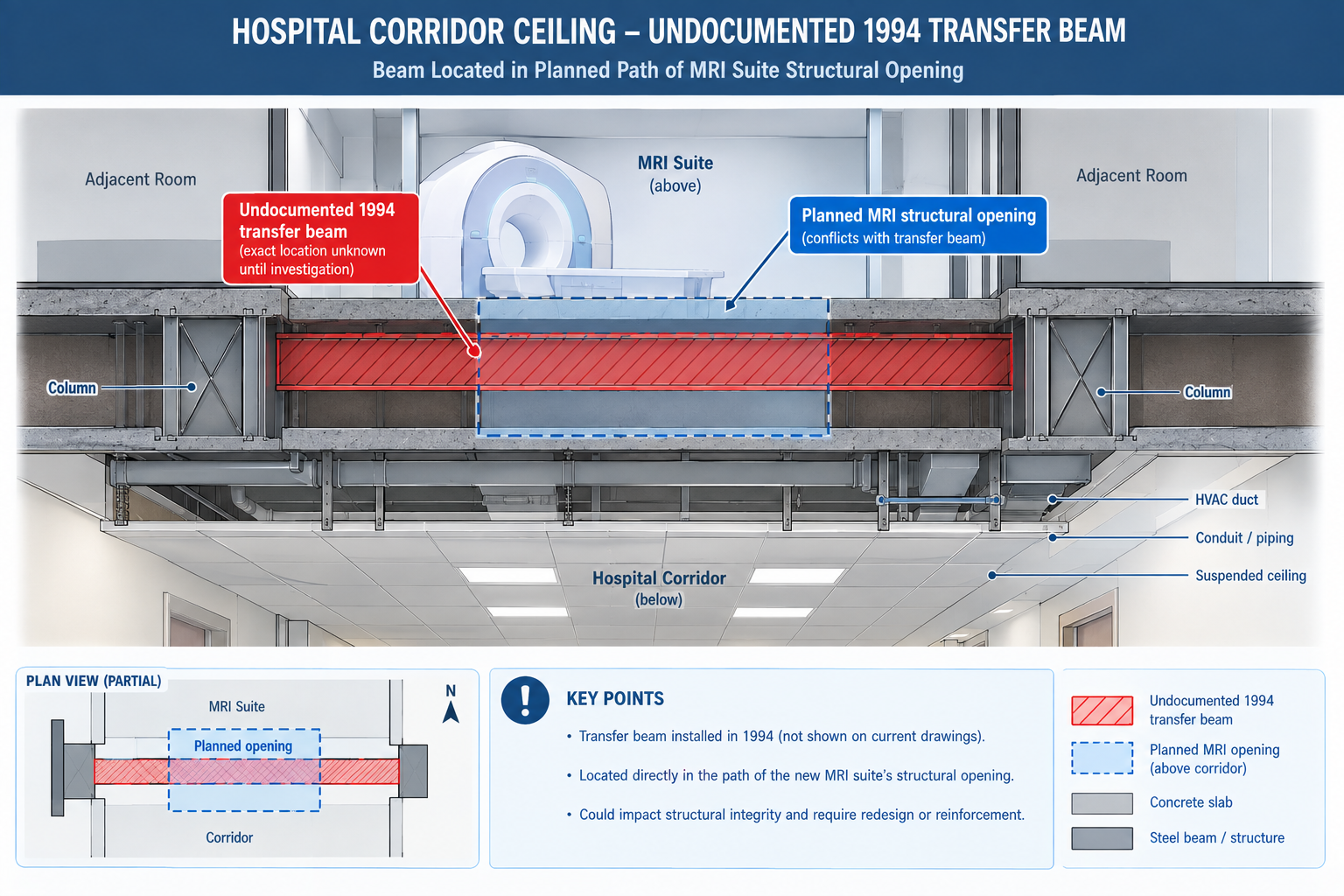
Three weeks into demolition, the contractor discovered a section of corridor ceiling concealed a structural transfer beam that appeared nowhere in the drawings. It had been installed during an unrecorded 1994 renovation to support a rooftop mechanical unit added at that time. The beam sat directly in the path of a new MRI suite’s structural opening, already planned and approved.
| Quick answer: The discovery halted demolition for eleven days while a structural engineer assessed the beam, the design was revised around it, and the revision was resubmitted for approval. On an active hospital renovation that had to stay partially operational throughout construction, that delay carried significantly higher cost and disruption than it would have on a vacant building. The beam had been there the entire time. What was missing was a reliable way to capture it before the design was finalised. That’s the gap scan-to-BIM closes: converting a building’s true, current physical condition into an accurate 3D model the design team can trust, instead of relying on original drawings that quietly stopped matching reality years earlier. |
This article covers the reality capture technologies used to gather existing-conditions data, the six-stage scan-to-BIM process, the benefits specific to renovation and facilities projects, what drives project cost, and worked examples in practice.
What Scan-to-BIM Actually Is
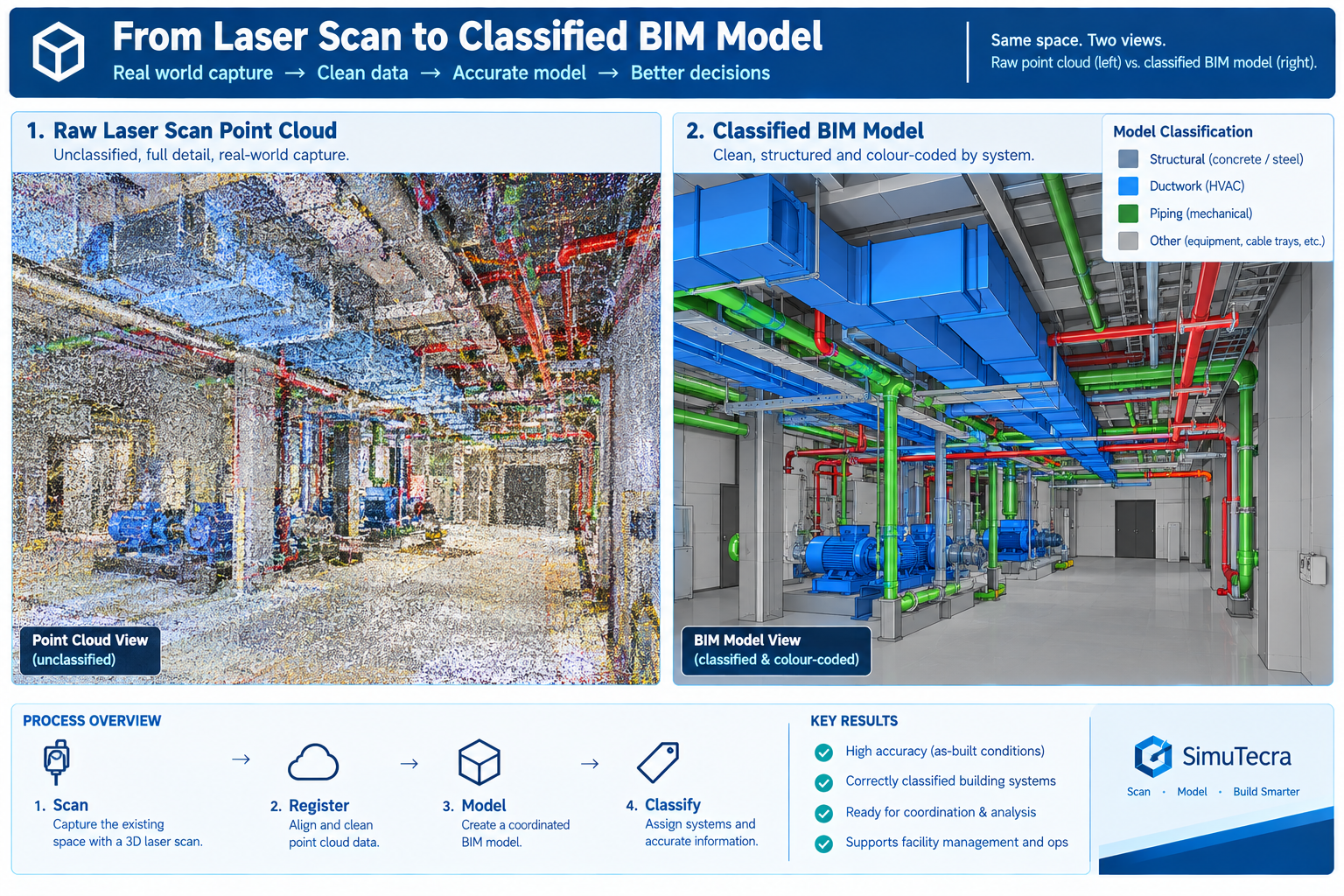
Scan-to-BIM captures a building’s existing physical condition using 3D reality capture technology, most commonly laser scanning, and converts that data into a structured Building Information Model a design or facilities team can use the same way they’d use a model authored from scratch. The output isn’t the raw scan itself, a point cloud of millions of individually measured 3D points, but a modelled interpretation of it: walls, structure, and MEP systems traced and classified into an organised, element-based model.
The point cloud and the finished model serve different purposes, and a complete deliverable should include both. The point cloud is the unfiltered record of physical reality, every visible surface at true measured accuracy, with no interpretation applied. The finished model is an interpreted simplification built to a defined level of development, so it can be federated and clash-tested using standard BIM workflows. Keeping the point cloud alongside the finished model lets anyone downstream independently verify what the model claims about a specific area, exactly the kind of check that would have caught the concealed hospital beam before, not after, demolition began.
The Reality Capture Technologies Behind Scan-to-BIM
Choosing the wrong technology for a given scope is one of the most common sources of both cost overrun and accuracy shortfall.
| Technology | Typical Accuracy | Capture Speed | Best Suited For |
|---|---|---|---|
| Terrestrial laser scanner (tripod) | 2-5mm at building-interior range | Slower per setup (2-8 min); many setups for full coverage | High-precision interior coordination, MEP-dense spaces, historic preservation |
| Handheld / SLAM scanner | 8-30mm, degrades over long walks without reference points | Fast; a full floor walk-through in minutes | Rapid existing-conditions capture, large open areas, feasibility studies |
| Drone (UAV) photogrammetry | 10-50mm depending on altitude and overlap | Fast for exterior/site capture; not usable indoors | Building exteriors, roofs, site topography, facade condition assessment |
| Mobile mapping (vehicle/backpack LiDAR) | 10-30mm depending on system and speed | Very fast for large linear or campus-scale capture | Large campuses, infrastructure corridors, site-wide capture |
| Structured-light / short-range scanner | 0.1-1mm at short range | Slow; small components only | Mechanical components, reverse engineering, fine architectural detail |
The Scan-to-BIM Process: Six Stages From Scope to Handoff
Scan-to-BIM is a structured production process, not a single scanning visit. The finished model’s quality depends as much on the planning and verification stages around the scan as on the technology itself.
| Stage | What Happens | Common Pitfall |
|---|---|---|
| 1. Scope definition and scan planning | Define required accuracy, target LOD, which systems to capture, and the technology mix | Scoping without confirming what the model will actually be used for, causing over-capture or missing detail |
| 2. Field data capture | Crews capture the site, placing control points to tie scans into a consistent coordinate system | Insufficient overlap or control points, leaving gaps or accuracy drift expensive to fix later |
| 3. Registration and point cloud processing | Individual scans are aligned into a single, unified, cleaned point cloud | Accepting a registered point cloud without verifying it against control points, letting errors propagate |
| 4. Model authoring to target LOD | Modellers build the BIM model from the point cloud to the agreed level of detail | Modelling every visible feature indiscriminately instead of to the agreed LOD, producing an oversized, expensive model |
| 5. Quality assurance and accuracy verification | The model is checked against the point cloud and survey control for accuracy and completeness | Skipping independent QA and relying solely on the modelling team’s self-review |
| 6. Deliverable handoff and integration | The model, point cloud, and documentation are delivered and integrated into the project workflow | Delivering the model without the point cloud or QA documentation, leaving the client unable to verify it later |
Why Scope Definition Is the Highest-Leverage Stage
Scope definition carries disproportionate weight because it sets the target accuracy and LOD every later stage is measured against. A scope specifying survey-grade accuracy and LOD 350 detail where LOD 200 general planning would suffice spends far more than the project needs. A scope that under-specifies LOD for a project that actually needs coordination-ready detail delivers a model that looks complete but can’t support the workflow the design team needs, forcing a costly re-scope later.
The hospital renovation illustrates getting scope wrong in the other direction. Relying on original drawings and a walkthrough, rather than commissioning any capture at all, is itself a scope decision, one assuming the drawing record was reliable enough to design from directly. For buildings with any unrecorded modification history, that assumption is very often wrong.
The Benefits of Scan-to-BIM, and Where Each One Applies Best
Scan-to-BIM’s benefits concentrate on projects where existing conditions matter and can’t be fully trusted from drawings alone.
| Benefit | Mechanism | Best Suited Project Type |
|---|---|---|
| Accurate existing conditions for renovation design | Captures true, current geometry instead of relying on outdated or missing drawings | Renovation, retrofit, and adaptive reuse, especially buildings older than 20-30 years |
| Reduced field verification trips | A complete point cloud eliminates repeated site visits to manually verify conditions | Design teams not co-located with the site, or restricted-access sites |
| Faster and more reliable design coordination | The as-built model can be clash-tested against new design elements like any discipline model | Renovation projects coordinated using a full BIM workflow |
| Reduced construction rework from unknown conditions | Conflicts with undocumented existing structure are caught in the model, not by a demolition crew | Any renovation, especially in occupied or operational buildings |
| Reliable facilities management and space planning data | Gives facilities teams a verified baseline for maintenance and future capital planning | Large portfolios without reliable current documentation |
Connecting Scan-to-BIM to the Rest of the Coordination Workflow
A scan-to-BIM model delivers the most value when it’s not treated as a standalone deliverable but federated into the same coordination workflow used for new design: brought into the common data environment as the authoritative existing-conditions reference, clash-tested against new elements, and maintained through construction like an as-built model. Renovation projects that integrate the scan into a full coordination programme capture the benefit twice, once from the accuracy of the capture itself, and again from standard BIM coordination benefits, fewer RFIs, less rework, more reliable scheduling, now extended to a project that would otherwise have had no reliable existing-conditions model at all.
What Drives Scan-to-BIM Project Cost
Cost varies widely by project. A meaningful quote depends on the specific combination of these factors rather than a single per-square-foot number.
| Cost Factor | Description | Why It Varies |
|---|---|---|
| Building size and site complexity | Total floor area and physical complexity, often the single largest cost driver | Open, simple spaces need fewer scan setups per unit area than congested, MEP-dense spaces |
| Required accuracy and LOD | Higher accuracy and target LOD need slower scanning and significantly more modelling time | Modelling time scales non-linearly with LOD; each added level needs proportionally more verification |
| Site access and operating conditions | Occupied, hazardous, or restricted sites slow field capture and may need off-hours scanning | Restricted access reduces effective scanning hours per day and adds safety/escort requirements |
| Element categories and system detail required | Architectural-only versus full MEP-inclusive scope with ductwork and piping modelled | MEP systems are geometrically dense and often partially concealed, needing more careful interpretation |
| Deliverable format and software compatibility | The required authoring platform, classification standard, and integration needs | Providers experienced with a client’s specific platform work faster than those adapting for the first time |
Weighing Scan-to-BIM Cost Against the Cost of Not Doing It
The more consequential comparison for most project decisions is against the cost of proceeding without a scan, relying on outdated drawings and field measurement, as the hospital renovation did. The eleven-day delay from the concealed beam, on an occupied hospital renovation, almost certainly cost more than a full scan of the affected wing would have. That comparison typically holds for any renovation of meaningful scope: weigh the cost of scan-to-BIM against the cost of the specific field discoveries and redesigns it’s likely to prevent, not as a standalone expense. Buildings with a long, undocumented modification history are where this comparison most reliably favours commissioning the scan.
Worked Examples
A historic theatre renovation: A 1920s-era theatre undergoing a seismic retrofit and accessibility renovation had no reliable original drawings, having been renovated at least four times with no consistent as-built record surviving. The retrofit design depended on knowing exactly how the existing structure was configured, not an assumed condition.
The project commissioned a terrestrial laser scan of the entire building, prioritising survey-grade accuracy for the seismic engineering use case, combined with drone photogrammetry of the exterior facade and roof. The point cloud was modelled to LOD 300 for structural elements and LOD 200 for architectural finishes not relevant to the seismic scope, a deliberately mixed-LOD approach matched to how each part would actually be used.
The scan revealed that a section of the original timber roof structure had been partially reinforced with steel during an undocumented 1960s repair, a condition the structural engineer needed to correctly model the existing structure’s seismic behaviour. Designing the retrofit without this information risked a design that misjudged the structure’s actual capacity. The scan-to-BIM model became the structural engineer’s primary reference for the entire retrofit, replacing the unreliable drawing record entirely.
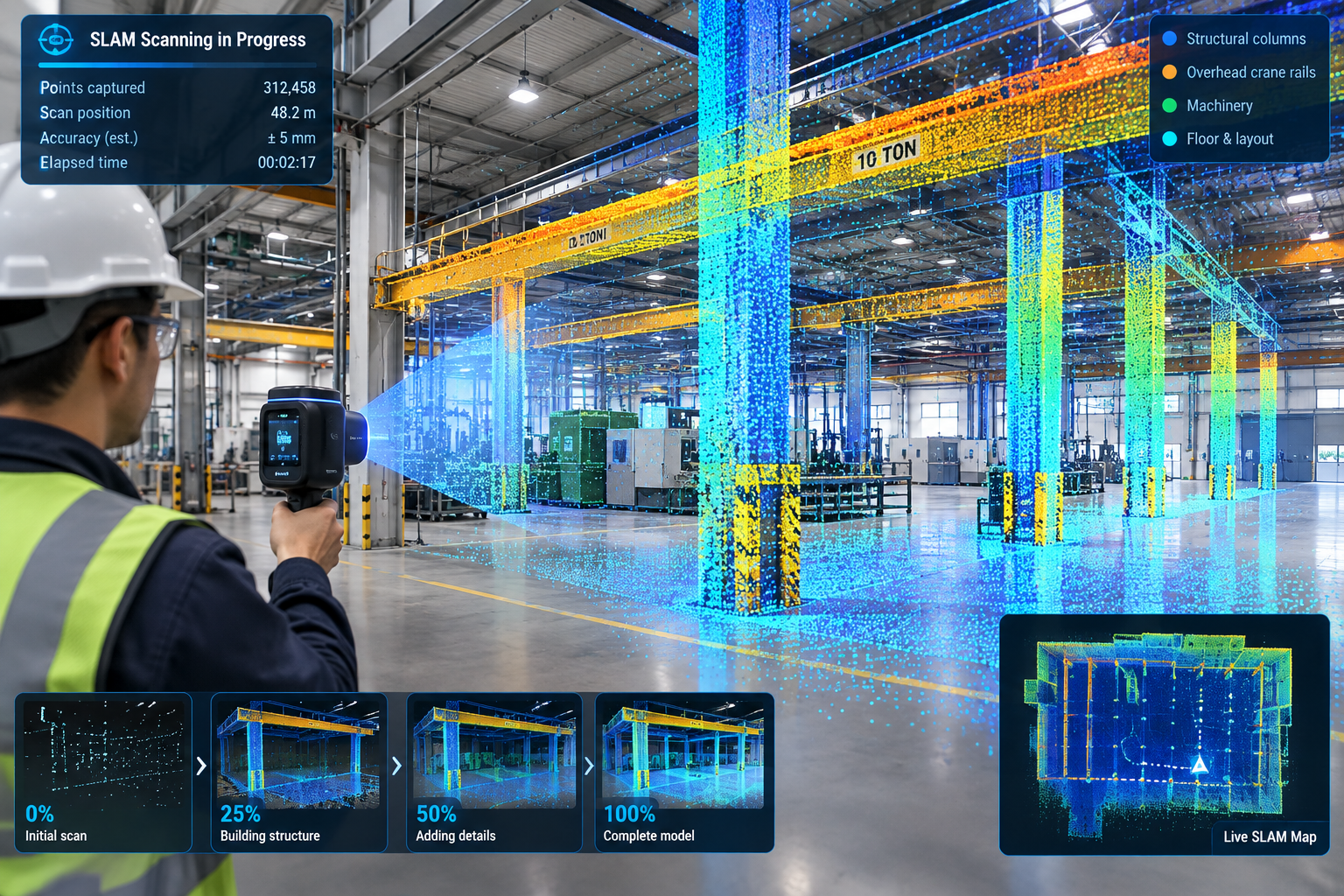
A manufacturing facility equipment relocation: A manufacturing company relocating a production line within an existing 1980s facility needed to verify that new equipment, with specific clearance requirements, would fit within an existing bay alongside structural columns, overhead crane rails, and utility routing, none of it documented in drawings that predated at least three prior equipment changes in the same bay.
A handheld SLAM scan captured the full production bay in under two hours, prioritising speed over survey-grade accuracy since the use case was equipment fit and clearance checking, not structural design. The point cloud was modelled to LOD 200-300, sufficient to run a clearance check without the cost of a survey-grade capture the project didn’t need.
The clearance check identified that the new equipment’s largest component wouldn’t clear an existing overhead crane rail bracket by the margin the manufacturer’s installation requirements specified, a conflict invisible in the facility’s outdated drawings, which didn’t reflect the bracket’s actual as-installed position after a prior modification. Catching the conflict before equipment delivery let the facility relocate the bracket during a scheduled maintenance window rather than during the tightly scheduled production line changeover, avoiding unplanned downtime.
Frequently Asked Questions
How accurate does a scan-to-BIM model need to be?
It depends on the use case. Structural or seismic engineering, precision MEP coordination, and historic preservation typically need survey-grade accuracy (a few millimetres) from terrestrial laser scanning. General space planning and equipment clearance checks often only need 10-30mm accuracy, achievable faster with handheld SLAM scanning. Define the required accuracy before selecting the technology, rather than defaulting to the highest accuracy available.
Can scan-to-BIM be used for an entire building, or only specific areas?
Both are common. A full-building scan fits a renovation spanning the whole building or an owner wanting a complete facilities record. A targeted scan of specific floors or systems fits a limited project scope, like the manufacturing example here. Scoping the capture area precisely to what’s needed is one of the most effective ways to manage cost without sacrificing accuracy.
How long does a typical scan-to-BIM project take from field capture to finished model?
Field capture is often the fastest stage, from a single day for a small space to several weeks for a large or access-restricted building. Registration, modelling, and QA typically take substantially longer, often several times the field capture duration, since modelling to a coordination-ready LOD is a detailed manual process. Confirm the modelling and QA timeline with the provider based on the specific scope and target LOD.
Is scan-to-BIM only useful for renovation projects, or does it have a role in new construction too?
It has a role in new construction as well: capturing as-built structural or MEP work before it’s concealed by later construction, verifying fabricated components match design models within tolerance, and documenting final as-built conditions for facilities handover. The core value, replacing an assumed condition with a verified, measured one, applies any time there’s meaningful uncertainty about what’s actually built or what exists.
What should a client look for when selecting a scan-to-BIM provider?
Look for experience with the specific scanning technology the project needs, since not every provider is equally strong across terrestrial, SLAM, and photogrammetry capture. Check for a documented accuracy verification process, ideally a QA report comparing the model against survey control. Confirm they’ll deliver the underlying point cloud alongside the finished model, not just the model itself, so the accuracy can be independently verified.
Key Takeaways
The concealed hospital beam, the undocumented theatre reinforcement, and the relocated crane rail bracket share a common thread: each was a physical condition that existed on site, invisible in the available drawings, found either expensively during construction or affordably during design depending on whether the project had commissioned an accurate capture beforehand. None of these discoveries needed unusual diligence to catch once a scan-to-BIM model existed; each was a straightforward measurement once the building’s true condition was actually captured rather than assumed from a drawing record that had quietly stopped being accurate.
This is the core case for scan-to-BIM on any project involving an existing building. Original drawings and even careful field measurement can’t reliably substitute for a systematic, verified capture of current conditions, particularly for buildings with any undocumented modification history, which describes the large majority of buildings more than a decade or two old, a gap the reality capture guidance in the GSA BIM Guide for 3D Imaging was specifically developed to address for institutional projects.
The six stages covered here, scope, capture, registration, modelling, QA, and handoff, exist to convert that physical reality into a model reliable enough to design and coordinate against, with the same confidence a design team would have working from a model of a building that doesn’t yet exist.
Weighed against the cost of the field discoveries, redesigns, and schedule delays it prevents, scan-to-BIM is rarely the most expensive line item on a renovation budget. It’s one of the more reliable ways to make sure the rest of that budget is spent designing and building against what’s actually there, rather than against what an old drawing set assumed still was.
Leave a Reply